Review:
The System of the World, by Neal Stephenson
| Series: |
The Baroque Cycle #3 |
| Publisher: |
William Morrow |
| Copyright: |
2004 |
| ISBN: |
0-06-052387-5 |
| Format: |
Hardcover |
| Pages: |
892 |
This is the third book of the three-volume
Baroque Cycle. I think
you could, if you really wanted, read it without reading the previous
volumes; Stephenson is certainly long-winded enough that you can pick up
most of what's going on while you read. It's been a year since I read the
second volume, and I only resorted to Wikipedia a couple of times to
remember plot elements (and mostly from the first book). However, I
wouldn't recommended starting here. Many of the character relationships,
and most of the underpinning of the plot, is established in the previous
volumes and given more significance by them. You would also miss
The Confusion, which is the best book of
the series, although none of this series rises to the level at which I'd
recommend it except under specific circumstances.
Quicksilver establishes the characters
of Daniel Waterhouse, a fictional Puritan whose family was close to
Cromwell and who became a friend to Isaac Newton in the days following the
Restoration; Jack Shaftoe, a vagabond who wanders Europe in a sequence of
improbable adventures; and Eliza, who becomes a friend to Leibniz and a
spy for William of Orange. The Waterhouse sections are prominent in
Quicksilver: full of the early history of the Royal Society,
alchemy, and a small amount of politics. Of those three characters, Eliza
is by far the most interesting, which meant that I was delighted when
The Confusion dropped Waterhouse almost entirely and mixed Eliza's
further story with more improbable but entertaining sea adventures of Jack
Shaftoe.
You will immediately sense my root problem with
The System of the
World when you hear that it is almost entirely about Daniel Waterhouse.
While Eliza and Jack both appear, they play supporting roles at best, and
Eliza's wonderful sharp intelligence and pragmatic survival skills are
left out almost entirely.
Instead, this is a novel about Waterhouse's return to England after
spending quite a bit of time in the American colonies working on
calculating machines. He is almost immediately entangled in dangerous
politics from multiple directions: the precarious national politics in
England near the end of the reign of Queen Anne, Isaac Newton's attempts
to maintain the currency of England as Master of the Mint, and a bombing
attempt that may have been aimed at him, may have been aimed at Newton,
and may have been aimed at someone else entirely. Much of the book
consists of an extended investigation of this bombing plot, skullduggery
involving counterfeiters, and attempts to use the currency and the Mint as
part of the political conflict between Whigs and Tories, mixed in with
attempts to construct a very early computer (this
is Stephenson,
after all). Leibniz and Eliza come into this only as confidants of the
Hanoverians.
All this may sound exciting, and there are parts of it that hold the
attention. But this book sprawls as badly as
Quicksilver did.
There's just too much detail without either enough plot or enough clarity.
Stephenson tries to make you feel, smell, and hear the streets of London
and the concerns of an idiosyncratic group of semi-nobles during one of
the more interesting junctures of British history, but he does that by
nearly drowning you in it, and without providing enough high-level
guidance. For most of the book, I felt like I was being given a tour of a
house on my hands and knees with a magnifying glass. It's a bad sign when
the reader of a historical novel is regularly resorting to Wikipedia, not
to follow interesting tangents of supporting material, but to try to get a
basic sense of the players and the politics involved because the author
never explains them clearly.
If you're more familiar with the details of British history than I am, and
can more easily follow the casual intermixing of two or three forms of
address for the same historical figure, you may not have that problem.
But I think other structural issues remain, and one of the largest is
Waterhouse himself.
Jack Shaftoe, and particularly Eliza, are more interesting characters
because they're
characters. They're not always particularly
believable, but they attack the world with panache and are constantly
squirming into the center of things. Stephenson's portrayals of Newton,
Leibniz, the Duke of Marlborough, Sophia of Hanover, Peter the Great, and
the other historical figures who show up here are interesting for
different reasons: Stephenson has history to draw on and elaborate, and
it's fascinating to meet those people from a different angle than dry
lists of accomplishments. History has a way of providing random details
that are too bizarre to make up; Isaac Newton, for example, actually did
disguise himself to infiltrate London criminal society in pursuit of
counterfeiters while he was Master of the Mint!
Waterhouse, for me, has none of these advantages. He is an invented
character in whom I have no pre-existing interest. He drifts through
events largely through personal connections, all of which seem to be
almost accidental. He's welcome in the councils of the Royal Society
because he's apparently a scientist, but the amount of actual science we
see him doing is quite limited. His nonconformist background allies him
squarely with the Whigs, but his actual position on religious matters
seems much less set than the others around him. What he seems to want,
more than anything else, is to help Leibniz in the development of a
computer and to reconcile Newton and Leibniz. And he's not particularly
effective at either.
In short, he has little in the way of memorable character or dynamism,
despite being the primary viewpoint character, and seems to exist mostly
to know everyone and be everywhere that's important to the story. He
feels like an authorial insertion more than a character. It's quite easy
to believe that Stephenson himself would have loved to be in exactly the
role and situation that Waterhouse finds himself in throughout the book,
in the middle of the councils of the wise and powerful, in just the right
position to watch the events of history. I can sympathize, but it doesn't
make for engrossing reading. Novels live and die by the strength of their
characters, particularly their protagonists; I want more than just a
neutral viewpoint.
The third major structural problem that I had with this book is that I
think Stephenson buries his lede. After finishing it, I think this is a
book with a point, a central premise around which all the events of the
story turn, and which is the philosophical culmination of
The
Baroque Cycle as a whole. But Stephenson seems oddly unwilling to state
that premise outright until the very end of the book. For the first half,
one could be forgiven in thinking this is a story about alchemy and the
oddly heavy gold that's been a part of the story since
The
Confusion, or perhaps about foundational but forgotten work on
computation that preceded Babbage by a century. But those all turn out to
be side stories, sometimes even without a proper conclusion. I appreciate
honoring the intelligence of the reader, and I presume that Stephenson
would like to guide the reader through the same process of realization
that the characters go through, but I think he takes this much too far and
fails to make the realization clear.
I'll therefore state what I believe is the premise outright, since I think
it's a stronger book with this idea in mind:
The System of the
World is a continuation of the transformational economics shown in
The Confusion into the realm of politics. Specifically, it's about
the replacement of
people with
systems, about the journey
towards Parliamentary supremacy, central banking, and the persistent
state, and about the application of scientific principles of consistency
and reproducibility to politics and economics (however fitfully and
arbitrarily).
Quicksilver was about the rise of science;
The
Confusion was, in retrospect, about the rise of economics; and
The
System of the World tries to be about the rise of technocratic modern
politics, barely perceptible among the squabbles between Tories and Whigs.
I think that's a fascinating premise, and I would have loved to read a
book that tackles it head-on. That's a concept that is much more familiar
from the late 19th and early 20th centuries in the context of Marxism,
early socialism, technological utopianism, and similar attempted
applications of scientific analysis to political and human behavior for
the betterment of human civilization. Shifting that 200 years earlier and
looking at a similar question from the perspective of the giants of the
Enlightenment feels full of of potential. There are moments when I think
Stephenson captures the sense of a seismic shift in how economies are run,
knowledge is established, and civilizations are knit together. But, most
of the time, it just isn't clear. There's so much other stuff in this
book, and in the whole series: so many false starts, digressions,
abandoned plots, discarded characters, and awkward attempts at romance (as
much as I like the characters, Stephenson's portrayal of the relationship
between Eliza and Jack is simply ridiculous and not particularly funny)
that the whole weight of the edifice crushes what I think is the core
concept.
Stephenson is never going to be sparse. When you start a Stephenson
novel, you know it's going to be full of chunks of partly digested
encyclopedia and random research findings that may have nothing to do with
the plot. But his best books (
Snow
Crash,
The Diamond Age, even
Cryptonomicon) have an underlying
structure off of which all of those digressions are hung. You can see the
bones beneath the flesh, and the creature they create is one you want to
get to know.
I'm not sure there are any bones here, and that may be the peril, for
Stephenson, of writing historical fiction. I wonder if he felt that the
structure of history would provide enough structure by itself that he
could wrap a few plots around the outside of it and call it good. If so,
it didn't work, at least for me. A lot of things happen. Some of them
are even exciting and tense. A lot of people meet, interact, and show off
their views of the world. A great deal of history, research, and sense of
place is described in painstaking detail. But at the end of the book, I
felt like I had to reach for some sort of point and try to retrofit it to
the story. Lots happened, but there wasn't a
novel. And that
makes it quite hard to get enthused by the book.
If you adored
Quicksilver, I suspect you will also like this. I
think they're the most similar. If, like I did, you thought
The
Confusion was a significant step up in enjoyment in the series and were
hoping the trend will continue, I'm sad to report that it didn't.
If you were considering whether to read the whole series and were waiting
to see what I thought of the end, my advice is to give
The Baroque
Cycle a pass unless you absolutely love Stephenson's digressions, don't
care if they're about history instead of current technology, and cannot
live without 3,000 pages of them. It's not that they're bad books, but
they're very long books, they take a significant investment of time and
attention, and I think that, for most readers, there are other books that
would repay a similar investment with more enjoyment.
Rating: 5 out of 10
 There was an interesting question by Fool recently on the StackExchange site for Boardgames:

 With wheezy released, the floodgates are opened on a lot of debhelper
changes that have been piling up. Most of these should be pretty minor, but
I released one yesterday that will affect all users of
With wheezy released, the floodgates are opened on a lot of debhelper
changes that have been piling up. Most of these should be pretty minor, but
I released one yesterday that will affect all users of  I've been working on TPMs lately. It turns out that they're moderately awful, but what's significantly more awful is basically all the existing documentation. So here's some of what I've learned, presented in the hope that it saves someone else some amount of misery.
 Ordinarily, I m a big believer that it is important to keep up to date with what every piece of software which competes with yours is doing, to remain educated on the latest concepts. Sometimes, there are concepts that get added which are definitely worth ripping off. We ve ripped off plenty of the better design choices from Windows or Mac OS, over the years, for use in the Free Desktop.
So, what about Windows 8, the hip new OS on everyone s lips?
Well, here s the thing I ve been using it on and off for a few months now for running legacy apps, and I can t for the life of me find anything worth stealing.
Let s take the key change Windows 8 has apps built with a new design paradigm which definitely isn t called Metro. Metro apps don t really have windows in the traditional sense they re more modeled on full-screen apps from smartphones or tablets than on Windows 1.0 -> 7. Which is fine, really, if you re running Windows 8 on a tablet or touchscreen device. But what if you re not? What about the normal PC user?
As Microsoft themselves ask:
Ordinarily, I m a big believer that it is important to keep up to date with what every piece of software which competes with yours is doing, to remain educated on the latest concepts. Sometimes, there are concepts that get added which are definitely worth ripping off. We ve ripped off plenty of the better design choices from Windows or Mac OS, over the years, for use in the Free Desktop.
So, what about Windows 8, the hip new OS on everyone s lips?
Well, here s the thing I ve been using it on and off for a few months now for running legacy apps, and I can t for the life of me find anything worth stealing.
Let s take the key change Windows 8 has apps built with a new design paradigm which definitely isn t called Metro. Metro apps don t really have windows in the traditional sense they re more modeled on full-screen apps from smartphones or tablets than on Windows 1.0 -> 7. Which is fine, really, if you re running Windows 8 on a tablet or touchscreen device. But what if you re not? What about the normal PC user?
As Microsoft themselves ask:


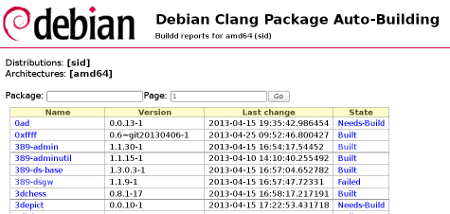
 At time of writing, most of the packages in unstable have been rebuilt (16 % are remaining). However, due to resource constraints, only amd64 packages are built. Contact me if you have resources to share for other architectures.
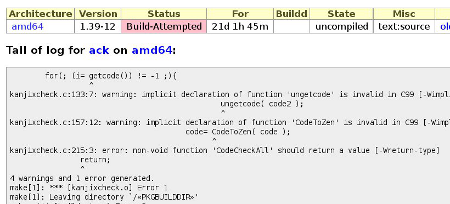
Thanks to Paul Wise, the PTS (Debian package tracking system) proposes a link to the clang build logs (failing or not).
A repository will be automatically updated with the results of these builds (once I find the time to get into buildd).
2) clang-built repository
At time of writing, most of the packages in unstable have been rebuilt (16 % are remaining). However, due to resource constraints, only amd64 packages are built. Contact me if you have resources to share for other architectures.
Thanks to Paul Wise, the PTS (Debian package tracking system) proposes a link to the clang build logs (failing or not).
A repository will be automatically updated with the results of these builds (once I find the time to get into buildd).
2) clang-built repository (It took me a while to come up with new CDBS packaging series post not
because I stopped using CDBS just because I was procrastinating myself
as busy)
This is the second post in the CDBS packaging series. In this series
I'm going to talk about package relationship management.
The better example where this feature is useful is packages where
build-depends and run-time dependencies overlap. Most of the Perl
modules which have test suites have build-depend and run-time
dependency intersection. So let me take example of a Perl module.
First lets see control file of a Perl package which is not using CDBS
and then let me explain how CDBS can help you improve the situation. I
choose libxml-libxml-perl lets see part of control file which includes
Build-Depends Depends Suggests Recommends.
(It took me a while to come up with new CDBS packaging series post not
because I stopped using CDBS just because I was procrastinating myself
as busy)
This is the second post in the CDBS packaging series. In this series
I'm going to talk about package relationship management.
The better example where this feature is useful is packages where
build-depends and run-time dependencies overlap. Most of the Perl
modules which have test suites have build-depend and run-time
dependency intersection. So let me take example of a Perl module.
First lets see control file of a Perl package which is not using CDBS
and then let me explain how CDBS can help you improve the situation. I
choose libxml-libxml-perl lets see part of control file which includes
Build-Depends Depends Suggests Recommends.

 The below is written in the hope it will be helpful for my fellow DDs.
Why using build after push ?
Simple answer: to save time, to always use a clean build environment, to automate more tests.
Real answer: because you are lazy, and tired of always having to type these build commands, and that watching the IRC channel is more fun than watching the build process.
Other less important answers: building takes some CPU time, and makes your computer run slower for other tasks. It is really nice that building doesn t consume CPU cycles on your workstation/laptop, and that a server does the work, not disturbing you while you are working. It is also super nice that it can maintain a Debian repository for you after a successful build, available for everyone to use and test, which would be harder to achieve on your work machine (which may be behind a router doing NAT, or even sometimes turned off, etc.). It s also kind of fun to have an IRC robot telling everyone when a build is successful, so that you don t have to tell them, they can see it and start testing your work.
Install a SID box that can build with cowbuilder
The below is written in the hope it will be helpful for my fellow DDs.
Why using build after push ?
Simple answer: to save time, to always use a clean build environment, to automate more tests.
Real answer: because you are lazy, and tired of always having to type these build commands, and that watching the IRC channel is more fun than watching the build process.
Other less important answers: building takes some CPU time, and makes your computer run slower for other tasks. It is really nice that building doesn t consume CPU cycles on your workstation/laptop, and that a server does the work, not disturbing you while you are working. It is also super nice that it can maintain a Debian repository for you after a successful build, available for everyone to use and test, which would be harder to achieve on your work machine (which may be behind a router doing NAT, or even sometimes turned off, etc.). It s also kind of fun to have an IRC robot telling everyone when a build is successful, so that you don t have to tell them, they can see it and start testing your work.
Install a SID box that can build with cowbuilder I was going to start this series with explaining how I did the remote set-up, but instead I will share something that happened today.
One of the first things you want to do when putting a server directly connected to the Internet is some filtering. You don't want to have an application listening on the network by mistake, so a simple netfilter firewall is a good way to ensure you are only accepting connections on ports you explicitly allowed.
I have been a long-time user of
I was going to start this series with explaining how I did the remote set-up, but instead I will share something that happened today.
One of the first things you want to do when putting a server directly connected to the Internet is some filtering. You don't want to have an application listening on the network by mistake, so a simple netfilter firewall is a good way to ensure you are only accepting connections on ports you explicitly allowed.
I have been a long-time user of