A new release, now at version 0.1.3, of pkgKitten arrived on CRAN this morning.
The main change is (optional) support of the excellent whoami package by Gabor which allows us to fill in the Author: and Maintainer: fields of the DESCRIPTION file with automatically discovered values. This is however only a Suggests: and not a Depends: to not force the added dependencies on everywhere. We also alter the default values of Title: and Description: so that they actually pass the current level of tests enforced by R CMD check --as-cran.
Changes in version 0.1.3 (2015-06-12)
The fields Title: and Description: in the file DESCRIPTION file are now updated such that they actually pass R CMD check on current versions of R.
If installed, the whoami package (version 1.1.0 or later) is now used to discover the username and email in the DESCRIPTION file.
I know very little about hardware.
I think I have a good understanding on many aspects of what happens inside a computer, but my knowledge is clearly firmer on what happens once an operating system is already running. And even then, my understanding of the lower parts of reality is shaky at most At least according to my self-evaluation, of course, comparing to people I'm honored to call "my peers".
During the last ~18 months, my knowledge of this part of reality, while still far from complete, has increased quite a bit Maybe mostly showing that I'm basically very cheap: As I have come across very cheap (or even free for me!) hardware, I have tried to understand and shape what happens in levels below those where I dwell.
I have been meaning to do a writeup on the MIPS Creator CI20, which was shipped to me for free (thanks++!) by Imagination Technologies; I still want to get more familiar with the board and have better knowledge before reporting on it. Just as a small advance, as this has been keeping me somewhat busy: I got this board after their offer to Debian Developers, and prompted because I'll be teaching some modules on the Embedded Linux diploma course dictated by Facultad de Ingenier a, UNAM Again, I'll blog about that later.
My post today follows Riku's, titled Dystopia of things, where he very clearly finds holes in the Internet of Things offering of one specific product and one specific company, but allows for generalizations on what we will surely see as the model. Riku says:
Today, the GPL sources for hub are available - at least the kernel and a patch for busybox. The proper GPL release is still only through written offer. The sources appeared online April this year while Hub has been sold for two years already. Even if I ordered the GPL CD, it's unlikely I could build a modified system with it - too many proprietary bits. The whole GPL was invented by someone who couldn't make a printer do what he wanted. The dystopian today where I have to rewrite the whole stack running on a Linux-based system if I'm not happy what's running there as provided by OEM.
This is not exactly the situation on the boards/products (it's a disservice to call the cute CuBox-i just a board!) I mention I'm using, but it's neither too far. Being used to the easy x86 world, I am used to bitching on specific hardware that does not get promptly recognized by the Linux kernel But even with the extra work UEFI+SecureBoot introduces, getting the kernel to boot is something we just take for granted. In the MIPS and ARM worlds, this is not so much of a given; I'm still treating the whole SPL and DeviceTree world as a black box, but that's where a lot of the work happens.
The boards I am working on try to make a point they are Open Hardware. The CI20 is quite impressive in this regard, as not only it has a much more complete set of on-board peripherials than any other, but a wealth of schematics, datasheets and specifications for the different parts of its components. And, of course, the mere availability of the MIPSfpga program to universities worldwide is noteworthy Completely outside of my skillset, but looks most interesting.
However... Despite being so much almost-Free-with-a-capital-F, all those boards fail our definitions of freedom in several ways. And yes, they lead us to a situation similar to what Riku describes, to what Stallman feared... To a situation not really better to where we stand on openly closed-source, commodity x86 hardware: Relying on binary blobs and on non-free portions of code to just use our hardware, or at least to use many of the features that would be available to us otherwise.
As an example, both the CI20 and the CuBox-i vendors provide system images able to boot what they describe as a Debian 7 system, based on a 3.0 Linux kernel (which Debian never used; IIRC the CuBox-i site said it was derived from a known-good Android kernel)... Only that it's an image resulting of somebody else installing and configuring it. Why should we trust their image to be sane? Yes, the resulting installation is quite impressive (i.e. the CI20's 3D demos are quite impressive for a system that feels otherwise sluggish, and out of my ARM experience, I'd wager it feels sluggish mostly because of a slow SSD)...
I have managed to do clean Debian installs on most of my ARM machines (the CuBox-i as described in my previous blog post; this post from Elena of Valhalla'' prompted me into trying the already well documented way of running the official Debian Installer, which worked like a charm and gave me a very nice and responsive Debian 8 install Modulo yes, the Banana's non-free video interface, which AFAICT uses the non-free Mail binary driver... And which I haven't had the time to play with yet. Of course, my CuBox is in a similar situation, where it works like a charm as a personal server, but is completely worthless as a set-top box.
So, with those beautiful, small, cheap SoC systems, we are close to where we stood twenty years ago with x86 Linux: Good support for a small set of peripherials, but a far cry from having a functional system with exclusively free software. ,
Still... Playing with these boards has taught me a lot, and has clearly taught me I'm still standing on the first steps of the n00b level. I have a lot to learn to be able to responsibly teach my part of the diploma course, and I'm very thankful for the differences in hardware (and, of course, for the hardware manufacturers, specially for the MIPS Creator CI20 and the Lemaker Banana Pi for giving me boards to work on!)
I shall keep posting on this topic.
The recent AWS introduction of the Elastic File System gives you an automatic grow-and-shrink capability as an NFS mount, an exciting option that takes away the previous overhead in creating shared block file systems for EC2 instances.
However it should be noted that the same auto-management of capacity is not true in the EC2 instance s Elastic Block Store (EBS) block storage disks; sizing (and resizing) is left to the customer. With current 2015 EBS, one cannot simply increase the size of an EBS Volume as the storage becomes full; (as at June 2015) an EBS volume, once created, has fixed size. For many applications, that lack of resize function on its local EBS disks is not a problem; many server instances come into existence for a brief period, process some data and then get Terminated, so long term managment is not needed.
However for a long term data store on an instance (instead of S3, which I would recommend looking closely at from a durability and pricing fit), and where I want to harness the capacity to grow (or shrink) disk for my data, then I will need to leverage some slightly more advanced disk management. And just to make life interesting, I wish to do all this while the data is live and in-use, if possible.
Enter: Logical Volume Management, or LVM. It s been around for a long, long time: LVM 2 made a debut around 2002-2003 (2.00.09 was Mar 2004) and LVM 1 was many years before that so it s pretty mature now. It s a powerful layer that sits between your raw storage block devices (as seen by the operating system), and the partitions and file systems you would normally put on them.
In this post, I ll walk through the process of getting set up with LVM on Debian in the AWS EC2 environment, and how you d do some basic maintenance to add and remove (where possible) storage with minimal interruption.
Getting Started
First a little prep work for a new Debian instance with LVM.
As I d like to give the instance its own ability to manage its storage, I ll want to provision an IAM Role for EC2 Instances for this host. In the AWS console, visit IAM, Roles, and I ll create a new Role I ll name EC2-MyServer (or similar), and at this point I ll skip giving it any actual privileges (later we ll update this). As at this date, we can only associate an instance role/profile at instance launch time.
Now I launch a base image Debian EC2 instance launched with this IAM Role/Profile; the root file system is an EBS Volume. I am going to put data that I ll be managing on a separate disk from the root file system.
First, I need to get the LVM utilities installed. It s a simple package to install: the lvm2 package. From my EC2 instance I need to get root privileges (sudo -i) and run:
apt update && apt install lvm2
After a few moments, the package is installed. I ll choose a location that I want my data to live in, such as /opt/. I want a separate disk for this task for a number of reasons:
Root EBS volumes cannot currently be encrypted using Amazon s Encrypted EBS Volumes at this point in time. If I want to also use AWS encryption option, it ll have to be on a non-root disk. Note that instance-size restrictions also exist for EBS Encrypted Volumes.
It s possibly not worth make a snapshot of the Operating System at the same time as the user content data I am saving. The OS install (except the /etc/ folder) can almost entirely be recreated from a fresh install. so why snapshot that as well (unless that s your strategy for preserving /etc, /home, etc).
The type of EBS volume that you require may be different for different data: today (Apr 2015) there is a choice of Magnetic, General Purpose 2 (GP2) SSD, and Provisioned IO/s (PIOPS) SSD, each with different costs; and depending on our volume, we may want to select one for our root volume (operating system), and something else for our data storage.
I may want to use EBS snapshots to clone the disk to another host, without the base OS bundled in with the data I am cloning.
I will create this extra volume in the AWS console and present it to this host. I ll start by using a web browser (we ll use CLI later) with the EC2 console.
The first piece of information we need to know is where my EC2 instance is running. Specifically, the AWS Region and Availability Zone (AZ). EBS Volumes only exist within the one designated AZ. If I accidentally make the volume(s) in the wrong AZ, then I won t be able to connect them to my instance. It s not a huge issue, as I would just delete the volume and try again.
I navigate to the Instances panel of the EC2 Console, and find my instance in the list:
A (redacted) list of instance from the EC2 console.
Here I can see I have located an instance and it s running in US-East-1A: that s AZ A in Region US-East-1. I can also grab this with a wget from my running Debian instance by asking the MetaData server:
The returned text is simply: us-east-1a .
Time to navigate to Elastic Block Store , choose Volumes and click Create :
Creating a volume in AWS EC2: ensure the AZ is the same as your instance
You ll see I selected that I wanted AWS to encrypt this and as noted above, at this time that doesn t include the t2 family. However, you have an option of using encryption with LVM where the customer looks after the encryption key see LUKS.
What s nice is that I can do both have AWS Encrypted Volumes, and then use encryption on top of this, but I have to manage my own keys with LUKS, and should I lose them, then I can keep all the cyphertext!
I deselected this for my example (with a t2.micro), and continue; I could see the new volume in the list as creating , and then shortly afterwards as available . Time to attach it: select the disk, and either right-click and choose Attach , or from the menu at the top of the list, chose Actions -> Attach (both do the same thing).
Attaching a volume to an instance: you ll be prompted for the compatible instances in the same AZ.
At this point in time your EC2 instance will now notice a new disk; you can confirm this with dmesg tail , and you ll see something like:
[1994151.231815] xvdg: unknown partition table
(Note the time-stamp in square brackets will be different).
Previously at this juncture you would format the entire disk with your favourite file system, mount it in the desired location, and be done. But we re adding in LVM here between this raw device, and the filesystem we are yet to make .
Marking the block device for LVM
Our first operation with LVM is to put a marker on the volume to indicate it s being use for LVM so that when we scan the block device, we know what it s for. It s a really simple command:
pvcreate /dev/xvdg
The device name above (/dev/xvdg) should correspond to the one we saw from the dmesg output above. The output of the above is rather straight forward:
Physical volume "/dev/xvdg" successfully created
Checking our EBS Volume
We can check on the EBS volume which LVM sees as a Physical Volume using the pvs command.
Here we see the entire disk is currently unused.
Creating our First Volume Group
Next step, we need to make an initial LVM Volume Group which will use our Physical volume (xvdg). The Volume Group will then contain one (or more) Logical Volumes that we ll format and use. Again, a simple command to create a volume group by giving it its first physical device that it will use:
# vgcreate  OptVG /dev/xvdg
  Volume group "OptVG" successfully created
And likewise we can check our set of Volume Groups with vgs :
The Attribute flags here indicate this is writable, resizable, and allocating extents in normal mode. Lets proceed to make our (first) Logical Volume in this Volume Group:
# lvcreate -n OptLV -L 4.9G OptVG
  Rounding up size to full physical extent 4.90 GiB
  Logical volume "OptLV" created
You ll note that I have created our Logical Volume as almost the same size as the entire Volume Group (which is currently one disk) but I left some space unused: the reason for this comes down to keeping some space available for any jobs that LVM may want to use on the disk and this will be used later when we want to move data between raw disk devices.
If I wanted to use LVM for Snapshots, then I d want to leave more space free (unallocated) again.
We can check on our Logical Volume:
The attribytes indicating that the Logical Volume is writeable, is allocating its data to the disk in inherit mode (ie, as the Volume Group is doing), and that it is active. At this stage you may also discover we have a device /dev/OptVG/OptLV, and this is what we re going to format and mount. But before we do, we should review what file system we ll use.
Filesystems
Popular Linux file systems
Name
Shrink
Grow
Journal
Max File Sz
Max Vol Sz
btrfs
Y
Y
N
16 EB
16 EB
ext3
Y off-line
Y
Y
2 TB
32 TB
ext4
Y off-line
Y
Y
16 TB
1 EB
xfs
N
Y
Y
8 EB
8 EB
zfs*
N
Y
Y
16 EB
256 ZB
For more details see Wikipedia comparison. Note that ZFS requires 3rd party kernel module of FUSE layer, so I ll discount that here. BTRFS only went stable with Linux kernel 3.10, so with Debian Jessie that s a possibility; but for tried and trusted, I ll use ext4.
The selection of ext4 also means that I ll only be able to shrink this file system off-line (unmounted).
I ll make the filesystem:
# mkfs.ext4 /dev/OptVG/OptLV
mke2fs 1.42.12 (29-Aug-2014)
Creating filesystem with 1285120 4k blocks and 321280 inodes
Filesystem UUID: 4f831d17-2b80-495f-8113-580bd74389dd
Superblock backups stored on blocks:
  32768, 98304, 163840, 229376, 294912, 819200, 884736
Allocating group tables: done
Writing inode tables: done
Creating journal (32768 blocks): done
Writing superblocks and filesystem accounting information: done
And now mount this volume and check it out:
# mount /dev/OptVG/OptLV /opt/
# df -HT /opt
Filesystem  Type  Size  Used Avail Use% Mounted on
/dev/mapper/OptVG-OptLV ext4  5.1G  11M  4.8G  1% /opt
Lastly, we want this to be mounted next time we reboot, so edit /etc/fstab and add the line:
/dev/OptVG/OptLV /opt ext4 noatime,nodiratime 0 0
With this in place, we can now start using this disk. I selected here not to update the filesystem every time I access a file or folder updates get logged as normal but access time is just ignored.
Time to expand
After some time, our 5 GB /opt/ disk is rather full, and we need to make it bigger, but we wish to do so without any downtime. Amazon EBS doesn t support resizing volumes, so our strategy is to add a new larger volume, and remove the older one that no longer suits us; LVM and ext4 s online resize ability will allow us to do this transparently.
For this example, we ll decide that we want a 10 GB volume. It can be a different type of EBS volume to our original we re going to online-migrate all our data from one to the other.
As when we created the original 5 GB EBS volume above, create a new one in the same AZ and attach it to the host (perhaps a /dev/xvdh this time). We can check the new volume is visible with dmesg again:
[1999786.341602] xvdh: unknown partition table
And now we initalise this as a Physical volume for LVM:
# pvcreate /dev/xvdh
  Physical volume "/dev/xvdh" successfully created
And then add this disk to our existing OptVG Volume Group:
# vgextend OptVG /dev/xvdh
  Volume group "OptVG" successfully extended
We can now review our Volume group with vgs, and see our physical volumes with pvs:
There are now 2 Physical Volumes we have a 4.9 GB filesystem taking up space, so 10.09 GB of unallocated space in the VG.
Now its time to stop using the /dev/xvgd volume for any new requests:
# pvchange -x n /dev/xvdg
  Physical volume "/dev/xvdg" changed
  1 physical volume changed / 0 physical volumes not changed
At this time, our existing data is on the old disk, and our new data is on the new one. Its now that I d recommend running GNU screen (or similar) so you can detach from this shell session and reconnect, as the process of migrating the existing data can take some time (hours for large volumes):
During the move, checking the Monitoring tab in the AWS EC2 Console for the two volumes should show one with a large data Read metric, and one with a large data Write metric clearly data should be flowing off the old disk, and on to the new.
A note on disk throughput
The above move was a pretty small, and empty volume. Larger disks will take longer, naturally, so getting some speed out of the process maybe key. There s a few things we can do to tweak this:
EBS Optimised: a launch-time option that reserves network throughput from certain instance types back to the EBS service within the AZ. Depending on the size of the instance this is 500 MB/sec up to 4GB/sec. Note that for the c4 family of instances, EBS Optimised is on by default.
Size of GP2 disk: the larger the disk, the longer it can sustain high IO throughput but read this for details.
Size and speed of PIOPs disk: if consistent high IO is required, then moving to Provisioned IO disk may be useful. Looking at the (2 weeks) history of Cloudwatch logs for the old volume will give me some idea of the duty cycle of the disk IO.
Back to the move
Upon completion I can see that the disk in use is the new disk and not the old one, using pvs again:
So all 5 GB is now unused (compare to above, where only 96 MB was PFree). With that disk not containing data, I can tell LVM to remove the disk from the Volume Group:
# vgreduce OptVG /dev/xvdg
  Removed "/dev/xvdg" from volume group "OptVG"
Then I cleanly wipe the labels from the volume:
# pvremove /dev/xvdg
  Labels on physical volume "/dev/xvdg" successfully wiped
If I really want to clean the disk, I could choose to use shred(1) on the disk to overwrite with random data. This can take a lng time
Now the disk is completely unused and disassociated from the VG, I can return to the AWS EC2 Console, and detach the disk:
Detach an EBS volume from an EC2 instance
Wait for a few seconds, and the disk is then shown as available ; I then chose to delete the disk in the EC2 console (and stop paying for it).
Back to the Logical Volume it s still 4.9 GB, so I add 4.5 GB to it:
# lvresize -L +4.5G /dev/OptVG/OptLV
  Size of logical volume OptVG/OptLV changed from 4.90 GiB (1255 extents) to 9.40 GiB (2407 extents).
  Logical volume OptLV successfully resized
We now have 0.6GB free space on the physical volume (pvs confirms this).
Finally, its time to expand out ext4 file system:
# resize2fs /dev/OptVG/OptLV
resize2fs 1.42.12 (29-Aug-2014)
Filesystem at /dev/OptVG/OptLV is mounted on /opt; on-line resizing required
old_desc_blocks = 1, new_desc_blocks = 1
The filesystem on /dev/OptVG/OptLV is now 2464768 (4k) blocks long.
And with df we can now see:
# df -HT /opt/
Filesystem  Type  Size  Used Avail Use% Mounted on
/dev/mapper/OptVG-OptLV ext4  9.9G  12M  9.4G  1% /opt
Automating this
The IAM Role I made at the beginning of this post is now going to be useful. I ll start by adding an IAM Policy to the Role to permit me to List Volumes, Create Volumes, Attach Volumes and Detach Volumes to my instance-id. Lets start with creating a volume, with a policy like this:
This policy puts some restrictions on the volumes that this instance can create: only within the given Availability Zone (matching our instance), only GP2 SSD (no PIOPs volumes), and size no more than 250 GB. I ll add another policy to permit this instance role to tag volumes in this AZ that don t yet have a tag called InstanceId:
Now that I can create (and then tag) volumes, this becomes a simple procedure as to what else I can do to this volume. Deleting and creating snapshots of this volume are two obvious options, and the corresponding policy:
Of course it would be lovely if I could use a variable inside the policy condition instead of the literal string of the instance ID, but that s not currently possible.
Clearly some of the more important actions I want to take are to attach and detach a volume to my instance:
Now with this in place, we can start to fire up the AWS CLI we spoke of. We ll let the CLI inherit its credentials form the IAM Instance Role and the polices we just defined.
and at this stage, the above manipulation of the raw block device with LVM can begin. Likewise you can then use the CLI to detach and destroy any unwanted volumes if you are migrating off old block devices.
After long time of waiting we finally released TeX Live 2015. Get some champagne, and ready to party!
Get it via downloading the net-installer, by obtaining a DVD, or downloading the iso. Besides the huge list up updates to packages and loads of bug fixes to all the programs, here are some notable news:
new LaTeX2e release which automatically includes fixltx2e
pdfTeX got improved jpeg support (exif and JFIF)
luaTeX got a new library newtokenlib
XeTeX got image handling fixes
MetaPost got a new numbersystem binary, and Japanese variants were added (upmpost and updvitomp)
MacTeX s Ghostscript packages got a facelift with better CJK support, other Unix-like distributions can do the same with my the newly included script cjk-gs-integrate (also one one my projects)
architectures: *kfreebsd was removed,and some additional platforms available as custom binaries. The DVD does not contain all platforms (due to space reasons), but all of them can be installed via the net-installer.
Regular updates of the repository will start in due course.
Thanks to all the contributors for the hard work. Let s have a party!
My LTS May
With regrets I have had to realize that I'm currently to overloaded to work on Debian LTS, so we planned that I'll do 7h in May and then I would take a three months break from doing LTS work. And then I didn't even manage that, I've only managed to finally fix #783800 ("security-tracker: squeeze-lts/non-free not handled correctly") and file #788362 and that was that. I do hope to come back to do sensible and serious LTS work in autumn, but for now it's better to move this off my plate.
I'm really sorry for not being able to support Debian LTS at the moment. I still think it's very much needed, worth of and in need of support - just not by me at this point. Of course I'll also continue to use it myself - because it's great to be able to choose when to upgrade ones systems!
This year, on top of the many excellent contributed talks, BoFs, and other
events always part of DebConf (some of which have already been announced) we
are excited to have confirmed the following keynote speakers.
During the Open Weekend (Saturday, August 15th and Sunday, August 16th), we
will have keynotes delivered by:
Bradley M. Kuhn,
President, Software Freedom Conservancy / Board of Directors, Free Software Foundation
(Wikipedia page)
Werner Koch,
Creator and Lead Developer, GnuPG Project / g10 Code GmbH
(Wikipedia page)
Bdale Garbee,
Chief Technologist Open Source and Linux, HP / Debian Project
(Wikipedia page)
On the last day of DebConf, we look forward to the closing keynote by:
Jacob Appelbaum,
Security Researcher and Journalist / Tor Project
(Wikipedia page)
For more information about our invited speakers, please see
http://debconf15.debconf.org/invited_speakers.xhtml
Citizenfour Screening
Additionally, there will be a screening of the
Citizenfour movie,
winner of the Best Documentary Feature Academy Award on the evening of Friday,
August 21st.
You still have time to submit your talk
There are only a few days left before the end of the Call for Proposals on June
15th. Events submitted after that date might not be part of the official
DebConf schedule. So, please, hurry, check out the
proposal submission guide
and submit your event.
Regards from the DebConf Team
I get quite a bit of recruitment spam, especially via my LinkedIn profile,
but today's Twitter-madness (recruiter scraped my twitter and then contacted
me) really took the biscuit. I include my response (stripped of identifying
marks) for your amusement:
On Tue, Jun 09, 2015 at 10:30:35 +0000, Silly Recruiter wrote:
> I have come across your profile on various social media platforms today and
> after looking through them I feel you are a good fit for a permanent Java
> Developer Role I have available.
Given that you followed me on Twitter I'm assuming you found a tweet or two in
which I mention how much I hate Java?
> I can see you are currently working at Codethink and was wondering if you
> were considering a change of role?
I am not.
> The role on offer is working as a Java Developer for a company based in
> Manchester. You will be maintaining and enhancing the company's core websites
> whilst using the technologies Java, JavaScript, JSP, Struts, Hibernate XML
> and Grails.
This sounds like one of my worst nightmares.
> Are you interested in hearing more about the role? Please feel free to call
> or email me to discuss it further.
Thanks, but no.
> If not, do you know someone that is interested? We offer a  500 referral fee
> for any candidate that is successful.
I wouldn't inflict that kind of Lovecraftian nightmare of a software stack on
anyone I cared about, sorry.
D.
I then decided to take a look back over my Twitter and see if I could find
what might have tripped this. There's some discussion of Minecraft modding but
nothing which would suggest JavaScript, JSP, Struts, Hibernate XML or Grails.
Indeed my most recent tweet regarding Java could hardly be construed as
positive towards it.
Sigh.
While updating the TeX Live package for Debian for the upcoming 2015 release, one of my aims was to convert as much as possible of the TeX configuration infrastructure to use dpkg triggers. We used the trigger mechanism already for the update of the font map configuration file (calls to updmap-sys), but till now neither for files installed into texmf trees, nor for format generation. In this blog I will describe the new management of all TeX related configuration files, while in the following one I will describe how things have been implemented with dpkg triggers. In due time this information will also be codified in the Debian TeX sub-policy.
Let us start with recalling the different actions that have to be taken when TeX packages are installed, removed, or updated.
Required actions for TeX packages
Filename database
The simplest case are packages that only include files ment to be loaded while running TeX or Metafont or similar programs. In this case the file name database of TeX (and the one of ConTeXt) needs to be updated. Usually this is done by calling mktexlsr on the changed trees, plus, if ConTeXt is installed, running mtxrun --generate.
Font map activation
More complicated are font packages that provide PostScript fonts. These packages need to ship a so called map file which maps TeX font names to PostScript fonts names. Examples are lm.map which defines this mapping for the Latin Modern fonts. All these map files have to be collected in one or more updmap.cfg files, and then a call to updmap(-sys) is necessary to generate configuration files for dvips, pdftex, and some other programs.
Format and hyphenation definitions
Even more complicated is the case of additional hyphenation patterns and additional format definitions. At the moment, hyphenation patterns are only shipped from the TeX Live packages itself, but additional format definitions are already provided by other packages than the TeX Live ones. Again, in both cases all the different format and hyphenation pattern definitions must be combined, into configuration files fmtutil.cnf and several language.* files, respectively. After this some incantation of fmtutil(-sys) is necessary to update the format dumps of TeX.
Status up to Debian/TeX Live 2014
Up to now most of these actions are done in the postinstall script of the providing packages, generated by dh_installtex. The tex-common package shipped besides the program dh_installtex also postinstall and postrm snippets that took care of all the necessary steps, and ensuring that configuration succeeds even if some of the programs were missing.
While this worked quite nicely for many years, I saw several disadvantages:
The postinstall script of many packages got bloated with a lot of complicated code. While this is not bad by itself, it is bad when a bug is found in this generated code because it requires a rebuild of all packages using dh_installtex.
As before, fixes or improvements in tex-common are not picked up automatically, due to separate code.
Package authors might forget to call dh_installtex and only install the files, which would result in unusable (for TeX) files.
Furthermore, /etc/texmf/ was filled with snippet-configuration directories, e.g., /etc/texmf/hyphen.d/ and /etc/texmf/fmt.d/ where the standard configuration of TeX was saved, and system administrators could change the necessary settings.
While this is a good thing, i.e., to give system administrators the chance to change their configuration, it carries a big risk: most system administrators, most users, have not the blankest idea how to write a proper format definition for TeX, nor a proper entry for a hyphenation pattern. And the TeX engines are not forgiving in this respect and will bail out immediately.
Finally, having so many configuration files hanging around in /etc/texmf/ makes it complicated to update between releases, where these files might have changed completely, files might have been added or removed.
New layout for Debian/TeX Live 2015 and onward
Thanks to a rewrite of fmtutil in Perl (also one of my endeavors), and adding the capability to read multiple fmtutil.cnf files in the same way updmap can read multiple updmap.cfg files, starting with Debian/TeX Live 2015 we can finally do the following:
switch to completely trigger based activation;
moving all format and hyphen related configuration files out of /etc/texmf/.
So let us dive into the details, following the above order:
Filename database
Update of the filename databases is now done automatically via a trigger on the two directories that are searched by kpathsea and used by Debian packages: /usr/share/texlive/texmf-dist/ (for TeX Live packages) and /usr/share/texmf/ (for all other packages).
Thus, if a Debian package installs files into one of these directories, automatically mktexlsr (and, if ConTeXt is installed also mtxrun) is run from the tex-common trigger action.
As a consequence for package maintainers of TeX related packages, if you are not adding font maps, formats, or hyphens, there is no need anymore to call dh_installtex or do anything TeX specific besides installing the files into the proper locations.
Font map activation
Here nothing has changed from the previous status, I just repeat that map snippets should be installed into /var/lib/tex-common/fontmap-cfg/texlive/ (for TeX Live packages) and /var/lib/tex-common/fontmap-cfg/texmf/ (for all other packages).
One snippet can contain arbitrary many Map or MixedMap lines. Example: /var/lib/tex-common/fontmap-cfg/texmf/tex-gyre.cfg:
There is a necessary action to be taken in postinst and postrm, which is calling update-texmf-conf map (but take care when writing your own code in postrm, as update-texmf-conf might not be available!).
Format and hyphenation definitions
Format definitions and hyphenations are now treated in the very same way as font maps. That is:
Format and hyphenation definitions need to be installed into the relevant sub-directories of /var/lib/tex-common/fmtutil-cnf/ and /var/lib/tex-common/hyphen-cnf, respectively. Relevant sub-directories here refers to either texlive (for TeX Live packages) or texmf (for all other packages), similar to the font map case.
Maintainer scripts need to call update-texmf-conf format and update-texmf-conf hyphen, respectively.
Package maintainers are advised to use dh_installtex as it also caters for the removal of format dumps under /var/lib/texmf/web2c.
Format of the configuration files
Files under /var/lib/tex-common/fmtutil-cnf/ must consist of syntactically correct lines for fmtutil.cnf, that is white-space separated entries where the first word is the name of the format, the second the name of the engine, the third the respective hyphenation configuration file or a literal if none, and the rest of the line are additional arguments to the respective initex program, where the last entry is the ini-file. A typical example would be /var/lib/tex-common/fmtutil-cnf/texlive/texlive-omega.cnf:
Files under /var/lib/tex-common/hyphen-cnf have a slightly changed syntax from the ones we used to have back in /etc/texmf/hyphen.d. The new syntax is taken directly from the TeX Live database, execute statement AddHyphen. That is one line of key=value pairs, where the following keys are allowed: name, synonyms, lefthyphenmin, righthyphenmin, file, file_patterns, file_exceptions, and luaspecial. A typical example would be /var/lib/tex-common/hyphen-cnf/texlive/texlive-lang-polish.cnf:
In addition, package maintainers that have shipped files in /etc/texmf/fmt.d or /etc/texmf/hyphen.d are advised to remove them on package upgrade, using PACKAGE.maintscript and the proper rm_conffile directive (see the musixtex package for an example.
Overriding system settings
In case an administrator wants to override any of the default setting, it has become much easier in case of font maps and formats, due to the multi-feature of the respective programs. For hyphenations a separate configuration file needs to be provided.
Overriding font maps and formats
This can be handled by dropping a updmap.cfg or fmtutil.cnf file, respectively, into either /etc/texmf/web2c/ or /usr/local/share/texmf/web2c/ (both will work). The new files will be evaluated by the respective programs (updmap(-sys) and fmtutil(-sys), respectively), and allow by default to override entries in other files. Please see the manual page of the two programs for details, or this entry for updmap and this entry for fmtutil.
Overriding hyphenation patterns
When generating the various language.* files, update-language evaluates last the file /etc/texmf/web2c/local-hyphen.cnf, which should contain hyphenation patterns in the very same format as described above. Using this entry one can add additional patterns, or override given ones.
Current status of uploads
Several packages have already been uploaded to experimental: tex-common, musixtex, context, texinfo. What remains are the TeX Live packages itself, but here we are facing two problems:
texlive-bin has been in NEW queue for over a month, and now has been rejected due to new complains on the since years unchanged copyright file. Well, I had already a new version in the upload queue, which extends the copyright file. So I had to build a new -1 version and re-upload it to the NEW queue. Let us see whether this one will go through. (now accepted and in experimental!)
There is an un-overridable lintian error which will create an auto-reject when uploading my packages. This lintian error is bogus, as reported both to the lintian maintainers and to ftp-masters. Unfortunately no reaction from ftp-masters for now, so I don t waste anyones time uploading the packages for now.
So, in case you cannot wait for the next century to happen (or, that all the packages are accepted), and still want to give it a shot, here are the apt-get lines:
deb http://people.debian.org/~preining/TeX/ exp/
deb-src http://people.debian.org/~preining/TeX/ exp/
but be warned, there might be more changes coming in.
Warnings: First, in case you have already texlive-binaries 2015.20150524.37493-2 installed, please downgrade to the new version -1 which is now on the server. They are the same packages, only the version number has changed. Yes, and if you test it, don t be surprised if suddenly you are left with a not-working TeX system. Don t tell me I didn t warn you
Anyway, I hope to hear some feedback and installation reports.
Conclusion
While packaging has become easier for maintainers, and there is less clutter in /etc/texmf/, we now are depending on dpkg to call the tex-common triggers. Thus, if this happens rather often, then especially fmtutil-sys --all will be called several times. This is a slight regression from the previous setup, but paid off (IMNSHO) by the arguments given in the beginning.
That said, there will be of course a certain time of transition until the new setup has proven its merits, and bugs are ironed out. But having bugs that need to be mostly fixed only in one package, namely tex-common, seems like an easier task to me.
Enjoy.
What happened about the reproducible
builds effort for this week:
Presentations
On May 26th,Holger Levsen presented reproducible builds in Debian at CCC Berlin for the Datengarten 52. The presentation was in German and the slides in English. Audio and video recordings are available.
Toolchain fixes
Dmitry Shachnev uploaded pyqt5/5.4.1+dfsg-3 which makes pyuic output imports in stable order. Original patch by Reiner Herrmann.
Lunar uploaded mozilla-devscripts/0.41 which uses the UTC timezone when calling zip or unzip.
Patches submitted which did not make their way to the archive yet:
#787327 on vim by Reiner Herrmann: set a constant user and set modified-by option.
#787650 on lush by Daniel Kahn Gillmor: remove __DATE__ and __TIME__ macros from source.
#787669 on cloc by Daniel Kahn Gillmor: use time of latest debian/changelog entry in manpage.
#787675 on ricochet by Daniel Kahn Gillmor: patch configure to allow an external build date and set it to the time of latest debian/changelog entry.
#787804 on clipper by akira: set HTML_TIMESTAMP to NO in Doxygen configuration.
#787829 on colobot by akira: set HTML_TIMESTAMP to NO in Doxygen configuration.
#787865 on fastjet by akira: call Doxygen with HTML_TIMESTAMP set to NO.
#787916 on cal3d by akira: remove $datetime from the file api_footer.html.
#787918 on dime by akira: remove $datetime from the file footer.html.
Daniel Kahn Gilmor also started discussions for emacs24 and the unsorted lists in generated .el files, the recording of a PID number in lush, and the reproducibility of ISO images in grub2.
reproducible.debian.net
Notifications are now sent when the build environment for a package has changed between two builds. This is a first step before automatically building the package once more. (Holger Levsen)
jenkins.debian.net was upgraded to Debian Jessie. (Holger Levsen)
A new variation is now being tested: $PATH. The second build will be done with a /i/capture/the/path added. (Holger Levsen)
Holger Levsen with the help of Alexander Couzens wrote extra job to test the reproducibility of coreboot. Thanks James McCoy for helping with certificate issues.
Mattia Rizollo made some more internal improvements.
strip-nondeterminism development
Andrew Ayer released strip-nondeterminism/0.008-1. This new version fixes the gzip handler so that it now skip adding a predetermined timestamp when there was none.
Holger Levsen sponsored the upload.
Documentation update
The pages about timestamps in manpages generated by Doxygen, GHC .hi files, and Jar files have been updated to reflect their status in upstream.
Markus Koschany documented an easy way to prevent Doxygen to write timestamps in HTML output.
Package reviews
83 obsolete
reviews have
been removed, 71 added and 48 updated this week.
Meetings
A meeting was held on 2015-06-03. Minutes and full logs are available.
It was agreed to hold such a meeting every two weeks for the time being. The time of the next meeting should be announced soon.
Conrad put out a new minor release 5.200.1 of Armadillo yesterday. Armadillo is a powerful and expressive C++ template library for linear algebra aiming towards a good balance between speed and ease of use with a syntax deliberately close to a Matlab.
Our corresponding RcppArmadillo release 0.5.200.1.0 is now on CRAN and on its way into Debian. See below for the brief list of changes.
Changes in RcppArmadillo version 0.5.200.1.0 (2015-06-04)
Upgraded to Armadillo release 5.200.1 ("Boston Tea Smuggler")
added orth() for finding the orthonormal basis of the range space of a matrix
expanded element initialisation to handle nested initialiser lists (C++11)
workarounds for bugs in GCC, Intel and MSVC C++ compilers
Nota: Este art culo, en espa ol, aqu .
I m not a gamer, although probably I ve played with machines/computers more than most of the girls of my age. My path has been: handheld machine, Pong and tenis in my uncle s console, MSX (with that one, in addition to playing, I learnt what was an algorithm and a program, and I started to write small programs in Basic, and I copied and ran the source code of small games and programs to make graphics, which I found in MSX magazines). My parents considered that arcade machines in bars were like slot machines so they were banned for us (even pinball, only table soccer was saved from them, and only if my father was playing with us).
In the MSX I played Magical Tree, Galaxians, Arkanoid, Konami s Sports Games, Spanish games from Dinamic, and some arcades like Golden Axe, Xenon, and maybe some more. The next computers (PC AT, later a 286) were not so for gaming; let s say that we played more with the printer (Harvard Graphics, Bannermania ). Later, I was interested in other things more than in computer games, and later there were highschool homework, dBase III, and later the University and programming again and more, and it was the end of gaming, computer was for office and Uni homework.
Later, it came the internet and since then, reading and writing and communicating was more interesting for me than playing.
I was not good at playing, and if you are not good, you play less, and you don t get better, so you begin to find other ways to loose your time, or to win it :)
The new generation
My son is 6 years old now, and I m living with him a second adventure about games. Games have changed a lot, and the family computing try to stay in the libre software side whenever I am the one that can decide, so sometimes some challenges arise.
Android (phone and tablet)
The kid has played games in the phone and tablet with Android since he was a baby. We tried some of the last years popular games. I am not so keen of banning things, but I don t feel comfortable with the popular games for Android (advertisements, nonfree software, addictive elements, massive data recollection and possible surveillance ), so I try to control without being Cruella de Vil . Some techniques I use:
We agree in the amount of time for using the table, setting a tomato to control the time (thanks Pomodoro in F-Droid)
I set the airplane mode and shut down internet everytime that I can. I never register account or login to play (if it s mandatory to login in Google or create an account, sorry but we cannot play, or we create a new empty profile).
I put barriers to installing games (for example, I say that he should uninstall 2 or 3 games first if he wants a new one, or he should explain well why he wants that game and why the ones that were installed became boring suddenly).
I ve never bought games for Android, and I m not thinking about buying them in the future. I prefer to donate for some libre game project.
I try to divert attention to other games (not computer games, usually).
If the equivalent non-computer game exists, we play that one (tic-tac-toe, hungman, battleship )
I seldom play in the phone/tablet, unless we play together.
On the other side, in my phone there is no Google Play, so we have been able to discover the section Games of F-Droid.
We have tried (all of them available in F-Droid, emphasis in the ones that he liked best): 2048, AndroFish, Bomber, Coloring for Kids, Core, Dodge, Falling Blocks, Free Fall, Frozen Bubble, HeriSwap (this one in the tablet), Hex, HyperRogue, Meerkat Challenge, Memory, Pixel Dungeon, Robotfindskitten, Slow it!, Tux Memory, Tux Rider, Vector Pinball.
Playing in my phone with CyanogenMod and having downloaded the games from F-Droid provides a relief similar to the one when playing a non-computer game. At least with the games that I have listed above. Maybe it is because they are simpler games, or they make me remember the ones that I played time ago. But it s also because of the peace of mind of knowing that they are libre software, that have been audited by the F-Droid community, that they don t abuse the user.
The same happens with Debian, what takes me to the next part of this blogpost.
Computer games: Debian
The kid has learnt to play with the tablet and the phone before than with the computer, because our computers have no joysticks nor touchscreens. He learnt to use the touchpad before than the mouse, because it s easier and we have no mouse at home. He learnt to use the mouse at school, where they work with educative games via CD or via web, using Flash :(
So Flash player appears and dissapears from my Debian setup depending on his willness to play with the school games .
Until few time ago, in the computer we played with GCompris, ChildsPlay, and TuxPaint.
When he learnt to use the arrow keys, I installed Hannah and he liked a lot, specially when we learnt to do hannah -l 900 :)
Later, in ClanTV there were advertisements about some online computer games about their favorite series, resulting in that they need Flash or a framework called Unity3D (no, it s not Ubuntu s Unity), and after digging a bit I decided that I was not going to install that #@%! in my Debian, so when he insisted in play those games, I booted the Windows 7 partition in his father s laptop and I installed it there.
Windows is slow and sad in the computer, and those web games with that framework are not very light, so luckily they have not become very interesting.
We have not played in the computer much more, maybe some incursion in Minetest, what takes me to the next section.
(Not without stating my eternal thanks to the Games Team in Debian. I think they do a very important work and I think that next year I ll try to get involved in some way, because I know that the future of our family computer games is tied to libre games in Debian).
PlayStation 3 and Minecraft
Some time ago my husband bought a PlayStation 3 for home. The shop had discounts prices and so. He would play together with the kid an so.
The machine came home with some games for free (included in the price), but most of them were classified for +13 or so, so the only two left were Pro Evolution Soccer, and Minecraft.
I decided not to connect the machine to the network. Maybe we are loosing cool things, but I feel safer like that. So, no ethernet cable plugged, no registration in the Sony shop (or whatever its name is).
The controllers are quite complex for the three of us. They are DualShock don t-know-what, and I think there is something (software) that makes the game adaptative to the person playing, because my husband is worse player after the son plays, if they play in turns and use the same controller.
The kid liked Minecraft. I didn t know anything about that game (well, I knew that there was a libre clone called Minetest), so, for learning the basics I had a look at the wiki and searched videos about how to and we began learning. Now, the kid can read a bit so he needs less help, and he has watched a lot of videos about Minecraft, so he is interested in exploring and building.
I had a look at Minetest, and I installed it in Debian. Having to use the keyboard is a disadvantage, and we didn t know how to dig, so it was not much attractive at first sight. I have looked a bit about how to use the PS3 controller in the computer, via USB, and it seems to work, but I suppose I need to write something to match each controller button with the corresponding key and subsequent action in Minetest. This is work, and I am lazy, and the boy seems not very interested in playing with the computer.
Watching the videos we have infered that it s possible to download saved games and worlds to upload them in the videogame console. We have done some tests. I wanted to upload a saved game about an amusement park, but the file was in a folder of name NPEB01899* and even when the PS3 saw it to copy it from USB to the console, later it didn t appear in the list of saved games (our sved games were in folders named BLES01976). And renaming the folder didn t work, of course. I understood that we had met Sony s restrictions, so I searched for more info. The games are saved using an encryption key and you are not able to use saved games from consoles in other world zone or using a media different than ours (the game can be played using a disc or purchasing it in the digital shop, it seems). Very ugly all of this! I read somewhere that there is certain software (libre software, BTW) that allows to break the encryption and re-encrypt the saved game with the zone and type of media of your console, but it seems the program only works for Windows, and it needs a console ID that we have not, because we didn t register the console in the PlayStation network. All these things look shaky grounds for me, unpleasant stuff, I don t want to spend time on this, maybe I should learn a bit more about Minetest and make it work and interesting and tell Sony go fly a kite. Finally, I found a saved game in the same format as ours (BLES01976), it s not an amusement park but it is a world with interesting places to explore and many things already built, so I ve tried to import it and it worked, so my son will be happy for some time, I suppose.
We have tried Minetest in the tablet too, but the touchscreen is not comfortable for this kind of games.
I feel quite frustrated and angry about this issue of Sony s restrictions on saved games. So I suppose that in the next months I ll try to learn more about Minetest in Debian, game controllers in Debian, and games in Debian in general. So I hope to be able to offer cool stuff to my son, and he becomes more interested in playing in a safe environment which does not abuse the user.
And with this, I finish
Libre games in GNU/Linux, Debian, and info about games in internet
When we have searched info about games in internet, I found that many times you need to go out from the secure environment: webpages with links to downloads that who knows if they contain what they say they contain, advertisements, videoblogs with a language not adequate for kids (or any person that loves their mother language) That s why I believe the path is to go into detail about libre games provided by the distro you use (Debian in my case). Here I bookmark a list of website with info that surely will be useful for me, to read in depth:
This was my sixth month working on Debian LTS. I was assigned 10.5
hours
by Freexian's
Debian LTS initiative. This was less than in previous months,
but I was still able to work on several packages.
dpkg
This update was almost ready to release at the end of April. I had
to rebuild from the upstream tarball as released by Guillem, then
uploaded and issued
DLA 220-1.
tiff
This update was also almost ready to release. I hoped to get some
users to test it, but didn't get any response. I uploaded and
issued
DLA 221-1.
ruby1.8
Ruby 1.8 had a single CVE to fix. It was already fixed in wheezy
against a similar upstream version, so it took little time to apply
that patch. Ruby has an extensive test suite that reassured me
this wouldn't cause a regression. I uploaded and issued
DLA 224-1.
p7zip
p7zip allows arbitrary file overwrite via symlinks
(CVE-2015-1038)
when extracting a carefully constructed archive, and this bug is not fixed
upstream. This sort of bug has been identified and fixed previously
in similar tools such as GNU tar, so I looked
at how
that handles links and tried to apply a similar change in p7zip.
This was somewhat complicated by the code style (C++ with COM-style
interfaces and NIH containers), but not too hard. I came up with a
patch that seems to work for the versions in Debian, and have
attached it to the upstream bug report for review.
linux-2.6
I reviewed the patches for Linux 2.6.32.66 - many of which were my
own backports - and then integrated this update into the SVN branch.
I will probably upload a new version soon, whether or not there's a
high severity issue, just to avoid piling up a large number of
changes in one update.
FTP assistant
This month I marked 235 packages for accept and rejected 44 of them. I know, the NEW-queue is rather large, but the numbers are showing a downward trend again.
In the light of recent events I would like to cite two things. The US Copyright Office Circular 14 says about derivative work:
A typical example of a derivative work received for registration in the Copyright Office is one that is primarily a new work but incorporates some previously published material. This previously published material makes the work a derivative work under the copyright law. To be copyrightable, a derivative work must be different enough from the original to be regarded as a new work or must contain a substantial amount of new material. Making minor changes or additions of little substance to a preexisting work will not qualify the work as a new version for copyright purposes. The new material must be original and copyrightable in itself. Titles, short phrases, and format, for example, are not copyrightable.
The copyright in a compilation or derivative work extends only to the material contributed by the author of such work, as distinguished from the preexisting material employed in the work, and does not imply any exclusive right in the preexisting material. The copyright in such work is independent of, and does not affect or enlarge the scope, duration, ownership, or subsistence of, any copyright protection in the preexisting material.
Squeeze LTS
This was my eleventh month that I did some work for the Squeeze LTS initiative, started by Raphael Hertzog at Freexian.
This month I got assigned a workload of only 10.25h and I spent most of it to prepare a new upload of ruby1.9.1. The other stuff I uploaded was
[DLA 222-1] commons-httpclient security update
[DLA 226-1] ntfs-3g security update
[DLA 226-2] ntfs-3g regression update
[DLA 235-1] ruby1.9.1 security update
[DLA 222-1 has been only a sponsored upload, where Markus Koschany prepared the patches. [DLA-226] needed two uploads as the first patch turned out to be incomplete. I also marked CVEs in the security tracker as for Squeeze or added notes for future processing.
The next big adventure in June will be another upload of PHP5.
Other stuff
This month I also uploaded feynmf to take care of the new TDS tree (#766287).
Donations
Again, thanks alot to all donors. I really appreciate this and hope that everybody is pleased with my commitment. Don t hesitate to make suggestions for improvements.
It turned out that my adventure in
backporting net-snmp from CentOS 7 to CentOS 5 has a regression issue with disk stats.
The logs provided us with the following error message
but only on CentOS 5. CentOS 6, build on the same CentOS 7 VM also with mock,
worked like a charm.
When I attached strace to the snmpd process I could see that the calls to
statfs() were executed with
an empty string, so no path was supplied.
A bit of source code grep'ing already pointed in the direction of
#define ETC_MNTTAB
but at that point I didn't believe that the chroot could be the culprit. So it took
some discussions with the colleagues until I did a test build, the old way
with a "./configure --prefix=$HOME/snmpd && make && make install", on a real
system. To my surprise that worked.
Since I did not fold in all the patches from the CentOS 7 rpm I expected that
one of the patches broke something along the way for old Linux releases. So
I went on, disabled nearly all patches in the spec file, build again in a chroot
and the resulting binary still did not work.
Somehow the chroot was at fault. Looking closer at the configure magic linked above
you'll see it iterates through a list of various files that contain the list of mounted
disks on various of *nix systems. For some unknown reason my CentOS 5 chroot
is not populated with a proper /etc/mtab linked to the systems /proc/self/mounts
while the one for CentOS 6 is. With /etc/mtab missing the configure script happily
picks up /etc/filesystems which is, you might or might not know this, the
/etc/fstab pendant on AIX. But on a CentOS system that just contains a list of
filesystems.
That indeed could not work out and explains why the build itself succeeded but parsing
a filesystem path out of that file did not. Luckily we can override that stuff easily
with the '--with-mnttab="/etc/mtab"' configure option of net-snmp, but the "/etc/filesystems"
file on CentOS was something I did not expect and never noticed before.
Hint: for the function of /etc/filesystems take a look at
man 8 mount and the section
about the "-t" parameter.
Internet references saved for May 2015
Instead of keeping substantial tabs open until I have read all of them, or
losing them in the jungle of browser bookmarks, I have written a script
that collects them into a file per month, and turns them into markdown files
for my blog. This way I sort of know where to find them, and if I do not, some
internet search might. And if I wish, I can even choose to share it.
The programming talent myth [LWN.net]
Jacob Kaplan-Moss is known for his work on Django but, as he would describe
in his keynote, many think he had more to do with its creation than he
actually did. While his talk ranged quite a bit, the theme covered
something that software development organizations and open source
projects may be grappling with: a myth about developer performance and how
it impacts the industry. It was a thought-provoking talk that was
frequently punctuated by applause; these are the kinds of issues that the
Python community tries to confront head on, so the talk was aimed well.
Matt Palmer: The Vicious Circle of Documentation
Why are there so many more undocumented systems than documented ones out
there, and how can we cause more well-documented systems to exist? The
answer isn t people are lazy , and the solution is simple though not
easy.
Jono Bacon, Dealing With Disrespect
This book is about helping us to focus on good people creating good things,
to preserve that spirit of sharing, and to protect against those whose
primary contribution is obstruction and disrespect
OFTC: Automatically Identifying Using SSL + CertFP
This page describes how to use SSL with a certificate fingerprint to
automatically identify your registered nickname with NickServ on connect.
You must have an IRC client that supports SSL with a client certificate.
Fran ois Marier: Usual Debian Server Setup
I manage a few servers for myself, friends and family as well as for the
Libravatar project. Here is how I customize recent releases of Debian on
those servers.
How to name things: the hardest problem in programming
Developers can get better at their craft by learning from the great writers
who mastered theirs. Writing software isn t the same as writing a novel,
but there are parallels. Besides, advice from writers is better because
writers have been struggling with their craft for many centuries, not just
a few decades. It s better-written as well. This talk shares great writers
best advice for coders: Stephen King on refactoring, Anne Rice on
development hardware, Hemingway on modelling with personas, and Neil Gaiman
on everything.
Hild was born in seventh-century Britain, daughter of Hereric (would-be
king of Daria) and Breguswith. Born, her mother said, to be a light to
the land. This much is documented by the Venerable Bede, in The
Ecclesiastical History of the English Nation, along with Hild's later
rise to become one of the most powerful abbesses in British history. But
nearly all of Hild's early life is a cipher.
Hild fills in some of that gap with fiction. Specifically, it
takes Hild from a child of three, learning her father has been killed, to
a young woman, an advisor of Edwin king. It's a coming of age story in
part, following her maturation both physically and mentally, her training
in when to speak and how, and the dangers of being close to royalty in a
fractious, political, and war-torn land. It's also the story of endless
maneuvering and care, initially by her mother Breguswith and then by Hild
herself sometimes in opposition to her mother, sometimes in alliance
as her mother attempts to make a safe place for her daughter and herself
in a treacherous court of shifting dangers.
But Hild is also a story about Britain. It's a novel about how it
felt and how it sounded. How it was organized, primarily among the
high-born but with snippets of perspective from the lower classes. And
it's a story about women: about weaving, about medicine, about friendships
and partnerships and alliances among women, about the politics of marriage
and childbirth, but also about the places women held and made in a time
when surviving official history is all about the men. Hild is a
painstakingly-researched, sprawling, lush, and sensual immersion in a part
of history that gets little formal attention: after the Romans, before
what we think of as medieval, before England as a country.
I've been waiting for a new Nicola Griffith novel for quite a while, since
Always in 2007. Hild doesn't
disappoint, but it's also different than Griffith's previous writing. It
has less of the strong narrative drive and clarity of either her SF or Aud
Torvingen stories. Instead, the goal of Hild is to immerse and
transport you, to help you feel the shape of Hild's world, to understand
her days and tasks, her dreams and dangers.
Like all of Griffith's work, it's beautifully written. Griffith puts
description at the fore, in the sharp eyes of an observant girl who loves
the outdoors, and who has been taught to watch for signs of weather and
tools of healing. From early on, Hild's mother sets her up as a seer and
prophetess as a way of establishing her value to war leaders and kings,
and while some of it is drama and cryptic words, so much of it is careful
observation, networks of information-gathering, and sharp deduction about
the motives and politics of surrounding kings. Hild is very good at what
she does because she has a sharp, quick mind that has been carefully
trained, and because she has the aid of her mother's networks and then aid
in building her own. Griffith does a wonderful job showing the reader
what Hild sees, how she appreciates the world both for its own beauty and
for the information she can gather from it, and how to build influence by
navigating tense and dangerous moments: waiting for just the right moment
and the right word, and taking sudden, impulsive risks and accepting their
consequences.
Unfortunately for me, this setting is also rich in complex politics and
numerous actors, with older and unfamiliar names, and I got lost.
Constantly. That's the drawback to immersion: Griffith doesn't hold the
reader's hand. We get Hild's thoughts and analysis, and the reader has to
keep up. Sometimes I did; sometimes I didn't. There's a dizzying flurry
of names here, both personal and place, and while there is a map and a
single family tree, neither helped me as much as I wanted them to. At
several points, I found myself skimming through the latest shift in the
balance between various petty kings because, while I knew I'd seen all the
names before, they had come adrift from their context in the story.
That was my major frustration with this book. It was all interesting
enough that I would have kept thumbing back to a detailed dramatis
personae, and indeed I kept checking the family tree, but there just
wasn't enough detail there. Even better would have been a brief factual
history of the political and military conflicts Hild was living through,
keyed by chapter. Hild is startlingly intelligent, leaping from insight
to insight, which is wonderful for building character, but which
occasionally leaves the reader scrambling to catch up with the connections
between her thoughts. I felt like, had I the broader context, I could
have understood her insight more readily. All this information is likely
available, since Griffith is playing off of documented history, but I'm
not the sort of reader who likes doing Internet research while engrossed
in a book.
So, that's the downside, at least for me. But this book has many
strengths, even if you're lost much of the time. Hild as written by
Griffith is a fascinating character, full of sharp edges and difficult
moods and a powerful belief in what she feels is right. Griffith is at
the height of her writing ability when describing Hild making hard choices
and taking on burdens that seem too large for her to bear. There are two
sections of the book, where Hild is forced by circumstances to lead men in
violence, that I think are two of the best bits of writing Griffith has
ever published not just because of those scenes themselves, but because
of the aftermath, the lingering echos, the way that they shape and inform
everything Hild does afterwards. The mingling of reward and loss,
maturation and trauma, the sense that the world has shifted both inside
and out and it's nearly impossible to say whether the change is for the
better or worse.
Griffith also knows when not to say too much, and while I found that
frustrating for the politics, it does wonders for the characters. Hild's
complex and fraught relationship with Gwaldus is the best example. We
never know exactly what Gwaldus is thinking; Hild can only guess, and at
times one is fairly sure that she guesses wrong. But that doesn't lead to
sudden revelations, where the characters finally understand each other.
Instead, they both adjust, they maneuver around each other, they find
space and understanding where they can, and sometimes they just close off.
This book is full of relationships like this: loves that are too
complicated for words, bonds that are too dangerous to acknowledge, and
characters who can't relax even though they wish the best for each other.
At times, it's exhausting reading, but it gives Hild a tension that
one wouldn't expect from a sprawling novel full of description and
scene-building.
Hild is clearly the first book of a series, and leaves quite a lot
unresolved. If you want closure in relationships and in politics, there's
a lot here that you may find frustrating. And if, like me, you struggle
to keep names and politics straight, you're probably going to get lost.
But it's well worth the effort for the description, for Hild's thought
processes, and for a few haunting scenes that I will be replaying in my
head for a very long time. Expect to take your time with this, and wait
until you're in the mood for immersion and puzzling out context as you go,
but recommended. I suspect it would be even better on a second reading.
Rating: 8 out of 10
After a few quiet months, a new version of rfoaas is now on CRAN. As before, it shadows upstream release of FOAAS from which carried over the version number 0.1.6.
The rfoaas package provides an interface for R to the most excellent FOAAS service--which provides a modern, scalable and RESTful web service for the frequent need to tell someone to f$#@ off.
Release 0.1.6 of FOAAS builds on the initial support for filters and now adds working internationalization. This is best shown by example:
R>library(rfoaas)
R>off("Tom", "Everyone") # standard upstream example
[1] "Fuck off, Tom. - Everyone"
R>off("Tom", "Everyone", language="fr") # now in French
[1] "Va te faire foutre, Tom. - Everyone"
R>off("Tom", "Everyone", language="de", filter="shoutcloud") # or in German and LOUD
[1] "VERPISS DICH, TOM. - EVERYONE"
R>
Hello
One of my last blog introduced the new cme update dpkg-copyright command and explained how to use this command to create a debian/copyright file from scratch.
We will see in this blog how cme update dpkg-copyright command can also be used if a debian/copyright file already exists.
During the lifetime of a package, creating a new debian/copyright copyright file should only happen once. When updating a package to a new upstream version, the content of the copyright file should be modified to reflect upstream changes by:
adding or removing file entries
updating years or owners
updating licenses
cme update dpkg-copyright can be run with an existing debian/copyright file: the information extracted by licensecheck are merged in debian/copyright. Unfortunately, this merge may bring back the errors coming from licensecheck that you ve cleaned up manually last time.
This last part is not optimal as the manual clean up must be repeated after cme update dpkg-copyright is run.
Here s a way to avoid the last problem: cme update dpkg-copyright supports a way to modify the content of debian/copyright after the merge: the optional file debian/fix.scanned.copyright contains instructions to tweak the content of debian/copyright. (See Config::Model::Dpkg::Copyright man page for more details)
You may remember that Config::Model handles all configuration information as a tree. The information contained in the copyright file is also stored in a tree structure. debian/fix.scanned.copyright contains instructions to navigate this tree and modify the content of the tree.
Imagine that there s a robot (or a monkey) in that configuration tree. Each instruction tells the robot either to move in the tree or to perform an operation.
The most useful instructions for debian/fix.scanned.copyright are:
! to move to the root of the tree
= to assign a value , e.g: short_name=MIT or Copyright="2014, FooBar" (use double quotes when the value white space or other fancy characters).
.= to append to a value, e.g Copyright.=" Appended info."
=~ to apply a substitution with a Perl regexp, e.g. Copyright=~"/ \s*//g"
: to move a Files element, e.g. Files:"foo/baz.c"
:~ to remove a Files element, e.g. Files:~"bogus.c"
Otherwise:
Comments with # or // must begin at the beginning of the line
Instructions are separated by space(s) or new lines
Let s see a commented example:
# go to the root of the tree (with '!')
# and remove a bogus Files entry (with ":~")
! Files:~"foo/bogus.c"
// go to a Files entry and append (operator '.=') some info to   owner
! Files:"foo/bar.h"
  Copyright.=" Appended info."
# go back to tree root and assign   info
! Files:"foo/baz.c" Copyright="2014, FooBar"
# add a global license and a file entry missed by licensecheck
# global license must be set before using it in Files entry
# note: MIT text license is provided by cme
! License=MIT
! Files:"3rdparty/missed.c" Copyright="2005 FooBar" License short_name=MIT
Other possible instructions for this file are described in Config::Model::Loader doc.
The number of instructions depends on the accuracy of licencecheck command. Hopefully, this number can be reduced by improving licensecheck.
Last but not least, the following packages are required:
You may want to install also libconfig-model-tkui-perl to update the copyright file with cme GUI.
In summary, the command cme updated dpkg-copyright associated with instructions stored in debian/fix.scanned.copyright enable Debian packagers to update with less effort debian/copyright file when updating a package.
All the best
You might have already read this
comment by RMS in the Guardian. That comment and a recent discussion about
the relevance of GPL changes post GPLv2 made me think again about the
battle RMS started to fight. While some think RMS should "retire", at
least I still fail on my personal goal to not depend on non-free software
and services. So for me this battle is far from over, and here is my
personal list of "non-free debt" I've to pay off.
general purpose systems aka your computer
Looking at the increasing list of firmware blobs required to use a GPU, wireless chipsets and
more and more wired NICs, the situation seems to be worse then in the late 90s. Back then
the primary issue was finding supported hardware, but the driver was free. Nowadays even the
open sourced firmware often requires obscure patched compilers to build. If I look at this
stuff I think the OpenBSD project got that right with the more radical position.
Oh and then there is CPU microcode. I'm not yet sure what to think about it, but in the end
it's software and it's not open source. So it's non-free software running on my system.
Maybe my memory is blurred due to the fact, that the seperation of firmware from the Linux kernel,
and proper firmware loading got implemented only years later. I remember the discussion
about the pwc driver and its removal from Linux.
Maybe the situation wasn't better at that time but the firmware was just hidden inside the Linux
driver code?
On my system at work I've to add the Flash plugin to the list due to my latest test with
Prezi which I'll touch later.
I also own a few Humble Indie bundles.
I played parts of Osmos after a recommendation by
Joey Hess, I later finished to play
through Limbo and I got pretty far with
Machinarium
on a Windows system I still had at that time. I also tried a few others but never got
far or soon lost interest.
Another thing I can not really get rid of is unrar because of stuff I need to pull
from xda-developer links just to keep a cell phone running.
Update: Josh Triplett pointed out that there is
unar available in the Debian archive. And indeed that one works on the rar file I just extracted.
Android ecosystem
I will soon get rid of a stock S3 mini and try to replace it with a
moto g
loaded with CyanogenMod.
That leaves me with a working phone with a OS that just works
because of a shitload of non-free blobs. The time and work required
to get there is another story. Among others you need a new bootloader
that requires a newer fastboot compared to what we have in Jessie, and later
you also need the newer adb to be able to sideload the CM image.
There I gave in and just downloaded the pre build SDK from Google. And there
you've another binary I did not even try to build from source. Same for the
CM image itself, though that's not that much different from using a GNU/Linux
distribution if you ignore the trust issues.
It's hard to trust the phone I've build that way, but it's the best I can
get at the moment with at least some bigger chunks of free software inside.
So let's move to the applications on the phone. I do not use GooglePlay,
so I rely on f-droid and freeware I can
download directly from the vendor.
Threema: a bit (a single one) more trustworthy then WhatsApp, they started
around the company of Michael Kasper
Wunderlist: well done shared shopping list, also non-free webservice
Opera: the compression proxy is awesome, also kind of a non-free webservice
"Cloud" services
This category mixes a lot with the stuff listed above, most of them are not only an application,
in fact Threema and Wunderlist are useless without the backend service. And Opera is just
degraded to a browser - and to be replaced with Firefox - if you discount the compression proxy.
The other big addition in this category is Prezi. We tried it out at work
after it got into my focus due to a post
by Dave Aitel. It's kind of the poster child of non-freeness. It requires a non-free, unstable,
insecure and half way deprecated browser plugin to work, you can not download your result in a
useful format, you've to buy storage for your presentation at this one vendor, you've to
pay if you want to keep your presentation private. It's the perfect lockin situation. But still
it's very convenient, prevents a lot of common mistakes you can make when you create a presentation
and they invented a new concept of presenting.
I know about impress.js(hosted on a non-free
platform by the way, but at least you can export it from there) and I also know about
hovercraft. I'm impressed by them, but it's
still not close to the ease of use of Prezi. So here you can also very prominently see the
cost of free and non-free software. Invest the time and write something cool with CSS3 and impress.js
or pay Prezi to just klick yourself through. To add something about the instability - I had to use
a windows laptop for presenting with Prezi because the Flash plugin on Jessie crashed in the presentation
mode, I did not yet check the latest Flash update. I guess that did not make the situation worse, it
already is horrible.
Update: Daniel Kahn Gillmore pointed out that you can combine
inkscape with sozi, though
the Debian package is in desperate need for an active maintainer, see also #692989.
I also use kind of database services like duden.de and dict.cc.
When I was younger you bought such things printed on dead trees but they did not update very well.
Thinking a bit further, a Certification Authority is not only questionable due to the whole
trust issue, they also provide OCSP responder as kind of a web service. And I've already
had the experience what the internet looks like when the OCSP systems of GlobalSign failed.
So there is still a lot to fight for and a lot of "personal non-free debt" to pay off.
I have posted a view times (here and here) about how to get a multi-boot/multi-purpose USB stick working. Now that TAILS has seens a major upgrade, and Debian 8.0 Jessie has been released, I think it is time to update the procedure to reflect the latest releases. That turned out to be a painful experience, in particular since Debian removed support for any reasonable boot method.
(Update: See this post for fixes to get Debian working again)
So going through these explanations one will end up with a usable USB stick that can boot you into TAILS, System Rescue CD, GNU Parted Live CD, but unfortunately not anymore to boot into an installation of Debian 8.0 Jessie installation. But the USB stick will still be usable as normal media.
Let us repeat some things from the original post concerning the wishlist and the main players:
I have a long wishlist of items a boot stick should fulfill
allows installation of Debian (not possible anymore) (again possible: this post)
if possible, preserve already present user data on the stick
This time I have added the GNOME/GNU Partition Editor gparted as it came in useful at times.
Requirements
A USB stick, the iso images of TAILS 1.4, SystemRescueCD 4.5.2, GParted Lice CD 0.22.0, and some tool to access iso images, for example ISOmaster (often available from your friendly Linux distribution).
I assume that you have already an USB stick prepared as described previously. If this is not the case, please go there and follow the section on preparing your usb stick.
Two types of boot options
We will employ two different approaches to boot special systems: the one is directly from an iso image, the other via extraction of the necessary kernels and images.
At the moment we have the following status with respect to boot methods:
Booting directly from ISO image: System Rescue CD and GNOME Parted Live CD
Extraction of kernels/images: TAILS (Debian Jessie does not work in any way)
What is a pity is that during the testing phase, booting and installation from testing images worked for Debian as documented previously. But with the final images (and my guess it has to do with systemd, wouldn t surprise me), there is no Debian CD detected as it cannot find the iso image on the USB stick. Bummer. That means that for having a Debian/USB stick you need a dedicated one.
Booting from ISO image
Grub has gained quite some time ago the ability to boot directly from an ISO image. In this case the iso image is mounted via loopback, and the kernel and initrd are specified relatively to the iso image root.
For both SystemRescueCD and GNOME Partition Live CD, just drop the iso files into /boot/iso/, in my case /boot/iso/systemrescuecd-x86-4.5.2.iso and /boot/iso/gparted-live-0.22.0-1-i586.iso.
After that, entries like the following have to be added to grub.cfg. For the full list see grub.cfg:
submenu "System Rescue CD 4.5.2 (via ISO) ---> "
  set isofile="/boot/iso/systemrescuecd-x86-4.5.2.iso"
  menuentry "SystemRescueCd (64bit, default boot options)"
        set gfxpayload=keep
        loopback loop (hd0,1)$isofile
        linux   (loop)/isolinux/rescue64 isoloop=$isofile
        initrd  (loop)/isolinux/initram.igz

  ...


submenu "GNU/Gnome Parted Live CD 0.22.0 (via ISO) ---> "
  set isofile="/boot/iso/gparted-live-0.22.0-1-i586.iso"
  menuentry "GParted Live (Default settings)"
    loopback loop (hd0,1)$isofile
    linux (loop)/live/vmlinuz boot=live username=user config components quiet noswap noeject  ip=  nosplash findiso=$isofile
    initrd (loop)/live/initrd.img

  ...
Note the added isoloop=$isofile and findiso=$isofile that helps the installer find the iso images.
Booting via extraction of kernels and images
This is a bit more tedious, but still not too bad.
Installation of TAILS files
Assuming you have access to the files on the TAILS CD via the directory ~/tails, execute the following commands:
mkdir -p /usbstick/boot/tails
cp -a ~/tails/live/* /usbstick/boot/tails/
The grub.cfg entries look now similar to the following:
The important part here is the live-media-path=/boot/tails, otherwise TAILS will not find the correct files for booting. The rest of the information was extracted from the boot setup of TAILS itself.
Current status of USB stick
Just to make sure, the usb stick should contain at the current stage the following files:
/boot/
    iso/
        gparted-live-0.22.0-1-i586.iso
        systemrescuecd-x86-4.5.2.iso
    tails/
        vmlinuz Tails.module initrd.img ....
    grub/
        fonts/
            lots of files
        locale/
            lots of files
        x86_64-efi/
            lots of files
        font.pf2
        grubenv
        grub.cfg            *this file we create in the next step!!*
/EFI
    BOOT/
        BOOTX64.EFI
The Grub config file grub.cfg
The final step is to provide a grub config file in /usbstick/boot/grub/grub.cfg. I created one by looking at the isoboot.cfg files both in the SystemRescueCD, TAILS iso images, GParted iso image, and the Debian/Jessie image, and converting them to grub syntax. Excerpts have been shown above in the various sections.
I spare you all the details, grab a copy here: grub.cfg
Conclusion
That s it. Now you can anonymously provide data about your evil government, rescue your friends computer, fix a forgotten Windows password, and above all, install a proper free operating system.
If you have any comments, improvements or suggestions, please drop me a comment. I hope this helps a few people getting a decent USB boot stick running.
Enjoy.
Postscriptum concerning Debian/Jessie
Working method is now described in this post.
So I have first tried to boot directly into the Debian Jessie firmware ISO image by dropping the ISO into /boot/iso/firmware-8.0.0-amd64-i386-netinst.iso and adding a grub entry like:
submenu "Debian 8.0 Jessie NetInstall ---> "
    set isofile="/boot/iso/firmware-8.0.0-amd64-i386-netinst.iso"

    menuentry '64 bit Install'
        set background_color=black
        loopback loop (hd0,1)$isofile
        linux    (loop)/install.amd/vmlinuz iso-scan/ask_second_pass=true iso-scan/filename=$isofile vga=788 -- quiet
        initrd   (loop)/install.amd/initrd.gz

    ...
That was a no go. I have added the iso-scan/ask_second_pass=true iso-scan/filename=$isofile thingy after some research in forum and web, without any change. Of course I have also tried the official ISO image debian-8.0.0-amd64-netinst.iso, with the same effect.
Although I was sure it doesn t make any difference, I have also tried to extract the kernel and initrd, and boot directly from it, i.e., copying the files to /usbstick/boot/debian/ as follows:
mkdir -p /usbstick/boot/debian
cp -a ~/tails/install.amd /usbstick/boot/debian/
cp -a ~/tails/install.386 /usbstick/boot/debian/
In addition, copy the iso image itself into /usbstick/boot/iso (or directly into the root of the usb stick, didn t change anything), and added a grub.cfg entry as follows:
submenu "Debian 8.0 Jessie NetInstall ---> "
  menuentry '64 bit Install'
    set background_color=black
    linux    /boot/debian/install.amd/vmlinuz vga=788 -- quiet
    initrd   /boot/debian/install.amd/initrd.gz

  ...
All these were without success, always ending up in error messages like: Mounting sdb, this is not a Debian Installation CD, etc etc.
I have also submitted a bug report to the installation reports, unfortunately no answer (not that I expected one). In case someone has a better idea, please let me know!
It is very sad that these kind of support is removed. The Installation Manual lists some options to install from USB, and the only difference is that there syslinux on a FAT16 system is used. This restricts the USB stick size a lot, and does not allow for easy multi boot via grub.
As reported here, I had this actually running. Unfortunately, I stupidly removed the old iso image and replaced it with the current Jessie ISO image, assuming that there will be no regression. Wrong assumption. Now I cannot even investigate the changes by looking into the initrd. Looking at the date of the original post I see that it is more or less one year ago, so before the Systemd introduction. I don t know whether this has any effect, I doubt, as the installer is separate. But something happened in the mean time. Bad for us.
 A new release, now at version 0.1.3, of pkgKitten arrived on CRAN this morning.
The main change is (optional) support of the excellent whoami package by Gabor which allows us to fill in the
A new release, now at version 0.1.3, of pkgKitten arrived on CRAN this morning.
The main change is (optional) support of the excellent whoami package by Gabor which allows us to fill in the  I know very little about hardware.
I think I have a good understanding on many aspects of what happens inside a computer, but my knowledge is clearly firmer on what happens once an operating system is already running. And even then, my understanding of the lower parts of reality is shaky at most At least according to my self-evaluation, of course, comparing to people I'm honored to call "my peers".
During the last ~18 months, my knowledge of this part of reality, while still far from complete, has increased quite a bit Maybe mostly showing that I'm basically very cheap: As I have come across very cheap (or even free for me!) hardware, I have tried to understand and shape what happens in levels below those where I dwell.
I have been meaning to do a writeup on the
I know very little about hardware.
I think I have a good understanding on many aspects of what happens inside a computer, but my knowledge is clearly firmer on what happens once an operating system is already running. And even then, my understanding of the lower parts of reality is shaky at most At least according to my self-evaluation, of course, comparing to people I'm honored to call "my peers".
During the last ~18 months, my knowledge of this part of reality, while still far from complete, has increased quite a bit Maybe mostly showing that I'm basically very cheap: As I have come across very cheap (or even free for me!) hardware, I have tried to understand and shape what happens in levels below those where I dwell.
I have been meaning to do a writeup on the  The recent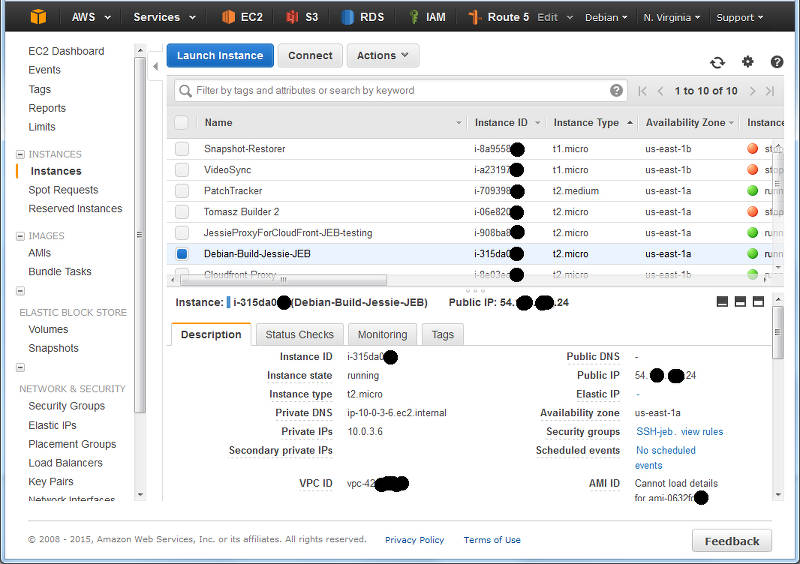
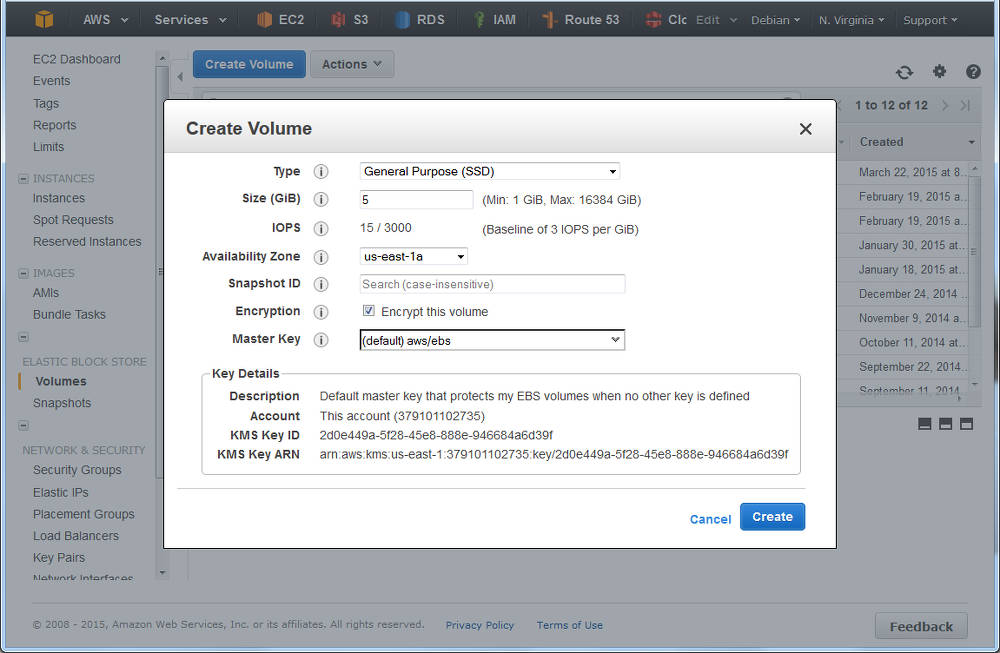
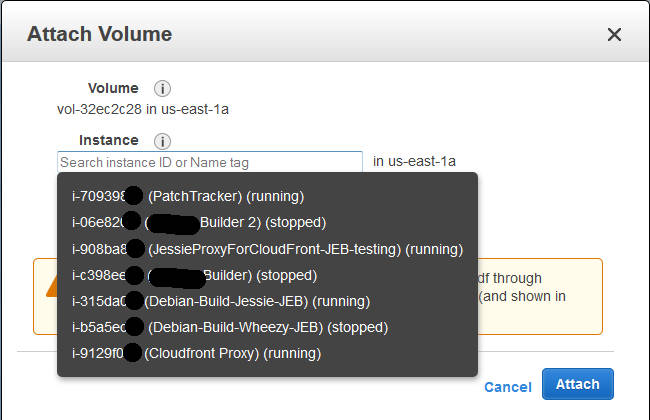
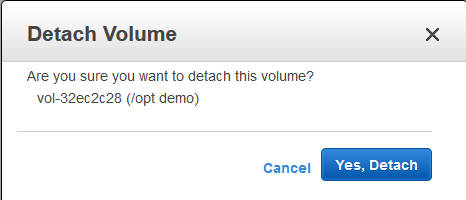
 After long time of waiting we finally released
 My LTS May
With regrets I have had to realize that I'm currently to overloaded to work on Debian LTS, so we planned that I'll do 7h in May and then I would take a three months break from doing LTS work. And then I didn't even manage that, I've only managed to finally fix
My LTS May
With regrets I have had to realize that I'm currently to overloaded to work on Debian LTS, so we planned that I'll do 7h in May and then I would take a three months break from doing LTS work. And then I didn't even manage that, I've only managed to finally fix 
 This year, on top of the many excellent contributed talks, BoFs, and other
events always part of DebConf (some of which have already been announced) we
are excited to have confirmed the following keynote speakers.
During the Open Weekend (Saturday, August 15th and Sunday, August 16th), we
will have keynotes delivered by:
This year, on top of the many excellent contributed talks, BoFs, and other
events always part of DebConf (some of which have already been announced) we
are excited to have confirmed the following keynote speakers.
During the Open Weekend (Saturday, August 15th and Sunday, August 16th), we
will have keynotes delivered by:
 I get quite a bit of recruitment spam, especially via my
  Let us start with recalling the different actions that have to be taken when TeX packages are installed, removed, or updated.
Required actions for TeX packages
Filename database
The simplest case are packages that only include files ment to be loaded while running TeX or Metafont or similar programs. In this case the file name database of TeX (and the one of ConTeXt) needs to be updated. Usually this is done by calling mktexlsr on the changed trees, plus, if ConTeXt is installed, running mtxrun --generate.
Font map activation
More complicated are font packages that provide PostScript fonts. These packages need to ship a so called map file which maps TeX font names to PostScript fonts names. Examples are lm.map which defines this mapping for the Latin Modern fonts. All these map files have to be collected in one or more updmap.cfg files, and then a call to updmap(-sys) is necessary to generate configuration files for dvips, pdftex, and some other programs.
Format and hyphenation definitions
Even more complicated is the case of additional hyphenation patterns and additional format definitions. At the moment, hyphenation patterns are only shipped from the TeX Live packages itself, but additional format definitions are already provided by other packages than the TeX Live ones. Again, in both cases all the different format and hyphenation pattern definitions must be combined, into configuration files fmtutil.cnf and several language.* files, respectively. After this some incantation of fmtutil(-sys) is necessary to update the format dumps of TeX.
Status up to Debian/TeX Live 2014
Up to now most of these actions are done in the postinstall script of the providing packages, generated by dh_installtex. The
Let us start with recalling the different actions that have to be taken when TeX packages are installed, removed, or updated.
Required actions for TeX packages
Filename database
The simplest case are packages that only include files ment to be loaded while running TeX or Metafont or similar programs. In this case the file name database of TeX (and the one of ConTeXt) needs to be updated. Usually this is done by calling mktexlsr on the changed trees, plus, if ConTeXt is installed, running mtxrun --generate.
Font map activation
More complicated are font packages that provide PostScript fonts. These packages need to ship a so called map file which maps TeX font names to PostScript fonts names. Examples are lm.map which defines this mapping for the Latin Modern fonts. All these map files have to be collected in one or more updmap.cfg files, and then a call to updmap(-sys) is necessary to generate configuration files for dvips, pdftex, and some other programs.
Format and hyphenation definitions
Even more complicated is the case of additional hyphenation patterns and additional format definitions. At the moment, hyphenation patterns are only shipped from the TeX Live packages itself, but additional format definitions are already provided by other packages than the TeX Live ones. Again, in both cases all the different format and hyphenation pattern definitions must be combined, into configuration files fmtutil.cnf and several language.* files, respectively. After this some incantation of fmtutil(-sys) is necessary to update the format dumps of TeX.
Status up to Debian/TeX Live 2014
Up to now most of these actions are done in the postinstall script of the providing packages, generated by dh_installtex. The  Anyway, I hope to hear some feedback and installation reports.
Conclusion
While packaging has become easier for maintainers, and there is less clutter in /etc/texmf/, we now are depending on dpkg to call the tex-common triggers. Thus, if this happens rather often, then especially fmtutil-sys --all will be called several times. This is a slight regression from the previous setup, but paid off (IMNSHO) by the arguments given in the beginning.
That said, there will be of course a certain time of transition until the new setup has proven its merits, and bugs are ironed out. But having bugs that need to be mostly fixed only in one package, namely tex-common, seems like an easier task to me.
Enjoy.
Anyway, I hope to hear some feedback and installation reports.
Conclusion
While packaging has become easier for maintainers, and there is less clutter in /etc/texmf/, we now are depending on dpkg to call the tex-common triggers. Thus, if this happens rather often, then especially fmtutil-sys --all will be called several times. This is a slight regression from the previous setup, but paid off (IMNSHO) by the arguments given in the beginning.
That said, there will be of course a certain time of transition until the new setup has proven its merits, and bugs are ironed out. But having bugs that need to be mostly fixed only in one package, namely tex-common, seems like an easier task to me.
Enjoy.
 What happened about the
 This was my sixth month working on Debian LTS. I was assigned 10.5
hours
by
This was my sixth month working on Debian LTS. I was assigned 10.5
hours
by 
 So going through these explanations one will end up with a usable USB stick that can boot you into