Search Results: "ina"

3 May 2020

Dirk Eddelbuettel: #0: Introducing T^4: Tips, Tricks, Tools, and Toys

For way too long now something I had meant to start was a little series about tips, tricks, tools, and toys. I had mentioned the idea a few times to a friend or two, and generally received a thumbs up or a go for it . But it takes a little to get over the humb and get going. And it turns out that last week s r^4 talk on upgrading to R 4.0.0 hit some latent demand as we are now at 1400 views on YouTube. Wowser. So hence without further ado, let s kick off T^4. Similar in spirit to R^4, but broader in scope and going beyond R. The opening slides explaining what we plan to do are here, and the video link follows below:

With some luck we should have the first actual talk next week. See you then! If you like this or other open-source work I do, you can now sponsor me at GitHub. For the first year, GitHub will match your contributions.

This post by Dirk Eddelbuettel originated on his Thinking inside the box blog. Please report excessive re-aggregation in third-party for-profit settings.

Sean Whitton: Processing mail from discussion lists differently

I realised this week that for some years I have been applying Inbox Zero indiscriminately to all e-mail that I receive, but this does not make sense, and has some downsides. My version of Inbox Zero works very well when applied to mail addressed directly to me, and for mail to certain mailing lists, where each post to the list might as well be addressed directly to me, in addition to the list. However, I also receive by e-mail the following things to which I now believe Inbox Zero should not be applied: I believe that applying Inbox Zero to these sorts of things is not only incorrect but is actually harming my engagement with these mediums. Let us distinguish
  1. processing e-mail this means applying the Inbox Zero decision procedure to incoming messages, at set times during the day (I do it once, around 4pm)
  2. browsing and sometimes catching up RSS articles and list mail looking through unread items, replying if I think I have something useful to say, leaving things for later, and occasionally marking all as read if I ve not had time for that group of lists lately.
These should be kept apart. The easy case to see is why you shouldn t apply the browsing/catching up approach to e-mail which should rather be processed that s just the original wisdom of Inbox Zero. And clearly you don t want ever to have to resort to just marking all mail addressed directly to you as read. What goes wrong, then, if you misapply the processing mentality to e-mail which should, rather, be browsed/caught up? Well, the core of Inbox Zero is deciding whether to read and reply to something right now, add it to your todo list to handle later, or decide the mail cannot be dealt with quickly but is not important enough to go on that todo list. If you apply this to RSS articles and discussion list mail, then the third option is basically ruled out, because almost nothing on mailing lists or on blogs that I follow is important enough to go on my list of Real Tasks. But then you re faced with either reading the article/post right now, or discarding it. There is no option to leave the item marked as unread and then maybe come back to it, or postpone discarding it until you ve decided to catch up the group. Applying Inbox Zero to discussion lists and RSS feeds creates a false sense of urgency. I ve realised that my implicit response to this has been reluctance to subscribe to new mailing lists and feeds, because I don t have things set up to allow me to read them in a leisurely way. But then I m missing out on discussions and writing that might be relevant and beneficial to me if I could only approach them when I m in a frame of mind other than time to get my inbox down to zero . This also means that subscribing to new mailing lists just in order to post something has an unreasonably high cost: introducing all mail on those lists into my Inbox Zero processing window. So, what s needed is to make the virtual folder views which I use to read new mail correspond cleanly to the distinction between mail to be processed and mail to be browsed. I.e. for each virtual folder it should be clear whether mail there is to be processed or to be browsed. Then I can continue to use my processing views once per day, and access the browsing views at leisure. (Indeed, I ve created a keybinding to cycle through the new browsing views, and another to catch them up.) As I mentioned, some list mail ought to be processed. For example, I want to process rather than browse the debian-policy mailing list, as one of the Policy Editors. With notmuch, it s easy to include this mail in the relevant processing views (I ve long had one processing view for weekdays and another for weekends). Additionally, I ve used a bit of Emacs Lisp to create a dynamic uncategorised unread view which catches mail to be browsed which (i) doesn t show up in one of the other virtual folders for mail to be browsed, and (ii) doesn t show up in one of the processing views. So now subscribing to a mailing list is cheap: mail will end up in the uncategorised view, and I can decide whether to leave it there for a low traffic list; create a new virtual folder for the list (trivial as it s all just more Emacs Lisp, no actual moving of files required); or unsubscribe. I ve been experiencing nostalgia for my time in secondary school when my friends and I had all sorts of interesting stuff flowing into our mailstores, from RSS feeds to each other s blogs where we d post both our own content and links elsewhere, RSS feeds to stranger s blogs, and e-mails sent to each other with links. We didn t have to worry about processing anything back then, as our e-mail accounts were used for intellectual enrichment but not the completion of tasks. I think I can recapture something of that with my new virtual folders for browsing.

Evgeni Golov: Remote management for OpenWRT devices without opening inbound connections

Everyone is working from home these days and needs a decent Internet connection. That's especially true if you need to do video calls and the room you want to do them has the worst WiFi coverage of the whole flat. Well, that's exactly what happened to my parents in law. When they moved in, we knew that at some point we'll have to fix the WiFi - the ISP provided DSL/router/WiFi combo would not cut it, especially not with the shape of the flat and the elevator shaft in the middle of it: the flat is essentially a big C around said shaft. But it was good enough for email, so we postponed that. Until now. The flat has wired Ethernet, but the users MacBook Air does not. That would have been too easy, right? So let's add another access point and hope the situation improves. Luckily I still had a TP-Link Archer C7 AC1750 in a drawer, which I could quickly flash with a fresh OpenWRT release, disable DHCPd and configure the same SSID and keys as the main/old WiFi. But I didn't know which channels would be best in the destination environment. Under normal circumstances, I'd just take the AP, drive to my parents in law and finish the configuration there. Nope, not gonna happen these days. So my plan was to finish configuration here, put the AP in a box and on the porch where someone can pick it up. But this would leave me without a way to further configure the device once it has been deployed - I was not particularly interested in trying to get port forwarding configured via phone and I was pretty sure UPnP was disabled in the ISP router. Installing a Tor hidden service for SSH was one possibility, setting up a VPN and making the AP a client another. Well, or just creating a reverse tunnel with SSH! sshtunnel Creating a tunnel with OpenSSH is easy: ssh -R127.0.0.1:2222:127.0.0.1:22 server.example.com will forward localhost:2222 on server.example.com to port 22 of the machine the SSH connection originated from. But what happens if the connection dies? Adding a while true; do ; done around it might help, but I would really like not to reinvent the wheel here! Thankfully, somebody already invented that particular wheel and OpenWRT comes with a sshtunnel package that takes care of setting up and keeping up such tunnels and documentation how to do so. Just install the sshtunnel package, edit /etc/config/sshtunnel to contain a server stanza with hostname, port and username and a tunnelR stanza referring said server plus the local and remote sides of the tunnel and you're good to go.
config server home
  option user     user
  option hostname server.example.com
  option port     22
config tunnelR local_ssh
  option server         home
  option remoteaddress  127.0.0.1
  option remoteport     2222
  option localaddress   127.0.0.1
  option localport      22
The only caveat is that sshtunnel needs the OpenSSH client binary (and the package correctly depends on it) and OpenWRT does not ship the ssh-keygen tool from OpenSSH but only the equivalent for Dropbear. As OpenSSH can't read Dropbear keys (and vice versa) you'll have to generate the key somewhere else and deploy it to the OpenWRT box and the target system. Oh, and OpenWRT defaults to enabling password login via SSH, so please disable that if you expose the box to the Internet in any way! Using the tunnel After configuring and starting the service, you'll see the OpenWRT system logging in to the configured remote and opening the tunnel. For some reason that connection would not show up in the output of w -- probably because there was no shell started or something, but logs show it clearly. Now it's just a matter of connecting to the newly open port and you're in. As the port is bound to 127.0.0.1, the connection is only possible from server.example.com or using it as a jump host via OpenSSH's ProxyJump option: ssh -J server.example.com -p 2222 root@localhost. Additionally, you can forward a local port over the tunneled connection to create a tunnel for the OpenWRT webinterface: ssh -J server.example.com -p 2222 -L8080:localhost:80 root@localhost. Yes, that's a tunnel inside a tunnel, and all the network engineers will go brrr, but it works and you can access LuCi on http://localhost:8080 just fine. If you don't want to type that every time, create an entry in your .ssh/config:
Host openwrt
  ProxyJump server.example.com
  HostName localhost
  Port 2222
  User root
  LocalForward 8080 localhost:80
And we're done. Enjoy easy access to the newly deployed box and carry on.

Fran ois Marier: Backing up to a GnuBee PC 2

After installing Debian buster on my GnuBee, I set it up for receiving backups from my other computers.

Software setup I started by configuring it like a typical server but without a few packages that either take a lot of memory or CPU: I changed the default hostname:
  • /etc/hostname: foobar
  • /etc/mailname: foobar.example.com
  • /etc/hosts: 127.0.0.1 foobar.example.com vogar localhost
and then installed the avahi-daemon package to be able to reach this box using foobar.local. I noticed the presence of a world-writable directory and so I tightened the security of some of the default mount points by putting the following in /etc/rc.local:
mount -o remount,nodev,nosuid /etc/network
mount -o remount,nodev,nosuid /lib/modules
chmod 755 /etc/network
exit 0

Hardware setup My OS drive (/dev/sda) is a small SSD so that the GnuBee can run silently when the spinning disks aren't needed. To hold the backup data on the other hand, I got three 4-TB drives drives which I setup in a RAID-5 array. If the data were valuable, I'd use RAID-6 instead since it can survive two drives failing at the same time, but in this case since it's only holding backups, I'd have to lose the original machine at the same time as two of the 3 drives, a very unlikely scenario. I created new gpt partition tables on /dev/sdb, /dev/sdbc, /dev/sdd and used fdisk to create a single partition of type 29 (Linux RAID) on each of them. Then I created the RAID array:
mdadm /dev/md127 --create -n 3 --level=raid5 -a /dev/sdb1 /dev/sdc1 /dev/sdd1
and waited more than 24 hours for that operation to finish. Next, I formatted the array:
mkfs.ext4 -m 0 /dev/md127
and added the following to /etc/fstab:
/dev/md127 /mnt/data/ ext4 noatime,nodiratime 0 2
To reduce unnecessary noise and reduce power consumption, I also installed hdparm:
apt install hdparm
and configured all spinning drives to spin down after being idle for 10 minutes by putting the following in /etc/hdparm.conf:
/dev/sdb  
       spindown_time = 120
 
/dev/sdc  
       spindown_time = 120
 
/dev/sdd  
       spindown_time = 120
 
and then reloaded the configuration:
 /usr/lib/pm-utils/power.d/95hdparm-apm resume
Finally I setup smartmontools by putting the following in /etc/smartd.conf:
/dev/sda -a -o on -S on -s (S/../.././02 L/../../6/03)
/dev/sdb -a -o on -S on -s (S/../.././02 L/../../6/03)
/dev/sdc -a -o on -S on -s (S/../.././02 L/../../6/03)
/dev/sdd -a -o on -S on -s (S/../.././02 L/../../6/03)
and restarting the daemon:
systemctl restart smartd.service

Backup setup I started by using duplicity since I have been using that tool for many years, but a 190GB backup took around 15 hours on the GnuBee with gigabit ethernet. After a friend suggested it, I took a look at restic and I have to say that I am impressed. The same backup finished in about half the time.

User and ssh setup After hardening the ssh setup as I usually do, I created a user account for each machine needing to backup onto the GnuBee:
adduser machine1
adduser machine1 sshuser
adduser machine1 sftponly
chsh machine1 -s /bin/false
and then matching directories under /mnt/data/home/:
mkdir /mnt/data/home/machine1
chown machine1:machine1 /mnt/data/home/machine1
chmod 700 /mnt/data/home/machine1
Then I created a custom ssh key for each machine:
ssh-keygen -f /root/.ssh/foobar_backups -t ed25519
and placed it in /home/machine1/.ssh/authorized_keys on the GnuBee. On each machine, I added the following to /root/.ssh/config:
Host foobar.local
    User machine1
    Compression no
    Ciphers aes128-ctr
    IdentityFile /root/backup/foobar_backups
    IdentitiesOnly yes
    ServerAliveInterval 60
    ServerAliveCountMax 240
The reason for setting the ssh cipher and disabling compression is to speed up the ssh connection as much as possible given that the GnuBee has avery small RAM bandwidth. Another performance-related change I made on the GnuBee was switching to the internal sftp server by putting the following in /etc/ssh/sshd_config:
Subsystem      sftp    internal-sftp

Restic script After reading through the excellent restic documentation, I wrote the following backup script, based on my old duplicity script, to reuse on all of my computers:
# Configure for each host
PASSWORD="XXXX"  # use  pwgen -s 64  to generate a good random password
BACKUP_HOME="/root/backup"
REMOTE_URL="sftp:foobar.local:"
RETENTION_POLICY="--keep-daily 7 --keep-weekly 4 --keep-monthly 12 --keep-yearly 2"
# Internal variables
SSH_IDENTITY="IdentityFile=$BACKUP_HOME/foobar_backups"
EXCLUDE_FILE="$BACKUP_HOME/exclude"
PKG_FILE="$BACKUP_HOME/dpkg-selections"
PARTITION_FILE="$BACKUP_HOME/partitions"
# If the list of files has been requested, only do that
if [ "$1" = "--list-current-files" ]; then
    RESTIC_PASSWORD=$PASSWORD restic --quiet -r $REMOTE_URL ls latest
    exit 0
# Show list of available snapshots
elif [ "$1" = "--list-snapshots" ]; then
    RESTIC_PASSWORD=$GPG_PASSWORD restic --quiet -r $REMOTE_URL snapshots
    exit 0
# Restore the given file
elif [ "$1" = "--file-to-restore" ]; then
    if [ "$2" = "" ]; then
        echo "You must specify a file to restore"
        exit 2
    fi
    RESTORE_DIR="$(mktemp -d ./restored_XXXXXXXX)"
    RESTIC_PASSWORD=$PASSWORD restic --quiet -r $REMOTE_URL restore latest --target "$RESTORE_DIR" --include "$2"   exit 1
    echo "$2 was restored to $RESTORE_DIR"
    exit 0
# Delete old backups
elif [ "$1" = "--prune" ]; then
    # Expire old backups
    RESTIC_PASSWORD=$PASSWORD restic --quiet -r $REMOTE_URL forget $RETENTION_POLICY
    # Delete files which are no longer necessary (slow)
    RESTIC_PASSWORD=$PASSWORD restic --quiet -r $REMOTE_URL prune
    exit 0
# Catch invalid arguments
elif [ "$1" != "" ]; then
    echo "Invalid argument: $1"
    exit 1
fi
# Check the integrity of existing backups
RESTIC_PASSWORD=$PASSWORD restic --quiet -r $REMOTE_URL check   exit 1
# Dump list of Debian packages
dpkg --get-selections > $PKG_FILE
# Dump partition tables from harddrives
/sbin/fdisk -l /dev/sda > $PARTITION_FILE
/sbin/fdisk -l /dev/sdb > $PARTITION_FILE
# Do the actual backup
RESTIC_PASSWORD=$PASSWORD restic --quiet --cleanup-cache -r $REMOTE_URL backup / --exclude-file $EXCLUDE_FILE
I run it with the following cronjob in /etc/cron.d/backups:
30 8 * * *    root  ionice nice nocache /root/backup/backup-machine1-to-foobar
30 2 * * Sun  root  ionice nice nocache /root/backup/backup-machine1-to-foobar --prune
in a way that doesn't impact the rest of the system too much. Finally, I printed a copy of each of my backup script, using enscript, to stash in a safe place:
enscript --highlight=bash --style=emacs --output=- backup-machine1-to-foobar   ps2pdf - > foobar.pdf
This is actually a pretty important step since without the password, you won't be able to decrypt and restore what's on the GnuBee.

2 May 2020

Sylvain Beucler: Debian LTS and ELTS - April 2020

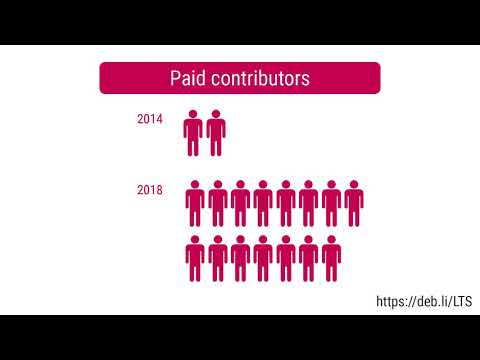
Debian LTS Logo Here is my transparent report for my work on the Debian Long Term Support (LTS) and Debian Extended Long Term Support (ELTS), which extend the security support for past Debian releases, as a paid contributor. In April, the monthly sponsored hours were split evenly among contributors depending on their max availability - I was assigned 28.75h for LTS (out of 30 max; all done) and 7.75h for ELTS (out of 20 max; I did 2.75). Escalation procedures were (internally) documented with a focus on discussing issues with team coordinator(s) first. Debian LTS had its first team meeting through IRC and lots of workflow question were discussed. This should help discuss questions that are a bit hard to bring up, and ensure everybody participates. There were lots of topics and it was a bit rushed, but this is something we want to repeat monthly now, possibly with audio/video in a couple months. Remarks from last month's report were discussed, strengthening the Front-Desk role. 10% of the global funding is now reserved for infrastructure work. What kind of work, and who (LTS or external) will do the work, will be discussed further. A fellow DD suggested (in a private conversation) that LTS may be taking time from the Debian Security team, due to additional commits to review. Conversely, this is another opportunity to mention all the global, non-LTS-specific work that LTS provides, which I usually highlight in my reports, and maybe I should be even more ;) ELTS - Wheezy LTS - Jessie Documentation/Scripts

1 May 2020

Paul Wise: FLOSS Activities April 2020

Changes

Issues

Review

Administration
  • myrepos: fix the forum
  • Debian: restart non-responsive tor daemon, restart processes due to OOM, apply debian.net changes for DD with expired key
  • Debian wiki: approve accounts
  • Debian QA services: deploy changes, auto-disable oldoldstable pockets

Communication

Sponsors The purple-discord work was sponsored by my employer. All other work was done on a volunteer basis.

Utkarsh Gupta: FOSS Activites in April 2020

Here s my (seventh) monthly update about the activities I ve done in the F/L/OSS world.

Debian
It s been 14 months since I ve started contributing to Debian. And 4 months since I ve been a Debian Developer. And in this beautiful time, I had this opprotunity to do and learn lots of new and interesting things. And most importantly, meet and interact with lots of lovely people!
Debian is $home.

Uploads:

Other $things:
  • Attended Ruby team meeting. Logs here.
  • Attended Perl team LHF. Report here.
  • Sponsored a lot of uploads for William Desportes and Adam Cecile.
  • Mentoring for newcomers.
  • FTP Trainee reviewing.
  • Moderation of -project mailing list.
  • Applied for DUCI project for Google Summer of Code 2020.

Ruby2.7 Migration:
Ruby2.7 was recently released on 25th December, 2019. Santa s gift. Believe it or not. We, the Debian Ruby team, have been trying hard to make it migrate to testing. And it finally happened. The default version in testing is ruby2.7. Here s the news! \o/
Here s what I worked on this month for this transition.

Upstream: Opened several issues and proposed patches (in the form of PRs):
  • Issue #35 against encryptor for Ruby2.7 test failures.
  • Issue #28 against image_science for removing relative paths.
  • Issue #106 against ffi-yajl for Ruby2.7 test failures.
  • PR #5 against aggregate for simply using require.
  • PR #6 against aggregate for modernizing CI and adding Ruby 2.5 and 2.7 support.
  • Issue #13 against espeak-ruby for Ruby2.7 test failures.
  • Issue #4 against tty-which for test failures in general.
  • Issue #11 against packable for Ruby2.7 test failures. PR #12 has been proposed.
  • Issue #10 against growl for test failures and proposed an initial patch.

Downstream: I fixed and uploaded the following packages in Debian:

Debian LTS
Debian Long Term Support (LTS) is a project to extend the lifetime of all Debian stable releases to (at least) 5 years. Debian LTS is not handled by the Debian security team, but by a separate group of volunteers and companies interested in making it a success.
This was my seventh month as a Debian LTS paid contributor. I was assigned 24.00 hours and worked on the following things:

CVE Fixes and Announcements:

Other LTS Work:

Other(s)
Sometimes it gets hard to categorize work/things into a particular category.
That s why I am writing all of those things inside this category.
This includes two sub-categories and they are as follows.

Personal: This month I could get the following things done:
  • Most importantly, I finally migrated to a new website. Huge UI imporvement! \o/
    From Jekyll to Hugo, it was not easy. But it was worth it! Many thanks to Luiz for writing hugo-coder, Clement, and Samyak!
    If you find any flaws, issues and pull requests are welcomed at utkarsh2102/utkarsh2102.com
  • Wrote battery-alert, a mini-project of my own to show battery alerts at <10% and >90%.
    Written in shell, it brings me all the satisfaction as it has saved my life on many occasions.
    And guess what? It has more users than just myself!
    Reviews and patches are welcomed \o/
  • Mentored in HackOn Hackathon. Thanks to Manvi for reaching out!
    It was fun to see people developing some really nice projects.
  • Thanks to Ray and John, I became a GitLab Hero!
    (I am yet to figure out my role and responibility though)
  • Atteneded Intro Sec Con and had the most fun!
    Heard Ian s keynote and attended other talks and learned how to use WireShark!

Open Source: Again, this contains all the things that I couldn t categorize earlier.
Opened several issues and pull requests:
  • Issue #297 against hugo-coder, asking to enable RSS feed for blogs.
  • PR #316 for hugo-coder for fixing the above issue myself.
  • Issue #173 against arbre for requesting a release.
  • Issue #104 against combustion, asking to relax dependency on rubocop. Fixed in this commit.
  • Issue #16 against ffi-compiler for requesting to fix homepage and license.
  • Issue #57 against gographviz for requesting a release.
  • Issue #14 against crb-blast, suggesting compatability with bio 2.0.x.
  • Issue #58 against uniform_notifier for asking to drop the use of ruby-growl.
  • PR #2072 for polybar, adding installation instructions on Debian systems.

Until next time.
:wq for today.

30 April 2020

Chris Lamb: Free software activities in April 2020

Here is my monthly update covering what I have been doing in the free software world during April 2020 (previous month's report). Looking it over prior to publishing, I am surprised how much I got done this month I felt that I was not only failing to do all the extra things I had planned, but I was doing far less than normal. But let us go easy on ourselves; nobody is nailing this. In addition, I did more hacking on the Lintian static analysis tool for Debian packages:
Reproducible builds One of the original promises of open source software is that distributed peer review and transparency of process results in enhanced end-user security. However, whilst anyone may inspect the source code of free and open source software for malicious flaws, almost all software today is distributed as pre-compiled binaries. This allows nefarious third-parties to compromise systems by injecting malicious code into ostensibly secure software during the various compilation and distribution processes. The motivation behind the Reproducible Builds effort is to ensure no flaws have been introduced during this compilation process by promising identical results are always generated from a given source, thus allowing multiple third-parties to come to a consensus on whether a build was compromised. The initiative is proud to be a member project of the Software Freedom Conservancy, a not-for-profit 501(c)(3) charity focused on ethical technology and user freedom. Conservancy acts as a corporate umbrella allowing projects to operate as non-profit initiatives without managing their own corporate structure. If you like the work of the Conservancy or the Reproducible Builds project, please consider becoming an official supporter. Elsewhere in our tooling, I made the following changes to diffoscope, our in-depth and content-aware diff utility that can locate and diagnose reproducibility issues, including preparing and uploading versions 139, 140, 141 and 142 to Debian: Lastly, I made a large number of changes to our website and documentation in the following categories:
Debian LTS This month I have contributed 18 hours to Debian Long Term Support (LTS) and 7 hours on its sister Extended LTS project. You can find out more about the project via the following video:
Debian I only filed three bugs in April, including one against snapshot.debian.org to report that a Content-Type HTTP header is missing when downloading .deb files (#956471) and to report build failures in the macs & ruby-enumerable-statistics packages:

Jonathan McDowell: Let's talk about work/life balance in lock down

A SYNCNI article passed by on my Twitter feed this morning, talking about balancing work life balance while working from home in these times of COVID-19 inspired lock down. The associated Twitter thread expressed an interest in some words of advice from men to other men (because of course the original article has the woman having to do all the balancing). This post does not contain the words of advice searched for, but it hopefully at least offers some reassurance that if you re finding all of this difficult you re not alone. From talking to others I don t think there s anything particularly special we re doing in this house; a colleague is taking roughly the same approach, and some of the other folk I ve spoken to in the local tech scene seem to be doing likewise. First, the situation. Like many households both my wife and I work full time. We have a small child (not even a year and a half old yet). I work for a software startup, my wife is an HR business partner for a large multinational, dealing with employees all over the UK and Ireland. We re both luckily able to work from home easily - our day to day work machines are laptops, our employers were already setup with the appropriate VPN / video conferencing etc facilities. Neither of us has seen any decrease in workload since lock down; there are always more features and/or bugs to work on when it comes to a software product, and, as I m sure you can imagine, there has been a lot more activity in the HR sphere over the past 6 weeks as companies try to work out what to do. On top of this our childcare arrangements, like everyone else s, are completely gone. Nursery understandably shut down around the same time as the schools (slightly later, but not by much) and contact with grandparents is obviously out (which they re finding hard). So we re left with trying to fit 2 full time jobs in with full time childcare, of a child who up until recently tried to go down stairs by continuing to crawl forward. Make no mistake, this is hard. I know we are exceptionally lucky in our situation, but that doesn t mean we re finding it easy. We ve adopted an approach of splitting the day up. I take the morning slot (previously I would have got up with our son anyway), getting him up and fed while my wife showers. She takes over for a bit while I shower and dress, then I take over again in time for her to take her daily 8am conference call. My morning is mostly taken up with childcare until nap time; I try to check in first thing to make sure there s nothing urgent, and get a handle on what I might have to work on later in the day. My local team mates know they re more likely to get me late morning and it s better to arrange meetings in the afternoon. Equally I work with a lot of folk on the US West coast, so shifting my hours to be a bit later is not a problem there. After nap time (which, if we re lucky, takes us to lunch) my wife takes over. As she deals with UK/Ireland folk she often ends up having to take calls even while looking after our son; generally important meetings can be moved to the morning and meetings with folk who understand there might be a lot of pot banging going on in the background can happen in the afternoon. Having started late I generally work late - past the point where I d normally get home; if I m lucky I pop my head in for bath time, but sometimes it s only for a couple of minutes. We alternate cooking; usually based on work load + meetings. For example tonight I m cooking while my wife catches up on some work after having put our son to bed. Last night I had a few meetings so my wife cooked. So what s worked for us? Splitting the day means we can plan with our co-workers. We always make sure we eat together in the evening, and that generally is the cut-off point for either of us doing any work. I m less likely to be online in the evening because my study has become the place I work. That means I m not really doing any of my personal projects - this definitely isn t a case of being at home during lock down and having lots of time to achieve new things. It s much more of case of trying to find a sustainable way to get through the current situation, however long it might last.

29 April 2020

Craig Small: Sending data in a signal

The well-known kill system call has been around for decades and is used to send a signal to another process. The most common use is to terminate or kill another process by sending the KILL or TERM signal but it can be used for a form of IPC, usually around giving the other process a kick to do something. One thing that isn t as well known is besides sending a signal to a process, you can send some data to it. This can either be an integer or a pointer and uses similar semantics to the known kill and signal handler. I came across this when there was a merge request for procps. The main changes are using sigqueue instead of kill in the sender and using a signal action not a signal handler in the receiver. To illustrate this feature, I have a small set of programs called sender and receiver that will pass an integer between them. The Sender The sender program is extremely simple, use a random(ish) from time masked to two bytes, put it in the required union and send the lot to sendqueue.
# include <signal.h>
# include <stdlib.h>
# include <stdio.h>
# include <time.h>
int main(int argc, char **argv)
 
    union sigval sigval;
    pid_t pid;
    if (argc < 2   (pid = atoi(argv[1])) < 0)
	return EXIT_FAILURE;
    sigval.sival_int = time(NULL) &amp; 0xff;
    printf("sender: sending %d to PID %d\n",
        sigval.sival_int, pid);
    sigqueue(pid, SIGUSR1, sigval);
    return EXIT_SUCCESS;
 
The key lines are 13 and 16 where the random (ish) integer is stored in the sigval union and then sent to the other process with the sigqueue. The receiver The receiver just sets up the signal handler, sends its PID (so I know what to tell the sender) and sits in a sleeping loop.
# include <stdio.h>
# include <stdlib.h>
# include <sys/types.h>
# include <unistd.h>
# include <signal.h>
void signal_handler(int signum, siginfo_t *siginfo, void *ucontext)
 
    if (signum != SIGUSR1) return;
    if (siginfo->si_code != SI_QUEUE) return;
    printf("receiver: Got value %d\n",
	    siginfo->si_int);
 
int main(int argc, char **argv)
 
    pid_t pid = getpid();
    struct sigaction signal_action;
    printf("receiver: PID is %d\n", pid);
    signal_action.sa_sigaction = signal_handler;
    sigemptyset (&amp;signal_action.sa_mask);
    signal_action.sa_flags = SA_SIGINFO;
    sigaction(SIGUSR1, &amp;signal_action, NULL);
    while(1) sleep(100);
    return EXIT_SUCCESS;
 
Lines 16-26 setup the signal handler. The main difference here is SA_SIGINFO used for the signal flags and sigaction references a sa_sigaction function rather than sa_handler. We need to use a different function because the sigaction only is passed the signal number but we need more information, including the integer that the sender process stored in sigval. Lines 7-14 are the signal handler function itself. It first checks that the receiver process got the correct signal (SIGUSR1 in this case) and that we got this signal from sigqueue because the type is SI_QUEUE. Checking the type of signal is important because different signals give you different data. For example, if you signalled this process with kill then si_int is undefined. The result As a proof of concept, the results are not terribly exciting. We see the sender say what it will be sending and the receiver saying it got it. It was useful to get some results, especially when things went wrong.
$ ./receiver &amp;
[1] 370216
receiver: PID is 370216
$ ./sender 370216
sender: sending 133 to (gdPID 370216
receiver: Got value 133
Gotchas While testing the two process there was two gotchas I encountered. GDB and the siginfo structure The sigaction manual page shows a simple siginfo_t structure, however when looking at what is passed to the signal handler, it s much more complicated.
(gdb) p *siginfo
$2 =  si_signo = 10, si_errno = 0, si_code = -1, __pad0 = 0, _sifields =  _pad =  371539, 1000, 11, 32766, 0 <repeats 24 times> , _kill =  si_pid = 371539, si_uid = 1000 , _timer =  si_tid = 371539, 
      si_overrun = 1000, si_sigval =  sival_int = 11, sival_ptr = 0x7ffe0000000b , _rt =  si_pid = 371539, si_uid = 1000, si_sigval =  sival_int = 11, sival_ptr = 0x7ffe0000000b , _sigchld =  
      si_pid = 371539, si_uid = 1000, si_status = 11, si_utime = 0, si_stime = 0 , _sigfault =  si_addr = 0x3e80005ab53, si_addr_lsb = 11, _bounds =  _addr_bnd =  _lower = 0x0, _upper = 0x0 , _pkey = 0 , 
    _sigpoll =  si_band = 4294967667539, si_fd = 11 , _sigsys =  _call_addr = 0x3e80005ab53, _syscall = 11, _arch = 32766 
(gdb) p siginfo->_sifields._rt.si_sigval.sival_int
$3 = 11
So the integer is stored in a union in a structure in a structure. Much harder to find than just simply sival_int. The pointer is just a pointer So perhaps sending an integer is not enough. The sigval is a union with an integer and a pointer. Could a string be sent instead? I changed line 13 of the sender so it used a string instead of an integer.
    sigval.sival_ptr = "Hello, World!"
The receiver needed a minor adjustment to print out the string. I tried this and the receiver segmentation faulted. What was going on? The issue is the set of system calls does a simple passing of the values. So if the sender sends a pointer to a string located at 0x1234567 then the receiver will have a pointer to the same location. When the receiver tries to dereference the sival_ptr, it is pointing to memory that is not owned by it but by another process (the sender) so it segmentation faults. The solution would be to use shared memory between the processes. The signal queue would then use the pointer to the shared memory and, in theory, all would be well.

Petter Reinholdtsen: GnuCOBOL, a free platform to learn and use COBOL - nice free software

The curiosity got the better of me when Slashdot reported that New Jersey was desperately looking for COBOL programmers, and a few days later it was reported that IBM tried to locate COBOL programmers. I thus decided to have a look at free software alternatives to learn COBOL, and had the pleasure to find GnuCOBOL was already in Debian. It used to be called Open Cobol, and is a "compiler" transforming COBOL code to C or C++ before giving it to GCC or Visual Studio to build binaries. I managed to get in touch with upstream, and was impressed with the quick response, and also was happy to see a new Debian maintainer taking over when the original one recently asked to be replaced. A new Debian upload was done as recently as yesterday. Using the Debian package, I was able to follow a simple COBOL introduction and make and run simple COBOL programs. It was fun to learn a new programming language. If you want to test for yourself, the GnuCOBOL Wikipedia page have a few simple examples to get you startet. As I do not have much experience with COBOL, I do not know how standard compliant it is, but it claim to pass most tests from COBOL test suite, which sound good to me. It is nice to know it is possible to learn COBOL using software without any usage restrictions, and I am very happy such nice free software project as this is available. If you as me is curious about COBOL, check it out. As usual, if you use Bitcoin and want to show your support of my activities, please send Bitcoin donations to my address 15oWEoG9dUPovwmUL9KWAnYRtNJEkP1u1b.

28 April 2020

Antoine Beaupr : Drowned my camera: dealing with liquid spills in electronics

Folks who acutely dig into this website might know that I have been taking more pictures recently, as I got a new camera since January 2018: a beautiful Fujifilm X-T2 that I really like. Recently, I went out on a photo shoot in the rain. It was intermittent, light rain when I left so I figured the "weather proofing" (dpreview.com calls this "environmentally sealed") would keep the camera secure. After an hour of walking outside, however, rain intensified and I was just quickly becoming more and more soaked. Still trusting the camera would function, I carried on. But after about 90 minutes of dutiful work, the camera just turned off and wouldn't power back on. It had drowned. I couldn't believe it; "but this is supposed to be waterproof! This can't be happening!", I thought. I tried swapping out the battery for a fresh one, which was probably a bad idea (even if I was smart enough to do this under cover): still no luck, yet I could still not believe it was dead, so I figured I would look at it later when I was home. I still eventually removed the battery after a while, remembering that it mattered. Turns out the camera was really dead. Even at home, it wouldn't power up, even with fresh batteries. After closer inspection, the camera was as soaked as I was...
Two Sandisk memory cards with water droplets on them ...even the SD cards were wet!
I was filled with despair! My precious camera! I had been waiting for litterally decades to find the right digital camera that was as close to the good old film cameras I was used to. I was even working on black and white "film" to get back to basics, which turned into a project to witness the impact of the coronavirus on city life! All that was lost, or at least stopped: amazingly, the SD cards were just absolutely fine and survived the flooding without problem.
A one-way sign broken, fallen on the side in a gray cityscape The last photo my camera took before it died
A good photographer friend told me that this was actually fairly common: "if you shoot outside, get used to this, it will happen". So I tried "the rice trick": plunge your camera in a pile of rice and let it rest there for a long time. It didn't work so well: I didn't have a big enough container to hold the camera and the rice. I was also worried about rice particles inserting themselves into the camera holes, as I had opened all the ports to let it dry. I could also not keep myself from inserting a battery and trying it out again: amazingly, it powered up, only once, and died again. After shopping in desperation for dessicators (who would have thought you should keep those little bags from the stuff you order online!), I ended up buying silica gel dehumidifier from Lee Valley (13$, the small one!) which comes in a neat little metal box. But that never arrived in time so I had to find another solution. My partner threw the idea out in jest, but the actual solution worked, and it was surprisingly simple!
My camera and lens drying in a food dehydrator, at 30 C with 22 hours left Tada! Turns out you can dehydrate hardware too!
We have a food dehydrator at home (a Sedna Express if you really want to know) since we do a lot of backpacking and canot-camping, but I never thought I would put electronics in there. Turns out a food dehydrator is perfect: it has a per degree temperature control that can go very low and a timer. I set it to 30 C for 24 hours. (I originally set it to 40 C but it smelled like plastic after a while so my partner turned it off thinking it was melting the camera.) And now the camera is back! I was so happy! There is probably some permanent damage to the delicate circuitry in the camera. And I will probably not go back out in heavy rain again with the camera, or at least not without a rainjacket (35$USD at B&H) on the camera. And I am now in a position to tell other people what to do if they suffer the same fate...

Tips for dealing with electronic liquid damage So, lessons learned...
  1. when you have a liquid spill over your electronics: IMMEDIATELY REMOVE ALL ELECTRIC POWER, including the battery! (this is another reason why all batteries should be removable)
  2. if the spill is "sticky" (e.g. coffee, beer, maple syrup, etc) or "salty", do try to wash it with water, yet without flooding it any further (delicate balance, I know) some devices are especially well adapted to this: I have washed a keyboard with a shower head and drowned the thing completely, it worked fine after drying.
  3. do NOT power it back on until you are certain the equipment is dry
  4. let the electronics device dry for 24 to 48 hours with all ports open in a humidity-absorbing environment: a bag of rice works, but a food dehydrator is best. make sure the rice doesn't get stuck inside the machine: use a small mesh bag if necessary
  5. once you are confident the device has dried, fiddle with the controls and see if water comes out: it might not have dried because it was stuck inside a button or dial. if dry, try powering it back on and watch the symptoms. if it's still weird, try drying it for another day.
  6. if you get tired of waiting and the machine doesn't come back up, you will have to send it to the repair shop or open it up yourself to see if there is soldering damage you can fix.
I hope it might help careless people who dropped their coffee or ran out in the rain, believing the hype of waterproof cameras. Amateur tip: waterproof cameras are not waterproof...

Dirk Eddelbuettel: RcppArmadillo 0.9.870.2.0

armadillo image Armadillo is a powerful and expressive C++ template library for linear algebra aiming towards a good balance between speed and ease of use with a syntax deliberately close to a Matlab. RcppArmadillo integrates this library with the R environment and language and is widely used by (currently) 705 other packages on CRAN. A new upstream release 9.870.2 of Armadillo was released a few days ago. We had tested two release candidates, and this caught one bug. The release was held up at CRAN for a few days as one package had an overly sensitive test depending on random input data; eventually we all convinced ourselves that there was no (Rcpp)Armadillo issue here. So morale: friends don t let friends have tests depend on random behavior. Changes in the new release are noted below.

Changes in RcppArmadillo version 0.9.870.2.0 (2020-04-24)
  • Upgraded to Armadillo release 9.870.2 (Roasted Mocha Retox)
    • faster handling of matrix multiplication expressions by diagvec() and diagmat()
    • added trimatu_ind() and trimatl_ind()
    • more consistent detection of sparse vector expressions

Courtesy of CRANberries, there is a diffstat report relative to previous release. More detailed information is on the RcppArmadillo page. Questions, comments etc should go to the rcpp-devel mailing list off the R-Forge page. If you like this or other open-source work I do, you can now sponsor me at GitHub. For the first year, GitHub will match your contributions.

This post by Dirk Eddelbuettel originated on his Thinking inside the box blog. Please report excessive re-aggregation in third-party for-profit settings.

27 April 2020

Dirk Eddelbuettel: #26: Upgrading to R 4.0.0

Welcome to the 26th post in the rationally regularized R revelations series, or R4 for short. R 4.0.0 was released two days ago, and a casual glance at some social media conversations appears to suggest quite some confusion, almost certainly some misunderstandings, and possibly also a fair amount of fear, uncertainty, and doubt about the process. So I thought I could show how I upgrade my own main workstation, live and in colour without a safety net. (Almost: I did upgrade my laptop yesterday which went swimmingly, if more slowly.) So here is a fresh video about upgrading to R 4.0.0, with some support slides as usual:

The slides used in the video are at this link. A few quick follow-ups to the live nature of this. The pbdZMQ package did in fact install smoothly once the (Ubuntu) -dev packages for Zero MQ were (re-)installed; then IRkernel also followed. BioConductor completed once I realized that GOSemSim needed the annotation package GO.db to be updated, that allowed MNF to install. So the only bug, really, was the circular depdency between pkgload and testthat. Overall, not bad at all for a quick afternoon session! And as mentioned, if you are interested and have questions concerning use of R on a .deb based system like Debain or Ubuntu (or Mint or ), the r-sig-debian list is a very good and friendly place to ask them. If you like this or other open-source work I do, you can now sponsor me at GitHub. For the first year, GitHub will match your contributions.

This post by Dirk Eddelbuettel originated on his Thinking inside the box blog. Please report excessive re-aggregation in third-party for-profit settings.

26 April 2020

Enrico Zini: Some Italian women

Artemisia Gentileschi - Wikipedia
art history people archive.org
Artemisia Lomi or Artemisia Gentileschi (US: / d nt l ski, -ti -/, Italian: [arte mi zja d enti leski]; July 8, 1593 c. 1656) was an Italian Baroque painter, now considered one of the most accomplished seventeenth-century artists working in the dramatic style of Caravaggio. In an era when women had few opportunities to pursue artistic training or work as professional artists, Artemisia was the first woman to become a member of the Accademia di Arte del Disegno in Florence and had an international clientele.
Maria Pellegrina Amoretti (1756 1787), was an Italian lawyer. She is referred to as the first woman to graduate in law in Italy, and the third woman to earn a degree.
Laura Maria Caterina Bassi (October 1711 20 February 1778) was an Italian physicist and academic. She received a doctoral degree in Philosophy from the University of Bologna in May 1732. She was the first woman to earn a professorship in physics at a university. She is recognized as the first woman in the world to be appointed a university chair in a scientific field of studies. Bassi contributed immensely to the field of science while also helping to spread the study of Newtonian mechanics through Italy.
Maria Gaetana Agnesi (UK: / n je zi/ an-YAY-zee,[1] US: / n -/ ahn-,[2][3] Italian: [ma ri a ae ta na a zi, - e z-];[4] 16 May 1718 9 January 1799) was an Italian mathematician, philosopher, theologian, and humanitarian. She was the first woman to write a mathematics handbook and the first woman appointed as a mathematics professor at a university.[5]
Elena Lucrezia Cornaro Piscopia (US: /k r n ro p sko pi /,[4] Italian: [ lena lu kr ttsja kor na ro pi sk pja]) or Elena Lucrezia Corner (Italian: [kor n r]; 5 June 1646 26 July 1684), also known in English as Helen Cornaro, was a Venetian philosopher of noble descent who in 1678 became one of the first women to receive an academic degree from a university, and the first to receive a Doctor of Philosophy degree.
Maria Tecla Artemisia Montessori (/ m nt s ri/ MON-tiss-OR-ee, Italian: [ma ri a montes s ri]; August 31, 1870 May 6, 1952) was an Italian physician and educator best known for the philosophy of education that bears her name, and her writing on scientific pedagogy. At an early age, Montessori broke gender barriers and expectations when she enrolled in classes at an all-boys technical school, with hopes of becoming an engineer. She soon had a change of heart and began medical school at the Sapienza University of Rome, where she graduated with honors in 1896. Her educational method is still in use today in many public and private schools throughout the world.
Rita Levi-Montalcini OMRI OMCA (US: / le vi mo nt l t i ni, l v-, li vi m nt l -/, Italian: [ ri ta l vi montal t i ni]; 22 April 1909 30 December 2012) was an Italian Nobel laureate, honored for her work in neurobiology. She was awarded the 1986 Nobel Prize in Physiology or Medicine jointly with colleague Stanley Cohen for the discovery of nerve growth factor (NGF). From 2001 until her death, she also served in the Italian Senate as a Senator for Life. This honor was given due to her significant scientific contributions. On 22 April 2009, she became the first Nobel laureate ever to reach the age of 100, and the event was feted with a party at Rome's City Hall. At the time of her death, she was the oldest living Nobel laureate.
Margherita Hack Knight Grand Cross OMRI (Italian: [mar e ri ta (h)ak]; 12 June 1922 29 June 2013) was an Italian astrophysicist and scientific disseminator. The asteroid 8558 Hack, discovered in 1995, was named in her honour.
Samantha Cristoforetti (Italian pronunciation: [sa manta kristofo retti]; born 26 April 1977, in Milan) is an Italian European Space Agency astronaut, former Italian Air Force pilot and engineer. She holds the record for the longest uninterrupted spaceflight by a European astronaut (199 days, 16 hours), and until June 2017 held the record for the longest single space flight by a woman until this was broken by Peggy Whitson and later by Christina Koch. She is also the first Italian woman in space. Samantha Cristoforetti is also known as the first person who brewed an espresso in space.

Russ Allbery: Review: The Last Goodbye

Review: The Last Goodbye, by Matt Potter
Publisher: Silvertail
Copyright: 2014-2016
Printing: 2016
ISBN: 1-909269-42-5
Format: Kindle
Pages: 308
In the contested space between the interested amateur and the trained expert lies the enthusiast. A topic has, for often inexplicable reasons, caught fire in their thoughts and become a mild obsession. They may not have formal training or systematic conceptual grounding beneath their interest, but they partly make up for that lack with sustained fascination. They research widely and obscurely about their particular focus, develop novel theories, see distinctions and classifications that few others would bother to investigate, and present their discoveries to anyone who will stand still long enough. And occasionally, when that interest happens to coincide with writing skill, they produce some surprisingly excellent essays or books. Matt Potter's enthusiasm is resignation letters.
Every damaging resignation letter, every cornered truth attack, every out-of-control speech by a former friend, is more than just an inconvenience, to be countered with positive spin and internal memos: it's an open challenge to the official version of the story, the perfectly controlled brand. They are breaks in an otherwise perfectly planned, smoothly executed narrative of the powerful. Holes in the program code. A rare, irresistible chance to hack into history's shiny, unstoppable operation.
The Last Goodbye: A History of the World in Resignation Letters is not, in truth, a history of the world. It is, first and foremost, a taxonomy, because there are types of resignation letters. The opening chapter, the truth bomb, is the type that one would expect upon discovering that someone wrote a book on the topic (that wasn't advice on how to write a good one). But there are other types, less heavy on the fireworks but just as fascinating. The unquotable expert construction. The knife in the back. The incoherent scream of rage. But also the surprisingly gentle and graceful conclusion.
It is the question that the letters themselves try in vain to answer, over and over again even as they explain, analyse, protest and bear witness to a million other details. The question is: Why? All the forces in the universe stack up against unburdening ourselves in a resignation letter. Professionally, it can be suicide. In practical terms, it is often self-defeating. Self-help books coach against unleashing its force; colleagues and confidantes urge caution, self-restraint. And yet we do it, and damn the consequences. We have no choice but to speak in sorrow, love, grief, cold anger, thirst for revenge, wounded pride, the pain of injustice, loyalty, pangs of regret, throes of vengeful madness, deluded righteousness, panic, black distress, isolation, ecstasies of martyrdom, and a million other shades of human extremity we need to say our piece even as we leave the stage.
The risk of the enthusiast's book is that the lack of structural grounding can leave the conclusions unsupported. A fair critique of this book is that it contains a lot of amateur sociology. Potter has a journalist's eye for motive and narrative, but some of his conclusions may not be warranted. But he compensates for the lack of rigor with, well, enthusiasm. Potter is fascinated by resignation letters and the insight they offer, and that fascination is irresistibly contagious. It's probably obvious that the chapters on truth bombs, fuck yous, and knives in the back have visceral appeal. The resignation letter as a force of truth-telling, as the revenge of a disregarded peon, as a crack in the alliance between the powerful that may let some truth shine through, is what got me to buy this book. And Potter doesn't disappoint; he quotes from both famous and nearly unknown examples, dissects the writing and the intent, and gives us a ringside seat to a few effective acts of revenge. That's not the best part of this book, though. The chapter that I will remember the longest is Potter's dissection of the constructed resignation letter. The carefully drafted public relations statement, the bland formality, the attempt to make a news story disappear. The conversation-ender. It's a truism that any area of human endeavor involves more expertise than those who have only observed it from the outside will realize, but I had never thought to apply that principle to the ghost-written resignation letter. The careful non-apology, the declaration that one has "become a distraction," the tell-tale phrasing of "spending more time with my family" is offensive in its bland dishonesty. But Potter shows that the blandness is expertly constructed to destroy quotability. Those statements are nearly impossible to remember or report on because they have been built that way: nouns carefully separated from verbs, all force dissipated by circuities and modifiers, and subtle grammatical errors introduced to discourage written news from including direct quotes. Potter's journalism background shines here because he can describe the effect on news reporting. He walks the reader through the construction to reveal that the writing is not incompetent but instead is skillfully bad in a way that causes one's attention to skitter off of it. The letter vanishes into its own vagueness. The goal is to smother the story in such mediocrity that it becomes forgettable. And it works. I've written several resignation letters of my own. Somewhat unusually, I've even sent several of them, although (as Potter says is typical) fewer than I've written. I've even written (and sent) the sort of resignation letter that every career advisor will say to never send. Potter's discussion of the motives and thought process behind those letters rang true for me. It's a raw and very human moment, one is never in as much control of it as one wishes, the cracks and emotions break through in the writing, and often those letters are trying to do far too many things at the same time. But it's also a moment in which one can say something important and have others listen, which can be weirdly challenging to do in the normal course of a job. Potter ends this book beautifully by looking at resignation letters that break or transcend the mold of most of the others he's examined: letters where the author seems to have found some peace and internal understanding and expresses that simply and straightforwardly. I found this surprisingly touching after the emotional roller-coaster of the rest of the book, and a lovely note on which to end. This is a great book. Potter has a good eye for language and the emotion encoded in it, a bracing preference for the common worker or employee over the manager or politician, and the skill to produce some memorable turns of phrase. Most importantly, he has the enthusiast's love of the topic. Even if you don't care about resignation letters going in, it will be hard to avoid some fascination with them by the end of this book. Recommended. This book was originally published as F*ck You and Goodbye in the UK. Rating: 8 out of 10

25 April 2020

Julian Andres Klode: An - EPYC - Focal Upgrade

Ubuntu Focal Fossa 20.04 was released two days ago, so I took the opportunity yesterday and this morning to upgrade my VPS from Ubuntu 18.04 to 20.04. The VPS provides: I rebooted one more time than necessary, though, as my cloud provider Hetzner recently started offering 2nd generation EPYC instances which I upgraded to from my Skylake Xeon based instance. I switched from the CX21 for 5.83 /mo to the CPX11 for 4.15 /mo. This involved a RAM downgrade - from 4GB to 2GB, but that s fine, the maximum usage I saw was about 1.3 GB when running dose-distcheck (running hourly); and it s good for everyone that AMD is giving Intel some good competition, I think. Anyway, to get back to the distribution upgrade - it was fairly boring. I started yesterday by taking a copy of the server and launching it locally in a lxd container, and then tested the upgrade in there; to make sure I m prepared for the real thing :) I got a confusing prompt from postfix as to which site I m operating (which is a normal prompt, but I don t know why I see it on an upgrade); and a few config files I had changed locally. As the server is managed by ansible, I just installed the distribution config files and dropped my changes (setting DPkg::Options "--force-confnew"; ;" in apt.conf), and then after the upgrade, ran ansible to redeploy the changes (after checking what changes it would do and adjusting a few things). There are two remaining flaws:
  1. I run rspamd from the upstream repository, and that s not built for focal yet. So I m still using the bionic binary, and have to keep bionic s icu 60 and libhyperscan4 around for it. This is still preventing CI of the ansible config from passing for focal, because it won t have the needed bionic packages around.
  2. I run weechat from the upstream repository, and apt can t tell the versions apart. Well, it can for the repositories, because they have Size fields - but status does not. Hence, it merges the installed version with the first repository it sees. What happens is that it installs from weechat.org, but then it believes the installed version is from archive.ubuntu.com and replaces it each dist-upgrade. I worked around it by moving the weechat.org repo to the front of sources.list, so that the it gets merged with that instead of the archive.ubuntu.com one, as it should be, but that s a bit ugly.
I also should start the migration to EC certificates for TLS, and 0-RTT handshakes, so that the initial visit experience is faster. I guess I ll have to move away from certbot for that, but I have not investigated this recently.

Reinhard Tartler: Building Packages with Buildah in Debian

1 Building Debian Packages with buildah
Building packages in Debian seems to be a solved problem. But is it? At the bottom, installing the dpkg-dev package provides all the basic tools needed. Assuming that you already succeeded with creating the necessary packaging metadata (i.e., debian/changelog, debian/control, debian/copyright, etc., and there are great helper tools for this such ash dh-make, dh-make-golang, etc.,) it should be as simple as invoking the dpkg-buildpackage tool. So what's the big deal here?

The issue is that dpkg-buildpackage expects to be called with an appropriately setup build context, that is, it needs to be called in an environment that satisfies all build dependencies on the system. Let's say you are building a package for Debian unstable on your Debian stable system (this is the common scenario for the official Debian build machines), you would need your build to link against libraries in unstable, not stable. So how to tell the package build process where to find its dependencies?

The answer (in Debian and many other Linux distributions) is you do not at all. This is actually a somewhat surprising answer for software developers without a Linux distribution development background1. Instead, chroots "simulate" an environment that has all dependencies that we want to build against at the system locations, that is. /usr/lib, etc.

Chroots are basically full system installations in a subdirectory that includes system and application libraries. In order to use them, a package build needs to use the chroot(2) system call, which is a privileged operation. Also creating these system installations is a somewhat finicky process. In Debian, we have tools that make this process easier, the most popular ones are probably pbuilder(1)2 and sbuild(1)3. Still, they are somewhat clumsy to use, add significant levels of abstraction in the sense that they do quite a bit of magic behind the scenes to work hide the fact that privileged operations (need root to run chroot(2), etc.) are required. They are also somewhat brittle, for instance, if a build process is aborted (SIGKILL, or system crash), you may end up with temporary directories and files under userids other than your own that again may require root-privileges to cleanup.

What if there was an easy way to do all of the above without any process running as root? Enter rootless buildah.

Modern Linux container technologies allow unprivileged users to "untie" a process from the system (cf. the unshare(2) system call). This means that a regular user may run a process (and its child processes) in an "environment" where system calls behave differently and provide a configurable amount of isolation levels. This article demonstrates a novel build tool buildah, which is:
  • easy to setup build environment from the command line
  • secure, as no process needs to run as root
  • simple in architecture, requires no running daemon like for example docker
  • convenient to use: you can debug your debian/rules interactively
Architecturally, buildah is written in golang and compiled as a (mostly) statically linked executable. It builds on top a number of libraries written in golang, including github.com/containers/storage and github.com/containers/image. The overlay functionality is provided by the fuse-overlayfs(1) utility.

1.1 Preparation:
The Kernel in Debian bullseye (and in buster, and recent Ubuntu kernels to the best of my knowledge) do support usernamespaces, but leave them disabled by default. Here is how to enable them:
echo kernel.unprivileged_userns_clone = 1   sudo tee -a /etc/sysctl.d/containers.conf
systemctl -p /etc/sysctl.d/containers.conf
I have to admit that I'm not entirely sure why the Debian kernels don't enable usernamespaces by default. I've found a reference on stackexchange4 that claims this disables some "hardening" features in the Debian kernel. I also understand this step is not necessary if you chose to compile and run a vanilla upstream kernel. I'd appreciate a better reference and am happy to update this text.
$ c=$(buildah from docker.io/debian:sid)
Getting image source signatures
Copying blob 2bbc6b8c460d done
Copying config 9b90abe801 done
Writing manifest to image destination
Storing signatures
This command downloads the image from docker.io and stores it locally in your home directory. Let's install essential utilities for building Debian packages:
1: buildah run $c apt-get update -qq
2: buildah run $c apt-get install dpkg-dev -y
3: buildah config --workingdir /src $c
4: buildah commit $c dpkg-dev
The command on line 1 and 2 execute the installation of compilers and dpkg development tools such as dpkg-buildpackage, etc. The buildah config command in line 4 arranges that whenever you start a shell in the container, the current working directory in the container is in /src. Don't worry about this location not existing yet, we will make sources from your host system available there. The last command creates an OCI image with the name dpkg-dev. BTW, the name you use for the image in the commit command can be used in podman (but not the "containers"). See 5 and 6 for a comparison between podman and buildah.
buildah images -a
This output might look like this:
  REPOSITORY                 TAG      IMAGE          ID   CREATED   SIZE             
localhost/dpkg-dev latest b85c34f95d3e 16 seconds ago 406 MB
docker.io/library/debian sid 9b90abe801db 11 hours ago 124 MB

1.2 Running a package build
Now we have a working container with the reference in the variable $c. To use it conveniently with source packages that I have stored in /srv/scratch/packages/containers, let's introduce a shell alias r like this:
alias r='buildah run --tty -v /srv/scratch/packages/containers:/src $c '
This allows you to easily execute commands in that container:
r pwd
r bash
The last command will give you an interactive shell that we'll be using for building packages!
siretart@x1:~/scratch/packages/containers/libpod$ r bash

root@x1:/src# cd golang-github-openshift-imagebuilder

root@x1:/src/golang-github-openshift-imagebuilder# dpkg-checkbuilddeps
dpkg-checkbuilddeps: error: Unmet build dependencies: debhelper (>= 11) dh-golang golang-any golang-github-containers-storage-dev (>= 1.11) golang-github-docker-docker-dev (>= 18.09.3+dfsg1) golang-github-fsouza-go-dockerclient-dev golang-glog-dev

root@x1:/src/golang-github-openshift-imagebuilder# apt-get build-dep -y .
Note, using directory '.' to get the build dependencies
Reading package lists... Done
Building dependency tree
Reading state information... Done
The following NEW packages will be installed:
[...]

root@x1:/src/golang-github-openshift-imagebuilder# dpkg-checkbuilddeps

root@x1:/src/golang-github-openshift-imagebuilder#
Now we have a environment that has all build-dependencies available and we are ready to build the package:
root@x1:/src/golang-github-openshift-imagebuilder# dpkg-buildpackage -us -uc -b
Assuming the package builds, the package build results are placed in /src inside the container, and are visible at ~/scratch/packages/containers on the host. There you can inspect, extract or even install them. The latter part allows you to interactively rebuild packages against updated dependencies, without the need of setting up an apt archive or similar.

2 Availability
The buildah(1) tool is available in debian/bullseye since 2019-12-17. Since is a golang binary, it only links dynamically against system libraries such as libselinux and libseccomp, which are all available in buster-backports. I'd expect buildah to just work on a debian/buster system as well provided you install those system libraries and possibly the backported Linux kernel.

Keeping the package at the latest upstream version is challenging because of its fast development pace that picks up new dependencies on golang libraries and new versions of existing libraries with every new upstream release. In general, this requires updating several source packages, and in many cases also uploading new source packages to the Debian archive that need to be processed by the Debian ftp-masters.

As an exercise, I suggest to install the buildah package from bullseye, 'git clone' the packaging repository from https://salsa.debian.org/go-team/packages/golang-github-containers-buildah and build the latest version yourself. Note, I would expect the above to even work on a Fedora laptop.

The Debian packages have not swept into the Ubuntu distributions yet, but I expect them to be included in the Ubuntu 20.10 release. In the mean time, ubuntu users can install the package that are provided by the upstream maintainers in the "Project Atomic" PPA at https://launchpad.net/~projectatomic/+archive/ubuntu/ppa

3 Related Tools
The buildah tool is accompanied with two "sister" tools:

The Skopeo package provides tooling to work with remote images registries. This allows you download, upload images to remote registries, convert container images between different formats. It has been available in Debian since 2020-04-20.

The podman tool is a 'docker' replacement. It provides a command-line interface that mimics the original docker command to an extend that a user familiar with docker might want to place this in their ~/.bashrc file:
alias docker='podman'
Unfortunately, at the time of writing podman is still being processed by the ftp-masters since 01-03-2020. At this point, I recommend building the package from our salsa repository at https://salsa.debian.org/debian/libpod

4 Conclusion
Building packages in the right build context is a fairly technical issue for which many tools have been written for. They come with different trade-off when it comes to usability. Containers promise a secure alternative to the tried and proven chroot-based approaches, and the buildah makes using this technology very easy to use.

I'd love to get into a conversation with you on how these tools work for you, and would like to encourage participation and assistance with keeping the complicated software stack up-to-date in Debian (and by extension, in derived distribution such as Ubuntu, etc.).

Footnotes:
1
At my day-job, we build millions of lines of C++ code on Solaris10 and AIX6, where concepts such as "chroots" are restricted to the super user 'root' and is therefore not available to developers, not even through wrappers. Instead, libraries and headers are installed into "refroots", that is, subdirectories that mimic the structure of the "sysroot" directories that are used in the embedded Linux community for cross-compiling packages, and we use Makefiles that set include flags (-I rules and -L flags) to tell the compiler and linker where to look.

24 April 2020

Norbert Preining: (Working) Unison Sync between for Debian/Buster and Sid

Since many years I am a big big fan of Unison. It is a two-way synchronization tool, meaning that changes on both sides are carried over as long as there is no conflict. Unison is the bread and butter for keeping my computers (main desktop, laptop, server) in sync. There is only one problem with Unison it is extremely picky about with what kind of Unison on the other side it speaks: Even the very same version, compiled with a slightly different OCaml compiler version, already produces incompatibilities. And with me having to sync between Debian/Buster (my server) and Debian/sid (my other machines), this always ended in tears. But heyhoh! the pain is over! My solution up to now was to keep a Unison binary from Buster on my Sid system, and used that binary when syncing to Buster server, but the normal Unison binary when syncing between two sid computers. This created lots of pain, because, when using a incompatible Unison binary, already a simple connect without a sync trial messed up the state files and required a complete resync. And so it happened often that I used the wrong binary, and had to resync a few gigabyte, what a pain. The Debian maintainer is working with upstream to improve this rather unfortunate situation, so maybe this will change in the future, but I need a solution now. BTW, thanks a lot to the excellent work of the current maintainers, setting up the new package was a blaze and only needed a bit of adjustments for the changed layout of recent sources. Big kudos to the maintainers of unison!!! So I have ventured out to create my own Unison package for Debian. And what I mean for Debian/Buster and Debian/sid, so that they are compatible, by using the very same compiler and the very same source and the very same dependencies to build the binaries. Fortunately, the lessons learned from my KDE/Plasma updates for Debian helped, and with a bit of magic and the nice service from the openSUSE build service, I now have packages for Unison ready for Debian/Buster and Debian/sid that are compatible, and in addition also the latest version, not the 5 year old package that is currently Debian. So here it is, the Debian Unison repository, binaries of (currently) Unison 2.51.2 are available for both i386 and amd64: For Debian/Buster

deb http://download.opensuse.org/repositories/home:/npreining:/debian-unison/Debian_10  ./
For Debian/sid:
deb http://download.opensuse.org/repositories/home:/npreining:/debian-unison/Debian_Unstable  ./
To use this repository, you need to import my OBS key obs-npreining.asc, best put it as is into /etc/apt/trusted.gpg.d/obs-npreining.asc. The sources are available at the OBS project debian-unison. For those interested, I had to backport a few package to Buster to ensure that the builds agree: debhelper (because dh_dwz is buggy in Buster), dh-ocaml, findlib, lablgl, lablgtk2, labltk, and ocaml. These packages are available in the OBS debian-ocaml-backports repository, and are also apt accessible if necessary. I guess you can conjure up the correct line ;-). That s it. I can now forget about all the differences between versions and happily sync between Buster and sid. Enjoy.

Fran ois Marier: Disabling mail sending from your domain

I noticed that I was receiving some bounced email notifications from a domain I own (cloud.geek.nz) to host my blog. These notifications were all for spam messages spoofing the From address since I do not use that domain for email. I decided to try setting a strict DMARC policy to see if DMARC-using mail servers (e.g. GMail) would then drop these spoofed emails without notifying me about it. I started by setting this initial DMARC policy in DNS in order to monitor the change:
@ TXT v=spf1 -all
_dmarc TXT v=DMARC1; p=none; ruf=mailto:dmarc@fmarier.org; sp=none; aspf=s; fo=0:1:d:s;
Then I waited three weeks without receiving anything before updating the relevant DNS records to this final DMARC policy:
@ TXT v=spf1 -all
_dmarc TXT v=DMARC1; p=reject; sp=reject; aspf=s;
This policy states that nobody is allowed to send emails for this domain and that any incoming email claiming to be from this domain should be silently rejected. I haven't noticed any bounce notifications for messages spoofing this domain in a while, so maybe it's working?

Next.

Previous.