Search Results: "cas"

22 August 2015

Joachim Breitner: Quickest path to a local apt repository

As I m writing this, DebConf 15 is coming to an end. I spend most of my time improving the situation of the Haskell Packages in Debian, by improving the tooling and upgrading our packages to match Stackage 3.0 and build against GHC 7.10. But that is mostly of special interest (see this mail for a partial summary), so I d like to use this post to advertise a very small and simple package I just uploaded to Debian: During one of the discussion here I noticed that it is rather tricky to make a locally built package available to apt-get. The latest version in unstable allows one to install a debian package simply by running apt-get install on it, but in some cases, e.g. when you want a convenient way to list all packages that you made available for local use, this is insufficient. So the usual approach is to create a local apt repository with your packages. Which is non-trivial: You can use dpkg-scanpackage, apt-ftparchive or reprepro. You need to create the directories, run the commands, add the repository to your local sources. You need to worry about signing it or setting the right options to make apt-get accept it without signing. It is precisely this work that my new package local-apt-repository automates for you: Once it is installed, you simply drop the .deb file into /srv/local-apt-repository/ and after the next apt-get update the package can be installed like any other package from the archive. I chose to use the advanced features that systemd provides namely activation upon path changes so works best with systemd as the init system. If you want to contribute, or test it before it passes the NEW queue, check out the git repository.

21 August 2015

Simon Kainz: DUCK challenge: Final week

Well, here are the stats for the final week of the DUCK challenge as well as DebConf15: So we had 21 packages fixed and uploaded by 14 different uploaders. People were really working hard on this during DebConf. A big "Thank You" to you!! Since the start of this challenge, a total of 89 packages, were fixed. Here is a quick overview:
Week 1 Week 2 Week 3 Week 4 Week 5 Week 6 Week 7
# Packages 10 15 10 14 10 9 21
Total 10 25 35 49 59 68 89
Thank you all for participating - either on purpose or "accidentially": Some people were really surprised as i sneaked up on them at DebConf15, confronting them with a green lighter! I just tried to put even more fun into Debian, i hope this worked out Pevious articles are here: Week 1, Week 2, Week 3, Week 4, Week 5,Week 6.

18 August 2015

Enrico Zini: standup-comedy-notes

My semi serious stand up comedy notes Video Disclaimers
Someone has said that it requires less mental effort to condemn than to think. (Emma Goldman, on several things including mailing list flamewars)
Fascinating A da's "Dogging" song. Look for "dogging etiquette" for more examples of code of conducts. Just don't take your computer for repair immediately afterwards . Introduction
Every daring attempt to make a great change in existing conditions, every lofty vision of new possibilities for the human race, has been labeled Utopian. (Emma Goldman, on the Debian Social Contract)
I am going to talk about many topics that we all know have so much in common: They are all, after all: BDSM
A person is no less a slave because they are allowed to choose a new master once in a term of years. (Lysander Spooner about proprietary cloud service providers)
If you thought you've seen it all with recursive acronyms, here's a chain acronym: Bondage Discipline, Dominance Submission, Sado Masochism. Why I think BDSM is interesting: not (just) because of whips, but for having a lot of awareness about power releationships. Why should one accept from a coworker a level of abuse that would be considered a hard limit when negotiating with a trusted dom? The BDSM Free Software definition: "I refuse to be bound by software I cannot negotiate with". YKINMKBYKIOK (Your Kink Is Not My Kink But Your Kink Is Okay) is a nice example of dealing with diversity, and it also definitely solves the emacs vs vi debate. Comfort zones, safewords, traffic light flow control, safety. "No means no", unless there has been a long discussion first, and a safeword is in place, in which case "Fuzzy purple unicorn" means "no" "No means no", and if someone insists after a "no", it becomes harassment. "No means no" is a precondition for being able to say "yes": http://pervocracy.blogspot.de/2011/03/no-and-no-and-no-and-yes.html Aftercare! Aftercare! Release parties! High fives! Solidarity after flamewars or votes! Poliamory
If love does not know how to give and take without restrictions, it is not love, but a transaction that never fails to lay stress on a plus and a minus. (Emma Goldman, on volunteer projects)
Polyamory is the practice, desire, or acceptance of intimate relationships that are not exclusive with respect to other sexual or intimate relationships, with knowledge and consent of everyone involved. Compersion, n: the feeling you get when someone else also takes good care of one of your packages. We currently allow only one value in the Maintainer field: * takeover is traumatic, because values can only be replaced * if values could be added instead, and removed when they don't make sense anymore... What is your definition of love? My current one is: my world is better with you in it. Relationship anarchy is the practice of forming relationships which are not bound by rules aside from what the people involved mutually agree on. How do you call a relationship that is bound by rules that the people involved do not agree on? From discussions after the talk New Relationship Energy, the excitement when you start to maintain a new package, and the risk of been carried away by the excitement and neglecting all the other ones. Consent
Anarchism, to me, means not only the denial of authority, not only a new economy, but a revision of the principles of morality. It means the development of the individual as well as the assertion of the individual. It means self-responsibility, and not leader worship. (Voltairine de Cleyre about trusting lintian warnings)
You need to know what you are doing, and what situation you're putting yourself into. You need to know that the person asking a question really is able to accept any answer, and take it seriously. You need to feel that you have alternatives. Be selfish when you ask, honest when you reply, and when others reply, take them seriously. If any of this doesn't stand, I find it hard to trust that we are in a consensual situation. When is one supposed to learn about consent? Consent explained with tea. Practical advice
Anarchism has but one infallible, unchangeable motto, Freedom. Freedom to discover any truth, freedom to develop, to live naturally and fully. (Lucy Parsons about the DFSG)
Relationship advice and work advice have a lot in common: Relationship advice from 99 ways to ruin an open source project Online participation advice from How to Screw Up Your Relationship (and make everyone miserable while you re at it) Packaging advice from BDSM Basics: 20 Unsolicited Tips for New Dominants Advice about joining a new community from Advice to a newbie submissive about dominants Dear Debian, and dear everyone contributing to it: my world is better with you in it. I love you all :* <3

17 August 2015

Iustin Pop: A few macro photos

I was walking in the city with my camera and a wide (35mm) lens. I also took in the bag a macro lens, "just in case", although I wasn't sure what would it be useful for, beyond a solitary flower here and there. But as luck would have it, I stumbled upon a floral arrangement which was host to a lot of working bees, bumblebees and ants. Perfect opportunity for some attempts at macro work! Especially as I didn't do many such attempts "outside" before. A few of the photographs turned out "OK". Not good, as there were multiple things fighting against my lack of skills and experience. First, aperture. From normal photography, I thought that f/8 is a small aperture. Turns out that f/8 is not enough to have the entire body of a bee in focus! f/16 is good from the depth-of-field point of view, but then the light is not good enough. Second, wind. Not in the sense of blur - high shutter speed combats wind-induced blur, but the movement of the subject due to wind makes it very hard to focus properly, either automatically or manually, as the depth of field is very thin. In any case, learned something more. The first and last pictures in this set are my favourites; the first one due to the detail in the wings (in stark contrast to the lack of detail in the body), and the last one due to the soft colours. Here they are, or check out the entire set: Mis-focused (bee body is not in focus) but with good results: very nice wings! This turned out much better than I expected, mostly due to the colours.

Iustin Pop: Nikkor 300mm f/4E tests and happy dogs!

I recently got a new lens, which I'm still trying to learn how to properly use . The new lens is the Nikon 300m f/4E PF ED VR (wow, that's a mouthful of acronyms ) and it's as good as I expected, except that it seems that it's too good for the person using it (me). Physically, the lens is indeed very light and very easy to hand-hold; it's barely heavier and longer than the 70-300mm f/4-5.6 zoom, although a bit more bulky. I was fearing something "bigger" and heavier for a fixed-aperture lens, even after hearing all the good reports about it, but it was better than I expected. I was also slightly concerned, this being a prime lens, about finding the subject fast, especially if smaller or far away. It turned out that if the lens is focused at somewhat the right distance (not at the opposite end), it is not a real problem. So, as the first test/learning exercise, I did a couple of hour long walks outdoor, photographing random subjects. First day I used the lens by itself, on the second day I added the Nikon TC-14E(III) tele-converter, for a 420mm focal length. All pictures below except the Huskies are non-cropped, just down-sampled (they have the original field of view); the Husky pictures were cropped. In all cases, camera was set to semi-manual mode, mostly at 1/1000s or 1/2000s, various apertures between f/4 and f/8; this means wide open or stopped down one (when with the tele-converter) or two stops. Semi-manual as auto-ISO was on. Lens focus limiter on, VR either active or sport (to help with the viewfinder image mostly, at this speed), camera set to AF-C and group mode most of the time. Also, all pictures were shot hand-held, with bad technique - until somebody stopped me, turns out he was a photographer, and showed me how to properly hold a telephoto lens; thanks, whoever you were! The "random subjects" parts worked only somewhat, as (at first) the subjects were not too interesting; air-plane flying high above - check, fast focus (although it is easy to focus on a plane in clear sky), or close, static subjects: Airplane in the sky Test of close focusing Birds flying around - almost check, fast focus (both with just the lens and with the TC), although I learned that shooting flying birds while panning needs 1/2000s - my initial attempt at 1/1000s was not enough to eliminate either panning blur or wing-tip blur (both depend on the speed of the respective action); in any case, initial focus acquisition is speedy enough for me. A couple of examples (first without, second with the TC; in the second one, I was unprepared when the I saw the bird from the corner of my eye, and managed to bring up the camera and take exactly one photo before the bird was gone): Not enough speed Too much blur Another attempt was to focus on dogs jumping in the water. Here the problem was different: focusing on the correct object! The splashing around meant that there were lots of water droplets both in front and behind the dog, the dog being partially obscured by them. I don't know what AF settings would have helped here (maybe 3D tracking pre-focused on the black dog)? I had a low success rate on the first attempt, so I'll have to try again. The lens did correctly track the wrong thing, though . Examples: Almost focused Wrong focus Once the dog caught its target, the lens focused well enough, of course, but not perfect; it might need some AF fine-tuning or photographer upgrade : Not quite perfect focus At one point, I was lucky to have a dog running towards me; focus tracking on a subject approaching the camera is a good test for the lens (and camera) auto-focus performance. I was pleasantly surprised, given my failure to track left-to-right flying birds (which should be easier!): Run! Not yet tired! In any case, I was walking and thinking on how to improve on my technique, when I saw in the distance a pair of dogs (Husky's, I believe) which were very active. This case was relatively easy for the camera and lens, since they were moving only left-to-right, instead of forward-backward, so the focus distance was mostly constant, and I just had to pan. Full gallery here, two examples: Jump! Play over, going home These two dogs had an education value beyond the "how is the lens performing"; they were so fast, active (they kept going at it non-stop for a good number of minutes) and playful that they made my day brighter . So, that concludes my first test of this lens and the 1.4 tele-converter. Conclusion: equipment good, need to upgrade the photographer!

Lars Wirzenius: On the cost analysis of dependencies

A question that I'm asked repeatedly recently is why I chose not to use an existing library for serialising data structures in Obnam. This blog post is the answer. Obnam is a backup program, and it needs to store various data about files. This includes stat(2) information about each file in the live data, as well as data Obnam needs to keep track of everything. At run-time, Obnam keeps this data in memory data structures, such as Python dicts. For storage, these data structures need to be converted, serialised, to and from streams of bytes. The are a variety of libraries for doing this, designed for different purposes and with their own constraints and pitfalls. Python's standard library comes with the cPickle library, for example, but its serialisation format is not guaranteed to be compatible with any other version of Python. For Obnam, I need something that will last a long time. I do not want to have to deal with a library changing its serialisation format, as that would mean either that Obnam can't handle old backups, or that I need to start maintaining the old version of the library. A way to look at this is that any dependencies your software have a cost, and that cost should be smaller than the benefit you get from them. For example, Obnam depends on the paramiko library to implement the SSH protocol. This library has some cost, and I've run into one or two bugs in it that have been rather unfortunate. However, the benefit it brings is huge: I don't have to implement SSH myself. I'm happy to have Obnam depend on paramiko. For the serialisation thing, I wrote my own library, after a small about of research into existing ones. Research time is a cost, too. Mine is somewhat Obnam specific, in that it can make some assumptions about the data to be serialised, and this allows a simpler library. A generic library would have to handle a number of special cases that mine can ignore. It took me less than an hour to write this twice. I first wrote a quick prototype and a little microbenchmark to see if my approach would be feasible. Then I deleted that code, and started from scratch, TDD style, to make sure the code was reliable. The cost of writing my own serialisation code was less than the cost of finding, let alone evaluating existing libraries. It may be that my own library turns out to be inadequate. Then, and only then, is when I start researching other libraries. Until then, I'll avoid the cost of research to find a suitable library, the cost of learning the chosen one, the cost of integrating it into Obnam, the cost to porters of Obnam of dealing with a new dependency, and the risk of the library changing in ways that are unsuitable for Obnam. Obviously, writing your own code has costs, too. Designing and implementing a library is a cost, as is maintaining it (debugging, changes in requirements, etc). Write your own or use existing code? It's a cost/benefit analysis. There's no clear one answer that's always correct.

16 August 2015

Lunar: Reproducible builds: week 16 in Stretch cycle

What happened in the reproducible builds effort this week: Toolchain fixes Valentin Lorentz sent a patch for ispell to initialize memory structures before dumping their content. In our experimental repository, qt4-x11 has been rebased on the latest version (Dhole), as was doxygen (akira). Packages fixed The following packages became reproducible due to changes in their build dependencies: backup-manager, cheese, coinor-csdp, coinor-dylp, ebook-speaker, freefem, indent, libjbcrypt-java, qtquick1-opensource-src, ruby-coffee-script, ruby-distribution, schroot, twittering-mode. The following packages became reproducible after getting fixed: Some uploads fixed some reproducibility issues but not all of them: Patches submitted which have not made their way to the archive yet: akira found another embedded code copy of texi2html in maxima. reproducible.debian.net Work on testing several architectures has continued. (Mattia/h01ger) Package reviews 29 reviews have been removed, 187 added and 34 updated this week. 172 new FTBFS reports were filled, 137 solely by Chris West (Faux). josch spent time investigating the issue with fonts in PDF files. Chris Lamb documented the issue affecting documentation generated by ocamldoc. Misc. Lunar presented a general Reproducible builds HOWTO talk at the Chaos Communication Camp 2015 in Germany on August 13th. Recordings are already available, as well as slides and script. h01ger and Lunar also used CCCamp15 as an opportunity to have discussions with members of several different projects about reproducible builds. Good news should be coming soon.

14 August 2015

Tiago Bortoletto Vaz: c3video for debconf #5

This is a follow-up to my previous post related the DebConf videoteam using a new software stack for the next conferences: http://acaia.ca/~tiago/posts/c3video-for-dc-take-4/. This is about the encoding step from C3TT, mostly done by the script named D-encoding. We can have many different encoding templates in the system. They're XSLT files which will generate the XML needed to create the local encoding commands. We can have more than one encoding template assigned for a conference.
/images/c3tt_encoding.png

XSLT encoding templates

A general comment: each meta ticket (say, the original ticket with meta info about the talk) will generate two children tickets over time, a recording one and a encoding one, with their own states. If things go wrong, a ingest ticket is created. More details can be checked here.
/images/c3tt_children_tickets.png

Children tickets

So I've got the proper encoded files in my Processing.Path.Output directory. The ticket is marked as encoded by the script. There's also a postencoding step, executed by E-postencoding. As I could understand, it's intended to be a general post-processing hook for encoded files. For instance, it can produces an audio file and make it available on Auphonic service. As we won't use that, we may want to set the property Processing.Auphonic.Enable to no. The next step starts from the operator side. Just going to the Releasing tab in the web interface, choosing the ticket to check and doing a quick review in the encoded file:
/images/c3tt_releasing.png

Releasing tab

Then, if everything looks fine, click Everthing's fine:
/images/c3tt_check.png

Check encoded file

From this point the ticket will be marked as checked and the next script (F-postprocessing) will take care of pushing the video(s)/audio(s) to the target place, as defined by Publishing.UploadTarget. I had to set myself the encoding template property EncodingProfile.Extension. We can optionally set Publishing.UploadOptions. (keep that in mind, seems not documented elsewhere) So I have now the first DebCamp encoded video file uploaded to an external host, entirely processed using the C3TT software stack. We may also want to use a very last script to release the videos (eg. as torrents, to different mirrors and other onlive services) if needed. This is script-G-release.pl, which unlike others, won't be run by the screen UI in the sequence. It has some parameters hardcoded on it, although code is very clear and ready to be hacked. It'll also mark the ticket as Released.
/images/c3tt_released.png

Released!

That's all for now! In summary: I've been able to install and set C3TT up during a few days in DebCamp, and will be playing with it during DebConf. In case things go well we'll probably be using this system as our video processing environment for the next events. We can access most CCC VoC software from https://github.com/voc. By having a look at what they're developing I feel that we (DebConf and CCC) share quite the same technical needs. And most important, the same spirit of community work for bringing part of the conference to those unable to attend. DebCamp was warm!

Alberto Garc a: I/O limits for disk groups in QEMU 2.4

QEMU 2.4.0 has just been released, and among many other things it comes with some of the stuff I have been working on lately. In this blog post I am going to talk about disk I/O limits and the new feature to group several disks together. Disk I/O limits Disk I/O limits allow us to control the amount of I/O that a guest can perform. This is useful for example if we have several VMs in the same host and we want to reduce the impact they have on each other if the disk usage is very high. The I/O limits can be set using the QMP command block_set_io_throttle, or with the command line using the throttling.* options for the -drive parameter (in brackets in the examples below). Both the throughput and the number of I/O operations can be limited. For a more fine-grained control, the limits of each one of them can be set on read operations, write operations, or the combination of both: Example:
-drive if=virtio,file=hd1.qcow2,throttling.bps-write=52428800,throttling.iops-total=6000
In addition to that, it is also possible to configure the maximum burst size, which defines a pool of I/O that the guest can perform without being limited: One additional parameter named iops_size allows us to deal with the case where big I/O operations can be used to bypass the limits we have set. In this case, if a particular I/O operation is bigger than iops_size then it is counted several times when it comes to calculating the I/O limits. So a 128KB request will be counted as 4 requests if iops_size is 32KB. Group throttling All of these parameters I ve just described operate on individual disk drives and have been available for a while. Since QEMU 2.4 however, it is also possible to have several drives share the same limits. This is configured using the new group parameter. The way it works is that each disk with I/O limits is member of a throttle group, and the limits apply to the combined I/O of all group members using a round-robin algorithm. The way to put several disks together is just to use the group parameter with all of them using the same group name. Once the group is set, there s no need to pass the parameter to block_set_io_throttle anymore unless we want to move the drive to a different group. Since the I/O limits apply to all group members, it is enough to use block_set_io_throttle in just one of them. Here s an example of how to set groups using the command line:
-drive if=virtio,file=hd1.qcow2,throttling.iops-total=6000,throttling.group=foo
-drive if=virtio,file=hd2.qcow2,throttling.iops-total=6000,throttling.group=foo
-drive if=virtio,file=hd3.qcow2,throttling.iops-total=3000,throttling.group=bar
-drive if=virtio,file=hd4.qcow2,throttling.iops-total=6000,throttling.group=foo
-drive if=virtio,file=hd5.qcow2,throttling.iops-total=3000,throttling.group=bar
-drive if=virtio,file=hd6.qcow2,throttling.iops-total=5000
In this example, hd1, hd2 and hd4 are all members of a group named foo with a combined IOPS limit of 6000, and hd3 and hd5 are members of bar. hd6 is left alone (technically it is part of a 1-member group). Next steps I am currently working on providing more I/O statistics for disk drives, including latencies and average queue depth on a user-defined interval. The code is almost ready. Next week I will be in Seattle for the KVM Forum where I will hopefully be able to finish the remaining bits.
I will also attend LinuxCon North America. Igalia is sponsoring the event and we have a booth there. Come if you want to talk to us or see our latest demos with WebKit for Wayland. See you in Seattle!

13 August 2015

Matthew Palmer: Your "Infrastructure as Code" is still code!

Whether you re a TDD zealot, or you just occasionally write a quick script to reproduce some bug, it s a rare coder who doesn t see value in some sort of automated testing. Yet, somehow, in all of the new-age Infrastructure as Code mania, we appear to have forgotten this, and the tools that are commonly used for implementing Infrastructure as Code have absolutely woeful support for developing your Infrastructure Code. I believe this has to change. At present, the state of the art in testing system automation code appears to be, spin up a test system, run the manifest/state/whatever, and then use something like serverspec or testinfra to SSH in and make sure everything looks OK . It s automated, at least, but it isn t exactly a quick process. Many people don t even apply that degree of rigour to their system config systems, and rely on manual testing, or even just doing it live! , to shake out the bugs they ve introduced. Speed in testing is essential. As the edit-build-test-debug cycle gets longer, frustration grows exponentially. If it takes two minutes to get a something went wrong report out of my tests, I m not going to run them very often. If I m not running my tests very often, then I m not likely to write tests much, and suddenly oops. Everything s on fire. In traditional software development, the unit tests are the backbone of the fast feedback cycle. You re running thousands of tests per second, ideally, and an entire test run might take 5-10 seconds. That s the sweet spot, where you can code and test in a rapid cycle of ever-increasing awesomeness. Interestingly, when I ask the users of most infrastructure management systems about unit testing, they either get a blank look on their face, or, at best, point me in the direction of the likes of Test Kitchen, which is described quite clearly as an integration platform, not a unit testing platform. Puppet has rspec-puppet, which is a pretty solid unit testing framework for Puppet manifests although it isn t widely used. Others, though nobody seems to have any ideas. The blank look is near-universal. If infrastructure developers want to be taken seriously, we need to learn a little about what s involved in the development part of the title we ve bestowed upon ourselves. This means knowing what the various types of testing are, and having tools which enable and encourage that testing. It also means things like release management, documentation, modularity and reusability, and considering backwards compatibility. All of this needs to apply to everything that is within the remit of the infrastructure developer. You don t get to hand-wave away any of this just because it s just configuration! . This goes double when your just configuration! is a hundred lines of YAML interspersed with templating directives (SaltStack, I m looking at you).

12 August 2015

Daniel Pocock: Recording live events like a pro (part 2: video)

In the first blog in this series, we looked at how to capture audio effectively for a range of different events. While recording audio appears less complicated than video, it remains fundamental to a good recording. For some types of event, like a speech or a debate, you can have quite a bad video with poor lighting and other defects but people will still be able to watch it if the audio is good. Therefore, if you haven't already looked at the previous blog, please do so now. As mentioned in the earlier blog, many people now have high quality equipment for recording both audio and video and a wide range of opportunities to use it, whether it is a talk at a conference, a wedding or making a Kickstarter video. The right camera for video recording The fundamental piece of equipment is the camera itself. You may have a DSLR camera that can record video or maybe you have a proper handheld video camera. The leading DSLR cameras, combined with a good lens, make higher quality recordings than many handheld video cameras. Unfortunately, although you pay good money to buy a very well engineered DSLR that could easily record many hours of video, most DSLRs are crippled to record a maximum of 30 minutes in one recording. This issue and some workarounds are discussed later in this blog. If you don't have any camera at all you need to think carefully about which type to buy. If you are only going to use it once you may want to consider renting or borrowing or asking for other people attending the event to bring whatever cameras they have to help make multiple recordings (the crowdsourcing solution). If you are a very keen photographer then you will probably have a preference for a DSLR. Accessories Don't just look at the cost of your camera and conclude that is all the budget you need. For professional quality video recording, you will almost certainly need some accessories. You may find they are overpriced at the retail store where you bought your camera, but you still need some of them, so have a look online.
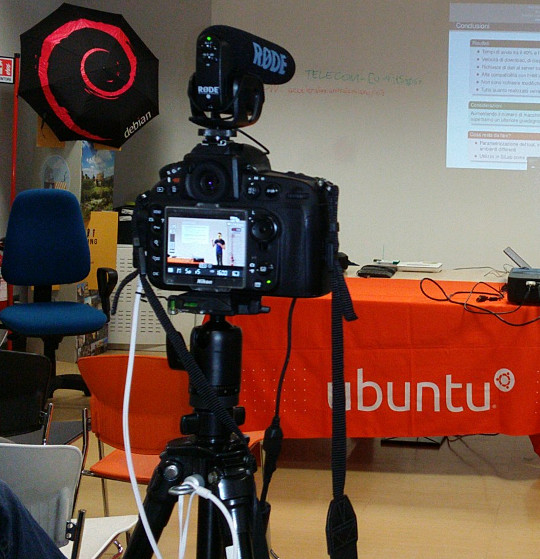
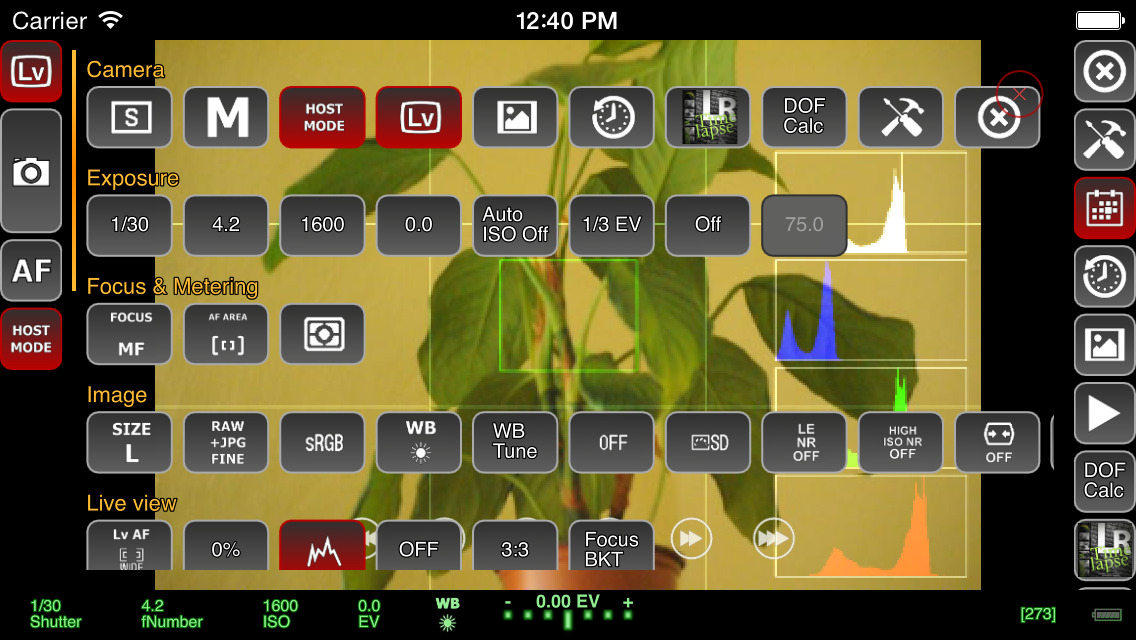
Recording a talk at a free software event with a Nikon D800 on a very basic tripod with Rode VideoMic Pro, headphones (white cable) and external power (black cable) If you want to capture audio with the camera and record it in the video file (discussed in more detail below), you will need to purchase a microphone that mounts on the camera. The built-in microphones on cameras are often quite bad, even on the most expensive cameras. If you are just using the built-in microphone for reference audio (to help with time synchronization when you combine different audio files with the video later) then the built-in microphone may be acceptable. Camera audio is discussed in more detail below. If your camera has a headphone socket, get some headphones for listening to the audio. Make sure you have multiple memory cards. Look carefully at the speed of the memory cards, slow ones are cheaper but they can't keep up with the speed of writing 1080p video. At a minimum, you should aim to buy memory cards that can handle one or two days worth of data for whatever it is you do. A tripod is essential for most types of video. If you use a particularly heavy camera or lens or if you are outdoors and it may be windy you will need a heavier tripod for stability. For video, it is very useful to have a tripod with a handle for panning left and right but if the camera will be stationary for the whole recording then the handle is not essential. Carrying at least one spare battery is another smart move. On one visit to the Inca Trail in Peru, we observed another member of our group hiking up and down the Andes with a brand new DSLR that they couldn't use because the battery was flat. For extended periods of recording, batteries will not be sufficient and you will need to purchase a mains power supply (PSU). These are available for most types of DSLR and video camera. The camera vendors typically design cameras with unusual power sockets so that you can only use a very specific and heavily overpriced PSU from the same company. Don't forget a surge protector too. There are various smartphone apps that allow you to remotely control the camera from the screen of your phone, such as the qDslrDashboard app. These often give a better preview than the screen built-in to the camera and may even allow you to use the touch screen to focus more quickly on a specific part of the picture. A regular USB cable is not suitable for this type of app, you need to buy a USB On-The-Go (OTG) cable.
Screenshot of qDslrDashboard app on a smartphone, controlling a DSLR camera If you plan to copy the video from the camera to a computer at the event, you will need to make sure you have a fast memory card reader. The memory card readers in some laptops are quite slow and others can be quite fast so you may not need to buy an extra card reader. Camera audio Most cameras, including DSLRs, have a built-in microphone and a socket for connecting an external microphone. The built-in microphones obtain very poor quality sound. For many events, it is much better to have independent microphones, such as a lapel microphone attached to a smartphone or wireless transmitter. Those solutions are described in part one of this blog series. Nonetheless, there are still some benefits of capturing audio in the camera. The biggest benefit is the time synchronization: if you have audio recordings in other devices, you will need to align them with the video using post-production software. If the camera recorded an audio stream too, even if the quality is not very good, you can visualize the waveform on screen and use it to align the other audio recordings much more easily and precisely. If the camera will be very close to the people speaking then it may be acceptable to use a microphone mounted on the camera. This will be convenient for post-production because the audio will be synchronized with the video. It may still not be as good as a lapel microphone though, but the quality of these camera-mounted microphones is still far higher than the built-in microphones. I've been trying the Rode VideoMic Pro, it is definitely better than recording with the built-in microphone on the camera and also better than the built-in microphone on my phone. One problem that most people encounter is the sound of the lens autofocus mechanism being detected by the microphone. This occurs with both the built-in microphone and any other microphone you mount on the camera. A microphone mounted on top of the camera doesn't detect this noise with the same intensity as the built-in microphone but it is still present in the recordings. If using a camera-mounted microphone to detect the audio from an audience, you may need to have an omnidirectional microphone. Many camera-mounted microphones are directional and will not detect very much sound from the sides or behind the camera. When using any type of external microphone with the camera, it is recommend to disable automatic gain control (AGC) in the camera settings and then manually adjust the microphone sensitivity/volume level. Use headphones A final word on audio - most good cameras have an audio output socket. Connect headphones and wear them, to make sure you are always capturing audio. Otherwise, if the microphone's battery goes flat or if a wireless microphone goes out of range you may not notice. Choosing a lens The more light you get, the better. Bigger and more expensive lenses allow more light into the camera. Many of the normal lenses sold with a DSLR camera are acceptable but if it is a special occasion you may want to rent a more expensive lens for the day. If you already have a lens, it is a very good idea to test it in conditions similar to those you expect for the event you want to record. Recording duration limits Most DSLR cameras with video capability impose a 30 minute maximum recording duration This is basically the result of a friendly arrangement between movie studios and politicians to charge an extra tax on video recording technology and potentially make the movie studio bosses richer, supposedly justified by the fact that a tiny but exaggerated number of people use their cameras to record movies at the cinema. As a consequence, most DSLR manufacturers limit the duration of video recording so their product won't be subject to the tax, ensuring the retail price is lower and more attractive. On top of this, many DSLR cameras also have a 4GB file size limit if they use the FAT filesystem. Recording 1080p video at a high frame rate may hit the file size limit in 10 minutes, well before you encounter the 30 minute maximum recording duration. To deal with the file size issue, you can record at 720p instead of 1080p and use the frame rate 24fps. For events longer than 30 minutes or where you really want 1080p or a higher frame rate, there are some other options you can consider:
  • Buy or rent a proper video camera instead of using a DSLR camera
  • Using multiple cameras that can stop and be restarted at different times.
  • Manually stopping and restarting the camera if there are breaks in the event where it is safe to do so.
  • Use an app to control the camera and program it to immediately restart the recording each time it stops
  • Extract the raw output from the camera's HDMI socket and record into some other device or computer. There are several purpose-built devices
    that can be used this way with an embedded SSD for storage.
  • There are also some people distributing unofficial/alternative firmware images that remove the artificial 30 minute recording limit.
Camera settings There are many online tutorials and demonstration videos on YouTube that will help you optimize the camera settings for video. You may have already made recordings using the automatic mode. Adjusting some or all of the settings manually may help you create a more optimal recording. You will need to spend some time familiarizing yourself with the settings first. The first thing to check is white balance. This tells the camera the type of lighting in the location. If you set this incorrectly then the colours will be distorted. Many cameras have the ability to automatically set the white balance. For video, you may be able to change one or more settings that control the recording quality. These settings control the file compression ratio and image size. Typical image size settings are 720p and 1080p. Compression ratio may be controlled by a high/medium/low quality setting. Choosing the highest quality and biggest picture requires more space on the memory card and also means you reach the 4GB file size limit more quickly. A higher quality setting also implies a faster memory card is required, because the rate of megabytes per second written to the memory card is higher. Next you need to think about the frame rate. Events that involve fast moving subjects, such as sports, typically benefit from a higher frame rate. For other events it is quite acceptable to use 24 frames per second (fps). Higher frame rates also imply bigger file size and a requirement for a faster memory card. Once you have decided on the frame rate, the next thing to do is set the shutter speed. Use a shutter speed that is double the frame rate. For example, if using 24fps or 25fps, use a 1/50 shutter speed. The final two settings you need to adjust are the ISO and aperture. Set these based on the lighting conditions and extent to which the subjects are moving. For example, if the setting is dark or if you are trying to record fast moving subjects like athletes, vehicles or animals, use an ISO value of 800 or higher. Once you have chosen ISO, adjust the aperture to ensure the picture is sufficiently illuminated. Aperture also has a significant impact on the depth of field. Operating the camera: zoom and focus Many people use zoom lenses. It is not always necessary to change the zoom while recording a video, you can use software to zoom in and out on individual parts of the picture when editing it in post-production. If you do change the zoom while recording, it may be more difficult to maintain focus. Almost all lenses support manual focus (turning the focus ring by hand) and many support automatic focus. When shooting photographs with a DSLR, the mirror is down and the camera can use dedicated sensors for focus and light sensing. When shooting video, the mirror is up and the camera can not use the same focus sensors that are used in photography. Video recording uses a digital focussing algorithm based on contrast in the picture. If you take a lot of photos you are probably quite accustomed to the fast and precise autofocus for photography and you will notice that keeping a video in focus is more challenging. As mentioned already, one of the first things you can do to keep focus simple is to avoid zooming while recording. Record in a higher resolution than you require and then zoom with software later. Some people record using 4k resolution even when they only want to produce a 720p video, as they can digitally zoom in to different parts of the 4k recording without losing detail. If the subject is very stationary (people sitting at a desk for an interview is a typical example), you may be able to set the camera to manual focus and not change it at all while recording. If you choose to enable autofocus while recording, any built-in camera microphone or microphone mounted on the camera is likely to detect sounds from the motorized focus system. Ultimately, the autofocus mechanism is not accurate for all subjects and you may be unable to stop them moving around so you will need to change the focus manually while recording. It requires some practice to be able to do this quickly without overshooting the right focus. To make life more tricky, Nikon and Canon focus rings rotate in the opposite direction, so if you are proficient using one brand you may feel awkward if you ever have to use the other. A good way to practice this skill is to practice while in the car or on the train, pointing at different subjects outside the window and trying to stay in focus as you move from one subject to the next. Make a trial run Many events, from weddings right up to the Olympic Games opening ceremony, have a trial run the day before. One reason for that is to test the locations and settings of all the recording and broadcasting equipment. If a trial run isn't possible for your event, you may find some similar event to practice recording and test your equipment. For example, if you are planning to record a wedding, you could try and record a Sunday mass in the same church. Backup and duplicate the recordings before leaving the event If you only have one copy of the recordings and the equipment is stolen or damaged you may be very disappointed. Before your event, make a plan to duplicate the raw audio and video recordings so that several people can take copies away with them. Decide in advance who will be responsible for this, ensure there will be several portable hard disks and estimate how much time it will take to prepare the copies and factor this into the schedule. Conclusion All the products described can be easily purchased from online retailers. You may not need every accessory that is mentioned as it depends on the type of event you record. The total cost of buying or renting the necessary accessories may be as much as the cost of the camera itself so if you are new to this you may need to think carefully about making a budget with a spreadsheet to do it correctly. Becoming familiar with the camera controls and practicing the techniques for manual focus and zoom can take weeks or months. If you enjoy photography this can be time well spent but if you don't enjoy it then you may not want to commit the time necessary to make good quality video. Don't rule out options like renting equipment instead of buying it or crowdsourcing, asking several participants or friends to help make recordings with their own equipment. For many events, audio is far more indispensable than video and as emphasizing at the beginning of this article, it is recommended that you should be one hundred percent confident in your strategy for recording audio before you start planning to record video.

Daniel Pocock: UK wakes up to airport tax and data grab

The UK has just woken up to the fact that retailers at airports have been playing the VAT system. The focus of the media coverage has been on the VAT money, failing to give much emphasis to the fact this is also a sophisticated and coordinated attack on personal privacy. This situation has been obvious to me for years and it doesn't just occur in the UK. Whenever one of these retailers asks me for a boarding pass, I always refuse. Sometimes they lie to me and tell me that it is mandatory to let them scan my boarding pass: I tell them that a travel companion has the boarding passes and at this point they usually find some way to complete the transaction without further comment. It is only necessary to pay the correct amount With the rise of payment cards, people seem to be forgetting that you can pay for things in cash. If I have the right change to pay for something in this scenario, I typically put it on the counter and walk away. Why should I have to waste my time helping a poorly trained cashier understand VAT? I already deal with enough computer problems in the job I'm paid to do, why should I lose my time when on vacation explaining to a cashier that their computer is failing to correctly deduct 20% VAT? Whenever showing a boarding pass or passport It is far too common for people to try and scan or copy documents these days. When somebody in an airport shop or hotel asks to see a document, I don't let it out of my hands. It is not hard to cover the barcode with your fingers too. This prevents them making an unauthorized copy or using a barcode scanner to extract personal data. Some of these staff literally try to snatch the documents out of people's hands and drop them onto a scanner next to their till. In some countries hotels are obliged to look at your passport and make a record of the name but they often have no obligation to photocopy or scan it and it is often a huge risk if they do. If the airports are genuinely concerned about the security of passengers, they would be just as thorough in protecting data as they are in the hunt for terrorists. For example, they could give VAT-free passengers colour-coded boarding passes or some other vouchers without any personal information on them. VAT diversion funds customer data grab Shops pocket an extra 20% of the price of a product and they condition everybody, staff and customers, to having all customer data expropriated from the boarding pass at the point of sale, even the customers not eligible for a tax refund are unnecessarily having their data hoovered up in this way. The VAT money diverted away from both the tax man and the customer is rolled back into the system to fund the data grab. UK law promises customers significant protection from unlawful use of personal data, so how can these retailers lie to passengers and tell them that scanning the boarding pass is mandatory? Why not ask the Information Commission's Office to check up on this? Paying the correct amount and walking away It is not hard for people to add up the amount of VAT included in a price, deduct it themselves, give the correct and exact amount of cash to the cashier and walk away. Just type the price into your smart phone, divide by 1.2 and you can see the amount to pay. For example, if a product costs 24.95, just type 24.95 1.2 into the calculator on your phone and you find that you have to pay 20.79. It may only be necessary to show a boarding pass or ID for purchasing duty-free alcohol or tobacco. Not just for airports Carrying a correct amount of cash doesn't just help navigate the data grab in airports. Consider some of the other scenarios:
  • A long queue at the cashier in a petrol station, typically on a Sunday afternoon. Did you ever notice somebody who just walks past the queue and puts the exact change (or a cheque) on the counter and drives away while everybody else is waiting to pay with some payment card and scan their loyalty card?
  • Restaurant in a tourist spot, you receive a bill and notice they have added VAT and service charges or something you didn't ask for like bread. In European countries and Australia, the price next to each dish on the menu is the only price you have to pay, just like the price on the shelf in a shop or the price on a web page. If you have the right change you can just pay that amount and walk away without a discussion. In the US the taxes are added later and some tourist hot spots in Europe try this with English speaking customers, thinking that if they are American they won't complain.
  • Hotel tries to insist on a currency conversion when charging your credit card. Maybe you've already realized that dynamic currency conversion (DCC) used by retailers often adds at least 3% to a purchase but some hotels try to go way beyond this. The booking confirmation page you printed from their web site gives you a total price in one currency, perhaps USD or EUR and they use some arbitrary exchange rate, with a whopping 30% margin or more, to convert to the local currency and ask you to insert your PIN number or sign a credit card authorization. The best answer to this practice is usually to carry banknotes in the currency used for the booking, paying that exact amount in cash and if they try to argue, just keep counting out the bank notes to prove it matches the confirmation page. Hotels only get away with this trick because few people check the rate, even fewer carry sufficient cash and you may not be able to use local cash machines to get the currency specified in your booking. This is a situation I've encountered in eastern Europe and South America where it is common to quote in EUR and USD even if that isn't the domestic currency.

11 August 2015

Jonathan McDowell: Programming the FST-01 (gnuk) with a Bus Pirate + OpenOCD

Last year at DebConf14 Lucas authorized the purchase of a handful of gnuk devices, one of which I obtained. At the time it only supported 2048 bit RSA keys. I took a look at what might be involved in adding 4096 bit support during DebConf and managed to brick my device several times in doing so. Thankfully gniibe was on hand with his STLinkV2 to help me recover. However subsequently I was loathe to experiment further at home until I had a suitable programmer. As it is this year has been busy and the 1.1.x release train is supposed to have 4K RSA (as well as ECC) support. DebConf15 is coming up and I felt I should finally sort out playing with the device properly. I still didn t have a suitable programmer. Or did I? Could my trusty Bus Pirate help? The FST-01 has an STM32F103TB on it. There is an exposed SWD port. I found a few projects that claimed to do SWD with a Bus Pirate - Will Donnelly has a much cloned Python project, the MC HCK project have a programmer in Ruby and there s LibSWD though that s targeted to smarter programmers. None of them worked for me; I could get the Python bits as far as correctly doing the ID of the device, but not reading the option bytes or successfully flashing (though I did manage an erase). Enter the old favourite, OpenOCD. This already has SWD support and there s an outstanding commit request to add Bus Pirate support. NodoNogard has a post on using the ST-Link/V2 with OpenOCD and the FST-01 which provided some useful pointers. I grabbed the patch from Gerrit, applied it to OpenOCD git and built an openocd.cfg that contained:
source [find interface/buspirate.cfg]
buspirate_port /dev/ttyUSB0
buspirate_vreg 1
buspirate_mode normal
transport select swd
source [find target/stm32f1x.cfg]
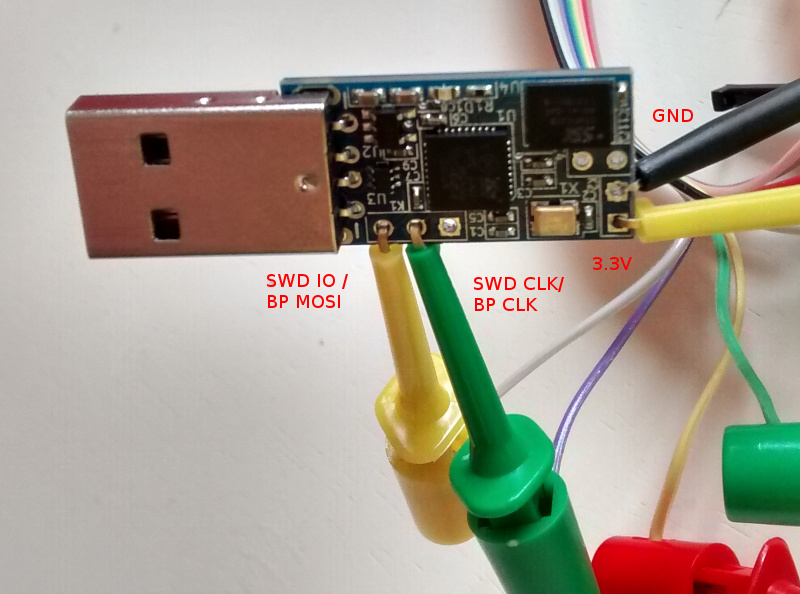
My BP has the Seeed Studio probe cable, so my hookups look like this: Bus Pirate + FST-01 SWD connection That s BP MOSI (grey) to SWD IO, BP CLK (purple) to SWD CLK, BP 3.3V (red) to FST-01 PWR and BP GND (brown) to FST-01 GND. Once that was done I fired up OpenOCD in one terminal and did the following in another:
$ telnet localhost 4444
Trying ::1...
Trying 127.0.0.1...
Connected to localhost.
Escape character is '^]'.
Open On-Chip Debugger
> reset halt
target state: halted
target halted due to debug-request, current mode: Thread
xPSR: 0x01000000 pc: 0xfffffffe msp: 0xfffffffc
Info : device id = 0x20036410
Info : SWD IDCODE 0x1ba01477
Error: Failed to read memory at 0x1ffff7e2
Warn : STM32 flash size failed, probe inaccurate - assuming 128k flash
Info : flash size = 128kbytes
> stm32f1x unlock 0
Device Security Bit Set
stm32x unlocked.
INFO: a reset or power cycle is required for the new settings to take effect.
> reset halt
target state: halted
target halted due to debug-request, current mode: Thread
xPSR: 0x01000000 pc: 0xfffffffe msp: 0xfffffffc
> flash write_image erase /home/noodles/checkouts/gnuk/src/build/gnuk.elf
auto erase enabled
wrote 109568 bytes from file /home/noodles/checkouts/gnuk/src/build/gnuk.elf in 95.055603s (1.126 KiB/s)
> stm32f1x lock 0
stm32x locked
> reset halt
target state: halted
target halted due to debug-request, current mode: Thread 
xPSR: 0x01000000 pc: 0x08000280 msp: 0x20005000
Then it was a matter of disconnecting the gnuk from the BP, plugging it into my USB port and seeing it come up successfully:
usb 1-2: new full-speed USB device number 11 using xhci_hcd
usb 1-2: New USB device found, idVendor=234b, idProduct=0000
usb 1-2: New USB device strings: Mfr=1, Product=2, SerialNumber=3
usb 1-2: Product: Gnuk Token
usb 1-2: Manufacturer: Free Software Initiative of Japan
usb 1-2: SerialNumber: FSIJ-1.1.7-87063020
usb 1-2: ep 0x82 - rounding interval to 1024 microframes, ep desc says 2040 microframes
More once I actually have a 4K key loaded on it.

Matthias Klumpp: AppStream/DEP-11 for everyone! (beta!)

One of the things we discussed at this year s Akademy conference is making AppStream work on Kubuntu.appstream-logo On Debian-based systems, we use a YAML-based implementation of AppStream, called DEP-11 . DEP-11 exists for historical reasons (the DEP-11 YAML format was a superset of AppStream once) and because YAML, unlike XML, is one accepted file format by the Debian FTPMasters team, who we want to have on board when adding support for AppStream. So I ve spent the last few days on setting up the DEP-11 generator for Kubuntu, as well as improving it greatly to produce more meaningful error messages and to generate better output. It became a bit slower in the process, but the greatly improved diagnostics data is worth it. For example, maintainers of Debian packages will now get a more verbose explanation of issues found with metadata in their packages, making them easier to fix for people who didn t get in contact with AppStream yet. At time, we generate AppStream metadata for Tanglu, Kubuntu and Debian, but so far only Tanglu makes real use of it by shipping it in a .deb package. Shipping the data as package is only a workaround though, for a proper implementation, the data will be downloaded by Apt. To achieve that, the data needs to reach the archive first, which is something that I can hopefully discuss and implement with the FTPMasters team of Debian at this year s Debconf. When this is done, the new metadata will automatically become available in tools like GNOME-Software or Muon Discover. How can I see if there are issues with my package? The dep11-generator tool will return HTML pages to show both the extracted metadata, as well as issues with it. You can find the information for the respective distribution here: Each issue tag will contain a detailed explanation of what went wrong. Errors generally lead to ignoring the metadata, so it will not be processed. Warnings usually concern things which might reduce the amount of metadata or make it less useful, while Info-type hints contain information on how to improve the metadata or make it more useful. Can I use the data already? Yes, you can. You just need to place the compressed YAML files in /var/cache/app-info/yaml and the icons in /var/cache/app-info/icons/<suite>-<component>/<size>, for example: /var/cache/app-info/icons/jessie-amd64/64 64 I think I found a bug in the generator In that case, please report the issue against the appstream-dep11 package at Debian, or file an issue at Github.. The only reason why I announce this feature now is to find remaining generator bugs, before officially announcing the feature on debian-devel-announce. When will this be officially announced? I want to give this feature a little bit more testing, and ideally have the integration into the archive ready, so people can see how the metadata looks like when rendered in GNOME-Software/Discover. I also want to write a bit more documentation to help Debian developers and upstreams to improve their metadata. Ideally, I also want to incorporate some feedback at Debconf when announcing full AppStream support in Debian. So take all the stuff you ve read above as a little sneak peek  Debconf15goingI will also give a talk at Debconf, titled AppStream, Limba, XdgApp Where we are going. The aim of this talk is to give an insight i tnto the new developments happening in the software distribution area, and what the goal of these different projects is (the talk should give an overview of what s in the oven and how it will impact Debian). So if you are interested, please drop by :-) Maybe setting up a BOF would also be a good idea.

10 August 2015

Lunar: Reproducible builds: week 15 in Stretch cycle

What happened in the reproducible builds effort this week: Toolchain fixes Guillem Jover uploaded dpkg/1.18.2 which makes dependency comparisons deep by comparing not only the first dependency alternative, to get them sorted in a reproducible way. Original patch by Chris Lamb. Dhole updated the patch adding support for SOURCE_DATE_EPOCH in gettext. A modified package is in the experimental reproducible repository. Valentin Lorentz submitted a patch adding support for SOURCE_DATE_EPOCH to ocamldoc. Valentin Lorentz also opened a bug about the inability to set an arbitrary RNG seed for ocamlopt which would be a way to fix an issue affecting many OCaml packages. Dhole submitted a patch adding support for SOURCE_DATE_EPOCH in qhelpgenerator. A modified package has been sent to the experimental repository as well. Several packages have been updated for the experimental toolchain: doxygen (akira), and dpkg (h01ger). Also, h01ger has built and uploaded all experimental packages having arch:any packages for armhf: dpkg, gettext, doxygen, fontforge, libxslt and texlive-bin. We are now providing our toolchain for armhf and amd64. Packages fixed As you might have noticed, Debian sid is currently largely uninstallable, due to the GCC 5 transition, which also can be see in our reproducibility test setup. Please help! The following packages became reproducible due to changes in their build dependencies: glosstex, indent, ktikz, liblouis, libmicrohttpd, linkchecker, multiboot, qterm, rrep, trueprint, twittering-mode. The following packages became reproducible after getting fixed: Patches submitted which have not made their way to the archive yet: Lunar reported an issue on an unstable ABI from a generated header in icedove reminding of an issue affecting libical-dev. The bug has since been fixed by Carsten Schoenert. akira identified an unreferenced embeded code copy (causing unreproducibility!) in gperf. reproducible.debian.net The scheduler has temporarily been changed to not schedule any already tested packages for sid and experimental, due to the the GCC 5 transitions, which are well visible in our graphs now. On the plus side this has caused our stretch testing to catch up (and improve stats). (h01ger) depwait packages (packages where the Build-Depends cannot be satisfied) are now listed in the last 24h and last 48h pages (Mattia Rizzolo) Two new amd64 build nodes (with 8 cores and 32 GB RAM each) have been added, kindly sponsored by Profitbricks. (h01ger) The 4 armhf (setup last week by Vagrant Cascadian) and 2 amd64 build nodes have been made available to Jenkins. Remote job scheduling has been implemented and 35 new jobs have been added for pbuilder and schroot creation and maintenance of the nodes. (h01ger) The manual scheduler gained a flag (-a/--architecture) to select which arch to schedule in. (Mattia Rizzolo) armhf will only be testing stretch for now, due to limited hardware ressources. (h01ger) The page listing maintainers of unreproducible packages gained internal anchors. As an example, one can now link to unreproducible orphaned packages. (Mattia Rizzolo) Packages with a bug tagged pending are marked using a new symbol: a brown P (Mattia Rizzolo) diffoscope development debbindiff is now called diffoscope! It also has a website at diffoscope.org. The name was changed to better reflect that it became a general purpose tool, capable of comparing many different archive formats, or directories. Version 29 is the renaming release. Amongst a couple of other cosmetic changes a favicon showing the new logo has been added to the generated HTML reports. Version 30 replaces the file matching algorithm for files listed in .changes to a smarter one that removes only the version number. It also fixes a bug where squashfs directories were being extracted even if their content was being compared at a later stage. It also fixes an issue with the test suite that was detected by debci. Documentation update More rationale have been added for supporting SOURCE_DATE_EPOCH The unfinished Reproducible Builds HOWTO is now visible on the web, feedback and patches most welcome. Package reviews 261 obsolete reviews have been removed, 73 added and 145 updated this week.

9 August 2015

Craig Small: procps 3.3.11

I have updated NEWS, bumped the API and tagged in git; procps version 3.3.11 is now released! This release we have fixed many bugs and made procps more robust for those odd corner cases. See the NEWS file for details. The most significant new feature in this release is the support for LXC containers in both ps and top. The source files can be found at both sourceforge and gitlab at: My thanks to the procps co-maintainers, bug reporters and merge/patch authors. What s Next? There has been a large amount of work on the library API. This is not visible to this release as it is on a different git branch called newlib. The library is getting a complete overhaul and will look completely different to the old libproc/libprocps set. A decision hasn t been made when newlib branch will merge into master, but we will do it once we re happy the library and its API have settled. This change will be the largest change to procps library in its 20-odd year history but will mean the library will use common modern practices for libraries.

8 August 2015

Craig Small: Be careful with errno

I m getting close to releasing version 3.3.11 of procps. When it gets near that time, I generally browse again the Debian Bug Tracker for procps bugs. Bug number #733758 caught my eye. With the free command if you used the s option before the c option, the s option failed, seconds argument N failed where N was the number you typed in. The error should be for you trying to type letters for number of seconds. Seemed reasonably simple to test and simple to fix. Take me to the code The relevant code looks like this:
   case 's':
            flags  = FREE_REPEAT;
            args.repeat_interval = (1000000 * strtof(optarg, &amp;endptr));
            if (errno   optarg == endptr   (endptr &amp;&amp; *endptr))
                xerrx(EXIT_FAILURE, _("seconds argument  %s' failed"), optarg);
Seems pretty stock-standard sort of function. Use strtof() to convert the string into the float. You need to check both errno AND optarg == endptr because: At first I thought the logic was wrong, but tracing through it was fine. I then compiled free using the upstream git source, the program worked fine with s flag with no c flag. Doing a diff between the upstream HEAD and Debian s 3.3.10 source showed nothing obvious. I then shifted the upstream git to 3.3.10 too and re-compiled. The Debian source failed, the upstream parsed the s flag fine. I ran diff, no change. I ran md5sum, the hashes matched; what is going on here? I ll set when I want The man page says in the case of under/overflow ERANGE is stored in errno . What this means is if there isn t and under/overflow then errno is NOT set to 0, but its just not set at all. This is quite useful when you have a chain of functions and you just want to know something failed, but don t care what. Most of the time, you generally would have a Have I failed? test and then check errno for why. A typical example is socket calls where anything less than 0 means failure. You check the return value first and then errno. strtof() is one of those funny ones where most people check errno directly; its simpler than checking for +/- HUGE_VAL. You can see though that there are traps. What s the difference? OK, so a simple errno=0 above the call fixes it, but why would the Debian source tree have this failure and the upstream not? Even with the same code? The difference is how they are compiled. The upstream compiles free like this:
gcc -std=gnu99 -DHAVE_CONFIG_H -I. -include ./config.h -I./include -DLOCALEDIR=\"/usr/local/share/locale\" -Iproc -g -O2 -MT free.o -MD -MP -MF .deps/free.Tpo -c -o free.o free.c
mv -f .deps/free.Tpo .deps/free.Po
/bin/bash ./libtool --tag=CC --mode=link gcc -std=gnu99 -Iproc -g -O2 ./proc/libprocps.la -o free free.o strutils.o fileutils.o -ldl
libtool: link: gcc -std=gnu99 -Iproc -g -O2 -o .libs/free free.o strutils.o fileutils.o ./proc/.libs/libprocps.so -ldl
While Debian has some hardening flags:
gcc -std=gnu99 -DHAVE_CONFIG_H -I. -include ./config.h -I./include -DLOCALEDIR=\"/usr/share/locale\" -D_FORTIFY_SOURCE=2 -Iproc -g -O2 -fstack-protector-strong -Wformat -Werror=format-security -MT free.o -MD -MP -MF .deps/free.Tpo -c -o free.o free.c
mv -f .deps/free.Tpo .deps/free.Po
/bin/bash ./libtool --tag=CC --mode=link gcc -std=gnu99 -Iproc -g -O2 -fstack-protector-strong -Wformat -Werror=format-security ./proc/libprocps.la -Wl,-z,relro -o free free.o strutils.o fileutils.o -ldl
libtool: link: gcc -std=gnu99 -Iproc -g -O2 -fstack-protector-strong -Wformat -Werror=format-security -Wl,-z -Wl,relro -o .libs/free free.o strutils.o fileutils.o ./proc/.libs/libprocps.so -ldl
It s not the compiling of free itself that is doing it, but the library. Most likely something that is called before the strtof() is setting errno which this code then falls into. In fact if you run the upstream free linked to the Debian procps library it fails. Moral of the story is to set errno before the function is called if you are going to depend on it for checking if the function succeeded.

7 August 2015

Norbert Preining: Japanese-English dictionary for Kobo

Since ever the Kobo firmwares also allowed downloading of a bunch of dictionaries, most of which I don t need. As I am fluent in most languages I read and write, the only real dictionary I would like to see is a Japanese-English (I don t dare asking for a Japanese-German). Unfortunately, Kobo never shipped one. OTOH, starting with firmware 3.16.10 they ships two different English-Japanese dictionaries, one excellent Japanese-Japanese dictionary, but not one Japanese-English. So I took the liberty to write a script that allows everyone to enrich the shipped Japanese-Japanese dictionary with English definitions. Kobo Logo Till now I have used Tshering s excellent Japanese dictionary which was enriched with English definitions. It was based on the older Japanese-Japanese dictionary shipped with firmwares before 3.16.10. I didn t want to loose the more complete dictionary from the new firmware, so here is a script that updates the dictionary for you Prerequisites The script is neither fool-proof nor does everything by itself. Furthermore, it requires a set of programs. In details: Supported dictionaries At the moment the program can use the following two dictionaries as sources: Edict2 and Japanese3. Edict2 The Edict dictionary is a free dictionary which is the base of most other dictionaries. Created by the JMdict/EDICT Project it provides a very complete Japanese-English dictionary. To use the dict with the current program, one need to download the edict2.gz file and unpack it with gunzip edict2.gz. If you put it into the same directory as the Perl script, nothing else needs to be done, otherwise one can use the command line option --edict PATH-TO-EDICT to specify the location of the edict2 file. Japanese3 The Japanese3 is a dictionary application for iOS which provides another very complete Japanese-English dictionary. My feeling is that it is 90% and more based on Edict, so adding it will not buy you much, but still a bit (see below for how much!). If you have purchased this dictionary/application, and you manage to get access to your iOS device (via jailbreaking or some other tools), then you need to get the file Japanese3.db from the application folder, and then generate a file via sqlite3 as follows:

$ sqlite3 Japanese3.db
.output japanese3-data
select Entry, Furigana, Summary from entries;
If you save the generated file japanese3-data into the same directory as the Perl script, nothing else needs to be done, otherwise one can use the command line option --japanese3 PATH-TO-J3-DATA to specify the location of the Japanese3 data file. Command line options The program supports the following command line options: Note that in case you pass in the option --unpacked, the files should be properly named (encodings are a problem!). Furthermore, note that the unpacked directory contains lots of .gif and .html files that are actually gzip-compressed files, but lacking the .gz extension. If you want to unpack the dictionary, by advised that the file names in the Zip directory are already encoded in UTF-8, but normal programs (unzip, 7z) assume that they are encoded in some other encoding. Thus, if your are using UTF-8 locale, it is necessary to set LC_CTYPE to C to make sure that the encoding is used, as in
LC_CTYPE=C 7z x ...
Typical run In the following example we use both dict2 and Japanese3 dictionaries, and prefer Edict2:
$ perl enhance-dictionary.pl --dicts edict2 --dicts japanese3
Using the following dictionaries as source for translations: edict2 japanese3
loading edict2 ... done
loading Japanese3 data ... done
unpacking original dictionary ... done
loading dict files ... done
searching for words and updating ... done
total words 805521, matches: 130563 (edict: 123388, japanese3: 7175)
creating output html ... done
creating update dictionary in dicthtml-jaxxdjs-201508072201.zip ... done
$
Installing the dictionary After having created the enhanced dictionary, one can install the generated file as KOBO/.kobo/dicts/dicthtml-jaxxdjs.zip (where KOBO is the mount point of the eReader). The dictionary should be picked up automatically. And the next lookup should give you something like the following:
kobo-glohd-enhanced-ja-dict There is only one caveat: Syncing with Kobo will re-download the original dictionary and overwrite the enhanced one. There is at least one solution here, which I am employing, see this post on MobileRead. Download and development place I am using the github repository kobo-ja-dict-enhance to develop the program. Please report bugs, and feature requests there. The file for the last released version can be downloaded from here: enhance-dictionary.pl Future plans I am planning to get rid of the 7z dependency and use Archive::Zip for all the unpacking and packing. This would also allow to do everything in memory and thus make it faster. There is a branch on github with ongoing work on this matter. I also think about including translations for Hiragana words by providing the translations of all possible Kanji readings. Conclusions Even if Kobo does not provide us with a decent Japanese-English dictionary, adding at least a huge amount of translations to the current dictionary is now easily possible. For serious students of Japanese who are reading or starting to read Japanese eBooks, this will be of great help. Enjoy, and don t forget to give feedback, suggestions, and improvements either here or better via the Github page.

Christoph Egger: Systemd pitfalls

logind hangs If you just updated systemd and ssh to that host seems to hang, that's just a known Bug (Debian Bug). Don't panic. Wait for the logind timeout and restart logind. restart and stop;start One thing that confused me several times and still confuses people is systemctl restart doing more than systemctl stop ; systemctl start. You will notice the difference once you have a failed service. A restart will try to start the service again. Both stop and start however will just ignore it. Rumors have it this has changed post jessie however. sysvinit-wrapped services and stop While there are certainly bugs with sysvinit services in general (I found myself several times without a local resolver as unbound failed to be started, haven't managed to debug further), the stop behavior of wrapped services is just broken. systemctl stop will block until the sysv initscript finished. It will even note the result of the action in its state. However systemctl will return with exitcode 0 and not output anything on stdout/stderr. This has been reported as Debian Bug. zsh helper I found the following zshrc snipped quite helpful in dealing with non-reported systemctl failures. On root shells it will display a list of failed services as part of the prompt. This will give proper feedback whether your systemctl stop failed, it will give feedback if you still have type=simple services and if the sysv-init script or wrapper is broken.
precmd ()  
    if [[ $UID == 0 && $+commands[systemctl] != 0 ]]
    then
      use_systemd=true
      systemd_failed=" systemctl --state=failed   grep failed   cut -d \  -f 2   tr '\n' ' ' "
    fi
 
if [[ $UID == 0 && $+commands[systemctl] != 0 ]]
then
  PROMPT=$'% $fg[red]>>  $systemd_failed$reset_color% \n'
else
  PROMPT=""
fi
PROMPT+=whateveryourpromptis
zsh completion Speaking of zsh, there's one problem that bothers me a lot and I don't have any solution for. Tab-completing the service name for service is blazing fast. Tab-completing the service name for systemctl restart takes ages. People traced down to truckloads of dbus communication for the completion but no further fix is known (to me). type=simple services As described in length by Lucas Nussbaum type=simple services are actively harmful. Proper type=forking daemons are strictly superior (they provide feedback of finished initialization and success thereof) and type=notify services are so simple there's no excuse for not using them even for private one-off hacks. Even if you're language doesn't provide libsystemd-daemon bindings:
(defun sd-notify (event-string)
  (let ((socket (make-instance 'sb-bsd-sockets:local-socket :type :datagram))
        (name (posix-getenv "NOTIFY_SOCKET"))
        (bufferlen (length event-string)))
    (when name
      (sb-bsd-sockets:socket-connect socket name)
      (sb-bsd-sockets:socket-send socket event-string bufferlen))))
This is a stable API guaranteed to not break in the future and implemented in less than ten lines of code with just basic socket functions. And if your language has support it becomes actually trivial:
    try:
        import systemd
        systemd.daemon.notify("READY=1")
    except ImportError:
        pass
Note that in both cases there is no drawback at all on systemd-free setups. It has the overhead of checking the process' environment for NOTIFY_SOCKET or for the systemd package and behaves like a simple service otherwise. Actually the idea of separating the technical aspect (daemonizing) from the semantic aspect of signalizing "initialization finished, everything's fine" is a pretty good idea and hopefully has the potential to reduce the number of services signalizing the "everything's fine" too early. It could even be ported to non-systemd init systems easily given the API.

Christoph Egger: Systemd pitfalls

logind hangs If you just updated systemd and ssh to that host seems to hang, that's just a known Bug (Debian Bug #770135). Don't panic. Wait for the logind timeout and restart logind. restart and stop;start One thing that confused me several times and still confuses people is systemctl restart doing more than systemctl stop ; systemctl start. You will notice the difference once you have a failed service. A restart will try to start the service again. Both stop and start however will just ignore it. Rumors have it this has changed post jessie however. sysvinit-wrapped services and stop While there are certainly bugs with sysvinit services in general (I found myself several times without a local resolver as unbound failed to be started, haven't managed to debug further), the stop behavior of wrapped services is just broken. systemctl stop will block until the sysv initscript finished. It will even note the result of the action in its state. However systemctl will return with exitcode 0 and not output anything on stdout/stderr. This has been reported as Debian Bug #792045. zsh helper I found the following zshrc snipped quite helpful in dealing with non-reported systemctl failures. On root shells it will display a list of failed services as part of the prompt. This will give proper feedback whether your systemctl stop failed, it will give feedback if you still have type=simple services and if the sysv-init script or wrapper is broken.
precmd ()  
    if [[ $UID == 0 && $+commands[systemctl] != 0 ]]
    then
      use_systemd=true
      systemd_failed=" systemctl --state=failed   grep failed   cut -d \  -f 2   tr '\n' ' ' "
    fi
 
if [[ $UID == 0 && $+commands[systemctl] != 0 ]]
then
  PROMPT=$'% $fg[red]>>  $systemd_failed$reset_color% \n'
else
  PROMPT=""
fi
PROMPT+=whateveryourpromptis
zsh completion Speaking of zsh, there's one problem that bothers me a lot and I don't have any solution for. Tab-completing the service name for service is blazing fast. Tab-completing the service name for systemctl restart takes ages. People traced down to truckloads of dbus communication for the completion but no further fix is known (to me). type=simple services As described in length by Lucas Nussbaum type=simple services are actively harmful. Proper type=forking daemons are strictly superior (they provide feedback of finished initialization and success thereof) and type=notify services are so simple there's no excuse for not using them even for private one-off hacks. Even if you're language doesn't provide libsystemd-daemon bindings:
(defun sd-notify (event-string)
  (let ((socket (make-instance 'sb-bsd-sockets:local-socket :type :datagram))
        (name (posix-getenv "NOTIFY_SOCKET"))
        (bufferlen (length event-string)))
    (when name
      (sb-bsd-sockets:socket-connect socket name)
      (sb-bsd-sockets:socket-send socket event-string bufferlen))))
This is a stable API guaranteed to not break in the future and implemented in less than ten lines of code with just basic socket functions. And if your language has support it becomes actually trivial:
    try:
        import systemd
        systemd.daemon.notify("READY=1")
    except ImportError:
        pass
Note that in both cases there is no drawback at all on systemd-free setups. It has the overhead of checking the process' environment for NOTIFY_SOCKET or for the systemd package and behaves like a simple service otherwise. Actually the idea of separating the technical aspect (daemonizing) from the semantic aspect of signalizing "initialization finished, everything's fine" is a pretty good idea and hopefully has the potential to reduce the number of services signalizing the "everything's fine" too early. It could even be ported to non-systemd init systems easily given the API.

Next.

Previous.