Search Results: "mak"

14 June 2017

Antoine Beaupr : Alioth moving toward pagure

Since 2003, the Debian project has been running a server called Alioth to host source code version control systems. The server will hit the end of life of the Debian LTS release (Wheezy) next year; that deadline raised some questions regarding the plans for the server over the coming years. Naturally, that led to a discussion regarding possible replacements. In response, the current Alioth maintainer, Alexander Wirt, announced a sprint to migrate to pagure, a free-software "Git-centered forge" written in Python for the Fedora project, which LWN covered last year. Alioth currently runs FusionForge, previously known as GForge, which is the free-software fork of the SourceForge code base when that service closed its source in 2001. Alioth hosts source code repositories, mainly Git and Subversion (SVN) and, like other "forge" sites, also offers forums, issue trackers, and mailing list services. While other alternatives are still being evaluated, a consensus has emerged on a migration plan from FusionForage to a more modern and minimal platform based on pagure.

Why not GitLab? While this may come as a surprise to some who would expect Debian to use the more popular GitLab project, the discussion and decision actually took place a while back. During a lengthy debate last year, Debian contributors discussed the relative merits of different code-hosting platforms, following the initiative of Debian Developer "Pirate" Praveen Arimbrathodiyil to package GitLab for Debian. At that time, Praveen also got a public GitLab instance running for Debian (gitlab.debian.net), which was sponsored by GitLab B.V. the commercial entity behind the GitLab project. The sponsorship was originally offered in 2015 by the GitLab CEO, presumably to counter a possible move to GitHub, as there was a discussion about creating a GitHub Organization for Debian at the time. The deployment of a Debian-specific GitLab instance then raised the question of the overlap with the already existing git.debian.org service, which is backed by Alioth's FusionForge deployment. It then seemed natural that the new GitLab instance would replace Alioth. But when Praveen directly proposed to move to GitLab, Wirt stepped in and explained that a migration plan was already in progress. The plan then was to migrate to a simpler gitolite-based setup, a decision that was apparently made in corridor discussions surrounding the Alioth Git replacement BoF held during Debconf 2015. The first objection raised by Wirt against GitLab was its "huge number of dependencies". Another issue Wirt identified was the "open core / enterprise model", preferring a "real open source system", an opinion which seems shared by other participants on the mailing list. Wirt backed his concerns with an hypothetical example:
Debian needs feature X but it is already in the enterprise version. We make a patch and, for commercial reasons, it never gets merged (they already sell it in the enterprise version). Which means we will have to fork the software and keep those patches forever. Been there done that. For me, that isn't acceptable.
This concern was further deepened when GitLab's Director of Strategic Partnerships, Eliran Mesika, explained the company's stewardship policy that explains how GitLab decides which features end up in the proprietary version. Praveen pointed out that:
[...] basically it boils down to features that they consider important for organizations with less than 100 developers may get accepted. I see that as a red flag for a big community like debian.
Since there are over 600 Debian Developers, the community seems to fall within the needs of "enterprise" users. The features the Debian community may need are, by definition, appropriate only to the "Enterprise Edition" (GitLab EE), the non-free version, and are therefore unlikely to end up in the "Community Edition" (GitLab CE), the free-software version. Interestingly, Mesika asked for clarification on which features were missing, explaining that GitLab is actually open to adding features to GitLab CE. The response from Debian Developer Holger Levsen was categorical: "It's not about a specific patch. Free GitLab and we can talk again." But beyond the practical and ethical concerns, some specific features Debian needs are currently only in GitLab EE. For example, debian.org systems use LDAP for authentication, which would obviously be useful in a GitLab deployment; GitLab CE supports basic LDAP authentication, but advanced features, like group or SSH-key synchronization, are only available in GitLab EE. Wirt also expressed concern about the Contributor License Agreement that GitLab B.V. requires contributors to sign when they send patches, which forces users to allow the release of their code under a non-free license. The debate then went on going through a exhaustive inventory of different free-software alternatives:
  • GitLab, a Ruby-based GitHub replacement, dual-licensed MIT/Commercial
  • Gogs, Go, MIT
  • Gitblit, Java, Apache-licensed
  • Kallithea, in Python, also supports Mercurial, GPLv3
  • and finally, pagure, also written Python, GPLv2
A feature comparison between each project was created in the Debian wiki as well. In the end, however, Praveen gave up on replacing Alioth with GitLab because of the controversy and moved on to support the pagure migration, which resolved the discussion in July 2016. More recently, Wirt admitted in an IRC conversation that "on the technical side I like GitLab a lot more than pagure" and that "as a user, GitLab is much nicer than pagure and it has those nice CI [continuous integration] features". However, as he explained in his blog "GitLab is Opencore, [and] that it is not entirely opensource. I don't think we should use software licensed under such a model for one of our core services" which leaves pagure as the only stable candidate. Other candidates were excluded on technical grounds, according to Wirt: Gogs "doesn't scale well" and a quick security check didn't yield satisfactory results; "Gitblit is Java" and Kallithea doesn't have support for accessing repositories over SSH (although there is a pending pull request to add the feature). In an email interview, Sid Sijbrandij, CEO of GitLab, did say that "we want to make sure that our open source edition can be used by open source projects". He gave examples of features liberated following requests by the community, such as branded login pages for the VLC project and GitLab Pages after popular demand. He stressed that "There are no artificial limits in our open source edition and some organizations use it with more than 20.000 users." So if the concern of the Debian community is that features may be missing from GitLab CE, there is definitely an opening from GitLab to add those features. If, however, the concern is purely ethical, it's hard to see how an agreement could be reached. As Sijbrandij put it:
On the mailinglist it seemed that some Debian maintainers do not agree with our open core business model and demand that there is no proprietary version. We respect that position but we don't think we can compete with the purely proprietary software like GitHub with this model.

Working toward a pagure migration The issue of Alioth maintenance came up again last month when Boyuan Yang asked what would happen to Alioth when support for Debian LTS (Wheezy) ends next year. Wirt brought up the pagure migration proposal and the community tried to make a plan for the migration. One of the issues raised was the question of the non-Git repositories hosted on Alioth, as pagure, like GitLab, only supports Git. Indeed, Ben Hutchings calculated that while 90% (\~19,000) of the repositories currently on Alioth are Git, there are 2,400 SVN repositories and a handful of Mercurial, Bazaar (bzr), Darcs, Arch, and even CVS repositories. As part of an informal survey, however, most packaging teams explained they either had already migrated away from SVN to Git or were in the process of doing so. The largest CVS user, the web site team, also explained it was progressively migrating to Git. Mattia Rizzolo then proposed that older repository services like SVN could continue running even if FusionForge goes down, as FusionForge is, after all, just a web interface to manage those back-end services. Repository creation would be disabled, but older repositories would stay operational until they migrate to Git. This would, effectively, mean the end of non-Git repository support for new projects in the Debian community, at least officially. Another issue is the creation of a Debian package for pagure. Ironically, while Praveen and other Debian maintainers have been working for 5 years to package GitLab for Debian, pagure isn't packaged yet. Antonio Terceiro, another Debian Developer, explained this isn't actually a large problem for debian.org services: "note that DSA [Debian System Administrator team] does not need/want the service software itself packaged, only its dependencies". Indeed, for Debian-specific code bases like ci.debian.net or tracker.debian.org, it may not make sense to have the overhead of maintaining Debian packages since those tools have limited use outside of the Debian project directly. While Debian derivatives and other distributions could reuse them, what usually happens is that other distributions roll their own software, like Ubuntu did with the Launchpad project. Still, Paul Wise, a member of the DSA team, reasoned that it was better, in the long term, to have Debian packages for debian.org services:
Personally I'm leaning towards the feeling that all configuration, code and dependencies for Debian services should be packaged and subjected to the usual Debian QA activities but I acknowledge that the current archive setup (testing migration plus backporting etc) doesn't necessarily make this easy.
Wise did say that "DSA doesn't have any hard rules/policy written down, just evaluation on a case-by-case basis" which probably means that pagure packaging will not be a blocker for deployment. The last pending issue is the question of the mailing lists hosted on Alioth, as pagure doesn't offer mailing list management (nor does GitLab). In fact, there are three different mailing list services for the Debian project: Wirt, with his "list-master hat" on, explained that the main mailing list service is "not really suited as a self-service" and expressed concern at the idea of migrating the large number mailing lists hosted on Alioth. Indeed, there are around 1,400 lists on Alioth while the main service has a set of 300 lists selected by the list masters. No solution for those mailing lists was found at the time of this writing. In the end, it seems like the Debian project has chosen pagure, the simpler, less featureful, but also less controversial, solution and will use the same hosting software as their fellow Linux distribution, Fedora. Wirt is also considering using FreeIPA for account management on top of pagure. The plan is to migrate away from FusionForge one bit at a time, and pagure is the solution for the first step: the Git repositories. Lists, other repositories, and additional features of FusionForge will be dealt with later on, but Wirt expects a plan to come out of the upcoming sprint. It will also be interesting to see how the interoperability promises of pagure will play out in the Debian world. Even though the federation features of pagure are still at the early stages, one can already clone issues and pull requests as Git repositories, which allows for a crude federation mechanism. In any case, given the long history and the wide variety of workflows in the Debian project, it is unlikely that a single tool will solve all problems. Alioth itself has significant overlap with other Debian services; not only does it handle mailing lists and forums, but it also has its own issue tracker that overlaps with the Debian bug tracking system (BTS). This is just the way things are in Debian: it is an old project with lots of moving part. As Jonathan Dowland put it: "The nature of the project is loosely-coupled, some redundancy, lots of legacy cruft, and sadly more than one way to do it." Hopefully, pagure will not become part of that "legacy redundant cruft". But at this point, the focus is on keeping the services running in a simpler, more maintainable way. The discussions between Debian and GitLab are still going on as we speak, but given how controversial the "open core" model used by GitLab is for the Debian community, pagure does seem like a more logical alternative.
Note: this article first appeared in the Linux Weekly News.

Sjoerd Simons: Debian armhf VM on arm64 server

At Collabora one of the many things we do is build Debian derivatives/overlays for customers on a variety of architectures including 32 bit and 64 bit ARM systems. And just as Debian does, our OBS system builds on native systems rather than emulators. Luckily with the advent of ARM server systems some years ago building natively for those systems has been a lot less painful than it used to be. For 32 bit ARM we've been relying on Calxeda blade servers, however Calxeda unfortunately tanked ages ago and the hardware is starting to show its age (though luckily Debian Stretch does support it properly, so at least the software is still fresh). On the 64 bit ARM side, we're running on Gigabyte MP30-AR1 based servers which can run 32 bit arm code (As opposed to e.g. ThunderX based servers which can only run 64 bit code). As such running armhf VMs on them to act as build slaves seems a good choice, but setting that up is a bit more involved than it might appear. The first pitfall is that there is no standard bootloader or boot firmware available in Debian to boot on the "virt" machine emulated by qemu (I didn't want to use an emulation of a real machine). That also means there is nothing to pick the kernel inside the guest at boot nor something which can e.g. have the guest network boot, which means direct kernel booting needs to be used. The second pitfall was that the current Debian Stretch armhf kernel isn't built with support for the generic PCI host controller which the qemu virtual machine exposes, which means no storage and no network shows up in the guest. Hopefully that will get solved soonish (Debian bug 864726) and can be in a Stretch update, until then a custom kernel package is required using the patch attach to the bug report is required but I won't go into that any further in this post. So on the happy assumption that we have a kernel that works, the challenge left is to nicely manage direct kernel loading. Or more specifically, how ensure the hosts boots the kernel the guest has installed via the standard apt tools without having to copy kernels around between guest/host, which essentially comes down to exposing /boot from the guest to the host. The solution we picked is to use qemu's 9pfs support to share a folder from the host and use that as /boot of the guest. For the 9p folder the "mapped" security mode seems needed as the "none" mode seems to get confused by dpkg (Debian bug 864718). As we're using libvirt as our virtual machine manager the remainder of how to glue it all together will be mostly specific to that. First step is to install the system, mostly as normal. One can directly boot into the vmlinuz and initrd.gz provided by normal Stretch armhf netboot installer (downloaded into e.g /tmp). The setup overall is straight-forward with a few small tweaks: Apart from those tweaks the resulting example command is similar to the one that can be found in the virt-install man-page:
virt-install --name armhf-vm --arch armv7l --memory 512 \
  --disk /srv/armhf-vm.img,bus=virtio
  --filesystem /srv/armhf-vm-boot,virtio-boot,mode=mapped \
  --boot=kernel=/tmp/vmlinuz,initrd=/tmp/initrd.gz,kernel_args="console=ttyAMA0,root=/dev/vda1"

Run through the install as you'd normally would. Towards the end the installer will likely complain it can't figure out how to install a bootloader, which is fine. Just before ending the install/reboot, switch to the shell and copy the /boot/vmlinuz and /boot/initrd.img from the target system to the host in some fashion (e.g. chroot into /target and use scp from the installed system). This is required as the installer doesn't support 9p, but to boot the system an initramfs will be needed with the modules needed to mount the root fs, which is provided by the installed initramfs :). Once that's all moved around, the installer can be finished. Next, booting the installed system. For that adjust the libvirt config (e.g. using virsh edit and tuning the xml) to use the kernel and initramfs copied from the installer rather then the installer ones. Spool up the VM again and it should happily boot into a freshly installed Debian system. To finalize on the guest side /boot should be moved onto the shared 9pfs, the fstab entry for the new /boot should look something like:
virtio-boot /boot  9p trans=virtio,version=9p2000.L,x-systemd.automount 0 0

With that setup, it's just a matter of shuffling the files in /boot around to the new filesystem and the guest is done (make sure vmlinuz/initrd.img stay symlinks). Kernel upgrades will work as normal and visible to the host. Now on the host side there is one extra hoop to jump through, as the guest uses the 9p mapped security model symlinks in the guest will be normal files on the host containing the symlink target. To resolve that one, we've used libvirt's qemu hook support to setup a proper symlink before the guest is started. Below is the script we ended up using as an example (/etc/libvirt/hooks/qemu):
vm=$1
action=$2
bootdir=/srv/$ vm -boot
if [ $ action  != "prepare" ] ; then
  exit 0
fi
if [ ! -d $ bootdir  ] ; then
  exit 0
fi
ln -sf $(basename $(cat $ bootdir /vmlinuz))  $ bootdir /virtio-vmlinuz
ln -sf $(basename $(cat $ bootdir /initrd.img))  $ bootdir /virtio-initrd.img

With that in place, we can simply point the libvirt definition to use /srv/$ vm -boot/virtio- vmlinuz,initrd.img as the kernel/initramfs for the machine and it'll automatically get the latest kernel/initramfs as installed by the guest when the VM is started. Just one final rough edge remains, when doing reboot from the VM libvirt leaves qemu to handle that rather than restarting qemu. This unfortunately means a reboot won't pick up a new kernel if any, for now we've solved this by configuring libvirt to stop the VM on reboot instead. As we typically only reboot VMs on kernel (security) upgrades, while a bit tedious, this avoid rebooting with an older kernel/initramfs than intended.

Nicolas Dandrimont: DebConf 17 bursaries: update your status now!

TL;DR: if you applied for a DebConf 17 travel bursary, and you haven t accepted it yet, login to the DebConf website and update your status before June 20th or your bursary grant will be gone. *blows dust off the blog* As you might be aware, DebConf 17 is coming soon and it s gonna be the biggest DebConf in Montr al ever. Of course, what makes DebConf great is the people who come together to work on Debian, share their achievements, and help draft our cunning plans to take over the world. Also cheese. Lots and lots of cheese. To that end, the DebConf team had initially budgeted US$40,000 for travel grants ($30,000 for contributors, $10,000 for diversity and inclusion grants), allowing the bursaries team to bring people from all around the world who couldn t have made it to the conference. Our team of volunteers rated the 188 applications, we ve made a ranking (technically, two rankings : one on contribution grounds and one on D&I grounds), and we finally sent out a first round of grants last week. After the first round, the team made a new budget assessment, and thanks to the support of our outstanding sponsors, an extra $15,000 has been allocated for travel stipends during this week s team meeting, with the blessing of the DPL. We ve therefore been able to send a second round of grants today. Now, if you got a grant, you have two things to do : you need to accept your grant, and you need to update your requested amount. Both of those steps allow us to use our budget more wisely: having grants expire frees money up to get more people to the conference earlier. Having updated amounts gives us a better view of our overall budget. (You can only lower your requested amount, as we can t inflate our budget) Our system has sent mails to everyone, but it s easy enough to let that email slip (or to not receive it for some reason). It takes 30 seconds to look at the status of your request on the DebConf 17 website, and even less to do the few clicks needed for you to accept the grant. Please do so now! OK, it might take a few minutes if your SSO certificate has expired and you have to look up the docs to renew it. The deadline for the first round of travel grants (which went out last week) is June 20th. The deadline for the second round (which went out today) is June 24th. If somehow you can t login to the website before the deadline, the bursaries team has an email address you can use. We want to send out a third round of grants on June 25th, using the money people freed up: our current acceptance ratio is around 40%, and a lot of very strong applications have been deferred. We don t want them to wait up until July to get a definitive answer, so thanks for helping us! bient t Montr al !

Dirk Eddelbuettel: #7: C++14, R and Travis -- A useful hack

Welcome to the seventh post in the rarely relevant R ramblings series, or R4 for short. We took a short break as several conferences and other events interfered during the month of May, keeping us busy and away from this series. But we are back now with a short and useful hack I came up with this weekend. The topic is C++14, i.e. the newest formally approved language standard for C++, and its support in R and on Travis CI. With release R 3.4.0 of a few weeks ago, R now formally supports C++14. Which is great. But there be devils. A little known fact is that R hangs on to its configuration settings from its own compile time. That matters in cases such as the one we are looking at here: Travis CI. Travis is a tremendously useful and widely-deployed service, most commonly connected to GitHub driving "continuous integration" (the 'CI') testing after each commit. But Travis CI, for as useful as it is, is also maddingly conservative still forcing everybody to live and die by [Ubuntu 14.04]http://releases.ubuntu.com/14.04/). So while we all benefit from the fine work by Michael who faithfully provides Ubuntu binaries for distribution via CRAN (based on the Debian builds provided by yours truly), we are stuck with Ubuntu 14.04. Which means that while Michael can provide us with current R 3.4.0 it will be built on ancient Ubuntu 14.04. Why does this matter, you ask? Well, if you just try to turn the very C++14 support added to R 3.4.0 on in the binary running on Travis, you get this error:
** libs
Error in .shlib_internal(args) : 
  C++14 standard requested but CXX14 is not defined
And you get it whether or not you define CXX14 in the session. So R (in version 3.4.0) may want to use C++14 (because a package we submitted requests it), but having been built on the dreaded Ubuntu 14.04, it just can't oblige. Even when we supply a newer compiler. Because R hangs on to its compile-time settings rather than current environment variables. And that means no C++14 as its compile-time compiler was too ancient. Trust me, I tried: adding not only g++-6 (from a suitable repo) but also adding C++14 as the value for CXX_STD. Alas, no mas. The trick to overcome this is twofold, and fairly straightforward. First off, we just rely on the fact that g++ version 6 defaults to C++14. So by supplying g++-6, we are in the green. We have C++14 by default without requiring extra options. Sweet. The remainder is to tell R to not try to enable C++14 even though we are using it. How? By removing CXX_STD=C++14 on the fly and just for Travis. And this can be done easily with a small script configure which conditions on being on Travis by checking two environment variables:
#!/bin/bash
## Travis can let us run R 3.4.0 (from CRAN and the PPAs) but this R version
## does not know about C++14.  Even though we can select CXX_STD = C++14, R
## will fail as the version we use there was built in too old an environment,
## namely Ubuntu "trusty" 14.04.
##
## So we install g++-6 from another repo and rely on the fact that is
## defaults to C++14.  Sadly, we need R to not fail and hence, just on
## Travis, remove the C++14 instruction
if [[ "$ CI " == "true" ]]; then
    if [[ "$ TRAVIS " == "true" ]]; then 
        echo "** Overriding src/Makevars and removing C++14 on Travis only"
        sed -i 's CXX_STD = CXX14 ' src/Makevars
    fi
fi
I have deployed this now for two sets of builds in two distinct repositories for two "under-development" packages not yet on CRAN, and it just works. In case you turn on C++14 via SystemRequirements: in the file DESCRIPTION, you need to modify it here. So to sum up, there it is: C++14 with R 3.4.0 on Travis. Only takes a quick Travis-only modification.

13 June 2017

Reproducible builds folks: Reproducible Builds: week 111 in Stretch cycle

Here's what happened in the Reproducible Builds effort between Sunday June 4 and Saturday June 10 2017: Past and upcoming events On June 10th, Chris Lamb presented at the Hong Kong Open Source Conference 2017 on reproducible builds. Patches and bugs filed Reviews of unreproducible packages 7 package reviews have been added, 10 have been updated and 14 have been removed in this week, adding to our knowledge about identified issues. Weekly QA work During our reproducibility testing, FTBFS bugs have been detected and reported by: Two FTBFS issues of LEDE (exposed in our setup) were found and were fixed: diffoscope development tests.reproducible-builds.org: Alexander 'lynxis' Couzens made some changes for testing LEDE and OpenWrt: Hans-Christoph Steiner, for testing F-Droid: Daniel Shahaf, for testing Debian: Holger 'h01ger' Levsen, for testing Debian: Misc. This week's edition was written by Ximin Luo, Chris Lamb and Holger Levsen & reviewed by a bunch of Reproducible Builds folks on IRC & the mailing lists.

Gunnar Wolf: Reporting progress on the translation infrastructure

Some days ago, I blogged asking for pointers to get started with the translation of Made with Creative Commons. Thank you all for your pointers and ideas! To the people that answered via private mail, via IRC, via comments on the blog. We have made quite a bit of progress so far; I want to test some things before actually sending a call for help. What do we have?
Git repository set up
I had already set up a repository at GitLab; right now, the contents are far from useful, they merely document what I have done so far. I have started talking with my Costa Rican friend Leo Arias, who is also interested in putting some muscle behind this translation, and we are both the admins to this project.
Talked with the authors
Sarah is quite enthusiastic about us making this! I asked her to hold a little bit before officially announcing there is work ongoing... I want to get bits of infrastructure ironed out first. Important Talking with her, she discussed the tools they used for authoring the book. It made me less of a purist :) Instead of starting from something "pristine", our master source will be the PDF export of the Google Docs document.
Markdown conversion
Given that translation tools work over the bits of plaintext, we want to work with the "plainest" rendition of the document, which is Markdown. I found that Pandoc does a very good approximation to what we need (that is, introduces very little "ugly" markup elements). Converting the ODT into Markdown is as easy as:
$ pandoc -f odt MadewithCreativeCommonsmostup-to-dateversion.odt -t markdown > MadewithCreativeCommonsmostup-to-dateversion.md
Of course, I want to fine-tune this as much as possible.
Producing a translatable .po file
I have used Gettext to translate user interfaces; it is a tool very well crafted for that task. Translating a book is quite different: How and where does it break and join? How are paragraphs "strung" together into chapters, parts, a book? That's a task for PO 4 Anything (po4a). As simple as this:
po4a-gettextize -f text -m MadewithCreativeCommonsmostup-to-dateversion.md -p MadewithCreativeCommonsmostup-to-dateversion.po -M utf-8
I tested the resulting file with my good ol' trusty poedit, and it works... Very nicely!
What is left to do?

12 June 2017

Sven Hoexter: UEFI PXE preseeded Debian installation on HPE DL120

We bought a bunch of very cheap low end HPE DL120 server. Enough to warrant a completely automated installation setup. Shouldn't be that much of a deal, right? Get dnsmasq up and running, feed it a preseed.cfg and be done with it. In practise it took us more hours then we expected. Setting up the hardware Our hosts are equipped with an additional 10G dual port NIC and we'd like to use this NIC for PXE booting. That's possible, but it requires you to switch to UEFI boot. Actually it enables you to boot from any available NIC. Setting up dnsmasq We decided to just use the packaged debian-installer from jessie and do some ugly things like overwritting files in /usr/lib via ansible later on. So first of all install debian-installer-8-netboot-amd64 and dnsmasq, then enroll our additional config for dnsmasq, ours looks like this:
domain=int.foobar.example
dhcp-range=192.168.0.240,192.168.0.242,255.255.255.0,1h
dhcp-boot=bootnetx64.efi
pxe-service=X86-64_EFI, "Boot UEFI PXE-64", bootnetx64.efi
enable-tftp
tftp-root=/usr/lib/debian-installer/images/8/amd64/text
dhcp-option=3,192.168.0.1
dhcp-host=00:c0:ff:ee:00:01,192.168.0.123,foobar-01
Now you've to link /usr/lib/debian-installer/images/8/amd64/text/bootnetx64.efi to /usr/lib/debian-installer/images/8/amd64/text/debian-installer/amd64/bootnetx64.efi. That got us of the ground and we had a working UEFI PXE boot that got us into debian-installer. Feeding d-i the preseed file Next we added some grub.cfg settings and parameterized some basic stuff to be handed over to d-i via the kernel command line. You'll find the correct grub.cfg in /usr/lib/debian-installer/images/8/amd64/text/debian-installer/amd64/grub/grub.cfg. We added the following two lines to automate the start of the installer:
set default="0"
set timeout=5
and our kernel command line looks like this:
 linux    /debian-installer/amd64/linux vga=788 --- auto=true interface=eth1 netcfg/dhcp_timeout=60 netcfg/choose_interface=eth1 priority=critical preseed/url=tftp://192.168.0.2/preseed.cfg quiet
Important points: preseeed.cfg, GPT and ESP One of the most painful points was the fight to find out the correct preseed values to install with GPT to create a ESP (EFI system partition) and use LVM for /. Relevant settings are:
# auto method must be lvm
d-i partman-auto/method string lvm
d-i partman-lvm/device_remove_lvm boolean true
d-i partman-md/device_remove_md boolean true
d-i partman-lvm/confirm boolean true
d-i partman-lvm/confirm_nooverwrite boolean true
d-i partman-basicfilesystems/no_swap boolean false
# Keep that one set to true so we end up with a UEFI enabled
# system. If set to false, /var/lib/partman/uefi_ignore will be touched
d-i partman-efi/non_efi_system boolean true
# enforce usage of GPT - a must have to use EFI!
d-i partman-basicfilesystems/choose_label string gpt
d-i partman-basicfilesystems/default_label string gpt
d-i partman-partitioning/choose_label string gpt
d-i partman-partitioning/default_label string gpt
d-i partman/choose_label string gpt
d-i partman/default_label string gpt
d-i partman-auto/choose_recipe select boot-root-all
d-i partman-auto/expert_recipe string \
boot-root-all :: \
538 538 1075 free \
$iflabel  gpt   \
$reusemethod    \
method  efi   \
format    \
. \
128 512 256 ext2 \
$defaultignore    \
method  format   format    \
use_filesystem    filesystem  ext2   \
mountpoint  /boot   \
. \
1024 4096 15360 ext4 \
$lvmok    \
method  format   format    \
use_filesystem    filesystem  ext4   \
mountpoint  /   \
. \
1024 4096 15360 ext4 \
$lvmok    \
method  format   format    \
use_filesystem    filesystem  ext4   \
mountpoint  /var   \
. \
1024 1024 -1 ext4 \
$lvmok    \
method  format   format    \
use_filesystem    filesystem  ext4   \
mountpoint  /var/lib   \
.
# This makes partman automatically partition without confirmation, provided
# that you told it what to do using one of the methods above.
d-i partman-partitioning/confirm_write_new_label boolean true
d-i partman/choose_partition select finish
d-i partman-md/confirm boolean true
d-i partman/confirm boolean true
d-i partman/confirm_nooverwrite boolean true
# This is fairly safe to set, it makes grub install automatically to the MBR
# if no other operating system is detected on the machine.
d-i grub-installer/only_debian boolean true
d-i grub-installer/with_other_os boolean true
d-i grub-installer/bootdev  string /dev/sda
I hope that helps to ease the processes to setup automated UEFI PXE installations for some other people out there still dealing with bare metal systems. Some settings took us some time to figure out, for example d-i partman-efi/non_efi_system boolean true required some searching on codesearch.d.n (amazing ressource if you're writing preseed files and need to find the correct templates) and reading scripts on git.d.o where you'll find the source for partman-* and grub-installer. Kudos Thanks especially to P.P. and M.K. to figure out all those details.

Petter Reinholdtsen: Updated sales number for my Free Culture paper editions

It is pleasing to see that the work we put down in publishing new editions of the classic Free Culture book by the founder of the Creative Commons movement, Lawrence Lessig, is still being appreciated. I had a look at the latest sales numbers for the paper edition today. Not too impressive, but happy to see some buyers still exist. All the revenue from the books is sent to the Creative Commons Corporation, and they receive the largest cut if you buy directly from Lulu. Most books are sold via Amazon, with Ingram second and only a small fraction directly from Lulu. The ebook edition is available for free from Github.
Title / languageQuantity
2016 jan-jun2016 jul-dec2017 jan-may
Culture Libre / French 3 6 15
Fri kultur / Norwegian 7 1 0
Free Culture / English 14 27 16
Total 24 34 31
A bit sad to see the low sales number on the Norwegian edition, and a bit surprising the English edition still selling so well. If you would like to translate and publish the book in your native language, I would be happy to help make it happen. Please get in touch.

11 June 2017

Bastian Blank: New blog featuring Pelican

For years I used a working blog setup using Zope, Plone and Quills. Quills was neglected for a long time and made me stuck at the aging Plone 4.2. There seems to be some work done in the last year, but I did not really care. Also this whole setup was just a bit too heavy for what I actually use it for. Well, static page generators are the new shit, so there we are. So here is it, some new blog, nice and shiny, which I hope to stop neglecting. The blog is managed in a Git repository. This repository is hosted on a private GitLab instance. It uses Pelican to generate shiny pages and is run via the GitLab CI. The finished pages are served by a, currently not highly available, instance of GitLab Pages (yes, this is one of the parts they copied from Github first). So let's see if this setup makes me more comfortable.

Benjamin Mako Hill: The Wikipedia Adventure

I recently finished a paper that presents a novel social computing system called the Wikipedia Adventure. The system was a gamified tutorial for new Wikipedia editors. Working with the tutorial creators, we conducted both a survey of its users and a randomized field experiment testing its effectiveness in encouraging subsequent contributions. We found that although users loved it, it did not affect subsequent participation rates.
Start screen for the Wikipedia Adventure.
A major concern that many online communities face is how to attract and retain new contributors. Despite it s success, Wikipedia is no different. In fact, researchers have shown that after experiencing a massive initial surge in activity, the number of active editors on Wikipedia has been in slow decline since 2007.
The number of active, registered editors ( 5 edits per month) to Wikipedia over time. From Halfaker, Geiger, and Morgan 2012.
Research has attributed a large part of this decline to the hostile environment that newcomers experience when begin contributing. New editors often attempt to make contributions which are subsequently reverted by more experienced editors for not following Wikipedia s increasingly long list of rules and guidelines for effective participation. This problem has led many researchers and Wikipedians to wonder how to more effectively onboard newcomers to the community. How do you ensure that new editors Wikipedia quickly gain the knowledge they need in order to make contributions that are in line with community norms? To this end, Jake Orlowitz and Jonathan Morgan from the Wikimedia Foundation worked with a team of Wikipedians to create a structured, interactive tutorial called The Wikipedia Adventure. The idea behind this system was that new editors would be invited to use it shortly after creating a new account on Wikipedia, and it would provide a step-by-step overview of the basics of editing.

The Wikipedia Adventure was designed to address issues that new editors frequently encountered while learning how to contribute to Wikipedia. It is structured into different missions that guide users through various aspects of participation on Wikipedia, including how to communicate with other editors, how to cite sources, and how to ensure that edits present a neutral point of view. The sequence of the missions gives newbies an overview of what they need to know instead of having to figure everything out themselves. Additionally, the theme and tone of the tutorial sought to engage new users, rather than just redirecting them to the troves of policy pages. Those who play the tutorial receive automated badges on their user page for every mission they complete. This signals to veteran editors that the user is acting in good-faith by attempting to learn the norms of Wikipedia.

An example of a badge that a user receives after demonstrating the skills to communicate with other users on Wikipedia.
Once the system was built, we were interested in knowing whether people enjoyed using it and found it helpful. So we conducted a survey asking editors who played the Wikipedia Adventure a number of questions about its design and educational effectiveness. Overall, we found that users had a very favorable opinion of the system and found it useful.
Survey responses about how users felt about TWA.
Survey responses about what users learned through TWA.
We were heartened by these results. We d sought to build an orientation system that was engaging and educational, and our survey responses suggested that we succeeded on that front. This led us to ask the question could an intervention like the Wikipedia Adventure help reverse the trend of a declining editor base on Wikipedia? In particular, would exposing new editors to the Wikipedia Adventure lead them to make more contributions to the community? To find out, we conducted a field experiment on a population of new editors on Wikipedia. We identified 1,967 newly created accounts that passed a basic test of making good-faith edits. We then randomly invited 1,751 of these users via their talk page to play the Wikipedia Adventure. The rest were sent no invitation. Out of those who were invited, 386 completed at least some portion of the tutorial. We were interested in knowing whether those we invited to play the tutorial (our treatment group) and those we didn t (our control group) contributed differently in the first six months after they created accounts on Wikipedia. Specifically, we wanted to know whether there was a difference in the total number of edits they made to Wikipedia, the number of edits they made to talk pages, and the average quality of their edits as measured by content persistence. We conducted two kinds of analyses on our dataset. First, we estimated the effect of inviting users to play the Wikipedia Adventure on our three outcomes of interest. Second, we estimated the effect of playing the Wikipedia Adventure, conditional on having been invited to do so, on those same outcomes. To our surprise, we found that in both cases there were no significant effects on any of the outcomes of interest. Being invited to play the Wikipedia Adventure therefore had no effect on new users volume of participation either on Wikipedia in general, or on talk pages specifically, nor did it have any effect on the average quality of edits made by the users in our study. Despite the very positive feedback that the system received in the survey evaluation stage, it did not produce a significant change in newcomer contribution behavior. We concluded that the system by itself could not reverse the trend of newcomer attrition on Wikipedia. Why would a system that was received so positively ultimately produce no aggregate effect on newcomer participation? We ve identified a few possible reasons. One is that perhaps a tutorial by itself would not be sufficient to counter hostile behavior that newcomers might experience from experienced editors. Indeed, the friendly, welcoming tone of the Wikipedia Adventure might contrast with strongly worded messages that new editors receive from veteran editors or bots. Another explanation might be that users enjoyed playing the Wikipedia Adventure, but did not enjoy editing Wikipedia. After all, the two activities draw on different kinds of motivations. Finally, the system required new users to choose to play the tutorial. Maybe people who chose to play would have gone on to edit in similar ways without the tutorial. Ultimately, this work shows us the importance of testing systems outside of lab studies. The Wikipedia Adventure was built by community members to address known gaps in the onboarding process, and our survey showed that users responded well to its design. While it would have been easy to declare victory at that stage, the field deployment study painted a different picture. Systems like the Wikipedia Adventure may inform the design of future orientation systems. That said, more profound changes to the interface or modes of interaction between editors might also be needed to increase contributions from newcomers.

This blog post, and the open access paper that it describes, is a collaborative project with Sneha Narayan, Jake Orlowitz, Jonathan Morgan, and Aaron Shaw. Financial support came from the US National Science Foundation (grants IIS-1617129 and IIS-1617468), Northwestern University, and the University of Washington. We also published all the data and code necessary to reproduce our analysis in a repository in the Harvard Dataverse. Sneha posted the material in this blog post over on the Community Data Science Collective Blog.

Francois Marier: Mysterious 400 Bad Request in Django debug mode

While upgrading Libravatar to a more recent version of Django, I ran into a mysterious 400 error. In debug mode, my site was working fine, but with DEBUG = False, I would only a page containing this error:
Bad Request (400)
with no extra details in the web server logs.

Turning on extra error logging To see the full error message, I configured logging to a file by adding this to settings.py:
LOGGING =  
    'version': 1,
    'disable_existing_loggers': False,
    'handlers':  
        'file':  
            'level': 'DEBUG',
            'class': 'logging.FileHandler',
            'filename': '/tmp/debug.log',
         ,
     ,
    'loggers':  
        'django':  
            'handlers': ['file'],
            'level': 'DEBUG',
            'propagate': True,
         ,
     ,
 
Then I got the following error message:
Invalid HTTP_HOST header: 'www.example.com'. You may need to add u'www.example.com' to ALLOWED_HOSTS.

Temporary hack Sure enough, putting this in settings.py would make it work outside of debug mode:
ALLOWED_HOSTS = ['*']
which means that there's a mismatch between the HTTP_HOST from Apache and the one that Django expects.

Root cause The underlying problem was that the Libravatar config file was missing the square brackets around the ALLOWED_HOSTS setting. I had this:
ALLOWED_HOSTS = 'www.example.com'
instead of:
ALLOWED_HOSTS = ['www.example.com']

9 June 2017

Petter Reinholdtsen: Release 0.1.1 of free software archive system Nikita announced

I am very happy to report that the Nikita Noark 5 core project tagged its second release today. The free software solution is an implementation of the Norwegian archive standard Noark 5 used by government offices in Norway. These were the changes in version 0.1.1 since version 0.1.0 (from NEWS.md): If this sound interesting to you, please contact us on IRC (#nikita on irc.freenode.net) or email (nikita-noark mailing list).

John Goerzen: Fixing the Problems with Docker Images

I recently wrote about the challenges in securing Docker container contents, and in particular with keeping up-to-date with security patches from all over the Internet. Today I want to fix that. Besides security, there is a second problem: the common way of running things in Docker pretends to provide a traditional POSIX API and environment, but really doesn t. This is a big deal. Before diving into that, I want to explain something: I have often heard it said the Docker provides single-process containers. This is unambiguously false in almost every case. Any time you have a shell script inside Docker that calls cp or even ls, you are running a second process. Web servers from Apache to whatever else use processes or threads of various types to service multiple connections at once. Many Docker containers are single-application, but a process is a core part of the POSIX API, and very little software would work if it was limited to a single process. So this is my little plea for more precise language. OK, soapbox mode off. Now then, in a traditional Linux environment, besides your application, there are other key components of the system. These are usually missing in Docker containers. So today, I will fix this also. In my docker-debian-base images, I have prepared a system that still has only 11MB RAM overhead, makes minimal changes on top of Debian, and yet provides a very complete environment and API. Here s what you get: The above goes into my minimal image. Additional images add layers on top of it, and here are some of the features they add: All of the above, including the optional features, has an 11MB overhead on start. Not bad for so much, right? From here, you can layer on top all your usual Dockery things. You can still run one application per container. But you can now make sure your disk doesn t fill up from logs, run your database vacuuming commands at will, have your blog download its RSS feeds every few minutes, etc all from within the container, as it should be. Furthermore, you don t have to reinvent the wheel, because Debian already ships with things to take care of a lot of this out of the box and now those tools will just work. There is some popular work done in this area already by phusion s baseimage-docker. However, I made my own for these reasons: Finally a word on the choice to use sysvinit. It would have been simpler to use systemd here, since it is the default in Debian these days. Unfortunately, systemd requires you to poke some holes in the Docker security model, as well as mount a cgroups filesystem from the host. I didn t consider this acceptable, and sysvinit ran without these workarounds, so I went with it. With all this, Docker becomes a viable replacement for KVM for various services on my internal networks. I ll be writing about that later.

Jonathan Dowland: Western Digital Hard Drive head parking

I stumbled across some information about pathological behaviour of Western Digital Green (and some Red) hard drives relating to drive-head parking when the device is idle. In some circumstances, a particular pattern of drive activity can result in the drive head being repeatedly parked and un-parked in short intervals, possibly* resulting in excess wear on the drive. Apparently* the drive head parking is recorded in the S.M.A.R.T. "Load Cycle Count" attribute. I have two WD Red drives in my NAS, one for live data and one for backup. The latter drive is basically unused most of the day until scheduled backup jobs kick in and those jobs are all clustered together. I already unmount the backup filesystems when the jobs are not active (I wrote about this in mount-on-demand backups). Inspecting the S.M.A.R.T. attributes was surprising:
drive power on hours load cycle count
regular 12143 348
backup 12191 13043
It certainly looks like my backup drive has a much higher load cycle count than you might expect for a mostly-idle drive. I checked the attributes again 24 hours later and the regular drive had incremented by a single cycle, whilst the backup drive went up by 56. There are some official tools from Western Digital that makes an adjustment to the idle timeouts for head parking on the drives. There's also an unofficial tool idle3tcl to do the same, which is packaged in Debian. The unofficial tool let you set and fetch a particular value from the drive firmware. I don't know for sure* that the official tool does exactly the same thing, and nothing else. One advantage of the unofficial tool is it lets you read the value as well as write it. I tried the unofficial tool to get the drive's default value, which was 0x8a, and bump it to the maximum of 0xff. I then tried the official tool then fetched the value again: interestingly the official tool had reset the value back to 0x8a. I haven't managed to assess the impact of these changes on the attrition rate yet because I need to perform a cold boot for the change to take effect and that isn't convenient just now. My plan is to try and disable the feature completely via the unofficial tool. If that rectifies the issue I will then investigate changing the power management settings by hand at backup start/end time, perhaps via hdparm. ( The problem with these kind of issues is there is precious little in the way of reliable documentation as to the real issue, real drive behaviour, etc. I've marked a few sections of this blog post with * asterisks to indicate where we are having to make informed guesses. )

8 June 2017

Norbert Preining: Running in the Kanazawa hills

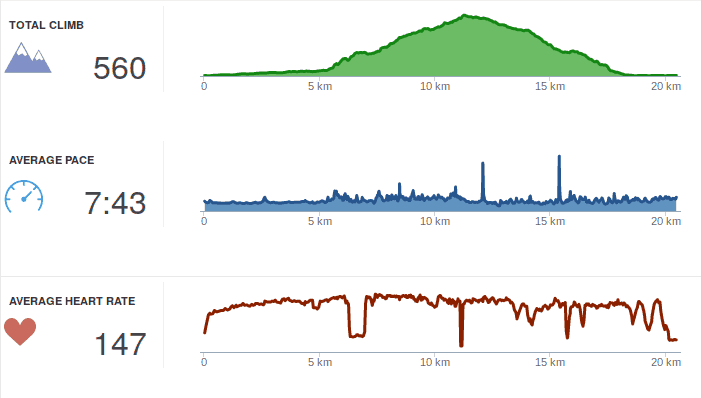
Sometimes I needed a short break from work, and usually I go a bit running. Normally I run between five and ten km, just around our flat. But yesterday I somehow thought it might be a good idea to run through the hills near by. I usually drive up there to a climbing spot or a cafe, so it will for sure not be that long. Well, my estimation was wrong
Turned out to be 20km and quite a trip up and down, in fact 560mH running up wasn t what I could actually do, so I walked the steeper parts. Due to the permanent rain the views weren t that great, but one gets a feeling how far it is back to town. I used my new fenix 5x for the run (was helpful with the built-in map, report later), so I got very detailed data from Garmin Connect. Not that I really understand what it is all for, but Garmin told me that I am overtraining and that I am not a good runner (due to vertical oscillation etc). I guess there is a whole lot to learn and improve. Anyway, I made it back alive, and the first thing I needed was loads of water to drink
Eriberto Mota: OpenVAS 9 from Kali Linux 2017.1 to Debian 9

The OpenVAS OpenVAS is a framework of several services and tools offering a comprehensive and powerful vulnerability scanning and vulnerability management solution. The framework is part of Greenbone Networks' commercial vulnerability management solution from which developments are contributed to the Open Source community since 2009. OpenVAS is composed of some elements, as OpenVAS-Cli, Greenbone Security Assistant, OpenVAS Scanner and OpenVAS Manager. The official OpenVAS homepage is http://www.openvas.org. From Kali Linux 2017.1 to Debian 9 Ok, this is a temporary solution. Now (June 2017), Debian 9 wasn't released yet and OpenVAS 9 is not available in Debian in good conditions (it is in Experimental but a bit problematic). I think that we will have OpenVAS in backports soon. The OpenVAS 9 from Kali is working perfect for Debian 9. So, to take advantage of this, adopt the following procedures:
1. Add a line to end of /etc/apt/sources.list file:

deb http://http.kali.org/kali kali-rolling main

2. Run:

# apt-get update
# apt-get install -t kali-rolling openvas

(if you want to simulate before install, add a -s option before -t)

3. Rermove or comment the previous line added to /etc/apt/sources.list file to avoid future problems in your Debian.

4. Run the following command to configure the OpenVAS and to download the initial database:

# openvas-setup

This step may take some time. Note that the initial password for user admin will be created and shown.

5. Finally, open a web browser and access the address https://127.0.0.1:9392 (use https!!!). Alternatively, you can call http://127.0.0.1 to be automagically redirected to https://127.0.0.1:9392.

The default user is admin and the password was shown in the last step. You will can change this password inside OpenVAS (menu Administration > Users > Edit User, which is an blue icon).

If your password was lost, you will be able to create a new administrative user via shell command. See the section "Some tips" below.

6. To see the packages installed from Kali Linux, use the command:

$ dpkg -l   grep kali
Some tips To create a new administrative user called test:
# openvasmd --create-user test --role Admin
To update the database (NVTs):
# openvasmd --update
# openvasmd --rebuild
# service openvas-scanner restart
To solve the message "Login failed. Waiting for OMP service to become available":
# openvas-start
To make OpenVAS listen all network interfaces, allowing one to call the service in a remote web browser (http://remote-server, port 80 only), edit the /lib/systemd/system/greenbone-security-assistant.service and change:
ExecStart=/usr/sbin/gsad --foreground --listen=127.0.0.1 --port=9392 --mlisten=127.0.0.1 --mport=9390

to

ExecStart=/usr/sbin/gsad --foreground --listen=0.0.0.0 --port=9392 --mlisten=127.0.0.1 --mport=9390
After the change, reload the configuration and restart the service:
# systemctl daemon-reload
# systemctl restart greenbone-security-assistant
Quick start for beginners If OpenVAS isn't familiar for you, I have a suggestion for a quick test. Firstly, download Ubuntu Server 8.04 from this page and install it inside a virtual machine, selecting all services as LAMP, SSH etc. I used the i386 version and VirtualBox. After this, use OpenVAS to scan the Ubuntu (menu Scans > Tasks > a pink icon with a magic wand in the upper left corner). After the scan, click over the blue bar where we will can see the word "Done". Enjoy!

7 June 2017

Jeremy Bicha: GNOME Tweak Tool 3.25.2

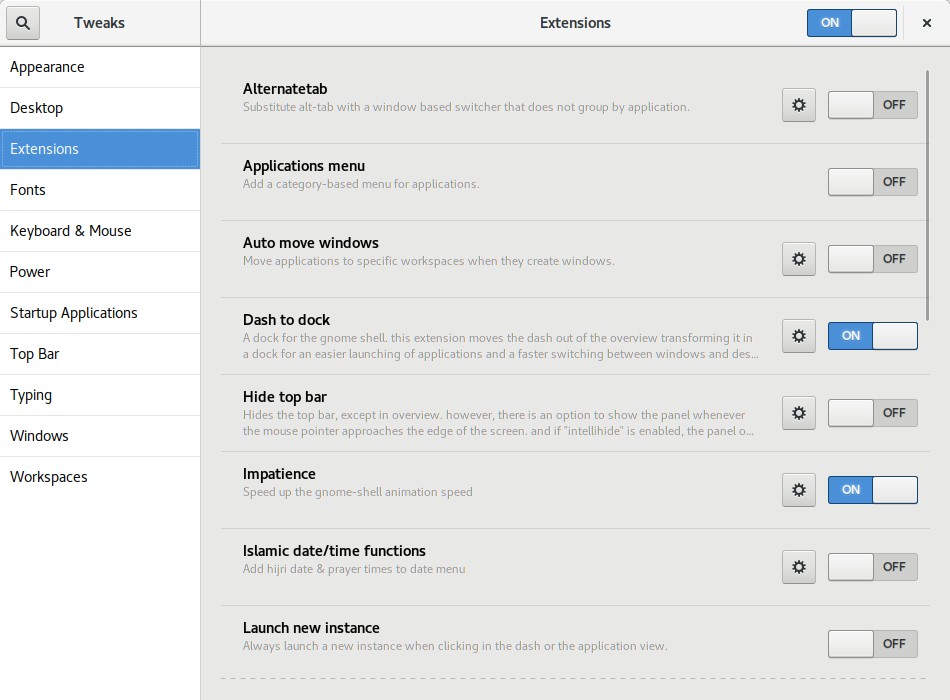
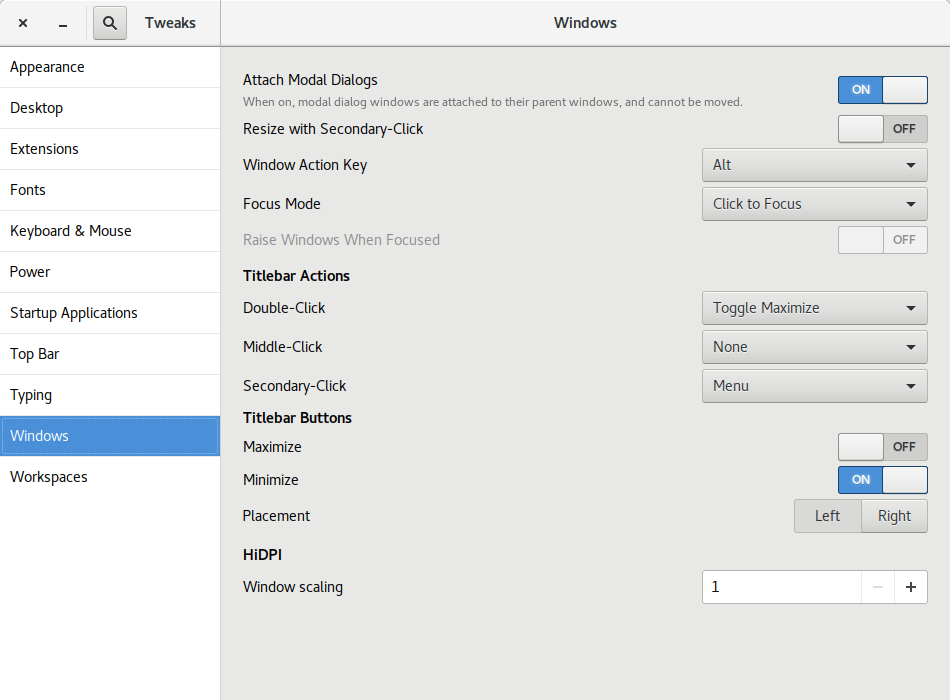
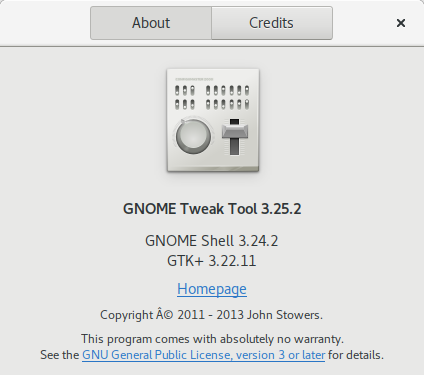
Today, I released the first development snapshot (3.25.2) of what will be GNOME Tweak Tool 3.26. Many of the panels have received UI updates. Here are a few highlights. Before this version, Tweak Tool didn t report its own version number on its About dialog! Also, as far as I know, there was no visible place in the default GNOME install for you to see what version of GTK+ is on your system. Especially now that GNOME and GTK+ releases don t share the same version numbers any more, I thought it was useful information to be in a tweak app. Florian M llner updated the layout of the GNOME Shell Extensions page: Rui Matos added a new Disable While Typing tweak to the Touchpad section. Alberto Fanjul added a Battery Percentage tweak for GNOME Shell s top bar. I added a Left/Right Placement tweak for the window buttons (minimize, maximize, close) . This screenshot shows a minimize and close button on the left. I think it s well known that Ubuntu s window buttons have been on the left for years but GNOME has kept the window buttons on the right. In fact, the GNOME 3 default is a single close button (see the other screenshots). For Unity (Ubuntu s default UI from 2011 until this year), it made sense for the buttons to be on the left because of how Unity s menu bar worked (the right side was used by the indicator system status menus). I don t believe the Ubuntu Desktop team has decided yet which side the window buttons will be on or which buttons there will be. I m ok with either side but I think I have a slight preference towards putting them on the right like Windows does. One reason I m not too worried about the Ubuntu default is that it s now very easy to switch them to the other side! If Ubuntu includes a dock like the excellent Dash to Dock in the default install, I think it makes sense for Ubuntu to add a minimize button by default. My admittedly unusual opinion is that there s no need for a maximize button.
  1. For one thing, GNOME is thoroughly tested with one window button; adding a second one shouldn t be too big of a deal, but maybe adding a 3rd button might not work as well with the design of some apps.
  2. When I maximize an app, I either double-click the titlebar or drag the app to the top of the screen so a maximize button just isn t needed.
  3. A dedicated maximize just doesn t make as much sense when there is more than one possible maximization state. Besides traditional maximize, there is now left and right semi-maximize. There s even a goal for GNOME 3.26 to support quarter-tiling .
Other Changes and Info

Petter Reinholdtsen: Idea for storing trusted timestamps in a Noark 5 archive

This is a copy of an email I posted to the nikita-noark mailing list. Please follow up there if you would like to discuss this topic. The background is that we are making a free software archive system based on the Norwegian Noark 5 standard for government archives. I've been wondering a bit lately how trusted timestamps could be stored in Noark 5. Trusted timestamps can be used to verify that some information (document/file/checksum/metadata) have not been changed since a specific time in the past. This is useful to verify the integrity of the documents in the archive. Then it occured to me, perhaps the trusted timestamps could be stored as dokument variants (ie dokumentobjekt referered to from dokumentbeskrivelse) with the filename set to the hash it is stamping? Given a "dokumentbeskrivelse" with an associated "dokumentobjekt", a new dokumentobjekt is associated with "dokumentbeskrivelse" with the same attributes as the stamped dokumentobjekt except these attributes: This assume a service following IETF RFC 3161 is used, which specifiy the given MIME type for replies and the .tsr file ending for the content of such trusted timestamp. As far as I can tell from the Noark 5 specifications, it is OK to have several variants/renderings of a dokument attached to a given dokumentbeskrivelse objekt. It might be stretching it a bit to make some of these variants represent crypto-signatures useful for verifying the document integrity instead of representing the dokument itself. Using the source of the service in formatDetaljer allow several timestamping services to be used. This is useful to spread the risk of key compromise over several organisations. It would only be a problem to trust the timestamps if all of the organisations are compromised. The following oneliner on Linux can be used to generate the tsr file. $input is the path to the file to checksum, and $sha256 is the SHA-256 checksum of the file (ie the ".tsr" value mentioned above).
openssl ts -query -data "$inputfile" -cert -sha256 -no_nonce \
    curl -s -H "Content-Type: application/timestamp-query" \
      --data-binary "@-" http://zeitstempel.dfn.de > $sha256.tsr
To verify the timestamp, you first need to download the public key of the trusted timestamp service, for example using this command:
wget -O ca-cert.txt \
  https://pki.pca.dfn.de/global-services-ca/pub/cacert/chain.txt
Note, the public key should be stored alongside the timestamps in the archive to make sure it is also available 100 years from now. It is probably a good idea to standardise how and were to store such public keys, to make it easier to find for those trying to verify documents 100 or 1000 years from now. :) The verification itself is a simple openssl command:
openssl ts -verify -data $inputfile -in $sha256.tsr \
  -CAfile ca-cert.txt -text
Is there any reason this approach would not work? Is it somehow against the Noark 5 specification?

6 June 2017

Reproducible builds folks: Reproducible Builds: week 110 in Stretch cycle

Here's what happened in the Reproducible Builds effort between Sunday May 28 and Saturday June 3 2017: Past an upcoming events Documentation updates Toolchain development and fixes Patches and bugs filed 4 package reviews have been added, 6 have been updated and 25 have been removed in this week, adding to our knowledge about identified issues. Weekly QA work During our reproducibility testing, FTBFS bugs have been detected and reported by: diffoscope development tests.reproducible-builds.org Mattia Rizzolo: Daniel Kahn Gillmor: Vagrant Cascadian: Holger Levsen: Misc. This week's edition was written by Chris Lamb, Bernhard M. Wiedemann and Holger Levsen & reviewed by a bunch of Reproducible Builds folks on IRC & the mailing lists.

Russ Allbery: Review: Star Healer

Review: Star Healer, by James White
Series: Sector General #6
Publisher: Orb
Copyright: 1984
Printing: 2002
ISBN: 0-312-87770-6
Format: Trade paperback
Pages: 206
Star Healer is the sixth book of the Sector General series, and I think it may be the first novel in the series that was written as a novel instead of a fix-up of short stories. That makes it not a bad place to start in the series if one would rather not deal with fix-ups or barely-disguised short story collections. There isn't a huge amount of character development over the course of this series (at least to this point), so the main thing you would lose by starting here is some built-up reason for caring about the main character. This is the third book in the Alien Emergencies omnibus (the book referenced in the publication information here). Most of the previous stories have focused on Conway, a Senior Physician in the sprawling and wonderfully well-equipped multi-species hospital called Sector General and, in recent stories, the head physician in the hospital's ambulance ship. Becoming a Senior Physician at Sector General is quite the accomplishment, and a fine point to reach in the career of any doctor specializing in varied life forms, but there is another tier above: the Diagnosticians, who are the elite of Sector General. The difference is education tapes. Deep knowledge of even one specific type of life is a lot to ask of a doctor, as shown by the increasing specialization of human medicine. Sector General, which deals with wildly varying ailments of thousands of species including entirely unknown ones (if, admittedly, primarily trauma, at least in the stories shown), would be an impossible task. White realizes this and works around it with education tapes that temporarily embed in a doctor's head the experience of a doctor of another species entirely. This provides the native expertise missing, but it comes with the full personality of the doctor who recorded the tape, including preferences for food and romantic attachment that may be highly disorienting. Senior Physicians use a tape at a time, and then have it erased again when they don't need it. Diagnosticians juggle four or more tapes at the same time, and keep them for long periods or even permanently, allowing them to do ground-breaking original research. The opening of Star Healer is an offer from the intimidating Chief Psychologist of Sector General: he has a shot at Diagnostician. But it's a major decision that he should think over first, so the next step is to take a vacation of sorts on a quiet world with a small human scientific station. Oh, and there's a native medical problem, although not one with much urgency. Conway doesn't do a lot of resting, because of course he gets pulled into trying to understand the mystery of an alien species that is solitary to the point of deep and unbreakable social taboos against even standing close to other people. This is a nice cultural puzzle in line with the rest of the series, but it also leaves Conway with a new ally: an alien healer in a society in which being a doctor is difficult to the point of near hopelessness. It's not much of a spoiler to say that of course Conway decides to try for Diagnostician after his "vacation." The rest of the book is him juggling multiple cases with his new and often conflicting modes of thinking, and tackling problems that require a bit less in the way of puzzle-solving and a bit more in the way of hard trade-off decisions and quick surgical action. Senior Physicians may be able to concentrate on just one puzzle at a time; Diagnosticians have to juggle several. And they're larger, more long-term problems, focusing on how to improve a general problem for a whole species rather than just heal a specific injured alien. One interesting aspect of this series, which is very much on display here, is that Sector General most definitely does not have a Prime Directive. They are cautious about making contact with particularly primitive civilizations for fear that spacefarers would give them an inferiority complex, but sometimes they do anyway. And if they run into some biological system that offends their sensibilities, they try to fix it, not just observe it. White frequently shows species caught in what the characters call "biological traps," unable to develop farther because of some biological adaptation that gets in their way, and Sector General tries to fix those. It's an interesting ethical problem that I wish they'd think about a bit more. It's not clear they're wrong, and I think it's correct to take an expansive view of the mission to heal, but there's also a sense in which Sector General is modifying culture and biology to make aliens more like them. (The parallels between this and all the abusive paternalism that human cultures do around disability is a little too close to home to be comfortable, and now I kind of wish it hadn't occurred to me.) The gender roles, sadly, continue to be dire, although mostly ignorable because the one major female character is generally just shown as another doctor with little attention to sex. But apparently women (of every species!) cannot become Diagnosticians because they have an insurmountable biological aversion to sharing their minds with a learning tape from any doctor who doesn't find them physically attractive, which is just... sigh. It's sad that someone who could write an otherwise remarkably open-minded and pacifist series of stories, in sharp contrast with most of SF history, would still have that large of a blind spot. Apart from the times gender comes up, I liked this book more than the rest of the series, in part because I strongly prefer novels to short stories. There's more room to develop the story, and while characterization continues to not be White's strong point and that space mostly goes to more puzzles instead, he does provide an interesting set of interlocking puzzles. The problem posed by the aliens Conway meets on his "vacation" isn't fully resolved here (presumably that's for a future book), but he does solve several other significant problems and develops his own problem-solving style in more depth than in previous stories. Mildly recommended, particularly if you like this series in general. Followed by Code Blue - Emergency. Rating: 7 out of 10

Next.

Previous.