Government approves T&Cs for first offshore wind auction under the Renewable Electricity Support Scheme
ORESS 1 expected to secure 2.5GW of electricity generating capacity
#GreensInGovernment
The Government has today approved the Terms and Conditions of ORESS 1, the first auction for offshore wind under the Renewable Electricity Support Scheme.
This is a seminal moment in the delivery of offshore wind in Ireland. The offshore auction, the first in Ireland's history, is expected to provide a route to market for up to 2.5GW of offshore renewable energy to the Irish grid, enough to power 2.5 million Irish homes with clean electricity. Coming during the weeks of COP27, publishing details of the auction sends a strong international signal that Ireland is serious about offshore energy and our national climate targets and obligations.
Recognising the critical role of local hosting communities in the development of this critical infrastructure, all offshore wind projects developed via ORESS will be required to make Community Benefit Fund contributions, from construction phase and continuing for the duration of the support period, typically for a total period of 25 years. This will result in lasting, tangible benefits for these communities.
Speaking about this development, Minister Ryan said: The publication of these ORESS 1 Terms and Conditions is another massive step forward for offshore wind, for Irish climate leadership and towards Ireland s future as an international green energy hub. The first stage of this transformative auction will start before Christmas and it sets us on a path to powering many more of our homes and businesses from our own green energy resources over the coming years. It follows the enactment of the Maritime Area Planning Act last year, and the announcement regarding the awarding of Maritime Area Consents to Phase One projects last month.
A final ORESS 1 auction calendar will be published by EirGrid shortly. The pre-qualification stage will launch next month (December). The qualification stage and the auction process will take place in the first half of 2023. Final auction results will be published by June 2023.
Eligible projects
Any project that has been awarded a Maritime Area Consent is eligible to partake in the ORESS 1 auction. Seven projects known as Relevant Projects were deemed ready to apply for Maritime Area Consents in Spring 2022. Once Maritime Area Consents are granted, these projects can not only compete for State support via the ORESS, but can also apply for planning permission from An Bord Plean la.
Delivering on our broader targets
ORESS 1 is expected to procure approximately 2.5GW of electricity generating capacity.
Further auctions will be required to meet our renewable energy and climate ambitions. At least three offshore energy auctions are currently planned for this decade. The aim is to progress enough viable offshore projects through the consenting system to have competitive auctions. This will ultimately drive down cost for electricity consumers.
Armadillo is a powerful and expressive C++ template library for linear algebra and scientific computing. It aims towards a good balance between speed and ease of use, has a syntax deliberately close to Matlab, and is useful for algorithm development directly in C++, or quick conversion of research code into production environments. RcppArmadillo integrates this library with the R environment and language and is widely used by (currently) 1027 packages other packages on CRAN, downloaded 26.9 million times (per the partial logs from the cloud mirrors of CRAN), and the CSDA paper (preprint / vignette) by Conrad and myself has been cited 503 times according to Google Scholar.
This release reflect as new upstream bugfix release 11.4.2 made recently by Conrad. To accomodate CRAN and their preference for at most a release per month, we held it back since the 11.4.0 release early October. As we usually do, we generally update once upstream Armadillo releases are made. When we do not immediately release to CRAN (in order to lower the release cadence), we make those interim releases available via GitHub source and the Rcpp drat repo.
This release also brings a rearranged, and as we think, simplified layout of the header files. All existing locations are still supported but we will be starting a (very patient and slow) transition at some point.
The full set of changes (since the last CRAN release 0.11.4.0.1) follows.
Changes in RcppArmadillo version 0.11.4.2.1 (2022-11-08)
Upgraded to Armadillo release 11.4.2 (Ship of Theseus)
more robust handling of corner cases in multi-threaded contexts
Internal header organisation with new sub-directories while providing full compatibility via existing paths (#395#396)
Changes in RcppArmadillo version 0.11.4.1.0 (2022-10-10) (GitHub Only)
Upgraded to Armadillo release 11.4.1 (Ship of Theseus)
fix data race in Cube::slice()
workarounds for false warnings emitted by GCC 12 when compiling with FORTIFY_SOURCE enabled (already in RcppArmadillo 0.11.4.0.1 too)
Desde de setembro de 2015, o
time de publicidade
do Projeto Debian passou a publicar a cada dois meses
listas com os nomes dos(as) novos(as)
Desenvolvedores(as) Debian (DD - do
ingl s Debian Developer) e
Mantenedores(as) Debian
(DM - do ingl s Debian Maintainer).
Estamos aproveitando estas listas para publicar abaixo os nomes dos(as)
brasileiros(as) que se tornaram Desenvolvedores(as) e Mantenedores(as) Debian a
partir de julho de 2015.
Desenvolvedores(as) Debian / Debian Developers / DDs:
Marcos Talau
Esta lista ser atualizada quando o time de publicidade do Debian publicar
novas listas com DMs e DDs e tiver brasileiros.
Para ver a lista completa de Mantenedores(as) e Desenvolvedores(as) Debian,
inclusive outros(as) brasileiros(as) antes de julho de 2015 acesse:
https://nm.debian.org/public/people
There is significant effort involved to get your apt or dnf commands always have a consistent set of servers to talk to.
That's why running separate "software stores" is a bad idea:
That way more admins need to learn how to run high availability services for dubious business opportunities to "later" monetize services. Services that nobody cares to pay for and thus opportunities that never materialize. But every company wants to find that out again. Because if Apple could do it, why shouldn't Canonical be able to do it? $$$!1!!
So, can't update Firefox on Ubuntu 22.04 right now.
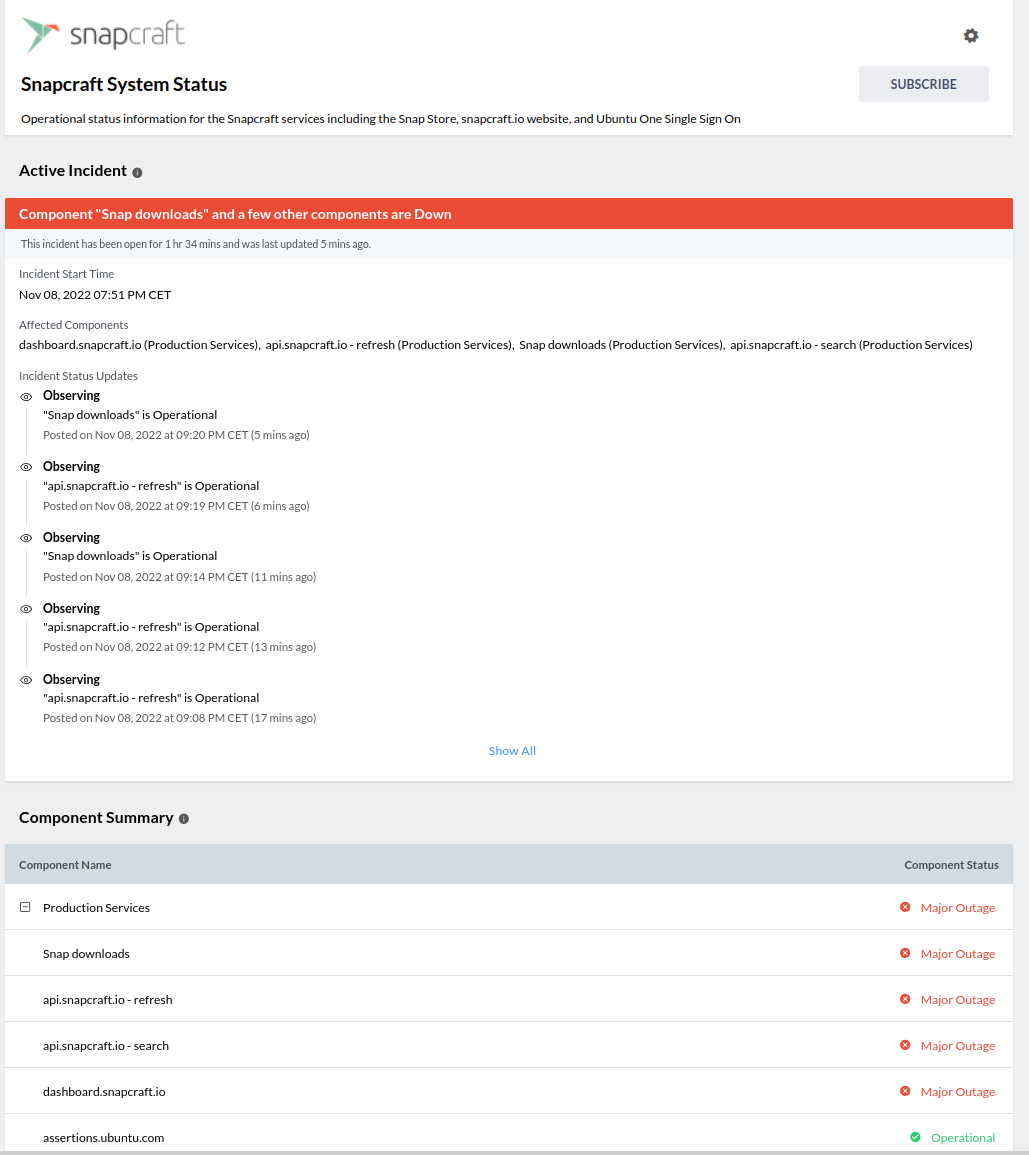
At least there is https://status.snapcraft.io/:
So I can check back tomorrow if I can update my web browser ...
Update
09.11.2022 12:15 CET
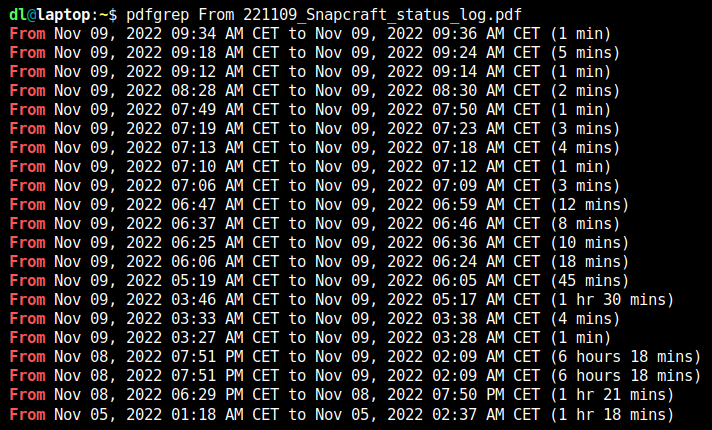
The Snapcraft distribution system seems quite flaky, this is the downtime log:
Bonus points for the bad client side implementation:
dl@laptop:~$ sudo snap refresh All snaps up to date.
# ^this is a lie, just close Firefox and ...
dl@laptop:~$ sudo snap refresh firefox 106.0.5-1 from Mozilla** refreshed
Computer terminals have traditionally had an actual bell
that would ring when a certain control character (the bell
character, typically control-g or \a in an C escape
sequence) would come in the input stream.
That feature actually predates computers altogether, and was present
in Baudot code, "an early character encoding for telegraphy
invented by mile Baudot in the 1870s", itself superseding Morse
code.
Modern terminal emulators have, of course, kept that feature: if
you run this command in a terminal right now:
printf '\a'
... you may hear some annoying beep. Or not. It actually depends on
a lot of factors, including which terminal emulator you're using, how
it's configured, whether you have headphones on, or speakers
connected, or, if you're really old school, a PC speaker, even.
Typically, I have this theory that it does the exact opposite of what
you want, regardless of whether you have configured it or not. That
is, if you want it to make noises, it won't, and if you want it to
stay silent, it will make brutal, annoying noises in moments you would
the least expect. I suspect this is a law in computer science, but I'm
too lazy to come up with a formal definition.
Yet something can be done with this.
Making the bell useful and silent
Many terminal emulators have this feature where they can silence the
bell somehow. It can be turned into a "visual bell" which basically
flashes the screen when a bell arrives. Or that can also be disabled
and the bell is just completely ignored.
What I did instead is turn the bell into a "urgency hint" (part
of the ICCCM standard. In xterm, this is done with this X
resource entry (typically in ~/.Xresources):
XTerm*bellIsUrgent:  true
XTerm*visualBell: false
Interestingly, this doesn't clearly say "bell is muted", but it's
effectively what it does. Or maybe it works because I have muted
"System Sounds" in Pulseaudio. Who knows. I do have this in my startup
scripts though:
If the dash or 'off' are given, the bell will be turned off.
Interestingly, you have the option of setting the bell "volume",
"pitch, in hertz, and [...] duration in milliseconds. Note that not
all hardware can vary the bell characteristics." In any case, I think
that's the magic trick to turn the darn thing off.
Now this should send urgency hints to your window manager:
sleep 3 ; printf '\a'
Try it: run the command, switch to another desktop, then wait 3
seconds. You should see the previous desktop show up in red or
something.
In the i3 window manager I am currently using, this is
the default, although I did set the colors (client.urgent and
urgent_workspace in bar.colors).
Other window managers or desktop environments may require different
configurations.
Sending a bell...
Now that, on itself, will only be useful when something sets a
bell. One place I had found a trick like this, long ago, is this
post (dead link, archived) which has various instructions for
different tools. I'll recopy some of them here since the original site
is dead, but credit goes to the Netbuz blog.
(Note that the blog post also features an Awesome WM configuration for
urgency hints.)
Mutt
set beep=yes
set beep_new=yes
Irssi
/set beep_when_window_active ON
/set beep_when_away ON
/set beep_msg_level MSGS DCC DCCMSGS HILIGHT
It was also recommending this setting, but it appears to be deprecated
and gives a warning in modern irssi versions:
/set bell_beeps ON
GNU Screen
This is an important piece of the puzzle, because by default, terminal
multiplexers have their own opinion of what to do with the bell as
well:
# disabled: we want to propagate bell to clients, which should handle
# it in their own terminal settings. this  vbell off  is also the
# upstream and tmux's default
#
# see also: http://netbuz.org/blog/2011/11/x-bells-and-urgency-hints/
vbell off
# propagate bell from other windows up to the terminal emulator as well
bell_msg 'Bell in window %n^G'
The bell_msg bit is an extra from me: it uses the bell message that
pops up when screen detects a bell in another window to resend the
bell control character up to the running terminal.
This makes it so a bell in any multiplexed window will also
propagate to the parent terminal, which is not the default.
Tmux
Untested, but that is apparently how you do it:
# listen to alerts from all windows
set -g bell-action any
# notice bell in windows
set -g monitor-bell on
# only propagate bell, don't warn user, as it hangs tmux for a second
set -g visual-bell off
# send bell *and* notify when activity (if monitor-activity)
set -g visual-activity both
Note that this config goes beyond what we have in GNU screen in that
inactivity or activity will trigger a bell as well. This might be
useful for cases where you don't have the prompt hack (below) but it
could also very well be very noisy. It will only generate noise when
monitor-activity is enabled though.
bash and shell prompts
Now the icing on cake is to actually send the bell when a command
completes. This is what I use this for the most, actually.
I was previously using undistract-me for this, actually. That was
nice: it would send me a nice desktop notification when a command was
running more than a certain amount of time, and if the window was
unfocused. But configuring this was a nightmare: because it uses a
complex PROMPT_COMMAND in bash, it would conflict with my (already
existing and way too) complex bash prompt, and lead to odd
behaviors. It would also not work for remote commands, of course, as
it wouldn't have access to my local D-BUS to send notifications
(thankfully!).
So instead, what I do now is systematically print a bell whenever a
command terminates, in all my shells. I have this in my
/root/.bashrc on all my servers, deployed in Puppet:
PROMPT_COMMAND='printf "\a"'
Or you can just put it directly in the shell prompt, with something
like:
PS1='\[\a\]'"$PS1"
(I have the equivalent in my own .bashrc, although that thing is
much more complex, featuring multi-command pipeline exit status,
colors, terminal title setting, and more, which should probably
warrant its own blog post.)
This sounds a little bonkers and really noisy, but remember that I
turned off the audible bell. And urgency hints are going to show up
only if the window is unfocused. So it's actually really nice and not
really distracting.
Or, to reuse the undistract-me concept: it allows me to not lose focus
too much when I'm waiting for a long process to complete.
That idea actually came from ahf, so kudos to him on that nice
hack.
Caveats
That is not setup on all the machines I administer for work, that
said. I'm afraid that would be too disruptive for people who do not
have that configuration. This implies that I don't get notifications
for commands that run for a long time on remote servers, most of the
time. That said, I could simply run a command with a trailing printf
'\a' to get a notification.
This might not work in Wayland, your window manager, your desktop
environment, your Linux console, or your telegraphy session.
A new release 0.2.12 of RcppCCTZ is now on CRAN.
RcppCCTZ uses Rcpp to bring CCTZ to R. CCTZ is a C++ library for translating between absolute and civil times using the rules of a time zone. In fact, it is two libraries. One for dealing with civil time: human-readable dates and times, and one for converting between between absolute and civil times via time zones. And while CCTZ is made by Google(rs), it is not an official Google product. The RcppCCTZ page has a few usage examples and details. This package was the first CRAN package to use CCTZ; by now several others packages (four the last time we counted) include its sources too. Not ideal, but beyond our control.
This version adds support for NA values when parsing, and updates GitHub Action.
Changes in version 0.2.12 (2022-11-06)
Support NA values in numerical or character input
GitHub Actions were updated to checkout version 3.
I just did again the usual web search, and I have verified that Mastodon still does not support managing multiple domains on the same instance, and that there is still no way to migrate an account to a different instance without losing all posts (and more?).
As much as I like the idea of a federated social network, open standards and so on, I do not think that it would be wise for me to spend time developing a social network identity on somebody else's instance which could disappear at any time.
I have managed my own email server since the '90s, but I do not feel that the system administration effort required to maintain a private Mastodon instance would be justified at this point: there is not even a Debian package! Mastodon either needs to become much simpler to maintain or become much more socially important, and so far it is neither. Also, it would be wasteful to use so many computing resources for a single-user instance.
While it is not ideal, for the time being I compromised by redirecting
WebFinger requests
for md@linux.it using this Apache configuration:
<Location /.well-known/host-meta>
  Header set Access-Control-Allow-Origin: "*"
  Header set Content-Type: "application/xrd+json; charset=utf-8"
  Header set Cache-Control: "max-age=86400"
</Location>
<Location /.well-known/webfinger>
  Header set Access-Control-Allow-Origin: "*"
  Header set Content-Type: "application/jrd+json; charset=utf-8"
  Header set Cache-Control: "max-age=86400"
</Location>
# WebFinger (https://www.rfc-editor.org/rfc/rfc7033)
RewriteMap lc int:tolower
RewriteMap unescape int:unescape
RewriteCond % REQUEST_URI  ^/\.well-known/webfinger$
RewriteCond $ lc:$ unescape:% QUERY_STRING  (?:^ &)resource=acct:([^&]+)@linux\.it(?:$ &)
RewriteRule .+ /home/soci/%1/public_html/webfinger.json [L,QSD]
# answer 404 to requests missing "acct:" or for domains != linux.it
RewriteCond % REQUEST_URI  ^/\.well-known/webfinger$
RewriteCond $ unescape:% QUERY_STRING  (?:^ &)resource=
RewriteRule .+ - [L,R=404]
# answer 400 to requests without the resource parameter
RewriteCond % REQUEST_URI  ^/\.well-known/webfinger$
RewriteRule .+ - [L,R=400]
A few days ago, my home network got a refresh that resulted in the enablement of some next-generation
technologies for me and my family. Well, next-generation or current-generation, depending on your point of view.
Per the ISP standards in Spain (my country), what I ll describe next is literally the most and latest you can get.
The post title spoiled it already. I have now 10G internet uplink and native IPv6 since I changed my ISP to https://digimobil.es.
My story began a few months ago when a series of fiber deployments started in my neighborhood by a back-then mostly unknown ISP (digimobil).
The workers were deploying the fiber inside the street sewers, and I noticed that they were surrounded by advertisements promoting the fastest
FTTH deployment in Spain. Indeed, their website was promoting 1G and 10G fiber, so a few days later I asked the workers when would that be
available for subscription. They told me to wait just a couple of months, and the wait ended this week.
I called the ISP, and a marketing person told me a lot of unnecessary information about how good service I was purchasing. I asked about IPv6
availability, but that person had no idea. They called me the next day to confirm that the home router they were installing would support both IPv6
and Wi-Fi 6. I was suspicious about nobody in the marketing department knowing anything about any of the two technologies, but I decided to proceed
anyway. Just 24 hours after calling them, a technician came to my house and 45 minutes later the setup was ready.
The new home router was a ZTE ZXHN F8648P unit. By the way, it had Linux inside, but I got no GPL copyright notice or anything. It had 1x10G and 4x1G
ethernet LAN ports. The optical speed tests that the technician did were giving between 8 Gbps to 9 Gbps in uplink speed, which seemed fair enough.
Upon quick search, there is apparently a community of folks online which already know how to get the most out of this router by unbloking the root
account (sorry, in spanish only) and using other tools.
When I plugged the RJ45 in my laptop, the magic happened: the interface got a native, public IPv6 from the router.
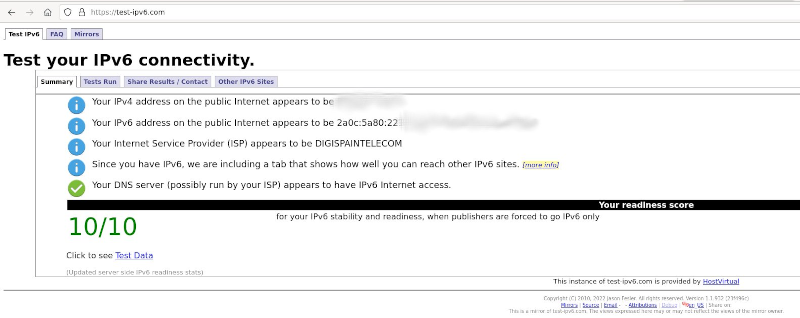
I ran to run the now-classic IPv6 browser test at https://test-ipv6.com/. And here is the result:
If you are curious, this was the IPv6 prefix whois information:
They were handing my router a prefix like 2a0c:5a80:2218:4a00::/56. I ignored if the prefix was somehow static, dynamic, just for me, or
anything else. I ve been waiting for native IPv6 at home for years. In the past, I ve had many ideas and projects to host
network services at home leveraging IPv6. But when I finally got it, I didn t know what to do next. I had a 7 months old
baby, and honestly I didn t have the spare time to play a lot with the setup.
Actually, I had no need or use for such fast network either. But my coworker Andrew convinced me: given the price 30 EUR / month, I didn t have
any reason not to buy it.
In fact, I didn t have any 10G-enabled NIC at home. I had a few laptops with 2.5G ports, though, and that was enough to experience the new network
speeds. Since this write-up was inspired by the now almost-legenday post by Michael Stapelberg My upgrade to 25 Gbit/s Fiber To The Home, I
contacted him, and he suggested running a few speed tests using the Ookla suite against his own server. Here are the results:
$ docker run --net host --rm -it docker.io/stapelberg/speedtest:latest -s 50092
[..]
     Server: Michael Stapelberg - Zurich (id = 50092)
        ISP: Digi Spain
    Latency:    34.29 ms   (0.20 ms jitter)
   Download:  2252.42 Mbps (data used: 3.4 GB )
     Upload:  2239.27 Mbps (data used: 2.8 GB )
Packet Loss:     0.0%
 Result URL: https://www.speedtest.net/result/c/cc8d6a78-c6f8-4f71-b554-a79812e10106
$ docker run --net host --rm -it docker.io/stapelberg/speedtest:latest -s 50092
[..]
     Server: Michael Stapelberg - Zurich (id = 50092)
        ISP: Digi Spain
    Latency:    34.05 ms   (0.21 ms jitter)
   Download:  2209.85 Mbps (data used: 3.2 GB )
     Upload:  2223.45 Mbps (data used: 2.9 GB )
Packet Loss:     0.0%
 Result URL: https://www.speedtest.net/result/c/32f9158e-fc1a-47e9-bd33-130e66c25417
This is over IPv6. Very satisfying.
Bonus point: when I called my former ISP to cancel the old subscription the conversation was like:
Marie is a royal bastardess, a product of rape no less, and entirely out
of place in the court in Westminster, where she landed after being kicked
off her mother's farm. She had run the farm since her mother's untimely
death, but there was no way that her relatives would let her inherit. In
court, Marie is too tall, too ugly, and too strange, raised by women who
were said to carry the blood of the fairy M lusine. Eleanor of
Aquitaine's solution to her unwanted house guest is a Papal commission.
Marie is to become the prioress of an abbey.
I am occasionally unpleasantly reminded of why I don't read very much
literary fiction. It's immensely frustrating to read a book in which the
author cares about entirely different things than the reader, and where
the story beats all land wrong.
This is literary historical fiction set in the 12th century. Marie is
Marie de France,
author of the lais about courtly love that are famous primarily due to
their position as early sources for the legends of King Arthur. The lais
are written on-screen very early in this book, but they disappear without
any meaningful impact on the story. Matrix is, instead, about
Shaftesbury Abbey and what it becomes during Marie's time as prioress and
then abbess, following the theory that Marie de France was
Mary of
Shaftesbury.
What I thought I was getting in this book, from numerous reviews and
recommendations, was a story of unexpected competence: how a wild,
unwanted child of seventeen lands at a dilapidated and starving abbey,
entirely against her will, and then over the next sixty years transforms
it into one of the richest abbeys in England. This does happen in this
book, but Groff doesn't seem to care about the details of that
transformation at all.
Instead, Matrix takes the mimetic fiction approach of detailed and
precise description of a few characters, with all of their flaws and
complexities, and with all of the narrative's attention turned to how they
are feeling and what they are seeing. It is also deeply, fully committed
to a Great Man (or in this case a Great Woman) view of history.
Marie is singular. The narrative follows her alone, she makes all the
significant decisions, and the development of the abbey is determined by
her apparently mystical visions. (In typical mimetic fashion, these are
presented as real to her, and the novel takes no position on whether that
reality is objective.) She builds spy networks, maneuvers through local
and church politics, and runs the abbey like her personal kingdom. The
tiny amount of this that is necessarily done by other people is attributed
to Marie's ability to judge character. Other people's motives are simply
steamrolled over and have no effect.
Maddeningly, essentially all of this happens off-screen, and Groff is
completely uninterested in the details of how any of it is accomplished.
Marie decides to do something, the narrative skips forward a year, and it
has happened. She decides to build something, and then it's built. She
decides to collect the rents she's due, the novel gestures vaguely at how
she's intimidating, and then everyone is happily paying up. She builds
spy networks; who cares how? She maneuvers through crises of local and
church politics that are vaguely alluded to, through techniques that are
apparently too uninteresting to bother the reader with.
Instead, the narrative focuses on two things: her deeply dysfunctional,
parasocial relationship with Eleanor, and her tyrannical relationship with
the other nuns. I suspect that Groff would strongly disagree with my
characterization of both of those narratives, and that's the other half of
my problem with this book.
Marie is obsessed with and in love with Eleanor, a completely impossible
love to even talk about, and therefore turns to courtly love from afar as
a model into which she can fit her feelings. While this is the setup for
a tragedy, it's a good idea for a story. But what undermined it for me is
that Marie's obsession seems to be largely physical (she constantly dwells
on Eleanor's beauty), and Eleanor is absolutely horrible to her in every
way: condescending, contemptuous, dismissive, and completely uninterested.
This does change a bit over the course of the book, but not enough to
justify the crush that Marie maintains for this awful person through her
entire life.
And Eleanor is the only person in the book who Marie treats like an equal.
Everyone else is a subordinate, a daughter, a charge, a servant, or a
worker. The nuns of the abbey prosper under her rule, so Marie has ample
reason to justify this to herself, but no one else's opinions or beliefs
matter to her in any significant way. The closest anyone can come to
friendship is to be reliably obedient, perhaps after some initial
objections that Marie overrules. Despite some quite good characterization
of the other nuns, none of the other characters get to do anything.
There is no delight in teamwork, sense of healthy community, or
collaborative problem-solving. It's just all Marie, all the time,
imposing her vision on the world both living and non-living through sheer
force of will.
This just isn't entertaining, at least for me. The writing might be
beautiful, the descriptions detailed and effective, and the research
clearly extensive, but I read books primarily for characters, I read
characters primarily for their relationships, and these relationships are
deeply, horribly unhealthy. They are not, to be clear, unrealistic
(although I do think there's way too much chosen one in Marie and way too
many problems that disappear off-camera); there are certainly people in
the world with dysfunctional obsessive relationships, and there are
charismatic people who overwhelm everyone around them. This is just not
what I want to read about.
You might think, with all I've said above, that I'm spoiling a lot of the
book, but weirdly I don't think I am. Every pattern I mention above is
well-established early in the novel. About the only thing that I'm
spoiling is the hope that any of it is somehow going to change, a hope
that I clung to for rather too long.
This is a great setup for a book, and I wish it were written by a fantasy
author instead of a literary author. Perhaps I'm being too harsh on
literary fiction here, but I feel like fantasy authors are more likely to
write for readers who want to see the growth sequence. If someone is
going to change the world, I want to see how they changed the
world. The mode of fantasy writing tends to think that what people do
(and how they do it) is as interesting or more interesting than what they
feel or what they perceive.
If this idea, with the exact same level of (minor) mysticism and historic
realism, without added magic, were written by, say, Guy Gavriel Kay or
Nicola Griffith, it would be a far different and, in my opinion, a much
better book. In fact, Hildis
part of this book written by Nicola Griffith, and it is a much
better book.
I have seen enough people rave about this book to know that this is a
personal reaction that is not going to be shared by everyone, or possibly
even most people. My theory is that this is due to the different reading
protocols between literary fiction readers and fantasy readers. I put
myself in the latter camp; if you prefer literary fiction, you may like
this much better (and also I'm not sure you'll find my book reviews
useful). I may be wrong, though; maybe there are fantasy readers who
would like this. I will say that the sense of place is very strong and
the writing has all the expected literary strengths of descriptiveness and
rhythm.
But, sadly, this was not at all my thing, and I'm irritated that I wasted
time on it.
Rating: 4 out of 10
Besides several bugfixes, the latest version now supports using higher
compression levels and logging to syslog facility. I also finished packaging
and official packages are now available,
A new release 0.3.3.9.3 of RcppEigen arrived on CRAN moments ago (and just went to Debian). Eigen is a C++ template library for linear algebra: matrices, vectors, numerical solvers, and related algorithms.
This update is again mostly maintenance. To accomodate one small aspect of the Fortran interface, we now require R 3.6.0 or later. Jonah Gabry spotted a really old typo and fixed it. The fastLm support code now uses the unabbreviated df.residual. We accomodated clang-15 in one signature as is common with many recent uploads, and also updated one aspect of GitHub Actions.
And once again as we said for the last four releases:
One additional and recent change was the accomodation of a recent CRAN Policy change to not allow gcc or clang to mess with diagnostic messages. A word of caution: this may make your compilation of packages using RcppEigen very noisy so consider adding -Wno-ignored-attributes to the compiler flags added in your ~/.R/Makevars.
We still find this requirement rather annoying. Eigen is only usable if you set, say,
asoptions in~/.R/Makevars . But CRAN makes the rules. Maybe if a few of us gently and politely nudge them they may relent one day. One can only hope.
The complete NEWS file entry follows.
Changes in RcppEigen version 0.3.3.9.3 (2022-11-04)
The dependency on R is now versioned to 3.6.0 or later for support for USE_FC_LEN_T from Fortran.
An old example typo was corrected (Jonah Gabry in #114).
The fastLm methods now reference df.residual by its full name (Closes #115).
A function prototype was updated for clang-15.
GitHub Actions were updated to checkout version 3.
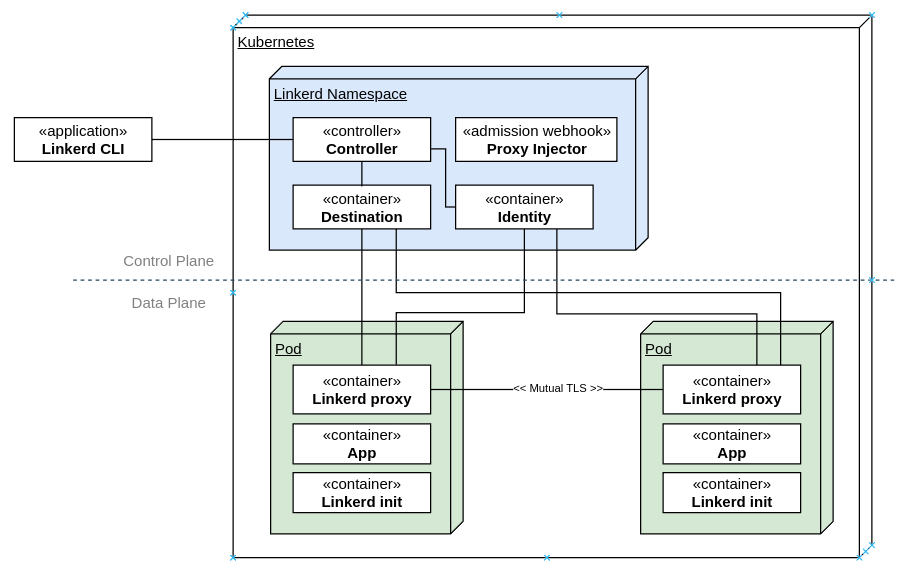
If you ve done anything in the Kubernetes space in recent years, you ve most likely come across the words Service Mesh . It s backed by a set of mature technologies that provides cross-cutting networking, security, infrastructure capabilities to be used by workloads running in Kubernetes in a manner that is transparent to the actual workload. This abstraction enables application developers to not worry about building in otherwise sophisticated capabilities for networking, routing, circuit-breaking and security, and simply rely on the services offered by the service mesh.In this post, I ll be covering Linkerd, which is an alternative to Istio. It has gone through a significant re-write when it transitioned from the JVM to a Go-based Control Plane and a Rust-based Data Plane a few years back and is now a part of the CNCF and is backed by Buoyant. It has proven itself widely for use in production workloads and has a healthy community and release cadence.It achieves this with a side-car container that communicates with a Linkerd control plane that allows central management of policy, telemetry, mutual TLS, traffic routing, shaping, retries, load balancing, circuit-breaking and other cross-cutting concerns before the traffic hits the container. This has made the task of implementing the application services much simpler as it is managed by container orchestrator and service mesh. I covered Istio in a prior post a few years back, and much of the content is still applicable for this post, if you d like to have a look.Here are the broad architectural components of Linkerd:The components are separated into the control plane and the data plane.The control plane components live in its own namespace and consists of a controller that the Linkerd CLI interacts with via the Kubernetes API. The destination service is used for service discovery, TLS identity, policy on access control for inter-service communication and service profile information on routing, retries, timeouts. The identity service acts as the Certificate Authority which responds to Certificate Signing Requests (CSRs) from proxies for initialization and for service-to-service encrypted traffic. The proxy injector is an admission webhook that injects the Linkerd proxy side car and the init container automatically into a pod when the linkerd.io/inject: enabled is available on the namespace or workload.On the data plane side are two components. First, the init container, which is responsible for automatically forwarding incoming and outgoing traffic through the Linkerd proxy via iptables rules. Second, the Linkerd proxy, which is a lightweight micro-proxy written in Rust, is the data plane itself.I will be walking you through the setup of Linkerd (2.12.2 at the time of writing) on a Kubernetes cluster.Let s see what s running on the cluster currently. This assumes you have a cluster running and kubectl is installed and available on the PATH.
On most systems, this should be sufficient to setup the CLI. You may need to restart your terminal to load the updated paths. If you have a non-standard configuration and linkerd is not found after the installation, add the following to your PATH to be able to find the cli:
export PATH=$PATH:~/.linkerd2/bin/
At this point, checking the version would give you the following:
$ linkerd version
Client version: stable-2.12.2
Server version: unavailable
Setting up Linkerd Control PlaneBefore installing Linkerd on the cluster, run the following step to check the cluster for pre-requisites:
kubernetes-api
--------------
  can initialize the client
  can query the Kubernetes API
kubernetes-version
------------------
  is running the minimum Kubernetes API version
  is running the minimum kubectl version
pre-kubernetes-setup
--------------------
  control plane namespace does not already exist
  can create non-namespaced resources
  can create ServiceAccounts
  can create Services
  can create Deployments
  can create CronJobs
  can create ConfigMaps
  can create Secrets
  can read Secrets
  can read extension-apiserver-authentication configmap
  no clock skew detected
linkerd-version
---------------
  can determine the latest version
  cli is up-to-date
Status check results are
All the pre-requisites appear to be good right now, and so installation can proceed.The first step of the installation is to setup the Custom Resource Definitions (CRDs) that Linkerd requires. The linkerd cli only prints the resource YAMLs to standard output and does not create them directly in Kubernetes, so you would need to pipe the output to kubectl apply to create the resources in the cluster that you re working with.
$ linkerd install --crds   kubectl apply -f -
Rendering Linkerd CRDs...
Next, run  linkerd install   kubectl apply -f -  to install the control plane.
customresourcedefinition.apiextensions.k8s.io/authorizationpolicies.policy.linkerd.io created
customresourcedefinition.apiextensions.k8s.io/httproutes.policy.linkerd.io created
customresourcedefinition.apiextensions.k8s.io/meshtlsauthentications.policy.linkerd.io created
customresourcedefinition.apiextensions.k8s.io/networkauthentications.policy.linkerd.io created
customresourcedefinition.apiextensions.k8s.io/serverauthorizations.policy.linkerd.io created
customresourcedefinition.apiextensions.k8s.io/servers.policy.linkerd.io created
customresourcedefinition.apiextensions.k8s.io/serviceprofiles.linkerd.io created
Next, install the Linkerd control plane components in the same manner, this time without the crds switch:
$ linkerd install   kubectl apply -f -
namespace/linkerd created
clusterrole.rbac.authorization.k8s.io/linkerd-linkerd-identity created
clusterrolebinding.rbac.authorization.k8s.io/linkerd-linkerd-identity created
serviceaccount/linkerd-identity created
clusterrole.rbac.authorization.k8s.io/linkerd-linkerd-destination created
clusterrolebinding.rbac.authorization.k8s.io/linkerd-linkerd-destination created
serviceaccount/linkerd-destination created
secret/linkerd-sp-validator-k8s-tls created
validatingwebhookconfiguration.admissionregistration.k8s.io/linkerd-sp-validator-webhook-config created
secret/linkerd-policy-validator-k8s-tls created
validatingwebhookconfiguration.admissionregistration.k8s.io/linkerd-policy-validator-webhook-config created
clusterrole.rbac.authorization.k8s.io/linkerd-policy created
clusterrolebinding.rbac.authorization.k8s.io/linkerd-destination-policy created
role.rbac.authorization.k8s.io/linkerd-heartbeat created
rolebinding.rbac.authorization.k8s.io/linkerd-heartbeat created
clusterrole.rbac.authorization.k8s.io/linkerd-heartbeat created
clusterrolebinding.rbac.authorization.k8s.io/linkerd-heartbeat created
serviceaccount/linkerd-heartbeat created
clusterrole.rbac.authorization.k8s.io/linkerd-linkerd-proxy-injector created
clusterrolebinding.rbac.authorization.k8s.io/linkerd-linkerd-proxy-injector created
serviceaccount/linkerd-proxy-injector created
secret/linkerd-proxy-injector-k8s-tls created
mutatingwebhookconfiguration.admissionregistration.k8s.io/linkerd-proxy-injector-webhook-config created
configmap/linkerd-config created
secret/linkerd-identity-issuer created
configmap/linkerd-identity-trust-roots created
service/linkerd-identity created
service/linkerd-identity-headless created
deployment.apps/linkerd-identity created
service/linkerd-dst created
service/linkerd-dst-headless created
service/linkerd-sp-validator created
service/linkerd-policy created
service/linkerd-policy-validator created
deployment.apps/linkerd-destination created
cronjob.batch/linkerd-heartbeat created
deployment.apps/linkerd-proxy-injector created
service/linkerd-proxy-injector created
secret/linkerd-config-overrides created
Kubernetes will start spinning up the data plane components and you should see the following when you list the pods:
kubernetes-api
--------------
  can initialize the client
  can query the Kubernetes API
kubernetes-version
------------------
  is running the minimum Kubernetes API version
  is running the minimum kubectl version
linkerd-existence
-----------------
  'linkerd-config' config map exists
  heartbeat ServiceAccount exist
  control plane replica sets are ready
  no unschedulable pods
  control plane pods are ready
  cluster networks contains all pods
  cluster networks contains all services
linkerd-config
--------------
  control plane Namespace exists
  control plane ClusterRoles exist
  control plane ClusterRoleBindings exist
  control plane ServiceAccounts exist
  control plane CustomResourceDefinitions exist
  control plane MutatingWebhookConfigurations exist
  control plane ValidatingWebhookConfigurations exist
  proxy-init container runs as root user if docker container runtime is used
linkerd-identity
----------------
  certificate config is valid
  trust anchors are using supported crypto algorithm
  trust anchors are within their validity period
  trust anchors are valid for at least 60 days
  issuer cert is using supported crypto algorithm
  issuer cert is within its validity period
  issuer cert is valid for at least 60 days
  issuer cert is issued by the trust anchor
linkerd-webhooks-and-apisvc-tls
-------------------------------
  proxy-injector webhook has valid cert
  proxy-injector cert is valid for at least 60 days
  sp-validator webhook has valid cert
  sp-validator cert is valid for at least 60 days
  policy-validator webhook has valid cert
  policy-validator cert is valid for at least 60 days
linkerd-version
---------------
  can determine the latest version
  cli is up-to-date
control-plane-version
---------------------
  can retrieve the control plane version
  control plane is up-to-date
  control plane and cli versions match
linkerd-control-plane-proxy
---------------------------
  control plane proxies are healthy
  control plane proxies are up-to-date
  control plane proxies and cli versions match
Status check results are
Everything looks good.Setting up the Viz ExtensionAt this point, the required components for the service mesh are setup, but let s also install the viz extension, which provides a good visualization capabilities that will come in handy subsequently. Once again, linkerd uses the same pattern for installing the extension.
$ linkerd viz install   kubectl apply -f -
namespace/linkerd-viz created
clusterrole.rbac.authorization.k8s.io/linkerd-linkerd-viz-metrics-api created
clusterrolebinding.rbac.authorization.k8s.io/linkerd-linkerd-viz-metrics-api created
serviceaccount/metrics-api created
clusterrole.rbac.authorization.k8s.io/linkerd-linkerd-viz-prometheus created
clusterrolebinding.rbac.authorization.k8s.io/linkerd-linkerd-viz-prometheus created
serviceaccount/prometheus created
clusterrole.rbac.authorization.k8s.io/linkerd-linkerd-viz-tap created
clusterrole.rbac.authorization.k8s.io/linkerd-linkerd-viz-tap-admin created
clusterrolebinding.rbac.authorization.k8s.io/linkerd-linkerd-viz-tap created
clusterrolebinding.rbac.authorization.k8s.io/linkerd-linkerd-viz-tap-auth-delegator created
serviceaccount/tap created
rolebinding.rbac.authorization.k8s.io/linkerd-linkerd-viz-tap-auth-reader created
secret/tap-k8s-tls created
apiservice.apiregistration.k8s.io/v1alpha1.tap.linkerd.io created
role.rbac.authorization.k8s.io/web created
rolebinding.rbac.authorization.k8s.io/web created
clusterrole.rbac.authorization.k8s.io/linkerd-linkerd-viz-web-check created
clusterrolebinding.rbac.authorization.k8s.io/linkerd-linkerd-viz-web-check created
clusterrolebinding.rbac.authorization.k8s.io/linkerd-linkerd-viz-web-admin created
clusterrole.rbac.authorization.k8s.io/linkerd-linkerd-viz-web-api created
clusterrolebinding.rbac.authorization.k8s.io/linkerd-linkerd-viz-web-api created
serviceaccount/web created
server.policy.linkerd.io/admin created
authorizationpolicy.policy.linkerd.io/admin created
networkauthentication.policy.linkerd.io/kubelet created
server.policy.linkerd.io/proxy-admin created
authorizationpolicy.policy.linkerd.io/proxy-admin created
service/metrics-api created
deployment.apps/metrics-api created
server.policy.linkerd.io/metrics-api created
authorizationpolicy.policy.linkerd.io/metrics-api created
meshtlsauthentication.policy.linkerd.io/metrics-api-web created
configmap/prometheus-config created
service/prometheus created
deployment.apps/prometheus created
service/tap created
deployment.apps/tap created
server.policy.linkerd.io/tap-api created
authorizationpolicy.policy.linkerd.io/tap created
clusterrole.rbac.authorization.k8s.io/linkerd-tap-injector created
clusterrolebinding.rbac.authorization.k8s.io/linkerd-tap-injector created
serviceaccount/tap-injector created
secret/tap-injector-k8s-tls created
mutatingwebhookconfiguration.admissionregistration.k8s.io/linkerd-tap-injector-webhook-config created
service/tap-injector created
deployment.apps/tap-injector created
server.policy.linkerd.io/tap-injector-webhook created
authorizationpolicy.policy.linkerd.io/tap-injector created
networkauthentication.policy.linkerd.io/kube-api-server created
service/web created
deployment.apps/web created
serviceprofile.linkerd.io/metrics-api.linkerd-viz.svc.cluster.local created
serviceprofile.linkerd.io/prometheus.linkerd-viz.svc.cluster.local created
A few seconds later, you should see the following in your pod list:
The viz components live in the linkerd-viz namespace.You can now checkout the viz dashboard:
$ linkerd viz dashboard
Linkerd dashboard available at:
http://localhost:50750
Grafana dashboard available at:
http://localhost:50750/grafana
Opening Linkerd dashboard in the default browser
Opening in existing browser session.
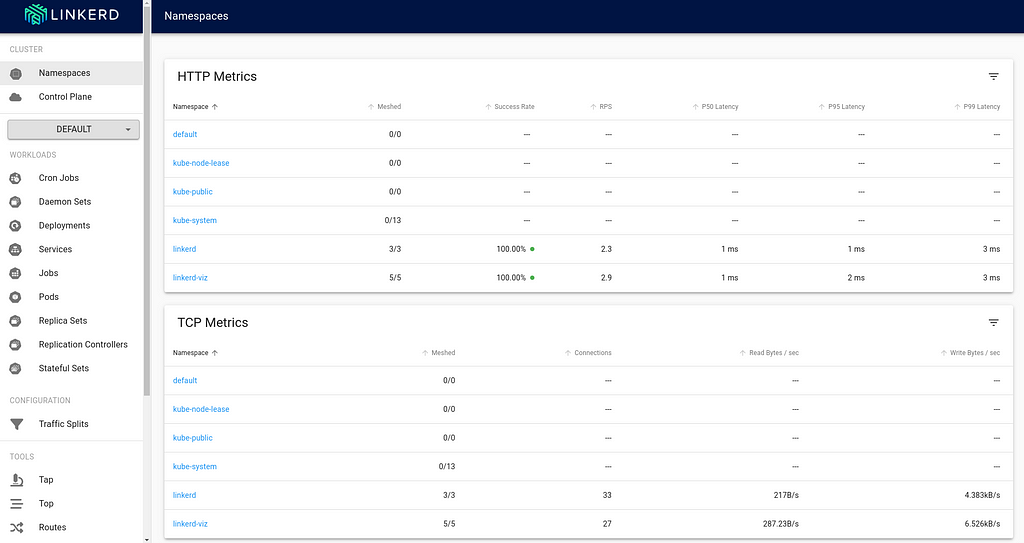
The Meshed column indicates the workload that is currently integrated with the Linkerd control plane. As you can see, there are no application deployments right now that are running.Injecting the Linkerd Data Plane componentsThere are two ways to integrate Linkerd to the application containers:1 by manually injecting the Linkerd data plane components 2 by instructing Kubernetes to automatically inject the data plane componentsInject Linkerd data plane manuallyLet s try the first option. Below is a simple nginx-app that I will deploy into the cluster:
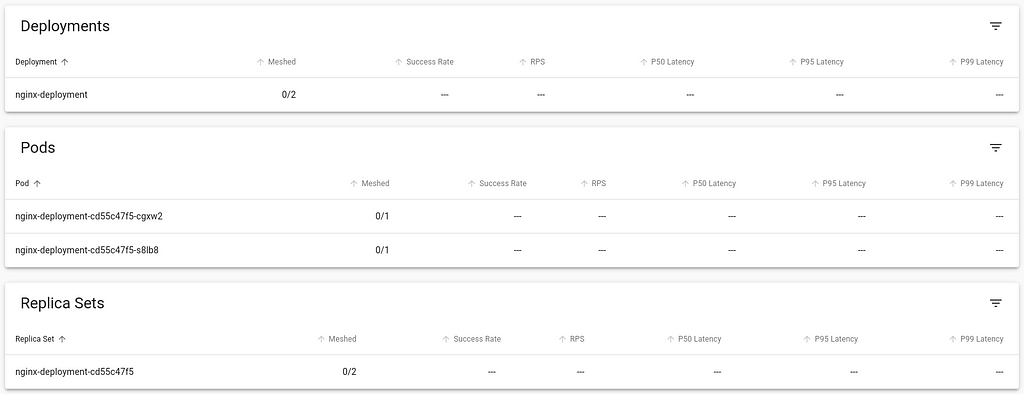
Back in the viz dashboard, I do see the workload deployed, but it isn t currently communicating with the Linkerd control plane, and so doesn t show any metrics, and the Meshed count is 0:Looking at the Pod s deployment YAML, I can see that it only includes the nginx container:
Let s directly inject the linkerd data plane into this running container. We do this by retrieving the YAML of the deployment, piping it to linkerd cli to inject the necessary components and then piping to kubectl apply the changed resources.
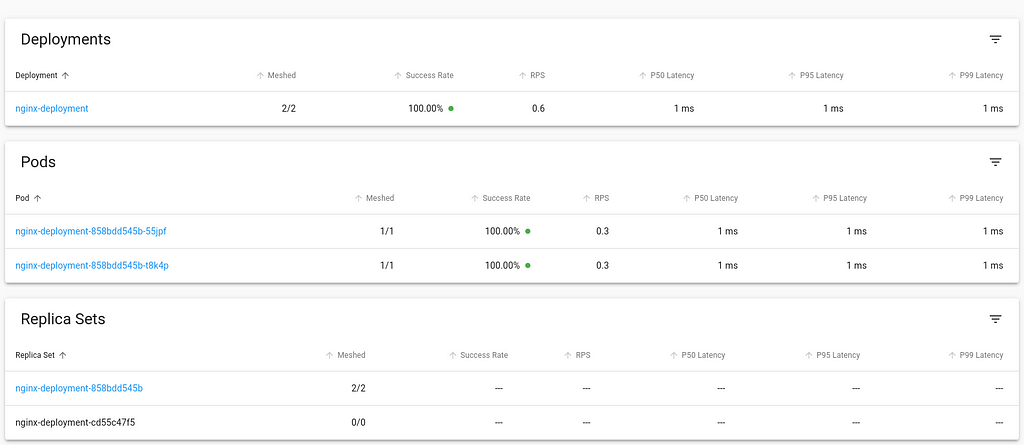
Back in the viz dashboard, the workload now is integrated into Linkerd control plane.Looking at the updated Pod definition, we see a number of changes that the linkerd has injected that allows it to integrate with the control plane. Let s have a look:
At this point, the necessary components are setup for you to explore Linkerd further. You can also try out the jaeger and multicluster extensions, similar to the process of installing and using the viz extension and try out their capabilities.Inject Linkerd data plane automaticallyIn this approach, we shall we how to instruct Kubernetes to automatically inject the Linkerd data plane to workloads at deployment time.We can achieve this by adding the linkerd.io/inject annotation to the deployment descriptor which causes the proxy injector admission hook to execute and inject linkerd data plane components automatically at the time of deployment.
This annotation can also be specified at the namespace level to affect all the workloads within the namespace. Note that any resources created before the annotation was added to the namespace will require a rollout restart to trigger the injection of the Linkerd components.Uninstalling LinkerdNow that we have walked through the installation and setup process of Linkerd, let s also cover how to remove it from the infrastructure and go back to the state prior to its installation.The first step would be to remove extensions, such as viz.
A brand-new version 0.0.9 of RcppSpdlog got onto CRAN overnight. RcppSpdlog bundles spdlog, a wonderful header-only C++ logging library with all the bells and whistles you would want that was written by Gabi Melman, and also includes fmt by Victor Zverovich.
This release contains two changes. First, we extend usability by offering both a set of simple R functions for logging from R, and a matching set of functions at the C++ level that are directly callable (and exported) from this package (so that client packages do not need to compile). Both these changes are described (as sections seven and eight) in the vignette. Second, while we were working on this Gabi released version 1.11.0 upstream so we included this as well.
The NEWS entry for this release follows.
FTP master
This month I accepted 484 and rejected 55 packages. The overall number of packages that got accepted was 492.
Debian LTS
This was my hundredth month that I did some work for the Debian LTS initiative, started by Raphael Hertzog at Freexian. Woohoo, There is a party. (yes I am old). Unfortunately there are already 101 completed month listed in the debian-lts-announce archive, so I seem to have counted wrong once. *sigh*, yes I am old.
This month my all in all workload has been 14h.
During that time I uploaded:
[DLA 3168-1] openvswitch security update for one CVE
[graphicsmagick] debdiff for Bullseye sent to security team (update as DLA or via PU?)
[graphicsmagick] prepared upload for Buster
[libvncserver] debdiff for Buster and Bullseye sent to maintainer (no upload yet :-()
I also started to work on virglrenderer.
Last but not least I took care of NEW packages on security-master.
Debian ELTS
This month was the fifty first ELTS month.
During my allocated time I uploaded:
[ELA-719-1] graphicsmagick security update of Jessie and Stretch for one CVE
[ELA-720-1] bluez security update of Jessie and Stretch for three CVEs
marked two CVEs of curl as not-affected for Jessie and Stretch
checked that all patches for dpdk need to be backported, unfortunately that was beyond my capabilities
I also started to work on snapd.
Last but not least I finally managed to become familiar with the git workflow and imported several packages to the salsa repository.
Debian Astro
This month I uploaded new upstream versions or improved packaging of:
I also uploaded a new package pysqm. This software supports the Sky Quality Meters made by Unihedron. I was kindly given an SQM-LU for USB and SQM-LE with network adapter. I plan to put a working Python3 version of the old PySQM software into Debian, package the UDM (Unihedron Device Manager) and finally check the support within Indi.
Debian IoT
This month I uploaded new upstream versions or improved packaging of:
Debian Mobcom
This month I finished the transition of the Osmocom packages, except osmo-mgw and osmo-msc seem to have problems. I have no idea how I can solve this, so help is appreciated.
Other stuff
This month I uploaded new packages:
1.3 billion announced for new Forestry Support
Funds to be delivered through new Forestry Programme
Premiums for planting trees to be increased by between 46% and 66% and extended to 20 years for farmers
#GreensInGovernment
The Taoiseach, Miche l Martin TD, Minister of State with responsibility for Forestry, Senator Pippa Hackett, and Minister for Agriculture, Food and the Marine, Charlie McConalogue T.D today announced a proposed investment by the Government of 1.3 billion in Irish forestry. The funding will be for the next national Forestry Programme and represents the largest ever investment by an Irish Government in tree-planting. The programme will now be the subject of state-aid approval by the European Commission.
The Taoiseach said:
This commitment by the Government to such a substantial financial package reflects the seriousness with which we view the climate change and biodiversity challenges, which affect all of society. Forestry is at the heart of delivering on our sustainability goals and strong support is needed to encourage engagement from all our stakeholders in reaching our objectives.
Minister Hackett said:
I m delighted to have secured a package of 1.318 billion for forestry. This will support the biggest and best-funded Forestry Programme ever in Ireland. It comes at an appropriate time, given the urgency of taking climate mitigation measures. Planting trees is one of the most effective methods of tackling climate change as well as contributing to improved biodiversity and water quality. One of my main aims is to re-engage farmers in afforestation. I m delighted therefore to be proposing a new 20-year premium term exclusively for farmers, as well as introducing a new small-scale native woodland scheme which will allow farmers to plant up to 1 hectare of native woodland on farmland and along watercourses outside of the forestry licensing process.
Minister McConalogue said:
Today we commit to providing unprecedented incentives to encourage the planting of trees that can provide a valuable addition to farm income and help to meet national climate and biodiversity objectives. This funding guarantees continued payments to those forest owners who planted under the current scheme and who are still in receipt of premiums. It also offers new and improved financial supports to those who undertake planting and sustainable forest management under the new Programme. We intend to increase premiums for planting trees by between 46% and 66% and to extend the premium period from 15 to 20 years for farmers.
"We are approaching a new and exciting period for forestry in Ireland. The new Forestry Programme will drive a new and brighter future for forestry, for farmers and for our climate.
The proposed new Forestry Programme is currently out to public consultation as part of the Strategic Environmental Assessment and Appropriate Assessment process. The Programme is the main implementation mechanism for the new Forest Strategy (2023 -2030) which reflects the ambitions contained in the recently published Shared National Vision for Trees, Woods and Forests in Ireland until 2050. The public consultation closes on 29th November, 2022 and any changes which result from this process will be incorporated into the Programme and the Forest Strategy.
Minister Hackett commented: The draft Forestry Programme and Forest Strategy are the product of extensive stakeholder consultation and feedback, and both documents are open to public consultation for the next number of weeks. I would strongly encourage all interested parties to engage with the consultation in advance of the Strategy and Programme being finalised.
The new Programme is built around the principle of right trees in the right places for the right reasons with the right management. It aims to deliver more diverse forest which will meet multiple societal objectives, economic, social and environmental. Higher grant rates for forest establishment are also proposed with increases of approximately 20% to reflect rising living costs. The new one hectare native tree area scheme will also make it easier for landowners who wish to plant small areas of trees on their farm.
The Taoiseach concluded I welcome this milestone and I believe that this funding injection will be an important catalyst in delivering on the ambition outlined in the new Forest Strategy. Our environmental challenges are huge but so is our commitment to overcoming them and this Forestry Programme is key to delivering so many of our priorities.
The new Programme will be 100% Exchequer funded and is subject to State Aid approval from the EU Commission. The Department is in contact with the Commission in relation to this approval which is a rigorous process.
Two weeks ago, I had the chance to go see Cory Doctorow at my local independent
bookstore, in Montr al. He was there to present his latest essay, co-written
with Rebecca Giblin1. Titled Chokepoint Capitalism: How Big Tech and
Big Content Captured Creative Labor Markets and How We'll Win Them Back, it
focuses on the impact of monopolies and monopsonies (more on this later) on
creative workers.
The book is divided in two main parts:
Part one, Culture has been captured (chapters 1 to 11), is a series of
case studies that focus on different examples of market failure. The specific
sectors analysed are the book market, the news media, the music industry,
Hollywood, the mobile apps industry and the online video platforms.
Part two, Braking anticompetitive flywheels (chapters 12 to 19), looks at
different solutions to try to fix these failures.
Although Doctorow is known for his strong political stances, I have to say I'm
quite surprised by the quality of the research Giblin and he did for this book.
They both show a pretty advanced understanding of the market dynamics they look
at, and even though most of the solutions they propose aren't new or
groundbreaking, they manage to be convincing and clear.
That is to say, you certainly don't need to be an economist to understand or
enjoy this book :)
As I have mentioned before, the book heavily criticises monopolies, but also
monopsonies a market structure that has only one buyer (instead of one
seller). I find this quite interesting, as whereas people are often familiar
with the concept of monopolies, monopsonies are frequently overlooked.
The classic example of a monopsony is a labor market with a single employer:
there is a multitude of workers trying to sell their labor power, but in the
end, working conditions are dictated by the sole employer, who gets to decide
who has a job and who hasn't. Mining towns are good real-world examples of
monopsonies.
In the book, the authors argue most of the contemporary work produced by
creative workers (especially musicians and writers) is sold to monopsonies and
oligopsonies, like Amazon2 or major music labels. This creates a
situation where the consumers are less directly affected by the lack of
competition in the market (they often get better prices), but where creators
have an increasingly hard time making ends meet. Not only this, but natural
monopsonies3 are relatively rare, making the case for breaking the
existing ones even stronger.
Apart from the evident need to actually start applying (the quite good)
antitrust laws in the USA, some of the other solutions put forward are:
Transparency Rights giving creative workers a way to audit the companies
that sell their work and make sure they are paid what they are due.
Collective Action
Time Limits on Copyright Contracts making sure creators that sell their
copyrights to publishers or labels can get them back after a reasonable
period of time.
Radical Interoperability forcing tech giants to make their walled-gardens
interoperable.
Minimum Wages for Creative Work enforcing minimum legal rates for workers
in certain domains, like what is already done for screenplays in the US by
members of the Writers Guild of America.
Collective Ownership
Overall, I found this book quite enjoying and well written. Since I am not a
creative worker myself and don't experience first-hand the hardships presented
in the book, it was the occasion for me to delve more deeply in this topic.
Chances are I'll reuse some of the expos s in my classes too.
Professor at the Melbourne Law School and Director of the
Intellectual Property Research Institute of Australia, amongst other things.
More on her here.
Amazon owns more than 50% of the US physical book retail market and
has an even higher market share for ebooks and audiobooks (via Audible). Not
only this, but with the decline of the physical book market, audiobooks are
an increasingly important source of revenue for authors.
Natural monopolies happen when it does not make economic sense for
multiple enterprises to compete in a market. Critical infrastructures, like
water supply or electricity, make for good examples of natural monopolies. It
simply wouldn't be efficient to have 10 separate electrical cables connecting
your house to 10 separate electric grids. In my opinion, such monopolies are
acceptable (and even desirable), as long as they are collectively owned,
either by the State or by local entities (municipalities, non-profits, etc.).
A new release 0.4.20 of RProtoBuf arrived on CRAN earlier today. RProtoBuf provides R with bindings for the Google Protocol Buffers ( ProtoBuf ) data encoding and serialization library used and released by Google, and deployed very widely in numerous projects as a language and operating-system agnostic protocol.
This release is somewhat mechanical and in the spirit of many other recent releases. clang-15 is, as more recent compilers do, more stringent on definitions and wants to see some void in argument-less signatures. Happy to oblige. At the same time, GitHub Actions started to nag us about minimum versions of node code so an upgrade to a newer action is warranted, again as with many other affected packages. We also found another http:// URL hiding somewhere so that was cleaned. Lastly, it appears Protocol Buffers themselves moved on and now need / prefer C++17 so were happy to oblige.
The following section from the NEWS.Rd file has full details.
Changes in RProtoBuf version 0.4.20 (2022-11-02)
Two function prototype were updated for clang-15.
GitHub Actions were updated to checkout version 3.
One more http:// URL was updated to https://
The package compilation is now donw with C++17 as the Protocol Buffer headers require it (and clang-15 nags otherwise).
The diffoscope maintainers are pleased to announce the release of diffoscope
version 226. This version includes the following changes:
[ Christopher Baines ]
* Add an lzip comparator with tests.
[ Chris Lamb ]
* Add support for comparing the "text" content of HTML files using html2text.
  (Closes: #1022209, reproducible-builds/diffoscope#318)
* Misc/test improvements:
  * Drop the ALLOWED_TEST_FILES test; it's mostly just annoying.
  * Drop other copyright notices from lzip.py and test_lzip.py.
  * Use assert_diff helper in test_lzip.py.
  * Pylint tests/test_source.py.
[ Mattia Rizzolo ]
* Add lzip to debian dependencies.
So this week I recycled a talk I'd given in the past, about how even using
extremely simple parsers allows a lot of useful static-analysis to be done,
for specific niche use-cases.
This included examples of scanning comments above classes to ensure they
referred to the appropriate object, ensuring that specific function
calls always included a specific (optional) parameter, etc.
Nothing too complex, but I figured I'd give a new example this time, and
I remembered I'd recently written a bunch of functions for an interpreter
which I'd ordered quite deliberately.
Assume you're writing a BASIC interpreter, you need to implement a bunch of
built-in maths functions such as SIN, COS, TAN, then some string-related
functions LEFT$, RIGHT$, MID$, etc.
When it comes to ordering there are a couple of approaches:
Stick them all in one package:
builtins/builtins.go
Create a package and group them:
builtins/maths.go
builtins/string.go
.. etc
Personal preference probably dictates the choice you make, but either way I think it would be rational and obvious that you'd put the functions in alphabetical order:
I did that myself, and I wrote a perl-script to just parse the file using a simple regexp "^func\s+([^(]+)\(" but then I figured this was a good time to write a real static-analysis tool.
The golang environment is full of trivial little linters for various purposes, and the standard "go vet .." driver makes it easy to invoke them. Realizing that I was going to get driven in the same way it was obvious I'd write something called "alphaVet".
So anyway, half written for a talk, half-written because of the name:
Golang linter that reports failures if functions aren't in alphabetical order


 Desde de setembro de 2015, o
 There is significant effort involved to get your
 That way more admins need to learn how to run high availability services for dubious business opportunities to "later" monetize services. Services that nobody cares to pay for and thus opportunities that never materialize. But every company wants to find that out again. Because if Apple could do it, why shouldn't Canonical be able to do it? $$$!1!!
So, can't update Firefox on Ubuntu 22.04 right now.
At least there is
 Bonus points for the bad client side implementation:
 I just did again the usual web search, and I have verified that Mastodon still does not support
 A few days ago, my home network got a refresh that resulted in the enablement of some next-generation
technologies for me and my family. Well, next-generation or current-generation, depending on your point of view.
Per the ISP standards in Spain (my country), what I ll describe next is literally the most and latest you can get.
The post title spoiled it already. I have now 10G internet uplink and native IPv6 since I changed my ISP to
 If you are curious, this was the IPv6 prefix whois information:
 Two weeks ago, I had the chance to go see Cory Doctorow at my local independent
bookstore, in Montr al. He was there to present his latest essay, co-written
with Rebecca Giblin
 Although Doctorow is known for his strong political stances, I have to say I'm
quite surprised by the quality of the research Giblin and he did for this book.
They both show a pretty advanced understanding of the market dynamics they look
at, and even though most of the solutions they propose aren't new or
groundbreaking, they manage to be convincing and clear.
That is to say, you certainly don't need to be an economist to understand or
enjoy this book :)
As I have mentioned before, the book heavily criticises monopolies, but also
monopsonies a market structure that has only one buyer (instead of one
seller). I find this quite interesting, as whereas people are often familiar
with the concept of monopolies, monopsonies are frequently overlooked.
The classic example of a monopsony is a labor market with a single employer:
there is a multitude of workers trying to sell their labor power, but in the
end, working conditions are dictated by the sole employer, who gets to decide
who has a job and who hasn't. Mining towns are good real-world examples of
monopsonies.
In the book, the authors argue most of the contemporary work produced by
creative workers (especially musicians and writers) is sold to monopsonies and
 So this week I recycled a talk I'd given in the past, about how even using
extremely simple parsers allows a lot of useful static-analysis to be done,
for specific niche use-cases.
This included examples of scanning comments above classes to ensure they
referred to the appropriate object, ensuring that specific function
calls always included a specific (optional) parameter, etc.
Nothing too complex, but I figured I'd give a new example this time, and
I remembered I'd recently written a bunch of functions for an interpreter
which I'd ordered quite deliberately.
Assume you're writing a BASIC interpreter, you need to implement a bunch of
built-in maths functions such as