Search Results: "eof"

25 January 2016

Steinar H. Gunderson: Chess endgame tablebases

A very short post: This link contains an interesting exposition of the 50-move rule in chess, and what it means for various endings. You can probably stop halfway, though; most of it is only interest for people deeply into endgame theory. Personally, I think DTZ50, as used by the Syzygy tablebases, is the best tradeoff for computer chess. It always produces the correct result (never throws away a win as a draw, or a draw as a loss), but the actual mates are of suboptimal length and look very strange (e.g., it will happily give away most of its pieces and then play very tricky endgames to mate). Then again, if you ever want to swindle against a non-optimal opponent (ie., try to make the position as hard as possible to play, to possibly convert e.g. a loss to a draw), you've opened up an entirely new can of worms. :-) Update: Eric P Smith has written a different explanation of the DTM50 metric that's probably easier to understand, although it contains less new information than the other one.

21 January 2016

Jonas Smedegaard: IT@school

Siri and I are on a journey through India and Nepal, with the aim of learning about needs of Debian derivatives, to improve Debian and encourage closer integration.

Distribution IT@school is a distribution originally based on Debian, later rebased on Ubuntu. Next release will possibly again be a direct derivative of Debian, or maybe even - time will tell - a Debian pure blend.

Aim is education As its name indicates, IT@school is targeted at schools: The system is used in 8th - 10th grades of most (or all?) public primary schools in Kerala, Together with KEK members Anto and Fayad, Siri and I met with former and current key participants in the project where we learned about its history and current status, and discussed some differences between Ubuntu and Debian. IT@school has a strong emphasis on the educational aspect, arguably setting it apart from Skolelinux/DebianEdu which emphasizes the technical aspect of relieving teachers from admin tasks. In the early years of deployment the project faced many hardware issues - e.g. in getting sound cards to work. This was seen not as problems but as beneficial learning for the teachers facing those issues. Kerala public school system has set the standard for other states in India, but sadly political support within the state has been weak in recent years. It is hoped that next election - this April - will bring a positive change.

School book IT@school is accompagnied by a school book written specifically for use of the included tools. No explicit license is applied to the book (which means it defaults to classic copyright). Possibly it will get Creative Commons licensed. If the school book gets a DFSG-free license, several collaboration opportunities emerge: Currently the book is drafted in LibreOffice but then - due to state procedures - finalized with PageMaker. Would be interesting to setup an alternate process using only Free tools - either with Scribus or XeLaTeX. An important detail here is to ensure that the process supports malayalam script.

Curriculum Work is in progress mapping FLOSS tools to the state curriculum. I recommended to share that work publicly with a Free license, to encourage comparisons across countries, and invite collaboration e.g. with Skolelunux/DebianEdu.

Blend for SBCs Some Kerala higher education schools (sorry, don't remember which) have bought some thousands of RaspberryPi2. I suggested to create a Debian Blend for SBCs (Single Board Computers) - we will see what comes of that idea

Blend for education I also suggested to make a Debian blend around IT@school distribution itself, with its strong focus on educational content - i.e. not just as addon to technical tools but the primary purpose pulling in tools as needed.

19 January 2016

Joey Hess: git-annex v6

Version 6 of git-annex, released last week, adds a major new feature; support for unlocked large files that can be edited as usual and committed using regular git commands. For example:
git init
git annex init --version=6
mv ~/foo.iso .
git add foo.iso
git commit -m "added hundreds of megabytes to git annex (not git)"
git remote add origin ssh://sever/dir
git annex sync origin --content # uploads foo.iso
Compare that with how git-annex has worked from the beginning, where git annex add is used to add a file, and then the file is locked, preventing further modifications of it. That is still a very useful way to use git-annex for many kinds of files, and is still supported of course. Indeed, you can easily switch files back and forth between being locked and unlocked. This new unlocked file mode uses git's smudge/clean filters, and I was busy developing it all through December. It started out playing catch-up with git-lfs somewhat, but has significantly surpassed it now in several ways. So, if you had tried git-annex before, but found it didn't meet your needs, you may want to give it another look now.
Now a few thoughts on git-annex vs git-lfs, and different tradeoffs made by them. After trying it out, my feeling is that git-lfs brings an admirable simplicity to using git with large files. File contents are automatically uploaded to the server when a git branch is pushed, and downloaded when a branch is merged, and after setting it up, the user may not need to change their git workflow at all to use git-lfs. But there are some serious costs to that simplicity. git-lfs is a centralized system. This is especially problimatic when dealing with large files. Being a decentralized system, git-annex has a lot more flexability, like transferring large file contents peer-to-peer over a LAN, and being able to choose where large quantities of data are stored (maybe in S3, maybe on a local archive disk, etc). The price git-annex pays for this flexability is you have to configure it, and run some additional commands. And, it has to keep track of what content is located where, since it can't assume the answer is "in the central server". The simplicity of git-lfs also means that the user doesn't have much control over what files are present in their checkout of a repository. git-lfs downloads all the files in the work tree. It doesn't have facilities for dropping the content of some files to free up space, or for configuring a repository to only want to get a subset of files in the first place. On the other hand, git-annex has excellent support for all those things, and this comes largely for free from its decentralized design. If git has showed us anything, it's perhaps that a little added complexity to support a fully distributed system won't prevent people using it. Even if many of them end up using it in a mostly centralized way. And that being decentralized can have benefits beyond the obvious ones.
Oh yeah, one other advantage of git-annex over git-lfs. It can use half as much disk space! A clone of a git-lfs repository contains one copy of each file in the work tree. Since the user can edit that file at any time, or checking out a different branch can delete the file, it also stashes a copy inside .git/lfs/objects/. One of the main reasons git-annex used locked files, from the very beginning, was to avoid that second copy. A second local copy of a large file can be too expensive to put up with. When I added unlocked files in git-annex v6, I found it needed a second copy of them, same as git-lfs does. That's the default behavior. But, I decided to complicate git-annex with a config setting:
git config annex.thin true
git annex fix
Run those two commands, and now only one copy is needed for unlocked files! How's it work? Well, it comes down to hard links. But there is a tradeoff here, which is why this is not the default: When you edit a file, no local backup is preserved of its old content. So you have to make sure to let git-annex upload files to another repository before editing them or the old version could get lost. So it's a tradeoff, and maybe it could be improved. (Only thin out a file after a copy has been uploaded?) This adds a small amount of complexity to git-annex, but I feel it's well worth it to let unlocked files use half the disk space. If the git-lfs developers are reading this, that would probably be my first suggestion for a feature to consider adding to git-lfs. I hope for more opportunities to catch-up to git-lfs in turn.

14 January 2016

Jan Wagner: Running Ghost blogging platform via Docker

When I was thinking about using Ghost, I did read the installations guide and then I just closed the browser window.
I didn't wanted to install npm, yet another package manager, and just hack init scripts. Not speaking about updating Ghost itself. Some weeks later I did think about using Ghost again. It has a nice Markdown Editor and some nice other features. Since everybody is jumping on the Docker band wagon actually and I had used it for some tests already, I thought trying the Ghost Docker image might be a good idea. If you are interested into how I did that, read on. I suppose you have installed a stock Debian Jessie.

Installing Docker

Pulling the Docker image Just in case you didn't, you need to (re)start docker to work with service docker restart
# docker pull ghost

Making Ghost (container image) run forever I did not like systemd in the first place for many reasons. But in some circumstances it makes sense. In case of handling a Docker container, using a systemd unit file makes life much easier.
# mkdir -p /srv/docker/ghost/
# cat > /etc/systemd/system/ghost.service << EOF
[Unit]
Description=GHost Service  
After=docker.service  
Requires=docker.service
[Service]
ExecStartPre=-/usr/bin/docker kill ghost  
ExecStartPre=-/usr/bin/docker rm ghost  
ExecStartPre=-/usr/bin/docker pull ghost  
ExecStart=/usr/bin/docker run  --name ghost --publish 2368:2368 --env 'NODE_ENV=production' --volume /srv/docker/ghost/:/var/lib/ghost ghost  
ExecStop=/usr/bin/docker stop ghost
[Install]
WantedBy=multi-user.target  
EOF  
# systemctl enable ghost && systemctl daemon-reload && systemctl start ghost 
This will start your container on start and even is looking for a new Docker image and is fetching it, if needed. If you don't like this behavior, just comment out the line in the config and reread it with systemctl daemon-reload. Now you should have listening something on port 2368:
# netstat -tapn   grep 2368
tcp6       0      0 :::2368                 :::*                    LISTEN      7061/docker-proxy  
Update: Jo l Dinel did send me a mail, that starting your Docker container with --restart always will take care that it is brought up again if Docker or (even) the whole system will get restarted. For real I used that before and might be a lightweight solution, but I liked the systemd unit file solution a lot more.

Persistent Data Thanks to the Docker mount option you can find all your data in /srv/docker/ghost/. So your blog will still have content, even if the ghost Docker images is updated:
# ls /srv/docker/ghost/
apps  config.js  data  images  themes  

Accessing the container To kick your ghost into production, it might be useful if you make it available on port 80 at least. This can be done for example by changing your Docker publish configuration or adding a DNAT to your firewall. But I would recommand using a proxy in front of your Docker container. This might be part of one of my next articles.

20 November 2015

Sylvain Beucler: Mini-sendmail... in bash

I recently faced an environment where there is no MTA. WTF? The reason is that people who work there get security audits on a regular basis, and the security people are usually mo...deratly skilled guys who blindly run a set of scripts, e.g. by ordering to disable Apache modules that "where seen enabled in /etc/apache2/mods-available/"... To avoid spending days arguing with them and nitpicking with non-technical managers, the system is trimmed to the minimum - and there is no MTA. No MTA, so no cron output, so difficulty to understand why last night's cron job failed miserably. Since it was not my role to reshape the whole business unit, I decided to hack a super-light, but functional way to get my cron output:
cat <<'EOF' > /usr/sbin/sendmail
#!/bin/bash
(
    echo "From me  $(LANG=C date)"
    cat
    echo
) >> /var/mail/all
EOF
chmod 755 /usr/sbin/sendmail
It works! :) There is a companion logrotate script, to avoid filling the file system:
cat <<'EOF' > /etc/logrotate.d/mail-all
/var/mail/all  
  daily
  rotate 10
  compress
  delaycompress
  notifempty
  create 622 root mail
 
EOF
Bootstrap with:
touch /var/mail/all
logrotate -f /var/mail/all
You now can check your sys-mails with:
mutt -f /var/mail/all
;)

9 November 2015

Vasudev Kamath: Forwarding host port to service in container

Problem I've lxc container running distcc daemon and I would like to forward the distcc traffic coming to my host system to container.
Solution Following simple script which uses iptable did the job.
 #!/bin/sh
 set -e
usage()  
    cat <<EOF
    $(basename $0) [options] <in-interface> <out-interface> <port> <destination>
    --clear           Clear the previous rules before inserting new
                      ones
    --protocol        Protocol for the rules to use.
    in-interface      Interface on which incoming traffic is expected
    out-interface     Interface to which incoming traffic is to be
                      forwarded.
    port              Port to be forwarded. Can be integer or string
                      from /etc/services.
    destination       IP and port of the destination system to which
                      traffic needs to be forwarded. This should be in
                      form <destination_ip:port>
(C) 2015 Vasudev Kamath - This program comes with ABSOLUTELY NO
WARRANTY. This is free software, and you are welcome to redistribute
it under the GNU GPL Version 3 (or later) License
EOF
 
setup_portforwarding ()  
    local protocol="$1"
    iptables -t nat -A PREROUTING -i $IN_INTERFACE -p "$protocol" --dport $PORT \
           -j DNAT --to $DESTINATION
    iptables -A FORWARD -p "$protocol" -d $ DESTINATION%%\:*  --dport $PORT -j ACCEPT
    # Returning packet should have gateway IP
    iptables -t nat -A POSTROUTING -s $ DESTINATION%%\:*  -o \
           $IN_INTERFACE -j SNAT --to $ IN_IP%%\/* 
 
if [ $(id -u) -ne 0 ]; then
    echo "You need to be root to run this script"
    exit 1
fi
while true; do
    case "$1" in
      --clear)
          CLEAR_RULES=1
          shift
          ;;
      --protocol --protocol=*?)
      if [ "$1" = "--protocol" -a -n "$2" ];then
          PROTOCOL="$2"
          shift 2
      elif [ "$ 1#--protocol= " != "$1" ]; then
          PROTOCOL="$ 1$--protocol= "
          shift 1
      else
          echo "You need to specify protocl (tcp udp)"
          exit 2
      fi
      ;;
      *)
          break
          ;;
    esac
done
if [ $# -ne 4 ]; then
    usage $0
    exit 2
fi
IN_INTERFACE="$1"
OUT_INTERFACE="$2"
PORT="$3"
DESTINATION="$4"
# Get the incoming interface IP. This is used for SNAT.
IN_IP=$(ip addr show $IN_INTERFACE \
             perl -nE '/inet\s(.*)\sbrd/ and print $1')
if [ -n "$CLEAR_RULES" ]; then
    iptables -t nat -X
    iptables -t nat -F
    iptables -F
fi
if [ -n "$PROTOCOL" ]; then
    setup_portforwarding $PROTOCOL
else
    setup_portforwarding tcp
    setup_portforwarding udp
fi
Coming to systemd-nspawn I see there is --port option which takes argument in form proto:hostport:destport where proto can be either tcp or udp, hostport and destport are number from 1-65535. This option assumes private networking enabled in the container. I've not tried this option yet but that simplifies quite a lot of thing, its like -p switch used by docker.

Vasudev Kamath: Taming systemd-nspawn for running containers

I've been trying to run containers using systemd-nspawn for quite some time. I was always bumping to one or other dead end. This is not systemd-nspawn's fault, rather my impatience stopping me from reading manual pages properly lack of good tutorial like article available online. Compared to this LXC has a quite a lot of good tutorials and howto's available online. This article is my effort to create a notes putting all required information in one place.
Creating a Debian Base Install First step is to have a minimal Debian system some where on your hard disk. This can be easily done using debootsrap. I wrote a custom script to avoid reading manual every time I want to run debootstrap. Parts of this script (mostly packages and the root password generation) is stolen from lxc-debian template provided by lxc package.
#!/bin/sh
set -e
set -x
usage ()  
    echo "$ 0##/*  [options] <suite> <target> [<mirror>]"
    echo "Bootstrap rootfs for Debian"
    echo
    cat <<EOF
    --arch         set the architecture to install
    --root-passwd  set the root password for bootstrapped rootfs
    EOF
 
# copied from the lxc-debian template
packages=ifupdown,\
locales,\
libui-dialog-perl,\
dialog,\
isc-dhcp-client,\
netbase,\
net-tools,\
iproute,\
openssh-server,\
dbus
if [ $(id -u) -ne 0 ]; then
    echo "You must be root to execute this command"
    exit 2
fi
if [ $# -lt 2 ]; then
   usage $0
fi
while true; do
    case "$1" in
        --root-passwd --root-passwd=?*)
            if [ "$1" = "--root-passwd" -a -n "$2" ]; then
                ROOT_PASSWD="$2"
                shift 2
            elif [ "$1" != "$ 1#--root-passwd= " ]; then
                ROOT_PASSWD="$ 1#--root-passwd= "
                shift 1
            else
                # copied from lxc-debian template
                ROOT_PASSWD="$(dd if=/dev/urandom bs=6 count=1 2>/dev/null base64)"
                ECHO_PASSWD="yes"
            fi
            ;;
        --arch --arch=?*)
            if [ "$1" = "--arch" -a -n "$2" ]; then
                ARCHITECTURE="$2"
                shift 2
            elif [ "$1" != "$ 1#--arch= " ]; then
                ARCHITECTURE="$ 1#--arch= "
                shift 1
            else
                ARCHITECTURE="$(dpkg-architecture -q DEB_HOST_ARCH)"
            fi
            ;;
        *)
            break
            ;;
    esac
done
release="$1"
target="$2"
if [ -z "$1" ]   [ -z "$2" ]; then
    echo "You must specify suite and target"
    exit 1
fi
if [ -n "$3" ]; then
    MIRROR="$3"
fi
MIRROR=$ MIRROR:-http://httpredir.debian.org/debian 
echo "Downloading Debian $release ..."
debootstrap --verbose --variant=minbase --arch=$ARCHITECTURE \
             --include=$packages \
             "$release" "$target" "$MIRROR"
if [ -n "$ROOT_PASSWD" ]; then
    echo "root:$ROOT_PASSWD"   chroot "$target" chpasswd
    echo "Root password is '$ROOT_PASSWRD', please change!"
fi
It just gets my needs done, if you don't like it feel free to modify or use debootstrap directly. !NB Please install dbus package in the minimal base install, otherwise you will not be able to control the container using machinectl
Manually Running Container and then persisting it Next we need to run the container manually. This is done by using following command.
systemd-nspawn -bD   /path/to/container --network-veth \
     --network-bridge=natbr0 --machine=Machinename
--machine option is not mandatory, if not specified systemd-nspawn will take the directory name as machine name, and if you have characters like - in the directory name it translates to hexcode x2d and controlling container with name becomes difficult. --network-veth specifies the systemd-nspawn to enable virtual ethernet based networking and --network-bridge tells the bridge interface on host system to be used by systemd-nspawn. These options together constitutes private networking for container. If not specified container can use host systems interface there by removing network isolation of container. Once you run this command container comes up. You can now run machinectl to control the container. Container can be persisted using following command
machinectl enable container-name
This will create a symbolic link of /lib/systemd/system/systemd-nspawn@service to /etc/systemd/system/machine.target.wants/. This allows you to start or stop container using machinectl or systemctl command. Only catch here is your base install should be in /var/lib/machines/. What I do in my case is create a symbolic link from my base container to /var/lib/machines/container-name. !NB Note that symbolic link name under /var/lib/machines should be same as the container name you gave using --machine switch or the directory name if you didn't specify --machine
Persisting Container Networking We did persist the container in above step, but this doesn't persist the networking options we provided in command line. systemd-nspawn@.service provides following command to invoke container.
ExecStart=/usr/bin/systemd-nspawn --quiet --keep-unit --boot --link-journal=try-guest --network-veth --settings=override --machine=%I
To persist the bridge networking configuration we did in command line, we need the help of systemd-networkd. So first we need to enable the systemd-networkd.service on both container and the host system.
systemctl enable systemd-networkd.service
Now inside the container, interfaces will be named as hostN. Depending on how many interfaces we have N increments. In our example case we had single interface, hence it will named as host0. By default network interfaces will be down inside container, hence systemd-networkd is needed to put it up. We put the following in /etc/systemd/network/host0.network file inside the container.
[Match]
Name=host0
[Network]
Description=Container wired interface host0
DHCP=yes
And in the host system we just configure the bridge interface using systemd-nspawn. I put following in natbr0.netdev in /etc/systemd/network/
[NetDev]
Description=Bridge natbr0
Name=natbr0
Kind=bridge
In my case I already had configured the bridge using /etc/network/interfaces file for lxc. I think its not really needed to use systemd-networkd in this case. Since systemd-networkd doesn't do anything if network / virtual device is already present I safely put above configuration and enabled systemd-networkd. Just for the notes here is my natbr0 configuration in interfaces file.
auto natbr0
iface natbr0 inet static
   address 172.16.10.1
   netmask 255.255.255.0
   pre-up brctl addbr natbr0
   post-down brctl delbr natbr0
   post-down sysctl net.ipv4.ip_forward=0
   post-down sysctl net.ipv6.conf.all.forwarding=0
   post-up sysctl net.ipv4.ip_forward=1
   post-up sysctl net.ipv6.conf.all.forwarding=1
   post-up iptables -A POSTROUTING -t mangle -p udp --dport bootpc -s 172.16.0.0/16 -j CHECKSUM --checksum-fill
   pre-down iptables -D POSTROUTING -t mangle -p udp --dport bootpc -s 172.16.0.0/16 -j CHECKSUM --checksum-fill
Once this is done just reload the systemd-networkd and make sure you have dnsmasq or any other DHCP server running in your system. Now the last part is to tell systemd-nspawn to use the bridge networking interface we have defined. This is done using container-name.nspawn file. Put this file under /etc/systemd/nspawn folder.
[Exec]
Boot=on
[Files]
Bind=/home/vasudev/Documents/Python/upstream/apt-offline/
[Network]
VirtualEthernet=yes
Bridge=natbr0
Here you can specify networking, and files mounting section of the container. For full list please refer the systemd.nspawn manual page. Now all this is done you can happily do
machinectl start container-name
#or
systemctl start systemd-nspawn@container-name
Resource Control Now all things said and done, one last part remains. Yes what is the point if we can't control how much resource does the container use. Atleast it is more important for me, because I use old and bit low powered laptop. Systemd provides way to control the resource using Control interface. To see all the the interfaces exposed by systemd please refer systemd.resource-control manual page. The way to control the resource is using systemctl. Once container starts running we can run following command.
systemctl set-property container-name CPUShares=200 CPUQuota=30% MemoryLimit=500M
The manual page does say that these things can be put under [Slice] section of unit files. Now I don't have clear idea if this can be put under .nspawn files or not. For the sake of persisting the container I manually wrote the service file for container by copying systemd-nspawn@.service and adding [Slice] section. But if I don't know how to find out if this had any effect or not. If some one knows about this please share your suggestions to me and I will update this section with your provided information.
Conclussion All in all I like systemd-nspawn a lot. I use it to run container for development of apt-offline. I previously used lxc where all can be controlled using a single config file. But I feel systemd-nspawn is more tightly integrated with system than lxc. There is definitely more in systemd-nspawn than I've currently figured out. Only thing is its not as popular as other alternatives and definitely lacks good howto documentation.For now only way out is dig the manual pages, scratch your head, pull your hair out and figure out new possibilities in systemd-nspawn. ;-)

1 November 2015

Steinar H. Gunderson: YUV color primaries

Attention: If these two videos don't both look identical (save for rounding errors) to each other and to this slide, it has broken understanding of YUV color primaries, and will render lots of perfectly normal video subtly off in color, one way or the other. Remux in MP4 instead of MPEG-TS here, for easier testing in browsers etc.: First, second. Chrome passes with perfect marks, Iceweasel segfaults on both (GStreamer's quality or lack thereof continues to amaze me). MPlayer and VLC both get one of them wrong (although VLC gets it more right if you use its screenshot function to save a PNG to disk, so check what's actually on the screen); ffmpeg with PNG output gets it right but ffplay doesn't. Edit to add: The point is the stable picture, not the flickering in the first few frames, of course. The video was encoded quite hastily.

13 September 2015

Steve Kemp: All about sharing files easily

Although I've been writing a bit recently about file-storage, this post is about something much more simple: Just making a random file or two available on an ad-hoc basis. In the past I used to have my email and website(s) hosted on the same machine, and that machine was well connected. Making a file visible just involved running ~/bin/publish, which used scp to write a file beneath an apache document-root. These days I use "my computer", "my work computer", and "my work laptop", amongst other hosts. The SSH-keys required to access my personal boxes are not necessarily available on all of these hosts. Add in firewall constraints and suddenly there isn't an obvious way for me to say "Publish this file online, and show me the root". I asked on twitter but nothing useful jumped out. So I ended up writing a simple server, via sinatra which would allow: This worked, and was even secure-enough, given that I run SSL if you import my CA file. But using basic auth felt like cheating, and I've been learning more Go recently, and I figured I should start taking it more seriously, so I created a small repository of learning-programs. The learning programs started out simply, but I did wire up a simple TOTP authenticator. Having TOTP available made me rethink things - suddenly even if you're not using SSL having an eavesdropper doesn't compromise future uploads. I'd also spent a few hours working out how to make extensible commands in go, the kind of thing that lets you run:
cmd sub-command1 arg1 arg2
cmd sub-command2 arg1 .. argN
The solution I came up with wasn't perfect, but did work, and allow the seperation of different sub-command logic. So suddenly I have the ability to run "subcommands", and the ability to authenticate against a time-based secret. What is next? Well the hard part with golang is that there are so many things to choose from - I went with gorilla/mux as my HTTP-router, then I spend several hours filling in the blanks. The upshot is now that I have a TOTP-protected file upload site:
publishr init    - Generates the secret
publishr secret  - Shows you the secret for import to your authenticator
publishr serve   - Starts the HTTP daemon
Other than a lack of comments, and test-cases, it is complete. And stand-alone. Uploads get dropped into ./public, and short-links are generated for free. If you want to take a peak the code is here: The only annoyance is the handling of dependencies - which need to be "go got ..". I guess I need to look at godep or similar, for my next learning project. I guess there's a minor gain in making this service available via golang. I've gained protection against replay attacks, assuming non-SSL environment, and I've simplified deployment. The downside is I can no longer login over the web, and I must use curl, or similar, to upload. Acceptible tradeoff.

7 September 2015

Ben Armstrong: Hike at Blomidon Park: Late Summer, 2015

I had the wonderful privilege to go camping and hiking with my kids scouting group, the Pathfinders of Tantallon SDA church. The day started with a quick trip to Pugwash with one of the leaders to bring back some chairs to their school, and then we headed back out to Blomidon to meet up with the group. Click the photo below to start the slideshow.
The road trip started early to fetch some chairsThe road trip started early to fetch some chairs click to start
The smudgy truck windows make an interesting filter Still an hour or more away from our first stop More funky filtering, this time with trees participating Wentworth valley taken over the cluttered dash We disturbed a great blue heron s breakfast at Wallace The beach at Pugwash SDA Camp where we loaded the chairs Trucking along past Truro After dropping off chairs, finally approaching Blomidon Getting very close to Blomidon Some bikers out to enjoy the views Interesting white berries Interesting red berries My first up close look at the point with my hiking buddy, Dave, on the first day An experimental panorama. Not sure I have the knack for keeping the horizon straight. We must bring the group out here tomorrow! Fast ringneck snake! Hard to get a clear shot Pre-dawn over the campground The first blush of coming dawn The Moon and Venus just before dawn Evergreens surrounding our camp site, pre-dawn Seems I m still the only one up Half of the tents on the spacious group site Half of the tents on the spacious group site My daughter, the artist My two youngest and their best friend Some relaxing down time after breakfast Not sure who said what, but apparently they were hilarious. :) The smoke was a bit much for my eldest Geoff entertaining the troops Dave making breakfast Dave making breakfast Breakfast just wrapping up Relaxing while we finish breakfast Looks like that needs some tweaking A bit too smoky The whole group The whole group Just goofing around Who s winning? Enjoying the last embers of the breakfast fire before heading to Jodrey Trail I admire this young lady s great eye for photography She has some sweet gear A lot of old hardwoods out here Dave did this hike with me yesterday Excellent hiking buddy! Words can t describe how much more stunning these views are in person All the cameras came out Got to get that perfect shot! A tree clinging to the eroding ground above the sheer cliff A lookoff on Jodrey Trail A lookoff on Jodrey Trail Lining up her shot /a> A lookoff on Jodrey Trail A lookoff on Jodrey Trail A lookoff on Jodrey Trail A fern with sharply serrated sturdy leaves I m not familiar with Breaking camp at group site 404 One final chance to enjoy the view from the park entrance before heading home
facebooktwittergoogle_plusredditpinterestlinkedinmail

3 September 2015

John Goerzen: There s still a chance to save WiFi

You may not know it, but wifi is under assault in the USA due to proposed FCC regulations about modifications to devices with modular radios. In short, it would make it illegal for vendors to sell devices with firmware that users can replace. This is of concern to everyone, because Wifi routers are notoriously buggy and insecure. It is also of special concern to amateur radio hobbyists, due to the use of these devices in the Amateur Radio Service (FCC Part 97). I submitted a comment to the FCC about this, which I am pasting in here. This provides a background and summary of the issues for those that are interested. Here it is: My comment has two parts: one, the impact on the Amateur Radio service; and two, the impact on security. Both pertain primarily to the 802.11 ( Wifi ) services typically operating under Part 15. The Amateur Radio Service (FCC part 97) has long been recognized by the FCC and Congress as important to the nation. Through it, amateurs contribute to scientific knowledge, learn skills that bolster the technological competitiveness of the United States, and save lives through their extensive involvement in disaster response. Certain segments of the 2.4GHz and 5GHz Wifi bands authorized under FCC Part 15 also fall under the frequencies available to licensed amateurs under FCC Part 97 [1]. By scrupulously following the Part 97 regulations, many amateur radio operators are taking devices originally designed for Part 15 use and modifying them for legal use under the Part 97 Amateur Radio Service. Although the uses are varied, much effort is being devoted to fault-tolerant mesh networks that provide high-speed multimedia communications in response to a disaster, even without the presence of any traditional infrastructure or Internet backbone. One such effort [2] causes users to replace the firmware on off-the-shelf Part 15 Wifi devices, reconfiguring them for proper authorized use under Part 97. This project has many vital properties, particularly the self-discovery of routes between nodes and self-healing nature of the mesh network. These features are not typically available in the firmware of normal Part 15 devices. It should also be noted that there is presently no vendor of Wifi devices that operate under Part 97 out of the box. The only route available to amateurs is to take Part 15 devices and modify them for Part 97 use. Amateur radio users of these services have been working for years to make sure they do not cause interference to Part 15 users [3]. One such effort takes advantage of the modular radio features of consumer Wifi gear to enable communication on frequencies that are within the Part 97 allocation, but outside (though adjacent) to the Part 15 allocation. For instance, the chart at [1] identifies frequencies such as 2.397GHz or 5.660GHz that will never cause interference to Part 15 users because they lie entirely outside the Part 15 Wifi allocation. If the FCC prevents the ability of consumers to modify the firmware of these devices, the following negative consequences will necessarily follow: 1) The use of high-speed multimedia or mesh networks in the Amateur Radio service will be sharply curtailed, relegated to only outdated hardware. 2) Interference between the Amateur Radio service which may use higher power or antennas with higher gain and Part 15 users will be expanded, because Amateur Radio service users will no longer be able to intentionally select frequencies that avoid Part 15. 3) The culture of inventiveness surrounding wireless communication will be curtailed in an important way. Besides the impact on the Part 97 Amateur Radio Service, I also wish to comment on the impact to end-user security. There have been a terrible slew of high-profile situations where very popular consumer Wifi devices have had incredible security holes. Vendors have often been unwilling to address these issues [4]. Michael Horowitz maintains a website tracking security bugs in consumer wifi routers [5]. Sadly these bugs are both severe and commonplace. Within just the last month, various popular routers have been found vulnerable to remote hacking [6] and platforms for launching Distributed Denial-of-Service (DDoS) attacks [7]. These impacted multiple models from multiple vendors. To make matters worse, most of these issues should have never happened in the first place, and were largely the result of carelessness or cluelessness on the part of manufacturers. Consumers should not be at the mercy of vendors to fix their own networks, nor should they be required to trust unauditable systems. There are many well-regarded efforts to provide better firmware for Wifi devices, which still keep them operating under Part 15 restrictions. One is OpenWRT [8], which supports a wide variety of devices with a system built upon a solid Linux base. Please keep control of our devices in the hands of consumers and amateurs, for the benefit of all. References: [1] https://en.wikipedia.org/wiki/High-speed_multimedia_radio [2] http://www.broadband-hamnet.org/just-starting-read-this.html [3] http://www.qsl.net/kb9mwr/projects/wireless/modify.html [4] http://www.tomsitpro.com/articles/netgear-routers-security-hole,1-2461.html [5] http://routersecurity.org/bugs.php [6] https://www.kb.cert.org/vuls/id/950576 [7] https://www.stateoftheinternet.com/resources-cloud-security-2015-q2-web-security-report.html [8] https://openwrt.org/

25 August 2015

Richard Hartmann: Tor-enabled Debian mirror, part 2

Well, that was quite some feedback to my last post; via blog, email, irc, and in person. I actually think this may be the most feedback I ever got to any single blog post. If you are still waiting for a reply after this new post, I will get back to you. To handle common question/information at once: So this whole thing is a lot easier now:
# apt-get install torsocks apt-transport-tor
# mv /etc/apt/sources.list /etc/apt/sources.list--backup2
# > /etc/apt/sources.list << EOF
deb tor+http://vwakviie2ienjx6t.onion/debian/ unstable main contrib non-free
deb tor+http://earthqfvaeuv5bla.onion/debian/ unstable main contrib non-free
EOF
# apt-get update
# apt-get install vcsh

10 August 2015

Norbert Preining: Updating my dual-boot Linux laptop to Windows 10

Ok, I have to admit, I still have Windows on my laptop. I do about 90% of my work on the Linux (Debian) side, but there are some applications where I don t have an alternative: Word (yes, I know LibreOffice, but it is still not capable enough to handle Japanese forms without breaking the layout), and much more, QuoVadis, a GPS and digital map program where I do have my whole history of moutaineering and bundled knowledge as mountain guide. So for the time being, I cannot switch away from Windows. Not to mention some of the Steam games that only work on Windows, unfortunately. So the other day I went ahead and accepted the upgrade offer and let Windows do its part win10 The machine is a Sony Vaio I have reported already many times, see the posts of the tag Vaio. All in all, it was a very smooth upgrade, to my complete suprise: On the other hand, as it is well documented, Windows 10 is a beast when it comes to collecting all kinds of data. There are a lot of settings to be turned off just to make sure not all your details down to your shoe size and the x-ray of your grandparents are transmitted to Microsoft. I used the German Computer News page heise where I found this article. All in all for now I am happy with the current situation, I could boot back into my comfy Linux and know that if it is necessary, I can switch to Windows (10) for some dirty work.

8 August 2015

Matthew Garrett: Difficult social problems are still difficult problems

After less than a week of complaints, the TODO group have decided to pause development of their code of conduct. This seems to have been triggered by the public response to the changes I talked about here, which TODO appear to have been completely unprepared for.

While disappointing in a bunch of ways, this is probably the correct decision. TODO stumbled into this space with a poor understanding of the problems that they were trying to solve. Nikki Murray pointed out that the initial draft lacked several of the key components that help ensure less privileged groups can feel that their concerns are taken seriously. This was mostly rectified last week, but nobody involved appeared to be willing to stand behind those changes in a convincing way. This wasn't helped by almost all of this appearing to land on Github's plate, with the rest of the TODO group largely missing in action[1]. Where were Google in this? Yahoo? Facebook? Left facing an angry mob with nobody willing to make explicit statements of support, it's unsurprising that Github would try to back away from the situation.

But that doesn't remove their blame for being in the situation in the first place. The statement claims
We are consulting with stakeholders, community leaders, and legal professionals, which is great. It's also far too late. If an industry body wrote a new kernel from scratch and deployed it without any external review, then discovered that it didn't work and only then consulted any of the existing experts in the field, we'd never take them seriously again. But when an industry body turns up with a new social policy, fucks up spectacularly and then goes back to consult experts, it's expected that we give them a pass.

Why? Because we don't perceive social problems as difficult problems, and we assume that anybody can solve them by simply sitting down and talking for a few hours. When we find out that we've screwed up we throw our hands in the air and admit that this is all more difficult than we imagined, and we give up. We ignore the lessons that people have learned in the past. We ignore the existing work that's been done in the field. We ignore the people who work full time on helping solve these problems.

We wouldn't let an industry body with no experience of engineering build a bridge. We need to accept that social problems are outside our realm of expertise and defer to the people who are experts.

[1] The repository history shows the majority of substantive changes were from Github, with the initial work appearing to be mostly from Twitter.

comment count unavailable comments

7 August 2015

Christoph Egger: Systemd pitfalls

logind hangs If you just updated systemd and ssh to that host seems to hang, that's just a known Bug (Debian Bug). Don't panic. Wait for the logind timeout and restart logind. restart and stop;start One thing that confused me several times and still confuses people is systemctl restart doing more than systemctl stop ; systemctl start. You will notice the difference once you have a failed service. A restart will try to start the service again. Both stop and start however will just ignore it. Rumors have it this has changed post jessie however. sysvinit-wrapped services and stop While there are certainly bugs with sysvinit services in general (I found myself several times without a local resolver as unbound failed to be started, haven't managed to debug further), the stop behavior of wrapped services is just broken. systemctl stop will block until the sysv initscript finished. It will even note the result of the action in its state. However systemctl will return with exitcode 0 and not output anything on stdout/stderr. This has been reported as Debian Bug. zsh helper I found the following zshrc snipped quite helpful in dealing with non-reported systemctl failures. On root shells it will display a list of failed services as part of the prompt. This will give proper feedback whether your systemctl stop failed, it will give feedback if you still have type=simple services and if the sysv-init script or wrapper is broken.
precmd ()  
    if [[ $UID == 0 && $+commands[systemctl] != 0 ]]
    then
      use_systemd=true
      systemd_failed=" systemctl --state=failed   grep failed   cut -d \  -f 2   tr '\n' ' ' "
    fi
 
if [[ $UID == 0 && $+commands[systemctl] != 0 ]]
then
  PROMPT=$'% $fg[red]>>  $systemd_failed$reset_color% \n'
else
  PROMPT=""
fi
PROMPT+=whateveryourpromptis
zsh completion Speaking of zsh, there's one problem that bothers me a lot and I don't have any solution for. Tab-completing the service name for service is blazing fast. Tab-completing the service name for systemctl restart takes ages. People traced down to truckloads of dbus communication for the completion but no further fix is known (to me). type=simple services As described in length by Lucas Nussbaum type=simple services are actively harmful. Proper type=forking daemons are strictly superior (they provide feedback of finished initialization and success thereof) and type=notify services are so simple there's no excuse for not using them even for private one-off hacks. Even if you're language doesn't provide libsystemd-daemon bindings:
(defun sd-notify (event-string)
  (let ((socket (make-instance 'sb-bsd-sockets:local-socket :type :datagram))
        (name (posix-getenv "NOTIFY_SOCKET"))
        (bufferlen (length event-string)))
    (when name
      (sb-bsd-sockets:socket-connect socket name)
      (sb-bsd-sockets:socket-send socket event-string bufferlen))))
This is a stable API guaranteed to not break in the future and implemented in less than ten lines of code with just basic socket functions. And if your language has support it becomes actually trivial:
    try:
        import systemd
        systemd.daemon.notify("READY=1")
    except ImportError:
        pass
Note that in both cases there is no drawback at all on systemd-free setups. It has the overhead of checking the process' environment for NOTIFY_SOCKET or for the systemd package and behaves like a simple service otherwise. Actually the idea of separating the technical aspect (daemonizing) from the semantic aspect of signalizing "initialization finished, everything's fine" is a pretty good idea and hopefully has the potential to reduce the number of services signalizing the "everything's fine" too early. It could even be ported to non-systemd init systems easily given the API.

Christoph Egger: Systemd pitfalls

logind hangs If you just updated systemd and ssh to that host seems to hang, that's just a known Bug (Debian Bug #770135). Don't panic. Wait for the logind timeout and restart logind. restart and stop;start One thing that confused me several times and still confuses people is systemctl restart doing more than systemctl stop ; systemctl start. You will notice the difference once you have a failed service. A restart will try to start the service again. Both stop and start however will just ignore it. Rumors have it this has changed post jessie however. sysvinit-wrapped services and stop While there are certainly bugs with sysvinit services in general (I found myself several times without a local resolver as unbound failed to be started, haven't managed to debug further), the stop behavior of wrapped services is just broken. systemctl stop will block until the sysv initscript finished. It will even note the result of the action in its state. However systemctl will return with exitcode 0 and not output anything on stdout/stderr. This has been reported as Debian Bug #792045. zsh helper I found the following zshrc snipped quite helpful in dealing with non-reported systemctl failures. On root shells it will display a list of failed services as part of the prompt. This will give proper feedback whether your systemctl stop failed, it will give feedback if you still have type=simple services and if the sysv-init script or wrapper is broken.
precmd ()  
    if [[ $UID == 0 && $+commands[systemctl] != 0 ]]
    then
      use_systemd=true
      systemd_failed=" systemctl --state=failed   grep failed   cut -d \  -f 2   tr '\n' ' ' "
    fi
 
if [[ $UID == 0 && $+commands[systemctl] != 0 ]]
then
  PROMPT=$'% $fg[red]>>  $systemd_failed$reset_color% \n'
else
  PROMPT=""
fi
PROMPT+=whateveryourpromptis
zsh completion Speaking of zsh, there's one problem that bothers me a lot and I don't have any solution for. Tab-completing the service name for service is blazing fast. Tab-completing the service name for systemctl restart takes ages. People traced down to truckloads of dbus communication for the completion but no further fix is known (to me). type=simple services As described in length by Lucas Nussbaum type=simple services are actively harmful. Proper type=forking daemons are strictly superior (they provide feedback of finished initialization and success thereof) and type=notify services are so simple there's no excuse for not using them even for private one-off hacks. Even if you're language doesn't provide libsystemd-daemon bindings:
(defun sd-notify (event-string)
  (let ((socket (make-instance 'sb-bsd-sockets:local-socket :type :datagram))
        (name (posix-getenv "NOTIFY_SOCKET"))
        (bufferlen (length event-string)))
    (when name
      (sb-bsd-sockets:socket-connect socket name)
      (sb-bsd-sockets:socket-send socket event-string bufferlen))))
This is a stable API guaranteed to not break in the future and implemented in less than ten lines of code with just basic socket functions. And if your language has support it becomes actually trivial:
    try:
        import systemd
        systemd.daemon.notify("READY=1")
    except ImportError:
        pass
Note that in both cases there is no drawback at all on systemd-free setups. It has the overhead of checking the process' environment for NOTIFY_SOCKET or for the systemd package and behaves like a simple service otherwise. Actually the idea of separating the technical aspect (daemonizing) from the semantic aspect of signalizing "initialization finished, everything's fine" is a pretty good idea and hopefully has the potential to reduce the number of services signalizing the "everything's fine" too early. It could even be ported to non-systemd init systems easily given the API.

4 August 2015

Matthew Garrett: Reverse this

The TODO group is an industry body that appears to be trying to define community best practices or something. I don't really know what their backstory is and whether they're trying to do meaningful work or just provide a fig leaf of respectability to organisations that dislike being criticised for doing nothing to improve the state of online communities but don't want to have to actually do anything, and their initial work on codes of conduct was, perhaps, suboptimal. But they do appear to be trying to improve things - this commit added a set of inappropriate behaviours, and also clarified that reverseisms were not actionable behaviour.

At which point Reddit lost its shit, because Reddit is garbage. And now the repository is a mess of white men attempting to explain how any policy that could allow them to be criticised is the real racism.

Fuck that shit.

Being a cis white man who's a native English speaker from a fairly well-off background, I'm pretty familiar with privilege. Spending my teenage years as an atheist of Irish Catholic upbringing in a Protestant school in a region of Northern Ireland that made parts of the bible belt look socially progressive, I'm also pretty familiar with the idea that that said privilege doesn't shield me from everything bad in life. Having privilege isn't a guarantee that my life will be better, in the same way that avoiding smoking doesn't mean I won't die of lung cancer. But there's an association in both cases, one that's strong enough to alter the statistical likelihood in meaningful ways.

And that inherently affects discussions about race or gender or sexuality. The probability that I've been subject to systematic discrimination because of these traits is vanishingly small. In the communities this policy is intended to cover, I'm the default. It's very difficult for any minority to exercise power over me. "You're white, you wouldn't understand" isn't fundamentally about my colour, it's about the fact that my colour means I haven't been subject to society trying to make my life more difficult at every opportunity. A community that considers saying that to be racist is a community that will never change the default, a community that will never be able to empower people who didn't grow up with that privilege. A code of conduct that makes it clear that "reverse racism" isn't grounds for complaint makes it clear that certain conversations are legitimate and helps ensure we have the framework we need to gradually change that default, and as such is better than one that doesn't.

(comments disabled because I don't trust any of you)

comment count unavailable comments

27 July 2015

Dirk Eddelbuettel: Evading the "Hadley tax": Faster Travis tests for R

Hadley is a popular figure, and rightly so as he successfully introduced many newcomers to the wonders offered by R. His approach strikes some of us old greybeards as wrong---I particularly take exception with some of his writing which frequently portrays a particular approach as both the best and only one. Real programming, I think, is often a little more nuanced and aware of tradeoffs which need to be balanced. As a book on another language once popularized: "There is more than one way to do things." But let us leave this discussion for another time. As the reach of the Hadleyverse keeps spreading, we sometimes find ourselves at the receiving end of a cost/benefit tradeoff. That is what this post is about, and it uses a very concrete case I encountered yesterday. As blogged earlier, the RcppZiggurat package was updated. I had not touched it in a year, but Brian Ripley had sent a brief and detailed note concerning something flagged by the Solaris compiler (correctly suggesting I replace fabs() with abs() on integer types). (Allow me to stray from the main story line here for a second to stress just how insane a work load he is carrying, essentially for all of us. R and the R community are so just so indebted to him for all his work---which makes the usual social media banter about him so unfortunate. But that too shall be left for another time.) Upon making the simple fix, and submitting to GitHub the usual Travis CI was triggered. And here is what I saw: first travis build in a year
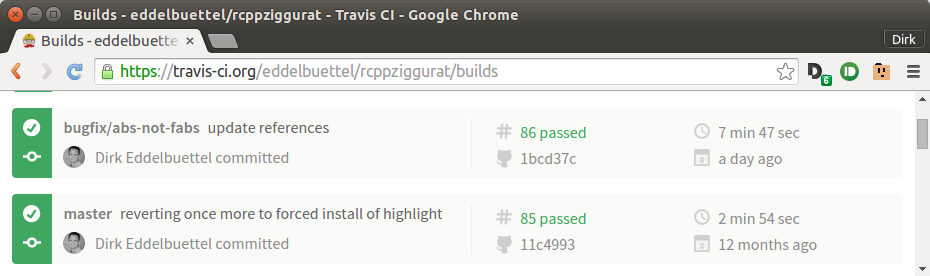
All happy, all green. Previous build a year ago, most recent build yesterday, both passed. But hold on: test time went from 2:54 minutes to 7:47 minutes for an increase of almost five minutes! And I knew that I had not added any new dependencies, or altered any build options. What did happen was that among the dependencies of my package, one had decided to now also depend on ggplot2. Which leads to a chain of sixteen additional packages being loaded besides the four I depend upon---when it used to be just one. And that took five minutes as all those packages are installed from source, and some are big and take a long time to compile. There is however and easy alternative, and for that we have to praise Michael Rutter who looks after a number of things for R on Ubuntu. Among these are the R builds for Ubuntu but also the rrutter PPA as well as the c2d4u PPA. If you have not heard this alphabet soup before, a PPA is a package repository for Ubuntu where anyone (who wants to sign up) can upload (properly setup) source files which are then turned into Ubuntu binaries. With full dependency resolution and all other goodies we have come to expect from the Debian / Ubuntu universe. And Michael uses this facility with great skill and calm to provide us all with Ubuntu binaries for R itself (rebuilding what yours truly uploads into Debian), as well as a number of key packages available via the CRAN mirrors. Less know however is this "c2d4u" which stands for CRAN to Debian for Ubuntu. And this builds on something Charles Blundell once built under my mentorship in a Google Summer of Code. And Michael does a tremdous job covering well over a thousand CRAN source packages---and providing binaries for all. Which we can use for Travis! What all that means is that I could now replace the line
 - ./travis-tool.sh install_r RcppGSL rbenchmark microbenchmark highlight
which implies source builds of the four listed packages and all their dependencies with the following line implying binary installations of already built packages:
 - ./travis-tool.sh install_aptget libgsl0-dev r-cran-rcppgsl r-cran-rbenchmark r-cran-microbenchmark r-cran-highlight
In this particular case I also needed to build a binary package of my RcppGSL package as this one is not (yet) handled by Michael. I happen to have (re-)discovered the beauty of PPAs for Travis earlier this year and revitalized an older and largely dormant launchpad account I had for this PPA of mine. How to build a simple .deb package will also have to left for a future post to keep this more concise. This can be used with the existing r-travis setup---but one needs to use the older, initial variant in order to have the ability to install .deb packages. So in the .travis.yml of RcppZiggurat I just use
before_install:
## PPA for Rcpp and some other packages
- sudo add-apt-repository -y ppa:edd/misc
## r-travis by Craig Citro et al
- curl -OL http://raw.github.com/craigcitro/r-travis/master/scripts/travis-tool.sh
- chmod 755 ./travis-tool.sh
- ./travis-tool.sh bootstrap
to add my own PPA and all is good. If you do not have a PPA, or do not want to create your own packages you can still benefit from the PPAs by Michael and "mix and match" by installing from binary what is available, and from source what is not. Here we were able to use an all-binary approach, so let's see the resulting performance: latest travis build
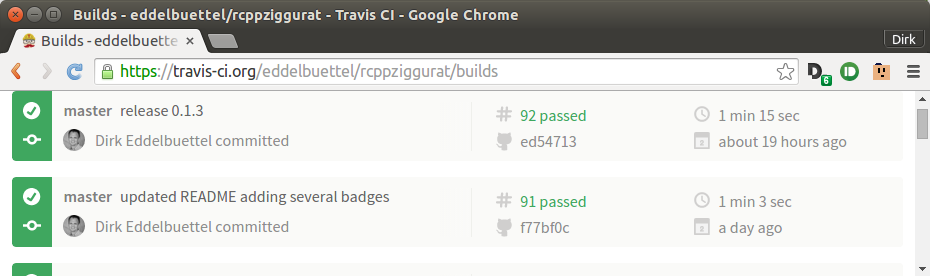
Now we are at 1:03 to 1:15 minutes---much better. So to conclude, while the every expanding universe of R packages is fantastic for us as users, it can be seen to be placing a burden on us as developers when installing and testing. Fortunately, the packaging infrastructure built on top of Debian / Ubuntu packages can help and dramatically reduce build (and hence test) times. Learning about PPAs can be a helpful complement to learning about Travis and continued integration. So maybe now I need a new reason to blame Hadley? Well, there is always snake case ...

Follow-up: The post got some pretty immediate feedback shortly after I posted it. Craig Citro pointed out (quite correctly) that I could use r_binary_install which would also install the Ubuntu binaries based on their R packages names. Having built R/CRAN packages for Debian for so long, I am simply more used to the r-cran-* notations, and I think I was also the one contributing install_aptget to r-travis ... Yihui Xie spoke up for the "new" Travis approach deploying containers, caching of packages and explicit whitelists. It was in that very (GH-based) discussion that I started to really lose faith in the new Travis approach as they want use to whitelist each and every package. With 6900 and counting at CRAN I fear this simply does not scale. But different approaches are certainly welcome. I posted my 1:03 to 1:15 minutes result. If the "New School" can do it faster, I'd be all ears.

This post by Dirk Eddelbuettel originated on his Thinking inside the box blog. Please report excessive re-aggregation in third-party for-profit settings.

26 July 2015

Lunar: Reproducible builds: week 12 in Stretch cycle

What happened in the reproducible builds effort this week: Toolchain fixes Eric Dorlan uploaded automake-1.15/1:1.15-2 which makes the output of mdate-sh deterministic. Original patch by Reiner Herrmann. Kenneth J. Pronovici uploaded epydoc/3.0.1+dfsg-8 which now honors SOURCE_DATE_EPOCH. Original patch by Reiner Herrmann. Chris Lamb submitted a patch to dh-python to make the order of the generated maintainer scripts deterministic. Chris also offered a fix for a source of non-determinism in dpkg-shlibdeps when packages have alternative dependencies. Dhole provided a patch to add support for SOURCE_DATE_EPOCH to gettext. Packages fixed The following 78 packages became reproducible in our setup due to changes in their build dependencies: chemical-mime-data, clojure-contrib, cobertura-maven-plugin, cpm, davical, debian-security-support, dfc, diction, dvdwizard, galternatives, gentlyweb-utils, gifticlib, gmtkbabel, gnuplot-mode, gplanarity, gpodder, gtg-trace, gyoto, highlight.js, htp, ibus-table, impressive, jags, jansi-native, jnr-constants, jthread, jwm, khronos-api, latex-coffee-stains, latex-make, latex2rtf, latexdiff, libcrcutil, libdc0, libdc1394-22, libidn2-0, libint, libjava-jdbc-clojure, libkryo-java, libphone-ui-shr, libpicocontainer-java, libraw1394, librostlab-blast, librostlab, libshevek, libstxxl, libtools-logging-clojure, libtools-macro-clojure, litl, londonlaw, ltsp, macsyfinder, mapnik, maven-compiler-plugin, mc, microdc2, miniupnpd, monajat, navit, pdmenu, pirl, plm, scikit-learn, snp-sites, sra-sdk, sunpinyin, tilda, vdr-plugin-dvd, vdr-plugin-epgsearch, vdr-plugin-remote, vdr-plugin-spider, vdr-plugin-streamdev, vdr-plugin-sudoku, vdr-plugin-xineliboutput, veromix, voxbo, xaos, xbae. The following packages became reproducible after getting fixed: Some uploads fixed some reproducibility issues but not all of them: Patches submitted which have not made their way to the archive yet: reproducible.debian.net The statistics on the main page of reproducible.debian.net are now updated every five minutes. A random unreviewed package is suggested in the look at a package form on every build. (h01ger) A new package set based new on the Core Internet Infrastructure census has been added. (h01ger) Testing of FreeBSD has started, though no results yet. More details have been posted to the freebsd-hackers mailing list. The build is run on a new virtual machine running FreeBSD 10.1 with 3 cores and 6 GB of RAM, also sponsored by Profitbricks. strip-nondeterminism development Andrew Ayer released version 0.009 of strip-nondeterminism. The new version will strip locales from Javadoc, include the name of files causing errors, and ignore unhandled (but rare) zip64 archives. debbindiff development Lunar continued its major refactoring to enhance code reuse and pave the way to fuzzy-matching and parallel processing. Most file comparators have now been converted to the new class hierarchy. In order to support for archive formats, work has started on packaging Python bindings for libarchive. While getting support for more archive formats with a common interface is very nice, libarchive is a stream oriented library and might have bad performance with how debbindiff currently works. Time will tell if better solutions need to be found. Documentation update Lunar started a Reproducible builds HOWTO intended to explain the different aspects of making software build reproducibly to the different audiences that might have to get involved like software authors, producers of binary packages, and distributors. Package reviews 17 obsolete reviews have been removed, 212 added and 46 updated this week. 15 new bugs for packages failing to build from sources have been reported by Chris West (Faux), and Mattia Rizzolo. Presentations Lunar presented Debian efforts and some recipes on making software build reproducibly at Libre Software Meeting 2015. Slides and a video recording are available. Misc. h01ger, dkg, and Lunar attended a Core Infrastructure Initiative meeting. The progress and tools mode for the Debian efforts were shown. Several discussions also helped getting a better understanding of the needs of other free software projects regarding reproducible builds. The idea of a global append only log, similar to the logs used for Certificate Transparency, came up on multiple occasions. Using such append only logs for keeping records of sources and build results has gotten the name Binary Transparency Logs . They would at least help identifying a compromised software signing key. Whether the benefits in using such logs justify the costs need more research.

23 July 2015

Antoine Beaupr : Is it safe to use open wireless access points?

I sometimes get questions when people use my wireless access point, which, for as long as I can remember, has been open to everyone; that is without any form of password protection or encryption. I arguably don't use the access point much myself, as I prefer the wired connection for the higher bandwidth, security and reliability it provides. Apart from convenience for myself and visitors, the main reason why I leave my wireless access open is that I believe in a free (both as in beer and freedom) internet, built with principles of solidarity rather than exploitation and profitability. In these days of ubiquitous surveillance, freedom often goes hand in hand with anonymity, which implies providing free internet access to everyone. I also believe that, as more and more services get perniciously transferred to the global internet, access to the network is becoming a basic human right. This is therefore my small contribution to the struggle, now also part of the R seau Libre project. So here were my friends question, in essence:
My credit card info was stolen when I used a wifi hotspot in an airport... Should I use open wifi networks? Is it safe to use my credit card for shopping online?
Here is a modified version of an answer I sent to a friend recently which I thought could be useful to the larger internet community. The short answer is "sorry about that", "it depends, you generally can, but be careful" and "your credit card company is supposed to protect you".

Sorry! First off, sorry to hear that our credit card was stolen in an airport! That has to be annoying... Did the credit card company reimburse you? Normally, the whole point of credit cards is that they protect you in case of theft like this and they are supposed to reimburse you if you credit card gets stolen or abused...

The complexity and unreliability of passwords Now of course, securing every bit of your internet infrastructure helps in protecting against such attacks. However: there is a trade-off! First off, it does makes it more complicated for people to join the network. You need to make up some silly password (which has its own security problems: passwords can be surprisingly easy to guess!) that you will post on the fridge or worst, forget all the time! And if it's on the fridge, anyone with a view to that darn fridge, be it one-time visitor or sneaky neighbor, can find the password and steal your internet access (although, granted, that won't allow them to directly spy on your internet connection). In any case, if you choose to use a password, you should use the tricks I wrote in the koumbit wiki to generate the password and avoid writing it on the fridge.

The false sense of security of wireless encryption Second, it can also give a false sense of security: just because a wifi access point appears "secure" (ie. that the communication between your computer and the wifi access point is encrypted) doesn't mean the whole connection is secure. In fact, one attack that can be done against access points is exactly to masquerade as an existing access point, with no security security at all. That way, instead of connecting to the real secure and trusted access point, you connect to an evil one which spies on our connection. Most computers will happily connect to such a hotspot even with degraded security without warning. It may be what happened at the airport, in fact. Of course this particular attack would be less likely to happen if you live in the middle of the woods than an airport, but it's some important distinction to keep in mind, because the same attack can be performed after the wireless access point, for example by your countryside internet access provider or someone attacking it. Your best protection for your banking details is to rely on good passwords (for your back account) but also, and more importantly, what we call end-to-end encryption. That is usually implemented using the "HTTPS" with a pad lock icon in your address bar. This ensures that the communication between your computer and the bank or credit card company is secure, that is: that no wifi access point or attacker between your computer and them can intercept your credit card number.

The flaws of internet security Now unfortunately, even the HTTPS protocol doesn't bring complete security. For example, one attack that can be done is similar to the previous one and that is to masquerade as a legitimate bank site, but either strip out the encryption or even fake the encryption. So you also need to look at the address of the website you are visiting. Attackers are often pretty clever and will use many tricks to hide the real address of the website in the address bar. To work around this, I always explicitly type my bank website address (https://accesd.desjardins.com/ in my case) directly myself instead of clicking on links, bookmarks or using a search engine to find my bank site. In the case of credit cards, it is much trickier because when you buy stuff online, you end up putting that credit card number on different sites which you do not necessarily trust. There's no good solution but complaining to your credit card company if you believe a website you used has stolen your credit card details. You can also use services like Paypal, Dwolla or Bitcoin that hide your credit card details from the seller, if they support the service. I usually try to avoid putting my credit card details on sites I do not trust, and limit myself to known parties (e.g. Via Rail, Air Canada, etc). Also, in general, I try to assume the network connection between me and the website I visit is compromised. This forced me to get familiar with online security and use of encryption. It is more accessible to me than trying to secure the infrastructure i am using, because i often do not control it at all (e.g. internet cafes...). Internet security is unfortunately a hard problem, and things are not getting easier as more things move online. The burden is on us programmers and system administrators to create systems that are more secure and intuitive for our users so, as I said earlier, sorry the internet sucks so much, we didn't think so many people would join the acid trip of the 70s. ;)

Next.

Previous.