Search Results: "ema"

16 September 2025

John Goerzen: I just want an 80 25 console, but that s no longer possible

Update 2025-09-18: I figured out how to do this, at least for many non-laptop screens. This post still contains a lot of good background detail, however. Somehow along the way, a feature that I ve had across DOS, OS/2, FreeBSD, and Linux and has been present on PCs for more than 40 years is gone. That feature, of course, is the 80 25 text console. Linux has, for awhile now, rendered its text console using graphic modes. You can read all about it here. This has been necessary because only PCs really had the 80 25 text mode (Raspberry Pis, for instance, never did), and even they don t have it when booted with UEFI. I ve lately been annoyed that: And, I wanted to run some software on the console that was designed with 80 25 in mind. And I d like to be able to plug in an old VGA monitor and have it just work if I want to do that. That shouldn t be so hard, right? Well, the old vga= option that you are used to doesn t work when you booted from UEFI or on non-x86 platforms. Most of the tricks you see online for changing resolutions, etc., are no longer relevant. And things like setting a resolution with GRUB are useless for systems that don t use GRUB (including ARM). VGA text mode uses 8 16 glyphs in 9 16 cells, where the pixels are non-square, giving a native resolution of 720 400 (which historically ran at 70Hz), which should have streched pixels to make a 4:3 image. While it is possible to select a console font, and 8 16 fonts are present and supported in Linux, it appears to be impossible to have a standard way to set 720 400 so that they present in a reasonable size, at the correct aspect ratio, with 80 25. Tricks like nomodeset no longer work on UEFI or ARM systems. It s possible that kmscon or something like it may help, but I m not even certain of that (video=eDP1:720 400 produced an error saying that 720 400 wasn t a supported mode, so I m unsure kmscon would be any better.) Not that it matters; all the kmscon options to select a font or zoom are broken, and it doesn t offer mode selection anyhow. I think I m going to have to track down an old machine. Sigh.

14 September 2025

Ian Jackson: tag2upload in the first month of forky

tl;dr: tag2upload (beta) is going well so far, and is already handling around one in 13 uploads to Debian. Introduction and some stats We announced tag2upload s open beta in mid-July. That was in the middle of the the freeze for trixie, so usage was fairly light until the forky floodgates opened. Since then the service has successfully performed 637 uploads, of which 420 were in the last 32 days. That s an average of about 13 per day. For comparison, during the first half of September up to today there have been 2475 uploads to unstable. That s about 176/day. So, tag2upload is already handling around 7.5% of uploads. This is very gratifying for a service which is advertised as still being in beta! Sean and I are very pleased both with the uptake, and with the way the system has been performing. Recent UI/UX improvements During this open beta period we have been hard at work. We have made many improvements to the user experience. Current git-debpush in forky, or trixie-backports, is much better at detecting various problems ahead of time. When uploads do fail on the service the emailed error reports are now more informative. For example, anomalies involving orig tarballs, which by definition can t be detected locally (since one point of tag2upload is not to have tarballs locally) now generally result in failure reports containing a diffstat, and instructions for a local repro. Why we are still in beta There are a few outstanding work items that we currently want to complete before we declare the end of the beta. Retrying on Salsa-side failures The biggest of these is that the service should be able to retry when Salsa fails. Sadly, Salsa isn t wholly reliable, and right now if it breaks when the service is trying to handle your tag, your upload can fail. We think most of these failures could be avoided. Implementing retries is a fairly substantial task, but doesn t pose any fundamental difficulties. We re working on this right now. Other notable ongoing work We want to support pristine-tar, so that pristine-tar users can do a new upstream release. Andrea Pappacoda is working on that with us. See #1106071. (Note that we would generally recommend against use of pristine-tar within Debian. But we want to support it.) We have been having conversations with Debusine folks about what integration between tag2upload and Debusine would look like. We re making some progress there, but a lot is still up in the air. We are considering how best to provide tag2upload pre-checks as part of Salsa CI. There are several problems detected by the tag2upload service that could be detected by Salsa CI too, but which can t be detected by git-debpush. Common problems We ve been monitoring the service and until very recently we have investigated every service-side failure, to understand the root causes. This has given us insight into the kinds of things our users want, and the kinds of packaging and git practices that are common. We ve been able to improve the system s handling of various anomalies and also improved the documentation. Right now our failure rate is still rather high, at around 7%. Partly this is because people are trying out the system on packages that haven t ever seen git tooling with such a level of rigour. There are two classes of problem that are responsible for the vast majority of the failures that we re still seeing: Reuse of version numbers, and attempts to re-tag tag2upload, like git (and like dgit), hates it when you reuse a version number, or try to pretend that a (perhaps busted) release never happened. git tags aren t namespaced, and tend to spread about promiscuously. So replacing a signed git tag, with a different tag of the same name, is a bad idea. More generally, reusing the same version number for a different (signed!) package is poor practice. Likewise, it s usually a bad idea to remove changelog entries for versions which were actually released, just because they were later deemed improper. We understand that many Debian contributors have gotten used to this kind of thing. Indeed, tools like dcut encourage it. It does allow you to make things neat-looking, even if you ve made mistakes - but really it does so by covering up those mistakes! The bottom line is that tag2upload can t support such history-rewriting. If you discover a mistake after you ve signed the tag, please just burn the version number and add a new changelog stanza. One bonus of tag2upload s approach is that it will discover if you are accidentally overwriting an NMU, and report that as an error. Discrepancies between git and orig tarballs tag2upload promises that the source package that it generates corresponds precisely to the git tree you tag and sign. Orig tarballs make this complicated. They aren t present on your laptop when you git-debpush. When you re not uploading a new upstream version, the tag2upload service reuses existing orig tarballs from the archive. If your git and the archive s orig don t agree, the tag2upload service will report an error, rather than upload a package with contents that differ from your git tag. With the most common Debian workflows, everything is fine: If you base everything on upstream git, and make your orig tarballs with git archive (or git deborig), your orig tarballs are the same as the git, by construction. We recommend usually ignoring upstream tarballs: most upstreams work in git, and their tarballs can contain weirdness that we don t want. (At worst, the tarball can contain an attack that isn t visible in git, as with xz!) Alternatively, if you use gbp import-orig, the differences (including an attack like Jia Tan s) are imported into git for you. Then, once again, your git and the orig tarball will correspond. But there are other workflows where this correspondence may not hold. Those workflows are hazardous, because the thing you re probably working with locally for your routine development is the git view. Then, when you upload, your work is transplanted onto the orig tarball, which might be quite different - so what you upload isn t what you ve been working on! This situation is detected by tag2upload, precisely because tag2upload checks that it s keeping its promise: the source package is identical to the git view. (dgit push makes the same promise.) Get involved Of course the easiest way to get involved is to start using tag2upload. We would love to have more contributors. There are some easy tasks to get started with, in bugs we ve tagged newcomer mostly UX improvements such as detecting certain problems earlier, in git-debpush. More substantially, we are looking for help with sbuild: we d like it to be able to work directly from git, rather than needing to build source packages: #868527.

comment count unavailable comments

Otto Kek l inen: Zero-configuration TLS and password management best practices in MariaDB 11.8

Featured image of post Zero-configuration TLS and password management best practices in MariaDB 11.8Locking down database access is probably the single most important thing for a system administrator or software developer to prevent their application from leaking its data. As MariaDB 11.8 is the first long-term supported version with a few new key security features, let s recap what the most important things are every DBA should know about MariaDB in 2025. Back in the old days, MySQL administrators had a habit of running the clumsy mysql-secure-installation script, but it has long been obsolete. A modern MariaDB database server is already secure by default and locked down out of the box, and no such extra scripts are needed. On the contrary, the database administrator is expected to open up access to MariaDB according to the specific needs of each server. Therefore, it is important that the DBA can understand and correctly configure three things:

  1. Separate application-specific users with granular permissions allowing only necessary access and no more.
  2. Distributing and storing passwords and credentials securely
  3. Ensuring all remote connections are properly encrypted
For holistic security, one should also consider proper auditing, logging, backups, regular security updates and more, but in this post we will focus only on the above aspects related to securing database access.

How encrypting database connections with TLS differs from web server HTTP(S) Even though MariaDB (and other databases) use the same SSL/TLS protocol for encrypting remote connections as web servers and HTTPS, the way it is implemented is significantly different, and the different security assumptions are important for a database administrator to grasp. Firstly, most HTTP requests to a web server are unauthenticated, meaning the web server serves public web pages and does not require users to log in. Traditionally, when a user logs in over a HTTP connection, the username and password were transmitted in plaintext as a HTTP POST request. Modern TLS, which was previously called SSL, does not change how HTTP works but simply encapsulates it. When using HTTPS, a web browser and a web server will start an encrypted TLS connection as the very first thing, and only once established, do they send HTTP requests and responses inside it. There are no passwords or other shared secrets needed to form the TLS connection. Instead, the web server relies on a trusted third party, a Certificate Authority (CA), to vet that the TLS certificate offered by the web server can be trusted by the web browser. For a database server like MariaDB, the situation is quite different. All users need to first authenticate and log in to the server before getting being allowed to run any SQL and getting any data out of the server. The database server and client programs have built-in authentication methods, and passwords are not, and have never been, sent in plaintext. Over the years, MySQL and its successor, MariaDB, have had multiple password authentication methods: the original SHA-1-based hashing, later double SHA-1-based mysql_native_password, followed by sha256_password and caching_sha256_password in MySQL and ed25519 in MariaDB. The MariaDB.org blog post by Sergei Golubchik recaps the history of these well. Even though most modern MariaDB installations should be using TLS to encrypt all remote connections in 2025, having the authentication method be as secure as possible still matters, because authentication is done before the TLS connection is fully established. To further harden the authentication agains man-in-the-middle attacks, a new password the authentication method PARSEC was introduced in MariaDB 11.8, which builds upon the previous ed25519 public-key-based verification (similar to how modern SSH does), and also combines key derivation with PBKDF2 with hash functions (SHA512,SHA256) and a high iteration count. At first it may seem like a disadvantage to not wrap all connections in a TLS tunnel like HTTPS does, but actually not having the authentication done in a MitM resistant way regardless of the connection encryption status allows a clever extra capability that is now available in MariaDB: as the database server and client already have a shared secret that is being used by the server to authenticate the user, it can also be used by the client to validate the server s TLS certificate and no third parties like CAs or root certificates are needed. MariaDB 11.8 was the first LTS version to ship with this capability for zero-configuration TLS. Note that the zero-configuration TLS also works on older password authentication methods and does not require users to have PARSEC enabled. As PARSEC is not yet the default authentication method in MariaDB, it is recommended to enable it in installations that use zero-configuration TLS encryption to maximize the security of the TLS certificate validation.

Why the root user in MariaDB has no password and how it makes the database more secure Relying on passwords for security is problematic, as there is always a risk that they could leak, and a malicious user could access the system using the leaked password. It is unfortunately far too common for database passwords to be stored in plaintext in configuration files that are accidentally committed into version control and published on GitHub and similar platforms. Every application or administrative password that exists should be tracked to ensure only people who need it know it, and rotated at regular intervals to ensure old employees etc won t be able to use old passwords. This password management is complex and error-prone. Replacing passwords with other authentication methods is always advisable when possible. On a database server, whoever installed the database by running e.g. apt install mariadb-server, and configured it with e.g. nano /etc/mysql/mariadb.cnf, already has full root access to the operating system, and asking them for a password to access the MariaDB database shell is moot, since they could circumvent any checks by directly accessing the files on the system anyway. Therefore, MariaDB, since version 10.4 stopped requiring the root user to enter a password when connecting locally, and instead checks using socket authentication whether the user is the operating-system root user or equivalent (e.g. running sudo). This is an elegant way to get rid of a password that was actually unnecessary to begin with. As there is no root password anymore, the risk of an external user accessing the database as root with a leaked password is fully eliminated. Note that socket authentication only works for local connections on the same server. If you want to access a MariaDB server remotely as the root user, you would need to configure a password for it first. This is not generally recommended, as explained in the next section.

Create separate database users for normal use and keep root for administrative use only Out of the box a MariaDB installation is already secure by default, and only the local root user can connect to it. This account is intended for administrative use only, and for regular daily use you should create separate database users with access limited to the databases they need and the permissions required. The most typical commands needed to create a new database for an app and a user the app can use to connect to the database would be the following:
sql
CREATE DATABASE app_db;
CREATE USER 'app_user'@'%' IDENTIFIED BY 'your_secure_password';
GRANT ALL PRIVILEGES ON app_db.* TO 'app_user'@'%';
FLUSH PRIVILEGES;
Alternatively, if you want to use the parsec authentication method, run this to create the user:
sql
CREATE OR REPLACE USER 'app_user'@'%'
 IDENTIFIED VIA parsec
 USING PASSWORD('your_secure_password');
Note that the plugin auth_parsec is not enabled by default. If you see the error message ERROR 1524 (HY000): Plugin 'parsec' is not loaded fix this by running INSTALL SONAME 'auth_parsec';. In the CREATE USER statements, the @'%' means that the user is allowed to connect from any host. This needs to be defined, as MariaDB always checks permissions based on both the username and the remote IP address or hostname of the user, combined with the authentication method. Note that it is possible to have multiple user@remote combinations, and they can have different authentication methods. A user could, for example, be allowed to log in locally using the socket authentication and over the network using a password. If you are running a custom application and you know exactly what permissions are sufficient for the database users, replace the ALL PRIVILEGES with a subset of privileges listed in the MariaDB documentation. For new permissions to take effect, restart the database or run FLUSH PRIVILEGES.

Allow MariaDB to accept remote connections and enforce TLS Using the above 'app_user'@'%' is not enough on its own to allow remote connections to MariaDB. The MariaDB server also needs to be configured to listen on a network interface to accept remote connections. As MariaDB is secure by default, it only accepts connections from localhost until the administrator updates its configuration. On a typical Debian/Ubuntu system, the recommended way is to drop a new custom config in e.g. /etc/mysql/mariadb.conf.d/99-server-customizations.cnf, with the contents:
[mariadbd]
# Listen for connections from anywhere
bind-address = 0.0.0.0
# Only allow TLS encrypted connections
require-secure-transport = on
For settings to take effect, restart the server with systemctl restart mariadb. After this, the server will accept connections on any network interface. If the system is using a firewall, the port 3306 would additionally need to be allow-listed. To confirm that the settings took effect, run e.g. mariadb -e "SHOW VARIABLES LIKE 'bind_address';" , which should now show 0.0.0.0. When allowing remote connections, it is important to also always define require-secure-transport = on to enforce that only TLS-encrypted connections are allowed. If the server is running MariaDB 11.8 and the clients are also MariaDB 11.8 or newer, no additional configuration is needed thanks to MariaDB automatically providing TLS certificates and appropriate certificate validation in recent versions. On older long-term-supported versions of the MariaDB server one would have had to manually create the certificates and configure the ssl_key, ssl_cert and ssl_ca values on the server, and distribute the certificate to the clients as well, which was cumbersome, so good it is not required anymore. In MariaDB 11.8 the only additional related config that might still be worth setting is tls_version = TLSv1.3 to ensure only the latest TLS protocol version is used. Finally, test connections to ensure they work and to confirm that TLS is used by running e.g.:
shell
mariadb --user=app_user --password=your_secure_password \
 --host=192.168.1.66 -e '\s'
The result should show something along:
--------------
mariadb from 11.8.3-MariaDB, client 15.2 for debian-linux-gnu (x86_64)
...
Current user: app_user@192.168.1.66
SSL: Cipher in use is TLS_AES_256_GCM_SHA384, cert is OK
...
If running a Debian/Ubuntu system, see the bundled README with zcat /usr/share/doc/mariadb-server/README.Debian.gz to read more configuration tips.

Should TLS encryption be used also on internal networks? If a database server and app are running on the same private network, the chances that the connection gets eavesdropped on or man-in-the-middle attacked by a malicious user are low. However, it is not zero, and if it happens, it can be difficult to detect or prove that it didn t happen. The benefit of using end-to-end encryption is that both the database server and the client can validate the certificates and keys used, log it, and later have logs audited to prove that connections were indeed encrypted and show how they were encrypted. If all the computers on an internal network already have centralized user account management and centralized log collection that includes all database sessions, reusing existing SSH connections, SOCKS proxies, dedicated HTTPS tunnels, point-to-point VPNs, or similar solutions might also be a practical option. Note that the zero-configuration TLS only works with password validation methods. This means that systems configured to use PAM or Kerberos/GSSAPI can t use it, but again those systems are typically part of a centrally configured network anyway and are likely to have certificate authorities and key distribution or network encryption facilities already set up. In a typical software app stac however, the simplest solution is often the best and I recommend DBAs use the end-to-end TLS encryption in MariaDB 11.8 in most cases. Hopefully with these tips you can enjoy having your MariaDB deployments both simpler and more secure than before!

11 September 2025

Freexian Collaborators: Debian Contributions: Preparing for setup.py install deprecation, Salsa CI, Debian 13 "trixie" release and more! (by Anupa Ann Joseph)

Debian Contributions: 2025-08 Contributing to Debian is part of Freexian s mission. This article covers the latest achievements of Freexian and their collaborators. All of this is made possible by organizations subscribing to our Long Term Support contracts and consulting services.

Preparing for setup.py install deprecation, by Colin Watson setuptools upstream will be removing the setup.py install command on 31 October. While this may not trickle down immediately into Debian, it does mean that in the near future nearly all Python packages will have to use pybuild-plugin-pyproject (though they don t necessarily have to use pyproject.toml; this is just a question of how the packaging runs the build system). Some of the Python team talked about this a bit at DebConf, and Colin volunteered to write up some notes on cases where this isn t straightforward. This page will likely grow as the team works on this problem.

Salsa CI, by Santiago Ruano Rinc n Santiago fixed some pending issues in the MR that moves the pipeline to sbuild+unshare, and after several months, Santiago was able to mark the MR as ready. Part of the recent fixes include handling external repositories, honoring the RELEASE autodetection from d/changelog (thanks to Ahmed Siam for spotting the main reason of the issue), and fixing a regression about the apt resolver for *-backports releases. Santiago is currently waiting for a final review and approval from other members of the Salsa CI team, and being able to merge it. Thanks to all the folks who have helped testing the changes or provided feedback so far. If you want to test the current MR, you need to include the following pipeline definition in your project s CI config file:
---
include:
  - https://salsa.debian.org/santiago/pipeline/raw/sbuild-unshare-02-salsa-ci/salsa-ci.yml
  - https://salsa.debian.org/santiago/pipeline/raw/sbuild-unshare-02-salsa-ci/pipeline-jobs.yml
As a reminder, this MR will make the Salsa CI pipeline build the packages more similar to how it s built by the Debian official builders. This will also save some resources, since the default pipeline will have one stage less (the provisioning) stage, and will make it possible for more projects to be built on salsa.debian.org (including large projects and those from the OCaml ecosystem), etc. See the different issues being fixed in the MR description.

Debian 13 trixie release, by Emilio Pozuelo Monfort On August 9th, Debian 13 trixie was released, building on two years worth of updates and bug fixes from hundreds of developers. Emilio helped coordinate the release, communicating with several teams involved in the process.

DebConf 26 Site Visit, by Stefano Rivera Stefano visited Santa Fe, Argentina, the site for DebConf 26 next year. The aim of the visit was to help build a local team and see the conference venue first-hand. Stefano and Nattie represented the DebConf Committee. The local team organized Debian meetups in Buenos Aires and Santa Fe, where Stefano presented a talk on Debian and DebConf. Venues were scouted and the team met with the university management and local authorities.

Miscellaneous contributions
  • Rapha l updated tracker.debian.org after the trixie release to add the new forky release in the set of monitored distributions. He also reviewed and deployed the work of Scott Talbert showing open merge requests from salsa in the action needed panel.
  • Rapha l reviewed some DEP-3 changes to modernize the embedded examples in light of the broad git adoption.
  • Rapha l configured new workflows on debusine.debian.net to upload to trixie and trixie-security, and officially announced the service on debian-devel-announce, inviting Debian developers to try the service for their next upload to unstable.
  • Carles created a merge request for django-compressor upstream to fix an error when concurrent node processing happened. This will allow removing a workaround added in openstack-dashboard and avoid the same bug in other projects that use django-compressor.
  • Carles prepared a system to detect packages that Recommends packages which don t exist in unstable. Processed (either reported or ignored due to mis-detected problems or temporary problems) 16% of the reports. Will continue next month.
  • Carles got familiar and gave feedback for the freedict-wikdict package. Planned contributions with the maintainer to improve the package.
  • Helmut responded to queries related to /usr-move.
  • Helmut adapted crossqa.d.n to the release of trixie .
  • Helmut diagnosed sufficient failures in rebootstrap to make it work with gcc-15.
  • Helmut fixed the CI pipeline of debvm.
  • Helmut sent patches for 19 cross build problems.
  • Faidon discovered that the Multi-Arch hinter would emit confusing hints about :any annotations. Helmut identified the root cause to be the handling of virtual packages and fixed it.
  • Enrico took some dust off python-debiancontributors and prototyped a receiving end for salsa webpings, to start followup work to contributors.debian.org discussions at DebConf25.
  • Colin upgraded about 70 Python packages to new upstream versions, which is around 10% of the backlog; this included a complicated Pydantic upgrade in collaboration with the Rust team.
  • Colin fixed a bug in debbugs that caused incoming emails to bugs.debian.org with certain header contents to go missing.
  • Thorsten uploaded sane-airscan, which was already in experimental, to unstable.
  • Thorsten created a script to automate the upload of new upstream versions of foomatic-db. The database contains information about printers and regularly gets an update. Now it is possible to keep the package more up to date in Debian.
  • Stefano prepared updates to almost all of his packages that had new versions waiting to upload to unstable. (beautifulsoup4, hatch-vcs, mkdocs-macros-plugin, pypy3, python-authlib, python-cffi, python-mitogen, python-pip, python-pipx, python-progress, python-truststore, python-virtualenv, re2, snowball, soupsieve).
  • Stefano uploaded two new python3.13 point releases to unstable.
  • Stefano updated distro-info-data in stable releases, to document the trixie release and expected EoL dates.
  • Stefano did some debian.social sysadmin work (keeping up quotas with growing databases and filesystems).
  • Stefano supported the Debian treasurers in processing some of the DebConf 25 reimbursements.
  • Lucas uploaded ruby3.4 to experimental. It was already approved by FTP masters.
  • Lucas uploaded ruby-defaults to experimental to add support for ruby3.4. It will allow us to start triggering test rebuilds and catch any FTBFS with ruby3.4.
  • Lucas did some administrative work for Google Summer of Code (GSoC) and replied to some queries from mentors and students.
  • Anupa helped to organize release parties for Debian 13 and Debian Day events.
  • Anupa did the live coverage for the Debian 13 release and prepared the Bits post for the release announcement and 32nd Debian Day as part of the Debian Publicity team.
  • Anupa attended a Debian Day event organized by FOSS club SSET as a speaker.

Freexian Collaborators: Monthly report about Debian Long Term Support, August 2025 (by Roberto C. S nchez)

Like each month, have a look at the work funded by Freexian s Debian LTS offering.

Debian LTS contributors In August, 21 contributors have been paid to work on Debian LTS, their reports are available:
  • Abhijith PA did 10.0h (out of 0.0h assigned and 14.0h from previous period), thus carrying over 4.0h to the next month.
  • Andrej Shadura did 12.0h (out of 9.0h assigned and 3.0h from previous period).
  • Bastien Roucari s did 20.0h (out of 19.75h assigned and 0.25h from previous period).
  • Ben Hutchings did 22.75h (out of 16.5h assigned and 6.25h from previous period).
  • Carlos Henrique Lima Melara did 10.0h (out of 10.0h assigned).
  • Chris Lamb did 18.0h (out of 18.0h assigned).
  • Daniel Leidert did 23.25h (out of 23.25h assigned).
  • Emilio Pozuelo Monfort did 23.25h (out of 23.25h assigned).
  • Guilhem Moulin did 15.0h (out of 15.0h assigned).
  • Jochen Sprickerhof did 11.0h (out of 6.0h assigned and 16.75h from previous period), thus carrying over 11.75h to the next month.
  • Lee Garrett did 16.25h (out of 0.0h assigned and 16.25h from previous period).
  • Lucas Kanashiro did 20.0h (out of 1.25h assigned and 18.75h from previous period).
  • Markus Koschany did 5.0h (out of 13.0h assigned and 9.75h from previous period), thus carrying over 17.75h to the next month.
  • Paride Legovini did 8.0h (out of 0.0h assigned and 8.0h from previous period).
  • Roberto C. S nchez did 7.5h (out of 11.75h assigned and 11.0h from previous period), thus carrying over 15.25h to the next month.
  • Santiago Ruano Rinc n did 13.5h (out of 7.25h assigned and 7.75h from previous period), thus carrying over 1.5h to the next month.
  • Stefano Rivera did 0.5h (out of 0.0h assigned and 3.0h from previous period), thus carrying over 2.5h to the next month.
  • Sylvain Beucler did 10.0h (out of 23.25h assigned), thus carrying over 13.25h to the next month.
  • Thorsten Alteholz did 22.75h (out of 22.75h assigned).
  • Tobias Frost did 4.0h (out of 0.0h assigned and 12.0h from previous period), thus carrying over 8.0h to the next month.
  • Utkarsh Gupta did 16.0h (out of 22.75h assigned), thus carrying over 6.75h to the next month.

Evolution of the situation In August, we released 27 DLAs. The month of August marked the release of Debian 13 (codename trixie ). This is worth noting because it brought with it the return of the customary fast development pace of Debian unstable, which included several contributions from LTS Team members. More on that below. Of the many security updates which were published (and a few non-security updates as well), some notable ones are highlighted here.
  • Notable security updates:
    • gnutls28 prepared by Adrian Bunk, fixes several potential denial of service vulnerabilities
    • apache2, prepared by Bastien Roucari s, fixes several vulnerabilities including a potential denial of service and SSL/TLS-related access control
    • mbedtls (original update, regression update) prepared by Andrej Shadura, fixes several potential denial of service and information disclosure vulnerabilities
    • openjdk-17, prepared by Emilio Pozuelo Monfort, fixes several vulnerabilities which could result in denial of service, information disclosure or weakened TLS connections
  • Notable non-security updates:
    • distro-info-data, prepared by Stefano Rivera, adds information concerning future Debian and Ubuntu releases
    • ca-certificates-java, prepared by Bastien Roucari s, fixes some bugs which could disrupt future updates
The LTS Team continues to welcome the collaboration of maintainers from across the Debian community. The contributions of maintainers from outside the LTS Team include: postgresql-13 (Christoph Berg), sope (Jordi Mallach), thunderbird (Carsten Schoenert), and iperf3 (Roberto Lumbreras). Finally, LTS Team members also contributed updates of the following packages:
  • redis (to stable), prepared by Chris Lamb
  • firebird3.0 (to oldstable and stable), prepared by Adrian Bunk
  • node-tmp (to oldstable, stable, and unstable), prepared by Adrian Bunk
  • openjpeg2 (to oldstable, stable, and unstable), prepared by Adrian Bunk
  • apache2 (to oldstable), prepared by Bastien Roucari s
  • unbound (to oldstable), prepared by Guilhem Moulin
  • luajit (to oldstable), prepared by Guilhem Moulin
  • golang-github-gin-contrib-cors (to oldstable and stable), prepared by Thorsten Alteholz
  • libcoap3 (to stable), prepared by Thorsten Alteholz
  • libcommons-lang-java and libcommons-lang3-java (both to unstable), prepared by Daniel Leidert
  • python-flask-cors (to oldstable), prepared by Daniel Leidert
The LTS Team would especially like to thank our many longtime friends and sponsors for their support and collaboration.

Thanks to our sponsors Sponsors that joined recently are in bold.

10 September 2025

John Goerzen: ARM is great, ARM is terrible (and so is RISC-V)

I ve long been interested in new and different platforms. I ran Debian on an Alpha back in the late 1990s and was part of the Alpha port team; then I helped bootstrap Debian on amd64. I ve got somewhere around 8 Raspberry Pi devices in active use right now, and the free NNCPNET Internet email service I manage runs on an ARM instance at a cloud provider. ARM-based devices are cheap in a lot of ways: they use little power and there are many single-board computers based on them that are inexpensive. My 8-year-old s computer is a Raspberry Pi 400, in fact. So I like ARM. I ve been looking for ARM devices that have accelerated AES (Raspberry Pi 4 doesn t) so I can use full-disk encryption with them. There are a number of options, since ARM devices are starting to go more mid-range. Radxa s ROCK 5 series of SBCs goes up to 32GB RAM. The Orange Pi 5 Max and Ultra have up to 16GB RAM, as does the Raspberry Pi 5. Pine64 s Quartz64 has up to 8GB of RAM. I believe all of these have the ARM cryptographic extensions. They re all small and most are economical. But I also dislike ARM. There is a terrible lack of standardization in the ARM community. They say their devices run Linux, but the default there is that every vendor has their own custom Debian fork, and quite likely kernel fork as well. Most don t maintain them very well. Imagine if you were buying x86 hardware. You might have to manage AcerOS, Dellbian, HPian, etc. Most of them have no security support (particularly for the kernel). Some are based on Debian 11 (released in 2021), some Debian 12 (released in 2023), and none on Debian 13 (released a month ago). That is exactly the situation we have on ARM. While Raspberry Pi 4 and below can run Debian trixie directly, Raspberry Pi has not bothered to upstream support for the Pi 5 yet, and Raspberry Pi OS is only based on Debian bookworm (released in 2023) and very explicitly does not support a key Debian feature: you can t upgrade from one Raspberry Pi OS release to the next, so it s a complete reinstall every 2 years instead of just an upgrade. OrangePiOS only supports Debian bookworm but notably, their kernel is mostly stuck at 5.10 for every image they have (bookworm shipped with 6.1 and bookworm-backports supports 6.12). Radxa has a page on running Debian on one specific board, they seem to actually not support Debian directly, but rather their fork Radxa OS. There s a different installer for every board; for instance, this one for the Rock 4D. Looking at it, I can see that it uses files from here and here, with custom kernel, gstreamer, u-boot, and they put zfs in main for some reason. From Pine64, the Quartz64 seems to be based on an ancient 4.6 or 4.19 kernel. Perhaps, though, one might be able to use Debian s Pine A64+ instructions on it. Trixie doesn t have a u-boot image for the Quartz64 but it does have device tree files for it. RISC-V seems to be even worse; not only do we have this same issue there, but support in trixie is more limited and so is performance among the supported boards. The alternative is x86-based mini PCs. There are a bunch based on the N100, N150, or Celeron. Many of them support AES-NI and the prices are roughly in line with the higher-end ARM units. There are some interesting items out there; for instance, the Radxa X4 SBC features both an N100 and a RP2040. Fanless mini PCs are available from a number of vendors. Companies like ZimaBoard have interesting options like the ZimaBlade also. The difference in power is becoming less significant; it seems the newer ARM boards need 20W or 30W power supplies, and that may put them in the range of the mini PCs. As for cost, the newer ARM boards need a heat sink and fan, so by the time you add SBC, fan, storage, etc. you re starting to get into the price range of the mini PCs. It is great to see all the options of small SBCs with ARM and RISC-V processors, but at some point you ve got to throw up your hands and go this ecosystem has a lot of problems and consider just going back to x86. I m not sure if I m quite there yet, but I m getting close. Update 2025-09-11: I found a performant encryption option for the Pi 4, but was stymied by serial console problems; see the update post.

9 September 2025

John Goerzen: btrfs on a Raspberry Pi

I m something of a filesystem geek, I guess. I first wrote about ZFS on Linux 14 years ago, and even before I used ZFS, I had used ext2/3/4, jfs, reiserfs, xfs, and no doubt some others. I ve also used btrfs. I last posted about it in 2014, when I noted it has some advantages over ZFS, but also some drawbacks, including a lot of kernel panics. Since that comparison, ZFS has gained trim support and btrfs has stabilized. The btrfs status page gives you an accurate idea of what is good to use on btrfs. Background: Moving towards ZFS and btrfs I have been trying to move everything away from ext4 and onto either ZFS or btrfs. There are generally several reasons for that:
  1. The checksums for every block help detect potential silent data corruption
  2. Instant snapshots make consistent backups of live systems a lot easier, and without the hassle and wasted space of LVM snapshots
  3. Transparent compression and dedup can save a lot of space in storage-constrained environments
For any machine with at least 32GB of RAM (plus my backup server, which has only 8GB), I run ZFS. While it lacks some of the flexibility of btrfs, it has polish. zfs list -o space shows a useful space accounting. zvols can be behind VMs. With my project simplesnap, I can easily send hourly backups with ZFS, and I choose to send them over NNCP in most cases. I have a few VMs in the cloud (running Debian, of course) that I use to host things like this blog, my website, my gopher site, the quux NNCP public relay, and various other things. In these environments, storage space can be expensive. For that matter, so can RAM. ZFS is RAM-hungry, so that rules out ZFS. I ve been running btrfs in those environments for a few years now, and it s worked out well. I do async dedup, lzo or zstd compression depending on the needs, and the occasional balance and defrag. Filesystems on the Raspberry Pi I run Debian trixie on all my Raspberry Pis; not Raspbian or Raspberry Pi OS for a number of reasons. My 8-yr-old uses a Raspberry Pi 400 as her primary computer and loves it! She doesn t do web browsing, but plays Tuxpaint, some old DOS games like Math Blaster via dosbox, and uses Thunderbird for a locked-down email account. But it was SLOW. Just really, glacially, slow, especially for Thunderbird. My first step to address that was to get a faster MicroSD card to hold the OS. That was a dramatic improvement. It s still slow, but a lot faster. Then, I thought, maybe I could use btrfs with LZO compression to reduce the amount of I/O and speed things up further? Analysis showed things were mostly slow due to I/O, not CPU, constraints. The conversion Rather than use the btrfs in-place conversion from ext4, I opted to dar it up (like tar), run mkfs.btrfs on the SD card, then unpack the archive back onto it. Easy enough, right? Well, not so fast. The MicroSD card is 128GB, and the entire filesystem is 6.2GB. But after unpacking 100MB onto it, I got an out of space error. btrfs has this notion of block groups. By default, each block group is dedicated to either data or metadata. btrfs fi df and btrfs fi usage will show you details about the block groups. btrfs allocates block groups greedily (the ssd_spread mount option I use may have exacerbated this). What happened was it allocated almost the entire drive to data block groups, trying to spread the data across it. It so happened that dar archived some larger files first (maybe /boot), so btrfs was allocating data and metadata blockgroups assuming few large files. But then it started unpacking one of the directories in /usr with lots of small files (maybe /usr/share/locale). It quickly filled up the metadata block group, and since the entire SD card had been allocated to different block groups, I got ENOSPC. Deleting a few files and running btrfs balance resolved it; now it allocated 1GB to metadata, which was plenty. I re-ran the dar extract and now everything was fine. See more details on btrfs balance and block groups. This was the only btrfs problem I encountered. Benchmarks I timed two things prior to switching to btrfs: how long it takes to boot (measured from the moment I turn on the power until the moment the XFCE login box is displayed), and how long it takes to start Thunderbird. After switching to btrfs with LZO compression, somewhat to my surprise, both measures were exactly the same! Why might this be? It turns out that SD cards are understood to be pathologically bad with random read performance. Boot and Thunderbird both are likely doing a lot of small random reads, not large streaming reads. Therefore, it may be that even though I have reduced the total I/O needed, the impact is unsubstantial because the real bottleneck is the seeks across the disk. Still, I gain the better backup support and silent data corruption prevention, so I kept btrfs. SSD mount options and MicroSD endurance btrfs has several mount options specifically relevant to SSDs. Aside from the obvious trim support, they are ssd and ssd_spread. The documentation on this is vague and my attempts to learn more about it found a lot of information that was outdated or unsubstantiated folklore. Some reports suggest that older SSDs will benefit from ssd_spread, but that it may have no effect or even a harmful effect on newer ones, and can at times cause fragmentation or write amplification. I could find nothing to back this up, though. And it seems particularly difficult to figure out what kind of wear leveling SSD firmware does. MicroSD firmware is likely to be on the less-advanced side, but still, I have no idea what it might do. In any case, with btrfs not updating blocks in-place, it should be better than ext4 in the most naive case (no wear leveling at all) but may have somewhat more write traffic for the pathological worst case (frequent updates of small portions of large files). One anecdotal report I read and can t find anymore, somehow was from a person that had set up a sort of torture test for SD cards, with reports that ext4 lasted a few weeks or months before the MicroSDs failed, while btrfs lasted years. If you are looking for a MicroSD card, by the way, The Great MicroSD Card Survey is a nice place to start. For longevity: I mount all my filesystems with noatime already, so I continue to recommend that. You can also consider limiting the log size in /etc/systemd/journald.conf, running daily fstrim (which may be more successful than live trims in all filesystems). Conclusion I ve been pretty pleased with btrfs. The concerns I have today relate to block groups and maintenance (periodic balance and maybe a periodic defrag). I m not sure I d be ready to say put btrfs on the computer you send to someone that isn t Linux-savvy because the chances of running into issues are higher than with ext4. Still, for people that have some tech savvy, btrfs can improve reliability and performance in other ways.

8 September 2025

Dirk Eddelbuettel: RcppArmadillo 15.0.2-1 on CRAN: New Upstream, Some Changes

armadillo image Armadillo is a powerful and expressive C++ template library for linear algebra and scientific computing. It aims towards a good balance between speed and ease of use, has a syntax deliberately close to Matlab, and is useful for algorithm development directly in C++, or quick conversion of research code into production environments. RcppArmadillo integrates this library with the R environment and language and is widely used by (currently) 1279 other packages on CRAN, downloaded 41.2 million times (per the partial logs from the cloud mirrors of CRAN), and the CSDA paper (preprint / vignette) by Conrad and myself has been cited 644 times according to Google Scholar. Fairly shortly after the release of Armadillo 14.6.3 (which became our precedig release 14.6.3), Conrad released version 15.0.0 of Armadillo. It contains several breaking changes which made it unsuitable for CRAN as is. First, the minimum C++ standard was lifted to C++14. There are many good reasons for doing so, but doing it unannounced with no transition offered cannot work at CRAN. For (mostly historical) reasons (as C++11 was once a step up from even more archaic code) many packages still enforce C++11. These packages would break under Armadillo 15.0.0. With some reverse-dependency checks we quickly found that this would affect over 200 packages. Second, Armadillo frequently deprecates code and issues a warning offering a hint towards an improved / current alternative. That too is good practice, and recommended. But at CRAN a deprecation warning seen leads to NOTE and an unfixed NOTEs can lead to archival which is not great. For that reason, we had added a global muffler suppressing the deprecation warnings. This was now removed in C++14 (as one can rely on newer compiler attributes we cannot undo, whereas the old scheme just used macros). Again, not something we can do at CRAN. So I hatched the plan of offering both the final release under the previous state of the world, i.e. 14.6.3, along with 15.0.0. User could then opt-into 15.0.0 but have a fallback of 14.6.3 allowing all packages to coexist. The first idea was to turn the fallback on only if C++11 compilation was noticed. This lead still a lot of deprecation warnings meaning we had to more strongly default to 14.6.3 and only if users actively selected 15.0.* would they get it. This seemed to work. We were still faced with two hard failures. Turns out one was local to a since-archived package, the other reveal a bad interaction betweem Armadillo and gcc for complex variables and lead to bug fix 15.0.1. Which I wrapped and uploaded a week ago. Release 15.0.1 was quickly seen as only temporary because I overlooked two issues. Moving legacy and current into, respectively, a directory of that name meant to top-level include header armadillo remained. This broked a few use cases where packages use a direct #include <armadillo> (which we do not recommend as it may miss a few other settings we apply for the R case). The other is that an old test for limited LAPACK capabilities made noise in some builds (for example on Windows). As (current) R versions generally have sufficient LAPACK and BLAS, this too has been removed. We have tested and rested these changed extensively. The usual repository with the logs shows eight reverse-dependency runs each of which can take up to a day. This careful approach, together with pacing uploads at CRAN usually works. We got a NOTE for seven uploads in six months for this one, but a CRAN maintainer quickly advanced it, and the fully automated test showed no regression or other human intervention which is nice given the set of changes, and the over 1200 reverse dependencies. The changes since the last announced CRAN release 14.6.3 follow.

Changes in RcppArmadillo version 15.0.2-1 (2025-09-08)
  • Upgraded to Armadillo release 15.0.2-1 (Medium Roast)
    • Optionally use OpenMP parallelisation for fp16 matrix multiplication
    • Faster vectorisation of cube tubes
  • Provide a top-level include file armadillo as fallback (#480)
  • Retire the no-longer-needed check for insufficient LAPACK as R now should supply a sufficient libRlapack (when used) (#483)
  • Two potential narrowing warnings are avoided via cast

Changes in RcppArmadillo version 15.0.1-1 (2025-09-01)
  • Upgraded to Armadillo release 15.0.1-1 (Medium Roast)
    • Workaround for GCC compiler bug involving misoptimisation of complex number multiplication
  • This version contains both 'legacy' and 'current' version of Armadillo (see also below). Package authors should set a '#define' to select the 'current' version, or select the 'legacy' version (also chosen as default) if they must. See GitHub issue #475 for more details.
  • Updated DESCRIPTION and README.md

Changes in RcppArmadillo version 15.0.0-1 (2025-08-21) (GitHub Only)
  • Upgraded to Armadillo release 15.0.0-1 (Medium Roast)
    • C++14 is now the minimum required C++ standard
    • Aded preliminary support for matrices with half-precision fp16 element type
    • Added second form of cond() to allow detection of failures
    • Added repcube()
    • Added .freeze() and .unfreeze() member functions to wall_clock
    • Extended conv() and conv2() to accept the "valid" shape argument
  • Also includes Armadillo 14.6.3 as fallback for C++11 compilations
  • This new 'dual' setup had been rigorously tested with five interim pre-releases of which several received full reverse-dependency checks

Courtesy of my CRANberries, there is a diffstat report relative to previous release. More detailed information is on the RcppArmadillo page. Questions, comments etc should go to the rcpp-devel mailing list off the Rcpp R-Forge page.

This post by Dirk Eddelbuettel originated on his Thinking inside the box blog. If you like this or other open-source work I do, you can sponsor me at GitHub.

6 September 2025

Reproducible Builds: Reproducible Builds in August 2025

Welcome to the August 2025 report from the Reproducible Builds project! Welcome to the latest report from the Reproducible Builds project for August 2025. These monthly reports outline what we ve been up to over the past month, and highlight items of news from elsewhere in the increasingly-important area of software supply-chain security. If you are interested in contributing to the Reproducible Builds project, please see the Contribute page on our website. In this report:

  1. Reproducible Builds Summit 2025
  2. Reproducible Builds and live-bootstrap at WHY2025
  3. DALEQ Explainable Equivalence for Java Bytecode
  4. Reproducibility regression identifies issue with AppArmor security policies
  5. Rust toolchain fixes
  6. Distribution work
  7. diffoscope
  8. Website updates
  9. Reproducibility testing framework
  10. Upstream patches

Reproducible Builds Summit 2025 Please join us at the upcoming Reproducible Builds Summit, set to take place from October 28th 30th 2025 in Vienna, Austria!** We are thrilled to host the eighth edition of this exciting event, following the success of previous summits in various iconic locations around the world, including Venice, Marrakesh, Paris, Berlin, Hamburg and Athens. Our summits are a unique gathering that brings together attendees from diverse projects, united by a shared vision of advancing the Reproducible Builds effort. During this enriching event, participants will have the opportunity to engage in discussions, establish connections and exchange ideas to drive progress in this vital field. Our aim is to create an inclusive space that fosters collaboration, innovation and problem-solving. If you re interesting in joining us this year, please make sure to read the event page which has more details about the event and location. Registration is open until 20th September 2025, and we are very much looking forward to seeing many readers of these reports there!

Reproducible Builds and live-bootstrap at WHY2025 WHY2025 (What Hackers Yearn) is a nonprofit outdoors hacker camp that takes place in Geestmerambacht in the Netherlands (approximately 40km north of Amsterdam). The event is organised for and by volunteers from the worldwide hacker community, and knowledge sharing, technological advancement, experimentation, connecting with your hacker peers, forging friendships and hacking are at the core of this event . At this year s event, Frans Faase gave a talk on live-bootstrap, an attempt to provide a reproducible, automatic, complete end-to-end bootstrap from a minimal number of binary seeds to a supported fully functioning operating system . Frans talk is available to watch on video and his slides are available as well.

DALEQ Explainable Equivalence for Java Bytecode Jens Dietrich of the Victoria University of Wellington, New Zealand and Behnaz Hassanshahi of Oracle Labs, Australia published an article this month entitled DALEQ Explainable Equivalence for Java Bytecode which explores the options and difficulties when Java binaries are not identical despite being from the same sources, and what avenues are available for proving equivalence despite the lack of bitwise correlation:
[Java] binaries are often not bitwise identical; however, in most cases, the differences can be attributed to variations in the build environment, and the binaries can still be considered equivalent. Establishing such equivalence, however, is a labor-intensive and error-prone process.
Jens and Behnaz therefore propose a tool called DALEQ, which:
disassembles Java byte code into a relational database, and can normalise this database by applying Datalog rules. Those databases can then be used to infer equivalence between two classes. Notably, equivalence statements are accompanied with Datalog proofs recording the normalisation process. We demonstrate the impact of DALEQ in an industrial context through a large-scale evaluation involving 2,714 pairs of jars, comprising 265,690 class pairs. In this evaluation, DALEQ is compared to two existing bytecode transformation tools. Our findings reveal a significant reduction in the manual effort required to assess non-bitwise equivalent artifacts, which would otherwise demand intensive human inspection. Furthermore, the results show that DALEQ outperforms existing tools by identifying more artifacts rebuilt from the same code as equivalent, even when no behavioral differences are present.
Jens also posted this news to our mailing list.

Reproducibility regression identifies issue with AppArmor security policies Tails developer intrigeri has tracked and followed a reproducibility regression in the generation of AppArmor policy caches, and has identified an issue with the 4.1.0 version of AppArmor. Although initially tracked on the Tails issue tracker, intrigeri filed an issue on the upstream bug tracker. AppArmor developer John Johansen replied, confirming that they can reproduce the issue and went to work on a draft patch. Through this, John revealed that it was caused by an actual underlying security bug in AppArmor that is to say, it resulted in permissions not (always) matching what the policy intends and, crucially, not merely a cache reproducibility issue. Work on the fix is ongoing at time of writing.

Rust toolchain fixes Rust Clippy is a linting tool for the Rust programming language. It provides a collection of lints (rules) designed to identify common mistakes, stylistic issues, potential performance problems and unidiomatic code patterns in Rust projects. This month, however, Sosth ne Gu don filed a new issue in the GitHub requesting a new check that would lint against non deterministic operations in proc-macros, such as iterating over a HashMap .

Distribution work In Debian this month: Lastly, Bernhard M. Wiedemann posted another openSUSE monthly update for their work there.

diffoscope diffoscope is our in-depth and content-aware diff utility that can locate and diagnose reproducibility issues. This month, Chris Lamb made the following changes, including preparing and uploading versions, 303, 304 and 305 to Debian:
  • Improvements:
    • Use sed(1) backreferences when generating debian/tests/control to avoid duplicating ourselves. [ ]
    • Move from a mono-utils dependency to versioned mono-devel mono-utils dependency, taking care to maintain the [!riscv64] architecture restriction. [ ]
    • Use sed over awk to avoid mangling dependency lines containing = (equals) symbols such as version restrictions. [ ]
  • Bug fixes:
    • Fix a test after the upload of systemd-ukify version 258~rc3. [ ]
    • Ensure that Java class files are named .class on the filesystem before passing them to javap(1). [ ]
    • Do not run jsondiff on files over 100KiB as the algorithm runs in O(n^2) time. [ ]
    • Don t check for PyPDF version 3 specifically; check for >= 3. [ ]
  • Misc:
    • Update copyright years. [ ][ ]
In addition, Martin Joerg fixed an issue with the HTML presenter to avoid crash when page limit is None [ ] and Zbigniew J drzejewski-Szmek fixed compatibility with RPM 6 [ ]. Lastly, John Sirois fixed a missing requests dependency in the trydiffoscope tool. [ ]

Website updates Once again, there were a number of improvements made to our website this month including:

Reproducibility testing framework The Reproducible Builds project operates a comprehensive testing framework running primarily at tests.reproducible-builds.org in order to check packages and other artifacts for reproducibility. In August, however, a number of changes were made by Holger Levsen, including:
  • reproduce.debian.net-related:
    • Run 4 workers on the o4 node again in order to speed up testing. [ ][ ][ ][ ]
    • Also test trixie-proposed-updates and trixie-updates etc. [ ][ ]
    • Gather seperate statistics for each tested release. [ ]
    • Support sources from all Debian suites. [ ]
    • Run new code from the prototype database rework branch for the amd64-pull184 pseudo-architecture. [ ][ ]
    • Add a number of helpful links. [ ][ ][ ][ ][ ][ ][ ][ ][ ]
    • Temporarily call debrebuild without the --cache argument to experiment with a new version of devscripts. [ ][ ][ ]
    • Update public TODO. [ ]
  • Installation tests:
    • Add comments to explain structure. [ ]
    • Mark more old jobs as old or dead . [ ][ ][ ]
    • Turn the maintenance job into a no-op. [ ]
  • Jenkins node maintenance:
    • Increase penalties if the osuosl5 or ionos7 nodes are down. [ ]
    • Stop trying to fix network automatically. [ ]
    • Correctly mark ppc64el architecture nodes when down. [ ]
    • Upgrade the remaining arm64 nodes to Debian trixie in anticipation of the release. [ ][ ]
    • Allow higher SSD temperatures on the riscv64 architecture. [ ]
  • Debian-related:
    • Drop the armhf architecture; many thanks to Vagrant for physically hosting the nodes for ten years. [ ][ ]
    • Add Debian forky, and archive bullseye. [ ][ ][ ][ ][ ][ ][ ]
    • Document the filesystem space savings from dropping the armhf architecture. [ ]
    • Exclude i386 and armhfr from JSON results. [ ]
    • Update TODOs for when Debian trixie and forky have been released. [ ][ ]
  • tests.reproducible-builds.org-related:
  • Misc:
    • Detect errors with openQA erroring out. [ ]
    • Drop the long-disabled openwrt_rebuilder jobs. [ ]
    • Use qa-jenkins-dev@alioth-lists.debian.net as the contact for jenkins.debian.net. [ ]
    • Redirect reproducible-builds.org/vienna25 to reproducible-builds.org/vienna2025. [ ]
    • Disable all OpenWrt reproducible CI jobs, in coordination with the OpenWrt community. [ ][ ]
    • Make reproduce.debian.net accessable via IPv6. [ ]
    • Ignore that the megacli RAID controller requires packages from Debian bookworm. [ ]
In addition,
  • James Addison migrated away from deprecated toplevel deb822 Python module in favour of debian.deb822 in the bin/reproducible_scheduler.py script [ ] and removed a note on reproduce.debian.net note after the release of Debian trixie [ ].
  • Jochen Sprickerhof made a huge number of improvements to the reproduce.debian.net statistics calculation [ ][ ][ ][ ][ ][ ] as well as to the reproduce.debian.net service more generally [ ][ ][ ][ ][ ][ ][ ][ ].
  • Mattia Rizzolo performed a lot of work migrating scripts to SQLAlchemy version 2.0 [ ][ ][ ][ ][ ][ ] in addition to making some changes to the way openSUSE reproducibility tests are handled internally. [ ]
  • Lastly, Roland Clobus updated the Debian Live packages after the release of Debian trixie. [ ][ ]

Upstream patches The Reproducible Builds project detects, dissects and attempts to fix as many currently-unreproducible packages as possible. We endeavour to send all of our patches upstream where appropriate. This month, we wrote a large number of such patches, including:

Finally, if you are interested in contributing to the Reproducible Builds project, please visit our Contribute page on our website. However, you can get in touch with us via:

4 September 2025

Noah Meyerhans: False Positives

There are times when an email based workflow gets really difficult. One of those times is when discussing projects related to spam and malware detection.
 noahm@debian.org
host stravinsky.debian.org [2001:41b8:202:deb::311:108]
SMTP error from remote mail server after end of data:
550-malware detected: Sanesecurity.Phishing.Fake.30934.1.UNOFFICIAL:
550 message rejected
submit@bugs.debian.org
host stravinsky.debian.org [2001:41b8:202:deb::311:108]
SMTP error from remote mail server after end of data:
550-malware detected: Sanesecurity.Phishing.Fake.30934.1.UNOFFICIAL:
550 message rejected
This was, in fact, a false positive. And now, because reportbug doesn t record outgoing messages locally, I need to retype the whole thing. (NB. this is not a complaint about the policies deployed on the Debian mail servers; they d be negligent if they didn t implement such policies on today s internet.)

3 September 2025

Colin Watson: Free software activity in August 2025

About 95% of my Debian contributions this month were sponsored by Freexian. You can also support my work directly via Liberapay or GitHub Sponsors. Python team forky is open! As a result I m starting to think about the upcoming Python 3.14. At some point we ll doubtless do a full test rebuild, but in advance of that I concluded that one of the most useful things I could do would be to work on our very long list of packages with new upstream versions. Of course there s no real chance of this ever becoming empty since upstream maintainers aren t going to stop work for that long, but there are a lot of packages there where we re quite a long way out of date, and many of those include fixes that we ll need for 3.14, either directly or by fixing interactions with new versions of other packages that in turn will need to be fixed. We can backport changes when we need to, but more often than not the most efficient way to do things is just to keep up to date. So, I upgraded these packages to new upstream versions (deep breath): That s only about 10% of the backlog, but of course others are working on this too. If we can keep this up for a while then it should help. I packaged pytest-run-parallel, pytest-unmagic (still in NEW), and python-forbiddenfruit (still in NEW), all needed as new dependencies of various other packages. setuptools upstream will be removing the setup.py install command on 31 October. While this may not trickle down immediately into Debian, it does mean that in the near future nearly all Python packages will have to use pybuild-plugin-pyproject (note that this does not mean that they necessarily have to use pyproject.toml; this is just a question of how the packaging runs the build system). We talked about this a bit at DebConf, and I said that I d noticed a number of packages where this isn t straightforward and promised to write up some notes. I wrote the Python/PybuildPluginPyproject wiki page for this; I expect to add more bits and pieces to it as I find them. On that note, I converted several packages to pybuild-plugin-pyproject: I fixed several build/test failures: I fixed some other bugs: I reviewed Debian defaults: nftables as banaction and systemd as backend, but it looked as though nothing actually needed to be changed so we closed this with no action. Rust team Upgrading Pydantic was complicated, and required a rust-pyo3 transition (which Jelmer Vernoo started and Peter Michael Green has mostly been driving, thankfully), packaging rust-malloc-size-of (including an upstream portability fix), and upgrading several packages to new upstream versions: bugs.debian.org I fixed bugs.debian.org: misspelled checkbox id uselessmesages , as well as a bug that caused incoming emails with certain header contents to go missing. OpenSSH I fixed openssh-server: refuses further connections after having handled PerSourceMaxStartups connections with a cherry-pick from upstream. Other bits and pieces I upgraded libfido2 to a new upstream version. I fixed mimalloc: FTBFS on armhf: cc1: error: -mfloat-abi=hard : selected architecture lacks an FPU, which was blocking changes to pendulum in the Python team. I also spent some time helping to investigate libmimalloc3: Illegal instruction Running mtxrun generate, though that bug is still open. I fixed various autopkgtest bugs in gssproxy, prompted by #1007 in Debusine. Since my old team is decommissioning Bazaar/Breezy code hosting in Launchpad (the end of an era, which I have distinctly mixed feelings about), I converted Storm to git.

31 August 2025

Otto Kek l inen: Managing procrastination and distractions

Featured image of post Managing procrastination and distractionsI ve noticed that procrastination and inability to be consistently productive at work has become quite common in recent years. This is clearly visible in younger people who have grown up with an endless stream of entertainment literally at their fingertips, on their mobile phone. It is however a trap one can escape from with a little bit of help. Procrastination is natural they say humans are lazy by nature after all. Probably all of us have had moments when we choose to postpone a task we know we should be working on, and instead spent our time doing secondary tasks (valorisation). Classic example is cleaning your apartment when you should be preparing for an exam. Some may procrastinate by not doing any work at all, and just watching YouTube videos or the like. To some people, typically those who are in their 20s and early in their career, procrastination can be a big challenge and finding the discipline to stick to planned work may need intentional extra effort, and perhaps even external help. During my 20+ year career in software development I ve been blessed to work with engineers of various backgrounds and each with their unique set of strengths. I have also helped many grow in various areas and overcome challenges, such as lack of intrinsic motivation and managing procrastination, and some might be able to get it in check with some simple advice.
Distance yourself from the digital distractions The key to avoiding distractions and procrastination is to make it inconvenient enough that you rarely do it. If continuing to do work is easier than switching to procrastination, work is more likely to continue. Tips to minimize digital distractions, listed in order of importance:
  1. Put your phone away. Just like when you go to a movie and turn off your phone for two hours, you can put the phone away completely when starting to work. Put the phone in a different room to ensure there is enough physical distance between you and the distraction, so it is impossible for you to just take a quick peek .
  2. Turn off notifications from apps. Don t let the apps call you like sirens luring Odysseus. You don t need to have all the notifications. You will see what the apps have when you eventually open them at a time you choose to use them.
  3. Remove or disable social media apps, games and the like from your phone and your computer. You can install them back when you have vacation. You can probably live without them for some time. If you can t remove them, explore your phone s screen time restriction features to limit your own access to apps that most often waste your time. These features are sometimes listed in the phone settings under digital health .
  4. Have a separate work computer and work phone. Having dedicated ones just for work that are void of all unnecessary temptations helps keep distance from the devices that could derail your focus.
  5. Listen to music. If you feel your brain needs a dose of dopamine to get you going, listening to music helps satisfy your brain s cravings while still being able to simultaneously keep working.
Doing a full digital detox is probably not practical, or not sustainable for an extended time. One needs apps to stay in touch with friends and family, and staying current in software development probably requires spending some time reading news online and such. However the tips above can help contain the distractions and minimize the spontaneous attention the distractions get. Some of the distractions may ironically be from the work itself, for example Slack notifications or new email notifications. I recommend turning them off for a couple of hours every day to have some distraction free time. It should be enough to check work mail a couple times a day. Checking them every hour probably does not add much overall value for the company unless your work is in sales or support where the main task itself is responding to emails.

Distraction free work environment Following the same principle of distancing yourself from distractions, try to use a dedicated physical space for working. If you don t have a spare room to dedicate to work, use a neighborhood caf or sign up for a local co-working space or start commuting to the company office to find a space to be focused on work in.

Break down tasks into smaller steps Sometimes people postpone tasks because they feel intimidated by the size or complexity of a task. In particular in software engineering problems may be vague and appear large until one reaches the breakthrough that brings the vision of how to tackle it. Breaking down problems into smaller more manageable pieces has many advantages in software engineering. Not only can it help with task-avoidance, but it can also make the problem easier to analyze, suggest solutions and test them and build a solid foundation to expand upon to ultimately later reach a full solution on the entire larger problem. Working on big problems as a chain of smaller tasks may also offer more opportunities to celebrate success on completing each subtask and help getting in a suitable cadence of solving a single thing, taking a break and then tackling the next issue. Breaking down a task into concrete steps may also help with getting more realistic time estimations. Sometimes procrastination isn t real someone could just be overly ambitious and feel bad about themselves for not doing an unrealistic amount of work.

Intrinsic motivation Of course, you should follow your passion when possible. Strive to pick a career that you enjoy, and thus maximize the intrinsic motivation you experience. However, even a dream job is still a job. Nobody is ever paid to do whatever they want. Any work will include at least some tasks that feel like a chore or otherwise like something you would not do unless paid to. Some would say that the definition of work itself is having to do things one would otherwise not do. You can only fully do whatever you want while on vacation or when you choose to not have a job at all. But if you have a job, you simply need to find the intrinsic motivation to do it. Simply put, some tasks are just unpleasant or boring. Our natural inclination is to avoid them in favor of more enjoyable activities. For these situations we just have to find the discipline to force ourselves to do the tasks and figuratively speaking whip ourselves into being motivated to complete the tasks.

Extrinsic motivation As the name implies, this is something people external to you need to provide, such as your employer or manager. If you have challenges in managing yourself and delivering results on a regular basis, somebody else needs to set goals and deadlines and keep you accountable for them. At the end of the day this means that eventually you will stop receiving salary or other payments unless you did your job. Forcing people to do something isn t nice, but eventually it needs to be done. It would not be fair for an employer to pay those who did their work the same salary as those who procrastinated and fell short on their tasks. If you work solo, you can also simulate the extrinsic motivation by publicly announcing milestones and deadlines to build up pressure for yourself to meet them and avoid publicly humiliation. It is a well-studied and scientifically proven phenomenon that most university students procrastinate at the start of assignments, and truly start working on them only once the deadline is imminent.

External help for addictions If procrastination is mainly due to a single distraction that is always on your mind, it may be a sign of an addiction. For example, constantly thinking about a computer game or staying up late playing a computer game, to the extent that it seriously affects your ability to work, may be a symptom of an addiction, and getting out of it may be easier with external help.
Discipline and structure Most of the time procrastination is not due to an addiction, but simply due to lack of self-discipline and structure. The good thing is that those things can be learned. It is mostly a matter of getting into new habits, which most young software engineers pick up more or less automatically while working along the more senior ones. Hopefully these tips can help you stay on track and ensure you do everything you are expected to do with clear focus, and on time!

29 August 2025

Ravi Dwivedi: Installing Debian With Btrfs and Encryption

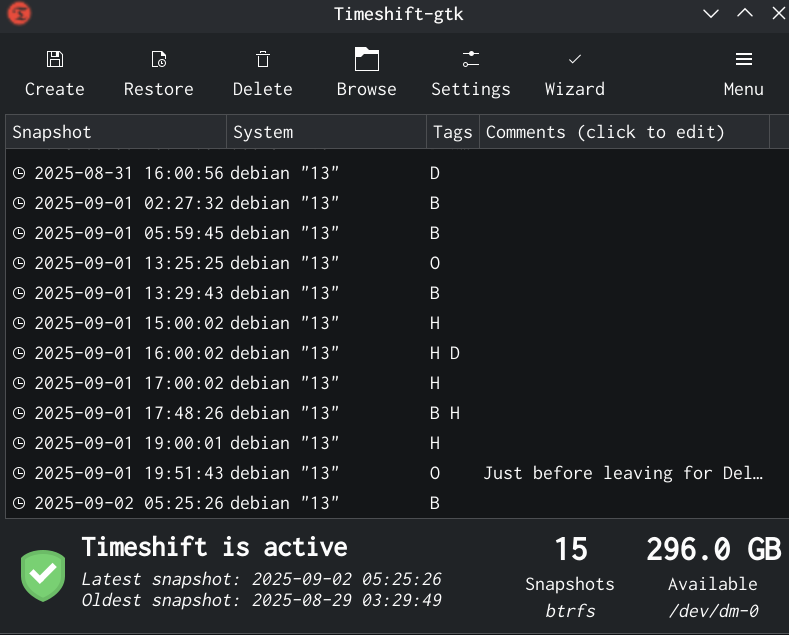
Motivation On the 8th of August 2025 (a day before the Debian Trixie release), I was upgrading my personal laptop from Debian Bookworm to Trixie. It was a major update. However, the update didn t go smoothly, and I ran into some errors. From the Debian support IRC channel, I got to know that it would be best if I removed the texlive packages. However, it was not so easy to just remove texlive with a simple apt remove command. I had to remove the texlive packages from /usr/bin. Then I ran into other errors. Hours after I started the upgrade, I realized I preferred having my system as it was before, as I had to travel to Noida the next day. Needless to say, I wanted to go to sleep rather than fix my broken system. Only if I had a way to go back to my system before I started upgrading, it would have saved a lot of trouble for me. I ended up installing Trixie from scratch. It turns out that there was a way to recover to the state before the upgrade - using Timeshift to roll back the system to a state (in our example, it is the state before the upgrade process started) in the past. However, it needs the Btrfs filesystem with appropriate subvolumes, not provided by Debian installer in their guided partitioning menu. I have set it up after a few weeks of the above-mentioned incident. Let me demonstrate how it works.
Check the screenshot above. It shows a list of snapshots made by Timeshift. Some of them were made by me manually. Others were made by Timeshift automatically as per the routine - I have set up hourly backups and weekly backups etc. In the above-mentioned major update, I could have just taken a snapshot using Timeshift before performing the upgrade and could have rolled back to that snapshot when I found that I cannot spend more time on fixing my installation errors. Then I could just perform the upgrade later.

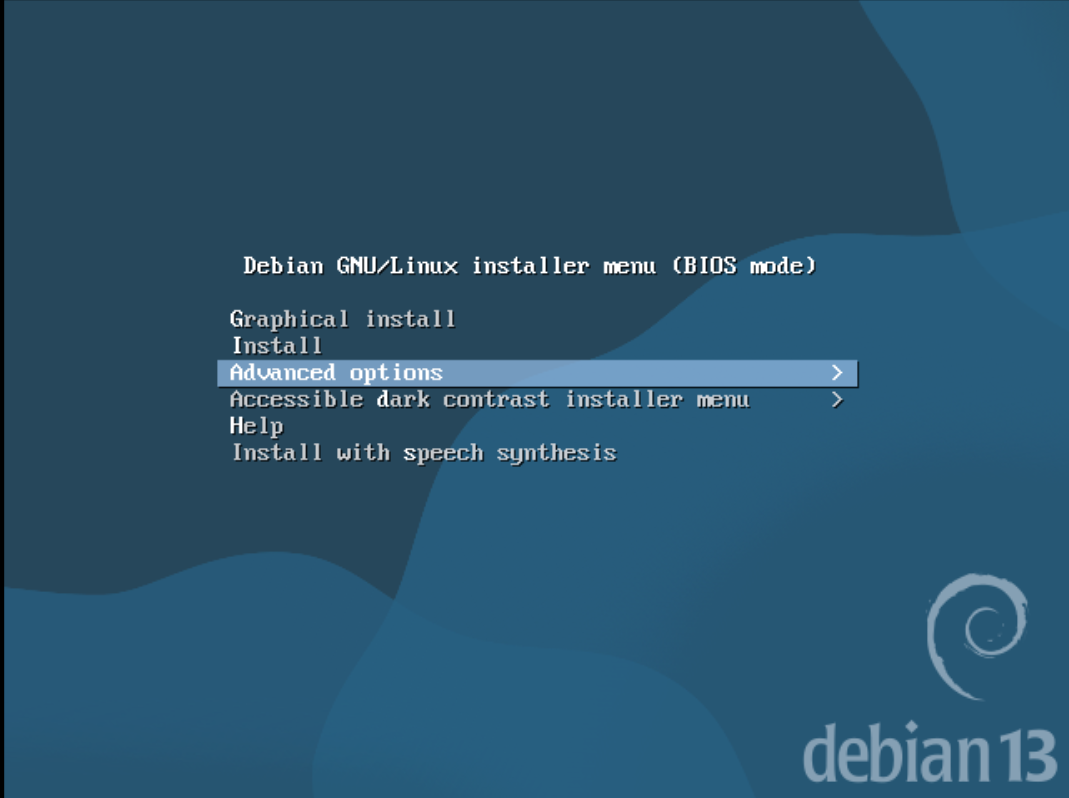
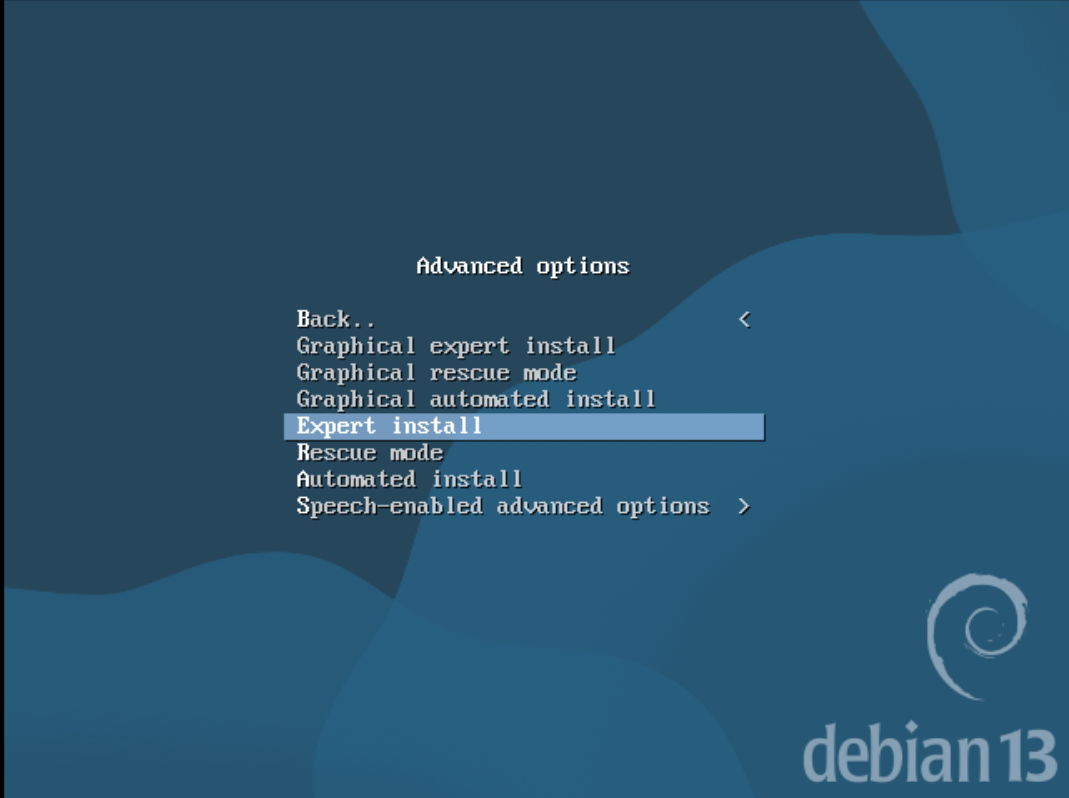
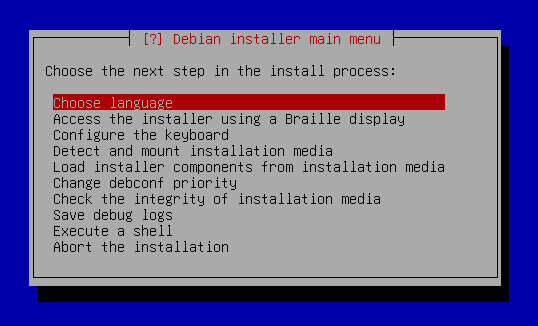
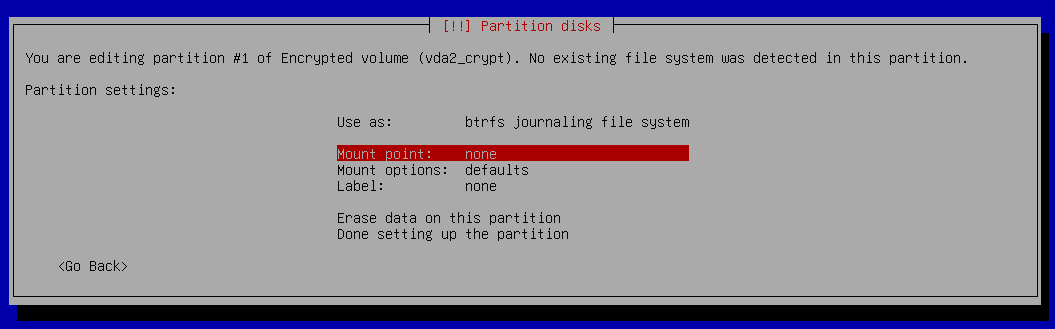
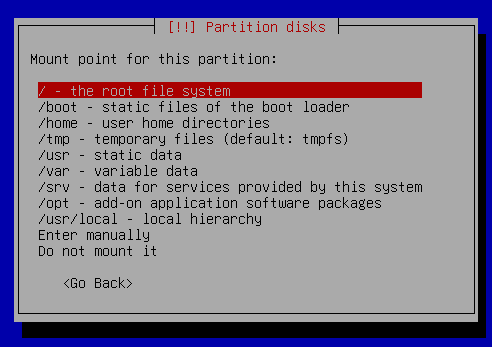
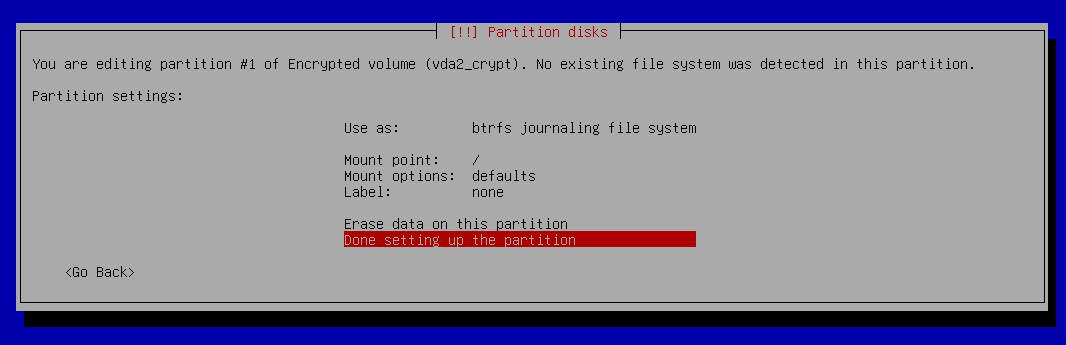
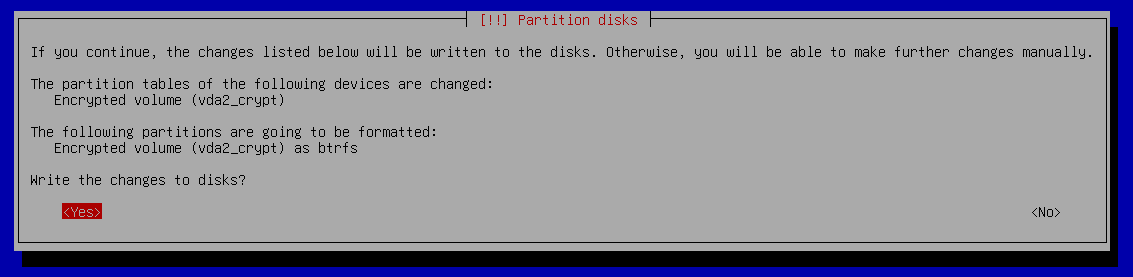
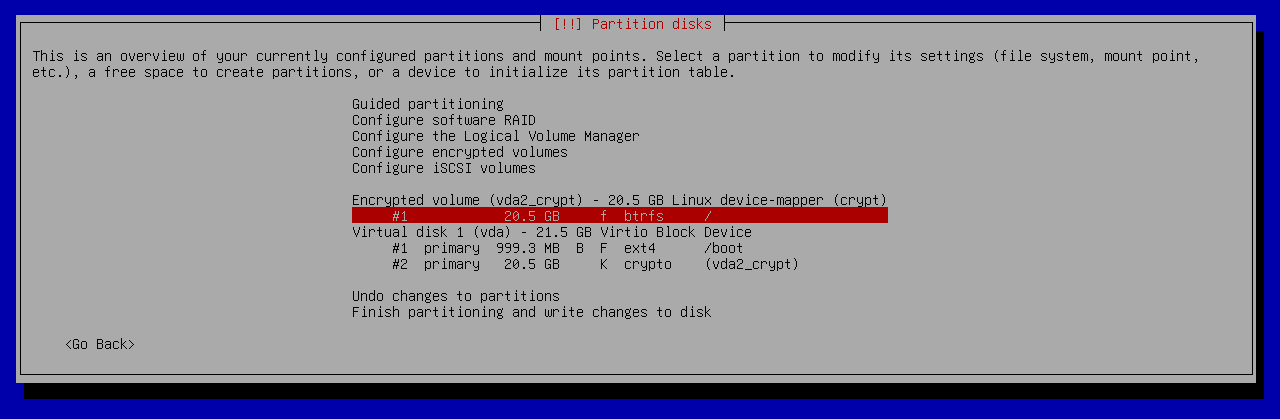
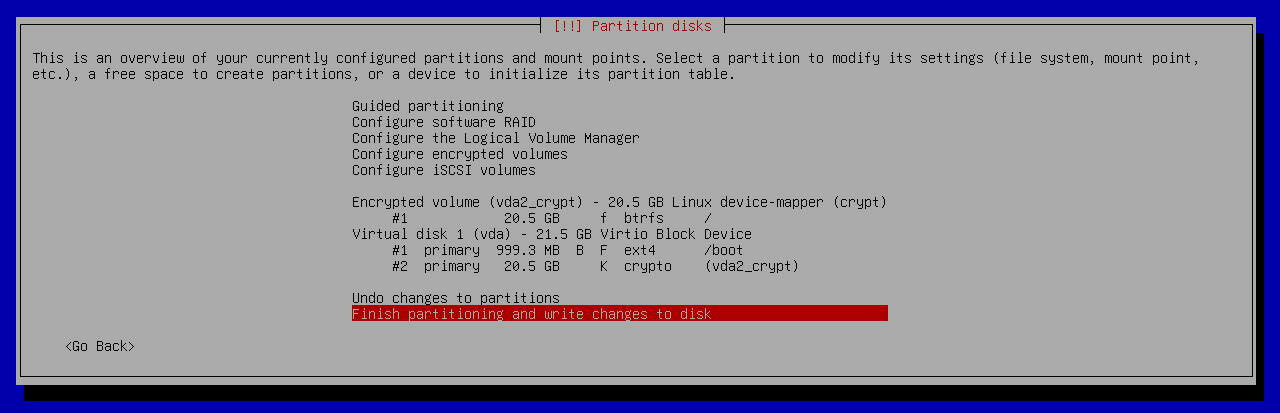
Installation In this tutorial, I will cover how I installed Debian with Btrfs and disk encryption, along with creating subvolumes @ for root and @home for /home so that I can use Timeshift to create snapshots. These snapshots are kept on the same disk where Debian is installed, and the use-case is to roll back to a working system in case I mess up something or to recover an accidentally deleted file. I went through countless tutorials on the Internet, but I didn t find a single tutorial covering both the disk encryption and the above-mentioned subvolumes (on Debian). Debian doesn t create the desired subvolumes by default, therefore the process requires some manual steps, which beginners may not be comfortable performing. Beginners can try distros such as Fedora and Linux Mint, as their installation includes Btrfs with the required subvolumes. Furthermore, it is pertinent to note that I used Debian Trixie s DVD iso on a real laptop (not a virtual machine) for my installation. Debian Trixie is the codename for the current stable version of Debian. Then I took screenshots in a virtual machine by repeating the process. Moreover, a couple of screenshots are from the installation I did on the real laptop. Let s start the tutorial by booting up the Debian installer.
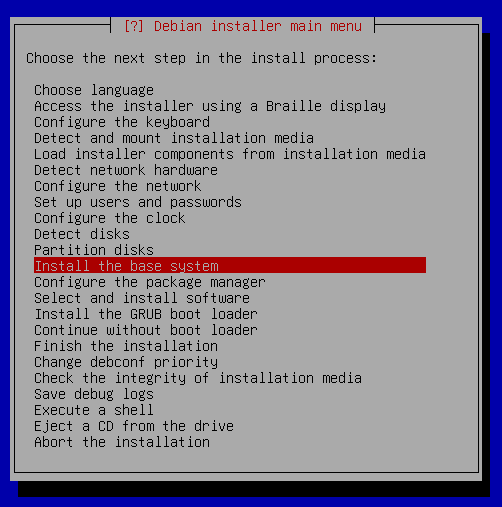
The above screenshot shows the first screen we see on the installer. Since we want to choose Expert Install, we select Advanced Options in the screenshot above.
Let s select the Expert Install option in the above screenshot. It is because we want to create subvolumes after the installer is done with the partition, and only then proceed to installing the base system. Non-expert install modes proceed directly to installing the system right after creating partitions without pausing for us to create the subvolumes.
After selecting the Expert Install option, you will get the screen above. I will skip to partitioning from here and leave the intermediate steps such as choosing language, region, connecting to Wi-Fi, etc. For your reference, I did create the root user.
Let s jump right to the partitioning step. Select the Partition disks option from the menu as shown above.
Choose Manual.
Select your disk where you would like to install Debian.
Select Yes when asked for creating a new partition.
I chose the msdos option as I am not using UEFI. If you are using UEFI, then you need to choose the gpt option. Also, your steps will (slightly) differ from mine if you are using UEFI. In that case, you can watch this video by the YouTube channel EF Linux in which he creates an EFI partition. As he doesn t cover disk encryption, you can continue reading this post after following the steps corresponding to EFI.
Select the free space option as shown above.
Choose Create a new partition.
I chose the partition size to be 1 GB.
Choose Primary.
Choose Beginning.
Now, I got to this screen.
I changed mount point to /boot and turned on the bootable flag and then selected Done setting up the partition.
Now select free space.
Choose the Create a new partition option.
I made the partition size equal to the remaining space on my disk. I do not intend to create a swap partition, so I do not need more space.
Select Primary.
Select the Use as option to change its value.
Select physical volume for encryption.
Select Done setting up the partition.
Now select Configure encrypted volumes.
Select Yes.
Select Finish.
Selecting Yes will take a lot of time to erase the data. Therefore, I would say if you have hours for this step (in case your SSD is like 1 TB), then I would recommend selecting Yes. Otherwise, you could select No and compromise on the quality of encryption. After this, you will be asked to enter a passphrase for disk encryption and confirm it. Please do so. I forgot to take the screenshot for that step.
Now select that encrypted volume as shown in the screenshot above.
Here we will change a couple of options which will be shown in the next screenshot.
In the Use as menu, select btrfs journaling file system.
Now, click on the mount point option.
Change it to / - the root file system.
Select Done setting up the partition.
This is a preview of the paritioning after performing the above-mentioned steps.
If everything is okay, proceed with the Finish partitioning and write changes to disk option.
The installer is reminding us to create a swap partition. I proceeded without it as I planned to add swap after the installation.
If everything looks fine, choose yes for writing the changes to disks.
Now we are done with partitioning and we are shown the screen in the screenshot above. If we had not selected the Expert Install option, the installer would have proceeded to install the base system without asking us. However, we want to create subvolumes before proceeding to install the base system. This is the reason we chose Expert Install. Now press Ctrl + F2.
You will see the screen as in the above screenshot. It says Please press Enter to activate this console. So, let s press Enter.
After pressing Enter, we see the above screen.
The screenshot above shows the steps I performed in the console. I followed the already mentioned video by EF Linux for this part and adapted it to my situation (he doesn t encrypt the disk in his tutorial). First we run df -h to have a look at how our disk is partitioned. In my case, the output was:
# df -h
Filesystem              Size  Used  Avail   Use% Mounted on
tmpfs                   1.6G  344.0K  1.6G    0% /run
devtmpfs                7.7G       0  7.7G   0% /dev
/dev/sdb1               3.7G    3.7G    0   100% /cdrom
/dev/mapper/sda2_crypt  952.9G  5.8G  950.9G  0% /target
/dev/sda1               919.7M  260.0K  855.8M  0% /target/boot
df -h shows us that /dev/mapper/sda2_crypt and /dev/sda1 are mounted on /target and /target/boot respectively. Let s unmount them. For that, we run:
# umount /target
# umount /target/boot
Next, let s mount our root filesystem to /mnt.
# mount /dev/mapper/sda2_crypt /mnt
Let s go into the /mnt directory.
# cd /mnt
Upon listing the contents of this directory, we get:
/mnt # ls
@rootfs
Debian installer has created a subvolume @rootfs automatically. However, we need the subvolumes to be @ and @home. Therefore, let s rename the @rootfs subvolume to @.
/mnt # mv @rootfs @
Listing the contents of the directory again, we get:
/mnt # ls
@
We only one subvolume right now. Therefore, let us go ahead and create another subvolume @home.
/mnt # btrfs subvolume create @home
Create subvolume './@home'
If we perform ls now, we will see there are two subvolumes:
/mnt # ls
@ @home
Let us mount /dev/mapper/sda2_crypt to /target
/mnt # mount -o noatime,space_cache=v2,compress=zstd,ssd,discard=async,subvol=@ /dev/mapper/sda2_crypt /target/
Now we need to create a directory for /home.
/mnt # mkdir /target/home/
Now we mount the /home directory with subvol=@home option.
/mnt # mount -o noatime,space_cache=v2,compress=zstd,ssd,discard=async,subvol=@home /dev/mapper/sda2_crypt /target/home/
Now mount /dev/sda1 to /target/boot.
/mnt # mount /dev/sda1 /target/boot/
Now we need to add these options to the fstab file, which is located at /target/etc/fstab. Unfortunately, vim is not installed in this console. The only way to edit is Nano.
nano /target/etc/fstab
Edit your fstab file to look similar to the one in the screenshot above. I am pasting the fstab file contents below for easy reference.
# /etc/fstab: static file system information.
#
# Use 'blkid' to print the universally unique identifier for a
# device; this may be used with UUID= as a more robust way to name devices
# that works even if disks are added and removed. See fstab(5).
#
# systemd generates mount units based on this file, see systemd.mount(5).
# Please run 'systemctl daemon-reload' after making changes here.
#
# <file system> <mount point>   <type>  <options>       <dump>  <pass>
/dev/mapper/sda2_crypt /        btrfs   noatime,compress=zstd,ssd,discard=async,space_cache=v2,subvol=@ 0       0
/dev/mapper/sda2_crypt /home    btrfs   noatime,compress=zstd,ssd,discard=async,space_cache=v2,subvol=@home 0       0
# /boot was on /dev/sda1 during installation
UUID=12842b16-d3b3-44b4-878a-beb1e6362fbc /boot           ext4    defaults        0       2
/dev/sr0        /media/cdrom0   udf,iso9660 user,noauto     0       0
Please double check the fstab file before saving it. In Nano, you can press Ctrl+O followed by pressing Enter to save the file. Then press Ctrl+X to quit Nano. Now, preview the fstab file by running
cat /target/etc/fstab
and verify that the entries are correct, otherwise you will booted to an unusable and broken system after the installation is complete. Next, press Ctrl + Alt + F1 to go back to the installer.
Proceed to Install the base system.
Screenshot of Debian installer installing the base system. Screenshot of Debian installer installing the base system.

I chose the default option here - linux-image-amd64. After this, the installer will ask you a few more questions. For desktop environment, I chose KDE Plasma. You can choose the desktop environment as per your liking. I will not cover the rest of the installation process and assume that you were able to install from here.

Post installation Let s jump to our freshly installed Debian system. Since I created a root user, I added the user ravi to the suoders file (/etc/sudoers) so that ravi can run commands with sudo. Follow this if you would like to do the same. Now we set up zram as swap. First, install zram-tools.
sudo apt install zram-tools
Now edit the file /etc/default/zramswap and make sure to have the following lines are uncommented:
ALGO=lz4
PERCENT=50
Now, run
sudo systemctl restart zramswap
If you run lsblk now, you should see the below-mentioned entry in the output:
zram0          253:0    0   7.8G  0 disk  [SWAP]
This shows us that zram has been activated as swap. Now we install timeshift, which can be done by running
sudo apt install timeshift
After the installation is complete, run Timeshift and schedule snapshots as you please. We are done now. Hope the tutorial was helpful. See you in the next post and let me know if you have any suggestions and questions on this tutorial.

28 August 2025

Samuel Henrique: Debian 13: My list of exciting new features

A bunch of screenshots overlaid on top of each other showing different tools: lazygit, gnome settings, gnome system monitor, powerline-go, and the wcurl logo, the text at the top says 'Debian 13: My list of exciting new features', and there's a Debian logo in the middle of image

Beyond Debian: Useful for other distros too Every two years Debian releases a new major version of its Stable series, meaning the differences between consecutive Debian Stable releases represent two years of new developments both in Debian as an organization and its native packages, but also in all other packages which are also shipped by other distributions (which are getting into this new Stable release). If you're not paying close attention to everything that's going on all the time in the Linux world, you miss a lot of the nice new features and tools. It's common for people to only realize there's a cool new trick available only years after it was first introduced. Given these considerations, the tips that I'm describing will eventually be available in whatever other distribution you use, be it because it's a Debian derivative or because it just got the same feature from the upstream project. I'm not going to list "passive" features (as good as they can be), the focus here is on new features that might change how you configure and use your machine, with a mix between productivity and performance.

Debian 13 - Trixie I have been a Debian Testing user for longer than 10 years now (and I recommend it for non-server users), so I'm not usually keeping track of all the cool features arriving in the new Stable releases because I'm continuously receiving them through the Debian Testing rolling release. Nonetheless, as a Debian Developer I'm in a good position to point out the ones I can remember. I would also like other Debian Developers to do the same as I'm sure I would learn something new. The Debian 13 release notes contain a "What's new" section , which lists the first two items here and a few other things, in other words, take my list as an addition to the release notes. Debian 13 was released on 2025-08-09, and these are nice things you shouldn't miss in the new release, with a bonus one not tied to the Debian 13 release.

1) wcurl wcurl logo Have you ever had to download a file from your terminal using curl and didn't remember the parameters needed? I did. Nowadays you can use wcurl; "a command line tool which lets you download URLs without having to remember any parameters." Simply call wcurl with one or more URLs as parameters and it will download all of them in parallel, performing retries, choosing the correct output file name, following redirects, and more. Try it out:
wcurl example.com
wcurl comes installed as part of the curl package on Debian 13 and in any other distribution you can imagine, starting with curl 8.14.0. I've written more about wcurl in its release announcement and I've done a lightning talk presentation in DebConf24, which is linked in the release announcement.

2) HTTP/3 support in curl Debian has become the first stable Linux distribution to ship curl with support for HTTP/3. I've written about this in July 2024, when we first enabled it. Note that we first switched the curl CLI to GnuTLS, but then ended up releasing the curl CLI linked with OpenSSL (as support arrived later). Debian was the first stable Linux distro to enable it, and within rolling-release-based distros; Gentoo enabled it first in their non-default flavor of the package and Arch Linux did it three months before we pushed it to Debian Unstable/Testing/Stable-backports, kudos to them! HTTP/3 is not used by default by the curl CLI, you have to enable it with --http3 or --http3-only. Try it out:
curl --http3 https://www.example.org
curl --http3-only https://www.example.org

3) systemd soft-reboot Starting with systemd v254, there's a new soft-reboot option, it's an userspace-only reboot, much faster than a full reboot if you don't need to reboot the kernel. You can read the announcement from the systemd v254 GitHub release Try it out:
# This will reboot your machine!
systemctl soft-reboot

4) apt --update Are you tired of being required to run sudo apt update just before sudo apt upgrade or sudo apt install $PACKAGE? So am I! The new --update option lets you do both things in a single command:
sudo apt --update upgrade
sudo apt --update install $PACKAGE
I love this, but it's still not yet where it should be, fingers crossed for a simple apt upgrade to behave like other package managers by updating its cache as part of the task, maybe in Debian 14? Try it out:
sudo apt upgrade --update
# The order doesn't matter
sudo apt --update upgrade
This is especially handy for container usage, where you have to update the apt cache before installing anything, for example:
podman run debian:stable bin/bash -c 'apt install --update -y curl'

5) powerline-go powerline-go is a powerline-style prompt written in Golang, so it's much more performant than its Python alternative powerline. powerline-style prompts are quite useful to show things like the current status of the git repo in your working directory, exit code of the previous command, presence of jobs in the background, whether or not you're in an ssh session, and more. A screenshot of a terminal with powerline-go enabled, showing how the PS1 changes inside a git repository and when the last command fails Try it out:
sudo apt install powerline-go
Then add this to your .bashrc:
function _update_ps1()  
    PS1="$(/usr/bin/powerline-go -error $? -jobs $(jobs -p   wc -l))"

    # Uncomment the following line to automatically clear errors after showing
    # them once. This not only clears the error for powerline-go, but also for
    # everything else you run in that shell. Don't enable this if you're not
    # sure this is what you want.

    #set "?"
 

if [ "$TERM" != "linux" ] && [ -f "/usr/bin/powerline-go" ]; then
    PROMPT_COMMAND="_update_ps1; $PROMPT_COMMAND"
fi
Or this to .zshrc:
function powerline_precmd()  
    PS1="$(/usr/bin/powerline-go -error $? -jobs $ $ (%):%j :-0 )"

    # Uncomment the following line to automatically clear errors after showing
    # them once. This not only clears the error for powerline-go, but also for
    # everything else you run in that shell. Don't enable this if you're not
    # sure this is what you want.

    #set "?"
 
If you'd like to have your prompt start in a newline, like I have in the screenshot above, you just need to set -newline in the powerline-go invocation in your .bashrc/.zshrc.

6) Gnome System Monitor Extension Tips number 6 and 7 are for Gnome users. Gnome is now shipping a system monitor extension which lets you get a glance of the current load of your machine from the top bar. Screenshot of the top bar of Gnome with the system monitor extension enabled, showing the load of: CPU, memory, network and disk I've found this quite useful for machines where I'm required to install third-party monitoring software that tends to randomly consume more resources than it should. If I feel like my machine is struggling, I can quickly glance at its load to verify if it's getting overloaded by some process. The extension is not as complete as system-monitor-next, not showing temperatures or histograms, but at least it's officially part of Gnome, easy to install and supported by them. Try it out:
sudo apt install gnome-system-monitor gnome-shell-extension-manager
And then enable the extension from the "Extension Manager" application.

7) Gnome setting for battery charging profile After having to learn more about batteries in order to get into FPV drones, I've come to have a bigger appreciation for solutions that minimize the inevitable loss of capacity that accrues over time. There's now a "Battery Charging" setting (under the "Power") section which lets you choose between two different profiles: "Maximize Charge" and "Preserve Battery Health". A screenshot of the Gnome settings for Power showing the options for Battery Charging On supported laptops, this setting is an easy way to set thresholds for when charging should start and stop, just like you could do it with the tlp package, but now from the Gnome settings. To increase the longevity of my laptop battery, I always keep it at "Preserve Battery Health" unless I'm traveling. What I would like to see next is support for choosing different "Power Modes" based on whether the laptop is plugged-in, and based on the battery charge percentage. There's a GNOME issue tracking this feature, but there's some pushback on whether this is the right thing to expose to users. In the meantime, there are some workarounds mentioned in that issue which people who really want this feature can follow. If you would like to learn more about batteries; Battery University is a great starting point, besides getting into FPV drones and being forced to handle batteries without a Battery Management System (BMS). And if by any chance this sparks your interest in FPV drones, Joshua Bardwell's YouTube channel is a great resource: @JoshuaBardwell.
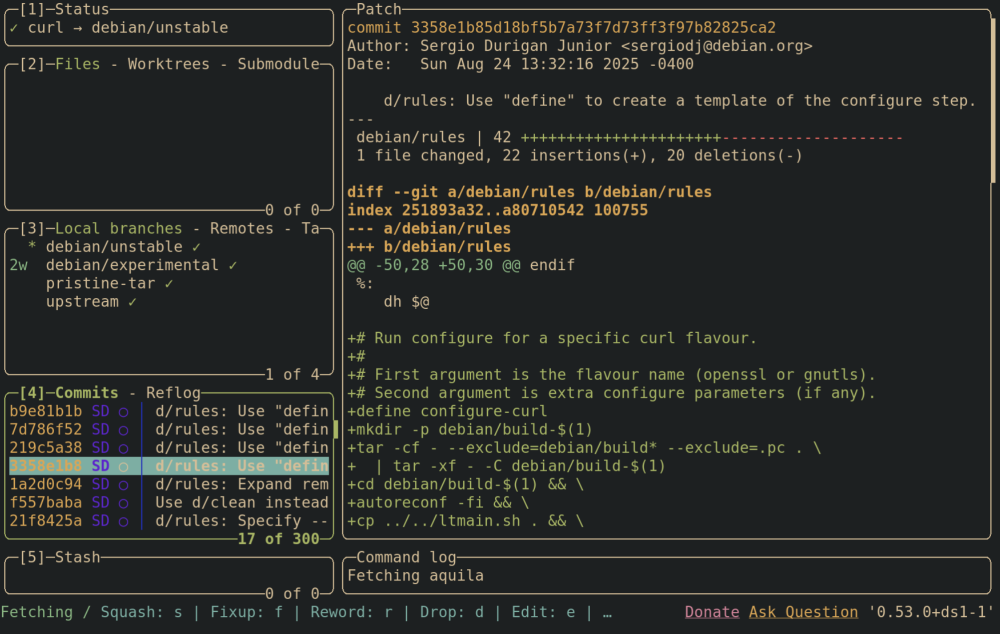
8) Lazygit Emacs users are already familiar with the legendary magit; a terminal-based UI for git. Lazygit is an alternative for non-emacs users, you can integrate it with neovim or just use it directly. I'm still playing with lazygit and haven't integrated it into my workflows, but so far it has been a pleasant experience. Screenshot of lazygit from the Debian curl repository, showing a selected commit and its diff, besides the other things from the lazygit UI You should check out the demos from the lazygit GitHub page. Try it out:
sudo apt install lazygit
And then call lazygit from within a git repository.

9) neovim neovim has been shipped in Debian since 2016, but upstream has been doing a lot of work to improve the experience out-of-the-box in the last couple of years. If you're a neovim poweruser, you're likely not installing it from the official repositories, but for those that are, Debian 13 comes with version 0.10.4, which brings the following improvements compared to the version in Debian 12:
  • Treesitter support for C, Lua, Markdown, with the possibility of adding any other languages as needed;
  • Better spellchecking due to treesitter integration (spellsitter);
  • Mouse support enabled by default;
  • Commenting support out-of-the-box; Check :h commenting for details, but the tl;dr is that you can use gcc to comment the current line and gc to comment the current selection.
  • OSC52 support. Especially handy for those using neovim over an ssh connection, this protocol lets you copy something from within the neovim process into the clipboard of the machine you're using to connect through ssh. In other words, you can copy from neovim running in a host over ssh and paste it in the "outside" machine.

10) [Bonus] Running old Debian releases The bonus tip is not specific to the Debian 13 release, but something I've recently learned in the #debian-devel IRC channel. Did you know there are usable container images for all past Debian releases? I'm not talking "past" as in "some of the older releases", I'm talking past as in "literally every Debian release, including the very first one". Tianon Gravi "tianon" is the Debian Developer responsible for making this happen, kudos to him! There's a small gotcha that the releases Buzz (1.1) and Rex (1.2) require a 32-bit host, otherwise you will get the error Out of virtual memory!, but starting with Bo (1.3) all should work in amd64/arm64. Try it out:
sudo apt install podman

podman run -it docker.io/debian/eol:bo
Don't be surprised when noticing that apt/apt-get is not available inside the container, that's because apt first appeared in Debian Slink (2.1).

Changes since publication

2025-08-30
  • Mention that Arch also enabled HTTP/3.

Samuel Henrique: Debian 13: My list of exciting new features

A bunch of screenshots overlaid on top of each other showing different tools: lazygit, gnome settings, gnome system monitor, powerline-go, and the wcurl logo, the text at the top says 'Debian 13: My list of exciting new features', and there's a Debian logo in the middle of image

Beyond Debian: Useful for other distros too Every two years Debian releases a new major version of its Stable series, meaning the differences between consecutive Debian Stable releases represent two years of new developments both in Debian as an organization and its native packages, but also in all other packages which are also shipped by other distributions (which are getting into this new Stable release). If you're not paying close attention to everything that's going on all the time in the Linux world, you miss a lot of the nice new features and tools. It's common for people to only realize there's a cool new trick available only years after it was first introduced. Given these considerations, the tips that I'm describing will eventually be available in whatever other distribution you use, be it because it's a Debian derivative or because it just got the same feature from the upstream project. I'm not going to list "passive" features (as good as they can be), the focus here is on new features that might change how you configure and use your machine, with a mix between productivity and performance.

Debian 13 - Trixie I have been a Debian Testing user for longer than 10 years now (and I recommend it for non-server users), so I'm not usually keeping track of all the cool features arriving in the new Stable releases because I'm continuously receiving them through the Debian Testing rolling release. Nonetheless, as a Debian Developer I'm in a good position to point out the ones I can remember. I would also like other Debian Developers to do the same as I'm sure I would learn something new. The Debian 13 release notes contain a "What's new" section , which lists the first two items here and a few other things, in other words, take my list as an addition to the release notes. Debian 13 was released on 2025-08-09, and these are nice things you shouldn't miss in the new release, with a bonus one not tied to the Debian 13 release.

1) wcurl wcurl logo Have you ever had to download a file from your terminal using curl and didn't remember the parameters needed? I did. Nowadays you can use wcurl; "a command line tool which lets you download URLs without having to remember any parameters." Simply call wcurl with one or more URLs as parameters and it will download all of them in parallel, performing retries, choosing the correct output file name, following redirects, and more. Try it out:
wcurl example.com
wcurl comes installed as part of the curl package on Debian 13 and in any other distribution you can imagine, starting with curl 8.14.0. I've written more about wcurl in its release announcement and I've done a lightning talk presentation in DebConf24, which is linked in the release announcement.

2) HTTP/3 support in curl Debian has become the first stable Linux distribution to ship curl with support for HTTP/3. I've written about this in July 2024, when we first enabled it. Note that we first switched the curl CLI to GnuTLS, but then ended up releasing the curl CLI linked with OpenSSL (as support arrived later). Debian was the first Linux distro to enable it in the default build of the curl package, but Gentoo enabled it a few weeks earlier in their non-default flavor of the package, kudos to them! HTTP/3 is not used by default by the curl CLI, you have to enable it with --http3 or --http3-only. Try it out:
curl --http3 https://www.example.org
curl --http3-only https://www.example.org

3) systemd soft-reboot Starting with systemd v254, there's a new soft-reboot option, it's an userspace-only reboot, much faster than a full reboot if you don't need to reboot the kernel. You can read the announcement from the systemd v254 GitHub release Try it out:
# This will reboot your machine!
systemctl soft-reboot

4) apt --update Are you tired of being required to run sudo apt update just before sudo apt upgrade or sudo apt install $PACKAGE? So am I! The new --update option lets you do both things in a single command:
sudo apt --update upgrade
sudo apt --update install $PACKAGE
I love this, but it's still not yet where it should be, fingers crossed for a simple apt upgrade to behave like other package managers by updating its cache as part of the task, maybe in Debian 14? Try it out:
sudo apt upgrade --update
# The order doesn't matter
sudo apt --update upgrade
This is especially handy for container usage, where you have to update the apt cache before installing anything, for example:
podman run debian:stable bin/bash -c 'apt install --update -y curl'

5) powerline-go powerline-go is a powerline-style prompt written in Golang, so it's much more performant than its Python alternative powerline. powerline-style prompts are quite useful to show things like the current status of the git repo in your working directory, exit code of the previous command, presence of jobs in the background, whether or not you're in an ssh session, and more. A screenshot of a terminal with powerline-go enabled, showing how the PS1 changes inside a git repository and when the last command fails Try it out:
sudo apt install powerline-go
Then add this to your .bashrc:
function _update_ps1()  
    PS1="$(/usr/bin/powerline-go -error $? -jobs $(jobs -p   wc -l))"

    # Uncomment the following line to automatically clear errors after showing
    # them once. This not only clears the error for powerline-go, but also for
    # everything else you run in that shell. Don't enable this if you're not
    # sure this is what you want.

    #set "?"
 

if [ "$TERM" != "linux" ] && [ -f "/usr/bin/powerline-go" ]; then
    PROMPT_COMMAND="_update_ps1; $PROMPT_COMMAND"
fi
Or this to .zshrc:
function powerline_precmd()  
    PS1="$(/usr/bin/powerline-go -error $? -jobs $ $ (%):%j :-0 )"

    # Uncomment the following line to automatically clear errors after showing
    # them once. This not only clears the error for powerline-go, but also for
    # everything else you run in that shell. Don't enable this if you're not
    # sure this is what you want.

    #set "?"
 
If you'd like to have your prompt start in a newline, like I have in the screenshot above, you just need to set -newline in the powerline-go invocation in your .bashrc/.zshrc.

6) Gnome System Monitor Extension Tips number 6 and 7 are for Gnome users. Gnome is now shipping a system monitor extension which lets you get a glance of the current load of your machine from the top bar. Screenshot of the top bar of Gnome with the system monitor extension enabled, showing the load of: CPU, memory, network and disk I've found this quite useful for machines where I'm required to install third-party monitoring software that tends to randomly consume more resources than it should. If I feel like my machine is struggling, I can quickly glance at its load to verify if it's getting overloaded by some process. The extension is not as complete as system-monitor-next, not showing temperatures or histograms, but at least it's officially part of Gnome, easy to install and supported by them. Try it out:
sudo apt install gnome-system-monitor gnome-shell-extension-manager
And then enable the extension from the "Extension Manager" application.

7) Gnome setting for battery charging profile After having to learn more about batteries in order to get into FPV drones, I've come to have a bigger appreciation for solutions that minimize the inevitable loss of capacity that accrues over time. There's now a "Battery Charging" setting (under the "Power") section which lets you choose between two different profiles: "Maximize Charge" and "Preserve Battery Health". A screenshot of the Gnome settings for Power showing the options for Battery Charging On supported laptops, this setting is an easy way to set thresholds for when charging should start and stop, just like you could do it with the tlp package, but now from the Gnome settings. To increase the longevity of my laptop battery, I always keep it at "Preserve Battery Health" unless I'm traveling. What I would like to see next is support for choosing different "Power Modes" based on whether the laptop is plugged-in, and based on the battery charge percentage. There's a GNOME issue tracking this feature, but there's some pushback on whether this is the right thing to expose to users. In the meantime, there are some workarounds mentioned in that issue which people who really want this feature can follow. If you would like to learn more about batteries; Battery University is a great starting point, besides getting into FPV drones and being forced to handle batteries without a Battery Management System (BMS). And if by any chance this sparks your interest in FPV drones, Joshua Bardwell's YouTube channel is a great resource: @JoshuaBardwell.

8) Lazygit Emacs users are already familiar with the legendary magit; a terminal-based UI for git. Lazygit is an alternative for non-emacs users, you can integrate it with neovim or just use it directly. I'm still playing with lazygit and haven't integrated it into my workflows, but so far it has been a pleasant experience. Screenshot of lazygit from the Debian curl repository, showing a selected commit and its diff, besides the other things from the lazygit UI You should check out the demos from the lazygit GitHub page. Try it out:

sudo apt install lazygit
And then call lazygit from within a git repository.

9) neovim neovim has been shipped in Debian since 2016, but upstream has been doing a lot of work to improve the experience out-of-the-box in the last couple of years. If you're a neovim poweruser, you're likely not installing it from the official repositories, but for those that are, Debian 13 comes with version 0.10.4, which brings the following improvements compared to the version in Debian 12:
  • Treesitter support for C, Lua, Markdown, with the possibility of adding any other languages as needed;
  • Better spellchecking due to treesitter integration (spellsitter);
  • Mouse support enabled by default;
  • Commenting support out-of-the-box; Check :h commenting for details, but the tl;dr is that you can use gcc to comment the current line and gc to comment the current selection.
  • OSC52 support. Especially handy for those using neovim over an ssh connection, this protocol lets you copy something from within the neovim process into the clipboard of the machine you're using to connect through ssh. In other words, you can copy from neovim running in a host over ssh and paste it in the "outside" machine.

10) [Bonus] Running old Debian releases The bonus tip is not specific to the Debian 13 release, but something I've recently learned in the #debian-devel IRC channel. Did you know there are usable container images for all past Debian releases? I'm not talking "past" as in "some of the older releases", I'm talking past as in "literally every Debian release, including the very first one". Tianon Gravi "tianon" is the Debian Developer responsible for making this happen, kudos to him! There's a small gotcha that the releases Buzz (1.1) and Rex (1.2) require a 32-bit host, otherwise you will get the error Out of virtual memory!, but starting with Bo (1.3) all should work in amd64/arm64. Try it out:
sudo apt install podman

podman run -it docker.io/debian/eol:bo
Don't be surprised when noticing that apt/apt-get is not available inside the container, that's because apt first appeared in Debian Slink (2.1).

27 August 2025

Russell Coker: ZRAM and VMs

I ve just started using zram for swap on VMs. The use of compression for swap in Linux apparently isn t new, it s been in the Linux kernel since version 3.2 (since 2012). But until recent years I hadn t used it. When I started using Mobian (the Debian distribution for phones) zram was in the default setup, it basically works and I never needed to bother with it which is exactly what you want from such a technology. After seeing it s benefits in Mobian I started using it on my laptops where it worked well. Benefits of ZRAM ZRAM means that instead of paging data to storage it is compressed to another part of RAM. That means no access to storage which is a significant benefit if storage is slow (typical for phones) or if storage wearing out is a problem. For servers you typically have SSDs that are fast and last for significant write volumes, for example the 120G SSDs referenced in my blog post about swap (not) breaking SSD [1] are running well in my parents PC because they outlasted all the other hardware connected to them and 120G isn t usable for anything more demanding than my parents use nowadays. Those are Intel 120G 2.5 DC grade SATA SSDs. For most servers ZRAM isn t a good choice as you can just keep doing IO on the SSDs for years. A server that runs multiple VMs is a special case because you want to isolate the VMs from each other. Support for quotas for storage IO in Linux isn t easy to configure while limiting the number of CPU cores is very easy. If a system or VM using ZRAM for swap starts paging excessively the bottleneck will be CPU, this probably isn t going to be great on a phone with a slow CPU but on a server class CPU it will be less of a limit. Whether compression is slower or faster than SSD is a complex issue but it will definitely be just a limit for that VM. When I setup a VM server I want to have some confidence that a DoS attack or configuration error on one VM isn t going to destroy the performance of other VMs. If the VM server has 4 cores (the smallest VM server I run) and no VM has more than 2 cores then I know that the system can still run adequately if half the CPU performance is being wasted. Some servers I run have storage limits that make saving the disk space for swap useful. For servers I run in Hetzner (currently only one server but I have run up to 6 at various times in the past) the storage is often limited, Hetzner seems to typically have storage that is 8* the size of RAM so if you have many VMs configured with the swap that they might need in the expectation that usually at most one of them will be actually swapping then it can make a real difference to usable storage. 5% of storage used for swap files isn t uncommon or unreasonable. Big Servers I am still considering the implications of zram on larger systems. If I have a ML server with 512G of RAM would it make sense to use it? It seems plausible that a system might need 550G of RAM and zram could make the difference between jobs being killed with OOM and the jobs just completing. The CPU overhead of compression shouldn t be an issue as when you have dozens of cores in the system having one or two used for compression is no big deal. If a system is doing strictly ML work there will be a lot of data that can t be compressed, so the question is how much of the memory is raw input data and the weights used for calculations and how much is arrays with zeros and other things that are easy to compress. With a big server nothing less than 32G of swap will make much difference to the way things work and if you have 32G of data being actively paged then the fastest NVMe devices probably won t be enough to give usable performance. As zram uses one stream per CPU code if you have 44 cores that means 44 compression streams which should handle greater throughput. I ll write another blog post if I get a chance to test this.

25 August 2025

Gunnar Wolf: The comedy of computation, or, how I learned to stop worrying and love obsolescence

This post is a review for Computing Reviews for The comedy of computation, or, how I learned to stop worrying and love obsolescence , a book published in Stanford University Press
The Comedy of Computation is not an easy book to review. It is a much enjoyable book that analyzes several examples of how being computational has been approached across literary genres in the last century how authors of stories, novels, theatrical plays and movies, focusing on comedic genres, have understood the role of the computer in defining human relations, reactions and even self-image. Mangrum structures his work in six thematic chapters, where he presents different angles on human society: How have racial stereotypes advanced in human imagination and perception about a future where we interact with mechanical or computational partners (from mechanical tools performing jobs that were identified with racial profiles to intelligent robots that threaten to control society); the genericity of computers and people can be seen as generic, interchangeable characters, often fueled by the tendency people exhibit to confer anthropomorphic qualities to inanimate objects; people s desire to be seen as truly authentic , regardless of what it ultimately means; romantic involvement and romance-led stories (with the computer seen as a facilitator for human-to-human romances, distractor away from them, or being itself a part of the couple); and the absurdity in antropomorphization, in comparing fundamentally different aspects such as intelligence and speed at solving mathematical operations, as well as the absurdity presented blatantly as such by several techno-utopian visions. But presenting this as a linear set of concepts that are presented does not do justice to the book. Throughout the sections of each chapter, a different work serves as the axis Novels and stories, Hollywood movies, Broadway plays, some covers for the Time magazine, a couple of presenting the would-be future, even a romantic comedy entirely written by bots . And for each of them, Benjamin Mangrum presents a very thorough analysis, drawing relations and comparing with contemporary works, but also with Shakespeare, classical Greek myths, and a very long etc tera. This book is hard to review because of the depth of work the author did: Reading it repeatedly made me look for other works, or at least longer references for them. Still, despite being a work with such erudition, Mangrum s text is easy and pleasant to read, without feeling heavy or written in an overly academic style. I very much enjoyed reading this book. It is certainly not a technical book about computers and society in any way; it is an exploration of human creativity and our understanding of the aspects the author has found as central to understanding the impact of computing on humankind. However, there is one point I must mention before closing: I believe the editorial decision to present the work as a running text, with all the material conceptualized as footnotes presented as a separate, over 50 page long final chapter, detracts from the final result. Personally, I enjoy reading the footnotes because they reveal the author s thought processes, even if they stray from the central line of thought. Even more, given my review copy was a PDF, I could not even keep said chapter open with one finger, bouncing back and forth. For all purposes, I missed out on the notes; now that I finished reading and stumbled upon that chapter, I know I missed an important part of the enjoyment.

Scarlett Gately Moore: A Bittersweet Farewell: My Final KDE Snap Release and the End of an Era

Today marks both a milestone and a turning point in my journey with open source software. I m proud to announce the release of KDE Gear 25.08.0 as my final snap package release. You can find all the details about this exciting update at the official KDE announcement. After much reflection and with a heavy heart, I ve made the difficult decision to retire from most of my open source software work, including snap packaging. This wasn t a choice I made lightly it comes after months of rejections and silence in an industry I ve loved and called home for over 20 years.

Passing the Torch While I m stepping back, I m thrilled to share that the future of KDE snaps is in excellent hands. Carlos from the Neon team has been working tirelessly to set up snaps on the new infrastructure that KDE has made available. This means building snaps in KDE CI is now possible a significant leap forward for the ecosystem. I ll be helping Carlos get the pipelines properly configured to ensure a smooth transition.

Staying Connected (But Differently) Though I m stepping away from most development work, I won t be disappearing entirely from the communities that have meant so much to me:
  • Kubuntu: I ll remain available as a backup, though Rik is doing an absolutely fabulous job getting the latest and greatest KDE packages uploaded. The distribution is in capable hands.
  • Ubuntu Community Council: I m continuing my involvement here because I ve found myself genuinely enjoying the community side of things. There s something deeply fulfilling about focusing on the human connections that make these projects possible.
  • Debian: I ll likely be submitting for emeritus status, as I haven t had the time to contribute meaningfully and want to be honest about my current capacity.

The Reality Behind the Decision This transition isn t just about career fatigue it s about financial reality. I ve spent too many years working for free while struggling to pay my bills. The recent changes in the industry, particularly with AI transforming the web development landscape, have made things even more challenging. Getting traffic to websites now requires extensive social media work and marketing all expected to be done without compensation. My stint at webwork was good while it lasted, but the changing landscape has made it unsustainable. I ve reached a point where I can t continue doing free work when my family and I are struggling financially. It shouldn t take breaking a limb to receive the donations needed to survive.

A Career That Meant Everything These 20+ years in open source have been the defining chapter of my professional life. I ve watched communities grow, technologies evolve, and witnessed firsthand the incredible things that happen when passionate people work together. The relationships I ve built, the problems we ve solved together, and the software we ve created have been deeply meaningful. But I also have to be honest about where I stand today: I cannot compete in the current job market. The industry has changed, and despite my experience and passion, the opportunities just aren t there for someone in my situation.

Looking Forward Making a career change after two decades is terrifying, but it s also necessary. I need to find a path that can provide financial stability for my family while still allowing me to contribute meaningfully to the world. If you ve benefited from my work over the years and are in a position to help during this transition, I would be forever grateful for any support. Every contribution, no matter the size, helps ease this difficult period: https://gofund.me/a9c55d8f

Thank You To everyone who has collaborated with me, tested my packages, filed bug reports, offered encouragement, or simply used the software I ve helped maintain thank you. You ve made these 20+ years worthwhile, and you ve been part of something bigger than any individual contribution. The open source world will continue to thrive because it s built on the collective passion of thousands of people like Carlos, Rik, and countless others who are carrying the torch forward. While my active development days are ending, the impact of this community will continue long into the future. With sincere gratitude and fond farewells, Scarlett Moore

20 August 2025

Dirk Eddelbuettel: RcppArmadillo 14.6.3-1 on CRAN: Minor Upstream Bug Fixes

armadillo image Armadillo is a powerful and expressive C++ template library for linear algebra and scientific computing. It aims towards a good balance between speed and ease of use, has a syntax deliberately close to Matlab, and is useful for algorithm development directly in C++, or quick conversion of research code into production environments. RcppArmadillo integrates this library with the R environment and language and is widely used by (currently) 1268 other packages on CRAN, downloaded 41 million times (per the partial logs from the cloud mirrors of CRAN), and the CSDA paper (preprint / vignette) by Conrad and myself has been cited 642 times according to Google Scholar. Conrad made three minor bug fix releases since the 4.6.0 release last month. We need to pace releases at CRAN so we do not immediately upload there on each upstream release and then CRAN also had the usual (and well-deserved) summer rest leading to a slight delay relative to the last upstream. The minor changes in the three releases are summarized below. All our releases are always available via the GitHub repo and hence also via r-universe, and still rigorously tested via our own reverse-dependency checks. We also note that the package once again passed with flying colours and no human intervention which remains impressive given the over 1200 reverse dependencies.

Changes in RcppArmadillo version 14.6.3-1 (2025-08-14)
  • Upgraded to Armadillo release 14.6.3 (Caffe Mocha)
    • Fix OpenMP related crashes in Cube::slice() on Arm64 CPUs

Changes in RcppArmadillo version 14.6.2-1 (2025-08-08) (GitHub Only)
  • Upgraded to Armadillo release 14.6.2 (Caffe Mocha)
    • Fix for corner-case speed regression in sum()
    • Better handling of OpenMP in omit_nan() and omit_nonfinite()

Changes in RcppArmadillo version 14.6.1-1 (2025-07-21) (GitHub Only)
  • Upgraded to Armadillo release 14.6.1 (Caffe Mocha)
    • Fix for speed regression in mean()
    • Fix for detection of compiler configuration
    • Use of pow optimization now optional

Courtesy of my CRANberries, there is a diffstat report relative to previous release. More detailed information is on the RcppArmadillo page. Questions, comments etc should go to the rcpp-devel mailing list off the Rcpp R-Forge page.

This post by Dirk Eddelbuettel originated on his Thinking inside the box blog. If you like this or other open-source work I do, you can sponsor me at GitHub.

Reproducible Builds: Reproducible Builds summit 2025 to take place in Vienna

We are extremely pleased to announce the upcoming Reproducible Builds summit, which will take place from October 28th 30th 2025 in the historic city of Vienna, Austria. This year, we are thrilled to host the eighth edition of this exciting event, following the success of previous summits in various iconic locations around the world, including Hamburg (2023 2024), Venice (2022), Marrakesh (2019), Paris (2018), Berlin (2017), Berlin (2016) and Athens (2015). If you re excited about joining us this year, please make sure to read the event page which has more details about the event and location. As in previous years, we will be sending invitations to all those who attended our previous summit events or expressed interest to do so. However, even if you do not receive a personal invitation, please do email the organizers and we will find a way to accommodate you.

About the event The Reproducible Builds Summit is a unique gathering that brings together attendees from diverse projects, united by a shared vision of advancing the Reproducible Builds effort. During this enriching event, participants will have the opportunity to engage in discussions, establish connections and exchange ideas to drive progress in this vital field. Our aim is to create an inclusive space that fosters collaboration, innovation and problem-solving. With your help, we will bring this (and several other areas) into life:
The main seminar room.

Schedule Although the exact content of the meeting will be shaped by the participants, the main goals will include:
  • Update & exchange about the status of reproducible builds in various projects.
  • Improve collaboration both between and inside projects.
  • Expand the scope and reach of reproducible builds to more projects.
  • Work together and hack on solutions.
  • Establish space for more strategic and long-term thinking than is possible in virtual channels.
  • Brainstorm designs on tools enabling users to get the most benefits from reproducible builds.
  • Discuss how reproducible builds will be usable and meaningful to users and developers alike.
Logs and minutes will be published after the meeting.

Location & date

Registration instructions Please reach out if you d like to participate in hopefully interesting, inspiring and intense technical sessions about reproducible builds and beyond! We look forward to what we anticipate to be yet another extraordinary event!

Next.

Previous.