Emmanuel Kasper: How configuration is passed from the BinderHub helm chart to a running BinderHub

Context:
At $WORK I am doing a lot of datascience work around Jupyter Notebooks and their ecosystem. Right now I am setting BinderHub, which is a service to start a Jupyter Notebook from a git repo in your browser.
For setting up BinderHub I am using the BinderHub helm chart, and I was wondering how configuration changes are propagated from the BinderHub helm chart to the process running in a Kubernetes Pod.
After going through this I can say I am not right now a great fan of Helm, as it looks to me like an unnecessary, overengineered abstraction layer on top of Kubernetes manifests. Or maybe it is just that I don t want to learn the golang templating synthax. I am looking forward to testing Kustomize as an alternative, but I havn t had the chance yet.
Starting from the list of config parameters available:
Although many parameters are mentioned in the installer document, you have to go to the developer doc at https://binderhub.readthedocs.io/en/latest/reference/ref-index.html to get a whole overview.
In my case I want to set the
hostname parameter for the Gitlab Repoprovider.
This is the relevelant snippet in the developer doc:
hostname c.GitLabRepoProvider.hostname = Unicode('gitlab.com')
    The host of the GitLab instance
c.GitLabRepoProvider.hostname here means, that the value of the hostname parameter will be loaded at the path config.GitLabRepoProvider inside a configuration file.
Using the yaml synthax this means the configuration file should contain a snippet like:
config:
  GitlabRepoProvider
    hostname: my-domain.com
yq that it correctly set:
$ yq --raw-output '.config.GitLabRepoProvider.hostname' config.yaml
my-domain.com
helm ( value or -f option) in the command:
$ helm upgrade \
    binderhub \
    jupyterhub/binderhub \
    --install \
    --version=$(RELEASE) \
    --create-namespace \
    --namespace=binderhub \
    --values secret.yaml \
    --values config.yaml \
    --debug
$ helm install --values myvalues.yaml --values override.yaml myredis ./redis
helm upgrade is run the helm values of type config are stashed in a Kubernetes secret binder-secret:
https://github.com/jupyterhub/binderhub/blob/main/helm-chart/binderhub/templates/secret.yaml#L12
stringData:
   - /*
    Stash away relevant Helm template values for
    the BinderHub Python application to read from
    in binderhub_config.py.
  */
  values.yaml:
     - pick .Values "config" "imageBuilderType" "cors" "dind" "pink" "extraConfig"   toYaml   nindent 4
$ kubectl get secret binder-secret -o yaml   yq --raw-output '.data."values.yaml"'    base64 --decode
...
  GitLabRepoProvider:
    hostname: my-domain.com
...
config, created from the binder-secret Secret:
$ kubectl get pod -l component=binder -o yaml   grep --context 4 binder-secret
    volumes:
    - name: config
      secret:
        defaultMode: 420
        secretName: binder-secret
/etc/binderhub/config:
      volumeMounts:
      - mountPath: /etc/binderhub/config/
        name: config
        readOnly: true
oc exec binder-74d9c7db95-qtp8r -- grep hostname /etc/binderhub/config/values.yaml
    hostname: my-domain.com
 In
In 
 The discovery of a backdoor in XZ Utils in the spring of 2024 shocked the open source community, raising critical questions about software supply chain security. This post explores whether better Debian packaging practices could have detected this threat, offering a guide to auditing packages and suggesting future improvements.
The XZ backdoor in versions 5.6.0/5.6.1 made its way briefly into many major Linux distributions such as Debian and Fedora, but luckily didn t reach that many actual users, as the backdoored releases were quickly removed thanks to the heroic diligence of
The discovery of a backdoor in XZ Utils in the spring of 2024 shocked the open source community, raising critical questions about software supply chain security. This post explores whether better Debian packaging practices could have detected this threat, offering a guide to auditing packages and suggesting future improvements.
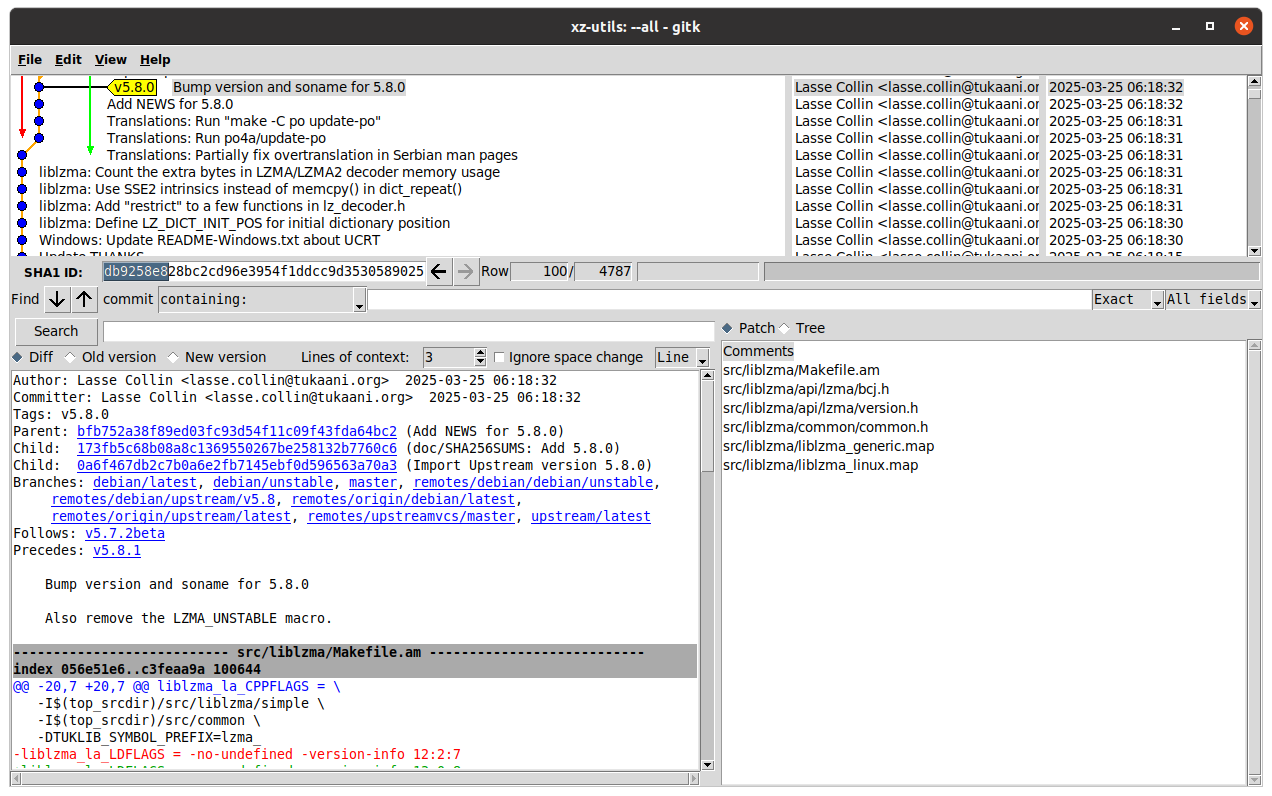
The XZ backdoor in versions 5.6.0/5.6.1 made its way briefly into many major Linux distributions such as Debian and Fedora, but luckily didn t reach that many actual users, as the backdoored releases were quickly removed thanks to the heroic diligence of 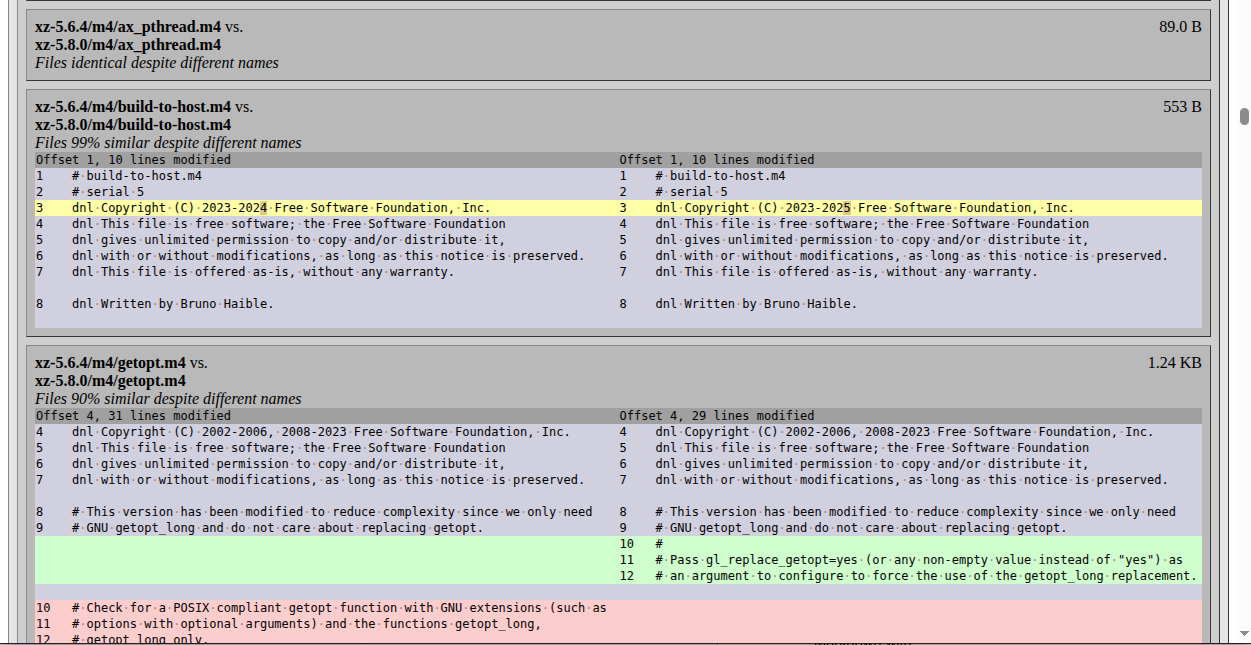 If the changes are extensive, and you want to use a LLM to help spot potential security issues, generate the report of both the upstream and Debian packaging differences in Markdown with:
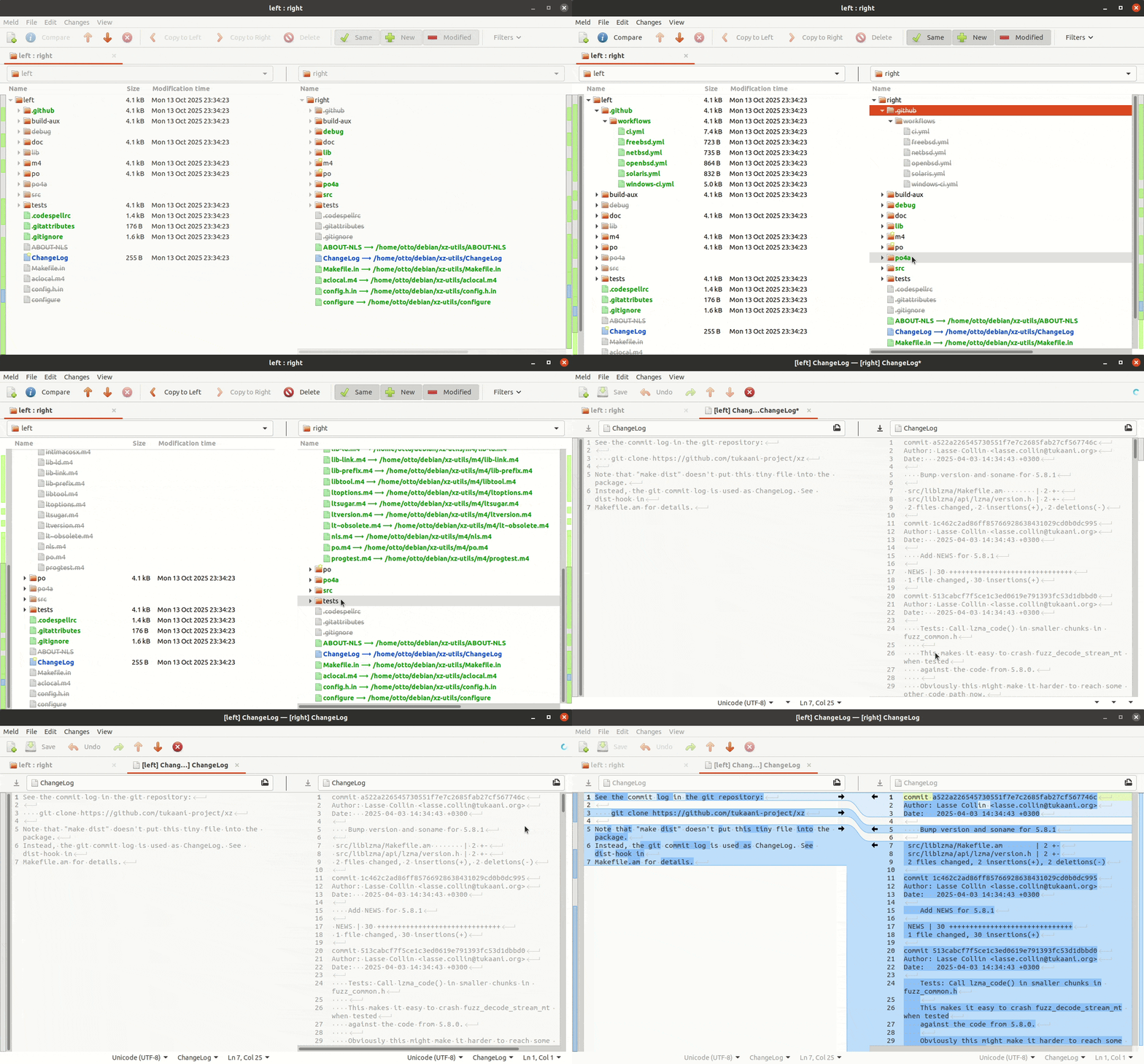 To compare changes across the new and old upstream tarball, one would need to compare commits afba662b New upstream version 5.8.0 and fa1e8796 New upstream version 5.8.1 by running
 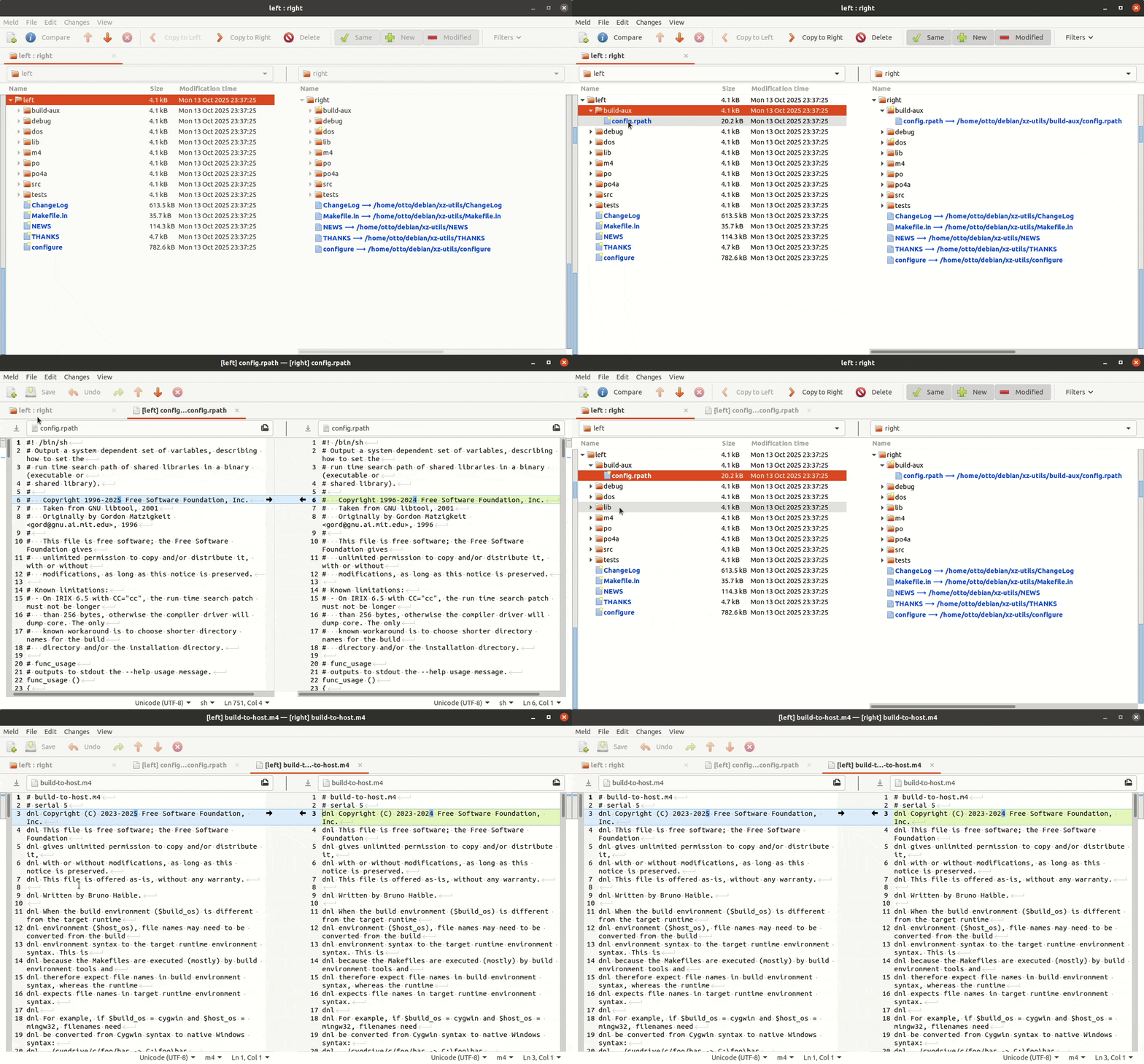 With all the above tips you can now go and try to audit your own favorite package in Debian and see if it is identical with upstream, and if not, how it differs.
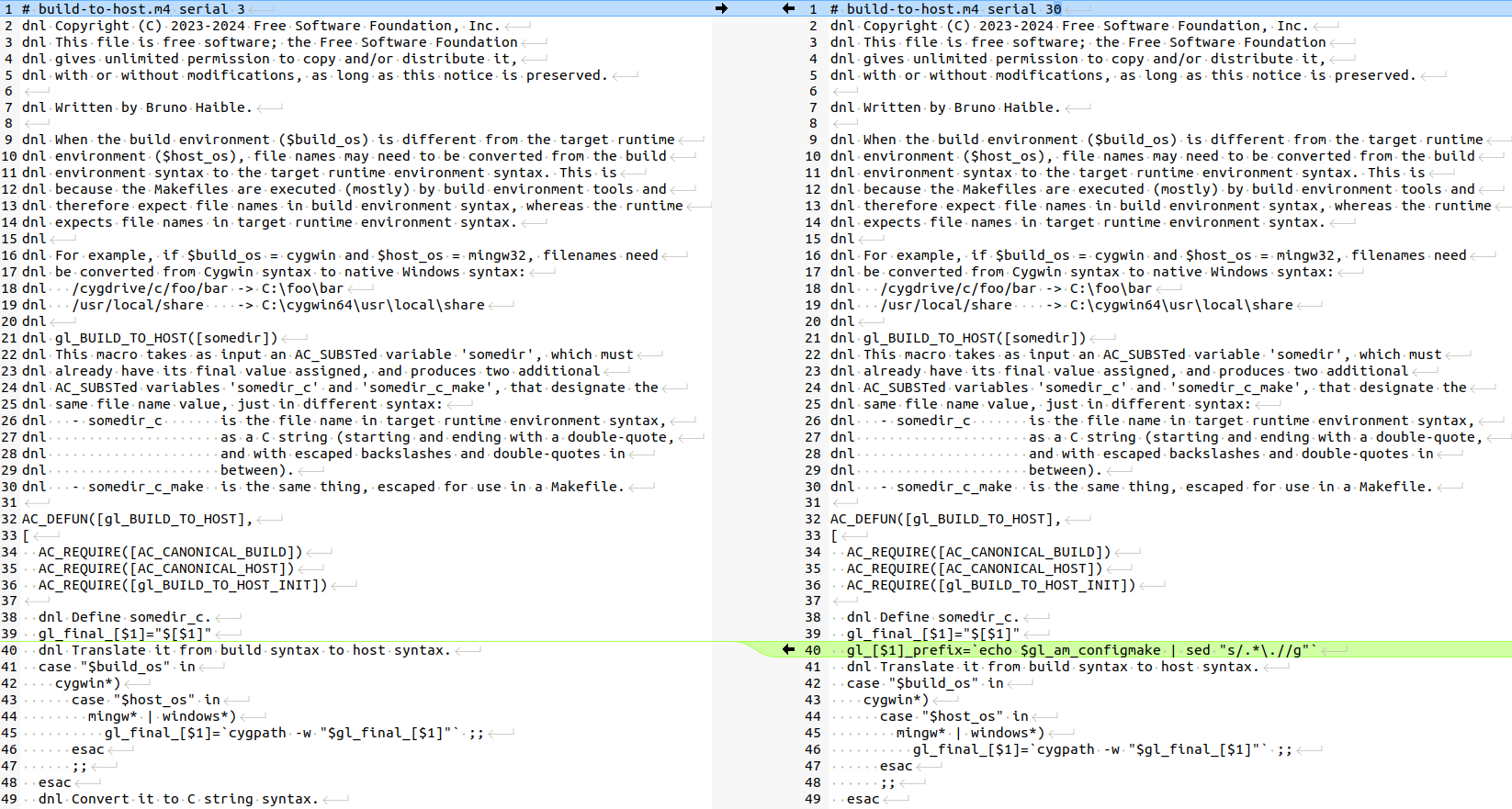 There is only one tiny thing that maybe a very experienced Autotools user could potentially have noticed: the
  A side project I have been working on a little since last winter and
which explores extending
A side project I have been working on a little since last winter and
which explores extending 
 Like each month, have a look at the work funded by
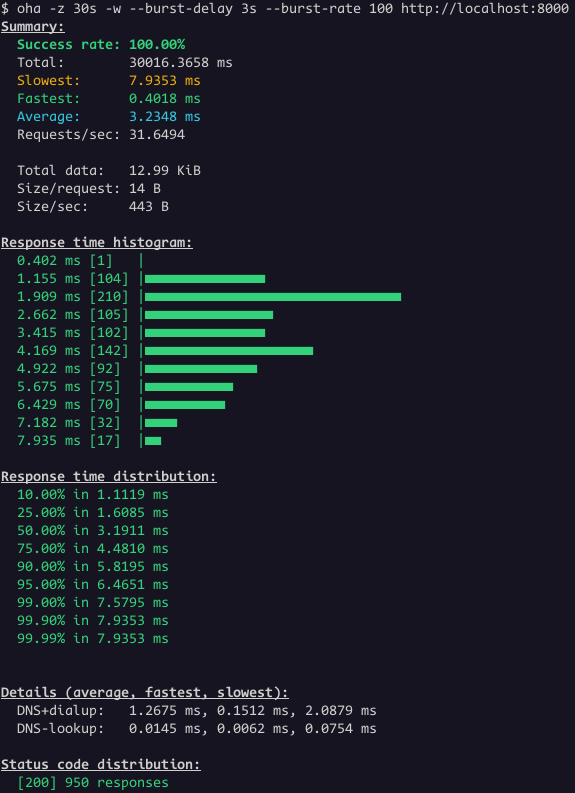
 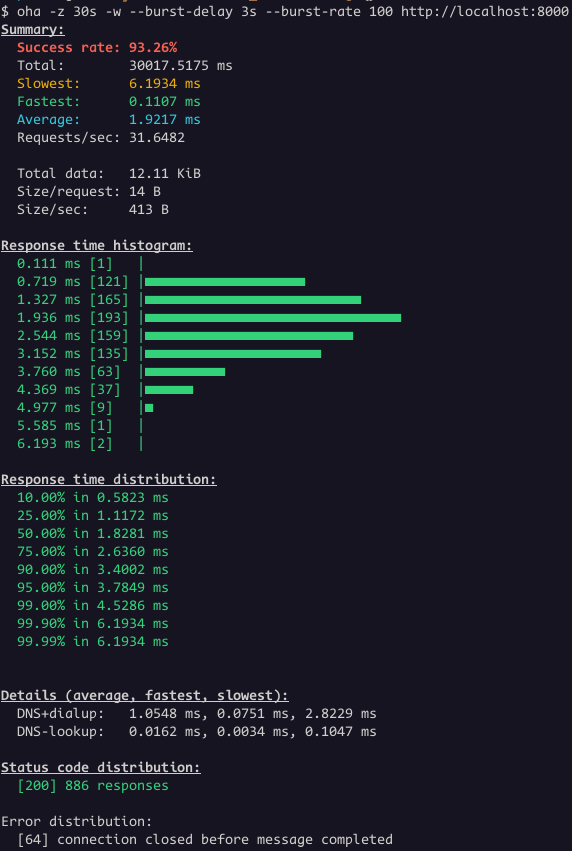 We had 886 responses with status code 200 and 64 connections closed.
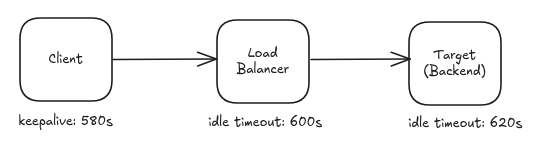
The backend terminated 64 connections while the load balancer still had
active requests directed to it.
Let's change the Load Balancer
We had 886 responses with status code 200 and 64 connections closed.
The backend terminated 64 connections while the load balancer still had
active requests directed to it.
Let's change the Load Balancer 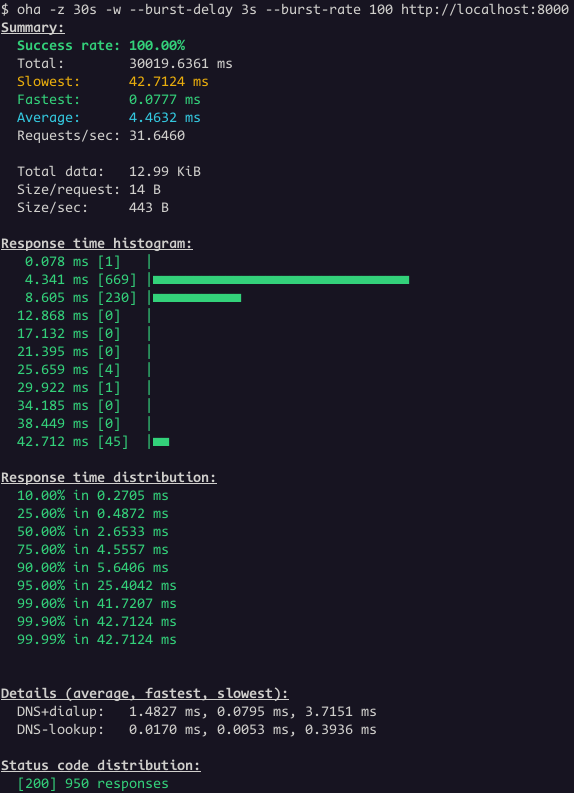 Great! Now all the requests worked.
This is a common issue, not specific to Envoy Proxy or the setup
shown earlier. Major cloud providers have all documented it.
Great! Now all the requests worked.
This is a common issue, not specific to Envoy Proxy or the setup
shown earlier. Major cloud providers have all documented it.
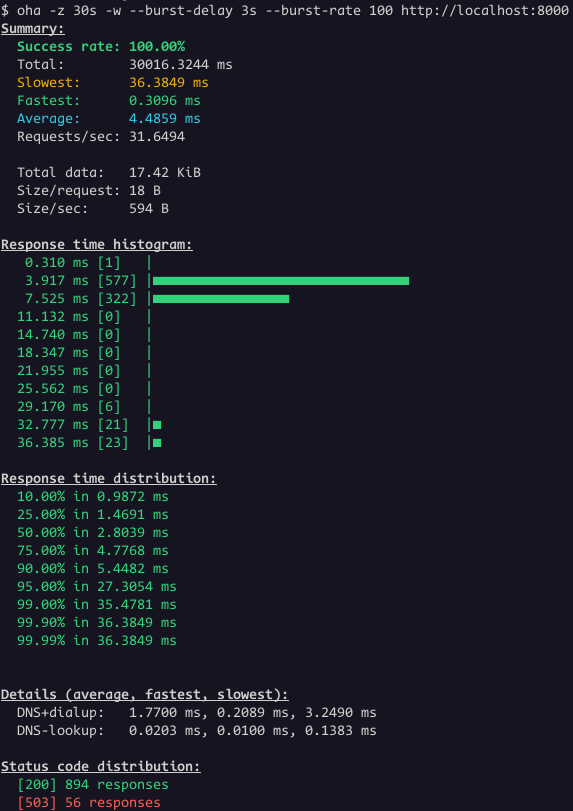 Even thought the success rate is 100%, the status code distribution
show some responses with status code 503. This is the case where is not
that obvious that the problem is related to idle timeout.
However, it's clear when we look the Envoy access logs:
Even thought the success rate is 100%, the status code distribution
show some responses with status code 503. This is the case where is not
that obvious that the problem is related to idle timeout.
However, it's clear when we look the Envoy access logs:
 Key Takeaways:
 A new version 0.3.5 of the
  Another short status update of what happened on my side last
month. Nothing stands out too much, I enjoyed doing the OSK changes
the most as that helped to improve the typing experience further. Also
doing a small bit of kernel work again was fun (still need to figure out
the 6mq's touch controller repsonsiveness though).
See below for details on the above and more:
Another short status update of what happened on my side last
month. Nothing stands out too much, I enjoyed doing the OSK changes
the most as that helped to improve the typing experience further. Also
doing a small bit of kernel work again was fun (still need to figure out
the 6mq's touch controller repsonsiveness though).
See below for details on the above and more:
 Solving the dependency here becomes a matter of trying to install the package
referenced by the first edge of the root, and seeing if that sticks. In this
case, that would be a . Let s assume that a failed to install, the next
step is to remove the empty node of
Solving the dependency here becomes a matter of trying to install the package
referenced by the first edge of the root, and seeing if that sticks. In this
case, that would be a . Let s assume that a failed to install, the next
step is to remove the empty node of  For ease of visualisation, we remove a from the dependency nodes as well,
leading us to a trie of the dependencies b , b c , and b x .
Presenting the Debian dependency problem, or the positive part of it as a
trie allows us for a great visualization of the problem but it may not proof
to be an effective implementation choice.
In the real world we may actually store this as a priority queue that we
can delete from. Since we don t actually want to delete from the queue
for real, our queue items are pairs of a pointer to dependency and an
activitity level, say
For ease of visualisation, we remove a from the dependency nodes as well,
leading us to a trie of the dependencies b , b c , and b x .
Presenting the Debian dependency problem, or the positive part of it as a
trie allows us for a great visualization of the problem but it may not proof
to be an effective implementation choice.
In the real world we may actually store this as a priority queue that we
can delete from. Since we don t actually want to delete from the queue
for real, our queue items are pairs of a pointer to dependency and an
activitity level, say