Dirk Eddelbuettel: ML quacks: Combining duckdb and mlpack
 A side project I have been working on a little since last winter and
which explores extending duckdb with
mlpack is now public at the duckdb-mlpack
repo.
duckdb is an excellent small (as
in runs as a self-contained binary ) database engine with both a focus
on analytical payloads (OLAP rather than OLTP) and an impressive number
of already bolted-on extensions (for example for cloud data access)
delivered as a single-build C++ executable (or of course as a library
used from other front-ends). mlpack is
an excellent C++ library containing many/most machine learning
algorithms, also built in a self-contained manner (or library) making it
possible to build compact yet powerful binaries, or to embed (as opposed
to other ML framework accessed from powerful but not lightweight
run-times such as Python or R). The compact build aspect as well as the
common build tools (C++, cmake) make these two a natural candidate for
combining them. Moreover, duckdb is a
champion of data access, management and control and the complementary
machine learning insights and predictions offered by mlpack are fully complementary and hence
fit this rather well.
duckdb also has a very robust and
active extension system. To use it, one starts from a template
repository and its use this template button, runs a script and can
then start experimenting. I have now grouped my initial start and test
functions into a separate repository duckdb-example-extension
to keep the duckdb-mlpack
one focused on the extend to mlpack aspect.
duckdb-mlpack
is right an MVP , i.e. a minimally viable product (or demo). It just
runs the
A side project I have been working on a little since last winter and
which explores extending duckdb with
mlpack is now public at the duckdb-mlpack
repo.
duckdb is an excellent small (as
in runs as a self-contained binary ) database engine with both a focus
on analytical payloads (OLAP rather than OLTP) and an impressive number
of already bolted-on extensions (for example for cloud data access)
delivered as a single-build C++ executable (or of course as a library
used from other front-ends). mlpack is
an excellent C++ library containing many/most machine learning
algorithms, also built in a self-contained manner (or library) making it
possible to build compact yet powerful binaries, or to embed (as opposed
to other ML framework accessed from powerful but not lightweight
run-times such as Python or R). The compact build aspect as well as the
common build tools (C++, cmake) make these two a natural candidate for
combining them. Moreover, duckdb is a
champion of data access, management and control and the complementary
machine learning insights and predictions offered by mlpack are fully complementary and hence
fit this rather well.
duckdb also has a very robust and
active extension system. To use it, one starts from a template
repository and its use this template button, runs a script and can
then start experimenting. I have now grouped my initial start and test
functions into a separate repository duckdb-example-extension
to keep the duckdb-mlpack
one focused on the extend to mlpack aspect.
duckdb-mlpack
is right an MVP , i.e. a minimally viable product (or demo). It just
runs the adaboost classifier but does so on any dataset
fitting the rectangular setup with columns of features (real valued)
and a final column (integer valued) of labels. I had hope to use two
select queries for both features and then labels but it
turns a table function (returning a table of data from a query) can
only run one select *. So the basic demo, also on the repo
README is now to run the following script (where the
SELECT * FROM mlpack_adaboost((SELECT * FROM D)); is the
key invocation of the added functionality):
#!/bin/bash

cat <<EOF   build/release/duckdb
SET autoinstall_known_extensions=1;
SET autoload_known_extensions=1; # for httpfs

CREATE TEMP TABLE Xd AS SELECT * FROM read_csv("https://mlpack.org/datasets/iris.csv");
CREATE TEMP TABLE X AS SELECT row_number() OVER () AS id, * FROM Xd;
CREATE TEMP TABLE Yd AS SELECT * FROM read_csv("https://mlpack.org/datasets/iris_labels.csv");
CREATE TEMP TABLE Y AS SELECT row_number() OVER () AS id, CAST(column0 AS double) as label FROM Yd;
CREATE TEMP TABLE D AS SELECT * FROM X INNER JOIN Y ON X.id = Y.id;
ALTER TABLE D DROP id;
ALTER TABLE D DROP id_1;
CREATE TEMP TABLE A AS SELECT * FROM mlpack_adaboost((SELECT * FROM D));

SELECT COUNT(*) as n, predicted FROM A GROUP BY predicted;
EOFgroup by:
(Note that this requires the httpfs extension. So when
you build from a freshly created extension repository you may be ahead
of the most recent release of duckdb by a few commits. It
is easy to check out the most recent release tag (or maybe the one you
are running for your local duckdb binary) to take advantage
of the extensions you likely already have for that version. So here, and
in the middle of October 2025, I picked v1.4.1 as I run
duckdb version 1.4.1 on my box.)
There are many other neat duckdb
extensions. The core ones are regrouped here
while a list of community extensions is here
and here.
For this (still more minimal) extension, I added a few TODO items to
the README.md:
- More examples of model fitting and prediction
- Maybe set up model serialization into table to predict on new data
- Ideally: Work out how to
SELECTfrom multiple tabels, or else maybeSELECTinto temp. tables and pass temp. table names into routine - Maybe add
mlpackas agit submodule
This post by Dirk Eddelbuettel originated on his Thinking inside the box blog. If you like this or other open-source work I do, you can now sponsor me at GitHub.


 Like each month, have a look at the work funded by
  Our Debian User Group met on September 27th for our first meeting
since our summer hiatus. As always, it was fun and productive!
Here's what we did:
pollo:
Our Debian User Group met on September 27th for our first meeting
since our summer hiatus. As always, it was fun and productive!
Here's what we did:
pollo:
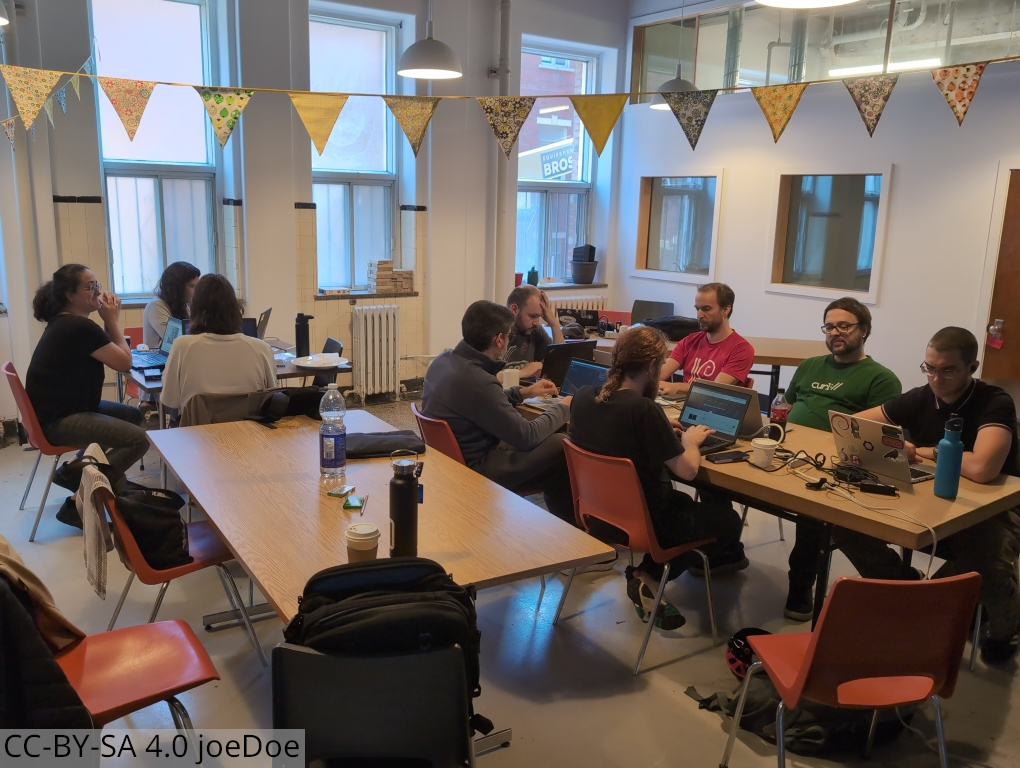 Some of us ended up grabbing a drink after the event at
 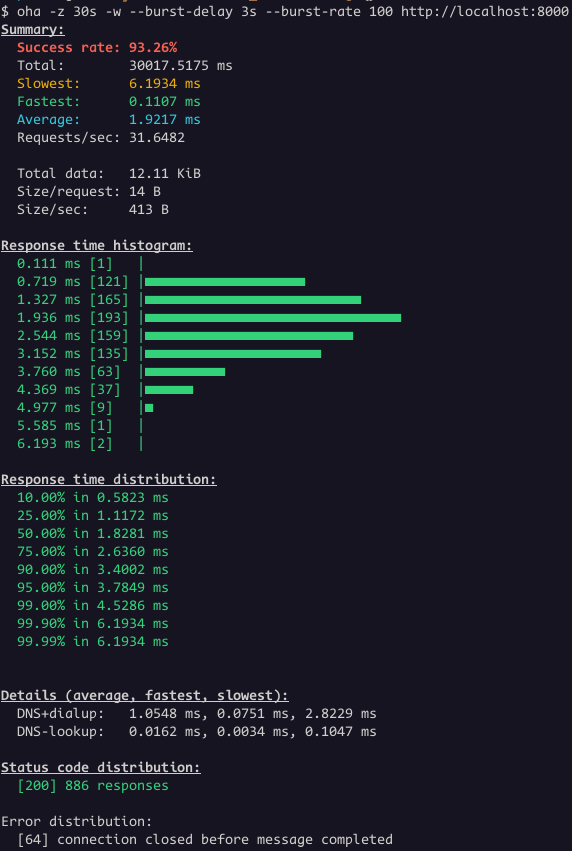 We had 886 responses with status code 200 and 64 connections closed.
The backend terminated 64 connections while the load balancer still had
active requests directed to it.
Let's change the Load Balancer
We had 886 responses with status code 200 and 64 connections closed.
The backend terminated 64 connections while the load balancer still had
active requests directed to it.
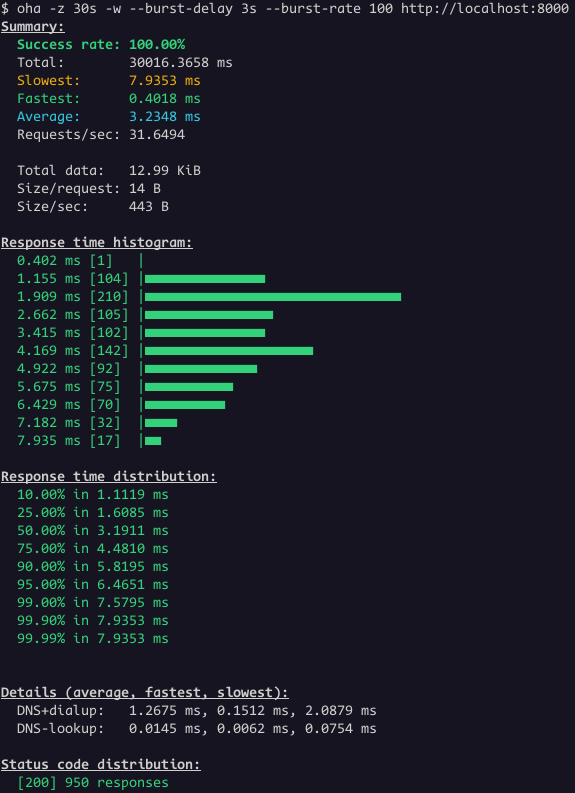
Let's change the Load Balancer 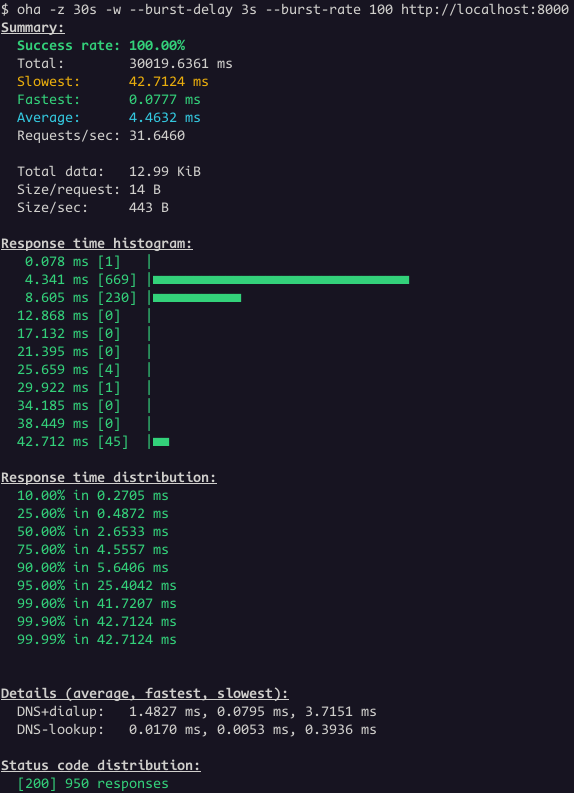 Great! Now all the requests worked.
This is a common issue, not specific to Envoy Proxy or the setup
shown earlier. Major cloud providers have all documented it.
Great! Now all the requests worked.
This is a common issue, not specific to Envoy Proxy or the setup
shown earlier. Major cloud providers have all documented it.
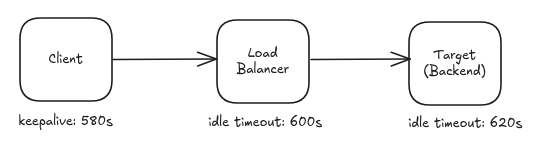
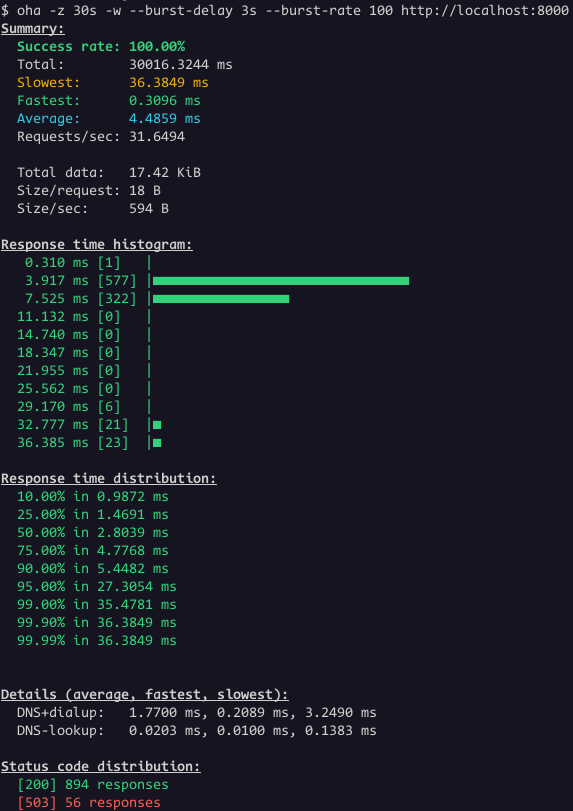 Even thought the success rate is 100%, the status code distribution
show some responses with status code 503. This is the case where is not
that obvious that the problem is related to idle timeout.
However, it's clear when we look the Envoy access logs:
Even thought the success rate is 100%, the status code distribution
show some responses with status code 503. This is the case where is not
that obvious that the problem is related to idle timeout.
However, it's clear when we look the Envoy access logs:
 Key Takeaways:
 The last (software) piece of sorting out a local voice assistant is tying the
  Solving the dependency here becomes a matter of trying to install the package
referenced by the first edge of the root, and seeing if that sticks. In this
case, that would be a . Let s assume that a failed to install, the next
step is to remove the empty node of
Solving the dependency here becomes a matter of trying to install the package
referenced by the first edge of the root, and seeing if that sticks. In this
case, that would be a . Let s assume that a failed to install, the next
step is to remove the empty node of  For ease of visualisation, we remove a from the dependency nodes as well,
leading us to a trie of the dependencies b , b c , and b x .
Presenting the Debian dependency problem, or the positive part of it as a
trie allows us for a great visualization of the problem but it may not proof
to be an effective implementation choice.
In the real world we may actually store this as a priority queue that we
can delete from. Since we don t actually want to delete from the queue
for real, our queue items are pairs of a pointer to dependency and an
activitity level, say
For ease of visualisation, we remove a from the dependency nodes as well,
leading us to a trie of the dependencies b , b c , and b x .
Presenting the Debian dependency problem, or the positive part of it as a
trie allows us for a great visualization of the problem but it may not proof
to be an effective implementation choice.
In the real world we may actually store this as a priority queue that we
can delete from. Since we don t actually want to delete from the queue
for real, our queue items are pairs of a pointer to dependency and an
activitity level, say  I had to rent a house for a couple of months recently, which is long enough in California that it pushes you into proper tenant protection law. As landlords tend to do, they failed to return my security deposit within the 21 days
 A shot of Jewel Changi. Photo by Ravi Dwivedi. Released under the CC-BY-SA 4.0.
 A shot of Sentosa Boardwalk. Photo by Ravi Dwivedi. Released under the CC-BY-SA 4.0.
 This is the hawker center we went to. Photo by Ravi Dwivedi. Released under the CC-BY-SA 4.0.
 Table littering at the hawker center was prohibited by law. Photo by Ravi Dwivedi. Released under the CC-BY-SA 4.0.
 Merlion from behind, giving a good view of Marina Bay Sands. Photo by Ravi Dwivedi. Released under the CC-BY-SA 4.0.
 If you're still using Vagrant (I am) and try to boot a box that uses UEFI (like