Akvorado collects network flows using IPFIX or sFlow. It stores them
in a ClickHouse database. A web console allows a user to query the data and
plot some graphs. A nice aspect of this console is how we can filter flows with
a SQL-like language:
Filter editor in Akvorado console
Often, web interfaces expose a querybuilder to build such filters. I think combining a
SQL-like language with an editor supporting completion, syntax
highlighting, and linting is a better approach.1
The language parser is built with pigeon (Go) from a parsing expression
grammar or PEG. The editor component is CodeMirror (TypeScript).
Language parser
PEG grammars are relatively recent2 and are an alternative to
context-free grammars. They are easier to write and they can generate better
error messages. Python switched from an LL(1)-based parser to a PEG-based
parser in Python 3.9.
pigeon generates a parser for Go. A grammar is a set of rules. Each rule is
an identifier, with an optional user-friendly label for error messages, an
expression, and an action in Go to be executed on match. You can find the
complete grammar in parser.peg. Here is a simplified rule:
The rule identifier is ConditionIPExpr. It case-insensitively matches
ExporterAddress, SrcAddr, or DstAddr. The action for each case returns the
proper case for the column name. That s what is stored in the column variable.
Then, it matches one of the possible operators. As there is no code block, it
stores the matched string directly in the operator variable. Then, it tries to
match the IP rule, which is defined elsewhere in the grammar. If it succeeds,
it stores the result of the match in the ip variable and executes the final
action. The action turns the column, operator, and IP into a proper expression
for ClickHouse. For example, if we have ExporterAddress = 203.0.113.15, we
get ExporterAddress = IPv6StringToNum('203.0.113.15').
The IP rule uses a rudimentary regular expression but checks if the matched
address is correct in the action block, thanks to netip.ParseAddr():
IP "IP address"[0-9A-Fa-f:.]+ ip,err:=netip.ParseAddr(string(c.text))iferr!=nilreturn"",errors.New("expecting an IP address")returnip.String(),nil
Our parser safely turns the filter into a WHERE clause accepted by
ClickHouse:3
Integration in CodeMirrorCodeMirror is a versatile code editor that can be easily integrated into
JavaScript projects. In Akvorado, the Vue.js component,
InputFilter, uses CodeMirror as its foundation and
leverages features such as syntax highlighting, linting, and completion. The
source code for these capabilities can be found in the
codemirror/lang-filter/ directory.
Syntax highlighting
The PEG grammar for Go cannot be utilized directly4 and the requirements
for parsers for editors are distinct: they should be error-tolerant and operate
incrementally, as code is typically updated character by character. CodeMirror
offers a solution through its own parser generator, Lezer.
We don t need this additional parser to fully understand the filter language.
Only the basic structure is needed: column names, comparison and logic
operators, quoted and unquoted values. The grammar is therefore quite short
and does not need to be updated often:
@topFilter
expression
expression
Not expression
"(" expression ")""(" expression ")" And expression
"(" expression ")" Or expression
comparisonExpression And expression
comparisonExpression Or expression
comparisonExpression
comparisonExpression
Column Operator Value
Value
String Literal ValueLParen ListOfValues ValueRParen
ListOfValues
ListOfValues ValueComma (String Literal)
String Literal
// [ ]@tokens// [ ]Column std.asciiLetter (std.asciiLetter std.digit)* Operator $[a-zA-Z!=><]+ String'"'(![\\\n"]"\\" _)* '"'?
"'"(![\\\n']"\\" _)* "'"?
Literal(std.digit std.asciiLetter $[.:/])+ // [ ]
The expression SrcAS = 12322 AND (DstAS = 1299 OR SrcAS = 29447) is parsed to:
Linting
We offload linting to the original parser in Go. The
/api/v0/console/filter/validate endpoint accepts a filter and returns a JSON
structure with the errors that were found:
"message":"at line 1, position 12: string literal not terminated","errors":[ "line":1,"column":12,"offset":11,"message":"string literal not terminated", ]
Completion
The completion system takes a hybrid approach. It splits the work between the
frontend and the backend to offer useful suggestions for completing filters.
The frontend uses the parser built with Lezer to determine the context of
the completion: do we complete a column name, an operator, or a value? It also
extracts the column name if we are completing something else. It forwards the
result to the backend through the /api/v0/console/filter/complete endpoint.
Walking the syntax tree was not as easy as I thought, but unit tests helped
a lot.
The backend uses the parser generated by pigeon to complete a column name
or a comparison operator. For values, the completions are either static or
extracted from the ClickHouse database. A user can complete an AS number from
an organization name thanks to the following snippet:
results:=[]structLabelstring ch:"label" Detailstring ch:"detail" columnName:="DstAS"sqlQuery:=fmt.Sprintf( SELECT concat('AS', toString(%s)) AS label, dictGet('asns', 'name', %s) AS detail FROM flows WHERE TimeReceived > date_sub(minute, 1, now()) AND detail != '' AND positionCaseInsensitive(detail, $1) >= 1 GROUP BY label, detail ORDER BY COUNT(*) DESC LIMIT 20,columnName,columnName)iferr:=conn.Select(ctx,&results,sqlQuery,input.Prefix);err!=nilc.r.Err(err).Msg("unable to query database")breakfor_,result:=rangeresultscompletions=append(completions,filterCompletionLabel:result.Label,Detail:result.Detail,Quoted:false, )
In my opinion, the completion system is a major factor in making the field
editor an efficient way to select flows. While a query builder may have been
more beginner-friendly, the completion system s ease of use and functionality
make it more enjoyable to use once you become familiar.
Moreover, building a query builder did not seem like a fun task for me.
Posted on February 13, 2023
Some months ago I stumbled on the video where Irving Finkel teaches Tom Scott how to play the Royal Game of Ur and my takeout was:
Irving Finkel is Gandalf or something;
the game sounded quite fun!;
so I did the almost sensible thing, quickly drew a board with inkscape, printed it on 160 g/m paper and used my piecepackpieces to try a few games.
I say almost sensible, because rather than drawing the rosettes with inkscape I decided to carve a rubber stamp and use that to print them on the board (which is why the svgs on this page are missing them: if you print them you ll have to add the rosettes in some way).
And if I had been a sensible person, that s where I would have stopped, since that s perfectly enough to play games and find out that it actually is quite a fun game, and one of our staples.
As some of you probably know, I m not a sensible person.
I also have quite a few blocks and half-blocks of cernit, and one day after I ve had used some, my hands were still moving and accidentally made some pyramidal dice, and a handful of tokens.
And after baking and trying them I liked them, but they had not been planned in any way, and they were a bit too small for the board, so the next time I was using cernit I tried to make a new set.
And while I was doing that I tried a new shape for the dice, as coins marked with a dot in the middle of one of the sides, because I don t really like tetrahedral dice.
And now, I realized this wasn t going to be my last set, and urgently felt the need for some container to keep them in and avoid missing pieces.
(Yes, in the picture above one piece was already missing. While taking it I didn t realize it, and neither I did when picking up everything to put it away, getting the missing piece and storing it safely together with the rest of the set. It must have been hiding in plain sight nearby, but I will never know where.)
Anyway, back to Inkscape, and to a board printed on scrap paper that I tried to fold up until I came up with a layout that folded up in a small drawer, and then I added a case to wrap around it to keep it closed.
I played around with the case until it was big enough to actually slide around the folded board, and this is the result, ready to be printed out on A4 paper, cut, folded and glued. (This takes most of the sheet, and I m not sure that the case would still fit around the board/drawer if printed with scaling, so if you want to print it on Letter paper I d recommend to move the pieces around.)
Now, the only problem left was that green isn t really my colour, and while I did like the stone effect of this set, I wasn t exactly pleased by the colour scheme. (why did I do it this way in the first place? probably because I was trying to use up old cernit blocks before opening new ones.)
So, the only possible way out was to make yet another set, right?
I still used stone effect cernit, but this time in a red/grey scheme that knew I would have liked more, and while I was doing it I tried a few improvements on the randomization devices.
The tetrahedral dice are still the same: they work, it s what they use in the replica sets, so I keep making them even if they re not my first choice.
I ve changed the coins to make them almost square for two reasons, however: one is that the round one tended to roll away into inconvenient places when throwing them with emphasis, and the other one is to make it easier to recognise them from the tokens with no need to flip each one around before starting the game.
The lozenges were a bit of a failure, instead. They work fine when thrown, but I don t think that there is a self-evident way to decide which side should be counted, and the only intuitive way I can think of (count the ones in the player s colour) would be unbalanced.
Speaking of balance issues: of course the hand-modelled dice and coins aren t perfectly balanced but:
they don t feel obviously unbalanced;
both players use the same set, so any subtle unbalance isn t going to affect the chance of winning in an uneven way.
Maybe one day I will find a way to easily roll them a statistically significant number of times, collect data and analyze it to find out how imbalanced they are, but that s not going to happen with manual data collecting, and I m not really ready to go down the yak shaving filled road to automatize it.
To wrap up: is it going to be the last set I make for the Royal Game of Ur? lol. Is it going to be the last cernit set I make this month? definitely yes, I now have one I m happy with, I m routinely playing with it and I m currently doing other crafts rather than cernit.
In response to a post about my latest laptop I had someone ask why I chose an Intel CPU. I ve been a fan of the Thinkpad series of laptops since the 90s. They have always seemed well constructed (given the constraints of being light etc) and had a good feature set. Also I really like the TrackPoint. I ve been a fan of the smaller Thinkpads since I got an X-301 from e-waste [1] and the X1-Carbon series is the latest and greatest line of small Thinkpads.
AMD makes some nice laptop CPUs which appear to have low power use and good performance particularly for smaller numbers of threads, it seems that generally AMD CPUs are designed for fewer cores with higher performance per core which is good for laptops. But Lenovo only makes the Thinkpad Carbon X1 series with Intel CPUs so choosing that model of laptop means choosing Intel. It could be that for some combination of size, TDP, speed, etc Intel just happens to beat AMD for all the times when Lenovo was designing a new motherboard for the Carbon X1. But it seems more likely that Intel has been lobbying Lenovo for this. It would be nice if there was an anti-trust investigation into Intel, everyone who s involved in the computer industry knows of some of the anti-competitive things that they have done.
Also it would be nice if Lenovo started shipping laptops with ARM CPUs across their entire range. But for the moment I guess I have to keep buying laptops with Intel CPUs.
The Dell T320
Almost 2 years ago I made a Dell PowerEdge T320 my home server [1]. It was a decent upgrade from the PowerEdge T110 II that I had used previously. One benefit of that system was that I needed more RAM and the PowerEdge T1xx series use unbuffered ECC RAM which is unreasonably expensive as well as the DIMMs tending to be smaller (no Load Reduced DIMMS) and only having 4 slots. As I had bought two T320s I put all the RAM in a single server getting a total of 96G and then put some cheap DIMMs in the other one and sold it with 48G.
The T320 has all the server reliability features including hot-swap redundant PSUs and hot-swap hard drives. One thing it doesn t have redundancy on is the motherboard management system known as iDRAC. 3 days ago my suburb had a power outage and when power came back on the T320 gave an error message about a failure to initialise the iDRAC and put all the fans on maximum speed, which is extremely loud. When a T320 is running in a room that s not particularly hot and it doesn t have SAS disks it s a very quiet server, one of the quietest I ve ever owned. When it goes into emergency cooling mode due to iDRAC failure it s loud enough to be heard from the other end of the house with doors closed in between.
Googling this failure gave a few possible answers. One was for some combinations of booting with the iDRAC button held down, turning off for a while and booting with the iDRAC button held down, etc (this didn t work). One was for putting a iDRAC firmware file on the SD card so iDRAC could automatically load it (which I tested even though I didn t have the flashing LED which indicates that it is likely to work, but it didn t do anything). The last was to enable serial console and configure the iDRAC to load new firmware via TFTP, I didn t get a iDRAC message from the serial console just the regular BIOS stuff.
So it looks like I ll have to sell the T320 for parts or find someone who wants to run it in it s current form. Currently to boot it I have to press F1 a few times to bypass BIOS messages (someone on the Internet reported making a device to key-jam F1). Then when it boots it s unreasonably loud, but apparently if you are really keen you can buy fans that have temperature sensors to control their own speed and bypass the motherboard control.
I d appreciate any advice on how to get this going. At this stage I m not going to go back to it but if I can get it working properly I can sell it for a decent price.
The HP Z640
I ve replaced the T320 with a HP Z640 workstation with 32G of RAM which I had recently bought to play with Stable Diffusion. There were hundreds of Z640 workstations with NVidia Quadro M6000 GPUs going on eBay for under $400 each, it looked like a company that did a lot of ML work had either gone bankrupt or upgraded all their employees systems. The price for the systems was surprisingly cheap, at regular eBay prices it seems that the GPU and the RAM go for about the same price as the system. It turned out that Stable Diffusion didn t like the video card in my setup for unknown reasons but also that the E5-1650v3 CPU could render an image in 15 minutes which is fast enough to test it out but not fast enough for serious use. I had been planning to blog about that.
When I bought the T320 server the DDR3 Registered ECC RAM it uses cost about $100 for 8*8G DIMMs, with 16G DIMMs being much more expensive. Now the DDR4 Registered ECC RAM used by my Z640 goes for about $120 for 2*16G DIMMs. In the near future I ll upgrade that system to 64G of RAM. It s disappointing that the Z640 only has 4 DIMM sockets per CPU so if you get a single-CPU version (as I did) and don t get the really expensive Load Reduced RAM then you are limited to 64G. So the supposed capacity benefit of going from DDR3 to DDR4 doesn t seem to apply to this upgrade.
The Z640 I got has 4 bays for hot-swap SAS/SATA 2.5 SSD/HDDs and 2 internal bays for 3.5 hard drives. The T320 has 8*3.5 hot swap bays and I had 3 hard drives in them in a BTRFS RAID-10 configuration. Currently I ve got one hard drive attached via USB but that s obviously not a long-term solution. The 3 hard drives are 4TB, they have worked since 4TB was a good size. I have a spare 8TB disk so I could buy a second ($179 for a shingle HDD) to make a 8TB RAID-1 array. The other option is to pay $369 for a 4TB SSD (or $389 for a 4TB NVMe + $10 for the PCIe card) to keep the 3 device RAID-10. As tempting as 4TB SSDs are I ll probably get a cheap 8TB disk which will take capacity from 6TB to 8TB and I could use some extra 4TB disks for backups.
I haven t played with the AMT/MEBX features on this system, I presume that they will work the same way as AMT/MEBX on the HP Z420 I ve used previously [2].
Update:
HP has free updates for the BIOS etc available here [3]. Unfortunately it seems to require loading a kernel module supplied by HP to do this. This is a bad thing, kernel code that isn t in the mainline kernel is either of poor quality or isn t licensed correctly.
I had to change my monitoring system to alert on temperatures over 100% of the high range while on the T320 I had it set at 95% of high and never got warnings. This is disappointing, enterprise class gear running in a reasonably cool environment (ambient temperature of about 22C) should be able to run all CPU cores at full performance without hitting 95% of the high temperature level.
My toilet is equipped with a Geberit Sigma 70 flush plate. The sales pitch
for this hydraulic-assisted device praises the
ingenious mount that acts like a rocker switch. In practice, the flush is very
capricious and has a very high failure rate. Avoid this type of
mechanism! Prefer a fully mechanical version like the Geberit Sigma 20.
After several plumbers, exchanges with Geberit s technical department, and the
expensive replacement of the entire mechanism, I was still getting a failure rate
of over 50% for the small flush. I finally managed to decrease this rate to 5%
by applying two 8 mm silicone bumpers on the back of the plate. Their
locations are indicated by red circles on the picture below:
Geberit Sigma 70 flush plate. Above: the mechanism installed on the wall. Below, the back of the glass plate. In red, the two places where to apply the silicone bumpers.
Expect to pay about 5 and as many minutes for this operation.
It's been a year since I started exploring HLedger, and I'm still
going. The rollover to 2023 was an opportunity to revisit my approach.
Some time ago I stumbled across Dmitry Astapov's HLedger notes (fully-fledged
hledger, which I briefly
mentioned in eventual consistency) and decided to adopt some of its ideas.
new year, new journal
First up, Astapov encourages starting a new journal file for a new calendar
year. I do this for other, accounting-adjacent files as a matter of course,
and I did it for my GNUCash files prior to adopting HLedger. But the reason
for those is a general suspicion that a simple mistake with those softwares
could irrevocably corrupt my data. I'm much more confident with HLedger, so
rolling over at years end isn't necessary for that. But there are other
advantages. A quick obvious one is you can get rid of old accounts (such as
expense accounts tied to a particular project, now completed).
one journal per import
In the first year, I periodically imported account data via CSV exports
of transactions and HLedger's (excellent) CSV import system. I imported
all the transactions, once each, into a single, large journal file.
Astapov instead advocates for creating a separate journal
for each CSV that you wish to import, and keep around the CSV, leaving you
with a 1:1 mapping of CSV:journal. Then use HLedger's "include" mechanism to
pull them all into the main journal.
With the former approach, where the CSV data was imported precisely, once, it
was only exposed to your import rules once. The workflow ended up being:
import transactions; notice some that you could have matched with import rules
and auto-coded; write the rule for the next time. With Astapov's approach, you
can re-generate the journal from the CSV at any point in the future with an
updated set of import rules.
tracking dependencies
Now we get onto the job of driving the generation of all these derivative
journal files. Astapov has built a sophisticated system using Haskell's "Shake",
which I'm not yet familiar, but for my sins I'm quite adept at (GNU-flavoured)
UNIX Make, so I started building with that. An example rule
This captures the dependency between the journal and the underlying CSV
but also to the relevant rules file; if I modify that, and this target
is run in the future, all dependent journals should be re-generated.1
opening balances
It's all fine and well starting over in a new year, and I might be generous
to forgive debts, but I can't count on others to do the same. We need
to carry over some balance information from one year to the next. Astapov has
a more complex (or perhaps featureful) scheme for this involving a custom
Haskell program, but I bodged something with a pair of make targets:
I think this could be golfed into a year-generic rule with a little more work.
The nice thing about this approach is the opening balances for a given year
might change, if adjustments are made in prior years. They shouldn't, for
real accounts, but very well could for more "virtual" liabilities. (including:
deciding to write off debts.)
run lots of reports
Astapov advocates for running lots of reports, and automatically. There's a
really obvious advantage of that to me: there's no chance anyone except me
will actually interact with HLedger itself. For family finances, I need
reports to be able to discuss anything with my wife.
Extending my make rules to run reports is trivial. I've gone for HTML
reports for the most part, as they're the easiest on the eye. Unfortunately
the most useful report to discuss (at least at the moment) would be a list
of transactions in a given expense category, and the register/aregister
commands did not support HTML as an output format. I submitted my first
HLedger patch to add HTML output support to aregister:
https://github.com/simonmichael/hledger/pull/2000
addressing the virtual posting problem
I wrote in my original hledger blog post that I had to resort to
unbalanced virtual postings in order to record both a liability between
my personal cash and family, as well as categorise the spend. I still
haven't found a nice way around that.
But I suspect having broken out the journal into lots of other journals
paves the way to a better solution to the above.
The form of a solution I am thinking of is: some scheme whereby the two
destination accounts are combined together; perhaps, choose one as a primary
and encode the other information in sub-accounts under that. For example,
repeating the example from my hledger blog post:
(I note this is very similar to a solution proposed to me by someone
responding on twitter).
The next step is to recognise that sometimes when looking at the data I
care about one aspect, and at other times the other, but rarely both. So
for the case where I'm thinking about family finances, I could use
account aliases
to effectively flatten out the expense category portion and ignore it.
On the other hand, when I'm concerned about how I've spent my personal
cash and not about how much I owe the family account, I could use
aliases to do the opposite: rewrite-away the family:liabilities:jon
prefix and combine the transactions with the regular jon:expenses
account heirarchy.
(this is all speculative: I need to actually try this.)
catching errors after an import
When I import the transactions for a given real bank account, I check the
final balance against another source: usually a bank statement, to make
sure they agree. I wasn't using any of the myriad methods to make sure
that this remains true later on, and so there was the risk that I make an
edit to something and accidentally remove a transaction that contributed
to that number, and not notice (until the next import).
The CSV data my bank gives me for accounts (not for credit cards) also includes
a 'resulting balance' field. It was therefore trivial to extend the CSV import
rules to add balance
assertions to
the transactions that are generated. This catches the problem.
There are a couple of warts with balance assertions on every such
transaction: for example, dealing with the duplicate transaction for paying
a credit card: one from the bank statement, one from the credit card.
Removing one of the two is sufficient to correct the account balances but
sometimes they don't agree on the transaction date, or the transactions
within a given day are sorted slightly differently by HLedger than by the
bank. The simple solution is to just manually delete one or two assertions:
there remain plenty more for assurance.
going forward
I've only scratched the surface of the suggestions in Astapov's "full fledged
HLedger" notes. I'm up to step 2 of 14. I'm expecting to return to it once
the changes I've made have bedded in a little bit.
I suppose I could anonymize and share the framework (Makefile etc) that I am
using if anyone was interested. It would take some work, though, so I don't know
when I'd get around to it.
the rm latest bit is to clear up some state-tracking files that HLedger writes to avoid importing duplicate transactions. In this case, I know better than HLedger.
Dear lazy web, help me pick the right hardware to make my shiny new
laptop work better. I want a new USB-C dock and travel power supply.
Background
I need advice on hardware, because my current setup in the office
doesn't work so well. My new Framework laptop has four (4!) USB-C
ports which is great, but it only has those ports (there's a combo
jack, but I don't use it because it's
noisy). So
right now I have the following setup:
HDMI: monitor one
HDMI: monitor two
USB-A: Yubikey
USB-C: USB-C hub, which has:
RJ-45 network
USB-A keyboard
USB-A mouse
USB-A headset
... and I'm missing a USB-C port for power! So I get into this
annoying situation where I need to actually unplug the USB-A Yubikey,
unplug the USB-A expansion card, plug in the power for a while so it
can charge, and then do that in reverse when I need the Yubikey again
(which is: often).
Another option I have is to unplug the headset, but I often need both
the headset and the Yubikey at once. I also have a pair of earbuds
that work in the combo jack, but, again, they are noticeably noisy.
So this doesn't work.
I'm thinking I should get a USB-C Dock of some sort. The Framework
forum has a long list of supported docks in a "megathread", but I
figured people here might have their own experience with docks and
laptop/dock setups.
So what should USB-C Dock should I get?
Should I consider changing to a big monitor with a built-in USB-C dock and power?
Ideally, i'd like to just walk in the office, put the laptop down and
insert a single USB-C cable and be done with it. Does that even work
with Wayland? I have read reports of Displaylink not working in
Sway specifically... does that apply to any multi-monitor over a
single USB-C cable setup?
Oh, and what about travel options? Do you have a fancy small form
factor USB-C power charger that you really like?
Current ideas
Here are the devices I'm considering right now...
USB chargers
The spec here is at least 65W USB-C with international plugs.
TOFU Power station: 95$USD 2 USB-A, 2 USB-C, AU/US/UK/EU adapters, 3-port power strip
I particularly like the TOFU, but I am not sure it will deliver... I
found that weird little thing through this Twitter post from
Benedict Reuschling, from this blog post, from 2.5 admins
episode 127 (phew!).
Update: I ordered a TOFU power station today (2023-02-20). I'm a
little concerned about the power output (45W instead of 65W for the
Framework charger), but I suspect it will not actually be a problem
while traveling, since the laptop will keep its charge during the day
and will charge at night... The device shipped 3 days later, with an
estimated delivery time of 12 to 15 days, so expect this thing to take
its sweet time landing on your desk.
USB Docks
Specification:
must have 2 or more USB-A ports (3 is ideal, otherwise i need a new
headset adapter)
at least one USB-C port, preferably more
works in Linux
2 display support (or one big monitor?), ideally 2x4k for
future-proofing, HDMI or Display-Port, ideally also with double
USB-C/Thunderbolt for future-proofing
all on one USB-C wire would be nice
power delivery over the USB-C cable
not too big, preferably
Note that I move from 4 USB-A ports down to 2 or 3 because I can
change the USB-A cable on my keyboard for USB-C. But that means I need
a slot for a USB-C port on the dock of course. I also could live with
one less USB-A cable if I find a combo jack adapter, but that would
mean a noisy experience.
Options found so far:
Caldigit docks are apparently good, and the USB-C HDMI
Dock seems like a good candidate (not on sale in there Canada
shop), but leaves me wondering whether I want to keep my old analog
monitors around and instead get proper monitors with USB-C inputs,
and use something like Thunderbolt Element hub
(230$USD). Update: I wrote Caldigit and they don't seem to have any
Dock that would work for me, they suggest the TS3 plus which
only has a single DP connector (!?). The USB-C HDMI dock is
actually discontinued and they mentioned that they do have trouble
with Linux in general.
I was also recommended OWC docks as well. update: their
website is a mess, and live chat has confirmed they do not actually
have any device that fits the requirement of two HDMI/DP outputs.
Anker also has docks (e.g. the Anker 568 USB-C Docking Station
11-in-1 looks nice, but holy moly 300$USD... Also, Anker docks
are not all equal, I've heard reports of some of them being
bad. Update: I reached out to Anker to clarify whether or not their
docks will work on Linux and to advise on which dock to use, and
their response is that they "do not recommend you use our items
with Linux system". So I guess that settles it with Anker.
Also: this post from Big Mess Of Wires has me worried that
anything might work at all. It's where I had the Cable Matters
reference however...
Update: I ordered a this dock from Cable Mattersfrom Amazon
(reluctantly). It promises Linux support and checked all the boxes
for me (4x USB-A, audio, network, 2xHDMI).
It kind of works? I tested the USB-A ports, charging, networking, and
the HDMI ports, all worked the first time. But! When I disconnect and
reconnect the hub, the HDMI ports stop working. It s quite infuriating
especially since there s very little diagnostics available. It s
unclear how the devices show up on my computer, I can t even tell what
device provides the HDMI connectors in lsbusb.
I ve also seen the USB keyboard drop keypresses, which is also ... not
fun. I suspect foul play inside Sway.
And yeah, those things are costly! This one goes for 300$ a pop, not
great.
Update 2: Cable Matters support responded by simply giving me this
hack that solved it at least for now. Just reverse the USB-C cable,
and poof, everything works. Magic.
Your turn!
So what's your desktop setup like? Do you have docks? a laptop? a
desktop? did you build it yourself?
Did you solder a USB-C port in the back of your neck and interface
directly with the matrix and there's no spoon?
Do you have a 4k monitor? Two? A 8k monitor that curves around your
head in a fully immersive display? Do you work on a Occulus rift
and only interface the world through 3d virtual reality, including
terminal emulators?
Thanks in advance!
The diffoscope maintainers are pleased to announce the release of diffoscope
version 235. This version includes the following changes:
[ Akihiro Suda ]
* Update .gitlab-ci.yml to push versioned tags to the container registry.
  (Closes: reproducible-builds/diffoscope!119)
[ Chris Lamb ]
* Fix compatibility with PyPDF2. (Closes: reproducible-builds/diffoscope#331)
* Fix compatibility with ImageMagick 7.1.
  (Closes: reproducible-builds/diffoscope#330)
[ Daniel Kahn Gillmor ]
* Update from PyPDF2 to pypdf. (Closes: #1029741, #1029742)
[ FC Stegerman ]
* Add support for Android resources.arsc files.
  (Closes: reproducible-builds/diffoscope!116)
* Add support for dexdump. (Closes: reproducible-builds/diffoscope#134)
* Improve DexFile's FILE_TYPE_RE and add FILE_TYPE_HEADER_PREFIX, and remove
  "Dalvik dex file" from ApkFile's FILE_TYPE_RE as well.
[ Efraim Flashner ]
* Update external tool for isoinfo on guix.
  (Closes: reproducible-builds/diffoscope!124)
This is the second part of how I build a read-only root setup for my router. You might want to read part 1 first, which covers the initial boot and general overview of how I tie the pieces together. This post will describe how I build the squashfs image that forms the main filesystem.
Most of the build is driven from a script, make-router, which I ll dissect below. It s highly tailored to my needs, and this is a fairly lengthy post, but hopefully the steps I describe prove useful to anyone trying to do something similar.
Breakdown of make-router
#!/bin/bash# Either rb3011 (arm) or rb5009 (arm64)#HOSTNAME="rb3011"HOSTNAME="rb5009"if["x$ HOSTNAME"=="xrb3011"];then
ARCH=armhf
elif["x$ HOSTNAME"=="xrb5009"];then
ARCH=arm64
else
echo"Unknown host: $ HOSTNAME"exit 1
fi
It s a bash script, and I allow building for either my RB3011 or RB5009, which means a different architecture (32 vs 64 bit). I run this script on my Pi 4 which means I don t have to mess about with QemuUserEmulation.
BASE_DIR=$(dirname$0)IMAGE_FILE=$(mktemp--tmpdir router.$ ARCH.XXXXXXXXXX.img)MOUNT_POINT=$(mktemp-p /mnt -d router.$ ARCH.XXXXXXXXXX)# Build and mount an ext4 image file to put the root file system indd if=/dev/zero bs=1 count=0 seek=1G of=$ IMAGE_FILE
mkfs -t ext4 $ IMAGE_FILE
mount -o loop $ IMAGE_FILE$ MOUNT_POINT
I build the image in a loopback ext4 file on tmpfs (my Pi4 is the 8G model), which makes things a bit faster.
# Add dpkg excludesmkdir-p$ MOUNT_POINT/etc/dpkg/dpkg.cfg.d/
cat<<EOF > $ MOUNT_POINT/etc/dpkg/dpkg.cfg.d/path-excludes
# Exclude docs
path-exclude=/usr/share/doc/*
# Only locale we want is English
path-exclude=/usr/share/locale/*
path-include=/usr/share/locale/en*/*
path-include=/usr/share/locale/locale.alias
# No man pages
path-exclude=/usr/share/man/*
EOF
Create a dpkg excludes config to drop docs, man pages and most locales before we even start the bootstrap.
Actually do the debootstrap step, including a bunch of extra packages that we want.
# Install mqtt-arpcp$ BASE_DIR/debs/mqtt-arp_1_$ ARCH.deb $ MOUNT_POINT/tmp
chroot$ MOUNT_POINT dpkg -i /tmp/mqtt-arp_1_$ ARCH.deb
rm$ MOUNT_POINT/tmp/mqtt-arp_1_$ ARCH.deb
# Frob the mqtt-arp config so it starts after mosquittosed-i-e's/After=.*/After=mosquitto.service/'$ MOUNT_POINT/lib/systemd/system/mqtt-arp.service
I haven t uploaded mqtt-arp to Debian, so I install a locally built package, and ensure it starts after mosquitto (the MQTT broker), given they re running on the same host.
# Frob watchdog so it starts earlier than multi-usersed-i-e's/After=.*/After=basic.target/'$ MOUNT_POINT/lib/systemd/system/watchdog.service
# Make sure the watchdog is poking the device filesed-i-e's/^#watchdog-device/watchdog-device/'$ MOUNT_POINT/etc/watchdog.conf
watchdog timeouts were particularly an issue on the RB3011, where the default timeout didn t give enough time to reach multiuser mode before it would reset the router. Not helpful, so alter the config to start it earlier (and make sure it s configured to actually kick the device file).
# Clean up docs + localesrm-r$ MOUNT_POINT/usr/share/doc/*rm-r$ MOUNT_POINT/usr/share/man/*for dir in$ MOUNT_POINT/usr/share/locale/*/;do
if["$ dir"!="$ MOUNT_POINT/usr/share/locale/en/"];then
rm-r$ dirfi
done
Clean up any docs etc that ended up installed.
# Set root password to rootecho"root:root"chroot$ MOUNT_POINT chpasswd
The only login method is ssh key to the root account though I suppose this allows for someone to execute a privilege escalation from a daemon user so I should probably randomise this. Does need to be known though so it s possible to login via the serial console for debugging.
There are config files that are easier to replace wholesale, some of which are specific to the hardware (e.g. related to network interfaces). See below for some more details.
# Build symlinks into flash for boot / modulesln-s /mnt/flash/lib/modules $ MOUNT_POINT/lib/modules
rmdir$ MOUNT_POINT/boot
ln-s /mnt/flash/boot $ MOUNT_POINT/boot
The kernel + its modules live outside the squashfs image, on the USB flash drive that the image lives on. That makes for easier kernel upgrades.
# Put our git revision into os-releaseecho-n"GIT_VERSION=">>$ MOUNT_POINT/etc/os-release
(cd$ BASE_DIR; git describe --tags)>>$ MOUNT_POINT/etc/os-release
Always helpful to be able to check the image itself for what it was built from.
# Add some stuff to root's .bashrccat<<EOF >> $ MOUNT_POINT/root/.bashrc
alias ls='ls -F --color=auto'
eval "\$(dircolors)"
case "\$TERM" in
xterm* rxvt*)
PS1="\\[\\e]0;\\u@\\h: \\w\a\\]\$PS1"
;;
*)
;;
esac
EOF
Just some niceties for when I do end up logging in.
# Save the installed package list offchroot$ MOUNT_POINT dpkg --get-selections> /tmp/wip-installed-packages
Save off the installed package list. This was particularly useful when trying to replicate the existing router setup and making sure I had all the important packages installed. It doesn t really serve a purpose now.
In terms of the config files I copy into /etc, shared across both routers are the following:
Breakdown of shared config
This is the second in a series of blog posts introducing Carthage,
an Infrastructure as Code framework I ve been working on the last four
years. In this post we ll talk about how we use Carthage to build the
Carthage container images. We absolutely could have just used a
Containerfile to do this; in fact I recently removed a hybrid solution that produced an artifact
and then used a Containerfile to turn it into an OCI image. The biggest
reason we don t use a Containerfile is that we want to be able to reuse
the same infrastructure (installed software and configuration) across
multiple environments. For example CarthageServerRole, a
reusable Carthage component that install Carthage itself is used in
several places:
on raw hardware when we re using Carthage to drive a hypervisor
As part of image building pipelines to build AMIs for Amazon Web
Services
Installed onto AWS instances built from the Debian AMI where we
cannot use custom AMIs
Installed onto KVM VMs
As part of building the Carthage container images
So the biggest thing Carthage gives us is uniformity in how we set up
infrastructure. We ve found a number of disadvantages of Containerfiles
as well:
Containerfiles mix the disadvantages of imperative and
declarative formats. Like a declarative format they have no explicit
control logic. It seems like that would be good for introspecting and
reasoning about Containers. But all you get is the base image and a set
of commands to build a container. For reasoning about common things like
whether a container has a particular vulnerability or can be distributed
under a particular license, that s not very useful. So we don t get much
valuable introspection out of the declarative aspects, and all too often
we see Containerfiles generated by Makefiles or other multi-level
build-systems to get more logic or control flow.
Containerfiles have limited facility for doing things outside the
container. The disadvantage of this is that you end up installing all
the software you need to build the container into the container itself
(or having a multi-level build system). But for example if I want to use
Ansible to configure a container, the easiest way to do that is to
actually install Ansible into the container itself, even though Ansible
has a large dependency chain most of which we won t need in the
container. Yes, Ansible does have a number of connection methods
including one for Buildah, but by the point you re using that, you re
already using a multi-level build system and aren t really just using a
Containerfile.
Okay, so since we re not going to just use a Containerfile, what do
we do instead? We produce a CarthageLayout.
A CarthageLayout is an object in the Carthage modeling
language. The modeling language looks a lot like Python in fact it s
even implemented using Python metaclasses and uses the Python parser.
However, there are some key semantic differences and it may help to
think of the modeling language as its own thing. Carthage layouts are
typically contained in Carthage plugins. For example, the oci_images plugin is our focus today. Most of the
work in that plugin is in layout.py, and the layout begins here:
class layout(CarthageLayout):
    add_provider(ConfigLayout)
    add_provider(carthage.ansible.ansible_log, str(_dir/"ansible.log"))
The add_provider calls are special, and we ll discuss them
in a future post. For now, think of them as assignments in a more
complex namespace than simple identifiers. But the heart of this layout
is the CarthageImage class:
Most of the work of our image is done by inheritance. We inherit from
the CarthageServerRole from the carthage_base plugin collection. A role is a
reusable set of infrastructure that can be attached directly to a MachineModel.
By inheriting from this role, we request the installation of the
Carthage software. The role also supports copying in various
dependencies; for example when Carthage is used to manage a cluster of
machines, the layout corresponding to the cluster can automatically be
copied to all nodes in the cluster. We do not need this feature to build
the container image. The CarthageImage class sets its base
image. Currently we are using our own base Debian image that we build
with debootstrap and then import as a container image. In
the fairly near future, we ll change that to:
base_image = debian:bookworm
That will simply use the Debian image from Dockerhub. We are building
our own base image for historical reasons and need to confirm that
everything works before switching over. By setting
oci_image_tag we specify where in the local images the
resulting image will be stored. We also specify that this image boots
systemd. We actually do want to do a bit of work on top of
CarthageServerRole specific to the container image. To do that
we use a Carthage feature called a Customization. There are
various types of customization. For example
MachineCustomization runs a set of tasks on a Machine that is
booted and on the network. When building images, the most common type of
customization is a FilesystemCustomization. For these, we have
access to the filesystem, and we have some way of running a command in
the context of the filesystem. We don t boot the filesystem as a machine
unless we need to. (We might if the filesystem is a kvm VM or AWS
instance for example). Carthage collects all the customizations in a
role or image model. In the case of container image classes like
PodmanImageModel, each customization is applied as an
individual layer in the resulting container image.
Roles and customizations are both reusable infrastructure. Roles
typically contain customizations. Roles operate at the modeling layer;
you might introspect a machine s model or an image s model to see what
functionality (roles) it provides. In contrast, customizations operate
at the implementation layer. They do specific things like move files
around, apply Ansible roles or similar.
Let s take a look at the customization applied for the Carthage
container image (full code):
class customize_for_oci(FilesystemCustomization):@setup_task("Remove Software")asyncdef remove_software(self):awaitself.run_command("apt", "-y", "purge","exim4-base", )@setup_task("Install service")asyncdef install_service(self):# installs and activates a systemd unit
Then to pull it all together, we simply run the layout:
Very few highly-anticipated movies appear in January and February, as the bigger releases are timed so they can be considered for the Golden Globes in January and the Oscars in late February or early March, so film fans have the advantage of a few weeks after the New Year to collect their thoughts on the year ahead. In other words, I'm not actually late in outlining below the films I'm most looking forward to in 2023...
Barbie
No, seriously! If anyone can make a good film about a doll franchise, it's probably Greta Gerwig. Not only was Little Women (2019) more than admirable, the same could be definitely said for Lady Bird (2017). More importantly, I can't help feel she was the real 'Driver' behind Frances Ha (2012), one of the better modern takes on Claudia Weill's revelatory Girlfriends (1978). Still, whenever I remember that Barbie will be a film about a billion-dollar toy and media franchise with a nettlesome history, I recall I rubbished the "Facebook film" that turned into The Social Network (2010). Anyway, the trailer for Barbie is worth watching, if only because it seems like a parody of itself.
Blitz
It's difficult to overstate just how important the aerial bombing of London during World War II is crucial to understanding the British psyche, despite it being a constructed phenomenon from the outset. Without wishing to underplay the deaths of over 40,000 civilian deaths, Angus Calder pointed out in the 1990s that the modern mythology surrounding the event "did not evolve spontaneously; it was a propaganda construct directed as much at [then neutral] American opinion as at British." It will therefore be interesting to see how British Grenadian Trinidadian director Steve McQueen addresses a topic so essential to the British self-conception. (Remember the controversy in right-wing circles about the sole Indian soldier in Christopher Nolan's Dunkirk (2017)?) McQueen is perhaps best known for his 12 Years a Slave (2013), but he recently directed a six-part film anthology for the BBC which addressed the realities of post-Empire immigration to Britain, and this leads me to suspect he sees the Blitz and its surrounding mythology with a more critical perspective. But any attempt to complicate the story of World War II will be vigorously opposed in a way that will make the recent hullabaloo surrounding The Crown seem tame. All this is to say that the discourse surrounding this release may be as interesting as the film itself.
Dune, Part II
Coming out of the cinema after the first part of Denis Vileneve's adaptation of Dune (2021), I was struck by the conception that it was less of a fresh adaptation of the 1965 novel by Frank Herbert than an attempt to rehabilitate David Lynch's 1984 version and in a broader sense, it was also an attempt to reestablish the primacy of cinema over streaming TV and the myriad of other distractions in our lives. I must admit I'm not a huge fan of the original novel, finding within it a certain prurience regarding hereditary military regimes and writing about them with a certain sense of glee that belies a secret admiration for them... not to mention an eyebrow-raising allegory for the Middle East. Still, Dune, Part II is going to be a fantastic spectacle.
Ferrari
It'll be curious to see how this differs substantially from the recent Ford v Ferrari (2019), but given that Michael Mann's Heat (1995) so effectively re-energised the gangster/heist genre, I'm more than willing to kick the tires of this about the founder of the eponymous car manufacturer. I'm in the minority for preferring Mann's Thief (1981) over Heat, in part because the former deals in more abstract themes, so I'd have perhaps prefered to look forward to a more conceptual film from Mann over a story about one specific guy.
Indiana Jones and the Dial of Destiny
Given I had a strong dislike of Indiana Jones and the Kingdom of the Crystal Skull (2008), I seriously doubt I will enjoy anything this film has to show me, but with 1981's Raiders of the Lost Ark remaining one of my most treasured films (read my brief homage), I still feel a strong sense of obligation towards the Indiana Jones name, despite it feeling like the copper is being pulled out of the walls of this franchise today.
Kafka
I only know Polish filmmaker Agnieszka Holland through her Spoor (2017), an adaptation of Olga Tokarczuk's 2009 eco-crime novel Drive Your Plow Over the Bones of the Dead. I wasn't an unqualified fan of Spoor (nor the book on which it is based), but I am interested in Holland's take on the life of Czech author Franz Kafka, an author enmeshed with twentieth-century art and philosophy, especially that of central Europe. Holland has mentioned she intends to tell the story "as a kind of collage," and I can hope that it is an adventurous take on the over-furrowed biopic genre. Or perhaps Gregor Samsa will awake from uneasy dreams to find himself transformed in his bed into a huge verminous biopic.
The Killer
It'll be interesting to see what path David Fincher is taking today, especially after his puzzling and strangely cold Mank (2020) portraying the writing process behind Orson Welles' Citizen Kane (1941). The Killer is said to be a straight-to-Netflix thriller based on the graphic novel about a hired assassin, which makes me think of Fincher's Zodiac (2007), and, of course, Se7en (1995). I'm not as entranced by Fincher as I used to be, but any film with Michael Fassbender and Tilda Swinton (with a score by Trent Reznor) is always going to get my attention.
Killers of the Flower Moon
In Killers of the Flower Moon, Martin Scorsese directs an adaptation of a book about the FBI's investigation into a conspiracy to murder Osage tribe members in the early years of the twentieth century in order to deprive them of their oil-rich land. (The only thing more quintessentially American than apple pie is a conspiracy combined with a genocide.) Separate from learning more about this disquieting chapter of American history, I'd love to discover what attracted Scorsese to this particular story: he's one of the few top-level directors who have the ability to lucidly articulate their intentions and motivations.
Napoleon
It often strikes me that, despite all of his achievements and fame, it's somehow still possible to claim that Ridley Scott is relatively underrated compared to other directors working at the top level today. Besides that, though, I'm especially interested in this film, not least of all because I just read Tolstoy's War and Peace (read my recent review) and am working my way through the mind-boggling 431-minute Soviet TV adaptation, but also because several auteur filmmakers (including Stanley Kubrick) have tried to make a Napoleon epic and failed.
Oppenheimer
In a way, a biopic about the scientist responsible for the atomic bomb and the Manhattan Project seems almost perfect material for Christopher Nolan. He can certainly rely on stars to queue up to be in his movies (Robert Downey Jr., Matt Damon, Kenneth Branagh, etc.), but whilst I'm certain it will be entertaining on many fronts, I fear it will fall into the well-established Nolan mould of yet another single man struggling with obsession, deception and guilt who is trying in vain to balance order and chaos in the world.
The Way of the Wind
Marked by philosophical and spiritual overtones, all of Terrence Malick's films are perfumed with themes of transcendence, nature and the inevitable conflict between instinct and reason. My particular favourite is his stunning Days of Heaven (1978), but The Thin Red Line (1998) and A Hidden Life (2019) also touched me ways difficult to relate, and are one of the few films about the Second World War that don't touch off my sensitivity about them (see my remarks about Blitz above). It is therefore somewhat Malickian that his next film will be a biblical drama about the life of Jesus. Given Malick's filmography, I suspect this will be far more subdued than William Wyler's 1959 Ben-Hur and significantly more equivocal in its conviction compared to Paolo Pasolini's ardently progressive The Gospel According to St. Matthew (1964). However, little beyond that can be guessed, and the film may not even appear until 2024 or even 2025.
Zone of Interest
I was mesmerised by Jonathan Glazer's Under the Skin (2013), and there is much to admire in his borderline 'revisionist gangster' film Sexy Beast (2000), so I will definitely be on the lookout for this one. The only thing making me hesitate is that Zone of Interest is based on a book by Martin Amis about a romance set inside the Auschwitz concentration camp. I haven't read the book, but Amis has something of a history in his grappling with the history of the twentieth century, and he seems to do it in a way that never sits right with me. But if Paul Verhoeven's Starship Troopers (1997) proves anything at all, it's all in the adaption.
In this post I will give a quick tutorial on how to set up fast Debian package builds using sbuild with mmdebstrap and apt-cacher-ng.
The usual tool for building Debian packages is dpkg-buildpackage, or a user-friendly wrapper like debuild, and while these are geat tools, if you want to upload something to the Debian archive they lack the required separation from the system they are run on to ensure that your packaging also works on a different system. The usual candidate here is sbuild. But setting up a schroot is tedious and performance tuning can be annoying. There is an alternative backend for sbuild that promises to make everything simpler: unshare. In this tutorial I will show you how to set up sbuild with this backend.
Additionally to the normal performance tweaking, caching downloaded packages can be a huge performance increase when rebuilding packages. I do rebuilds quite often, mostly when a new dependency got introduced I didn t specify in debian/control yet or lintian notices a something I can easily fix. So let s begin with setting up this caching.
Setting up apt-cacher-ng
Install apt-cacher-ng:
sudo apt install apt-cacher-ng
A pop-up will appear, if you are unsure how to answer it select no, we don t need it for this use-case.
To enable apt-cacher-ng on your system, create /etc/apt/apt.conf.d/02proxy and insert:
In /etc/apt-cacher-ng/acng.conf you can increase the value of ExThreshold to hold packages for a shorter or longer duration.
The length depends on your specific use case and resources. A longer threshold takes more disk space, a short threshold like one day effecitvely only reduces the build time for rebuilds.
If you encounter weird issues on apt update at some point the future, you can try to clean the cache from apt-cacher-ng.
You can use this script:
Setting up mmdebstrap
Install mmdebstrap:
sudo apt install mmdebstrap
We will create a small helper script to ease creating a chroot. Open ~/.local/bin/mmupdate and insert:
If you execute mmupdate again you can see that the downloading stage is much faster thanks to apt-cacher-ng. For me the difference is from about 115s to about 95s. Your results may vary, this depends on the speed of your internet, Debian mirror and disk.
If you have used the schroot backend and sbuild-update before, you probably notice that creating a new chroot with mmdebstrap is slower. It would be a bit annoying to do this manually before we start a new Debian packaging session, so let s create a systemd service that does this for us.
First create a folder for user services:
mkdir -p ~/.config/systemd/user
Create ~/.config/systemd/user/mmupdate.service and add:
Now every day mmupdte will be run automatically. You can adjust the period if you think daily rebuilds are a bit excessive.
A neat advantage of period rebuilds is that they the base files in your apt-cacher-ng cache warm every time they run.
Setting up sbuild:
Install sbuild and (optionally) autopkgtest:
# backend for using mmdebstrap chroots
$chroot_mode = 'unshare';
# build in tmpfs
$unshare_tmpdir_template = '/dev/shm/tmp.sbuild.XXXXXXXX';
# upgrade before starting build
$apt_update = 1;
$apt_upgrade = 1;
# build everything including source for source-only uploads
$build_arch_all = 1;
$build_arch_any = 1;
$build_source = 1;
$source_only_changes = 1;
# go to shell on failure instead of exiting
$external_commands =   "build-failed-commands" => [ [ '%SBUILD_SHELL' ] ]  ;
# always clean build dir, even on failure
$purge_build_directory = "always";
# run lintian
$run_lintian = 1;
$lintian_opts = [ '-i', '-I', '-E', '--pedantic' ];
# do not run piuparts
$run_piuparts = 0;
# run autopkgtest
$run_autopkgtest = 1;
$autopkgtest_root_args = '';
$autopkgtest_opts = [ '--apt-upgrade', '--', 'unshare', '--release', '%r', '--arch', '%a', '--prefix=/dev/shm/tmp.autopkgtest.' ];
# set uploader for correct signing
$uploader_name = 'Stephan Lachnit <stephanlachnit@debian.org>';
You should adjust uploader_name. If you don t want to run autopkgtest or lintian by default you can also disable it here. Note that for packages that need a lot of space for building, you might want to comment the unshare_tmpdir_template line to prevent a OOM build failure.
You can now build your Debian packages with the sbuild command :)
Finishing touches
You can add these variables to your ~/.bashrc as bonus (with adjusted name / email):
In particular adjust the value of parallel to ensure parallel builds.
If you are new to signing / uploading your package, first install the required tools:
If you don t introduce a new binary package, you always want to go with source-only changes.
You can now upload the package to Debian with
dput ../<filename>.changes
Update Feburary 22nd
Jochen Sprickerhof, who originally advised me to use the unshare backend, commented that one can also use --include=auto-apt-proxy instead of the --aptopt option in mmdebstrap to detect apt proxies automatically.
He also let me know that it is possible to use autopkgtest on tmpfs (config in the blog post is updated) and added an entry on the sbuild wiki page on how to setup sbuild+unshare with ccache if you often need to build a large package.
Further, using --variant=apt and --include=build-essential will produce smaller build chroots if wished. On the contrary, one can of course also use the --include option to include debhelper and lintian (or any other packages you like) to further decrease the setup time. However, staying with buildd variant is a good choice for official uploads.
FTP master
This month I accepted 419 and rejected 46 packages. The overall number of packages that got accepted was 429. Looking at these numbers and comparing them to the previous month, one can see: the freeze is near. Everybody wants to get some packages into the archive and I hope nobody is disappointed.
Debian LTS
This was my hundred-third month that I did some work for the Debian LTS initiative, started by Raphael Hertzog at Freexian.
This month my all in all workload has been 14h.
During that time I uploaded:
[DLA 3272-1] sudo (embargoed) security update for one CVE
[DLA 3286-1] tor security update for one CVE
[DLA 3290-1] libzen security update for one CVE
[libzen Bullseye] debdiff sent to maintainer
[DLA 3294-1] libarchive security update for one CVE
I also attended the monthly LTS meeting and did some days of frontdesk duties.
Debian ELTS
This month was the fifty fourth ELTS month.
[ELA-772-1] sudo security update of Jessie and Stretch for one CVE
[ELA-781-1] libzen security update of Stretch for one CVE
[ELA-782-1] xorg-server security update of Jessie and Stretch for six CVEs
[ELA-790-1] libarchive security update of Jessie and Stretch for one CVEs
Last but not least I did some days of frontdesk duties.
Debian Astro
This month I uploaded improved packages or new versions of:
These new packages are already preparations for the new CUPS architecture. This architecture will be introduced after the release of Bookworm and shall be ready at least in Trixie. Parts of this work is generously funded by Freexian!
Other stuff
This month I uploaded improved packages of:
The server that normally serves this page, all my email, and many more
services was unavailable for about 24 hours. This post explains how and
why.
What happened?
Starting February 2nd, I started seeing intermittent packet loss on
the network. Every hour or so, the link would go down for one or two
minutes, then come back up.
At first, I didn't think much of it because I was away and could blame
the crappy wifi or the uplink I using. But when I came in the office
on Monday, the service was indeed seriously degraded. I could barely
do videoconferencing calls as they would cut out after about half an
hour.
I opened a ticket with my uplink, Oricom. They replied that it
was an issue they couldn't fix on their end and would need someone on
site to fix.
So, the next day (Tuesday, at around 10EST) I called Oricom again, and
they made me do a full modem reset, which involves plugging a pin in a
hole for 15 seconds on the Technicolor TC4400 cable modem. Then
the link went down, and it didn't come back up at all.
Boom.
Oricom then escalated this to their upstream (Oricom is a reseller of
Videotron, who has basically the monopoly on cable in Qu bec) which
dispatched a tech. This tech, in turn, arrived some time after lunch
and said the link worked fine and it was a hardware issue.
At this point, Oricom put a new modem in the mail and I started
mitigation.
Mitigation
Website
The first thing I did, weirdly, was trying to rebuild this blog. I
figured it should be pretty simple: install ikiwiki and hit rebuild. I
knew I had some patches on ikiwiki to deploy, but
surely those are not a deal breaker, right?
Nope. Turns out I wrote many plugins and those still don't ship with
ikiwiki, despite having been sent upstream a while back, some years
ago.
So I deployed the plugins inside the .ikiwiki directory of the site
in the hope of making things a little more
"standalone". Unfortunately, that didn't work either because the
theme must be shipped in the system-wide location: I couldn't figure
out how to put it to have it bundled with the main repository. At that
point I mostly gave up because I had spent too much time on this and I
had to do something about email otherwise it would start to bounce.
Email
So I made a new VM at Linode (thanks 2.5admins for the credits)
to build a new mail server.
This wasn't the best idea, in retrospect, because it was really
overkill: I started rebuilding the whole mail server from scratch.
Ideally, this would be in Puppet and I would just deploy the right
profile and the server would be rebuilt. Unfortunately, that part of
my infrastructure is not Puppetized and even if it would, well the
Puppet server was also down so I would have had to bring that up
first.
At first, I figured I would just make a secondary mail exchanger (MX),
to spool mail for longer so that I wouldn't lose it. But I decided
against that: I thought it was too hard to make a "proper" MX as it
needs to also filter mail while avoiding backscatter. Might as well
just build a whole new server! I had a copy of my full mail spool on
my laptop, so I figured that was possible.
I mostly got this right: added a DKIM key, installed Postfix, Dovecot,
OpenDKIM, OpenDMARC, glue it all together, and voil , I had a mail
server. Oh, and spampd. Oh, and I need the training data, oh, and this
and... I wasn't done and it was time to sleep.
The mail server went online this morning, and started accepting
mail. I tried syncing my laptop mail spool against it, but that failed
because Dovecot generated new UIDs for the emails, and isync correctly
failed to sync. I tried to copy the UIDs from the server in the office
(which I had still access to locally), but that somehow didn't work
either.
But at least the mail was getting delivered and stored properly. I
even had the Sieve rules setup so it would get sorted properly
too. Unfortunately, I didn't hook that up properly, so those didn't
actually get sorted. Thankfully, Dovecot can re-filter emails with the
sieve-filter command, so that was fixed later.
At this point, I started looking for other things to fix.
Web, again
I figured I was almost done with the website, might as well publish
it. So I installed the Nginx Debian package, got a cert with
certbot, and added the certs to the default configuration. I
rsync'd my build in /var/www/html and boom, I had a website. The
Goatcounter analytics were timing out, but that was easy to turn
off.
Resolution
Almost at that exact moment, a bang on the door told me mail was here
and I had the modem. I plugged it in and a few minutes later, marcos
was back online.
So this was a lot (a lot!) of work for basically nothing. I could
have just taken the day off and wait for the package to be
delivered. It would definitely have been better to make a simpler mail
exchanger to spool the mail to avoid losing it. And in fact, that's
what I eventually ended up doing: I converted the linode server in a
mail relay to continue accepting mail with DNS propagates, but without
having to sort the mail out of there...
Right now I have about 200 mails in a mailbox that I need to move back
into marcos. Normally, this would just be a simple rsync, but because
both servers have accepted mail simultaneously, it's going to be
simpler to just move those exact mails on there. Because dovecot
helpfully names delivered files with the hostname it's running on,
it's easy to find those files and transfer them, basically:
Overall, the outage lasted about 24 hours, from 11:00EST (16:00UTC) on
2023-02-07 to the same time today.
Future work
I'll probably keep a mail relay to make those situations more
manageable in the future. At first I thought that mail filtering would
be a problem, but that happens post queue anyways and I don't bounce
mail based on Spamassassin, so back-scatter shouldn't be an issue.
I basically need Postfix, OpenDMARC, and Postgrey. I'm not even sure I
need OpenDKIM as the server won't process outgoing mail, so it doesn't
need to sign anything, just check incoming signatures, which
OpenDMARC can (probably?) do.
Thanks to everyone who supported me through this ordeal, you know who
you are (and I'm happy to give credit here if you want to be
deanonymized)!
I recently got a new NVME drive. My plan was to create a fresh Debian install on an F2FS root partition with compression for maximum performance. As it turns out, this is not entirely trivil to accomplish.
For one, the Debian installer does not support F2FS (here is my attempt to add it from 2021).
And even if it did, grub does not support F2FS with the extra_attr flag that is required for compression support (at least as of grub 2.06).
Luckily, we can install Debian anyway with all these these shiny new features when we go the manual road with debootstrap and using systemd-boot as bootloader.
We can break down the process into several steps:
Warning: Playing around with partitions can easily result in data if you mess up! Make sure to double check your commands and create a data backup if you don t feel confident about the process.
Creating the partition partble
The first step is to create the GPT partition table on the new drive. There are several tools to do this, I recommend the ArchWiki page on this topic for details.
For simplicity I just went with the GParted since it has an easy GUI, but feel free to use any other tool.
The layout should look like this:
Type         Partition        Suggested size

EFI          /dev/nvme0n1p1           512MiB
Linux swap   /dev/nvme0n1p2             1GiB
Linux fs     /dev/nvme0n1p3        remainder
Notes:
The disk names are just an example and have to be adjusted for your system.
Don t set disk labels, they don t appear on the new install anyway and some UEFIs might not like it on your boot partition.
The size of the EFI partition can be smaller, in practive it s unlikely that you need more than 300 MiB. However some UEFIs might be buggy and if you ever want to install an additional kernel or something like memtest86+ you will be happy to have the extra space.
The swap partition can be omitted, it is not strictly needed. If you need more swap for some reason you can also add more using a swap file later (see ArchWiki page). If you know you want to use suspend-to-RAM, you want to increase the size to something more than the size of your memory.
If you used GParted, create the EFI partition as FAT32 and set the esp flag. For the root partition use ext4 or F2FS if available.
Creating and mounting the root partition
To create the root partition, we need to install the f2fs-tools first:
sudo apt install f2fs-tools
Now we can create the file system with the correct flags:
--arch sets the CPU architecture (see Debian Wiki).
--components sets the archive components, if you don t want non-free pacakges you might want to remove some entries here.
unstable is the Debian release, you might want to change that to testing or bookworm.
$DFS points to the mounting point of the root partition.
http://deb.debian.org/debian is the Debian mirror, you might want to set that to http://ftp.de.debian.org/debian or similar if you have a fast mirror in you area.
Chrooting into the system
Before we can chroot into the newly created system, we need to prepare and mount virtual kernel file systems. First create the directories:
Then bind-mount the directories from your system to the mount point of the new system:
sudo mount -v -B /dev $DFS/dev
sudo mount -v -B /dev/pts $DFS/dev/pts
sudo mount -v -B /proc $DFS/proc
sudo mount -v -B /sys $DFS/sys
sudo mount -v -B /run $DFS/run
sudo mount -v -B /sys/firmware/efi/efivars $DFS/sys/firmware/efi/efivars
As a last step, we need to mount the EFI partition:
sudo mount -v -B /dev/nvme0n1p1 $DFS/boot/efi
Now we can chroot into new system:
sudo chroot $DFS /bin/bash
Configure the base system
The first step in the chroot is setting the locales. We need this since we might leak the locales from our base system into the chroot and if this happens we get a lot of annoying warnings.
Now you have a fully functional Debian chroot! However, it is not bootable yet, so let s fix that.
Define static file system information
The first step is to make sure the system mounts all partitions on startup with the correct mount flags.
This is done in /etc/fstab (see ArchWiki page).
Open the file and change its content to:
# file system                               mount point   type   options                                                            dump   pass
# NVME efi partition
UUID=XXXX-XXXX                              /boot/efi     vfat   umask=0077                                                         0      0
# NVME swap
UUID=XXXXXXXX-XXXX-XXXX-XXXX-XXXXXXXXXXXX   none          swap   sw                                                                 0      0
# NVME main partition
UUID=XXXXXXXX-XXXX-XXXX-XXXX-XXXXXXXXXXXX   /             f2fs   compress_algorithm=zstd:6,compress_chksum,atgc,gc_merge,lazytime   0      1
You need to fill in the UUIDs for the partitions. You can use
ls -lAph /dev/disk/by-uuid/
to match the UUIDs to the more readable disk name under /dev.
Installing the kernel and bootloader
First install the systemd-boot and efibootmgr packages:
apt install systemd-boot efibootmgr
Now we can install the bootloader:
bootctl install --path=/boot/efi
You can verify the procedure worked with
efibootmgr -v
The next step is to install the kernel, you can find a fitting image with:
apt search linux-image-*
In my case:
apt install linux-image-amd64
After the installation of the kernel, apt will add an entry for systemd-boot automatically. Neat!
However, since we are in a chroot the current settings are not bootable.
The first reason is the boot partition, which will likely be the one from your current system.
To change that, navigate to /boot/efi/loader/entries, it should contain one config file.
When you open this file, it should look something like this:
title      Debian GNU/Linux bookworm/sid
version    6.1.0-3-amd64
machine-id 2967cafb6420ce7a2b99030163e2ee6a
sort-key   debian
options    root=PARTUUID=f81d4fae-7dec-11d0-a765-00a0c91e6bf6 ro systemd.machine_id=2967cafb6420ce7a2b99030163e2ee6a
linux      /2967cafb6420ce7a2b99030163e2ee6a/6.1.0-3-amd64/linux
initrd     /2967cafb6420ce7a2b99030163e2ee6a/6.1.0-3-amd64/initrd.img-6.1.0-3-amd64
The PARTUUID needs to point to the partition equivalent to /dev/nvme0n1p3 on your system. You can use
ls -lAph /dev/disk/by-partuuid/
to match the PARTUUIDs to the more readable disk name under /dev.
The second problem is the ro flag in options which tell the kernel to boot in read-only mode.
The default is rw, so you can just remove the ro flag.
Once this is fixed, the new system should be bootable. You can change the boot order with:
efibootmgr --bootorder
However, before we reboot we might add well add a user and install some basic software.
Protocol Buffers are a popular choice for serializing structured data
due to their compact size, fast processing speed, language independence, and
compatibility. There exist other alternatives, including Cap n Proto,
CBOR, and Avro.
Usually, data structures are described in a proto definition file
(.proto). The protoc compiler and a language-specific plugin convert it into
code:
Akvorado collects network flows using IPFIX or sFlow, decodes them
with GoFlow2, encodes them to Protocol Buffers, and sends them to
Kafka to be stored in a ClickHouse database. Collecting a new field,
such as source and destination MAC addresses, requires modifications in multiple
places, including the proto definition file and the ClickHouse migration code.
Moreover, the cost is paid by all users.1 It would be nice to have an
application-wide schema and let users enable or disable the fields they
need.
While the main goal is flexibility, we do not want to sacrifice performance. On
this front, this is quite a success: when upgrading from 1.6.4 to 1.7.1, the
decoding and encoding performance almost doubled!
Faster Protocol Buffers encoding
I use the following code to benchmark both the decoding and
encoding process. Initially, the Decode() method is a thin layer above
GoFlow2 producer and stores the decoded data into the in-memory structure
generated by protoc. Later, some of the data will be encoded directly during
flow decoding. This is why we measure both the decoding and the
encoding.2
The canonical Go implementation for Protocol Buffers,
google.golang.org/protobuf is not the most
efficient one. For a long time, people were relying on gogoprotobuf.
However, the project is now deprecated. A good replacement is
vtprotobuf.3
Dynamic Protocol Buffers encoding
We have our baseline. Let s see how to encode our Protocol Buffers without a
.proto file. The wire format is simple and rely a lot on variable-width
integers.
Variable-width integers, or varints, are an efficient way of encoding unsigned
integers using a variable number of bytes, from one to ten, with small values
using fewer bytes. They work by splitting integers into 7-bit payloads and using
the 8th bit as a continuation indicator, set to 1 for all payloads
except the last.
Variable-width integers encoding in Protocol Buffers
For our usage, we only need two types: variable-width
integers and byte sequences. A byte sequence is encoded by prefixing it by its
length as a varint. When a message is encoded, each key-value pair is turned
into a record consisting of a field number, a wire type, and a payload. The
field number and the wire type are encoded as a single variable-width integer
called a tag.
Message encoded with Protocol Buffers
We use the following low-level functions to build the output buffer:
Our schema abstraction contains the appropriate information to encode a message
(ProtobufIndex) and to generate a proto definition file (fields starting with
Protobuf):
typeColumnstructKeyColumnKeyNamestringDisabledbool// [ ]// For protobuf.ProtobufIndexprotowire.NumberProtobufTypeprotoreflect.Kind// Uint64Kind, Uint32Kind, ProtobufEnummap[int]stringProtobufEnumNamestringProtobufRepeatedbool
We have a few helper methods around the protowire functions to directly
encode the fields while decoding the flows. They skip disabled fields or
non-repeated fields already encoded. Here is an excerpt of the sFlow
decoder:
For fields that are required later in the pipeline, like source and destination
addresses, they are stored unencoded in a separate structure:
typeFlowMessagestructTimeReceiveduint64SamplingRateuint32// For exporter classifierExporterAddressnetip.Addr// For interface classifierInIfuint32OutIfuint32// For geolocation or BMPSrcAddrnetip.AddrDstAddrnetip.AddrNextHopnetip.Addr// Core component may override themSrcASuint32DstASuint32GotASPathbool// protobuf is the protobuf representation for the information not contained above.protobuf[]byteprotobufSetbitset.BitSet
The protobuf slice holds encoded data. It is initialized with a capacity of
500 bytes to avoid resizing during encoding. There is also some reserved room at
the beginning to be able to encode the total size as a variable-width integer.
Upon finalizing encoding, the remaining fields are added and the message length
is prefixed:
func(schema*Schema)ProtobufMarshal(bf*FlowMessage)[]byteschema.ProtobufAppendVarint(bf,ColumnTimeReceived,bf.TimeReceived)schema.ProtobufAppendVarint(bf,ColumnSamplingRate,uint64(bf.SamplingRate))schema.ProtobufAppendIP(bf,ColumnExporterAddress,bf.ExporterAddress)schema.ProtobufAppendVarint(bf,ColumnSrcAS,uint64(bf.SrcAS))schema.ProtobufAppendVarint(bf,ColumnDstAS,uint64(bf.DstAS))schema.ProtobufAppendIP(bf,ColumnSrcAddr,bf.SrcAddr)schema.ProtobufAppendIP(bf,ColumnDstAddr,bf.DstAddr)// Add length and move it as a prefixend:=len(bf.protobuf)payloadLen:=end-maxSizeVarintbf.protobuf=protowire.AppendVarint(bf.protobuf,uint64(payloadLen))sizeLen:=len(bf.protobuf)-endresult:=bf.protobuf[maxSizeVarint-sizeLen:end]copy(result,bf.protobuf[end:end+sizeLen])returnresult
Minimizing allocations is critical for maintaining encoding performance. The
benchmark tests should be run with the -benchmem flag to monitor allocation
numbers. Each allocation incurs an additional cost to the garbage collector. The
Go profiler is a valuable tool for identifying areas of code that can be
optimized:
$ gotest-run=__nothing__-bench=Netflow/with_encoding\> -benchmem-cpuprofileprofile.out\> akvorado/inlet/flow
goos: linuxgoarch: amd64pkg: akvorado/inlet/flowcpu: AMD Ryzen 5 5600X 6-Core ProcessorNetflow/with_encoding-12 143953 7955 ns/op 8256 B/op 134 allocs/opPASSok akvorado/inlet/flow 1.418s$ gotoolpprofprofile.out
File: flow.testType: cpuTime: Feb 4, 2023 at 8:12pm (CET)Duration: 1.41s, Total samples = 2.08s (147.96%)Entering interactive mode (type "help" for commands, "o" for options)(pprof)web
After using the internal schema instead of code generated from the
proto definition file, the performance improved. However, this comparison is not
entirely fair as less information is being decoded and previously GoFlow2 was
decoding to its own structure, which was then copied to our own version.
As for testing, we use github.com/jhump/protoreflect: the
protoparse package parses the proto definition file we generate and the
dynamic package decodes the messages. Check the ProtobufDecode()
method for more details.4
To get the final figures, I have also optimized the decoding in GoFlow2. It
was relying heavily on binary.Read(). This function may use
reflection in certain cases and each call allocates a byte array to read data.
Replacing it with a more efficient version provides the following
improvement:
It is now easier to collect new data and the inlet component is faster!
Notice
Some paragraphs were editorialized by ChatGPT, using
editorialize and keep it short as a prompt. The result was proofread by a
human for correctness. The main idea is that ChatGPT should be better at
English than me.
While empty fields are not serialized to Protocol Buffers, empty
columns in ClickHouse take some space, even if they compress well.
Moreover, unused fields are still decoded and they may clutter the
interface.
There is a similar function using NetFlow. NetFlow and IPFIX
protocols are less complex to decode than sFlow as they are using a simpler
TLV structure.
vtprotobuf generates more optimized Go code by removing an
abstraction layer. It directly generates the code encoding each field to
bytes:
Welcome to the first report for 2023 from the Reproducible Builds project!
In these reports we try and outline the most important things that we have been up to over the past month, as well as the most important things in/around the community. As a quick recap, the motivation behind the reproducible builds effort is to ensure no malicious flaws can be deliberately introduced during compilation and distribution of the software that we run on our devices. As ever, if you are interested in contributing to the project, please visit our Contribute page on our website.
News
In a curious turn of events, GitHub first announced this month that the checksums of various Git archives may be subject to change, specifically that because:
the default compression for Git archives has recently changed. As result, archives downloaded from GitHub may have different checksums even though the contents are completely unchanged.
This change (which was brought up on our mailing list last October) would have had quite wide-ranging implications for anyone wishing to validate and verify downloaded archives using cryptographic signatures. However, GitHub reversed this decision, updating their original announcement with a message that We are reverting this change for now. More details to follow. It appears that this was informed in part by an in-depth discussion in the GitHub Community issue tracker.
The Bundesamt f r Sicherheit in der Informationstechnik (BSI) (trans: The Federal Office for Information Security ) is the agency in charge of managing computer and communication security for the German federal government. They recently produced a report that touches on attacks on software supply-chains (Supply-Chain-Angriff). (German PDF)
Contributor Seb35 updated our website to fix broken links to Tails Git repository [][], and Holger updated a large number of pages around our recent summit in Venice [][][][].
Noak J nsson has written an interesting paper entitled The State of Software Diversity in the Software Supply Chain of Ethereum Clients. As the paper outlines:
In this report, the software supply chains of the most popular Ethereum clients are cataloged and analyzed. The dependency graphs of Ethereum clients developed in Go, Rust, and Java, are studied. These client are Geth, Prysm, OpenEthereum, Lighthouse, Besu, and Teku. To do so, their dependency graphs are transformed into a unified format. Quantitative metrics are used to depict the software supply chain of the blockchain. The results show a clear difference in the size of the software supply chain required for the execution layer and consensus layer of Ethereum.
F-Droid & Android
There was a very large number of changes in the F-Droid and wider Android ecosystem this month:
On January 15th, a blog post entitled Towards a reproducible F-Droid was published on the F-Droid website, outlining the reasons why F-Droid signs published APKs with its own keys and how reproducible builds allow using upstream developers keys instead. In particular:
GitLab user Parwor discovered that the number of CPU cores can affect the reproducibility of .dex files. []
FC Stegerman also announced the 0.2.0 and 0.2.1 releases of reproducible-apk-tools, a suite of tools to help make .apk files reproducible. Several new subcommands and scripts were added, and a number of bugs were fixed as well [][]. They also updated the F-Droid website to improve the reproducibility-related documentation. [][]
A number of bugs related to reproducibility were discovered in Android itself. Firstly, the non-deterministic order of .zip entries in .apk files [] and then newline differences between building on Windows versus Linux that can make builds not reproducible as well. [] (Note that these links may require a Google account to view.)
Debian
As mentioned in last month s report, Vagrant Cascadian has been organising a series of online sprints in order to clear the huge backlog of reproducible builds patches submitted by performing NMUs (Non-Maintainer Uploads). During January, a sprint took place on the 10th, resulting in the following uploads:
During this sprint, Holger Levsen filed Debian bug #1028615 to request that the tracker.debian.org service display results of reproducible rebuilds, not just reproducible CI results.
Elsewhere in Debian, strip-nondeterminism is our tool to remove specific non-deterministic results from a completed build. This month, version 1.13.1-1 was uploaded to Debian unstable by Holger Levsen, including a fix by FC Stegerman (obfusk) to update a regular expression for the latest version of file(1) []. (#1028892)
Lastly, 65 reviews of Debian packages were added, 21 were updated and 35 were removed this month adding to our knowledge about identified issues.
Finally, an existing tool called rpmreproduce was (re-)discovered this month, which claims that given a buildinfo file from a RPM package, [it can] generate instructions for attempting to reproduce the binary packages built from the associated source and build information.
diffoscopediffoscope is our in-depth and content-aware diff utility. Not only can it locate and diagnose reproducibility issues, it can provide human-readable diffs from many kinds of binary formats. This month, Chris Lamb made the following changes to diffoscope, including preparing and uploading versions 231, 232, 233 and 234 to Debian:
No need for from __future__ import print_function import anymore. []
Comment and tidy the extras_require.json handling. []
Split inline Python code to generate test Recommends into a separate Python script. []
Update debian/tests/control after merging support for PyPDF support. []
Correctly catch segfaulting cd-iccdump binary. []
Drop some old debugging code. []
Allow ICC tests to (temporarily) fail. []
In addition, FC Stegerman (obfusk) made a number of changes, including:
Updating the test_text_proper_indentation test to support the latest version(s) of file(1). []
Use an extras_require.json file to store some build/release metadata, instead of accessing the internet. []
Updating an APK-related file(1) regular expression. []
Lastly, Sam James added support for PyPDF version 3 [] and Vagrant Cascadian updated a handful of tool references for GNU Guix. [][]
Upstream patches
The Reproducible Builds project attempts to fix as many currently-unreproducible packages as possible. This month, we wrote a large number of such patches, including:
Several patches for file(1) (which is used by reproducible builds tools like diffoscope and strip-nondeterminism) that improve detection of various file formats are now included in the Debian packaging. []
Testing framework
The Reproducible Builds project operates a comprehensive testing framework at tests.reproducible-builds.org in order to check packages and other artifacts for reproducibility. In January, the following changes were made by Holger Levsen:
Node changes:
Add three new nodes hosted at the Oregon State University Open Source Lab including integrating them into the DNS, maintenance and monitoring systems. [][][][][]
Debian-related changes:
Only keep diffoscope s HTML output (ie. no .json or .txt) for LTS suites and older in order to save diskspace on the Jenkins host. []
Re-create pbuilder base less frequently for the stretch, bookworm and experimental suites. []
OpenWrt-related changes:
Add gcc-multilib to OPENWRT_HOST_PACKAGES and install it on the nodes that need it. []
Detect more problems in the health check when failing to build OpenWrt. []
Misc changes:
Update the chroot-run script to correctly manage /dev and /dev/pts. [][][]
Update the Jenkins shell monitor script to collect disk stats less frequently [] and to include various directory stats. [][]
Update the real year in the configuration in order to be able to detect whether a node is running in the future or not. []
Bump copyright years in the default page footer. []
In addition, Christian Marangi submitted a patch to build OpenWrt packages with the V=s flag to enable debugging. []
If you are interested in contributing to the Reproducible Builds project, please visit the Contribute page on our website. You can get in touch with us via:
This post is very late, but better late than never! I want to take a look back at the work that was done on FreedomBox during 2022.
Several apps were added to FreedomBox in 2022. The email server app (that was developed by a Google Summer of Code student back in 2021) was finally made available to the general audience of FreedomBox users. You will find it under the name Postfix/Dovecot , which are the main services configured by this app.
Another app that was added is Janus, which has the description video room . It is called video room instead of video conference because the room itself is persistent. People can join the room or leave, but there isn t a concept of calling or ending the call . Actually, Janus is a lightweight WebRTC server that can be used as a backend for many different types of applications. But as implemented currently, there is just the simple video room app. In the future, more advanced apps such as Jangouts may be packaged in Debian and made available to FreedomBox.
RSS-Bridge is an app that generates RSS feeds for websites that don t provide their own (for example, YouTube). It can be used together with any RSS news feed reader application, such as TT-RSS which is also available in FreedomBox.
There is now a Privacy page in the System menu, which allows enabling or disabling the Debian popularity-contest tool. If enabled, it reports the Debian packages that are installed on the system. The results can be seen at https://popcon.debian.org, which currently shows over 400 FreedomBoxes are reporting data.
A major feature added to FreedomBox in 2022 is the ability to uninstall apps. This feature is still considered experimental (it won t work for every app), but many issues have been fixed already. There is an option to take a backup of the app s data before uninstalling. There is also now an operations queue in case the user starts multiple install or uninstall operations concurrently.
XEP-0363 (HTTP File Upload) has been enabled for Ejabberd Chat Server. This allows files to be transferred between XMPP clients that support this feature.
There were a number of security improvements to FreedomBox, such as adding fail2ban jails for Dovecot, Matrix Synapse, and WordPress. Firewall rules were added to ensure that authentication and authorization for services proxied through Apache web server cannot be bypassed by programs running locally on the system. Also, we are no longer using libpam-tmpdir to provide temporary folder isolation, because it causes issues for several packages. Instead we use systemd s sandboxing features, which provide even better isolation for services.
Some things were removed in 2022. The ez-ipupdate package is no longer used for Dynamic DNS, since it is replaced by a Python implementation of GnuDIP. An option to restrict who can log in to the system was removed, due to various issues that arose from it. Instead there is an option to restrict who can login through SSH. The DNSSEC diagnostic test was removed, because it caused confusion for many users (although use of DNSSEC is still recommended).
Finally, some statistics. There were 31 releases in 2022 (including point releases). There were 68 unique contributors to the git repository; this includes code contributions and translations (but not contributions to the manual pages). In total, there were 980 commits to the git repository.
Prologue
For over a year now, Fre(i)e Software GmbH (my company) is involved in Ubuntu Touch development. The development effort currently is handled by a mix of paid and voluntary developers/contributors under the umbrella of the UBports Foundation. We are approaching the official first release of Ubuntu Touch 20.04 with rapid pace.
And, if you are a non-Englisch native speaker, we'd like to ask you for help... Read below.
light+love
Mike (aka sunweaver at debian.org, Mastodon, IRC, etc.)
Internationalization (i18n) of Ubuntu Touch 20.04
The UBports team has moved most of the translation workflows for localizing Ubuntu Touch over to Hosted Weblate:
The localization platform of all UBports / Lomiri components is sponsored by Hosted Weblate via their free hosting plan for Libre and Open Source Projects. Many thanks for providing this service.
Translating Lomiri
The translation components in the Lomiri project have already been set up and are ready for being updated by translators. Please expect some translation template changes for all those components to occur in the near future, but this should not hinder you from starting translation work right away.
Translating Lomiri will bring the best i18n experience to Ubuntu Touch 20.04 end users for the core libraries and the pre-installed (so called) Core Apps.
Translating Ubuntu Touch Apps
For App Developers (apps that are not among the Core Apps) we will now offer a translation slot under the UBports project on hosted.weblate.org:
If you are actively maintaining an Ubuntu Touch app, please ask for a translation component slot on hosted.weblate.org and we will set up your app's translation workflow for and with you. Using the translation service at Hosted Weblate is not a must for app developers, it's rather a service we offer to ease i18n work on Ubuntu Touch apps.
Who to contact?
To get translations for your app set up on Hosted Weblate, please get in touch with us on https://t.me/ubports, please highlight @sunweaver (Mike Gabriel), @BetaBreak (Raoul Kramer), @cibersheep and @Danfro with your request.
In 2022 I read 34 books (-19% on last year).
In 2021 roughly a quarter of the books I read were written by women. I was
determined to push that ratio in 2022, so I made an effort to try and only
read books by women. I knew that I wouldn't manage that, but by trying to, I
did get the ratio up to 58% (by page count).
I'm not sure what will happen in 2023. My to-read pile has some back-pressure
from books by male authors I postponed reading in 2022 (in particular new works
by Christopher Priest and Adam Roberts). It's possible the ratio will swing
back the other way, which would mean it would not be worth repeating the
experiment. At least if the ratio is the point of the exercise. But perhaps it
isn't: perhaps the useful outcome is more qualitative than quantitative.
I tried to read some new (to me) authors. I really enjoyed Shirley Jackson (The
Haunting of Hill House, We Have Always Lived In The Castle). I Struggled with
Angela Carter's Heroes and Villains although
I plan to return to her other work, in particular, The Bloody Chamber. I
also got through Donna Tartt's The Secret History on the recommendation of a
friend. I had to push through the first 15% or so but it turned out to be worth
it.
I finally read (and loved) The Handmaid's Tale, which I had never read
despite loving Atwood.
My top non-fiction book was The Nanny State Made Me by Stuart Maconie. I still
read far more fiction than non-fiction. Or perhaps I'm not keeping track of non-
fiction as well. I feel non-fiction requires a different approach to reading: not
necessarily linear; it's not always important to read the whole book; it's often
important to re-read sections. It might not make sense to consider them in the
same bracket.
My favourite novels this year were Sea of Tranquility by Emily St. John Mandel,
a standalone sort-of sequel to The Glass House but in a very different genre;
and The This by Adam Roberts, which was equally remarkable. The This has an
interesting narrative device in the first third where a stream of tweets is
presented in parallel with the main text. This works well, and does a good job
of capturing the figurative river of tweet-like stuff that is woven into our
lives at the moment. But I can't help but wonder how they tackle that in the
audiobook.

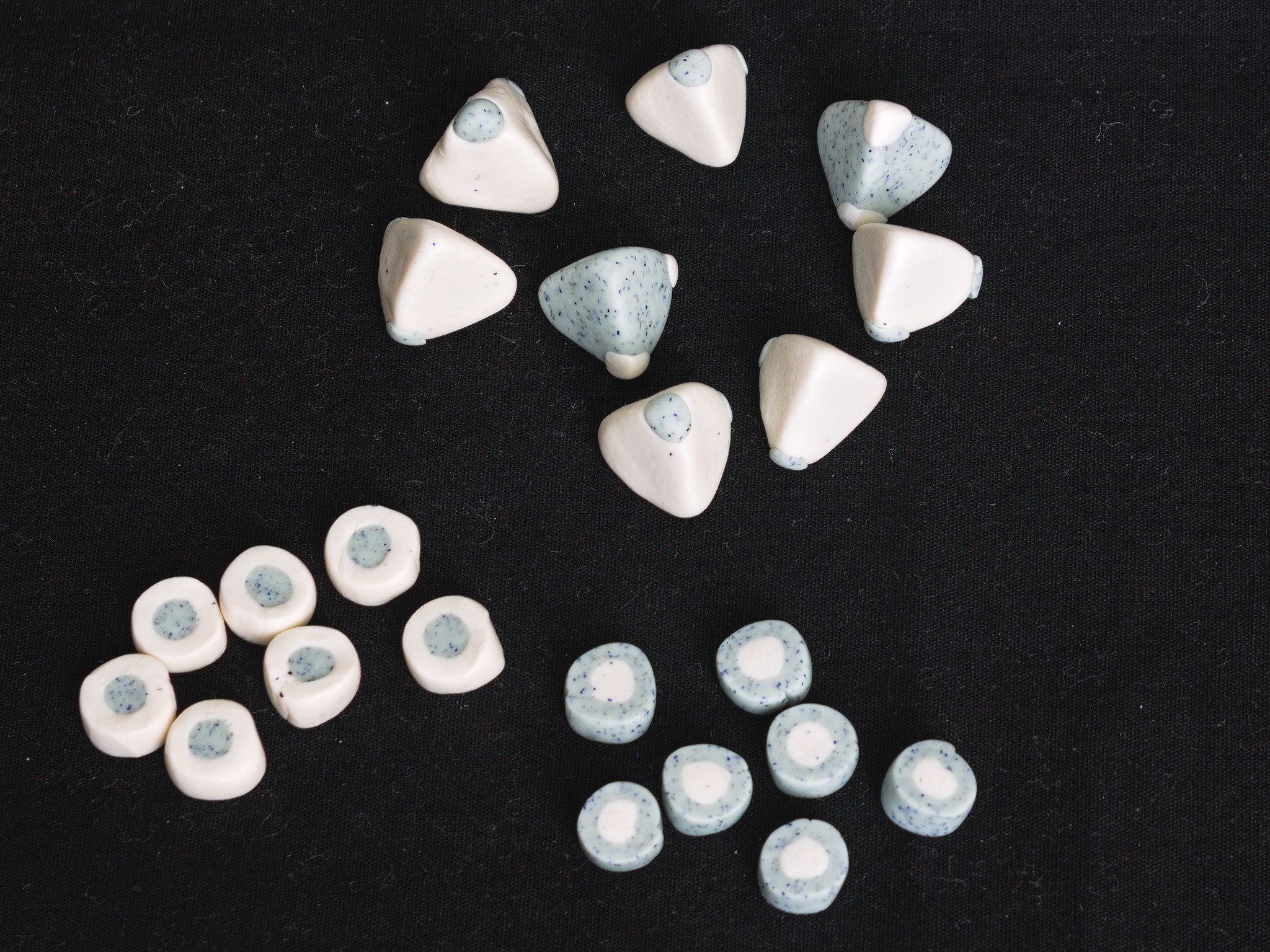 And after baking and trying them I liked them, but they had not been planned in any way, and they were a bit too small for the board, so the next time I was using cernit I tried to make a new set.
And while I was doing that I tried a new shape for the dice, as coins marked with a dot in the middle of one of the sides, because I don t really like tetrahedral dice.
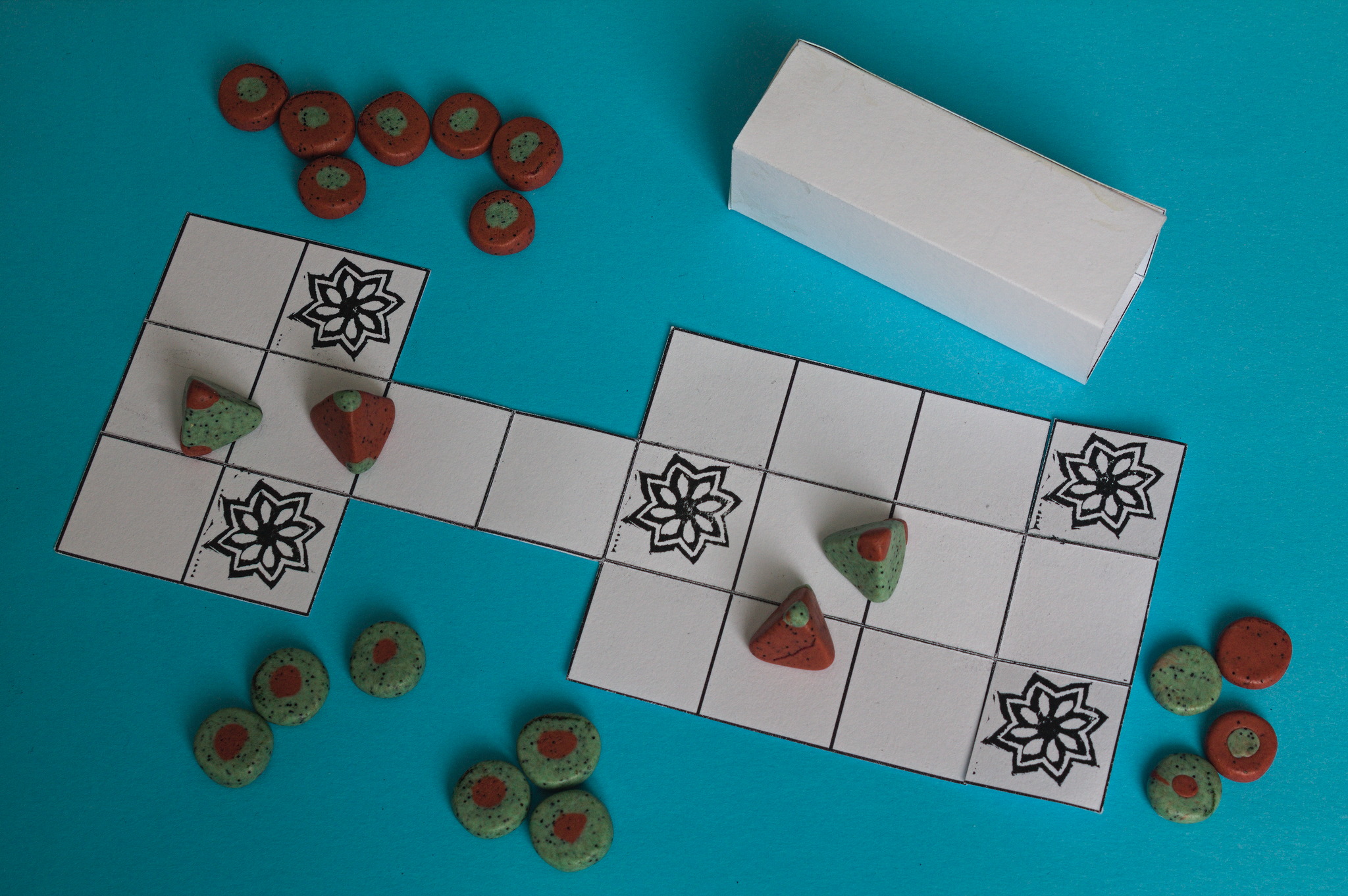 And now, I realized this wasn t going to be my last set, and urgently felt the need for some container to keep them in and avoid missing pieces.
(Yes, in the picture above one piece was already missing. While taking it I didn t realize it, and neither I did when picking up everything to put it away, getting the missing piece and storing it safely together with the rest of the set. It must have been hiding in plain sight nearby, but I will never know where.)
Anyway, back to Inkscape, and to a board printed on scrap paper that I tried to fold up until I came up with a layout that folded up in a small drawer, and then I added a case to wrap around it to keep it closed.

 I played around with the case until it was big enough to actually slide around the folded board, and this is the result, ready to be printed out on A4 paper, cut, folded and glued. (This takes most of the sheet, and I m not sure that the case would still fit around the board/drawer if printed with scaling, so if you want to print it on Letter paper I d recommend to move the pieces around.)

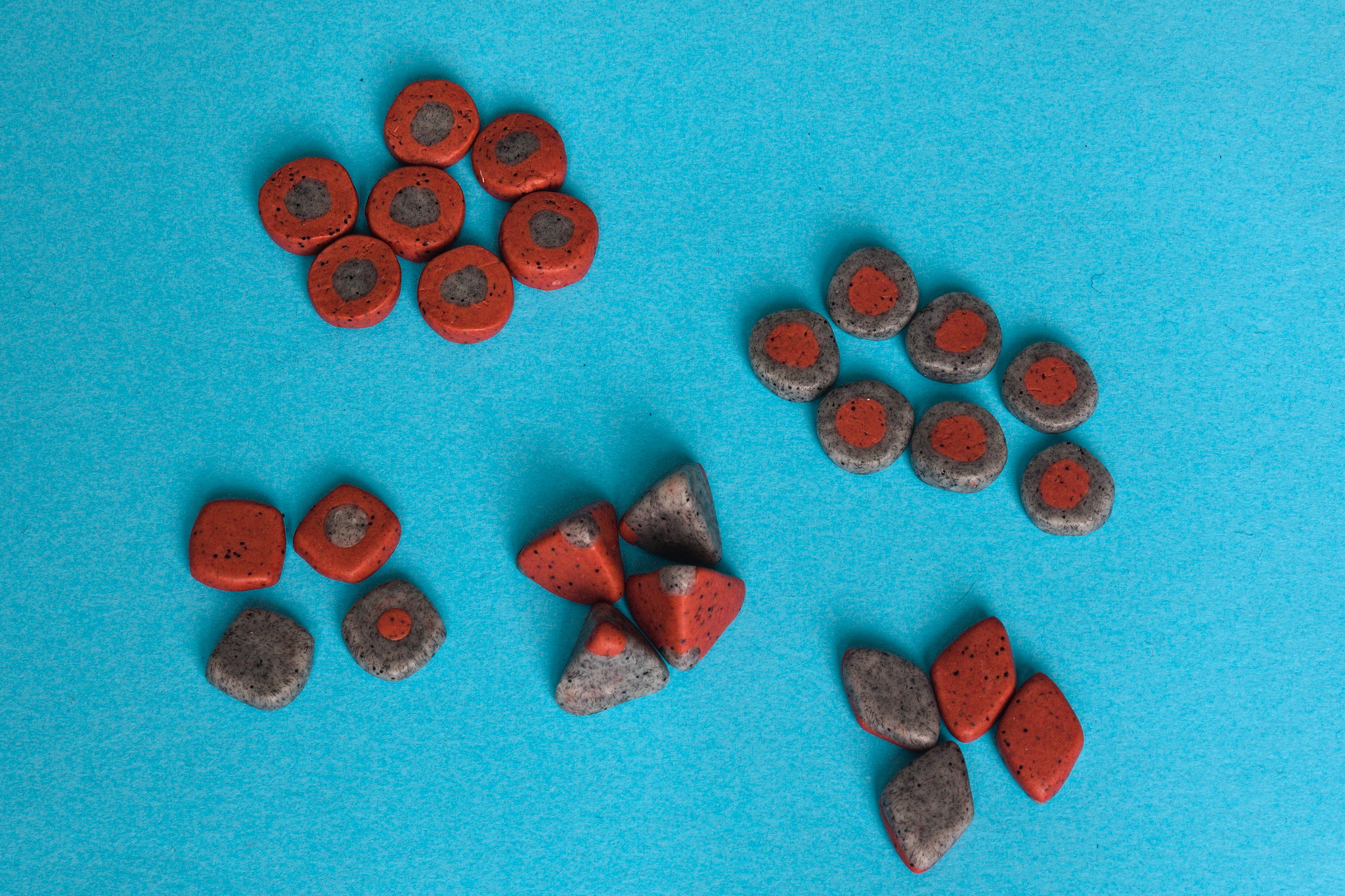 I still used stone effect cernit, but this time in a red/grey scheme that knew I would have liked more, and while I was doing it I tried a few improvements on the randomization devices.
The tetrahedral dice are still the same: they work, it s what they use in the replica sets, so I keep making them even if they re not my first choice.
I ve changed the coins to make them almost square for two reasons, however: one is that the round one tended to roll away into inconvenient places when throwing them with emphasis, and the other one is to make it easier to recognise them from the tokens with no need to flip each one around before starting the game.
The lozenges were a bit of a failure, instead. They work fine when thrown, but I don t think that there is a self-evident way to decide which side should be counted, and the only intuitive way I can think of (count the ones in the player s colour) would be unbalanced.
Speaking of balance issues: of course the hand-modelled dice and coins aren t perfectly balanced but:
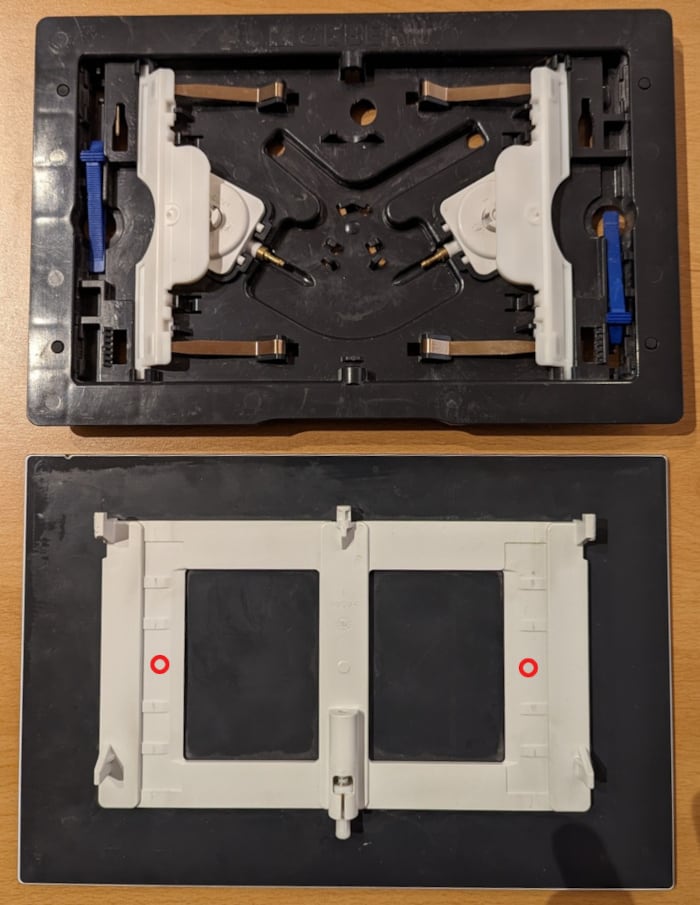
 It's been a year since I started exploring

 This is the second part of how I build a read-only root setup for my router. You might want to read
 Very few highly-anticipated movies appear in January and February, as the bigger releases are timed so they can be considered for the










 Prologue
For over a year now, Fre(i)e Software GmbH (my company) is involved in Ubuntu Touch development. The development effort currently is handled by a mix of paid and voluntary developers/contributors under the umbrella of the UBports Foundation. We are approaching the official first release of Ubuntu Touch 20.04 with rapid pace.
And, if you are a non-Englisch native speaker, we'd like to ask you for help... Read below.
light+love