Search Results: "gt"

20 February 2023

Jonathan McDowell: Fixing mobile viewing

It was brought to my attention recently that the mobile viewing experience of this blog was not exactly what I d hope for. In my poor defence I proof read on my desktop and the only time I see my posts on mobile is via FreshRSS. Also my UX ability sucks. Anyway. I ve updated the theme to a more recent version of minima and tried to make sure I haven t broken it all in the process (I did break tagging, but then I fixed it again). I double checked the generated feed to confirm it was the same (other than some re-tagging I did), so hopefully I haven t flooded anyone s feed. Hopefully I can go back to ignoring the underlying blog engine for another 5+ years. If not I ll have to take a closer look at Enrico s staticsite.

19 February 2023

Russell Coker: New 18 Core CPU and NVMe

I just got a E5-2696 v3 CPU for my ML110 Gen9 home workstation, this has a Passmark score of 23326 which is almost 3 times faster than the E5-2620 v4 which rated 9224. Previously it took over 40 minutes real time to compile a 6.10 kernel that was based on the Debian kernel configuration, now it takes 14 minutes of real time, 202 minutes of user time, and 37 minutes of system CPU time. That s a definite benefit of having a faster CPU, I don t often compile kernels but when I do I don t want to wait 40+ minutes for a result. I also expanded the system from 96G of RAM to 128G, most of the time I don t need so much RAM but it s better to have too much than too little, particularly as my friend got me a good deal on RAM. The extra RAM might have helped improve performance too, going from 6/8 DIMM slots full to 8/8 might help the CPU balance access. That series of HP machines has a plastic mounting bracket for the CPU, see this video about the HP Proliant Smart Socket for details [1]. I was working on this with a friend who has the same model of HP server as I do, after buying myself a system I was so happy with it that I bought another the same when I saw it going for a good price and then sold it to my friend when I realised that I had too many tower servers at home. It turns out that getting the same model of computer as a friend is a really good strategy so then you can work together to solve problems with it. My friend s first idea was to try and buy new clips for the new CPUs (which would have delayed things and cost more money), but Reddit and some blog posts suggested that you can just skip the smart-socket guide clip and when the chip was resting in the socket it felt secure as the protrusions on the sides of the socket fit firmly enough into the notches in the CPU to prevent it moving far enough to short a connection. Testing on 2 systems showed that you don t need the clip. As an aside it would be nice if Intel made every CPU that fits a particular socket have the same physical dimensions so clips and heatsinks can work well on all CPUs. The TDP of the new CPU is 145W and the old one was 85W. One would hope that in a server class system that wouldn t make a lot of difference but unfortunately the difference was significant. Previously I could have the system running 7/8 cores with BOINC 24*7 and I wouldn t notice the fans being louder. It is possible that 100% CPU use on a hot day might make the fans sound louder if I didn t have an air-conditioner on that was loud enough to drown them out, but the noteworthy fact is that with the previous CPU the system fans were a minor annoyance. Now if I have 16 cores running BOINC it s quite loud, the sort of noise that makes most people avoid using tower servers as workstations! I ve found that if I limit it to 4 or 5 cores then the system is about as quiet as it was before. As a rough approximation I can use as much CPU power as before without making the fans louder but if I use more CPU power than was previously available it gets noisy. I also got some new NVMe devices, I was previously using 2*Crucial 1TB P1 NVMes in a BTRFS RAID-1 and now I have 2*Crucial 1TB P3 NVMes (where P1 is the slowest Crucial offering, P3 is better and more expensive, P5 is even better, etc). When doing the BTRFS migrations to move my workstation to new NVMe devices and my server to the old NVMe devices I found that the P3 series seem to have a limit of about 70MB/s for sustained random writes and the P1 series is about 35MB/s. Apparently with the cheaper NVMe devices they slow down if you do lots of random writes, pity that all the review articles talking about GB/s speeds don t mention this. To see how bad reviews are Google some reviews of these SSDs, you will find a couple of comment threads on places like Reddit of them slowing down with lots of writes and lots of review articles on well known sites that don t mention it. Generally I d recommend not upgrading from P1 to P3 NVMe devices, the benefit isn t enough to cover the effort. For every capacity of NVMe devices the most expensive devices cost more than twice as much as the cheapest devices, and sometimes it will be worth the money. Getting the most expensive device won t guarantee great performance but getting cheap devices will guarantee that it s slow. It seems that CPU development isn t progressing as well as it used to, the CPU I just bought was released in 2015 and scored 23,343 according to Passmark [2]. The most expensive Intel CPU on offer at my local computer store is the i9-13900K which was released this year and scores 62,914 [3]. One might say that CPUs designed for servers are different from ones designed for desktop PCs, but the i9 in question has a TDP Up of 253W which is too big for the PSU I have! According to the HP web site the new ML110 Gen10 servers aren t sold with a CPU as fast as the E5-2696 v3! In the period from 1988 to about 2015 every year there were new CPUs with new capabilities that were worth an upgrade. Now for the last 8 years or so there hasn t been much improvement at all. Buy a new PC for better USB ports or something not for a faster CPU!

17 February 2023

Enrico Zini: Monitoring a heart rate monitor

I bought myself a cheap wearable Bluetooth LE heart rate monitor in order to play with it, and this is a simple Python script to monitor it and plot data. Bluetooth LE I was surprised that these things seem decently interoperable. You can use hcitool to scan for devices:
hcitool lescan
You can then use gatttool to connect to device and poke at them interactively from a command line. Bluetooth LE from Python There is a nice library called Bleak which is also packaged in Debian. It's modern Python with asyncio and works beautifully! Heart rate monitors Things I learnt: How about a proper fitness tracker? I found OpenTracks, also on F-Droid, which seems nice Why script it from a desktop computer? The question is: why not? A fitness tracker on a phone is useful, but there are lots of silly things one can do from one's computer that one can't do from a phone. A heart rate monitor is, after all, one more input device, and there are never enough input devices! There are so many extremely important use cases that seem entirely unexplored:

Jonathan McDowell: First impressions of the VisionFive 2

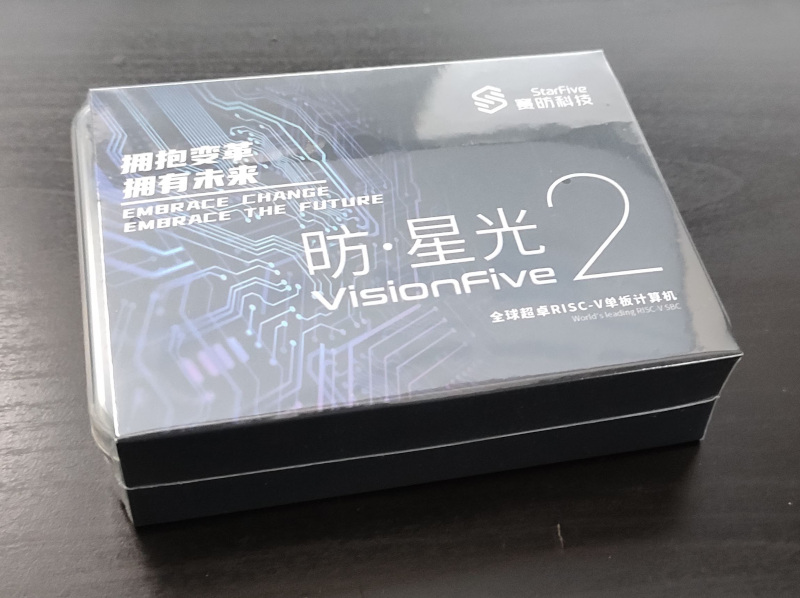
VisionFive 2 packaging Back in September last year I chose to back the StarFive VisionFive 2 on Kickstarter. I don t have a particular use in mind for it, but I felt it was one of the first RISC-V systems that were relatively capable (mentally I have it as somewhere between a Raspberry Pi 3 + a Pi 4). In particular it s a quad 1.5GHz 64-bit RISC-V core with 8G RAM, USB3, GigE ethernet and a single M.2 PCIe slot. More than ample as a personal machine for playing around with RISC-V and doing local builds. I ended up paying 67 for the Early Bird variant (dual GigE ethernet rather than 1 x 100Mb and 1 x GigE). A couple of weeks ago I got an email with a tracking number and last week it finally turned up. Being impatient the first thing I did was plug it into a monitor, connect up a keyboard, and power it on. Nothing except some flashing lights. Looking at the boot selector DIP switches suggested it was configured to boot from UART, so I flipped them to (what I thought was) the flash setting. It wasn t - turns out the ON marking on the switches represents logic 0 and it was correctly setup when I got it. I went to read the documentation which talked about writing an image to a MicroSD card, but also had details of the UART connection. Wanting to make sure the device was at least doing something before I actually tried an OS on it I hooked up a USB/serial dongle and powered the board up again. Success! U-Boot appeared and I could interact with it. I went to the VisionFive2 Debian page and proceeded to torrent the Image-69 image, writing it to a MicroSD card and inserting it in the slot on the bottom of the board. It booted fine. I can t even tell you what graphical environment it booted up because I don t remember; it worked fine though (at 1080p, I ve seen reports that 4K screens will make it croak). Poking around the image revealed that it s built off a snapshot.debian.org snapshot from 20220616T194833Z, which is a little dated at this point but I understand the rationale behind picking something that works and sticking with it. The kernel is of course a vendor special, based on 5.15.0. Further investigation revealed that the entire X/graphics stack is living in /usr/local, which isn t overly surprising; it s Imagination based. I was pleasantly surprised to discover there is work to upstream the Imagination support, but I m not planning to run the board with a monitor attached so it s not a high priority for me. Having discovered all that I decided to see how well a clean Debian unstable install from Debian Ports would go. I had a spare Intel Optane lying around (it s a stupid 22110 M.2 which is too long for any machine I own), so I put it in the slot on the bottom of the board. To my surprise it Just Worked and was detected ok:
# lspci
0000:00:00.0 PCI bridge: PLDA XpressRich-AXI Ref Design (rev 02)
0000:01:00.0 USB controller: VIA Technologies, Inc. VL805/806 xHCI USB 3.0 Controller (rev 01)
0001:00:00.0 PCI bridge: PLDA XpressRich-AXI Ref Design (rev 02)
0001:01:00.0 Non-Volatile memory controller: Intel Corporation NVMe Datacenter SSD [Optane]
I created a single partition with an ext4 filesystem (initially tried btrfs, but the StarFive kernel doesn t support it), and kicked off a debootstrap with:
# mkfs -t ext4 /dev/nvme0n1p1
# mount /dev/nvme0n1p1 /mnt
# debootstrap --keyring=/etc/apt/trusted.gpg.d/debian-ports-archive-2023.gpg \
	unstable /mnt https://deb.debian.org/debian-ports
The u-boot setup has a convoluted set of vendor scripts that eventually ends up reading a /boot/extlinux/extlinux.conf config from /dev/mmcblk1p2, so I added an additional entry there using the StarFive kernel but pointing to the NVMe device for /. Made sure to set a root password (not that I ve been bitten by that before, too many times), and rebooted. Success! Well. Sort of. I hit a bunch of problems with having a getty running on ttyS0 as well as one running on hvc0. The second turns out to be a console device from the RISC-V SBI. I did a systemctl mask serial-getty@hvc0.service which made things a bit happier, but I was still seeing odd behaviour and output. Turned out I needed to reboot the initramfs as well; the StarFive one was using Plymouth and doing some other stuff that seemed to be confusing matters. An update-initramfs -k 5.15.0-starfive -c built me a new one and everything was happy. Next problem; the StarFive kernel doesn t have IPv6 support. StarFive are good citizens and make their 5.15 kernel tree available, so I grabbed it, fed it the existing config, and tweaked some options (including adding IPV6 and SECCOMP, which chrony wanted). Slight hiccup when it turned out trying to do things like make sound modular caused it to fail to compile, and having to backport the fix that allowed the use of GCC 12 (as present in sid), but it got there. So I got cocky and tried to update it to the latest 5.15.94. A few manual merge fixups (which I may or may not have got right, but it compiles and boots for me), and success. Timings:
$ time make -j 4 bindeb-pkg
  [linux-image-5.15.94-00787-g1fbe8ac32aa8]
real	37m0.134s
user	117m27.392s
sys	6m49.804s
On the subject of kernels I am pleased to note that there are efforts to upstream the VisionFive 2 support, with what appears to be multiple members of StarFive engaging in multiple patch submission rounds. It s really great to see this and I look forward to being able to run an unmodified mainline kernel on my board. Niggles? I have a few. The provided u-boot doesn t have NVMe support enabled, so at present I need to keep a MicroSD card to boot off, even though root is on an SSD. I m also seeing some errors in dmesg from the SSD:
[155933.434038] nvme nvme0: I/O 436 QID 4 timeout, completion polled
[156173.351166] nvme nvme0: I/O 48 QID 3 timeout, completion polled
[156346.228993] nvme nvme0: I/O 108 QID 3 timeout, completion polled
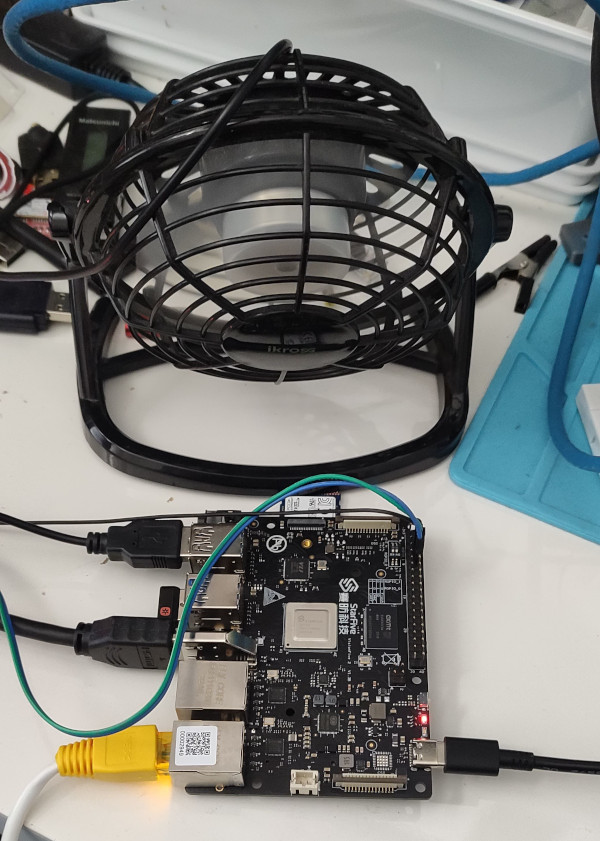
It doesn t seem to cause any actual issues, and it could be the SSD, the 5.15 kernel or an actual hardware thing - I ll keep an eye on it (I will probably end up with a different SSD that actually fits, so that ll provide another data point). More annoying is the temperature the CPU seems to run at. There s no heatsink or fan, just the metal heatspreader on top of the CPU, and in normal idle operation it sits at around 60 C. Compiling a kernel it hit 90 C before I stopped the job and sorted out some additional cooling in the form of a desk fan, which kept it as just over 30 C. Bare VisionFive 2 SBC board with a small desk fan pointed at it I haven t seen any actual stability problems, but I wouldn t want to run for any length of time like that. I ve ordered a heatsink and also realised that the board supports a Raspberry Pi style PoE Hat , so I ve got one of those that includes a fan ordered (I am a complete convert to PoE especially for small systems like this). With the desk fan setup I ve been able to run the board for extended periods under load (I did a full recompile of the Debian 6.1.12-1 kernel package and it took about 10 hours). The M.2 slot is unfortunately only a single PCIe v2 lane, and my testing topped out at about 180MB/s. IIRC that is about half what the slot should be capable of, and less than a 10th of what the SSD can do. Ethernet testing with iPerf3 sustained about 941Mb/s, so basically maxing out the port. The board as a whole isn t going to set any speed records, but it s perfectly usable, and pretty impressive for the price point. On the Debian side I ve not hit any surprises. There s work going on to move RISC-V to a proper release architecture, and I m hoping to be able to help out with that, but the version of unstable I installed from the ports infrastructure has looked just like any other Debian install. Which is what you want. And that pretty much sums up my overall experience of the VisionFive 2; it s not noticeably different than any other single board computer. That s a good thing, FWIW, and once the kernel support lands properly upstream (it ll be post 6.3 at least it seems) it ll be a boring mainline supported platform that just happens to be RISC-V.

Valhalla's Things: git status Side Effects

Posted on February 17, 2023
TIL, from a conversation with friends1, that git status can indeed have side effects, of some sort. By default, running git status causes a background refresh of the index to happen, which holds the write lock on the repository. In theory, if somebody is really unlucky, this could break some script / process that is also trying to work on the repo at the same time, especially on a huge repository where git status takes a significant time, rather than the usual fraction of a second2. There is a way to prevent this, by running git status --no-optional-locks (https://git-scm.com/docs/git#Documentation/git.txt---no-optional-locks) or by setting GIT_OPTIONAL_LOCKS to 0, as writing the updated index is just an optimization and git knows it can be avoided. I don t think there are many chances to actually stumble on this in the real life, but I m writing this down so that if I ever do I have an easy way to remember what happened and find the solution.

  1. I won t name name or provide details to protect the innocents (and the guilty), but thanks to all of the people involved in the conversations who helped find the answer.
  2. Related, but unrelated TIL: there is a place called Secondo (second), near Venice, but it s already a frazione (fraction / subdivision of municipality).

Reproducible Builds (diffoscope): diffoscope 236 released

The diffoscope maintainers are pleased to announce the release of diffoscope version 236. This version includes the following changes:
[ FC Stegerman ]
* Update code to match latest version of Black. (Closes: #1031433)
[ Chris Lamb ]
* Require at least Black version 23.1.0 to run the internal Black tests.
* Update copyright years.
You find out more by visiting the project homepage.

16 February 2023

Scarlett Gately Moore: KDE Snaps, Security updates, Debian Freeze

Icy morning Witch Wells AzIcy morning Witch Wells Az
Much like our trees, Debian is now in freeze stage for Bookworm. I am still working on packages locally until development opens up again. My main focus is getting mycroft packages updated to the new fork at https://github.com/orgs/OpenVoiceOS/repositories. On the KDE Snaps side of things: My PPA is not going well. There is a problem in Focal here qhelpgenerator-qt5 is a missing dependency, HOWEVER it is there as shown here: https://launchpad.net/ubuntu/focal/+package/qhelpgenerator-qt5 a fun circular dependency for qtbase. It also builds fine in a focal chroot. I have tried copying packages, source recipe builds, adding another PPA with successful builds, to no avail. My PPA does not seem to use its own packages, or universe for that matter. I have tried all of the dependency settings available and nothing changes. If any of you launchpad experts out there want to help me out, or point me in the right direction, it would be appreciated ! This PPA is mandatory for our core20 snaps moving forward, as they currently have no security updates, and I refuse to have my name on security riddled snaps. As for the kde-neon extension for core22, I have fixed most of the tests and Sergio is wrapping it up, thank you!!!! I am still looking for work!!! Please reach out if you, or anyone you know is looking for my skill set. Once again, I ask for you to please consider a donation. We managed to get the bills paid this month ( Big thank you! ) but, March is quickly approaching. The biggest thing is Phone/Internet so I can keep working on things and Job hunt. Thank you so much for your support! https://gofund.me/a9c36b87

Gunnar Wolf: We are GREAT at handling multimedia!

I have mentioned several times in this blog, as well as by other communication means, that I am very happy with the laptop I bought (used) about a year and a half ago: an ARM-based Lenovo Yoga C630. Yes, I knew from the very beginning that using this laptop would pose a challenge to me in many ways, as full hardware support for ARM laptops are nowhere as easy as for plain boring x86 systems. But the advantages far outweigh the inconvenience (i.e. the hoops I had to jump through to handle video-out when I started teaching presentially, which are fortunately a thing of the past now). Anyway This post is not about my laptop. Back in 2018, I was honored to be appointed as a member of the Debian Technical Committee. Of course, that meant (due to the very clear and clever point 6.2.7.1 of the Debian Constitution that my tenure in the Committee (as well as Niko Tyni s) finished in January 1, 2023. We were invited to take part of a Jitsi call as a last meeting, as well as to welcome Matthew Garrett to the Committee. Of course, I arranged so I would be calling from my desktop system at work (for which I have an old, terrible webcam but as long as I don t need to control screen sharing too finely, mostly works). Out of eight people in the call, two had complete or quite crippling failures with their multimedia setup, and one had a frozen image (at least as far as I could tell). So Yes, Debian is indeed good and easy and simple and reliable for most nontechnical users using standard tools. But I guess that we power users enjoy tweaking our setup to our precise particular liking. Or that we just don t care about frivolities such as having a working multimedia setup. Or I don t know what happens. But the fact that close to half of the Technical Committee, which should consist of Debian Developers who know their way around technical obstacles, cannot get a working multimedia setup for a simple, easy WebRTC call (even after a pandemic that made us all work via teleconferencing solutions on a daily basis!) is just Beautiful

15 February 2023

Marco d'Itri: I replaced grub with systemd-boot

To be able to investigate and work on the the measured boot features I have switched from grub to systemd-boot (sd-boot). This initial step is optional, but it is useful because this way /etc/kernel/cmdline will become the new place where the kernel command line can be configured:
. /etc/default/grub
echo "root=/dev/mapper/root $GRUB_CMDLINE_LINUX $GRUB_CMDLINE_LINUX_DEFAULT" > /etc/kernel/cmdline
Do not forget to set the correct root file system there, because initramfs-tools does not support discovering it at boot time using the Discoverable Partitions Specification. The installation has been automated since systemd version 252.6-1, so installing the package has the effect of installing sd-boot in the ESP, enabling it in the UEFI boot sequence and then creating boot loader entries for the kernels already installed on the system:
apt install systemd-boot
If needed, it could be manually installed again just by running bootctl install. I like to show the boot menu by default, at least until I will be more familiar with sd-boot:
bootctl set-timeout 4
Since other UEFI binaries can be easily chainloaded, I am also going to keep around grub for a while, just to be sure:
cat <<END > /boot/efi/loader/entries/grub.conf
title Grub
linux /EFI/debian/grubx64.efi
END
At this point sd-boot works, but I still had to enable secure boot. So far sd-boot has not been signed with a Debian key known to the shim bootloader, so I needed to create a Machine Owner Key (MOK), enroll it in UEFI and then use it to sign everything. I dislike the complexity of mokutil and the other related programs, so after removing it and the boot shim I have decided to use sbctl instead. With it I easily created new keys, enrolled them in the EFI key store and then signed everything:
sbctl create-keys
sbctl enroll-keys
for file in /boot/efi/*/*/linux /boot/efi/EFI/*/*.efi; do
  sbctl sign -s $file
done
Since there is no sbctl package yet I need to make sure that also the kernels installed in the future will be automatically signed, so I have created a trivial script in /etc/kernel/install.d/ which automatically runs sbctl sign -s or sbctl remove-file. The Debian wiki SecureBoot page documents how do do this with mokutil and sbsigntool, but I think that sbctl is much friendlier. Since I am not using the boot shim, I also had to set DisableShimForSecureBoot=true in /etc/fwupd/uefi_capsule.conf to make firmware updates work automatically. As a bonus, I have also added to the boot menu the excellent Debian-based GRML live distribution. Since sd-boot is not capable of loopback-mounting CD-ROM images like grub, I first had to extract the kernel and initramfs and copy them to the ESP:
mount -o loop /boot/grml/grml64-full_2022.11.iso /mnt/
mkdir /boot/efi/grml/
cp /mnt/boot/grml64full/* /boot/efi/grml/
umount /mnt/
cat <<END > /boot/efi/loader/entries/grml.conf
title GRML
linux /grml/vmlinuz
initrd /grml/initrd.img
options boot=live bootid=grml64full202211 findiso=/grml/grml64-full_2022.11.iso live-media-path=/live/grml64-full net.ifnames=0 
END
As expected, after a reboot bootctl reports the new security features:
System:
      Firmware: UEFI 2.70 (Lenovo 0.4496)
 Firmware Arch: x64
   Secure Boot: enabled (user)
  TPM2 Support: yes
  Boot into FW: supported
Current Boot Loader:
      Product: systemd-boot 252.5-2
     Features:   Boot counting
                 Menu timeout control
                 One-shot menu timeout control
                 Default entry control
                 One-shot entry control
                 Support for XBOOTLDR partition
                 Support for passing random seed to OS
                 Load drop-in drivers
                 Support Type #1 sort-key field
                 Support @saved pseudo-entry
                 Support Type #1 devicetree field
                 Boot loader sets ESP information
          ESP: /dev/disk/by-partuuid/1b767f8e-70fa-5a48-b444-cfe5c272d66e
         File:  /EFI/systemd/systemd-bootx64.efi
...
Relevant documentation:

Lukas M rdian: Netplan v0.106 is now available

I m happy to announce that Netplan version 0.106 is now available on GitHub and is soon to be deployed into an Ubuntu/Debian/Fedora installation near you! Six months and 65 commits after the previous version, this release is brought to you by 4 free software contributors from around the globe. Highlights Highlights of this release include the new netplan status command, which queries your system for IP addresses, routes, DNS information, etc in addition to the Netplan backend renderer (NetworkManager/networkd) in use and the relevant Netplan YAML configuration ID. It displays all this in a nicely formatted way (or alternatively in machine readable YAML/JSON format).
Furthermore, we implemented a clean libnetplan API which can be used by external tools to parse Netplan configuration, migrated away from non-inclusive language (PR#303) and improved the overall Netplan documentation. Another change that should be noted, is that the match.macaddress stanza now only matches on PermanentMACAddress= on the systemd-networkd backend, as has been the case on the NetworkManager backend ever since (see PR#278 for background information on this slight change in behavior). Changelog Bug fixes:

Valhalla's Things: My experience with a PinePhone

Posted on February 15, 2023
I ve had and used1 a PinePhone for quite some time now, and a shiny new blog sounds like a good time to do a review of my experience. TL;DL: I love it, but my use cases may not be very typical. While I ve had a mobile phone since an early time (my parents made me carry one for emergencies before it was usual for my peers) I ve never used a typical smartphone (android / iPhone / those other proprietary things) because I can t trust them not to be designed to work against me (data collection, ads, tricking users into micro payments, and other antipatterns of proprietary software design), and bringing them to sanity as most of the people I know do is too much effort for my tastes. Instead, as a phone I keep using an old nokia featurephone2 which is reliable, only requires charging once a week, and can easily survive falling from hand height to the ground, even if thrown 3. And then I ve been carrying a variety of other devices to do other computer-like tasks; earlier it was just a laptop, or a netbook, a Pandora (all of which used a dongle to connect to mobile network internet) then I tried a phone with FirefoxOS (it could have been better) and now the PinePhone has taken their place, at least when I m not carrying a laptop anyway. So, the tasks I use the PinePhone for are mostly:
  1. sending and receiving xmpp messages, with no need for notifications (when somebody needs to tell me something where urgency is required, they know to use the other phone, either with a call or an sms);
  2. tethering an internet connection to the laptop;
  3. reading djvu scans of old books while standing in a queue or something;
  4. checking something on the internet when I m not close to a real computer (i.e. one with a keyboard and a big screen);
  5. running a timer while heat-setting fabric paint with an iron (and reading a djvu book at the same time yes, this is a very specific task, but it has happened multiple times already :D );
  6. running a calculator with unit conversions;
  7. running the odd command line program;
  8. taking pictures, especially those that I want to send soon (I often also carry a DSLR camera, but I tend to wait a few days before I download them from the card);
  9. map related things.
3 and 5 work perfectly well, no issues there. 1, 2 and 4 usually work just fine, except for the fact that sometimes while the phone is suspended it forgets about being a phone, and needs to be restarted to turn the modem back on. It s not a big deal while using the phone, I just need to check before I try to use it after a few hours. For 1, I also had to take care to install dino-im from experimental, as up to now the features required to fit the interface in a mobile screen aren t available in the official release, but I believe that this has just been fixed. Somewhat related to 4, I ve also installed kiwix and the dumps of wiktionary and wikivoyage, but I haven t had a chance to travel much, so I m not really using it. For 6 I m quite happy with qalculate, the GUI version of qalc (which is what I use on my laptop), even if it has a few minor interface issues, and 7 of course works as well as it can, given the limitations of a small screen and virtual keyboard. 8 is, let us say, problematic. The camera on the PinePhone is peculiar, only works with a specific software, and even there the quality of the pictures is, well, low-fi, vintagey pictures are a look and that s a specific artistic choice, right? Thanks to the hard work of the megapixels maintainer the quality has improved a lot, and these days it is usable, but there are still limits (no webcam in the browser, no recording of videos). 9 is really bad. A few times I can remember getting a GPS fix. A few times in many months, and now and then I keep trying, to see if a miracle has happened, but usually I only get a vague position from wifi data (which isn t great, when walking through less densely populated areas). I ve seen another PinePhone running gpsd and getting data from an external GPS receiver via bluetooth, and if I really needed it I may seriously consider that solution. Also, the apps available in mobian aren t great either, even when compared to running tangogps on an OpenMoko with pre-downloaded maps (I mean! I don t think my expectations are too high!). I ve heard that PureMaps is quite good as a software, but a bit of a PITA to package for Debian, and I really hope that one day there will be a linux-first mobile device with good GPS hardware, so that people will be encouraged to fix the software side. Thankfully, I don t usually need GPS and navigation software; when I m driving into places I don t know I usually have a human navigator, and when walking into places I can do with just a static map (either printed on paper or on the PinePhone), maybe some pre-calculated route from the OSM website and looking at street names to find out where I am. Overall, for my use cases the PinePhone works just fine and is an useful addition to the things I always carry with me, and I don t feel the pressing need to get an android phone. I don t think it s ready as a daily driver for everybody, but I think that depending on one s needs it s worth asking around (I d recommend doing so on the fediverse with a #PinePhone and #mobian hashtag), as there is a non-zero chance that it may be a good fit for you.

  1. which, if I m not mistaken, is often not implied by the fact of owning it :D
  2. for very low values of feature: it doesn t have any kind of internet access, and there are only 3 games, one of which is snake.
  3. don t ask.

14 February 2023

Holger Levsen: 20230214-i-love-osuosl

I love free software and I OSUOSL So in December 2018 I was approached somewhat out of the blue by someone from OSUOSL who offered eight servers to the Reproducible Builds project and as these machines had 32 cores and 144 GB Ram each (plus 3 TB on a single HDD) and they also offered free hosting, I very happyly said yes. And since them I'm a very happy Oregon State University Open Source Labs user, and these days we're switching the setup to different machines, which is another story to tell some other time...! ;-) My point now is: since 2018 I got to know OSUOSL and every year I like them more. They are super friendly, reliable (a working ticket system and a great IRC channel), offer help in various ways, be it with DNS names (and renamings...) or finding new hardware suited to our needs or whatever else we come up with. They are really dedicated to help free software projects and I'm grateful having the privilege to enjoy this since more than four years now. To quote https://osuosl.org/: "The Open Source Lab is a nonprofit organization working for the advancement of open source technologies. The lab, in partnership with the School of Electrical Engineering and Computer Science at Oregon State University, provides hosting for more than 160 projects, including those of worldwide leaders like the Apache Software Foundation, the Linux Foundation and Drupal. Together, the OSL s hosted sites deliver nearly 430 terabytes of information to people around the world every month. The most active organization of its kind, the OSL offers world-class hosting services, professional software development and on-the-ground training for promising students interested in open source management and programming." So, IOW, I'm just seeing a very tiny tip of the iceberg of their awesome work. Check out https://osuosl.org/communities/ to see what I mean with very tiny tip. Search for "Debian" and "Reproducible" on that page :) Thank you, everybody at OSUOSL! You rock and make a big difference for many projects!

13 February 2023

Jonathan Dowland: A visit to Prusa Labs

.
.

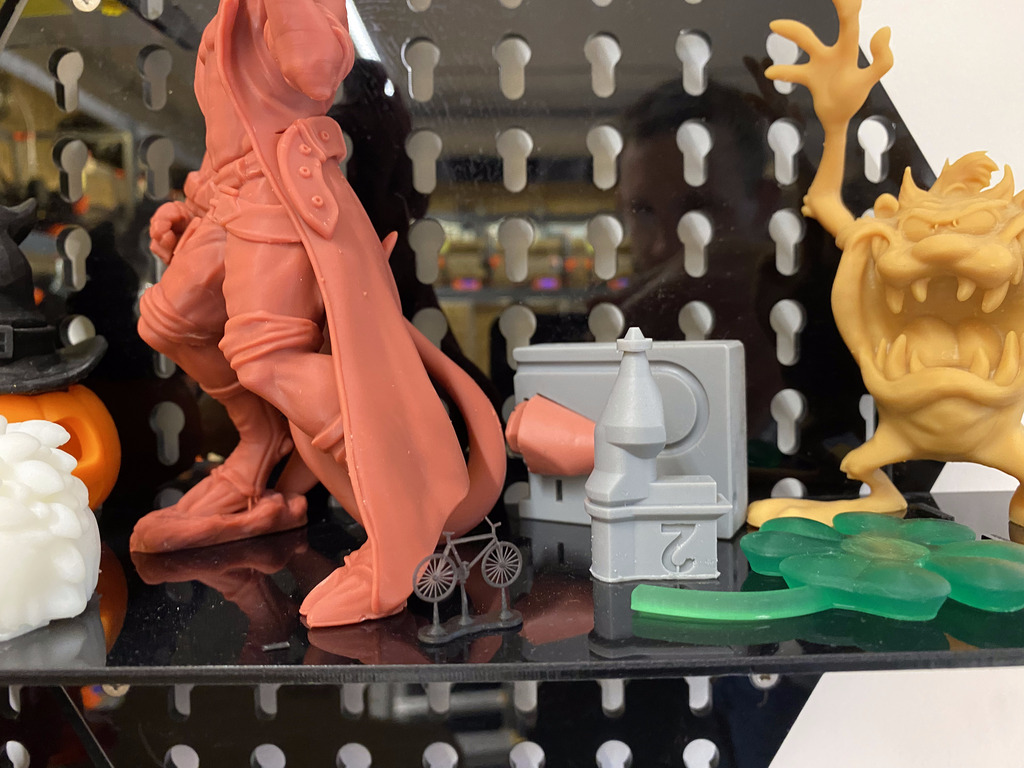
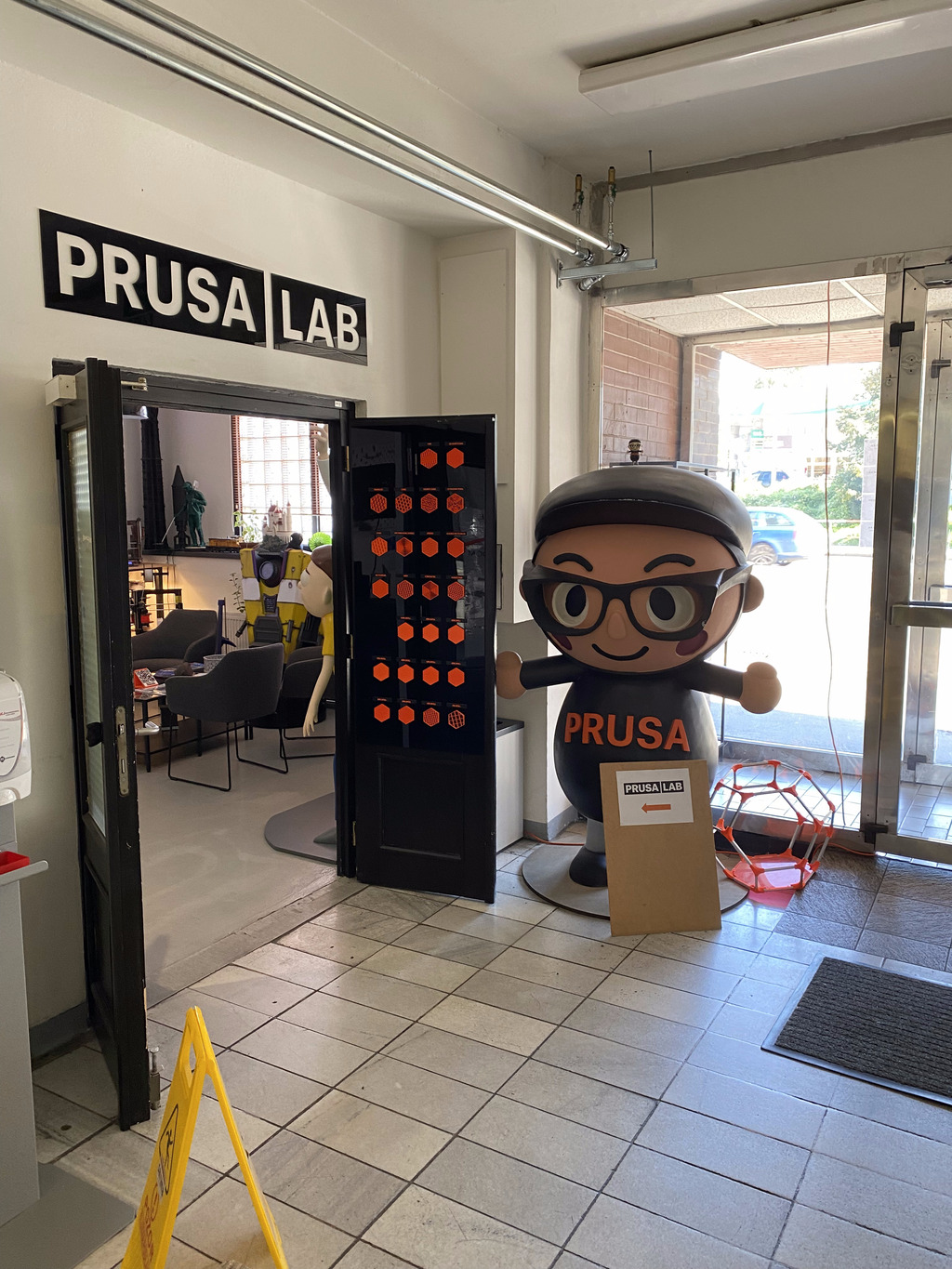
In September I was in Czechia for a Red Hat event. I ended up travelling via Prague, and had an unexpected extra day due to an airline strike causing my flight home to be cancelled. I took the opportunity to visit Prusa's offices/factory/Lab, and it was amazing! The Prusa team were all busy getting ready for the Prague Maker Faire that was happening the day afterwards.1 On arriving at the street which houses Prusa's Lab and Office buildings, the first thing that hit me was the smell. I find the melted-plastic smell of FDM printing (with PLA, at least) quite pleasant, and this was a super-condensed version of that, pumping out of their ground-floor windows. I started at the reception area on the ground floor. Outside reception there's a lovely sculpture representing the history of the development of the MK3S+.
The Reception The Reception
SLS Farm in the former Hack lab SLS Farm in the former Hack lab
History of the MK3S+ History of the MK3S+

At the reception you have a small waiting area with shelves of demonstration prints and some spools of Prusament. From here, our kind guide first took us to a region on the ground floor that used to be (prior to COVID times) the public maker/hack lab. The lab contained two modest farms of printers: one of their flagship FDM printer, the MK3S+, and another of their SLS resin printers. A close up of some example resin models is pictured above. The bicycle was tiny: about the size of a thumbnail.
A Historic display A Historic display
Bespoke QE equipment Bespoke QE equipment
The MK3S+ Farm The MK3S+ Farm

. Moi in the Farm
2KG orange PLA spools for the Farm 2KG orange PLA spools for the Farm
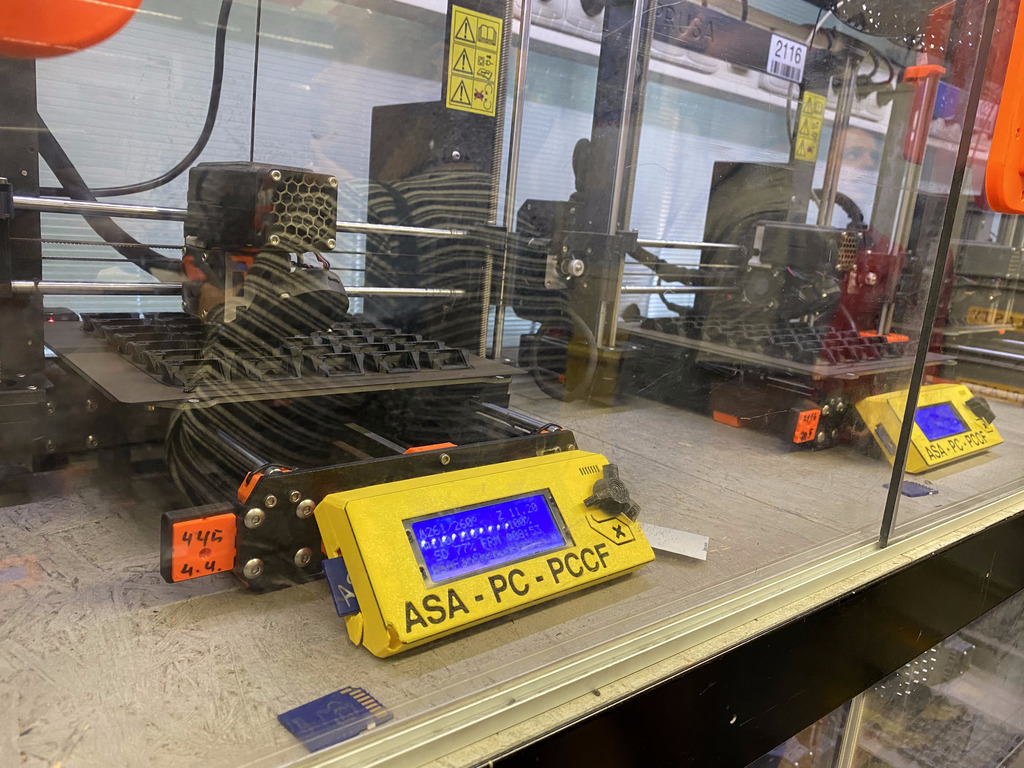
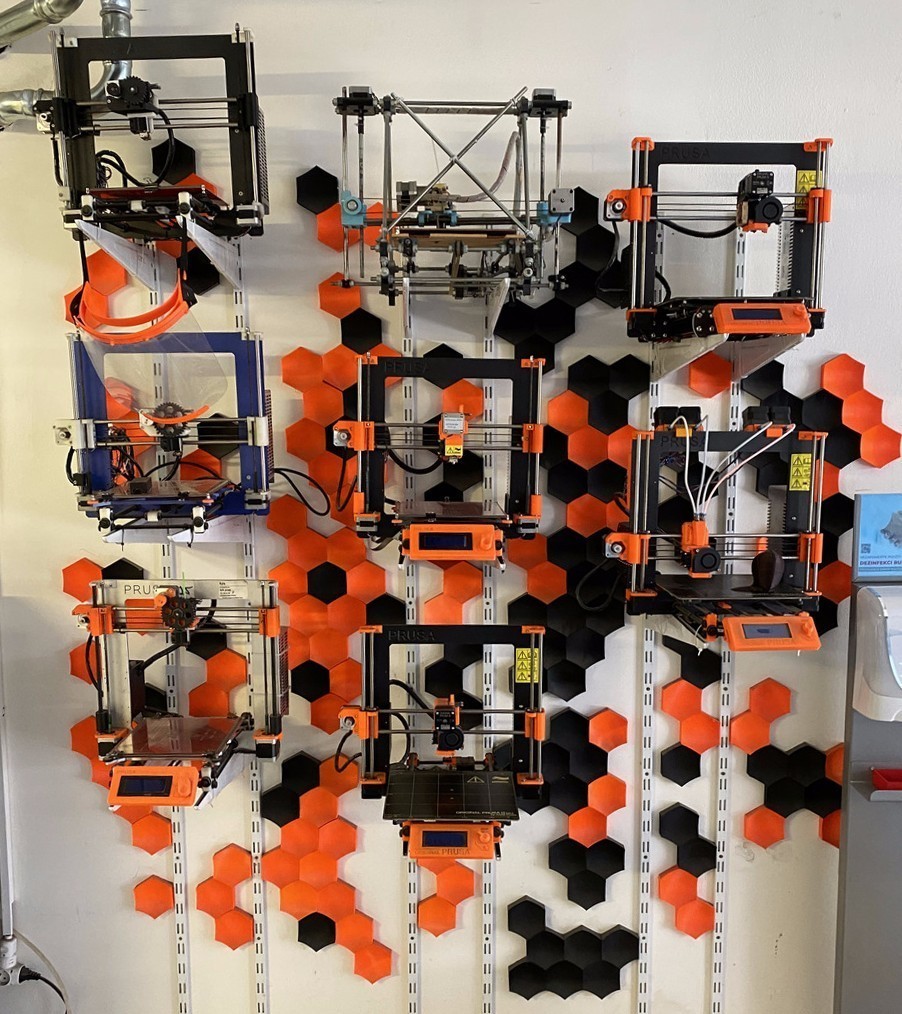
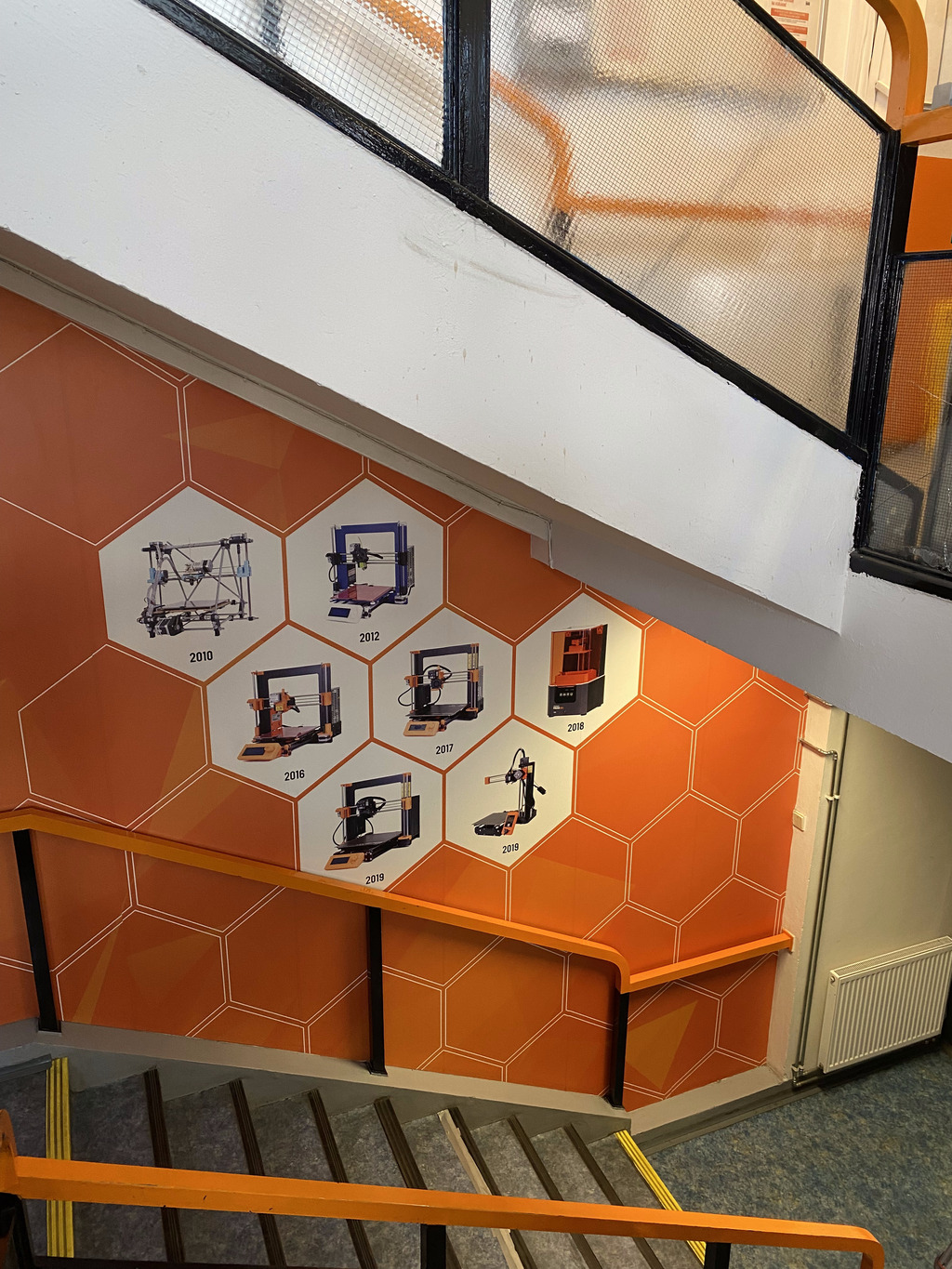
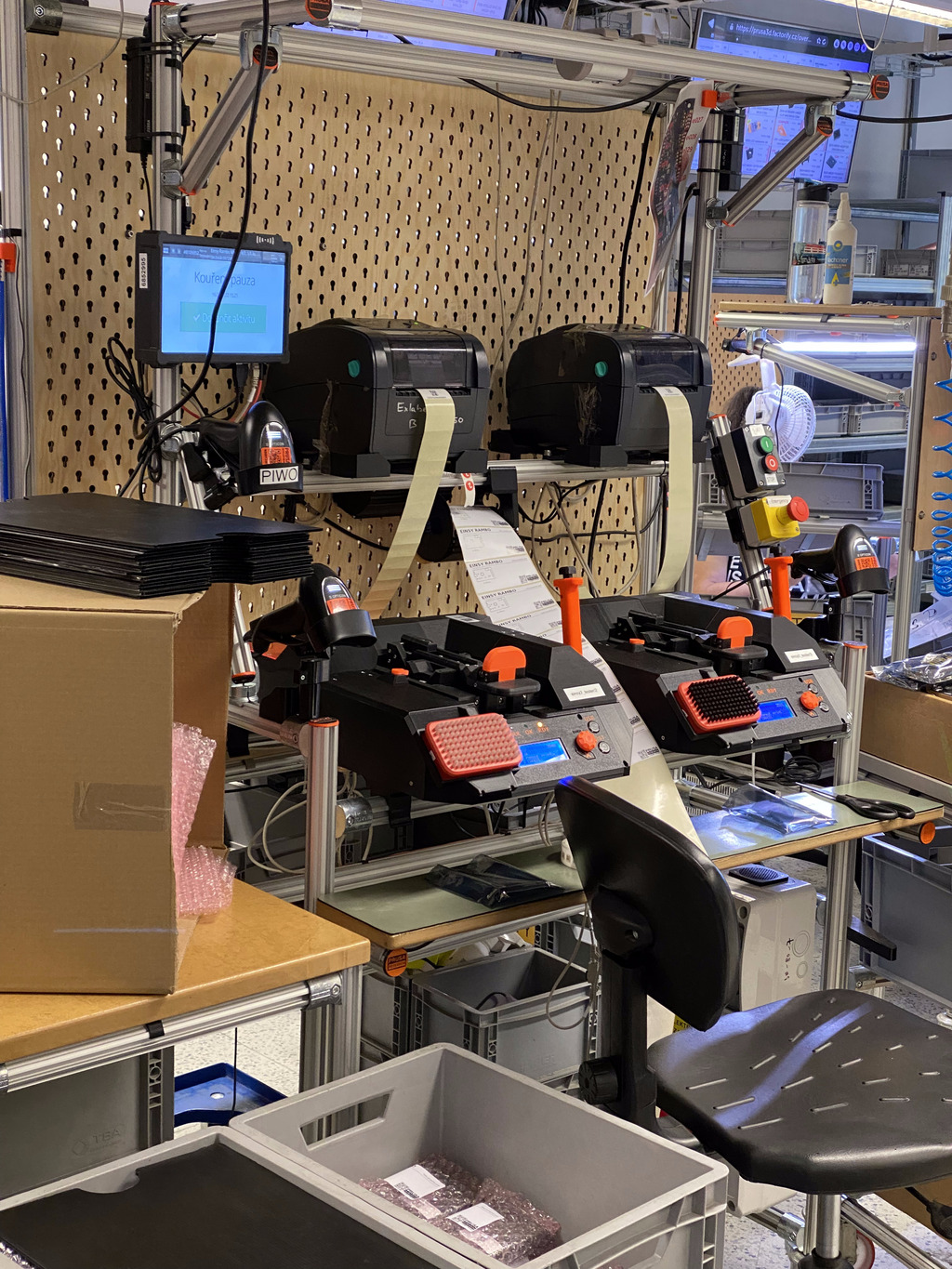
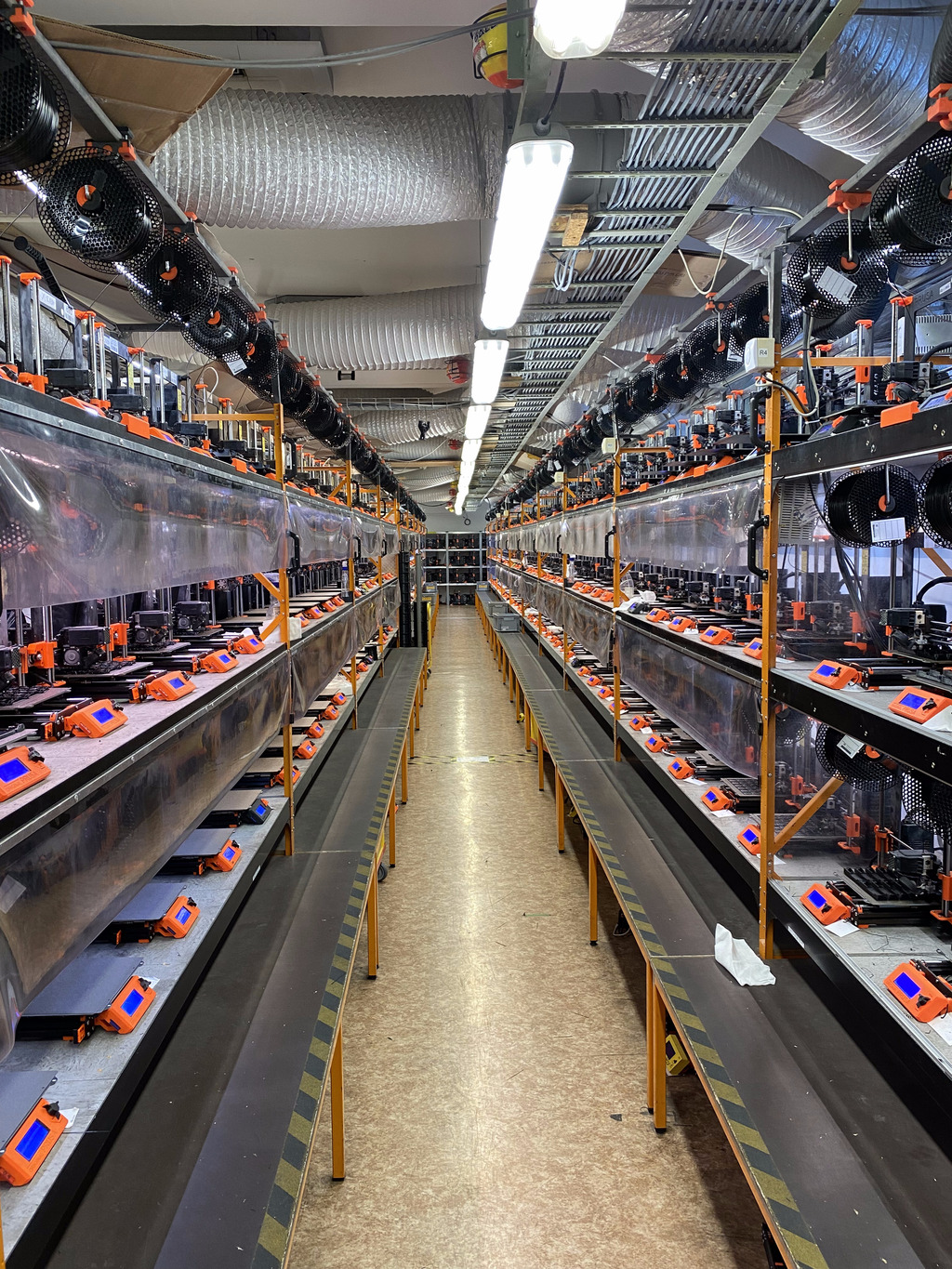
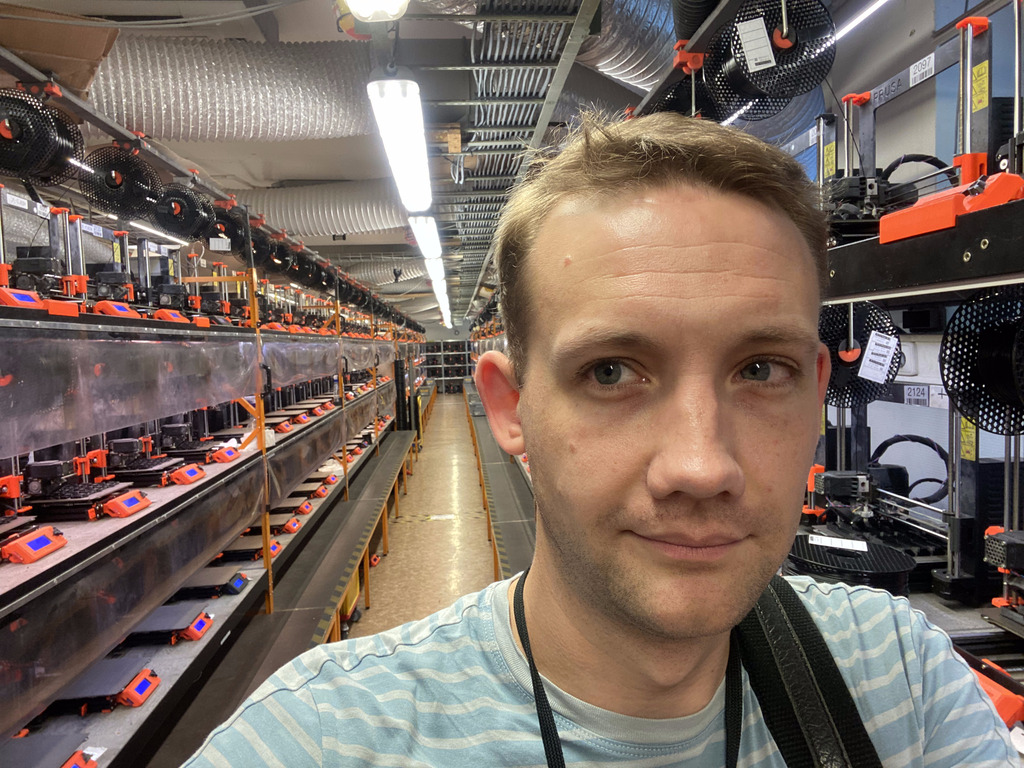
The rest of the ground floor area was full of heavy machinery and prototyping equipment. Onwards we went to the upstairs floors. Upstairs, past a nice graphic of Prusa's historic products, we visited the assembly and QE testing areas. They have a very organised system of parts buckets and some thorough QE processes, including some bespoke equipment that produces the "receipt" of tests and calibration that they provide for you in the box when you buy a 3D printer. After that, we visited the production Farm: a large room full of MK3S+ printers churning out parts for other printers. The noise was remarkable. The printers were running custom firmware to continually print the part they had been set for. Some of the printers were designated for printing with ASA: they were colour-coded (yellow controller surround) and within boxed regions to prevent the fumes causing problems. (picture at the top) Outside the room sat palettes of orange PETG plastic for the printer farm on 2KG spools (not a size they sell to the public just yet) The final part of the trip was outside, to the real farm: Prusa have a smallholding with Alpacas at the rear of their estate. Whilst we visited it, Josef Prusa himself turned up (in a snazzy looking custom colour Tesla) to feed the animals, say hello and pose for a picture. Overall, it was a fantastic visit. I'm very grateful to Air France for cancelling my flight home, and to Prusa Labs (in particular Luk ) for allowing me to come and say hello!

  1. I managed to squeeze that in too on my way to my rescheduled flight, although it was a rush visit and I don't have much to say or show from it. Suffice to say that it was lovely and bittersweet since the UK Maker Faire used to be hosted in my fair home city of Newcastle before they stopped.

Vincent Bernat: Building a SQL-like language to filter flows

Akvorado collects network flows using IPFIX or sFlow. It stores them in a ClickHouse database. A web console allows a user to query the data and plot some graphs. A nice aspect of this console is how we can filter flows with a SQL-like language:
Filter editor in Akvorado console
Often, web interfaces expose a query builder to build such filters. I think combining a SQL-like language with an editor supporting completion, syntax highlighting, and linting is a better approach.1 The language parser is built with pigeon (Go) from a parsing expression grammar or PEG. The editor component is CodeMirror (TypeScript).

Language parser PEG grammars are relatively recent2 and are an alternative to context-free grammars. They are easier to write and they can generate better error messages. Python switched from an LL(1)-based parser to a PEG-based parser in Python 3.9. pigeon generates a parser for Go. A grammar is a set of rules. Each rule is an identifier, with an optional user-friendly label for error messages, an expression, and an action in Go to be executed on match. You can find the complete grammar in parser.peg. Here is a simplified rule:
ConditionIPExpr "condition on IP"  
  column:("ExporterAddress"i   return "ExporterAddress", nil  
        / "SrcAddr"i   return "SrcAddr", nil  
        / "DstAddr"i   return "DstAddr", nil  ) _ 
  operator:("=" / "!=") _ 
  ip:IP  
    return fmt.Sprintf("%s %s IPv6StringToNum(%s)",
      toString(column), toString(operator), quote(ip)), nil
   
The rule identifier is ConditionIPExpr. It case-insensitively matches ExporterAddress, SrcAddr, or DstAddr. The action for each case returns the proper case for the column name. That s what is stored in the column variable. Then, it matches one of the possible operators. As there is no code block, it stores the matched string directly in the operator variable. Then, it tries to match the IP rule, which is defined elsewhere in the grammar. If it succeeds, it stores the result of the match in the ip variable and executes the final action. The action turns the column, operator, and IP into a proper expression for ClickHouse. For example, if we have ExporterAddress = 203.0.113.15, we get ExporterAddress = IPv6StringToNum('203.0.113.15'). The IP rule uses a rudimentary regular expression but checks if the matched address is correct in the action block, thanks to netip.ParseAddr():
IP "IP address"   [0-9A-Fa-f:.]+  
  ip, err := netip.ParseAddr(string(c.text))
  if err != nil  
    return "", errors.New("expecting an IP address")
   
  return ip.String(), nil
 
Our parser safely turns the filter into a WHERE clause accepted by ClickHouse:3
WHERE InIfBoundary = 'external' 
AND ExporterRegion = 'france' 
AND InIfConnectivity = 'transit' 
AND SrcAS = 15169 
AND DstAddr BETWEEN toIPv6('2a01:e0f:ffff::') 
                AND toIPv6('2a01:e0f:ffff:ffff:ffff:ffff:ffff:ffff')

Integration in CodeMirror CodeMirror is a versatile code editor that can be easily integrated into JavaScript projects. In Akvorado, the Vue.js component, InputFilter, uses CodeMirror as its foundation and leverages features such as syntax highlighting, linting, and completion. The source code for these capabilities can be found in the codemirror/lang-filter/ directory.

Syntax highlighting The PEG grammar for Go cannot be utilized directly4 and the requirements for parsers for editors are distinct: they should be error-tolerant and operate incrementally, as code is typically updated character by character. CodeMirror offers a solution through its own parser generator, Lezer. We don t need this additional parser to fully understand the filter language. Only the basic structure is needed: column names, comparison and logic operators, quoted and unquoted values. The grammar is therefore quite short and does not need to be updated often:
@top Filter  
  expression
 
expression  
 Not expression  
 "(" expression ")"  
 "(" expression ")" And expression  
 "(" expression ")" Or expression  
 comparisonExpression And expression  
 comparisonExpression Or expression  
 comparisonExpression
 
comparisonExpression  
 Column Operator Value
 
Value  
  String   Literal   ValueLParen ListOfValues ValueRParen
 
ListOfValues  
  ListOfValues ValueComma (String   Literal)  
  String   Literal
 
// [ ]
@tokens  
  // [ ]
  Column   std.asciiLetter (std.asciiLetter std.digit)*  
  Operator   $[a-zA-Z!=><]+  
  String  
    '"' (![\\\n"]   "\\" _)* '"'?  
    "'" (![\\\n']   "\\" _)* "'"?
   
  Literal   (std.digit   std.asciiLetter   $[.:/])+  
  // [ ]
 
The expression SrcAS = 12322 AND (DstAS = 1299 OR SrcAS = 29447) is parsed to:
Filter(Column, Operator, Value(Literal),
  And, Column, Operator, Value(Literal),
  Or, Column, Operator, Value(Literal))
The last step is to teach CodeMirror how to map each token to a highlighting tag:
export const FilterLanguage = LRLanguage.define( 
  parser: parser.configure( 
    props: [
      styleTags( 
        Column: t.propertyName,
        String: t.string,
        Literal: t.literal,
        LineComment: t.lineComment,
        BlockComment: t.blockComment,
        Or: t.logicOperator,
        And: t.logicOperator,
        Not: t.logicOperator,
        Operator: t.compareOperator,
        "( )": t.paren,
       ),
    ],
   ),
 );

Linting We offload linting to the original parser in Go. The /api/v0/console/filter/validate endpoint accepts a filter and returns a JSON structure with the errors that were found:
 
  "message": "at line 1, position 12: string literal not terminated",
  "errors": [ 
    "line":    1,
    "column":  12,
    "offset":  11,
    "message": "string literal not terminated",
   ]
 
The linter source for CodeMirror queries the API and turns each error into a diagnostic.

Completion The completion system takes a hybrid approach. It splits the work between the frontend and the backend to offer useful suggestions for completing filters. The frontend uses the parser built with Lezer to determine the context of the completion: do we complete a column name, an operator, or a value? It also extracts the column name if we are completing something else. It forwards the result to the backend through the /api/v0/console/filter/complete endpoint. Walking the syntax tree was not as easy as I thought, but unit tests helped a lot. The backend uses the parser generated by pigeon to complete a column name or a comparison operator. For values, the completions are either static or extracted from the ClickHouse database. A user can complete an AS number from an organization name thanks to the following snippet:
results := []struct  
  Label  string  ch:"label" 
  Detail string  ch:"detail" 
 
columnName := "DstAS"
sqlQuery := fmt.Sprintf( 
 SELECT concat('AS', toString(%s)) AS label, dictGet('asns', 'name', %s) AS detail
 FROM flows
 WHERE TimeReceived > date_sub(minute, 1, now())
 AND detail != ''
 AND positionCaseInsensitive(detail, $1) >= 1
 GROUP BY label, detail
 ORDER BY COUNT(*) DESC
 LIMIT 20
 , columnName, columnName)
if err := conn.Select(ctx, &results, sqlQuery, input.Prefix); err != nil  
  c.r.Err(err).Msg("unable to query database")
  break
 
for _, result := range results  
  completions = append(completions, filterCompletion 
    Label:  result.Label,
    Detail: result.Detail,
    Quoted: false,
   )
 
In my opinion, the completion system is a major factor in making the field editor an efficient way to select flows. While a query builder may have been more beginner-friendly, the completion system s ease of use and functionality make it more enjoyable to use once you become familiar.

  1. Moreover, building a query builder did not seem like a fun task for me.
  2. They were introduced in 2004 in Parsing Expression Grammars: A Recognition-Based Syntactic Foundation. LR parsers were introduced in 1965, LALR parsers in 1969, and LL parsers in the 1970s. Yacc, a popular parser generator, was written in 1975.
  3. The parser returns a string. It does not generate an intermediate AST. This makes it simpler and it currently fits our needs.
  4. It could be manually translated to JavaScript with PEG.js.

Valhalla's Things: Cernit Sets for the Royal Game of UR

Posted on February 13, 2023
Some months ago I stumbled on the video where Irving Finkel teaches Tom Scott how to play the Royal Game of Ur and my takeout was:
  1. Irving Finkel is Gandalf or something;
  2. the game sounded quite fun!;
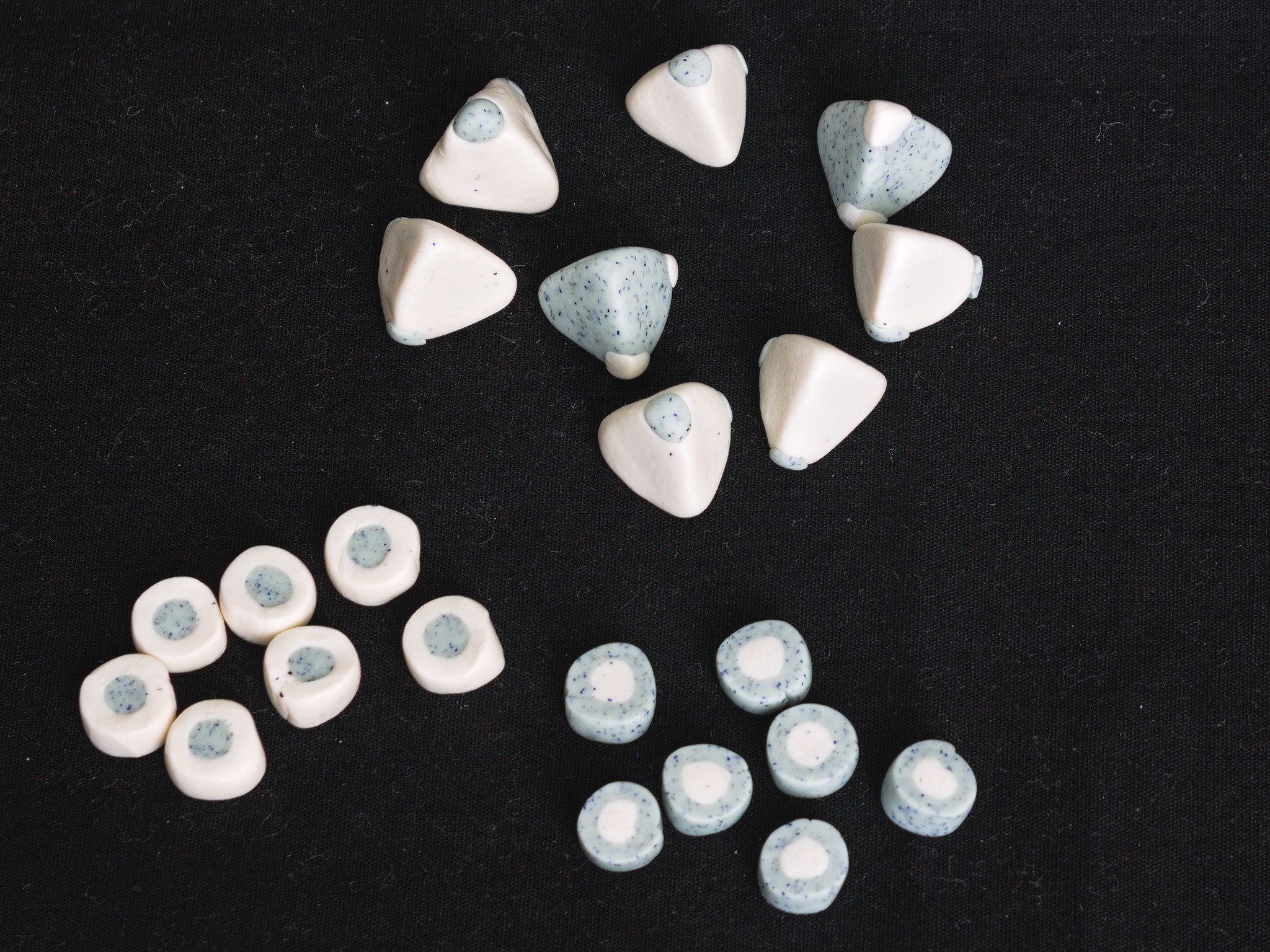
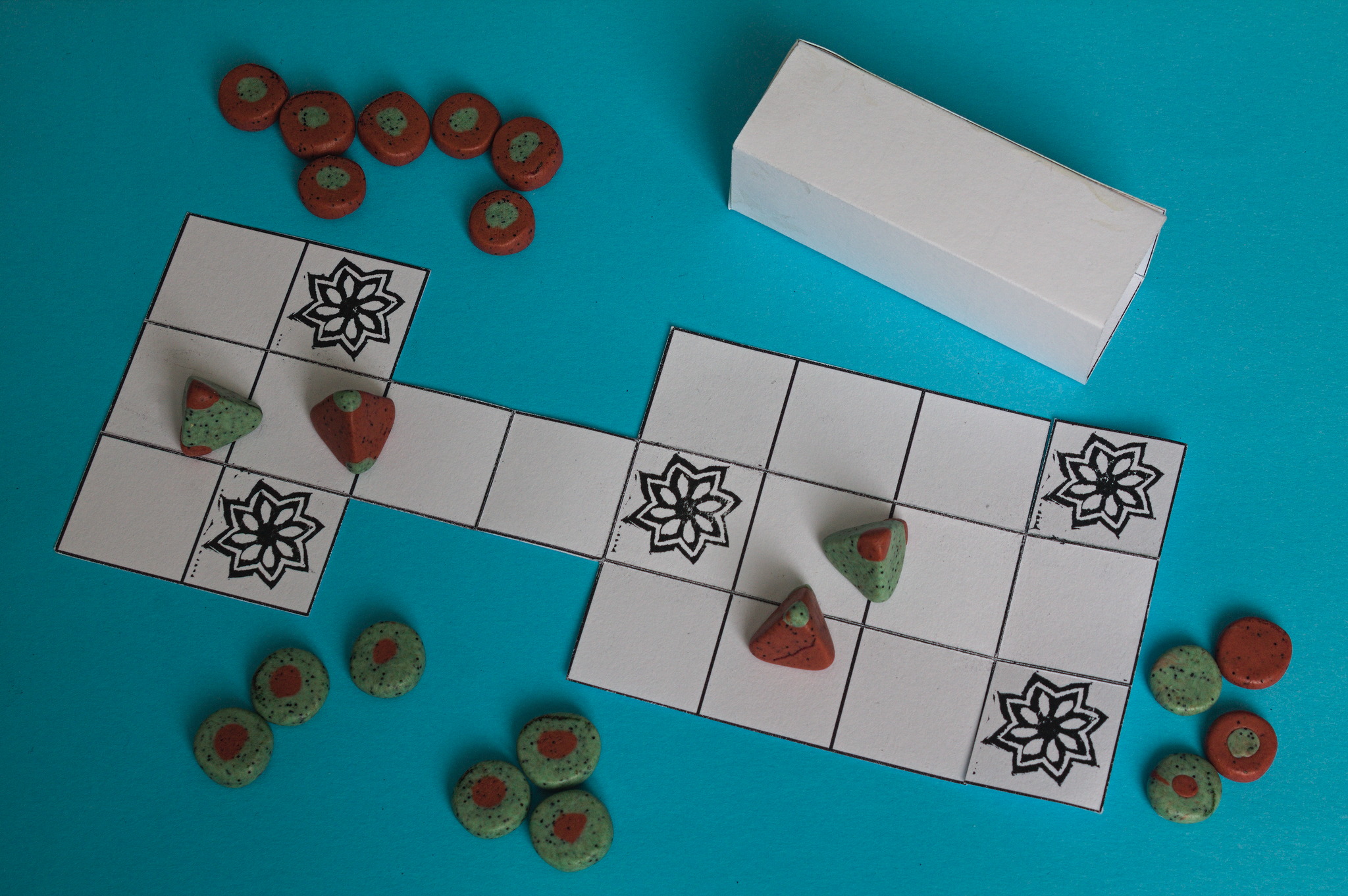
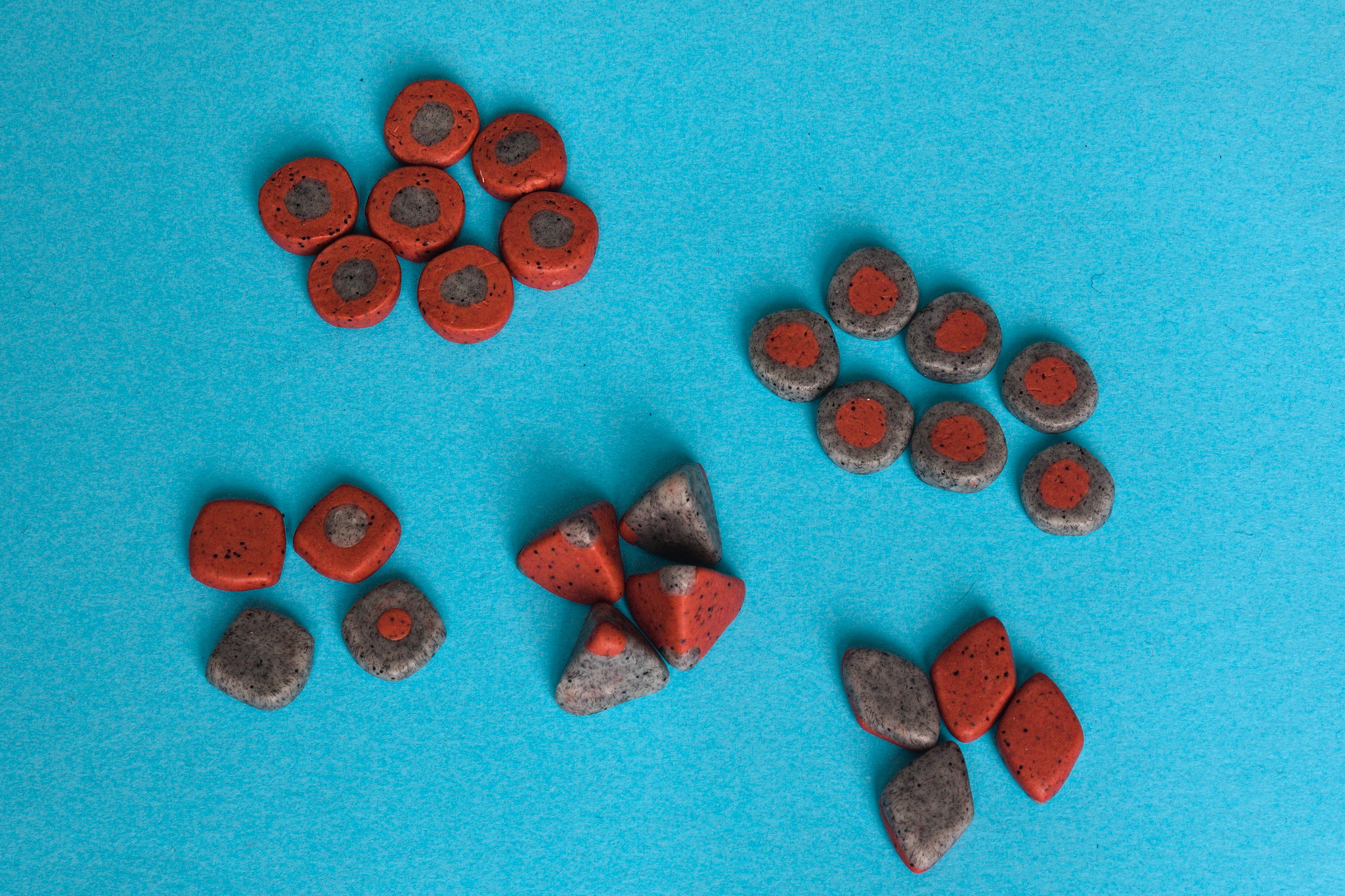
so I did the almost sensible thing, quickly drew a board with inkscape, printed it on 160 g/m paper and used my piecepack pieces to try a few games. two copies of a game board made of plain squares: a 3   4 squares area at the top, a 3   2 area at the bottom, connected by a 1   2 corridor in the middle. I say almost sensible, because rather than drawing the rosettes with inkscape I decided to carve a rubber stamp and use that to print them on the board (which is why the svgs on this page are missing them: if you print them you ll have to add the rosettes in some way). And if I had been a sensible person, that s where I would have stopped, since that s perfectly enough to play games and find out that it actually is quite a fun game, and one of our staples. As some of you probably know, I m not a sensible person. I also have quite a few blocks and half-blocks of cernit, and one day after I ve had used some, my hands were still moving and accidentally made some pyramidal dice, and a handful of tokens. Royal game of Ur pieces in marbled grey and white plastic: the tokens are small coins in one colour with a small circle of the other colour in the middle, the dice are tetrahedrons in one colour with two points marked in the other colour. And after baking and trying them I liked them, but they had not been planned in any way, and they were a bit too small for the board, so the next time I was using cernit I tried to make a new set. And while I was doing that I tried a new shape for the dice, as coins marked with a dot in the middle of one of the sides, because I don t really like tetrahedral dice. A set of red and green tokens, like the ones above, plus tetrahedron dice and four more coins with a dot of a different colour just on one side. Everything is on top of a board that folds up. And now, I realized this wasn t going to be my last set, and urgently felt the need for some container to keep them in and avoid missing pieces. (Yes, in the picture above one piece was already missing. While taking it I didn t realize it, and neither I did when picking up everything to put it away, getting the missing piece and storing it safely together with the rest of the set. It must have been hiding in plain sight nearby, but I will never know where.) Anyway, back to Inkscape, and to a board printed on scrap paper that I tried to fold up until I came up with a layout that folded up in a small drawer, and then I added a case to wrap around it to keep it closed. A white box, about 2.5 cm   2.5 cm   7.5 cm; a drawer is sliding out of one small end. The drawer from the box above, extracted to show it's made of a folded game of Ur board and contains a set with tokens and dice. I played around with the case until it was big enough to actually slide around the folded board, and this is the result, ready to be printed out on A4 paper, cut, folded and glued. (This takes most of the sheet, and I m not sure that the case would still fit around the board/drawer if printed with scaling, so if you want to print it on Letter paper I d recommend to move the pieces around.) two copies of the game board above, plus two cut / fold / glue boxes Now, the only problem left was that green isn t really my colour, and while I did like the stone effect of this set, I wasn t exactly pleased by the colour scheme. (why did I do it this way in the first place? probably because I was trying to use up old cernit blocks before opening new ones.) So, the only possible way out was to make yet another set, right? A set of red and grey tokens, tetrahedron dice, coins with one side marked with a dot that are square-ish rather than circular and four lozenge-shaped coins with each side of a different colour. I still used stone effect cernit, but this time in a red/grey scheme that knew I would have liked more, and while I was doing it I tried a few improvements on the randomization devices. The tetrahedral dice are still the same: they work, it s what they use in the replica sets, so I keep making them even if they re not my first choice. I ve changed the coins to make them almost square for two reasons, however: one is that the round one tended to roll away into inconvenient places when throwing them with emphasis, and the other one is to make it easier to recognise them from the tokens with no need to flip each one around before starting the game. The lozenges were a bit of a failure, instead. They work fine when thrown, but I don t think that there is a self-evident way to decide which side should be counted, and the only intuitive way I can think of (count the ones in the player s colour) would be unbalanced. Speaking of balance issues: of course the hand-modelled dice and coins aren t perfectly balanced but:
  • they don t feel obviously unbalanced;
  • both players use the same set, so any subtle unbalance isn t going to affect the chance of winning in an uneven way.
Maybe one day I will find a way to easily roll them a statistically significant number of times, collect data and analyze it to find out how imbalanced they are, but that s not going to happen with manual data collecting, and I m not really ready to go down the yak shaving filled road to automatize it. To wrap up: is it going to be the last set I make for the Royal Game of Ur? lol. Is it going to be the last cernit set I make this month? definitely yes, I now have one I m happy with, I m routinely playing with it and I m currently doing other crafts rather than cernit.

12 February 2023

Russell Coker: Intel vs AMD

In response to a post about my latest laptop I had someone ask why I chose an Intel CPU. I ve been a fan of the Thinkpad series of laptops since the 90s. They have always seemed well constructed (given the constraints of being light etc) and had a good feature set. Also I really like the TrackPoint. I ve been a fan of the smaller Thinkpads since I got an X-301 from e-waste [1] and the X1-Carbon series is the latest and greatest line of small Thinkpads. AMD makes some nice laptop CPUs which appear to have low power use and good performance particularly for smaller numbers of threads, it seems that generally AMD CPUs are designed for fewer cores with higher performance per core which is good for laptops. But Lenovo only makes the Thinkpad Carbon X1 series with Intel CPUs so choosing that model of laptop means choosing Intel. It could be that for some combination of size, TDP, speed, etc Intel just happens to beat AMD for all the times when Lenovo was designing a new motherboard for the Carbon X1. But it seems more likely that Intel has been lobbying Lenovo for this. It would be nice if there was an anti-trust investigation into Intel, everyone who s involved in the computer industry knows of some of the anti-competitive things that they have done. Also it would be nice if Lenovo started shipping laptops with ARM CPUs across their entire range. But for the moment I guess I have to keep buying laptops with Intel CPUs.

Russell Coker: T320 iDRAC Failure and new HP Z640

The Dell T320 Almost 2 years ago I made a Dell PowerEdge T320 my home server [1]. It was a decent upgrade from the PowerEdge T110 II that I had used previously. One benefit of that system was that I needed more RAM and the PowerEdge T1xx series use unbuffered ECC RAM which is unreasonably expensive as well as the DIMMs tending to be smaller (no Load Reduced DIMMS) and only having 4 slots. As I had bought two T320s I put all the RAM in a single server getting a total of 96G and then put some cheap DIMMs in the other one and sold it with 48G. The T320 has all the server reliability features including hot-swap redundant PSUs and hot-swap hard drives. One thing it doesn t have redundancy on is the motherboard management system known as iDRAC. 3 days ago my suburb had a power outage and when power came back on the T320 gave an error message about a failure to initialise the iDRAC and put all the fans on maximum speed, which is extremely loud. When a T320 is running in a room that s not particularly hot and it doesn t have SAS disks it s a very quiet server, one of the quietest I ve ever owned. When it goes into emergency cooling mode due to iDRAC failure it s loud enough to be heard from the other end of the house with doors closed in between. Googling this failure gave a few possible answers. One was for some combinations of booting with the iDRAC button held down, turning off for a while and booting with the iDRAC button held down, etc (this didn t work). One was for putting a iDRAC firmware file on the SD card so iDRAC could automatically load it (which I tested even though I didn t have the flashing LED which indicates that it is likely to work, but it didn t do anything). The last was to enable serial console and configure the iDRAC to load new firmware via TFTP, I didn t get a iDRAC message from the serial console just the regular BIOS stuff. So it looks like I ll have to sell the T320 for parts or find someone who wants to run it in it s current form. Currently to boot it I have to press F1 a few times to bypass BIOS messages (someone on the Internet reported making a device to key-jam F1). Then when it boots it s unreasonably loud, but apparently if you are really keen you can buy fans that have temperature sensors to control their own speed and bypass the motherboard control. I d appreciate any advice on how to get this going. At this stage I m not going to go back to it but if I can get it working properly I can sell it for a decent price. The HP Z640 I ve replaced the T320 with a HP Z640 workstation with 32G of RAM which I had recently bought to play with Stable Diffusion. There were hundreds of Z640 workstations with NVidia Quadro M6000 GPUs going on eBay for under $400 each, it looked like a company that did a lot of ML work had either gone bankrupt or upgraded all their employees systems. The price for the systems was surprisingly cheap, at regular eBay prices it seems that the GPU and the RAM go for about the same price as the system. It turned out that Stable Diffusion didn t like the video card in my setup for unknown reasons but also that the E5-1650v3 CPU could render an image in 15 minutes which is fast enough to test it out but not fast enough for serious use. I had been planning to blog about that. When I bought the T320 server the DDR3 Registered ECC RAM it uses cost about $100 for 8*8G DIMMs, with 16G DIMMs being much more expensive. Now the DDR4 Registered ECC RAM used by my Z640 goes for about $120 for 2*16G DIMMs. In the near future I ll upgrade that system to 64G of RAM. It s disappointing that the Z640 only has 4 DIMM sockets per CPU so if you get a single-CPU version (as I did) and don t get the really expensive Load Reduced RAM then you are limited to 64G. So the supposed capacity benefit of going from DDR3 to DDR4 doesn t seem to apply to this upgrade. The Z640 I got has 4 bays for hot-swap SAS/SATA 2.5 SSD/HDDs and 2 internal bays for 3.5 hard drives. The T320 has 8*3.5 hot swap bays and I had 3 hard drives in them in a BTRFS RAID-10 configuration. Currently I ve got one hard drive attached via USB but that s obviously not a long-term solution. The 3 hard drives are 4TB, they have worked since 4TB was a good size. I have a spare 8TB disk so I could buy a second ($179 for a shingle HDD) to make a 8TB RAID-1 array. The other option is to pay $369 for a 4TB SSD (or $389 for a 4TB NVMe + $10 for the PCIe card) to keep the 3 device RAID-10. As tempting as 4TB SSDs are I ll probably get a cheap 8TB disk which will take capacity from 6TB to 8TB and I could use some extra 4TB disks for backups. I haven t played with the AMT/MEBX features on this system, I presume that they will work the same way as AMT/MEBX on the HP Z420 I ve used previously [2]. Update: HP has free updates for the BIOS etc available here [3]. Unfortunately it seems to require loading a kernel module supplied by HP to do this. This is a bad thing, kernel code that isn t in the mainline kernel is either of poor quality or isn t licensed correctly. I had to change my monitoring system to alert on temperatures over 100% of the high range while on the T320 I had it set at 95% of high and never got warnings. This is disappointing, enterprise class gear running in a reasonably cool environment (ambient temperature of about 22C) should be able to run all CPU cores at full performance without hitting 95% of the high temperature level.

11 February 2023

Vincent Bernat: Hacking the Geberit Sigma 70 flush plate

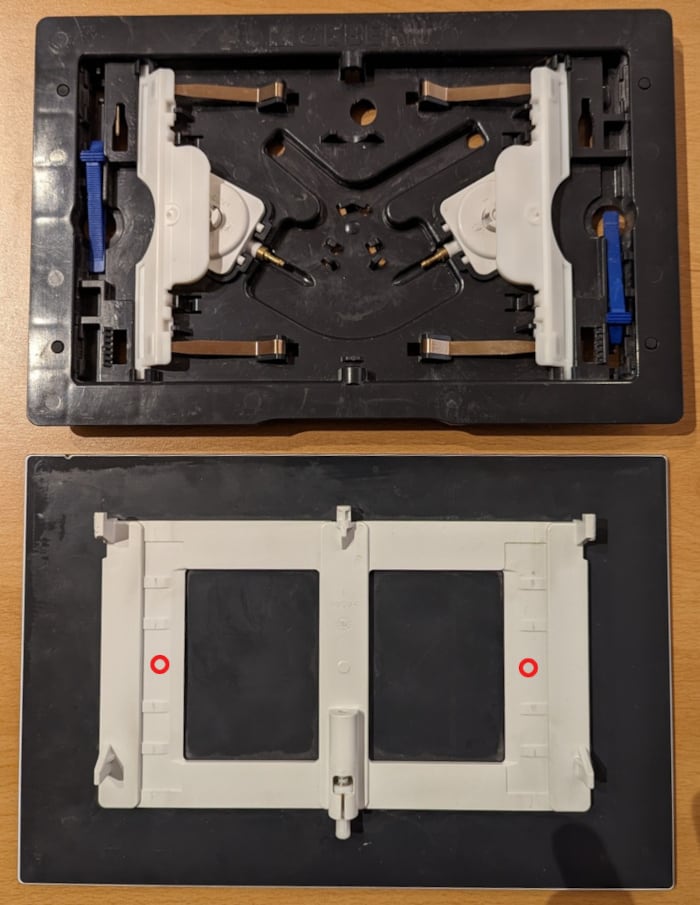
My toilet is equipped with a Geberit Sigma 70 flush plate. The sales pitch for this hydraulic-assisted device praises the ingenious mount that acts like a rocker switch. In practice, the flush is very capricious and has a very high failure rate. Avoid this type of mechanism! Prefer a fully mechanical version like the Geberit Sigma 20. After several plumbers, exchanges with Geberit s technical department, and the expensive replacement of the entire mechanism, I was still getting a failure rate of over 50% for the small flush. I finally managed to decrease this rate to 5% by applying two 8 mm silicone bumpers on the back of the plate. Their locations are indicated by red circles on the picture below:
Geberit Sigma 70 flush plate. Top: the mechanism that converts the mechanical press into a hydraulic impulse. Bottom: the back of the plate with the two places where to apply the bumpers.
Geberit Sigma 70 flush plate. Above: the mechanism installed on the wall. Below, the back of the glass plate. In red, the two places where to apply the silicone bumpers.
Expect to pay about 5 and as many minutes for this operation.

10 February 2023

Jonathan Dowland: HLedger, 1 year on

It's been a year since I started exploring HLedger, and I'm still going. The rollover to 2023 was an opportunity to revisit my approach. Some time ago I stumbled across Dmitry Astapov's HLedger notes (fully-fledged hledger, which I briefly mentioned in eventual consistency) and decided to adopt some of its ideas. new year, new journal First up, Astapov encourages starting a new journal file for a new calendar year. I do this for other, accounting-adjacent files as a matter of course, and I did it for my GNUCash files prior to adopting HLedger. But the reason for those is a general suspicion that a simple mistake with those softwares could irrevocably corrupt my data. I'm much more confident with HLedger, so rolling over at years end isn't necessary for that. But there are other advantages. A quick obvious one is you can get rid of old accounts (such as expense accounts tied to a particular project, now completed). one journal per import In the first year, I periodically imported account data via CSV exports of transactions and HLedger's (excellent) CSV import system. I imported all the transactions, once each, into a single, large journal file. Astapov instead advocates for creating a separate journal for each CSV that you wish to import, and keep around the CSV, leaving you with a 1:1 mapping of CSV:journal. Then use HLedger's "include" mechanism to pull them all into the main journal. With the former approach, where the CSV data was imported precisely, once, it was only exposed to your import rules once. The workflow ended up being: import transactions; notice some that you could have matched with import rules and auto-coded; write the rule for the next time. With Astapov's approach, you can re-generate the journal from the CSV at any point in the future with an updated set of import rules. tracking dependencies Now we get onto the job of driving the generation of all these derivative journal files. Astapov has built a sophisticated system using Haskell's "Shake", which I'm not yet familiar, but for my sins I'm quite adept at (GNU-flavoured) UNIX Make, so I started building with that. An example rule
import/jon/amex/%.journal: import/jon/amex/%.csv rules/amex.csv.rules
    rm -f $(@D)/.latest.$*.csv $@
    hledger import --rules-file rules/amex.csv.rules -f $@ $<
This captures the dependency between the journal and the underlying CSV but also to the relevant rules file; if I modify that, and this target is run in the future, all dependent journals should be re-generated.1 opening balances It's all fine and well starting over in a new year, and I might be generous to forgive debts, but I can't count on others to do the same. We need to carry over some balance information from one year to the next. Astapov has a more complex (or perhaps featureful) scheme for this involving a custom Haskell program, but I bodged something with a pair of make targets:
import/opening/2023.csv: 2022.journal
    mkdir -p import/opening
    hledger bal -f $< \
                $(list_of_accounts_I_want_to_carry_over) \
        -O csv -N > $@
import/opening/2023.journal: import/opening/2023.csv rules/opening.rules
    rm -f $(@D)/.latest.2023.csv $@
    hledger import --rules-file rules/opening.rules \
        -f $@ $<
I think this could be golfed into a year-generic rule with a little more work. The nice thing about this approach is the opening balances for a given year might change, if adjustments are made in prior years. They shouldn't, for real accounts, but very well could for more "virtual" liabilities. (including: deciding to write off debts.) run lots of reports Astapov advocates for running lots of reports, and automatically. There's a really obvious advantage of that to me: there's no chance anyone except me will actually interact with HLedger itself. For family finances, I need reports to be able to discuss anything with my wife. Extending my make rules to run reports is trivial. I've gone for HTML reports for the most part, as they're the easiest on the eye. Unfortunately the most useful report to discuss (at least at the moment) would be a list of transactions in a given expense category, and the register/aregister commands did not support HTML as an output format. I submitted my first HLedger patch to add HTML output support to aregister: https://github.com/simonmichael/hledger/pull/2000 addressing the virtual posting problem I wrote in my original hledger blog post that I had to resort to unbalanced virtual postings in order to record both a liability between my personal cash and family, as well as categorise the spend. I still haven't found a nice way around that. But I suspect having broken out the journal into lots of other journals paves the way to a better solution to the above. The form of a solution I am thinking of is: some scheme whereby the two destination accounts are combined together; perhaps, choose one as a primary and encode the other information in sub-accounts under that. For example, repeating the example from my hledger blog post:
2022-01-02 ZTL*RELISH
    family:liabilities:creditcard        -3.00
    family:dues:jon                       3.00
    (jon:expenses:snacks)                 3.00
This could become
2022-01-02 ZTL*RELISH
    family:liabilities:creditcard        -3.00
    family:liabilities:jon:snacks
(I note this is very similar to a solution proposed to me by someone responding on twitter). The next step is to recognise that sometimes when looking at the data I care about one aspect, and at other times the other, but rarely both. So for the case where I'm thinking about family finances, I could use account aliases to effectively flatten out the expense category portion and ignore it. On the other hand, when I'm concerned about how I've spent my personal cash and not about how much I owe the family account, I could use aliases to do the opposite: rewrite-away the family:liabilities:jon prefix and combine the transactions with the regular jon:expenses account heirarchy. (this is all speculative: I need to actually try this.) catching errors after an import When I import the transactions for a given real bank account, I check the final balance against another source: usually a bank statement, to make sure they agree. I wasn't using any of the myriad methods to make sure that this remains true later on, and so there was the risk that I make an edit to something and accidentally remove a transaction that contributed to that number, and not notice (until the next import). The CSV data my bank gives me for accounts (not for credit cards) also includes a 'resulting balance' field. It was therefore trivial to extend the CSV import rules to add balance assertions to the transactions that are generated. This catches the problem. There are a couple of warts with balance assertions on every such transaction: for example, dealing with the duplicate transaction for paying a credit card: one from the bank statement, one from the credit card. Removing one of the two is sufficient to correct the account balances but sometimes they don't agree on the transaction date, or the transactions within a given day are sorted slightly differently by HLedger than by the bank. The simple solution is to just manually delete one or two assertions: there remain plenty more for assurance. going forward I've only scratched the surface of the suggestions in Astapov's "full fledged HLedger" notes. I'm up to step 2 of 14. I'm expecting to return to it once the changes I've made have bedded in a little bit. I suppose I could anonymize and share the framework (Makefile etc) that I am using if anyone was interested. It would take some work, though, so I don't know when I'd get around to it.

  1. the rm latest bit is to clear up some state-tracking files that HLedger writes to avoid importing duplicate transactions. In this case, I know better than HLedger.

Antoine Beaupr : Picking a USB-C dock and charger

Dear lazy web, help me pick the right hardware to make my shiny new laptop work better. I want a new USB-C dock and travel power supply.

Background I need advice on hardware, because my current setup in the office doesn't work so well. My new Framework laptop has four (4!) USB-C ports which is great, but it only has those ports (there's a combo jack, but I don't use it because it's noisy). So right now I have the following setup:
  • HDMI: monitor one
  • HDMI: monitor two
  • USB-A: Yubikey
  • USB-C: USB-C hub, which has:
    • RJ-45 network
    • USB-A keyboard
    • USB-A mouse
    • USB-A headset
... and I'm missing a USB-C port for power! So I get into this annoying situation where I need to actually unplug the USB-A Yubikey, unplug the USB-A expansion card, plug in the power for a while so it can charge, and then do that in reverse when I need the Yubikey again (which is: often). Another option I have is to unplug the headset, but I often need both the headset and the Yubikey at once. I also have a pair of earbuds that work in the combo jack, but, again, they are noticeably noisy. So this doesn't work. I'm thinking I should get a USB-C Dock of some sort. The Framework forum has a long list of supported docks in a "megathread", but I figured people here might have their own experience with docks and laptop/dock setups. So what should USB-C Dock should I get? Should I consider changing to a big monitor with a built-in USB-C dock and power? Ideally, i'd like to just walk in the office, put the laptop down and insert a single USB-C cable and be done with it. Does that even work with Wayland? I have read reports of Displaylink not working in Sway specifically... does that apply to any multi-monitor over a single USB-C cable setup? Oh, and what about travel options? Do you have a fancy small form factor USB-C power charger that you really like?

Current ideas Here are the devices I'm considering right now...

USB chargers The spec here is at least 65W USB-C with international plugs. I particularly like the TOFU, but I am not sure it will deliver... I found that weird little thing through this Twitter post from Benedict Reuschling, from this blog post, from 2.5 admins episode 127 (phew!). Update: I ordered a TOFU power station today (2023-02-20). I'm a little concerned about the power output (45W instead of 65W for the Framework charger), but I suspect it will not actually be a problem while traveling, since the laptop will keep its charge during the day and will charge at night... The device shipped 3 days later, with an estimated delivery time of 12 to 15 days, so expect this thing to take its sweet time landing on your desk.

USB Docks Specification:
  • must have 2 or more USB-A ports (3 is ideal, otherwise i need a new headset adapter)
  • at least one USB-C port, preferably more
  • works in Linux
  • 2 display support (or one big monitor?), ideally 2x4k for future-proofing, HDMI or Display-Port, ideally also with double USB-C/Thunderbolt for future-proofing
  • all on one USB-C wire would be nice
  • power delivery over the USB-C cable
  • not too big, preferably
Note that I move from 4 USB-A ports down to 2 or 3 because I can change the USB-A cable on my keyboard for USB-C. But that means I need a slot for a USB-C port on the dock of course. I also could live with one less USB-A cable if I find a combo jack adapter, but that would mean a noisy experience. Options found so far:
  • ThinkPad universal dock/40ay0090us): 300$USD, 65-100W, combo jack, 3x USB3.1, 2x USB2.0, 1x USB-C, 2x Display Port, 1x HDMI Port, 1x Gigabit Ethernet
  • Caldigit docks are apparently good, and the USB-C HDMI Dock seems like a good candidate (not on sale in there Canada shop), but leaves me wondering whether I want to keep my old analog monitors around and instead get proper monitors with USB-C inputs, and use something like Thunderbolt Element hub (230$USD). Update: I wrote Caldigit and they don't seem to have any Dock that would work for me, they suggest the TS3 plus which only has a single DP connector (!?). The USB-C HDMI dock is actually discontinued and they mentioned that they do have trouble with Linux in general.
  • I was also recommended OWC docks as well. update: their website is a mess, and live chat has confirmed they do not actually have any device that fits the requirement of two HDMI/DP outputs.
  • Anker also has docks (e.g. the Anker 568 USB-C Docking Station 11-in-1 looks nice, but holy moly 300$USD... Also, Anker docks are not all equal, I've heard reports of some of them being bad. Update: I reached out to Anker to clarify whether or not their docks will work on Linux and to advise on which dock to use, and their response is that they "do not recommend you use our items with Linux system". So I guess that settles it with Anker.
  • Cable Matters are promising, and their "USB-C Docking Station with Dual 4K HDMI and 80W Charging for Windows Computers might just actually work. It was out of stock on their website and Amazon but after reaching out to their support by email, they pointed out a product page that works in Canada.
Also: this post from Big Mess Of Wires has me worried that anything might work at all. It's where I had the Cable Matters reference however... Update: I ordered a this dock from Cable Matters from Amazon (reluctantly). It promises Linux support and checked all the boxes for me (4x USB-A, audio, network, 2xHDMI). It kind of works? I tested the USB-A ports, charging, networking, and the HDMI ports, all worked the first time. But! When I disconnect and reconnect the hub, the HDMI ports stop working. It s quite infuriating especially since there s very little diagnostics available. It s unclear how the devices show up on my computer, I can t even tell what device provides the HDMI connectors in lsbusb. I ve also seen the USB keyboard drop keypresses, which is also ... not fun. I suspect foul play inside Sway. And yeah, those things are costly! This one goes for 300$ a pop, not great. Update 2: Cable Matters support responded by simply giving me this hack that solved it at least for now. Just reverse the USB-C cable, and poof, everything works. Magic.

Your turn! So what's your desktop setup like? Do you have docks? a laptop? a desktop? did you build it yourself? Did you solder a USB-C port in the back of your neck and interface directly with the matrix and there's no spoon? Do you have a 4k monitor? Two? A 8k monitor that curves around your head in a fully immersive display? Do you work on a Occulus rift and only interface the world through 3d virtual reality, including terminal emulators? Thanks in advance!

Next.

Previous.