Search Results: "sto"

17 May 2017

Reproducible builds folks: Reproducible Builds: week 107 in Stretch cycle

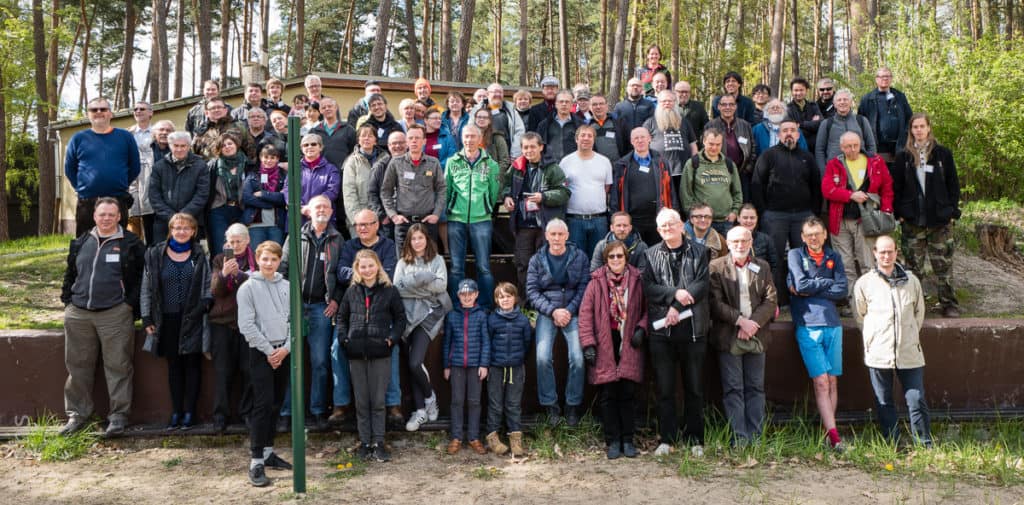
Here's what happened in the Reproducible Builds effort between Sunday May 7 and Saturday May 13 2017: Report from Reproducible Builds Hamburg Hackathon We were 16 participants from 12 projects: 7 Debian, 2 repeatr.io, 1 ArchLinux, 1 coreboot + LEDE, 1 F-Droid, 1 ElectroBSD + privoxy, 1 GNU R, 1 in-toto.io, 1 Meson and 1 openSUSE. Three people came from the USA, 3 from the UK, 2 Finland, 1 Austria, 1 Denmark and 6 from Germany, plus we several guests from our gracious hosts at the CCCHH hackerspace as well as a guest from Australia We had four presentations: Some of the things we worked on: We had a Debian focussed meeting where we discussed a number of topics: And then we also had a lot of fun in the hackerspace, enjoying some of their gimmicks, such as being able to open physical doors with ssh or controlling light and music with an webbrowser without authentication (besides being in the right network). Not quite the hackathon (This wasn't the hackathon per-se, but some of us appreciated these sights and so we thought you would too.) Many thanks to: News and media coverage openSUSE has had a security breach in their infrastructure, including their build services. As of this writing, the scope and impact are still unclear, however the incident illustrates that no one should rely on being able to secure their infrastructure at all times. Reproducible Builds help mitigate this by allowing independent verification of build results, by parties that are unaffected by the compromise. (Whilst this can happen to anyone. Kudos to openSUSE for being open about it. Now let's continue working on Reproducible Builds everywhere!) On May 13th Chris Lamb gave a talk on Reproducible Builds at OSCAL 2017 in Tirana, Albania. OSCAL 2017 Toolchain bug reports and fixes Packages' bug reports Reviews of unreproducible packages 11 package reviews have been added, 2562 have been updated and 278 have been removed in this week, adding to our knowledge about identified issues. Most of the updates were to move ~1800 packages affected by the generic catch-all captures_build_path (out of ~2600 total) to the more specific gcc_captures_build_path, fixed by our proposed patches to GCC. 5 issue types have been updated: Weekly QA work During our reproducibility testing, FTBFS bugs have been detected and reported by: diffoscope development diffoscope development continued on the experimental branch: strip-nondeterminism development reprotest development trydiffoscope development Misc. This week's edition was written by Ximin Luo, Holger Levsen and Chris Lamb & reviewed by a bunch of Reproducible Builds folks on IRC & the mailing lists.

Michal Čihař: Weblate 2.14

Weblate 2.14 has been released today slightly ahead of the schedule. There are quite a lot of security improvements based on reports we got from HackerOne program, API extensions and other minor improvements. Full list of changes: If you are upgrading from older version, please follow our upgrading instructions. You can find more information about Weblate on https://weblate.org, the code is hosted on Github. If you are curious how it looks, you can try it out on demo server. You can login there with demo account using demo password or register your own user. Weblate is also being used on https://hosted.weblate.org/ as official translating service for phpMyAdmin, OsmAnd, Turris, FreedomBox, Weblate itself and many other projects. Should you be looking for hosting of translations for your project, I'm happy to host them for you or help with setting it up on your infrastructure. Further development of Weblate would not be possible without people providing donations, thanks to everybody who have helped so far! The roadmap for next release is just being prepared, you can influence this by expressing support for individual issues either by comments or by providing bounty for them.

Filed under: Debian English SUSE Weblate

16 May 2017

Daniel Pocock: Building an antenna and receiving ham and shortwave stations with SDR

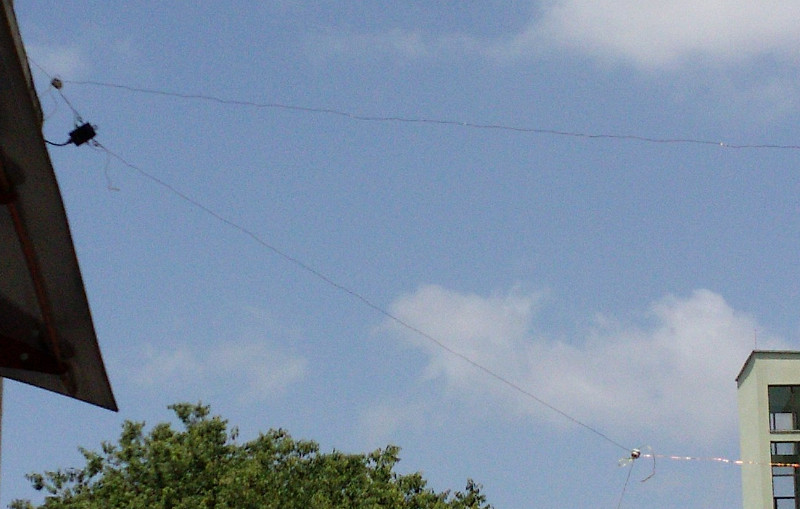
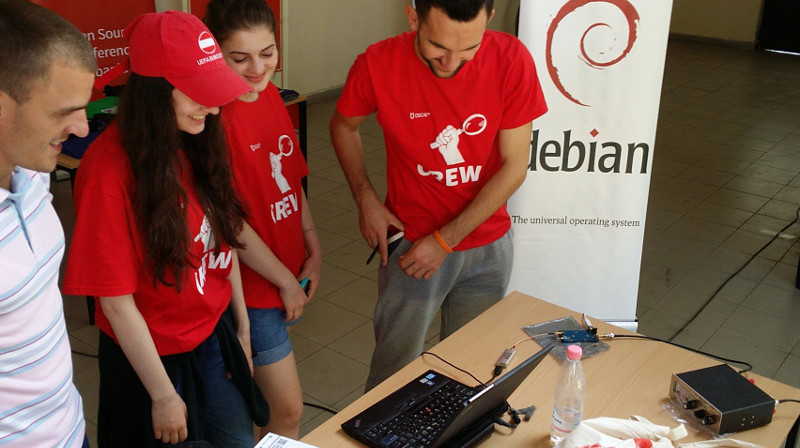
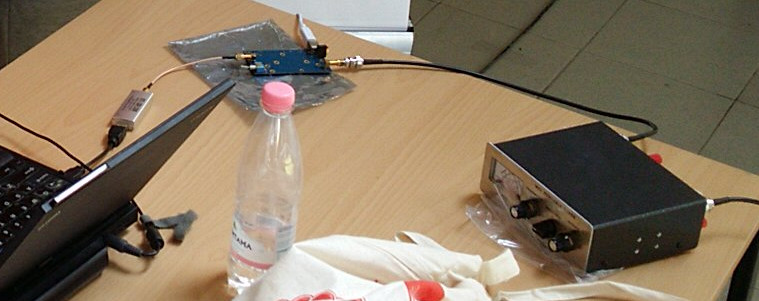
In my previous blog on the topic of software defined radio (SDR), I provided a quickstart guide to using gqrx, GNU Radio and the RTL-SDR dongle to receive FM radio and the amateur 2 meter (VHF) band. Using the same software configuration and the same RTL-SDR dongle, it is possible to add some extra components and receive ham radio and shortwave transmissions from around the world. Here is the antenna setup from the successful SDR workshop at OSCAL'17 on 13 May: After the workshop on Saturday, members of the OSCAL team successfully reconstructed the SDR and antenna at the Debian info booth on Sunday and a wide range of shortwave and ham signals were detected: Here is a close-up look at the laptop, RTL-SDR dongle (above laptop), Ham-It-Up converter (above water bottle) and MFJ-971 ATU (on right): Buying the parts
Component Purpose, Notes Price/link to source
RTL-SDR dongle Converts radio signals (RF) into digital signals for reception through the USB port. It is essential to buy the dongles for SDR with TCXO, the generic RTL dongles for TV reception are not stable enough for anything other than TV. ~ 25
Enamelled copper wire, 25 meters or more Loop antenna. Thicker wire provides better reception and is more suitable for transmitting (if you have a license) but it is heavier. The antenna I've demonstrated at recent events uses 1mm thick wire. ~ 10
4 (or more) ceramic egg insulators Attach the antenna to string or rope. Smaller insulators are better as they are lighter and less expensive. ~ 10
4:1 balun The actual ratio of the balun depends on the shape of the loop (square, rectangle or triangle) and the point where you attach the balun (middle, corner, etc). You may want to buy more than one balun, for example, a 4:1 balun and also a 1:1 balun to try alternative configurations. Make sure it is waterproof, has hooks for attaching a string or rope and an SO-239 socket. from 20
5 meter RG-58 coaxial cable with male PL-259 plugs on both ends If using more than 5 meters or if you want to use higher frequencies above 30MHz, use thicker, heavier and more expensive cables like RG-213. The cable must be 50 ohm. ~ 10
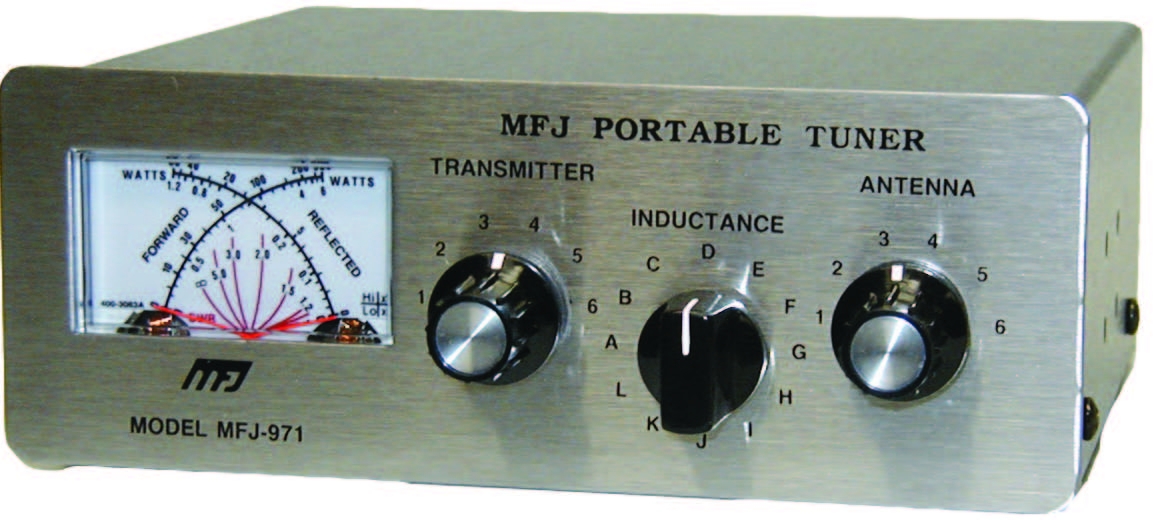
Antenna Tuning Unit (ATU) I've been using the MFJ-971 for portable use and demos because of the weight. There are even lighter and cheaper alternatives if you only need to receive. ~ 20 for receive only or second hand
PL-259 to SMA male pigtail, up to 50cm, RG58 Joins the ATU to the upconverter. Cable must be RG58 or another 50 ohm cable ~ 5
Ham It Up v1.3 up-converter Mixes the HF signal with a signal from a local oscillator to create a new signal in the spectrum covered by the RTL-SDR dongle ~ 40
SMA (male) to SMA (male) pigtail Join the up-converter to the RTL-SDR dongle ~ 2
USB charger and USB type B cable Used for power to the up-converter. A spare USB mobile phone charge plug may be suitable. ~ 5
String or rope For mounting the antenna. A ligher and cheaper string is better for portable use while a stronger and weather-resistent rope is better for a fixed installation. 5
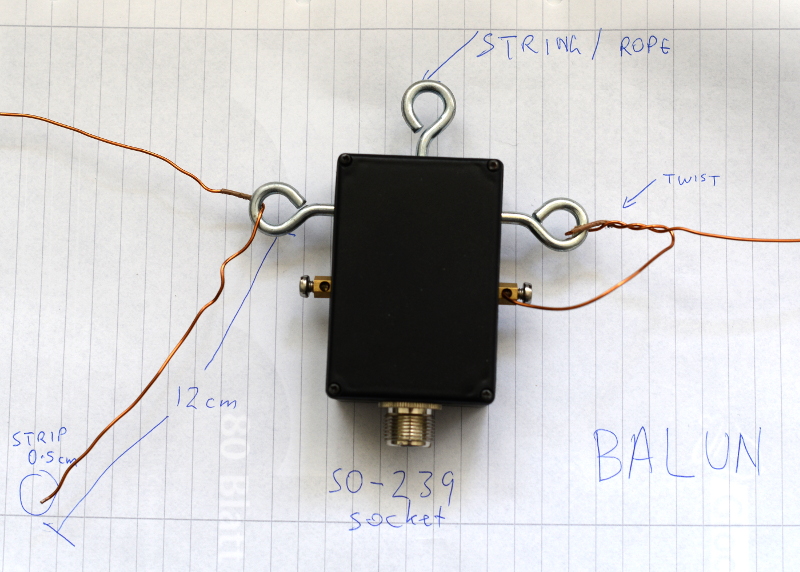
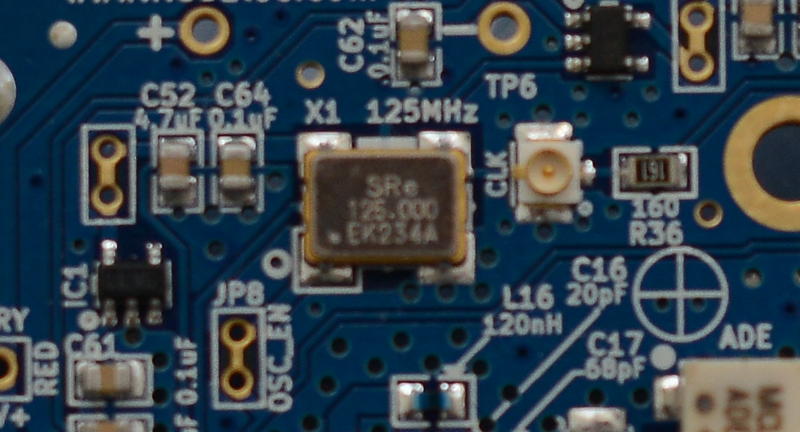
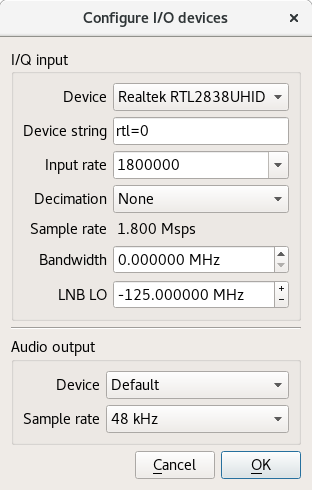
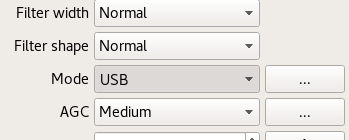
Building the antenna There are numerous online calculators for measuring the amount of enamelled copper wire to cut. For example, for a centre frequency of 14.2 MHz on the 20 meter amateur band, the antenna length is 21.336 meters. Add an extra 24 cm (extra 12 cm on each end) for folding the wire through the hooks on the balun. After cutting the wire, feed it through the egg insulators before attaching the wire to the balun. Measure the extra 12 cm at each end of the wire and wrap some tape around there to make it easy to identify in future. Fold it, insert it into the hook on the balun and twist it around itself. Use between four to six twists. Strip off approximately 0.5cm of the enamel on each end of the wire with a knife, sandpaper or some other tool. Insert the exposed ends of the wire into the screw terminals and screw it firmly into place. Avoid turning the screw too tightly or it may break or snap the wire. Insert string through the egg insulators and/or the middle hook on the balun and use the string to attach it to suitable support structures such as a building, posts or trees. Try to keep it at least two meters from any structure. Maximizing the surface area of the loop improves the performance: a circle is an ideal shape, but a square or 4:3 rectangle will work well too. For optimal performance, if you imagine the loop is on a two-dimensional plane, the first couple of meters of feedline leaving the antenna should be on the plane too and at a right angle to the edge of the antenna. Join all the other components together using the coaxial cables. Configuring gqrx for the up-converter and shortwave signals Inspect the up-converter carefully. Look for the crystal and find the frequency written on the side of it. The frequency written on the specification sheet or web site may be wrong so looking at the crystal itself is the best way to be certain. On my Ham It Up, I found a crystal with 125.000 written on it, this is 125 MHz. Launch gqrx, go to the File menu and select I/O devices. Change the LNB LO value to match the crystal frequency on the up-converter, with a minus sign. For my Ham It Up, I use the LNB LO value -125.000000 MHz. Click OK to close the I/O devices window. On the Input Controls tab, make sure Hardware AGC is enabled. On the Receiver options tab, change the Mode value. Commercial shortwave broadcasts use AM and amateur transmission use single sideband: by convention, LSB is used for signals below 10MHz and USB is used for signals above 10MHz. To start exploring the 20 meter amateur band around 14.2 MHz, for example, use USB. In the top of the window, enter the frequency, for example, 14.200 000 MHz. Now choose the FFT Settings tab and adjust the Freq zoom slider. Zoom until the width of the display is about 100 kHZ, for example, from 14.15 on the left to 14.25 on the right. Click the Play icon at the top left to start receiving. You may hear white noise. If you hear nothing, check the computer's volume controls, move the Gain slider (bottom right) to the maximum position and then lower the Squelch value on the Receiver options tab until you hear the white noise or a transmission. Adjust the Antenna Tuner knobs Now that gqrx is running, it is time to adjust the knobs on the antenna tuner (ATU). Reception improves dramatically when it is tuned correctly. Exact instructions depend on the type of ATU you have purchased, here I present instructions for the MFJ-971 that I have been using. Turn the TRANSMITTER and ANTENNA knobs to the 12 o'clock position and leave them like that. Turn the INDUCTANCE knob while looking at the signals in the gqrx window. When you find the best position, the signal strength displayed on the screen will appear to increase (the animated white line should appear to move upwards and maybe some peaks will appear in the line). When you feel you have found the best position for the INDUCTANCE knob, leave it in that position and begin turning the ANTENNA knob clockwise looking for any increase in signal strength on the chart. When you feel that is correct, begin turning the TRANSMITTER knob. Listening to a transmission At this point, if you are lucky, some transmissions may be visible on the gqrx screen. They will appear as darker colours in the waterfall chart. Try clicking on one of them, the vertical red line will jump to that position. For a USB transmission, try to place the vertical red line at the left hand side of the signal. Try dragging the vertical red line or changing the frequency value at the top of the screen by 100 Hz at a time until the station is tuned as well as possible. Try and listen to the transmission and identify the station. Commercial shortwave broadcasts will usually identify themselves from time to time. Amateur transmissions will usually include a callsign spoken in the phonetic alphabet. For example, if you hear "CQ, this is Victor Kilo 3 Tango Quebec Romeo" then the station is VK3TQR. You may want to note down the callsign, time, frequency and mode in your log book. You may also find information about the callsign in a search engine. The video demonstrates reception of a transmission from another country, can you identify the station's callsign and find his location? If you have questions about this topic, please come and ask on the Debian Hams mailing list. The gqrx package is also available in Fedora and Ubuntu but it is known to crash on startup in Ubuntu 17.04. Users of other distributions may also want to try the Debian Ham Blend bootable ISO live image as a quick and easy way to get started.

Foteini Tsiami: Outreachy internship!

Hello everyone! I am very happy that I have been accepted as an intern in the Outreachy 2017 round. My project task is to adapt sch-scripts into a new project ltsp-manager , primarily through internationalization and localization as well as documentation.

Sch-scripts is a graphical tool that assists with management of a classroom computer lab, managing users and network booted computers with LTSP, and is used in more than 1000 schools in Greece along with the epoptes user monitoring software.

Traditionally, maintaining an LTSP environment requires comfort with a commandline interface, but sch-scripts provides a graphical tool that simplifies the installation, configuration and management of an LTSP classroom.

Epoptes allows the teacher to monitor or assist users in the computer lab, as well as send messages, boot and shut down computers.

Both LTSP and Epoptes are present in Debian, and internationalizing sch-scripts is an important step towards making the same interface used successfully in Greek schools available to all Debian and Ubuntu users.

Francois Marier: Recovering from an unbootable Ubuntu encrypted LVM root partition

A laptop that was installed using the default Ubuntu 16.10 (xenial) full-disk encryption option stopped booting after receiving a kernel update somewhere on the way to Ubuntu 17.04 (zesty). After showing the boot screen for about 30 seconds, a busybox shell pops up:
BusyBox v.1.21.1 (Ubuntu 1:1.21.1-1ubuntu1) built-in shell (ash)
Enter 'help' for list of built-in commands.
(initramfs)
Typing exit will display more information about the failure before bringing us back to the same busybox shell:
Gave up waiting for root device. Common problems:
  - Boot args (cat /proc/cmdline)
    - Check rootdelay= (did the system wait long enough?)
    - Check root= (did the system wait for the right device?)
  - Missing modules (cat /proc/modules; ls /dev)
ALERT! /dev/mapper/ubuntu--vg-root does not exist. Dropping to a shell! 
BusyBox v.1.21.1 (Ubuntu 1:1.21.1-1ubuntu1) built-in shell (ash)   
Enter 'help' for list of built-in commands.  
(initramfs)
which now complains that the /dev/mapper/ubuntu--vg-root root partition (which uses LUKS and LVM) cannot be found. There is some comprehensive advice out there but it didn't quite work for me. This is how I ended up resolving the problem.

Boot using a USB installation disk First, create bootable USB disk using the latest Ubuntu installer:
  1. Download an desktop image.
  2. Copy the ISO directly on the USB stick (overwriting it in the process):
     dd if=ubuntu.iso of=/dev/sdc1
    
and boot the system using that USB stick (hold the option key during boot on Apple hardware).

Mount the encrypted partition Assuming a drive which is partitioned this way:
  • /dev/sda1: EFI partition
  • /dev/sda2: unencrypted boot partition
  • /dev/sda3: encrypted LVM partition
Open a terminal and mount the required partitions:
cryptsetup luksOpen /dev/sda3 sda3_crypt
vgchange -ay
mount /dev/mapper/ubuntu--vg-root /mnt
mount /dev/sda2 /mnt/boot
mount -t proc proc /mnt/proc
mount -o bind /dev /mnt/dev
Note:
  • When running cryptsetup luksOpen, you must use the same name as the one that is in /etc/crypttab on the root parition (sda3_crypt in this example).
  • All of these partitions must be present (including /proc and /dev) for the initramfs scripts to do all of their work. If you see errors or warnings, you must resolve them.

Regenerate the initramfs on the boot partition Then "enter" the root partition using:
chroot /mnt
and make sure that the lvm2 package is installed:
apt install lvm2
before regenerating the initramfs for all of the installed kernels:
update-initramfs -c -k all

15 May 2017

Michal Čihař: New projects on Hosted Weblate

Hosted Weblate provides also free hosting for free software projects. The hosting requests queue was over one month long, so it's time to process it and include new project. This time, the newly hosted projects include: We now also host few new Minetest mods: If you want to support this effort, please donate to Weblate, especially recurring donations are welcome to make this service alive. You can do them on Liberapay or Bountysource.

Filed under: Debian English SUSE Weblate

intrigeri: GNOME and Debian usability testing, May 2017

During the Contribute your skills to Debian event that took place in Paris last week-end, we conducted a usability testing session. Six people were tasked with testing a few aspects of the GNOME 3.22 desktop environment and of the Debian 9 (Stretch) operating system. A number of other people observed them and took notes. Then, two observers and three testers analyzed the results, that we are hereby presenting: we created a heat map visualization, summed up the challenges met during the tests, and wrote this blog post together. We will point the relevant upstream projects to our results. A couple of other people also did some usability testing but went in much more depth: their feedback is much more detailed and comes with a number of improvement ideas. I will process and publish their results as soon as possible. Missions Testers were provided a laptop running GNOME on a a Debian 9 (Stretch) Live system. A quick introduction (mostly copied from the one we found in some GNOME usability testing reports) was read. Then they were asked to complete the following tasks. A. Nautilus Mission A.1 Download and rename file in Nautilus
  1. Download a file from the web, a PDF document for example.
  2. Open the folder in which the file has been downloaded.
  3. Rename the dowloaded file to SUCCESS.pdf.
  4. Toggle the browser window to full screen.
  5. Open the file SUCCESS.pdf.
  6. Go back to the File manager.
  7. Close the file SUCCESS.pdf.
Mission A.2 Manipulate folders in Nautilus
  1. Create a new folder named cats in your user directory.
  2. Create a new folder named to do in your user directory.
  3. Move the cats folder to the to do folder.
  4. Delete the cats folder.
Mission A.3 Create a bookmark in Nautilus
  1. Create a folder named unicorns in your personal directory.
  2. This folder is important. Add a bookmark for unicorns in order to find it again in a few weeks.
Mission A.4 Nautilus display settings Folders and files are usually listed as icons, but they can also be displayed differently.
  1. Configure the File manager to make it show items as a list, with one file per line.
  2. You forgot your glasses and the font size is too small for you to see the text: increase the size of the text.
B. Package management Introduction On Debian, each application is available as a "package" which contains every file needed for the software to work. Unlike in other operating systems, it is rarely necessary and almost never a good idea, to download and install software from the authors website. We can rather install it from an online library managed by Debian (like an appstore). This alternative offers several advantages, such as being able to update all the software installed in one single action. Specific tools are available to install and update Debian packages. Mission B.1 Install and remove packages
  1. Install the vlc package.
  2. Start VLC.
  3. Remove the vlc package.
Mission B.2 Search and install a package
  1. Find a piece of software which can download files with BitTorrent in a graphical interface.
  2. Install the corresponding package.
  3. Launch that BitTorrent software.
Mission B.3 Upgrade the system Make sure the whole system (meaning all installed packages) is up to date. C. Settings Mission C.1 Change the desktop background
  1. Download an image you like from the web.
  2. Set the downloaded image as the desktop wallpaper.
Mission C.2 Tweak temporary files management Configure the system so that temporary files older than three days are deleted automatically. Mission C.3 Change the default video player
  1. Install VLC (ask for help if you could not do it during the previous mission).
  2. Make VLC the default video player.
  3. Download a video file from the web.
  4. Open the downloaded video, then check if it opens with VLC.
Mission C.4 Add and remove world clocks When you click the time and date in the top bar, a menu pops-up. There, you can display clocks in several time-zones.
  1. Add a clock with Rio de Janeiro timezone, then another showing the current time in Boston.
  2. Check that the time and date menu now displays these two additional clocks.
  3. Remove the Boston clock.
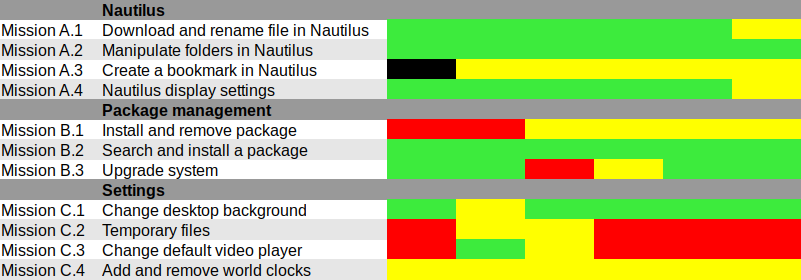
Results and analysis Heat map We used Jim Hall's heat map technique to summarize our usability test results. As Renata puts it, it is "a great way to see how the users performed on each task. The heat map clarifies how easy or difficult it was for the participant to accomplish a certain task.
  1. Scenario tasks (from the usability test) are arranged in rows.
  2. Test participants (for each tester) are arranged in columns.
  3. The colored blocks represent each tester s difficulty with each scenario task.
Green blocks represent the ability of the participant to accomplish the tasks with little or no difficulty. Yellow blocks indicate the tasks that the tester had significant difficulties accomplishing. Red blocks indicate that testers experienced extreme difficulty or where testers completed the tasks incorrectly. Black blocks indicate tasks the tester was unable to complete." Alternatively, here is the spreadsheet that was used to create this picture, with added text to avoid relying on colors only. Most tasks were accomplished with little or no difficulty so we will now focus on the problematic parts. What were the challenges? The heat map shows several "hot" rows, that we will now be looking at in more details. Mission A.3 Create a bookmark in Nautilus Most testers right-clicked the folder first, and eventually found they could simply drag'n'drop to the bookmarks location in the sidebar. One tester thought that he could select a folder, click the hamburger icon, and from there use the "Bookmark this folder" menu item. However, this menu action only works on the folder one has entered, not on the selected one. Mission B.1 Install and remove a package Here we faced a number of issues caused by the fact that Debian Live images don't include package indices (with good reason), so no package manager can list available software. Everyone managed to start a graphical package manager via the Overview (or via the CLI or Alt-F2 for a couple power users). Some testers tried to use GNOME Software, which listed only already installed packages (Debian bug #862560) and provided no way we could find to refresh the package indices. That's arguably a bug in Debian Live, but still: GNOME Software might display some useful information when it detects this unusual situation. We won't list here all the obstacles that were met in Synaptic: it's no news its usability is rather sub-optimal and better alternatives (such as GNOME Software) are in the works. Mission C.2 Tweak temporary files management The mission was poorly phrased: some observers had to clarify that it was specifically about GNOME, and not generic Linux system administration: some power-users were already searching the web for command-line tools to address the task at hand. Even with this clarification, no tester would have succeeded without being told they were allowed to use the web with a search query including the word "GNOME", or use the GNOME help or the Overview. Yet eventually all testers succeeded. It's interesting to note that regular GNOME users had the same problem as others: they did not try searching "temporary" in the Overview and did not look-up the GNOME Help until they were suggested to do so. Mission C.3 Change the default video player One tester configured one single video file format to be opened by default with VLC, via right-click in Nautilus Open with etc. He believed this would be enough to make VLC the default video player, missing the subtle difference between "default video player" and "default player for one single video format". One tester tried to complete this task inside VLC itself and then needed some help to succeed. It might be that the way web browsers ask "Do you want ThisBrowser to become the default web browser?" gave a hint an application GUI is the right place to do it. Two testers searched "default" in the Overview (perhaps the previous mission dealing with temporary files was enough to put them in this direction). At least one tester was confused since the only search result (Details View information about your system), which is the correct one to get there, includes the word View, which suggests that one cannot modify settings there, but only view them. One long-term GNOME user looked in Tweak Tool first, and then used the Overview. Here again, GNOME users experienced essentially the same issues as others. Mission C.4 Add and remove world clocks One tester tried to look for the clock on the top right corner of the screen, then realized it was in the middle. Other than this, all testers easily found a way to add world clocks. However, removing a world clock was rather difficult; although most testers managed to do it, it took them a number of attempts to succeed:
  1. Several testers left-clicked or right-clicked the clock they wanted to remove, expecting this would provide them with a way to remove it (which is not the case).
  2. After a while, all testers noticed the Select button (that has no text label nor tooltip info), which allowed them to select the clock they wanted to remove; then, most testers clicked the 1 selected button, hoping it would provide a contextual menu or some other way to act on the selected clocks (it doesn't).
  3. Eventually, everyone managed to locate the Delete button on the bottom right corner of the window; some testers mentioned that it is less visible and flashy than the blue bar that appears on the top of the screen once they had entered "Selection" mode.
General notes and observations

14 May 2017

Russ Allbery: Review: The Raven and the Reindeer

Review: The Raven and the Reindeer, by T. Kingfisher
Publisher: Red Wombat Tea Company
Copyright: 2016
ASIN: B01BKTT73A
Format: Kindle
Pages: 191
Once upon a time, there was a boy born with frost in his eyes and frost in his heart. There are a hundred stories about why this happens. Some of them are close to true. Most of them are merely there to absolve the rest of us of blame. It happens. Sometimes it's no one's fault.
Kay is the boy with frost in his heart. Gerta grew up next door. They were inseparable as children, playing together on cold winter days. Gerta was in love with Kay for as long as she could remember. Kay, on the other hand, was, well, kind of a jerk.
There are not many stories about this sort of thing. There ought to be more. Perhaps if there were, the Gertas of the world would learn to recognize it. Perhaps not. It is hard to see a story when you are standing in the middle of it.
Then, one night, Kay is kidnapped in the middle of the night by the Snow Queen while Gerta watches, helpless. She's convinced that she's dreaming, but when she wakes up, Kay is indeed gone, and eventually the villagers stop the search. But Gerta has defined herself around Kay her whole life, so she sets off, determined to find him, totally unprepared for the journey but filled with enough stubborn, practical persistence to overcome a surprising number of obstacles. Depending on your past reading experience (and cultural consumption in general), there are two things that may be immediately obvious from this beginning. First, it's written by Ursula Vernon, under her T. Kingfisher pseudonym that she uses for more adult fiction. No one else has quite that same turn of phrase, or writes protagonists with quite the same sort of overwhelmed but stubborn determination. Second, it's a retelling of Hans Christian Andersen's "The Snow Queen." I knew the first, obviously. I was completely oblivious to the second, having never read "The Snow Queen," or anything else by Andersen for that matter. I haven't even seen Frozen. I therefore can't comment in too much detail on the parallels and divergences between Kingfisher's telling and Andersen's (although you can read the original to compare if you want) other than some research on Wikipedia. As you might be able to tell from the quote above, though, Kingfisher is rather less impressed by the idea of childhood true love than Andersen was. This is not the sort of story in which the protagonist rescues the captive boy through the power of pure love. It's something quite a bit more complicated and interesting: a coming-of-age story for Gerta, in which her innocence is much less valuable than her fundamental decency, empathy, and courage, and in which her motives for her journey change as the journey proceeds. It helps that Kingfisher's world is populated by less idealized characters, many of whom are neither wholly bad nor wholly good, but who think of themselves as basically decent and try to do vaguely the right thing. Although sometimes they need some reminding. The story does feature a talking raven. (Most certainly not a crow.) His name is the Sound of Mouse Bones Crunching Under the Hooves of God. He's quite possibly the best part. Gerta does not rescue Kay through the power of pure love. But there is love here, of a sort that Gerta wasn't expecting at all, and of a sort that Andersen never had in mind when he wrote the original. There's also some beautifully-described shapeshifting, delightful old women, and otters. (Also, I find the boy who appears at the very end of the story utterly fascinating, with all his implied parallel story and the implicit recognition that the world does not revolve around Kay and Greta.) But I think my favorite part is how clearly different Greta is at the end of her journey than at the beginning, how subtly Kingfisher makes that happen through the course of the story, and how understated but just right her actions are at the very end. This is really excellent stuff. The next time you're feeling in the mood for a retold and modernized fairy tale, I recommend it. Rating: 8 out of 10

13 May 2017

Vincent Fourmond: Run QSoas complely non-interactively

QSoas can run scripts, and, since version 2.0, it can be run completely without user interaction from the command-line (though an interface may be briefly displayed). This possibility relies on the following command-line options:If you create a script.cmds file containing the following commands:
generate-buffer -10 10 sin(x)
save sin.dat
and run the following command from your favorite command-line interpreter:
~ QSoas --stdout --run '@ script.cmds' --exit-after-running
This will create a sin.dat file containing a sinusoid. However, if you run it twice, a Overwrite file 'sin.dat' ? dialog box will pop up. You can prevent that by adding the /overwrite=true option to save. As a general rule, you should avoid all commands that may ask questions in the scripts; a /overwrite=true option is also available for save-buffers for instance.I use this possibility massively because I don't like to store processed files, I prefer to store the original data files and run a script to generate the processed data when I want to plot or to further process them. It can also be used to generate fitted data from saved parameters files. I use this to run automatic tests on Linux, Windows and Mac for every single build, in order to quickly spot platform-specific regressions.To help you make use of this possibility, here is a shell function (Linux/Mac users only, add to your $HOME/.bashrc file or equivalent, and restart a terminal) to run directly on QSoas command files:
qs-run ()  
        QSoas --stdout --run "@ $1" --exit-after-running
 
To run the script.cmds script above, just run
~ qs-run script.cmds

About QSoasQSoas is a powerful open source data analysis program that focuses on flexibility and powerful fitting capacities. It is described in Fourmond, Anal. Chem., 2016, 88 (10), pp 5050 5052. Current version is 2.1

12 May 2017

Daniel Pocock: Kamailio World and FSFE team visit, Tirana arrival

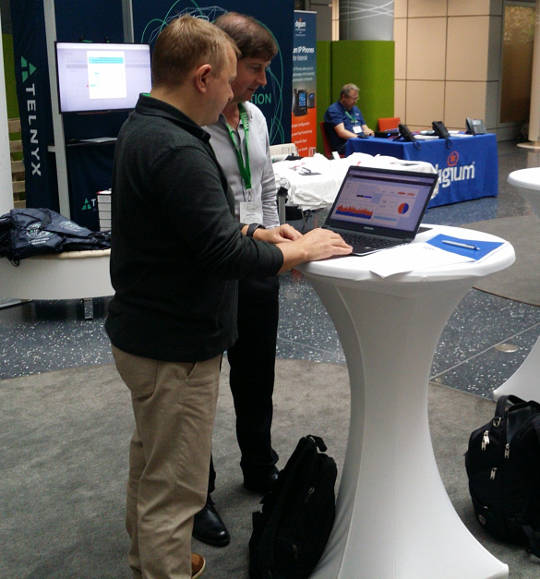
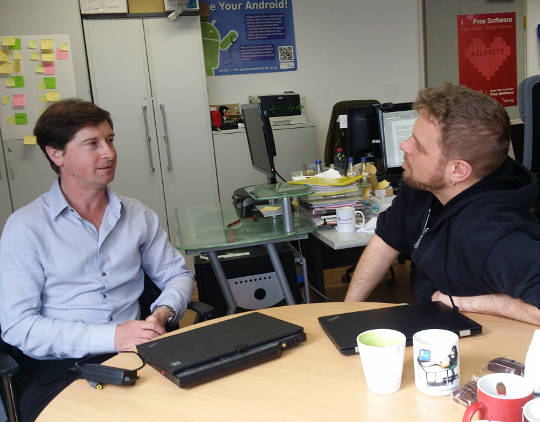
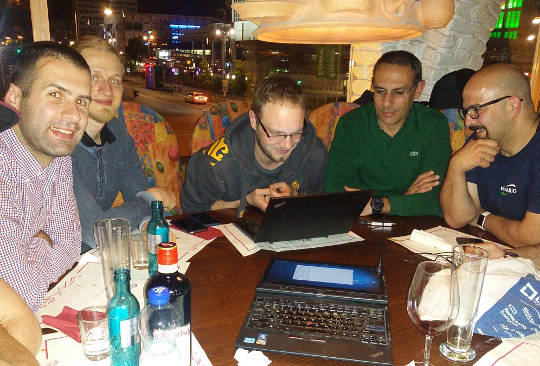
This week I've been thrilled to be in Berlin for Kamailio World 2017, one of the highlights of the SIP, VoIP and telephony enthusiast's calendar. It is an event that reaches far beyond Kamailio and is well attended by leaders of many of the well known free software projects in this space. HOMER 6 is coming Alexandr Dubovikov gave me a sneak peek of the new version of the HOMER SIP capture framework for gathering, storing and analyzing messages in a SIP network. exploring HOMER 6 with Alexandr Dubovikov at Kamailio World 2017 Visiting the FSFE team in Berlin Having recently joined the FSFE's General Assembly as the fellowship representative, I've been keen to get to know more about the organization. My visit to the FSFE office involved a wide-ranging discussion with Erik Albers about the fellowship program and FSFE in general. discussing the Fellowship program with Erik Albers Steak and SDR night After a hard day of SIP hacking and a long afternoon at Kamailio World's open bar, a developer needs a decent meal and something previously unseen to hack on. A group of us settled at Escados, Alexanderplatz where my SDR kit emerged from my bag and other Debian users found out how easy it is to apt install the packages, attach the dongle and explore the radio spectrum. playing with SDR after dinner Next stop OSCAL'17, Tirana Having left Berlin, I'm now in Tirana, Albania where I'll give an SDR workshop and Free-RTC talk at OSCAL'17. The weather forecast is between 26 - 28 degrees celsius, the food is great and the weekend's schedule is full of interesting talks and workshops. The organizing team have already made me feel very welcome here, meeting me at the airport and leaving a very generous basket of gifts in my hotel room. OSCAL has emerged as a significant annual event in the free software world and if it's too late for you to come this year, don't miss it in 2018. OSCAL'17 banner

Norbert Preining: Gaisi Takeuti, 1926-2017

Two days ago one of the most influential logician of the 20th century has passed away, Gaisi Takeuti ( ). I had the pleasure to meet this excellent man, teacher, writer, thinker several times while he was the president of the Kurt G del Society. I don t want to recall his achievements in mathematical logic, in particular proof theory, because I am not worth to write about such a genius. I want to recall a few personal stories from my own experience. I came into contact with Prof. Takeuti via is famous book Proof Theory, which my then Professor, now colleague and friend Matthias Baaz used for teaching us students proof theory. Together with Shoenfield s Mathematical Logic these two books became the foundation of my whole logic education. Now again in print, back then the Proof Theory was a rare precious. Few prints did remain in the library, and over the years one by one disappeared, until the last copy we had access to was my copy where I had scribbled pages and pages of notes and proofs. Matthias later on used these copies for his lectures, I should have written on the back-side! I remember well my first meeting with Prof. Takeuti: I was on the Conference on Internationalization in 2003 in Tsukuba, long before I moved to Japan. Back then I was just finishing my PhD and without much experience. When I arrived in the hotel, without fail there was a message of Prof. Takeuti inviting me for dinner the following day. We had dinner in a specialty restaurant of his area, together with is lovely wife. I was soo nervous about Japanese manners and stuttered Japanese phrases just to be stopped by Prof. Takeuti pouring himself a glass of sake and telling me: Relax, and forget the rules and fill your own glass when you want to. I am well aware that this liberal attitude didn t extend to Japanese colleagues, where he, descendant from a Samurai family, was at times very, extremely strict. The dinner was decided upon already, not easy since I was still strict vegetarian back than (now I would have enjoyed the dinner much more!), but for the last course we could decide. I remember with a smile how Prof. Takeuti suggested in Japanese various sweets, just to be interrupted by his wife with No Gaisi, no! . I asked what is going on and she explained that he wants to order a Japanese sweet for me I agreed, and that was probably the worst dish I had in Japan. Slippy noodles swimming in a cold broth, to be picked with chopsticks and put into a semi-sweet soja-sauce. I finished it, but it wasn t good. I should have thought twice when Prof. Takeuti s wife ordered a normal fruit salad. Scientifically he was simply a genius and famous for not reading a lot but reinventing everything. One of my research areas, G del logics, was reinvented by him as Intuitionistic Fuzzy Logic (for an overview see my talk at the Collegium Logicum 2016: G del Logics a short survey). But I want to recall one of my favorite articles of him: A Conservative Extension of Peano Arithmetic . This was published as part 2 of Volume 17 of Publications of the Mathematical Society of Japan, retypeset pdf is available here, JSTOR page. Therein he develops classical (real and complex) analysis over Peano s arithmetic. He shows that any arithmetical theorem proved in analytic number theory is a theorem in Peano s arithmetic. The proof uses Gentzen s cut elimination theorem, the center piece of modern proof theory. With Georg Kreisel having passed away in 2015, and now Gaisi Takeuti, we loose two of the greatest, if not the greatest minds in logic.


11 May 2017

Arturo Borrero Gonz lez: Debunk some Debian myths

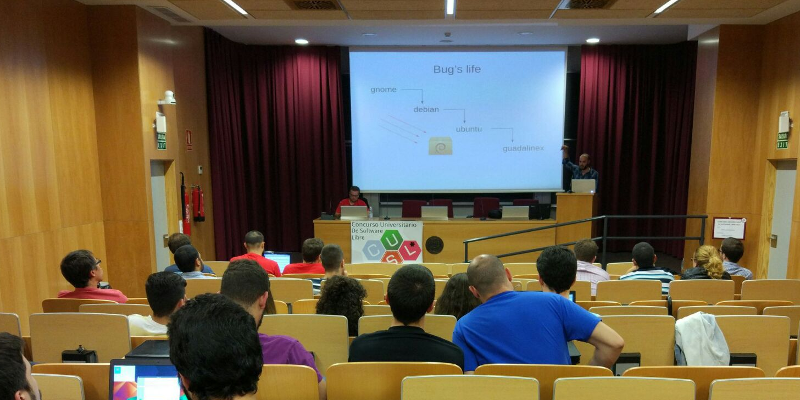
Debian CUSL 11 Debian has many years of history, about 25 years already. With such a long travel over the continous field of developing our Universal Operating System, some myths, false accusations and bad reputation has arisen. Today I had the opportunity to discuss this topic, I was invited to give a Debian talk in the 11 Concurso Universitario de Software Libre , a Spanish contest for students to develop and dig a bit into free-libre open source software (and hardware). In this talk, I walked through some of the most common Debian myths, and I would like to summarize here some of them, with a short explanation of why I think they should be debunked. Picture of the talk myth #1: Debian is old software Please, use testing or stable-backports. If you use Debian stable your system will in fact be stable and that means: updates contain no new software but only fixes. myth #2: Debian is slow We compile and build most of our packages with industry-standard compilers and options. I don t see a significant difference on how fast linux kernel or mysql run in a CentOS or in Debian. myth #3: Debian is difficult I already discussed about this issue back in Jan 2017, Debian is a puzzle: difficult. myth #4: Debian has no graphical environment This is, simply put, false. We have gnome, kde, xfce and more. The basic Debian installer asks you what do you want at install time. myth #5: since Debian isn t commercial, the quality is poor Did you know that most of our package developers are experts in their packages and in their upstream code? Not all, but most of them. Besides, many package developers get paid to do their Debian job. Also, there are external companies which do indeed offer support for Debian (see freexian for example). myth #6: I don t trust Debian Why? Did we do something to gain this status? If so, please let us know. You don t trust how we build or configure our packages? You don t trust how we work? Anyway, I m sorry, you have to trust someone if you want to use any kind of computer. Supervising every single bit of your computer isn t practical for you. Please trust us, we do our best. myth #7: nobody uses Debian I don t agree. Many people use Debian. They even run Debian in the International Space Station. Do you count derivatives, such as Ubuntu? I believe this myth is just pointless, but some people out there really think nobody uses Debian. myth #8: Debian uses systemd Well, this is true. But you can run sysvinit if you want. I prefer and recommend systemd though :-) myth #9: Debian is only for servers No. See myths #1, #2 and #4. You may download my slides in PDF and in ODP format (only in Spanish, sorry for English readers).
Norbert Preining: BachoTeX 2017

A week of typesetting, typography, bookbinding, bibliophily, not to forget long chats with good friends and loads of beer. That is BachoTeX, the best series of conferences I have ever been. This year BachoTeX was held for the 25th time, and was merged with the TUG Meeting for a firework of excellent presentations and long hours of brain storming, hacking, music making, dancing, and simply enjoying life!
Symphony of Green
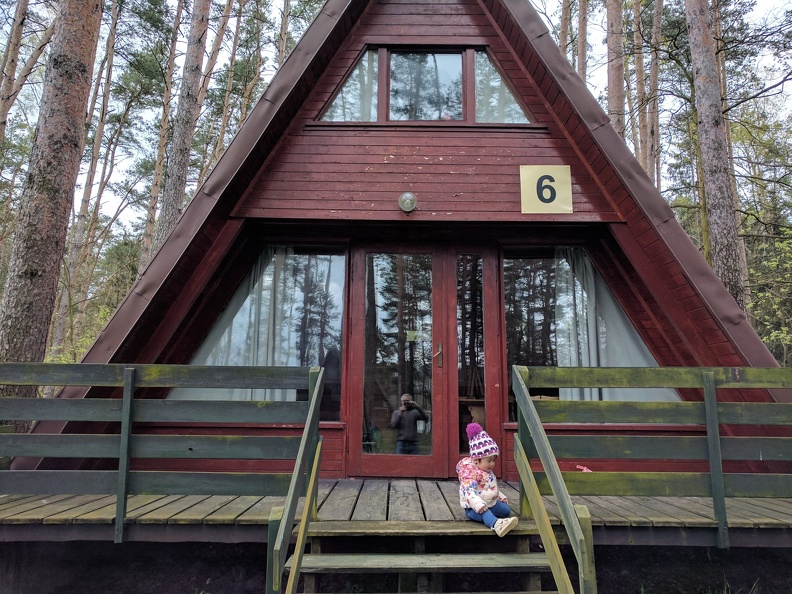
And while it was a bit less relaxing for me than in the last years, mostly due to the presence of my little daughter who requested presence quite often, it is still the place to be during the Golden Week! Of course I also gave a talk at BachoTeX about our latest changes in the upcoming TeX Live 2017 release: fmtutil and updmap past & future changes (or: cleaning up the mess). Big thanks to my company Accelia Inc. for allowing me to attend the conference. We arrived after a long trip, first via train and plane to Vienna, then two days break (including research with a colleague), followed by a night train ride to Warsaw and another train ride to Torun and a taxi ride to Bachotek. All in all far too long to be done with a 14 month old girl. Finally arrived we went directly to our hut and found it freezing. Fortunately we could organize a heater so that the rest of the week we didn t have to live in 5-10 degrees
Our log house in Bachotek
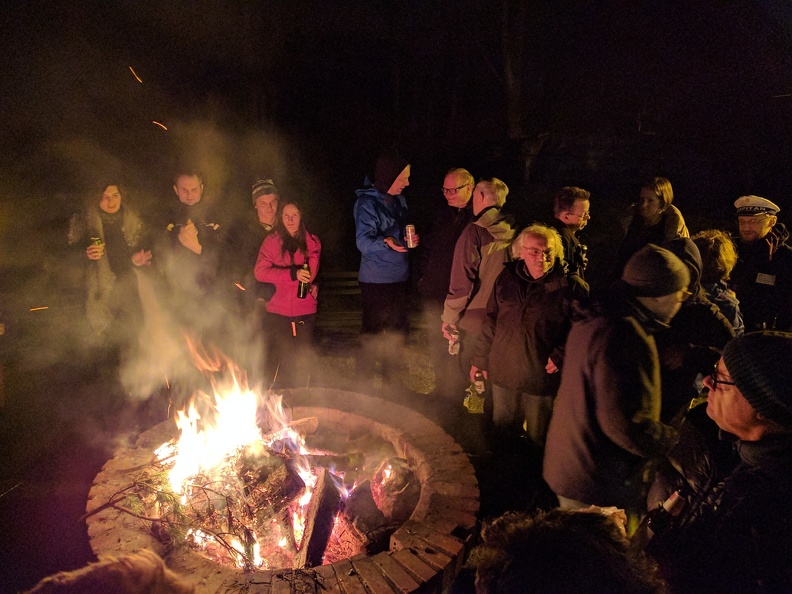
The second day brought already the traditional bonfire. After a small (for Polish standard) dinner we ignored the rain and met at the fireplace for BBQ, beer, and lots of live music.
Bonfire on the second evening
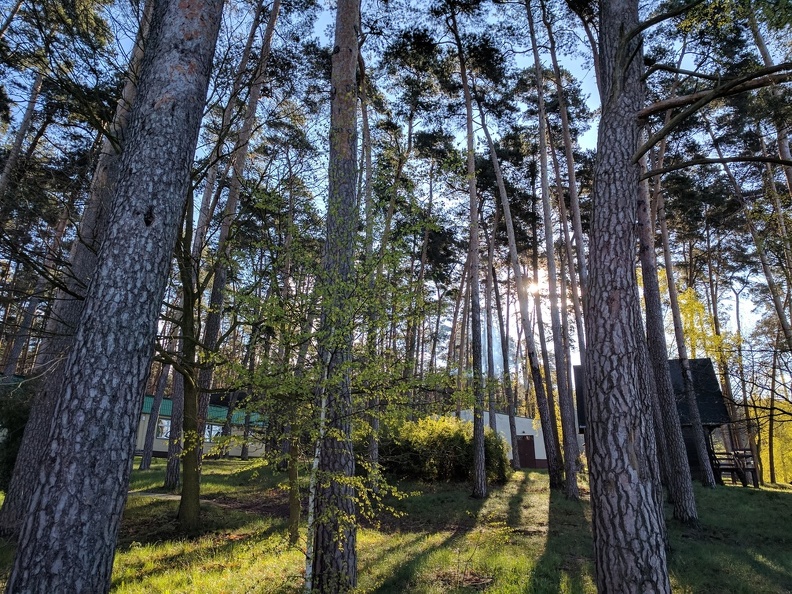
The rain stopped during the bonfire, probably due to my horrible singing, and the following days we were blessed with sunshine and warmer temperatures. The forest sparked in all kinds of greens.
Sunny days in Bachotek
For our daughter the trip was a great experience lots of wild play grounds, many other kids, and a lake she really wanted to go swimming in. Normally I go swimming there, but this year I had a bad cold so I refrained from it, and with me also our daughter, to her great disappointment.
Ready to go swimming
Another day has passed, and the sunset lights up the beautiful lake Bachotek. I cannot imagine a better place for concentrated work paired with great relaxation!
Sunset along the lake
During the days the temperatures were really nice, but the mornings were cold, and our morning walk to the breakfast place was quite chilly.
Enjoying a fresh morning on the lake
Ample coffee breaks and lunch breaks left us enough time to discuss new developments. But the single most important thing that brought people to talk a lot was the horrible internet connection, a big plus in BachoTeX (but as far as rumors go it might have been the last time with that advantage!).
Beautiful and peaceful lake Bachotek
The last evening we had a banquet honoring 25 years of BachoTeX, one of the oldest TeX conference. Live music and dancing, lots of good food and drinks, and outside the perfect evening atmosphere.
Sunset around the lake
Too fast the time has passed and we had to return to Vienna, retracing the long trip. How far it may be, taking the burden to come from Japan is worth every drop of sweat, the time at BachoTeX is probably one of the most productive, and at the same time most relaxing for me. Big thanks to all our Polish friends for organizing the event.
BachoTeX conference photo

(photo by Frans Goddijn)


10 May 2017

Jonathan Dowland: Three things I didn't know about Haskell

I've been trying to refresh my Haskell skills and Paul Callaghan recommended I read the paper "A History of Haskell: Being Lazy With Class", which I found (surprisingly?) fascinating. Three facts about Haskell that I didn't know jumped out at me:

9 May 2017

Matthew Garrett: Intel AMT on wireless networks

More details about Intel's AMT vulnerablity have been released - it's about the worst case scenario, in that it's a total authentication bypass that appears to exist independent of whether the AMT is being used in Small Business or Enterprise modes (more background in my previous post here). One thing I claimed was that even though this was pretty bad it probably wasn't super bad, since Shodan indicated that there were only a small number of thousand machines on the public internet and accessible via AMT. Most deployments were probably behind corporate firewalls, which meant that it was plausibly a vector for spreading within a company but probably wasn't a likely initial vector.

I've since done some more playing and come to the conclusion that it's rather worse than that. AMT actually supports being accessed over wireless networks. Enabling this is a separate option - if you simply provision AMT it won't be accessible over wireless by default, you need to perform additional configuration (although this is as simple as logging into the web UI and turning on the option). Once enabled, there are two cases:
  1. The system is not running an operating system, or the operating system has not taken control of the wireless hardware. In this case AMT will attempt to join any network that it's been explicitly told about. Note that in default configuration, joining a wireless network from the OS is not sufficient for AMT to know about it - there needs to be explicit synchronisation of the network credentials to AMT. Intel provide a wireless manager that does this, but the stock behaviour in Windows (even after you've installed the AMT support drivers) is not to do this.
  2. The system is running an operating system that has taken control of the wireless hardware. In this state, AMT is no longer able to drive the wireless hardware directly and counts on OS support to pass packets on. Under Linux, Intel's wireless drivers do not appear to implement this feature. Under Windows, they do. This does not require any application level support, and uninstalling LMS will not disable this functionality. This also appears to happen at the driver level, which means it bypasses the Windows firewall.
Case 2 is the scary one. If you have a laptop that supports AMT, and if AMT has been provisioned, and if AMT has had wireless support turned on, and if you're running Windows, then connecting your laptop to a public wireless network means that AMT is accessible to anyone else on that network[1]. If it hasn't received a firmware update, they'll be able to do so without needing any valid credentials.

If you're a corporate IT department, and if you have AMT enabled over wifi, turn it off. Now.

[1] Assuming that the network doesn't block client to client traffic, of course

comment count unavailable comments

Benjamin Mako Hill: Surviving an Eternal September: How an Online Community Managed a Surge of Newcomers

Attracting newcomers is among the most widely studied problems in online community research. However, with all the attention paid to challenge of getting new users, much less research has studied the flip side of that coin: large influxes of newcomers can pose major problems as well! The most widely known example of problems caused by an influx of newcomers into an online community occurred in Usenet. Every September, new university students connecting to the Internet for the first time would wreak havoc in the Usenet discussion forums. When AOL connected its users to the Usenet in 1994, it disrupted the community for so long that it became widely known as The September that never ended . Our study considered a similar influx in NoSleep an online community within Reddit where writers share original horror stories and readers comment and vote on them. With strict rules requiring that all members of the community suspend disbelief, NoSleep thrives off the fact that readers experience an immersive storytelling environment. Breaking the rules is as easy as questioning the truth of someone s story. Socializing newcomers represents a major challenge for NoSleep.
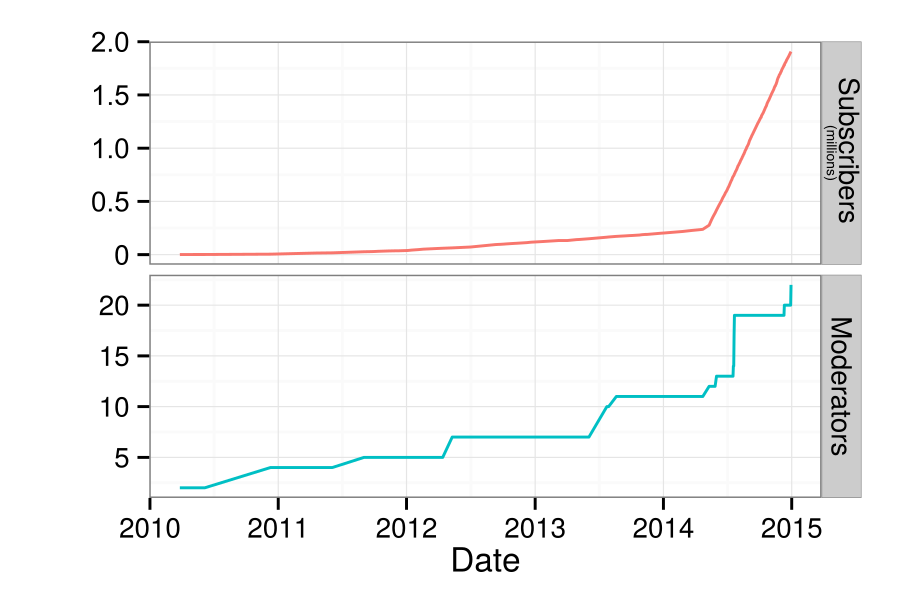
Number of subscribers and moderators on /r/NoSleep over time.
On May 7th, 2014, NoSleep became a default subreddit i.e., every new user to Reddit automatically joined NoSleep. After gradually accumulating roughly 240,000 members from 2010 to 2014, the NoSleep community grew to over 2 million subscribers in a year. That said, NoSleep appeared to largely hold things together. This reflects the major question that motivated our study: How did NoSleep withstand such a massive influx of newcomers without enduring their own Eternal September? To answer this question, we interviewed a number of NoSleep participants, writers, moderators, and admins. After transcribing, coding, and analyzing the results, we proposed that NoSleep survived because of three inter-connected systems that helped protect the community s norms and overall immersive environment. First, there was a strong and organized team of moderators who enforced the rules no matter what. They recruited new moderators knowing the community s population was going to surge. They utilized a private subreddit for NoSleep s staff. They were able to socialize and educate new moderators effectively. Although issuing sanctions against community members was often difficult, our interviewees explained that NoSleep s moderators were deeply committed and largely uncompromising. That commitment resonates within the second system that protected NoSleep: regulation by normal community members. From our interviews, we found that the participants felt a shared sense of community that motivated them both to socialize newcomers themselves as well as to report inappropriate comments and downvote people who violate the community s norms. Finally, we found that the technological systems protected the community as well. For instance, post-throttling was instituted to limit the frequency at which a writer could post their stories. Additionally, Reddit s Automoderator , a programmable AI bot, was used to issue sanctions against obvious norm violators while running in the background. Participants also pointed to the tools available to them the report feature and voting system in particular to explain how easy it was for them to report and regulate the community s disruptors.

This blog post was written with Charlie Kiene. The paper and work this post describes is collaborative work with Charlie Kiene and Andr s Monroy-Hern ndez. The paper was published in the Proceedings of CHI 2016 and is released as open access so anyone can read the entire paper here. A version of this post was published on the Community Data Science Collective blog.

Martin Pitt: Cockpit is now just an apt install away

Cockpit has now been in Debian unstable and Ubuntu 17.04 and devel, which means it s now a simple
$ sudo apt install cockpit
away for you to try and use. This metapackage pulls in the most common plugins, which are currently NetworkManager and udisks/storaged. If you want/need, you can also install cockpit-docker (if you grab docker.io from jessie-backports or use Ubuntu) or cockpit-machines to administer VMs through libvirt. Cockpit upstream also has a rather comprehensive Kubernetes/Openstack plugin, but this isn t currently packaged for Debian/Ubuntu as kubernetes itself is not yet in Debian testing or Ubuntu. After that, point your browser to https://localhost:9090 (or the host name/IP where you installed it) and off you go.

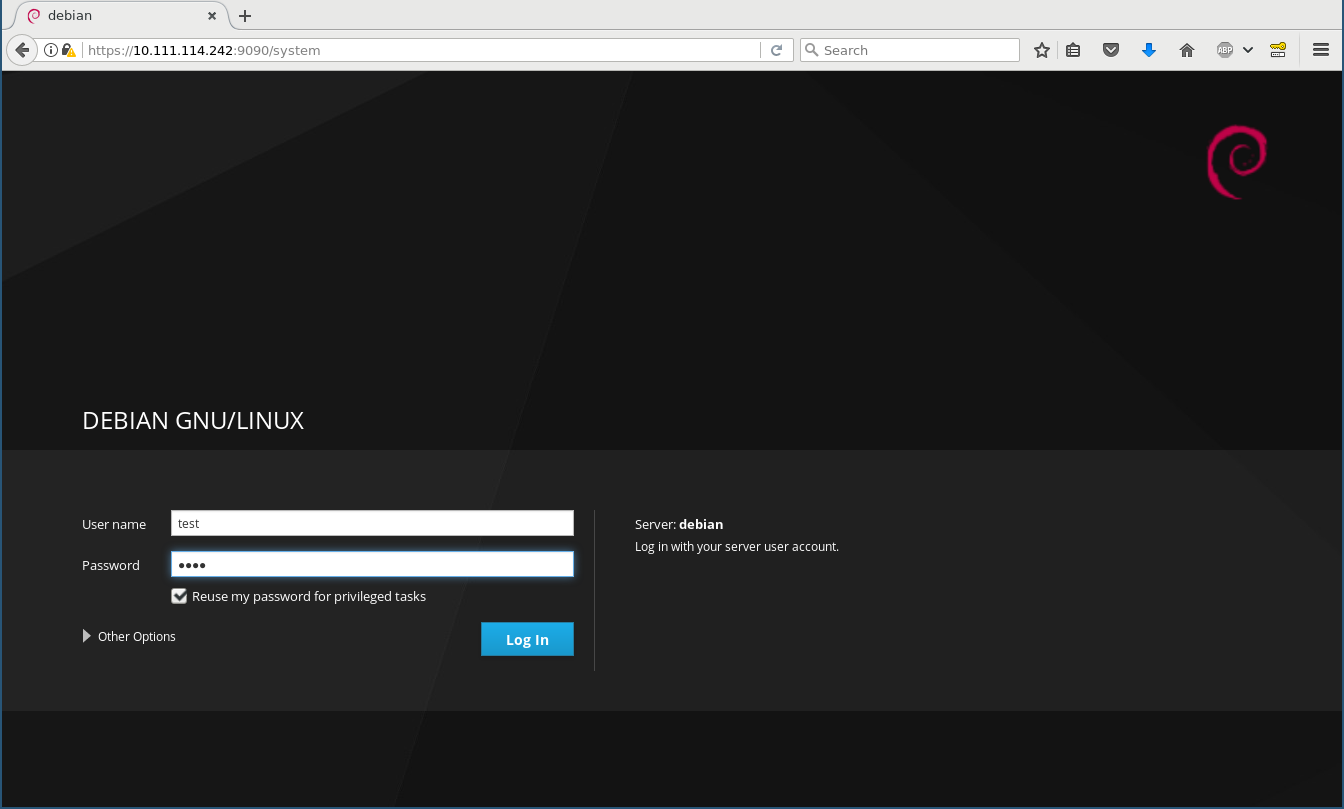
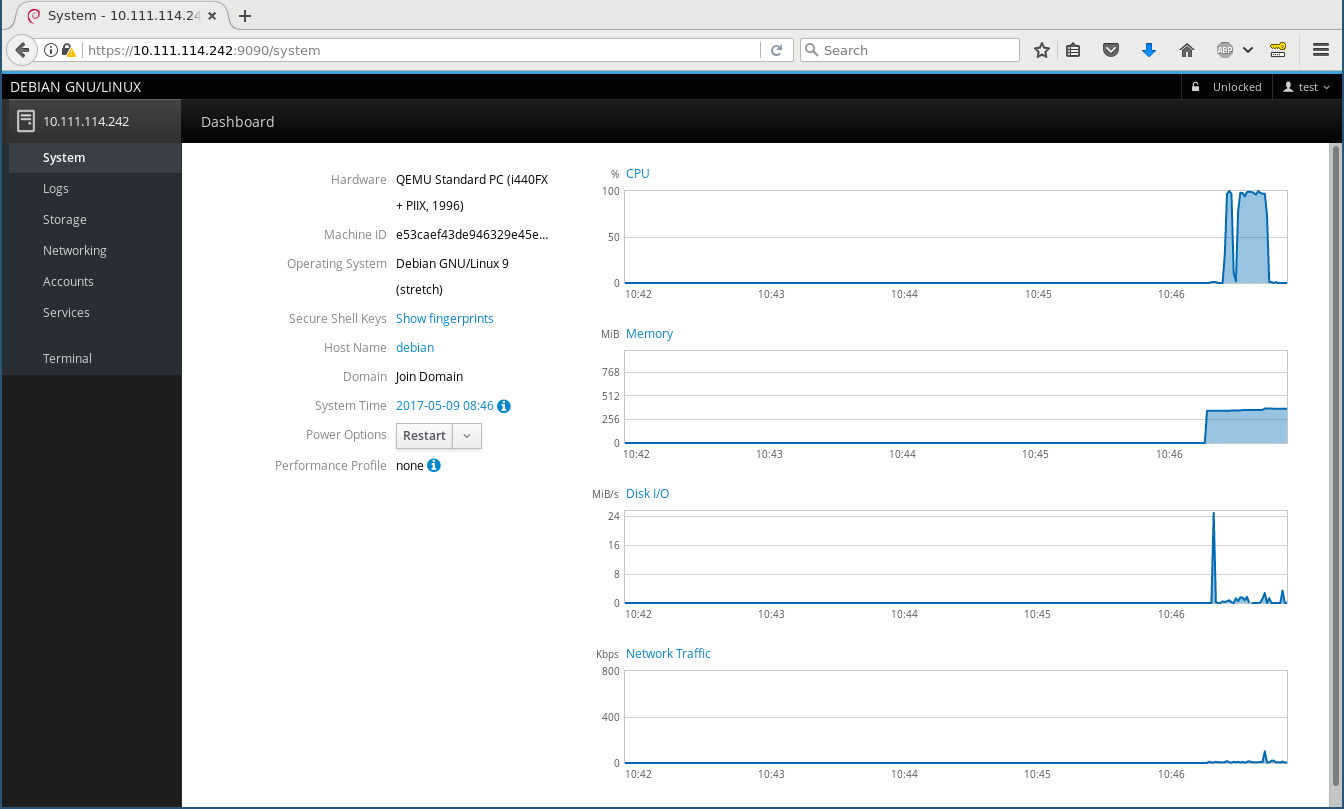
What is Cockpit? Think of it as an equivalent of a desktop (like GNOME or KDE) for configuring, maintaining, and interacting with servers. It is a web service that lets you log into your local or a remote (through ssh) machine using normal credentials (PAM user/password or SSH keys) and then starts a normal login session just as gdm, ssh, or the classic VT logins would. Login screen System page The left side bar is the equivalent of a task switcher , and the applications (i. e. modules for administering various aspects of your server) are run in parallel. The main idea of Cockpit is that it should not behave special in any way - it does not have any specific configuration files or state keeping and uses the same Operating System APIs and privileges like you would on the command line (such as lvmconfig, the org.freedesktop.UDisks2 D-Bus interface, reading/writing the native config files, and using sudo when necessary). You can simultaneously change stuff in Cockpit and in a shell, and Cockpit will instantly react to changes in the OS, e. g. if you create a new LVM PV or a network device gets added. This makes it fundamentally different to projects like webmin or ebox, which basically own your computer once you use them the first time. It is an interface for your operating system, which even reflects in the branding: as you see above, this is Debian (or Ubuntu, or Fedora, or wherever you run it on), not Cockpit .

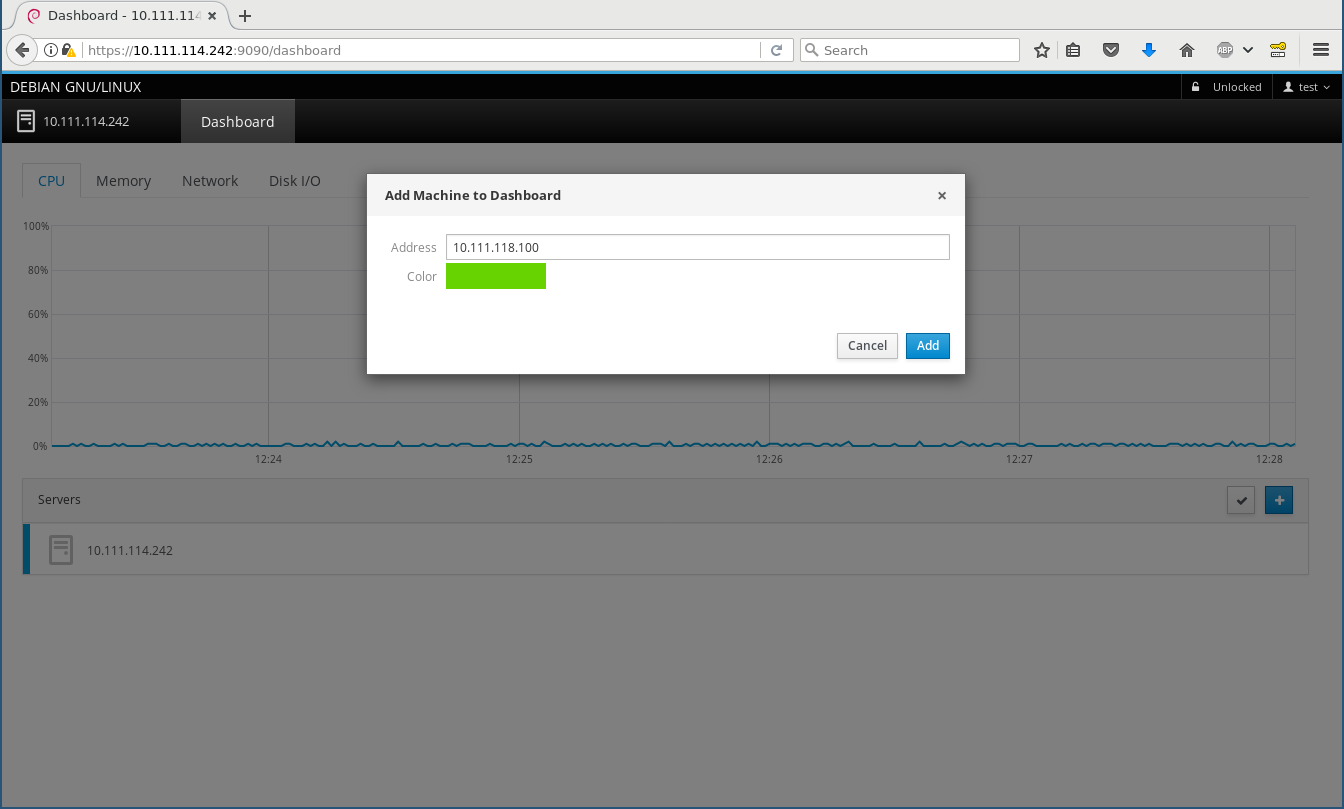
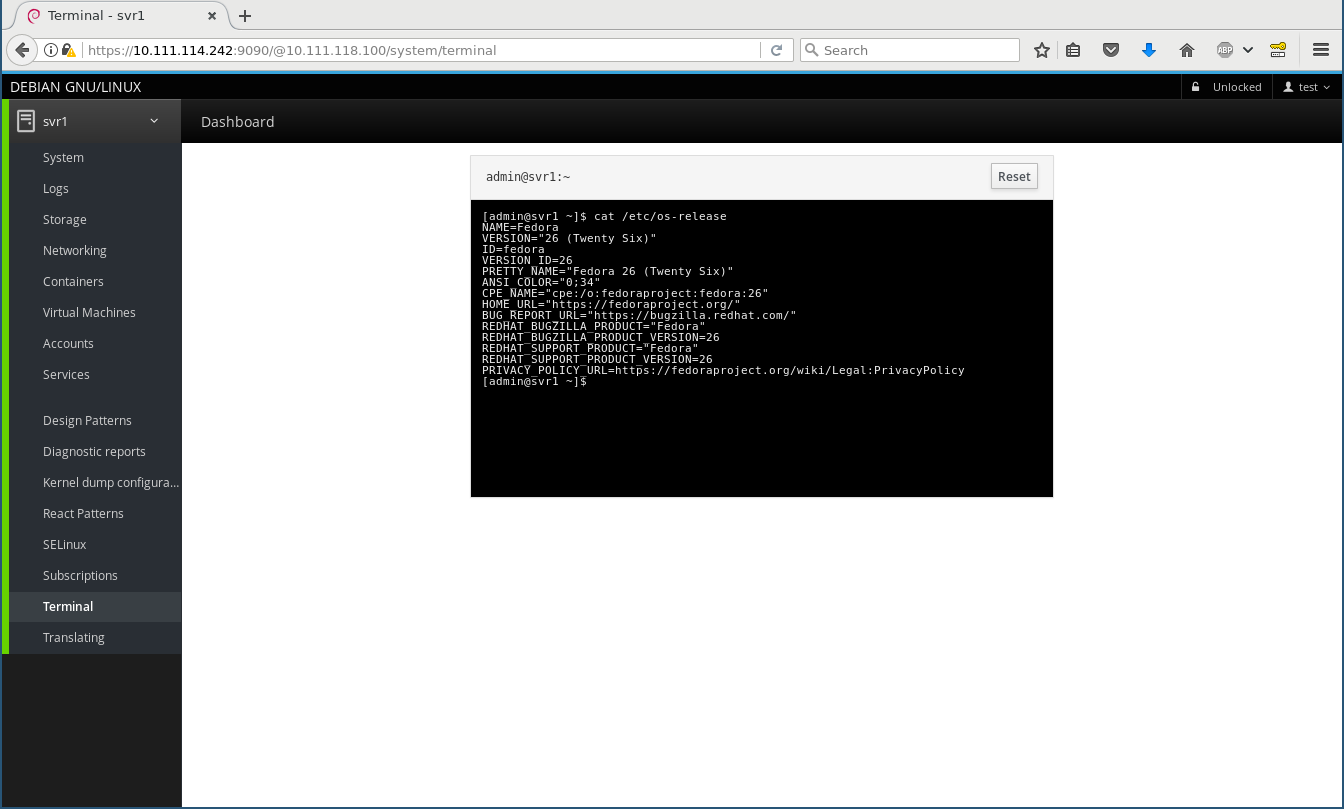
Remote machines In your home or small office you often have more than one machine to maintain. You can install cockpit-bridge and cockpit-system on those for the most basic functionality, configure SSH on them, and then add them on the Dashboard (I add a Fedora 26 machine here) and from then on can switch between them on the top left, and everything works and feels exactly the same, including using the terminal widget: Add remote Remote terminal The Fedora 26 machine has some more Cockpit modules installed, including a lot of playground ones, thus you see a lot more menu entries there.

Under the hood Beneath the fancy Patternfly/React/JavaScript user interface is the Cockpit API and protocol, which particularly fascinates me as a developer as that is what makes Cockpit so generic, reactive, and extensible. This API connects the worlds of the web, which speaks IPs and host names, ports, and JSON, to the local host only world of operating systems which speak D-Bus, command line programs, configuration files, and even use fancy techniques like passing file descriptors through Unix sockets. In an ideal world, all Operating System APIs would be remotable by themselves, but they aren t. This is where the cockpit bridge comes into play. It is a JSON (i. e. ASCII text) stream protocol that can control arbitrarily many channels to the target machine for reading, writing, and getting notifications. There are channel types for running programs, making D-Bus calls, reading/writing files, getting notified about file changes, and so on. Of course every channel can also act on a remote machine. One can play with this protocol directly. E. g. this opens a (local) D-Bus channel named d1 and gets a property from systemd s hostnamed:
$ cockpit-bridge --interact=---
  "command": "open", "channel": "d1", "payload": "dbus-json3", "name": "org.freedesktop.hostname1"  
---
d1
  "call": [ "/org/freedesktop/hostname1", "org.freedesktop.DBus.Properties", "Get",
          [ "org.freedesktop.hostname1", "StaticHostname" ] ],
  "id": "hostname-prop"  
---
and it will reply with something like
d1
 "reply":[[ "t":"s","v":"donald" ]],"id":"hostname-prop" 
---
( donald is my laptop s name). By adding additional parameters like host and passing credentials these can also be run remotely through logging in via ssh and running cockpit-bridge on the remote host. Stef Walter explains this in detail in a blog post about Web Access to System APIs. Of course Cockpit plugins (both internal and third-party) don t directly speak this, but use a nice JavaScript API. As a simple example how to create your own Cockpit plugin that uses this API you can look at my schroot plugin proof of concept which I hacked together at DevConf.cz in about an hour during the Cockpit workshop. Note that I never before wrote any JavaScript and I didn t put any effort into design whatsoever, but it does work .

Next steps Cockpit aims at servers and getting third-party plugins for talking to your favourite part of the system, which means we really want it to be available in Debian testing and stable, and Ubuntu LTS. Our CI runs integration tests on all of these, so each and every change that goes in is certified to work on Debian 8 (jessie) and Ubuntu 16.04 LTS, for example. But I d like to replace the external PPA/repository on the Install instructions with just it s readily available in -backports ! Unfortunately there s some procedural blockers there, the Ubuntu backport request suffers from understaffing, and the Debian stable backport is blocked on getting it in to testing first, which in turn is blocked by the freeze. I will soon ask for a freeze exception into testing, after all it s just about zero risk - it s a new leaf package in testing. Have fun playing around with it, and please report bugs! Feel free to discuss and ask questions on the Google+ post.

8 May 2017

Lars Wirzenius: Ick2 design discussion

Recently, Daniel visited us in Helsinki. In addition to enjoying local food and scenerey, we spent some time together in front of a whiteboard to sketch out designs for Ick2. Ick is my continuous integration system, and it's all Daniel's fault for suggesting the name. Ahem. I am currently using the first generation of Ick and it is a rigid, cumbersome, and fragile thing. It works well enough that I don't miss Jenkins, but I would like something better. That's the second generation of Ick, or Ick2, and that's what we discussed with Daniel. Where pretty much everything in Ick1 is hardcoded, everything in Ick2 will be user-configurable. It's my last, best chance to go completely overboard in the second system syndrome manner. Where Ick1 was written in a feverish two-week hacking session, rushed because my Jenkins install at the time had broken one time too many, we're taking our time with Ick2. Slow and careful is the tune this time around. Our "minimum viable product" or MVP for Ick2 is defined like this:
Ick2 builds static websites from source in a git repository, using ikiwiki, and published to a web server using rsync. A change to the git repository triggers a new build. It can handle many separate websites, and if given enough worker machines, can build many of them concurrently.
This is a real task, and something we already do with Ick1 at work. It's a reasonable first step for the new program. Some decisions we made: The initial pipelines will be basically like this, but expressed in some way by the user:
  1. Clone the source repoistory.
  2. Run ikiwiki --build to build the website.
  3. Run rsync to publish the website on a server.
Assumptions: Actions the Ick2 controller API needs to support: A sketch API: Sequence: The next step will probably be to sketch a yarn test suite of the API and implement a rudimentary one.

Russ Allbery: Review: Chimes at Midnight

Review: Chimes at Midnight, by Seanan McGuire
Series: October Daye #7
Publisher: DAW
Copyright: 2013
ISBN: 1-101-63566-5
Format: Kindle
Pages: 346
Chimes at Midnight is the seventh book of the October Daye series and builds heavily on the previous books. Toby has gathered quite the group of allies by this point, and events here would casually spoil some of the previous books in the series (particularly One Salt Sea, which you absolutely do not want spoiled). I strongly recommend starting at the beginning, even if the series is getting stronger as it goes along. This time, rather than being asked for help, the book opens with Toby on a mission. Goblin fruit is becoming increasingly common on the streets of San Francisco, and while she's doing all she can to find and stop the dealers, she's finding dead changelings. Goblin fruit is a pleasant narcotic to purebloods, but to changelings it's instantly and fatally addictive. The growth of the drug trade means disaster for the local changelings, particularly since previous events in the series have broken a prominent local changeling gang. That was for the best, but they were keeping goblin fruit out, and now it's flooding into the power vacuum. In the sort of idealistic but hopelessly politically naive move that Toby is prone to, she takes her evidence to the highest local authority in faerie: the Queen of the Mists. The queen loathes Toby and the feeling is mutual, but Toby's opinion is that this shouldn't matter: these are her subjects and goblin fruit is widely recognized as a menace. Even if she cares nothing for their lives, a faerie drug being widely sold on the street runs the substantial risk that someone will give it to humans, potentially leading to the discovery of faerie. Sadly, but predictably, Toby has underestimated the Queen's malevolence. She leaves the court burdened not only with the knowledge that the Queen herself is helping with the distribution of goblin fruit, but also an impending banishment thanks to her reaction. She has three days to get out of the Queen's territory, permanently. Three days that the Luidaeg suggests she spend talking to people who knew King Gilad, the former and well-respected king of the local territory who died in the 1906 earthquake, apparently leaving the kingdom to the current Queen. Or perhaps not. As usual, crossing Toby is a very bad idea, and getting Toby involved in politics means that one should start betting heavily against the status quo. Also, as usual, things initially go far too well, and then Toby ends up in serious trouble. (I realize the usefulness of raising the stakes of the story, but I do prefer the books of this series that don't involve Toby spending much of the book ill.) However, there is a vast improvement over previous books in the story: one key relationship (which I'll still avoid spoiling) is finally out of the precarious will-they, won't-they stage and firmly on the page, and it's a relationship that I absolutely love. Watching Toby stomp people who deserve to be stomped makes me happy, but watching Toby let herself be happy and show it makes me even happier. McGuire also gives us some more long-pending revelations. I probably should have guessed the one about one of Toby's long-time friends and companions much earlier, although at least I did so a few pages before Toby found out. I have some strong suspicions about Toby's own background that were reinforced by this book, and will be curious to see if I'm right. And I'm starting to have guesses about the overall arc of the series, although not firm ones. One of my favorite things in long-running series is the slow revelation of more and more world background, and McGuire does it in just the way I like: lots of underlying complexity, reveals timed for emotional impact but without dragging on things that the characters should obviously be able to figure out, and a whole bunch of layered secrets that continue to provide more mystery even after one layer is removed. The plot here is typical of the plot of the last couple of novels in the series, which is fine by me since my favorite part of this series is the political intrigue (and Toby realizing that she has far more influence than she thinks). It helps that I thought Arden was great, given how central she is to this story. I liked her realistic reactions to her situation, and I liked her arguments with Toby. I'm dubious how correct Toby actually was, but we've learned by now that arguments from duty are always going to hold sway with her. And I loved Mags and the Library, and hope we'll be seeing more of them in future novels. The one quibble I'll close with, since the book closed with it, is that I found the ending rather abrupt. There were several things I wanted to see in the aftermath, and the book ended before they could happen. Hopefully that means they'll be the start of the next book (although a bit of poking around makes me think they may be in a novella). If you've liked the series so far, particularly the couple of books before this one, this is more of what you liked. Recommended. Followed by The Winter Long. Rating: 8 out of 10

6 May 2017

Dirk Eddelbuettel: x13binary 1.1.39-1

The US Census Bureau released a new build 1.1.39 of their X-13ARIMA-SEATS program, released as binary and source. So Christoph and went to work and updated our x13binary package on CRAN. The x13binary package takes the pain out of installing X-13ARIMA-SEATS by making it a fully resolved CRAN dependency. For example, if you install the excellent seasonal package by Christoph, then X-13ARIMA-SEATS will get pulled in via the x13binary package and things just work: Depend on x13binary and on all relevant OSs supported by R, you should have an X-13ARIMA-SEATS binary installed which will be called seamlessly by the higher-level packages such as seasonal or gunsales. So now the full power of the what is likely the world's most sophisticated deseasonalization and forecasting package is now at your fingertips and the R prompt, just like any other of the 10,500+ CRAN packages. Not many packaging changes in this release besides updating the underlying builds, but we switched our versioning scheme to reflect that our releases are driven by the US Census Bureau releases. But thanks to an initial contribution by David Schaub we now support the 'armhf' architecture common on Chromebooks running Linux. Courtesy of CRANberries, there is also a diffstat report for this release.

This post by Dirk Eddelbuettel originated on his Thinking inside the box blog. Please report excessive re-aggregation in third-party for-profit settings.

Next.

Previous.