Search Results: "sf"

20 July 2011

Andrew Pollock: [life/americania] 4th of July in the Grand Canyon

Our adventurous friends Eric and Katie had invited us to join them on a hike in the Grand Canyon over the 4th of July weekend. As this struck us as something we'd never have considered doing otherwise, we thought we'd accept their kind offer. We're so glad we did. It was quite a bit of traveling just to get there. We flew out of San Jose on Thursday night, got into Las Vegas, rented a car, and then drove to Peach Springs, Arizona, where we stayed the night. We didn't get in at the Grand Canyon Caverns Inn until around midnight, and we had to get up again for a 5:00am departure (I think we actually got away by more like 5:30am), to drive to the Hualapai Hilltop, where the trail head was. Zoe handled all of this very well. She didn't end up falling asleep in the car until about 10:30pm I think, and dealt with the transfer out of the car at midnight very well and went back to sleep. The drive to the Hualapai Hilltop, along Indian Road 18, took about an hour. We had to dodge a bit of livestock on the road. The road itself was sealed and of good quality. We remarked on the way back out that as soon as you left the Havasupai Reservation and entered the Hualapai Reservation that there was a distinct degradation in the quality of the road. We parked at the Hilltop, and got ourselves organised, and commenced our descent by about 7:10am. The first 1.5 miles was very steep. There were a bunch of switchbacks and there was a fair few people coming up the other way already. There were also a few mule trains coming in the opposite direction that we had to dodge. The mule trains have right of way, so we had to stop and get out of the way to let them pass. Zoe thought they were pretty cool because they invariably had a few dogs with them as well, and she thinks dogs are awesome. The remaining 6.5 miles (it was an 8 mile/13 kilometre hike in total) were fairly easy. There was a lot of variety in terrain. Rocks, sand, dirt. It wasn't all in the sun, which was made it more comfortable. Heat wise, I think it was in the high 30's Celsius, with pretty much no humidity, so it didn't feel too uncomfortable. Towards the end, as we got near the water, there was a distinct change in the canyon. There was more greenery, and we started hearing insects and seeing bird life. When we first saw the water, it was hard not to just jump in, it looked so inviting. The total hiking time was about 4 hours 45 minutes, which included a reasonable stop to give Zoe some breakfast. We arrived in the village at around midday. Unfortunately the lodge wasn't ready for check ins until 1pm, so we had to twiddle our thumbs for a little bit. Zoe handled the hike incredibly well. We used a Macpac Possum child carrier that Nigel had passed down to us, and she didn't complain the whole time. She even took a nap in it. We were very relieved that it wasn't a problem for her. Sarah carried her, and I carried everything else. (I'm so glad I didn't see the photo of how I looked until well afterwards). In hindsight we probably brought too much stuff, but we didn't really know what to expect down there, so we'd rather have too much than too little. The village completely exceeded my expectations. I had this (silly) mental picture of it being just the lodge and not much else, but somewhere between 450 and 700 people live in the village. It had two general-type stores, a cafe that was pretty much like a fast food/takeaway place, an elementary school, and some sort of basic medical clinic. There was also a small general purpose community centre of some sort. The main store had pretty much everything you'd need in the food department. The cafe frequently ran out of various different things, but you weren't going to go hungry. For the remainder of Friday, we just stayed put in the village and let Zoe stretch her legs. Eric and Katie and their kids explored the first set of falls down from the village, unofficially named Rock Falls. On Saturday, we all hiked down to Havasu Falls. We met a couple of other families (amusingly both from the Bay Area) along the way, so we had some interesting conversations. I have no idea how long the hike was. Havasu Falls was impressive. Quite tall and narrow at the top, and quite loud. Zoe was impressed. We took her for a bit of a swim in the pools in the bottom. We had lunch there, and then Zoe and Sarah stayed there (Zoe took a nap in the KinderKot (also courtesy of Nigel) in the shade by the falls, and I took the Macpac with a water bladder in it to refill it at the spring in the campground, which was further down stream, and to check out Mooney Falls with Eric and Katie (and their kids), which was further downstream again from the campground. Mooney Falls was pretty insane. A lot taller than Havasu Falls, and a lot more treacherous to get to the bottom of. Parts of it were vertical. Chains and rickety ladders were involved. Caves were involved. I'm so glad I didn't have Zoe in the Macpac, because on multiple occasions, the top of it got bashed into rocks, so without having Sarah with me also to act as a guide, there's no way I could have safely descended with Zoe in the backpack. My favourite photo illustrating how crazy this was is this one that I took of Eric and Katie. This photo highlights some of the craziness involved to get down. I pretty much got to the bottom, had a quick look around and left Eric and Katie to it, because I figured Zoe would have woken up by now, and was probably bored. Turned out I had all of the sunscreen with me as well. So I climbed back up, and trekked back to the campground, refilled at the spring, and headed back up to Havasu Falls. After we reunited, we then hiked back up to the village, which to be honest, was the hardest bit of hiking we did. I was carrying Zoe in the Macpac, and it was hot, and it was mostly loose sand all the way. We were very glad to get back to the village. Zoe started showing signs of coming down with a cold and a cough, so we decided to cut short our stay in the village and leave on Sunday instead of Monday. We'd been tossing up between getting a helicopter or horses out. We ended up opting for the helicopter after learning that the horses still took about 3.5 hours, and you basically had no control over the animal. We were dubious as to how Zoe would go being bounced around on the back of a horse for that long. The helicopter ride also took all of about 5 minutes. The tribal members get first dibs on the helicopter, and there had been a death in the village, and I think a lot of people had come to the village for the viewing (the casket itself was flown out earlier on Sunday morning for a burial out of the village), so I suspect there was a higher number of tribal passengers than usual. We didn't get out until 2pm. Again, Zoe was incredibly good. She just hung out with us while we waiting for a flight out. There were plenty of dogs for her to be entertained by, and some other kids. She also took a pretty decent nap. So we finally got out, and got back to our car, and then the heavens opened. It absolutely poured down with rain. Sarah was keen to check out Hoover Dam, so we decided to stay near Boulder City in Nevada, and got a suite in the Hacienda Hotel and Casino for cheap. The next day was the Monday public holiday for Independence Day, and we were tossing up whether or not to take Zoe to a doctor to get her checked to see if she had bronchitis (we've been a bit gun-shy about bronchitis since the time she came down with it when we were in Australia). She ended up falling asleep in the car while we were hunting around for an Urgent Care facility that was open, so we decided to let her sleep and drove to Las Vegas. After she woke up, we took her to see the flamingos at Flamingo and the lions at MGM Grand. Zoe absolutely loved all the lights, sights and sounds of Las Vegas. In the afternoon, we took her to a doctor, and got the "first child, huh?" from the doctor (she didn't have bronchitis). After that, we went and briefly checked out Hoover Dam (just walked half way across the bridge in front of it and walked across the dam itself). The following day, we packed up and spent the morning on the Las Vegas strip again. This time we went to the Venetian (Zoe thought the gondolas were pretty cool) and then we flew out in the afternoon. So it was a lovely little family vacation. We ended up spending about as much time in Las Vegas as we did in the Grand Canyon, but that was okay. I'd really like to go back to Supai again, but I'm not sure if the stars will align themselves appropriately. If we did, knowing what I know now, I'd take a lot less food and put all of the luggage on a horse, and just hike in with the minimum of stuff. I'd probably be game to hike out as well if the bulk of the luggage was on a horse. Photos from the trip are here.

19 July 2011

John Goerzen: Trains and Birthdays

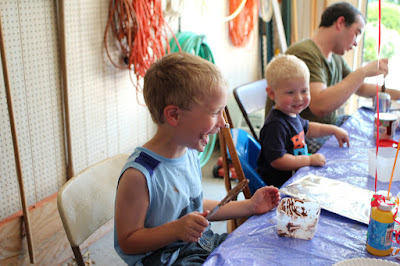
This weekend, the boys got what they ve been waiting for: another trip on Amtrak. For the last week or so, Jacob has had a morning ritual. He ll look at the calendar, figure out what today is, figure out when we ll get on the train, and then figure out how many days it will be. As the number gets lower, the excitement gets higher, of course. Friday morning, we woke the boys at 2:30AM to get to the train station. The only Amtrak trains through our area are middle of the night departures. Jacob is normally hard to wake up, but when I tell him that I m waking him up to go to the train station, he wakes up faster than I ve ever seen him before. It takes about 3 seconds for him to process that in his groggy state, and then he sits up straight, throws off the covers, and is instantly ready to go. Both boys were excited even in the station waiting room. Oliver has been on an Amtrak train before, but it s been awhile and he probably doesn t remember it. He constantly talked about it, jabbering as much as his vocabulary lets him. Once we were on the train, Terah and I would have liked to get some more sleep. The boys, on the other hand, were now wide awake, and didn t fall back asleep until about 5:30. That means Terah and I didn t, either. Here s what it usually looks like: When it came time for breakfast, we went to the dining car as usual. Jacob had already been telling us for days what he would eat for breakfast on the train: I always have French toast on the train, dad. And so he did. A few minutes later, I heard the waitress telling other people they were out of French toast, so I was glad I didn t have to disappoint Jacob over that! But it was Oliver that really came alive on this trip. I don t think I ve ever seen him so excited. It was almost constant. He happily talked about anything he could see or touch. But he also listened to other conversations, and would frequently pick out one word from a sentence and try to say it. He does that at home too, but not nearly so often as on the train. Both boys wanted to go exploring a lot my word for taking them for a walk in the train and seeing what they might find. We walked up and down the train several times, Jacob excited over opening the doors between the cars, and Oliver excited just to be there. Oliver s excitement kept him from sleeping well. He did eventually get a short nap, but that wasn t quite enough to avert a couple of tantrums later in the day. The reason for the trip was the 80th birthday party for Terah s grandpa. And it so happened that Oliver s 2nd birthday would be over the same time. So, Saturday morning, we all went for breakfast at Das Dutchman Essenhaus, one of the favorite local restaurants in northern Indiana. After that, it was over to a relative s place for some birthday festivities. The children got mini cakes to decorate as rail cars. There was frosting and all sorts of toppings. Great fun was had by all, and it was wise that this activity took place in a garage rather than indoors. Yes, that is a marshmallow stuck to Jacob s nose. Then in the evening, it was off to another relative s place for some more family time. Jacob had a great time all day, and was in high spirits. He asked me to sit by him at dinner, and started one of the longest conversations I ve had with him in some time. We just talked about the things that happened in the day, but it was nice when I told him, I like sitting by you, Jacob, and he said, Dad, me too! The big highlight for the day happened in the evening. We were gathered around a fire with a guitar to do some singing. Jacob was happily perched in his lawn chair, but got very excited when he saw some lightweight airplanes flying overhead. These kept flying at some distance, and he kept pointing them out to us. But that wasn t even the most exciting part. That came when the fireflies came out. Jacob ran around, catching them in his hands, and excitedly showing them to whatever person happened to be closest. He was laughing with joy for such a long time. At one point, someone asked him if the bugs were tickling his hands. He said, evidentally just realizing it, Oh yes, they ARE tickling my hands! He was one very happy boy. Sunday I had to leave to get back home, while Terah and the boys will return a couple of days later. Although I do sort of look forward to a train trip that I can relax without having to manage two young boys, I do miss them already and will be happy to have everyone back home in a few days. (This post written during the trip and posted a week later after arriving home)

18 July 2011

Benjamin Mako Hill: Quiet Room

At the Copenhagen airport, Mika and I found the quiet room. It was a soft, well lit, room designed for prayer and reflection. During the hour I was in it, the only other visitor was a child cracking open the doorway to peer in. The room had a guest book with hundreds of messages left by other travelers over the last couple years. People praised the airport administrators for providing the room, made suggestions, and complained about the room, the airport, and the country's shortcomings. They talked about themselves, their travels, their happiness and unhappiness with departing or returning home, and their thoughts about the world. I spend a lot of time in airports but only rarely speak to my fellow travelers. It's amazing how little I know about the thousands of people waiting in line with me, sitting near me on the plane, and sharing in the long, lonely, and often stressful experience of moving between countries and continents. The guest book provided a rare window into these people in what is normally the anonymous and depersonalized non-place of airports. In the quiet room, I could -- for the first time -- hear some of these fellow travelers speak.

17 July 2011

Thorsten Glaser: mksh R40b; joe 3.1jupp16 and 2.8jupp2 released

mksh R40b (nowadays with filled in user s caveats (for R40, too!) and packager s upgrade hints) has just been released. This is a should-have upgrade, fixing a number of admittedly some obscure bugs, changing things begun in R40, improving upon others. Thanks to the PLD Linux guys for spotting all these errors; thanks to them and phpnet.org both for adopting mksh so well. I have also fixed a bug in nroff(1) which will lead to an even nicer looking HTML manpage mksh(1) (after the next rebuild and upload of a MirBSD snapshot scheduled RSN). jupp 3.1.16 took on the task of merging Debian joe changes (aiming at an upload). I also split the jupprc file into three versions (2.8 generic/DOS, 3.1+jupp and 3.7/Unix) because of the differences in the baseline executables making rc files partially mutually incompatible (think Insert key), annoyingly warning (think syntax, hmsg), or less usable (joe s new menu system). jupp 2.8.2 is a companion to jupp 3.1.16 mostly because of the new help window character map Binaries for jupp should be updated RSN too. Considering Banja Luka is arriving quickly, the r in RSN should be taken with a few grains of salt. I ve also scheduled working on the pcc Debian package for the next future; updating lynx and maybe others like OpenSSH in MirBSD is also due; cvs(1) will receive more of my time, but before the next Upload I d like to fix LP#12230 once verified. Builds for Debian/m68k are also still running. I note I did in fact not manage to make a new base image, yet (but 2.6.39 kernels miss a patch, anyway, so waiting for 3.0 is ok). It s still using gcc-4.4 because nobody tests gcc-4.6 and gcj-4.6 FTBFS due to SIGSEGV, but that s ok in my books. rsyslog is broken but sysklogd works. The #ksh Freenode page finally got a well-deserved link to Planet Commandline. Throw more my way! Acronyms and translations, too. (Got Norwegian and Rumanian covered in the meantime. No idea whether any RTL languages will work in that beast. But I m young and need the money) Since I m writing a wlog entry anyway let me thank Gunnar for a nice summary on the current Free Culture discussion; my comments on Nina s site seem to be eaten, but let me support it fully, although, of course, I normally use a copycenter style licence, which is specifically written for general works of authorship under copyright law, not limited to software. I did in fact have that in mind. Maybe some people will like it (it s less than one Kibibyte long) either generally or just for their everyday random musings (they can then keep CC-BY-SA for the big works if they so desire). Wouter, grass background makes green headlines illegible. I ve never liked, and never installed manually, cups either. (Benny tells me that Apple s new version refuses to talk with a non-Apple cups, kinda defeating the whole idea I think.) Port 9100 is JetDirect (probably with an HP in front and some subset of trailing) and just nice. (Being able to talk ESC/P with your printer like print '\033K\x07\0\x3E\x81\x99\xA5\xA5\x81\x3E' >/dev/lpa too rocks though, IMHO. Yes, mine can, and I still can. /dev/lpa is BSD.)

Kai, thanks for your vimrc lines:

	:highlight TrailWhitespace ctermbg=red guibg=red
	:match TrailWhitespace /\s\+$\  \+\ze\t/
 

Automatic removal is harmful, though I just fell into the trap since jupprc contains needed whitespace at EOL but manual removal (bound to ^K] in jupp) rocks. And I like that your solution uses such strong a colour vim users are the single most represented offender group for actually leaving the redundant whitespace at EOL there, and it should hurt their eyes. (Sadly there is some vehement disagreement preventing them from inclusion in grml-etc-core but that s why I re-post them here.) Ah, and jupp can of course display whitespace visibly (although it uses / , replacing the arrow with if no UTF-8, not ), accessible with ^Ov. Steve, want to put up a checklist for sites? We can crowdsource the testing to maybe get some interesting results Some other people would get more comments if they were idling in IRC (Freenode) or allow comments on their blog, specifically without too high an entrance barrier OpenID is ok, but many other things, and ECMAscript, are not; but I can t really say that loud because our wlog is static HTML compiled from a flat plaintext data source so it doesn t allow such either. I often forget what I wanted to add if I can t get it out quickly enough (especially at work). Sowwy Me like the cat picture postings (Amayita, Tiago, Gracias!).

12 July 2011

Gunnar Wolf: Free Software must migrate to become Free Culture

Cineast and Free Culture activist Nina Paley wrote some days ago a rantifesto on why the FSF has a double standard: Why are the Freedoms guaranteed for Free Software not guaranteed for Free Culture?, by not following its own very strict rules on software when it comes to culture as a whole. Her post was widely circulated, and got (at least) one reply by fellow Debian Developer Wouter Verhelst, largely agreeing with her, and an anti-rantifesto by Joe Brockmeier Which was promptly answered again by Wouter with a very fun and inspired post, written from the right angle: From the viewpoint of a person who is both a programmer and a musician, and understands the concepts at hand. I'd love to write a longer, better thought post But I'm tired and frankly stressed by many things, so I am just echoing their very interesting discussion to other people who might want to read it. I have been thinking and writing bits on that subject over the last couple of months. An example of that was the talk I gave at the Senate ~6 weeks ago. Following that talk, I wrote a short article for Revista Z calo (a widely circulated magazine mainly dealing with Mexican politics and social issues) called simply Software libre, cultura libre (full text available, but in Spanish only You can try reading an automated translation if it suits you). I wrote the article, mind you, with very limited time, and I'll be the first to recognize the prose was quite poor this time :( Anyway My point is that our nature is to share culture, to build it in a collaborative fashion, and having the Internet as a practically zero-cost, zero loss medium with which we can interchange our creativity with other like-minded people will naturally boost creativity. Free Software emerged before other Free Culture groups just because programmers had privileged access to Internet in the 80s and early 90s; as network access and digital creation tools have got to more people, it's just natural for all kinds of free culture to grow. Software is just a form of knowledge. Code is just a notation for a certain kind of ideas, just as the mathematical or musical notations. I believe (and hope) it's just unavoidable for us all to eventually switch to a mainly free cultural creation system.

11 July 2011

Thorsten Glaser: [Update] Hilfe gesucht: Mitarbeiter berwachung

Deutsche Version dieses Postings read the English Version instead Der Leiter der Abteilung Systemadministration einer Firma, welche in diesem Artikel ungenannt bleiben soll, wo der Zufall es will, da ich f r sie arbeite, m chte uns Mitarbeiter dazu zwingen, das Feature der persistenten Historie (also einen niedergeschriebenen Verlauf der abgesetzten Befehle) der Shell (Kommandozeile) auf allen Systemen zu benutzen. Nun hat die mksh dies vern nftigerweise, w hrend immer noch verf gbar, standardm ig aus Gr nden der Privatsph re deaktiviert, und ich finde, dies sollte sich nicht ndern. Es kann ja nicht sein, da man mir beim Arbeiten ber die Schulter guckt; was kommt als n chstes, Video berwachung der B ros? (Seine Argumentation l uft darauf hinaus, da er nachvollziehen/verstehen kann, wie ich (ha! ich! nicht die anderen, nein, ich!) ein Problem das letzte Mal gel st habe; es ist aber nichts anderes als rekonstru eren zu k nnen, wer wann was eingetippt/gemacht hat. Naja, Argumentationen sind eh relativ, andere jagen Flugzeuge in ihre eigenen Verteidigungsministerien, welche gerade zuf llig umgebaut werden ) Ich habe dies nat rlich in die F hrungsetage eskaliert, und unser Gesch ftsf hrer versteht meine Bedenken und m chte nun ein Gespr ch anraunen, um eine L sung zu finden. Die meisten meiner Kollegen im Bereich Systemadministration denken leider nichtmals dr ber nach, obschon ich in anderen Bereichen Gleichgesinnte gefunden habe. Einen Betriebsrat haben wir auch gro er Fehler, ich wei nicht (aber ich s e eh nicht drin, ich hasse Politik jeder Art). Dies l t mich in dringender Not, Argumente wider diese Total berwachung aller (insbesondere auf der Kommandozeile arbeitenden also besonders mich) Kollegen zu finden, idealerweise solche, die durch deutsches Recht gest tzt sind. Wenn ihr solche habt, bitte mailt die schnell an meine eMail-Adresse, welche da nicht junk@mirbsd.org lautet, sondern mit einem tg vor dem Klammeraffen (dies dient der Abwehr unerw nschter Werbemails). Vielen Dank bereits im Voraus! Update 12.07.2011: Wir haben geredet, und wie viele kommentierten keine L sung auf rechtlicher Ebene gefunden, sondern stattdessen, nachdem wir festgestellt hatten, da mir dieses Problem sehr am Herzen liegt, nach anderen L sungen f r das eigentliche Ziel des Chefadmins gesucht; dies z hlt als ein Entgegenkommen auf Seiten der Firma. Ich habe zugestimmt, meine L sungen in kleine Skripte zu verpacken und ins VCS zu committen f r das Herausfinden, wann was auf einem Server ge ndert wurde, im Fehlerfall, denken wir uns gerade ohnehin was aus. Danke an alle, die kommentiert haben!

10 July 2011

NeuroDebian: NeuroDebian@HBM2011.ca

NeuroDebian@HBM2011.ca On June 26-30 the annual meeting of the Organization for Human Brain Mapping (HBM2011) took place in Quebec City, Canada. Encouraged by our positive experience at last year s SfN in San Diego and enthusiasm of our scientific adviser, James V. Haxby, we hosted another NeuroDebian booth. The setup was pretty much the same as last year: Some chairs and tables, lots of people, our tri-fold flyers, a Debian mirror and some virtual machine images to show Debian in action. This time we also had an LCD display attracting visitors with the package swarm, some demos, and our recent paper. We had many curious people have their first exposure to Debian, long-time users expressing their gratitude to Debian, and our upstream developers getting together to discuss various topics. Having registered the booth as NeuroDebian , we had the additional pleasure of explaining visitors the concept of a project inside Debian, in contrast to a derived distribution. But that is nothing new really, so let s talk about the differences from last year s booth. First of all, we had more people at the booth. Dominique Belhachemi volunteered to help us out and that was very much appreciated. Although HBM has only about a tenth of the attendees that SfN has, we had significantly more traffic. While last year people were primarily interested in knowing about the project, this time many of them wanted to give it a try immediately. People came with their laptops, got the VM images and started playing with Debian. After a day or so, some came back and asked for recommendations on particular software after having been exposed to the wealth of the Debian archive. What also had increased was the number of developers, or rather research labs developing neuroimaging software that came to the booth to discuss how to get their software into Debian and how to arrange ongoing maintenance of these future Debian packages. As we have our plates already quite full, we have been spending some time on mentoring interested developers to learn the art of Debian packaging and making them familiar with Debian s procedures and standards (e.g. working on #609820 with Yannick Schwartz, upstream, at the booth). ../../_images/BusyBooth216.jpg Two promising new developments need to be mentioned. First, we were approached by companies that develop hardware for brain-imaging and psychophysics research. They were curious to learn about Debian as an integrated platform that offers free software solutions that an increasing amount of their customers demands (e.g. PsychoPy). Apparently, the movement towards open research software has finally made it into the business plans of companies, as they seem to start perceiving compatibility with free software systems as a competitive advantage. We explained how software gets into Debian, and how its release cycle is managed. To foster their motivation we also pointed them to the existing open-source software that is already available or even present in Debian. Let s see whether we see more Debian-certified research products in the future. Lastly, we started talking with folks from the INCF to explore possibilities of collaborating on INCF projects using Debian as the integration and development platform. The INCF is an OECD-funded organization that develops collaborative neuroinformatics infrastructure and promotes the sharing of data and computing resources to the international research community. At least one INCF project is already relying on the efforts of the NeuroDebian project. We are going to continue this discussion during a workshop in September. A report will follow...
../../_images/DDs13.jpg

Debian people at the booth (f.l.t.r): Michael Hanke, Yaroslav Halchenko, Stephan Gerhard, Dominique Belhachemi. Not shown: Swaroop Guntupalli.

Acknowledgments This booth has been made possible by the generous support of Prof. James V. Haxby (Dartmouth College, New Hampshire, USA).

Christian Perrier: Cheese and Wine party for DebConf 11, aka C&W7

Do I need to explain what is the Cheese and Wine (C&W) party? Still, if some of you need more information, please feel free to ask. The C&W7 wiki page now exists on DebConf wiki. Information will come there until the day of the C&W, which is scheduled for Tuesday July 26th, so the day before the planned daytrip, if I'm correct. C&W orga details are currently very vague, but the most important point is: start planning what YOU will be bringing for the event. Remember that the event is only successful when many of us manage to bring good stuff to share (preferrably cheese, wine...or other ethanol-improved beverages). If you think about something *else* than cheese, please feel free to bring it: just try to have it representative of your part of the world...or a part of the world you love. Any further questions can be asked in the debconf-discuss mailing list or in #debconf channel on irc.debian.org

9 July 2011

Wouter Verhelst: Freedom, continued

Okay, so the story continues: Joe Brockmeier has posted a rebuttal to Nina Paley's post that I commented on earlier today. Basically, Joe says that Culture is not the same things as Software, and gives a lot of arguments as to why this would be true. But I can't agree with him. Let's see why. His first argument is "One of these things is not like the other". As in,
But it's far more reasonable and sensible to discuss Perl scripts and software written in assembler embedded on a chip together, and the rights that they come with, than to try to talk about rights to modify sculpture and essays.
I don't see how one could combine a perl script with an embedded assembler program, except perhaps over a network, or by using exec() two cases in which the FSF would consider that they are not even derivatives anymore, they are "at arm's length", and it would be legal to do something like this if one bit was released under the GPL while the other was not. At the same time, it's possible to engrave (part of) an essay into a statue, for example. Or make a technical apparatus which looks like a statue but which will play music if you come near it. Both would be valid cases of some artist combining two separate and (at first sight) distinct things into one work.
Sure, you could crowdsource sculpture, but I doubt it will have much practical application. (And certainly difficult over the Internet, but I digress...)
It's called RepRap, and it's very much possible over the Internet. Joe moves on, with 'Unintended consequences of forkable prose'.
Take the GNU Manifesto, for example. If you could "fork" the manifesto, I could easily see variant versions modified to justify open source instead of free software.
This argument had been brought forward during the discussions which Debian had on the GFDL vote, and has been seriously debunked there. In short: the ability and right to fork someone's prose does not, in any way, give you the right to misrepresent them. While I believe it should be okay for someone to base a theoretical Open Source Manifesto on the GNU Manifesto, I do not believe it should be okay for them to still keep calling it the GNU Manifesto. It's not the same thing anymore, so that should be clear. This is true within Free Software as well: if you fork, you give it a new name, so it becomes clear that you're not the original anymore. Moreover, I doubt the kind of prose found in the GNU Manifesto is the same kind of prose that Nina would like to see in a free culture movement. Not because the GNU Manifesto is a bad piece of writing it isn't but because Free Culture likely focuses on other things than manifestos. Next, we get "Solving a problem that doesn't exist"
The spark that fired off the GNU revolution was a legitimate problem because of non-free code, a user was unable to make use of hardware they (or their university) legitimately owned.
(...)
While Paley and others may want the same freedoms to go with cultural works, it is not a real problem in the same sense.
Pardon ye me? I am a musician. Not a very brilliant one, mind you, but I play the flute with much enthusiasm, and have done so in a number of places. If you've been to any debconf since 2007, surely you must've heard me play. Also, I've been singing in choirs since I was sixteen which, I just realized, means I've now been singing for more than half my lifetime. Time flies, it must be said. One of the orchestra that I've been playing in was an extended flute choir with a rather unusual instrumentarium: apart from 30-something flautists, the orchestra also had a piano and drummer, a number of guitar players, and a bass guitar. Such an unusual set of music means you have three options: you play original music, written specifically for your group; you play something written for a different set of instruments, without changing anything, and hope nobody notices that it doesn't actually sound very well; or you make modifications. You make a derivative work of the music, so you can actually play it. There, I've said the word. This isn't just true for music; I've yet to see the first theatre performance that is true, word-for-word, to the original script. Also, movies use music all the time. When they do, there are usually two options: either they have original pieces of music written specifically for their movie (as is the case for most Hollywood blockbusters), or they take a piece of existing music, and adapt it so it fits the events in the movie better. By, say, shortening it, so it doesn't run into the next scene. Or by repeating the refrain an extra time, so the words line up nicely with the action. Or by having a group of musicians record a version of that piece specifically for your movie, which is the same thing in everything except the speed so that the feet of the actor walking on the big screen hit the ground in sync with the music. Or... well. You get the idea. By claiming that artists have no need to modify and derive from others, the only thing Joe accomplishes is to show that he really, really, really doesn't know what the fuck he's talking about. Artists have a need to modify other artists' works all the time. The only difference with free software is that they either need to invoke the fair use clause, or need to pay big bucks to the original rightsholder. Sound familiar? Joe finishes up with stating that despite all of that, Free Culture is still possible. And:
That doesn't mean that free culture is impossible. It simply means that different standards apply.
Exactly: different standards apply. And why? There is no good reason for that. Because people make money from cultural works? Well, money is made from software, too, that has never been a good enough reason. Because Culture is not functional? How many in the Free Software movement would even be willing to only be doing software all the time, and not ever do anything remotely related to Culture? None, I would say. Culture is just as functional as Software, it just serves different functions. In the comments, Joe clarifies that he isn't against people preferring not to use the ND clause in the CC licenses they select, he's just against demanding that others do the same. That argument would make sense if not for the fact that the FSF demands, mostly, that Software Should Be Free!!1!. By not complaining about the GNU Manifesto, but complaining about Paley's "Rantifesto", which basically complains about the lack of such an environment in the free culture movement, Joe just makes a fool of himself. Anyway, 'nuff said.

Wouter Verhelst: On Software (and Cultural) Freedom

Nina Paley, author/actor/director/animatrist of the excellent sita sings the blues, blogs about the FSF's double standards when it comes to freedom. To the FSF, Software Should Be Free!!1!, and it is willing to go to great lengths to accomplish that. For example, the FSF will create dracionian requirements on their Hardware endorsement criteria, that will most likely render it unusable, just for the remote possibility that they might convert a single soul to their religion. They will add propaganda to their documentation, and slap on a license that makes it illegal for anyone to modify or remove that propaganda. They will claim to make an update to that license, just to make their friends happy, but then do not make any effort to finish the job. Most of all, the FSF is led by a person who deserves our respect for jumpstarting a movement that has made all this free software even possible, but whose atypical behaviour might be interfering with his message these days. I have stated before that I'm not a member of the FSF, and that 'I have my reasons'. In case you were wondering: the above are my reasons. I can't be a member of, or be supporting of, any organization that uses such double standards in anything. In the case of Debian, it took us a long time to come to the conclusion that the GNU FDL is a non-free license. And though we came to that conclusion through other arguments than "Culture should be free, too" (specifically, the arguments boiled down to "if it's digital, it's software, and software should be free"), I have since come to the conclusion that there is nothing special about 'digital stuff' that should mean it should be more free than 'non-digital stuff'. If I hand you a piece of music on a sheet of paper, why should you not have the right to redistribute and/or modify that, while you should have the exact same right if I were to hand you the exact same paper on a digital medium? That makes no sense. So, in short, I agree with you, Nina: there is no Free Culture movement, and that's a shame; and while it would be nice if the FSF were to take a lead role in guiding such a movement, I find it highly unlikely that they will. The FSF may claim they care about Freedom, that doesn't mean they do; they care about Software Freedom. And while that certainly was an issue thirty years ago, when the FSF was formed, it isn't so much anymore today. There can only be one conclusion: the FSF is obsolete.

6 July 2011

Dirk Eddelbuettel: Even faster linear model fits with R using RcppEigen

Linear regression models are a major component of every applied researcher's toolbox. Obtaining results more quickly is therefore of central importance, particularly when many such models have to be fit. Common examples in this context are Monte Carlo simulation or bootstrapping. My talks introducing High Performance Computing with R (see e.g. these slides from a five-hour workshop at the ISM in Tokyo) frequently feature an example of how to extend R with dedicated compiled code for linear regressions. Romain and I also frequently use this a motivating examples with our Rcpp package for seamless R and C++ integration. In fact, the examples directory for Rcpp still contains an earlier version of a benchmark for fastLm(), a faster alternative for R's lm() and lm.fit() functions. We have also extended this with the RcppArmadillo package which brings Conrad Sanderson's excellent Armadillo library with templated C++ code for linear algebra to R, as well as a simple integration to the GNU GSL via our RcppGSL package. The Rcpp section on my blog contains several posts about fastLm benchmarks. Doug Bates has been a key Rcpp contributor, helping particularly with the initial Armadillo integration. His research, however, also requires highly performing sparse matrix operations which Armadillo does not yet offer. So Doug has started to explore the Eigen project---a free C++ template math library mainly focused on vectors, matrices, and linear algebra (note that we will refer to the Eigen, Eigen2 and Eigen3 APIs as just 'Eigen' here, focusing on the latest version, Eigen3). Better still, Doug went to work and pretty much single-handedly wrote a new package RcppEigen which integrates the templated C++ library Eigen with R using Rcpp. RcppEigen also provides a fastLm implementation and benchmark script. In fact, it contains a full six different implementations as Doug is keenly interested in rank-revealing decompositions which can guard against ill-conditioned model matrices. Some more background information on this is also available in Doug's article on Least Squares Calculations in R in R News 4(1). Doug's implementation also uses an elegant design. It comprises a base class with common functionality, and six subclasses which specialize accordingly for these six different decompositions approaches: On my server, the result of running the included benchmark script lmBenchmark is as follows:
lm benchmark for n = 100000 and p = 40: nrep = 20
     test   relative elapsed user.self sys.self
7     LLt   1.000000   0.918      0.91     0.00
3    LDLt   1.002179   0.920      0.92     0.00
5 SymmEig   3.021786   2.774      2.19     0.57
6      QR   5.136166   4.715      4.24     0.48
2   PivQR   5.303922   4.869      4.27     0.58
8    arma   6.592593   6.052      6.03     0.02
1  lm.fit   9.386710   8.617      7.14     1.45
4     SVD  33.858388  31.082     30.19     0.84
9     GSL 114.972767 105.545    104.79     0.63
From this first set of results, the preferred method may be 'PivQR', the pivoted QR. Strictly-speaking, it is the only one we can compare to lm.fit() which also uses a pivoting scheme. In the case of a degenerated model matrix, all the other methods, including the four fastest approaches, are susceptible to producing incorrect estimates. Doug plans to make SVD and SymmEig rank-revealing too. As for pure speed, the LL and LDL decomposition have almost identical performance, and are clearly faster than the other approaches. Compared to lm.fit(), which is the best one could do with just R, we see an improvement by a factor of eight which is quite impressive (albeit not robust to rank-deficient model matrices). Apart from the SVD, all approaches using Eigen are faster than the one using Armadillo, which itself is still faster than R's lm.fit(). Doug and I were very surprised by the poor performance of the GNU GSL (which also uses SVD) via RcppGSL. Now, Eigen uses its own code for all linear algebra operations, bypassing BLAS and LAPACK libraries. The results above were achieved with the current Atlas package in Ubuntu. If we take advantage of the BLAS / LAPACK plug-in architecture offered on Debian / Ubuntu systems (see the vignette in my gcbd package for more) and use Goto BLAS which provide tuning as well as parallelism on multi-core machines, the results are as follow:
lm benchmark for n = 100000 and p = 40: nrep = 20
     test   relative elapsed user.self sys.self
3    LDLt   1.000000   0.907      0.90     0.00
7     LLt   1.000000   0.907      0.91     0.00
5 SymmEig   2.981257   2.704      2.14     0.56
6      QR   5.004410   4.539      4.03     0.50
8    arma   5.072767   4.601     15.30     3.05
2   PivQR   5.307607   4.814      4.27     0.55
1  lm.fit   8.302095   7.530      9.55    12.25
4     SVD  33.015436  29.945     29.06     0.85
9     GSL 195.413451 177.240    244.64   319.89
We see that the BLAS-using Armadillo approach improves a little and moves just slightly ahead of the pivoted QR. On the other hand, lm.fit(), which also uses a pivoting scheme and hence only level 1 BLAS operations, changes less. GSL performs even worse (and it is unclear why). Doug's post announcing RcppEigen on the Eigen list has a few more sets of results. This post has illustrated some of the performance gains that can be obtained from using Eigen via RcppEigen. When not using rank-revealing methods, computing time can be reduced by up to eight times relative to lm.fit(). Rank-revealing method can still improve by almost a factor of two. The main disadvantage of Eigen may be one of the reasons behind its impressive performance: its heavily templated code does not use BLAS, and the resulting object code (as e.g. in RcppEigen) becomes enormous (when compiling with debugging symbols). As one illustration, the shared library for RcppEigen on my Ubuntu 64-bit system has a size of 24.6 mb whereas RcppArmadillo comes in at a mere 0.78 mb; without debugging symbols it is a more reasonable 0.52 mb. The performance of Eigen is certainly intriguiging, and its API is rather complete. It seems safe to say that we may see more R projects going to make use of Eigen thanks to the RcppEigen wrapper.

Update: Clarified statement about large object size which was entirely due to building with debugging support.

4 July 2011

Raphaël Hertzog: How to prepare patches for Debian packages

You want to start contributing to Debian and/or Ubuntu, you decided to help a package maintainer and you re now looking for how to change a source package and how to submit your changes. 1. Retrieve the source package and install build-dependencies The first step is to retrieve the latest version of the source package and to install the required build-dependencies. I already covered how to do this with apt-get in the article explaining how to rebuild a source package. If you prefer, you can use dget (from the devscripts package) to directly grab the source package. You can find the URL of the .dsc files in the Package Tracking System for example. Sometimes apt-get will warn you that the source package is maintained in a VCS repository, like this:
$ apt-get source wordpress
[...]
NOTICE: 'wordpress' packaging is maintained in the 'Git' version control system at:
git://git.debian.org/git/collab-maint/wordpress.git
[...]
In that case, you can use debcheckout to retrieve the VCS repository instead (provided that you have the corresponding VCS installed):
$ debcheckout wordpress
declared git repository at git://git.debian.org/git/collab-maint/wordpress.git
git clone git://git.debian.org/git/collab-maint/wordpress.git wordpress ...
Cloning into wordpress...
Note however that some maintainers use their VCS in a way that s not really compatible with the explanations that I will give below. It s also a good idea to install the package packaging-dev . It s a meta-package depending on the most common tools that are used for Debian packaging work. 2. Do the changes Execute dch --nmu to record the fact that you re working on an update prepared by someone who is not the maintainer (NMU means Non Maintainer Upload). This also ensures that if we build the package, we won t overwrite the original source package that we downloaded, thus making it possible to generate a diff between both versions. 2.1. Modify Debian packaging files Now fire your text editor and do the required changes in the debian sub-directory. You will probably run dch -a multiple times to document each subsequent change. 2.2. Modify upstream files If you have to modify upstream files, the proper way to do it depends on the source package format ( 1.0 vs 3.0 (quilt) vs 3.0 (native) , see the debian/source/format file) and on the presence or not of a patch system (the what-patch can help you identify it). In this explanation, I ll assume that the package is using the recommended format: 3.0 (quilt) . (It also works for 1.0 if quilt is used and if you configured ~/.quiltrc as recommended by /usr/share/doc/quilt/README.source). First you should ensure that all patches have been applied with quilt push -a. If there s no patch yet, you want to create the debian/patches directory (with mkdir debian/patches). 2.2.1. Import a patch If the upstream changes are already in a patch file (say /tmp/patch that you downloaded from the upstream VCS repository) you can import that patch like this:
$ quilt import -P fix-foobar.patch /tmp/patch
Importing patch /tmp/patch (stored as fix-foobar.patch)
$ quilt push
Applying patch fix-foobar.patch
[...]
Now at patch fix-foobar.patch
The -P option allows to select the name of the patch file created in debian/patches/. As you see, the new patch file is recorded in debian/patches/series but not applied by default, we re thus doing it with quilt push. 2.2.1. Create a new patch If the upstream changes that you want to make are not in a patch yet, you should tell quilt that you re going to create one:
$ quilt new fix-foobar.patch
Patch fix-foobar.patch is now on top
Then you must record every file that you re going to modify with a quilt add invocation. quilt then makes a backup of those files so that it can generate the patch later on. If you re going to modify the files with your text editor you can just do quilt edit file-to-modify, it s the same than quilt add file-to-modify followed by sensible-editor file-to-modify.
$ quilt edit foobar.c
File foobar.c added to patch fix-foobar.patch
The last step is tell quilt to generate the patch:
$ quilt refresh
Refreshed patch fix-foobar.patch
3. Test your changes You should build your modified package with debuild -us -uc . You can easily install the resulting package with debi . Verify that everything works as expected. If not, continue your modifications until you re satisfied with the result. 4. Generate a patch and mail it If you followed the instructions, you should have two .dsc files in the parent directory, like this:
$ cd ..
$ ls wordpress_*.dsc
../wordpress_3.0.5+dfsg-1.1.dsc
../wordpress_3.0.5+dfsg-1.dsc
Generating the patch to send to the maintainer is then just a matter of running debdiff:
$ debdiff wordpress_3.0.5+dfsg-1.dsc wordpress_3.0.5+dfsg-1.1.dsc >/tmp/wp-debdiff
You can send the /tmp/wp-debdiff file to the wordpress maintainer. Usually you send it via the bugreport that your update is fixing and you add the patch tag to the report. This can be automated with the nmudiff utility. By default it assumes that you re using mutt but it can also directly feed the resulting mail to sendmail. The default text that nmudiff proposes assumes that you re actually performing an NMU and that the result has been uploaded. If that s not the case, you should edit the text and make it clear that you re just sending a patch. If you have been working in a VCS repository, instead of using debdiff you can simply use the diff feature integrated in your VCS (git diff, svn diff, etc.). But note that with a distributed VCS (like git/bzr/mercurial, unlike svn) you should probably have committed all individual changes in separate changesets. And instead of sending a single patch, you re probably going to send a series of patches (though it might be easier to just upload your branch in a public repository and give the corresponding URL to the maintainer).
Found it useful? Be sure to not miss other packaging tips (or lessons), click here to subscribe to my free newsletter and get new articles by email.

No comment Liked this article? Click here. My blog is Flattr-enabled.

3 July 2011

Russell Coker: Can Online Dating make You Depressed?

Anne Rettenberg wrote an article for Psychology Today that is critical of the idea of online dating [1], she cites one example of a man who visited a prostitute due to being depressed at his lack of success in online dating to support her claim. The first big problem with her article is that she doesn t mention the different experiences that male and female customers presumably have on online dating sites. I don t know what it s like for women on the dating sites so I can t comment on that. But I m sure that someone who works as a counselor could provide some useful insight into this matter. Also she didn t even give a mention to the issue of gay/lesbian dating sites. The next issue is that she didn t offer any good advice for who should use online dating sites and what their aims should be. Rejection In dating in real life (IRL) it s expected that the man make the first move, and therefore women end up rejecting lots of guys for various reasons. Anne seems to think that rejection online is somehow worse than rejection IRL, it probably is for some people but that certainly isn t the case for everyone. The way that lots of dating sites seem to work is that women place adverts, men respond to them, and then the women reply to a small subset of the email that they receive. Rejection in this case isn t a matter of telling someone that you aren t interested, but of merely not replying to their mail. From my discussions with a few men who ve used online dating sites the strategy seems to be to send out initial messages to a few dozen women every day and then maybe get a few responses a day. For the messages that get no response you will never know whether the other person found someone else first, wasn t interested in you for some reason, or just didn t bother checking their email. The only comparison to IRL rejection is that which happens after phone numbers have been exchanged, which isn t going to be that common (and has the same issues regardless of how the people met). Guys, relax about the women who don t respond to your first message. They probably get 100+ responses to their advert and don t have time to even read half of them. If you get rejected later in the process then you can look through your email archive at a later date to try and discover what went wrong. The Aim of Online Dating The fact that Anne s client visited a prostitute suggests that maybe he wasn t really after a relationship. In which case using one of the many online services for finding sex partners might have been a better option. Generally it seems that a good strategy is to try and have fun. I don t know any men who have married someone from a dating site, but the general opinion seems to be that they are still worth using. If you meet someone in a bar then you might end up having a drunken conversation that is drowned out by loud music. If you meet someone over the Internet then you can have a quiet conversation over the phone which seems to be a better way to get to know someone (and generally more pleasant for anyone who s not an alcoholic). I think that men who have no immediate aim other than finding someone nice to talk to will do better than those who aim to score quickly. Of the men I know who married women they met over the Internet (but not through online dating sites) I wonder how many of them would have ended up married if they hadn t used the online dating sites first. It seems that men who regularly communicate with women outside formal situations (work etc) will have a better chance of impressing someone that they like than those who lack such experience. Introverts There are a lot of people who really can t function in a bar. With the way our society works it seems that anyone who can t handle the bar scene really should consider online dating. How Counselors can Help It seems to me that someone who is seeing a counselor and who is considering a new way of finding a SO should ask their counselor for advice first. It also seems to me that a good option might be to ask their counselor for advice in online dating. Instead of being unsuccessful and depressed a man who was seeing a female counselor could do well to ask her advice for how to impress women on the Internet. This is probably a business opportunity for female counselors who can advise men on such things, among other things it seems that seeing an online relationship coach would be perceived in a more positive manner than seeing a counselor or psychologist for the more traditional reasons.

30 June 2011

Michael Casadevall: On porting the installer (Part 1)...

So as Alpha 2 approaches, I find myself working towards porting the alternate installer/d-i to the pandaboard to support the netboot installer. There's not a lot of documentation that describes the internals of d-i, nor what bits are platform specific.


This is especially true when working towards creating a new subarchitecture since lots of little places have to be touched, kernels usually have to be tweaked, and all other sorts of odds and ins. This post isn't a comprehensive guide to what's necessary, but just little tidbits of what I did, just some random odds and ends.

The first step of any enablement is to have something you can run and boot. The netboot images, as well as the alternate kernel and ramdisk are built out of the debian-installer package. In the debian-installer package, several config files for driving the process are located in build/config/$arch/$subarch. For omap4, we have the following files:

boot/arm/generate-partitioned-filesystem
build/config/armel.cfg
build/config/armel/omap4.cfg
build/config/armel/omap4/cdrom.cfg
build/config/armel/omap4/netboot.cfg

boot/arm/generate-partitioned-filesystem is a shell script that takes a VFAT blob, and spits out a proper MBR and partition table.

build/config/armel.cfg simply is a list subarchitectures to build, and some sane-ish kernel defaults for armel.

build/config/armel/omap4.cfg is also a simple config file which specifies the type of images we're building, and the kernel to use in d-i. This file looks like this:

MEDIUM_SUPPORTED = netboot cdrom

# The version of the kernel to use.
KERNELVERSION := 2.6.38-1309-omap4
# we use non-versioned filenames in the omap kernel udeb
KERNELNAME = vmlinuz
VERSIONED_SYSTEM_MAP =

As a point of clarification, 'cdrom' is a bit of a misdemeanor; it refers to the alternate installer kernel and ramdisk used by alternate images, and not the type of media. Other types of images exist such as 'floppy' and 'hd-install', but these are specialized images, and out of scope for this blog post.

Each file in build/config/armel/omap4/* is a makefile thats called in turn for each image that created. The most interesting of this is the netboot.cfg

MEDIA_TYPE = netboot image
SUBARCH = omap4
TARGET = $(TEMP_INITRD) $(TEMP_KERNEL) omap4
EXTRANAME = $(MEDIUM)
INITRD_FS = initramfs

MANIFEST-INITRD = "netboot initrd"
MANIFEST-KERNEL = "kernel image to netboot"
INSTALL_PATH = $(SOME_DEST)/$(EXTRANAME)

omap4:
# Make sure our build envrionment is clean
rm -rf $(INSTALL_PATH)
mkdir -p $(INSTALL_PATH)

# Generate uImage/uInitrd
mkimage -A arm -O linux -T kernel -C none -a 0x80008000 -e 0x80008000 -n "Ubuntu kernel" -d $(TEMP_KERNEL) $(INSTALL_PATH)/uImage
mkimage -A arm -O linux -T ramdisk -C none -a 0x0 -e 0x0 -n "debian-installer ramdisk" -d $(TEMP_INITRD) $(INSTALL_PATH)/uInitrd

# Generate boot.scrs
mkimage -A arm -T script -C none -n "Ubuntu boot script (serial)" -d boot/arm/boot.script-omap4-serial $(INSTALL_PATH)/boot.scr-serial
mkimage -A arm -T script -C none -n "Ubuntu boot script (framebuffer)" -d boot/arm/boot.script-omap4-fb $(INSTALL_PATH)/boot.scr-fb

# Create DD'able filesystems
mkdosfs -C $(INSTALL_PATH)/boot.img-fat-serial 10240
mcopy -i $(INSTALL_PATH)/boot.img-fat-serial $(INSTALL_PATH)/uImage ::uImage
mcopy -i $(INSTALL_PATH)/boot.img-fat-serial $(INSTALL_PATH)/uInitrd ::uInitrd
mcopy -i $(INSTALL_PATH)/boot.img-fat-serial /usr/lib/x-loader/omap4430panda/MLO ::MLO
mcopy -i $(INSTALL_PATH)/boot.img-fat-serial /usr/lib/u-boot/omap4_panda/u-boot.bin ::u-boot.bin
cp $(INSTALL_PATH)/boot.img-fat-serial $(INSTALL_PATH)/boot.img-fat-fb
mcopy -i $(INSTALL_PATH)/boot.img-fat-serial $(INSTALL_PATH)/boot.scr-serial ::boot.scr
mcopy -i $(INSTALL_PATH)/boot.img-fat-fb $(INSTALL_PATH)/boot.scr-fb ::boot.scr
boot/arm/generate-partitioned-filesystem $(INSTALL_PATH)/boot.img-fat-fb $(INSTALL_PATH)/boot.img-fb
boot/arm/generate-partitioned-filesystem $(INSTALL_PATH)/boot.img-fat-serial $(INSTALL_PATH)/boot.img-serial

# Generate manifests
update-manifest $(INSTALL_PATH)/uImage "Linux kernel for OMAP Boards"
update-manifest $(INSTALL_PATH)/uInitrd "initrd for OMAP Boards"
update-manifest $(INSTALL_PATH)/boot.scr-fb "Boot script for booting OMAP netinstall initrd and kernel from SD card. Uses framebuffer display"
update-manifest $(INSTALL_PATH)/boot.scr-serial "Boot script for booting OMAP netinstall initrd and kernel from SD card. Uses serial output"
update-manifest $(INSTALL_PATH)/boot.img-serial "Boot image for booting OMAP netinstall. Uses serial output"
update-manifest $(INSTALL_PATH)/boot.img-fb "Boot image for booting OMAP netinstall. Uses framebuffer output"

The vast majority of this is fairly straightforward. TARGET represents the targets called by make. There are tasks for creating a vmlinuz and initrd that must be included. The omap4 target then handles specialized handling for the omap4/netboot image.

omap4 requires a VFAT boot partition on the SD card with a proper filesystem and MBR. The contents of the filesystem are straightforward:

MLO - also known as x-loader, a first stage bootloader
u-boot.bin - u-boot binary, second stage bootloader, used to book the kernel
uImage - linux kernel with special uboot header (created with mkimage)
uInitrd - d-i ramdisk with special uboot header
boot.scr - special boot script for u-boot for commands to execute at startup.

MLO and u-boot.bin are copied in from x-loader-omap4-panda and u-boot-linaro-omap4-panda which are listed as build-deps in the control file for d-i. boot.scr is generated from a plain-text file:

fatload mmc 0:1 0x80000000 uImage
fatload mmc 0:1 0x81600000 uInitrd
setenv bootargs vram=32M mem=456M@0x80000000 mem=512M@0xA0000000 fixrtc quiet debian-installer/framebuffer=false console=ttyO2,115200n8
bootm 0x80000000 0x81600000

These are u-boot commands that simply load the uImage/uInitrd into RAM, set the command line, and then boot into it.

When porting the installer, it is mostly a task of putting your subarchitecture name in the right places, then adding the necessary logic in places to spit out an image that boots. This provides a sane base to start working on porting other bits of the installer. When d-i is uploaded to Launchpad, these files end up in http://ports.ubuntu.com/ubuntu-ports/dists/oneiric/main/installer-armel/current/images/

My next blog post will go a bit into udebs, and understanding how d-i does architecture detection, and introducing flash-kernel.

Raphaël Hertzog: How to start contributing to Debian?

I often get requests of persons who would like to contribute to Debian but who don t know where to start. Let s try to answer this question properly so that I can give out this URL the next time that I am asked. The Debian website has a page explaining how to help Debian. While it provides no less than 10 suggestions in a daunting text-only list, it s difficult to know what to do next once you picked up something that you could do. I will try to fix this by providing concrete information for each cases in upcoming articles but in the mean time I propose you another approach to start with. Before answering your question ( what can I do for Debian ), we need to know some information about you. What motivates you? You re a volunteer, you re not doing stuff for Debian because someone told you so. You must have some intrinsic motivation and the ultimate motivation is usually that you re enjoying what you re doing. So what are you enjoying and/or what are your motivations ? On the opposite, make sure to know what you hate and what you want to stay far away from. Maybe you dislike a programming language so much that you don t want to be involved in a project where you would have to use it, etc. Write down the answers to the questions, you might need them later when you ll ask other Debian contributors how you can help. What are your skills? If you re not interested in learning new skills, then you must obviously select a task where your current skills are sufficient. Again make a list of your skills and in particular of skills that you d like to practice! Here s a non-exhaustive list of skills to consider: How much time can you spend on Debian? This is the last important information that you need to communicate whenever you re asking someone else what you could do for Debian. There s no point giving you a big task if you can only spend 30 minutes every week. On the opposite if you can work on Debian full time during a week (because you re between 2 contracts or because you re in vacation), it s equally important to know. In general contributing to Debian requires time, you should be ready to spend at least several hours per week and possibly more at the start while you re learning everything. Find something to do At this point you have a generic idea of what you d like to do but you re still missing a concrete objective. Let s try to find one, we ll explore several ways to do this. Scratch your itch The best objectives are those that satisfy your own needs. Here are some examples: If you re a good Debian citizen, you have already filed bugs for issues that bugged you. Then you can browse http://bugs.debian.org/from:hertzog@debian.org to find out some ideas of stuff to do (obviously replace hertzog@debian.org by your own email address). Join a team If you don t have a specific itch to scratch, you might want to focus your work on a specific team. Head over to wiki.debian.org/Teams and browse the list of teams. You ll surely find one that works in an area that you like. If you select a packaging team, pick one that works on packages that you re actually using. Some of the teams have instructions for newcomers, follow them when that is the case. Otherwise join the mailing list and the IRC channel, and get a feel of how the team works. See if it suits you, you can follow several teams at the same time and pick the one that you prefer after a few days/weeks. Once you have lurked a bit, if you still don t know how you could help, then just ask on the mailing list. Include all the answers you have collected to the 3 questions on your motivations, your skills and your time available. Focus on a specific package You can concentrate your work on a specific package even if you re in a team, it s often a good idea. But I list it separately because not all packages are team maintained and you might want to help maintain a package where there s a single maintainer currently. I leave it up to you to find a way to select a package that interests you Then head over to the package tracking system: http://packages.qa.debian.org/dpkg (replace dpkg by the name of the package that interests you) Fill in the form in the bottom-left corner with your email and select opts in the drop-down list, then click go . You get a new form where you can select the information that you ll receive, I recommend you to keep everything except upload-binary and to validate the form. From now on, you get the same mails than the maintainer (and a bit more actually), and it s a good idea to inform the maintainer that you subscribed and that you re going to help a bit. Maybe he s willing to grant you commit rights immediately, maybe he will ask you to send patches for a start. The important thing is to create a good relationship. In any case (even if you did not get any answer from the maintainer), you should be free to help triage existing bugs and to help deal with the flow of incoming bugs (including forwarding bugs when appropriate). Help a Debian developer Paul Tagliamonte once blogged Hey, DDs, need help?. He offered his help to overworked Debian developers . His post was missing all the information required (cf motivations/skills/time) but the approach is a good one. The best way to start contributing is to work with existing Debian developers. Even if you just want to be sponsored for your own pet package, you should consider that mentoring is a burden for many Debian developers and that you re more likely to get a sponsor if you have an existing relationship with a Debian developer that you helped. Pick a developer that works in an area that is of interest, and offer him your help. To simplify things even further, I have created a wiki page where you can find out how you can help me and thus build a relationship with me. That s it for now, I hope this article will help you to start contributing. Don t forget to subscribe to my newsletter to not miss future articles for new contributors. Note that you can refer to this article with the following URL: http://raphaelhertzog.com/go/contributing/ (easier to type and remember).


13 comments Liked this article? Click here. My blog is Flattr-enabled.

29 June 2011

Vincent Bernat: Alternate Android firmware on Samsung Galaxy S

I have bought a Samsung Galaxy S Android phone some time ago. One of the first thing that you try to do with such a phone is to switch to some alternate firmware (the coined term is ROM ), like CyanogenMod. Flashing a firmware is a whole new universe. You are told about a lot of proprietary tools, you need to download a lot of things from MegaUpload and friends and nobody really explains what s going on under the hood. I was a bit lost at first. I will not provide a step-by-step guide since I cannot afford to stay up-to-date. Such a guide is usually posted on some forum. It assumes you are running Windows and provides appropriate download links. You must follow it (and check that it is recent enough). I will just provide you some background to understand those guides.

Android firmwares There are several Android firmwares. Most of them are specific to a given phone (or its close variations). They can be sorted in three categories:
  1. Official firmwares from the phone manufacturer include a kernel with appropriate drivers and, usually, a customized interface (HTC Sense for HTC, TouchWiz for Samsung). Some manufacturers will lag a lot behind Android schedule and you may not get all the new shiny features.
  2. Modified firmwares are built from the official firmwares. They usually add a lot of hacks on top of the original firmware, remove some cruft but are still closely related to the official firmware.
  3. Firmwares built from Android Open Source Project (the open source version of Android) do not share nothing with the official firmware except some bits related to the kernel (drivers, hacks).

Darky ROM Darky ROM is a modified firmware. It takes the original firmware from Samsung, adds a custom kernel (based on the source of the official kernel), adds a lot of hacks, some additional applications and removes some unwanted cruft. This is a very nice firmware which is quite snappy. This is a drop-in replacement for the default firmware: you will only get improvements. The latest version is 10.1 and there is a neat guide on how to install it.

CyanogenMod CyanogenMod is a firmware built from AOSP. It supports several devices and provide an unified firmware on all of them. Support for the Samsung Galaxy S is recent and is not present in the stable build. However, some RC build is now available. Be sure to read the FAQ (most notably the part saying that you need to install from Froyo 2.2 because the bootloader provided by Samsung with Gingerbread 2.3 is not compatible). You can also grab some information from the wiki. The major drawback of using this firmware instead of going for a modified firmware like Darky ROM is that the battery life may suck. I now need to charge my phone every day instead of once every two days. On the plus side, you get a very clean firmware with a lot of features and almost no cruft. For example, the notification bar can be customized and OpenVPN is available out of the box. Moreover, almost everything is open source (if you don t install Google apps). You can see this firmware as an open source distribution for your phone. There is no need to download random files linked from a random forum to make it work. There is no package manager, though. Despite the bad battery life, I prefer this firmware.

Prerequisites Before trying to flash a new firmware, there are some tools that you need to have. Note that you don t need root access to flash a new firmware.

Download & recovery mode Before trying to install any firmware, you must check that your phone can access download and recovery modes. The download mode allows to flash any new firmware, even if the current firmware does not boot at all. As long as this mode is available, there is very little chance that you brick your phone. To access those modes, you need to use the three-button combo . Here are the steps (your phone should not be plugged):
  1. Power off the phone (wait for the phone to vibrate).
  2. Hold the Volume down button for download mode. Hold the Volume up button for recovery mode.
  3. Hold the Home button.
  4. Hold the Power button. The phone will start.
  5. Once you have the Samsung logo displayed on the screen, release the Power button.
  6. Only release the two other buttons when you enter the recovery mode or download mode. The recovery mode displays a menu. The download mode displays a big yellow Android logo.
If after ten tries, you are unable to access those modes, maybe they have been disabled. Keep reading, there is a solution.

Heimdall Heimdall is a tool to flash a new firmware to your phone. This is not a mandatory tool but you will have to use it if something goes wrong. Most guides will tell you to use Odin. It is a leaked Samsung tool running on Windows only. You can use Heimdall instead.
$ git clone https://github.com/Benjamin-Dobell/Heimdall.git
Cloning into Heimdall...
remote: Counting objects: 423, done.
remote: Compressing objects: 100% (271/271), done.
remote: Total 423 (delta 220), reused 332 (delta 138)
Receiving objects: 100% (423/423), 5.91 MiB   962 KiB/s, done.
Resolving deltas: 100% (220/220), done.
$ cd Heimdall/heimdall
$ sudo apt-get install libusb-1.0-0-dev
$ ./configure && make
[...]
$ sudo cp 60-heimdall-galaxy-s.rules /etc/udev/rules.d
$ sudo /etc/init.d/udev reload
You need to use this tool while in download mode. You can test it, while in download mode, with:
$ ./heimdall print-pit
This will display the partition table of your phone. This is enlightening to know what it contains:
  • IBL+PBL is the boot loader, be extra careful with it;
  • PIT is the partition table;
  • EFS contains some important data like IEMEI, be extra careful with it;
  • SBL is the second boot loader;
  • SBL2 is the backup of the second boot loader;
  • PARAM contains some images used as various stage of the boot process;
  • KERNEL is the kernel;
  • RECOVERY is the backup of the kernel;
  • FACTORYFS contains /system file system which is some kind of root file system;
  • DBDATA contains /data file system which is the database to store application parameters;
  • CACHE contains /cache file system which contains the Dalvik cache;
  • MODEM contains the firmware for the modem.
As we will see, Heimdall is able to flash any of those partitions with flash subcommand.

adb adb stands for Android Debug Bridge. Among other things, this tool allow you to drive your phone through the USB connection. You can get a shell, reboot into download or recovery mode, push files to your Android device, etc. To get this tool, you need to download the full Android SDK.
$ tar zxvf ~/download/android-sdk_r11-linux_x86.tgz
$ cd android-sdk-linux_x86
$ tools/android update sdk
[select Android SDK Platform-tools]
$ platform-tools/adb shell
# uname -a
Linux localhost 2.6.35.7-I9000XWJVH-CL184813 #Dark_Core_2.4 PREEMPT Mon May 16 15:02:38 EEST 2011 armv7l GNU/Linux
The important commands are:
  • shell to get a shell on the device;
  • reboot recovery to reboot in recovery mode;
  • reboot download to reboot in download mode;
  • push to put a file on the phone;
  • pull to retrieve a file;
  • install to install an application from its APK;
  • logcat to see the logs and what happens, very useful!

Restore download mode If your phone is missing download mode, you can recover it with the help of adb and heimdall. You need to grab some official firmware and extract boot.bin and Sbl.bin from it.
$ adb reboot download
$ heimdall flash --primary-boot ~/download/boot.bin --secondary-boot ~/download/Sbl.bin
Be extra careful here. You may brick your phone. Double check that you grab the correct files and that they are really for your phone (there exists some variants). It worked for me.

Installing a new firmware While you can switch from one firmware to another without losing your data, it is better to wipe your system and your data before switching firmware. This means that you will lose all your applications and the data inside them (list of contacts, SMS, preferences). However, nothing will ever modify your data in the internal SD card or in the external SD card (which are both inside the phone). They usually contains your music and your photos. There are two ways to install a firmware:
  1. via Heimdall, or
  2. using the recovery.

Heimdall When a guide tells you to use Odin, you can use Heimdall instead. Odin takes a TAR file. You should untar it and uses its content with Heimdall. For example:
$ ./heimdall flash --repartition --pit s1_odin_20100512.pit \
>                  --factoryfs factoryfs.rfs \
>                  --cache cache.rfs --dbdata dbdata.rfs \
>                  --param param.lfs --modem modem.bin \
>                  --kernel zImage --secondary-boot Sbl.bin 
Claiming interface again...   Success
Setting up interface...   Success
Beginning session...
Handshaking with Loke...   Success
Uploading PIT
PIT upload successful
Uploading SBL
100%
SBL upload successful
Uploading KERNEL
100%
KERNEL upload successful
Uploading MODEM
100%
MODEM upload successful
Uploading PARAM
100%
PARAM upload successful
Uploading FACTORYFS
100%
FACTORYFS upload successful
Uploading DBDATAFS
100%
DBDATAFS upload successful
Uploading CACHE
100%
CACHE upload successful
Ending session...
Rebooting device...
You may be interested to update your modem using Heimdall. This is usually independent of the firmware you want to use. Also, no need to provide a PIT file if you don t want to repartition. Heimdall can read the current one and flash only one of the partitions.

Recovery mode The base recovery shipped with the Samsung Galaxy S does not have a lot of options. Moreover, it may be locked and will accept to install only signed firmwares. Most firmwares come with ClockWorkMod, a more advanced recovery. Once you get it, you will be able to use any ZIP file to install a new firmware. My advice is to try to get ClockWorkMod as soon as possible. If you are root, you can install ROM Manager that will install it for you. If you are not root, most custom firmwares will provide ClockWorkMod. Therefore, you can just install a custom firmware with Heimdall. There exists special firmwares just for this, like EZbase. If you want to install CyanogenMod, be sure to download a Froyo firmware, not a Gingerbread one. Keep in mind that the recovery is located inside the kernel. It is not self-contained in the bootloader (unlike download mode). If you don t want to flash a whole firmware (and lose everything on your phone) just to get the recovery, you can just flash the kernel. The ClockWorkMod recovery comes with an utility to backup your whole phone. This way, you can easily restore your previous firmware if you don t like the current one. This is what is called a Nandroid backup.

Lagfix A lot of guides will tell you to enable or disable lagfix. Samsung shipped the Galaxy S with some crappy filesystem called RFS (which is some kind of enhanced FAT). It is slow and seems responsible for some lags that may happen on the interface. A lagfix is a way to replace this filesystem by something better, like EXT4 or YAFFS2. The process is pretty straighforward and consist to backup all the partition to the SD card, reformat it with another filesystem and restore the backup. The lagfix may be applied automatically with some firmware (like CyanogenMod) or you may request it in the recovery mode (most modified firmwares work this way). In this case, it will be applied automatically on the next boot. You should disable it before installing another firmware with the recovery mode (no need if you install it with Heimdall).

Applications You can find many free (as in free speech) applications for Android. Unfortunately, Android Market does not allow to use this criteria as a filter. F-Droid is an alternate market featuring only FOSS applications. Here is a short selection of free applications:
  • ADW.Launcher is a home replacement app. It is very configurable and themable.
  • K-9 Mail is a very nice email client.
  • Xabber is a XMPP/Jabber client.
  • ConnectBot is an SSH client (as well as a terminal).
  • DroidWall is an application firewall (using Netfilter). It lets you select which application can access to Internet depending on your connection (wifi or 3G).
  • Barcode Scanner decodes 1D/2D barcode including QR codes.
  • OsmAnd is a replacement for Google Maps using OpenStreetMap. The free version on Android Market is out-dated. Buy the plus version or download it throught F-Droid.
Another must-have application is Titanium Backup which allows to backup any application with data. Unfortunately, this is not a free (as in free speech) application.

Charles Plessy: BioPerl and regression tests

Two weeks ago, I updated the packages containing the BioPerl modules bioperl and bioperl-run, which allowed to resume the work done on GBrowse, one of the genome browsers available in Debian. As many Perl modules, BioPerl has extensive regression tests. Some of them need access to external services, and are disabled by default as the Internet is not available in our build farm. Nevertheless, they can be triggered through the environment variable DEB_MAINTAINER_MODE when building the package locally. Bioperl successfully passes all off-line tests, and a part of the on-line tests is already corrected its development branch. In contrary, BioPerl-Run fail the tests for Bowtie, DBA, EMBOSS, Genewise, Hmmer, PAML, SABlastPlus, T-Coffee and gmap-run. In some cases, like EMBOSS, it is because a command has been renamed in Debian. In other cases, in particular DBA et Genewise, it is much more difficult to figure out on which side is the problem. Regression tests are essential to determine if a package works or not on ports others than the one used by the packager (amd64 in my case). Even simple ones can be useful. In the case of T-Coffee, that has a rudimentary test that I have activated recently, it showed that the packages distributed on armel are not working at all. Running regression tests when building packages have advantages, in particular to have the results published for each port automatically as part of the build logs. But is also cause problems. First, a package would need to build-depend on every software it can interact with, in order to test it comprehensively. In the example of bioperl-run, it makes it impossible to build on armel as long as t-coffee is broken there. Second, this approach does not help the user to test similarly a program installed on his computer. Maybe the Debian Enhancement Proposal 8, to test binary packages with material provided by their source packages, will solve these two problems.

27 June 2011

Clint Adams: The GFDL is still not dead

It has been over 5 years since we voted on the GNU FDL. At the time I was misled by certain people who insisted that they had inside knowledge and that the GFDL was going to be fixed within the year. The FDL is still a bad license, and the successor meant to be less bad, the GSFDL, has not progressed beyond a discussion draft from September 2006. Personally, I feel dirty having voted the way I did. We compromised our principles and ended up in a stalemate that many people on either side of the issue are still unhappy about to this day. Hopefully I have learned my lesson.

Olivier Berger: Migrating from Evolution to Gnus + NotMuch (part 1)

I ve gotten fed up with Evolution s bugs and slowness. Even though I experience less problems than some weeks ago since I ve applied a patch related to locks in e-d-s, Evolution has now become really too slow and given that my mail flow is not really diminishing, I ve come to the point when I think about migrating. I ve been a user of Gnus for years also (at home, with much satisfaction, as it runs fine inside a GNU Screen), so I could switch to it with moderate damage. Also, as I m using org-mode, it would be quite complementary of course, staying more in Emacs ;) One nice (and even priceless) feature of Evolution is the vfolders, that allow me to manage the tons of emails in different contexts, wherever that may be located. AFAIK, Gnus doesn t offer any comparable feature. But it seems that the most interesting way to have it is to integrate Gnus with NotMuch. Fortunately, my colleague Roland has written a nice howto explaining (among other details of his mail system setup) how to integrate these together. Now, if I m able to setup a similar NotMuch + Gnus setup for newly received mail, I m left with migrating all my piles of old mail, currently stored in Evolution. It seems that one possible way to do so is through copying Evolution mail folders into a newly setup local IMAP server s Maildir storage. The copy is supposed to preserve some flags like the read/unread status of the important flag. From the first tests I ve made, it s possible to install a local Dovecot IMAPd server, configure it so that the mail is stored in the user s ~/Maildir/ maildir directory, which can then be recognized by Evolution as a target for copying mail. It seems that nomuch can then be configured so that it doesn t flag all new mails as unread, and understangs the imap server flags accordingly (unread, important, and such). Needless to say, I m glad all these useful programs are packaged in Debian ;-) I need to make further tests and also test Gnus + Notmuch integration, but having a possible solution to migrate my existing mail looks like a relief. I d be curious to read your alternative ideas for such a migration. Stay tuned for next iterations.

Next.

Previous.