For my home office network I have been using
Dnsmasq for some time. Dnsmasq provides me with
DNS,
DHCP,
DHCPv6, and
IPv6 Router Advertisement. I run dnsmasq on a
Debian Jessie server, but it works similar with
OpenWRT if you want to use a smaller device. My entire /etc/dnsmasq.d/local configuration used to look like this:
dhcp-authoritative
interface=eth1
read-ethers
dhcp-range=192.168.1.100,192.168.1.150,12h
dhcp-range=2001:9b0:104:42::100,2001:9b0:104:42::1500
dhcp-option=option6:dns-server,[::]
enable-ra
Here
dhcp-authoritative enable DHCP.
interface=eth1 says to listen on eth1 only, which is my internal (IPv4 NAT) network. I try to keep track of the MAC address of all my devices in a /etc/ethers file, so I use
read-ethers to have dnsmasq give stable IP addresses for them. The
dhcp-range is used to enable DHCP and DHCPv6 on my internal network. The
dhcp-option=option6:dns-server,[::] statement is needed to inform the DHCP clients of the DNS resolver s IPv6 address, otherwise they would only get the IPv4 DNS server address. The
enable-ra parameter enables IPv6 router advertisement on the internal network, thereby removing the need to run
radvd too useful since I prefer to use
copyleft software.
Recently I had a desire to use DNSSEC, and enabled it in Dnsmasq using the following statements:
dnssec
trust-anchor=.,19036,8,2,49AAC11D7B6F6446702E54A1607371607A1A41855200FD2CE1CDDE32F24E8FB5
dnssec-check-unsigned
The
dnssec keyword enable DNSSEC validation in dnsmasq, using the indicated
trust-anchor (get the
root-anchors from IANA). The
dnssec-check-unsigned deserves some more discussion. The dnsmasq manpage describes it as follows:
As a default, dnsmasq does not check that unsigned DNS replies are legitimate: they are assumed to be valid and passed on (without the authentic data bit set, of course). This does not protect against an attacker forging unsigned replies for signed DNS zones, but it is fast. If this flag is set, dnsmasq will check the zones of unsigned replies, to ensure that unsigned replies are allowed in those zones. The cost of this is more upstream queries and slower performance.
For example, this means that dnsmasq s DNSSEC functionality is not secure against active man-in-the-middle attacks between dnsmasq and the DNS server it is using. Even if
example.org used DNSSEC properly, an attacker could fake that it was unsigned to dnsmasq, and I would get potentially incorrect values in return. We all know that the Internet is not a secure place, and your threat model should include active attackers. I believe this mode should be the default in dnsmasq, and users should have to configure dnsmasq to not be in that mode if they really want to (with the obvious security warning).
Running with this enabled for a couple of days resulted in frustration about not being able to reach a couple of domains. The behaviour was that my clients would hang indefinitely or get a SERVFAIL, both resulting in lack of service. You can enable query logging in dnsmasq with
log-queries and enabling this I noticed three distinct form of error patterns:
jow13gw dnsmasq 460 - -  forwarded www.fritidsresor.se to 213.80.101.3
jow13gw dnsmasq 460 - -  validation result is BOGUS
jow13gw dnsmasq 547 - -  reply cloudflare-dnssec.net is BOGUS DNSKEY
jow13gw dnsmasq 547 - -  validation result is BOGUS
jow13gw dnsmasq 547 - -  reply linux.conf.au is BOGUS DS
jow13gw dnsmasq 547 - -  validation result is BOGUS
The first only happened intermittently, the second did not cause any noticeable problem, and the final one was reproducible. To be fair, I only found the last example after starting to search for problem reports (see
post confirming bug).
At this point, I had a confirmed bug in dnsmasq that affect my use-case. I want to use official packages from Debian on this machine, so installing newer versions manually is not an option. So I started to look into alternatives for DNS resolving, and quickly found
Unbound. Installing it was easy:
apt-get install unbound
unbound-control-setup
I created a local configuration file in /etc/unbound/unbound.conf.d/local.conf as follows:
server:
	interface: 127.0.0.1
	interface: ::1
	interface: 192.168.1.2
	interface: 2001:9b0:104:42::2
	access-control: 127.0.0.1 allow
	access-control: ::1 allow
	access-control: 192.168.1.2/24 allow
	access-control: 2001:9b0:104:42::2/64 allow
	outgoing-interface: 155.4.17.2
	outgoing-interface: 2001:9b0:1:1a04::2
#	log-queries: yes
#	verbosity: 2
The
interface keyword determine which IP addresses to listen on, here I used the loopback interface and the local address of the physical network interface for my internal network. The
access-control allows recursive DNS resolving from those networks. And
outgoing-interface specify my external Internet-connected interface.
log-queries and/or
verbosity are useful for debugging.
To make things work, dnsmasq has to stop providing DNS services. This can be achieved with the
port=0 keyword, however that will also disable informing DHCP clients about the DNS server to use. So this has to be added in manually. I ended up adding the two following lines to /etc/dnsmasq.d/local:
port=0
dhcp-option=option:dns-server,192.168.1.2
Restarting unbound and dnsmasq now leads to working (and secure) internal DNSSEC-aware name resolution over both IPv4 and IPv6. I can verify that resolution works, and that Unbound verify signatures and reject bad domains properly with dig as below, or use
online DNSSEC resolver test page although I m not sure how confident you can be in the result from that page.
$ host linux.conf.au
linux.conf.au has address 192.55.98.190
linux.conf.au mail is handled by 1 linux.org.au.
$ host sigfail.verteiltesysteme.net
;; connection timed out; no servers could be reached
$
I use
Munin to monitor my services, and I was happy to find a nice
Unbound Munin plugin. I installed the file in
/usr/share/munin/plugins/ and created a Munin plugin configuration file
/etc/munin/plugin-conf.d/unbound as follows:
[unbound*]
user root
env.statefile /var/lib/munin-node/plugin-state/root/unbound.state
env.unbound_conf /etc/unbound/unbound.conf
env.unbound_control /usr/sbin/unbound-control
env.spoof_warn 1000
env.spoof_crit 100000
I run
munin-node-configure --shell sh to enable it. To work unbound has to be configured as well, so I create a
/etc/unbound/unbound.conf.d/munin.conf as follows.
server:
	extended-statistics: yes
	statistics-cumulative: no
	statistics-interval: 0
remote-control:
	control-enable: yes
The graphs may be viewed at
my munin instance.
 At the miniDebConfUK in Cambridge, November 2015, there was a vmdebootstrap sprint.
vmdebootstrap is written in python and the sprint built on the changes I made during DebConf15. The primary aim was to split out the code from a single python script and create modules which would be useful to other tools and make the source code itself easier to follow. Whilst doing this, I worked with Steve McIntyre to implement UEFI support into vmdebootstrap. This version reached experimental shortly after DebConf15.
At the sprint, the squashfs support in vmdebootstrap was improved to be more useful in the preparation of live images rather than simply using
At the miniDebConfUK in Cambridge, November 2015, there was a vmdebootstrap sprint.
vmdebootstrap is written in python and the sprint built on the changes I made during DebConf15. The primary aim was to split out the code from a single python script and create modules which would be useful to other tools and make the source code itself easier to follow. Whilst doing this, I worked with Steve McIntyre to implement UEFI support into vmdebootstrap. This version reached experimental shortly after DebConf15.
At the sprint, the squashfs support in vmdebootstrap was improved to be more useful in the preparation of live images rather than simply using  This is the fourth part in a series of articles about SRE, based on the talk I gave in the
 My monthly report covers a large part of what I have been doing in the free software world. I write it for
 "Graz nightlife as seen from the perspective of a blind couple" has just
been uploaded to
"Graz nightlife as seen from the perspective of a blind couple" has just
been uploaded to  FOSDEM is one of the largest gatherings of Free Software contributors in the world and happens each February in Brussels (Belgium, Europe). One of the tracks will be the Desktops DevRoom (formerly known as CrossDesktop DevRoom ), which will host Desktop-related talks.
We are now inviting proposals for talks about Free/Libre/Open-source Software on the topics of Desktop development, Desktop applications and interoperability amongst Desktop Environments. This is a unique opportunity to show novel ideas and developments to a wide technical audience.
Topics accepted include, but are not limited to:
FOSDEM is one of the largest gatherings of Free Software contributors in the world and happens each February in Brussels (Belgium, Europe). One of the tracks will be the Desktops DevRoom (formerly known as CrossDesktop DevRoom ), which will host Desktop-related talks.
We are now inviting proposals for talks about Free/Libre/Open-source Software on the topics of Desktop development, Desktop applications and interoperability amongst Desktop Environments. This is a unique opportunity to show novel ideas and developments to a wide technical audience.
Topics accepted include, but are not limited to:
 Building on top of
 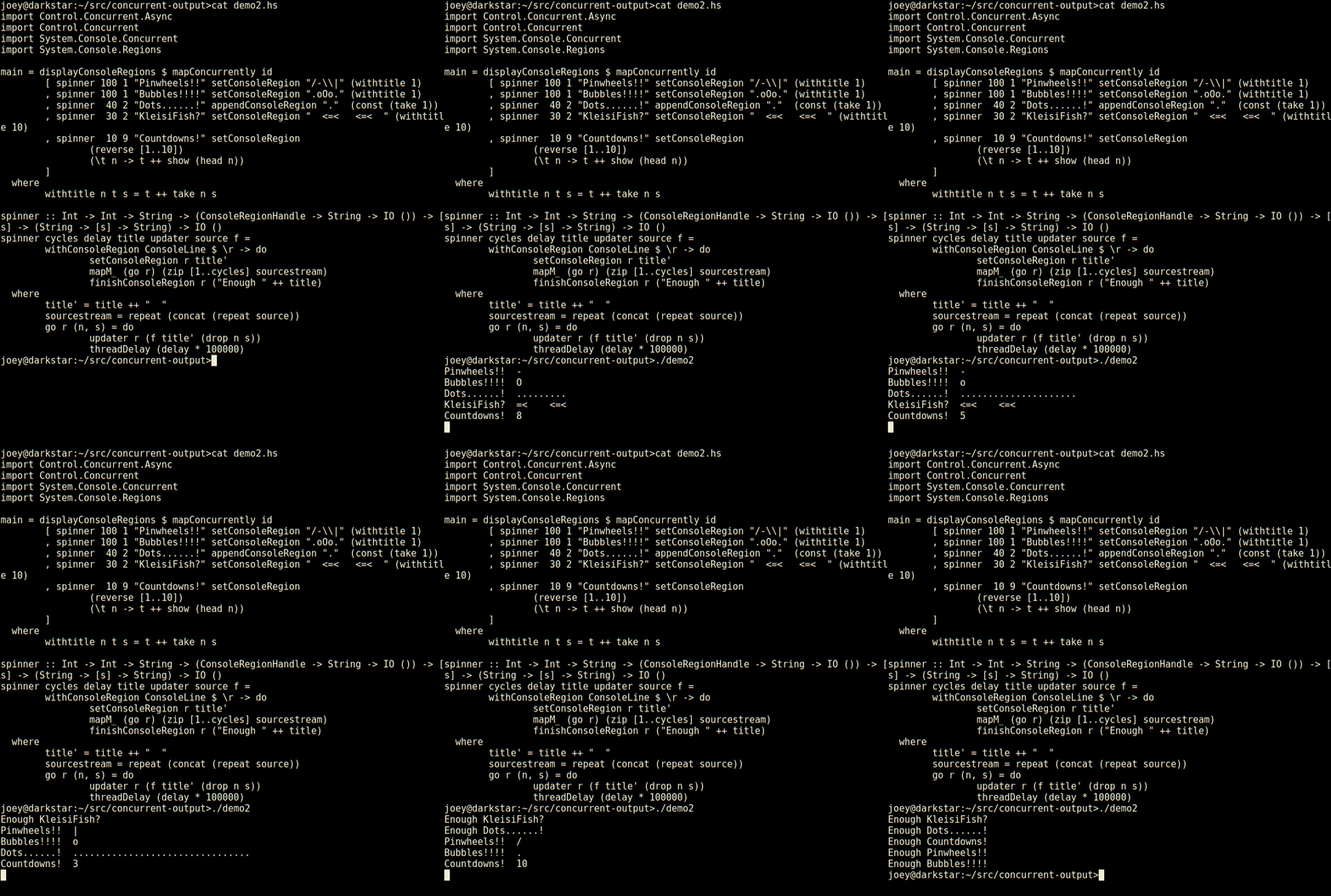 Not bad for 23 lines of code, is that? Seems much less tedious to do things
this way than using ncurses. Even with its panels, ncurses requires you to
think about layout of various things on the screen, and many low-level
details. This, by contrast, is compositional, just add another region and a
thread to update it, and away it goes.
So, here's an apt-like download progress display, in 30 lines of code.
Not bad for 23 lines of code, is that? Seems much less tedious to do things
this way than using ncurses. Even with its panels, ncurses requires you to
think about layout of various things on the screen, and many low-level
details. This, by contrast, is compositional, just add another region and a
thread to update it, and away it goes.
So, here's an apt-like download progress display, in 30 lines of code.
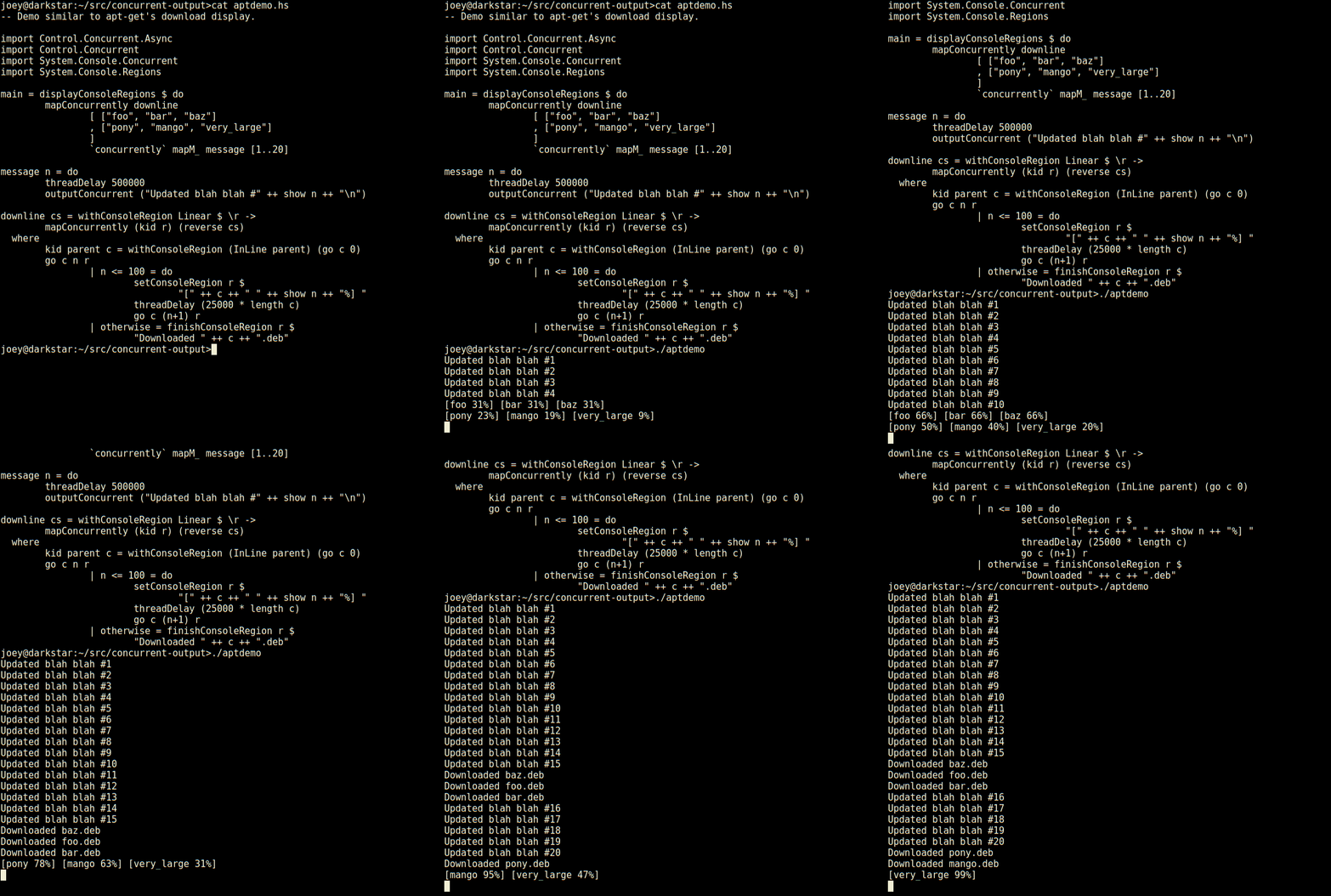 Not only does it have regions which are individual lines of the screen,
but those can have sub-regions within them as seen here (and so on).
And, log-type messages automatically scroll up above the regions.
External programs run by
Not only does it have regions which are individual lines of the screen,
but those can have sub-regions within them as seen here (and so on).
And, log-type messages automatically scroll up above the regions.
External programs run by 

 So, my thought was that the video stream is not corrupt. It just is rendering at a slower frame rate. So, there were 2 problems. 1: Video rendering slower than the usual 30 fps rate. 2: As a result of 1, audio not being in sync with video.
Thanks to gpac tools, even a novice, I was able to quickly separate the streams. And then re-encode the video stream into 30 fps. And then merge the audio + video stream together. And the result: Just awesome.
In below steps, Strip the video
So, my thought was that the video stream is not corrupt. It just is rendering at a slower frame rate. So, there were 2 problems. 1: Video rendering slower than the usual 30 fps rate. 2: As a result of 1, audio not being in sync with video.
Thanks to gpac tools, even a novice, I was able to quickly separate the streams. And then re-encode the video stream into 30 fps. And then merge the audio + video stream together. And the result: Just awesome.
In below steps, Strip the video 
 Test calls
If a friend installs Lumicall too and you dial their number, the Lumicall popup should appear and give you the option to make the call over SIP.
You can also make test calls using
Test calls
If a friend installs Lumicall too and you dial their number, the Lumicall popup should appear and give you the option to make the call over SIP.
You can also make test calls using  I guess that the time has finally come to admit that, as far as upstream development is concerned, the


 I got me a new television last wednesday. The previous one was still
functional, but with its 20 inch display it was (by today's standards) a
very small one. In itself that wasn't an issue, but combined with my
rather large movie collection and the 5.1 surround set that I bought
I got me a new television last wednesday. The previous one was still
functional, but with its 20 inch display it was (by today's standards) a
very small one. In itself that wasn't an issue, but combined with my
rather large movie collection and the 5.1 surround set that I bought  sip0 is a GRE tunnel between the router and the colo box in Seattle, the payload of which is encapsulated as ipsec traffic before being transmitted over the Ubiquity equipment to the switch that the CenturyLink DSL modem attaches to. I don t get centurylink easter eggs in my search results when I use this interface.
eth9 is the local gigabit transceiver. Attached directly to a SIP phone which bridges to a gigabit switch, on which the Ubiquity equipment participates.
lo is the local loopback interface, of course. Good old 127/8
usb1 is the 100Mbit USB NIC to which the WRT54G with ssid colliertech.org is attached. The vast majority of the traffic originates on this interface.
sip0 is a GRE tunnel between the router and the colo box in Seattle, the payload of which is encapsulated as ipsec traffic before being transmitted over the Ubiquity equipment to the switch that the CenturyLink DSL modem attaches to. I don t get centurylink easter eggs in my search results when I use this interface.
eth9 is the local gigabit transceiver. Attached directly to a SIP phone which bridges to a gigabit switch, on which the Ubiquity equipment participates.
lo is the local loopback interface, of course. Good old 127/8
usb1 is the 100Mbit USB NIC to which the WRT54G with ssid colliertech.org is attached. The vast majority of the traffic originates on this interface.
 TLDR: With the help of Helmut Grohne I finally figured out most of the bits
necessary to unshare everything without becoming root (though one might say
that this is still cheated because the suid root tools
TLDR: With the help of Helmut Grohne I finally figured out most of the bits
necessary to unshare everything without becoming root (though one might say
that this is still cheated because the suid root tools