Search Results: "sto"

27 May 2017

Russ Allbery: Optimistic haul

I never have as much time to read as I wish I did, but I keep buying books, of course. Maybe someday I'll have a good opportunity to take extended time off work and just read for a bit. Well, retirement, at least, right? Charlie Jane Anders All the Birds in the Sky (sff)
Peter C. Brown, et al. Make It Stick (nonfiction)
April Daniels Dreadnought: Nemesis (sff)
T. Kingfisher The Halcyon Fairy Book (sff collection)
T. Kingfisher Jackalope Wives and Other Stories (sff collection)
Margot Lee Shetterly Hidden Figures (nonfiction)
Cordwainer Smith Norstrilia (sff)
Kristine Smith Code of Conduct (sff)
Jonathan Taplin Move Fast and Break Things (nonfiction)
Sarah Zettel Fool's War (sff)
Sarah Zettel Playing God (sff)
Sarah Zettel The Quiet Invasion (sff) It doesn't help that James Nicoll keeps creating new lists of books that all sound great. And there's some really interesting nonfiction being written right now. Make It Stick is the current book for the work book club.

Lars Wirzenius: Distix movement

Distix is my distributed ticketing system. I initially wrote the core of it as a bit of programming performance art, to celebrate my 30 years as a programmer. Distix is built on top of git and emails in Maildirs. It is a silent listener to your issue and bug discussions: as long as you ensure it gets a copy of each mail, it takes care of automatically arranging things into separate tickets based on email threading. Users and customers do not need to even know Distix is being used. Only the "support staff" need ever interact with Distix, and they mostly only need to close tickets that have been dealt with. I've been using Distix for my own stuff for some time now, and recently we've started using it at work. I slowly improve it as we find problems. It's not a sleek, smooth, finished tool. It's clunky, weird, and probably not what you want. But it's what I want. Changes in recent months: I've discussed with a friend the possibility of writing a web UI, and some day maybe that will happen. For now, distix is a command line applicaton that can generate a static HTML site.

26 May 2017

Steinar H. Gunderson: Last minute stretch bugs

The last week, I found no less than three pet bugs I have hope that will be allowed to go in before stretch release: I promise, none of these were found late because I upgraded to stretch too late just a perfect storm. :-)

Michal Čihař: Running Bitcoin node on Turris Omnia

For quite some I'm happy user of Turris Omnia router. The router has quite good hardware, so I've decided to try if I can run Bitcoin node on that and ElectrumX server. To make the things easier to manage, I've decided to use LXC and run all these in separate container. First of all you need LXC on the router. This is the default setup, but in case you've removed it, you can add it back in the Updater settings. Now we will create Debian container. There is basic information on using in Turris Documentation on how to create the container, in latter documentation I assume it is called debian. It's also good idea to enable LXC autostart, to do so add your container to cat /etc/config/lxc-auto on :
config container
    option name debian
You might also want to edit lxc container configration to enable clean shutdown:
# Send SIGRTMIN+3 to shutdown systemd (37 on Turris Omnia)
lxc.haltsignal = SIGRTMIN+3
To make the system more recent, I've decided to use Debian Stretch (one of reasons was that ElectrumX needs Python 3.5.3 or newer). Which is anyway probably sane choice right now given that it's already frozen and will be soon stable. As Stretch is not available as a download option in Omnia, I've chosen to use Debian Jessie and upgrate it later:
$ lxc-attach  --name debian
$ sed -i s/jessie/stretch/ /etc/apt/sources.list
$ apt update
$ apt full-upgrade
Now you have up to date system and we can start installing dependencies. First thing to install is Bitcoin Core. Just follow the instructions on their website to do that. Now it's time to set it up and wait for downloading full blockchain:
$ adduser bitcoin
$ su - bitcoin
$ bitcoind -daemon
Depending on your connection speed, the download will take few hours. You can monitor the progress using bitcoin-cli, you're waiting for 450k blocks:
$ bitcoin-cli getinfo
 
  "version": 140000,
  "protocolversion": 70015,
  "walletversion": 130000,
  "balance": 0.00000000,
  "blocks": 301242,
  "timeoffset": -1,
  "connections": 8,
  "proxy": "",
  "difficulty": 8853416309.1278,
  "testnet": false,
  "keypoololdest": 1490267950,
  "keypoolsize": 100,
  "paytxfee": 0.00000000,
  "relayfee": 0.00001000,
  "errors": ""
 
Depending how much memory you have (mine has 2G) and what all you run on the router, you will have to tweak bitcoind configuration to consume less memory. This can be done by editing .bitcoin/bitcoin.conf, I've ended up with following settings:
par=1
dbcache=150
maxmempool=150
You can also create startup unit for Bitcoin daemon (place that as /etc/systemd/system/bitcoind.service):
[Unit]
Description=Bitcoind
After=network.target
[Service]
ExecStart=/opt/bitcoin/bin/bitcoind
User=bitcoin
TimeoutStopSec=30min
Restart=on-failure
RestartSec=30
[Install]
WantedBy=multi-user.target
Now we can enable services to start on container start:
systemctl enable bitcoind.service
Then I wanted to setup ElectrumX as well, but I've quickly realized that it uses way more memory that my router has, so there is no option to run it without using swap, what will probably make it quite slow (I haven't tried that).

Filed under: Debian English OpenWrt

25 May 2017

Michael Prokop: The #newinstretch game: new forensic packages in Debian/stretch

Repeating what I did for the last Debian releases with the #newinwheezy and #newinjessie games it s time for the #newinstretch game: Debian/stretch AKA Debian 9.0 will include a bunch of packages for people interested in digital forensics. The packages maintained within the Debian Forensics team which are new in the Debian/stretch release as compared to Debian/jessie (and ignoring jessie-backports): Join the #newinstretch game and present packages and features which are new in Debian/stretch.

24 May 2017

Steve Kemp: Getting ready for Stretch

I run about 17 servers. Of those about six are very personal and the rest are a small cluster which are used for a single website. (Partly because the code is old and in some ways a bit badly designed, partly because "clustering!", "high availability!", "learning!", "fun!" - seriously I had a lot of fun putting together a fault-tolerant deployment with haproxy, ucarp, etc, etc. If I were paying for it the site would be both retired and static!) I've started the process of upgrading to stretch by picking a bunch of hosts that do things I could live without for a few days - in case there were big problems, or I needed to restore from backups. So far I've upgraded: All upgrades were painless, with only one real surprise - the attic-backup software was removed from Debian. Although I do intend to retry using Larss' excellent obnum in the near future pragmatically I wanted to stick with what I'm familiar with. Borg backup is a fork of attic I've been aware of for a long time, but I never quite had a reason to try it out. Setting it up pretty much just meant editing my backup-script:
s/attic/borg/g
Once I did that, and created some new destinations all was good:
borg@rsync.io ~ $ borg init /backups/git.steve.org.uk.borg/
borg@rsync.io ~ $ borg init /backups/master.steve.org.uk.borg/
borg@rsync.io ~ $ ..
Upgrading other hosts, for example my website(s), and my email-box, will be more complex and fiddly. On that basis they will definitely wait for the formal stretch release. But having a couple of hosts running the frozen distribution is good for testing, and to let me see what is new.

Michal Čihař: Weblate 2.14.1

Weblate 2.14.1 has been released today. It is bugfix release fixing possible migration issues, search results navigation and some minor security issues. Full list of changes: If you are upgrading from older version, please follow our upgrading instructions. You can find more information about Weblate on https://weblate.org, the code is hosted on Github. If you are curious how it looks, you can try it out on demo server. You can login there with demo account using demo password or register your own user. Weblate is also being used on https://hosted.weblate.org/ as official translating service for phpMyAdmin, OsmAnd, Turris, FreedomBox, Weblate itself and many other projects. Should you be looking for hosting of translations for your project, I'm happy to host them for you or help with setting it up on your infrastructure. Further development of Weblate would not be possible without people providing donations, thanks to everybody who have helped so far! The roadmap for next release is just being prepared, you can influence this by expressing support for individual issues either by comments or by providing bounty for them.

Filed under: Debian English SUSE Weblate

23 May 2017

Dirk Eddelbuettel: Rcpp 0.12.11: Loads of goodies

The elevent update in the 0.12.* series of Rcpp landed on CRAN yesterday following the initial upload on the weekend, and the Debian package and Windows binaries should follow as usual. The 0.12.11 release follows the 0.12.0 release from late July, the 0.12.1 release in September, the 0.12.2 release in November, the 0.12.3 release in January, the 0.12.4 release in March, the 0.12.5 release in May, the 0.12.6 release in July, the 0.12.7 release in September, the 0.12.8 release in November, the 0.12.9 release in January, and the 0.12.10.release in March --- making it the fifteenth release at the steady and predictable bi-montly release frequency. Rcpp has become the most popular way of enhancing GNU R with C or C++ code. As of today, 1026 packages on CRAN depend on Rcpp for making analytical code go faster and further, along with another 91 in BioConductor. This releases follows on the heels of R's 3.4.0 release and addresses on or two issues from the transition, along with a literal boatload of other fixes and enhancements. James "coatless" Balamuta was once restless in making the documentation better, Kirill Mueller addressed a number of more obscure compiler warnings (triggered under under -Wextra and the like), Jim Hester improved excecption handling, and much more mostly by the Rcpp Core team. All changes are listed below in some detail. One big change that JJ made is that Rcpp Attributes also generate the now-almost-required package registration. (For background, I blogged about this one, two, three times.) We tested this, and do not expect it to throw curveballs. If you have an existing src/init.c, or if you do not have registration set in your NAMESPACE. It should cover most cases. But one never knows, and one first post-release buglet related to how devtools tests things has already been fixed in this PR by JJ.

Changes in Rcpp version 0.12.11 (2017-05-20)
  • Changes in Rcpp API:
    • Rcpp::exceptions can now be constructed without a call stack (Jim Hester in #663 addressing #664).
    • Somewhat spurious compiler messages under very verbose settings are now suppressed (Kirill Mueller in #670, #671, #672, #687, #688, #691).
    • Refreshed the included tinyformat template library (James Balamuta in #674 addressing #673).
    • Added printf-like syntax support for exception classes and variadic templating for Rcpp::stop and Rcpp::warning (James Balamuta in #676).
    • Exception messages have been rewritten to provide additional information. (James Balamuta in #676 and #677 addressing #184).
    • One more instance of Rf_mkString is protected from garbage collection (Dirk in #686 addressing #685).
    • Two exception specification that are no longer tolerated by g++-7.1 or later were removed (Dirk in #690 addressing #689)
  • Changes in Rcpp Documentation:
  • Changes in Rcpp Sugar:
    • Added sugar function trimws (Nathan Russell in #680 addressing #679).
  • Changes in Rcpp Attributes:
    • Automatically generate native routine registrations (JJ in #694)
    • The plugins for C++11, C++14, C++17 now set the values R 3.4.0 or later expects; a plugin for C++98 was added (Dirk in #684 addressing #683).
  • Changes in Rcpp support functions:
    • The Rcpp.package.skeleton() function now creates a package registration file provided R 3.4.0 or later is used (Dirk in #692)

Thanks to CRANberries, you can also look at a diff to the previous release. As always, even fuller details are on the Rcpp Changelog page and the Rcpp page which also leads to the downloads page, the browseable doxygen docs and zip files of doxygen output for the standard formats. A local directory has source and documentation too. Questions, comments etc should go to the rcpp-devel mailing list off the R-Forge page.

This post by Dirk Eddelbuettel originated on his Thinking inside the box blog. Please report excessive re-aggregation in third-party for-profit settings.

Reproducible builds folks: Reproducible Builds: week 108 in Stretch cycle

Here's what happened in the Reproducible Builds effort between Sunday May 14 and Saturday May 20 2017: News and Media coverage IRC meeting Our next IRC meeting has been scheduled for Thursday June 1 at 16:00 UTC. Packages reviewed and fixed, bugs filed, etc. Bernhard M. Wiedemann: Chris Lamb: Reviews of unreproducible packages 35 package reviews have been added, 28 have been updated and 12 have been removed in this week, adding to our knowledge about identified issues. 2 issue types have been added: diffoscope development strip-nondeterminism development tests.reproducible-builds.org Holger wrote a new systemd-based scheduling system replacing 162 constantly running Jenkins jobs which were slowing down job execution in general: Misc. This week's edition was written by Chris Lamb, Holver Levsen, Bernhard M. Wiedemann, Vagrant Cascadian and Maria Glukhova & reviewed by a bunch of Reproducible Builds folks on IRC & the mailing lists.

21 May 2017

Ritesh Raj Sarraf: apt-offline 1.8.0 released

I am pleased to announce the release of apt-offline, version 1.8.0. This release is mainly a forward port of apt-offline to Python 3 and PyQt5. There are some glitches related to Python 3 and PyQt5, but overall the CLI interface works fine. Other than the porting, there's also an important bug fixed, related to memory leak when using the MIME library. And then there's some updates to the documentation (user examples) based on feedback from users. Release is availabe from Github and Alioth

What is apt-offline ?

Description: offline APT package manager
apt-offline is an Offline APT Package Manager.
.
apt-offline can fully update and upgrade an APT based distribution without
connecting to the network, all of it transparent to APT.
.
apt-offline can be used to generate a signature on a machine (with no network).
This signature contains all download information required for the APT database
system. This signature file can be used on another machine connected to the
internet (which need not be a Debian box and can even be running windows) to
download the updates.
The downloaded data will contain all updates in a format understood by APT and
this data can be used by apt-offline to update the non-networked machine.
.
apt-offline can also fetch bug reports and make them available offline.

Categories:

Keywords:

Like:

Russ Allbery: Review: Sector General

Review: Sector General, by James White
Series: Sector General #5
Publisher: Orb
Copyright: 1983
Printing: 2002
ISBN: 0-312-87770-6
Format: Trade paperback
Pages: 187
Sector General is the fifth book (or, probably more accurately, collection) in the Sector General series. I blame the original publishers for the confusion. The publication information is for the Alien Emergencies omnibus, which includes the fourth through the sixth books in the series. Looking back on my previous reviews of this series (wow, it's been eight years since I read the last one?), I see I was reviewing them as novels rather than as short story collections. In retrospect, that was a mistake, since they're composed of clearly stand-alone stories with a very loose arc. I'm not going to go back and re-read the earlier collections to give them proper per-story reviews, but may as well do this properly here. Overall, this collection is more of the same, so if that's what you want, there won't be any negative surprises. It's another four engineer-with-a-wrench stories about biological and medical puzzles, with only a tiny bit of characterization and little hint to any personal life for any of the characters outside of the job. Some stories are forgettable, but White does create some memorable aliens. Sadly, the stories don't take us to the point of real communication, so those aliens stop at biological puzzles and guesswork. "Combined Operation" is probably the best, although "Accident" is the most philosophical and an interesting look at the founding principle of Sector General. "Accident": MacEwan and Grawlya-Ki are human and alien brought together by a tragic war, and forever linked by a rather bizarre war monument. (It's a very neat SF concept, although the implications and undiscussed consequences don't bear thinking about too deeply.) The result of that war was a general recognition that such things should not be allowed to happen again, and it brought about a new, deep commitment to inter-species tolerance and politeness. Which is, in a rather fascinating philosophical twist, exactly what MacEwan and Grawlya-Ki are fighting against: not the lack of aggression, which they completely agree with, but with the layers of politeness that result in every species treating all others as if they were eggshells. Their conviction is that this cannot create a lasting peace. This insight is one of the most profound bits I've read in the Sector General novels and supports quite a lot of philosophical debate. (Sadly, there isn't a lot of that in the story itself.) The backdrop against which it plays out is an accidental crash in a spaceport facility, creating a dangerous and potentially deadly environment for a variety of aliens. Given the collection in which this is included and the philosophical bent described above, you can probably guess where this goes, although I'll leave it unspoiled if you can't. It's an idea that could have been presented with more subtlety, but it's a really great piece of setting background that makes the whole series snap into focus. A much better story in context than its surface plot. (7) "Survivor": The hospital ship Rhabwar rescues a sole survivor from the wreck of an alien ship caused by incomplete safeguards on hyperdrive generators. The alien is very badly injured and unconscious and needs the full attention of Sector General, but on the way back, the empath Prilicla also begins suffering from empathic hypersensitivity. Conway, the protagonist of most of this series, devotes most of his attention to that problem, having delivered the rescued alien to competent surgical hands. But it will surprise no regular reader that the problems turn out to be linked (making it a bit improbable that it takes the doctors so long to figure that out). A very typical entry in the series. (6) "Investigation": Another very typical entry, although this time the crashed spaceship is on a planet. The scattered, unconscious bodies of the survivors, plus signs of starvation and recent amputation on all of them, convinces the military (well, police is probably more accurate) escort that this is may be a crime scene. The doctors are unconvinced, but cautious, and local sand storms and mobile vegetation add to the threat. I thought this alien design was a bit less interesting (and a lot creepier). (6) "Combined Operation": The best (and longest) story of this collection. Another crashed alien spacecraft, but this time it's huge, large enough (and, as they quickly realize, of a design) to indicate a space station rather than a ship, except that it's in the middle of nowhere and each segment contains a giant alien worm creature. Here, piecing together the biology and the nature of the vehicle is only the beginning; the conclusion points to an even larger problem, one that requires drawing on rather significant resources to solve. (On a deadline, of course, to add some drama.) This story requires the doctors to go unusually deep into the biology and extrapolated culture of the alien they're attempting to rescue, which made it more intellectually satisfying for me. (7) Followed by Star Healer. Rating: 6 out of 10

Adnan Hodzic: Automagically deploy & run containerized WordPress (PHP7 FPM, Nginx, MariaDB) using Ansible + Docker on AWS

In this blog post, I ve described what started as simple migration of WordPress blog to AWS, ended up as automation project consisting of publishing multiple Ansible roles deploying and running multiple Docker images. If you re not interested in reading about my entire journey, cognition gains and how this process came to be, please skim down to Birth of: containerized-wordpress-project (TL;DR) section. Migrating WordPress blog to AWS (EC2, Lightsail?) Since I ve been sold on Amazon s AWS idea of cloud computing services for couple of years now. I ve wanted, and been trying to migrate this (WordPress) blog to AWS, but somehow it never worked out. Moving it to EC2 instance, with its own ELB volumes, AMI, EIP, Security Group it just seemed as an overkill. When AWS Lightsail was first released, it seemed that was an answer to all my problems. But it wasn t, disregarding its bit restrictive/dumbed down versions of original features. Living in Amsterdam, my main problem with it was that it was only available in a single US region. Regardless, I thought it had everything I needed for WordPress site, and as a new service, it had great potential. Its regional limitations were also good in a sense that they made me realize one important thing. And that s once I migrate my blog to AWS, I want to be able to seamlessly move/migrate it across different EC2 s and different regions once they were available. If done properly, it meant I could even have it moved across different clouds (I m talking to you Google Cloud). P.S: AWS Lightsail is now available in couple of different regions across Europe. Rollout which was almost smoothless. Fundamental problem of every migration is migration

Phase 1: Don t reinvent the wheel? When you have a WordPress site that s not self hosted. You want everything to work, but yet you really don t want to spend any time managing infrastructure it s on. And as soon as I started looking what could fit this criteria, I found that there were pre-configured, running out of box WordPress EC2 images available on AWS Marketplace, great! But when I took a look, although everything was running out of box, I wasn t happy with software stack it was all built on. Namely Ubuntu 14.04 and Apache, and all of the services were started using custom scripts. Yuck. With this setup, when it was time to upgrade (and it s already that time) you wouldn t be thinking about upgrade. You d only be thinking about another migration. Phase 2: What if I built everything myself? Installing and configuring everything manually, and then writing huge HowTo which I would follow when I needed to re-create whole stack was not an option. Same case with was scripting whole process, as overhead of changes that had to be tracked was too way too big. Being a huge Ansible fan, automating this step was a natural next step. I even found an awesome Ansible role which seemed like it s going to do everything I need. Except, I realized I needed to update all software that s deployed with it, and customize it since configuration it was deployed on wasn t as generic. So I forked it and got to work. But soon enough, I was knee deep in making and fiddling with various system changes. Something I was trying to get away in this case, and most importantly something I was trying to avoid when it was time for next update. Phase 3: Marriage made in heaven: Ansible + Docker + AWS Idea to have everything Dockerized was around from very start. However, it never made a lot of sense until I put Ansible into same picture. And it was at this point where my final idea and requirements become crystal clear. Use Ansible to configure and setup host ready for Docker ecosystem. Ecosystem consisting of multiple separate containers for each required service (WordPress + Nginx + MariaDB). Link them all together as a single service using Docker Compose. Idea was backed by thought to spend minimum to no time (and effort) on manual configuration of anything on the server. Level of attachment to this server was so low that I didn t even want to SSH to it. If there was something wrong, I could just nuke the whole thing and deploy code on a new healthy rolled out server with everything working out of box. After it was clear what needed to be done, I got to work.

Birth of: containerized-wordpress-project (TL;DR)

After a lot of work, end result is project which allows you to automagically deploy & run containerized WordPress instance which consists of 3 separate containers running:

Once run, containerized-wordpress playbook will guide you through interactive setup of all 3 containers, after which it will run all Ansible roles created for this project. End result is that host you have never even SSH-ed to will be fully configured and running containerized WordPress instace out of box.

Most importantly, this whole process will be completed in <= 5 minutes and doesn t require any Docker or Ansible knowledge! containerized-wordpress demo Console output of running containerized-wordpress Ansible Playbook: Console output of running "containerized-wordpress" Ansible Playbook

Accessing WordPress instance created from containerized-wordpress Ansible Playbook:

Accessing WordPress instance created from "containerized-wordpress" Ansible Playbook Did I end up migrating to AWS in the end? You bet. Thanks to efforts made in containerized-wordpress-project, I m happy to report my whole WordPress migration to AWS was completed in matter of minutes and that this blog is now running on Docker and on AWS! I hope this same project will help you take a leap in your migration. Happy hacking!

Elena 'valhalla' Grandi: Modern XMPP Server

Modern XMPP Server

I've published a new HOWTO on my website www.trueelena.org/computers/ho:

www.enricozini.org/blog/2017/d already wrote about the Why (and the What, Who and When), so I'll just quote his conclusion and move on to the How.

I now have an XMPP setup which has all the features of the recent fancy chat systems, and on top of that it runs, client and server, on Free Software, which can be audited, it is federated and I can self-host my own server in my own VPS if I want to, with packages supported in Debian.


How

I've decided to install prosody.im/, mostly because it was recommended by the RTC QuickStart Guide rtcquickstart.org/; I've heard that similar results can be reached with www.ejabberd.im/ and other servers.

I'm also targeting www.debian.org/ stable (+ backports); as I write this is jessie; if there are significant differences I will update this article when I will upgrade my server to stretch. Right now, this means that I'm using prosody 0.9 (and that's probably also the version that will be available in stretch).

Installation and prerequisites

You will need to enable the backports.debian.org/ repository and then install the packages prosody and prosody-modules.

You also need to setup some TLS certificates (I used Let's Encrypt letsencrypt.org/); and make them readable by the prosody user; you can see Chapter 12 of the RTC QuickStart Guide rtcquickstart.org/guide/multi/ for more details.

On your firewall, you'll need to open the following TCP ports:


The latter two are needed to enable some services provided via http(s), including rich media transfers.

With just a handful of users, I didn't bother to configure LDAP or anything else, but just created users manually via:

prosodyctl adduser alice@example.org

In-band registration is disabled by default (and I've left it that way, to prevent my server from being used to send spim en.wikipedia.org/wiki/Messagin).

prosody configuration

You can then start configuring prosody by editing /etc/prosody/prosody.cfg.lua and changing a few values from the distribution defaults.

First of all, enforce the use of encryption and certificate checking both for client2server and server2server communications with:


c2s_require_encryption = true
s2s_secure_auth = true


and then, sadly, add to the whitelist any server that you want to talk to and doesn't support the above:


s2s_insecure_domains = "gmail.com"


virtualhosts

For each virtualhost you want to configure, create a file /etc/prosody/conf.avail/chat.example.org.cfg.lua with contents like the following:


VirtualHost "chat.example.org"
enabled = true
ssl =
key = "/etc/ssl/private/example.org-key.pem";
certificate = "/etc/ssl/public/example.org.pem";


For the domains where you also want to enable MUCs, add the follwing lines:


Component "conference.chat.example.org" "muc"
restrict_room_creation = "local"


the "local" configures prosody so that only local users are allowed to create new rooms (but then everybody can join them, if the room administrator allows it): this may help reduce unwanted usages of your server by random people.

You can also add the following line to enable rich media transfers via http uploads (XEP-0363):


Component "upload.chat.example.org" "http_upload"

The defaults are pretty sane, but see modules.prosody.im/mod_http_up for details on what knobs you can configure for this module

Don't forget to enable the virtualhost by linking the file inside /etc/prosody/conf.d/.

additional modules

Most of the other interesting XEPs are enabled by loading additional modules inside /etc/prosody/prosody.cfg.lua (under modules_enabled); to enable mod_something just add a line like:


"something";

Most of these come from the prosody-modules package (and thus from modules.prosody.im/ ) and some may require changing when prosody 0.10 will be available; when this is the case it is mentioned below.


@Gruppo Linux Como @LIFO

20 May 2017

Neil Williams: Software, service, data and freedom

Free software, free services but what about your data? I care a lot about free software, not only as a Debian Developer. The use of software as a service matters as well because my principle free software development is on just such a project, licensed under the GNU Affero General Public License version 3. The AGPL helps by allowing anyone who is suitably skilled to install their own copy of the software and run their own service on their own hardware. As a project, we are seeing increasing numbers of groups doing exactly this and these groups are actively contributing back to the project. So what is the problem? We've got an active project, an active community and everything is under a free software licence and regularly uploaded to Debian main. We have open code review with anonymous access to our own source code CI and anonymous access to project planning, open mailing list archives as well as an open bug tracker and a very active IRC channel (#linaro-lava on OFTC). We develop in the open, we respond in the open and we publish frequently (monthly, approximately). The code we write defaults to public visibilty at runtime with restrictions available for certain use cases. What else can we be doing? Well it was a simple question which started me thinking.
The lava documentation has various example test scripts e.g. https://validation.linaro.org/static/docs/v2/examples/test-jobs/qemu-kernel-standard-sid.yaml these have no licence information, we've adapted them for a Linux Foundation project, what licence should apply to these files? Robert Marshall
Those are our own examples, contributed as part of the documentation and covered by the AGPL like the rest of the documentation and the software which it documents, so I replied with the same. However, what about all the other submissions received by the service?
Data Freedom LAVA acts by providing a service to authenticated users. The software runs your test code on hardware which might not be available to the user or which is simply inconvenient for the test writer to setup themselves. The AGPL covers this nicely. What about the data contributed by the users? We make this available to other users who will, naturally, copy and paste for their own tests. In most cases, because the software defaults to public access, anonymous users also get to learn from the contributions of other test writers. This is a good thing and to be encouraged. (One reason why we moved to YAML for all submissions was to allow comments to help other users understand why the submission does specific things.) Writing a test job submission or a test shell definition from scratch is a non-trivial amount of work. We've written dozens of pages of documentation covering how and how not to do it but the detail of how a test job runs exactly what the test writer requires can involve substantial effort. (Our documentation recommends using version control for each of these works for exactly these reasons.) At what point do these works become software? At what point do these need licensing? How could that be declared?
Perils of the Javascript Trap approach When reading up on the AGPL, I also read about Service as a Software Substitute (SaaSS) and this led to The Javascript Trap. I don't consider LAVA to be SaaSS although it is Software as a Service (SaaS). (Distinguishing between those is best left to the GNU document as it is an almighty tangle at times.) I did look at the GNU ideas for licensing Javascript but it seems cumbersome and unnecessary - a protocol designed for the specific purposes of their own service rather than as a solution which could be readily adopted by all such services. The same problems affect trying to untangle sharing the test job data within LAVA.
Adding Licence text The traditional way, of course, is simply to add twenty lines or so of comments at the top of every file. This works nicely for source code because the comments are hidden from the final UI (unless an explicit reference is made in the --help output or similar). It is less nice for human readable submissions where the first thing someone has to do is scroll passed the comments to get to what they want to see. At that point, it starts to look like a popup or a nagging banner - blocking the requested content on a website to try and get the viewer to subscribe to a newsletter or pay for the rest of the content. Let's not actively annoy visitors who are trying to get things done.
Adding Licence files This can be done in the remote version control repository - then a single line in the submitted file can point at the licence. This is how I'm seeking to solve the problem of our own repositories. If the reference URL is included in the metadata of the test job submission, it can even be linked into the test job metadata and made available to everyone through the results API.
metadata:
  licence.text: http://mysite/lava/git/COPYING
  licence.name: BSD 3 clause
Metadata in LAVA test job submissions is free-form but if the example was adopted as a convention for LAVA submissions, it would make it easy for someone to query LAVA for the licences of a range of test submissions. Currently, LAVA does not store metadata from the test shell definitions except the URL of the git repo for the test shell definition but that may be enough in most cases for someone to find the relevant COPYING or LICENCE file.
Which licence? This could be a problem too. If users contribute data under unfriendly licences, what is LAVA to do? I've used the BSD 3 clause in the above example as I expect it to be the most commonly used licence for these contributions. A copyleft licence could be used, although doing so would require additional metadata in the submission to declare how to contribute back to the original author (because that is usually not a member of the LAVA project).
Why not Creative Commons? Although I'm referring to these contributions as data, these are not pieces of prose or images or audio. These are instructions (with comments) for a specific piece of software to execute on behalf of the user. As such, these objects must comply with the schema and syntax of the receiving service, so a code-based licence would seem correct.
Results Finally, a word about what comes back from your data submission - the results. This data cannot be restricted by any licence affecting either the submission or the software, it can be restricted using the API or left as the default of public access. If the results and the submission data really are private, then the solution is to take advantage of the AGPL, take the source code of LAVA and run it internally where the entire service can be placed within a firewall.
What happens next?
  1. Please consider editing your own LAVA test job submissions to add licence metadata.
  2. Please use comments in your own LAVA test job submissions, especially if you are using some form of template engine to generate the submission. This data will be used by others, it is easier for everyone if those users do not have to ask us or you about why your test job does what it does.
  3. Add a file to your own repositories containing LAVA test shell definitions to declare how these files can be shared freely.
  4. Think about other services to which you submit data which is either only partially machine generated or which is entirely human created. Is that data free-form or are you essentially asking the service to do a precise task on your behalf as if you were programming that server directly? (Jenkins is a classic example, closely related to LAVA.)
    • Think about how much developer time was required to create that submission and how the service publishes that submission in ways that allow others to copy and paste it into their own submissions.
    • Some of those submissions can easily end up in documentation or other published sources which will need to know about how to licence and distribute that data in a new format (i.e. modification.) Do you intend for that useful purpose to be defeated by releasing your data under All Rights Reserved?
Contact I don't enable comments on this blog but there are enough ways to contact me and the LAVA project in the body of this post, it really shouldn't be a problem for anyone to comment.

Ritesh Raj Sarraf: Patanjali Research Foundation

PSA: Research in the domain of Ayurveda

http://www.patanjaliresearchfoundation.com/patanjali/
I am so glad to see this initiative taken by the Patanjali group. This is a great stepping stone in the health and wellness domain. So far, Allopathy has been blunt in discarding alternate medicine practices, without much solid justification. The only, repetitive, response I've heard is "lack of research". This initiative definitely is a great step in that regard. Ayurveda (Ancient Hindu art of healing) has a huge potential to touch lives. For the Indian sub-continent, this has the potential of a blessing. The Prime Minister of India himself inaugurated the research centre.

Categories:

Keywords:

Like:

19 May 2017

Michael Prokop: Debian stretch: changes in util-linux #newinstretch

We re coming closer to the Debian/stretch stable release and similar to what we had with #newinwheezy and #newinjessie it s time for #newinstretch! Hideki Yamane already started the game by blogging about GitHub s Icon font, fonts-octicons and Arturo Borrero Gonzalez wrote a nice article about nftables in Debian/stretch. One package that isn t new but its tools are used by many of us is util-linux, providing many essential system utilities. We have util-linux v2.25.2 in Debian/jessie and in Debian/stretch there will be util-linux >=v2.29.2. There are many new options available and we also have a few new tools available. Tools that have been taken over from other packages New tools New features/options addpart (show or change the real-time scheduling attributes of a process):
--reload reload prompts on running agetty instances
blkdiscard (discard the content of sectors on a device):
-p, --step <num>    size of the discard iterations within the offset
-z, --zeroout       zero-fill rather than discard
chrt (show or change the real-time scheduling attributes of a process):
-d, --deadline            set policy to SCHED_DEADLINE
-T, --sched-runtime <ns>  runtime parameter for DEADLINE
-P, --sched-period <ns>   period parameter for DEADLINE
-D, --sched-deadline <ns> deadline parameter for DEADLINE
fdformat (do a low-level formatting of a floppy disk):
-f, --from <N>    start at the track N (default 0)
-t, --to <N>      stop at the track N
-r, --repair <N>  try to repair tracks failed during the verification (max N retries)
fdisk (display or manipulate a disk partition table):
-B, --protect-boot            don't erase bootbits when creating a new label
-o, --output <list>           output columns
    --bytes                   print SIZE in bytes rather than in human readable format
-w, --wipe <mode>             wipe signatures (auto, always or never)
-W, --wipe-partitions <mode>  wipe signatures from new partitions (auto, always or never)
New available columns (for -o):
 gpt: Device Start End Sectors Size Type Type-UUID Attrs Name UUID
 dos: Device Start End Sectors Cylinders Size Type Id Attrs Boot End-C/H/S Start-C/H/S
 bsd: Slice Start End Sectors Cylinders Size Type Bsize Cpg Fsize
 sgi: Device Start End Sectors Cylinders Size Type Id Attrs
 sun: Device Start End Sectors Cylinders Size Type Id Flags
findmnt (find a (mounted) filesystem):
-J, --json             use JSON output format
-M, --mountpoint <dir> the mountpoint directory
-x, --verify           verify mount table content (default is fstab)
    --verbose          print more details
flock (manage file locks from shell scripts):
-F, --no-fork            execute command without forking
    --verbose            increase verbosity
getty (open a terminal and set its mode):
--reload               reload prompts on running agetty instances
hwclock (query or set the hardware clock):
--get            read hardware clock and print drift corrected result
--update-drift   update drift factor in /etc/adjtime (requires --set or --systohc)
ldattach (attach a line discipline to a serial line):
-c, --intro-command <string>  intro sent before ldattach
-p, --pause <seconds>         pause between intro and ldattach
logger (enter messages into the system log):
-e, --skip-empty         do not log empty lines when processing files
    --no-act             do everything except the write the log
    --octet-count        use rfc6587 octet counting
-S, --size <size>        maximum size for a single message
    --rfc3164            use the obsolete BSD syslog protocol
    --rfc5424[=<snip>]   use the syslog protocol (the default for remote);
                           <snip> can be notime, or notq, and/or nohost
    --sd-id <id>         rfc5424 structured data ID
    --sd-param <data>    rfc5424 structured data name=value
    --msgid <msgid>      set rfc5424 message id field
    --socket-errors[=<on off auto>] print connection errors when using Unix sockets
losetup (set up and control loop devices):
-L, --nooverlap               avoid possible conflict between devices
    --direct-io[=<on off>]    open backing file with O_DIRECT 
-J, --json                    use JSON --list output format
New available --list column:
DIO  access backing file with direct-io
lsblk (list information about block devices):
-J, --json           use JSON output format
New available columns (for --output):
HOTPLUG  removable or hotplug device (usb, pcmcia, ...)
SUBSYSTEMS  de-duplicated chain of subsystems
lscpu (display information about the CPU architecture):
-y, --physical          print physical instead of logical IDs
New available column:
DRAWER  logical drawer number
lslocks (list local system locks):
-J, --json             use JSON output format
-i, --noinaccessible   ignore locks without read permissions
nsenter (run a program with namespaces of other processes):
-C, --cgroup[=<file>]      enter cgroup namespace
    --preserve-credentials do not touch uids or gids
-Z, --follow-context       set SELinux context according to --target PID
rtcwake (enter a system sleep state until a specified wakeup time):
--date <timestamp>   date time of timestamp to wake
--list-modes         list available modes
-r, --reorder <dev>  fix partitions order (by start offset)
sfdisk (display or manipulate a disk partition table):
New Commands:
-J, --json <dev>                  dump partition table in JSON format
-F, --list-free [<dev> ...]       list unpartitioned free areas of each device
-r, --reorder <dev>               fix partitions order (by start offset)
    --delete <dev> [<part> ...]   delete all or specified partitions
--part-label <dev> <part> [<str>] print or change partition label
--part-type <dev> <part> [<type>] print or change partition type
--part-uuid <dev> <part> [<uuid>] print or change partition uuid
--part-attrs <dev> <part> [<str>] print or change partition attributes
New Options:
-a, --append                   append partitions to existing partition table
-b, --backup                   backup partition table sectors (see -O)
    --bytes                    print SIZE in bytes rather than in human readable format
    --move-data[=<typescript>] move partition data after relocation (requires -N)
    --color[=<when>]           colorize output (auto, always or never)
                               colors are enabled by default
-N, --partno <num>             specify partition number
-n, --no-act                   do everything except write to device
    --no-tell-kernel           do not tell kernel about changes
-O, --backup-file <path>       override default backup file name
-o, --output <list>            output columns
-w, --wipe <mode>              wipe signatures (auto, always or never)
-W, --wipe-partitions <mode>   wipe signatures from new partitions (auto, always or never)
-X, --label <name>             specify label type (dos, gpt, ...)
-Y, --label-nested <name>      specify nested label type (dos, bsd)
Available columns (for -o):
 gpt: Device Start End Sectors Size Type Type-UUID Attrs Name UUID
 dos: Device Start End Sectors Cylinders Size Type Id Attrs Boot End-C/H/S Start-C/H/S
 bsd: Slice Start  End Sectors Cylinders Size Type Bsize Cpg Fsize
 sgi: Device Start End Sectors Cylinders Size Type Id Attrs
 sun: Device Start End Sectors Cylinders Size Type Id Flags
swapon (enable devices and files for paging and swapping):
-o, --options <list>     comma-separated list of swap options
New available columns (for --show):
UUID   swap uuid
LABEL  swap label
unshare (run a program with some namespaces unshared from the parent):
-C, --cgroup[=<file>]                              unshare cgroup namespace
    --propagation slave shared private unchanged   modify mount propagation in mount namespace
-s, --setgroups allow deny                         control the setgroups syscall in user namespaces
Deprecated / removed options sfdisk (display or manipulate a disk partition table):
-c, --id                  change or print partition Id
    --change-id           change Id
    --print-id            print Id
-C, --cylinders <number>  set the number of cylinders to use
-H, --heads <number>      set the number of heads to use
-S, --sectors <number>    set the number of sectors to use
-G, --show-pt-geometry    deprecated, alias to --show-geometry
-L, --Linux               deprecated, only for backward compatibility
-u, --unit S              deprecated, only sector unit is supported

Benjamin Mako Hill: Children s Perspectives on Critical Data Literacies

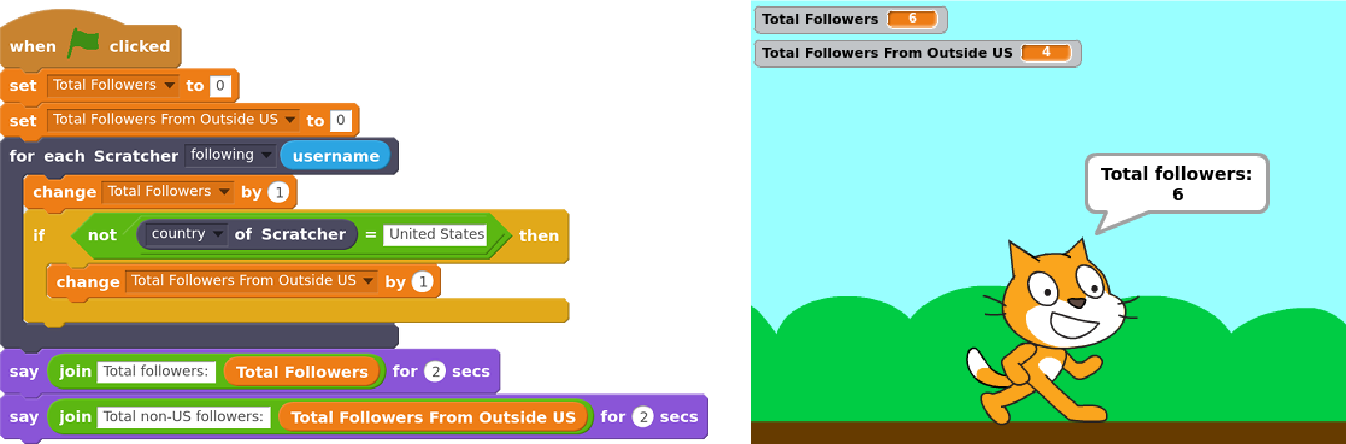
Last week, we presented a new paper that describes how children are thinking through some of the implications of new forms of data collection and analysis. The presentation was given at the ACM CHI conference in Denver last week and the paper is open access and online. Over the last couple years, we ve worked on a large project to support children in doing and not just learning about data science. We built a system, Scratch Community Blocks, that allows the 18 million users of the Scratch online community to write their own computer programs in Scratch of course to analyze data about their own learning and social interactions. An example of one of those programs to find how many of one s follower in Scratch are not from the United States is shown below. Last year, we deployed Scratch Community Blocks to 2,500 active Scratch users who, over a period of several months, used the system to create more than 1,600 projects. As children used the system, Samantha Hautea, a student in UW s Communication Leadership program, led a group of us in an online ethnography. We visited the projects children were creating and sharing. We followed the forums where users discussed the blocks. We read comment threads left on projects. We combined Samantha s detailed field notes with the text of comments and forum posts, with ethnographic interviews of several users, and with notes from two in-person workshops. We used a technique called grounded theory to analyze these data. What we found surprised us. We expected children to reflect on being challenged by and hopefully overcoming the technical parts of doing data science. Although we certainly saw this happen, what emerged much more strongly from our analysis was detailed discussion among children about the social implications of data collection and analysis. In our analysis, we grouped children s comments into five major themes that represented what we called critical data literacies. These literacies reflect things that children felt were important implications of social media data collection and analysis. First, children reflected on the way that programmatic access to data even data that was technically public introduced privacy concerns. One user described the ability to analyze data as, creepy , but at the same time, very cool. Children expressed concern that programmatic access to data could lead to stalking and suggested that the system should ask for permission. Second, children recognized that data analysis requires skepticism and interpretation. For example, Scratch Community Blocks introduced a bug where the block that returned data about followers included users with disabled accounts. One user, in an interview described to us how he managed to figure out the inconsistency:

At one point the follower blocks, it said I have slightly more followers than I do. And, that was kind of confusing when I was trying to make the project. [ ] I pulled up a second [browser] tab and compared the [data from Scratch Community Blocks and the data in my profile]. Third, children discussed the hidden assumptions and decisions that drive the construction of metrics. For example, the number of views received for each project in Scratch is counted using an algorithm that tries to minimize the impact of gaming the system (similar to, for example, Youtube). As children started to build programs with data, they started to uncover and speculate about the decisions behind metrics. For example, they guessed that the view count might only include unique views and that view counts may include users who do not have accounts on the website. Fourth, children building projects with Scratch Community Blocks realized that an algorithm driven by social data may cause certain users to be excluded. For example, a 13-year-old expressed concern that the system could be used to exclude users with few social connections saying:

I love these new Scratch Blocks! However I did notice that they could be used to exclude new Scratchers or Scratchers with not a lot of followers by using a code: like this:
when flag clicked
if then user s followers < 300
stop all.
I do not think this a big problem as it would be easy to remove this code but I did just want to bring this to your attention in case this not what you would want the blocks to be used for.
Fifth, children were concerned about the possibility that measurement might distort the Scratch community s values. While giving feedback on the new system, a user expressed concern that by making it easier to measure and compare followers, the system could elevate popularity over creativity, collaboration, and respect as a marker of success in Scratch.

I think this was a great idea! I am just a bit worried that people will make these projects and take it the wrong way, saying that followers are the most important thing in on Scratch. Kids conversations around Scratch Community Blocks are good news for educators who are starting to think about how to engage young learners in thinking critically about the implications of data. Although no kid using Scratch Community Blocks discussed each of the five literacies described above, the themes reflect starting points for educators designing ways to engage kids in thinking critically about data. Our work shows that if children are given opportunities to actively engage and build with social and behavioral data, they might not only learn how to do data analysis, but also reflect on its implications.

This blog-post and the work that it describes is a collaborative project by Samantha Hautea, Sayamindu Dasgupta, and Benjamin Mako Hill. We have also received support and feedback from members of the Scratch team at MIT (especially Mitch Resnick and Natalie Rusk), as well as from Hal Abelson from MIT CSAIL. Financial support came from the US National Science Foundation.

18 May 2017

Michael Prokop: Debugging a mystery: ssh causing strange exit codes?

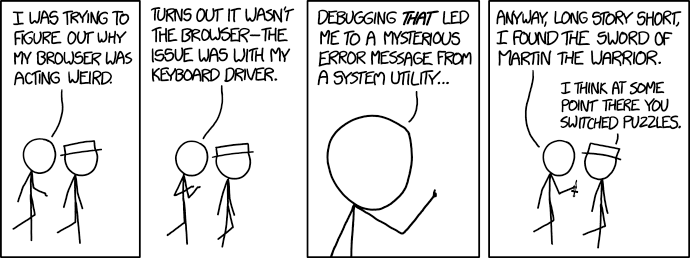
XKCD comic 1722 Recently we had a WTF moment at a customer of mine which is worth sharing. In an automated deployment procedure we re installing Debian systems and setting up MySQL HA/Scalability. Installation of the first node works fine, but during installation of the second node something weird is going on. Even though the deployment procedure reported that everything went fine: it wasn t fine at all. After bisecting to the relevant command lines where it s going wrong we identified that the failure is happening between two ssh/scp commands, which are invoked inside a chroot through a shell wrapper. The ssh command caused a wrong exit code showing up: instead of bailing out with an error (we re running under set -e ) it returned with exit code 0 and the deployment procedure continued, even though there was a fatal error. Initially we triggered the bug when two ssh/scp command lines close to each other were executed, but I managed to find a minimal example for demonstration purposes:
# cat ssh_wrapper 
chroot << "EOF" / /bin/bash
ssh root@localhost hostname >/dev/null
exit 1
EOF
echo "return code = $?"
What we d expect is the following behavior, receive exit code 1 from the last command line in the chroot wrapper:
# ./ssh_wrapper 
return code = 1
But what we actually get is exit code 0:
# ./ssh_wrapper 
return code = 0
Uhm?! So what s going wrong and what s the fix? Let s find out what s causing the problem:
# cat ssh_wrapper 
chroot << "EOF" / /bin/bash
ssh root@localhost command_does_not_exist >/dev/null 2>&1
exit "$?"
EOF
echo "return code = $?"
# ./ssh_wrapper 
return code = 127
Ok, so if we invoke it with a binary that does not exist we properly get exit code 127, as expected.
What about switching /bin/bash to /bin/sh (which corresponds to dash here) to make sure it s not a bash bug:
# cat ssh_wrapper 
chroot << "EOF" / /bin/sh
ssh root@localhost hostname >/dev/null
exit 1
EOF
echo "return code = $?"
# ./ssh_wrapper 
return code = 1
Oh, but that works as expected!? When looking at this behavior I had the feeling that something is going wrong with file descriptors. So what about wrapping the ssh command line within different tools? No luck with stdbuf -i0 -o0 -e0 ssh root@localhost hostname , nor with script -c ssh root@localhost hostname /dev/null and also not with socat EXEC: ssh root@localhost hostname STDIO . But it works under unbuffer(1) from the expect package:
# cat ssh_wrapper 
chroot << "EOF" / /bin/bash
unbuffer ssh root@localhost hostname >/dev/null
exit 1
EOF
echo "return code = $?"
# ./ssh_wrapper 
return code = 1
So my bet on something with the file descriptor handling was right. Going through the ssh manpage, what about using ssh s -n option to prevent reading from standard input (stdin)?
# cat ssh_wrapper
chroot << "EOF" / /bin/bash
ssh -n root@localhost hostname >/dev/null
exit 1
EOF
echo "return code = $?"
# ./ssh_wrapper 
return code = 1
Bingo! Quoting ssh(1):
     -n      Redirects stdin from /dev/null (actually, prevents reading from stdin).
             This must be used when ssh is run in the background.  A common trick is
             to use this to run X11 programs on a remote machine.  For example,
             ssh -n shadows.cs.hut.fi emacs & will start an emacs on shadows.cs.hut.fi,
             and the X11 connection will be automatically forwarded over an encrypted
             channel.  The ssh program will be put in the background.  (This does not work
             if ssh needs to ask for a password or passphrase; see also the -f option.)
Let s execute the scripts through strace -ff -s500 ./ssh_wrapper to see what s going in more detail.
In the strace run without ssh s -n option we see that it s cloning stdin (file descriptor 0), getting assigned to file descriptor 4:
dup(0)            = 4
[...]
read(4, "exit 1\n", 16384) = 7
while in the strace run with ssh s -n option being present there s no file descriptor duplication but only:
open("/dev/null", O_RDONLY) = 4
This matches ssh.c s ssh_session2_open function (where stdin_null_flag corresponds to ssh s -n option):
        if (stdin_null_flag)                                              
                in = open(_PATH_DEVNULL, O_RDONLY);
          else  
                in = dup(STDIN_FILENO);
         
This behavior can also be simulated if we explicitly read from /dev/null, and this indeed works as well:
# cat ssh_wrapper
chroot << "EOF" / /bin/bash
ssh root@localhost hostname >/dev/null </dev/null
exit 1
EOF
echo "return code = $?"
# ./ssh_wrapper 
return code = 1
The underlying problem is that both bash and ssh are consuming from stdin. This can be verified via:
# cat ssh_wrapper
chroot << "EOF" / /bin/bash
echo "Inner: pre"
while read line; do echo "Eat: $line" ; done
echo "Inner: post"
exit 3
EOF
echo "Outer: exit code = $?"
# ./ssh_wrapper
Inner: pre
Eat: echo "Inner: post"
Eat: exit 3
Outer: exit code = 0
This behavior applies to bash, ksh, mksh, posh and zsh. Only dash doesn t show this behavior.
To understand the difference between bash and dash executions we can use the following test scripts:
# cat stdin-test-cmp
#!/bin/sh
TEST_SH=bash strace -v -s500 -ff ./stdin-test 2>&1   tee stdin-test-bash.out
TEST_SH=dash strace -v -s500 -ff ./stdin-test 2>&1   tee stdin-test-dash.out
# cat stdin-test
#!/bin/sh
: $ TEST_SH:=dash 
$TEST_SH <<"EOF"
echo "Inner: pre"
while read line; do echo "Eat: $line"; done
echo "Inner: post"
exit 3
EOF
echo "Outer: exit code = $?"
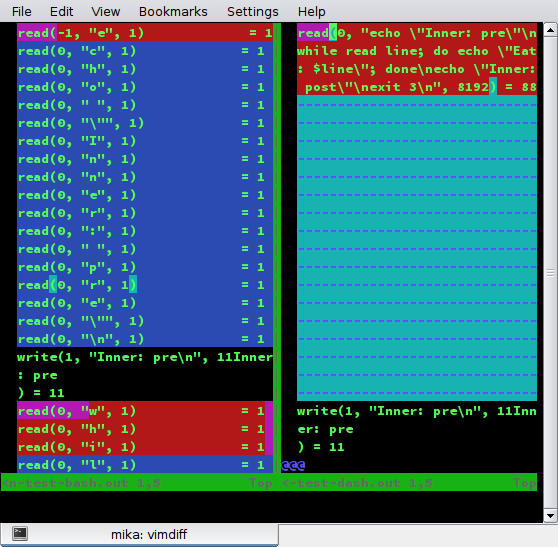
When executing ./stdin-test-cmp and comparing the generated files stdin-test-bash.out and stdin-test-dash.out you ll notice that dash consumes all stdin in one single go (a single read(0, ) ), instead of character-by-character as specified by POSIX and implemented by bash, ksh, mksh, posh and zsh. See stdin-test-bash.out on the left side and stdin-test-dash.out on the right side in this screenshot: screenshot of vimdiff on *.out files So when ssh tries to read from stdin there s nothing there anymore. Quoting POSIX s sh section:
When the shell is using standard input and it invokes a command that also uses standard input, the shell shall ensure that the standard input file pointer points directly after the command it has read when the command begins execution. It shall not read ahead in such a manner that any characters intended to be read by the invoked command are consumed by the shell (whether interpreted by the shell or not) or that characters that are not read by the invoked command are not seen by the shell. When the command expecting to read standard input is started asynchronously by an interactive shell, it is unspecified whether characters are read by the command or interpreted by the shell. If the standard input to sh is a FIFO or terminal device and is set to non-blocking reads, then sh shall enable blocking reads on standard input. This shall remain in effect when the command completes.
So while we learned that both bash and ssh are consuming from stdin and this needs to prevented by either using ssh s -n or explicitly specifying stdin, we also noticed that dash s behavior is different from all the other main shells and could be considered a bug (which we reported as #862907). Lessons learned: Thanks to Guillem Jover for review and feedback regarding this blog post.

Tianon Gravi: My Docker Install Process (redux)

Since I wrote my first post on this topic, Docker has switched from apt.dockerproject.org to download.docker.com, so this post revisits my original steps, but tailored for the new repo. There will be less commentary this time (straight to the beef). For further commentary on why for any step, see my previous post.
These steps should be fairly similar to what s found in upstream s Install Docker on Debian document, but do differ slightly in a few minor ways.

grab Docker s APT repo GPG key
# "Docker Release (CE deb)"
export GNUPGHOME="$(mktemp -d)"
gpg --keyserver ha.pool.sks-keyservers.net --recv-keys 9DC858229FC7DD38854AE2D88D81803C0EBFCD88
# stretch+
gpg --export --armor 9DC858229FC7DD38854AE2D88D81803C0EBFCD88   sudo tee /etc/apt/trusted.gpg.d/docker.gpg.asc
# jessie
# gpg --export 9DC858229FC7DD38854AE2D88D81803C0EBFCD88   sudo tee /etc/apt/trusted.gpg.d/docker.gpg > /dev/null
rm -rf "$GNUPGHOME"
Verify:
$ apt-key list
...
/etc/apt/trusted.gpg.d/docker.gpg.asc
-------------------------------------
pub   rsa4096 2017-02-22 [SCEA]
      9DC8 5822 9FC7 DD38 854A  E2D8 8D81 803C 0EBF CD88
uid           [ unknown] Docker Release (CE deb) <docker@docker.com>
sub   rsa4096 2017-02-22 [S]
...

add Docker s APT source With the switch to download.docker.com, HTTPS is now mandated:
$ apt-get update && apt-get install apt-transport-https
Setup sources.list:
echo "deb [arch=amd64] https://download.docker.com/linux/debian stretch stable"   sudo tee /etc/apt/sources.list.d/docker.list
Add edge component for every-month releases and test for release candidates (ie, ... stretch stable edge). Replace stretch with jessie for Jessie installs. At this point, you should be safe to run apt-get update to verify the changes:
$ sudo apt-get update
...
Get:5 https://download.docker.com/linux/debian stretch/stable amd64 Packages [1227 B]
...
Reading package lists... Done
(There shouldn t be any warnings or errors about missing keys, etc.)

configure Docker
This step could be done after Docker s installed (and indeed, that s usually when I do it because I forget that I should until I ve got Docker installed and realize that my configuration is suboptimal), but doing it before ensures that Docker doesn t have to be restarted later.
sudo mkdir -p /etc/docker
sudo sensible-editor /etc/docker/daemon.json
(sensible-editor can be replaced by whatever editor you prefer, but that command should choose or prompt for a reasonable default)
I then fill daemon.json with at least a default storage-driver. Whether I use aufs or overlay2 depends on my kernel version and available modules if I m on Ubuntu, AUFS is still a no-brainer (since it s included in the default kernel if the linux-image-extra-XXX/linux-image-extra-virtual package is installed), but on Debian AUFS is only available in either 3.x kernels (jessie s default non-backports kernel) or recently in the aufs-dkms package (as of this writing, still only available on stretch and sid no jessie-backports option).
If my kernel is 4.x+, I m likely going to choose overlay2 (or if that errors out, the older overlay driver).
Choosing an appropriate storage driver is a fairly complex topic, and I d recommend that for serious production deployments, more research on pros and cons is performed than I m including here (especially since AUFS and OverlayFS are not the only options they re just the two I personally use most often).
 
	"storage-driver": "overlay2"
 

configure boot parameters
I usually set a few boot parameters as well (in /etc/default/grub s GRUB_CMDLINE_LINUX_DEFAULT option run sudo update-grub after adding these, space-separated).
  • cgroup_enable=memory enable memory accounting for containers (allows docker run --memory for setting hard memory limits on containers)
  • swapaccount=1 enable swap accounting for containers (allows docker run --memory-swap for setting hard swap memory limits on containers)
  • systemd.legacy_systemd_cgroup_controller=yes newer versions of systemd may disable the legacy cgroup interfaces Docker currently uses; this instructs systemd to keep those enabled (for more details, see systemd/systemd#4628, opencontainers/runc#1175, docker/docker#28109)
  • vsyscall=emulate allow older binaries to run (debian:wheezy, etc.; see docker/docker#28705)
All together:
...
GRUB_CMDLINE_LINUX_DEFAULT="cgroup_enable=memory swapaccount=1 systemd.legacy_systemd_cgroup_controller=yes vsyscall=emulate"
...

install Docker! Finally, the time has come.
$ sudo apt-get install -V docker-ce
...
   docker-ce (17.03.1~ce-0~debian-stretch)
...
$ sudo docker version
Client:
 Version:      17.03.1-ce
 API version:  1.27
 Go version:   go1.7.5
 Git commit:   c6d412e
 Built:        Mon Mar 27 17:07:28 2017
 OS/Arch:      linux/amd64
Server:
 Version:      17.03.1-ce
 API version:  1.27 (minimum version 1.12)
 Go version:   go1.7.5
 Git commit:   c6d412e
 Built:        Mon Mar 27 17:07:28 2017
 OS/Arch:      linux/amd64
 Experimental: false
$ sudo usermod -aG docker "$(id -un)"

17 May 2017

Daniel Pocock: Hacking the food chain in Switzerland

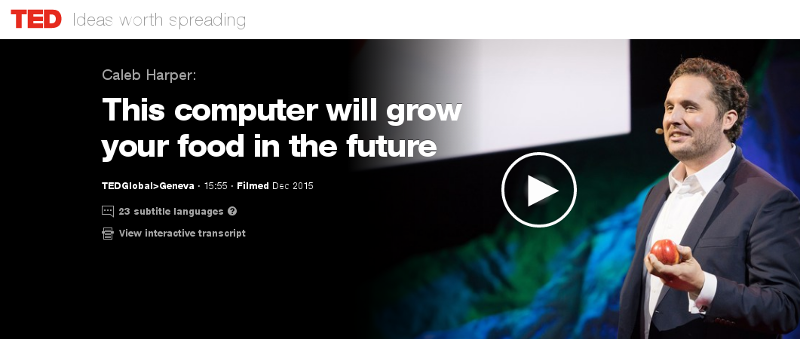
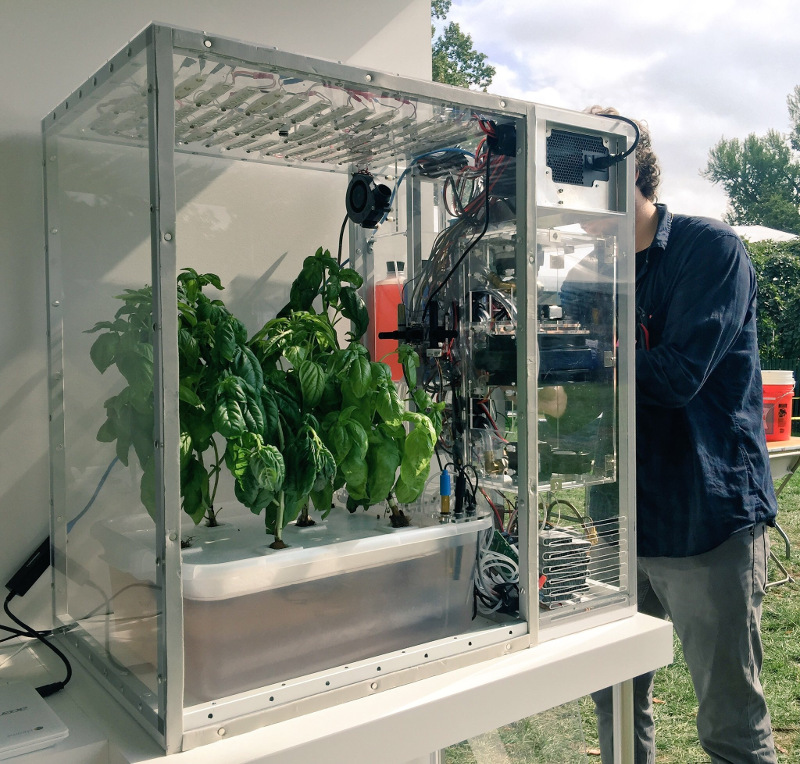
A group has recently been formed on Meetup seeking to build a food computer in Zurich. The initial meeting is planned for 6:30pm on 20 June 2017 at ETH, (Zurich Centre/Zentrum, R mistrasse 101). The question of food security underlies many of the world's problems today. In wealthier nations, we are being called upon to trust a highly opaque supply chain and our choices are limited to those things that major supermarket chains are willing to stock. A huge transport and storage apparatus adds to the cost and CO2 emissions and detracts from the nutritional value of the produce that reaches our plates. In recent times, these problems have been highlighted by the horsemeat scandal, the Guacapocalypse and the British Hummus crisis. One interesting initiative to create transparency and encourage diversity in our diets is the Open Agriculture (OpenAg) Initiative from MIT, summarised in this TED video from Caleb Harper. The food produced is healthier and fresher than anything you might find in a supermarket and has no exposure to pesticides. An open source approach to food An interesting aspect of this project is the promise of an open source approach. The project provides hardware plans, a a video of the build process, source code and the promise of sharing climate recipes (scripts) to replicate the climates of different regions, helping ensure it is always the season for your favour fruit or vegetable. Do we need it? Some people have commented on the cost of equipment and electricity. Carsten Agger recently blogged about permaculture as a cleaner alternative. While there are many places where people can take that approach, there are also many overpopulated regions and cities where it is not feasible. Some countries, like Japan, have an enormous population and previously productive farmland contaminated by industry, such as the Fukushima region. Growing our own food also has the potential to reduce food waste, as individual families and communities can grow what they need. Whether it is essential or not, the food computer project also provides a powerful platform to educate people about food and climate issues and an exciting opportunity to take the free and open source philosophy into many more places in our local communities. The Zurich Meetup group has already received expressions of interest from a diverse group including professionals, researchers, students, hackers, sustainability activists and free software developers. Next steps People who want to form a group in their own region can look in the forum topic "Where are you building your Food Computer?" to find out if anybody has already expressed interest. Which patterns from the free software world can help more people build more food computers? I've already suggested using Debian's live-wrapper to distribute a runnable ISO image that can boot from a USB stick, can you suggest other solutions like this? Can you think of any free software events where you would like to see a talk or exhibit about this project? Please suggest them on the OpenAg forum. There are many interesting resources about the food crisis, an interesting starting point is watching the documentary Food, Inc. If you are in Switzerland, please consider attending the meeting on at 6:30pm on 20 June 2017 at ETH (Centre/Zentrum), Zurich. One final thing to contemplate: if you are not hacking your own food supply, who is?

Next.

Previous.