Jonas Smedegaard: BOSS - Barath Operating System Solutions
 Siri and I are on a journey through India and Nepal,
with the aim of learning about needs of Debian derivatives,
to improve Debian and encourage closer integration.
Siri and I are on a journey through India and Nepal,
with the aim of learning about needs of Debian derivatives,
to improve Debian and encourage closer integration.
Siri and I are on a journey through India and Nepal,
with the aim of learning about needs of Debian derivatives,
to improve Debian and encourage closer integration.
Siri and I are on a journey through India and Nepal,
with the aim of learning about needs of Debian derivatives,
to improve Debian and encourage closer integration.

 A very short post: This link contains an
interesting exposition of the 50-move rule in chess, and what it means for
various endings. You can probably stop halfway, though; most of it is only
interest for people deeply into endgame theory.
Personally, I think DTZ50, as used by the Syzygy tablebases,
is the best tradeoff for computer chess. It always produces the correct result
(never throws away a win as a draw, or a draw as a loss), but the actual
mates are of suboptimal length and look very strange (e.g., it will happily
give away most of its pieces and then play very tricky endgames to mate).
Then again, if you ever want to swindle against a non-optimal opponent
(ie., try to make the position as hard as possible to play, to possibly
convert e.g. a loss to a draw), you've opened up an entirely new can of worms. :-)
Update: Eric P Smith has written a different explanation
of the DTM50 metric that's probably easier to understand, although it
contains less new information than the other one.
A very short post: This link contains an
interesting exposition of the 50-move rule in chess, and what it means for
various endings. You can probably stop halfway, though; most of it is only
interest for people deeply into endgame theory.
Personally, I think DTZ50, as used by the Syzygy tablebases,
is the best tradeoff for computer chess. It always produces the correct result
(never throws away a win as a draw, or a draw as a loss), but the actual
mates are of suboptimal length and look very strange (e.g., it will happily
give away most of its pieces and then play very tricky endgames to mate).
Then again, if you ever want to swindle against a non-optimal opponent
(ie., try to make the position as hard as possible to play, to possibly
convert e.g. a loss to a draw), you've opened up an entirely new can of worms. :-)
Update: Eric P Smith has written a different explanation
of the DTM50 metric that's probably easier to understand, although it
contains less new information than the other one.
vanderpol.ode):x = x_0 y = dx_0 d_x = y d_y = mu * (1 - x**2) * y - xNote the blank line between the initial conditions and the expression for the derivatives. This is the representation of the form using
y as the derivative of x. The integration variable in QSoas is the time t. You can learn more about how to specify differential equations in QSoas from the manual. The game is now simply to use fit-ode to launch the fit interface, but before that, one needs data to serve as a template, generated using generate-buffer:QSoas> generate-buffer 0 100 1 QSoas> fit-ode vanderpol.odeNow, the fit interface looks like this:

mu... For every modification, hit the Update button, or just Ctrl+U, to see the effect. For data you'd wish to take a closer look at, use the Push current to stack action from the Data... menu, which creates new buffers on the stack. A nice thing is that QSoas keeps the fit parameters as meta-data, which you can see later on using show:
mu in the terminal above ?This feature of QSoas makes it easy to quickly explore the effect of the parameters of a model on the shape of the resulting curve. I have used that very heavily in my research, I hope others will find it useful too. Enjoy !
#ooni IRC channel. Tor also works fine, and could be a great way
to avoid the global surveillance system described later in this
article.
Nevertheless, it still remains to be seen how the internet is censored
in the "real" Cuban internet, outside of the tourist designated
areas - hopefully future visitors or locals can expand on this using
the tools mentioned above, using the regular internet.
Usual care should be taken when using any workaround tools, mentioned
in this post or not, as different regimes over the world have accused,
detained, tortured and killed sometimes for the mere fact of using or
distributing circumvention tools. For example, a Russian developer
was arrested and detained in 2001 by United States' FBI for
exposing vulnerabilities in the Adobe e-books copy protection
mechanisms. Similarly, people distributing Tor and other tools have
been arrested during the period prior to the revolution in Tunisia.
--- 10.0.0.1 ping statistics ---
163 packets transmitted, 31 received, 80% packet loss, time 162391ms
rtt min/avg/max/mdev = 133.700/2669.535/64188.027/11257.336 ms, pipe 65
killall iodine # stop DNS tunnel
nmcli n off # turn off wifi to change MAC address
macchanger -A wlan0 # change MAC address
nmcli n on # turn wifi back on
sleep 3 # wait for wifi to settle
iodine-client-start # restart DNS tunnel
Wifi_Memories_Jibacoa which, for anyone that cares to research, will
give them a location of about 20 square meters where I was located
when connected (there is only one access point in the whole hotel).
Finally, the central portal also knows my MAC address,
a unique identifier for the computer I am using which also reveals
which brand of computer I am using (Mac, Lenovo, etc). While this
address can be changed, very few people know that, let alone how.
This led me to question whether I would be allowed back in Cuba (or
even allowed out!) after publishing this blog post, as it is obvious
that I can be easily identified based on the time this article was
published, my name and other details. Hopefully the Cuban government
will either not notice or not care, but this can be a tricky
situation, obviously. I have heard that Cuban prisons are not the best
hangout place in Cuba, to say the least...
[1034]anarcat@angela:cuba$ speedtest
Retrieving speedtest.net configuration...
Retrieving speedtest.net server list...
Testing from Empresa de Telecomunicaciones de Cuba (152.206.92.146)...
Selecting best server based on latency...
Hosted by LIME (George Town) [391.78 km]: 317.546 ms
Testing download speed........................................
Download: 1.01 Mbits/s
Testing upload speed..................................................
Upload: 1.00 Mbits/s
--- koumbit.org ping statistics ---
122 packets transmitted, 120 received, 1,64% packet loss, time 18731,6ms
rtt min/avg/max/sdev = 127,457/156,097/725,211/94,688 ms
--- google.com ping statistics ---
122 packets transmitted, 121 received, 0,82% packet loss, time 19371,4ms
rtt min/avg/max/sdev = 132,517/160,095/724,971/93,273 ms
--- redcta.org.ar ping statistics ---
122 packets transmitted, 120 received, 1,64% packet loss, time 40748,6ms
rtt min/avg/max/sdev = 303,035/339,572/965,092/97,503 ms
--- ccc.de ping statistics ---
122 packets transmitted, 72 received, 40,98% packet loss, time 19560,2ms
rtt min/avg/max/sdev = 244,266/271,670/594,104/61,933 ms
traceroute to koumbit.net (199.58.80.33), 30 hops max, 60 byte packets
 1  10.156.41.1 (10.156.41.1)  9.724 ms  9.472 ms  9.405 ms
 2  192.168.134.137 (192.168.134.137)  16.089 ms  15.612 ms  15.509 ms
 3  172.31.252.113 (172.31.252.113)  15.350 ms  15.805 ms  15.358 ms
 4  pos6-0-0-agu-cr-1.mpls.enet.cu (172.31.253.197)  15.286 ms  14.832 ms  14.405 ms
 5  172.31.252.29 (172.31.252.29)  13.734 ms  13.685 ms  14.485 ms
 6  200.0.16.130 (200.0.16.130)  14.428 ms  11.393 ms  10.977 ms
 7  200.0.16.74 (200.0.16.74)  10.738 ms  10.019 ms  10.326 ms
 8  ix-11-3-1-0.tcore1.TNK-Toronto.as6453.net (64.86.33.45)  108.577 ms  108.449 ms
1 10.156.41.1 (10.156.41.1) 9.724 ms 9.472 ms 9.405 ms
2 192.168.134.137 (192.168.134.137) 16.089 ms 15.612 ms 15.509 ms
 3  172.31.252.113 (172.31.252.113)  15.350 ms  15.805 ms  15.358 ms
 4  pos6-0-0-agu-cr-1.mpls.enet.cu (172.31.253.197)  15.286 ms  14.832 ms  14.405 ms
 5  172.31.252.29 (172.31.252.29)  13.734 ms  13.685 ms  14.485 ms
 6  200.0.16.130 (200.0.16.130)  14.428 ms  11.393 ms  10.977 ms
 7  200.0.16.74 (200.0.16.74)  10.738 ms  10.019 ms  10.326 ms
/24, or 256 IP
addresses) network allocated to ETECSA, the state telco
in Cuba:
inetnum:     200.0.16/24
status:      allocated
aut-num:     N/A
owner:       EMPRESA DE TELECOMUNICACIONES DE CUBA S.A. (IXP CUBA)
ownerid:     CU-CUBA-LACNIC
responsible: Rafael L pez Guerra
address:     Ave. Independencia y 19 Mayo, s/n,
address:     10600 - La Habana - CH
country:     CU
phone:       +53 7 574242 []
owner-c:     JOQ
tech-c:      JOQ
abuse-c:     JEM52
inetrev:     200.0.16/24
nserver:     NS1.NAP.ETECSA.NET
nsstat:      20160123 AA
nslastaa:    20160123
nserver:     NS2.NAP.ETECSA.NET
nsstat:      20160123 AA
nslastaa:    20160123
created:     20030512
changed:     20140610
8 ix-11-3-1-0.tcore1.TNK-Toronto.as6453.net (64.86.33.45) 108.577 ms 108.449 ms 108.257 ms
traceroute to 192.168.134.138 (192.168.134.138), 30 hops max, 60 byte packets
 1  192.168.134.138 (192.168.134.138)  6.027 ms  5.698 ms  5.596 ms
$ ip route
default via 10.156.41.1 dev wlan0  proto static  metric 1024
10.156.41.0/24 dev wlan0  proto kernel  scope link  src 10.156.41.4
169.254.0.0/16 dev wlan0  scope link  metric 1000
190.6.81.230 in the hotel.
Accessing http://1.1.1.1/ gives you a status page which allows you
to disconnect from the portal. It actually redirects you to
https://192.168.134.138/logout.user. That is also a
self-signed, but different certificate. That
certificate actually reveals the implication of Gemtek which is a
"world-leading provider of Wireless Broadband solutions, offering a
wide range of solutions from residential to business". It is somewhat
unclear if the implication of Gemtek here is deliberate or a
misconfiguration on the part of Cuban officials, especially since the
certificate is self-signed and was issued in 2002. It could be,
however, a trace of the supposed involvement of China in the
development of Cuba's networking systems, although Gemtek is based in
Taiwan, and not in the China mainland.
That IP, in turn, redirects you to the same portal but in a page that
shows you the statistics:
https://www.portal-wifi-temas.nauta.cu/?mac=0024D1717D18&script=logout.user&remain_time=00%3A55%3A52&session_time=00%3A04%3A08&username=151003576287&clientip=10.156.41.21&nasid=Wifi_Memories_Jibacoa&r=ac%2Fpopup
Actualizar redirects you back to the IP address, which
redirects you to the right URL on the portal. The "real" logout is at:
http://192.168.134.138/logout.user?cmd=logout
https://www.portal-wifi-temas.nauta.cu/?&nasid=Wifi_Memories_Jibacoa&nasip=192.168.134.138&clientip=10.156.41.21&mac=EC:55:F9:C5:F2:55&ourl=http%3a%2f%2fgoogle.ca%2f&sslport=443&lang=en-US%2cen%3bq%3d0.8&lanip=10.156.41.1
www.portal-wifi-temas.nauta.cu, 190.6.81.230)192.168.134.138)10.156.41.1)2.4.21 and 2.4.31. Now, to
find out which version of Linux it is running is way more challenging,
and it is possible it is just some custom Linux distribution. Indeed,
the webserver shows up as G4200.GSI.2.22.0155 and the SSH server is
running OpenSSH 3.0.2p1, which is basically prehistoric (2002!)
which corroborates the idea that this is some Gemtek embedded device.
The fact that those devices are running 14 years old software should
be a concern to the people responsible for those networks. There is,
for example, a remote root vulnerability that affects that
specific version of OpenSSH, among
many other vulnerabilities.
15100, the
following digits being 3576 or 4595, presumably depending on the
"batch" that was sent to different hotels, which seems to be batches
of 1000 cards. You can also correlate the UID with the date at which
the card was issued. For example, 15100357XXX cards are all valid
until 19/03/2017, and 151004595XXX cards are all valid until
23/03/2017. Here's the list of UIDs I have seen:
151004595313
151004595974
151003576287
151003576105
151003576097
 The phone company logs provide a register of locations to check out
when one want to figure out what the tracked person was doing. It is
unavailable for most of us, but provided to selected government
officials, company staff, those illegally buying information from
unfaithful servants and crackers stealing the information. But the
public information can be collected and analysed, and a free software
tool to do so is called
Creepy or Cree.py. I
discovered it when I read
an
article about Creepy in the Norwegian newspaper Aftenposten i
November 2014, and decided to check if it was available in Debian.
The python program was in Debian, but
the version in
Debian was completely broken and practically unmaintained. I
uploaded a new version which did not work quite right, but did not
have time to fix it then. This Christmas I decided to finally try to
get Creepy operational in Debian. Now a fixed version is available in
Debian unstable and testing, and almost all Debian specific patches
are now included
upstream.
The Creepy program visualises geolocation information fetched from
Twitter, Instagram, Flickr and Google+, and allow one to get a
complete picture of every social media message posted recently in a
given area, or track the movement of a given individual across all
these services. Earlier it was possible to use the search API of at
least some of these services without identifying oneself, but these
days it is impossible. This mean that to use Creepy, you need to
configure it to log in as yourself on these services, and provide
information to them about your search interests. This should be taken
into account when using Creepy, as it will also share information
about yourself with the services.
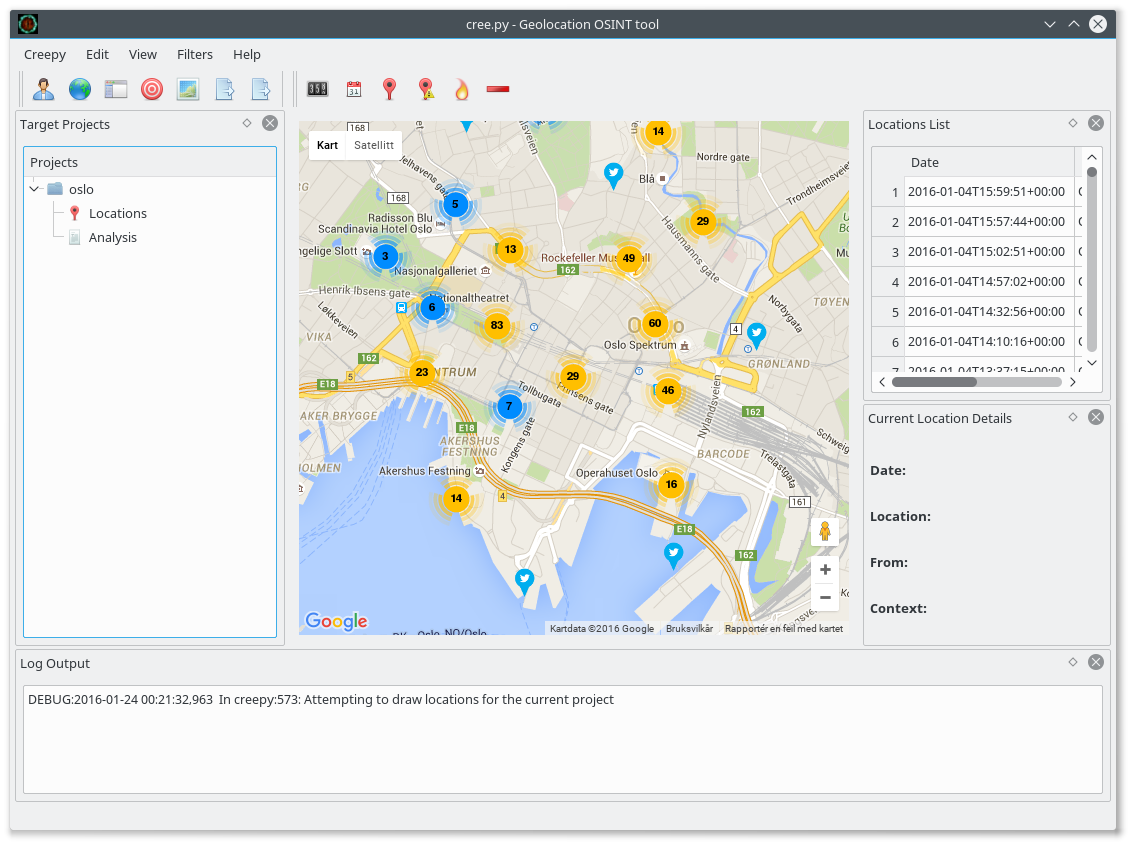
The picture above show the twitter messages sent from (or at least
geotagged with a position from) the city centre of Oslo, the capital
of Norway. One useful way to use Creepy is to first look at
information tagged with an area of interest, and next look at all the
information provided by one or more individuals who was in the area.
I tested it by checking out which celebrity provide their location in
twitter messages by checkout out who sent twitter messages near a
Norwegian TV station, and next could track their position over time,
making it possible to locate their home and work place, among other
things. A similar technique have been
used
to locate Russian soldiers in Ukraine, and it is both a powerful
tool to discover lying governments, and a useful tool to help people
understand the value of the private information they provide to the
public.
The package is not trivial to backport to Debian Stable/Jessie, as
it depend on several python modules currently missing in Jessie (at
least python-instagram, python-flickrapi and
python-requests-toolbelt).
(I have uploaded
the image to
screenshots.debian.net and licensed it under the same terms as the
Creepy program in Debian.)
The phone company logs provide a register of locations to check out
when one want to figure out what the tracked person was doing. It is
unavailable for most of us, but provided to selected government
officials, company staff, those illegally buying information from
unfaithful servants and crackers stealing the information. But the
public information can be collected and analysed, and a free software
tool to do so is called
Creepy or Cree.py. I
discovered it when I read
an
article about Creepy in the Norwegian newspaper Aftenposten i
November 2014, and decided to check if it was available in Debian.
The python program was in Debian, but
the version in
Debian was completely broken and practically unmaintained. I
uploaded a new version which did not work quite right, but did not
have time to fix it then. This Christmas I decided to finally try to
get Creepy operational in Debian. Now a fixed version is available in
Debian unstable and testing, and almost all Debian specific patches
are now included
upstream.
The Creepy program visualises geolocation information fetched from
Twitter, Instagram, Flickr and Google+, and allow one to get a
complete picture of every social media message posted recently in a
given area, or track the movement of a given individual across all
these services. Earlier it was possible to use the search API of at
least some of these services without identifying oneself, but these
days it is impossible. This mean that to use Creepy, you need to
configure it to log in as yourself on these services, and provide
information to them about your search interests. This should be taken
into account when using Creepy, as it will also share information
about yourself with the services.
The picture above show the twitter messages sent from (or at least
geotagged with a position from) the city centre of Oslo, the capital
of Norway. One useful way to use Creepy is to first look at
information tagged with an area of interest, and next look at all the
information provided by one or more individuals who was in the area.
I tested it by checking out which celebrity provide their location in
twitter messages by checkout out who sent twitter messages near a
Norwegian TV station, and next could track their position over time,
making it possible to locate their home and work place, among other
things. A similar technique have been
used
to locate Russian soldiers in Ukraine, and it is both a powerful
tool to discover lying governments, and a useful tool to help people
understand the value of the private information they provide to the
public.
The package is not trivial to backport to Debian Stable/Jessie, as
it depend on several python modules currently missing in Jessie (at
least python-instagram, python-flickrapi and
python-requests-toolbelt).
(I have uploaded
the image to
screenshots.debian.net and licensed it under the same terms as the
Creepy program in Debian.)
 Bradley White from the upstream CCTZ team prepared some more changes in CCTZ itself -- so a new RcppCCTZ version got to CRAN the other day catching up with these changes.
CCTZ is a C++ library for translating between absolute and civil times using the rules of a time zone. It requires only a proper C++11 compiler and the standard IANA time zone data base which standard Unix, Linux, OS X, ... computers tend to have in
Bradley White from the upstream CCTZ team prepared some more changes in CCTZ itself -- so a new RcppCCTZ version got to CRAN the other day catching up with these changes.
CCTZ is a C++ library for translating between absolute and civil times using the rules of a time zone. It requires only a proper C++11 compiler and the standard IANA time zone data base which standard Unix, Linux, OS X, ... computers tend to have in /usr/share/zoneinfo. RcppCCTZ connects this library to R by relying on Rcpp.
Changes in this version are summarized here:
Changes in version 0.0.3 (2016-01-17)We also have a diff to the previous version thanks to CRANberries. More details, issue tickets etc at the GitHub repository.
- Synchronized with
CCTZupstream.
This post by Dirk Eddelbuettel originated on his Thinking inside the box blog. Please report excessive re-aggregation in third-party for-profit settings.
 In some cases it might be a good idea to use a reverse proxy in front of a web application. Nginx is a very common solution for this scenario these days. As I started with containers for some of my playgrounds, I decided to go this route.
 When looking around to implement a nginx in front of a Docker web application, in most cases nginx itself is also a Docker container.
# aptitude install nginx
conf.d/docker-ghost.conf.
upstream docker-ghost
  server localhost:2368;
/etc/nginx/nginx.conf but I would recommend to use a config file in /etc/nginx/sites-available/ instead.
server
  listen 80;
  server_name log.cyconet.org;
  include /etc/nginx/snippets/ghost_vhost.conf;
  location /
    proxy_pass                          http://docker-ghost;
    proxy_set_header  Host              $http_host;   # required for docker client's sake
    proxy_set_header  X-Real-IP         $remote_addr; # pass on real client's IP
    proxy_set_header  X-Forwarded-For   $proxy_add_x_forwarded_for;
    proxy_set_header  X-Forwarded-Proto $scheme;
    proxy_read_timeout                  900;
# ln -s ../sites-available/ghost.conf /etc/nginx/sites-enabled/ghost.conf && \
 service nginx configtest && service nginx reload
git cinnabar fsck doesn t fail to upgrade metadata.remote.$remote.cinnabar-draft config works again. I have just released version 1.19 of Obnam, the backup program. See
the website at http://obnam.org for details on what the program
does. The new version is available from git (see http://git.liw.fi)
and as Debian packages from http://code.liw.fi/debian, and uploaded
to Debian, and soon in unstable.
The NEWS file extract below gives the highlights of what's new in this
version.
NOTE: Obnam has an EXPERIMENTAL repository format under
development, called
I have just released version 1.19 of Obnam, the backup program. See
the website at http://obnam.org for details on what the program
does. The new version is available from git (see http://git.liw.fi)
and as Debian packages from http://code.liw.fi/debian, and uploaded
to Debian, and soon in unstable.
The NEWS file extract below gives the highlights of what's new in this
version.
NOTE: Obnam has an EXPERIMENTAL repository format under
development, called green-albatross. It is NOT meant for real
use. It is likely to change in incompatible ways without warning. Do
not use it unless you're willing to lose your backup.
Version 1.19, released 2016-01-15
Bug fixes:
prefetch method in its 1.16 version. Obnam can
now deal with either variant of the method. Found and reported by
Kyle Manna, who provided a patch that Lars Wirzenius rewrote to be
backwards compatible to older versions of Paramiko.obnam generations now show time zone. Lars Wirzenius
implemented based on suggestion by Limdi.# AICCU Configuration # Login information username USERNAME password PASSWORD # Protocol and server listed on your tunnel protocol tic server tic.sixxs.net # Interface names to use ipv6_interface sixxs # The tunnel_id to use # (only required when there are multiple tunnels in the list) #tunnel_id <your tunnel id> # Be verbose? verbose false # Daemonize? daemonize true # Require TLS? requiretls true # Set default route? defaultroute trueNow you can add a script to bring up the tunnel and interface to /jffs/config/sixxs.ipup (make sure you make it executable) where you replace your tunnel address in the ip commands.
# wait until time is synced
while [  date +%Y  -eq 1970 ]; do
sleep 5
done
# check if aiccu is already running
if [ -n " ps grep etc/aiccu grep -v grep " ]; then
aiccu stop
sleep 1
killall aiccu
fi
# start aiccu
sleep 3
aiccu start /jffs/etc/aiccu.conf
sleep 3
ip -6 addr add 2001:....:....:....::/64 dev br0
ip -6 route add 2001:....:....:....::/64 dev br0
sleep 5
#### BEGIN FIREWALL RULES ####
WAN_IF=sixxs
LAN_IF=br0
#flush tables
ip6tables -F
#define policy
ip6tables -P INPUT DROP
ip6tables -P FORWARD DROP
ip6tables -P OUTPUT ACCEPT
# Input to the router
# Allow all loopback traffic
ip6tables -A INPUT -i lo -j ACCEPT
#Allow unrestricted access on internal network
ip6tables -A INPUT -i $LAN_IF -j ACCEPT
#Allow traffic related to outgoing connections
ip6tables -A INPUT -i $WAN_IF -m state --state RELATED,ESTABLISHED -j ACCEPT
# for multicast ping replies from link-local addresses (these don't have an
# associated connection and would otherwise be marked INVALID)
ip6tables -A INPUT -p icmpv6 --icmpv6-type echo-reply -s fe80::/10 -j ACCEPT
# Allow some useful ICMPv6 messages
ip6tables -A INPUT -p icmpv6 --icmpv6-type destination-unreachable -j ACCEPT
ip6tables -A INPUT -p icmpv6 --icmpv6-type packet-too-big -j ACCEPT
ip6tables -A INPUT -p icmpv6 --icmpv6-type time-exceeded -j ACCEPT
ip6tables -A INPUT -p icmpv6 --icmpv6-type parameter-problem -j ACCEPT
ip6tables -A INPUT -p icmpv6 --icmpv6-type echo-request -j ACCEPT
ip6tables -A INPUT -p icmpv6 --icmpv6-type echo-reply -j ACCEPT
# Forwarding through from the internal network
# Allow unrestricted access out from the internal network
ip6tables -A FORWARD -i $LAN_IF -j ACCEPT
# Allow some useful ICMPv6 messages
ip6tables -A FORWARD -p icmpv6 --icmpv6-type destination-unreachable -j ACCEPT
ip6tables -A FORWARD -p icmpv6 --icmpv6-type packet-too-big -j ACCEPT
ip6tables -A FORWARD -p icmpv6 --icmpv6-type time-exceeded -j ACCEPT
ip6tables -A FORWARD -p icmpv6 --icmpv6-type parameter-problem -j ACCEPT
ip6tables -A FORWARD -p icmpv6 --icmpv6-type echo-request -j ACCEPT
ip6tables -A FORWARD -p icmpv6 --icmpv6-type echo-reply -j ACCEPT
#Allow traffic related to outgoing connections
ip6tables -A FORWARD -i $WAN_IF -m state --state RELATED,ESTABLISHED -j ACCEPT
interface br0

AdvSendAdvert on;
prefix 2001:....:....:....::/64

  ;
 RDNSS 2001:4860:4860::8888 2001:4860:4860::8844

  ;
 ;
(again, replace the prefix with your own) That is pretty much it; at this point, you should have an IPv6 network and it's most likely that all your network devices will "just work" with it. I got full scores on the IPv6 test sites on a range of devices. Unfortunately, even a geographically close tunnel still really kills latency; compare these two traceroutes:
$ mtr -r -c 1 google.com
Start: Fri Jan 15 14:51:18 2016
HOST: jj                          Loss%   Snt   Last   Avg  Best  Wrst StDev
1.  -- 2001:....:....:....::      0.0%     1    1.4   1.4   1.4   1.4   0.0
2.  -- gw-163.syd-01.au.sixxs.ne  0.0%     1   12.0  12.0  12.0  12.0   0.0
3.  -- ausyd01.sixxs.net          0.0%     1   13.5  13.5  13.5  13.5   0.0
4.  -- sixxs.sydn01.occaid.net    0.0%     1   13.7  13.7  13.7  13.7   0.0
5.  -- 15169.syd.equinix.com      0.0%     1   11.5  11.5  11.5  11.5   0.0
6.  -- 2001:4860::1:0:8613        0.0%     1   14.1  14.1  14.1  14.1   0.0
7.  -- 2001:4860::8:0:79a0        0.0%     1  115.1 115.1 115.1 115.1   0.0
8.  -- 2001:4860::8:0:8877        0.0%     1  183.6 183.6 183.6 183.6   0.0
9.  -- 2001:4860::1:0:66d6        0.0%     1  196.6 196.6 196.6 196.6   0.0
10. -- 2001:4860:0:1::72d         0.0%     1  189.7 189.7 189.7 189.7   0.0
11. -- kul01s07-in-x09.1e100.net  0.0%     1  194.9 194.9 194.9 194.9   0.0
$ mtr -4 -r -c 1 google.com
Start: Fri Jan 15 14:51:46 2016
HOST: jj                          Loss%   Snt   Last   Avg  Best  Wrst StDev
1. -- gateway                    0.0%     1    1.3   1.3   1.3   1.3   0.0
2. -- 10.50.0.1                  0.0%     1   11.0  11.0  11.0  11.0   0.0
3. -- ???                       100.0     1    0.0   0.0   0.0   0.0   0.0
4. -- ???                       100.0     1    0.0   0.0   0.0   0.0   0.0
5. -- ???                       100.0     1    0.0   0.0   0.0   0.0   0.0
6. -- riv4-ge4-1.gw.optusnet.co  0.0%     1   12.1  12.1  12.1  12.1   0.0
7. -- 198.142.187.20             0.0%     1   10.4  10.4  10.4  10.4   0.0
When you watch what is actually using ipv6 (the ipvfoo plugin for Chrome is pretty cool, it shows you what requests are going where), it's mostly all just traffic to really big sites (Google/Google Analytics, Facebook, Youtube, etc) who have figured out IPv6. Since these are exactly the type of places that have made efforts to get caching as close as possible to you (Google's mirror servers are within Optus' network, for example) and so you're really shooting yourself in the foot going around it using an external tunnel. The other thing is that I'm often hitting IPv6 mirrors and downloading larger things for work stuff (distro updates, git clones, image downloads, etc) which is slower and wasting someone else's bandwith for really no benefit. So while it's pretty cool to have an IPv6 address (and a fun experiment) I think I'm going to turn it off. One positive was that after running with it for about a month, nothing has broken -- which suggests that most consumer level gear in a typical house (phones, laptops, TVs, smart-watches, etc) is either ready or ignores it gracefully. Bring on native IPv6!
 I have made a new release of cjk-gs-integrate, the script that searches for all kind of CJK fonts, and makes them available to Ghostscript (and if asked for also to TeX by linking). The update has been uploaded to CTAN (link) and it will land in TeX Live within the next days.
 Changes made in this version are mostly related to link handling and removal:
When I was thinking about using Ghost, I did read the installations guide and then I just closed the browser window.
Changes made in this version are mostly related to link handling and removal:
When I was thinking about using Ghost, I did read the installations guide and then I just closed the browser window. docker to work with service docker restart
# docker pull ghost
# mkdir -p /srv/docker/ghost/
# cat > /etc/systemd/system/ghost.service << EOF
[Unit]
Description=GHost Service
After=docker.service
Requires=docker.service
[Service]
ExecStartPre=-/usr/bin/docker kill ghost
ExecStartPre=-/usr/bin/docker rm ghost
ExecStartPre=-/usr/bin/docker pull ghost
ExecStart=/usr/bin/docker run  --name ghost --publish 2368:2368 --env 'NODE_ENV=production' --volume /srv/docker/ghost/:/var/lib/ghost ghost
ExecStop=/usr/bin/docker stop ghost
[Install]
WantedBy=multi-user.target
EOF
# systemctl enable ghost && systemctl daemon-reload && systemctl start ghost
systemctl daemon-reload.
Now you should have listening something on port 2368:
# netstat -tapn   grep 2368
tcp6       0      0 :::2368                 :::*                    LISTEN      7061/docker-proxy
--restart always will take care that it is brought up again if Docker or (even) the whole system will get restarted. For real I used that before and might be a lightweight solution, but I liked the systemd unit file solution a lot more.
/srv/docker/ghost/. So your blog will still have content, even if the ghost Docker images is updated:
# ls /srv/docker/ghost/
apps  config.js  data  images  themes

 While the details about how to join the set of paid contributors have always been public (here) we did not advertise this fact very much outside of the people already interested in LTS (and thus subscribed to debian-lts@lists.debian.org). But right now we would like to have a few more paid contributors on board and I m thus posting this call for volunteers.
Who can apply?
You need to meet those requirements:
While the details about how to join the set of paid contributors have always been public (here) we did not advertise this fact very much outside of the people already interested in LTS (and thus subscribed to debian-lts@lists.debian.org). But right now we would like to have a few more paid contributors on board and I m thus posting this call for volunteers.
Who can apply?
You need to meet those requirements:
One comment Liked this article? Click here. My blog is Flattr-enabled.


 Since moving to Japan, I got more and more interested in history, especially the recent history of the 20th century. The book I just finished, Ian Buruma (Wiki, home page) Wages of Guilt Memories of War in Germany and Japan (Independent, NYRB), has been a revelation for me. As an Austrian living in Japan, I am experiencing the discrepancy between these two countries with respect to their treatment of war legacy practically daily, and many of my blog entries revolve around the topic of Japanese non-reconciliation.
Willy Brandt went down on his knees in the Warsaw ghetto, after a functioning democracy had been established in the Federal Republic of Germany, not before. But Japan, shielded from the evil world, has grown into an Oskar Matzerath: opportunistic, stunted, and haunted by demons, which it tries to ignore by burying them in the sand, like Oskar s drum.
Ian Buruma, Wages of Guilt, Clearing Up the Ruins
 The comparison of Germany and Japan with respect to their recent history as laid out in Buruma s book throws a spotlight on various aspects of the psychology of German and Japanese population, while at the same time not falling into the easy trap of explaining everything with difference in the guilt culture. A book of great depth and broad insights everyone having even the slightest interest in these topics should read.
This difference between (West) German and Japanese textbooks is not just a matter of detail; it shows a gap in perception.Only thinking about giving a halfway full account of this book is something impossible for me. The sheer amount of information, both on the German and Japanese side, is impressive. His incredible background (studies of Chinese literature and Japanese movie!) and long years as journalist, editor, etc, enriches the book with facets normally not available: In particular his knowledge of both the German and Japanese movie history, and the reflection of history in movies, were complete new aspects for me (see my recent post (in Japanese)). The book is comprised of four parts: The first with the chapters War Against the West and Romance of the Ruins; the second with the chapters Auschwitz, Hiroshima, and Nanking; the third with History on Trial, Textbook Resistance, and Memorials, Museums, and Monuments; and the last part with A Normal Country, Two Normal Towns, and Clearing Up the Ruins. Let us look at the chapters in turn:
Ian Buruma, Wages of Guilt, Romance of the Ruins
What is so convenient in the cases of Germany and Japan is that pacifism happens to be a high-minded way to dull the pain of historical guilt. Or, conversely, if one wallows in it, pacifism turns national guilt into a virtue, almost a mark of superiority, when compared to the complacency of other nations.
Hitler s doom and the emperor s speech, the end of one symbol and the odd continuity of another. Whatever their symbolic differences, both would be associated forever with ruins ruined cities, ruined people, ruined ideals.
Here the past had fossilized into something monumental or, as Adorno would have put it, museal.
The problem with this quasi-religious view of history is that it makes it hard to discuss past events in anything but nonsecular terms. Visions of absolute evil are unique, and they are beyond human explanation or even comprehension. To explain is hubristic and amoral. If this is true of Auschwitz, it is even more true of Hiroshima. The irony is that while there can be no justification for Auschwitz unless one believes in Hitler s murderous ideology, the case for Hiroshima is at least open to debate. The A-bomb might have saved lives; it might have shortened the war. But such arguments are incompatible with the Hiroshima spirit.
Yet the question remains whether the raping and killing of thousands of women, and the massacre of thousands, perhaps hundreds of thousands, of other unarmed people, in the course of six weeks, can still be called extreme conduct in the heat of battle. The question is pertinent, particularly when such extreme violence is justified by an ideology which teaches the aggressors that killing an inferior race is in accordance with the will of their divine emperor.
The Nuremberg trials were to be a history lesson, then, as well as a symbolic punishment of the German people a moral history lesson cloaked in all the ceremonial trappings of due legal process. They were the closest that man, or at least the men belonging to the victorious powers, could come to dispensing divine justice.Also, the differences in war trials in East and West Germany is compared. The East Germany Waldheimer trials, as well as the thorough purge of Nazis from East German jurisdiction and politics, which was in stark contrast to both West German s very restricted trials, as well as Japan s absolute non-purge of criminals.
As long as the emperor lived, Japanese would have trouble being honest about the past. For he had been formally responsible for everything, and by holding him responsible for nothing, everybody was absolved, except, of course, for a number of military and civilian scapegoats, Officers and Outlaws, who fell victim to victors justice.
The judges and some of the counsel for the ministry sat back with their eyes closed, in deep concentration, or fast asleep. Perhaps they were bored, because they had heard it all before. Perhaps they thought it was a pointless exercise, since they knew already how the case would end. But it was not a pointless exercise. For Ienaga Saburo had kept alive a vital debate for twenty-seven years. One cussed schoolteacher and several hundred supporters at the courthouse might not seem much, but it was enough to show that, this time, someone was fighting back.
The tragedy is not just that the suicide pilots died young. Soldiers (and civilians) do that in wars everywhere. What is so awful about the memory of their deaths is the cloying sentimentality that was meant to justify their self-immolation. There is no reason to suppose they didn t believe in the patriotic gush about cherry blossoms and sacrifice, no matter how conventional it was at the time. Which was exactly the point: they were made to rejoice in their own death. It was the exploitation of their youthful idealism that made it such a wicked enterprise. And this point is still completely missed at the Peace Museum today.
It was not an ignoble enterprise, but he should have recognized that Historisierung, even forty-three years after the war, was still a highly risky business. For a normal society, a society not haunted by ghosts, cannot be achieved by normalizing history, or by waving cross and garlic. More the other way around: when society has become sufficiently open and free to look back, from the point of view neither of the victim nor of the criminal, but of the critic, only then will the ghosts be laid to rest.On the Japanese side the case of Motoshima Hitoshi , who dared to question Hirohito:
Forty-three years have passed since the end of the war, and I think we have had enough chance to reflect on the nature of that war. From reading various accounts from abroad and having been a soldier myself, involved in military education, I do believe that the emperor bore responsibility for the war.which led to hitherto unseen of demonstration of extreme-right-wing groups issuing death treats that lead to a failed assassination of Motoshima, all under the completely complacent Japanese police and politics letting the right-wingers play their game.
By breaking a Japanese taboo, Motoshima struck a blow for a more open, more normal political society, and very nearly lost his life. Jenninger, I like to think, wanted to strike a blow for the same, but failed, and lost his job. Perhaps he wasn t up to the task. Or perhaps even West Germany was not yet normal enough to hear his message.
I asked him again about the local camp and the small hidden memorial. Dominik showed signs of distress. It was difficult, he admitted, very difficult. I know what you mean. But let me give you my personal opinion. When you have a crippled arm, you don t really want to show it around. It was a low point in our history, back then. But it was only twelve years in thousands of years of history. And so people tend to hide it, just as a person with a crippled arm is not likely to wear a short-sleeved shirt.A similar incident is recounted on the Japanese side, the Hanaoka incident (detailed article) and its unveiling by Nozoe Kenji, where 800 Chinese slave workers, after escaping from a forced-work camp for the Kajima Corporation, where rabbit-hunted down and slaughtered. He, too, got death threats, and was virtually expelled from his home area because he dared to publish his findings.
I think it is this basic distrust, this refusal to be told what to think by authorities, this cussed insistence on asking questions, on hearing the truth, that binds together Nozoe, Rosmus, and others like them. There are not many such people in Japan, or anywhere else for that matter. And I suspect they are not much liked wherever they live.
The state was run by virtually the same bureaucracy that ran the Japanese empire, and the electoral system was rigged to help the same corrupt conservative party to stay in power for almost forty years. This arrangement suited the United States, as well as Japanese bureaucrats, LDP politicians, and the large industrial combines, for it ensured that Japan remained a rich and stable ally against Communism. But it also helped to stifle public debate and stopped the Japanese from growing up politically.His description of current Japanese society, written in 1995, is still hauntingly true in 2016:
There is something intensely irritating about the infantilism of postwar Japanese culture: the ubiquitous chirping voices of women pretending to be girls; the Disneylandish architecture of Japanese main streets, where everything is reduced to a sugary cuteness; the screeching television talents rolling about and carrying on like kindergarten clowns; the armies of blue-suited salarymen straphanging on the subway trains, reading boys comics, the maudlin love for old school songs and cuddly mama-sans.
The Nanking Massacre, for leftists and many liberals too, is the main symbol of Japanese militarism, supported by the imperial (and imperialist) cult. Which is why it is a keystone of postwar pacifism. Article Nine of the constitution is necessary to avoid another Nanking Massacre. The nationalist right takes the opposite view. To restore the true identity of Japan, the emperor must be reinstated as a religious head of state, and Article Nine must be revised to make Japan a legitimate military power again. For this reason, the Nanking Massacre, or any other example of extreme Japanese aggression, has to be ignored, softened, or denied.While there are signs of resistance in the streets of Japan (Okinawa and the Hanako bay, the demonstrations against secrecy law and reversion of the constitution), we are still to see a change influenced by the people in a country ruled and distributed by oligarchs. I don t think there will be another Nanking Massacre in the near future, but Buruma s books shows that we are heading back to a nationalistic regime similar to pre-war times, just covered with a democratic veil to distract critics.
Ian Buruma, Wages of Guilt, Nanking
[ ] mainstream conservatives made a deliberate attempt to distract people s attention from war and politics by concentrating on economic growth.
The curious thing was that much of what attracted Japanese to Germany before the war Prussian authoritarianism, romantic nationalism, pseudo-scientific racialism had lingered in Japan while becoming distinctly unfashionable in Germany.In Romance of the Ruins:
The point of all this is that Ikeda s promise of riches was the final stage of what came to be known as the reverse course, the turn away from a leftist, pacifist, neutral Japan a Japan that would never again be involved in any wars, that would resist any form of imperialism, that had, in short, turned its back for good on its bloody past. The Double Your Incomes policy was a deliberate ploy to draw public attention away from constitutional issues.In Hiroshima:
The citizens of Hiroshima were indeed victims, primarily of their own military rulers. But when a local group of peace activists petitioned the city of Hiroshima in 1987 to incorporate the history of Japanese aggression into the Peace Memorial Museum, the request was turned down. The petition for an Aggressors Corner was prompted by junior high school students from Osaka, who had embarrassed Peace Museum officials by asking for an explanation about Japanese responsibility for the war.
The history of the war, or indeed any history, is indeed not what the Hiroshima spirit is about. This is why Auschwitz is the only comparison that is officially condoned. Anything else is too controversial, too much part of the flow of history .In Nanking, by the governmental pseudo-historian Tanaka:
Unlike in Europe or China, writes Tanaka, you won t find one instance of planned, systematic murder in the entire history of Japan. This is because the Japanese have a different sense of values from the Chinese or the Westerners.In History on Trial:
In 1950, Becker wrote that few things have done more to hinder true historical self-knowledge in Germany than the war crimes trials. He stuck to this belief. Becker must be taken seriously, for he is not a right-wing apologist for the Nazi past, but an eminent liberal.
There never were any Japanese war crimes trials, nor is there a Japanese Ludwigsburg. This is partly because there was no exact equivalent of the Holocaust. Even though the behavior of Japanese troops was often barbarous, and the psychological consequences of State Shinto and emperor worship were frequently as hysterical as Nazism, Japanese atrocities were part of a military campaign, not a planned genocide of a people that included the country s own citizens. And besides, those aspects of the war that were most revolting and furthest removed from actual combat, such as the medical experiments on human guinea pigs (known as logs ) carried out by Unit 731 in Manchuria, were passed over during the Tokyo trial. The knowledge compiled by the doctors of Unit 731 of freezing experiments, injection of deadly diseases, vivisections, among other things was considered so valuable by the Americans in 1945 that the doctors responsible were allowed to go free in exchange for their data.
Some Japanese have suggested that they should have conducted their own war crimes trials. The historian Hata Ikuhiko thought the Japanese leaders should have been tried according to existing Japanese laws, either in military or in civil courts. The Japanese judges, he believed, might well have been more severe than the Allied tribunal in Tokyo. And the consequences would have been healthier. If found guilty, the spirits of the defendants would not have ended up being enshrined at Yasukuni. The Tokyo trial, he said, purified the crimes of the accused and turned them into martyrs. If they had been tried in domestic courts, there is a good chance the real criminals would have been flushed out.
After it was over, the Nippon Times pointed out the flaws of the trial, but added that the Japanese people must ponder over why it is that there has been such a discrepancy between what they thought and what the rest of the world accepted almost as common knowledge. This is at the root of the tragedy which Japan brought upon herself.
Emperor Hirohito was not Hitler; Hitler was no mere Shrine. But the lethal consequences of the emperor-worshipping system of irresponsibilities did emerge during the Tokyo trial. The savagery of Japanese troops was legitimized, if not driven, by an ideology that did not include a Final Solution but was as racialist as Hider s National Socialism. The Japanese were the Asian Herrenvolk, descended from the gods.
Emperor Hirohito, the shadowy figure who changed after the war from navy uniforms to gray suits, was not personally comparable to Hitler, but his psychological role was remarkably similar.
In fact, MacArthur behaved like a traditional Japanese strongman (and was admired for doing so by many Japanese), using the imperial symbol to enhance his own power. As a result, he hurt the chances of a working Japanese democracy and seriously distorted history. For to keep the emperor in place (he could at least have been made to resign), Hirohito s past had to be freed from any blemish; the symbol had to be, so to speak, cleansed from what had been done in its name.In Memorials, Museums, and Monuments:
If one disregards, for a moment, the differences in style between Shinto and Christianity, the Yasukuni Shrine, with its relics, its sacred ground, its bronze paeans to noble sacrifice, is not so very different from many European memorials after World War I. By and large, World War II memorials in Europe and the United States (though not the Soviet Union) no longer glorify the sacrifice of the fallen soldier. The sacrificial cult and the romantic elevation of war to a higher spiritual plane no longer seemed appropriate after Auschwitz. The Christian knight, bearing the cross of king and country, was not resurrected. But in Japan, where the war was still truly a war (not a Holocaust), and the symbolism still redolent of religious exultation, such shrines as Yasukuni still carry the torch of nineteenth-century nationalism. Hence the image of the nation owing its restoration to the sacrifice of fallen soldiers.In A Normal Country:
The mayor received a letter from a Shinto priest in which the priest pointed out that it was un-Japanese to demand any more moral responsibility from the emperor than he had already taken. Had the emperor not demonstrated his deep sorrow every year, on the anniversary of Japan s surrender? Besides, he wrote, it was wrong to have spoken about the emperor in such a manner, even as the entire nation was deeply worried about his health. Then he came to the main point: It is a common error among Christians and people with Western inclinations, including so-called intellectuals, to fail to grasp that Western societies and Japanese society are based on fundamentally different religious concepts . . . Forgetting this premise, they attempt to place a Western structure on a Japanese foundation. I think this kind of mistake explains the demand for the emperor to bear full responsibility.In Two Normal Towns:
The bust of the man caught my attention, but not because it was in any way unusual; such busts of prominent local figures can be seen everywhere in Japan. This one, however, was particularly grandiose. Smiling across the yard, with a look of deep satisfaction over his many achievements, was Hatazawa Kyoichi. His various functions and titles were inscribed below his bust. He had been an important provincial bureaucrat, a pillar of the sumo wrestling establishment, a member of various Olympic committees, and the recipient of some of the highest honors in Japan. The song engraved on the smooth stone was composed in praise of his rich life. There was just one small gap in Hatazawa s life story as related on his monument: the years from 1941 to 1945 were missing. Yet he had not been idle then, for he was the man in charge of labor at the Hanaoka mines.In Clearing Up the Ruins:
But the question in American minds was understandable: could one trust a nation whose official spokesmen still refused to admit that their country had been responsible for starting a war? In these Japanese evasions there was something of the petulant child, stamping its foot, shouting that it had done nothing wrong, because everybody did it.
Japan seems at times not so much a nation of twelve-year-olds, to repeat General MacArthur s phrase, as a nation of people longing to be twelve-year-olds, or even younger, to be at that golden age when everything was secure and responsibility and conformity were not yet required.
For General MacArthur was right: in 1945, the Japanese people were political children. Until then, they had been forced into a position of complete submission to a state run by authoritarian bureaucrats and military men, and to a religious cult whose high priest was also formally chief of the armed forces and supreme monarch of the empire.
I saw Jew S ss that same year, at a screening for students of the film academy in Berlin. This showing, too, was followed by a discussion. The students, mostly from western Germany, but some from the east, were in their early twenties. They were dressed in the international uniform of jeans, anoraks, and work shirts. The professor was a man in his forties, a 68er named Karsten Witte. He began the discussion by saying that he wanted the students to concentrate on the aesthetics of the film more than the story. To describe the propaganda, he said, would simply be banal: We all know the what, so let s talk about the how. I thought of my fellow students at the film school in Tokyo more than fifteen years before. How many of them knew the what of the Japanese war in Asia.
 Automatic Calendar Management Notmuch + Calypso
One of the big features of outlook/exchange in my world is
automatically merging of incoming calendar updates from email. This
makes my calendar actually useful in knowing what meetings people have
asked me to attend. As I'm not willing to otherwise tolerate outlook,
I decided to try and provide that in my preferred environment; notmuch
and calypso.
Identifying calendar updates
The first trick is how to identify incoming messages with calendar
updates. I'd love to be able to search for specific mime content
types, but I haven't been able to construct such a search. Failing
that, I'm just looking for messages containing the string
'text/calendar':
Automatic Calendar Management Notmuch + Calypso
One of the big features of outlook/exchange in my world is
automatically merging of incoming calendar updates from email. This
makes my calendar actually useful in knowing what meetings people have
asked me to attend. As I'm not willing to otherwise tolerate outlook,
I decided to try and provide that in my preferred environment; notmuch
and calypso.
Identifying calendar updates
The first trick is how to identify incoming messages with calendar
updates. I'd love to be able to search for specific mime content
types, but I haven't been able to construct such a search. Failing
that, I'm just looking for messages containing the string
'text/calendar':
notmuch search --output=messages tag:inbox AND text/calendar
notmuch search --output=messages tag:inbox AND text/calendar AND not tag:calendar
jq -r '.. select(."content-type"? == "text/calendar") .content'
#!/bin/bash
SEARCH="tag:inbox AND not tag:calendar AND text/calendar"
TMP= mktemp
trap "rm -r $TMP" 0 1 15
notmuch search --output=messages $SEARCH   while read message; do
    notmuch show --format=json $message
        jq -r '..   select(."content-type"? == "text/calendar")   .content' > $TMP
    if [ -s $TMP ]; then
        calypso --import private/calendar $TMP && notmuch tag +calendar $message
    else
        notmuch tag +calendar $message
    fi
done
2 comments Liked this article? Click here. My blog is Flattr-enabled.
 People these days often do think about what worked well in the last year that they are proud of, what didn't work so well and what they plan to change the coming year. For me a fair amount of the resolutions were about my name. One of them was getting rid of my old name from the Debian Project Participants page. Actually, I started with it on new year's eve already:
| Date | Package | Version |
|---|---|---|
| Dec 31 | abook | 0.6.1-1 |
| Jan 01 | tworld | 1.3.2-1 |
| Jan 01 | blosxom | 2.1.2-2 |
| Jan 02 | netris | 0.52-10 |
| Jan 03 | t-prot | 3.4-4 |
| Jan 04 | rungetty | 1.2-16 |
| Jan 05 | tworld | 1.3.2-2 |
| Jan 06 | tetrinet | 0.11+CVS20070911-2 |
| Jan 07 | xblast-tnt-musics | 20050106-3 |
| Jan 08 | xblast-tnt-sounds | 20040429-3 |
| Jan 09 | xblast-tnt-levels | 20050106-3 |
| Jan 10 | xblast-tnt-images | 20050106-3 |
| Jan 11 | tetradraw | 2.0.3-9 |
| Jan 12 | ldapvi | 1.7-10 |
dh binary --no-actoverride_ in debian/rules to get to where you want to go. This worked extremely well for me.Next.