Search Results: "xam"

2 September 2013

Dmitrijs Ledkovs: My Debian Activities: Multiarch & upstart on kFreeBSD hacking

Looks like there is a recent trend to publicize one's debian activities, so I thought I should join in =) Not so sure if MDA acronym would work for these types of posts...
MultiarchI have been working on multi-arching additional libraries. In particular I am working on multiarching boost libraries. At the moment boost1.53 multiarched libraries are uploaded in the experimental, and I am still working out the quirks with those. At the same time I have submitted a patch to multiarch libicu-dev, which has been accepted by the maintainer and is currently waiting in new queue. This brings us closer to multiarching all of boost libraries. But as it has been pointed out at the Multiarch BOF at Debconf'13, one doesn't have to wait for dependencies (be it libs or lib-devs) to be Multiarched before multi-arching your own library. If you do it right (put all or arch-specifi headers in multiarch location, and place libraries in multiarch location, split utilities into a separate package), you can go and multiarch your libraries ahead of time. Maybe it's time to default to debhelper 9 in dh-make, and default to multiarch locations for all libraries?

Boost also has libraries which depend on mpi, and at the moment that's not multiarched. I'm not sure if there are additional considerations there given the support for alternative mpi implementations in Debian.

Boost also depends on libpython. At the moment it's shipping libboost_python-py2.7.so & libbost-py3.3.so, with a libboost_python.so symlink to libbost_python-py2.7.so. I do wonder if it's a sensible approach, or should the boosty_python library be simply shipped in arch specific & python implementation specific paths e.g. /usr/lib/pythonX.Y/config-X.Y$(abi_tag)-$(DEB_HOST_MULTIARCH)/ that way we'll be able to support python debug interpreter in python_boost. I guess I should seek expert opinion on other multiarch wizards.

In addition to boost, I've now started looking at qmake and how it handles multiarch. At the moment, it doesn't handle it much. All paths are statically copied around and hard-coded in each module qmake provides. I have now been working at abusing qmake's $$system to call into dpkg-architecture, and actually choose native or cross compiler & adjust settings and paths to Qt libraries. There are a couple of bugs to fix, but I should be able to propose a "debian-multiarch" qmake spec soon. Such that in calls dpkg-architecture & properly adjust compilers & locations for the DEB_HOST. qmake by the way has its quirks. For example all variable assignments seemed to default to be "by value" & not "by reference" (i.e. upon assignment all variables on the right hand side get expanded and the literal string is stored, instead of storing $(prefix)/lib/$(arch), and evaluating that later.) Hence my current qmakespec is less elegant than I hoped.
upstart on kFreeBSDFreeBSD 9.2 and up have implemented the wait6 and with it waitid is also exposed. At the moment there are some differences between glibc and FreeBSD waitid usage. I am not well versed in glibc, FreeBSD and POSIX, but the bug at hand & POSIX reference lead me to believe that POSIX is slightly ambiguous about it.

Why is waitid support is interesting? Well, kFreeBSD/libc maintainer in Debian is working on exposing it with/after (e)glibc2.18 is in Debian, which will remove one more blocker from porting Upstart to kFreeBSD. To this extend, I have in the mean time setup FreeBSD & kFreeBSD virtual machines and got libnih to compile on both (sans waitid on kFreeBSD). One of the optional upstart's features is to use inotify to spot & reload configuration files, at the moment I haven't ported that functionality to use native kevent/kqueues (EVFILT_AIO) instead I have cheated and packaged for Debian the Google Summer of Code 2011 project libinotify-kevent which provides inotify compatible API, implemented with kevent. Which is kind of the reverse strategy of libkqueue and/or libevent. It would be interesting to see kernels and/or those libraries to unify/standartise on common APIs. Unfortunately, it still seems like using native API for each kernel is best to avoid dependencies and leverage all features and semantics. Nonetheless I did package it for now. To further progress with actually porting upstart, I'd like to get my hands at (e)glibc 2.18 compiled for kFreeBSD with waitid patches. I got pointers to the patches, but I haven't yet succeeded at compiling (e)glibc with those applied. So no upstart booting kFreeBSD VM yet, but rather work in progress. It's quite fun. It's been years since I have touched a FreeBSD boxes and it's first time me using kFreeBSD. The semantics, differences and benefits of each do shine and it's a promising platform.
Multiarch on kFreeBSD?
Given the excellent multiarch implementation on Debian and sophisticated Linux Emulation Layer on FreeBSD kernel, I was half expecting the following to work:
  • on kFreeBSD enable linux i386/amd64 repository
  • apt-get install hello:i386
  • $ hello
But unfortunately this confused kFreeBSD, since it didn't find ELF tags and linker didn't seem to load the right libraries any more =( Not sure if this issue has been raised before, but I think it would be awesome if FreeBSD Linux Emulation Layer worked transparently on Debian/kFreeBSD multiarch system.

1 September 2013

Eddy Petrișor: Integrating Beyond Compare with Semanticmerge

Note: This post will probably not be on the liking of those who think free software is always preferable to closed source software, so if you are such a person, please take this article as an invitation to implement better open source alternatives that can realistically compete with the closed source applications I am mentioning here. I am not going to mention here where the open source alternatives are not up to the same level as the commercial tools, I'll leave that for the readers or for another article.


Semanticmerge is a merge tool that attempts to do the right thing when it comes to merging source code. It is language aware and it currently supports Java and C#. Just today the creators of the software have started working on the support for C.

Recently they added Debian packages, so I installed it on my system. For open source development Codice Software, the creators of Semanticmerge, offers free licenses, so I decided to ask for one today, and, although is Sunday, I received an answer and I will get my license on Monday.

When a method is moved from one place to another and changed in a conflicting way in two parallel development lines, Semanticmerge can isolate the offending method and can pass all its incarnations (base, source and destination or, if you prefer, base, mine and theirs) to a text based merge tool to allow the developer to decide how to resolve the merge. On Linux, the Semanticmerge samples are using kdiff3 as the text-based merge tool, which is nice, but I don't use kdiff3, I use Meld, another open source visual tool for merges and comparisons.


OTOH, Beyond Compare is a merge and compare tool made by Scooter Software which provides a very good text based 3-way merge with a 3 sources + 1 result pane, and can compare both files and directories. Two of its killer features is having the ability split differences into important and non-important ones according to the syntax of the compared/merged files, and the ability to easily change or add to the syntax rules in a very user-friendly way. This allows to easily ignore changes in comments, but also basic refactoring such as variable renaming, or other trivial code-wide changes, which allows the developer to focus on the important changes/differences during merges or code reviews.

Syntax support for usual file formats like C, Java, shell, Perl etc. is built in (but can be modified, which is a good thing) and new file types with their syntaxes can be added via the GUI from scratch or based on existing rules.

I evaluated Beyond Compare at my workplace and we decided it would be a good investment to purchases licenses for it for the people in our department.


Having these two software separate is good, but having them integrated with each other would be even better. So I decided I would try to see how it can be done. I installed Beyond compare on my system, too and looked through the examples


The first thing I discovered is that the main assumption of Semanticmerge developers was that the application would be called via the SCM when merges are to be done, so passing lots of parameters would not be problem. I realised that when I saw how one of the samples' starting script invoked semantic merge:
semanticmergetool -s=$sm_dir/src.java -b=$sm_dir/base.java -d=$sm_dir/dst.java -r=/tmp/semanticmergetoolresult.java -edt="kdiff3 \"#sourcefile\" \"#destinationfile\"" -emt="kdiff3 \"#basefile\" \"#sourcefile\" \"#destinationfile\" --L1 \"#basesymbolic\" --L2 \"#sourcesymbolic\" --L3 \"#destinationsymbolic\" -o \"#output\"" -e2mt="kdiff3 \"#sourcefile\" \"#destinationfile\" -o \"#output\""
Can you see the problem? It seems Semanticmerge has no persistent knowledge of the user preferences with regards to the text-based merge tool and exports the issue to the SCM, at the price of overcomplicating the command line. I already mentioned this issue in my license request mail and added the issue and my fix suggestion in their voting system of features to be implemented.

The upside was that by comparing the command line for kdiff3 invocations, the kdiff3 documentation and, by comparison, the Beyond Compare SCM integration information, I could deduce what is the command line necessary for Semanticmerge to use Beyond Compare as an external merge and diff tool.

The -edt, -emt and -e2mt options are the ones which specify how the external diff tool, external 3-way merge tool and external 2-way merge tool is to be called. Once I understood that, I split the problem in its obvious parts, each invocation had to be mapped, from kdiff3 options to beyond compare options, adding the occasional bell and whistle, if possible.

The parts to figure out, ordered by compexity, were:

  1. -edt="kdiff3 \"#sourcefile\" \"#destinationfile\"

  2. -e2mt="kdiff3 \"#sourcefile\" \"#destinationfile\" -o \"#output\""

  3. -emt="kdiff3 \"#basefile\" \"#sourcefile\" \"#destinationfile\" --L1 \"#basesymbolic\" --L2 \"#sourcesymbolic\" --L3 \"#destinationsymbolic\" -o \"#output\""

Semantic merge integrates with kdiff3 in diff mode via the -edt option. This was easy to map to Beyond Compare, I just replaced kdiff3 with bcompare:
-edt="bcompare \"#sourcefile\" \"#destinationfile\""
Integration for 2-way merges was also quite easy, the mapping to Beyond Compare was:
-e2mt="bcompare \"#sourcefile\" \"#destinationfile\" -savetarget=\"#output\""
For the 3-way merge I was a little confused because the Beyond Compare documentation and options were inconsistent between Windows and Linux. On Windows, for some of the SCMs, the options that set the titles for the panes are '/title1', '/title2', '/title3' and '/title4' (way too descriptive for my taste /sarcasm), but for some others are '/lefttitle', '/centertitle', '/righttitle', '/outputtitle', while on Linux the options are the more explicit kind, but with a '-' instead of a '/'.

The basic things were easy, ordering the parameters in the 'source, destination, base, output' instead of kdiff3's 'base, source, destination, -o ouptut', so I wanted to add the bells and whistles, since it really makes more sense for the developer to see something like 'Destination: [method] readOptions' instead of '/tmp/tmp4327687242.tmp', and because that's exactly what is necessary for Semanticmerge when merging methods, since on conflicts the various versions of the functions are placed in temporary files which don't mean anything.

So, after some digging into the examples from Beyond Compare and kdiff3 documentation, I ended up with:
-emt="bcompare \"#sourcefile\" \"#destinationfile\" \"#basefile\" \"#output\" -lefttitle='#sourcesymbolic' -righttitle='#destinationsymbolic' -centertitle='#basesymbolic' -outputtitle='merge result'"

Sadly, I wasn't able to identify the symbolic name for the output, so I added the hard coded 'merge result'. If Codice people would like to help with with this information (or if it exists), I would be more than willing to do update the information and do the necessary changes.

Then I added the bells and whistles for the -edt and -e2mt options, so I ended up with an even more complicated command line. The end result was this monstrosity:
semanticmergetool -s=$sm_dir/src.java -b=$sm_dir/base.java -d=$sm_dir/dst.java -r=/tmp/semanticmergetoolresult.java -edt="bcompare \"#sourcefile\" \"#destinationfile\" -lefttitle='#sourcesymbolic' -righttitle='#destinationsymbolic'" -emt="bcompare \"#sourcefile\" \"#destinationfile\" \"#basefile\" \"#output\" -lefttitle='#sourcesymbolic' -righttitle='#destinationsymbolic' -centertitle='#basesymbolic' -outputtitle='merge result'" -e2mt="bcompare \"#sourcefile\" \"#destinationfile\" -savetarget=\"#output\" -lefttitle='#sourcesymbolic' -righttitle='#destinationsymbolic'"
So when I 3-way merge a function I get something like this (sorry for high resolution, lower resolutions don't do justice to the tools):


I don't expect this post to remain relevant for too much time, because after sending my feedback to Codice, they were open to my suggestion to have persistent settings for the external tool integration, so, in the future, the command line could probably be as simple as:
semanticmergetool -s=$sm_dir/src.java -b=$sm_dir/base.java -d=$sm_dir/dst.java -r=/tmp/semanticmergetoolresult.java
And the integration could be done via the GUI, while the command line can become a way to override the defaults.

31 August 2013

Russell Coker: Links August 2013

Mark Cuban wrote an interesting article titled What Business is Wall Street In about the failure of Wall Street to fulfill it s stated purpose of providing capital for businesses [1]. His proposed solution is extreme, but so is the problem. PopSci has an interesting article by Peter Nonacs about allowing students to collaborate (which is often known as cheating ) in an exam on a Game Theory exam [2]. So the Game Theory exam became a practical exercise. It s more interesting than I can describe in a paragraph. Salon has an interesting article suggesting that mealtime routines and rituals improve flavor [3]. I wonder whether that applies to other things. Does the ritual of compiling software make one enjoy it more? Would the food at a Linux conference taste better if we sang the Free Software Song first?

28 August 2013

Matt Zimmerman: Scaling Human Systems: Roles and Responsibilities

This is part 5 in a series on organizational design and growth. What it means

Each of us has a job to do, probably more than one, and our teammates should know what they are. Why it s important

Roles are a kind of standing commitment we make to each other. They re a way of dividing up work which is easy to understand and simple to apply. Utilizing this tool will make it easier for us to coordinate our day to day work, and manage the changes and growth we re going through. Old Status Quo

Roles are vague or nonexistent. Management roles in particular are probably not well understood. Many people juggle multiple roles, all of which are implicit. Moving to a new team means learning from scratch what other people do. People take responsibility for tasks and decisions largely on a case-by-case basis, or based on implicit knowledge of what someone does (or doesn t do). In many cases, there is only one person in the company who knows how to perform a certain function. When someone leaves or goes on vacation, gaps are left behind. New Status Quo

Each individual has a clear understanding of the scope of their job. We have a handful of well defined roles, which are used by multiple teams and have written definitions. People who are new or transfer between teams have a relatively easy time understanding what the people around them are doing. Many day to day responsibilities are defined by roles, and more than one person can fill that role. When someone leaves a team, another person can cover their critical roles. Behaviors that help

Obstacles that stand in our way

26 August 2013

Vincent Fourmond: Announcing version 0.5 of ctioga2

I've just released version 0.5 of ctioga2, my plotting program. While there is still quite a lot of improvements I'd like to get in some day, the past few days have seen a lot of activity. Probably the most important change is the new space-separated command file format, much simpler than the old one (which is still supported, although marked clearly as deprecated now). Another important change for the users is the large improvement of error reporting: in most cases, ctioga2 pinpoints the exact location where things go wrong; it also features reporting on LaTeX errors. The last important feature is also the introduction of real contour plots, such as the one below, coming from the documentation:
Now, I feel like ctioga2 is coming close to gnuplot in terms of features and ease of use. Part of my plans for the website is to create a gnuplot mockup gallery, in which I would take as many examples from the gnuplot website as possible (ie all the ones ctioga2 can reproduce) and compare the code and look of both.Among features I'd like to implement for ctioga2, here are the ones that I think are the most important ones:But maybe you have other ideas you'd like to see before that ?

Jose Luis Rivas: MongoDB: $pull from an embedded document array

TL;DR: db.collection.update( _id: 'x' , $pull: embedded_doc: _id: 'y' ) Queries are wrote for the mongo shell Dot based access If you have been using MongoDB for some time, then there are big chances that you will know the "dot-based access" on the find queries. This is the easier way to write those queries and will probably want to keep using that. Like:
db.collection.find( _id: 'x', 'embedded_doc._id': 'y' )
The thing is that does not work with everything, like: Arrays of embedded documents! Little example schema Let's suppose the following little schema (written for Mongoose): A = new Schema( w: String, x: String ); Document = new Schema( embedded_doc: [A] ); The collection of Document is called documents. Updating arrays If the arrays are not embedded documents I can actually just use a regular update like with any other field combined with a $set and change all the array like:
db.documents.update( _id: 'x',  $set:  array: [
   a: 1 , 
   a: 2 , 
   a: 3 
] )
And using conveniently $pull and $addToSet. But when it comes to embedded documents the history is very different. You can't make a simple $set because it will give you an error related to ModId which you can't change. So you really need to use $push, $addToSet, $pull and it's friends. So all those you can do it as in the manual, but what if you want to make a $pull over an array of objects and w and x are not unique? Well, that's why you probably made them an embedded document! Then you have the _id and you try to use the dot notation like:
db.documents.update( _id: 'x' ,  $pull:  "embedded_doc._id": 'y' )
And it looks good, except that it wont work. You have to use the complete syntax like:
db.documents.update( _id: 'x' ,  $pull:  embedded_doc:  _id: 'y' )

25 August 2013

Joey Hess: idea: git push requests

This is an idea that Keith Packard told me. It's a brilliant way to reduce GitHub's growing lockin, but I don't know how to implement it. And I almost forgot about it, until I had another annoying "how do I send you a patch with this amazing git technology?" experience and woke up with my memory refreshed. The idea is to allow anyone to git push to any anonymous git:// repository. But the objects pushed are not stored in a public part of the repository (which could be abused). Instead the receiving repository emails them off to the repository owner, in a git-am-able format. So this is like a github pull request except it can be made on any git repository, and you don't have to go look up the obfuscated contact email address and jump through git-format-patch hoops to make it. You just commit changes to your local repository, and git push to wherever you cloned from in the first place. If the push succeeds, you know your patch is on its way for review. Keith may have also wanted to store the objects in the repository in some way that a simple git command run there could apply them without the git-am bother on the receiving end. I forget. I think git-am would be good enough -- and including the actual diffs in the email would actually make this far superior to github pull request emails, which are maximally annoying by not doing so.
Hmm, I said I didn't know how to implement this, but I do know one way. Make the git-daemon run an arbitrary script when receiving a push request. A daemon.pushscript config setting could enable this. The script could be something like this:
#!/bin/sh
set -e
tmprepo="$(mktemp -d)"
# this shared clone is *really* fast even for huge repositories, and uses
# only a few 100 kb of disk space!
git clone --shared --bare "$GIT_DIR" "$tmprepo"
git-receive-pack "$tmprepo"
# XXX add email sending code here.
rm -rf "$tmprepo"
Of course, this functionality could be built into the git-daemon too. I suspect a script hook and an example script in contrib/ might be an easier patch to get accepted into git though. That may be as far as I take this idea, at least for now..

Yves-Alexis Perez: Expiration extension on PGP subkeys

So, last year I've switched to an OpenPGP smartcard setup for my whole personal/Debian PGP usage. When doing so, I've also switched to subkeys, since it's pretty natural when using a smartcard. I initially set up an expiration of one year for the subkeys, and everything seems to be running just fine for now. The expiration date was set to october 27th, and I though it'd be a good idea to renew them quite in advance, considering there's my signing key in there, which is (for example) used to sign packages. If the Debian archive considers my signature subkey expired, that means I can't upload packages anymore, which is a bit of a problem (although I think I could still upload packages signed by the main key). dak (Debian Archive Kit, the software managing the Debian archive) uses keys from the keyring provided by Debian admins, which is usually updated every month or so from the keyring.debian.org public key server, so pushing the expiration date two months before the due date seemed like a good idea. I've just did that, and it was pretty easy, actually. For those who followed my setup last year, here's how I did it: First, I needed my main smartcard (the one storing the main key), since it's the only one able to do operations on the subkeys. So I plug it, and then:
corsac@scapa: gpg --edit-key 71ef0ba8
gpg (GnuPG) 1.4.14; Copyright (C) 2013 Free Software Foundation, Inc.
This is free software: you are free to change and redistribute it.
There is NO WARRANTY, to the extent permitted by law.
Secret key is available.
pub  4096R/71EF0BA8  created: 2009-05-06  expires: never       usage: SC  
                     trust: ultimate      validity: ultimate
sub  4096g/36E31BD8  created: 2009-05-06  expires: never       usage: E   
sub  2048R/CC0E273D  created: 2012-10-17  expires: 2013-10-27  usage: A   
sub  2048R/A675C0A5  created: 2012-10-27  expires: 2013-10-27  usage: S   
sub  2048R/D98D0D9F  created: 2012-10-27  expires: 2013-10-27  usage: E   
[ultimate] (1). Yves-Alexis Perez <corsac@corsac.net>
[ultimate] (2)  Yves-Alexis Perez (Debian) <corsac@debian.org>
gpg&> key 2
pub  4096R/71EF0BA8  created: 2009-05-06  expires: never       usage: SC  
                     trust: ultimate      validity: ultimate
sub  4096g/36E31BD8  created: 2009-05-06  expires: never       usage: E   
sub* 2048R/CC0E273D  created: 2012-10-17  expires: 2013-10-27  usage: A   
sub  2048R/A675C0A5  created: 2012-10-27  expires: 2013-10-27  usage: S   
sub  2048R/D98D0D9F  created: 2012-10-27  expires: 2013-10-27  usage: E   
[ultimate] (1). Yves-Alexis Perez <corsac@corsac.net>
[ultimate] (2)  Yves-Alexis Perez (Debian) <corsac@debian.org>
gpg> expire
Changing expiration time for a subkey.
Please specify how long the key should be valid.
         0 = key does not expire
      <n>  = key expires in n days
      <n>w = key expires in n weeks
      <n>m = key expires in n months
      <n>y = key expires in n years
Key is valid for? (0) 429d
Key expires at mar. 28 oct. 2014 12:43:35 CET
Is this correct? (y/N) y
At that point, a pinentry dialog should ask you the PIN, and the smartcard will sign the subkey. Repear for all the subkeys (in my case, 3 and 4). If you ask for PIN confirmation at every signature, the pinentry dialog should reappear each time. When you're done, check that everything is ok, and save:
gpg> save
corsac@scapa: gpg --list-keys 71ef0ba8
gpg: checking the trustdb
gpg: public key of ultimately trusted key AF2195C9 not found
gpg: 3 marginal(s) needed, 1 complete(s) needed, PGP trust model
gpg: depth: 0  valid:   4  signed:   5  trust: 0-, 0q, 0n, 0m, 0f, 4u
gpg: depth: 1  valid:   5  signed:  53  trust: 5-, 0q, 0n, 0m, 0f, 0u
gpg: next trustdb check due at 2013-12-28
pub   4096R/71EF0BA8 2009-05-06
uid                  Yves-Alexis Perez <corsac@corsac.net>
uid                  Yves-Alexis Perez (Debian) <corsac@debian.org>
sub   4096g/36E31BD8 2009-05-06 [expires: 2014-10-28]
sub   2048R/CC0E273D 2012-10-17 [expires: 2014-10-28]
sub   2048R/A675C0A5 2012-10-27 [expires: 2014-10-28]
sub   2048R/D98D0D9F 2012-10-27 [expires: 2014-10-28]
Now that we have the new subkeys definition locally, we need to push it to the keyservers so other people get it too. In my case, I also need to push it to Debian keyring keyserver so it gets picked at the next update:
corsac@scapa: gpg --send-keys 71ef0ba8
gpg: sending key 71EF0BA8 to hkp server subkeys.pgp.net
corsac@scapa: gpg --keyserver keyring.debian.org --send-keys 71ef0ba8
gpg: sending key 71EF0BA8 to hkp server keyring.debian.org
Main smartcard now back in safe place. As far as I can tell, there's no operation needed on the daily smartcard (which only holds the subkeys), but you will need to refresh your public key on any machine you use it on before it gets the updated expiration date.

Vincent Bernat: Boilerplate for autotools-based C project

When starting a new HTML project, a common base is to use HTML5 Boilerplate which helps by setting up the essential bits. Such a template is quite useful for both beginners and experienced developers as it is kept up-to-date with best practices and it avoids forgetting some of them. Recently, I have started several little projects written in C for a customer. Each project was bootstrapped from the previous one. I thought it would be useful to start a template that I could reuse easily. Hence, bootstrap.c1, a template for simple projects written in C with the autotools, was born.

Usage A new project can be created from this template in three steps:
  1. Run Cookiecutter, a command-line tool to create projects from project templates, and answer the questions.
  2. Setup Git.
  3. Complete the todo list .

Cookiecutter Cookiecutter is a new tool to create projects from project templates. It uses Jinja2 as a template engine for file names and contents. It is language agnostic: you can use it for Python, HTML, Javascript or C! Cookiecutter is quite simple. You can read an introduction from Daniel Greenfeld. The Debian package is currently waiting in the NEW queue and should be available in a few weeks in Debian Sid. You can also install it with pip. Bootstrapping a new project is super easy:
$ cookiecutter https://github.com/vincentbernat/bootstrap.c.git
Cloning into 'bootstrap.c'...
remote: Counting objects: 90, done.
remote: Compressing objects: 100% (68/68), done.
remote: Total 90 (delta 48), reused 64 (delta 22)
Unpacking objects: 100% (90/90), done.
Checking connectivity... done
full_name (default is "Vincent Bernat")? Alfred Thirsty
email (default is "bernat@luffy.cx")? alfred@thirsty.eu
repo_name (default is "bootstrap")? secretproject
project_name (default is "bootstrap")? secretproject
project_description (default is "boilerplate for small C programs with autotools")? Super secret project for humans
Cookiecutter asks a few questions to instantiate the template correctly. The result has been stored in the supersecret directory:
.
  autogen.sh
  configure.ac
  get-version
  m4
      ax_cflags_gcc_option.m4
      ax_ld_check_flag.m4
  Makefile.am
  README.md
  src
      log.c
      log.h
      Makefile.am
  secretproject.8
  secretproject.c
  secretproject.h
2 directories, 13 files

Remaining steps There are still some steps to be executed manually. You first need to initalize Git, as some features of this template rely on it:
$ git init
Initialized empty Git repository in /home/bernat/tmp/secretproject/.git/
$ git add .
$ git commit -m "Initial import"
[...]
Then, you need to extract the todo list built from the comments contained in source files:
$ git ls-tree -r --name-only HEAD   \
>   xargs grep -nH "T[O]DO:"   \
>   sed 's/\([^:]*:[^:]*\):\(.*\)T[O]DO:\(.*\)/\3 (\1)/'   \
>   sort -ns   \
>   awk '(last != $1)  print ""   last=$1 ; print '
2003 Add the dependencies of your project here. (configure.ac:52)
2003 The use of "Jansson" here is an example, you don't have (configure.ac:53)
2003 to keep it. (configure.ac:54)
2004 Each time you have used  PKG_CHECK_MODULES  macro (src/Makefile.am:12)
2004 in  configure.ac , you get two variables that (src/Makefile.am:13)
2004 you can substitute like above. (src/Makefile.am:14)
3000 It's time for you program to do something. Add anything (src/secretproject.c:76)
3000 you want here. */ (src/secretproject.c:77)
[...]
Only a few minutes are needed to complete those steps.

What do you get? Here are the main features:
  • Minimal configure.ac and Makefile.am.
  • Changelog based on Git logs and automatic version from Git tags2.
  • Manual page skeleton.
  • Logging infrastructure with variadic functions like log_warn(), log_info().
logging output of lldpd

About the use of the autotools The autotools are a suite of tools to provide a build system for a project, including:
  • autoconf to generate a configure script, and
  • automake to generate makefiles using a similar but higher-level language.
Understanding the autotools can be a quite difficult task. There are a lot of bad documentations on the web and the manual does not help by describing corner-cases that would be useful if you wanted your project to compile for HP-UX. So, why do I use it?
  1. I have invested a lot of time in the understanding of this build system. Once you grasp how it should be used, it works reasonably well and can cover most of your needs. Maybe CMake would be a better choice but I have yet to learn it. Moreover, the autotools are so widespread that you have to know how they work.
  2. There are a lot of macros available for autoconf. Many of them are included in the GNU Autoconf Archive and ready to use. The quality of such macros are usually quite good. If you need to correctly detect the appropriate way to compile a program with GNU Readline or something compatible, there is a macro for that.
If you want to learn more about the autotools, do not read the manual. Instead, have a look at Autotools Mythbuster. Start with a minimal configure.ac and do not add useless macros: a macro should be used only if it solves a real problem. Happy hacking!

  1. Retrospectively, I think boilerplate.c would have been a better name.
  2. For more information on those features, have a look at their presentation in a previous post about lldpd.

24 August 2013

Marko Lalic: PTS rewrite: Django Memory Usage


Rewriting the PTS in a fairly large Web framework such as Django is sure to cause larger memory consumption by even the more simple tasks, when compared to a couple of (loosely related) perl scripts. If anything, simply due to the fact that the entire Django machinery needs to be loaded.

However, just how large the memory consumption difference between the two can be seen in the example of the command to dispatch received package emails to users. In the new version, the command is implemented as a Django management command, whereas before it was a perl script dispatch.pl relying on the common.pl script for some additional functions.

The reason this command's memory usage is important is an incident with the current test deployment of the new PTS found at http://pts.debian.net. All package mails that the old PTS receives are also forwarded to the new instance in order to expose the new implementation to real-world mail traffic. At a certain point, over a hundred mails were received instantly causing over a hundred dispatch processes to be launched. This led to the system running out of memory and the kernel had to run the OOM Killer which brought down PostgreSQL server thereby causing the site to become unavailable.

For now, such a problem seems to have been prevented from reoccurring by setting up exim to queue messages when a certain system average load is exceeded, however it is interesting to check how large the memory consumption difference between the old and new dispatch really is.

Measurement setupIn order to measure the memory use, two messages of different sizes were used: 1KB and 1MB.

For the new PTS two cases were considered, when the database used is sqlite3 and PostgreSQL. In both cases, it was simply initialized by syncdb, meaning it contained only the default keywords found in the initial fixture and no registered users and subscriptions. The DEBUG setting was set to False.

For testing the old PTS's dispatch.pl, the database was also initialized empty.

This way, the tests should show the actual difference between the two implementations.

Since the main concern here is the maximum memory usage of the dispatch script, a simple bash script was written which takes a PID of a running process and outputs the maximum memory usage as reported by ps once the process is terminated. The script used is shown below.

#!/usr/bin/env bash

pid=$1

while ps $pid >/dev/null
do
ps -o vsz= $ pid
sleep 0.1
done sort -n tail -n1

Old PTS Measurements
The maximum memory usage of the old PTS was:
  1. 37.8 MB for the 1 KB message
  2. 38.2 MB for the 1 MB message

New PTS Measurements

sqlite3
The maximum memory usage of the new PTS using sqlite3 was:
  1. 91.77 MB for the 1 KB message
  2. 92.59 MB for the 1 MB message

PostgreSQL

The maximum memory usage of the new PTS using PostgreSQL was:
  1. 148 MB for the 1 KB message
  2. 160 MB for the 1 MB message

Comparison and DiscussionWhen comparing the memory used by the old dispatch.pl implementation and the new PTS running sqlite3, the difference does not seem to be too large and is to be expected, since, as mentioned, the whole Django framework is loaded when executing a management command.

However, the huge difference between the two versions of the new PTS: the one using sqlite3 and the one using PostgreSQL is very surprising indeed.

Another interesting measurement is the difference between running a bare Django management command: one including only a sleep statement (in order to allow enough time to measure its memory usage) on PostgreSQL and sqlite3. In both cases, the memory usage was only about 1 MB less than what the respective maximum memory usage when processing the 1 KB message.

All this considered, the logical conclusion seems to be that either psycopg2 package and/or the Django postgresql_psycopg2 database engine use a lot more memory than the corresponding sqlite3 alternatives.

Could anyone shed some more light as to what causes this stark difference between using sqlite3 and Postgres in Django? Anything that could be done to mitigate it?

Marko Lalic: PTS Rewrite Project Status

The rewrite has already achieved some of the major goals which have been set in the beginning, as well as made some changes and improvements along the way. Some of the major points of the new system implemented so far will be presented here.

    Tasks framework
    The current PTS implementation regenerates the HTML pages for all packages a few times per day. A goal of the rewrite was to make smaller incremental updates possible so that the information displayed for each package can be much more dynamic.

    In order to allow incremental updates, it is necessary to consider the situation where updating some information should trigger an update of other information.

    This is where the tasks framework comes in. It allows developers to define a task with a list of "events" that it produces. An event can be triggered by any change to shared information or anything else the task would like to signal. Each event is identified by a simple unique string name. Events can also contain arbitrary (JSON-serializable) objects. Other than events that it produces, a task defines a list of dependencies events it depends on.

    When a single task should be executed, the tasks framework uses this information to build a dependency graph (a DAG) and executes the tasks in topological sort order, making sure each task runs only after all tasks which could raise an event it depends on have finished. It automatically makes the raised events available to the task so that it can access the extra data. Tasks for which no event was raised are skipped.

    Such execution of a task along with all its dependencies is called a Job. A Job's state is persisted to the database after each task completes its operation. This allows Jobs to be continued if there is an unexpected error causing it to terminate.

    So far, the tasks framework has already proven useful. For example, there are tasks which extract some package information to a denormalized model suited for directly displaying the data in the package page after a new package version is detected in a repository. Other examples are tasks which update standards-version warnings (after a new package version is detected) and the news generation task based on various detected changes to the packages (new source version, version removed from repository, version migrated to another repository).

    Vendor-specific customizationAnother goal of the rewrite was to make the PTS less Debian-specific. This is so that derivatives could easily deploy their own versions of the PTS. The idea is to have a number of core PTS services which alternative deployments can customize and augment.

    The simplest way vendors can customize PTS is by changing some of the local settings values. An example of this would be changing the PTS_VENDOR_NAME which leads to this name being displayed in any part of the system.

    This is fairly uninteresting since the information is always static. What is more interesting is when the vendor should provide different information based on some context, e.g. package name, received message, etc. This requirement led to the concept of the vendor app with a rules module.

    Various core parts of the PTS specify hook functions which different vendors can implement to provide customized behavior of the core component. Some examples are:
    • providing URLs to a developer information site (e.g. http://qa.debian.org/developer.php in Debian's case) based on a developer's email
    • providing a URL to a bug tracker for a particular package (based on the package type and bug category type)
    • providing additional rules to tag received package mails with keywords
    • providing additional headers to be injected in the forwarded package mails
    • providing a list of bugs which should be displayed in the bugs panel
    A settings value is set giving the full dotted path to the Python module containing the implementation of these hook functions.

    Vendor-specific featuresA step beyond customizing core features is for vendors to include their own specific functionality. The already described tasks framework allows for implementing custom data update/generation processes (optionally depending on core events). Furthermore, since a vendor-specific Django app is expected, it can contain any vendor-specific models which are managed just as the core models are (syncdb, migrations, etc. all work as expected). The last piece of the puzzle is displaying this information on the package page.

    Currently, all package information is provided in various boxes (general, bugs, links, etc.) which were named panels. The rewrite has made it possible to implement additional panels in a really elegant way.

    It is required to implement a class with some properties giving:
    • the panel's title
    • position in the page (left, center, right)
    • panel importance (higher importance panels are placed above lower importance ones in the same column)
    To generate the HTML for a package, two alternatives are allowed. The first is to provide a property which gives (explicitly marked safe) HTML output which is then included in the correct position verbatim. The second alternative, which is what should cover most needs and should be preferred, is to provide a property giving a template name and a property giving the additional context variables necessary to render this template. By using the power of Python properties, the context can be dynamically generated for each package by the panel. The PTS then makes sure to pass the correct panel's context when rendering its template and to include the rendered result in the final package page.

    Various convenience classes are implemented in the panel API, but those are better left to be read about in the panels API documentation.

    Changes from current PTSSome existing features of PTS were not simply rewritten to fit into a Django project, but also improved upon.

    One of the first such changes was reducing the number of confirmation mails sent by the email control bot to only one per received control mail (as per a wishlist PTS bug).

    Work started by Markus Wanner (see this bug) was expanded on and integrated with the new News model so that any inline GPG signatures found in the content of a news item are automatically extracted and the signers name displayed in the package page.

    The existing TODO and Probems panels have been merged into a single Action Needed panel. However, besides merging their representation in the package page, all the package issues are now represented as an ActionItem Django model which provides additional meta-data (item type, date created/updated, severity level) which could be used in the future to provide additional functionality (such as all packages with a certain issue type).

    The descriptions of the action items were also shortened from their current rendition, with the detailed description being moved to a dedicated item page. If Javascript is enabled in the user's browser, it can also be displayed in a popup.

    GUIThe graphical interface has seen some changes, however I hesitate to claim improvements. In my opinion, some of it is definitely better, more polished and more "modern" (for what it's worth).

    Still, this could benefit from more people getting involved in testing and providing feedback so that the design is polished to suit the largest number of users. For example, the padding between the panels is increased, which to me definitely looks better, however, it is possible that this introduces too much whitespace and reduces the information density below what some may expect.

    RecapOverall, I am quite pleased with where the project is currently. Most of the information provided by the current PTS has been reimplemented, with only a few smaller ones remaining. For now, since we are nearly entering the final month of GSoC, the development will switch focus from porting old features to the new PTS to adding in some new ones. Namely, user registration and account management is in the pipeline for the coming week. It entails features such as managing package subscriptions via the online interface (for multiple emails associated with the account) and sso.debian.org integration for Debian Developers.

    This post aimed to provide the most notable changes and improvements made so far to the PTS. In reality, there has been quite a lot of them and not everything is covered here. For more information, check out the PTS documentation which is updated weekly (corresponding to the weekly deployments) or the source code repository.

    The latest iteration of the PTS can always be found at http://pts.debian.net. The mail control interface bot responds to mails sent to control@pts.debian.net.

    Stay tuned for updates and be sure to check out pts.debian.net on at least a weekly basis to see new deployments in action!

    22 August 2013

    Mart&iacute;n Ferrari: Setting up my server: re-installing on an encripted LVM

    Very long post ahead (sorry for the wall of text), part of a series of posts on some sysadmin topics, see post 1 and post 2. I want to show you how I set up my tiny dedicated server to have encrypted partitions, and to reinstall it from scratch. All of this without ever accessing the actual server console.

    Introduction As much as my provider may have gold standards on how to do things (they don't, there are some very bad practises in the default installation, like putting their SSH key into root's authorized_keys file), I wouldn't trust an installation done by a third party. Also, I wanted to have all my data securely encrypted. I know this is not perfect, and there are possible attacks. But I think it is a good barrier to have to deter entities without big budgets from getting my data. I have done this twice on my servers, and today I was reviewing each step as he was doing the same thing (with some slight differences) on his brand new server, so I think this is all mostly correct. Please, tell me if you find a bug in this guide. This was done on my 12 /month Kimsufi dedicated server, sold by OVH (see my previous post on why I chose it), and some things are specific to them. But you can do the same thing with any dedicated server that has a rescue netboot image. The process is to boot into the rescue image (this is of course a weak link, as the image could have a keylogger, but we have to stop the paranoia at some point), manually partition the disk, set-up encryption, and LVM; and then install a Debian system with debootstrap. To be able to unlock the encrypted disks, you will have to ssh into the server after a reboot and enter the passphrase (this is done inside the initrd phase). Once unlocked, the normal boot process continues. If anything fails, you end up with an unreachable system: it might or might have not booted, the disk might or might not be unlocked, etc. You can always go back into the rescue netboot image, but that does not allow you to see the boot process. Some providers will give you real remote console access, OVH charges you silly money for that. They used to offer a "virtual KVM", which was a bit of a kludge, but it worked: another netboot image that started a QEMU connected to a VNC server, so by connecting to the VNC server, you would be able to interact with the emulated boot process, but with a fake BIOS and a virtual network. For some unspecified reason they've stopped offering this, but there is a workaround available. The bottom line is, if you have some kind of rescue netboot image, you can just download and run QEMU on it and do the same trick.

    The gritty details Start by netbooting into your rescue image. For OVH, you'd go to the control panel, in the Services/Netboot section and select "rescue pro". Then reboot your server. OVH will mail you a temporary password when it finishes rebooting. Connect to it, without saving the temporary SSH key:
    $ ssh -oUserKnownHostsFile=/dev/null -oStrictHostKeyChecking=no root@$ IP 
    
    For the rest of the text, I am assuming you have one hard drive called /dev/sda. We start by partitioning it:
    # fdisk /dev/sda
    
    Start a new partition table with o, and then create two primary partitions: a small one for /boot at the beginning (100 to 300 MB would do), and a second one with the remaining space. Set both as type 83 (Linux), and don't forget to activate the first one, as this servers refuse to boot from the hard drive without that. Create the file system for /boot, and the encrypted device:
    # mkfs.ext4 /dev/sda1
    # cryptsetup -s 512 -c aes-xts-plain64 luksFormat /dev/sda2
    
    The encryption parameters are the same as the ones used by the Debian Installer by default, so don't change them unless you really know what you are doing. You will need to type a passphrase for the encrypted device, be sure not to forget it! This passphrase can later be changed (or secondary passphrases added) with the cryptsetup tool. Look up the crypt device's UUID, and save it for later:
    # cryptsetup luksDump /dev/sda2   grep UUID:
    UUID:           xxxxxxxx-xxxx-xxxx-xxxx-xxxxxxxxxxxx
    
    Open the encrypted device (type the passphrase again), and set up the LVM volume group:
    # cryptsetup luksOpen /dev/sda2 sda2_crypt
    # pvcreate /dev/mapper/sda2_crypt
    # vgcreate vg0 /dev/mapper/sda2_crypt
    
    Create the logical volumes, this is of course a matter of personal taste and there are many possible variations. This is my current layout, note that I put most of the "big data" in /srv.
    # lvcreate -L 500m -n root vg0
    # lvcreate -L 1.5g -n usr vg0
    # lvcreate -L 3g -n var vg0
    # lvcreate -L 1g -n home vg0
    # lvcreate -L 10g -n srv vg0
    # lvcreate -L 500m -n swap vg0
    # lvcreate -L 100m -n tmp vg0
    
    Some possible variations:
    • You can decide to use a ramdisk for /tmp, so instead of creating a logical volume, you would add RAMTMP=yes to /etc/default/tmpfs.
    • You can merge / and /usr in one same partition, as neither of them change much.
    • You can avoid having swap if you prefer.
    • You can put /home in /srv, and bind mount it later.
    Now, create the file systems, swap space, and mount them in /target. Note that I like to use human-readable labels.
    # for i in home root srv tmp usr var; do 
      mkfs.ext4 -L $i /dev/mapper/vg-$i; done
    # mkswap -L swap /dev/mapper/vg0-swap
    # mkdir /target
    # mount /dev/mapper/vg0-root /target
    # mkdir /target/ boot,home,srv,tmp,usr,var 
    # mount /dev/sda1 /target/boot
    # for i in home srv tmp usr var; do
      mount /dev/mapper/vg-$i /target/$i; done
    # swapon /dev/mapper/vg-swap
    
    Don't forget to set the right permissions for /tmp.
    # chmod 1777 /target/tmp
    
    If you want to do the /home on /srv, you'll need to do this (and then copy to /etc/fstab):
    # mkdir /target/srv/home
    # mount -o bind /target/srv/home /target/home
    
    The disk is ready now. We will use debootstrap to install the base system. The OVH image carries it, otherwise consult the relevant section in the Install manual for details. It is important that at this point you check that you have a good GPG keyring for debootstrap to verify the installation source, by comparing it to a good one (for example, the one in your machine):
    # gpg /usr/share/keyrings/debian-archive-keyring.gpg
    pub  4096R/B98321F9 2010-08-07 Squeeze Stable Release Key <debian-release@lists.debian.org>
    pub  4096R/473041FA 2010-08-27 Debian Archive Automatic Signing Key (6.0/squeeze) <ftpmaster@debian.org>
    pub  4096R/65FFB764 2012-05-08 Wheezy Stable Release Key <debian-release@lists.debian.org>
    pub  4096R/46925553 2012-04-27 Debian Archive Automatic Signing Key (7.0/wheezy) <ftpmaster@debian.org>
    
    Now, for the actual installation. You can use any Debian mirror, OVH has their own in the local network. In OVH's case it is critical to specify the architecture, as the rescue image is i386. I didn't notice that and had to painfully switch architectures in place (which was absolutely not possible a couple of years ago).
    # debootstrap --arch amd64 wheezy /target http://debian.mirrors.ovh.net/debian
    
    After a few minutes downloading and installing stuff, you almost have a Debian system ready to go. Since this is not D-I, we still need to tighten a few screws manually. Let's mount some needed file systems, and enter the brand new system with chroot:
    # mount -o bind /dev /target/dev
    # mount -t proc proc /target/proc
    # mount -t sysfs sys /target/sys
    # XTERM=xterm-color LANG=C.UTF-8 chroot /target /bin/bash
    
    The most critical parts now are to correctly save the parameters for the encrypted device, and the partitions and logical volumes. You'll need the UUID saved before:
    # echo 'sda2_crypt UUID=xxxxxxxx-xxxx-xxxx-xxxx-xxxxxxxxxxxx none luks' \
      > /etc/crypttab
    
    Create the file systems table in /etc/fstab. Here I use labels to identify the devices:
    # file system   mount point type    options             dump    pass
    LABEL=root      /           ext4    errors=remount-ro   0       1
    LABEL=tmp       /tmp        ext4    rw,nosuid,nodev     0       2
    LABEL=var       /var        ext4    rw                  0       2
    LABEL=usr       /usr        ext4    rw,nodev            0       2
    LABEL=home      /home       ext4    rw,nosuid,nodev     0       2
    # Alternative home in /srv:
    #/srv/home      /home       auto    bind                0       0
    LABEL=srv       /srv        ext4    rw,nosuid,nodev     0       2
    LABEL=boot      /boot       ext4    rw,nosuid,nodev     0       2
    LABEL=swap      none        swap    sw                  0       0
    
    You can also just use the device mapper's names (/dev/mapper/<volume_group>-<logical_volume>), be sure not to use the /dev/<volume_group>/<logical_volume> naming, as there are some initrd-tools that choked on them.
    # file system           mount point type    options             dump    pass
    /dev/mapper/vg0-root    /           ext4    errors=remount-ro   0       1
    /dev/mapper/vg0-tmp     /tmp        ext4    rw,nosuid,nodev     0       2
    /dev/mapper/vg0-var     /var        ext4    rw                  0       2
    /dev/mapper/vg0-usr     /usr        ext4    rw,nodev            0       2
    /dev/mapper/vg0-home    /home       ext4    rw,nosuid,nodev     0       2
    # Alternative home in /srv:
    #/srv/home              /home       auto    bind                0   0
    /dev/mapper/vg0-srv     /srv        ext4    rw,nosuid,nodev     0   2
    /dev/sda1               /boot       ext4    rw,nosuid,nodev     0   2
    /dev/mapper/vg0-swap    none        swap    sw                  0   0
    
    Some tools depend on /etc/mtab, which now is just a symbolic link:
    # ln -sf /proc/mounts /etc/mtab
    
    Now configure the network. You most surely can use DHCP, but you might prefer static configuration, that's personal choice. For DHCP, it is very straightforward:
    # cat >> /etc/network/interfaces
    auto eth0
    iface eth0 inet dhcp
    
    For static configuration, first find the current valid addresses and routes as obtained by DHCP:
    # ip address
    # ip route
    
    And then store them:
    # cat >> /etc/network/interfaces
    auto eth0
    iface eth0 inet static
        address AAA.BBB.CCC.DDD/24
        gateway AAA.BBB.CCC.254
        pre-up /sbin/ip addr flush dev eth0   true
    
    Note that pre-up command I added; that is to remove the configuration that is to be done by the kernel during boot (more on that later), otherwise ifupdown will complain about existing addresses. If your provider does IPv6, add it too. For OVH, the IPv6 set-up is a bit weird, so you need to add the routes in post-up. Your default gateway is going to be your /64 prefix, with the last byte replaced by ff, and then followed by :ff:ff:ff:ff. As you can see, that gateway is not in your network segment, so you need to add an explicit route to it. They have some information, but it is completely unreadable. If your IPv6 address is 2001:41D0:1234:5678::1/64, you will add:
    iface eth0 inet6 static
        address 2001:41D0:1234:5678::1/64
        post-up /sbin/ip -6 route add 2001:41D0:1234:56ff:ff:ff:ff:ff dev eth0
        post-up /sbin/ip -6 route add default via 2001:41D0:1234:56ff:ff:ff:ff:ff
    
    You probably don't want the auto-configured IPv6 addresses, so disable them via sysctl:
    # cat >> /etc/sysctl.conf
    # Disable IPv6 autoconf 
    net.ipv6.conf.all.autoconf = 0
    net.ipv6.conf.default.autoconf = 0
    net.ipv6.conf.eth0.autoconf = 0
    net.ipv6.conf.all.accept_ra = 0
    net.ipv6.conf.default.accept_ra = 0
    net.ipv6.conf.eth0.accept_ra = 0
    
    To have a working DNS resolver, we can use the local server (OVH in this case):
    # cat > /etc/resolv.conf 
    search $DOMAIN
    nameserver 213.186.33.99
    
    The most important part of a new install: choose a host name (and make the system use it).
    # echo $HOSTNAME > /etc/hostname
    # hostname $HOSTNAME
    # echo "127.0.1.1 $HOSTNAME.$DOMAIN $HOSTNAME" >> /etc/hosts
    
    If we want to speficy the BIOS clock to use UTC:
    # echo -e '0.0 0 0.0\n0\nUTC' > /etc/adjtime
    
    Set up your time zone:
    # dpkg-reconfigure tzdata
    
    Configure APT with your preferred mirrors. I also prevent APT from installing recommends by default.
    # echo deb http://ftp2.fr.debian.org/debian wheezy main contrib non-free \
      >> /etc/apt/sources.list
    # echo deb http://ftp2.fr.debian.net/debian wheezy-updates main contrib non-free \
      >> /etc/apt/sources.list
    # echo deb http://security.debian.org/ wheezy/updates main contrib non-free \
      >> /etc/apt/sources.list
    # echo 'APT::Install-Recommends "False";' > /etc/apt/apt.conf.d/02recommends
    # apt-get update
    
    Before installing any package, let's make sure that the initial ram disk (initrd) that is going to be created will allow us to connect. There will be no chance of using the root password during boot. Your public key is usually found in $HOME/.ssh/id_rsa.pub.
    # mkdir -p /etc/initramfs-tools/root/.ssh/
    # echo $(YOUR_PUB_RSA_KEY) > /etc/initramfs-tools/root/.ssh/authorized_keys
    
    If you change this, or the host key stored at /etc/dropbear/dropbear_*_host_key, the /etc/crypttab, or any other critical piece of information for the booting process, you need to run update-initramfs -u. Now we can install the missing pieces:
    # apt-get install makedev cryptsetup lvm2 ssh dropbear busybox ssh \
      initramfs-tools locales linux-image-amd64 grub-pc kbd console-setup
    
    During the installation you will have to choose where to install grub, I recommend directly on /dev/sda. Also, the magic initrd will be created. We want to double check that it has all the important pieces for a successful boot:
    # zcat /boot/initrd.img-3.2.0-4-amd64   cpio -t conf/conf.d/cryptroot \
      etc/lvm/lvm.conf etc/dropbear/\* root/.ssh/authorized_keys sbin/dropbear
    etc/lvm/lvm.conf
    etc/dropbear/dropbear_dss_host_key
    etc/dropbear/dropbear_rsa_host_key
    sbin/dropbear
    root/.ssh/authorized_keys
    conf/conf.d/cryptroot
    
    All these files need to be there. Most critically, we need to check that the cryptroot file has the right information to access the root file system:
    # zcat /boot/initrd.img-*   cpio -i --to-stdout conf/conf.d/cryptroot
    target=sda2_crypt,source=UUID=xxxxxxxx-xxxx-xxxx-xxxx-xxxxxxxxxx,key=none,rootdev,lvm=vg0-root
    
    If all that was correct, now we need to tell the kernel to configure the network as soon as possible so we can connect to the initrd and unlock the disks. This is done by passing a command-line option though grub. This should match what was done in /etc/network/interfaces: either DHCP or static configuration. For DHCP, this line should be changed in /etc/default/grub:
    GRUB_CMDLINE_LINUX="ip=:::::eth0:dhcp"
    
    For static configuration:
    GRUB_CMDLINE_LINUX="ip=MY_IP_ADDR::MY_DEFAULT_GW:MY_NETMASK::eth0:none"
    
    It is also a good idea to disable the quiet boot and graphical boot splash, in case we need to use QEMU to fix some booting issue:
    GRUB_CMDLINE_LINUX_DEFAULT=""
    GRUB_TERMINAL=console
    
    And make the changes effective:
    # update-grub2
    
    Having fsck fix problems automatically can be a life-saver too:
    # echo FSCKFIX=yes >> /etc/default/rcS
    
    Get some very useful packages:
    # apt-get install vim less ntpdate sudo
    
    Create an user for yourself, possibly make it an administrator:
    # adduser tincho
    # adduser tincho sudo
    # adduser tincho adm
    
    This is mostly done, exit the chroot, and unmount everything.
    # exit  # the chroot.
    # umount /target/ dev,proc,sys,boot,home,srv,tmp,usr,var 
    # umount /target
    # swapoff -a
    # lvchange -an /dev/mapper/vg0-*
    # cryptsetup luksClose sda2_crypt
    
    Disable the netboot option from your administration panel, reboot, and hope it all goes well. If you followed every step carefully, a few minutes later you should be able to ping your server. Use this snippet to enter the password remotely:
    $ stty -echo; ssh -o UserKnownHostsFile=$HOME/.ssh/known_hosts.initramfs \
      -o BatchMode=yes root@"$HOST" 'cat > /lib/cryptsetup/passfifo'; \
      stty echo
    
    It is very important that you close the pipe (with control-D twice) without typing enter. For my servers, I have a script that reads the passphrase from a GPG-encrypted file and pipes it directly into the remote server. That way, I only type the GPG passphrase locally:
    $ cat unlock.sh 
    #!/bin/sh
    BASE="$(dirname "$0")"
    HOST="$1"
    gpg --decrypt "$BASE"/key-"$HOST".gpg   \
        ssh -o UserKnownHostsFile="$BASE"/known_hosts.initramfs -o BatchMode=yes \
            root@"$HOST" 'cat > /lib/cryptsetup/passfifo'
    
    It might be a good idea to create a long, impossible to guess passphrase that you can use in the GPG-encrypted file, and that you can also print and store in somewhere safe. See the luksAddKey function in the cryptsetup(8) man page. Once again, if everything went right, a few seconds later the openSSH server will replace the tiny dropbear and you will be able to access your server normally (and with the real SSH host key). Hope you find this article helpful! I would love to hear your feedback.

    21 August 2013

    Joey Hess: experimental multiuser git-annex repository

    On the last day of DebConf 13, RichiH and Ganneff and I set up a git-annex repository that all Debian developers have automatic commit access to, and everyone can clone and browse. See the announcement email. This is an interesting repository for me for several reasons. Selfishly, I have always wanted an easy way to download lots of DebConf photos for offline viewing, and never seem to get around to downloading everything from gallery.debconf.org when I have bandwidth. I've also wanted an example repository that shows how git-annex can be used by a large group for collaboration. Finally, the way this repository is set up with an incoming queue is fairly unique. With 430 files in the repository, totaling over 3.5 gigabytes (which doesn't include all the talk videos that are #included into it), and at least 18 people having cloned the repository so far, the debconf-share repository is well on its way to being a sort of large git-annex repository. Just running git annex whereis is interesting; many of the files already have 8 copies. Some talk videos are more popular than others and you can see when they're downloaded too. But enough snooping.. ;) So far people have uploaded mostly photos and talk slides. Other places exist to store those things in the DebConf infrastructure, but it's nice to have them all available in one tree. I particularly like today's addition of chrysn's files which include the raw photos and hugin files used to produce panoramas, and then pull those together into a postcard which has all its sources available. In my corner of the debconf-share repository, I'm collecting together files regarding the possibly-historic dpkg-source-git-re-re-redesign process that would have otherwise been scattered around various places and probably not all published. This includes an hour long recording of the main design session (recorded with permissions) made by my laptop's mic, which, surprisingly, turned out to be pretty listenable. I will probably have more to say about this process later, once Ian announces dgit. So, we're still seeing how usage develops. I hope that having this available during the next DebConf, and other Debian meetings, rather than only at the end, will further facilitate file sharing and storage. Especially if a fast clone is available right on the DebConf LAN. ;)
    The technical details of how the repository is put together are:
    • There's a repository on git.debian.org, which piggy-backs on the collab-maint group, so most Debian people have commit access to it.
    • git-annex is used to upload files to that repository, as an incoming queue.
    • A git-annex-shell annex-content hook is run whenever someone uploads a file to there. It moves all annexed content over to annex.debconf.org for publication. This involves some ugly but safe stuff to do with publically readable restricted use ssh private keys. It was the hardest piece to get working, and is only necessary because we don't want to bloat git.debian.org with this stuff and it's not practical to give everyone logins to annex.debconf.org.
    • As an additional guard against accidental bloat, the git.debian.org repository will refuse to accept uploads when there is less than 5 gb free disk.
    • annex.debconf.org was set up following the git-annex public repository on a web site howto.
    I've found at least 4 bugs in git-annex as a result of this repository, which is a rather unusual use case. And fixed 2 of them so far..

    Raphael Geissert: A bashism a week: function names

    The bashism of this week is easy to hit when overriding the execution of a command with a shell function. Think of the following example scenario:

    Replacing the yes(1) command with a shell function:
    $ exec /bin/bash
    $ type -t yes
    file
    $ yes() while :; do echo $ 1:-y ; done;
    $ type -t yes
    function

    Now every time yes is called the above-defined shell function will be called instead of /usr/bin/yes.

    Apply the same principle to replace the run-parts(8) command with the following overly-simplified shell function:

    $ run-parts()   
    if [ "$1" = "--test" ]; then
    shift;
    simulate=true;
    else
    simulate=false;
    fi;
    for f in "$1"/*; do
    [ -x "$f" ] && [ -f "$f" ] continue;
    case "$(basename "$f")" in
    *[!a-zA-Z0-9_/-]*)
    :
    ;;
    *)
    if $simulate; then
    echo $f;
    else
    $f;
    fi
    ;;
    esac;
    done

    $ type -t run-parts
    function
    (note the use of negative matching)

    It also works as expected. However, when running it under a shell that only supports the function names required by the POSIX:2001 specification it will fail. One such shell is dash, which aborts with a "Syntax error: Bad function name", another is posh which aborts with a "run-parts: invalid function name".

    If you ever want to have function names with dashes, equal signs, commas, and other unusual characters make sure you use bash and ksh-like shells (and keep that code to yourself). Yes, you can even have batch-like silencing of stdout with
    function @   "$@" > /dev/null ;  

    Update: there were missing quotation marks in the example @ function.

    20 August 2013

    Russell Coker: The End of Kogan Mobile

    Kogan Mobile has just announced that Telstra succeeded in it s attempt to break it s contract with ISPone and thus end the Kogan Mobile business [1]. Over the last few years there has been a trend for all Australian telcos to increase mobile phone costs. There are some pre-paid companies that offer reasonable deals for people who don t make many calls, but for people who make any significant amount of calls or use any significant amount of data transfer the prices have mostly been going up. The big exceptions to the trend of increased prices were Kogan Mobile and Aldi who offered unlimited contracts at affordable rates. Kogan s deal was initially $299 per annum (it was later increased a bit) for unlimited calls and SMS and 6G of data transfer per month (but not more than 1G in one day and not more than 3 days of more than 400M in a month). 6G per month is much more than most people could use in a month and 400M is enough data transfer that most people won t be at risk of doing that 3 times in a month. While Kogan did impose some limits on calls and SMS they weren t going to affect most people. So when I switched to Kogan I removed the apps that tracked bandwidth use and talked for as long as I wanted without bothering about cost. I don t think I used much more data transfer or spoke for much longer, but it was good not to bother about such things. Now it seems that Aldi Mobile [2] is the best remaining option for affordable mobile access in Australia for anyone who wants more than the basic use. Aldi s option is $35 for 30 days of unlimited phone calls and SMS within Australia with 5G of data transfer, $420 for 360 days of unlimited calls and 5G of data per almost-month isn t as good as $299 per 365/366 days and 6G of data per month. Only having 5G of data per almost-month isn t a problem for me, but the significant increase in price is. A big problem with Aldi is the limitations on acceptable use which aren t as clear as for Kogan, Aldi gives downloading gigabytes of data in a short period as an example of unacceptable use, this isn t nearly as good as Kogan s daily limits of 3*400M or 1*1G in a month which can be tracked by software to avoid accidental breaches. But I ll use Aldi in spite of this risk. All the other telcos charge too much for plans which involve 2G of data per month. The 1.5G quota I had before Kogan was a real problem for me, I need a quota of at least 2G with no serious penalties for accidentally exceeding it or a quota that s at least 3G. Australia needs proper competition in the mobile phone market or significant government action. Forcing the current telcos to stop colluding would be one good option for the government but another option would be to create a government owned telco with a mandate to serve the public much like Telstra was before John Howard sold it off.

    Erich Schubert: Google turning evil

    I used to be a fan of the Google company. I used to think of this as a future career opportunity, as I've received a number of invitations to apply for a job with them.
    But I am no longer a fan.
    Recently, the company has in my opinion turned to the "evil" side; they probably became worse than Microsoft ever was and the "do no evil" principle is long gone.
    So what has changed? In my perception, Google:
    • Is much more focused on making money now, than making technology happen.
    • Instead of making cool technology, it tries more and more to be a "hipster" thing and following the classic old 80-20 rule: get 80% of the users with 20% of the effort. Think of the GMail changes that received so much hate and the various services it shuts down (Code search, Reader, Googlecode downloads) and how much Google is becoming a walled garden.
    • Google leverages its search market dominance as well as Android to push their products that don't perform as good as desired. Plus for example. There is a lot of things I like about plus. In particular when you use it as a "blog" type of conversation tool instead of a site for sharing your private data, then it's much better than Facebook because of the search function and communities. (And I definitely wouldn't cry if a Facebook successor emerges). But what I hate is how Google tries hard to leverage their Android and YouTube power to force people to Plus. And now they are spreading even further, into TV (ChromeCast) and ISP (Google Fiber) markets.
    • Hangups, oops, Hangouts is another such example. I've been using XMPP for a long time. At some point, Google started operating an XMPP server, and it would actually "federate" with other servers, and it worked quite nicely. But at some point they decided they need to have more "hipster" features, like ponies. Or more likely, they decided that they want all these users to use Plus. So now they are moving it away from an open standard towards a walled garden. But since 90% of my use is XMPP outside of Google, I will instead just move away from them. Worse.
    • Reader. They probably shut this down to support Currents and on the long run move people over to Plus, too. Fortunately here, there now exist a number of good alternatives such as Feedly. But again: Google failed my needs.
    • Maps. Again an example where they moved from "works good" to "hipster crap". The first thing the new maps always greets me with is a gray screen. The new 3D view looks like an earthquake happened, without offering any actual benefit over the classic (and fast) satellite imagery. Worse. In fact my favorite map service right now is an OpenStreetmap offline map.
    • Google Glass is pure hipsterdom crap. I have yet to see an actual use case for it. People use it to show off, and that's about it. If you are serious about photos, you use a DSLR camera with a large objective and sensor. But face it: it's just distraction. If you want productive, it's actually best to turn of all chat and email and focus. Best productivity tip ever: Turn off email notifications. And turn of chat, always-on and Glass, too.
    • Privacy. When privacy-aware US providers actually recommend against anyone trusting their private data to a company with physical ties to the United States, then maybe it's time to look out for services in countries that value freedom higher than spying. I cannot trust Google on keeping my data private.
    We are living in worrisome times. The U.S.A., once proud defenders of freedom, have become the most systematic spies in the world, even on their own people. The surveillance in the Eastern Bloc is no match for this machinery built the last decade. Say hello to Nineteen Eighty-Four. Surveillance, in a mixture of multi-state and commercial surveillance has indeed become omnipresent. Wireless sensors in trash cans track your device MACs. Your email is automatically scanned both by the NSA and Google. Your social friendships are tracked by Facebook and your iPhone.
    I'm not being paranoid. These things are real, and it can only be explained with a "brainwashing" with both the constantly raised fear of terror (note that you are much more likely to be killed in a traffic accident or by a random gun crazy in the U.S.A. than by terrorists) and the constant advertisement for useless technology such as Google Glass. Why have so many people stopped fighting for their freedom?
    So what now? I will look into options to move away stuff from Google (that is mostly, my email -- although I'd really like to see a successor to email finally emerge). Maybe I can find a number of good services located e.g. in Switzerland or Norway (who still seem to hold freedom in high respect - neither the UK nor Germany are an alternative these days). And I hope that some politicians will have the courage to openly discuss whether it may be necessary to break up Google into "Boogles" (Baby-Googles), just as Reagan did with AT&T. But unfortunately, todays politicians are really bad at such decisions, in particular when it might lower their short-run popularity. They are only good at making excuses.

    19 August 2013

    Sylvestre Ledru: Clang 3.3 and Debian

    The LLVM toolchain version 3.3 has been released a couple months ago.
    Here are now the result of the rebuild of Debian archive using this version of the compiler.
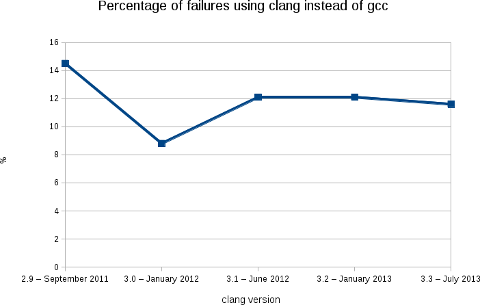
    Like the previous releases, we are at a bit less than 12% of packages failing (2188 packages on a total of 18854).
    More warnings / errors detections have been added to the software (for example: like this defect of the C++ standard or the detection of unused linker option) causing more build failures, but, in the mean time, we fixed some issues in the Debian packages... As usual, the following image shows clearly the evolution of the build failures over time.
    As stated in my blog post for the release 3.2, this rebuilds prove that Clang is ready for production in term of support of the C, C++ and Objective C languages. With the performance results showed by Chandler Carruth from Google at the last Euro LLVM summit (see this video from 5:40), I believe that it is now time to report and fix the bugs in the upstream packages. I also presented this work (video) at the Debconf 13 last week in Vaumarcus (Switzerland) and I will be also presenting this work at the Linux Plumbers Conference, New Orleans. With L o Cavaille (as part of his GSOC) and Paul Tagliamonte, we are also working on providing a better automatic rebuild infrastructure for clang-built packages (and other static analyzers). More in the next few weeks. Finally, I would like to thank folks at AWS for the Debian credit and David Suarez for helping on with the Ruby segfaults.

    17 August 2013

    Daniel Leidert: Create a KNOPPIX USB (boot-)stick from a running Linux system

    I was recently examining, how to boot a (live) KNOPPIX from an USB stick. It turns out I did not find a manual about how to create a bootable USB stick containing KNOPPIX without burning KNOPPIX to a CD/DVD first?! So this is a short howto without burning anything. I'm showing how to put a KNOPPIX ISO image to an USB stick. I need an ISO image of KNOPPIX, an USB stick and syslinux installed. I've chosen to put the 4GB DVD image KNOPPIX_V7.2.0DVD-2013-06-16-EN.iso onto a 16GB USB stick. The place left on the USB device should be available to the user as NTFS partition. I'll use the term /dev/sdX to refer to the stick (where X is a lowercase character, e.g. /dev/sdb) and completely empty it first (THIS WILL DELETE ALL DATA INCLUDING THE PARTITION TABLE!):
    shred -z /dev/sdX
    Now after the ISO image has been downloaded, we need to alter it a bit. For this some information about the USB stick is required. The relevant bits heads and sectors/track are highlighted below:

    fdisk -l /dev/sdX

    Disk /dev/sdX: 16.0 GB, 16008609792 bytes
    64 heads, 32 sectors/track, 15267 cylinders, total 31266816 sectors
    Units = sectors of 1 * 512 = 512 bytes
    Sector size (logical/physical): 512 bytes / 512 bytes
    I/O size (minimum/optimal): 512 bytes / 512 bytes
    Disk identifier: 0x0000

    Device Boot Start End Blocks Id System
    Now we change the ISO image for hybrid mode:
    isohybrid -o 1 -h 64 -s 32 -e 1 KNOPPIX_V7.2.0DVD-2013-06-16-EN.iso
    and copy the ISO image to the USB stick:
    cat KNOPPIX_V7.2.0DVD-2013-06-16-EN.iso > /dev/sdX
    After the command has succeeded, the partition table will show a bootable "Hidden HPFS/NTFS" partition. Note that you can adjust the partition type by using the -t, --type switch of isohybrid.

    fdisk -l /dev/sdX

    Disk /dev/sdX: 16.0 GB, 16008609792 bytes
    64 heads, 32 sectors/track, 15267 cylinders, total 31266816 sectors
    Units = sectors of 1 * 512 = 512 bytes
    Sector size (logical/physical): 512 bytes / 512 bytes
    I/O size (minimum/optimal): 512 bytes / 512 bytes
    Disk identifier: 0x0000

    Device Boot Start End Blocks Id System
    /dev/sdX * 1 8032255 4016127+ 17 Hidden HPFS/NTFS
    Now we can create one or more partitions on the stick for shipping data or $whatever by using fdisk, e.g. create a new primary partition and set the type to HPFS/NTFS/exFAT:

    fdisk /dev/sdX

    Command (m for help): p

    Disk /dev/sdX: 16.0 GB, 16008609792 bytes
    64 heads, 32 sectors/track, 15267 cylinders, total 31266816 sectors
    Units = sectors of 1 * 512 = 512 bytes
    Sector size (logical/physical): 512 bytes / 512 bytes
    I/O size (minimum/optimal): 512 bytes / 512 bytes
    Disk identifier: 0x12345678

    Device Boot Start End Blocks Id System
    /dev/sdX * 1 8032255 4016127+ 17 Hidden HPFS/NTFS

    Command (m for help): n
    Partition type:
    p primary (1 primary, 0 extended, 3 free)
    e extended
    Select (default p): p
    Partition number (1-4, default 2): 2
    First sector (8032256-31266815, default 8032256):
    Using default value 8032256
    Last sector, +sectors or +size K,M,G (8032256-31266815, default 31266815):
    Using default value 31266815

    Command (m for help): t
    Partition number (1-4): 2
    Hex code (type L to list codes): 7
    Changed system type of partition 2 to 7 (HPFS/NTFS/exFAT)

    Command (m for help): p

    Disk /dev/sdX: 16.0 GB, 16008609792 bytes
    64 heads, 32 sectors/track, 15267 cylinders, total 31266816 sectors
    Units = sectors of 1 * 512 = 512 bytes
    Sector size (logical/physical): 512 bytes / 512 bytes
    I/O size (minimum/optimal): 512 bytes / 512 bytes
    Disk identifier: 0x12345678

    Device Boot Start End Blocks Id System
    /dev/sdX1 * 1 8032255 4016127+ 17 Hidden HPFS/NTFS
    /dev/sdX2 8032256 31266815 11617280 7 HPFS/NTFS/exFAT

    Command (m for help): w

    [..]
    Run mkfs.ntfs on /dev/sdX2 to create the NTFS file system there. The USB stick is ready now. Connected to the system where one wants to start a live KNOPPIX and chosen to boot this system from USB will result in a running KNOPPIX system.The same should also work for creating a Debian live system USB stick. Thanks to the author of this article.

    Steve Kemp: Soon it will be time for something different

    This weekend I'm mostly alternating between reading, writing, and trying to avoid death by the plague.[*] I've switched Lumail to using a UTF-8 aware string library, which means we can now handle the obvious case:

    --
    -- Prove keybindings work.
    --
    keymap['global'][' '] = 'msg("UTF-8 rocks!")'
    
    Similarly we can stuff input into the buffer:
    --
    -- Pretend the user typed ":msg ...\n"
    --
    stuff( ":msg('  is pie')\n" );
    
    This transition was annoying to handle, but wasn't too difficult. There is only one more major update required, according to the development roadmap, which is to double check that UTF-8 output is correct. Otherwise I think I'm almost done. In the sense that I don't see anything obvious missing, barring things that won't ever happen such as mutt-style "tag" support. I've updated the online examples to include some nice code: I can't claim to have many users, so far the development has been carried out by myself and approximately four other people. But that matters not. I genuinely believe this is a good client and it really suits the way that I handle (large volumes of) email:
    • Show folders with unread mail.
    • Quickly read it.
    Allowing you to open multiple folders at once means you get a great view into your currently-unread mail, regardless of where procmail has placed it. The overriding feeling having "completed" the client is that Lua rocks. I'm torn between wanting to sleep some more, and wondering what other system/package/tool can be extended by Lua. As epiphanies go my on_idle() update takes some beating.
    * - I do not have the black death, but I'm not well.

    Lars Wirzenius: Yarn, a scenario testing tool

    I write a fair number of Unix command line programs, and I want to have test suites for them. A year and a half ago I wrote a tool to make that easier: cmdtest. However, it turned out to not be a particularly good one, primarily because it doesn't make it easy to write good test code. Tests and test code should be obviously correct, so you don't need a test suite for your test suite. Earlier this year, Daniel and I started a slow, but long discussion about this. We'd talk it over during many a lunch, figuring out what we actually want. We eventually converged on an approach based on for Unix command line programs, and based on Markdown documents. We then wrote that up as a README, and then took another month refining the README before writing any code. The naming discussion only took a week.
    • We borrowed the given/when/then structure from BDD, and the idea of using that structure so that tests are specified using lightly structured text in a way that allowsnon-developers to participate.
    • This borrowed structure gives a way to express sequences of things that happen, including setup and checks. We call these sequences test scenarios, and thus this approach to testing is called scenario testing.
    • We embed the test scenarios, and the code that implements them, as code blocks in Markdown documents. This makes it easy to explain what is going on in the tests, when that's needed, right next to the tests. The Markdown files can easily be formatted as web pages or PDFs (among other formats), making it easy to share and discuss them with people who might not be comfortable accessing a git repository.
    As a concrete example, here is a real test scenario, from Obnam, for testing its new FUSE plugin:
    SCENARIO Browsing backups with FUSE plugin
    ASSUMING user is in group fuse
    GIVEN a live data directory
    AND a 0 byte file called empty
    AND a 1 byte file called one
    AND a 4096 byte file called 4k
    AND a 10485760 byte file called 10meg
    AND a hardlink to 4k called 4k-hardlink
    AND a symlink to 4k called 4k-symlink
    AND a directory called some-dir
    AND a symlink to ../4k called some-dir/other-symlink
    WHEN live data is backed up
    AND repository is fuse mounted
    THEN latest generation can be copied correctly from fuse mount
    FINALLY unmount repository
    
    Some explanations:
    • SCENARIO is the name of the scenario.
    • ASSUMING is a condition for the entire scenario: the FUSE plugin can only be tested when the user can use FUSE.
    • GIVEN is a setup step, WHEN is the step that does the thing that is being tested, and THEN checks that the right thing happened during WHEN.
    • AND is an alias for the keyword on the previous line; it makes the test scenario seem more like normal English text
    • FINALLY is for cleaning up afterwards, whether the scenario passed or not
    Test scenarios like this are obviously not directly executable. We need to provide the code that actually executs each step. For this, yarn provides an IMPLEMENTS section, of which I will show one example: the creation of the files.
    IMPLEMENTS GIVEN a (\d+) byte file called (\S+)
    dd if=/dev/zero of="$DATADIR/live/$MATCH_2" bs=1 count="$MATCH_1"
    
    (The other IMPLEMENTS sections for that Obnam test scenario are also only about a line of shell. The longest one is four lines, because it has an if statement that I like to format in a fairly verbose way. I'm skipping the others to avoid needless repetition.) The text after the keyword (GIVEN, WHEN, THEN, etc) in the test scenario is a single line of free-form text, which is matched by a regular expression in the IMPLEMENTS section. There must be exactly one matching IMPLEMENTS for each line in a test scenario. The body of IMPLEMENTS is a shell script snippet. Yarn provides a temporary directory for each scenario, and the path to that is given in the DATADIR environment variable. Yarn also cleans up the directory afterwards, unless the user running yarn requests otherwise, so tests that only change things in the temporary directory don't need any FINALLY steps. The above example uses FINALLY to unmount the FUSE filesystem at the end. The regular expressions can capture parts of the text in the scenario step, and these are provided to the shell script using environment variables: MATCH_1 etc. This is a simple, but powerful mechanism for implementing very flexible steps, which also means the number of steps can be kept down. The IMPLEMENTS sections are shared between all test scenarios. This makes it very easy to write new scenarios using already-existing steps, by choosing which ones to use, in which order, and making use of any variability in the steps that their implementations provide. Yarn is a new tool, and I expect it to mature in the coming months. It's included in the cmdtest Debian package, and is already in Debian jessie and unstable, for those who want to try it. (My personal apt repository has a .deb for wheezy as well; backports are welcome). The yarn scenario testing language itself is not set in stone, but Daniel and I both want to be careful about making changes to it. It's all meant to be very simple: an obviously correct testing tool is better than an intricate one. I've used yarn in several of my own little programs now, as has Daniel, and we've used it at work as well. Undoubtedly we'll find bugs in the implementation, and we're still feeling our way to figuring out how to write really excellent scenarios, and how to structure steps with the best possible taste. We'll also start designing a shell library that yarn provides to the IMPLEMENTS sections, for doing things that we find ourselves doing in many projects. It is already clear to me, however, that yarn is oh so much better than cmdtest could ever be. I'm even starting to express ideas for new tools as yarn test documents, so I'm clear what they should do. If and when I ever get to actually implementing the tools, I'll have a test suite for them already. See, for example, first attempts at specifying how a fast file transfer tool, fling, which is to use Linux-only system calls to reach wire speeds over wired LAN, and a tool to recompress compressed files with another compression tool. We hope yarn will prove to be useful for others as well. If you try it, and have suggestions or comments, please e-mail us.

    Next.

    Previous.