Search Results: "tar"

29 April 2020

Craig Small: Sending data in a signal

The well-known kill system call has been around for decades and is used to send a signal to another process. The most common use is to terminate or kill another process by sending the KILL or TERM signal but it can be used for a form of IPC, usually around giving the other process a kick to do something. One thing that isn t as well known is besides sending a signal to a process, you can send some data to it. This can either be an integer or a pointer and uses similar semantics to the known kill and signal handler. I came across this when there was a merge request for procps. The main changes are using sigqueue instead of kill in the sender and using a signal action not a signal handler in the receiver. To illustrate this feature, I have a small set of programs called sender and receiver that will pass an integer between them. The Sender The sender program is extremely simple, use a random(ish) from time masked to two bytes, put it in the required union and send the lot to sendqueue.
# include <signal.h>
# include <stdlib.h>
# include <stdio.h>
# include <time.h>
int main(int argc, char **argv)
 
    union sigval sigval;
    pid_t pid;
    if (argc < 2   (pid = atoi(argv[1])) < 0)
	return EXIT_FAILURE;
    sigval.sival_int = time(NULL) &amp; 0xff;
    printf("sender: sending %d to PID %d\n",
        sigval.sival_int, pid);
    sigqueue(pid, SIGUSR1, sigval);
    return EXIT_SUCCESS;
 
The key lines are 13 and 16 where the random (ish) integer is stored in the sigval union and then sent to the other process with the sigqueue. The receiver The receiver just sets up the signal handler, sends its PID (so I know what to tell the sender) and sits in a sleeping loop.
# include <stdio.h>
# include <stdlib.h>
# include <sys/types.h>
# include <unistd.h>
# include <signal.h>
void signal_handler(int signum, siginfo_t *siginfo, void *ucontext)
 
    if (signum != SIGUSR1) return;
    if (siginfo->si_code != SI_QUEUE) return;
    printf("receiver: Got value %d\n",
	    siginfo->si_int);
 
int main(int argc, char **argv)
 
    pid_t pid = getpid();
    struct sigaction signal_action;
    printf("receiver: PID is %d\n", pid);
    signal_action.sa_sigaction = signal_handler;
    sigemptyset (&amp;signal_action.sa_mask);
    signal_action.sa_flags = SA_SIGINFO;
    sigaction(SIGUSR1, &amp;signal_action, NULL);
    while(1) sleep(100);
    return EXIT_SUCCESS;
 
Lines 16-26 setup the signal handler. The main difference here is SA_SIGINFO used for the signal flags and sigaction references a sa_sigaction function rather than sa_handler. We need to use a different function because the sigaction only is passed the signal number but we need more information, including the integer that the sender process stored in sigval. Lines 7-14 are the signal handler function itself. It first checks that the receiver process got the correct signal (SIGUSR1 in this case) and that we got this signal from sigqueue because the type is SI_QUEUE. Checking the type of signal is important because different signals give you different data. For example, if you signalled this process with kill then si_int is undefined. The result As a proof of concept, the results are not terribly exciting. We see the sender say what it will be sending and the receiver saying it got it. It was useful to get some results, especially when things went wrong.
$ ./receiver &amp;
[1] 370216
receiver: PID is 370216
$ ./sender 370216
sender: sending 133 to (gdPID 370216
receiver: Got value 133
Gotchas While testing the two process there was two gotchas I encountered. GDB and the siginfo structure The sigaction manual page shows a simple siginfo_t structure, however when looking at what is passed to the signal handler, it s much more complicated.
(gdb) p *siginfo
$2 =  si_signo = 10, si_errno = 0, si_code = -1, __pad0 = 0, _sifields =  _pad =  371539, 1000, 11, 32766, 0 <repeats 24 times> , _kill =  si_pid = 371539, si_uid = 1000 , _timer =  si_tid = 371539, 
      si_overrun = 1000, si_sigval =  sival_int = 11, sival_ptr = 0x7ffe0000000b , _rt =  si_pid = 371539, si_uid = 1000, si_sigval =  sival_int = 11, sival_ptr = 0x7ffe0000000b , _sigchld =  
      si_pid = 371539, si_uid = 1000, si_status = 11, si_utime = 0, si_stime = 0 , _sigfault =  si_addr = 0x3e80005ab53, si_addr_lsb = 11, _bounds =  _addr_bnd =  _lower = 0x0, _upper = 0x0 , _pkey = 0 , 
    _sigpoll =  si_band = 4294967667539, si_fd = 11 , _sigsys =  _call_addr = 0x3e80005ab53, _syscall = 11, _arch = 32766 
(gdb) p siginfo->_sifields._rt.si_sigval.sival_int
$3 = 11
So the integer is stored in a union in a structure in a structure. Much harder to find than just simply sival_int. The pointer is just a pointer So perhaps sending an integer is not enough. The sigval is a union with an integer and a pointer. Could a string be sent instead? I changed line 13 of the sender so it used a string instead of an integer.
    sigval.sival_ptr = "Hello, World!"
The receiver needed a minor adjustment to print out the string. I tried this and the receiver segmentation faulted. What was going on? The issue is the set of system calls does a simple passing of the values. So if the sender sends a pointer to a string located at 0x1234567 then the receiver will have a pointer to the same location. When the receiver tries to dereference the sival_ptr, it is pointing to memory that is not owned by it but by another process (the sender) so it segmentation faults. The solution would be to use shared memory between the processes. The signal queue would then use the pointer to the shared memory and, in theory, all would be well.

Petter Reinholdtsen: GnuCOBOL, a free platform to learn and use COBOL - nice free software

The curiosity got the better of me when Slashdot reported that New Jersey was desperately looking for COBOL programmers, and a few days later it was reported that IBM tried to locate COBOL programmers. I thus decided to have a look at free software alternatives to learn COBOL, and had the pleasure to find GnuCOBOL was already in Debian. It used to be called Open Cobol, and is a "compiler" transforming COBOL code to C or C++ before giving it to GCC or Visual Studio to build binaries. I managed to get in touch with upstream, and was impressed with the quick response, and also was happy to see a new Debian maintainer taking over when the original one recently asked to be replaced. A new Debian upload was done as recently as yesterday. Using the Debian package, I was able to follow a simple COBOL introduction and make and run simple COBOL programs. It was fun to learn a new programming language. If you want to test for yourself, the GnuCOBOL Wikipedia page have a few simple examples to get you startet. As I do not have much experience with COBOL, I do not know how standard compliant it is, but it claim to pass most tests from COBOL test suite, which sound good to me. It is nice to know it is possible to learn COBOL using software without any usage restrictions, and I am very happy such nice free software project as this is available. If you as me is curious about COBOL, check it out. As usual, if you use Bitcoin and want to show your support of my activities, please send Bitcoin donations to my address 15oWEoG9dUPovwmUL9KWAnYRtNJEkP1u1b.

26 April 2020

Enrico Zini: Some Italian women

Artemisia Gentileschi - Wikipedia
art history people archive.org
Artemisia Lomi or Artemisia Gentileschi (US: / d nt l ski, -ti -/, Italian: [arte mi zja d enti leski]; July 8, 1593 c. 1656) was an Italian Baroque painter, now considered one of the most accomplished seventeenth-century artists working in the dramatic style of Caravaggio. In an era when women had few opportunities to pursue artistic training or work as professional artists, Artemisia was the first woman to become a member of the Accademia di Arte del Disegno in Florence and had an international clientele.
Maria Pellegrina Amoretti (1756 1787), was an Italian lawyer. She is referred to as the first woman to graduate in law in Italy, and the third woman to earn a degree.
Laura Maria Caterina Bassi (October 1711 20 February 1778) was an Italian physicist and academic. She received a doctoral degree in Philosophy from the University of Bologna in May 1732. She was the first woman to earn a professorship in physics at a university. She is recognized as the first woman in the world to be appointed a university chair in a scientific field of studies. Bassi contributed immensely to the field of science while also helping to spread the study of Newtonian mechanics through Italy.
Maria Gaetana Agnesi (UK: / n je zi/ an-YAY-zee,[1] US: / n -/ ahn-,[2][3] Italian: [ma ri a ae ta na a zi, - e z-];[4] 16 May 1718 9 January 1799) was an Italian mathematician, philosopher, theologian, and humanitarian. She was the first woman to write a mathematics handbook and the first woman appointed as a mathematics professor at a university.[5]
Elena Lucrezia Cornaro Piscopia (US: /k r n ro p sko pi /,[4] Italian: [ lena lu kr ttsja kor na ro pi sk pja]) or Elena Lucrezia Corner (Italian: [kor n r]; 5 June 1646 26 July 1684), also known in English as Helen Cornaro, was a Venetian philosopher of noble descent who in 1678 became one of the first women to receive an academic degree from a university, and the first to receive a Doctor of Philosophy degree.
Maria Tecla Artemisia Montessori (/ m nt s ri/ MON-tiss-OR-ee, Italian: [ma ri a montes s ri]; August 31, 1870 May 6, 1952) was an Italian physician and educator best known for the philosophy of education that bears her name, and her writing on scientific pedagogy. At an early age, Montessori broke gender barriers and expectations when she enrolled in classes at an all-boys technical school, with hopes of becoming an engineer. She soon had a change of heart and began medical school at the Sapienza University of Rome, where she graduated with honors in 1896. Her educational method is still in use today in many public and private schools throughout the world.
Rita Levi-Montalcini OMRI OMCA (US: / le vi mo nt l t i ni, l v-, li vi m nt l -/, Italian: [ ri ta l vi montal t i ni]; 22 April 1909 30 December 2012) was an Italian Nobel laureate, honored for her work in neurobiology. She was awarded the 1986 Nobel Prize in Physiology or Medicine jointly with colleague Stanley Cohen for the discovery of nerve growth factor (NGF). From 2001 until her death, she also served in the Italian Senate as a Senator for Life. This honor was given due to her significant scientific contributions. On 22 April 2009, she became the first Nobel laureate ever to reach the age of 100, and the event was feted with a party at Rome's City Hall. At the time of her death, she was the oldest living Nobel laureate.
Margherita Hack Knight Grand Cross OMRI (Italian: [mar e ri ta (h)ak]; 12 June 1922 29 June 2013) was an Italian astrophysicist and scientific disseminator. The asteroid 8558 Hack, discovered in 1995, was named in her honour.
Samantha Cristoforetti (Italian pronunciation: [sa manta kristofo retti]; born 26 April 1977, in Milan) is an Italian European Space Agency astronaut, former Italian Air Force pilot and engineer. She holds the record for the longest uninterrupted spaceflight by a European astronaut (199 days, 16 hours), and until June 2017 held the record for the longest single space flight by a woman until this was broken by Peggy Whitson and later by Christina Koch. She is also the first Italian woman in space. Samantha Cristoforetti is also known as the first person who brewed an espresso in space.

25 April 2020

Julian Andres Klode: An - EPYC - Focal Upgrade

Ubuntu Focal Fossa 20.04 was released two days ago, so I took the opportunity yesterday and this morning to upgrade my VPS from Ubuntu 18.04 to 20.04. The VPS provides: I rebooted one more time than necessary, though, as my cloud provider Hetzner recently started offering 2nd generation EPYC instances which I upgraded to from my Skylake Xeon based instance. I switched from the CX21 for 5.83 /mo to the CPX11 for 4.15 /mo. This involved a RAM downgrade - from 4GB to 2GB, but that s fine, the maximum usage I saw was about 1.3 GB when running dose-distcheck (running hourly); and it s good for everyone that AMD is giving Intel some good competition, I think. Anyway, to get back to the distribution upgrade - it was fairly boring. I started yesterday by taking a copy of the server and launching it locally in a lxd container, and then tested the upgrade in there; to make sure I m prepared for the real thing :) I got a confusing prompt from postfix as to which site I m operating (which is a normal prompt, but I don t know why I see it on an upgrade); and a few config files I had changed locally. As the server is managed by ansible, I just installed the distribution config files and dropped my changes (setting DPkg::Options "--force-confnew"; ;" in apt.conf), and then after the upgrade, ran ansible to redeploy the changes (after checking what changes it would do and adjusting a few things). There are two remaining flaws:
  1. I run rspamd from the upstream repository, and that s not built for focal yet. So I m still using the bionic binary, and have to keep bionic s icu 60 and libhyperscan4 around for it. This is still preventing CI of the ansible config from passing for focal, because it won t have the needed bionic packages around.
  2. I run weechat from the upstream repository, and apt can t tell the versions apart. Well, it can for the repositories, because they have Size fields - but status does not. Hence, it merges the installed version with the first repository it sees. What happens is that it installs from weechat.org, but then it believes the installed version is from archive.ubuntu.com and replaces it each dist-upgrade. I worked around it by moving the weechat.org repo to the front of sources.list, so that the it gets merged with that instead of the archive.ubuntu.com one, as it should be, but that s a bit ugly.
I also should start the migration to EC certificates for TLS, and 0-RTT handshakes, so that the initial visit experience is faster. I guess I ll have to move away from certbot for that, but I have not investigated this recently.

Reinhard Tartler: Building Packages with Buildah in Debian

1 Building Debian Packages with buildah
Building packages in Debian seems to be a solved problem. But is it? At the bottom, installing the dpkg-dev package provides all the basic tools needed. Assuming that you already succeeded with creating the necessary packaging metadata (i.e., debian/changelog, debian/control, debian/copyright, etc., and there are great helper tools for this such ash dh-make, dh-make-golang, etc.,) it should be as simple as invoking the dpkg-buildpackage tool. So what's the big deal here?

The issue is that dpkg-buildpackage expects to be called with an appropriately setup build context, that is, it needs to be called in an environment that satisfies all build dependencies on the system. Let's say you are building a package for Debian unstable on your Debian stable system (this is the common scenario for the official Debian build machines), you would need your build to link against libraries in unstable, not stable. So how to tell the package build process where to find its dependencies?

The answer (in Debian and many other Linux distributions) is you do not at all. This is actually a somewhat surprising answer for software developers without a Linux distribution development background1. Instead, chroots "simulate" an environment that has all dependencies that we want to build against at the system locations, that is. /usr/lib, etc.

Chroots are basically full system installations in a subdirectory that includes system and application libraries. In order to use them, a package build needs to use the chroot(2) system call, which is a privileged operation. Also creating these system installations is a somewhat finicky process. In Debian, we have tools that make this process easier, the most popular ones are probably pbuilder(1)2 and sbuild(1)3. Still, they are somewhat clumsy to use, add significant levels of abstraction in the sense that they do quite a bit of magic behind the scenes to work hide the fact that privileged operations (need root to run chroot(2), etc.) are required. They are also somewhat brittle, for instance, if a build process is aborted (SIGKILL, or system crash), you may end up with temporary directories and files under userids other than your own that again may require root-privileges to cleanup.

What if there was an easy way to do all of the above without any process running as root? Enter rootless buildah.

Modern Linux container technologies allow unprivileged users to "untie" a process from the system (cf. the unshare(2) system call). This means that a regular user may run a process (and its child processes) in an "environment" where system calls behave differently and provide a configurable amount of isolation levels. This article demonstrates a novel build tool buildah, which is:
  • easy to setup build environment from the command line
  • secure, as no process needs to run as root
  • simple in architecture, requires no running daemon like for example docker
  • convenient to use: you can debug your debian/rules interactively
Architecturally, buildah is written in golang and compiled as a (mostly) statically linked executable. It builds on top a number of libraries written in golang, including github.com/containers/storage and github.com/containers/image. The overlay functionality is provided by the fuse-overlayfs(1) utility.

1.1 Preparation:
The Kernel in Debian bullseye (and in buster, and recent Ubuntu kernels to the best of my knowledge) do support usernamespaces, but leave them disabled by default. Here is how to enable them:
echo kernel.unprivileged_userns_clone = 1   sudo tee -a /etc/sysctl.d/containers.conf
systemctl -p /etc/sysctl.d/containers.conf
I have to admit that I'm not entirely sure why the Debian kernels don't enable usernamespaces by default. I've found a reference on stackexchange4 that claims this disables some "hardening" features in the Debian kernel. I also understand this step is not necessary if you chose to compile and run a vanilla upstream kernel. I'd appreciate a better reference and am happy to update this text.
$ c=$(buildah from docker.io/debian:sid)
Getting image source signatures
Copying blob 2bbc6b8c460d done
Copying config 9b90abe801 done
Writing manifest to image destination
Storing signatures
This command downloads the image from docker.io and stores it locally in your home directory. Let's install essential utilities for building Debian packages:
1: buildah run $c apt-get update -qq
2: buildah run $c apt-get install dpkg-dev -y
3: buildah config --workingdir /src $c
4: buildah commit $c dpkg-dev
The command on line 1 and 2 execute the installation of compilers and dpkg development tools such as dpkg-buildpackage, etc. The buildah config command in line 4 arranges that whenever you start a shell in the container, the current working directory in the container is in /src. Don't worry about this location not existing yet, we will make sources from your host system available there. The last command creates an OCI image with the name dpkg-dev. BTW, the name you use for the image in the commit command can be used in podman (but not the "containers"). See 5 and 6 for a comparison between podman and buildah.
buildah images -a
This output might look like this:
  REPOSITORY                 TAG      IMAGE          ID   CREATED   SIZE             
localhost/dpkg-dev latest b85c34f95d3e 16 seconds ago 406 MB
docker.io/library/debian sid 9b90abe801db 11 hours ago 124 MB

1.2 Running a package build
Now we have a working container with the reference in the variable $c. To use it conveniently with source packages that I have stored in /srv/scratch/packages/containers, let's introduce a shell alias r like this:
alias r='buildah run --tty -v /srv/scratch/packages/containers:/src $c '
This allows you to easily execute commands in that container:
r pwd
r bash
The last command will give you an interactive shell that we'll be using for building packages!
siretart@x1:~/scratch/packages/containers/libpod$ r bash

root@x1:/src# cd golang-github-openshift-imagebuilder

root@x1:/src/golang-github-openshift-imagebuilder# dpkg-checkbuilddeps
dpkg-checkbuilddeps: error: Unmet build dependencies: debhelper (>= 11) dh-golang golang-any golang-github-containers-storage-dev (>= 1.11) golang-github-docker-docker-dev (>= 18.09.3+dfsg1) golang-github-fsouza-go-dockerclient-dev golang-glog-dev

root@x1:/src/golang-github-openshift-imagebuilder# apt-get build-dep -y .
Note, using directory '.' to get the build dependencies
Reading package lists... Done
Building dependency tree
Reading state information... Done
The following NEW packages will be installed:
[...]

root@x1:/src/golang-github-openshift-imagebuilder# dpkg-checkbuilddeps

root@x1:/src/golang-github-openshift-imagebuilder#
Now we have a environment that has all build-dependencies available and we are ready to build the package:
root@x1:/src/golang-github-openshift-imagebuilder# dpkg-buildpackage -us -uc -b
Assuming the package builds, the package build results are placed in /src inside the container, and are visible at ~/scratch/packages/containers on the host. There you can inspect, extract or even install them. The latter part allows you to interactively rebuild packages against updated dependencies, without the need of setting up an apt archive or similar.

2 Availability
The buildah(1) tool is available in debian/bullseye since 2019-12-17. Since is a golang binary, it only links dynamically against system libraries such as libselinux and libseccomp, which are all available in buster-backports. I'd expect buildah to just work on a debian/buster system as well provided you install those system libraries and possibly the backported Linux kernel.

Keeping the package at the latest upstream version is challenging because of its fast development pace that picks up new dependencies on golang libraries and new versions of existing libraries with every new upstream release. In general, this requires updating several source packages, and in many cases also uploading new source packages to the Debian archive that need to be processed by the Debian ftp-masters.

As an exercise, I suggest to install the buildah package from bullseye, 'git clone' the packaging repository from https://salsa.debian.org/go-team/packages/golang-github-containers-buildah and build the latest version yourself. Note, I would expect the above to even work on a Fedora laptop.

The Debian packages have not swept into the Ubuntu distributions yet, but I expect them to be included in the Ubuntu 20.10 release. In the mean time, ubuntu users can install the package that are provided by the upstream maintainers in the "Project Atomic" PPA at https://launchpad.net/~projectatomic/+archive/ubuntu/ppa

3 Related Tools
The buildah tool is accompanied with two "sister" tools:

The Skopeo package provides tooling to work with remote images registries. This allows you download, upload images to remote registries, convert container images between different formats. It has been available in Debian since 2020-04-20.

The podman tool is a 'docker' replacement. It provides a command-line interface that mimics the original docker command to an extend that a user familiar with docker might want to place this in their ~/.bashrc file:
alias docker='podman'
Unfortunately, at the time of writing podman is still being processed by the ftp-masters since 01-03-2020. At this point, I recommend building the package from our salsa repository at https://salsa.debian.org/debian/libpod

4 Conclusion
Building packages in the right build context is a fairly technical issue for which many tools have been written for. They come with different trade-off when it comes to usability. Containers promise a secure alternative to the tried and proven chroot-based approaches, and the buildah makes using this technology very easy to use.

I'd love to get into a conversation with you on how these tools work for you, and would like to encourage participation and assistance with keeping the complicated software stack up-to-date in Debian (and by extension, in derived distribution such as Ubuntu, etc.).

Footnotes:
1
At my day-job, we build millions of lines of C++ code on Solaris10 and AIX6, where concepts such as "chroots" are restricted to the super user 'root' and is therefore not available to developers, not even through wrappers. Instead, libraries and headers are installed into "refroots", that is, subdirectories that mimic the structure of the "sysroot" directories that are used in the embedded Linux community for cross-compiling packages, and we use Makefiles that set include flags (-I rules and -L flags) to tell the compiler and linker where to look.

24 April 2020

Fran ois Marier: Disabling mail sending from your domain

I noticed that I was receiving some bounced email notifications from a domain I own (cloud.geek.nz) to host my blog. These notifications were all for spam messages spoofing the From address since I do not use that domain for email. I decided to try setting a strict DMARC policy to see if DMARC-using mail servers (e.g. GMail) would then drop these spoofed emails without notifying me about it. I started by setting this initial DMARC policy in DNS in order to monitor the change:
@ TXT v=spf1 -all
_dmarc TXT v=DMARC1; p=none; ruf=mailto:dmarc@fmarier.org; sp=none; aspf=s; fo=0:1:d:s;
Then I waited three weeks without receiving anything before updating the relevant DNS records to this final DMARC policy:
@ TXT v=spf1 -all
_dmarc TXT v=DMARC1; p=reject; sp=reject; aspf=s;
This policy states that nobody is allowed to send emails for this domain and that any incoming email claiming to be from this domain should be silently rejected. I haven't noticed any bounce notifications for messages spoofing this domain in a while, so maybe it's working?

21 April 2020

Debian Project Leader: Bits from the new DPL

My fellow Debianites, It's been one month, one week and one day since I decided to run for this DPL term. The Debian community has been through a variety of interesting times during the last decade, and instead of focusing on grand, sweeping changes for Debian, core to my DPL campaign was to establish a sense of normality and stability so that we can work on community building, continue to focus on technical excellence and serve our users the best we can. Thing don't always work out as we plan, and for many of us, Debian recently had to take a back seat to personal priorities. Back when I posted my intention to run, there were 125 260 confirmed cases of COVID-19 globally. Today, that number is 20 times higher, with the actual infected number likely to be significantly higher. A large number of us are under lock-down, where we not only fear the disease and its effect on local hospitals and how it will affect our loved ones, but also our very livelihoods and the future of our local businesses and industry. I don't mean to be gloomy with the statement above, I am after all, an optimist - but unfortunately it does get even worse. Governments and corporations around the world have started to take advantage of COVID-19 in negative ways and are making large sweeping changes that undermine the privacy and rights of individuals everywhere. For many reasons, including those above, I believe that the Debian project is more important and relevant now than it's ever been before. The world needs a free, general purpose operating system, unburdened by the needs of profit, which puts the needs of its users first, providing a safe and secure platform for the computing needs of the masses. While we can't control or fix all the problems in the world, we can control our response to it, and be part of the solutions that bring the change we want to see. During my term as DPL, I will be available to help with problems in our community to the maximum extent that my time permits. If we help ourselves, we will be in a better position to help others. If you (or your team) get stuck and are in need of help, then please do not hessitate to e-mail me. A few thank-yous As incoming DPL, I'd like to thank Sam Hartman on behalf of the project for the work that he's done over the last year as DPL. It's a tremendous time commitment that requires constant attention to detail. On Sunday, Sam and I had a handover meeting where we discussed various DPL responsibilities including finances, delegations (including specifics of some delegations), legal matters, outreach and other questions I had. I'd also like to thank Sam for taking the time to do this. Thank you to Sruthi Chadran and Brian Gupta who took the time to also run for DPL this year. Both candidates brought important issues to the forefront and I hope to work with both of them on those in the near future. DPL Blog Today, I've started a new blog for the Debian Project Leader to help facilitate more frequent communication, and to reach a wider audience via Planet Debian. This will contain supplemental information to what I send to the debian-devel-announce mailing list. Want to help? In my platform, I listed some key areas that I'd like to work on. My work won't be limited to those, but it should give you some idea of the type of DPL that I'll be. If you'd like to get involved, feel free to join the #debian-dpl channel on the oftc IRC network, and please introduce yourself along with any areas of interest that you'd like to contribute to.

Debian Project Leader: Bits from the new DPL

My fellow Debianites, It's been one month, one week and one day since I decided to run for this DPL term. The Debian community has been through a variety of interesting times during the last decade, and instead of focusing on grand, sweeping changes for Debian, core to my DPL campaign was to establish a sense of normality and stability so that we can work on community building, continue to focus on technical excellence and serve our users the best we can. Thing don't always work out as we plan, and for many of us, Debian recently had to take a back seat to personal priorities. Back when I posted my intention to run, there were 125 260 confirmed cases of COVID-19 globally. Today, that number is 20 times higher, with the actual infected number likely to be significantly higher. A large number of us are under lock-down, where we not only fear the disease and its effect on local hospitals and how it will affect our loved ones, but also our very livelihoods and the future of our local businesses and industry. I don't mean to be gloomy with the statement above, I am after all, an optimist - but unfortunately it does get even worse. Governments and corporations around the world have started to take advantage of COVID-19 in negative ways and are making large sweeping changes that undermine the privacy and rights of individuals everywhere. For many reasons, including those above, I believe that the Debian project is more important and relevant now than it's ever been before. The world needs a free, general purpose operating system, unburdened by the needs of profit, which puts the needs of its users first, providing a safe and secure platform for the computing needs of the masses. While we can't control or fix all the problems in the world, we can control our response to it, and be part of the solutions that bring the change we want to see. During my term as DPL, I will be available to help with problems in our community to the maximum extent that my time permits. If we help ourselves, we will be in a better position to help others. If you (or your team) get stuck and are in need of help, then please do not hessitate to e-mail me. A few thank-yous As incoming DPL, I'd like to thank Sam Hartman on behalf of the project for the work that he's done over the last year as DPL. It's a tremendous time commitment that requires constant attention to detail. On Sunday, Sam and I had a handover meeting where we discussed various DPL responsibilities including finances, delegations (including specifics of some delegations), legal matters, outreach and other questions I had. I'd also like to thank Sam for taking the time to do this. Thank you to Sruthi Chadran and Brian Gupta who took the time to also run for DPL this year. Both candidates brought important issues to the forefront and I hope to work with both of them on those in the near future. DPL Blog Today, I've started a new blog for the Debian Project Leader to help facilitate more frequent communication, and to reach a wider audience via Planet Debian. This will contain supplemental information to what I send to the debian-devel-announce mailing list. Want to help? In my platform, I listed some key areas that I'd like to work on. My work won't be limited to those, but it should give you some idea of the type of DPL that I'll be. If you'd like to get involved, feel free to join the #debian-dpl channel on the oftc IRC network, and please introduce yourself along with any areas of interest that you'd like to contribute to.

20 April 2020

Norbert Preining: Gaming: What Remains of Edith Finch

I never thought I could finish a game which is completely linear, has hardly any interaction necessary, hardly any riddles, no fighting. What Remains of Edith Finch taught be differently. And it is amazing.

A friend recently pointed me at a blog about casual games, and surprisingly I found two games I have played on the list: Firewatch and The Witness. One of the other games on the list was What Remains of Edith Finch. This games was lurking in my Steam library for quite some time, and I realized I actually started playing it long ago, but only for a few minutes, before having given up, back then. What a failure I realized! The games plays completely in the now deserted house of the family Finch. The youngest member of the family returns with a key to the house and uncovers the stories of her family. This is about all that is happening in the game. And it is so well done that I couldn t stop playing (wouldn t it be for my daughter interrupting me), and leaves you with the feeling to replay as soon as possible. The graphics are very well done, beautiful scenery, lots of love to details. The story progresses by walking (completely linearly) through the house, and text fragments appearing around you, telling part of the story, small hints, little secrets, everything that makes up a tangible set of family memories.

Exploring the house filled with locked rooms sealed as shrines for the deceased members of the family, Edith uncovers one by one the final moments of her family members, a family seemingly cursed. In these stories the player dives into the world and playing the role of the family members, re-living events of the past.
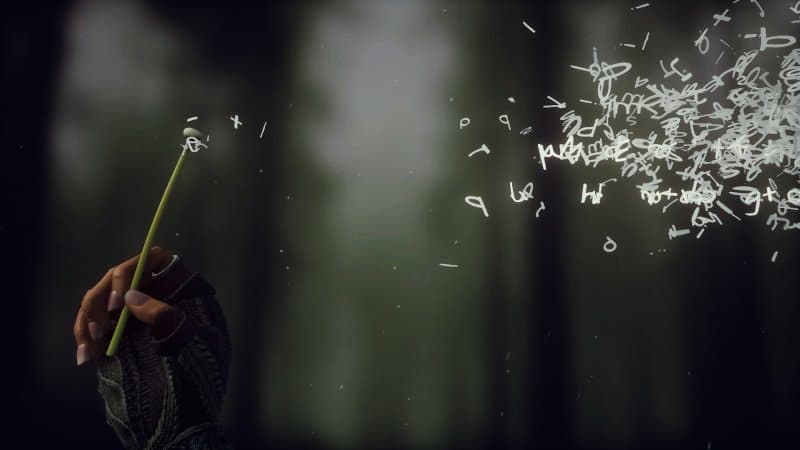
As I wrote in the beginning don t expect fights, don t expect riddles, but be prepared for an emotional roller coaster, for a deep dive into a well written family history with lots of weird twists. An absolute great game with a playing time of around 2h.

19 April 2020

Enrico Zini: Little wonders

Gibbsdavidl/CatterPlots
devel
Did you ever wish you could make scatter plots with cat shaped points? Now you can! - Gibbsdavidl/CatterPlots
What is the best tool to use for drawing vector pictures? For me and probably for many others, the answer is pretty obvious: Illustrator, or, maybe, Inkscape.
A coloring book to help folks understand how SELinux works. - mairin/selinux-coloring-book
The EURion constellation (also known as Omron rings[1] or doughnuts[2]) is a pattern of symbols incorporated into a number of banknote designs worldwide since about 1996. It is added to help imaging software detect the presence of a banknote in a digital image. Such software can then block the user from reproducing banknotes to prevent counterfeiting using colour photocopiers. According to research from 2004, the EURion constellation is used for colour photocopiers but probably not used in computer software.[3] It has been reported that Adobe Photoshop will not allow editing of an image of a banknote, but in some versions this is believed to be due to a different, unknown digital watermark rather than the EURion constellation.[4][3]
This huge collection of non-scary optical illusions and fascinating visual phenomena emphasizes interactive exploration, beauty, and scientific explanation.
Generated photos are created from scratch by AI systems. All images can be used for any purpose without worrying about copyrights, distribution rights, infringement claims, or royalties.
Dokumentarfilm ber die Rangierer im Bahnhof Dresden-Friedrichstadt in der DDR aus dem Jahr 1984.
Il termine sardo femina accabadora, femina agabbad ra o, pi comunemente, agabbadora o accabadora (s'agabbad ra, lett. "colei che finisce", deriva dal sardo s'acabbu, "la fine" o dallo spagnolo acabar, "terminare") denota la figura storicamente incerta di una donna che si incaricava di portare la morte a persone di qualunque et , nel caso in cui queste fossero in condizioni di malattia tali da portare i familiari o la stessa vittima a richiederla. In realt non ci sono prove di tale pratica, che avrebbe riguardato alcune regioni sarde come Marghine, Planargia e Gallura[1]. La pratica non doveva essere retribuita dai parenti del malato poich il pagare per dare la morte era contrario ai dettami religiosi e della superstizione.
Alright the people have spoken and they want more cat genetics. So, I present to you all "Cat Coat Genetics 101: A Tweetorial", feat. pics of many real life cats (for science, of course...this baby is Caterpillar).

Dirk Eddelbuettel: prrd 0.0.3: More improvements

Back in early 2018, the prrd package was introduced as release 0.0.1, uploaded to CRAN, and updated once as release 0.0.2. I have used it extensively for every CRAN release of Rcpp, RcppArmadillo, RcppEigen, BH, and possibly others. The idea of prrd is simple, and described in some more detail on its webpage and its GitHub repo. Reverse dependency checks are an important part of package development and is easily done in a (serial) loop. But these checks are also generally embarassingly parallel as there is no or little interdependency between them (besides maybe shared build depedencies). See the following (dated) screenshot (running six parallel workers, arranged in split byobu session). Since the two early releases, I made a few changes to e.g. the analysis of package checks and their summaries (but never pushed these) as well as a few usability enhancements. This release regroups these. The release is summarised in the NEWS entry:

Changes in prrd version 0.0.3 (2020-04-19)
  • Extended functionality summarise() with optional use of package foghorn (Dirk)
  • New scripts enqueueDepends, dequeueDepends and summmariseJobs (Dirk)
  • Added tweaks and enhancements throughout (Dirk)
  • The default queue location can now be set via options (Dirk)
  • Meta-data on package, version and date is now stored, and shown on dequeue startup (Dirk)
  • The README.md was clarified and improved (Dirk, Avraham Adler in #8, Robert Nuske in #10)

CRANberries provides the usual summary of changes to the previous version. See the aforementioned webpage and its repo for details. For more questions or comments use the issue tracker off the GitHub repo. If you like this or other open-source work I do, you can now sponsor me at GitHub. For the first year, GitHub will match your contributions.

This post by Dirk Eddelbuettel originated on his Thinking inside the box blog. Please report excessive re-aggregation in third-party for-profit settings.

Bits from Debian: DPL elections 2020, congratulations Jonathan Carter!

The Debian Project Leader elections just finished and the winner is Jonathan Carter! His term as project leader starts next Tuesday April 21st and expires on April 20th 2021. Of a total of 1011 developers, 339 developers voted using the Condorcet method. More information about the result is available in the Debian Project Leader Elections 2020 page. Many thanks to Jonathan Carter, Sruthi Chandran and Brian Gupta for running. And special thanks to Sam Hartman for his service as DPL during these last twelve months!

Sven Hoexter: Emulating Raspi2 like hardware with Rasbian in 2020

To follow some older (as in two years) ARM assembler howto, I searched for a quick and dirty way to run a current Rasbian with qemu 4.2 on Debian/unstable. The end result are the following notes to get that up and running:
# Download a binary device tree file and matching kernel a good soul uploaded to github
wget https://github.com/vfdev-5/qemu-rpi2-vexpress/raw/master/kernel-qemu-4.4.1-vexpress
wget https://github.com/vfdev-5/qemu-rpi2-vexpress/raw/master/vexpress-v2p-ca15-tc1.dtb
# Download the official Rasbian image without X
wget -O raspbian_lite_latest.zip https://downloads.raspberrypi.org/raspbian_lite_latest
unzip raspbian_lite_latest.zip
# Convert it from the raw image to a qcow2 image and add some space
qemu-img convert -f raw -O qcow2 2020-02-13-raspbian-buster-lite.img rasbian.qcow2
qemu-img resize rasbian.qcow2 +2G
# start qemu
qemu-system-arm -m 2048M -M vexpress-a15 -cpu cortex-a15 \
 -kernel kernel-qemu-4.4.1-vexpress -no-reboot \
 -smp 2 -serial stdio \
 -dtb vexpress-v2p-ca15-tc1.dtb -sd rasbian.qcow2 \
 -append "root=/dev/mmcblk0p2 rw rootfstype=ext4 console=ttyAMA0,15200 loglevel=8" \
 -nic user,hostfwd=tcp::5555-:22
# login at the serial console as user pi with password raspberry
sudo -i
# enable ssh
systemctl enable ssh
# resize partition and filesystem
parted /dev/mmcblk0 resizepart 2 100%
resize2fs /dev/mmcblk0p2
Now I can login via ssh and start to play:
ssh pi@localhost -p 5555
So for me that is sufficient, I have network connectivity to install an editor, transfer files and can otherwise work with tmux to have some session multiplexing. Additional Notes

Russ Allbery: Review: Beyond the Galaxy

Review: Beyond the Galaxy, by Ethan Siegel
Publisher: World Scientific
Copyright: 2016
ISBN: 981-4667-16-1
Format: Kindle
Pages: 370
In the preface of this book, Ethan Siegel recounts his experience as a new college professor in 2009, thrilled to learn that he would be teaching the college's introductory astronomy class. The only disappointment was that he could not find a textbook that described astronomy the way that he wanted to teach it. Siegel did not want to simply describe the current astronomical understanding. He wanted to start at the beginning and tell a story. What questions did we start with? How did we answer them? What new questions did those answers provoke? I enjoyed Sabine Hossenfelder's Lost in Math, but I'm even happier that she included in it a recommendation of Beyond the Galaxy as a good introduction to modern astronomy. I am completely in agreement with Siegel: Astronomy is interesting however it is described, but the best presentation for the interested lay person who does not intend to become a professional astronomy is chronological. (I feel the same way about physics and mathematics.) The narrative structure of scientific discovery draws me in every time. It's so satisfying to see our knowledge growing, breakthrough by breakthrough, only to meet the next puzzling inconsistency. It also is a natural fit for bringing someone up to speed on a field, since the history of the field starts with simpler questions and problems, and the complications of later discoveries build on the gaps left by earlier theories. Siegel tells that story well. Beyond the Galaxy starts with observations of seasonal changes in the path of the Sun through the sky and phases of the moon, quickly moves on to Eratosthenes's calculation of the circumference of the Earth, and continues at pace through early astronomy. The first chapter brings the reader up to the start of the 20th century, after which Siegel slows down and spends the remaining 10 chapters on the last 100 years: special and general relativity, the expansion of the universe, the Big Bang, dark matter, dark energy, the inflationary period, and more. For me, this was perfect. The story of early astronomy and the fight over the heliocentric model of the universe is worth telling, but it's been told many times before and features prominently in history books outside of science classes. The weight of material in this book matched my interest: What new developments have there been after general relativity and the Big Bang theory? What inconsistencies are dark matter and dark energy explaining? What is the inflationary period and how did it modify the Big Bang theory? (My half-formed impression of this part of astronomy from news articles turned out to be almost entirely wrong.) And how do we know all of this? The question of how we know as much as we do about the early origins of the universe turned out to be far more interesting than I had realized. It's one of those pieces of science where, when given only the conclusions, it's hard to imagine how our theories could be as complete as they are. Siegel is a bit repetitive in how he talks about theory development and occasionally skims over the details to avoid getting too deep into techniques and math, but he does a great job explaining the predictions of a theory, the design of experiments to prove or disprove those predictions, and the implications for the boundaries of what we know. This is the first time someone has explained the theorized origin of matter-antimatter asymmetry in sufficient detail that I was able to understand and internalize it. Dark matter and dark energy are the current topics of astronomy that get the most press, and the coverage of both is very good here. I was particularly fascinated by the link between dark matter and the superstructures of the universe that we've discovered. Astronomy does scale in a way that no other science can manage, and the scale of structure we've discovered and been able to map has gone up considerably since the last time I refreshed my astronomical knowledge. If you're looking for a math-light, comprehensive introduction to modern astronomy, I can wholeheartedly recommend this book. That goes double if you, like me, prefer a chronological view of scientific discovery so that you can understand what questions people were trying to answer and how our understanding changed over time. One note on format: Astronomy being what it is, this book is very heavy on pictures. It is not at all suitable for a dedicated ebook reader. The Kindle tries, but the combination of a small screen and black and white e-ink fail miserably. I switched to reading on a tablet, and that was a far better experience. The Kindle app still struggles to put the figures next to the text that discusses them, but that's a typesetting problem that I often have with physical books as well. If you don't have a tablet and you aren't willing to read on a computer screen, you probably want a physical copy of this one (which, sadly, means academic textbook pricing). Rating: 8 out of 10

18 April 2020

Jonathan McDowell: Building a very minimal initramfs

I m working on trying to get a Qualcomm IPQ8064 device working properly. I d got as far as an extremely hacked up chain of networking booting and the serial console working, so the next stage was to try and get a basic userland in place to try and make poking things a bit easier. While I have a cross-compiling environment all setup (that s how I m building my kernels) I didn t really want to get into something complicated just to be able to poke around sysfs etc. I figured I could use a static BusyBox in an initramfs. I was right, but there were a couple of hiccups along the way so I m writing it up so I remember next time. First, I cheated and downloaded a prebuilt static binary from https://busybox.net/downloads/binaries/ (very convenient, thanks) - the IPQ8064 is a dual core ARMv7 so I used busybox-armv7l. There were various sites with init scripts to go along with this; I ended up with a variation of Star Brilliant s gist:
Minimal init script
#!/bin/busybox sh
busybox mkdir -p /dev /etc /proc /root /sbin /sys /usr/bin /usr/sbin
busybox mount -t proc proc /proc
busybox mount -t sysfs sys /sys
busybox mount -t devtmpfs dev /dev
echo Starting up...
echo ttyMSM0::respawn:/sbin/getty -L ttyMSM0 115200 vt100 >> /etc/inittab
echo Login with root and no password. > /etc/issue
echo >> /etc/issue
echo root::0:0:root:/root:/bin/sh > /etc/passwd
busybox mdev -s
busybox --install
hostname localhost
ip link set lo up
echo 5 > /proc/sys/kernel/printk
exec /linuxrc
busybox and the init script aren t sufficient. If you have any problems then you re going to want a console device. Otherwise you ll do what I did, forget to change one of the tty references in the script to the right device, and spend too long trying to figure out why you re not getting any output as soon as you start running userspace. It turns out that CONFIG_DEVTMPFS_MOUNT isn t sufficient for the initramfs (the Kconfig help even tells you that). So I need to create a /dev/console device file inside the initramfs too. And I don t build as root (and you shouldn t either) which makes creating a device node hard. It s ok though, because the Linux kernel doesn t need you to be root to build it, and it has a default initramfs with a console device in it. This is helpfully generated using usr/gen_init_cpio, which takes a file defining what you want to put in the cpio file that becomes your initramfs. I used the following:
Minimal initramfs creation file
# Simple busybox based initramfs
dir /dev 0755 0 0
nod /dev/console 0600 0 0 c 5 1
dir /root 0700 0 0
dir /bin 0755 0 0
dir /sbin 0755 0 0
file /init basic-init 0755 0 0
file /bin/busybox busybox-armv7l 0755 0 0
All that then needs to be done is linux/usr/gen_init_cpio initramfs.list > initramfs.cpio and the resulting initramfs.cpio is suitable for inclusion in your kernel. The precompiled binaries have a lot of stuff enabled, which makes for a pretty useful debugging environment with fairly minimal work.

17 April 2020

Julien Danjou: Being in Charge

Being in ChargeIf you never heard of the 10x engineer myth, it's a pretty great concept. It boils down to the idea where an engineer could be 10x more efficient than a random engineer. I find this fantastically twisted.Last week, I sat and chat with Alexis Monville in Le Podcast a podcast that equips you to make positive change in your organization. We talked about that 10x Engineer myth, and from there we digressed on how to grow your career and handle the different aspects of it.This was a very interesting exchange. Alexis is actually going to publish a new book next month (May 2020) entitled I am a Software Engineer and I am in charge.
Being in Charge
Lucky me, this week, I had the chance to be able to read the book before everybody else which means I actually read after our recording. I understood why Alexis said that a lot of what I was talking about during our podcast resonated with him. I send a detailed review of the book to Alexis and Michael if you're curious. I'm definitely recommending this book if you want to stop complaining about your job and start understanding how to pull the strings.I wish I had this book available 10 years ago!

Daniel Kahn Gillmor: Tech-assisted Contact-Tracing against the COVID-19 pandemic

Today at the ACLU, we released a whitepaper discussing how to evaluate some novel cryptographic schemes that are being considered to provide technology-assisted contact-tracing in the face of the COVID-19 pandemic. The document offers guidelines for thinking about potential schemes like this, and what kinds of safeguards we need to expect and demand from these systems so that we might try to address the (hopefully temporary) crisis of the pandemic without also creating a permanent crisis for civil liberties. The proposals that we're seeing (including PACT, DP^3T, TCN, and the Apple/Google proposal) work in pretty similar ways, and the challenges and tradeoffs there are remarkably similar to Internet protocol design decisions. Only now in addition to bytes and packets and questions of efficiency, privacy, and control, we're also dealing directly with risk of physical harm (who gets sick?), society-wide allocation of scarce and critical resources (who gets tested? who gets treatment?), and potentially serious means of exercising powerful social control (who gets forced into quarantine?). My ACLU colleague Jon Callas and i will be doing a Reddit AMA in r/Coronavirus tomorrow starting at 2020-04-17T19:00:00Z (that's 3pm Friday in TZ=America/New_York) about this very topic, if that's the kind of thing you're into.

15 April 2020

Antoine Beaupr : OpenDKIM configuration to send debian.org email

Debian.org added support for DKIM in 2020. To configure this on my side, I had to do the following, on top of my email configuration.
  1. add this line to /etc/opendkim/signing.table:
    *@debian.org marcos-debian.anarcat.user
    
  2. add this line to /etc/opendkim/key.table:
    marcos-debian.anarcat.user debian.org:marcos-debian.anarcat.user:/etc/opendkim/keys/marcos-debian.anarcat.user.private
    
    Yes, that's quite a mouthful! That magic selector is long in that way because it needs a special syntax (specifically the .anarcat.user suffix) for Debian to be happy. The -debian string is to tell me where the key is published. The marcos prefix is to remind me where the private is used.
  3. generate the key with:
    opendkim-genkey --directory=/etc/opendkim/keys/ --selector=marcos-debian.anarcat.user --domain=debian.org --verbose
    
    This creates the DNS record in /etc/opendkim/keys/marcos-debian.anarcat.user.txt (alongside the private key in .key).
  4. restart OpenDKIM:
    service opendkim restart
    
    The DNS record will look something like this:
    marcos-debian.anarcat.user._domainkey   IN  TXT ( "v=DKIM1; h=sha256; k=rsa; "
    "p=MIIBIjANBgkqhkiG9w0BAQEFAAOCAQ8AMIIBCgKCAQEAtKzBK2f8vg5yV307WAOatOhypQt3ANQ95iDaewkVehmx42lZ6b4PzA1k5DkIarxjkk+7m6oSpx5H3egrUSLMirUiMGsIb5XVGBPFmKZhDVmC7F5G1SV7SRqqKZYrXTufRRSne1eEtA31xpMP0B32f6v6lkoIZwS07yQ7DDbwA9MHfyb6MkgAvDwNJ45H4cOcdlCt0AnTSVndcl"
    "pci5/2o/oKD05J9hxFTtlEblrhDXWRQR7pmthN8qg4WaNI4WszbB3Or4eBCxhUdvAt2NF9c9eYLQGf0jfRsbOcjSfeus0e2fpsKW7JMvFzX8+O5pWfSpRpdPatOt80yy0eqpm1uQIDAQAB" )  ; ----- DKIM key marcos-debian.anarcat.user for debian.org
    
  5. The "p=MIIB..." string needs to be joined together, without the quotes and the p=, and sent in a signed email to changes@db.debian.org:
    -----BEGIN PGP SIGNED MESSAGE-----
    dkimPubKey: marcos.anarcat.user MIIB[...]
    -----BEGIN PGP SIGNATURE-----
    [...]
    
  6. Wait a few minutes for DNS to propagate. You can check if they have with:
    host -t TXT marcos-debian.anarcat.user._domainkey.debian.org nsp.dnsnode.net
    
    (nsp.dnsnode.net being one of the NS records of the debian.org zone.)
If all goes well, the tests should pass when sending from your server as anarcat@debian.org.

Testing Test messages can be sent to dkimvalidator, mail-tester.com or check-auth@verifier.port25.com. Those tools will run Spamassassin on the received emails and report the results. What you are looking for is:
  • -0.1 DKIM_VALID: Message has at least one valid DKIM or DK signature
  • -0.1 DKIM_VALID_AU: Message has a valid DKIM or DK signature from author's domain
  • -0.1 DKIM_VALID_EF: Message has a valid DKIM or DK signature from envelope-from domain
If one of those is missing, then you are doing something wrong and your "spamminess" score will be worse. The latter is especially tricky as it validates the "Envelope From", which is the MAIL FROM: header as sent by the originating MTA, which you see as from=<> in the postfix lost. The following will happen anyways, as soon as you have a signature, that's normal:
  • 0.1 DKIM_SIGNED: Message has a DKIM or DK signature, not necessarily valid
And this might happen if you have a ADSP record but do not correctly sign the message with a domain field that matches the record:
  • 1.1 DKIM_ADSP_ALL No valid author signature, domain signs all mail
That's bad and will affect your spam core badly. I fixed that issue by using a wildcard key in the key table:
--- a/opendkim/key.table
+++ b/opendkim/key.table
@@ -1 +1 @@
-marcos anarc.at:marcos:/etc/opendkim/keys/marcos.private
+marcos %:marcos:/etc/opendkim/keys/marcos.private

References This is a copy of a subset of my more complete email configuration.

14 April 2020

Markus Koschany: My Free Software Activities in March 2020

Welcome to gambaru.de. Here is my monthly report (+ the first week in April) that covers what I have been doing for Debian. If you re interested in Java, Games and LTS topics, this might be interesting for you. I am sure I am not the only one who will remember March 2020 in the future as a month nobody was really fond of. I was mostly occupied with non-Debian work and managed to get ill in the same week I wanted to celebrate my birthday but it didn t matter anyway because of ehm quarantine and social distancing. Maybe next year March will be great again.
Debian Games Debian Java Misc Debian LTS This was my 49. month as a paid contributor and I have been paid to work 10 hours on Debian LTS, a project started by Rapha l Hertzog. In that time I did the following: ELTS Extended Long Term Support (ELTS) is a project led by Freexian to further extend the lifetime of Debian releases. It is not an official Debian project but all Debian users benefit from it without cost. The current ELTS release is Debian 7 Wheezy . This was my 22. month and I have been paid to work 9 hours on ELTS. Thanks for reading and see you next time.

Emmanuel Kasper: Recommended keyboard settings for Productivity and Usability, for European Programmers

TLDR: setxkbmap -layout us -variant altgr-intl and become a happier programmer.
The case for QWERTY for European ProgrammersIf you re working on Unix / Linux, or C based programming languages, it can make sense to switch to the qwerty(us) keyboard layout. Why ?
Unix, C, Perl, Java, and most of programming languages have been conceived on QWERTY keyboards.
So when the designers choose special characters to use for the language synthax, they simply choose what was easy to access on their own keyboard. This has been historically documented for the vi editor.

To give an example, using an Unix shell you have to type the dot . and slash / symbols quite often to navigate the filesystem. The two keys producing these symbols, are nicely aligned on a QWERTY layout and do not require a key combination to be entered. So you can quickly enter something like ../.. using a single hand.
Now using a QWERTZ layout, like in Germany / Austria, you have the . symbol easily accessible, but you need to combine two keys ( Shift + 7 ) to get a / .
And if you are a poor soul using an AZERTY layout, to get the . and / symbol you need each time a key combo.
The need of key combos is bad not only for speed (multiple keys to lookup) but also for usability, as you have to stretch your fingers to reach the key if using a single hand, provoking repetitive strain injury. You might be smiling but this is commonly known amongst Emacs Users, due to the prominent use of commands using Ctrl and Alt combos, and led to the creation of an Emacs Ergonomic wiki.

This goes as well for many symbol commonly used in programming languages, think for instance about the semicolon ; for terminating a statement, the [ , and ] symbols for defining an array, and the backslash \ for escaping.
All these keys are accessible via a single keypress on qwerty and require key combos on qwertz and azerty. No wonder Linux, Minix and BSD were invented on non-azerty layouts: in France we were still busy typing the path to the source code, when in other parts of the world people already had the file open in their editor.
You don t need to throw away your existing keyboards when learning the qwerty (us) layout: for a couple of euros, you can find on ebay alternate keys stickers to put on your laptop.
Accessing keys with diacritics with the AltGr International variantNow if you want to switch to a qwerty keyboard layout, and you re French or German, you might wonder how to access the characters with diacritics, the and of French and and of German.
Fortunately there is a very clever keyboard variant for the us layout who uses the AltGr key, to make all these keys accessible, just hiding them behind the AltGr key.
Need ? that s just AltGr + e away. Needs ? That s just AltGr + , Needs ? AltGr +p
See the coolness of that ? You can type all international diacritics in an easy way, and there are even keyboard stickers for that too.

Now how to access to this layout of wonder ?
You can configure the layout and variant in Xorg, in debian/ubuntu that would be entering in /etc/default/keyboard
XKBLAYOUT="us"
XKBVARIANT="altgr-intl"
After restarting the X server, you can check that the settings have been applied with
setxkbmap -print -verbose 10
If using Gnome, you can also set the keyboard layout and variant by changing the schema org.gnome.desktop-inputsources, which will override the desktop-agnostic settings of /etc/default/keyboard.
For this you can either call
dconf write /org/gnome/desktop/input-sources/sources "[('xkb', 'us+altgr-intl')]"
or navigate with the gui tool dconf-settings to org.gnome.desktop-inputsources and set the value there.

If you want to further improve your keyboard layout, you can also have a look at swapping Ctrl and Alt, as described here (French language article) Happy hacking !

Next.

Previous.