Search Results: "sf"

20 September 2011

Kai Wasserb ch: TNEF or how to lock-up your e-mails

As the administrator for several MTAs I've received my fair share of support requests for "unreadable" e-mails. They generally have an attachment called winmail.dat. This is what all (for exceptions see the rest of this blog post) non-Outlook MUAs can display, when they receive an e-mail with the application/ms-tnef (or application/vnd.ms-tnef) MIME type. TNEF is a propietary format cooked up in Redmond. When chosen, the e-mail in question isn't sent as text/plain or at least text/html, but the entire e-mail is put into an TNEF-encoded attachment, most often called winmail.dat, in which you (most commonly) find the content of the e-mail in RTF, possible attachments are also put into the winmail.dat. The easieast solution for all involved parties is to convince the sender, that her Outlook and/or Exchange setup needs fixing (disabling TNEF in Outlook and Exchange 2003). Sadly this won't work all the time. The other solutions are to either filter the e-mails on your e-mail server and run them through something like ytnef_smtpd.py (please note, that this might be legally problematic for you as a service provider, opening an e-mail, even automatically, is a violation of communication privacy rights in many jurisdictions). Or, if the legal problem is too big or can't be solved through an local server installation (e.g. because there is no server running 24/7), you're left with either using Outlook (probably what Microsoft intended) or you can use a plug-in/add-on for your client. I've tested the LookOut add-on for icedove and it seems to work well. There are of course plug-ins for many other clients, but I can't honestly tell whether they work or not. [UPDATE 2011-09-20]: Fellow Debian Developer Josselin Mouette wrote me, that Evolution is capable of reading TNEF-encoded e-mails out of the box, but he also said that [TNEF e-mails should] be banned by all means.[/UPDATE 2011-09-20] Now, before I close, please always try to convince the sender/postmaster to fix their setup. It has only advantages: text/plain e-mails are smaller, they're less likely to contain malicious code (i.e. no parts hidden away from the virus scanner on the mail server (amavis can read TNEF e-mails, if libconvert-tnef-perl is installed)) and all recipients can open the e-mails with the client of their choice.

19 September 2011

Keith Packard: MacBook-Air-2

Fixing the Sandbrige MacBook Air display initialization We left our hero with Debian installed on the MacBook Air, but with the display getting scrambled as soon as the i915 driver loaded. As was reported to Matthew, the problem is as simple as a lack of the right mode for the eDP panel in the machine. This mode is supposed to come from the panel EDID data, but for some reason the driver wasn t able to query the EDID data, and so it decided to try some random panel timings it dug out of the VBT tables, which are generally supposed to be used by LVDS panels. Apple helpfully stuck valid data there, but for some other panel one that is 1280x800 pixels instead of the 1366x768 pixel panel in the MacBook Air. I heard rumors that some machines would get a black screen when the i915 driver loaded. I was fortunate my machine simply displayed a 1366x768 subset of the programmed 1280x800 mode. A bit of garbage on the right side, and a few scanlines missing at the bottom. Quite workable, especially after I ran fbset -yres 768 to keep the console in the visible portion of the screen. DDC failure Looking through the kernel logs, the Intel driver tries to access the EDID data and times out, as if DDC is just completely broken. This is rather unexpected; the eDP spec says that the panel is required to support DDC and provide EDID. Now, we ve seen a lot of panels which don t quite live up to the rigorous eDP specifications, but it s a bit surprising from Apple, who generally do VESA stuff pretty well. We ve heard reports about panels reporting invalid EDID data, or EDID data which didn t actually match the panel (causing us to prefer the VBT data on LVDS machines). But I ve not heard of an eDP panel which didn t have anything hanging off of the DDC channel. But X works fine? During early debugging, I happened to start X up. Much to my surprise, X came up at the native 1366x768 mode. Digging through the kernel logs after that, I discovered that EDID was successfully fetched from the eDP panel while X started up. At this point, I knew it was all downhill the EDID data was present, it just wasn t getting picked up during the early part of the driver initialization when the console mode is initialized. eDP power management The CPU is given complete control over the power management of the eDP panel; sequencing through various power states and waiting appropriate amounts of time when things change. Given the goal of keeping power usage as low as possible, this makes a huge amount of sense. The eDP spec is quite clear though, without power, the panel will not respond to anything over the aux channel, and that includes EDID data. The eDP panel power hardware in the Sandybridge chip has a special mode for dealing with this requirement. If the panel is not displaying data, you can supply power for the aux channel stuff by setting a magic bit in the panel power registers. When initializing the frame buffer, the kernel driver turns off the panel completely so that it has all of the hardware in a known state (yeah, this is not optimal, but that s another bug). When X started, the panel was already running with the console mode. Given the difference between these two states EDID querying with the panel off failed, while EDID querying with the panel on worked, it seemed pretty clear that the panel power wasn t getting managed correctly. So, it seemed pretty clear that the magic power the panel bit wasn t getting turned on at the right times. Getting the power turned on. I stuck a check inside all of the aux channel communication functions to see where things were broken. This pointed out several places missing the panel power calls. This wasn t quite sufficient to get EDID data flowing. The remaining problem was that the code wasn t waiting long enough after turning the panel power on before starting the aux channel communication. A few msleep calls and huzzah! EDID at boot time and the console had the right mode. Making it faster However, it turns out that the driver does this a lot, and the msleeps required were fairly long the eDP panel wants a 500ms delay from turning the panel power off before you can turn it back on. I fix this by simply delaying the panel power off until things were idle for a long time. Now mode setting goes zipping through, and a few seconds later, the bit to force panel power on gets turned off. Getting these bits for yourself I ve pushed out the code to my (temporary) kernel repository git://people.freedesktop.org/~keithp/linux in the fix-edp-vdd-power branch. I d love to hear if you ve tried this on either a MacBook Air or any other eDP machine from Ironlake onwards.

18 September 2011

Craig Small: Getting music into the iPod Shuffle

IPod shuffle

Image via Wikipedia

Sounds easy doesn t it? You got a nice debian computer filled with mp3s and you got an iPod Shuffle. You want to get the mp3s onto the Shuffle, simple really! Well, no. I ve got a 2nd Generation iPod Shuffle; its a little blue thing the size of a postage stamp with no screen. Specifically a model A1204. It uses the headphone socket with a special connector to get it connected via USB. It also steadfastly refused to play anything I transferred onto it. gtkpod was first. I knew I was in trouble when my model doesn t appear in their list of supported devices. 2nd Generation Shuffles do, just not an A1204. After a lot of fiddling around and playing with special files and firewire IDs I got a file onto it. Great, but then turning the iPod on I got the green and orange sequence of lights which means no file found. Next, was Rhythmbox. It is supposed to understand iPods too. The funny thing was that it saw the music file I put on the iPod by gtkpod, but adding any file gave me the same colour sequence. What was worse is if you tried to look at the information about the iPod, Rhythmbox crashed. It seemed I was doomed to use iTunes on the windows computer in the living room. A program that seems designed not to work the way I want. (It tries to load all the mp3 files from my son s games into the iPod but ignores my music on the samba share, for starters). I just wanted the files on the player and the player to recognise and play them. It didn t seem like a too hard a task, but I was stuck. That was until I found a small (643 lines) python script called rebuild-db that builds the special iPod files with my music. I found the file at the rebuild-db sourceforge page and it was very simple process. Now I plug the iPod in, wait for the window to appear, push my songs onto the iPod and run the script. It s quick and simple and more importantly it works. Not bad for a program that hasn t been developed since April 2006.

17 September 2011

Joey Hess: destructive impulse

I used to know guys who would take old computer hardware out in the desert and shoot it up. I never went, and I've never gratuitously destroyed a computer in 2 decades of working with the things. Until yesterday when I picked one up by the monitor and introduced it to the floor. My regret isn't that I violently destroyed a computer, but that it was my Mom's computer, and I did it right in front of her, and without even a story-worthy reason, just out of garden variety frustration. And perhaps there's some regret that I was actually unsucessful in destroying anything other than the monitor and some speakers. The computer was salvaged, and my mom has a new monitor and a working system again. Sorry Mom & Maggie. To make up for it, I'll humiliate myself with this recording of "broke mom's computer blues", which will only be available for a very limited time: click to listen (warning: contains harmonica). Anyway, don't worry; any remaining frustration will be taken out the usual way: Splitting firewood.

Andrew Pollock: [life/americania] Whirlwind visit to the Windy City

Our friend Susan was going to be in Chicago for a conference, and as we hadn't seen Chicago yet, and it was on the list of cities we wanted to visit, we made the semi-spur of the moment decision to have a three day weekend there last weekend. We got the Virgin America red-eye flight from SFO, which left on Friday at around 5pm, and got into Chicago at around 11:30pm, local time. Zoe didn't do as well as she has previously, and didn't sleep very well on the flight over, despite us getting lucky and scoring an empty seat between us on an otherwise fairly full flight. I think she's getting too big to comfortably sleep in the Ergo baby carrier (or isn't keen on sleeping vertically any more). We stayed at the Swissotel, because that was where Susan was staying (and was where her conference was) and nearby hotels seemed to be around the same price range. When we checked in, we let them talk us into an upgrade to a larger room, which had fantastic views of Lake Michigan and the Chicago River. Lake Michigan is just mind-bogglingly big. It's an inland sea. What can I say? I was totally in love with Chicago. The weather while we were there was unbelievable. Clear skies. High 20's (Celsius). It was more humid than the Bay Area, but less humid than Brisbane. The first thing we did on Saturday was go visit a friend of Sarah's who lived in Bryn Mawr. We took the "L" there. The elevated train was an interesting affair, and turned out to be less accessible than we'd been led to believe from some light research in advance. In fact, I found Chicago in general to be fairly wheelchair (and by extension, stroller) unfriendly. We had to lug Zoe's stroller up and down stairs quite a bit to get from the river level to where the hotel was. Zoe seemed to find it amusing, at least. Aside from that problem, the city seemed pretty flat. I'm really glad that we got out of the city and into Bryn Mawr, because it was really great to see that aspect of Chicago life as well. Lovely, quiet, tree-lined streets with wide sidewalks. Beautiful buildings. Sarah's friend was fostering 8 kittens, so Zoe got to have a play with all of them, which she thought was pretty cool. After we returned to the city, Sarah and I kicked back in Millennium Park while Zoe napped in the stroller. Saturday, being 9/10/11 in US date format, seemed to be particularly popular for weddings, and there were a lot of couples getting wedding photos taken in the park. That night, we tried to have some deep dish pizza at Uno, the home of deep dish pizza, but the line was ridiculous. We subsequently learned about Due, and went there the following night. The pizza was good, and I found the crust to be slightly different from what we'd get at Patxi's. We checked out the Navy Pier on both Sunday and Monday, taking Zoe to the Chicago Children's Museum both days (we got free entry thanks to our membership at the Children's Discovery Museum of San Jose). We had grand plans of checking out the Shedd Aquarium, but it turned out that Monday was a "free for all Illinois residents" day, and the line at 11am was ridiculous, so we gave it a miss and took at water taxi back to Navy Pier. It was Zoe's first boat ride, and she enjoyed it. I got some unbelievably good photos of the city skyline from the boat. Our flight out was at 7pm, so we took the train to Midway. I was very impressed that we could get all the way to the airport by train for the standard price. I love flat-rate fares. I really love a city with good mass public transit. The only thing that detracted from this in Chicago was the accessibility issues. We explicitly went to the Orange Line Clarke/Lake station to go to Midway because it was listed as being wheelchair accessible, and we had a stroller and a suitcase. We ended up going up to the wrong platform, and getting across to the other side was a bit of a mission. We'd entered the station from the street level, took the elevator up, and then realised we were on the wrong side. We had to go back down the elevator to the level below the street, cross the street from underneath it, and then go back up the elevator on the other side. Aside from these sorts of shenanigans, the whole elevated train thing was pretty cool (but I wouldn't have wanted to have an apartment with the train line right outside my window). If only the cars had glass roofs, the Loop would have been a lot more scenic. Overall, it'd be hard to say whether I liked Chicago or New York City better. I liked the clean, flat nature of Chicago, the architecture and the lower density of buildings, but I also really love New York just because it's New York, and has an awesome (probably equally stroller-unfriendly) subway system. Photos from the trip are here.

Patrick Schoenfeld: Struggling with Advanced Format during a LVM to RAID migration

Recently I decided to invest in another harddisk for my atom system. That system, I built up almost two years ago, has become the central system in my home network, serving as a fileserver to host my personal data, some git repositories etc., streaming server and since I switched to a cable internet connection it also serves as a router/firewall.
Originally, I bought that disk to backup some data, of the systems in the network, but I realized that all data on this system were hosted on a single 320GB 2,5" disk and it became clear to me, that, in absense of a proper backup strategy, I at least should provide some redundancy.


So I decided, once the disk was in place, that the whole system should move to a RAID1 over the two disks. Basically this is not that hard as it may seem at a first glance, but I had some problems due to a new sector size in some recent harddisks, which is called Advanced Format.


But lets begin from the start. The basic idea of such a migration is:
  1. Install mdadm with apt-get. Make sure to answer 'all' to the question which devices need to be activated in order to boot the system.
  2. Partition the new disk (almost) identical.
    Because the new drive is somewhat bigger that wouldn't make sense, but at least the two partitions which should be mirrored on the second disk, need to be identical.
    Usually this is achieved easily by using
    sfdisk -d /dev/sda sfdisk /dev/second/sdb

    In this case, it wasn't that easy. But I will come to that in a minute.
  3. Change the type of the partitions to 'FD' (Linux RAID autodetect) with fdisk
  4. Erase evidence of an eventual old RAID from the partitions, which is probably pointless on a brand-new disk, but we want to be sure:
    mdadm --zero-superblock /dev/sdb1
    mdadm --zero-superblock /dev/sdb2
  5. Create two DEGRADED raid1 arrays from the partitions:
    mdadm --create /dev/md0 --level=1 --raid-devices=2 /dev/sdb1 missing
    mdadm --create /dev/md1 --level=1 --raid-devices=2 /dev/sdb2 missing
  6. Create filesystem on the first raid device, which will become /boot.
  7. Mount that filesystem somewhere temporary and move the contents of /boot to it:
    mount /dev/md0 /mnt/somewhere
  8. Unmount /boot, edit fstab to mount /boot from /dev/md0 and re-mount /boot (from md0)
  9. Create mdadm configuration with mdadm and append it to /etc/mdadm/mdadm.conf:
    mdadm --examine --scan >> /etc/mdadm/mdadm.conf
  10. Update the initramfs and grub (no manual modification needed with grub2 on my system)
    and install grub into the MBR of the second disk.

    update-initramfs -u
    update-grub
    grub-install /dev/sdb
  11. The first point to pray: Reboot the system to verify it can boot from the new /boot.
  12. Create a physical volume on /dev/md1:
    pvcreate /dev/md1
  13. Extend the volume group to contain that device:
    vgextend <volgroup_name> /dev/md1
  14. Move the whole volume group physically from the first disk to the degraded RAID:
    vgmove <volgroup_name> /dev/md1

    (Wait for it to complete... takes some time ;)
  15. Reduce first disk from the VG:
    vgreduce <volgroup_name> /dev/sda2
  16. Prepare it for addition to the RAID (see step 3 and 4) and add it:
    mdadm --add /dev/md0 /dev/sda1
    mdadm --add /dev/md1 /dev/sda2
  17. Hooray! Watch into /proc/mdstat. You should see that the RAID is recovering.
  18. When recovery is finished pray another time and hope that system is still booting with it running from the RAID entirely. If it does: Finished :-)

Now to the problem with the advanced format:
There is some action taking place with the hardware vendors to move to a new sector size. Physically my new device has a size of 4096 bytes per sector. Somewhat different to the 512 bytes disks used to have the last decade.


Logically it still has 512 bytes per sector. As far as I understand this is achieved by placing 8 logical sectors into one physical sector, so when partitioning a new disk the alignment of the disk has to be so that partitions start in a sector which is a multiple of 8.

That, obviously, wasn't the case with the old partitioning on my first disk. So I had to manually create partitions by specifying start points manually and making sure they are dividable by 8.

Otherwise fdisk would complain about the layout on the disk.
This does not work with cfdisk, because it does not accept manual alignment parameters and unfortunately the partitions it creates do have a wrong alignment. So good old fdisk and some calculations how many sectors are needed and where to start, to the rescue.

So the layout is now:
Device Boot Start End Blocks Id System
/dev/sdb1 2048 291154 144553+ fd Linux raid autodetect
/dev/sdb2 291160 625139334 312424087+ fd Linux raid autodetect


16 September 2011

Sha Liu: Test blogging from w.bloggar v4.03 portable build

I just download this tool here. After finishing a really simple setup wizard, which includes choosing your blog service provider, filling in your username&passwd info, I m now writing my first blog with this tool. Before I download and begin to use it, I knew from reviews that this is NOT a WYSIWYG tool. I really doubt it that it could be useful for a person like me who have nearly no HTML knowledge. But so many reviews mention this tool and all give it high options that I decide to give it a try.

screenshot of Editor Tab

The tool looks pretty neat, isn t it? It s simple for me to use any buttons without guessing what they will do. And you can see that there s Preview tab, in which you can check the real layout when published.

screenshot of Preview Tab

The preview tab(it seems the first picture is not uploaded successfully?) In all, I begin to love this editor even this is my first time using it! It s simple yet completely enough for users like me. And with this editing HTML directly, I can even learn a little bit about its syntax. Don t mention all the merits an offline desktop editor can provide. Now, I ll try the last and most important function Publish! See you on my blog!

Rapha&#235;l Hertzog: How to triage bugs in the Debian bug tracking system

Triaging bugs is one of the easiest way to start contributing to Debian. I ll teach you the basics in this article. 1. Prerequisites All interactions with the Debian Bug Tracking System (BTS) happen through email so you need to have an email account with an address that you re willing to make public. All the mail that you send to the BTS will be archived and publicly available through its web-interface. This also means that you should have some spam filters in place because it will inevitably be harvested by spammers. :-( To ensure that this email address is consistently used by the various tools that we re going to use, it s a good idea to put this email address in the DEBEMAIL environment variable. You can also specify your full name in DEBFULLNAME (in case you don t want to use the name associated with your Unix account). You usually do this by modifying ~/.bashrc (if you use bash as login shell):
export DEBEMAIL="hertzog@debian.org"
export DEBFULLNAME="Rapha l Hertzog"
You should also install the devscripts package, it provides the bts command that we re going to use. 2. Find a package or a team with too many bugs You can literally pick any popular software that s in Debian, they almost always get more bug reports than the maintainers can handle. Instead of picking a package, you can also select a packaging team and concentrate your efforts on the set of packages managed by the team. In any case, it s important to receive the bug traffic for the packages that you re going to work on. If you went for a specific package, you should subscribe to the package via the Package Tracking System (there s a subscribe box on the bottom left corner once you selected the source package of interest). If you decided to help a team, there s usually a dedicated mailing list receiving all bug traffic. You can browse a list of packages with the most bugs if you have troubles finding a package to work on. A stack of bug reports to triage 3. Triage bugs! Bug triaging is all about making sure that bugs are correctly classified so that when a developer looks at the bug list, he can quickly find bugs with all the information required to be able to fix them! 3.1 Adding information to bug Adding supplementary information is easily done just by sending a mail to XXXX@bugs.debian.org (replace XXXX with the bug number). But often you want to reply to a message in the bug history, in that case bts --mbox show XXXX is for you. It will grab the corresponding mailbox and open a mailer (mutt by default) on it. Now you can directly reply in your favorite mailer. 3.2 Classifying bugs The Debian BTS uses tags (click the link and read the doc!) to classify bugs. bts tag XXXX + foo will add the foo tag (replace the + with a to remove a tag). If you want to explain why you re adding a tag, you should instead reply in the bug log as explained above, put control@bugs.debian.org in Bcc (Blind Carbon Copy) and start the body of your message with your tag command:
tag XXXX + foo
thanks
But what tag should you add? When a bug is submitted, you should try to reproduce the bug. If you can reproduce it, then tag the bug confirmed (example in #641710). If you can t, you should request more information (ex: a sample document triggering the bug, a configuration file, the output of some relevant command, etc.) until you can reproduce it or conclude that it was a user mistake. When you request supplementary information due to this, you should tag the bug unreproducible moreinfo (example in #526774). moreinfo should be later dropped when the requested information are provided, and unreproducible should be dropped if those information were enough to actually help reproduce the bug (example in #526774). During that initial evaluation, it s also worth differentiating packaging bugs (which are specific to Debian) from upstream bugs (which are relevant also for non-Debian users). The latter should be tagged upstream (and forwarded upstream if the bug is reproducible or contains enough information for the upstream developers, example in #635112). If you saw a (viable) patch in the bug log, the bug should be tagged patch . This is usually done by the patch submitter but sometimes it s forgotten (example in #632460). Take care though to not reinstate the patch tag if it was initially set but then dropped by the package maintainer after a review of the patch. If the title of the bug report is not descriptive enough, you can change it with a retitle XXXX new-title command (example in #170850). You can also change the severity of the bug report depending on the impact of the problem (with a command severity XXXX new-severity , what a surprise!). Request for new features are wishlist , most documentation problems are minor . On the other side of the scale, you can use important for bugs that are very annoying but that should not block a release. serious , grave and critical are used for release critical bugs, check the official definitions of the severities (examples in 502738 or #506498). 3.3 Closing non-bugs and bugs that are already fixed If your analysis of the bug report is that it s not really a bug but a user mistake, then you should close it by sending a mail to XXXX-done@bugs.debian.org with some explanations of the user s mistake so that he can get past his problem (example in #592853). If the problem was a real bug, but one that is apparently already fixed, you should try to quickly find the version that fixed the bug. If you can t find it in the changelog (there s a link to it in the PTS, or you can use /usr/share/doc/package/changelog.Debian.gz), you ll make the safe assumption that the upstream version you re currently using is the first one where this is fixed. Then you send a mail to XXXX-done@bugs.debian.org but you start your mail with Version: version-that-fixed-the-bug and continue with a small explanation of why you believe the bug to be fixed by this version (example in #122948). 3.4 Reassigning misfiled bug reports Bug reports are not always filed against the proper package. Users file bugs against applications where they experience the bugs, but the real bug might be in an underlying library or application. When that happens, you should use the reassign XXXX correct-package version command to get it filed against the correct package. The version parameter is optional but should be provided if possible, it should be the oldest version that we know to have the problem (example in #626232). 3.5 Forwarding bugs Forwarding bugs means opening bug reports in the upstream bug tracker for issues that have been reported in Debian but that applies to the upstream (unmodified) source code. Be sure to include all the relevant information and a link to the corresponding Debian bug. Depending on the upstream bug tracker, you might have to open an account to be able to file new bug reports. On the Debian side, you must record that a bug has been forwarded with bts forwarded XXXX upstream-bug-url . upstream-bug-url is the URL corresponding to the upstream bug report you created (ex: http://projects.ciarang.com/p/feed2omb/issues/21/ recorded in #609345 ). If the upstream authors fix the bug you reported, you can tag the Debian bug with fixed-upstream so that it s easier to find bugs to close when the next upstream release comes out (example in #637275). 3.6 Updating version information The Debian BTS uses version tracking to know which package versions are affected by a given bug. It s particularly important to have correct version information for release critical bugs since it might affect the migration of packages to testing. You can learn more on this topic here: http://wiki.debian.org/HowtoUseBTS. 4. More advice Colin Watson wrote a constructive rant explaining some mistakes that bug triagers are often doing. While it refers mainly to Ubuntu s launchpad, the advice apply equally as well to Debian. Check it out to become a better bug triager! Note that you can refer to this article with this shorter URL: http://raphaelhertzog.com/go/bugtriaging/

Do you want to read more tutorials like this one? Click here to subscribe to my free newsletter, you can opt to receive future articles by email.

One comment Liked this article? Click here. My blog is Flattr-enabled.

14 September 2011

Mike Hommey: Building a custom kernel for the Nexus S

There are several reasons why someone would want to build a custom kernel for their Android phone. In my case, this is because I wanted performance counters (those used by the perf tool that comes with the kernel source). In Julian Seward s case, he wanted swap support to overcome the limited memory amount on these devices in order to run valgrind. In both cases, the usual suspects (AOSP, CyanogenMod) don t provide the wanted features in prebuilt ROMs. There are also several reasons why someone would NOT want to build a complete ROM for their Android phone. In my case, the Nexus S is what I use to work on Firefox Mobile, but it is also my actual mobile phone. It s a quite painful and long process to create a custom ROM, and another long (but arguably less painful thanks to ROM manager) process to backup the phone data, install the ROM, restore the phone data. And if you happen to like or use the proprietary Google Apps that don t come with the AOSP sources, you need to add more steps. There are however tricks that allow to build a custom kernel for the Nexus S and use it with the system already on the phone. Please note that the following procedure has only been tested on two Nexus S with a 2.6.35.7-something kernel (one with a stock ROM, but unlocked, and another one with an AOSP build). Also please note that there are various ways to achieve many of the steps in this procedure, but I ll only mention one (or two in a few cases). Finally, please note some steps rely on your device being rooted. There may be ways to do without, but I m pretty sure it requires an unlocked device at the very least. This post doesn t cover neither rooting nor unlocking. Preparing a build environment To build an Android kernel, you need a cross-compiling toolchain. Theoretically, any will do, provided it targets ARM. I just used the one coming in the Android NDK:
$ wget http://dl.google.com/android/ndk/android-ndk-r6b-linux-x86.tar.bz2
$ tar -jxf android-ndk-r6b-linux-x86.tar.bz2
$ export ARCH=arm
$ export CROSS_COMPILE=$(pwd)/android-ndk-r6b/toolchains/arm-linux-androideabi-4.4.3/prebuilt/linux-x86/bin/arm-linux-androideabi-
For the latter, you need to use a directory path containing prefixed versions (such as arm-eabi-gcc or arm-linux-androideabi-gcc), and include the prefix, but not gcc . You will also need the adb tool coming from the Android SDK. You can install it this way:
$ wget http://dl.google.com/android/android-sdk_r12-linux_x86.tgz
$ tar -zxf android-sdk_r12-linux_x86.tgz
$ android-sdk-linux_x86/tools/android update sdk -u -t platform-tool
$ export PATH=$PATH:$(pwd)/android-sdk-linux_x86/platform-tools
Building the kernel For the Nexus S, one needs to use the Samsung Android kernel tree, which happens to be unavailable at the moment of writing due to the kernel.org outage. Fortunately, there is a clone used for the B2G project, which also happens to contain the necessary cherry-picked patch to add support for the PMU registers on the Nexus S CPU that are needed for the performance counters.
$ git clone -b devrom-2.6.35 https://github.com/cgjones/samsung-android-kernel
$ cd samsung-android-kernel
You can then either start from the default kernel configuration:
$ make herring_defconfig
or use the one from the B2G project, which enables interesting features such as oprofile:
$ wget -O .config https://raw.github.com/cgjones/B2G/master/config/kernel-nexuss4g
From then, you can use the make menuconfig or similar commands to further configure your kernel. One of the problems you d first encounter when booting such a custom kernel image is that the bcm4329 driver module that is shipped in the system partition (and not in the boot image) won t match the kernel, and won t be loaded. The unfortunate consequence is the lack of WiFi support. One way to overcome this problem is to overwrite the kernel module in the system partition, but I didn t want to have to deal with switching modules when switching kernels. There is however a trick allowing the existing module to be loaded by the kernel: compile a kernel with the same version string as the one already on the phone. Please note this only really works if the kernel is really about the same. If there are differences in the binary interface between the kernel and the modules, it will fail in possibly dangerous ways. To use that trick, you first need to know what kernel version is running on your device. Settings > About phone > Kernel version will give you that information on the device itself. You can also retrieve that information with the following command:
$ adb shell cat /proc/version
With my stock ROM, this looks like the following:
Linux version 2.6.35.7-ge382d80 (android-build@apa28.mtv.corp.google.com) (gcc version 4.4.3 (GCC) ) #1 PREEMPT Thu Mar 31 21:11:55 PDT 2011
In the About phone information, it looks like:
2.6.35.7-ge382d80
android-build@apa28
The important part above is -ge382d80, and that is what we will be using in our kernel build. Make sure the part preceding -ge382d80 does match the output of the following command:
$ make kernelversion
The trick is to write that -ge382d80 in a .scmversion file in the kernel source tree (obviously, you need to replace -ge382d80 with whatever your device has):
$ echo -ge382d80 > .scmversion
The kernel can now be built:
$ make -j$(($(grep -c processor /proc/cpuinfo) * 3 / 2))
The -j part is the general rule I use when choosing the number of parallel processes make can use at the same time. You can pick whatever suits you better. Before going further, we need to get back to the main directory:
$ cd ..
Getting the current boot image The Android boot image living in the device doesn t contain only a kernel. It also contains a ramdisk containing a few scripts and binaries, that starts the system initialization. As we will be using the ramdisk coming with the existing kernel, we need to get that ramdisk from the device flash memory:
$ adb shell cat /proc/mtd awk -F'[:"]' '$3 == "boot" print $1 '
The above command will print the mtd device name corresponding to the boot partition. On the Nexus S, this should be mtd2.
$ adb shell
$ su
# dd if=/dev/mtd/mtd2 of=/sdcard/boot.img bs=4096
2048+0 records in
2048+0 records out
8388608 bytes transferred in x.xxx secs (xxxxxxxx bytes/sec)
# exit
$ exit
In the above command sequence, replace mtd2 with whatever the previous command did output for you. Now, you can retrieve the boot image:
$ adb pull /sdcard/boot.img
Creating the new boot image We first want to extract the ramdisk from that boot image. There are various tools to do so, but for convenience, I took unbootimg, on github, and modified it slightly to seemlessly support the page size on the Nexus S. For convenience as well, we ll use mkbootimg even if fastboot is able to create boot images. Building unbootimg, as well as the other tools rely on the Android build system, but since I didn t want to go through setting it up, I figured a minimalistic way to build the tools:
$ git clone https://github.com/glandium/unbootimg.git
$ git clone git://git.linaro.org/android/platform/system/core.git
The latter is a clone of git://android.git.kernel.org/platform/system/core.git, which is down at the moment.
$ gcc -o unbootimg/unbootimg unbootimg/unbootimg.c core/libmincrypt/sha.c -Icore/include -Icore/mkbootimg
$ gcc -o mkbootimg core/mkbootimg/mkbootimg.c core/libmincrypt/sha.c -Icore/include
$ gcc -o fastboot core/fastboot/ protocol,engine,bootimg,fastboot,usb_linux,util_linux .c core/libzipfile/ centraldir,zipfile .c -Icore/mkbootimg -Icore/include -lz
Once the tools are built, we can extract the various data from the boot image:
$ unbootimg/unbootimg boot.img
section sizes incorrect
kernel 1000 2b1b84
ramdisk 2b3000 22d55
second 2d6000 0
total 2d6000 800000
...but we can still continue
Don t worry about the error messages about incorrect section sizes if it tells you we can still continue . The unbootimg program creates three files: All that is left to do is to generate the new boot image:
$ eval ./mkbootimg $(sed s,boot.img-kernel,samsung-android-kernel/arch/arm/boot/zImage, boot.img-mk)
Booting the image There are two ways you can use the resulting boot image: one-time boot or flash. If you want to go for the latter, it is best to actually do both, starting with the one-time boot, to be sure you won t be leaving your phone useless (though recovery is there to the rescue, but is not covered here). First, you need to get your device in the fastboot mode, a.k.a. boot-loader:
$ adb reboot bootloader
Alternatively, you can power it off, and power it back on while pressing the volume up button. Once you see the boot-loader screen, you can test the boot image with a one-time boot:
$ ./fastboot boot boot.img
downloading 'boot.img'...
OKAY [ 0.xxxs]
booting...
OKAY [ 0.xxxs]
finished. total time: 0.xxxs
As a side note, if fastboot sits waiting for device , it either means your device is not in fastboot mode (or is not connected), or that you have permissions issues on the corresponding USB device in /dev. Your device should now be starting up, and eventually be usable under your brand new kernel (and WiFi should be working, too). Congratulations. If you want to use that kernel permanently, you can now flash it after going back in the bootloader:
$ adb reboot bootloader
$ ./fastboot flash boot boot.img
sending 'boot' (2904 KB)...
OKAY [ 0.xxxs]
writing 'boot'...
OKAY [ 0.xxxs]
finished. total time: 0.xxxs
$ ./fastboot reboot
Voil .

12 September 2011

Antonio Terceiro: Laptop fun, or "WTF, HP?"

A couple of weeks ago my old laptop decided to rest forever, and I was forced to impose some economic pressure onto the consumption of the planet resources by acquiring a new one. Fortunately this happened while I am still here in Canada, where it is reasonably cheaper to get a decent laptop than it is in Brazil. Although I did not have the budget I wanted for buying a really kick ass laptop, I was able to buy a decent one, an HP Pavilion G6 1B74CA. I went on 4 different shops with a USB stick loaded with Debian Live to check whether all the hardware would work ok. I always asked one of the salesman before rebooting the laptops, but it was funny to see the reactions of the different employees who came by to check what I was doing: some of them barely noticed that GNOME was not Windows XYZ, and and some asked whether I was hacking the laptops. Unfortunately, I wasn t able to find a single laptop in which the wireless worked out of the box with the Squeeze kernel, which sucks. I searched over the internet a lot, and it seems that even the vendors recommended by the FSF do not provide laptops with wireless cards that work without non-free blobs. Other issue I had was with the Intel graphics. After the kernel enables the modesetting, the backlight goes to the minimum and it looks like you have no video. There are a couple of workarounds in the internet, and the one in which you add acpi_osi=Linux acpi_backlight=vendor to the kernel parameters makes the laptop turn on by itself in the morning. This is probably caused by broken ACPI handling in the BIOS, who almost always is written by people on crack. The other issues I had were related to the keyboard. First, the BIOS came by default with Access keys mode enabled, which means that by default pressing F2-F12 actually activated the multimedia keys instead of the real function keys. It was disapointing to hit F12 and have my wireless turned off. After disabling this in the BIOS setup, it was OK. Well, not quite: for some reason, Fn+F4 did not generate the expected keycodes. After some research on the internet, I found a interesting Ubuntu bug . It seems that the latest and greatest version of Windows starts its video setup application via the Meta+P shortcut ( Meta is the actual name of what Windows people call the Windows key ). Guess what the morons writing the HP BIOS did yes, they made the keys Fn+F4 (where F4 has video setup as its multimedia key ) generate the keycodes for Meta+P! It would be a lot easier for everyone in the world if the people at Microsoft just make their stuff listen to both Meta+P and the video setup keycode, which is generated by every laptop out there, to activate the Windows screen setup thing. This way the very smart dudes writing BIOS at HP wouldn t need to make Fn+F4 generate the keycodes for Meta+P and break every single desktop that is not procuced at Redmond.

8 September 2011

David Welton: Zero to Profitable - LiberWriter Lessons Learned

Here's how I have created the beginnings of a profitable Kindle formatting and conversion service, LiberWriter, from scratch. Last Winter, I read one of the best business books I have read in a long time, Rob Walling's Start Small, Stay Small: <iframe frameborder="0" marginheight="0" marginwidth="0" scrolling="no" src="http://rcm.amazon.com/e/cm?lt1=_blank&amp;bc1=000000&amp;IS2=1&amp;bg1=FFFFFF&amp;fc1=000000&amp;lc1=0000FF&amp;t=dedasys-20&amp;o=1&amp;p=8&amp;l=as4&amp;m=amazon&amp;f=ifr&amp;ref=ss_til&amp;asins=B003YH9MMI" style="width: 120px; height: 240px;"></iframe> Rather than being a "big idea" book that includes one big idea and lots of stories to support it, it's a very practical book on how to go about creating a small online business. I've always been someone who loves to build things, from various open source projects, to diverse web sites that people have found valuable. However, I am not a "business guy". I'm not that good at making money, so the simple approach in the book is really better for people like me: make something and sell it. Advertising can certainly work, but it's so much harder to figure out the numbers compared with a product, where you can compare the cost of providing the product to the price people will pay for it. And that's just one thing; the book has tons of ideas about practical ways of going about putting together a profitable small online business. It's not a "get rich quick" book - part of the idea is that if you are looking at a niche that is fairly small, it will simply not be of interest to larger companies, so you aren't going to get outspent and outcompeted by them. In any event, though, at about the same time I read the book, I was poking around looking at Amazon's KDP, which allows you to self publish for the Kindle, and noticing how difficult the process is. The native format of Amazon's books is HTML with several XML files thrown in for good measure. Now, for someone technical, that's certainly not an insurmountable obstacle, but for many authors, it's a very unpleasant prospect. Granted, you can also manipulate a Word file to make it suitable for the KDP, but even that is something that many people dont' find to be a productive use of their time. They're authors, and they want to write. Having spotted a niche that looked interesting - I love to read, and I like the idea of helping out authors - I discarded the book idea I was looking at myself and did some writing of my own: source code for a project that would automate the process of converting and formatting Kindle books. The core of the system was a fun evenings/weekends project, and soon it was able to produce pretty good books. After "inflicting" the beta version of the system on several people, such as Rich Bowen (thanks again, Rich!), I got it beat into shape and started accepting the first paying customers. It's very exciting to have those first few people pay for something you made - it's a great feeling! Initially, my thought was to sell it as a way to write books directly for the Kindle, however, it soon became evident that 99% of people have already written their books with Microsoft Word, so what they were really interested in was a conversion and formatting system that would take a Word document, poke and prod, stitch and stretch it some, and output a nice looking book for the Kindle. One of the lessons from Rob's book was that stuff doesn't have to be perfect if it works. Initially, I had people putting their word documents into LiberWriter not with the smooth(ish) upload process we have now, but by cutting and pasting in their documents! As a computer guy, doing things in a hacky way is sometimes very unpleasant, but you know what? It worked, and it was easy for people to handle, so I ran with it until a better system was in place. Writing code was the easy part, and definitely within my "comfort zone". Some of the other things I've had to do have been much more difficult, and as a consequence, more of a learning experience. For instance, I realized early on that the process would never be 100% automatic, so I'd have to get some people to work on the books, with the idea being to provide them tools to make the process as simple, quick, and easy as possible. I'm always on the lookout for new things to script within the system. However, need people it does, and finding them and engaging them has been a difficult process. As per the book's suggestion, I've primarily used oDesk to find contractors, and have grardually begun to find some people who work really well. It has taken time, and has not been easy, though. I'm not an introvert, but in some ways I'm happiest when doing my own thing. Being the 'boss' is new. One of the tricky aspects of oDesk is that pretty much any job posting gets tons of responses, some of them from people who appear to have barely read the posting. One trick I learned is to request that the potential contractor creates an account with LiberWriter. Very simple and not a waste of time, and yet a majority of applicants ignored the request. Through most of the spring and summer, LiberWriter remained something strictly for the evenings and weekends, as I was busy with client work during the days, and with my daughter during the afternoons, but as August rolled around, I found some more time on my hands, and really started investing more energy in LiberWriter. It has been very rewarding to see a corresponding increase in the number of customers. We (at this point, between myself and the contractors, LiberWriter is a group, and no longer "I") also raised prices - another valuable piece of advice from the book, and... pretty much anyone who writes for people jumping into online businesses. As tech people, we often tend to aim low in terms of prices. Indeed, soonish, prices will likely go up again. Another challenge has been turning it as much as possible into a "productized service". Since Kindle books are fairly simple in what you can do with them, as long as you don't get too fancy, it's possible to automate *most* things, but not everything, so it's not just a product that people buy and it works and that's that; there's a human element involved, which means more communication, and more potential for things to go off the rails. I've been investing time in automating the workflow of the system, but have a lot more to do on that front. Also, one of the things our customers love about the service is being able to deal with "real people", something that is more difficult at Amazon. That's good for us in one way, but in the future, it will be critical to document things and make them as simple as possible to avoid generating unneccessary support requests, as it can easily take up a lot of time. Indeed, because LiberWriter does attract customers who are often not all that technical, making the user experience as easy and straightforward for them as possible (and then some) is extremely important. It can be exasperating once in a while, but I do my best to channel any frustrated energy on my part into making the site ever easier and ever more straightforward. In other words, instead of "how the heck do they not get that?!" it's "what can I do to make sure the tools and information they need are even easier for them to get?". There's lots to do on that front, but on the whole it's actually part of the project that I've grown to like a lot. Rather than dealing with other techies like myself, our customers are people who really benefit from what we offer because we can save them so much time and frustration. Marketing the system is fun, but another area where I have a lot to learn: I'm not a natural when it comes to marketing or selling. One thing that has worked well so far is finding forums where your target users hang out, and then.... spam them as often as possible? No way! Be yourself, and provide genuine help and value to people in the forums. By being on the level, and not trying to sell! sell! sell! people are friendlier and more receptive to your message. It can be time consuming, but I suppose it's the sort of thing where taking the wrong short cut could be very detrimental over the long haul. Without disclosing too much, I don't think I'll ever get rich from LiberWriter, but it is incredibly satisfying to have created and marketed a product of my own that goes beyond just selling my own time. LiberWriter doesn't bring in as much as consulting, yet, but it feels like much more of an investment, something that will have some momentum of its own, and of course it has been an incredible learning experience. I like programming, but being outside of my "comfort zone", doing stuff that's new and challenging is also a very positive part of the project. If things continue to grow the way they have been, I could envision depending on LiberWriter as my primary source of income in the very near future. That's a bit of a jump into the unknown in some ways, but I'd love it. I have worked very hard on it lately, and one of the things I am enjoying is always having new ideas about how to improve every aspect of the system, from customer service to the mechanics of the conversion process, to tracking the finances. In some ways it's tiring because I'm thinking about it *all* the time, but it's that "good kind of tired". It's been a tumultous summer, and in the past few weeks we (well, my wife much more than me!) had a new baby boy, and bought a house here in Padova. To keep things interesting for the future, I applied to the Startup Chile program with LiberWriter. I suspect they're more interested in startups with high growth potential, but I feel strongly that the approach outlined in Rob's book is one that people outside of Silicon Valley, without easy access to venture capital and the huge talent pool that area has, should consider, rather than trying to copy what makes Silicon Valley work like it does. Whether I get accepted or not, LiberWriter will continue to grow, and, I sincerely hope, thrive. A big thanks to all our customers, and to my wife Ilenia, and children, Helen and Daniel for tollerating all the time I spend with the computer. I wrestled a bit with writing this post, as I don't want to "jinx things", and I've only just got a small taste of "success", but I've always enjoyed reading about how "ordinary people" have managed to create their own small businesses, people like those behind Balsamiq, "Bingo Card Creator", and the like, and I figure that writing up my own experiences is a way of "paying it forward".

7 September 2011

Soeren Sonnenburg: Shogun at Google Summer of Code 2011

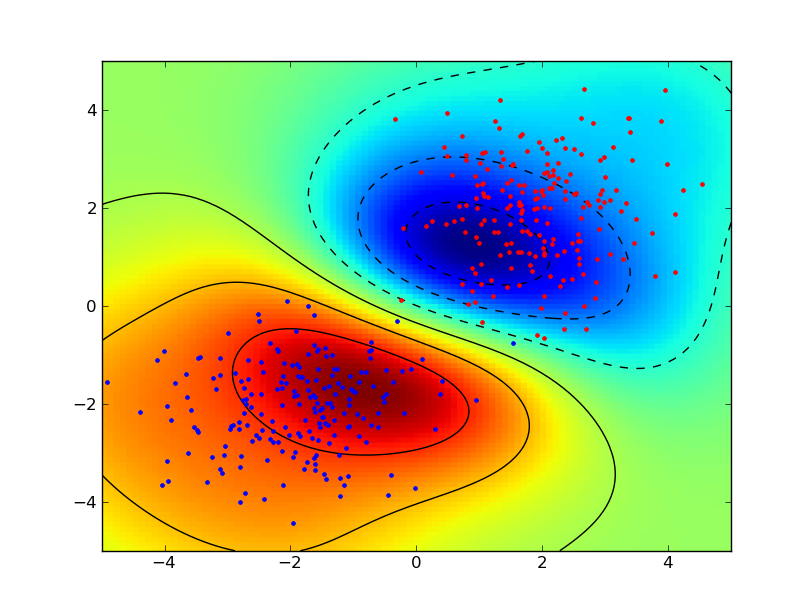
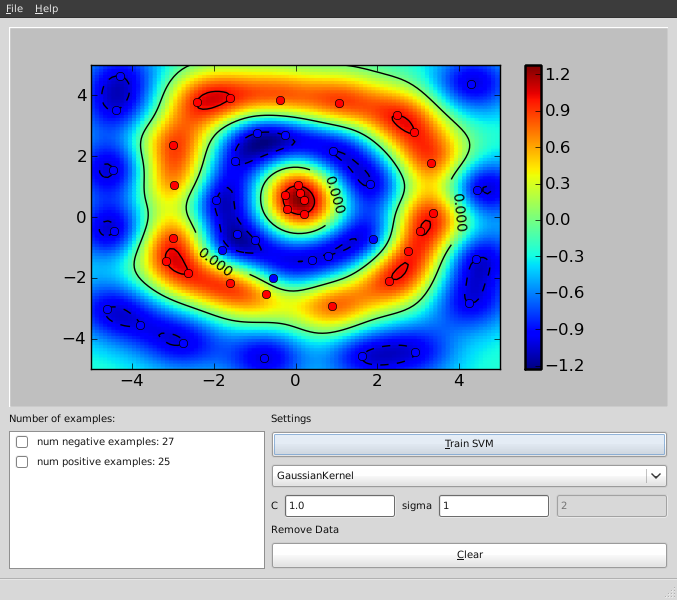
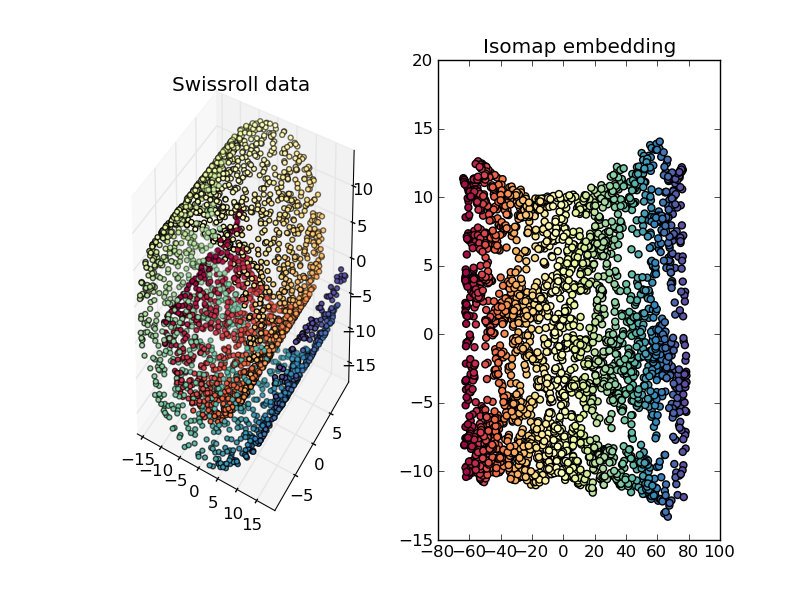
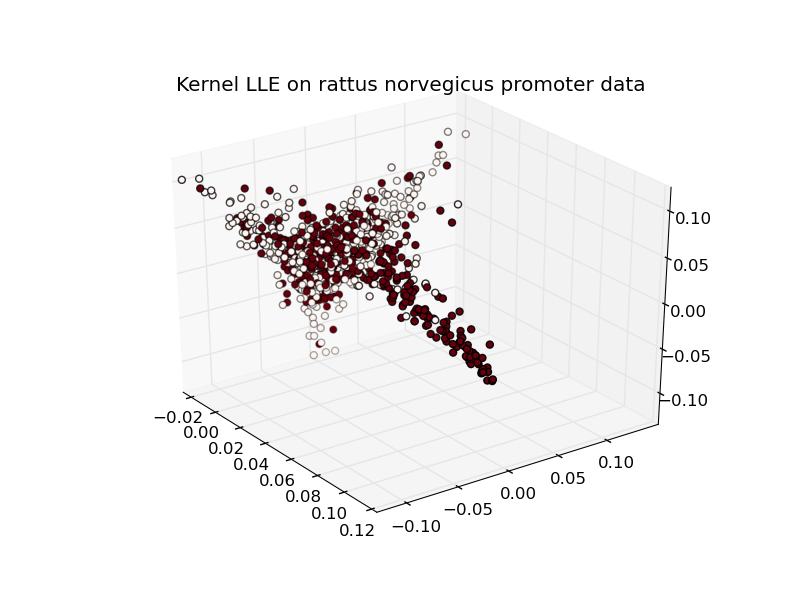
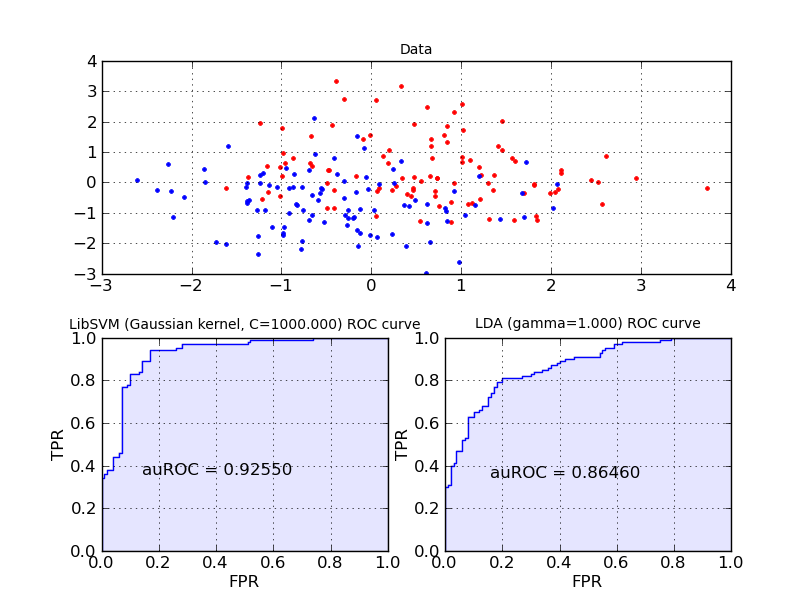
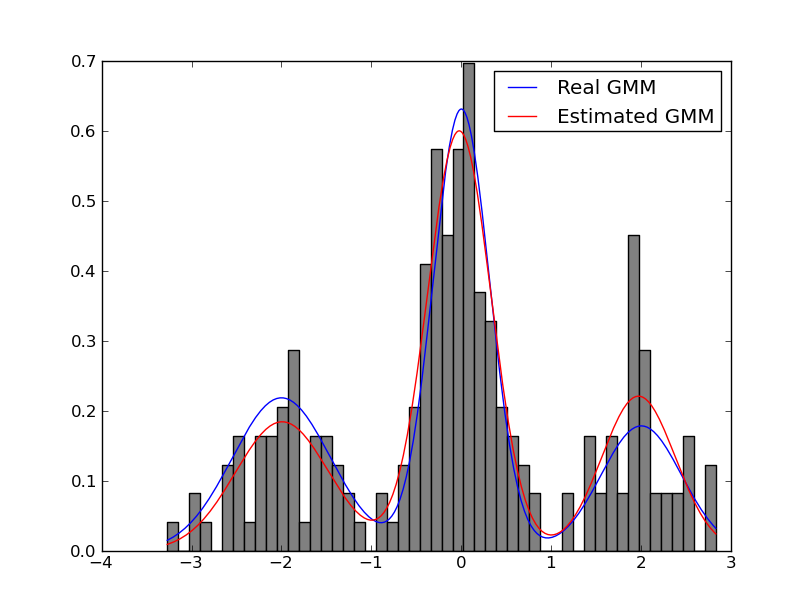
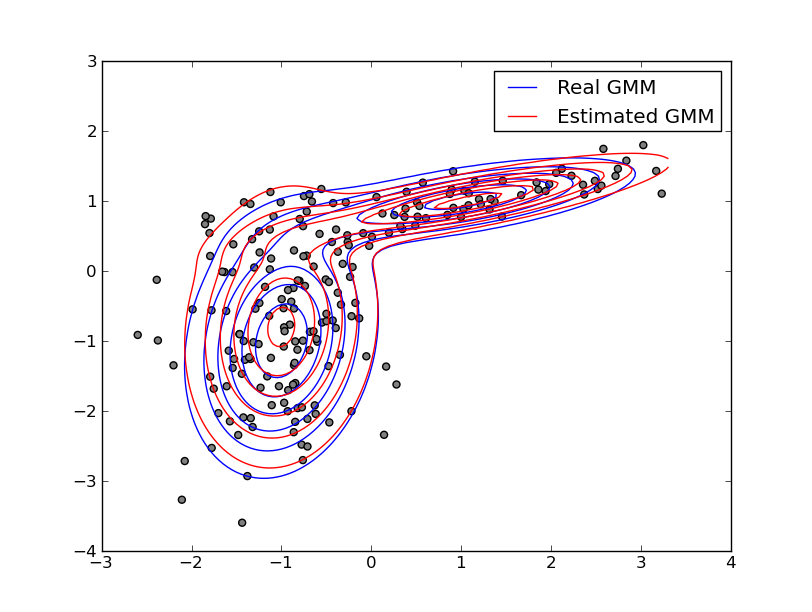
Google Summer of Code 2011 gave a big boost to the development of the shogun machine learning toolbox. In case you have never heard of shogun or machine learning: Machine Learning involves algorithms that do intelligent'' and even automatic data processing and is nowadays used everywhere to e.g. do face detection in your camera, compress the speech in you mobile phone, powers the recommendations in your favourite online shop, predicts solulabily of molecules in water, the location of genes in humans, to name just a few examples. Interested? Then you should give it a try. Some very simple examples stemming from a sub-branch of machine learning called supervised learning illustrate how objects represented by two-dimensional vectors can be classified in good or bad by learning a so called support vector machine. I would suggest to install the python_modular interface of shogun and to run the example interactive_svm_demo.py also included in the source tarball. Two images illustrating the training of a support vector machine follow (click to enlarge): svm svm interactive Now back to Google Summer of Code: Google sponsored 5 talented students who were working hard on various subjects. As a result we now have a new core developer and various new features implemented in shogun: Interfaces to new languages like java, c#, ruby, lua written by Baozeng; A model selection framework written by Heiko Strathman, many dimension reduction techniques written by Sergey Lisitsyn, Gaussian Mixture Model estimation written by Alesis Novik and a full-fledged online learning framework developed by Shashwat Lal Das. All of this work has already been integrated in the newly released shogun 1.0.0. In case you want to know more about the students projects continue reading below, but before going into more detail I would like to summarize my experience with GSoC 2011. My Experience with Google Summer of Code We were a first time organization, i.e. taking part for the first time in GSoC. Having received many many student applications we were very happy to hear that we at least got 5 very talented students accepted but still had to reject about 60 students (only 7% acceptance rate!). Doing this was an extremely tough decision for us. Each of us ended up in scoring students even then we had many ties. So in the end we raised the bar by requiring contributions even before the actual GSoC started. This way we already got many improvements like more complete i/o functions, nicely polished ROC and other evaluation routines, new machine learning algorithms like gaussian naive bayes and averaged perceptron and many bugfixes. The quality of the contributions and independence of the student aided us coming up with the selection of the final five. I personally played the role of the administrator and (co-)mentor and scheduled regular (usually) monthly irc meetings with mentors and students. For other org admins or mentors wanting into GSoC here come my lessons learned: Now please read on to learn about the newly implemented features: Dimension Reduction Techniques Sergey Lisitsyn (Mentor: Christian Widmer) Dimensionality reduction is the process of finding a low-dimensional representation of a high-dimensional one while maintaining the core essence of the data. For one of the most important practical issues of applied machine learning, it is widely used for preprocessing real data. With a strong focus on memory requirements and speed, Sergey implemented the following dimension reduction techniques: See below for the some nice illustrations of dimension reduction/embedding techniques (click to enlarge). isomap swissrollrno kllelocal tangent space alignment Cross-Validation Framework Heiko Strathmann (Mentor: Soeren Sonnenburg) Nearly every learning machine has parameters which have to be determined manually. Before Heiko started his project one had to manually implement cross-validation using (nested) for-loops. In his highly involved project Heiko extend shogun's core to register parameters and ultimately made cross-validation possible. He implemented different model selection schemes (train,validation,test split, n-fold cross-validation, stratified cross-validation, etc and did create some examples for illustration. Note that various performance measures are available to measure how good'' a model is. The figure below shows the area under the receiver operator characteristic curve as an example. foo Interfaces to the Java, C#, Lua and Ruby Programming Languages Baozeng (Mentor: Mikio Braun and Soeren Sonnenburg) Boazeng implemented swig-typemaps that enable transfer of objects native to the language one wants to interface to. In his project, he added support for Java, Ruby, C# and Lua. His knowlegde about swig helped us to drastically simplify shogun's typemaps for existing languages like octave and python resolving other corner-case type issues. The addition of these typemaps brings a high-performance and versatile machine learning toolbox to these languages. It should be noted that shogun objects trained in e.g. python can be serialized to disk and then loaded from any other language like say lua or java. We hope this helps users working in multiple-language environments. Note that the syntax is very similar across all languages used, compare for yourself - various examples for all languages ( python, octave, java, lua, ruby, and csharp) are available. Largescale Learning Framework and Integration of Vowpal Wabbit Shashwat Lal Das (Mentor: John Langford and Soeren Sonnenburg) Shashwat introduced support for 'streaming' features into shogun. That is instead of shogun's traditional way of requiring all data to be in memory, features can now be streamed from e.g. disk, enabling the use of massively big data sets. He implemented support for dense and sparse vector based input streams as well as strings and converted existing online learning methods to use this framework. He was particularly careful and even made it possible to emulate streaming from in-memory features. He finally integrated (parts of) vowpal wabbit, which is a very fast large scale online learning algorithm based on SGD. Expectation Maximization Algorithms for Gaussian Mixture Models Alesis Novik (Mentor: Vojtech Franc) The Expectation-Maximization algorithm is well known in the machine learning community. The goal of this project was the robust implementation of the Expectation-Maximization algorithm for Gaussian Mixture Models. Several computational tricks have been applied to address numerical and stability issues, like An illustrative example of estimating a one and two-dimensional Gaussian follows below. 1D GMM2D GMM Final Remarks All in all, this year s GSoC has given the SHOGUN project a great push forward and we hope that this will translate into an increased user base and numerous external contributions. Also, we hope that by providing bindings for many languages, we can provide a neutral ground for Machine Learning implementations and that way bring together communities centered around different programming languages. All that s left to say is that given the great experiences from this year, we d be more than happy to participate in GSoC2012.

Gunnar Wolf: Language designers, API designers, PHP and utter fails

After many years of successfully dodging doing any serious programming in PHP, I had to get my feet wet with PHP for my RL job: I was requested to develop a simple but non-trivial module for our Institute's Drupal-based webpage. It basically meant two and a half weeks devoted to head-scratching: I had read the very good John van Dyk's Pro Drupal Development book, and knew it would be an important resource were I to face writing a module or work on a theme beyond the most basic stuff So I checked it out of the library, and started basically writing something similar to my good and trusty Perl code. After all, PHP seems quite similar to Perl, although forcing you to write more for no gain (i.e. requiring an array() declaration whenever you want to store more than one value together) or lacking important and useful constructs (not having a sane way to prepare a SQL statement for multiple executions with different parameters Yes, there are DB access methods that do provide it, but Drupal 6 does not use them). Anyway, book in hand, I started understanding while implementing (which is way different than just reading the book, right?) Drupal's notions. I cannot say I like them, but it's ahem doable. Now, I hit a problem twice. I chose to ignore it the first time, as it was a corner case I'd look into later on, but had to devote for hours of my attention later on. When designing the menu (which for Drupal means not only the facility which prepares/displays links to the bits of functionality, but also the access control layer and the action dispatcher a huge yay! for responsability separation!), I had only two access levels: Public and administrator. So, this seemed like a good fit:
  1. $public = array('first/action', 'second/action',
  2. 'third/action', 'something/else');
  3. foreach (array_keys($items) as $item)
  4. if (array_search($item, $public))
  5. $items[$item]['access callback'] = TRUE
  6. else
  7. $items[$item]['access arguments'] = array('diradmin');
But... No matter what I did, the first element in $public refused to be publicly visible. It was not until after a severe amount of head-scratching I came across this jewel in the PHP online manual:
Warning This function may return Boolean FALSE, but may also return a non-Boolean value which evaluates to FALSE, such as 0 or "". Please read the section on Booleans for more information. Use the === operator for testing the return value of this function.
GRAH. Using a sane language for some time had made me forget about the problems of true/false sharing space with other meaningful values. So, yes, checking for inclusion of a value in an array in PHP this way should be compared with class-bound identity (that's what === means) to FALSE, or better yet, using a function that exclusively returns a boolean (as in_array()). Anyway While arrays (which in PHP are any kind of list, be it keyed as a hash or consecutive as a traditional array) are such an usual construct in any language, please do take a look at PHP's array-handling API. Too long. Too complex. Too many corner cases. I cannot but wonder what keeps PHP as a popular language. It hurts.

5 September 2011

Eugene V. Lyubimkin: cupt: 2.2.0~rc1

It took longer than usual, but I believe it's worth.

I just released Cupt 2.2.0~rc1 to Debian experimental. To experimental, because there are important changes and I would appreciate "in-field" testing before final 2.2.0.

Here are the major changes since 2.1.x:


Enjoy and send the bug reports.

3 September 2011

Gregor Herrmann: RC bugs 2011/21 - 2011/35

over 3 months without a posting about my RC bug squashing activities. that also means I hardly looked at any bugs in packages I'm not (co-)maintaining. anyway, here's the list of fixed RC bugs:

Benjamin Mako Hill: In Defense of Negativity

I often hear criticism of "negative campaigning" in the free software movement. For example, in reply to a blog post I once wrote about an FSF campaign, several people argued against, "negative campaigning of any sort, in any realm." Drawing an analogy to political smear campaigns, some members of the free software community have taken the position that negative campaigning in general is not useful and that negativity has no place in our advocacy. First, it is important to be clear on what we mean by a negative campaigns. I believe that there is a fundamental difference between speaking out against policies or actions and smear campaigns that employ untrue claims, ad hominem attacks, and that attempt to avoid a real conversation about issues. I will categorically condemn the latter form of smear campaigning in campaigns for software freedom or for anything else. That said, negativity directed at negativity has had a positive effect in many social movements. I have supported and participated in "negative" campaigns against proprietary software, software patents, DRM, centralized network services, and the firms behind these practices. I've done so because I believe that if one is taking an ethical position, it is justified, and often necessary, to not only speak about the benefits of freedom but against acts of dispossession and disenfranchisement. In some of the most effective social movements, unambiguously negative messages have been central. Should a campaign for abolishing child labor talk only about how valuable adult workers are to their employers or how happy kids are when they don't work? Should a campaign trying to abolish land mines talk only about the benefits of bomb-free fields and intact lower limbs? Should a free speech organization only speak out about the social welfare brought by a free press and never against acts of censorship? These may seem like outlandish comparisons but you can find people writing, only a couple centuries ago, about how slavery should be abolished by arguing in favor of the benefits of paid labor. Even if the economic arguments in favor of paid work are strong, these arguments seems irrelevant and offensive today. Whether slavery is more or less efficient is a moot point. Society has rejected it because it is wrong. We have made important strides toward eliminating injustices like child labor and slavery because activists waged decidedly negative campaigns against them and convinced others to join in opposition. In doing so, activists declared the status quo unconscionable and created an ethical responsibility to find alternatives and to redefine what was "realistic." While I will not suggest that the movement for software freedom is comparable in ethical weight to these other causes, I know that the free software mission is similar in kind. Of course, if one does not think that user control over technology is an ethical issue but is instead merely a matter of choice, one will probably oppose negative campaigns. It is also possible that a particular negative campaign is tactically unwise in that it is unlikely to reach a large audience, unlikely to change people's minds, or be difficult to carry out successfully. But such campaigns are a bad idea because they are ineffective, not because they are negative. Additionally, a movement that is purely negative and offers no reasonable alternative to the stated ill may also be unlikely to succeed. This is why, for example, I believe it is good that the FSF uses the large majority of its resources in the "positive" role of supporting free software. For those that do treat technological empowerment as an ethical ideal, it is both justified and essential to condemn the systematic disempowerment of others through non-free software just as we celebrate the benefits of software freedom. "Negative" campaigns against proprietary software, software patents, and DRM in music have already led our community to important -- if incomplete -- victories. The desire to right wrongs has been a critical part of our movement's success and of many others'. We would be wise not to give it up.

2 September 2011

Rapha&#235;l Hertzog: Google plus and server to give away

Just a quick note to let you know that (like many free software hackers apparently) I have an account on Google+. I m not using it much yet but I like it in general. It s interesting to see how Google transformed Joindiaspora s aspects into circles . When Google will make an API available, I ll probably setup it like my public Facebook page so that new blog posts are automatically announced. In the mean time, it s going to be very quiet on my Google+ profile. That said, I used it twice this week: the first time because I m looking for a French developer with sysadmin skills, and the second time because I have a server to give away (Pentium IV 3Ghz, 4 Gb RAM, 200 Gb of diskspace in RAID1 Hard). If you take the server for a free software project, it can be hosted for free where it currently is (courtesy of Julien Danjou). So if you re also a Google+ user, feel free to add me to one of your circles.

5 comments Liked this article? Click here. My blog is Flattr-enabled.

1 September 2011

Matthew Garrett: The Android/GPL situation

There was another upsurge in discussion of Android GPL issues last month, triggered by couple of posts by Edward Naughton, followed by another by Florian Mueller. The central thrust is that section 4 of GPLv2 terminates your license on violation, and you need the copyright holders to grant you a new one. If they don't then you don't get to distribute any more copies of the code, even if you've now come into compliance. TLDR; most Android vendors are no longer permitted to distribute Linux.

I'll get to that shortly. There's a few other issues that could do with some clarification. The first is Naughton's insinuation that Google are violating the GPL due to Honeycomb being closed or their "license washing" of some headers. There's no evidence whatsoever that Google have failed to fulfil their GPL obligations in terms of providing source to anyone who received GPL-covered binaries from them. If anyone has some, please do get in touch. Some vendors do appear to be unwilling to hand over code for GPLed bits of Honeycomb. That's an issue with the vendors, not Google.

His second point is more interesting, but the summary is "Google took some GPLed header files and relicensed them under Apache 2.0, and they've taken some other people's GPLv2 code and put it under Apache 2.0 as well". As far as the headers go, there's probably not much to see here. The intent was to produce a set of headers for the C library by taking the kernel headers and removing the kernel-only components. The majority of what's left is just structure definitions and function prototypes, and is almost certainly not copyrightable. And remember that these are the headers that are distributed with the kernel and intended for consumption by userspace. If any of the remaining macros or inline functions are genuinely covered by the GPLv2, any userspace application including them would end up a derived work. This is clearly not the intention of the authors of the code. The risk to Google here is indistinguishable from zero.

How about the repurposing of other code? Naughton's most explicit description is:

For example, Android uses bootcharting logic, which uses the 'bootchartd' script provided by www.bootchart.org, but a C re-implementation that is directly compiled into our init program. The license that appears at www.bootchart.org is the GPLv2, not the Apache 2.0 license that Google claims for its implementation.

, but there's no indication that Google's reimplementation is a derived work of the GPLv2 original.

In summary: No sign that Google's violating the GPL.

Florian's post appears to be pretty much factually correct, other than this bit discussing the SFLC/Best Buy case:

I personally believe that intellectual property rights should usually be enforced against infringing publishers/manufacturers rather than mere resellers, but that's a separate issue.

The case in question was filed against Best Buy because Best Buy were manufacturing infringing devices. It was a set of own-brand Blu Ray players that incorporated Busybox. Best Buy were not a mere reseller.

Anyway. Back to the original point. Nobody appears to disagree that section 4 of the GPLv2 means that violating the license results in total termination of the license. The disagreement is over what happens next. Armijn Hemel, who has done various work on helping companies get back into compliance, believes that simply downloading a new copy of the code will result in a new license being granted, and that he's received legal advice that supports that. Bradley Kuhn disagrees. And the FSF seem to be on his side.

The relevant language in v2 is:

You may not copy, modify, sublicense, or distribute the Program except as expressly provided under this License. Any attempt otherwise to copy, modify, sublicense or distribute the Program is void, and will automatically terminate your rights under this License.

The relevant language in v3 is:

You may not propagate or modify a covered work except as expressly provided under this License. Any attempt otherwise to propagate or modify it is void, and will automatically terminate your rights under this License

which is awfully similar. However, v3 follows that up with:

However, if you cease all violation of this License, then your license from a particular copyright holder is reinstated (a) provisionally, unless and until the copyright holder explicitly and finally terminates your license, and (b) permanently, if the copyright holder fails to notify you of the violation by some reasonable means prior to 60 days after the cessation.

In other words, with v3 you get your license back providing you're in compliance. This doesn't mesh too well with the assumption that you can get a new license by downloading a new copy of the software. It seems pretty clear that the intent of GPLv2 was that the license termination was final and required explicit reinstatement.

So whose interpretation is correct? At this point we really don't know - the only people who've tried to use this aspect of the GPL are the SFLC, and as part of their settlements they've always reinstated permission to distribute Busybox. There's no clear legal precedent. Which makes things a little awkward.

It's not possible to absolutely say that many Android distributors no longer have the right to distribute Linux. But nor is it possible to absolutely say that they haven't lost that right. Any sufficiently motivated kernel copyright holder probably could engage in a pretty effective shakedown racket against Android vendors. Whether they will do remains to be seen, but honestly if I were an Android vendor I'd be worried. There's plenty of people out there who hold copyright over significant parts of the kernel. Would you really bet on all of them being individuals of extreme virtue?

comment count unavailable comments

29 August 2011

Uwe Hermann: Flashrom 0.9.4 released - Flashing BIOS/ROM chips from the Unix/Linux command line using various programmers

flashrom logo Forgot to mention this here: We released flashrom 0.9.4 a few days ago, the latest release of the open-source, GPL'd ROM chip flashing software for Linux, *BSD, DOS, and partially also Windows (work in progress, though). Here's a quick summary of the release announcement. Some of the noteworthy news items include: Get the latest release tarball, or download and build the most recent version via Subversion:
  $ svn co svn://flashrom.org/flashrom/trunk flashrom
  $ cd flashrom
  $ make
I already updated the Debian package to 0.9.4 (it has also already migrated to Debian testing and Ubuntu), other people have updated Fedora, Gentoo, NetBSD etc. etc. There's already a huge amount of patches queued for the next release, including support for even more programmers, PowerPC support (tested on Mac Mini and others), and of course the usual "more boards, more chips" items...

27 August 2011

Axel Beckert: Useful but Unknown Unix Tools: Calculating with IPs, The Sequel

This is a direct followup on my previous blog posting about calculating IPs and netmasks with the tools netmask and prips. Kurt Roeckx (via e-mail) and Niall Donegan (via a comment to that blog posting) both told me about the package sipcalc, and Kurt also mentioned the package ipcalc. Thanks for that! And since I found both useful, too, let s put them in their own blog posting: Both tools, ipcalc and sipcalc offer a get all information at once mode which are not present in the previously presented tool netmask. ipcalc ipcalc by default outputs all information and even in ANSI colors:
$ ipcalc 192.168.96.0/21
Address:   192.168.96.0         11000000.10101000.01100 000.00000000
Netmask:   255.255.248.0 = 21   11111111.11111111.11111 000.00000000
Wildcard:  0.0.7.255            00000000.00000000.00000 111.11111111
=>
Network:   192.168.96.0/21      11000000.10101000.01100 000.00000000
HostMin:   192.168.96.1         11000000.10101000.01100 000.00000001
HostMax:   192.168.103.254      11000000.10101000.01100 111.11111110
Broadcast: 192.168.103.255      11000000.10101000.01100 111.11111111
Hosts/Net: 2046                  Class C, Private Internet
(Coloured Screenshots done with ANSI HTML Adapter from the package aha.) You can suppress the bitwise option or directly output HTML via commandline options. For example ipcalc -b -h 192.168.96.0/21 outputs the following content:
Address: 192.168.96.0
Netmask: 255.255.248.0 = 21
Wildcard: 0.0.7.255
=>
Network: 192.168.96.0/21
HostMin: 192.168.96.1
HostMax: 192.168.103.254
Broadcast: 192.168.103.255
Hosts/Net: 2046 Class C, Private Internet
Yes, that s an HTML table and no preformatted text, just with a monospaced font. (I just removed the hardcoded text color from it, otherwise it would not look nice on dark backgrounds like in Planet Commandline s default color scheme.) Like netmask, ipcalc can also deaggregate IP ranges into largest possible networks:
$ ipcalc 192.168.87.0 - 192.168.110.255
deaggregate 192.168.87.0 - 192.168.110.255
192.168.87.0/24
192.168.88.0/21
192.168.96.0/21
192.168.104.0/22
192.168.108.0/23
192.168.110.0/24
(ipcalc -r 192.168.87.0 192.168.110.255 is just another way to write this, and it results in the same output.) To find networks with at least 20, 63 and 30 IP addresses within a /24 network, use for example:
Address:   192.0.2.0            
Netmask:   255.255.255.0 = 24   
Wildcard:  0.0.0.255            
=>
Network:   192.0.2.0/24         
HostMin:   192.0.2.1            
HostMax:   192.0.2.254          
Broadcast: 192.0.2.255          
Hosts/Net: 254                   Class C
1. Requested size: 20 hosts
Netmask:   255.255.255.224 = 27 
Network:   192.0.2.128/27       
HostMin:   192.0.2.129          
HostMax:   192.0.2.158          
Broadcast: 192.0.2.159          
Hosts/Net: 30                    Class C
2. Requested size: 63 hosts
Netmask:   255.255.255.128 = 25 
Network:   192.0.2.0/25         
HostMin:   192.0.2.1            
HostMax:   192.0.2.126          
Broadcast: 192.0.2.127          
Hosts/Net: 126                   Class C
3. Requested size: 30 hosts
Netmask:   255.255.255.224 = 27 
Network:   192.0.2.160/27       
HostMin:   192.0.2.161          
HostMax:   192.0.2.190          
Broadcast: 192.0.2.191          
Hosts/Net: 30                    Class C
Needed size:  192 addresses.
Used network: 192.0.2.0/24
Unused:
192.0.2.192/26
sipcalc sipcalc is similar to ipcalc. One big difference seems to be the IPv6 support:
$ sipcalc 2001:DB8::/32
-[ipv6 : 2001:DB8::/32] - 0
[IPV6 INFO]
Expanded Address        - 2001:0db8:0000:0000:0000:0000:0000:0000
Compressed address      - 2001:db8::
Subnet prefix (masked)  - 2001:db8:0:0:0:0:0:0/32
Address ID (masked)     - 0:0:0:0:0:0:0:0/32
Prefix address          - ffff:ffff:0:0:0:0:0:0
Prefix length           - 32
Address type            - Aggregatable Global Unicast Addresses
Network range           - 2001:0db8:0000:0000:0000:0000:0000:0000 -
                          2001:0db8:ffff:ffff:ffff:ffff:ffff:ffff
(Thanks to Niall for the pointer to RFC3849. :-) It can also split up networks into smaller chunks, but only same-size chunks, like e.g. split a /32 IPv6 network into /34 networks:
sipcalc -S34 2001:DB8::/32
-[ipv6 : 2001:DB8::/32] - 0
[Split network]
Network                 - 2001:0db8:0000:0000:0000:0000:0000:0000 -
                          2001:0db8:3fff:ffff:ffff:ffff:ffff:ffff
Network                 - 2001:0db8:4000:0000:0000:0000:0000:0000 -
                          2001:0db8:7fff:ffff:ffff:ffff:ffff:ffff
Network                 - 2001:0db8:8000:0000:0000:0000:0000:0000 -
                          2001:0db8:bfff:ffff:ffff:ffff:ffff:ffff
Network                 - 2001:0db8:c000:0000:0000:0000:0000:0000 -
                          2001:0db8:ffff:ffff:ffff:ffff:ffff:ffff
-
Similar thing with IPv4:
sipcalc -s27 192.0.2.0/24
-[ipv4 : 192.0.2.0/24] - 0
[Split network]
Network                 - 192.0.2.0       - 192.0.2.31
Network                 - 192.0.2.32      - 192.0.2.63
Network                 - 192.0.2.64      - 192.0.2.95
Network                 - 192.0.2.96      - 192.0.2.127
Network                 - 192.0.2.128     - 192.0.2.159
Network                 - 192.0.2.160     - 192.0.2.191
Network                 - 192.0.2.192     - 192.0.2.223
Network                 - 192.0.2.224     - 192.0.2.255
sipcalc also has a show me all information mode with the -a option:
$ sipcalc -a 192.168.96.0/21
-[ipv4 : 192.168.96.0/21] - 0
[Classfull]
Host address            - 192.168.96.0
Host address (decimal)  - 3232260096
Host address (hex)      - C0A86000
Network address         - 192.168.96.0
Network class           - C
Network mask            - 255.255.255.0
Network mask (hex)      - FFFFFF00
Broadcast address       - 192.168.96.255
[CIDR]
Host address            - 192.168.96.0
Host address (decimal)  - 3232260096
Host address (hex)      - C0A86000
Network address         - 192.168.96.0
Network mask            - 255.255.248.0
Network mask (bits)     - 21
Network mask (hex)      - FFFFF800
Broadcast address       - 192.168.103.255
Cisco wildcard          - 0.0.7.255
Addresses in network    - 2048
Network range           - 192.168.96.0 - 192.168.103.255
Usable range            - 192.168.96.1 - 192.168.103.254
[Classfull bitmaps]
Network address         - 11000000.10101000.01100000.00000000
Network mask            - 11111111.11111111.11111111.00000000
[CIDR bitmaps]
Host address            - 11000000.10101000.01100000.00000000
Network address         - 11000000.10101000.01100000.00000000
Network mask            - 11111111.11111111.11111000.00000000
Broadcast address       - 11000000.10101000.01100111.11111111
Cisco wildcard          - 00000000.00000000.00000111.11111111
Network range           - 11000000.10101000.01100000.00000000 -
                          11000000.10101000.01100111.11111111
Usable range            - 11000000.10101000.01100000.00000001 -
                          11000000.10101000.01100111.11111110
[Networks]
Network                 - 192.168.96.0    - 192.168.103.255 (current)
Thanks again to Kurt and Niall for their contributions!

Now listening to the schreimaschine and fausttanz submissions for the interactive competition at the B nzli/DemoDays in Olten (Switzerland)

Next.

Previous.