The serial port is still
the way to access network components out of band. It is slow, but reliable, and
remarkably well standardized. It does not have technical whiz-bangs that can fail when one needs things to just work.
That makes it the natural way to access critical infrastructure and still being sure that this access vector still works
when most other things are down.
Every communication link has two sides, so there is a market for devices with a network link and a bigger number of
serial ports to connect the actual devices to. Commercial vendors have a broad choice of serial console servers. Most of
them, especially the small products with five to ten ports, are quite expensive, so I have been investigating how do
build a serial console server with el cheapo hardware.
USB comes to mind here, of course.
The hardware side is actually
quite easy: A seven-port USB hub, and seven USB-to-serial adaptors (using the widely-deployed Prolific PL2303) are
easily purchased for well below a hundred Euros, and naively connected. In my test setup, connected to the hp compaq
nc8000 that my blog readers should know only too well by now, the hub does not even need to have its power supply
connected. The notebook can power the hub and the seven adaptors just fine.
When the
UMTS card is plugged in, the ttyUSBx device nodes appear in the
order of plugging in the devices. When the system is booted, the order is not very predictable, so one needs - again -
udev to give predictable device node names.
udevinfo is an important tool to obtain the data set of an USB device which is available to match a device and to act
appropriately when it is connected. udevinfo sorts the devices into a tree and shows the relationship of the devices,
which device is “behind” which other device from the system’s point of view. udevinfo’s output
starts at the leaf of the device tree and shows the information for each node up the tree until its root is reached.
One pitfall is that one can only match against the leaf and
_one_ other node more up the tree. So you cannot do
matches like “the pl2303-based device connected to port 3 on hub 2-3 will be designated USBserial3”. If you
try this, your rule will silently be ignored. This is a major turn-off in udev’s implementation. I didn’t
try it on sid, but etch definetely shows this behavior. So one can only match like “the tty on the USB subsystem
connected to port 3 on hub 2-3 will be designated USBserial3”, but that’s probably as good as it’ll
get.
The cause for my hub having only seven ports clearly shows itself when one looks at the udevinfo outputs of the fully
equipped USB hub: The adapters are connected to ports 1, 2, 3, 4.1, 4.2, 4.3 and 4.4. The seven-port hub is actually two
four-port hubs in a single case, with the second one connected to the first one’s port 4. This reflects itself, of
course, in the udev rules necessary to address the adapters by the hub port they’re plugged in:
SUBSYSTEM==“tty”, SUBSYSTEMS==“usb”, DRIVERS==“usb”, \
   KERNELS==“*-*.1”, \
   SYMLINK=“USBserial1”
SUBSYSTEM==“tty”, SUBSYSTEMS==“usb”, DRIVERS==“usb”, \
   KERNELS==“*-*.2”, \
   SYMLINK=“USBserial2”
SUBSYSTEM==“tty”, SUBSYSTEMS==“usb”, DRIVERS==“usb”, \
   KERNELS==“*-*.3”, \
   SYMLINK=“USBserial3”
SUBSYSTEM==“tty”, SUBSYSTEMS==“usb”, DRIVERS==“usb”, \
   KERNELS==“*-*.4.1”, \
   SYMLINK=“USBserial4”
SUBSYSTEM==“tty”, SUBSYSTEMS==“usb”, DRIVERS==“usb”, \
   KERNELS==“*-*.4.2”, \
   SYMLINK=“USBserial5”
SUBSYSTEM==“tty”, SUBSYSTEMS==“usb”, DRIVERS==“usb”, \
   KERNELS==“*-*.4.3”, \
   SYMLINK=“USBserial6”
SUBSYSTEM==“tty”, SUBSYSTEMS==“usb”, DRIVERS==“usb”, \
   KERNELS==“*-*.4.4”, \
   SYMLINK=“USBserial7”
These rules will only work for a similary structured hub that is
directly connected to the notebook. If there
are more hubs in between the “final” hub and the host, the address matched against in the KERNELS matches
are going to have a different structure. In the test setup, the first two parts of the address needed to be wildcarded
since these addresses keep changing when the host is booted or the hub plugged out and in. So I guess that these udev
rules are probably going to fail miserably when more hubs and/or USB-to-serial adaptors are connected.
But if one does not do too many changes, things are just fine, and it is possible to put numbers on the USB hub ports
and be sure that the USB-to-serial adaptor connected to port 4 is going to be /dev/USBserial4 in the host system. I
tried plugging in and out the adaptors in random order, unplugged and plugged the hub itself, booted the host, and the
relationship between the port and the device node was stable.
In the test environment, I only tested one adapter at a time, but all these tests were successful as well. I guess that
many more of these adaptors will eventually need a powered USB hub, but with seven adaptors on a single hub, the power
from the USB host is sufficient to live without extra power on the hub. And, I guess, there is some hard limit for the
number of USB adapters being used, and some soft limit when managing the ports and adapters is going to get harder. But,
I think that a site in need of more than, say, sixteen serial ports on the console server can afford a
“real” console server from one of the major vendors, which can be accessed via ethernet, UMTS, ISDN and
whatever you can think of.
This concludes the hardware part of my serial console server for the poor. Tomorrow, I’ll blog about the software
side needed on the host to allow the serial ports to be accessed from the network while still being reasonably secure.
The next article will involve ssh, /etc/passwd shells, /etc/shells, a small perl script, ser2net and telnet. And, shell
escape is the cue word for grey hairs sprouting on my head.

 Summer crept up behind me and has been beating my about the head and
shoulders all week. It's hot (95+ F / 35 C in the shade). I've been
slowly adapting back to hot-weather mode, but with the suddenness of the
onslaught, it's been hard to keep up.
It's easy to get annoyed at hot weather -- like one of pterry's trolls, I
know I am a tenth as good a coder in the summer. And I choose not to have
air conditioning at home, so if I need to get back to peak performance for
something, I have walk downtown to the coffee shop or library or someplace
air-conditioned.
But this weather is good for the bigger, longer-term thoughts (aka lazing
about). And I know I can adapt. Yesterday I hiked in to Abrams Falls, and
the heat didn't bother me at all, and just made sitting and meditating
under the falls even better. Then I climbed up to the top of the falls and
waded all the way back up the creek.
Summer crept up behind me and has been beating my about the head and
shoulders all week. It's hot (95+ F / 35 C in the shade). I've been
slowly adapting back to hot-weather mode, but with the suddenness of the
onslaught, it's been hard to keep up.
It's easy to get annoyed at hot weather -- like one of pterry's trolls, I
know I am a tenth as good a coder in the summer. And I choose not to have
air conditioning at home, so if I need to get back to peak performance for
something, I have walk downtown to the coffee shop or library or someplace
air-conditioned.
But this weather is good for the bigger, longer-term thoughts (aka lazing
about). And I know I can adapt. Yesterday I hiked in to Abrams Falls, and
the heat didn't bother me at all, and just made sitting and meditating
under the falls even better. Then I climbed up to the top of the falls and
waded all the way back up the creek.
 Dear
Dear  We actually got home last Sunday, but I've been too jetlagged, and then too
busy with work to really have a chance to write anything...
We got back in at around 2pm, but our bags fell victim to Heathrow's
Terminal 5, and didn't arrive until around 11pm. I think I lasted until
about 8pm, when I had to crash. Poor Sarah had to stay up until 11pm when
they finally got around to delivering our suitcases.
The week in Zurich was wonderful. The Zurich office is everything the photos
make it out to be, and then some. One weird thing: apparently there's some
Swiss regulation about how much you're allowed to cool a building in
relation to the outdoor ambient temperature, so there's no air conditioning
in the office. Instead, you can open the windows. Unfortunately, there's a
fairly busy set of train tracks right beside the office, so it can get a tad
noisy... It was a pretty warm week, I think around 30°C. I certainly
prefer being colder rather than hotter when indoors, so found the lack of
decent cooling to be a shame, given the rest of the building's features.
That said, it was pretty amazing sweltering away in Zurich, and then looking
up and seeing snow on the mountains. It was surprising how much of a
temperature difference there was.
On the last evening in Zurich, we went on a reconnoitre to try and find the
river that we could hear (and see on the map) behind our apartment. We
eventually found some street access to it, and it was another world back
there. It was fairly thickly wooded, and the sunlight was heavily filtered
through the trees, so it was cool and shady.
The river was fairly fast flowing over some rocks in parts, which is what
was making it so audible. The whole setting was absolutely beautiful. There
were a couple of paths, and the whole thing felt like something out of a
fairy tail. We think we stumbled onto a fox, but we're not sure. It's a
shame we only discovered the place on the last day, as I'd have liked to
have explored it further.
I really liked Zurich. It was nice and flat, and had an excellent tram
service.
We actually got home last Sunday, but I've been too jetlagged, and then too
busy with work to really have a chance to write anything...
We got back in at around 2pm, but our bags fell victim to Heathrow's
Terminal 5, and didn't arrive until around 11pm. I think I lasted until
about 8pm, when I had to crash. Poor Sarah had to stay up until 11pm when
they finally got around to delivering our suitcases.
The week in Zurich was wonderful. The Zurich office is everything the photos
make it out to be, and then some. One weird thing: apparently there's some
Swiss regulation about how much you're allowed to cool a building in
relation to the outdoor ambient temperature, so there's no air conditioning
in the office. Instead, you can open the windows. Unfortunately, there's a
fairly busy set of train tracks right beside the office, so it can get a tad
noisy... It was a pretty warm week, I think around 30°C. I certainly
prefer being colder rather than hotter when indoors, so found the lack of
decent cooling to be a shame, given the rest of the building's features.
That said, it was pretty amazing sweltering away in Zurich, and then looking
up and seeing snow on the mountains. It was surprising how much of a
temperature difference there was.
On the last evening in Zurich, we went on a reconnoitre to try and find the
river that we could hear (and see on the map) behind our apartment. We
eventually found some street access to it, and it was another world back
there. It was fairly thickly wooded, and the sunlight was heavily filtered
through the trees, so it was cool and shady.
The river was fairly fast flowing over some rocks in parts, which is what
was making it so audible. The whole setting was absolutely beautiful. There
were a couple of paths, and the whole thing felt like something out of a
fairy tail. We think we stumbled onto a fox, but we're not sure. It's a
shame we only discovered the place on the last day, as I'd have liked to
have explored it further.
I really liked Zurich. It was nice and flat, and had an excellent tram
service. 

 The most dynamic segment of the software industry that I'm aware of is web programming. Flamewars rage about frameworks and browsers and standards and whatnot, and the openness of the whole thing feels like some of the things that made me fall in love with computing as a whole and Free Software in particular. The problem with all that openness is that it's rather difficult to navigate. Aside from the obvious issues with browser incompatibilities, there's an enormous amount of software solutions on the server side, spanning languages, libraries, and frameworks. Each one is an ecosystem to itself, often being large and complicated.
 Beh! Looks like it is currently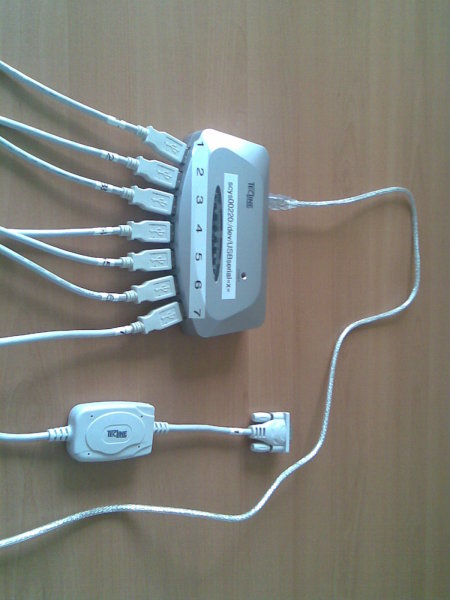
 One of the downsides of writing my thesis last year was that focusing on a technical subject for approximately 16 hours a day left me almost entirely unable to relate to people. The irony in this is that losing the ability to socially relate tends to result in you assuming that you're fine and everyone else is just behaving bizarrely, which makes rectifying the situation rather difficult. In an attempt to avoid this I have written some
  I don’t know if
 I continue to use Kontact from KDE3. Modestas and Sune have switched to kde4pim and they found it better than expected.

 Now that kde4.1 is beginning to really take shape, I have also upgraded all my computers to kde4. Bye bye kde3.
I can’t live without a few kde3 apps though, particularily amarok. But my amarok usage was mostly controlled by the kicker media applet.
So I needed something that behaved similar to the kicker media applet. Plasma && dcop command line to the rescue. It still needs some polishing, especially getting the buttons closer together. But it works. It wasn’t that hard to get started, although the plasma docs still haven’t the quality of Qt documentation.
Here is how it looks:
Now that kde4.1 is beginning to really take shape, I have also upgraded all my computers to kde4. Bye bye kde3.
I can’t live without a few kde3 apps though, particularily amarok. But my amarok usage was mostly controlled by the kicker media applet.
So I needed something that behaved similar to the kicker media applet. Plasma && dcop command line to the rescue. It still needs some polishing, especially getting the buttons closer together. But it works. It wasn’t that hard to get started, although the plasma docs still haven’t the quality of Qt documentation.
Here is how it looks:
 During the last 4 days, I didn't read Planet. So I started an interesting
exercise and wanted to comment very briefly on a few entries I just read
quickly to catch up. My Planet premium, so to say..
During the last 4 days, I didn't read Planet. So I started an interesting
exercise and wanted to comment very briefly on a few entries I just read
quickly to catch up. My Planet premium, so to say..
 I was at two geek events in Zurich this week: At the
  versus
 versus
  The first is the pretty internationally standard "no entry" sign, but when
you see the third sign in isolation, it seemed to us at least, that perhaps
that meant "no entry", where it actually means "no standing". "No parking"
is a variant of "no standing", with just one diagonal line. The middle
sign means "no vehicles", which makes no sense at all, unless you've seen
(and understood) the other versions of this sign, which have lesser
restrictions of "no cars" or "no bicycles" and feature an icon of either
inside the circle.
Speed limit signs were also a bit interesting. You'd have
The first is the pretty internationally standard "no entry" sign, but when
you see the third sign in isolation, it seemed to us at least, that perhaps
that meant "no entry", where it actually means "no standing". "No parking"
is a variant of "no standing", with just one diagonal line. The middle
sign means "no vehicles", which makes no sense at all, unless you've seen
(and understood) the other versions of this sign, which have lesser
restrictions of "no cars" or "no bicycles" and feature an icon of either
inside the circle.
Speed limit signs were also a bit interesting. You'd have  , which specifies
a speed limit, but then you'd have
, which specifies
a speed limit, but then you'd have  , which
means "End of speed limit". Our question was "well what is the speed limit
now?" The answer seems to be "the default national limit for the class of
road you're on".
The final set of signs we didn't understand until Christine explained them
to us when we saw her yesterday, were
, which
means "End of speed limit". Our question was "well what is the speed limit
now?" The answer seems to be "the default national limit for the class of
road you're on".
The final set of signs we didn't understand until Christine explained them
to us when we saw her yesterday, were  and
and  , which
are "priority road" and "end of priority road", respectively. We just didn't
know what a priority road was. Turns out it means traffic on the priority
road has right of way over traffic on roads intersecting it. I would have
thought this was pretty obvious, but apparently on a non-priority road, you
have to give way to traffic on the right, regardless of whether you have a
stop sign or a yield/give-way sign. So there's some sort of implicit
four-way stop thing going on on a non-priority road.
Every time I see European traffic signs, particularly the triangular warning
signs, it gives me a flash back to my childhood. My Aunty Peggy used to have
a huge big bag of mixed Lego pieces, including a bunch of European traffic
signs, and some square Lego mats, and when we were kids, and we used to go
to her house to play, we'd build little towns out of all of the Lego.
This was the first time we've driven a manual left-hand drive car, and it
was fine, except your immediate subconscious reaction the first few times is
to go reaching for the gear stick with your left hand, and bash it into the
door. It was also the first time we've driven on a roundabout on the right
hand side of the road. That was interesting, because it added an additional
thing to think about: the traffic on the left.
, which
are "priority road" and "end of priority road", respectively. We just didn't
know what a priority road was. Turns out it means traffic on the priority
road has right of way over traffic on roads intersecting it. I would have
thought this was pretty obvious, but apparently on a non-priority road, you
have to give way to traffic on the right, regardless of whether you have a
stop sign or a yield/give-way sign. So there's some sort of implicit
four-way stop thing going on on a non-priority road.
Every time I see European traffic signs, particularly the triangular warning
signs, it gives me a flash back to my childhood. My Aunty Peggy used to have
a huge big bag of mixed Lego pieces, including a bunch of European traffic
signs, and some square Lego mats, and when we were kids, and we used to go
to her house to play, we'd build little towns out of all of the Lego.
This was the first time we've driven a manual left-hand drive car, and it
was fine, except your immediate subconscious reaction the first few times is
to go reaching for the gear stick with your left hand, and bash it into the
door. It was also the first time we've driven on a roundabout on the right
hand side of the road. That was interesting, because it added an additional
thing to think about: the traffic on the left.