Vincent Sanders: The way to get started is to quit talking and begin doing
When Walt Disney said that he almost certainly did not have software developers in mind. However it is still good advice, especially if you have no experience with a piece of software you want to change.
Others have written extensively on the topic of software as more than engineering and the creative aspects, comparing it to a craft, which is a description I am personally most comfortable with. As with any craft though you have to understand the material you have to work with and an existing codebase is often a huge amount of material.
While developing NetSurf we get a lot of people who talk a lot about what we "ought" or "should" do to improve the browser but few who actually get off their collective posteriors and contribute. In fact according to the ohloh analysis of the revision control system there are roughly six of us who contribute significantly on a regular basis and of those only four who have interests beyond a specific frontend.
It has been mentioned by a couple of new people who have recently compiled the browser from source that it is somewhat challenging to get started. To address this criticism I intend to give a whirlwind introduction to getting started with the NetSurf codebase, perhaps we can even get some more contributors!
This first post will cover the mechanics of acquiring and building the source and the next will look at working with the codebase and the Netsurf community.
This is my personal blog, the other developers might disagree with my approach, which is why this is in my blog and not on the NetSurf website. That being said comments are enabled and I am sure they will correct anything I get wrong.
ResourcesNetSurf has a selection of resources which are useful to a new developer:
The developer will require a Unix like system but let's be honest, we have not tried with anything other than Linux distributions in some time or MAC OS X for the cocoa frontend because its a special snowflake.
Traditionally at this point in this kind of introduction it would be traditional to provide the command line for various packaging systems to install the build environment and external libraries. We do have documentation that does this but no one reads it, or at least it feels like that. Instead we have chosen to provide a shell fragment that encodes all the bootstrap knowledge in one place, its kept in the revision control system so it can be updated.
To use: download it, read it (hey running random shell code is always a bad idea), source it into your environment and run ns-apt-get-install on a Debain based system or ns-yum-install on Fedora. The rest of this posting will assume the functionality of this script is available, if you want to do it the hard way please refer to the script for the relevant commands and locations.
For Example:
Historically NetSurf built on more platforms natively but the effort to keep these build environments working was extensive and no one was prepared to do the necessary maintenance work. This is strictly a build setup decision and does not impact the supported platforms.
Since the last release NetSurf has moved to the git version control system from SVN. This has greatly improved our development process and allows for proper branching and merging we previously struggled to implement.
In addition to the core requirements external libraries NetSurf depends on will need to be installed. Native frontends where the compiled output is run on the same system it was built on are pretty straightforward in that the native package management system can be used to install the libraries for that system.
For cross building to the less common frontends we provide a toolchain repository which will build the entire cross toolchain and library set (we call this the SDK) direct from source. This is what the CI system uses to generate its output so is well tested.
External LibrariesNetSurf depends upon several external development libraries for image handling, network fetching etc. The libraries for the GTK frontend are installed by default if using the development script previously mentioned.
Generally a minimum of libcurl, libjpeg and libpng are necessary along with whatever libraries are required for the toolkit.
Project Source and Internal Libraries
NetSurf currently has nine frontends to consider:
Others have written extensively on the topic of software as more than engineering and the creative aspects, comparing it to a craft, which is a description I am personally most comfortable with. As with any craft though you have to understand the material you have to work with and an existing codebase is often a huge amount of material.
While developing NetSurf we get a lot of people who talk a lot about what we "ought" or "should" do to improve the browser but few who actually get off their collective posteriors and contribute. In fact according to the ohloh analysis of the revision control system there are roughly six of us who contribute significantly on a regular basis and of those only four who have interests beyond a specific frontend.
It has been mentioned by a couple of new people who have recently compiled the browser from source that it is somewhat challenging to get started. To address this criticism I intend to give a whirlwind introduction to getting started with the NetSurf codebase, perhaps we can even get some more contributors!
This first post will cover the mechanics of acquiring and building the source and the next will look at working with the codebase and the Netsurf community.
This is my personal blog, the other developers might disagree with my approach, which is why this is in my blog and not on the NetSurf website. That being said comments are enabled and I am sure they will correct anything I get wrong.
ResourcesNetSurf has a selection of resources which are useful to a new developer:
- Main website
- Development wiki
- Git Repositories
- Continuous Integration System
- Developers mailing list
- IRC
- Ohloh
The developer will require a Unix like system but let's be honest, we have not tried with anything other than Linux distributions in some time or MAC OS X for the cocoa frontend because its a special snowflake.
Traditionally at this point in this kind of introduction it would be traditional to provide the command line for various packaging systems to install the build environment and external libraries. We do have documentation that does this but no one reads it, or at least it feels like that. Instead we have chosen to provide a shell fragment that encodes all the bootstrap knowledge in one place, its kept in the revision control system so it can be updated.
To use: download it, read it (hey running random shell code is always a bad idea), source it into your environment and run ns-apt-get-install on a Debain based system or ns-yum-install on Fedora. The rest of this posting will assume the functionality of this script is available, if you want to do it the hard way please refer to the script for the relevant commands and locations.
For Example:
$ wget http://git.netsurf-browser.org/netsurf.git/plain/Docs/env.sh
$ less env.sh
$ source env.sh
$ ns-apt-get-install
Historically NetSurf built on more platforms natively but the effort to keep these build environments working was extensive and no one was prepared to do the necessary maintenance work. This is strictly a build setup decision and does not impact the supported platforms.
Since the last release NetSurf has moved to the git version control system from SVN. This has greatly improved our development process and allows for proper branching and merging we previously struggled to implement.
In addition to the core requirements external libraries NetSurf depends on will need to be installed. Native frontends where the compiled output is run on the same system it was built on are pretty straightforward in that the native package management system can be used to install the libraries for that system.
For cross building to the less common frontends we provide a toolchain repository which will build the entire cross toolchain and library set (we call this the SDK) direct from source. This is what the CI system uses to generate its output so is well tested.
External LibrariesNetSurf depends upon several external development libraries for image handling, network fetching etc. The libraries for the GTK frontend are installed by default if using the development script previously mentioned.
Generally a minimum of libcurl, libjpeg and libpng are necessary along with whatever libraries are required for the toolkit.
Project Source and Internal Libraries
One important feature of NetSurf is that a lot of functionality is split out into libraries. These are internal libraries and although technically separate projects, releases bundle them all together and for development we assume they will all be built together.
The development script provides the ns-clone function which clones all the project sources directly from their various git repositories. Once cloned the ns-make script can be used to build and install all the internal libraries into a local target ready for building the browser.
For Example:
Frontend selectionAs I have mentioned NetSurf supports several windowing environments (toolkits if you like) however on some OS there is only one toolkit so the two get conflated together.The development script provides the ns-clone function which clones all the project sources directly from their various git repositories. Once cloned the ns-make script can be used to build and install all the internal libraries into a local target ready for building the browser.
For Example:
$ source env.sh
$ ns-clone
$ ns-make-libs install
NetSurf currently has nine frontends to consider:
- amiga
This frontend is for Amiga OS 4 on the power PC architecture and is pretty mature. It is integrated into the continuous integration (CI) system and has an active maintainer. Our toolchain repository can build a functional cross build environment, the target is ppc-amigaos. - atari
This frontend is for the m68k and m5475 (coldfire) architecture. It has a maintainer but is still fairly limited principally because of the target hardware platform. It is integrated into the continuous integration system. Our toolchain repository can build a functional cross build environment for both architectures. - beos
This frontend is for beos and the Haiku clone. It does have a maintainer although they are rarely active. It is little more than a proof of concept port and there is no support in the CI system because there is currently no way to run the jenkins slave client or to construct a viable cross build environment. This frontend is unusual in that it is the only one written in C++ - cocoa
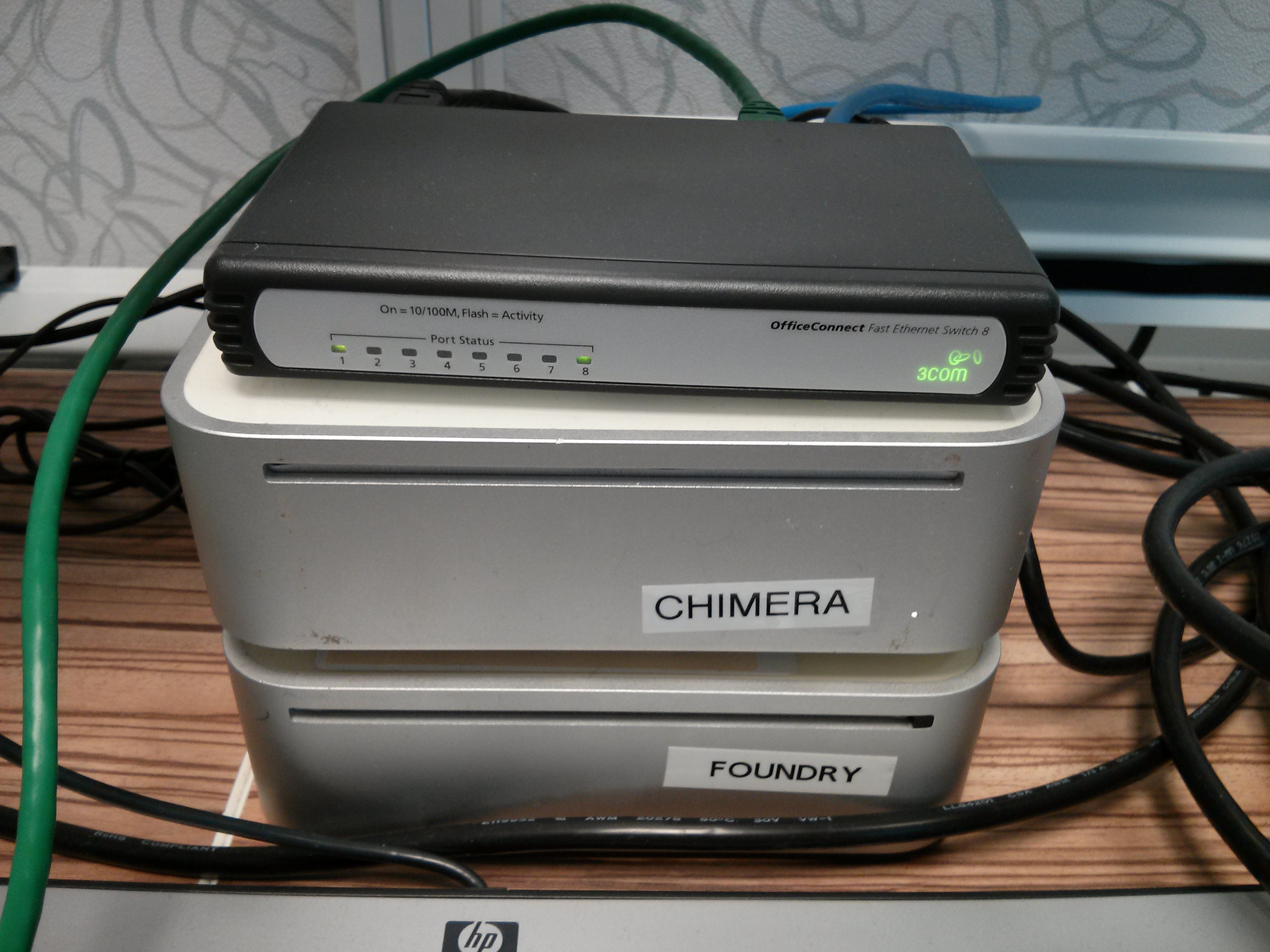 This frontend supports the cocoa, the windowing system of MacOS X, on both PPC (version 10.5) and X86 (10.6 or later). The port is usefully functional and is integrated into the CI system, built natively on Mac mini systems as a jenkins slave. The port is written in objective C and currently has no active maintainer.
- framebuffer
This frontend is different to the others in that it does not depend on a system toolkit and allows the browser to be run anywhere the projects internal libnsfb library can present a linear framebuffer. It is maintained and integrated into the CI system. - gtk
This frontend uses the gtk+ toolkit library and is probably the most heavily used frontend by the core developers. The port is usefully functional and is integrated into the CI system, there is no official maintainer. - monkey
This frontend is a debugging and test framework. It can be built with no additional library dependencies but has no meaningful user interface. It is maintained and integrated into the CI system. - riscos
This frontend is the oldest from which the browser evolved. The port is usefully functional and is integrated into the CI system. There is an official maintainer for this frontend although they are not active very often. Our toolchain repository can build a functional cross build environment for this target. - windows
This frontend would more accurately be called the win32 frontend as it specifically targets that Microsoft API. The port is functional but suffers from a lack of a maintainer. The port is integrated into the CI system and the toolchain repository can build a functional cross build environment for this target.
Building and running NetSurfFor a developer new to the project I recommend that the gtk version be built natively which is what I describe here.
Once the internal libraries have been installed, building NetSurf itself is as simple as running make.
For Example:
Once the internal libraries have been installed, building NetSurf itself is as simple as running make.
For Example:
$ source env.sh
$ ns-make -C $ TARGET_WORKSPACE /$ NS_BROWSER  TARGET=gtk
Though generally most developers would change into the netsurf source directory and run make there. The target (frontend) selection defaults to gtk on Linux systems so that can also be omitted Once the browser is built it can be run from the source tree to test.
For Example:
The build can be configured by editing a Makefile.config file. An example Makefile.config.example can be copied into place and the configuration settings overridden as required. The default values can be found in Makefile.defaults which should not be edited directly.
Logging is enabled with the command line switch -v and user options can be specified on the command line, options on the command line will override those sourced from a users personal configuration, generally found in ~/.netsurf/Choices although this can be compile time configured.
For Example:
$ source env.sh
$ cd $ TARGET_WORKSPACE /$ NS_BROWSER
$ ns-make
$ ./nsgtk
The build can be configured by editing a Makefile.config file. An example Makefile.config.example can be copied into place and the configuration settings overridden as required. The default values can be found in Makefile.defaults which should not be edited directly.
Logging is enabled with the command line switch -v and user options can be specified on the command line, options on the command line will override those sourced from a users personal configuration, generally found in ~/.netsurf/Choices although this can be compile time configured.


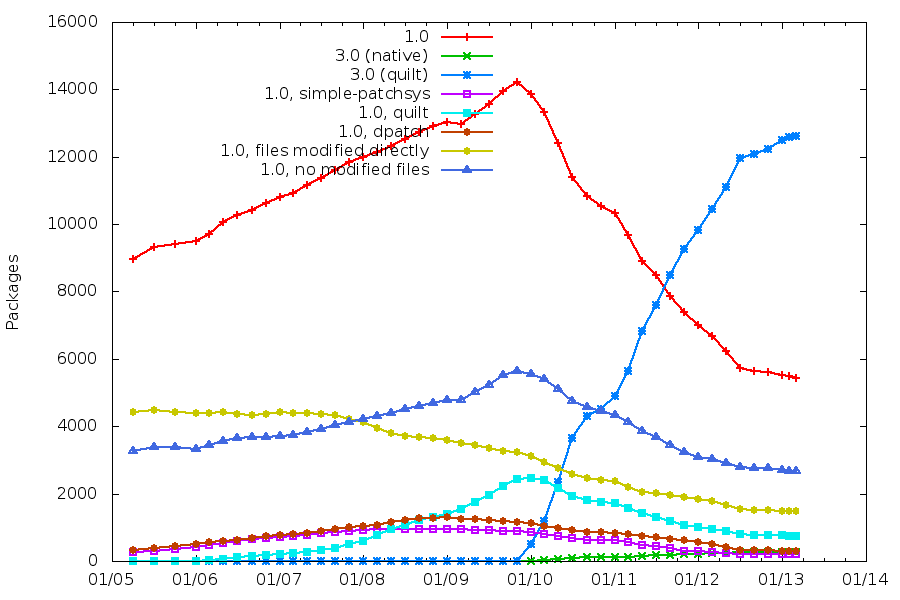
 (Looking for those graphs online, I realized that I never properly published them, besides that
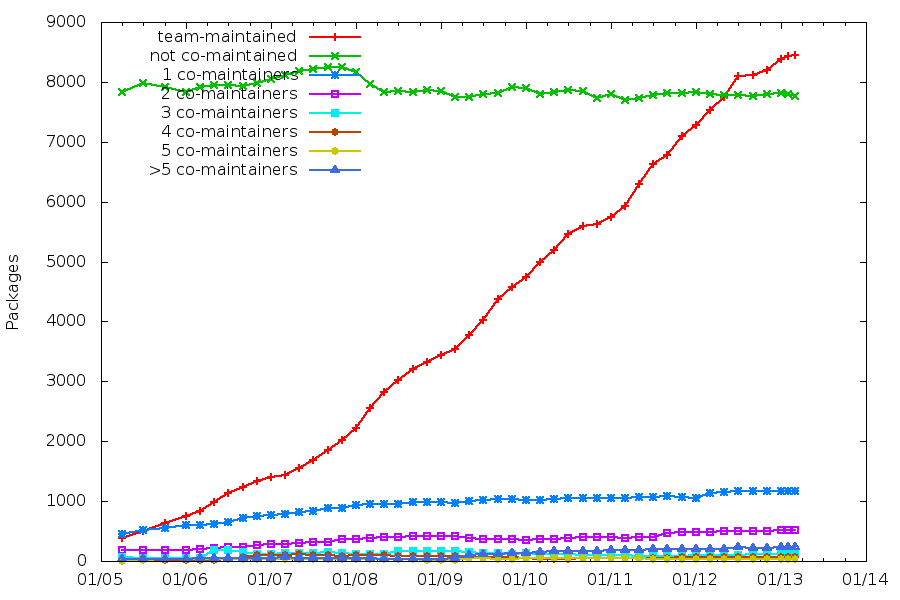
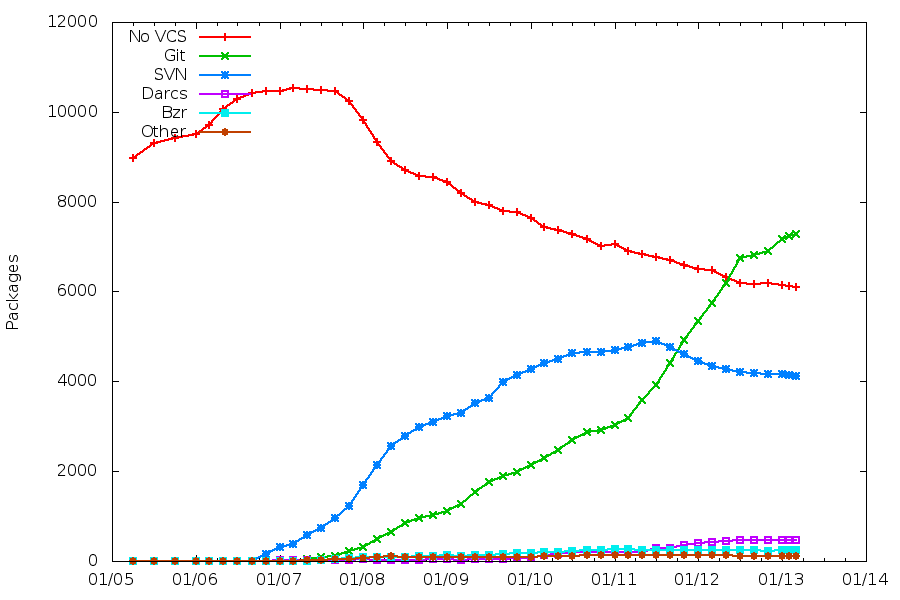 A large majority of our packages are maintained in a VCS repository, with Git being the clear winner now.
Possible goal for Jessie: standardize on a Git workflow, since every team tends to design its own?
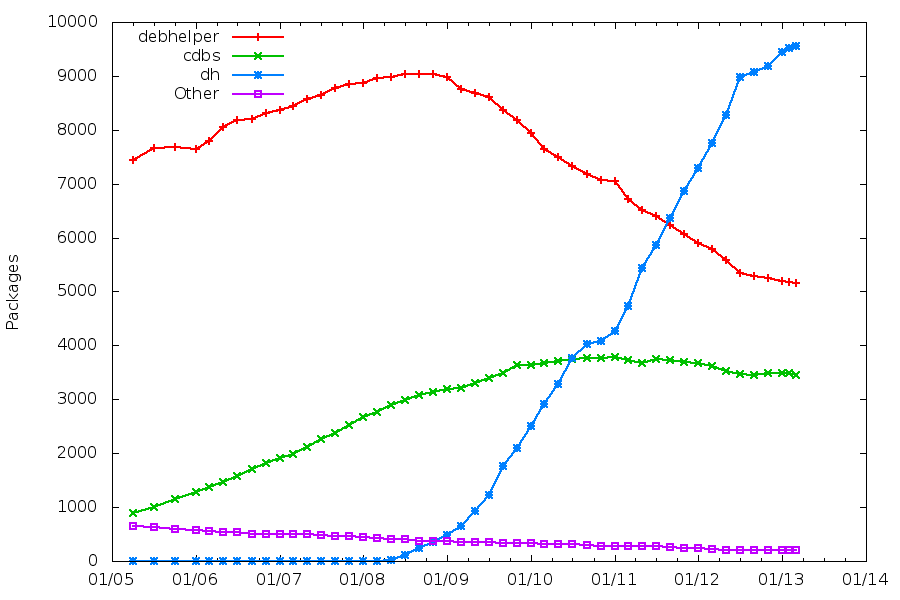
Packaging helpers
 when francesca started her

 This is my monthly summary of my free software related activities. If you re among the people who
 This post is just a status update for the Openstack packaging, after the next version froze last week.
The Openstack bi-annual summit of next April will take place this year in Portland, Oregon, and if everything goes as plan, Grizzly will be released just before the summit. Grizzly will be out a bit before the next Ubuntu in April, as releases are following the one of Ubuntu. Openstack uses town names for it s release names: Austin, Bextar, Cactus (2011.1), Diablo (2011.2), Essex (2012.1), Folsom (2012.2), Grizzly (2013.1).
I started to seriously work on the Openstack packaging in October, and never stopped working on its packaging until now. Slowly, but surely, preparing all the packages and their dependency python modules. One package at a time, working all this every day. Folsom works now pretty well and can be used in production, and I maintain it for security (along with Essex, which is in Wheezy).
Then Grizzly was frozen last week, on the 22nd of February, with the G3 release. As I already worked on packaging the G2 release in January, managing the packaging of G3 was fast. On late Sunday, I had a repository with Grizzly built, and its corresponding python (build-)dependencies. But while just building your own repository is easy, having all the dependencies in Debian is a lot more work.
As of today, if I include all the python modules, I have (at least) touch around 50 packages in total when working on Openstack. Many of them were simply built from scratch. The only python dependency that needs an upgrade in Experimental, so that all dependencies are satisfied, is a new version of pep8. The rest of is new python modules that were not in Debian, and which are currently waiting in the NEW queue for ftp masters approval: python-pecan, python-tablib, python-wsme and websockify. Some of these python modules have been waiting there for a long time, like python-pecan (it s been waiting in the NEW queue for more than 35 days now), some like websockify and python-wsme have been uploaded only this week. I really hope it can be possible to have all of Grizzly in Debian before the next Openstack summit (this depends mainly on the ftp-masters).
Note that I do not intend to apply security patches in Grizzly until it is released as the new Openstack stable. So use my private Grizzly repository as your own risk. I intend to fix this by working on some constant integration to have nightly builds, like many people are doing with Openstack. If you want to try it out:
deb http://archive.gplhost.com/debian grizzly main


 Some of our customers are using central
 So, the price of heating my apartment has gone up significantly since last year and a lot of people have noticed the same trend. As a geek, I want not just any solutions, but geekiest solutions possible to that enter a Smart Home system. The heating in my apartment is separated from all other apartments with a separate heat meter that measures both heating water flow and the temperature difference on the incoming and outgoing pipes, so if I reduce the heating consumption I will immediately see that in lower heating bills. This particular smart home system is very simple and made in Latvia and also relatively cheap, so I decided to give this a try.
The start was very simple I filled out a form on


 I am in some way flattered (en_FR?) that some people think that I should stand
as DPL candidate (