Search Results: "spa"

1 June 2016

Antoine Beaupr : (Still) working too much on the computer

I have been using Workrave to try to force me to step away from the computer regularly to work around Repetitive Strain Injury (RSI) issues that have plagued my life on the computer intermittently in the last decade. Workrave itself is only marginally efficient at getting me away from the machine: as any warning systems, it suffers from alarm fatigue as you frenetically click the dismiss button every time a Workrave warning pops up. However, it has other uses.

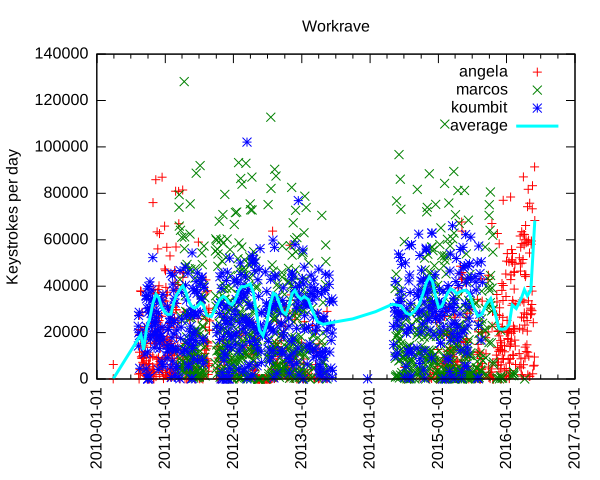
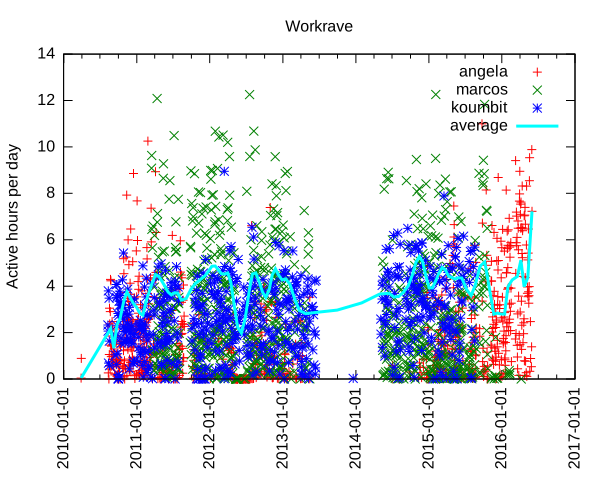
Analyzing data input In the past, I have used Workrave to document how I work too much on the computer, but never went through more serious processing of the vast data store that Workrave accumulates about mouse movements and keystrokes. Interested in knowing how much my leave from Koumbit affected time spent on the computer, I decided to look into this again. It turns out I am working as much, if not more, on the computer since I took that "time off": per machine keystrokes per day and average We can see here that I type a lot on the computer. Normal days range from 10 000 to 60 000 keystrokes, with extremes at around 100 000 keystrokes per day. The average seem to fluctuate around 30 to 40 000 keystrokes per day, but rises sharply around the end of the second quarter of this very year. For those unfamiliar with the underlying technology, one keystroke is roughly one byte I put on the computer. So the average of 40 000 keystrokes is 40 kilobyte (KB) per day on the computer. That means 15 MB over a year or about 150MB (or 100 MiB if you want to be picky about it) over the course of the last decade. That is a lot of typing. I originally thought this could have been only because I type more now, as opposed to use more the mouse previously. Unfortunately, Workrave also tracks general "active time" which we can also examine: per machine keystrokes per day and average Here we see that I work around 4 hours a day continuously on the computer. That is active time: not just login, logout time. In other words, the time where i look away from the computer and think for a while, jot down notes in my paper agenda or otherwise step away from the computer for small breaks is not counted here. Notice how some days go up to 12 hours and how recently the average went up to 7 hours of continuous activity. So we can clearly see that I basically work more on the computer now than I ever did in the last 7 years. This is a problem - one of the reasons of this time off was to step away from the computer, and it seems I have failed.
Update: it turns out the graph was skewed towards the last samples. I went more easy on the keyboard in the last few days and things have significantly improved: per machine keystrokes per day and average, 3 days later
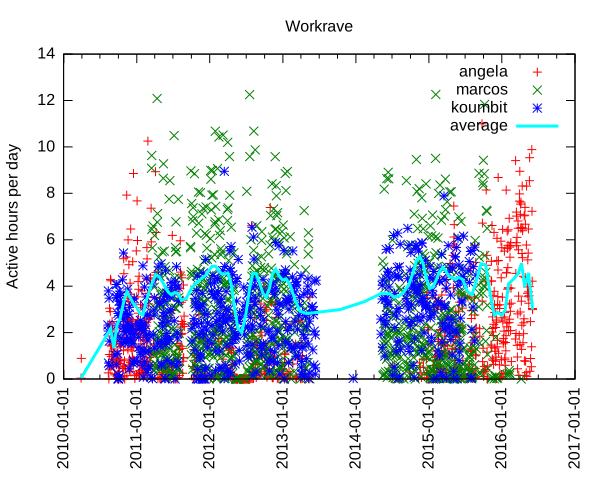
Another interesting thing we can see is when I switched from using my laptop to using the server as my main workstation, around early 2011, which is about the time marcos was built. Now that marcos has been turned into a home cinema downstairs, I went back to using my laptop as my main computing device, in late 2015. We can also clearly see when I stopped using Koumbit machines near the end of 2015 as well.

Further improvements and struggle for meaning The details of how the graph was produced are explained at the end of this article. This is all quite clunky: it doesn't help that the Workrave data structure is not easily parsable and so easily corruptible. It would be best if each data point was on its own separate line, which would be long, granted, but so easier to parse. Furthermore, I do not like the perl/awk/gnuplot data processing pipeline much. It doesn't allow me to do interesting analysis like averages, means and linear regressions easily. It could be interesting to rewrite the tools in Python to allow better graphs and easier data analysis, using the tools I learned in 2015-09-28-fun-with-batteries. Finally, this looks only at keystrokes and non-idle activity. It could be more interesting to look at idle/active times and generally the amount of time spent on the computer each day. And while it is interesting to know that I basically write a small book on the computer every day (according to Wikipedia, 120KB is about the size of a small pocket book), it is mostly meaningless if all that stuff is machine-readable code. Where is, after all, the meaning in all those shell commands and programs we constantly input on our keyboards, in the grand scheme of human existence? Most of those bytes are bound to be destroyed by garbage collection (my shell's history) or catastrophic backup failures.
While the creative works from the 16th century can still be accessed and used by others, the data in some software programs from the 1990s is already inaccessible. - Lawrence Lessig
But is my shell history relevant? Looking back at old posts on this blog, one has to wonder if the battery life of the Thinkpad 380z laptop or how much e-waste I threw away in 2005 will be of any historical value in 20 years, assuming the data survives that long.

How this graph was made I was happy to find that Workrave has some contrib scripts to do such processing. Unfortunately, those scripts are not shipped with the Debian package, so I requested that to be fixed (#825982). There were also some fixes necessary to make the script work at all: first, there was a syntax error in the Perl script. But then since my data is so old, there was bound to be some data corruption in there: incomplete entries or just plain broken data. I had lines that were all NULL characters, typical of power failures or disk corruptions. So I have made a patch to fix that script (#826021). But this wasn't enough: while this processes data on the current machine fine, it doesn't deal with multiple machines very well. In the last 7 years of data I could find, I was using 3 different machines: this server (marcos), my laptop (angela) and Koumbit's office servers (koumbit). I ended up modifying the contrib scripts to be able to collate that data meaningfully. First, I copied over the data from Koumbit in a local fake-koumbit directory. Second, I mounted marcos home directory locally with SSHFS:
sshfs anarc.at:/home/anarcat marcos
I also made this script to sum up datasets:
#!/usr/bin/perl -w
use List::MoreUtils 'pairwise';
$  = 1;
my %data = ();
while (<>)  
    my @fields = split;
    my $date = shift @fields;
    if (defined($data $date ))  
        my @t = pairwise   $a + $b   @ $data $date , @fields;
        $data $date  = \@t;
     
    else  
        $data $date  = \@fields;
     
 
foreach my $d ( sort keys %data )  
    print "$d @ $data $d \n";
 
Then I made a modified version of the Gnuplot script that processes all those files together:
#!/usr/bin/gnuplot
set title "Workrave"
set ylabel "Keystrokes per day"
set timefmt "%Y%m%d%H%M"
#set xrange [450000000:*]
set format x "%Y-%m-%d"
set xtics rotate
set xdata time
set terminal svg
set output "workrave.svg"
plot "workrave-angela.dat" using 1:28 title "angela", \
     "workrave-marcos.dat" using 1:28 title "marcos", \
     "workrave-koumbit.dat" using 1:28 title "koumbit", \
     "workrave-sum.dat" using 1:2 smooth sbezier linewidth 3 title "average"
#plot "workrave-angela.dat" using 1:28 smooth sbezier title "angela", \
#     "workrave-marcos.dat" using 1:28 smooth sbezier title "marcos", \
#     "workrave-koumbit.dat" using 1:28 smooth sbezier title "koumbit"
And finally, I made a small shell script to glue this all together:
#!/bin/sh
perl workrave-dump > workrave-$(hostname).dat
HOME=$HOME/marcos perl workrave-dump > workrave-marcos.dat
HOME=$PWD/fake-koumbit perl workrave-dump > workrave-koumbit.dat
# remove idle days as they skew the average
sed -i '/ 0$/d' workrave-*.dat
# per-day granularity
sed -i 's/^\(........\)....\? /\1 /' workrave-*.dat
# sum up all graphs
cat workrave-*.dat   sort   perl sum.pl > workrave.dat
./gnuplot-workrave-anarcat
I used a different gnuplot script to generate the activity graph:
#!/usr/bin/gnuplot
set title "Workrave"
set ylabel "Active hours per day"
set timefmt "%Y%m%d%H%M"
#set xrange [450000000:*]
set format x "%Y-%m-%d"
set xtics rotate
set xdata time
set terminal svg
set output "workrave.svg"
plot "workrave-angela.dat"  using 1:($23/3600) title "angela", \
     "workrave-marcos.dat"  using 1:($23/3600) title "marcos", \
     "workrave-koumbit.dat" using 1:($23/3600) title "koumbit", \
     "workrave.dat"         using 1:($23/3600) title "average" smooth sbezier linewidth 3
#plot "workrave-angela.dat" using 1:28 smooth sbezier title "angela", \
#     "workrave-marcos.dat" using 1:28 smooth sbezier title "marcos", \
#     "workrave-koumbit.dat" using 1:28 smooth sbezier title "koumbit"

Russell Coker: I Just Ordered a Nexus 6P

Last year I wrote a long-term review of Android phones [1]. I noted that my Galaxy Note 3 only needed to last another 4 months to be the longest I ve been happily using a phone. Last month (just over 7 months after writing that) I fell on my Note 3 and cracked the screen. The Amourdillo case is good for protecting the phone [2] so it would have been fine if I had just dropped it. But I fell with the phone in my hand, the phone landed face down and about half my body weight ended up in the middle of the phone which apparently bent it enough to crack the screen. As a result of this the GPS seems to be less reliable than it used to be so there might be some damage to the antenna too. I was quoted $149 to repair the screen, I could possibly have found a cheaper quote if I had shopped around but it was a good starting point for comparison. The Note 3 originally cost $550 including postage in 2014. A new Note 4 costs $550 + postage now from Shopping Square and a new Note 3 is on ebay with a buy it now price of $380 with free postage. It seems like bad value to pay 40% of the price of a new Note 3 or 25% the price of a Note 4 to fix my old phone (which is a little worn and has some other minor issues). So I decided to spend a bit more and have a better phone and give my old phone to one of my relatives who doesn t mind having a cracked screen. I really like the S-Pen stylus on the Samsung Galaxy Note series of phones and tablets. I also like having a hardware home button and separate screen space reserved for the settings and back buttons. The downsides to the Note series are that they are getting really expensive nowadays and the support for new OS updates (and presumably security fixes) is lacking. So when Kogan offered a good price on a Nexus 6P [3] with 64G of storage I ordered one. I m going to give the Note 3 to my father, he wants a phone with a bigger screen and a stylus and isn t worried about cracks in the screen. I previously wrote about Android device service life [4]. My main conclusion in that post was that storage space is a major factor limiting service life. I hope that 64G in the Nexus 6P will solve that problem, giving me 3 years of use and making it useful to my relatives afterwards. Currently I have 32G of storage of which about 8G is used by my music video collection and about 3G is free, so 64G should last me for a long time. Having only 3G of RAM might be a problem, but I m thinking of trying CyanogenMod again so maybe with root access I can reduce the amount of RAM use.

31 May 2016

Enrico Zini: Python gotcha

This code:
#!/usr/bin/python3
class Test:
    def __init__(self, items=[]):
        self.items = items
    def add(self, item):
        self.items.append(item)
a = Test()
a.add("foo")
b = Test()
b.add("bar")
print(repr(a.items))
print(repr(b.items))
"obviously" prints:
['foo', 'bar']
['foo', 'bar']
Because the default value of the items argument is a mutable list constructed just once when the code is compiled when the function definition is evaluated, and then reused. So, in Python, mutable items in default arguments are a good way to get more fun time with debugging.

30 May 2016

Daniel Stender: My work for Debian in May

No double posting this time ;-) I've got not so much spare time this month to spend on Debian, but I could work on the following packages: This series of blog postings also includes little introductions of and into new packages in the archive. This month there is: Pyinfra Pyinfra is a new project which is currently still in development state. It has been already pointed out in an interesting German article1, and is now available as package maintained within the Python Applications Team. It's currently a one man production by Nick Barrett, and eagerly developed in the past weeks (we're currently at 0.1~dev24). Pyinfra is a remote server configuration/provisioning/service deployment tool which belongs in the same software category like Puppet or Ansible2. It's for provisioning one or an array of remote servers with software packages and to configure them. Pyinfra runs agentless like Ansible, that means for using it nothing special (like a daemon) has to run on targeted servers. It's written to be used for provisioning POSIX compatible Linux systems and has alternatives when it comes to special features like package managers (e.g. supports apt as well as yum). The documentation could be found in usr/share/doc/pyinfra/html/. Here's a little crash course on how to use Pyinfra: The pyinfra CLI tool is used on the command line like this, deploy scripts, single operations or facts (see below) could be used on a single server or a multitude of remote servers:
$ pyinfra -i <inventory script/single host> <deploy script>
$ pyinfra -i <inventory script/single host> --run <operation>
$ pyinfra -i <inventory script/single host> --facts <fact>
Remote servers which are operated on must provide a working shell and they must be reachable by SSH. For connecting, --port, --user, --password, --key/--key-password and --sudo flags are available, --sudo to gain superuser rights. Root access or sudo rights of course have to be already set up. By the way, localhost could be operated on the same way. Single operations are organized in modules like "apt", "files", "init", "server" etc. With the --run option they could be used individually on servers like follows, e.g. server.user adds a new user on a single targeted system (-v adds verbosity to the pyinfra run):
$ pyinfra -i 192.0.2.10 --run server.user sam --user root --key ~/.ssh/sshkey --key-password 123456 -v
Multiple servers can be grouped in inventories, which hold the targeted hosts and data associated with them, like e.g. an inventory file farm1.py would contain lists like this:
COMPUTE_SERVERS = ['192.0.2.10', '192.0.2.11']
DATABASE_SERVERS = ['192.0.2.20', '192.0.2.21']
Group designators must be all caps. A higher level of grouping are the file names of inventory scripts, thus COMPUTE_SERVERS and DATABASE_SERVERS can be referenced to at the same time by the group designator farm1. Plus, all servers are automatically added to the group all. And, inventory scripts should be stored in the subfolder inventory/ in the project directory. Inventory files then could be used instead of specific IP addresses like this, the single operation then gets performed on all given machines in farm1.py:
$ pyinfra -i inventory/farm1.py  --run server.user sam --user root --key ~/.ssh/sshkey --key-password=123456 -v
Deployment scripts could be used together with group data files in the subfolder group_data/ in the project directory. For example, a group_data/farm1.py designates all servers given in inventory/farm1.py (by the way, all.py designates all servers), and contains the random attribute user_name (attributes must be lowercase), next to authentication data for the whole inventory group:
user_name = 'sam'
ssh_user = 'root'
ssh_key = '~/.ssh/sshkey'
ssh_key_password = '123456'
The random attribute can be picked up by a deployment script using host.data() like follows, user_name could be used again for e.g. server.user(), like this:
from pyinfra import host
from pyinfra.modules import server
server.user(host.data.user_name)
This deploy, the ensemble of inventory file, group data file and deployment script (usually placed top level in the project folder) then could be run that way:
$ pyinfra -i inventory/farm1.py deploy.py
You have guessed it, since deployment scripts are Python scripts they are fully programmable (please regard that Pyinfra is build & runs on Python 3 on Debian), and that's the main advantage point with this piece of software. Quite handy for that come Pyinfra facts, functions which check different things on remote systems and return information as Python data. Like e.g. deb_packages returns a dictionary of installed packages from a remote apt based server:
$ pyinfra -i 192.0.2.10 --fact deb_packages --user root --key ~/.ssh/sshkey --key-password=123456
 
    "192.0.2.10":  
        "libdebconfclient0": "0.192",
        "python-debian": "0.1.27",
        "libavahi-client3": "0.6.31-5",
        "dbus": "1.8.20-0+deb8u1",
        "libustr-1.0-1": "1.0.4-3+b2",
        "sed": "4.2.2-4+b1",
Using facts, Pyinfra reveals its full potential. For example, a deployment script could go like this, linux.distribution() returns a dict containing the installed distribution:
from pyinfra import host
from pyinfra.modules import apt
if host.fact.linux_distribution['name'] == 'Debian':
   apt.packages(packages='gummi', present=True, update=True)
elif host.fact.linux_distribution['name'] == 'CentOS':
   pass
I'll spare more sophisticated examples to keep this introduction simple. Beyond fancy deployment scripts, Pyinfra features an own API by which it could be programmed from the outside, and much more. But maybe that's enough to introduce Pyinfra. That are the usage basics. Pyinfra is a brand new project and it remains to be seen whether the developer can keep on further developing the tool like he does these days. For a private project it's insane to attempt to become a contender for the established "big" free configuration management tools and frameworks, but, if Puppet has become too complex in the meanwhile or not3, I really don't think that's the point here. Pyinfra follows an own approach in being programmable the way which it is. And it's definitely not harm to have it in the toolbox already, not trying to replace nothing. Brainstorm After the first package has been in experimental, the Brainstorm library from Swiss AI research institute IDSIA4 is now available as python3-brainstorm in unstable. Brainstorm is a lean, easy-to-use library for setting up deep learning networks (multiple layered artificial neural networks) for machine learning applications like for image and speech recognition or natural language processing. To set up a working training network for a classifier for handwritten digits like the MNIST dataset (a usual "hello world") just takes a couple of lines, like an example demonstrates. The package is maintained within the Debian Python Modules Team. The Debian package ships a couple of examples in /usr/share/python3-brainstorm/examples (the data/ and examples/ folders of the upstream tarball are combined here). Among them there are5: The current documentation in /usr/share/doc/python3-brainstorm/html/ isn't complete yet (several chapters are under construction), but there's a walkthrough on the CIFAR-10 example. The MNIST example has been extended by Github user pinae, and has been explained in German C't recently6. What are the perspectives for further development? Like Zhou Mo confirmed, there are a couple of deep learning frameworks around having a rather poor outlook since there have been abandoned after being completed as PhD projects. There's really no point for thriving to have them all in Debian, like the ITP of Minerva has been given up partly for this reason, there weren't any commits since 08/2015 (and because cuDNN isn't available and most likely won't). Brainstorm, 0.5 have been released 05/2015, also was a PhD project as IDSIA. It's stated on Github that the project is "under active development", but the rather sparse project page on the other side expresses the "hope the community will help us to further improve Brainstorm". This sentence much often implies that the developers are not actively working on the project. But there are recent commits and it looks that upstream is active and could be reached when there are problems, and that the project is active. So I don't think we're riding a dead horse, here. The downside for Brainstorm in Debian is, it seems that the libraries which are needed for GPU accelerated processing can't be fully provided. Pycuda is available, but scikit-cuda (an additional library which provides wrappers for CUDA features like CUBLAS, CUFFT and CUSOLVER) is not and won't be, because the CULA Dense Toolkit (scikit-cuda also contains wrappers for also that) is not available freely as source. Because of that, a dependency against pycuda, not even as Suggests (it's non-free), has been spared. Without GPU acceleration, Brainstorm computes the matrices on openBLAS using a Cython wrapper on the NumpyHandler, and the PyCudaHandler couldn't be used. openBLAS makes pretty good use of the available hardware (it distributes over all available CPU cores), but it's not yet possible to run Brainstorm full throttle using available floating point devices to reduce training times, which becomes crucial when the projects are getting bigger. Brainstorm belongs to the number of deep learning frameworks already being or becoming available in Debian. Currently there is: I've checked over Microsoft's CNTK, but although it's also set free recently I have my doubts if that could be included. Apparently there are dependencies against non-free software and most likely other issues. So much for a little update on the state of deep learning in Debian, please excuse if my radar misses something.

  1. Tim Sch rmann: "Schlangen l: Automatisiertes Service-Deployment mit Pyinfra". In: IT-Administrator 05/2016, pp. 90-95.
  2. For a comparison of configuration management software like this, see B wetter/Johannsen/Steig: "Baukastensysteme: Konfigurationsmanagement mit Open-Source-Software". In: iX 04/2016, pp. 94-99 (please excuse the prevalence of German articles in the pointers, I've just have them at hand).
  3. On the points of critique on Puppet, see Martin Loschwitz: "David gegen Goliath Zwei Welten treffen aufeinander: Puppet und Ansible". In Linux-Magazin 01/2016, 50-54.
  4. See the interview with IDSIA's deep learning guru J rgen Schmidhuber in German C't 2014/09, p. 148
  5. The examples scripts need some more finetuning. To run the data creation scripts in place the environment variable BRAINSTORM_DATA_DIR could be set, but the trained networks are currently tried to write in place. So please copy the scripts into some workspace if you want to try them out. I'll patch the example scripts to run out-of-the-box, soon.
  6. Johannes Merkert: "Ziffernlerner. Ein k nstliches neuronales Netz selber gebaut". In: C't 2016/06, p. 142-147. Web: http://www.heise.de/ct/ausgabe/2016-6-Ein-kuenstliches-neuronales-Netz-selbst-gebaut-3118857.html.
  7. See Ramon Wartala: "Tiefensch rfe: Deep learning mit NVIDIAs Jetson-TX1-Board und dem Caffe-Framework". In: iX 06/2016, pp. 100-103
  8. https://lists.debian.org/debian-science/2016/03/msg00016.html

Russ Allbery: Review: Empires of EVE

Review: Empires of EVE, by Andrew Groen
Publisher: Andrew Groen
Copyright: 2015
Printing: 2016
ISBN: 0-9909724-0-2
Format: Hardcover
Pages: 171
The version of this book I read was the hardcover Kickstarter campaign reward, since I was a backer. I believe it's the same as the hardcover currently available for sale from the author's site for those who didn't back the project. There are also softcover and Kindle versions. I've lost track of whether they have less sidebar content, or just less high-quality artwork. EVE Online ("EVE" is not an acronym, just the developer's way of writing the name, so you'll also see "Eve" both for the game and for this book) is a massively multiplayer on-line role-playing game (MMORPG) based on interstellar mining, manufacturing, and combat. Its Icelandic developer takes a different, more emergent approach than most MMORPG developers: rather than fill the world exclusively with pre-scripted adventures and enemies (although there is some of that for those who want it), vast regions of EVE's world are left open to the players to govern, exploit, or fight over as they see fit. Player versus player combat plays a large role in that aspect of the game, and many actions that would be prohibited or made impossible in other games (stealing from other players, betrayals, tricking other players into fatal situations) are permitted and sometimes core components of the game. EVE is best-known for its economy, which is almost entirely player-driven and requires extensive mining and manufacturing work by large teams of players to build the largest and most powerful ships in the game. Empires of EVE is an unusual type of book, one that I'm not sure would have been possible ten years ago. Subtitled "a history of the great wars of EVE Online," it's a history of a virtual world, but not one sponsored by the developer or part of the marketing or lore of the game. I love seeing this (which is also why I backed the Kickstarter). Video games have developed beyond just games to play into games to watch other people play (successfully competing, for me and for many others, for the role previously filled by professional sports), and now into emergent events that are complex enough, and dramatic enough, to warrant their own third-party history. I was quite surprised and delighted by how broad the audience for this sort of writing is. And this is not a shallow effort. Andrew Groen is a freelance writer who does not, himself, play EVE. He approaches the complex political and in-game fighting with the attitude of a reporter and historian, cites sources (to the standards I would expect for long-form journalism, if not quite at the level of academic history), discloses where history has been lost or one side of some fight could not be contacted, and puts substantial effort into explaining the political strengths and weaknesses of the shifting in-game alliances. It's a proper political history of an imaginary world, including objective (so far as I can tell) reporting of times when developers were accused of assisting one of the factions. If, like me, you don't play EVE and are primarily interested in this book to get a feel for the game, there are a few caveats to be aware of. EVE is divided into regions with game-enforced security levels. The ones near the center of the game galaxy are heavily policed by the game to prevent most of the player versus player combat and let new players get their feet. Those regions also offer various built-in missions that don't require interacting with other players. As one moves out from that central area, the game-provided security (and I believe the game-provided interactions) drops off. Empires of EVE deals exclusively with nullsec space: the outer regions of the game where the richest resources are, and where there is no law or policing except what's done by the players themselves. The game here, and as described in the book, is relentlessly blood-thirsty, but this isn't representative of the entire game. Second, most of this book is devoted to ship-to-ship combat and missions of conquest and reprisal. But combat is built on top of a vast "civilian" infrastructure of mining and manufacturing, and there are players who focus on those aspects of the game and rarely, if ever, fight. Groen talks about this in passing, since it can have significant influence on the politics of the game, but spends little time describing the day-to-day life in the game for those players. The focus here is on the resulting combat. Finally, Groen starts his history at the EVE beta in 2003 but ends it in 2009. Maneuvering and wars have, of course, continued ever since, but he has to stop somewhere. As he mentioned during the Kickstarter, it takes some years for events to become history, and for people to be willing to talk about them. The developer has kept changing the game, so some of the mechanics here will be mildly stale and the current political alliances are quite likely far different (although many of the players discussed in this book are still playing). With those caveats, though, this is a fascinating book, even if this isn't your sort of game. Personally, I have a deep-seated dislike of games like Diplomacy where alliances, betrayal, and political maneuvering is sanctioned and encouraged by the game. I've never played EVE and I can't imagine ever wanting to, particularly after reading this book. But it's still a fascinating war history and analysis of slightly skew human politics. The alliances and backstabbing are reminiscent of real human history, but the game setting adds some significant twists: players can just quit if they're not having fun, the largest threat to strong alliances is players just not bothering to show up because they're not having fun or because the risk is too high, and without the stability and momentum of real-world institutions, in-game corporations and alliances can collapse overnight when players lose faith in them. From a distance, it's quite entertaining to see how those factors reshape politics and propaganda. (If sadly somewhat reminiscent of the sort of personalities that killed Usenet. I shouldn't have been surprised that organized Internet trolls made an appearance in EVE, although the nature of EVE politics meant they fit right in rather than doing much to spoil other people's fun, at least in nullsec.) I can't speak to the other formats, but the hardcover is also a gorgeous book. The artwork isn't quite my style, and the in-game screen shots are a bit muddy and confusing (not Groen's fault), but the maps are clear and invaluable, the propaganda posters are amazing, and the hardcover printing is clearly of a very high quality. I felt like I got my $50 worth in terms of presentation and quality printing, and have a book that isn't going to fall apart in a few years. The one quibble that I have is that Groen picked a fairly thin and light font for the main text, which my eyes had some trouble with on high-gloss paper. Something thicker and darker may not have looked as good on the page, but it would have been easier to read. The font choice for the sidebars was a lovely high-contrast white on black, but I would have appreciated something a bit larger. If you have vision issues, you may find the ebook more readable, if not as beautiful. Empires of EVE has apparently been very successful within its niche, which makes me happy. I would love to read more books of this type. I know I'm not the only person who grew up with gaming but has been increasingly drawn into watching other people game or reading about other people game. I love watching or reading about people who have put the effort into becoming very good at something they love, and when that comes with emergent history, creative propaganda, and a lot of assholes to root against (although sadly not many people to root for), the history of EVE makes compelling reading, at least for me. Recommended if this is at all your sort of thing; the ebook version of the book is fairly inexpensive. Rating: 8 out of 10

Norbert Preining: OpenPHT 1.5.2 for Debian/sid

I have updated the openpht repository with builds of OpenPHT 1.5.2 for Debian/sid for both amd64 and i386 architecture. For those who have forgotten it, OpenPHT is the open source fork of Plex Home Theater that is used on RasPlex, see my last post concerning OpenPHT for details. plex-debian-new The repository also contains packages (source and amd64/i386) for shairplay which is necessary for building and running OpenPHT. sid and testing For sid use the following lines:

deb http://www.preining.info/debian/ openpht-sid main
deb-src http://www.preining.info/debian/ openpht-sid main
You can also grab the binary for amd64 directly here for amd64 and i386, you can get the source package with
dget http://www.preining.info/debian/pool/main/o/openpht/openpht_1.5.2.514-1.dsc
Note that if you only get the binary deps, you also need libshairplay0 from amd64 or i386. jessie Builds for Debian stable release jessie are not done by now. The release file and changes file are signed with my official Debian key 0x860CDC13. Now be ready for enjoying the next movie!

29 May 2016

Kevin Avignon: Interesting project : Render stereoscopic 3D images using Kinect 2.0

Hi guys, Last summer, I got into an interesting course entitled Emerging topics in information technologies . During the first part of the course, we focused more on 3D computer vision techniques and how to manipulate 3D images.Issues such as depth-image-based rendering were obscure and captivating enough to get me motivated throughout the summer semester. In order Continue reading Interesting project : Render stereoscopic 3D images using Kinect 2.0

28 May 2016

Dirk Eddelbuettel: RcppArmadillo 0.7.100.3.0

armadillo image The first Armadillo release of the 7.* series is out: a new version 7.100.3. We uploaded RcppArmadillo 0.7.100.3.0 to CRAN and Debian. This followed the usual thorough reverse-dependecy checking of by now 230 packages using it. This release now requires a recent enough compiler. As g++ is so common, we explicitly test for version 4.6 or newer. So if you happen to be on an older RHEL or CentOS release, you may need to get yourself a more modern compiler. R on Windows is now at 4.9.3 which is decent (yet stable) choice; the 4.8 series of g++ will also do. For reference, the current LTS of Ubuntu is at 5.3.1, and we have g++ 6.1 available in Debian testing. This new upstream release adds a few new helper functions (which are particularly useful in statistics, but were of course already available to us via Rcpp), more slicing of Cube data structures and a brand new sparse matrix decomposition module courtesy of Yixuan Qiu -- whom R users know as the author of the RSpectra package (which replaces his older rArpack package) and of course all the most excellent work he provided to RcppEigen. Armadillo is a powerful and expressive C++ template library for linear algebra aiming towards a good balance between speed and ease of use with a syntax deliberately close to a Matlab. Changes in this release are as follows:
Changes in RcppArmadillo version 0.7.100.3.0 (2016-05-25)
  • Upgraded to Armadillo test release 7.100.3
    • added erf(), erfc(), lgamma()
    • added .head_slices() and .tail_slices() to subcube views
    • spsolve() now requires SuperLU 5.2
    • eigs_sym(), eigs_gen() and svds() now use a built-in reimplementation of ARPACK for real (non-complex) matrices (code contributed by Yixuan Qiu)
  • The configure code now checks against old g++ version which are no longer sufficient to build the package.
Courtesy of CRANberries, there is also a diffstat report for this release. As always, more detailed information is on the RcppArmadillo page. Questions, comments etc should go to the rcpp-devel mailing list off the R-Forge page.

This post by Dirk Eddelbuettel originated on his Thinking inside the box blog. Please report excessive re-aggregation in third-party for-profit settings.

27 May 2016

Kevin Avignon: Euler problems

Hi guys, Late post before I go to bed. I don t know if you ever heard about Euler problems ? It s a series of challenging computer and mathematical programming problems. They require some thinking in order to be solved. The reason behind solving them is to acquire better skills at problem solving, which is something Continue reading Euler problems

26 May 2016

Kevin Avignon: Bring more functionalities to types using extension methods

Hey guys, What are extension methods ? Extension methods are quite simple to understand and they can be quite useful in time of needs. An extension method give you the power to create a new method for any type that you would like. They re static methods designed to extend the capabilities of a type without Continue reading Bring more functionalities to types using extension methods

Norbert Preining: Shotwell vs. digiKam

How to manage your photos? That is probably the biggest question for anyone doing anything with a photo camera. As resolutions of cameras grow, the data we have to manage is growing ever. In my case I am talking about more than 50000 photos and videos measuring up to about 200Gb of disk space, constantly growing. There are several photo management softwares out there, I guess the most commonly used ones are Shotwell for the Gnome desktop, digiKam for the KDE world, and FotoXX. I have not used Shotwell and digiKam for quite some time, and collect here my experiences of strength and weaknesses of the two programs. FotoXX seems to be very powerful, too, but I haven t tested it till now.
shotwell-digikam There is no clear winner here, unfortunately. Both have their strength and their weaknesses. And as a consequence I am using both in parallel. Before I start a clear declaration: I have been using Shotwell for many years, and have myself contributed considerable code to Shotwell, in particular the whole comment system (comments for photos and events), as well as improved the Piwigo upload features. I started using digiKam some month ago when I started to look for offloading parts of my photo library to external devices. Since then I have used both in parallel. Let us start with what these programs say about themselves: Shotwell is declared as a Photo Manager for Gnome 3, with the following features: digiKam says about itself that it is an advanced digital photo management application for Linux, Windows, and Mac-OSX. It has a very long feature page with a short list at the beginning: Now that sounds like they are very similar, but upon using them it turns out that there are huge differences, that can easily be summed up in a short statement:
Shotwell is Gnome 3 that means get rid of functionality. digiKam is KDE that means provide as much functionality as possible.
Now before you run after me with a knife because you do not agree with me on the above, either read on, or stop reading. I am not interested in flame wars over Gnome versus KDE philosophy. I have been using Gnome since many years, and tried to convince myself to G3 for more than a year until I threw out all of it but selected programs but their number is going down. Let us look at those aspects I am using: organization, offline, sharing, editing. Organization In Shotwell, your photos are organized into events, independent from their location on disk. These events can have title and comment and collect a set of related photos. In my case I often have photos from two or more cameras (my camera and mobile, photos of friends), which I keep in separate directories within a main directory for the event. For example I have a folder 2016/05.21-22.Climbing.Tanigakadake with two sub-folders Norbert (for my photos) and Friend (for my friends photos). In Shotwell all the photos are in the same event, which is shown with title 05.21-22 Tanigakawadake Climbing within the 2016 year and May month.
shotwell-events So in short Shotwell distinguishes between disk layout and album/event names. In digiKam there is a strict connection between disk layout and album names 1:1. Albums are directories. One can adjust the viewer to show all photos of sub-albums in the main album, and by this one can achieve the same effect of merging all photos of my friend and myself. The good thing in this approach is that one can easily have sub-albums: Imagine a trip to three different islands of Hawaii during one trip. This is something easy to achieve in digiKam, but hard in Shotwell.
digikam-albums Other organization methods Both Shotwell and digiKam support tags, including hierarchical tags and rating (0-5 stars). Shotwell has in addition a quick flag action that I used quite often for initial selecting photos, as well as accepted and rejected. digiKam also has so called picks (no pick, reject, pending, accepted), and colors (not used by now). Both programs have some face detection support, but also this I haven t used. So in the organization respect there is no clear winner. I like the Event idea of Shotwell, or better, the separation of events from the disk structure. But on the other hand, Shotwell does not allow for sub-albums, which is also a pain. No clear winner draw Offline storage That is simple: Shotwell: forget it, not reasonably possible. One can move parts to an external HD, then unplug it, and Shotwell will tell you that all the photos are missings. And when you plug the external HD in, it will redetect them. But this is not proper support, just a consequence of hash sum storage. Also separation into several libraries (online and offline) is not supported. On the other hand, digiKam supports multiple libraries, partly offline, without a hinch. I would love to have this feature in Shotwell, because I need to free disk space, urgently!!! Clear winner: digiKam Sharing Again here my testing is very restricted I am using my own Piwigo installation exclusively. Here Shotwell is excellent in providing support for various features: upload to existing category, create new category, resize, optionally remove tags, add comments to albums and photos, etc. (partly implemented by me
shotwell-piwigo On the other hand digiKam has a very barebone interface to Piwigo you can upload photos to an existing album and resize them, but that is already everything. One also needs to say that the list of supported services in digiKam is by far longer than the one in Shotwell, but the main services (usual suspects) are supported in both.
digikam-piwigo Clear winner: Shotwell (but I haven t tested other upload services). Editing The editing capabilities of Shotwell are again very restricted: red eyes, resize, levels, .
shotwell-editing digiKam here is more like a photo editor software with loads of tools and features. I haven t even explored all the options maybe I can get rid of GIMP, too?
digikam-editing Clear winner: digiKam Conclusions While I am still working with both, I actually would love to move completely to digiKam. I simply cannot stand the Gnome 3 philosophy of reducing functionality to a minimal for dummy users. There is a market for that, sure, but I am not one of it. Unfortunately, the missing Event support, and much more the completely minimal support for Piwigo sharing in digiKam is a big show stopper at the moment. Even after testing the upcoming digiKam 5.0 version for some time, I didn t see any improvement wrt to sharing. That leaves me with the only option to continue working with both programs, and hope to get a new bigger SSD before the current one runs out of space. Of course I could start hacking into the digiKam source maybe I do this when I have a bit more time to add proper Piwigo support.

Kevin Avignon: GSoC16: First coding week

Hey guys, I won t say yet again that it has been too long because it really was. I ll try to keep my blog updated weekly concerning a program I m doing with Google this summer. It s called the Google Summer of Code (GSoC). Basically, it s meant for students to be able to contribute on an open Continue reading GSoC16: First coding week

19 May 2016

Antoine Beaupr : My free software activities, May 2016

Debian Long Term Support (LTS) This is my 6th month working on Debian LTS, started by Raphael Hertzog at Freexian. This is my largest month so far, for which I had requested 20 hours of work.

Xen work I spent the largest amount of time working on the Xen packages. We had to re-roll the patches because it turned out we originally just imported the package from Ubuntu as-is. This was a mistake because that package forked off the Debian packaging a while ago and included regressions in the packaging itself, not just security fixes. So I went ahead and rerolled the whole patchset and tested it on Koumbit's test server. Brian May then completed the uploaded, which included about 40 new patches, mostly from Ubuntu.

Frontdesk duties Next up was the frontdesk duties I had taken this week. This was mostly uneventful, although I had forgotten how to do some of the work and thus ended up doing extensive work on the contributor's documentation. This is especially important since new contributors joined the team! I also did a lot of Debian documentation work in my non-sponsored work below. The triage work involved chasing around missing DLAs, triaging away OpenJDK-6 (for which, let me remind you, security support has ended in LTS), raised the question of Mediawiki maintenance.

Other LTS work I also did a bunch of smaller stuff. Of importance, I can note that I uploaded two advisories that were pending from April: NSS and phpMyAdmin. I also reviewed the patches for the ICU update, since I built the one for squeeze (but didn't have time to upload before squeeze hit end-of-life). I have tried to contribute to the NTP security support but that was way too confusing to me, and I have left it to the package maintainer which seemed to be on top of things, even if things mean complete chaos and confusion in the world of NTP. I somehow thought that situation had improved with the recent investments in ntpsec and ntimed, but unfortunately Debian has not switched to the ntpsec codebase, so it seems that the NTP efforts have diverged in three different projects instead of closing into a single, better codebase.

Future LTS work This is likely to be my last month of work on LTS until September. I will try to contribute a few hours in June, but July and August will be very busy for me outside of Debian, so it's unlikely that I contribute much to the project during the summer. My backlog included those packages which might be of interest to other LTS contributors:
  • libxml2: no upstream fix, but needs fixing!
  • tiff ,3 : same mess
  • libgd2: maintainer contacted
  • samba regression: mailed bug #821811 to try to revive the effort
  • policykit-1: to be investigated
  • p7zip: same

Other free software work

Debian documentation I wrote an detailed short guide to Debian package development, something I felt was missing from the existing corpus, which seems to be too focus in covering all alternatives. My guide is opinionated: I believe there is a right and wrong way of doing things, or at least, there are best practices, especially when just patching packages. I ended up retroactively publishing that as a blog post - now I can simply tag an item with blog and it shows up in the blog. (Of course, because of a mis-configuration on my side, I have suffered from long delays publishing to Debian planet, so all the posts dates are off in the Planet RSS feed. This will hopefully be resolved around the time this post is published, but this allowed me to get more familiar with the Planet Venus software, as detailed in that other article.) Apart from the guide, I have also done extensive research to collate information that allowed me to create workflow graphs of the various Debian repositories, which I have published in the Debian Release section of the Debian wiki. Here is the graph: It helps me understand how packages flow between different suites and who uploads what where. This emerged after I realized I didn't really understand how "proposed updates" worked. Since we are looking at implementing a similar process for the security queue, I figured it was useful to show what changes would happen, graphically. I have also published a graph that describes the relations between different software that make up the Debian archive. The idea behind this is also to provide an overview of what happens when you upload a package in the Debian archive, but it is more aimed at Debian developers trying to figure out why things are not working as expected. The graphs were done with Graphviz, which allowed me to link to various components in the graph easily, which is neat. I also prefered Graphviz over Dia or other tools because it is easier to version and I don't have to bother (too much) about the layout and tweaking the looks. The downside is, of course, that when Graphviz makes the wrong decision, it's actually pretty hard to make it do the right thing, but there are various workarounds that I have found that made the graphs look pretty good. The source is of course available in git but I feel all this documentation (including the guide) should go in a more official document somewhere. I couldn't quite figure out where. Advice on this would be of course welcome.

Ikiwiki I have made yet another plugin for Ikiwiki, called irker, which enables wikis to send notifications to IRC channels, thanks to the simple irker bot. I had trouble with Irker in the past, since it was not quite reliable: it would disappear from channels and not return when we'd send it a notification. Unfortunately, the alternative, the KGB bot is much heavier: each repository needs a server-side, centralized configuration to operate properly. Irker's design is simpler and more adapted to a simple plugin like this. Let's hope it will work reliably enough for my needs. I have also suggested improvements to the footnotes styles, since they looked like hell in my Debian guide. It turns out this was an issue with the multimarkdown plugin that doesn't use proper semantic markup to identify footnotes. The proper fix is to enable footnotes in the default Discount plugin, which will require another, separate patch. Finally, I have done some improvements (I hope!) on the layout of this theme. I made the top header much lighter and transparent to work around an issue where followed anchors would be hidden under the top header. I have also removed the top menu made out of the sidebar plugin because it was cluttering the display too much. Those links are all on the frontpage anyways and I suspect people were not using them so much. The code is, as before, available in this git repository although you may want to start from the new ikistrap theme that is based on Bootstrap 4 and that may eventually be merged in ikiwiki directly.

DNS diagnostics Through this interesting overview of various *ping tools, I got found out about the dnsdiag tool which currently allows users to do DNS traces, tampering detection and ping over DNS. In the hope of packaging it into Debian, I have requested clarifications regarding a modification to the DNSpython library the tool uses. But I went even further and boldly opened a discussion about replacing DNSstuff, the venerable DNS diagnostic tools that is now commercial. It is somewhat surprising that there is no software that has even been publicly released that does those sanity checks for DNS, given how old DNS is. Incidentally, I have also requested smtpping to be packaged in Debian as well but httping is already packaged.

Link checking In the process of writing this article, I suddenly remembered that I constantly make mistakes in the various links I post on my site. So I started looking at a link checker, another tool that should be well established but that, surprisingly, is not quite there yet. I have found this neat software written in Python called LinkChecker. Unfortunately, it is basically broken in Debian, so I had to do a non-maintainer upload to fix that old bug. I managed to force myself to not take over maintainership of this orphaned package but I may end up doing just that if no one steps up the next time I find issues in the package. One of the problems I had checking links in my blog is that I constantly refer to sites that are hostile to bots, like the Debian bugtracker and MoinMoin wikis. So I published a patch that adds a --no-robots flag to be able to crawl those sites effectively. I know there is the W3C tool but it's written in Perl, and there's probably zero chance for me to convince those guys to bypass robots exclusion rules, so I am sticking to Linkchecker.

Other Debian packaging work At my request, Drush has finally been removed from Debian. Hopefully someone else will pick up that work, but since it basically needs to be redone from scratch, there was no sense in keeping it in the next release of Debian. Similarly, Semanticscuttle was removed from Debian as well. I have uploaded new versions of tuptime, sopel and smokeping. I have also file a Request For Help for Smokeping. I am happy to report there was a quick response and people will be stepping up to help with the maintenance of that venerable monitoring software.

Background radiation Finally, here's the generic background noise of me running around like a chicken with his head cut off: Finally, I should mention that I will be less active in the coming months, as I will be heading outside as the summer finally came! I somewhat feel uncomfortable documenting publicly my summer here, as I am more protective of my privacy than I was before on this blog. But we'll see how it goes, maybe you'll hear non-technical articles here again soon!

Valerie Young: Summer of Reproducible Builds

Hello friend, family, fellow Outreachy participants, and the Debian community!
This blog's primary purpose will be to track the progress of the Outreachy project in which I'm participating this summer    This post is to introduce myself and my project (working on the Debian reproducible builds project).
What is Outreachy? You might not know! Let me empower you: Outreachy is an organization connecting woman and minorities to mentors in the free (as in freedom) software community, /and/ funding for three months to work with the mentors and contribute to a free software project.  If you are a woman or minority human that likes free software, or if you know anyone in this situation, please tell them about Outreachy   Or put them in touch with me, I'd happily tell them more.

So who am I?
My name is Valerie Young. I live in the Boston Metropolitan Area (any other outreachy participants here?) and hella love free software. 
Some bullet pointed Val facts in rough reverse chronological order:
- I run Debian but only began contributing during the Outreachy application process
- If you went to DebConf2015, you might have seen me dye nine people's hair blue, blond or Debian swirl.
- If you stop through Boston I could be easily convinced to dye your hair.
- I worked on electronic medical records web application for the last two years (lotsa Javascriptin' and Perlin' at athenahealth)
- Before that I taught a programming summer program at University of Moratuwain Sri Lanka.
- Before that I got a degrees in physics and computer science at Boston University.
- At BU I helped start a hackerspace where my interest in technology, free software, hacker culture, anarchy, the internet all began.
- I grew up in the very fine San Francisco Bay Area.
What will I be working on?
Reproducible builds!
In the near future I'll write a  What is reproducible builds? Why is it so hot right now?  post.  For now, from a high (and not technical) level, reproducible builds is a broad effort to verify that the computer executable binary programs you run on your computer come from the human readable source code they claim to. It is not presently /impossible/ to do this verification, but it's not easy, and there are a lot of nuanced computer quirks that make it difficult for the most experienced programmer and straight-up impossible for a user with no technical expertise. And without this ability to verify -- the state we are in now -- any executable piece of software could be hiding secret code. 
The first step towards the goal of verifiability is to make reproducibility a essential part of software development. Reproducible builds means this: when you compile a program from the source code, it should always be identical, bit by bit. If the program is always identical, you can compare your version of the software to any trusted programmer with very little effort. If it is identical, you can trust it -- if it's not, you have reason to worry.
The Debian project is undergoing an effort to make the entire Debian operating system verifiable reproducible (hurray!). My outreachy-funded summer contribution involves the improving and updating tests.reproducible-builds.org   a site that presently presently surfaces the results of reproducibility testing of several free software projects (including Debian, Fedora, coreboot, OpenWrt, NetBSD, FreeBSD and ArchLinux). However, the design of test.r-b.org is a bit confusing, making it difficult for a user to find how to check on the reproducibility of a given package for one of the aforementioned projects, or understand the reasons for failure. Additional, the backend test results of Debian are outgrowing the original SQLite database, and many projects do not log the results of package testing at all. I hope, by the end of the summer, we'll have a more beefed-out and pretty site as well as better organized backend data  
This summer there will be 3 other Outreachy participants working on the Debian reproducible builds project! Check out their blogs/projects:
Scarlett
Satyam
Ceridwen
Thanks to our Debian mentors -- Lunar, Holger Levsen, and Mattia Rizzolo -- for taking us on   

18 May 2016

Jonathan McDowell: First steps with the ATtiny45

1 port USB Relay
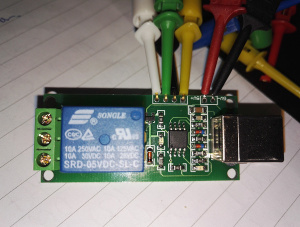
These days the phrase embedded usually means no console (except, if you re lucky, console on a UART for debugging) and probably busybox for as much of userspace as you can get away with. You possibly have package management from OpenEmbedded or similar, though it might just be a horrible kludged together rootfs if someone hates you. Either way it s rare for it not to involve some sort of hardware and OS much more advanced than the 8 bit machines I started out programming on. That is, unless you re playing with Arduinos or other similar hardware. I m currently waiting on some ESP8266 dev boards to arrive, but even they re quite advanced, with wifi and a basic OS framework provided. A long time ago I meant to get around to playing with PICs but never managed to do so. What I realised recently was that I have a ready made USB relay board that is powered by an ATtiny45. First step was to figure out if there were suitable programming pins available, which turned out to be all brought out conveniently to the edge of the board. Next I got out my trusty Bus Pirate, installed avrdude and lo and behold:
$ avrdude -p attiny45 -c buspirate -P /dev/ttyUSB0
Attempting to initiate BusPirate binary mode...
avrdude: Paged flash write enabled.
avrdude: AVR device initialized and ready to accept instructions
Reading   ##################################################   100% 0.01s
avrdude: Device signature = 0x1e9206 (probably t45)
avrdude: safemode: Fuses OK (E:FF, H:DD, L:E1)
avrdude done.  Thank you.
Perfect. I then read the existing flash image off the device, disassembled it, worked out it was based on V-USB and then proceeded to work out that the only interesting extra bit was that the relay was hanging off pin 3 on IO port B. Which led to me knocking up what I thought should be a functionally equivalent version of the firmware, available locally or on GitHub. It s worked with my basic testing so far and has confirmed to me I understand how the board is set up, meaning I can start to think about what else I could do with it

17 May 2016

Rapha&#235;l Hertzog: Freexian s report about Debian Long Term Support, April 2016

A Debian LTS logoLike each month, here comes a report about the work of paid contributors to Debian LTS. Individual reports In April, 116.75 work hours have been dispatched among 9 paid contributors. Their reports are available: Many contributors did not use all their allocated hours. This is partly explained by the fact that in April Wheezy was still under the responsibility of the security team and they were not able to drive updates from start to finish. In any case, this means that they have more hours available over May and since the LTS period started, they should hopefully be able to make a good dent in the backlog of security updates. Evolution of the situation The number of sponsored hours reached a new record with 132 hours per month, thanks to two new gold sponsors (Babiel GmbH and Plat Home). Plat Home s sponsorship was aimed to help us maintain Debian 7 Wheezy on armel and armhf (on top of already supported amd64 and i386). Hopefully the trend will continue so that we can reach our objective of funding the equivalent of a full-time position. The security tracker currently lists 45 packages with a known CVE and the dla-needed.txt file lists 44 packages awaiting an update. This is a bit more than the 15-20 open entries that we used to have at the end of the Debian 6 LTS period. Thanks to our sponsors New sponsors are in bold.

No comment Liked this article? Click here. My blog is Flattr-enabled.

16 May 2016

Russ Allbery: Review: Gentleman Jole and the Red Queen

Review: Gentleman Jole and the Red Queen, by Lois McMaster Bujold
Series: Vorkosigan #15
Publisher: Baen
Copyright: 2015
Printing: February 2016
ISBN: 1-4767-8122-2
Format: Kindle
Pages: 352
This is very late in the Vorkosigan series, but it's also a return to a different protagonist and a change of gears to a very different type of story. Gentleman Jole and the Red Queen has Cordelia as a viewpoint character for, I believe, the first time since Barrayar, very early in the series. But you would still want to read the intermediate Miles books before this one given the nature of the story Bujold is telling here. It's a very character-centric, very quiet story that depends on the history of all the Vorkosigan characters and the connection the reader has built up with them. I think you have to be heavily invested in this series already to get that much out of this book. The protagonist shift has a mildly irritating effect: I've read the whole series, but I was still a bit adrift at times because of how long it's been since I read the books focused on Cordelia. I only barely remember the events of Shards of Honor and Barrayar, which lay most of the foundations of this story. Bujold does have the characters retell them a bit, enough to get vaguely oriented, but I'm pretty sure I missed some subtle details that I wouldn't have if the entire series were fresh in memory. (Oh for the free time to re-read all of the series I'd like to re-read.) Unlike recent entries in this series, Gentleman Jole and the Red Queen is not about politics, investigations, space (or ground) combat, war, or any of the other sources of drama that have shown up over the course series. It's not even about a wedding. The details (and sadly even the sub-genre) are all spoilers, both for this book and for the end of Cryoburn, so I can't go into many details. But I'm quite curious how the die-hard Baen fans would react to this book. It's a bit far afield from their interests. Gentleman Jole is all about characters: about deciding what one wants to do with one's life, about families and how to navigate them, about boundaries and choices. Choices about what to communicate and what not to communicate, and, partly, about how to maintain sufficient boundaries against Miles to keep his manic energy from bulldozing into things that legitimately aren't any of his business. Since most of the rest of the series is about Miles poking into things that appear to not be his business and finding ways to fix things, it's an interesting shift. It also cast Cordelia in a new light for me: a combination of stability, self-assurance, and careful and thoughtful navigation around others' feelings. Not a lot happens in the traditional plot sense, so one's enjoyment of this book lives or dies on one's investment in the mundane life of the viewpoint characters. It worked for me. There is also a substantial retcon or reveal about an aspect of Miles's family that hasn't previously been mentioned. (Which term you use depends on whether you think Bujold has had this in mind all along. My money is on reveal.) I suspect some will find this revelation jarring and difficult to believe, but it worked perfectly for me. It felt like exactly the sort of thing that would go unnoticed by the other characters, particularly Miles: something that falls neatly into his blind spots and assumptions, but reads much differently to Cordelia. In general, one of the joys of this book for me is seeing Miles a bit wrong-footed and maneuvered by someone who simply isn't willing to be pushed by him. One of the questions the Vorkosigan series has been asking since the start is whether anyone can out-maneuver Miles. Ekaterin only arguably managed it, but Gentleman Jole makes it clear that Miles is no match for his mother on her home turf. This is a quiet and slow book that doesn't feel much like the rest of the series, but it worked fairly well for me. It's not up in the ranks of my favorite books of this series, partly because the way it played out was largely predictable and I never quite warmed to Jole, but Cordelia is delightful and seeing Miles from an outside perspective is entertaining. An odd entry in the series, but still recommended. Rating: 7 out of 10

14 May 2016

Thadeu Lima de Souza Cascardo: Chromebook Trackpad

Three years ago, I wanted to get a new laptop. I wanted something that could run free software, preferably without blobs, with some good amount of RAM, good battery and very light, something I could carry along with a work laptop. And I didn't want to spend too much. I don't want to make this too long, so in the end, I asked in the store anything that didn't come with Windows installed, and before I was dragged into the Macbook section, I shouted "and no Apple!". That's how I got into the Chromebook section with two options before me. There was the Chromebook Pixel, too expensive for me, and the Samsung Chromebook, using ARM. Getting a laptop with an ARM processor was interesting for me, because I like playing with different stuff. I looked up if it would be possible to run something other than ChromeOS on it, got the sense that is, it would, and make a call. It does not have too much RAM, but it was cheap. I got an external HD to compensate for the lack of storage (only 16GB eMMC), and that was it. Wifi does require non-free firmware to be loaded, but booting was a nice surprise. It is not perfect, but I will see if I can get to that another day. I managed to get Fedora installed, downloading chunks of an image that I could write into the storage. After a while, I backed up home, and installed Debian using debootstrap. Recently, after an upgrade from wheezy to jessie, things stopped working. systemd would not mount the most basic partitions and would simply stop very early in the boot process. That's a story on my backlog as well, that I plan to tell soon, since I believe this connects with supporting Debian on mobile devices. After fixing some things, I decided to try libinput instead of synaptics for the Trackpad. The Chromebook uses a Cypress APA Trackpad. The driver was upstreamed in Linux 3.9. The Chrome OS ships with Linux 3.4, but had the driver in its branch. After changing to libinput, I realized clicking did not work. Neither did tapping. I moved back to synaptics, and was reminded things didn't work too well with that either. I always had to enable tapping. I have some experience with input devices. I wrote drivers, small applications reacting to some events, and some uinput userspace drivers as well. I like playing with that subsystem a lot. But I don't have too much experience with multitouch and libinput is kind of new for me too. I got my hands on the code and found out there is libinput-debug-events. It will show you how libinput translates evdev events. I clicked on the Trackpad and got nothing but some pointer movements. I tried evtest and there were some multitouch events I didn't understand too well, but it looked like there were important events there that I thought libinput should have recognized. I tried reading some of libinput code, but didn't get too far before I tried something else. But then, I had to let this exercise for another day. Today, I decided to do it again. Now, with some fresh eyes, I looked at the driver code. It showed support for left, right and middle buttons. But maybe my device doesn't support it, because I don't remember seeing it on evtest when clicking the Trackpad. I also understood better the other multitouch events, they were just saying how many fingers there were and what was the position of which one of them. In the case of a single finger, you still get an identifier. For better understanding of all this, reading Documentation/input/event-codes.txt and Documentation/input/multi-touch-protocol.txt is recommended. So, in trying to answer if libinput needs to handle my devices events properly, or handle my device specially, or if the driver requires changes, or what else I can do to have a better experience with this Trackpad, things were tending to the driver and device. Then, after running evtest, I noticed a BTN_LEFT event. OK, so the device and driver support it, what is libinput doing with that? Running evtest and libinput-debug-events at the same time, I found out the problem. libinput was handling BTN_LEFT correctly, but the driver was not reporting it all the time. By going through the driver, it looks like this is either a firmware or a hardware problem. When you get the click response, sound and everything, the drivers will not always report it. It could be pressure, eletrical contact, I can't tell for sure. But the driver does not check for anything but what the firmware has reported, so it's not the driver. A very interesting I found out is that you can read and write the firmware. I dumped it to a file, but still could not analyze what it is. There are some commands to put the driver into some bootloader state, so maybe it's possible to play with the firmware without bricking the device, though I am not sure yet. Even then, the problem might not be fixable by just changing the firmware. So, I left with the possibility of using tapping, which was not working with libinput. Grepping at the code, I found out by libinput documentation that tapping needs to be enabled. The libinput xorg driver supports that. Just set the Tapping option to true and that's it. So, now I am a happy libinput user, with some of the same issues I had before with synaptics, but something you get used to. And I have a new firmware in front of me that maybe we could tackle by some reverse engineering.

Gunnar Wolf: Debugging backdoors and the usual software distribution for embedded-oriented systems

In the ARM world, to which I am still mostly a newcomer (although I've been already playing with ARM machines for over two years, I am a complete newbie compared to my Debian friends who live and breathe that architecture), the most common way to distribute operating systems is to distribute complete, already-installed images. I have ranted in the past on how those images ought to be distributed. Some time later, I also discussed on my blog on how most of this hardware requires unauditable binary blobs and other non-upstreamed modifications to Linux. In the meanwhile, I started teaching on the Embedded Linux diploma course in Facultad de Ingenier a, UNAM. It has been quite successful And fun. Anyway, one of the points we make emphasis on to our students is that the very concept of embedded makes the mere idea of downloading a pre-built, 4GB image, loaded with a (supposedly lightweight, but far fatter than my usual) desktop environment and whatnot an irony. As part of the "Linux Userspace" and "Boot process" modules, we make a lot of emphasis on how to build a minimal image. And even leaving installed size aside, it all boils down to trust. We teach mainly four different ways of setting up a system: Now... In the past few days, a huge vulnerability / oversight was discovered and made public, supporting my distrust of distribution forms that do not come from, well... The people we already know and trust to do this kind of work! Most current ARM chips cannot run with the stock, upstream Linux kernel. Then require a set of patches that different vendors pile up to support their basic hardware (remember those systems are almost always systems-on-a-chip (SoC)). Some vendors do take the hard work to try to upstream their changes that is, push the changes they did to the kernel for inclusion in mainstream Linux. This is a very hard task, and many vendors just abandon it. So, in many cases, we are stuck running with nonstandard kernels, full with huge modifications... And we trust them to do things right. After all, if they are knowledgeable enough to design a SoC, they should do at least decent kernel work, right? Turns out, it's far from the case. I have a very nice and nifty Banana Pi M3, based on the Allwinner A83T SoC. 2GB RAM, 8 ARM cores... A very nice little system, almost usable as a desktop. But it only boots with their modified 3.4.x kernel. This kernel has a very ugly flaw: A debugging mode left open, that allows any local user to become root. Even on a mostly-clean Debian system, installed by a chrooted debootstrap:
  1. Debian GNU/Linux 8 bananapi ttyS0
  2. banana login: gwolf
  3. Password:
  4. Last login: Thu Sep 24 14:06:19 CST 2015 on ttyS0
  5. Linux bananapi 3.4.39-BPI-M3-Kernel #9 SMP PREEMPT Wed Sep 23 15:37:29 HKT 2015 armv7l
  6. The programs included with the Debian GNU/Linux system are free software;
  7. the exact distribution terms for each program are described in the
  8. individual files in /usr/share/doc/*/copyright.
  9. Debian GNU/Linux comes with ABSOLUTELY NO WARRANTY, to the extent
  10. permitted by applicable law.
  11. gwolf@banana:~$ id
  12. uid=1001(gwolf) gid=1001(gwolf) groups=1001(gwolf),4(adm),20(dialout),21(fax),24(cdrom),25(floppy),26(tape),27(sudo),29(audio),30(dip),44(video),46(plugdev),108(netdev)
  13. gwolf@banana:~$ echo rootmydevice > /proc/sunxi_debug/sunxi_debug
  14. gwolf@banana:~$ id
  15. groups=0(root),4(adm),20(dialout),21(fax),24(cdrom),25(floppy),26(tape),27(sudo),29(audio),30(dip),44(video),46(plugdev),108(netdev),1001(gwolf)
Why? Oh, well, in this kernel somebody forgot to comment out (or outright remove!) the sunxi-debug.c file, or at the very least, a horrid part of code therein (it's a very small, simple file):
  1. if(!strncmp("rootmydevice",(char*)buf,12))
  2. cred = (struct cred *)__task_cred(current);
  3. cred->uid = 0;
  4. cred->gid = 0;
  5. cred->suid = 0;
  6. cred->euid = 0;
  7. cred->euid = 0;
  8. cred->egid = 0;
  9. cred->fsuid = 0;
  10. cred->fsgid = 0;
  11. printk("now you are root\n");
Now... Just by looking at this file, many things should be obvious. For example, this is not only dangerous and lazy (it exists so developers can debug by touching a file instead of... typing a password?), but also goes against the kernel coding guidelines the file is not documented nor commented at all. Peeking around other files in the repository, it gets obvious that many files lack from this same basic issue and having this upstreamed will become a titanic task. If their programmers tried to adhere to the guidelines to begin with, integration would be a much easier path. Cutting the wrong corners will just increase the needed amount of work. Anyway, enough said by me. Some other sources of information: There are surely many other mentions of this. I just had to repeat it for my local echo chamber, and for future reference in class! ;-)

12 May 2016

Antoine Beaupr : Notmuch, offlineimap and Sieve setup

I've been using Notmuch since about 2011, switching away from Mutt to deal with the monstrous amount of emails I was, and still am dealing with on the computer. I have contributed a few patches and configs on the Notmuch mailing list, but basically, I have given up on merging patches, and instead have a custom config in Emacs that extend it the way I want. In the last 5 years, Notmuch has progressed significantly, so I haven't found the need to patch it or make sweeping changes.

The huge INBOX of death The one thing that is problematic with my use of Notmuch is that I end up with a ridiculously large INBOX folder. Before the cleanup I did this morning, I had over 10k emails in there, out of about 200k emails overall. Since I mostly work from my laptop these days, the Notmuch tags are only on the laptop, and not propagated to the server. This makes accessing the mail spool directly, from webmail or simply through a local client (say Mutt) on the server, really inconvenient, because it has to load a very large spool of mail, which is very slow in Mutt. Even worse, a bunch of mail that was archived in Notmuch shows up in the spool because it's just removed tags in Notmuch: the mails are still in the inbox, even though they are marked as read. So I was hoping that Notmuch would help me deal with the giant inbox of death problem, but in fact, when I don't use Notmuch, it actually makes the problem worse. Today, I did a bunch of improvements to my setup to fix that. The first thing I did was to kill procmail, which I was surprised to discover has been dead for over a decade. I switched over to Sieve for filtering, having already switched to Dovecot a while back on the server. I tried to use the procmail2sieve.pl conversion tool but it didn't work very well, so I basically rewrote the whole file. Since I was mostly using Notmuch for filtering, there wasn't much left to convert.

Sieve filtering But this is where things got interesting: Sieve is so simpler to use and more intuitive that I started doing more interesting stuff in bridging the filtering system (Sieve) with the tagging system (Notmuch). Basically, I use Sieve to split large chunks of emails off my main inbox, to try to remove as much spam, bulk email, notifications and mailing lists as possible from the larger flow of emails. Then Notmuch comes in and does some fine-tuning, assigning tags to specific mailing lists or topics, and being generally the awesome search engine that I use on a daily basis.

Dovecot and Postfix configs For all of this to work, I had to tweak my mail servers to talk sieve. First, I enabled sieve in Dovecot:
--- a/dovecot/conf.d/15-lda.conf
+++ b/dovecot/conf.d/15-lda.conf
@@ -44,5 +44,5 @@
 protocol lda  
   # Space separated list of plugins to load (default is global mail_plugins).
-  #mail_plugins = $mail_plugins
+  mail_plugins = $mail_plugins sieve
  
Then I had to switch from procmail to dovecot for local delivery, that was easy, in Postfix's perennial main.cf:
#mailbox_command = /usr/bin/procmail -a "$EXTENSION"
mailbox_command = /usr/lib/dovecot/dovecot-lda -a "$RECIPIENT"
Note that dovecot takes the full recipient as an argument, not just the extension. That's normal. It's clever, it knows that kind of stuff. One last tweak I did was to enable automatic mailbox creation and subscription, so that the automatic extension filtering (below) can create mailboxes on the fly:
--- a/dovecot/conf.d/15-lda.conf
+++ b/dovecot/conf.d/15-lda.conf
@@ -37,10 +37,10 @@
 #lda_original_recipient_header =
 # Should saving a mail to a nonexistent mailbox automatically create it?
-#lda_mailbox_autocreate = no
+lda_mailbox_autocreate = yes
 # Should automatically created mailboxes be also automatically subscribed?
-#lda_mailbox_autosubscribe = no
+lda_mailbox_autosubscribe = yes
 protocol lda  
   # Space separated list of plugins to load (default is global mail_plugins).

Sieve rules Then I had to create a Sieve ruleset. That thing lives in ~/.dovecot.sieve, since I'm running Dovecot. Your provider may accept an arbitrary ruleset like this, or you may need to go through a web interface, or who knows. I'm assuming you're running Dovecot and have a shell from now on. The first part of the file is simply to enable a bunch of extensions, as needed:
# Sieve Filters
# http://wiki.dovecot.org/Pigeonhole/Sieve/Examples
# https://tools.ietf.org/html/rfc5228
require "fileinto";
require "envelope";
require "variables";
require "subaddress";
require "regex";
require "vacation";
require "vnd.dovecot.debug";
Some of those are not used yet, for example I haven't tested the vacation module yet, but I have good hopes that I can use it as a way to announce a special "urgent" mailbox while I'm traveling. The rationale is to have a distinct mailbox for urgent messages that is announced in the autoreply, that hopefully won't be parsable by bots.

Spam filtering Then I filter spam using this fairly standard expression:
########################################################################
# spam 
# possible improvement, server-side:
# http://wiki.dovecot.org/Pigeonhole/Sieve/Examples#Filtering_using_the_spamtest_and_virustest_extensions
if header :contains "X-Spam-Flag" "YES"  
  fileinto "junk";
  stop;
  elsif header :contains "X-Spam-Level" "***"  
  fileinto "greyspam";
  stop;
 
This puts stuff into the junk or greyspam folder, based on the severity. I am very aggressive with spam: stuff often ends up in the greyspam folder, which I need to check from time to time, but it beats having too much spam in my inbox.

Mailing lists Mailing lists are generally put into a lists folder, with some mailing lists getting their own folder:
########################################################################
# lists
# converted from procmail
if header :contains "subject" "FreshPorts"  
    fileinto "freshports";
  elsif header :contains "List-Id" "alternc.org"  
    fileinto "alternc";
  elsif header :contains "List-Id" "koumbit.org"  
    fileinto "koumbit";
  elsif header :contains ["to", "cc"] ["lists.debian.org",
                                       "anarcat@debian.org"]  
    fileinto "debian";
# Debian BTS
  elsif exists "X-Debian-PR-Message"  
    fileinto "debian";
# default lists fallback
  elsif exists "List-Id"  
    fileinto "lists";
 
The idea here is that I can safely subscribe to lists without polluting my mailbox by default. Further processing is done in Notmuch.

Extension matching I also use the magic +extension tag on emails. If you send email to, say, foo+extension@example.com then the emails end up in the foo folder. This is done with the help of the following recipe:
########################################################################
# wildcard +extension
# http://wiki.dovecot.org/Pigeonhole/Sieve/Examples#Plus_Addressed_mail_filtering
if envelope :matches :detail "to" "*"  
  # Save name in $ name  in all lowercase except for the first letter.
  # Joe, joe, jOe thus all become 'Joe'.
  set :lower "name" "$ 1 ";
  fileinto "$ name ";
  #debug_log "filed into mailbox $ name  because of extension";
  stop;
 
This is actually very effective: any time I register to a service, I try as much as possible to add a +extension that describe the service. Of course, spammers and marketers (it's the same really) are free to drop the extension and I suspect a lot of them do, but it helps with honest providers and this actually sorts a lot of stuff out of my inbox into topically-defined folders. It is also a security issue: someone could flood my filesystem with tons of mail folders, which would cripple the IMAP server and eat all the inodes, 4 times faster than just sending emails. But I guess I'll cross that bridge when I get there: anyone can flood my address and I have other mechanisms to deal with this. The trick is to then assign tags to all folders so that they appear in the Notmuch-emacs welcome view:
echo tagging folders
for folder in $(ls -ad $HOME/Maildir/$ PREFIX */   egrep -v "Maildir/$ PREFIX (feeds.* Sent.* INBOX/ INBOX/Sent)\$"); do
    tag=$(echo $folder   sed 's#/$##;s#^.*/##')
    notmuch tag +$tag -inbox tag:inbox and not tag:$tag and folder:$ PREFIX $tag
done
This is part of my notmuch-tag script that includes a lot more fine-tuned filtering, detailed below.

Automated reports filtering Another thing I get a lot of is machine-generated "spam". Well, it's not commercial spam, but it's a bunch of Nagios, cron jobs, and god knows what software thinks it's important to send me emails every day. I get a lot less of those these days since I'm off work at Koumbit, but still, those can be useful for others as well:
if anyof (exists "X-Cron-Env",
          header :contains ["subject"] ["security run output",
                                        "monthly run output",
                                        "daily run output",
                                        "weekly run output",
                                        "Debian Package Updates",
                                        "Debian package update",
                                        "daily mail stats",
                                        "Anacron job",
                                        "nagios",
                                        "changes report",
                                        "run output",
                                        "[Systraq]",
                                        "Undelivered mail",
                                        "Postfix SMTP server: errors from",
                                        "backupninja",
                                        "DenyHosts report",
                                        "Debian security status",
                                        "apt-listchanges"
                                        ],
           header :contains "Auto-Submitted" "auto-generated",
           envelope :contains "from" ["nagios@",
                                      "logcheck@"])
     
    fileinto "rapports";
 
# imported from procmail
elsif header :comparator "i;octet" :contains "Subject" "Cron"  
  if header :regex :comparator "i;octet"  "From" ".*root@"  
        fileinto "rapports";
   
 
elsif header :comparator "i;octet" :contains "To" "root@"  
  if header :regex :comparator "i;octet"  "Subject" "\\*\\*\\* SECURITY"  
        fileinto "rapports";
   
 
elsif header :contains "Precedence" "bulk"  
    fileinto "bulk";
 

Refiltering emails Of course, after all this I still had thousands of emails in my inbox, because the sieve filters apply only on new emails. The beauty of Sieve support in Dovecot is that there is a neat sieve-filter command that can reprocess an existing mailbox. That was a lifesaver. To run a specific sieve filter on a mailbox, I simply run:
sieve-filter .dovecot.sieve INBOX 2>&1   less
Well, this doesn't do anything. To really execute the filters, you need the -e flags, and to write to the INBOX for real, you need the -w flag as well, so the real run looks something more like this:
sieve-filter -e -W -v .dovecot.sieve INBOX > refilter.log 2>&1
The funky output redirects are necessary because this outputs a lot of crap. Also note that, unfortunately, the fake run output differs from the real run and is actually more verbose, which makes it really less useful than it could be.

Archival I also usually archive my mails every year, rotating my mailbox into an Archive.YYYY directory. For example, now all mails from 2015 are archived in a Archive.2015 directory. I used to do this with Mutt tagging and it was a little slow and error-prone. Now, i simply have this Sieve script:
require ["variables","date","fileinto","mailbox", "relational"];
# Extract date info
if currentdate :matches "year" "*"   set "year" "$ 1 ";  
if date :value "lt" :originalzone "date" "year" "$ year "  
  if date :matches "received" "year" "*"  
    # Archive Dovecot mailing list items by year and month.
    # Create folder when it does not exist.
    fileinto :create "Archive.$ 1 ";
   
 
I went from 15613 to 1040 emails in my real inbox with this process (including refiltering with the default filters as well).

Notmuch configuration My Notmuch configuration is a in three parts: I have small settings in ~/.notmuch-config. The gist of it is:
[new]
tags=unread;inbox;
ignore=
#[maildir]
# synchronize_flags=true
# tentative patch that was refused upstream
# http://mid.gmane.org/1310874973-28437-1-git-send-email-anarcat@koumbit.org
#reckless_trash=true
[search]
exclude_tags=deleted;spam;
I omitted the fairly trivial [user] section for privacy reasons and [database] for declutter. Then I have a notmuch-tag script symlinked into ~/Maildir/.notmuch/hooks/post-new. It does way too much stuff to describe in details here, but here are a few snippets:
if hostname   grep angela > /dev/null; then
    PREFIX=Anarcat/
else
    PREFIX=.
fi
This sets a variable that makes the script work on my laptop (angela), where mailboxes are in Maildir/Anarcat/foo or the server, where mailboxes are in Maildir/.foo. I also have special rules to tag my RSS feeds, which are generated by feed2imap, which is documented shortly below:
echo tagging feeds
( cd $HOME/Maildir/ && for feed in $ PREFIX feeds.*; do
    name=$(echo $feed   sed "s#$ PREFIX feeds\\.##")
    notmuch tag +feeds +$name -inbox folder:$feed and not tag:feeds
done )
Another example that would be useful is how to tag mailing lists, for example, this removes the inbox tag and adds the notmuch tags to emails from the notmuch mailing list.
notmuch tag +lists +notmuch      -inbox tag:inbox and "to:notmuch@notmuchmail.org"
Finally, I have a bunch of special keybindings in ~/.emacs.d/notmuch-config.el:
;; autocompletion
(eval-after-load "notmuch-address"
  '(progn
     (notmuch-address-message-insinuate)))
; use fortune for signature, config is in custom
(add-hook 'message-setup-hook 'fortune-to-signature)
; don't remember what that is
(add-hook 'notmuch-show-hook 'visual-line-mode)
;;;;;;;;;;;;;;;;;;;;;;;;;;;;;;;;;;;;;;;;;;;;;;;;;;;;;;;;;;;;;;;;;;;;;;;;
;;; keymappings
;;;;;;;;;;;;;;;;;;;;;;;;;;;;;;;;;;;;;;;;;;;;;;;;;;;;;;;;;;;;;;;;;;;;;;;;
(define-key notmuch-show-mode-map "S"
  (lambda ()
    "mark message as spam and advance"
    (interactive)
    (notmuch-show-tag '("+spam" "-unread"))
    (notmuch-show-next-open-message-or-pop)))
(define-key notmuch-search-mode-map "S"
  (lambda (&optional beg end)
    "mark message as spam and advance"
    (interactive (notmuch-search-interactive-region))
    (notmuch-search-tag (list "+spam" "-unread") beg end)
    (anarcat/notmuch-search-next-message)))
(define-key notmuch-show-mode-map "H"
  (lambda ()
    "mark message as spam and advance"
    (interactive)
    (notmuch-show-tag '("-spam"))
    (notmuch-show-next-open-message-or-pop)))
(define-key notmuch-search-mode-map "H"
  (lambda (&optional beg end)
    "mark message as spam and advance"
    (interactive (notmuch-search-interactive-region))
    (notmuch-search-tag (list "-spam") beg end)
    (anarcat/notmuch-search-next-message)))
(define-key notmuch-search-mode-map "l" 
  (lambda (&optional beg end)
    "undelete and advance"
    (interactive (notmuch-search-interactive-region))
    (notmuch-search-tag (list "-unread") beg end)
    (anarcat/notmuch-search-next-message)))
(define-key notmuch-search-mode-map "u"
  (lambda (&optional beg end)
    "undelete and advance"
    (interactive (notmuch-search-interactive-region))
    (notmuch-search-tag (list "-deleted") beg end)
    (anarcat/notmuch-search-next-message)))
(define-key notmuch-search-mode-map "d"
  (lambda (&optional beg end)
    "delete and advance"
    (interactive (notmuch-search-interactive-region))
    (notmuch-search-tag (list "+deleted" "-unread") beg end)
    (anarcat/notmuch-search-next-message)))
(define-key notmuch-show-mode-map "d"
  (lambda ()
    "delete current message and advance"
    (interactive)
    (notmuch-show-tag '("+deleted" "-unread"))
    (notmuch-show-next-open-message-or-pop)))
;; https://notmuchmail.org/emacstips/#index17h2
(define-key notmuch-show-mode-map "b"
  (lambda (&optional address)
    "Bounce the current message."
    (interactive "sBounce To: ")
    (notmuch-show-view-raw-message)
    (message-resend address)
    (kill-buffer)))
;;;;;;;;;;;;;;;;;;;;;;;;;;;;;;;;;;;;;;;;;;;;;;;;;;;;;;;;;;;;;;;;;;;;;;;;
;;; my custom notmuch functions
;;;;;;;;;;;;;;;;;;;;;;;;;;;;;;;;;;;;;;;;;;;;;;;;;;;;;;;;;;;;;;;;;;;;;;;;
(defun anarcat/notmuch-search-next-thread ()
  "Skip to next message from region or point
This is necessary because notmuch-search-next-thread just starts
from point, whereas it seems to me more logical to start from the
end of the region."
  ;; move line before the end of region if there is one
  (unless (= beg end)
    (goto-char (- end 1)))
  (notmuch-search-next-thread))
;; Linking to notmuch messages from org-mode
;; https://notmuchmail.org/emacstips/#index23h2
(require 'org-notmuch nil t)
(message "anarcat's custom notmuch config loaded")
This is way too long: in my opinion, a bunch of that stuff should be factored in upstream, but some features have been hard to get in. For example, Notmuch is really hesitant in marking emails as deleted. The community is also very strict about having unit tests for everything, which makes writing new patches a significant challenge for a newcomer, which will often need to be familiar with both Elisp and C. So for now I just have those configs that I carry around. Emails marked as deleted or spam are processed with the following script named notmuch-purge which I symlink to ~/Maildir/.notmuch/hooks/pre-new:
#!/bin/sh
if hostname   grep angela > /dev/null; then
    PREFIX=Anarcat/
else
    PREFIX=.
fi
echo moving tagged spam to the junk folder
notmuch search --output=files tag:spam \
        and not folder:$ PREFIX junk \
        and not folder:$ PREFIX greyspam \
        and not folder:Koumbit/INBOX \
        and not path:Koumbit/** \
      while read file; do
          mv "$file" "$HOME/Maildir/$ PREFIX junk/cur"
      done
echo unconditionnally deleting deleted mails
notmuch search --output=files tag:deleted   xargs -r rm
Oh, and there's also customization for Notmuch:
;; -*- mode: emacs-lisp; auto-recompile: t; -*-
(custom-set-variables
 ;; from https://anarc.at/sigs.fortune
 '(fortune-file "/home/anarcat/.mutt/sigs.fortune")
 '(message-send-hook (quote (notmuch-message-mark-replied)))
 '(notmuch-address-command "notmuch-address")
 '(notmuch-always-prompt-for-sender t)
 '(notmuch-crypto-process-mime t)
 '(notmuch-fcc-dirs
   (quote
    ((".*@koumbit.org" . "Koumbit/INBOX.Sent")
     (".*" . "Anarcat/Sent"))))
 '(notmuch-hello-tag-list-make-query "tag:unread")
 '(notmuch-message-headers (quote ("Subject" "To" "Cc" "Bcc" "Date" "Reply-To")))
 '(notmuch-saved-searches
   (quote
    ((:name "inbox" :query "tag:inbox and not tag:koumbit and not tag:rt")
     (:name "unread inbox" :query "tag:inbox and tag:unread")
     (:name "unread" :query "tag:unred")
     (:name "freshports" :query "tag:freshports and tag:unread")
     (:name "rapports" :query "tag:rapports and tag:unread")
     (:name "sent" :query "tag:sent")
     (:name "drafts" :query "tag:draft"))))
 '(notmuch-search-line-faces
   (quote
    (("deleted" :foreground "red")
     ("unread" :weight bold)
     ("flagged" :foreground "blue"))))/
 '(notmuch-search-oldest-first nil)
 '(notmuch-show-all-multipart/alternative-parts nil)
 '(notmuch-show-all-tags-list t)
 '(notmuch-show-insert-text/plain-hook
   (quote
    (notmuch-wash-convert-inline-patch-to-part notmuch-wash-tidy-citations notmuch-wash-elide-blank-lines notmuch-wash-excerpt-citations)))
 )
I think that covers it.

Offlineimap So of course the above works well on the server directly, but how do run Notmuch on a remote machine that doesn't have access to the mail spool directly? This is where OfflineIMAP comes in. It allows me to incrementally synchronize a local Maildir folder hierarchy with a a remote IMAP server. I am assuming you already have an IMAP server configured, since you already configured Sieve above. Note that other synchronization tools exist. The other popular one is isync but I had trouble migrating to it (see courriels for details) so for now I am sticking with OfflineIMAP. The configuration is fairly simple:
[general]
accounts = Anarcat
ui = Blinkenlights
maxsyncaccounts = 3
[Account Anarcat]
localrepository = LocalAnarcat
remoterepository = RemoteAnarcat
# refresh all mailboxes every 10 minutes
autorefresh = 10
# run notmuch after refresh
postsynchook = notmuch new
# sync only mailboxes that changed
quick = -1
## possible optimisation: ignore mails older than a year
#maxage = 365
# local mailbox location
[Repository LocalAnarcat]
type = Maildir
localfolders = ~/Maildir/Anarcat/
# remote IMAP server
[Repository RemoteAnarcat]
type = IMAP
remoteuser = anarcat
remotehost = anarc.at
ssl = yes
# without this, the cert is not verified (!)
sslcacertfile = /etc/ssl/certs/DST_Root_CA_X3.pem
# do not sync archives
folderfilter = lambda foldername: not re.search('(Sent\.20[01][0-9]\..*)', foldername) and not re.search('(Archive.*)', foldername)
# and only subscribed folders
subscribedonly = yes
# don't reconnect all the time
holdconnectionopen = yes
# get mails from INBOX immediately, doesn't trigger postsynchook
idlefolders = ['INBOX']
Critical parts are:
  • postsynchook: obviously, we want to run notmuch after fetching mail
  • idlefolders: receives emails immediately without waiting for the longer autorefresh delay, which means that most mailboxes don't see new emails until 10 minutes in the worst case. unfortunately, doesn't run the postsynchook so I need to hit G in Emacs to see new mail
  • quick=-1, subscribedonly, holdconnectionopen: makes most runs much, much faster as it skips unchanged or unsubscribed folders and keeps the connection to the server
The other settings should be self-explanatory.

RSS feeds I gave up on RSS readers, or more precisely, I merged RSS feeds and email. The first time I heard of this, it sounded like a horrible idea, because it means yet more emails! But with proper filtering, it's actually a really nice way to process emails, since it leverages the distributed nature of email. For this I use a fairly standard feed2imap, although I do not deliver to an IMAP server, but straight to a local Maildir. The configuration looks like this:
---
include-images: true
target-refix: &target "maildir:///home/anarcat/Maildir/.feeds."
feeds:
- name: Planet Debian
  url: http://planet.debian.org/rss20.xml
  target: [ *target, 'debian-planet' ]
I have obviously more feeds, the above is just and example. This will deliver the feeds as emails in one mailbox per feed, in ~/Maildir/.feeds.debian-planet, in the above example.

Troubleshooting You will fail at writing the sieve filters correctly, and mail will (hopefully?) fall through to your regular mailbox. Syslog will tell you things fail, as expected, and details are in your .dovecot.sieve.log file in your home directory. I also enabled debugging on the Sieve module
--- a/dovecot/conf.d/90-sieve.conf
+++ b/dovecot/conf.d/90-sieve.conf
@@ -51,6 +51,7 @@ plugin  
        # deprecated imapflags extension in addition to all extensions were already
   # enabled by default.
   #sieve_extensions = +notify +imapflags
+  sieve_extensions = +vnd.dovecot.debug
   # Which Sieve language extensions are ONLY available in global scripts. This
   # can be used to restrict the use of certain Sieve extensions to administrator
This allowed me to use debug_log function in the rulesets to output stuff directly to the logfile.

Further improvements Of course, this is all done on the commandline, but that is somewhat expected if you are already running Notmuch. Of course, it would be much easier to edit those filters through a GUI. Roundcube has a nice Sieve plugin, and Thunderbird also has such a plugin as well. Since Sieve is a standard, there's a bunch of clients available. All those need you to setup some sort of thing on the server, which I didn't bother doing yet. And of course, a key improvement would be to have Notmuch synchronize its state better with the mailboxes directly, instead of having the notmuch-purge hack above. Dovecot and Maildir formats support up to 26 flags, and there were discussions about using those flags to synchronize with notmuch tags so that multiple notmuch clients can see the same tags on different machines transparently. This, however, won't make Notmuch work on my phone or webmail or any other more generic client: for that, Sieve rules are still very useful. I still don't have webmail setup at all: so to read email, I need an actual client, which is currently my phone, which means I need to have Wifi access to read email. "Internet Caf s" or "this guy's computer" won't work as well, although I can always use ssh to login straight to the server and read mails with Mutt. I am also considering using X509 client certificates to authenticate to the mail server without a passphrase. This involves configuring Postfix, which seems simple enough. Dovecot's configuration seems a little more involved and less well documented. It seems that both [OfflimeIMAP][] and K-9 mail support client-side certs. OfflineIMAP prompts me for the password so it doesn't get leaked anywhere. I am a little concerned about building yet another CA, but I guess it would not be so hard... The server side of things needs more documenting, particularly the spam filters. This is currently spread around this wiki, mostly in configuration.

Security considerations The whole purpose of this was to make it easier to read my mail on other devices. This introduces a new vulnerability: someone may steal that device or compromise it to read my mail, impersonate me on different services and even get a shell on the remote server. Thanks to the two-factor authentication I setup on the server, I feel a little more confident that just getting the passphrase to the mail account isn't sufficient anymore in leveraging shell access. It also allows me to login with ssh on the server without trusting the machine too much, although that only goes so far... Of course, sudo is then out of the question and I must assume that everything I see is also seen by the attacker, which can also inject keystrokes and do all sorts of nasty things. Since I also connected my email account on my phone, someone could steal the phone and start impersonating me. The mitigation here is that there is a PIN for the screen lock, and the phone is encrypted. Encryption isn't so great when the passphrase is a PIN, but I'm working on having a better key that is required on reboot, and the phone shuts down after 5 failed attempts. This is documented in my phone setup. Client-side X509 certificates further mitigates those kind of compromises, as the X509 certificate won't give shell access. Basically, if the phone is lost, all hell breaks loose: I need to change the email password (or revoke the certificate), as I assume the account is about to be compromised. I do not trust Android security to give me protection indefinitely. In fact, one could argue that the phone is already compromised and putting the password there already enabled a possible state-sponsored attacker to hijack my email address. This is why I have an OpenPGP key on my laptop to authenticate myself for critical operations like code signatures. The risk of identity theft from the state is, after all, a tautology: the state is the primary owner of identities, some could say by definition. So if a state-sponsored attacker would like to masquerade as me, they could simply issue a passport under my name and join a OpenPGP key signing party, and we'd have other problems to deal with, namely, proper infiltration counter-measures and counter-snitching.

Next.

Previous.