Search Results: "cas"

27 December 2015

Steve Kemp: Some things are universal?

I don't often do retrospectives, but this year has been an unusual one for me, as I moved to Finland almost six months ago. The topic has come up in conversation a lot over the past few months, so when people ask me what I think I can give some simple answers without too much thought. Here's a brief summary. There are some obvious changes:
The Traffic
The traffic drives on the right-hand side of the roads, which took a bit of getting used to, but isn't a huge surprise as I've travelled in Europe in the past. There aren't so many countries that drive on the left after all so most people probably wouldn't even notice this as odd. When it comes to traffic one thing nice about Helsinki is that most junctions are "zebra crossings". Sure they don't have flashing lights, but they have shaded areas, and pedestrians have right of way. As for transport the city of Helsinki has local trains, trams, buses and taxis. The trams and buses all use the same card for payment so transport is integrated very well. I buy a time-based card, spending about 50 for a month of unlimited travel. If you prefer you may add euros to your card and pay for distinct journeys - but that works out more expensive if you travel twice, or more, a day.
The Money
Finland uses the Euro these days, having switched from the Finnish markka in 2002. Enough said. Costs are largely in line with what I'd expect: Cigarettes are cheap, beer is expensive. Some things are very expensive, some things are very cheap. Largely the expensive things are those that are imported. It is a very small country after all.
The Language
Finnish is .. complex. But I've not struggled too much. Mostly I can buy what I want without difficulty. There are weird exceptions though for example I went out to buy soup one day and had to return carrying only shame and disappointment: I can't read the language on the tins and what I thought was soup turned out to be a can of chopped tomatoes. Food is good though, and available easily (!!). The only significant surprise when it comes to shopping is that loose goods must be weighed yourself. You pick up a bunch of bananas, take it to the scales, press the button that has a picture of a banana on it, and it prints out a label you attach to them - at the till the cashier will scan the label and charge you. If you forget, or don't know how to do it they'll tut and complain. In daily life I use two phrases frequently and they are sufficient for communcation:
  • "minua haluan ... kahvi kakku olut"
    • "I want ... coffee cake beer".
  • "kiitos"
    • "Thanks"
Usually people speak to me in English, which is a little annoying as it means I'm not learning as much as I could. But that said over the past few months I've had proper conversations entirely in Finnish with shop-keepers, and similar. So I'm getting better.
The Culture
Finnish people are friendly, but terse. That's the reputation. The Finnish people are alcoholics, and have high rates of suicide. Also the reputation. Finally we know that the Finnish people consume more coffee than the rest of the world. All those things are true, but they're not enough by far to describe the people. Obviously they're all different, and we have a lot of people from other parts of the world here too - Russians, Asians, Somalians. So culture is complex .. but markedly different than in the UK. I could write more about this, but I think for the moment I'll just draw a line under culture and say that I'm enjoying the interactions with people here, and while many things are slightly "off", it's not bad. Just different. Also saunas are fun. I've never had any qualms about being naked with strangers, so I don't really understand why Americans, and others, find this so difficult/surprising. But yeah, saunas are great. Things that Finland is known for internationally: The invention of the molotov cocktail, rally-driving, hockey, world's strongest man, Moomins, Tom of Finland, Salmiakki.
The Weather
Not too hot. Not too cold. But that's largely because I'm one of those "hot" people who doesn't really get cold even at the best of times. My ideal temperatures are about 13 C. My wife prefers 15 C, or more. We don't fight any more. Mostly. Winter is apparently full of snow, but this year has been poor. We had the first snowfall yesterday, here in Helsinki, and we woke this morning a blanket of snow about two inches high. It looks pretty. The biggest thing about weather in Finland is the constant darkness in winter, and the constant sun in Summer. In Summer there were like 22 hours of sunlight a day which made sleeping hard when we moved into our flat - with no curtains. In winter it feels like there is 20 minutes of sunlight a day. It's not that bad here in the south, although I think it is something like five hours and less in the north. I've never had any real issues with depression, or similar: People have good days and bad days, I'd generally be "OK" or "great". In the darkness? I've been grumpy at colleagues, I've made bad choices, I've lapsed attention. I'm not sure I can blame it on the weather, or my reaction to the weather, but I know I've not been as "happy" as I "should". It requires effort to be enthusiastic in a way I've never experienced before. Thankfully once I (slowly) realized this I took action and I think I'm good now. Unlike the UK the buildings here are relatively modern. I think that's the biggest contributing factor to how houses are "warm". Houses have all been built in the last 50-100 years, so you have proper insulation. Even though it might be very very cold outdoors indoors you can be naked without heating. Try that in the UK and you might freeze in some of the older leakier houses! You do have to laugh, though, when people point out "the oldest pub" in the city though. Where I come from if I pub isn't 500+ years old you wouldn't give it a seconds thought - places like The Golden Fleece, etc.
I could write more. I probably should. But it has been an interesting year, and although there are things I miss about the UK, and Edinburgh specifically, I have no regrets. I'm glad I came. What triggered this post? I said "Some things are universal" to my wife, when I saw a child riding a bicycle they'd obviously just received for Christmas. Her reaction "No Finnish person would buy a bicycle at Christmas - they'd expect too much snow!". So perhaps it was another immigrant family. Christmas bicycles universal, or not, it doesn't really matter.

26 December 2015

Lucas Nussbaum: Debian packages with /outdated/ packaging style

(This is just a copy of this debian-devel@ email) Following my blog post yesterday with graphs about Debian packaging evolution, I prepared lists of packages for each kind of outdatedness. Of course not all practices highlighted below are deprecated, and there are good reasons to continue to do some of them. But still, given that they all represent a clear minority of packages, I thought that it would be useful to list the related packages. (I honestly didn t know if some of my packages would show up in the lists!) The lists are available at https://people.debian.org/~lucas/qa-20151226/ I also pushed them to alioth, so you can either do:
ssh people.debian.org 'grep -A 10 YOURNAME ~lucas/public_html/qa-20151226/*ddlist'
or:
ssh alioth.debian.org 'grep -A 10 YOURNAME ~lucas/qa-20151226/*ddlist' the meaning of the lists is: If you don t understand why your package is listed, you can have a look at allpackages-20151226.yaml that provides more details. If you still don t understand, just ask me. Excluding duplicates, a total of 5469 packages are listed. The dd-list output for the merged list is also available (which isn t very useful, except to know if you are listed).

Russ Allbery: Review: The Steerswoman

Review: The Steerswoman, by Rosemary Kirstein
Series: Steerswomen #1
Publisher: Del Rey
Copyright: 1989, 2003
Printing: 2003
ISBN: 0-345-46105-3
Format: Trade paperback
Pages: 264
I read this novel as part of The Steerswoman's Road omnibus, which is the edition reflected in the metadata (except for the page count, which is just this novel). Rowan is a steerswoman, a member of an order of traveling scholars in a world of generally medieval customs. This is a world of small villages and town blacksmiths, of swords, sailing ships, and lots of walking. Steerswomen (the order does include some men, but only rarely; the gender balance is left delightfully unexplained and unremarked) mostly travel routes through the Inner Lands until they decide to retire and do research and study. Sometimes, though, they get on the trail of something unexplained, and are driven to explain it. That's the case for Rowan at the start of this book: she's run across several peculiar flat jewels. No one seems to know what they are, their pattern of distribution is odd, and they're discovered in some decidedly strange places, such as embedded deep in a tree. It's a puzzle, and Rowan is determined to understand it. The Steerswoman opens with Rowan investigating a jewel owned by an innkeeper, and a chance meeting in his inn with an Outskirter who wears a whole belt of the same jewels. The Outskirters are nomadic tribes from the far west known for their prickly attitude, their ability in warfare, and their occasional raids. Those who live in the Inner Lands consider them barbarians. But Bel is curious, thoughtful, and happy to tell Rowan of the origin of her belt: her father found a huge number of the jewels embedded in the side of a cliff, far into the Outskirts. Rowan is immediately tempted to go there, but she has to report to the Archives first. Much to her surprise, Bel asks to accompany her. And then wizards start trying to kill them. The steerswomen are Kirstein's best bit of world-building and the anchor around which the rest of the story is told. Steerswomen have to answer all questions they're asked, truthfully. In return, they can ask a question of anyone and have to be answered truthfully. If anyone refuses to answer, or tells a deliberate lie, they're placed under the steerswomen's ban, and no steerswoman will answer their questions. This is woven deep into the culture of the Inner Lands... except for the wizards, who refuse to explain what they're doing or how to anyone, are under the ban, and don't care. They protect cities from dragons, build magical lighting, and occasionally start wars with other wizards in which numerous people die. They're effectively the rulers of this world insofar as it has rulers, and they're apparently quite interested in Rowan's search for these unexplained jewels. Rowan is a wonderful character. At the start of the book, she's the only steerswoman that the reader knows, so much of her early behavior is also world-building, showing us steerswomen. But as the story develops, we meet other steerswomen and Rowan develops into her own character: innocent in a way, but determined, ethical, and with a very deep store of self-knowledge and inner contemplation. I found the middle part of the book somewhat frustrating for the same reasons Rowan did. The ending lets her shine, in her own way, and it's deeply satisfying. The Steerswoman does pick up a third character along the way, a young boy named Will who hopes to become a wizard's apprentice, and to whom I never warmed. Part of the problem was structural: he's very suspicious of characters that the reader knows are entirely honorable. This is a difficult tone to pull off without irritating me, and Kirstein doesn't quite manage. She also shifts the story to the Will's perspective from time to time, and I never found his viewpoint very interesting. I warmed to him a bit by the climax, but I still don't think he added much to the story. Bel, though... Bel competes with Rowan as best character of this book. The other characters all have roles to play: Rowan is the steerswoman, integral to the world-building, and Will exemplifies another corner of the analytical process so central to this book and represents the appeal of the wizards. But Bel is just herself: irreverent, curious, loyal, dangerous, decisive, and adventurous. Rowan is the heart of the book and the primary protagonist, but I think Bel is its soul. I haven't said too much about the themes of this book, intentionally. Kirstein is doing something very interesting and subtle with the reader's expectations of a medieval world with wizards, and I think it's better experienced without spoilers. But it's also a character-driven story, a story of unlikely friendship between two very different women, and a story about the value of being true to yourself even when it's exceptionally dangerous. Rowan delighted me immediately, Bel grew on me over the course of the story, and the rough patches in the middle of the book faded in comparison to an excellent ending. Unfortunately, this is only part of a story. There is a climax, and we do know what the jewels are by the end of the book. But the journey has raised many more questions, most of which are not solved. The world has become far more complicated. Rowan has a lot left to learn and investigate. I recommend the omnibus, or getting the ebooks from Amazon where you can quickly get more, because you'll probably want to immediately start the second book. Followed by The Outskirter's Secret. Rating: 8 out of 10

25 December 2015

Lucas Nussbaum: Debian is still changing

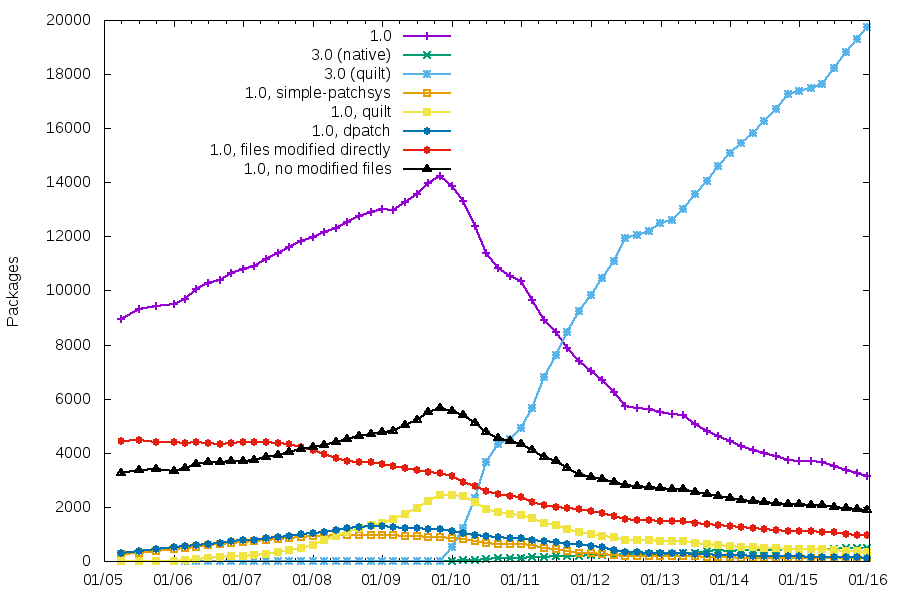
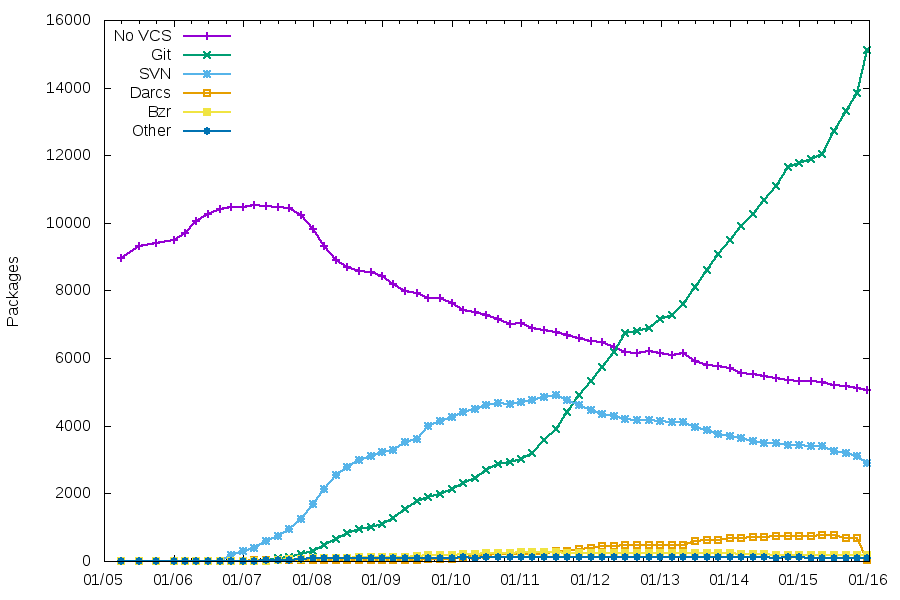
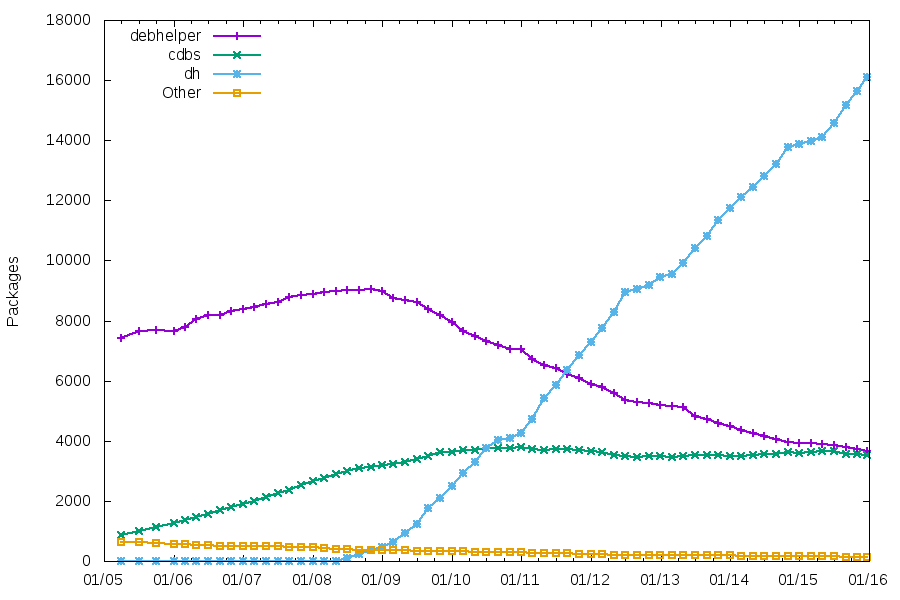
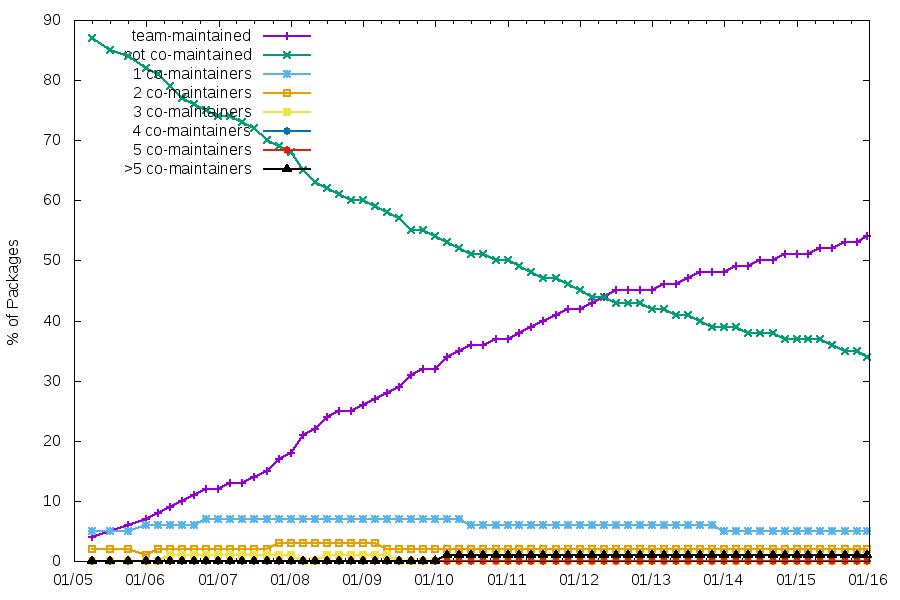
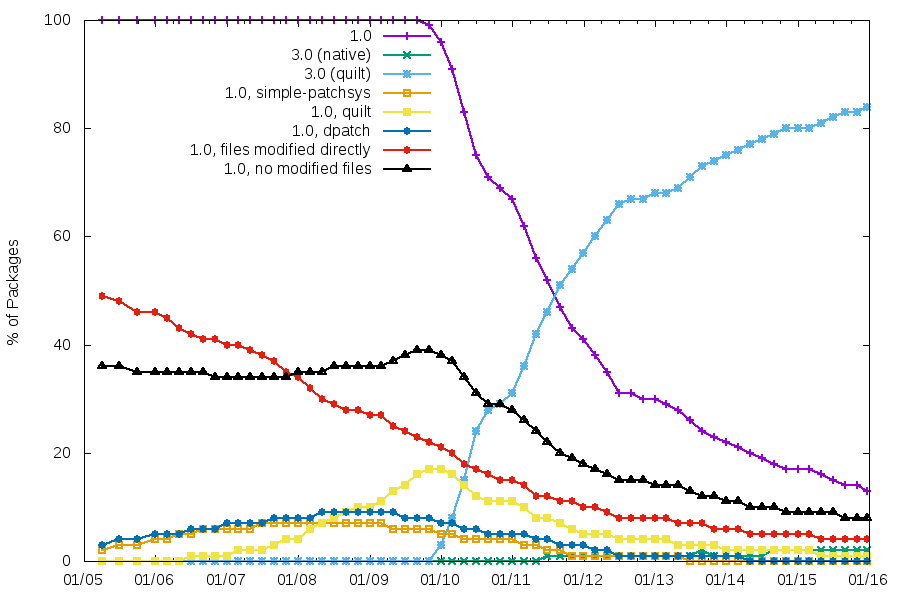
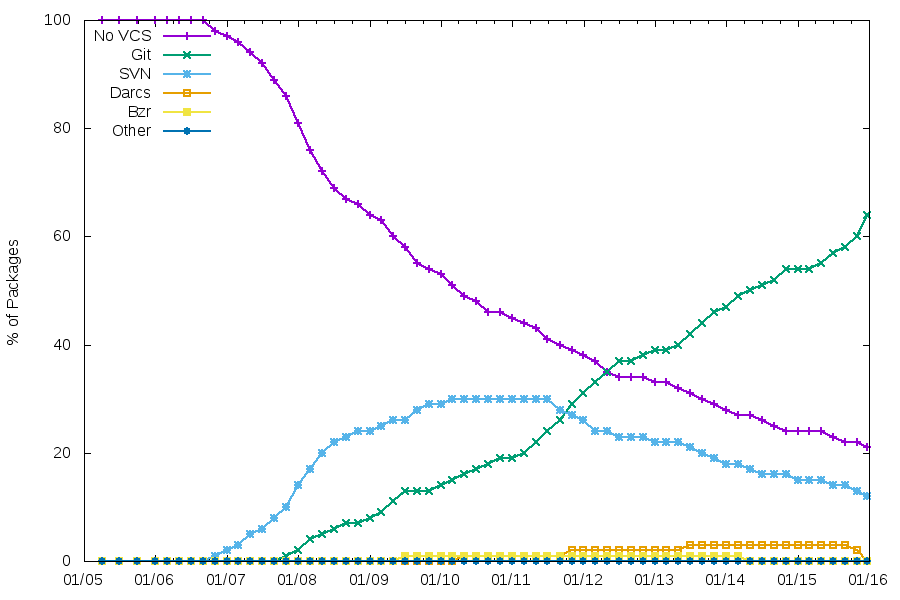
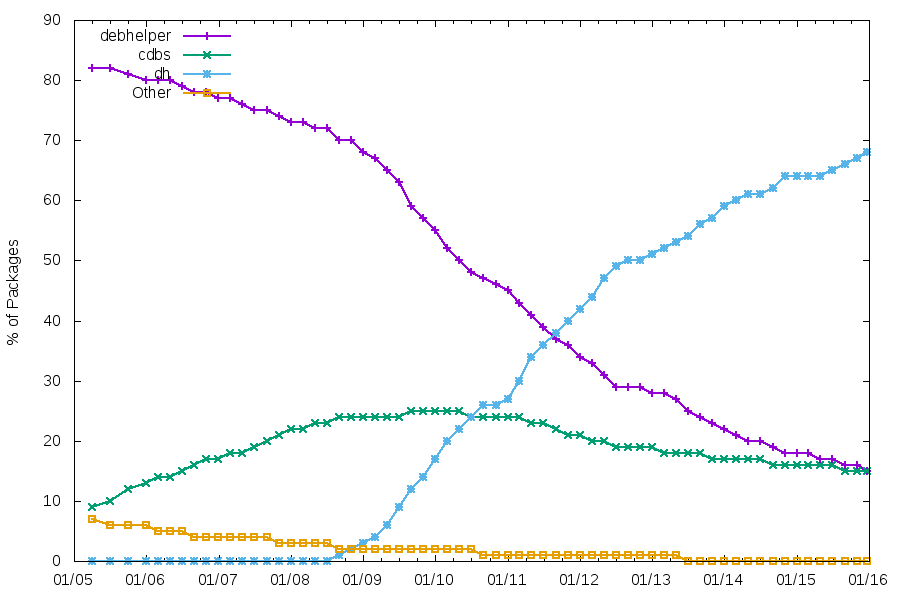
Here is an update to the usual graphs generated from snapshot.d.o. See my previous blog post for the background info. In all graphs, it s easy to see the effect of the Jessie freeze (and the previous freezes since 2005, too). Team maintenance comaint-2015 It s interesting to see that, while the number of team-maintained packages increases, the number of packages that aren t co-maintained is very stable. Maintenance using a VCS vcs-2015 Git is the clear winner now, with the migration rate increasing recently. Packaging helpers helpers-2015 As usual, the number of packages using CDBS is quite stable. The number of packages using traditional debhelper might soon be lower than those using CDBS. Patch systems and packaging formats formats-patches-2015 3.0 is the clear winner, even if we still have 3000+ packages using 1.0, and ~1000 of those modifying files directly. The other patch systems have basically disappeared.
So, all those graphs are kind-of boring now. Any good ideas of additional things to track, that be can identified reliably by looking at source packages? For those interested, below are links to the graphs with percentages of packages. comaint-percent-2015 formats-patches-percent-2015 vcs-percent-2015 helpers-percent-2015

24 December 2015

Clint Adams: Before the Tet Offensive

Kurt has trouble keeping his mouth shut. This became widely apparent when he was expelled from Catholic school for telling a visiting dignitary to go fuck himself. WB used to preach angrily against casual sex. Kurt enlisted in the Army, and due to his high IQ he ended up in the Army Security Agency. After training, he was stationed in Germany where he performed signals intelligence functions like direction finding and passing on information to the CIA and NSA. One day WB shagged a boy with a leather hat. Contrary to what one might assume, Kurt had awareness of consequences. He refused officer training because that would have extended his commitment from 4 to 6 years. He purposefully flunked his French language proficiency exam. He wanted there to be no chance of him getting transferred to Vietnam. The following day, WB found herself confronted and asked to explain why she had had a change of heart about casual sex. Oh, it wasn't casual sex, she explained. He came over and said, I've been dying to make love with you for the past three hours, so it was special, she clarified. Thus the nature of the past communication failure became clear to everyone but WB. Despite all his efforts to avoid Vietnam, Kurt, of course, had trouble keeping his mouth shut. So in 1967 he pissed off the wrong person and found himself having to choose between Leavenworth and Saigon. He chose life of alcoholism over prison.

23 December 2015

Petter Reinholdtsen: OpenALPR, find car license plates in video streams - nice free software

When I was a kid, we used to collect "car numbers", as we used to call the car license plate numbers in those days. I would write the numbers down in my little book and compare notes with the other kids to see how many region codes we had seen and if we had seen some exotic or special region codes and numbers. It was a fun game to pass time, as we kids have plenty of it. A few days I came across the OpenALPR project, a free software project to automatically discover and report license plates in images and video streams, and provide the "car numbers" in a machine readable format. I've been looking for such system for a while now, because I believe it is a bad idea that the automatic number plate recognition tool only is available in the hands of the powerful, and want it to be available also for the powerless to even the score when it comes to surveillance and sousveillance. I discovered the developer wanted to get the tool into Debian, and as I too wanted it to be in Debian, I volunteered to help him get it into shape to get the package uploaded into the Debian archive. Today we finally managed to get the package into shape and uploaded it into Debian, where it currently waits in the NEW queue for review by the Debian ftpmasters. I guess you are wondering why on earth such tool would be useful for the common folks, ie those not running a large government surveillance system? Well, I plan to put it in a computer on my bike and in my car, tracking the cars nearby and allowing me to be notified when number plates on my watch list are discovered. Another use case was suggested by a friend of mine, who wanted to set it up at his home to open the car port automatically when it discovered the plate on his car. When I mentioned it perhaps was a bit foolhardy to allow anyone capable of placing his license plate number of a piece of cardboard to open his car port, men replied that it was always unlocked anyway. I guess for such use case it make sense. I am sure there are other use cases too, for those with imagination and a vision. If you want to build your own version of the Debian package, check out the upstream git source and symlink ./distros/debian to ./debian/ before running "debuild" to build the source. Or wait a bit until the package show up in unstable.

22 December 2015

Ian Wienand: Platform bootstrap for OpenStack Infrastructure

This is a terse guide on bootstrapping virtual-machine images for OpenStack infrastructure, with the goal of adding continuous-integration support for new platforms. It might also be handy if you are trying to replicate the upstream CI environment. It covers deployment to Rackspace for testing; Rackspace is one of the major providers of capacity for the OpenStack Infrastructure project, so it makes a good place to start when building up your support story. Firstly, get an Ubuntu Trusty environment to build the image in (other environments, like CentOS or Fedora, probably work -- but take this step to minimise differences to what the automated machinery of what upstream does). You want a fair bit of memory, and plenty of disk-space. The tool used for building virtual-machine images is diskimage-builder. In short, it takes a series of elements, which are really just scripts run in different phases of the build process. I'll describe building a Fedora image, since that's been my focus lately. We will use a fedora-minimal element -- this means the system is bootstrapped from nothing inside a chroot environment, before eventually being turned into a virtual-machine image (contrast this to the fedora element, which bases itself off the qcow2 images provided by the official Fedora cloud project). Thus you'll need a few things installed on the Ubuntu host to deal with bootstrapping a Fedora chroot
apt-get install yum yum-utils python-lzma
You will hit stuff like that python-lzma dependency on this road-less-travelled -- technically it is a bug that yum packages on Ubuntu don't depend on it; without it you will get strange yum errors about unsupported compression. At this point, you can bootstrap your diskimage-builder environment. You probably want diskimage-builder from git, and then build up a virtualenv for your support bits and pieces.
git clone git://git.openstack.org/openstack/diskimage-builder
virtualenv dib_env
. dib_env/bin/activate
pip install dib-utils
dib-utils is a small part of diskimage-builder that is split-out; don't think too much about it. While diskimage-builder is responsible for the creation of the basic image, there are a number of elements provided by the OpenStack project-config repository that bootstrap the OpenStack environment. This does a lot of stuff, including caching all git trees (so CI jobs aren't cloning everything constantly) and running puppet setup.
git clone git://git.openstack.org/openstack-infra/project-config
There's one more trick required for building the VHD images that Rackspace requires; make sure you install the patched vhd-util as described in the script help. At this point, you can probably build an image. Here's something approximating what you will want to do
break=after-error \
TMP_DIR=~/tmp \
ELEMENTS_PATH=~/project-config/nodepool/elements \
DIB_DEV_USER_PASSWORD="password"  DIB_DEV_USER_PWDLESS_SUDO=1 \
DISTRO=23 \
./bin/disk-image-create -x --no-tmpfs -t vhd \
   fedora-minimal vm devuser simple-init \
   openstack-repos puppet nodepool-base node-devstack
To break some of this down This goes and does its thing; it will take about 20 minutes. Depending on how far your platform diverges from the existing support, it will require a lot of work to get everything working so you can get an image out the other side. To see a rough example of what should be happening, see the logs of the official image builds that happen for a variety of platforms. At some point, you should get a file image.vhd which is now ready to be deployed. The only reasonable way to do this is with shade. You can quickly grab this into the virtualenv we created before
pip install shade
Now you'll need to setup a clouds.yaml file to give yourself the permissions to upload the image. It should look something like
clouds:
  rax:
    profile: rackspace
    auth:
       username: your_rax_username
       password: your_rax_password
       project_id: your_rax_accountnum
    regions:
    - IAD
You should know your user-name and password (whatever you log into the website with), and when you login to Rackspace your project_id value is listed in the drop-down box labeled with your username as Account #. shade has no UI as such, so a simple script will do the upload.
import shade
shade.simple_logging(debug=True)
cloud = shade.openstack_cloud(cloud='rax')
image = cloud.create_image('image-name', filename='image.vhd', wait=True)
Now wait -- this will also take a while. Even after upload it takes a fair while to process (you will see the shade debug output looping around some glance calls seeing if it is ready). If everything works, the script should return and you should be able to see the new image in the output of nova list-images. At this point, you're ready to try booting! One caveat is that the Rackspace web interface does not seem to give you the option to boot with a configuration drive available to the host, essential for simple-init to bring up the network. So boot via the API with something like
nova boot --flavor=2 --image=image-uuid --config-drive 1 test-image
This should build and boot your image! This will allow you to open a whole new door of debugging to get your image booting correctly. You can now iterate by rebuilding/uploading/booting as required. Note these are pretty big images, and uploaded in broken-up swift files, so I find swift delete --all helpful to reset between builds (obviously, I have nothing else in swift that I want to keep). The Rackspace java-based console UI is rather annoying; it cuts itself off every time the host reboots. This makes it quite difficult to catch the early bootup, or modify grub options via the boot-loader, etc. You might need to fiddle timeout options, etc in the image build. If you've managed to get your image booting and listening on the network, you're a good-deal of the way towards having your platform supported in upstream OpenStack CI. At this point, you likely want to peruse the nodepool configuration and get an official build happening here. Once that is up, you can start the process of adding jobs that use your platform to test! Don't worry, there's plenty more that can go wrong from here -- but you're on the way! OpenStack infra is a very dynamic environment, which many changes in progress; so in general, #openstack-infra on freenode is going to be a great place to start looking for help.

Michal Čihař: Weekly phpMyAdmin contributions

Again one week has passed and there has been some progress on phpMyAdmin. This week the focus was on code cleanup and issue fixing. I've identified several pieces of dead code and removed that from our code base (the biggest removal being no longer used PMA_String class). The codebase is quite old and sometimes it's not easy to identify code which is not really being used, as it still might be referenced from some locations, but without actually invoking it. On the issue fixing side, I'm really happy from improving user experience with fields marked as binary - so far phpMyAdmin has displayed them as hexadecimal dump in all cases. Now it will display them as text as long as the content is valid utf-8. Bugs fixed: PS: I will most likely skip report next week due to Christmas.

Filed under: English phpMyAdmin 0 comments

21 December 2015

Jonas Smedegaard: SOME DESCRIPTIVE TITLE

# Copyright (C) YEAR Free Software Foundation, Inc. # This file is distributed under the same license as the PACKAGE package. # FIRST AUTHOR , YEAR. # #, fuzzy msgid "" msgstr "" "Project-Id-Version: PACKAGE VERSION\n" "POT-Creation-Date: 2015-12-21 15:00+0100\n" "PO-Revision-Date: YEAR-MO-DA HO:MI+ZONE\n" "Last-Translator: FULL NAME \n" "Language-Team: LANGUAGE \n" "Language: \n" "MIME-Version: 1.0\n" "Content-Type: text/plain; charset=UTF-8\n" "Content-Transfer-Encoding: 8bit\n" #. type: Title # #, no-wrap msgid "I want your input" msgstr "" #. type: Plain text #, no-wrap msgid "\n" msgstr "" #. type: Plain text #, no-wrap msgid "\n" msgstr "" #. type: Plain text msgid "You want to share an opinion with me, or raise a question?" msgstr "" #. type: Plain text msgid "Great, please do: I love exchanging opinions and ideas." msgstr "" #. type: Plain text msgid "" "You can [contact me discretely][]. Please consider, however, to speak in " "public instead, allowing others to benefit from our exchange." msgstr "" #. type: Plain text msgid "" "Don't worry if it is interesting to others - the World is big and someone " "somewhere always cares!" msgstr "" #. type: Plain text msgid "[contact me discretely]:" msgstr "" #. type: Title ## #, no-wrap msgid "Email - encourages reflection" msgstr "" #. type: Plain text msgid "Post to a public mailinglist." msgstr "" #. type: Plain text msgid "" "If uncertain that I am subscribed to the list, or if you want my special " "attention (but think twice if that's really needed!), add my [private " "mail](mailto:dr@jones.dk) as cc." msgstr "" #. type: Title ## #, no-wrap msgid "Chat - more casual" msgstr "" #. type: Plain text msgid "" "I am also [reachable via chat][]. Chat is nice for shorter " "questions/comments, and when you need to discuss what you want to say at " "all." msgstr "" #. type: Plain text msgid "[reachable via chat]:" msgstr "" #. type: Title ## #, no-wrap msgid "Blog - best for reuse" msgstr ""

20 December 2015

Lunar: Reproducible builds: week 34 in Stretch cycle

What happened in the reproducible builds effort between December 13th to December 19th: Infrastructure Niels Thykier started implementing support for .buildinfo files in dak. A very preliminary commit was made by Ansgar Burchardt to prevent .buildinfo files from being removed from the upload queue. Toolchain fixes Mattia Rizzolo rebased our experimental debhelper with the changes from the latest upload. New fixes have been merged by OCaml upstream. Packages fixed The following 39 packages have become reproducible due to changes in their build dependencies: apache-mime4j, avahi-sharp, blam, bless, cecil-flowanalysis, cecil, coco-cs, cowbell, cppformat, dbus-sharp-glib, dbus-sharp, gdcm, gnome-keyring-sharp, gudev-sharp-1.0, jackson-annotations, jackson-core, jboss-classfilewriter, jboss-jdeparser2, jetty8, json-spirit, lat, leveldb-sharp, libdecentxml-java, libjavaewah-java, libkarma, mono.reflection, monobristol, nuget, pinta, snakeyaml, taglib-sharp, tangerine, themonospot, tomboy-latex, widemargin, wordpress, xsddiagram, xsp, zeitgeist-sharp. The following packages became reproducible after getting fixed: Some uploads fixed some reproducibility issues, but not all of them: Patches submitted which have not made their way to the archive yet: reproducible.debian.net Packages in experimental are now tested on armhf. (h01ger) Arch Linux packages in the multilib and community repositories (4,000 more source packages) are also being tested. All of these test results are better analyzed and nicely displayed together with each package. (h01ger) For Fedora, build jobs can now run in parallel. Two are currently running, now testing reproducibility of 785 source packages from Fedora 23. mock/1.2.3-1.1 has been uploaded to experimental to better build RPMs. (h01ger) Work has started on having automatic build node pools to maximize use of armhf build nodes. (Vagrant Cascadian) diffoscope development Version 43 has been released on December 15th. It has been dubbed as epic! as it contains many contributions that were written around the summit in Athens. Baptiste Daroussin found that running diffoscope on some Tar archives could overwrite arbitrary files. This has been fixed by using libarchive instead of Python internal Tar library and adding a sanity check for destination paths. In any cases, until proper sandboxing is implemented, don't run diffosope on unstrusted inputs outside an isolated, throw-away system. Mike Hommey identified that the CBFS comparator would needlessly waste time scanning big files. It will now not consider any files bigger than 24 MiB 8 MiB more than the largest ROM created by coreboot at this time. An encoding issue related to Zip files has also been fixed. (Lunar) New comparators have been added: Android dex files (Reiner Herrmann), filesystem images using libguestfs (Reiner Herrmann), icons and JPEG images using libcaca (Chris Lamb), and OS X binaries (Clemens Lang). The comparator for Free Pascal Compilation Unit will now only be used when the unit version matches the compiler one. (Levente Polyak) A new multi-file HTML output with on-demand loading of long diffs is available through the --html-dir option. On-demand loading requires jQuery which path can be specified through the --jquery option. The diffs can also be simply browsed for non-JavaScript users or when jQuery is not available. (Joachim Breitner) Example of on-demand loading in diffosope Portability toward other systems has been improved: old versions of GNU diff are now supported (Mike McQuaid), suggestion of the appropriate locale is now the more generic en_US.UTF-8 (Ed Maste), the --list-tools option can now support multiple systems (Mattia Rizzolo, Levente Polyak, Lunar). Many internal changes and code clean-ups have been made, paving the way for parallel processing. (Lunar) Version 44 was released on December 18th fixing an issue affecting .deb lacking a md5sums file introduced in a previous refactoring (Lunar). Support has been added for Mozilla optimized Zip files. (Mike Hommey). The HTML output has been optimized in size (Mike Hommey, Esa Peuha, Lunar), speed (Lunar), and will now properly number lines (Mike Hommey). A message will always be displayed when lines are ignored at the end of a diff (Lunar). For portability and consistency, Python os.walk() function is now used instead of find to perform directory listing. (Lunar) Documentation update Package reviews 143 reviews have been removed, 69 added and 22 updated in the previous week. Chris Lamb reported 12 new FTBFS issues. News issues identified this week: random_order_in_init_py_generated_by_python-genpy, timestamps_in_copyright_added_by_perl_dist_zilla, random_contents_in_dat_files_generated_by_chasen-dictutils_makemat, timestamps_in_documentation_generated_by_pandoc. Chris West did some improvements on the scripts used to manage notes in the misc repository. Misc. Accounts of the reproducible builds summit in Athens were written by Thomas Klausner from NetBSD and Hans-Christoph Steiner from The Guardian Project. Some openSUSE developers are working on a hackweek on reproducible builds which was discussed on the opensuse-packaging mailing-list.

Iustin Pop: Nikkor 200-500mm f5.6E ED VR tests

So, lately I've been on a telephoto lens learning curve; after the 300mm prime, I said to test a zoom lens. As I found the prime reasonably easy to adapt to (compared to shorter focal length lenses), I thought that a zoom (heavier, bigger) will be the same. Oh, I was wrong. My keeper rate for the first outdoors test was quite bad around 50% only, which (when talking only about focus/sharpness) is much below my standards. I started easy; some close or medium range shots, nothing special: Usual flower picture Lonely snag But then, moving to further distances, things became less straightforward. Shooting two pictures each time meant that usually one of them was sharp, but the other not. I got really confused at this step; the shutter speed was 1/2000s and I also had VR on; either VR was unneeded (i.e. contributing blur instead of helping) or something else was going on. After much head scratching, I think it's a combination of the following factors: So, for such style of shooting, I need to train more both photographic technique and arm strength at the gym In the meantime, it is possible to get such shots reasonably sharp, for example this picture of the (start of the) Alps taken from what is technically still Z rich city: The Alps  viewed from Z rich! I'm happy with the detail (at this distance), however I was not able to correct the colour due to the haze between me and the mountains; note that the trees on the bottom of the distance were not near me, but on the next or after-next hill. This picture confirms that with more practice things will get better. Coming back to shorter distances, and shorter focal lengths, things are looking better. We were passing somewhat near some people playing with RC-controlled planes not near enough to hear them, but near enough to see the plane quickly flying. Switched camera quickly to AF-C and Dynamic-21 focus, and - to my surprise - I was able to capture four good pictures, two so-so and four more clearly out of focus. But, for such a heavy length, hand-held and on the short notice, I was happy; the first picture is one of the so-so ones, but I kept it as I like the way the propeller is seen. All pictures at 290mm plus some cropping, 1/1250s, ISO between 900 and 1800, f/5.6 (i.e wide open): RC plane: continous focus tests RC plane #2 RC plane #3: good results! RC plane #4 RC plane #5: landing? From this exercise, the conclusion is that the lens is OK-ish for tracking, although the not-so good keeper rate tells me that I need to be careful; I'll have to see how a subject moving not left-right, but instead approaching or moving away from the camera would be tracked. But enough pictures of small planes. At 500mm, but still somewhat close, trees: Trees @ 500mm At this step I'm starting to wonder if stopping down a bit would help with the sharpness; I'll have to test that in the future. Walking some more, finally a bird in flight; one of the hopes when I took the camera/lens out was that I'll see some birds, but this was the first. 500mm, heavily cropped, but quite good result for myself (same autofocus settings as before): Bird in flight @ 500mm Bird in flight: difficult light The only problem here is, as always with crows (I think these are crows), is the black bird against the light-blue sky (not even strong blue), which means the picture has a high dynamic range; recovering the shadows on the bird is difficult. But in any case, it's clear the lens can deliver, if the photographer is good. Next, a helicopter was gracious enough to pass by (pretty close): Helicopter: close shot Two minutes later, it was quite far, but since it was going in the direction of the Alps, it gave the opportunity for a nice shot: Helicopter: flying towards the Alps This picture is less sharp, but still I like it due to composition; not successful on small screens though, only if you see it full screen. Light is very difficult though and about 10 seconds earlier would have been even better (more separation between the helicopter and the mountain). And since we're talking about planes, let's see a plane at 500m, directly overhead, and quite high: High-flying plane This picture (@500mm, cropped, 1/2000s) has the most detail of a plane flying high enough to have trails (not sure how to estimate, but at least 5km, maybe more around 7-8 I'd say) that I ever took. So yes, the lens can deliver, but it's not easy. This shot, being shot more or less straight up, had the least distance through low-altitude atmosphere, so it has less problems compared to the mountains pictures. It's still not really sharp (lens wide open), but the amount of detail I'm sold :) And to finish on a more close note: Hunting!! A long focal length lens allows one to get "close" without getting close, which means animals are not disturbed. The first picture with the cat (not shown) had the cat less alert; ears not fully up, although eyes were still seeking; this picture shows it fully alert and concentrated, like it was a wild cat hunting for its survival, and not a city cat, out just for fun. So, summary: All the best to everybody for the coming holidays, and thanks for reading.

Lars Wirzenius: FUUG grant for Obnam development: what happened then

In September, The FUUG Foundation gave me a grant to buy some hardware for Obnam development. I used this money to buy a new desktop-ish machine, see below for details. It's sat in a corner, and I use it as a server: it's not normally connected to a monitor or keyboard. It runs Obnam benchmarks. Before this, I ran Obnam benchmarks and experiments on my laptop, or on BigV virtual servers donated by Bytemark. The hardware The parts: Not to brag, but it's a nice machine. Much more power than my 2012 era laptop. The SSD is the system drive, the HDDs are for running Obnam benchmarks on. The HDDs are not RAIDed. Each drive is a PV for LVM2. All the data on those drives is scratch data: it's not valuable, and I do not care if it is lost. In fact, most of the data gets created and deleted during a benchmark run, and usually the disks are empty. The SSD contains the host operating system, and the virtual disks for all the virtual machines. I assembled the machine myself, with the help of a friend, and installed Debian jessie on it. The Debian installation is pretty bare bones, just enough to run and manage a bunch of virtual machines using libvirt and ansible. All the actual work, including benchmarks, are run in virtual machines. The benchmarks The benchmarks are run by a kludge, called obbench, and the results are published at http://benchmark.obnam.org/. Here's a snapshot of the results so far:
date many files one big file
2015-09-28 2165.0 1381.9
2015-12-06 1461.6 384.0
In a bit over two months, I've made some significant progress, I think. The two benchmarks that I currently run are: These are two extreme cases of what a backup needs to deal with: either the file metadata, or its content. They incur different costs for a backup program. Thus, two benchmarks. In both cases, the benchmark consists of an initial backup, a restore, and a second backup, without changes to the live data. The second backup is an extreme case of what backups usually do: most data usually doesn't change, so keeping that in mind for optimisation is important. The above benchmarks are synthetic: they use data that's generated by a program (genbackupdata), so that they can be reproduced. Synthetic benchmarks are useful, especially for looking at particular aspects of a program's operation for optimisation. However, they do not necessarily reflect how a program behaves in actual use. I also run, by hand, experiments with real data. I have a snapshot of our home file server and my laptop on the benchmark machine. The snapshots are static, and do not get updated. I experiment by running Obnam backups manually, the initial full backup and a no-change incremental one. In early October, I couldn't finish the initial full backups. They took too long, more than a week. Now I can finish them in about a day. This remarkable change is not evident from the synthetic benchmarks. In numbers: 572986 files in the live data, containing 4.5 TiB. Initial backup, about 18.5 hours. Incremental backup, 4m13s. This is from a local disk to a local disk. In addition to these, I've run numerous experiments on the new machine. These would have been much less easy to run on my laptop, and so I probably wouldn't have. Running benchmarks was always painful on my laptop, since it does not have the necessary disk space, and I'd really rather like to use it for other things. The results Thanks to the benchmarks and experiments I've been able to take the in-development version of Obnam from being quite impractical for real use to being in experimental use for real data. I now use the new version as my primary backup of my laptop, with two secondary backups (with the old Obnam version, and rsync) in parallel. This would not have happened this year without the extra hardware. In addition to the Obnam work, I've used the new machine to develop a test suite for vmdebootstrap. My actual development still happens on my laptop, except for things that are heavy enough to be slow on the laptop. I've made sure I can do most development purely on my laptop, while offline, including running a CI system, and testing things on two architecture and three releases of Debian. I do not want my development to be dependent on incidental things such as network access, unless I'm doing things that by their nature depend on the network, such as publishing changes or releases.

Petter Reinholdtsen: Using appstream with isenkram to install hardware related packages in Debian

Around three years ago, I created the isenkram system to get a more practical solution in Debian for handing hardware related packages. A GUI system in the isenkram package will present a pop-up dialog when some hardware dongle supported by relevant packages in Debian is inserted into the machine. The same lookup mechanism to detect packages is available as command line tools in the isenkram-cli package. In addition to mapping hardware, it will also map kernel firmware files to packages and make it easy to install needed firmware packages automatically. The key for this system to work is a good way to map hardware to packages, in other words, allow packages to announce what hardware they will work with. I started by providing data files in the isenkram source, and adding code to download the latest version of these data files at run time, to ensure every user had the most up to date mapping available. I also added support for storing the mapping in the Packages file in the apt repositories, but did not push this approach because while I was trying to figure out how to best store hardware/package mappings, the appstream system was announced. I got in touch and suggested to add the hardware mapping into that data set to be able to use appstream as a data source, and this was accepted at least for the Debian version of appstream. A few days ago using appstream in Debian for this became possible, and today I uploaded a new version 0.20 of isenkram adding support for appstream as a data source for mapping hardware to packages. The only package so far using appstream to announce its hardware support is my pymissile package. I got help from Matthias Klumpp with figuring out how do add the required metadata in pymissile. I added a file debian/pymissile.metainfo.xml with this content:
<?xml version="1.0" encoding="UTF-8"?>
<component>
  <id>pymissile</id>
  <metadata_license>MIT</metadata_license>
  <name>pymissile</name>
  <summary>Control original Striker USB Missile Launcher</summary>
  <description>
    <p>
      Pymissile provides a curses interface to control an original
      Marks and Spencer / Striker USB Missile Launcher, as well as a
      motion control script to allow a webcamera to control the
      launcher.
    </p>
  </description>
  <provides>
    <modalias>usb:v1130p0202d*</modalias>
  </provides>
</component>
The key for isenkram is the component/provides/modalias value, which is a glob style match rule for hardware specific strings (modalias strings) provided by the Linux kernel. In this case, it will map to all USB devices with vendor code 1130 and product code 0202. Note, it is important that the license of all the metadata files are compatible to have permissions to aggregate them into archive wide appstream files. Matthias suggested to use MIT or BSD licenses for these files. A challenge is figuring out a good id for the data, as it is supposed to be globally unique and shared across distributions (in other words, best to coordinate with upstream what to use). But it can be changed later or, so we went with the package name as upstream for this project is dormant. To get the metadata file installed in the correct location for the mirror update scripts to pick it up and include its content the appstream data source, the file must be installed in the binary package under /usr/share/appdata/. I did this by adding the following line to debian/pymissile.install:
debian/pymissile.metainfo.xml usr/share/appdata
With that in place, the command line tool isenkram-lookup will list all packages useful on the current computer automatically, and the GUI pop-up handler will propose to install the package not already installed if a hardware dongle is inserted into the machine in question. Details of the modalias field in appstream is available from the DEP-11 proposal. To locate the modalias values of all hardware present in a machine, try running this command on the command line:
cat $(find /sys/devices/ grep modalias)
To learn more about the isenkram system, please check out my blog posts tagged isenkram.

19 December 2015

James McCoy: EINVAL woes with SG_IO

Dear lazyweb, TL;DR version Why does ioctl(fd, SG_IO, &sg_io_hdr) return EINVAL, but an immediate retry after reopening the /dev/sdX fd succeeds? I'm not sure if reopening the fd is relevant, but the code only holds the fd open long enough to do perform the ioctl. The frequency of EINVAL seems to increase in correlation with the number of IO threads, where none are seen with a single IO thread. Background At work, I've been adding Linux support to an internal Windows tool we use to perform data integrity testing of block storage devices. It's a heavily multi-threaded program: The user has the ability to use either SCSI pass-thru or read/write file to perform reads/writes to the LUN, as well as various other purely SCSI pass-thru commands. The IO portion of the code can be boiled down to basically the following pseudo code:
start IO thread  
    If SCSI pass-thru or command which requires SCSI pass-thru
        build sg_io_hdr_t struct
        open /dev/disk/by-path/  (O_RDWR   O_NONBLOCK)
        issue ioctl(fd, SG_IO, &sg_io_hdr)
        close fd
        return massaged ioctl status and scsi_status
     else
        open /dev/disk/by-path/  (O_RDWR   O_NONBLOCK)
        seek to LBA
        issue write/read
        close fd
        return massaged write/read status 
wait for IO thread completion  
check status and potentially retry operation
Problem As the number of target LUNs or IO threads scale, we're seeing increasing amounts of EINVAL errors when we issue the SG_IO ioctl. According to the sg documentation, there are only a couple situations where EINVAL should be seen: I wouldn't have been surprised to get EDOM (exceeding SG_MAX_QUEUE), but I'm at a loss as to where/why EINVAL is coming from. Granted, I'm opening an sd device instead of an sg device, so the error may be coming from a different layer in the stack. If you have any ideas, please let me know.

18 December 2015

Martin Pitt: What s new in autopkgtest: LXD, MaaS, apt pinning, and more

The last two major autopkgtest releases (3.18 from November, and 3.19 fresh from yesterday) bring some new features that are worth spreading. New LXD virtualization backend 3.19 debuts the new adt-virt-lxd virtualization backend. In case you missed it, LXD is an API/CLI layer on top of LXC which introduces proper image management, seamlessly use images and containers on remote locations, intelligently caching them locally, automatically configure performant storage backends like zfs or btrfs, and just generally feels really clean and much simpler to use than the classic LXC. Setting it up is not complicated at all. Install the lxd package (possibly from the backports PPA if you are on 14.04 LTS), and add your user to the lxd group. Then you can add the standard LXD image server with
  lxc remote add lco https://images.linuxcontainers.org:8443
and use the image to run e. g. the libpng test from the archive:
  adt-run libpng --- lxd lco:ubuntu/trusty/i386
  adt-run libpng --- lxd lco:debian/sid/amd64
The adt-virt-lxd.1 manpage explains this in more detail, also how to use this to run tests in a container on a remote host (how cool is that!), and how to build local images with the usual autopkgtest customizations/optimizations using adt-build-lxd. I have btrfs running on my laptop, and LXD/autopkgtest automatically use that, so the performance really rocks. Kudos to St phane, Serge, Tycho, and the other LXD authors! The motivation for writing this was to make it possible to move our armhf testing into the cloud (which for $REASONS requires remote containers), but I now have a feeling that soon this will completely replace the existing adt-virt-lxc virt backend, as its much nicer to use. It is covered by the same regression tests as the LXC runner, and from the perspective of package tests that you run in it it should behave very similar to LXC. The one problem I m aware of is that autopkgtest-reboot-prepare is broken, but hardly anything is using that yet. This is a bit complicated to fix, but I expect it will be in the next few weeks. MaaS setup script While most tests are not particularly sensitive about which kind of hardware/platform they run on, low-level software like the Linux kernel, GL libraries, X.org drivers, or Mir very much are. There is a plan for extending our automatic tests to real hardware for these packages, and being able to run autopkgtests on real iron is one important piece of that puzzle. MaaS (Metal as a Service) provides just that it manages a set of machines and provides an API for installing, talking to, and releasing them. The new maas autopkgtest ssh setup script (for the adt-virt-ssh backend) brings together autopkgtest and real hardware. Once you have a MaaS setup, get your API key from the web UI, then you can run a test like this:
  adt-run libpng --- ssh -s maas -- \
     --acquire "arch=amd64 tags=touchscreen" -r wily \
     http://my.maas.server/MAAS 123DEADBEEF:APIkey
The required arguments are the MaaS URL and the API key. Without any further options you will get any available machine installed with the default release. But usually you want to select a particular one by architecture and/or tags, and install a particular distro release, which you can do with the -r/--release and --acquire options. Note that this is not wired into Ubuntu s production CI environment, but it will be. Selectively using packages from -proposed Up until a few weeks ago, autopkgtest runs in the CI environment were always seeing/using the entirety of -proposed. This often led to lockups where an application foo and one of its dependencies libbar got a new version in -proposed at the same time, and on test regressions it was not clear at all whose fault it was. This often led to perfectly good packages being stuck in -proposed for a long time, and a lot of manual investigation about root causes. . These days we are using a more fine-grained approach: A test run is now specific for a trigger , that is, the new package in -proposed (e. g. a new version of libbar) that caused the test (e. g. for foo ) to run. autopkgtest sets up apt pinning so that only the binary packages for the trigger come from -proposed, the rest from -release. This provides much better isolation between the mush of often hundreds of packages that get synced or uploaded every day. This new behaviour is controlled by an extension of the --apt-pocket option. So you can say
  adt-run --apt-pocket=proposed=src:foo,libbar1,libbar-data ...
and then only the binaries from the foo source, libbar1, and libbar-data will come from -proposed, everything else from -release. Caveat:Unfortunately apt s pinning is rather limited. As soon as any of the explicitly listed packages depends on a package or version that is only available in -proposed, apt falls over and refuses the installation instead of taking the required dependencies from -proposed as well. In that case, adt-run falls back to the previous behaviour of using no pinning at all. (This unfortunately got worse with apt 1.1, bug report to be done). But it s still helpful in many cases that don t involve library transitions or other package sets that need to land in lockstep. Unified testbed setup script There is a number of changes that need to be made to testbeds so that tests can run with maximum performance (like running dpkg through eatmydata, disabling apt translations, or automatically using the host s apt-cacher-ng), reliable apt sources, and in a minimal environment (to detect missing dependencies and avoid interference from unrelated services these days the standard cloud images have a lot of unnecessary fat). There is also a choice whether to apply these only once (every day) to an autopkgtest specific base image, or on the fly to the current ephemeral testbed for every test run (via --setup-commands). Over time this led to quite a lot of code duplication between adt-setup-vm, adt-build-lxc, the new adt-build-lxd, cloud-vm-setup, and create-nova-image-new-release. I now cleaned this up, and there is now just a single setup-commands/setup-testbed script which works for all kinds of testbeds (LXC, LXD, QEMU images, cloud instances) and both for preparing an image with adt-buildvm-ubuntu-cloud, adt-build-lx[cd] or nova, and with preparing just the current ephemeral testbed via --setup-commands. While this is mostly an internal refactorization, it does impact users who previously used the adt-setup-vm script for e. g. building Debian images with vmdebootstrap. This script is now gone, and the generic setup-testbed entirely replaces it. Misc Aside from the above, every new version has a handful of bug fixes and minor improvements, see the git log for details. As always, if you are interested in helping out or contributing a new feature, don t hesitate to contact me or file a bug report.

17 December 2015

Iain R. Learmonth: YubiKey NEO as an OpenPGP token

I was first interested in the idea of using a smartcard to store OpenPGP subkeys when I joined the Free Software Foundation Europe as a Fellow and recieved my FSFE Fellowship Card. By performing all cryptographic operations on the smartcard it would remove almost all the routes by which the secret key material could be compromised as the host operating system never has access to that secret material. I decided that this was something I wanted to try out and I purchased two Cherry G83-6644 keyboards. One of the nice things I noticed about this product was that it was both FIPS 201 approved and GOST R approved. If both the Americans and the Russians could agree it was a good keyboard, it had a good chance of being a good keyboard. A little udev magic to handle permissions and the card worked great, but there was a problem. This was not the most friendly form-factor and a USB keyboard was a bit big to be carrying around to use the smartcard with my laptop. I intended to get a smaller reader for my laptop but never did and the Fellowship card fell into disuse. Later, I came across the YubiKey NEO. The YubiKey NEO is capable of emulating an OpenPGP smartcard, just like the Fellowship card, but in the form-factor of a USB stick. This improved form factor was enough to make me give it a go. Since August 2015 I've been using a YubiKey NEO to store my OpenPGP subkeys and, excluding some occasional udev mishaps, it's been working great. When you first get the YubiKey NEO, it does not have the OpenPGP applet enabled. You'll need to enable it yourself using the ykpersonalize tool:

sudo apt install yubikey-personalization  
sudo ykpersonalize -m 82  
Once you've enabled the OpenPGP module, the USB product ID will change, and you can now add a udev rule that will allow you to interact with the device when it's plugged in as your normal user.
/etc/udev/rules.d/99-yubikeys.rules:
------------------------------------
SUBSYSTEMS=="usb", ATTRS idVendor =="1050",ATTRS idProduct =="0111", OWNER="irl"  
This is not the correct way to do this. I've set it so that any YubiKey with the OpenPGP module inserted is set to be owned by my username (irl) when the correct way to do this would be to have it set to the current console user. I do not know enough udev magic to know how to do that. UPDATE: I recieved a lot of good feedback on this, which you can find here. Of course, for my key 0xE9846C49, this key started life as an ordinary key just stored on my laptop, so seperating subkeys onto the YubiKey has not massively increased security as an attacker that has stolen the secret key material can generate new subkeys. I would hopefully notice these new rogue subkeys (I do monitor keyservers for changes to my key regularly), but I would prefer to make the possibility of the key being compromised as low as possible. For this reason I am performing a key transition to a new key, F540ABCD, where the master key is stored offline. In my next post, hopefully within a day or so, I'll explain how I used Tails to generate a key offline and load the subkeys into the YubiKey.

Simon Josefsson: Let s Encrypt Clients

As many others, I have been following the launch of Let s Encrypt. Let s Encrypt is a new zero-cost X.509 Certificate Authority that supports the Automated Certificate Management Environment (ACME) protocol. ACME allow you to automate creation and retrieval of HTTPS server certificates. As anyone who has maintained a number of HTTPS servers can attest, this process has unfortunately been manual, error-prone and differ between CAs. On some of my personal domains, such as this blog.josefsson.org, I have been using the CACert authority to sign the HTTPS server certificate. The problem with CACert is that the CACert trust anchors aren t shipped with sufficient many operating systems and web browsers. The user experience is similar to reaching a self-signed server certificate. For organization-internal servers that you don t want to trust external parties for, I continue to believe that running your own CA and distributing it to your users is better than using a public CA (compare my XMPP server certificate setup). But for public servers, availability without prior configuration is more important. Therefor I decided that my public HTTPS servers should use a CA/Browser Forum-approved CA with support for ACME, and as long as Let s Encrypt is trustworthy and zero-cost, they are a good choice. I was in need of a free software ACME client, and set out to research what s out there. Unfortunately, I did not find any web pages that listed the available options and compared them. The Let s Encrypt CA points to the official Let s Encrypt client, written by Jakub Warmuz, James Kasten, Peter Eckersley and several others. The manual contain pointers to two other clients in a seamingly unrelated section. Those clients are letsencrypt-nosudo by Daniel Roesler et al, and simp_le by (again!) Jakub Warmuz. From the letsencrypt.org s client-dev mailing list I also found letsencrypt.sh by Gerhard Heift and LetsEncryptShell by Jan Moj . Is anyone aware of other ACME clients? By comparing these clients, I learned what I did not like in them. I wanted something small so that I can audit it. I want something that doesn t require root access. Preferably, it should be able to run on my laptop, since I wasn t ready to run something on the servers. Generally, it has to be Secure, which implies something about how it approaches private key handling. The letsencrypt official client can do everything, and has plugin for various server software to automate the ACME negotiation. All the cryptographic operations appear to be hidden inside the client, which usually means it is not flexible. I really did not like how it was designed, it looks like your typical monolithic proof-of-concept design. The simp_le client looked much cleaner, and gave me a good feeling. The letsencrypt.sh client is simple and written in /bin/sh shell script, but it appeared a bit too simplistic. The LetsEncryptShell looked decent, but I wanted something more automated. What all of these clients did not have, and that letsencrypt-nosudo client had, was the ability to let me do the private-key operations. All the operations are done interactively on the command-line using OpenSSL. This would allow me to put the ACME user private key, and the HTTPS private key, on a YubiKey, using its PIV applet and techniques similar to what I used to create my SSH host CA. While the HTTPS private key has to be available on the HTTPS server (used to setup TLS connections), I wouldn t want the ACME user private key to be available there. Similarily, I wouldn t want to have the ACME or the HTTPS private key on my laptop. The letsencrypt-nosudo tool is otherwise more rough around the edges than the more cleaner simp_le client. However the private key handling aspect was the deciding matter for me. After fixing some hard-coded limitations on RSA key sizes, getting the cert was as simple as following the letsencrypt-nosudo instructions. I ll follow up with a later post describing how to put the ACME user private key and the HTTPS server certificate private key on a YubiKey and how to use that with letsencrypt-nosudo. So you can now enjoy browsing my blog over HTTPS! Thank you Let s Encrypt!

Dirk Eddelbuettel: RcppArmadillo 0.6.400.2.2

armadillo image And yet another updated of Armadillo by Conrad bringing us to 6.400.2. I folded that yesterday into RcppArmadillo 0.6.400.2.2; and this is now on CRAN and Debian. There was even an interim-CRAN-only release 0.6.300.2.2 with a refinement for tests of imcompleye LAPACK libraries---which we encounter whenver R is build with its own (partial) copy of LAPACK as on Windows, and on bigger computers whenver this was chosen over the default of system LAPACK. Armadillo is a powerful and expressive C++ template library for linear algebra aiming towards a good balance between speed and ease of use with a syntax deliberately close to a Matlab. This release brings the following changes:
Changes in RcppArmadillo version 0.6.400.2.0 (2015-12-15)
  • Upgraded to Armadillo 6.400.2 ("Flying Spaghetti Monster Deluxe")
    • expanded each_col(), each_row() and each_slice() to handle C++11 lambda functions
    • added ind2sub() and sub2ind()
    • fixes for corner cases in gmm_diag class
Changes in RcppArmadillo version 0.6.300.2.2 (2015-12-12)
  • Upgraded to Armadillo 6.300.3-test ("Flying Spaghetti Monster")
    • Additional test in auxlib_meat.hpp for limited LAPACK
  • Updated test and #define for limited LAPACK version R might be built with on Unix-alike systems
Courtesy of CRANberries, there is also a diffstat report for the most recent CRAN release. As always, more detailed information is on the RcppArmadillo page. Questions, comments etc should go to the rcpp-devel mailing list off the R-Forge page.

This post by Dirk Eddelbuettel originated on his Thinking inside the box blog. Please report excessive re-aggregation in third-party for-profit settings.

Steinar H. Gunderson: sRGB weirdness: Doing the right thing causes a worse result

A while back, I wrote about how you should always do image calculations in linear light, not gamma space; since then, Tom Forsythe has come out with a much better metaphor than I could cough up myself, namely that you should look at sRGB value as compressed values, not integers. So naturally, when I needed a deinterlacing filter for Movit, my GPU filter library, I wanted to do it in linear light. (In fact, all pixel processing in Movit is in linear light, except in the cases where it's 100% equivalent to do it on the gamma-encoded values and the conversion can be skipped for speed.) After some deliberations, I made an implementation of Martin Weston's three-field deinterlacing filter, known in ffmpeg as w3fdif. I won't discuss deinterlacing in detail here since it's really hard, but I'll note that w3fdif works by way of applying two filters; low-frequency components are estimated from the current field, and high-frequency from the previous and next fields. (This makes intuitive sense; you cannot get the HF information from the current field since you don't have the lines you need for that, but you can hope it hasn't changed too much.) Aha! A filter. Brilliant, that's exactly when linear light means the most, too. But when implementing it, I found that it sometimes looked weird -- and ffmpeg's implementation (which works directly on the sRGB values, which we already established is wrong) didn't. After lots of tweaking back and forth, I decided to set up a synthetic test to settle this once and for all; I took a static test picture (eliminating everything related to video capture, codecs, frame rates, etc.) and compared to ffmpeg. Of course, deinterlacing is all about movement, but this would do to try to nail things down. So after lots of fruitless debugging, I did a last-ditch: What if I turned off the gamma conversions? This gave me a huge surprise; indeed it looked better! I'll provide some upscaled versions; left is the original image, middle is deinterlaced in sRGB space and right is deinterlaced in linear light: Original picture Deinterlaced in sRGB space Deinterlaced in linear light If that's not dramatic enough for you (trust me, you'll notice it when it's animated as you flicker through the two different fields), here's an even more high-contrast example (same ordering): Original picture Deinterlaced in sRGB space Deinterlaced in linear light I guess it's obvious in retrospect what happens; the HF filter picks up residue from its outer edges, and even if the coefficient is just 0.031 (well, times two; it adds that value from both the previous and next field), 3% the photons of a fully lit pixel (which is what you get when working in linear light) is actually quite a bit, whereas a 3% gray is only pixel value 8 or so, which is barely visible. So what am I to make of this? I'm honestly not sure. Maybe it's somehow related to that these filter values were chosen in 1988, where they were relatively unlikely to do this in linear light (although if they did it with analog circuitry, perhaps they could?) and it was tweaked to look good despite doing the wrong thing. Or maybe I need to change my approach here entirely. It always sucks when your fundamental assumptions are challenged, but I think it shows once again that if you notice something funny in your output, you really ought to investigate, because you never know how deep the rabbit hole goes. :-/

16 December 2015

Thomas Goirand: Django upgrades area always a pain

It s been a few years that I maintain some python-django-* packages, as part of the maintenance of the OpenStack dashboard, Horizon. Currently, this consist of: python-django-appconf, python-django-babel, python-django-bootstrap-form, python-django-compressor, python-django-discover-runner, python-django-formtools, python-django-openstack-auth, python-django-overextends, python-django-pyscss. By far, Django has been one of the biggest pain point. It moves too fast, deprecating its own API from one minor version to the next, at the rate of one minor release every 6 months. As Django 1.9 was uploaded to Sid, a bunch of problems appeared. The Django 1.9 release notes explains it all: a large chunk of its API gets removed (look for Freatures removed in that page). I had to fix a few issues: the last one I fixed was #807346 (in django-openstack-auth), which needed 2 patches. Amusingly, the patch I wrote looks the same as what is currently under review, by one of the upstream authors. Though still have #807355 to fix, and that one is more complex. To fix it, I have to package the latest commit of django-compressor, and: Even after doing all of this, django-compressor still doesn t build (unit test failures) with lots of errors ending with this: File some-path/build-area/python-django-compressor-1.6+2015.12.15.git.66feba0db5/compressor/management/commands/compress.py , line 162, in compress
followlinks=options.get( followlinks , False)):
File /usr/lib/python2.7/os.py , line 278, in walk
names = listdir(top)
TypeError: coercing to Unicode: need string or buffer, Origin found I tried fixing this last one, but failed so far. (if anyone can help, please do ) This was just the upgrade from 1.8 to 1.9, and it doesn t include some of the issues fixed earlier (when Django 1.9 was only in Experimental and easy fixes were written). All this to say: Django upgrades are always painful. As I always say: the Linux kernel is so much more complex than this kind of Python modules, and yet, they don t allow themselves break the userland API. Why most Python developers believe that it s OK to do so? It isn t possible to separate private and public API clearly in python (like it is with the kernel). So it isn t uncommon that library users start using non-public functions, classes or methods. For that, it is understandable that there are breakages (when someone uses something that isn t made to be used by the library users). But that s the only case where it is, and there s no excuse to break known used public API. Django upstream authors, if you read me, please stop breaking the world every 6 months! And no, your deprecation messages are not an excuse. If you did a design mistake in the past, that s no excuse. Too bad you ll have to live with it until the end of times and find a work-around.

Next.

Previous.