Search Results: "tar"

25 May 2020

Russ Allbery: Review: The Last Emperox

Review: The Last Emperox, by John Scalzi
Series: Interdependency #3
Publisher: Tor
Copyright: April 2020
ISBN: 0-7653-8917-7
Format: Kindle
Pages: 318
This is the conclusion of the Interdependency trilogy, which is a single story told in three books. Start with The Collapsing Empire. You don't want to read this series out of order. All the pieces and players are in place, the causes and timeline of the collapse of the empire she is accidentally ruling are now clear, and Cardenia Wu-Patrick knows who her friends and enemies are. What she doesn't know is what she can do about it. Her enemies, unfettered Cardenia's ethics or desire to save the general population, have the advantage of clearer and more achievable goals. If they survive and, almost as important, remain in power, who cares what happens to everyone else? As with The Consuming Fire, the politics may feel a bit too on-the-nose for current events, this time for the way that some powerful people are handling (or not handling) the current pandemic. Also as with The Consuming Fire, Scalzi's fast-moving story, likable characters, banter, and occasional humorous descriptions prevent those similarities from feeling heavy or didactic. This is political wish fulfillment to be sure, but it doesn't try to justify itself or linger too much on its improbabilities. It's a good story about entertaining people trying (mostly) to save the world with a combination of science and political maneuvering. I picked up The Last Emperox as a palate cleanser after reading Gideon the Ninth, and it provided exactly what I was looking for. That gave me an opportunity to think about what Scalzi does in his writing, why his latest novel was one of my first thoughts for a palate cleanser, and why I react to his writing the way that I do. Scalzi isn't a writer about whom I have strong opinions. In my review of The Collapsing Empire, I compared his writing to the famous description of Asimov as the "default voice" of science fiction, but that's not quite right. He has a distinct and easily-recognizable style, heavy on banter and light-hearted description. But for me his novels are pleasant, reliable entertainment that I forget shortly after reading them. They don't linger or stand out, even though I enjoy them while I'm reading them. That's my reaction. Others clearly do not have that reaction, fully engage with his books, and remember them vividly. That indicates to me that there's something his writing is doing that leaves substantial room for difference of personal taste and personal reaction to the story, and the sharp contrast between The Last Emperox and Gideon the Ninth helped me put my finger on part of it. I don't feel like Scalzi's books try to tell me how to feel about the story. There's a moment in The Last Emperox where Cardenia breaks down crying over an incredibly difficult decision that she's made, one that the readers don't find out about until later. In another book, there would be considerably more emotional build-up to that moment, or at least some deep analysis of it later once the decision is revealed. In this book, it's only a handful of paragraphs and then a few pages of processing later, primarily in dialogue, and less focused on the emotions of the characters than on the forward-looking decisions they've made to deal with those emotions. The emotion itself is subtext. Many other authors would try to pull the reader into those moments and make them feel what the characters are feeling. Scalzi just relates them, and leaves the reader free to feel what they choose to feel. I don't think this is a flaw (or a merit) in Scalzi's writing; it's just a difference, and exactly the difference that made me reach for this book as an emotional break after a book that got its emotions all over the place. Calling Scalzi's writing emotionally relaxing isn't quite right, but it gives me space to choose to be emotionally relaxed if I want to be. I can pick the level of my engagement. If I want to care about these characters and agonize over their decisions, there's enough information here to mull over and use to recreate their emotional states. If I just want to read a story about some interesting people and not care too much about their hopes and dreams, I can choose to do that instead, and the book won't fight me. That approach lets me sidle up on the things that I care about and think about them at my leisure, or leave them be. This approach makes Scalzi's books less intense than other novels for me. This is where personal preference comes in. I read books in large part to engage emotionally with the characters, and I therefore appreciate books that do a lot of that work for me. Scalzi makes me do the work myself, and the result is not as effective for me, or as memorable. I think this may be part of what I and others are picking up on when we say that Scalzi's writing is reminiscent of classic SF from decades earlier. It used to be common for SF to not show any emotional vulnerability in the main characters, and to instead focus on the action plot and the heroics and martial virtues. This is not what Scalzi is doing, to be clear; he has a much better grasp of character and dialogue than most classic SF, adds considerable light-hearted humor, and leaves clear clues and hooks for a wide range of human emotions in the story. But one can read Scalzi in that tone if one wants to, since the emotional hooks do not grab hard at the reader and dig in. By comparison, you cannot read Gideon the Ninth without grappling with the emotions of the characters. The book will not let you. I think this is part of why Scalzi is so consistent for me. If you do not care deeply about Gideon Nav, you will not get along with Gideon the Ninth, and not everyone will. But several main characters in The Last Emperox (Mance and to some extent Cardenia) did little or nothing for me emotionally, and it didn't matter. I liked Kiva and enjoyed watching her strategically smash her way through social conventions, but it was easy to watch her from a distance and not get too engrossed in her life or her thoughts. The plot trundled along satisfyingly, regardless. That lack of emotional involvement precludes, for me, a book becoming the sort of work that I will rave about and try to press into other people's hands, but it also makes it comfortable and gentle and relaxing in a way that a more emotionally fraught book could not be. This is a long-winded way to say that this was a satisfying conclusion to a space opera trilogy that I enjoyed reading, will recommend mildly to others, and am already forgetting the details of. If you liked the first two books, this is an appropriate and fun conclusion with a few new twists and a satisfying amount of swearing (mostly, although not entirely, from Kiva). There are a few neat (albeit not horribly original) bits of world-building, a nice nod to and subversion of Asimov, a fair bit of political competency wish fulfillment (which I didn't find particularly believable but also didn't mind being unbelievable), and one enjoyable "oh no she didn't" moment. If you like the thing that Scalzi is doing, you will enjoy this book. Rating: 8 out of 10

24 May 2020

Enrico Zini: Music links

It's the end of the world as we know it, twice as fast
After Homemade Instruments Week on the facebook page, here is an article with some PVC pipes instruments! Percussion on PVC pipes A classic, long pipes for big bass, easy to tune by changing the length
"Ut queant laxis" or "Hymnus in Ioannem" is a Latin hymn in honor of John the Baptist, written in Horatian Sapphics and traditionally attributed to Paulus Diaconus, the eighth-century Lombard historian. It is famous for its part in the history of musical notation, in particular solmization. The hymn belongs to the tradition of Gregorian chant.

23 May 2020

Reproducible Builds (diffoscope): diffoscope 145 released

The diffoscope maintainers are pleased to announce the release of diffoscope version 145. This version includes the following changes:
[ Chris Lamb ]
* Improvements:
  - Add support for Apple Xcode mobile provisioning .mobilepovision files.
    (Closes: reproducible-builds/diffoscope#113)
  - Add support for printing the signatures via apksigner(1).
    (Closes: reproducible-builds/diffoscope#121)
  - Use SHA256 over MD5 when generating page names for the HTML directory
    presenter, validate checksums for files referenced in .changes files
    using SHA256 too, and move to using SHA256 in "Too much input for diff"
    output too. (Closes: reproducible-builds/diffoscope#124)
  - Don't leak the full path of the temporary directory in "Command [..]
    exited with 1".  (Closes: reproducible-builds/diffoscope#126)
  - Identify "iOS App Zip archive data" files as .zip files.
    (Closes: reproducible-builds/diffoscope#116)
* Bug fixes:
  - Correct "differences" typo in the ApkFile handler.
    (Closes: reproducible-builds/diffoscope#127)
* Reporting/output improvements:
  - Never emit the same id="foo" TML anchor reference twice, otherwise
    identically-named parts will not be able to linked to via "#foo".
    (Closes: reproducible-builds/diffoscope#120)
  - Never emit HTML with empty "id" anchor lements as it is not possible to
    link to "#" (vs "#foo"). We use "#top" as a fallback value so it will
    work for the top-level parent container.
  - Clarify the message when we cannot find the "debian" Python module.
  - Clarify "Command [..] failed with exit code" to remove duplicate "exited
    with exit" but also to note that diffoscope is interpreting this as an
    error.
  - Add descriptions for the 'fallback' Debian module file types.
  - Rename the --debugger command-line argument to --pdb.
* Testsuite improvements:
  - Prevent CI (and runtime) apksigner test failures due to lack of
    binfmt_misc on Salsa CI and elsewhere.
* Codebase improvements:
  - Initially add a pair of comments to tidy up a slightly abstraction level
    violating code in diffoscope.comparators.mising_file and the
    .dsc/.buildinfo file handling, but replace this later by by inlining
    MissingFile's special handling of deb822 to prevent leaking through
    abstraction layers in the first place.
  - Use a BuildinfoFile (etc.) regardless of whether the associated files
    such as the orig.tar.gz and the .deb are present, but don't treat them as
    actual containers. (Re: reproducible-builds/diffoscope#122)
  - Rename the "Openssl" command class to "OpenSSLPKCS7" to accommodate other
    commands with this prefix.
  - Wrap a docstring across multiple lines, drop an inline pprint import and
    comment the HTMLPrintContext class, etc.
[ Emanuel Bronshtein ]
* Avoid build-cache in building the released Docker image.
  (Closes: reproducible-builds/diffoscope#123)
[ Holger Levsen ]
* Wrap long lines in older changelog entries.
You find out more by visiting the project homepage.

22 May 2020

Bits from Debian: Debian welcomes the 2020 GSOC interns

GSoC logo We are very excited to announce that Debian has selected nine interns to work under mentorship on a variety of projects with us during the Google Summer of Code. Here are the list of the projects, students, and details of the tasks to be performed.
Project: Android SDK Tools in Debian Deliverables of the project: Make the entire Android toolchain, Android Target Platform Framework, and SDK tools available in the Debian archives.
Project: Packaging and Quality assurance of COVID-19 relevant applications Deliverables of the project: Quality assurance including bug fixing, continuous integration tests and documentation for all Debian Med applications that are known to be helpful to fight COVID-19
Project: BLAS/LAPACK Ecosystem Enhancement Deliverables of the project: Better environment, documentation, policy, and lintian checks for BLAS/LAPACK.
Project: Quality Assurance and Continuous integration for applications in life sciences and medicine Deliverables of the project: Continuous integration tests for all Debian Med applications, QA review, and bug fixes.
Project: Systemd unit translator Deliverables of the project: A systemd unit to OpenRC init script translator. Updated OpenRC package into Debian Unstable.
Project: Architecture Cross-Grading Support in Debian Deliverables of the project: Evaluate, test, and develop tools to evaluate cross-grade checks for system and user configuration.
Project: Upstream/Downstream cooperation in Ruby Deliverables of the project: Create guide for rubygems.org on good practices for upstream maintainers, develop a tool that can detect problems and, if possible fix those errors automatically. Establish good documentation, design the tool to be extensible for other languages.
Congratulations and welcome to all the interns! The Google Summer of Code program is possible in Debian thanks to the efforts of Debian Developers and Debian Contributors that dedicate part of their free time to mentor interns and outreach tasks. Join us and help extend Debian! You can follow the interns' weekly reports on the debian-outreach mailing-list, chat with us on our IRC channel or reach out to the individual projects' team mailing lists.

20 May 2020

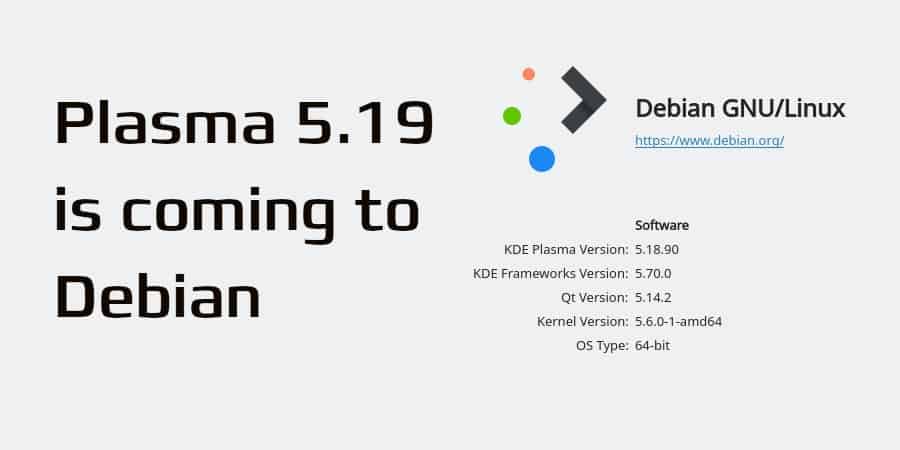
Norbert Preining: Plasma 5.19 coming to Debian

The KDE Plasma desktop is soon getting an update to 5.19, and beta versions are out for testing.
In this release, we have prioritized making Plasma more consistent, correcting and unifying designs of widgets and desktop elements; worked on giving you more control over your desktop by adding configuration options to the System Settings; and improved usability, making Plasma and its components easier to use and an overall more pleasurable experience.
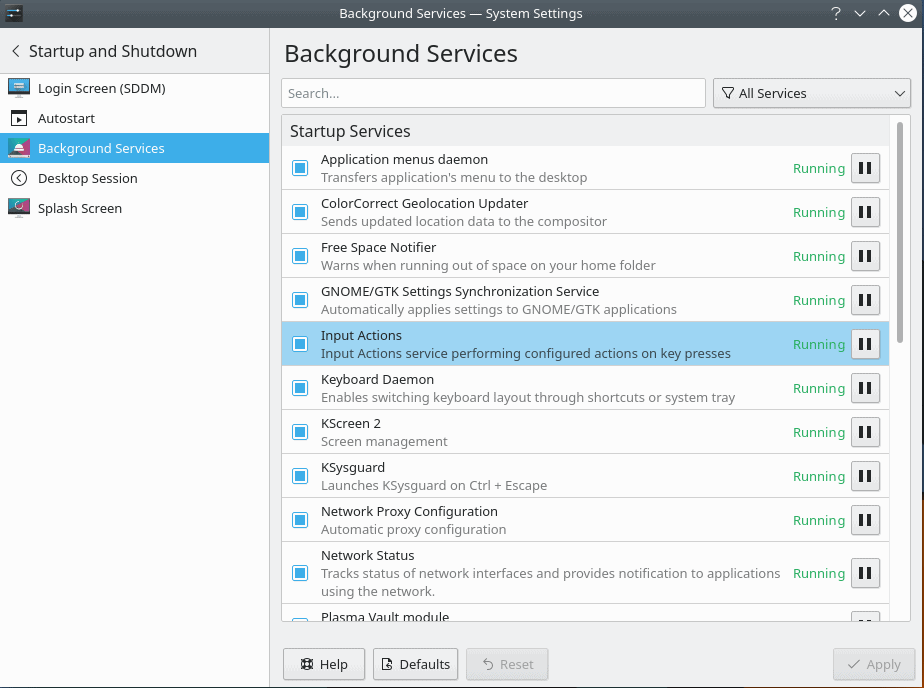
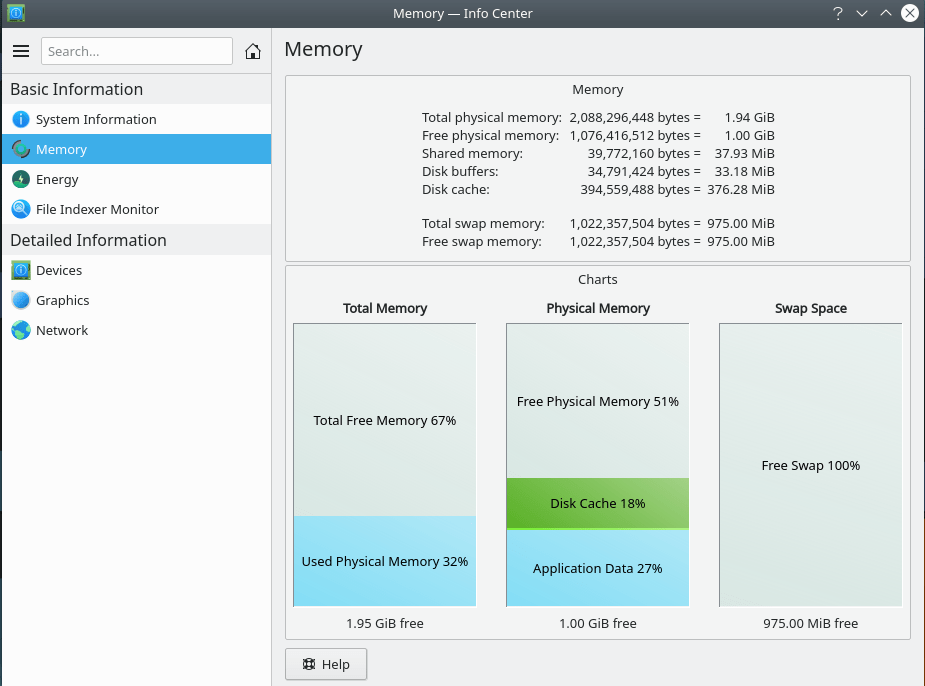
There are lots of new features mentioned in the release announcement, I like in particular the much more usable settings application as well as the new info center.


I have been providing builds of KDE related packages since quite some time now, see everything posted under the KDE tag. In the last days I have prepared Debian packages for Plasma 5.18.90 on OBS, for now only targeting Debian/sid and amd64 architecture. These packages require Qt 5.14, which is only available in the experimental suite, and there is no way to simply update to Qt 5.14 since all Qt related packages need to be recompiled. So as long as Qt 5.14 doesn t hit unstable, I cannot really run these packages on my main machine, but I tried a clean Debian virtual machine installing only Plasma 5.18.90 and depending packages, plus some more for a pleasant desktop experience. This worked out quite well, the VM runs Plasma 5.18.90. I don t have 3D running on the VM, so I cannot really check all the nice new effects, but I am sure on my main system they would work. Well, bottom line, as soon as we have Qt 5.14 in Debian/unstable, we are also ready for Plasma 5.19!

18 May 2020

Fran ois Marier: Displaying client IP address using Apache Server-Side Includes

If you use a Dynamic DNS setup to reach machines which are not behind a stable IP address, you will likely have a need to probe these machines' public IP addresses. One option is to use an insecure service like Oracle's http://checkip.dyndns.com/ which echoes back your client IP, but you can also do this on your own server if you have one. There are multiple options to do this, like writing a CGI or PHP script, but those are fairly heavyweight if that's all you need mod_cgi or PHP for. Instead, I decided to use Apache's built-in Server-Side Includes.

Apache configuration Start by turning on the include filter by adding the following in /etc/apache2/conf-available/ssi.conf:
AddType text/html .shtml
AddOutputFilter INCLUDES .shtml
and making that configuration file active:
a2enconf ssi
Then, find the vhost file where you want to enable SSI and add the following options to a Location or Directory section:
<Location /ssi_files>
    Options +IncludesNOEXEC
    SSLRequireSSL
    Header set Content-Security-Policy: "default-src 'none'"
    Header set X-Content-Type-Options: "nosniff"
</Location>
before adding the necessary modules:
a2enmod headers
a2enmod include
and restarting Apache:
apache2ctl configtest && systemctl restart apache2.service
Create an shtml page With the web server ready to process SSI instructions, the following HTML blurb can be used to display the client IP address:
<!--#echo var="REMOTE_ADDR" -->
or any other built-in variable. Note that you don't need to write a valid HTML for the variable to be substituted and so the above one-liner is all I use on my server.

Security concerns The first thing to note is that the configuration section uses the IncludesNOEXEC option in order to disable arbitrary command execution via SSI. In addition, you can also make sure that the cgi module is disabled since that's a dependency of the more dangerous side of SSI:
a2dismod cgi
Of course, if you rely on this IP address to be accurate, for example because you'll be putting it in your DNS, then you should make sure that you only serve this page over HTTPS, which can be enforced via the SSLRequireSSL directive. I included two other headers in the above vhost config (Content-Security-Policy and X-Content-Type-Options) in order to limit the damage that could be done in case a malicious file was accidentally dropped in that directory. Finally, I suggest making sure that only the root user has writable access to the directory which has server-side includes enabled:
$ ls -la /var/www/ssi_includes/
total 12
drwxr-xr-x  2 root     root     4096 May 18 15:58 .
drwxr-xr-x 16 root     root     4096 May 18 15:40 ..
-rw-r--r--  1 root     root        0 May 18 15:46 index.html
-rw-r--r--  1 root     root       32 May 18 15:58 whatsmyip.shtml

Arturo Borrero Gonz lez: A better Toolforge: upgrading the Kubernetes cluster

Logos This post was originally published in the Wikimedia Tech blog, and is authored by Arturo Borrero Gonzalez and Brooke Storm. One of the most successful and important products provided by the Wikimedia Cloud Services team at the Wikimedia Foundation is Toolforge. Toolforge is a platform that allows users and developers to run and use a variety of applications that help the Wikimedia movement and mission from the technical point of view in general. Toolforge is a hosting service commonly known in the industry as a Platform as a Service (PaaS). Toolforge is powered by two different backend engines, Kubernetes and GridEngine. This article focuses on how we made a better Toolforge by integrating a newer version of Kubernetes and, along with it, some more modern workflows. The starting point in this story is 2018. Yes, two years ago! We identified that we could do better with our Kubernetes deployment in Toolforge. We were using a very old version, v1.4. Using an old version of any software has more or less the same consequences everywhere: you lack security improvements and some modern key features. Once it was clear that we wanted to upgrade our Kubernetes cluster, both the engineering work and the endless chain of challenges started. It turns out that Kubernetes is a complex and modern technology, which adds some extra abstraction layers to add flexibility and some intelligence to a very old systems engineering need: hosting and running a variety of applications. Our first challenge was to understand what our use case for a modern Kubernetes was. We were particularly interested in some key features: Soon enough we faced another Kubernetes native challenge: the documentation. For a newcomer, learning and understanding how to adapt Kubernetes to a given use case can be really challenging. We identified some baffling patterns in the docs. For example, different documentation pages would assume you were using different Kubernetes deployments (Minikube vs kubeadm vs a hosted service). We are running Kubernetes like you would on bare-metal (well, in CloudVPS virtual machines), and some documents directly referred to ours as a corner case. During late 2018 and early 2019, we started brainstorming and prototyping. We wanted our cluster to be reproducible and easily rebuildable, and in the Technology Department at the Wikimedia Foundation, we rely on Puppet for that. One of the first things to decide was how to deploy and build the cluster while integrating with Puppet. This is not as simple as it seems because Kubernetes itself is a collection of reconciliation loops, just like Puppet is. So we had to decide what to put directly in Kubernetes and what to control and make visible through Puppet. We decided to stick with kubeadm as the deployment method, as it seems to be the more upstream-standardized tool for the task. We had to make some interesting decisions by trial and error, like where to run the required etcd servers, what the kubeadm init file would look like, how to proxy and load-balance the API on our bare-metal deployment, what network overlay to choose, etc. If you take a look at our public notes, you can get a glimpse of the number of decisions we had to make. Our Kubernetes wasn t going to be a generic cluster, we needed a Toolforge Kubernetes service. This means we don t use some of the components, and also, we add some additional pieces and configurations to it. By the second half of 2019, we were working full-speed on the new Kubernetes cluster. We already had an idea of what we wanted and how to do it. There were a couple of important topics for discussions, for example: We will describe in detail the final state of those pieces in another blog post, but each of the topics required several hours of engineering time, research, tests, and meetings before reaching a point in which we were comfortable with moving forward. By the end of 2019 and early 2020, we felt like all the pieces were in place, and we started thinking about how to migrate the users, the workloads, from the old cluster to the new one. This migration plan mostly materialized in a Wikitech page which contains concrete information for our users and the community. The interaction with the community was a key success element. Thanks to our vibrant and involved users, we had several early adopters and beta testers that helped us identify early flaws in our designs. The feedback they provided was very valuable for us. Some folks helped solve technical problems, helped with the migration plan or even helped make some design decisions. Worth noting that some of the changes that were presented to our users were not easy to handle for them, like new quotas and usage limits. Introducing new workflows and deprecating old ones is always a risky operation. Even though the migration procedure from the old cluster to the new one was fairly simple, there were some rough edges. We helped our users navigate them. A common issue was a webservice not being able to run in the new cluster due to stricter quota limiting the resources for the tool. Another example is the new Ingress layer failing to properly work with some webservices s particular options. By March 2020, we no longer had anything running in the old Kubernetes cluster, and the migration was completed. We then started thinking about another step towards making a better Toolforge, which is introducing the toolforge.org domain. There is plenty of information about the change to this new domain in Wikitech News. The community wanted a better Toolforge, and so do we, and after almost 2 years of work, we have it! All the work that was done represents the commitment of the Wikimedia Foundation to support the technical community and how we really want to pursue technical engagement in general in the Wikimedia movement. In a follow-up post we will present and discuss more in-depth about some technical details of the new Kubernetes cluster, stay tuned! This post was originally published in the Wikimedia Tech blog, and is authored by Arturo Borrero Gonzalez and Brooke Storm.

Russell Coker: A Good Time to Upgrade PCs

PC hardware just keeps getting cheaper and faster. Now that so many people have been working from home the deficiencies of home PCs are becoming apparent. I ll give Australian prices and URLs in this post, but I think that similar prices will be available everywhere that people read my blog. From MSY (parts list PDF ) [1] 120G SATA SSDs are under $50 each. 120G is more than enough for a basic workstation, so you are looking at $42 or so for fast quiet storage or $84 or so for the same with RAID-1. Being quiet is a significant luxury feature and it s also useful if you are going to be in video conferences. For more serious storage NVMe starts at around $100 per unit, I think that $124 for a 500G Crucial NVMe is the best low end option (paying $95 for a 250G Kingston device doesn t seem like enough savings to be worth it). So that s $248 for 500G of very fast RAID-1 storage. There s a Samsung 2TB NVMe device for $349 which is good if you need more storage, it s interesting to note that this is significantly cheaper than the Samsung 2TB SSD which costs $455. I wonder if SATA SSD devices will go away in the future, it might end up being SATA for slow/cheap spinning media and M.2 NVMe for solid state storage. The SATA SSD devices are only good for use in older systems that don t have M.2 sockets on the motherboard. It seems that most new motherboards have one M.2 socket on the motherboard with NVMe support, and presumably support for booting from NVMe. But dual M.2 sockets is rare and the price difference is significantly greater than the cost of a PCIe M.2 card to support NVMe which is $14. So for NVMe RAID-1 it seems that the best option is a motherboard with a single NVMe socket (starting at $89 for a AM4 socket motherboard the current standard for AMD CPUs) and a PCIe M.2 card. One thing to note about NVMe is that different drivers are required. On Linux this means means building a new initrd before the migration (or afterwards when booted from a recovery image) and on Windows probably means a fresh install from special installation media with NVMe drivers. All the AM4 motherboards seem to have RADEON Vega graphics built in which is capable of 4K resolution at a stated refresh of around 24Hz. The ones that give detail about the interfaces say that they have HDMI 1.4 which means a maximum of 30Hz at 4K resolution if you have the color encoding that suits text (IE for use other than just video). I covered this issue in detail in my blog post about DisplayPort and 4K resolution [2]. So a basic AM4 motherboard won t give great 4K display support, but it will probably be good for a cheap start. $89 for motherboard, $124 for 500G NVMe, $344 for a Ryzen 5 3600 CPU (not the cheapest AM4 but in the middle range and good value for money), and $99 for 16G of RAM (DDR4 RAM is cheaper than DDR3 RAM) gives the core of a very decent system for $656 (assuming you have a working system to upgrade and peripherals to go with it). Currently Kogan has 4K resolution monitors starting at $329 [3]. They probably won t be the greatest monitors but my experience of a past cheap 4K monitor from Kogan was that it is quite OK. Samsung 4K monitors started at about $400 last time I could check (Kogan currently has no stock of them and doesn t display the price), I d pay an extra $70 for Samsung, but the Kogan branded product is probably good enough for most people. So you are looking at under $1000 for a new system with fast CPU, DDR4 RAM, NVMe storage, and a 4K monitor if you already have the case, PSU, keyboard, mouse, etc. It seems quite likely that the 4K video hardware on a cheap AM4 motherboard won t be that great for games and it will definitely be lacking for watching TV documentaries. Whether such deficiencies are worth spending money on a PCIe video card (starting at $50 for a low end card but costing significantly more for 3D gaming at 4K resolution) is a matter of opinion. I probably wouldn t have spent extra for a PCIe video card if I had 4K video on the motherboard. Not only does using built in video save money it means one less fan running (less background noise) and probably less electricity use too. My Plans I currently have a workstation with 2*500G SATA SSDs in a RAID-1 array, 16G of RAM, and a i5-2500 CPU (just under 1/4 the speed of the Ryzen 5 3600). If I had hard drives then I would definitely buy a new system right now. But as I have SSDs that work nicely (quiet and fast enough for most things) and almost all machines I personally use have SSDs (so I can t get a benefit from moving my current SSDs to another system) I would just get CPU, motherboard, and RAM. So the question is whether to spend $532 for more than 4* the CPU performance. At the moment I ll wait because I ll probably get a free system with DDR4 RAM in the near future, while it probably won t be as fast as a Ryzen 5 3600, it should be at least twice as fast as what I currently have.

17 May 2020

Steve Kemp: Some brief sysbox highlights

I started work on sysbox again recently, adding a couple of simple utilities. (The whole project is a small collection of utilities, distributed as a single binary to ease installation.) Imagine you want to run a command for every line of STDIN, here's a good example:
 $ cat input   sysbox exec-stdin "youtube-dl  "
Here you see for every (non-empty) line of input read from STDIN the command "youtube-dl" has been executed. " " gets expanded to the complete line read. You can also access individual fields, kinda like awk. (Yes youtube-dl can read a list of URLs from a file, this is an example!) Another example, run groups for every local user:
$ cat /etc/passwd   sysbox exec-stdin --split=: groups  1 
Here you see we have split the input-lines read from STDIN by the : character, instead of by whitespace, and we've accessed the first field via " 1 ". This is certainly easier for scripting than using a bash loop. On the topic of bash; command-completion for each subcommand, and their arguments, is now present:
$ source <(sysbox bash-completion)
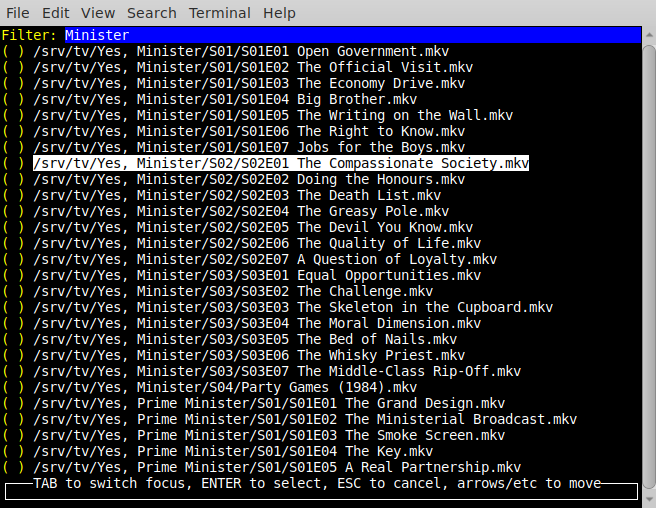
And I've added a text-based UI for selecting files. You can also execute a command, against the selected file:
$ sysbox choose-file -exec "xine  " /srv/tv
This is what that looks like: /2020/05/17-choose-file.png You'll see: As well as choosing files, you can also select from lines read via STDIN, and you can filter the command in the same way as before. (i.e. " " is the selected item.) Other commands received updates, so the calculator now allows storing results in variables:
$ sysbox calc
calc> let a = 3
3
calc> a / 9 * 3
1
calc> 1 + 2 * a
7
calc> 1.2 + 3.4
4.600000

16 May 2020

Norbert Preining: Upgrading AMD Radeon 5700 to 5700 XT via BIOS

Having recently switched from NVIDIA to AMD graphic cards, in particular a RX 5700, I found out that I can get myself a free upgrade to the RX 5700 XT variant without paying one Yen, by simply flashing a compatible 5700 XT BIOS onto the 5700 card. Not that this is something new, a detailed explanation can be found here.
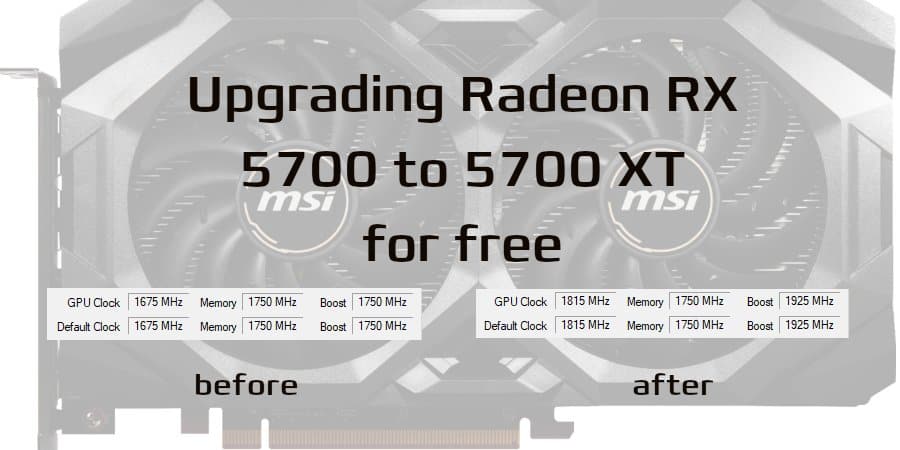
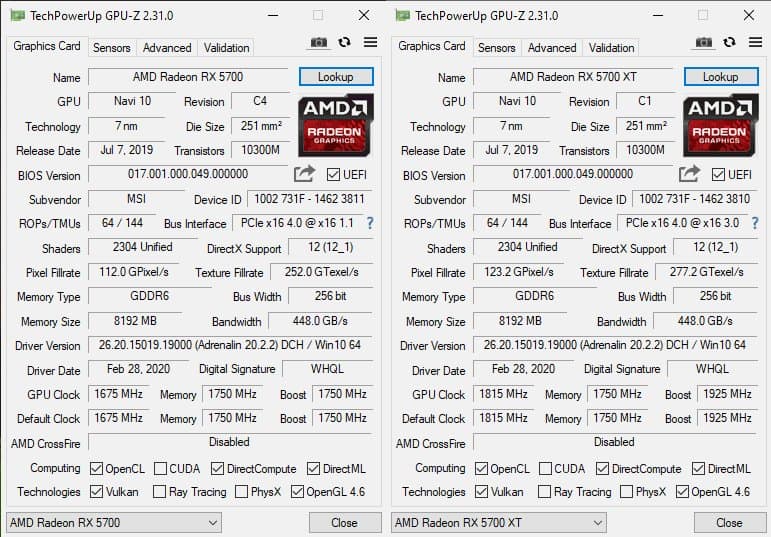
The same article also gives a detailed technical explanation on the difference between the two cards. The 5700 variant has less stream processors (2304 against 2560 in the XT variant), and lower power limits and clock speeds. Other than this they are based on the exact same chip layout (Navi 10), and with the same amount and type of memory 8 GB GDDR6. Flashing the XT BIOS onto the plain 5700 will not changes the number of stream processors, but power limits and clock speeds are raised to the same level of the 5700 XT, providing approximately a 7% gain without any over-clocking and over-powering, and potentially more by raising voltage etc. Detailed numbers can be found in the linked article above. The first step in this free upgrade is to identify ones own card correctly, best with device id and subsystem id, and then find the correct BIOS. Lots of BIOS dumps are provided in the BIOS database (link already restricting to 5700 XT BIOS). I used CPU-Z (Windows program) to determine this items, see image on the right (click to enlarge). In my case I got 1002 731F - 1462 3811 for the complete device id. The card is a MSI RX 5700 8 GB Mech OC, so I found the following alternative BIOS for MSI RX 5700 XT 8 GB Mech OC. Unfortunately, it seems that MSI is distinguishing 5700 and 5700 XT by their device id, because the XT variant gives 1002 731F - 1462 3810 for the complete device id, meaning that the last digit is 1 off compared to mine (3811 versus 3810). And indeed, trying to flash this video BIOS the normal way (using the Windows version ended in a warning that the subsystem id is different. A bit of search led to a thread in the TechPowerup Fora and this post explaining how to force the flashing in this case. Disclaimer: The following might brick your graphic card, you are doing this on your own risk! Necessary software: I did all the flashing and checking under Windows, but only because I realized too late that there is a fully uptodate flashing program for Linux that exhibits the same functionality. Also, I didn t know how to get the device id since the current AMD ROCm tools seem not to provide this data. If you are lucky and the device ids for your card are the same for both 5700 and 5700 XT variants, then you can use the graphical client (amdvbflashWin.exe), but if there is a difference, the command line is necessary. After unpacking the AMD Flash program and getting the correct BIOS rom file, the steps taken on Windows are (the very same steps can be taken on Linux): This should succeed in both cases. After that shutdown and restart your computer and you should be greeted with a RT 5700 XT card, without twisting a single screw. Starting Windows for the first time gave some flickering, because the driver for the new card was installed. On Linux the system auto-detects the card and everything works out of the box. Very smooth. Finally, a word of warning: Don t do these kind of things if you are not ready to pay the prize of a bricked GPU card in case something goes wrong! Everything is on your own risk! Let me close with a before/after image, most of the fields are identical, but the default/gpu clocks both at normal as well as boost levels see a considerable improvement

Michael Stapelberg: a new distri linux (fast package management) release

I just released a new version of distri. The focus of this release lies on: See the release notes for more details. The distri research linux distribution project was started in 2019 to research whether a few architectural changes could enable drastically faster package management. While the package managers in common Linux distributions (e.g. apt, dnf, ) top out at data rates of only a few MB/s, distri effortlessly saturates 1 Gbit, 10 Gbit and even 40 Gbit connections, resulting in fast installation and update speeds.

Lucas Kanashiro: Quarantine times

After quite some time without publishing anything here, I decided to share the latest events. It is a hard time for most of us but with all this time at home, one can also do great things. I would like to start with the wonderful idea the Debian Brasil community had! Why not create an online Debian related conference to keep people s minds busy and also share knowledge? After brainstorming, we came up with our online conference called #FiqueEmCasaUseDebian (in English it would be #StayHomeUseDebian). It started on May 3rd and will last until May 30th (yes, one month)! Every weekday, we have one online talk at night and on every Saturday, a Debian packaging workshop. The feedback so far has been awesome and the Brazilian Debian community is reaching out to more people than usual at our regular conferences (as you might have imagined, Brazil is huge and it is hard to bring people at the same place). At the end of the month, we will have the first MiniDebConf online and I hope it will be as successful as our experience here in Brazil. Another thing that deserves a highlight is the fact that I became an Ubuntu Core Developer this month; yay! After 9 months of working almost daily on the Ubuntu Server, I was able to get my upload rights to the Ubuntu archive. I was tired of asking for sponsorship, and probably my peers were tired of me too. I could spend more time here complaining about the Brazilian government but I think it isn t worth it. Let s try to do something useful instead!

15 May 2020

Dirk Eddelbuettel: Let s celebrate Anna!

Today is graduation at Washington University, and just like many other places, the ceremonies are a lot more virtual and surreal that in other years. For Anna today marks the graduation from Biomedical Engineering with a BSc. The McKelvey School of Engineering put a Zoom meeting together yesterday which was nice, and there is something more virtual here. Hopefully a real-life commencenment can take place in a year the May 30, 2021, date has been set. The university also sent out a little commencement site/video which was cute. But at end of the day online-only still falls short of the real deal as we all know too well by now. During those years, just about the only thing really I ever tweeted about appears to be soccer related. As it should because ball is life, as we all know. Here is one from 1 1/2 years ago when her Club Team three-peated in their NIRSA division: And that opens what may be the best venue for mocking Anna: this year, which her a senior and co-captain, the team actually managed to loose a league game (a shocking first in these years) and to drop the final. I presume they anticipated that all we would all talk about around now is The Last Dance and three-peats, and left it at that. Probably wise. Now just this week, and hence days before graduating with her B.Sc., also marks the first time Anna was addressed as Dr Eddelbuettel. A little prematurely I may say, but not too shabby to be in print already! But on the topic of gratulations and what comes next, this tweet was very sweet: As was this, which marked another impressive score: So big thanks from all of us to WashU for being such a superb environment for Anna for those four years, and especially everybody at the Pappu Lab for giving Anna a home and base to start a research career. And deepest and most sincere congratulations to Anna before the next adventure starts .

14 May 2020

Iustin Pop: New internet provider

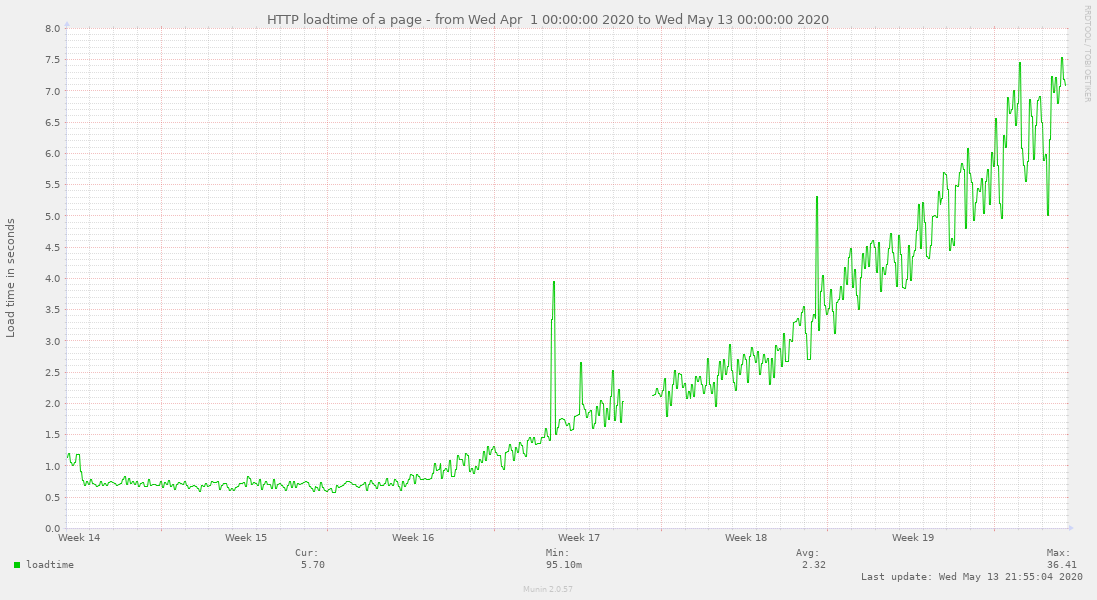
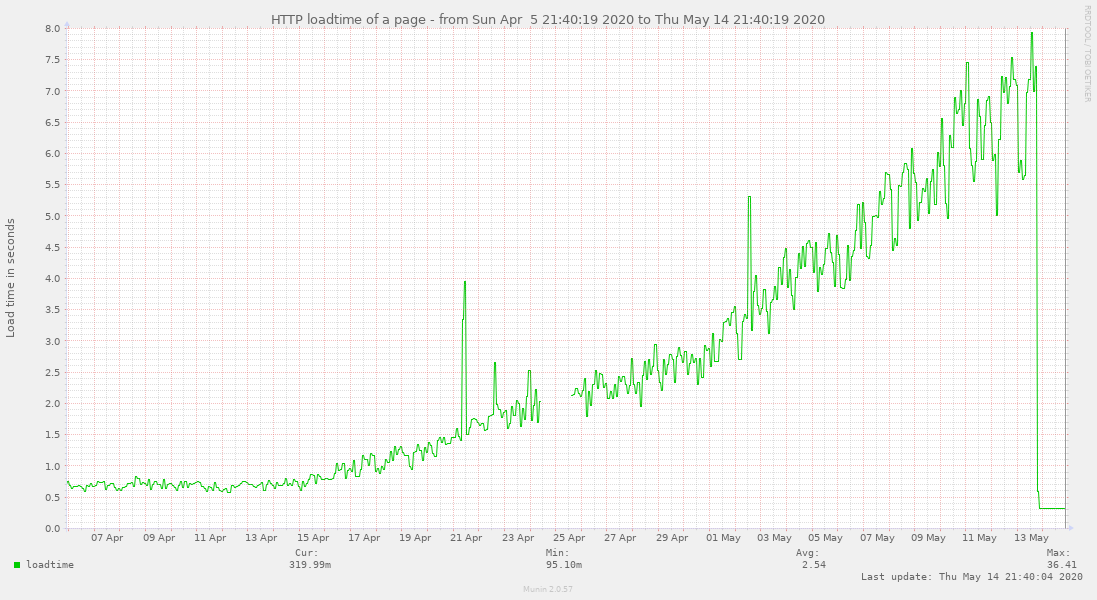
Note: all this is my personal experience, on my personal machines, and I don t claim it to be the absolute truth. Also, I don t directly call out names, although if you live in Switzerland it s pretty easy to guess who the old provider is from some hints. For a long time, I wanted to move away from my current (well, now past) provider, for a multitude of reasons. The main being that the company is very classic company, with classic support system, that doesn t work very well - I had troubles with their billing system that left me out cold without internet for 15 days, but for the recent few years, they were mostly OK, and changing to a different provider would have meant me routing a really long Ethernet cable around the apartment, so I kept postponing it. Yes, self-inflicted pain, I know. Until the entire work-from-home thing, when the usually stable connection start degrading in a very linear fashion day-by-day (this is a graph that basically reflects download bandwidth):
1+ month download bandwidth test 1+ month download bandwidth test
At first, I didn t realise this, as even 100Mbps is still fast enough. But once the connection went below (I believe) 50Mbps, it became visible in day to day work. And since I work daily from home yeah. Not fun. So I started doing speedtest.net - and oh my, ~20Mbps was a good result, usually 12-14Mbps. On a wired connection. On a connection that officially is supposed to be 600Mbps down. The upload speed was spot on, so I didn t think it was my router, but: Nothing helped. Once in a blue moon, speedtest would give me 100Mbps, but like once every two days, then it would be back and showing 8Mbps. Eight! It ended up as even apt update was tediously slow, and kernel downloads took ages The official instructions for dealing with bad internet are a joke: And the best part: If you are not satisfied with the results, read our internet optimisation guide. If you are still not happy, use our community forums or our social platforms. Given that it was a decline over 3-weeks, that I don t know of any computer component that would degrade this steadily but not throw any other errors, and that my upload speed was all good, I assumed it s the provider. Maybe I was wrong, but I wanted to do this anyway for a long while, so I went through the find how to route cable, check if other provider socket is good, order service, etc. dance, and less than a week later, I had the other connection. Now, of course, bandwidth works as expected:
1+ month updated bandwidth test 1+ month updated bandwidth test
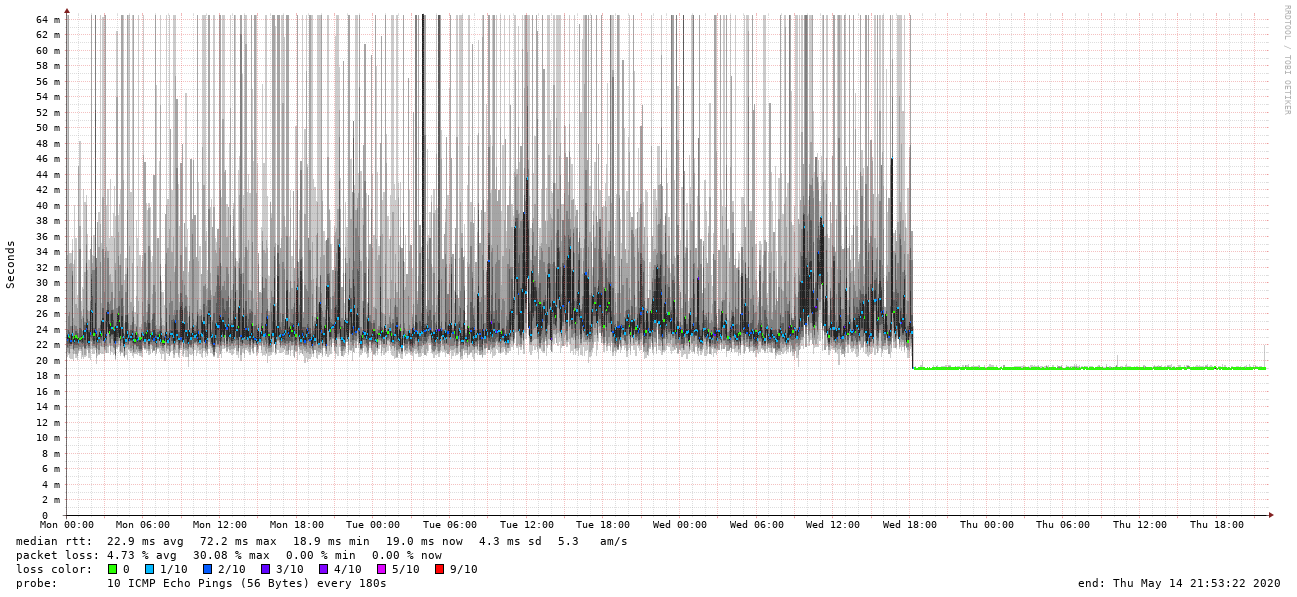
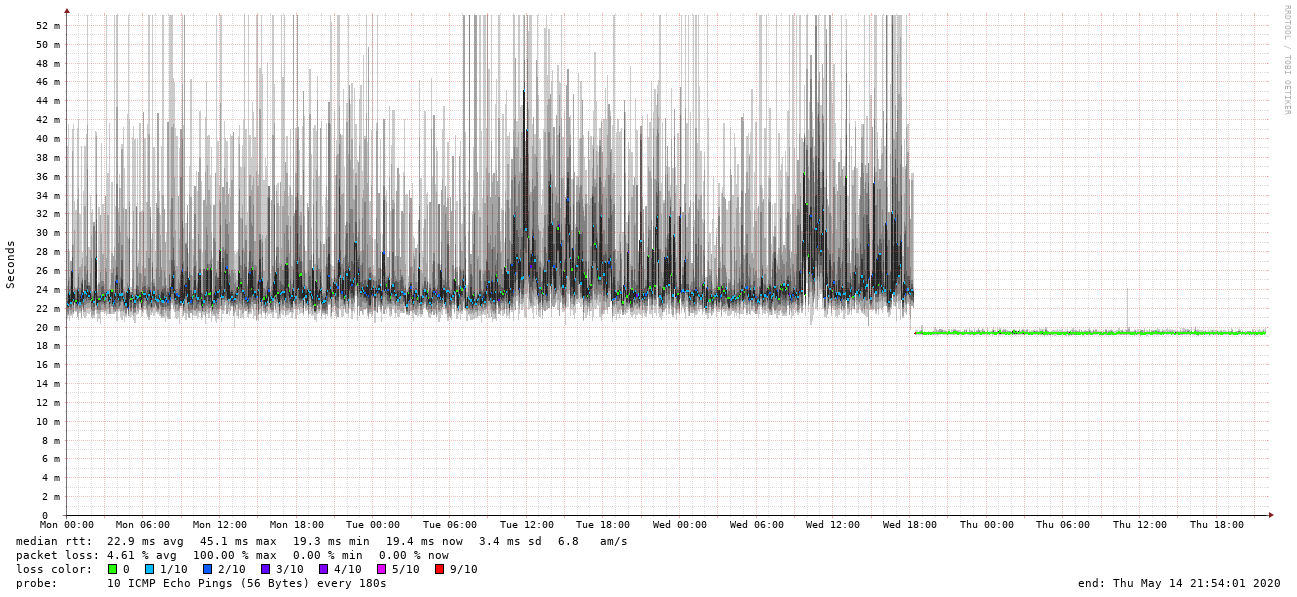
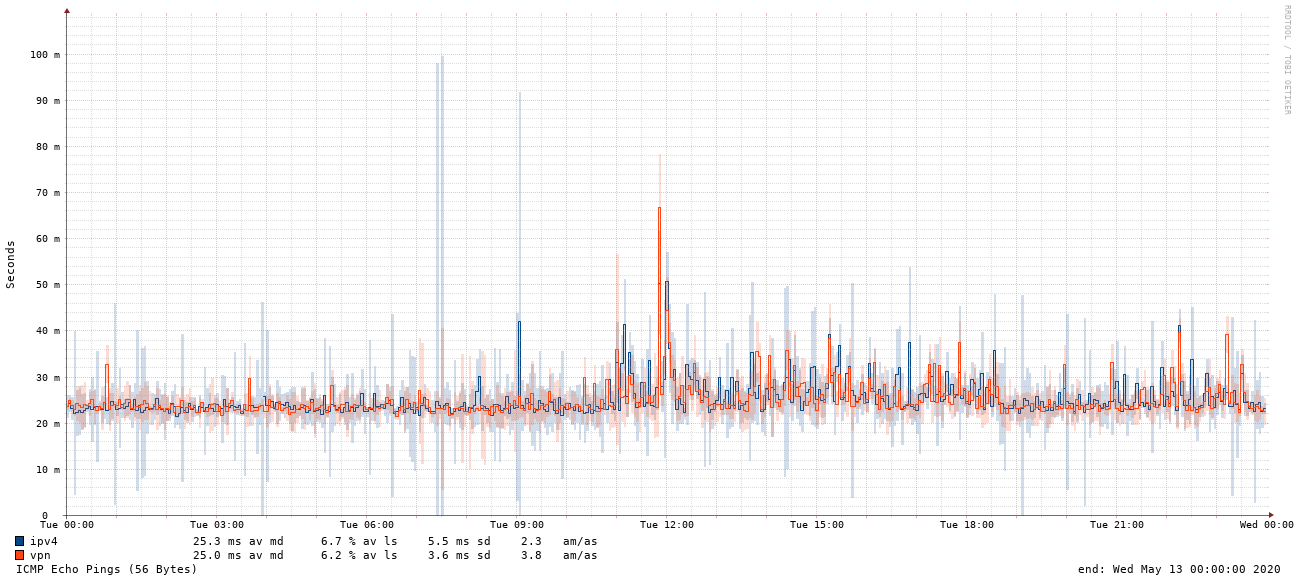
Both download and upload are fine (the graph above is just download). Latency is also much better, towards many parts of the internet that matter. But what is shocking is the difference in jitter to some external hosts I care about. On the previous provider, a funny thing was that both outgoing and incoming pings had both more jitter and packet loss when done directly (IPv4 to IPv4) than when done over a VPN. This doesn t make sense, since VPN is just overhead over IPv4, but the graphs show it, and what I think happens is that a VPN flow is cached in the provider s routers, whereas a simple ping packet not. But, the fact that there s enough jitter for a ping to a not-very-far host doesn t make me happy. Examples, outgoing:
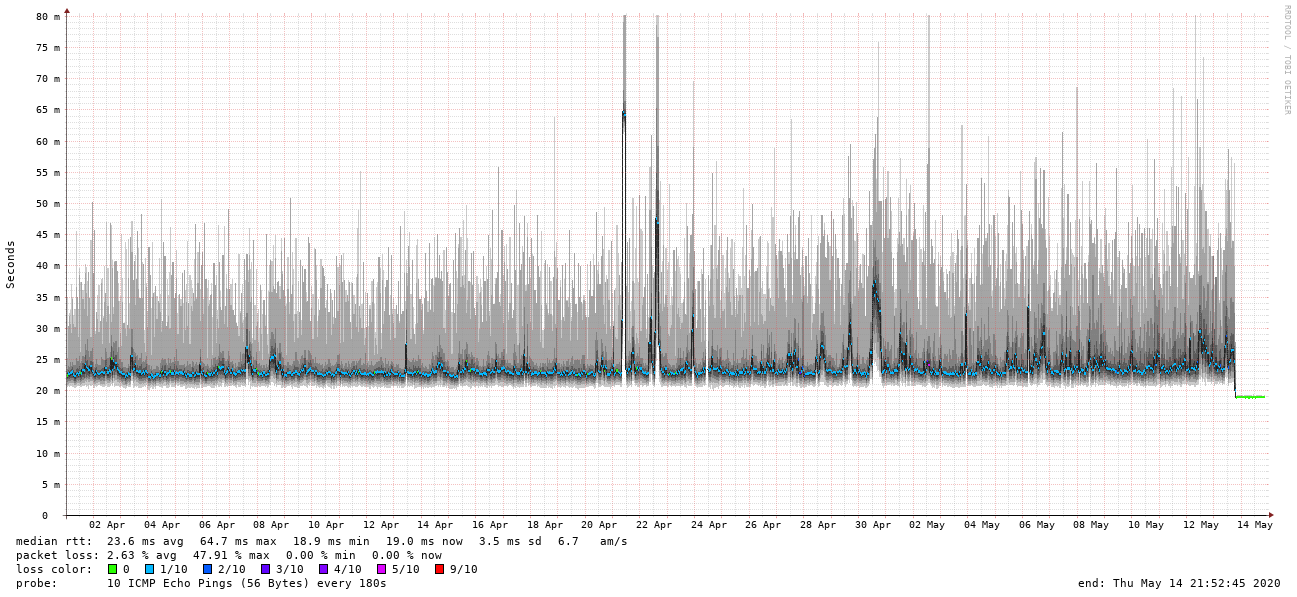
Outgoing smokeping to public IPv4 Outgoing smokeping to public IPv4
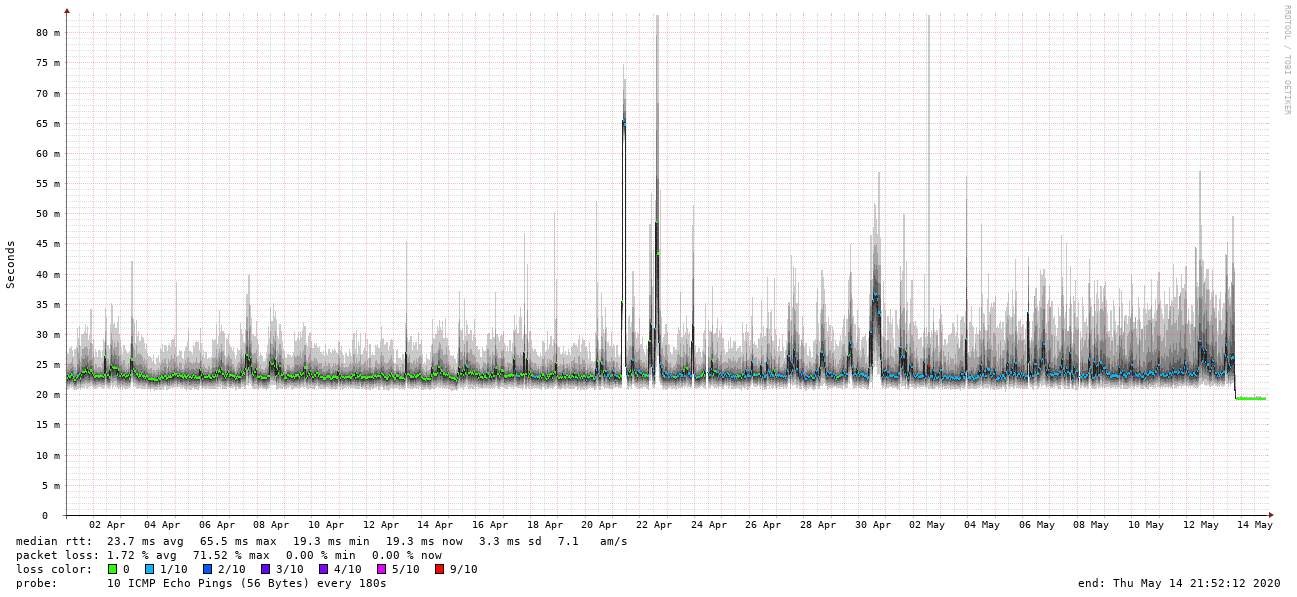
Outgoing smokeping over VPN Outgoing smokeping over VPN
And incoming:
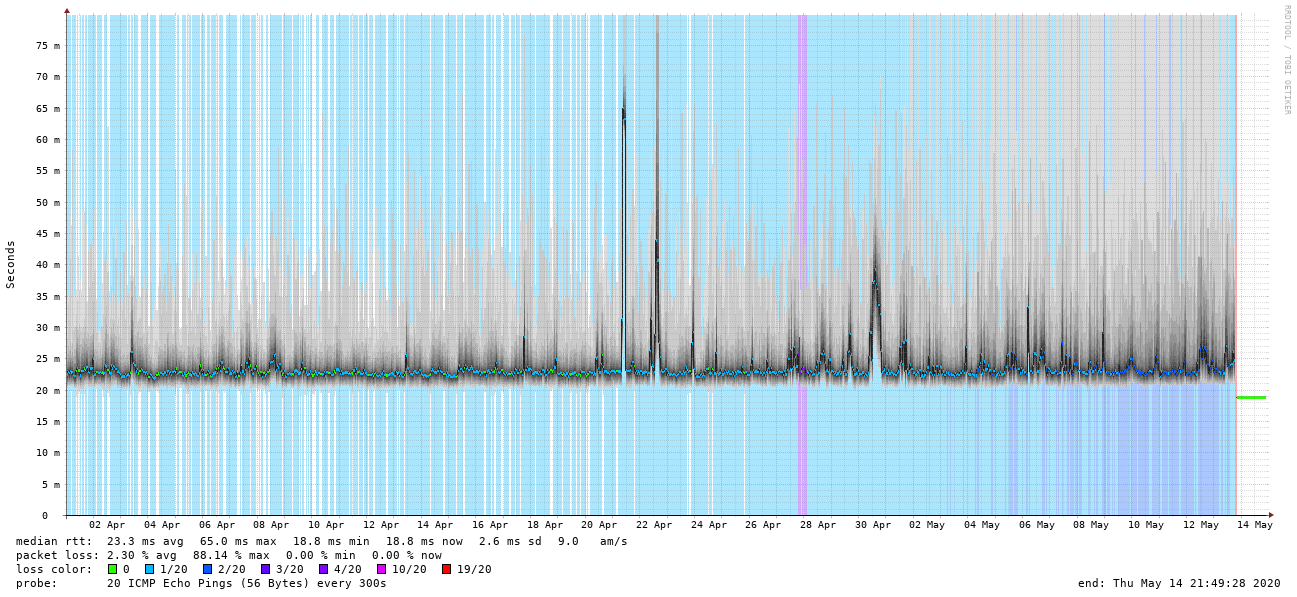
Incoming smokeping to public IPv4 Incoming smokeping to public IPv4
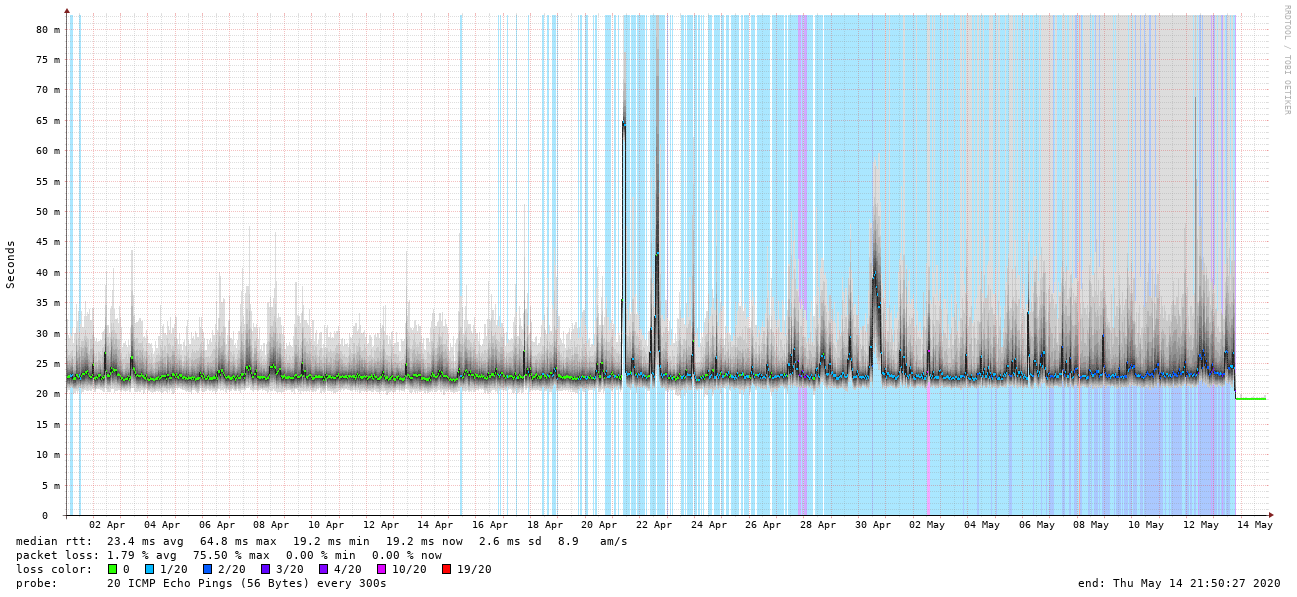
Incoming smokeping over VPN Incoming smokeping over VPN
Both incoming and outgoing show this weirdness - more packet loss and more jitter over VPN. Again, this is not a problem in practice, or not much, but makes me wonder what other shenanigans happen behind the scenes. You can also see clearly when the work from home traffic entered the picture and started significantly degrading my connection, even over the magically better VPN connection. Switching to this week s view shows the (in my opinion) dramatic improvement in consistency of the connection:
Outgoing current week smokeping to public IPv4 Outgoing current week smokeping to public IPv4
Outgoing current week smokeping over VPN Outgoing current week smokeping over VPN
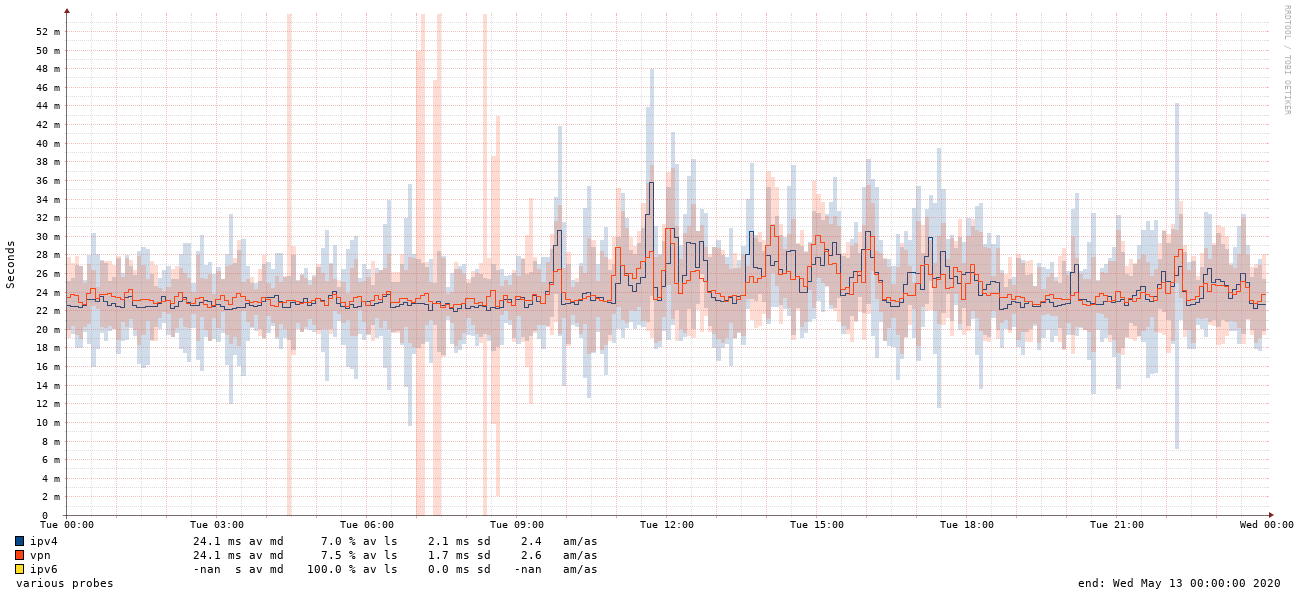
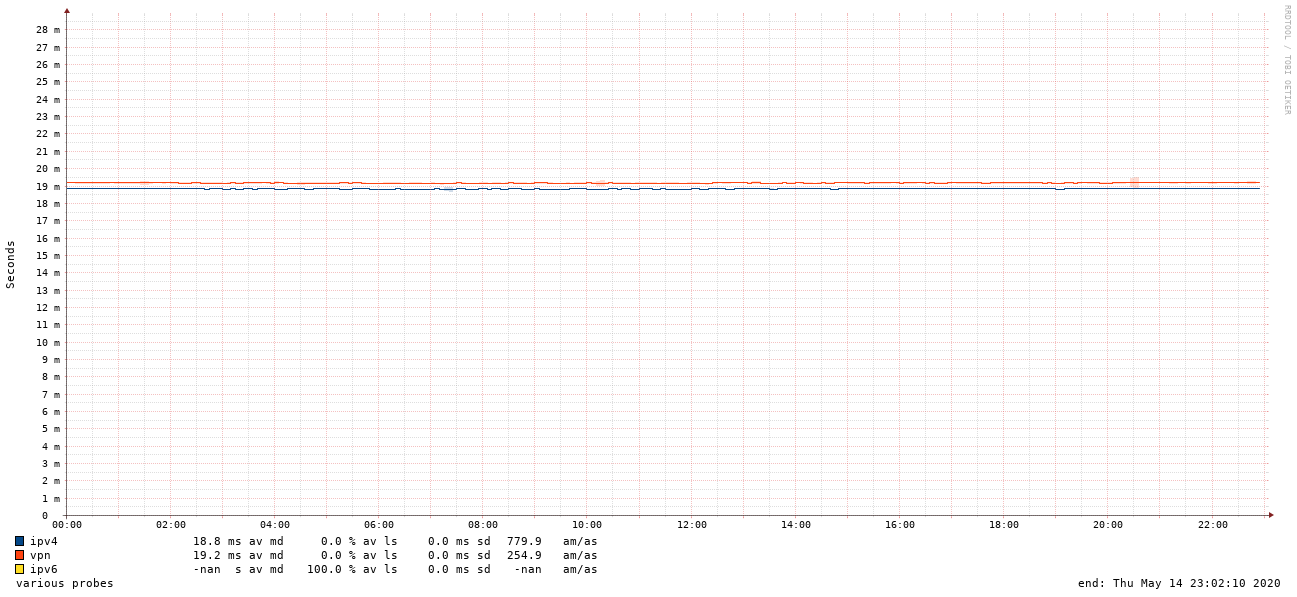
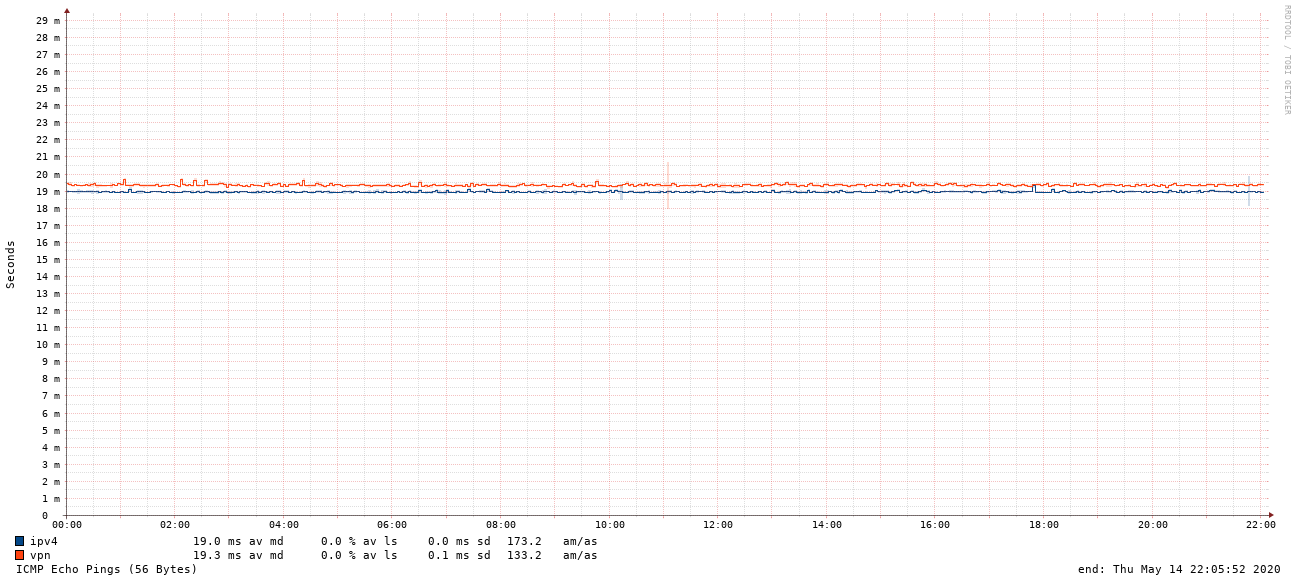
No more packet loss, no more jitter. You can also see my VPN being temporarily down during provider switchover because my firewall was not quite correct for a moment. And the last drill down, at high resolution, one day before and one day after switchover. Red is VPN, blue is plain IPv4, yellow is the missing IPv6 connection :) Incoming old:
Incoming 1-day smokeping, old provider Incoming 1-day smokeping, old provider
and new:
Incoming 1-day smokeping, new provider Incoming 1-day smokeping, new provider
Outgoing old:
Outgoing 1-day smokeping, old provider Outgoing 1-day smokeping, old provider
and new:
Outgoing 1-day smokeping, new provider Outgoing 1-day smokeping, new provider
This is what I expect, ping-over-VPN should of course be slower than plain ping. Note that incoming and outgoing have slightly different consistency, but that is fine for me :) The endpoints doing the two tests are different, so this is expected. Reading the legend on the graphs for the incoming connection (similar story for outgoing): So to my previous provider: it can be done better. Or at least, allow people easier ways to submit performance issue problems. For me, the moral of the story is that I should have switched a couple of years ago, instead of being lazy. And that I m curious to see how IPv6 traffic will differ, if at all :) Take care, everyone! And thanks for looking at these many graphs :)

Norbert Preining: Switching from NVIDIA to AMD (including tensorflow)

I have been using my Geforce 1060 extensively for deep learning, both with Python and R. But the always painful play with the closed source drivers and kernel updates, paired with the collapse of my computer s PSU and/or GPU, I decided to finally do the switch to AMD graphic card and open source stack. And you know what, within half a day I had everything, including Tensorflow running. Yeah to Open Source!

Preliminaries So what is the starting point: I am running Debian/unstable with a AMD Radeon 5700. First of all I purged all NVIDIA related packages, and that are a lot I have to say. Be sure to search for nv and nvidia and get rid of all packages. For safety I did reboot and checked again that no kernel modules related to NVIDIA are loaded. Firmware Debian ships the package amd-gpu-firmware but this is not enough for the current kernel and current hardware. Better is to clone git://git.kernel.org/pub/scm/linux/kernel/git/firmware/linux-firmware.git and copy everything from the amdgpu directory to /lib/firmware/amdgpu. I didn t do that at first, and then booting the kernel did hang during the switch to AMD framebuffer. If you see this behaviour, your firmwares are too old. Kernel The advantage of having open source driver that is in the kernel is that you don t have to worry about incompatibilities (like every time a new kernel comes out the NVIDIA driver needs patching). For recent AMD GPUs you need a rather new kernel, I have 5.6.0 and 5.7.0-rc5 running. Make sure that you have all the necessary kernel config options turned on if you compile your own kernels. In my case this is
CONFIG_DRM_AMDGPU=m
CONFIG_DRM_AMDGPU_USERPTR=y
CONFIG_DRM_AMD_ACP=y
CONFIG_DRM_AMD_DC=y
CONFIG_DRM_AMD_DC_DCN=y
CONFIG_HSA_AMD=y
When installing the kernel, be sure that the firmware is already updated so that the correct firmware is copied into the initrd. Support programs and libraries All the following is more or less an excerpt from the ROCm Installation Guide! AMD provides a Debian/Ubuntu APT repository for software as well as kernel sources. Put the following into /etc/apt/sources.list.d/rocm.list:
deb [arch=amd64] http://repo.radeon.com/rocm/apt/debian/ xenial main
and also put the public key of the rocm repository into /etc/apt/trusted.d/rocm.asc. After that apt-get update should work. I did install rocm-dev-3.3.0, rocm-libs-3.3.0, hipcub-3.3.0, miopen-hip-3.3.0 (and of course the dependencies), but not rocm-dkms which is the kernel module. If you have a sufficiently recent kernel (see above), the source in the kernel itself is newer. The libraries and programs are installed under /opt/rocm-3.3.0, and to make the libraries available to Tensorflow (see below) and other programs, I added /etc/ld.so.conf.d/rocm.conf with the following content:
/opt/rocm-3.3.0/lib/
and run ldconfig as root. Last but not least, add a udev rule that is normally installed by rocm-dkms, put the following into /etc/udev/rules.d/70-kfd.rules:
SUBSYSTEM=="kfd", KERNEL=="kfd", TAG+="uaccess", GROUP="video"
This allows users from the video group to access the GPU.
Up to here you should be able to boot into the system and have X running on top of AMD GPU, including OpenGL acceleration and direct rendering:
$ glxinfo
ame of display: :0
display: :0  screen: 0
direct rendering: Yes
server glx vendor string: SGI
server glx version string: 1.4
...
client glx vendor string: Mesa Project and SGI
client glx version string: 1.4
...
Tensorflow Thinking about how hard it was to get the correct libraries to get Tensorflow running on GPUs (see here and here), it is a pleasure to see that with open source all this pain is relieved. There is already work done to make Tensorflow run on ROCm, the tensorflow-rocm project. The provide up to date PyPi packages, so a simple
pip3 install tensorflow-rocm
is enough to get Tensorflow running with Python:
>> import tensorflow as tf
>> tf.add(1, 2).numpy()
2020-05-14 12:07:19.590169: I tensorflow/stream_executor/platform/default/dso_loader.cc:44] Successfully opened dynamic library libhip_hcc.so
...
2020-05-14 12:07:19.711478: I tensorflow/core/common_runtime/gpu/gpu_device.cc:1247] Created TensorFlow device (/job:localhost/replica:0/task:0/device:GPU:0 with 7444 MB memory) -> physical GPU (device: 0, name: Navi 10 [Radeon RX 5600 OEM/5600 XT / 5700/5700 XT], pci bus id: 0000:03:00.0)
3
>>
Tensorflow for R Installation is trivial again since there is a tensorflow for R package, just run (as a user that is in the group staff, which normally own /usr/local/lib/R)
$ R
...
> install.packages("tensorflow")
..
Do not call the R function install_tensorflow() since Tensorflow is already installed and functional! With that done, R can use the AMD GPU for computations:
$ R
...
> library(tensorflow)
> tf$constant("Hellow Tensorflow")
2020-05-14 12:14:24.185609: I tensorflow/stream_executor/platform/default/dso_loader.cc:44] Successfully opened dynamic library libhip_hcc.so
...
2020-05-14 12:14:24.277736: I tensorflow/core/common_runtime/gpu/gpu_device.cc:1247] Created TensorFlow device (/job:localhost/replica:0/task:0/device:GPU:0 with 7444 MB memory) -> physical GPU (device: 0, name: Navi 10 [Radeon RX 5600 OEM/5600 XT / 5700/5700 XT], pci bus id: 0000:03:00.0)
tf.Tensor(b'Hellow Tensorflow', shape=(), dtype=string)
>
AMD Vulkan From the Vulkan home page:
Vulkan is a new generation graphics and compute API that provides high-efficiency, cross-platform access to modern GPUs used in a wide variety of devices from PCs and consoles to mobile phones and embedded platforms.
Several games are using the Vulkan API if available and it is said to be more efficient. There are Vulkan libraries for Radeon shipped in with mesa, in the Debian package mesa-vulkan-drivers, but they look a bit outdated is my guess. The AMDVLK project provides the latest version, and to my surprise was rather easy to install, again by following the advice in their README. The steps are basically (always follow what is written for Ubuntu): All as described in the linked README. Just to make sure, I removed the JSON files /usr/share/vulkan/icd.d/radeon* shipped by Debians mesa-vulkan-drivers package. Finally I deviated a bit by not editing the file /usr/share/X11/xorg.conf.d/10-amdgpu.conf, but instead copying to /etc/X11/xorg.conf.d/10-amdgpu.conf and adding there the section:
Section "Device"
        Identifier "AMDgpu"
        Option  "DRI" "3"
EndSection
. To be honest, I did not follow the Copy driver and JSON files literally, since I don t want to copy self-made files into system directories under /usr/lib. So what I did is: With this in place, I don t pollute the system directories, and still the new Vulkan driver is available. But honestly, I don t really know whether it is used and is working, because I don t know how to check.
With all that in place, I can run my usual set of Steam games (The Long Dark, Shadow of the Tomb Raider, The Talos Principle, Supraland, ) and I don t see any visual problem till now. As a bonus, KDE/Plasma is now running much better, since NVIDIA and KDE has traditionally some incompatibilities. The above might sound like a lot of stuff to do, but considering that most of the parts are not really packaged within Debian, and all this is rather new open source stack, I was surprised that in half a day I got all working smoothly. Thanks to all the developers who have worked hard to make this all possible.

13 May 2020

Russ Allbery: Review: Gideon the Ninth

Review: Gideon the Ninth, by Tamsyn Muir
Series: The Locked Tomb #1
Publisher: Tor
Copyright: September 2019
ISBN: 1-250-31317-1
Format: Kindle
Pages: 448
Despite being raised there, Gideon Nav is an outsider in the Ninth House. Her mother, already dead, fell from the sky with a one-day-old Gideon in tow, leaving her an indentured servant. She's a grumpy, caustic teenager in a world of moldering corpses, animated skeletons, and mostly-dead adults whose parts are falling off. Her world is sword fighting, dirty magazines, a feud with the house heir Harrowhark, and a determination to escape the terms of her indenture. Gideon does get off the planet, but not the way that she expects. She doesn't get accepted into the military. She ends up in the middle of a bizarre test, or possibly an ascension rite, mingling with and competing with the nobility of the empire alongside her worst enemy. I struggled to enjoy the beginning of Gideon the Ninth. Gideon tries to carry the story on pure snark, but it is very, very goth. If you like desiccated crypts, mostly-dead goons, betrayal, frustration, necromancers, black robes, disturbing family relationships, gloom, and bitter despair, the first six chapters certainly deliver, but I was sick of it by the time Gideon gets out. Thankfully, the opening is largely unlike the rest of the book. What starts as an over-the-top teenage goth rebellion turns into a cross between a manor house murder mystery and a competitive escape room. This book is a bit of a mess, but it's a glorious mess. It's also the sort of glorious mess that I don't think would have been written or published twenty years ago, and I have a pet theory that attributes this to the invigorating influence of fanfic and writers who grew up reading and writing it. I read a lot of classic science fiction and epic fantasy as a teenager. Those books have many merits, obviously, but emotional range is not one of them. There are a few exceptions, but on average the genre either focused on puzzles and problem solving (how do we fix the starship, how do we use the magic system to take down the dark god) or on the typical "heroic" (and male-coded) emotions of loyalty, bravery, responsibility, authority, and defiance of evil. Characters didn't have messy breakups, frenemies, anxiety, socially-awkward love affairs, impostor syndrome, self-hatred, or depression. And authors weren't allowed to fall in love with the messiness of their characters, at least on the page. I'm not enough of a scholar to make the argument well, but I suspect there's a case to be made that fanfic exists partially to fill this gap. So much of fanfic starts from taking the characters on the canonical page or screen and letting them feel more, live more, love more, screw up more, and otherwise experience a far wider range of human drama, particularly compared to what made it into television, which was even more censored than what made it into print. Some of those readers and writers are now writing for publication, and others have gone into publishing. The result, in my theory, is that the range of stories that are acceptable in the genre has broadened, and the emotional texture of those stories has deepened. Whether or not this theory is correct, there are now more novels like this in the world, novels full of grudges, deflective banter, squabbling, messy emotional processing, and moments of glorious emotional catharsis. This makes me very happy. To describe the emotional payoff of this book in any more detail would be a huge spoiler; suffice it to say that I unabashedly love fragile competence and unexpected emotional support, and adore this book for containing it. Gideon's voice, irreverent banter, stubborn defiance, and impulsive good-heartedness are the center of this book. At the start, it's not clear whether there will be another likable character in the book. There will be, several of them, but it takes a while for Gideon to find them or for them to become likable. You'll need to like Gideon well enough to stick with her for that journey. I read books primarily for the characters, not for the setting, and Gideon the Ninth struck some specific notes that I will happily read endlessly. If that doesn't match your preferences, I would not be too surprised to hear you bounced off the book. There's a lot here that won't be to everyone's taste. The setting felt very close to Warhammer 40K: an undead emperor that everyone worships, endless war, necromancy, and gothic grimdark. The stage for most of the book is at least more light-filled, complex, and interesting than the Ninth House section at the start, but everything is crumbling, drowning, broken, or decaying. There's quite a lot of body horror, grotesque monsters, and bloody fights. And the ending is not the best part of the book; roughly the last 15% of the novel is composed of two running fight scenes against a few practically unkillable and frankly not very interesting villains. I got exhausted by the fighting long before it was over, and the conclusion is essentially a series cliffhanger. There are also a few too many characters. The collection of characters and the interplay between the houses is one of the strengths of this book, but Muir sets up her story in a way that requires eighteen significant characters and makes the reader want to keep track of all of them. It took me about halfway through the book before I felt like I had my bearings and wasn't confusing one character for another or forgetting a whole group of characters. That said, most of the characters are great, and the story gains a lot from the interplay of their different approaches and mindsets. Palamedes Sextus's logical geekery, in particular, is a great counterpoint to the approaches of most of the other characters. The other interesting thing Muir does in this novel that I've not seen before, and that feels very modern, is to set the book in essentially an escape room. Locking a bunch of characters in a sprawling mansion until people start dying is an old fictional trope, but this one has puzzles, rewards, and a progressive physical structure that provides a lot of opportunities to motivate the characters and give them space to take wildly different problem-solving approaches. I liked this a lot, and I'm looking forward to seeing it in future books. This is not the best book I've read, but I thoroughly enjoyed it, despite some problems with the ending. I've already pre-ordered the sequel. Followed by Harrow the Ninth. Rating: 8 out of 10

12 May 2020

Jacob Adams: Roman Finger Counting

I recently wrote a final paper on the history of written numerals. In the process, I discovered this fascinating tidbit that didn t really fit in my paper, but I wanted to put it somewhere. So I m writing about it here. If I were to ask you to count as high as you could on your fingers you d probably get up to 10 before running out of fingers. You can t count any higher than the number of fingers you have, right? The Romans could! They used a place-value system, combined with various gestures to count all the way up to 9,999 on two hands.

The System Finger Counting (Note that in this diagram 60 is, in fact, wrong, and this picture swaps the hundreds and the thousands.) We ll start with the units. The last three fingers of the left hand, middle, ring, and pinkie, are used to form them. Zero is formed with an open hand, the opposite of the finger counting we re used to. One is formed by bending the middle joint of the pinkie, two by including the ring finger and three by including the middle finger, all at the middle joint. You ll want to keep all these bends fairly loose, as otherwise these numbers can get quite uncomfortable. For four, you extend your pinkie again, for five, also raise your ring finger, and for six, you raise your middle finger as well, but then lower your ring finger. For seven you bend your pinkie at the bottom joint, for eight adding your ring finger, and for nine, including your middle finger. This mirrors what you did for one, two and three, but bending the finger at the bottom joint now instead. This leaves your thumb and index finger for the tens. For ten, touch the nail of your index finger to the inside of your top thumb joint. For twenty, put your thumb between your index and middle fingers. For thirty, touch the nails of your thumb and index fingers. For forty, bend your index finger slightly towards your palm and place your thumb between the middle and top knuckle of your index finger. For fifty, place your thumb against your palm. For sixty, leave your thumb where it is and wrap your index finger around it (the diagram above is wrong). For seventy, move your thumb so that the nail touches between the middle and top knuckle of your index finger. For eighty, flip your thumb so that the bottom of it now touches the spot between the middle and top knuckle of your index finger. For ninety, touch the nail of your index finger to your bottom thumb joint. The hundreds and thousands use the same positions on the right hand, with the units being the thousands and the tens being the hundreds. One account, from which the picture above comes, swaps these two, but the first account we have uses this ordering. Combining all these symbols, you can count all the way to 9,999 yourself on just two hands. Try it!

History

The Venerable Bede The first written record of this system comes from the Venerable Bede, an English Benedictine monk who died in 735. He wrote De computo vel loquela digitorum, On Calculating and Speaking with the Fingers, as the introduction to a larger work on chronology, De temporum ratione. (The primary calculation done by monks at the time was calculating the date of Easter, the first Sunday after the first full moon of spring). He also includes numbers from 10,000 to 1,000,000, but its unknown if these were inventions of the author and were likely rarely used regardless. They require moving your hands to various positions on your body, as illustrated below, from Jacob Leupold s Theatrum Arilhmetico-Geometricum, published in 1727: Finger Counting with Large Numbers

The Romans If Bede was the first to write it, how do we know that it came from Roman times? It s referenced in many Roman writings, including this bit from the Roman satirist Juvenal who died in 130:
Felix nimirum qui tot per saecula mortem distulit atque suos iam dextera computat annos. Happy is he who so many times over the years has cheated death And now reckons his age on the right hand.
Because of course the right hand is where one counts hundreds! There s also this Roman riddle:
Nunc mihi iam credas fieri quod posse negatur: octo tenes manibus, si me monstrante magistro sublatis septem reliqui tibi sex remanebunt. Now you shall believe what you would deny could be done: In your hands you hold eight, as my teacher once taught; Take away seven, and six still remain.
If you form eight with this system and then remove the symbol for seven, you get the symbol for six!

Sources My source for this blog post is Paul Broneer s 1969 English translation of Karl Menninger s Zahlwort und Ziffer (Number Words and Number Symbols).

11 May 2020

Markus Koschany: My Free Software Activities in April 2020

Welcome to gambaru.de. Here is my monthly report (+ the first week in May) that covers what I have been doing for Debian. If you re interested in Java, Games and LTS topics, this might be interesting for you. Debian Games

Playonlinux
Debian Java Misc Debian LTS This was my 50. month as a paid contributor and I have been paid to work 11,5 hours on Debian LTS, a project started by Rapha l Hertzog. In that time I did the following: ELTS Extended Long Term Support (ELTS) is a project led by Freexian to further extend the lifetime of Debian releases. It is not an official Debian project but all Debian users benefit from it without cost. The current ELTS release is Debian 7 Wheezy . This was my 23. month and I have been paid to work 2 hours on ELTS. Thanks for reading and see you next time.

Gunnar Wolf: Certified printer fumes

After losing a fair bit of hair due to quality and reliability issues with our home laser multifunctional (Brother DCP1600-series, which we bought after checking it was meant to work on Linux And it does, but with a very buggy, proprietary driver Besides being the printer itself of quite low quality), we decided it was time to survey the market again, and get a color inkjet printer. I was not very much an enthusiast of the idea, until I found all of the major manufacturers now offer refillable ink tanks instead of the darn expensive cartridges of past decades. Lets see how it goes! Of course, with over 20 years of training, I did my homework. I was about to buy an Epson printer, but decided for an HP Ink Tank 410 Wireless printer. The day it arrived, not wanting to fuss around too much to get to see the results, I connected it to my computer using the USB cable. Everything ran smoothly and happily! No driver hunting needed, print quality is superb I hope, years from now, we stay with this impression. Next day, I tried to print over WiFi. Of course, it requires configuration. And, of course, configuration strongly wants you to do it from a Windows or MacOS machine which I don t have. OK, fall back to Android For which an app download is required (and does not thrill me, but what can I say. Oh and the app needs location services to even run. Why Maybe because it interacts with the wireless network in WiFi Direct, non-authenticated way?) Anyway, things seem to work. But they don t My computers can identify and connect with the printer from CUPS, but nothing ever comes out. Printer paused, they say. Entering the printer s web interface is somewhat ambiguous Following the old HP practices, I tried http://192.168.1.75:9100/ (no point in hiding my internal IP), and got a partial webpage sometimes (and nothing at all othertimes). Seeing the printer got detected over ipps://, my immediate reaction was to try pointing the browser to port 631. Seems to work! Got some odd messages But it seems I ll soon debug the issue away. I am not a familiar meddler in the dark lands of cups, our faithful print server, but I had to remember my toolkit..
# cupsenable HP_Ink_Tank_Wireless_410_series_C37468_ --release
Sucess in enabling, but self-auto-disabled right away lpstat -t was not more generous, reporting only it was still paused. Some hours later (mix in attending kids and whatnot), I finally remember to try cupsctl --debug-logging, and magically, /var/log/cups/error_log turns from being quiet to being quite chatty. And, of course, my first print job starts being processed:
D [10/May/2020:23:07:20 -0500] Report: jobs-active=1
(...)
D [10/May/2020:23:07:25 -0500] [Job 174] Start rendering...
(...)
D [10/May/2020:23:07:25 -0500] [Job 174] STATE: -connecting-to-device
(...)
Everything looks fine and dandy so far! But, hey, given nothing came out of the printer keep reading one more second of logs (a couple dozen lines)
D [10/May/2020:23:07:26 -0500] [Job 174] Connection is encrypted.
D [10/May/2020:23:07:26 -0500] [Job 174] Credentials are expired (Credentials have expired.)
D [10/May/2020:23:07:26 -0500] [Job 174] Printer credentials: HPC37468 / Thu, 01 Jan 1970 00:00:00 GMT / 28A59EF511A480A34798B6712DEEAE74
D [10/May/2020:23:07:26 -0500] [Job 174] No stored credentials.
D [10/May/2020:23:07:26 -0500] [Job 174] update_reasons(attr=0(), s=\"-cups-pki-invalid,cups-pki-changed,cups-pki-expired,cups-pki-unknown\")
D [10/May/2020:23:07:26 -0500] [Job 174] STATE: -cups-pki-expired
(...)
D [10/May/2020:23:08:00 -0500] [Job 174] envp[16]="CUPS_ENCRYPTION=IfRequested"
(...)
D [10/May/2020:23:08:00 -0500] [Job 174] envp[27]="PRINTER_STATE_REASONS=cups-pki-expired"
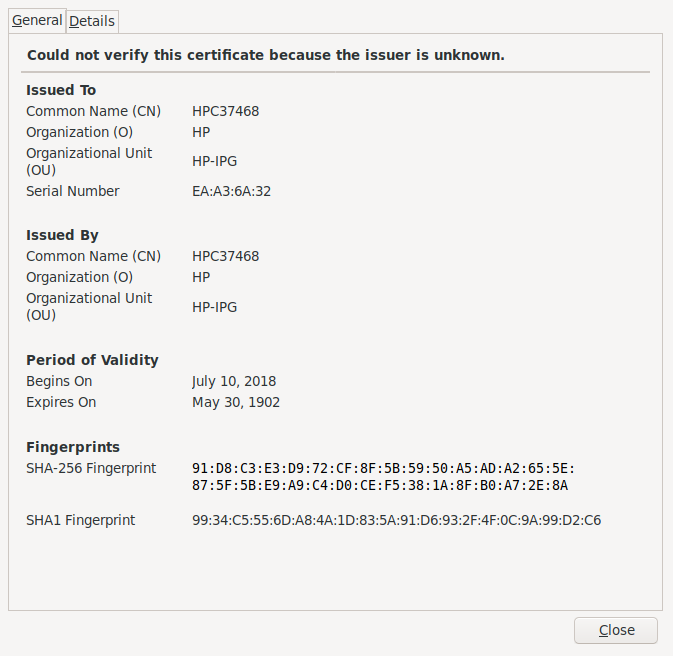
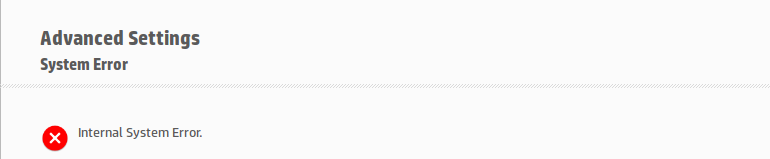
My first stabs were attempts to get CUPS not to care about expired certificates, but it seems to have been hidden or removed from its usual place. Anyway, I was already frustrated. WTF Well, yes, turns out that from the Web interface, I paid some attention to this the first time around, but let it pass (speaks wonders about my security practices!): Way, way, way too expired cert So, the self-signed certificate the printer issued at itself expired 116 years before even being issued. (is this maybe a Y2k38 bug? Sounds like it!) Interesting thing, my CUPS log mentions the printer credentials to expire at the beginning of the Unix Epoch (01 Jan 1970 00:00:00 GMT). OK, lets clickety-click away on the Web interface Didn t take me long to get to Network Advanced settings Certificates: Can manage certs! However, clicking on Configure leads me to the not very reassuring Way, way, way too expired cert I don t remember what I did for the next couple of minutes. Kept fuming Until I parsed again the output of lpstat -t, and found that:

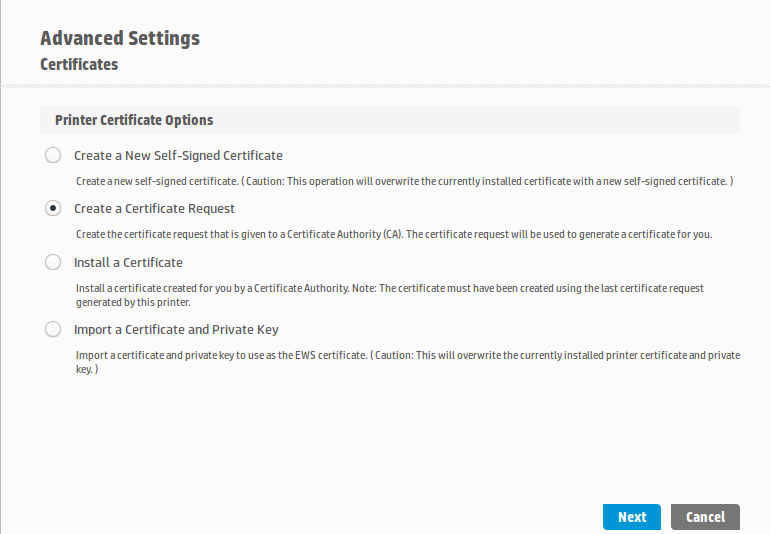
# lpstat -t
(...)
device for HP_Ink_Tank_Wireless_410_series_C37468_: ipps://HPF43909C37468.local:443/ipp/print
(...)
Hmmmm CUPS is connecting using good ol port 443, as if it were a Web thingy What if I do the same? Now we are talking! Click on New self-signed certificate , click on Next, a couple of reloads And a very nice color print came out of the printer, yay! Now, it still baffles me (of course I checked!): The self-signed certificate is now said to come from Issuer : CN=HPC37468, L=Vancouver, ST=Washington, C=US, O=HP,OU=HP-IPG, alright not that it matters (I can import a more meaningful one if I really feel like it), but, why is it Issued On: 2019-06-14 and set to Expires On: 2029-06-11? Anyway, print quality is quite nice. I hope to keep the printer long enough to rant at the certificate being expired in the future!

Comments Jeff Epler (Adafruit) 2020-05-11 20:39:17 -0500 why is it Issued On: 2019-06-14 and set to Expires On: 2029-06-11? Because it s 3650 days Gunnar Wolf 2020-05-11 20:39:17 -0500 Nice catch! Thanks for doing the head-scratching for me

10 May 2020

Norbert Preining: Updating Dovecot for Debian

A tweet of a friend pointed me at the removal of dovecot from Debian/testing, which surprised me a bit. Investigating the situation it seems that Dovecot in Debian is lagging a bit behind in releases, and hasn t seen responses to some RC bugs. This sounds critical to me as dovecot is a core part of many mail setups, so I prepared updated packages.
Based on the latest released version of Dovecot, 2.3.10, I have made a package starting from the current Debian packaging and adjusted to the newer upstream. The package builds on Debian Buster (10), Testing, and Unstable on i386 and x64 archs. The packages are available on OBS, as usual: For Unstable:
deb https://download.opensuse.org/repositories/home:/npreining:/debian-dovecot/Debian_Unstable/ ./
For Testing:
deb https://download.opensuse.org/repositories/home:/npreining:/debian-dovecot/Debian_Testing/ ./
For Debian 10 Buster:
deb https://download.opensuse.org/repositories/home:/npreining:/debian-dovecot/Debian_10/ ./
To make these repositories work, don t forget that you need to import my OBS gpg key: obs-npreining.asc, best to download it and put the file into /etc/apt/trusted.gpg.d/obs-npreining.asc. These packages are provided without any warranty. Enjoy.

Next.

Previous.