Search Results: "ron"

17 October 2016

Russell Coker: Improving Memory

I ve just attended a lecture about improving memory, mostly about mnemonic techniques. I m not against learning techniques to improve memory and I think it s good to teach kids a variety of things many of which won t be needed when they are younger as you never know which kids will need various skills. But I disagree with the assertion that we are losing valuable skills due to digital amnesia . Nowadays we have programs to check spelling so we can avoid the effort of remembering to spell difficult words like mnemonic, calendar apps on our phones that link to addresses and phone numbers, and the ability to Google the world s knowledge from the bathroom. So the question is, what do we need to remember? For remembering phone numbers it seems that all we need is to remember numbers that we might call in the event of a mobile phone being lost or running out of battery charge. That would be a close friend or relative and maybe a taxi company (and 13CABS isn t difficult to remember). Remembering addresses (street numbers etc) doesn t seem very useful in any situation. Remembering the way to get to a place is useful and it seems to me that the way the navigation programs operate works against this. To remember a route you would want to travel the same way on multiple occasions and use a relatively simple route. The way that Google maps tends to give the more confusing routes (IE routes varying by the day and routes which take all shortcuts) works against this. I think that spending time improving memory skills is useful, but it will either take time away from learning other skills that are more useful to most people nowadays or take time away from leisure activities. If improving memory skills is fun for you then it s probably better than most hobbies (it s cheap and provides some minor benefits in life). When I was in primary school it was considered important to make kids memorise their times tables . I m sure that memorising the multiplication of all numbers less than 13 is useful to some people, but I never felt a need to do it. When I was young I could multiply any pair of 2 digit numbers as quickly as most kids could remember the result. The big difference was that most kids needed a calculator to multiply any number by 13 which is a significant disadvantage. What We Must Memorise Nowadays the biggest memory issue is with passwords (the Correct Horse Battery Staple XKCD comic is worth reading [1]). Teaching mnemonic techniques for the purpose of memorising passwords would probably be a good idea and would probably get more interest from the audience. One interesting corner-case of passwords is ATM PIN numbers. The Wikipedia page about PIN numbers states that 4-12 digits can be used for PINs [2]. The 4 digit PIN was initially chosen because John Adrian Shepherd-Barron (who is credited with inventing the ATM) was convinced by his wife that 6 digits would be too difficult to memorise. The fact that hardly any banks outside Switzerland use more than 4 digits suggests that Mrs Shepherd-Barron had a point. The fact that this was decided in the 60 s proves that it s not digital amnesia . We also have to memorise how to use various supposedly user-friendly programs. If you observe an iPhone or Mac being used by someone who hasn t used one before it becomes obvious that they really aren t so user friendly and users need to memorise many operations. This is not a criticism of Apple, some tasks are inherently complex and require some complexity of the user interface. The limitations of the basic UI facilities become more obvious when there are operations like palm-swiping the screen for a screen-shot and a double-tap plus drag for a 1 finger zoom on Android. What else do we need to memorise?

14 October 2016

Antoine Beaupr : Managing good bug reports

Bug reporting is an art form that is too often neglected in software projects. Bug reports allow contributors to participate without deep technical knowledge and at the same time provide a crucial space for developers to be made aware of issues with their software that they could not have foreseen or found themselves, for lack of resources, variety or imagination.

Prior art Unfortunately, there are rarely good guidelines for submitting bug reports. Historically, people have pointed towards How to report bugs effectively or How to ask questions the smart way. While those guides can be useful for motivated people and may seem attractive references for project managers, they suffer from serious issues:
  • they are written by technical people, for non-technical people
  • as a result, they have a deeply condescending attitude such as calling people "stupid" or various animal names like "mongoose"
  • they are also very technical themselves: one starts with a copyright notice and a changelog, the other uses magic words like "Core dumps" and $Id$
  • they are too long: sgtatham's is about 3600 words long, esr's is even longer at about 11800 words. those texts will take about 20 to 60 minutes to read by an average reader, according to research
Individual projects have their own guides as well. Linux has the REPORTING_BUGS file that is a much shorter 1200 that can be read under 5 minutes, provided that you can understand the topic at hand. Interestingly, that guide refers to both esr's and sgtatham's guidelines, which means, in the degenerate case where the user hasn't had the "privilege" of reading esr's prose already, they will have an extra hour and a half of reading to do to have honestly followed the guidelines before reporting the bug. I often find good documentation in the Tails project. Their bug reporting guidelines are easily accessible and quick to read, although they still might be too technical. It could be argued that you need to get technical at some point to get that information out, of course. In the Monkeysign project, I have started a bug reporting guide that doesn't yet address all those issues. I am considering writing a new guide, but I figured I would look at other people's work and get feedback before writing my own standard.

What's the point? Why have those documents been written? Are people really expected to read them before seeking help? It seems to me unlikely that someone would:
  1. be motivated enough to do something about a broken part of their computer
  2. figure out they can do something about it
  3. read a fifteen thousand words novel about how to report a bug...
  4. just to finally write a 20-line bug report that has no warranty of support attached to it
And if I would be a paying customer, I wouldn't want to be forced to waste my time reading that prose either: it's your job to help me fix your broken things, not the reverse. As someone doing consulting these days: I totally understand: it's not you, the user, it's us, the developers, that have a problem. We have been socialized through computers, and it makes us weird and obtuse, but that's no excuse, and we need to clean up our act. Furthermore, it's surprising how often we get (and make!) bug reports that can be difficult to use. The Monkeysign project is very "technical" and I have expected that the bug reports I would get would be well written, with ways to reproduce and so on, but it happened that I received bug reports that were all over the place, didn't have any ways of reproducing or were simply incomplete. Those three bug reports were filed by people that I know to be very technically capable: one is a fellow Debian developer, the second had filed a good bug report 5 days before, and the third one is a contributor that sent good patches before. In all three cases, they knew what they were doing. Those three people probably read the guidelines mentioned in the past. They may have even read the Monkeysign bug reporting guidelines as well. I can only explain those bug reports by the lack of time: people thought the issue was obvious, that it would get fixed rapidly because, obviously, something is broken. We need a better way.

The takeaway What are those guides trying to tell us?
  1. ask questions in the right place
  2. search for similar questions and issues before reporting the bug
  3. try to make the developers reproduce the issues
  4. failing that, try to describe the issue as well as you can
  5. write clearly, be specific and verbose yet concise
There are obviously contradictions in there, like sgtatham telling us to be verbose and esr tells us to, basically, not be verbose. There is definitely a tension in there, and there are many, many more details about how great bug reports can be if done properly. I tend towards the side of terseness in our descriptions: people that will know how to be concise will be, people that don't will most likely not learn by reading a 12 000 words novel that, in itself, didn't manage to be parsimonious. But I am willing to allow for verbosity in bug reports: I prefer too many details instead of missing a key bit of information.

Issue trackers Step 1 is our job: we should send people in the right place, and give them the right tools. Monkeysign used to manage bugs with bugs-everywhere and this turned out to be a terrible idea: you had to understand git and bugs-everywhere to file any bug reports. As a result, there were exactly zero bug reports filed by non-developers during the whole time BE was used, although some bugs were filed in the Debian Bugtracker. So have a good bug tracker. A mailing list or email address is not a good bug tracker: you lose track of old issues, and it's hard for newcomers to search the archives. It does have the advantage of having a unified interface for the support forum and bug tracking, however. Redmine, Gitlab, Github and others are all decent-enough bug trackers. The key point is that the issue tracker should be publicly available, and users should be able to register easily to file new issues. You should also be able to mass-edit tickets and users should be able to discover the tracker's features easily. I am sorry to say that the Debian BTS somewhat falls short on those two features. Step 2 is a shared responsibility: there should be an easy way to search for issues, and we should help the user looking for similar issues. Stackexchange sites do an excellent job at this, by automatically searching for similar questions while you write your question, suggesting similar ones in an attempt to weed out duplicates. Duplicates still happen, but they can then clearly be marked and linked with a distinct mechanism. Most bug trackers do not offer such high level functionality, but should, so I feel the fault lies more on "our" end than at the user's end.

Reproducing the environment Step 3 and 4 are more or less the user's responsibility. We can detail in our documentation how to clearly share the environment where we reproduced the bug, for example, but in the end, the user decides if they want to share that information or not. In Monkeysign, I have finally implemented joeyh's suggestion of shipping the test suite with the program. I can now tell people to run the test suite in their environment to see if this is a regression that is specific to their environment - so a known bug, in a way - or a novel bug for which I can look at writing a new unit test. I also include way more information about the environment in the --version output, an idea I brought forward in the borg project to ease debugging. That way, people can just send the output of monkeysign --test and monkeysign --version, and I have a very good overview of what is happening on their end. Of course, Monkeysign also supports the usual --verbose and --debug flag that users should enable when reproducing issues. Another idea is to report bugs directly from the application. We have all seen Firefox or other software have automatic bug reporting tools, but somehow those seem unsatisfactory for a user: we have no feedback of where the report goes, if it's followed up on. It is useful for larger project to get statistical data, but not so useful for users in the short term. Monkeysign tries to handle exceptions in the code in a graceful way, but could do better. We use a small library to handle exceptions, but that library has since then been improved to directly file bugs against the Github project. This assumes the user is logged into Github, but it is nice to pre-populate bug reports with the relevant information up front.

Issue templates In the meantime, to make sure people provide enough information, I have now moved a lot of the bug reporting guidelines to a separate issue template. That issue template is available through the issue creation form now, although it is not enabled by default, a weird limitation of Gitlab. Issue templates are available in Gitlab and Github. Issue templates somewhat force users in a straight jacket: there is already something to structure their bug report. Those could be distinct form elements that had to be filled in, but I like the flexibility of the template, and the possibility for users to just escape the formalism and just plead for help in their own way.

Issue guidelines In the end, I opted for a short few paragraphs in the style of the Tails documentation, including a reference to sgtatham, as an optional future reference:
  • Before you report a new bug, review the existing issues in the online issue tracker and the Debian BTS for Monkeysign to make sure the bug has not already been reported elsewhere.
  • The first aim of a bug report is to tell the developers exactly how to reproduce the failure, so try to reproduce the issue yourself and describe how you did that.
  • If that is not possible, try to describe what went wrong in detail. Write down the error messages, especially if they have numbers.
  • Take the necessary time to write clearly and precisely. Say what you mean, and make sure it cannot be misinterpreted.
  • Include the output of monkeysign --test, monkeysign --version and monkeysign --debug in your bug reports. See the issue template for more details about what to include in bug reports.
If you wish to read more about issues regarding communication in bug reports, you can read How to Report Bugs Effectively, which takes around 20 to 30 minutes.
Unfortunately, short of rewriting sgtatham's guide, I do not feel there is much more we can do as a general guide. I find esr's guide to be too verbose and commanding, so sgtatham it will be for now.

The prose and literacy In the end, there is a fundamental issue with reporting bugs: it assumes our users are literate and capable of writing amazing prose that we will enjoy reading as the last J.K. Rowling novel (if you're into that kind of thing). It's just an unreasonable expectation: some of your users don't even speak the same language as you, let alone read or write it. This makes for challenging collaboration, to say the least. This is where automated reporting makes sense: it doesn't require user's intervention, and the communication is mediated by machines without human intervention and their pesky culture. But we should, as maintainers, "be liberal in what we accept and conservative in what we send". Be tolerant, and help your users in fixing their issues. It's what you are there for, after all. And in the end, we all fail the same way. In an attempt to improve the situation on bug reporting guides, I seem to have myself written a 2000 short story that will have taken up a hopefully pleasant 10 minutes of your time at minimum. Hopefully I will have succeeded at being clear, specific, verbose and concise all at once and look forward to your feedback on how to improve our bug reporting culture.

Jonathan Dowland: Hi-Fi Furniture

sadly obsolete sadly obsolete
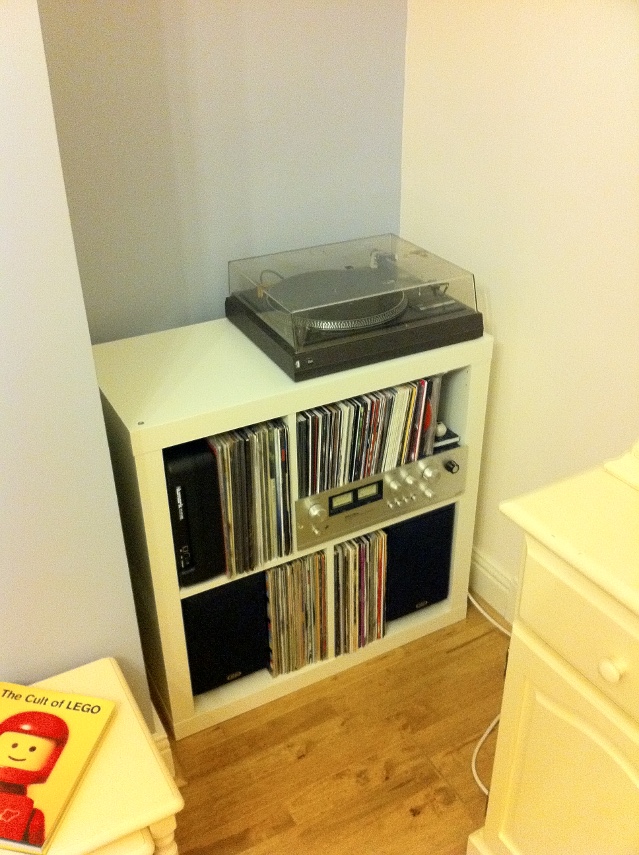
For the last four years or so, I've had my Hi-Fi and the vast majority of my vinyl collection stored in a self-contained, mildly-customized Ikea unit. Since moving house this has been in my dining room which we have always referred to as the "play room", since we have a second dining room in which we actually dine. The intention for the play room was for it to be the room within which all our future children would have their toys kept, in an attempt to keep the living room from being overrun with plastic. The time has thus come for my Hi-Fi to come out of there, so we've moved it to our living room. Unfortunately, there's not enough room in the living room for the Ikea unit: I need something narrower for the space available.
via IkeaHackers.net via IkeaHackers.net
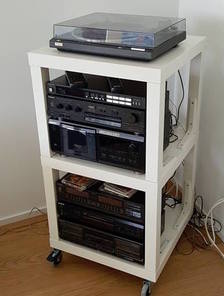
In the spirit of my original hack, I started looking at what others might have achieved with Ikea components. There are some great examples of open-style units built out of the (extremely cheap) Lack coffee tables, such as this ikeahackers article, but I'd prefer something more enclosed. One problem I've had with the Expedit unit was my cat trying to scratch the records. I ended up putting framed records at the front to cover the spines of the records within. If I were keeping the unit, I'd look at fitting hinges (another ikeahackers article) Asides from hacked Ikea stuff, there are a few companies offering traditional enclosed Hi Fi cabinets. I'm going to struggle to fit both the equipment and a subset of records into these, so I might have to look at storing them separately. In some ways that makes life easier: the records could go into a 1x4 Ikea KALLAX unit, leaving the amp and deck to home somewhere. Perhaps I could look at a bigger unit for under the TV. My parents have a nice Hi-Fi unit that pretends to be a chest of drawers. I'm fairly sure my Dad custom-built it, as it has a hinged top to provide access to the turntable and I haven't seen anything like that on the market. That brings me onto thinking about other AV things I'd like to achieve in the living room. I've always been interested in exploring surround sound, but my initial attempt in my prior flat did not go well, either because the room was not terribly suited accoustically, or because the Pioneer unit I bought was rubbish, or both. It seems that there aren't really AV receivers which are designed to satisfy both people wanting to use them in a Hi-Fi and a home cinema setting. I could stick to stereo and run the TV into my existing (or a new) amplifier, subject to some logistics around wiring. A previous house owner ran some phono cables under the hard-wood flooring from the TV alcove to the opposite side of the fire place, which might give me some options. There's also the world of wireless audio, Sonos etcetera. Realistically the majority of my music is digital nowadays, and it would be good to be able to listen to it conveniently in the house. I've heard good reports on the entry level Sonos stuff, but they seem to be Mono, and even the more high-end ones with lots of drivers have very small separation. I did buy a Chromecast Audio on a whim recently, but I haven't looked at it much yet: perhaps that's part of the solution. So, lots of stuff in the melting pot to figure out here!

13 October 2016

Wouter Verhelst: Webserver certificate authentication with intermediate CAs

Authenticating HTTPS clients using TLS certificates has long been very easy to do. The hardest part, in fact, is to create a PKI infrastructure robust enough so that compromised (or otherwise no longer desirable) certificates cannot be used anymore. While setting that up can be fairly involved, it's all pretty standard practice these days. But authentication using a private CA is laughably easy. With apache, you just do something like:
SSLCACertificateFile /path/to/ca-certificate.pem
SSLVerifyClient require
...and you're done. With the above two lines, apache will send a CertificateRequest message to the client, prompting the client to search its local certificate store for certificates signed by the CA(s) in the ca-certificate.pem file, and using the certificate thus found to authenticate against the server. This works perfectly fine for setting up authentication for a handful of users. It will even work fine for a few thousands of users. But what if you're trying to set up website certificate authentication for millions of users? Well, in that case, storing everything in a single CA just doesn't work, and you'll need intermediate CAs to make things not fall flat on their face. Unfortunately, the standard does not state what should happen when a client certificate is signed by an intermediate certificate, and the distinguished name(s) in the CertificateRequest message are those of the certificate(s) at the top of the chain rather than the intermediates. Previously, browsers would not just send out the client certificate, but also send along the certificate that it knew to have signed that client certificate, and so on until it found a self-signed certificate. With that, the server would see a chain of certificates that it could verify against the root certificates in its local trust store, and certificate verification would succeed. It would appear that browsers are currently changing this behaviour, however. With the switch to BoringSSL, Google Chrome on the GNU/Linux platform no longer sent the signing certificates, and instead only sends the leaf certificate that it wants to use for certificate authentication. In the bug report, Ryan Sleevi explains that while the change was premature, the long term plans are for this to be the behaviour not just on GNU/Linux, but on Windows and macOS too. Meanwhile, the issue has been resolved for Chrome 54 (due to be released), but there's no saying for how long. As if that was not enough, the new version of Safari as shipped with macOS 10.12 has also stopped sending intermediate certificates, and expects the web server to be happy with just receiving the leaf certificates. So, I guess it's safe to say that when you want to authenticate a client in a multi-level hierarchical CA environment, you cannot just hand the webserver a list of root certificates and expect things to work anymore; you'll have to hand it the intermediary certificates as well. To do so, you need to modify the SSLCACertificateFile parameter in apache configuration so that it not only contains the root certificate, but all the intermediate certificates as well. If your list of intermediate certificates is rather long, it may improve performance to use SSLCACertificatePath and the c_rehash tool to create a hashed directory with certificates rather than a PEM file, but in essense, that should work. While this works, the problem with doing so is that now the DNs of all the intermediate certificates are sent along with the CertificateRequest message to the client, which (again, if your list of intermediate certificates is rather long) may result in performance issues. The fix for that is fairly easy: add a line like
SSLCADNRequestFile /path/to/root-certificates.pem
where the file root-certificates.pem contains the root certificates only. This file will tell the webserver which certificates should be announced in the CertificateRequest message, but the SSLCACertificateFile (or SSLCACertificatePath) configuration item will still be used for actual verification of the certificates in question. Note though that the root certificates apparently also seem to need to be available in the SSLCACertificatePath or SSLCACertificateFile configuration; if you do not do so, then authentication seems to fail, although I haven't yet found why. I've set up a test page for all of those "millions" of certificates, and it seems to work for me. I've you're trying to use one of those millions of certificates against your own webserver or have a similar situation with a different set of certificates, you might want to make the above changes, too.

12 October 2016

C.J. Adams-Collier: Using SonarQube 5.4, Maven 3.3.9, Jenkins 2.19.1 on systems with both Java 1.7 and 1.8

Hello folks! My team spent hours and hours beating our head against a Sonar deployment problem on Ubuntu Trusty (14.04 LTS). I thought I might share our findings so that you won t have to! As you probably know, Trusty only makes Java Development Kit 1.7 available on the stock installation. The current stable version of the Java is 1.8. The way we install this is to use the OpenJDK PPA, generously uploaded by our dear friend Matthias Klose. To make things even more exciting, a modern Maven is not available on this platform. And so we use the stock Maven 3.3.9 tarball distribution. This tarball distribution does not integrate well with Debian, and so, when we tell the system using sudo update-java-alternatives -s /usr/lib/jvm/java-1.8.0-openjdk-amd64 that we wish to use Java 1.8 as our default system JDK, it does not get the message. The only way to reliably let Maven know which java you wish to use is to set the JAVA_HOME environment variable. In order to do this within the Jenkins environment, one must select the JDK one wishes to use: openjdk8-ubuntu1404-as-jdk To make things worse, this option is not, as one might expect, available for editing in a stock Jenkins 2.x installation. In Jenkins 1.x, one would be able to specify which java one wished to use just by specifying openjdk8 in a field. With Jenkins 2.x, the field does not exist unless a configuration option in an unrelated form is set. So! One should first select Manage Jenkins -> Global Tool Configuration: Jenkins2-Global_Tool_Configuration Once this form is open, look for the JDK installations button: Jenkins2-JDK_installations Click it very thoroughly just once. You ll be presented with a form into which you may enter details about the various JDKs your build executors may have access to. You ll refer to them in your job configuration by the value of their Name field, and when executing the build, Jenkins will set JAVA_HOME to the value of the (you guessed it) JAVA_HOME field: Jenkins2-JDK_installations-expanded Once these entries are made, they can be selected in two place. 1) on the ZMQ Event Publisher: jdk-select-project 2) in the post-build actions under SonarQube analysis with Maven (advanced) postbuild-sonarqube-select-jdk And that s how it s done! Here s the details from my colleague, Thanh: https://lists.fd.io/pipermail/honeycomb-dev/2016-October/000387.html

11 October 2016

Stig Sandbeck Mathisen: DevOps toys, looking at new and old tools

From last month s toybox of distractions, I ve spent time with GitLab CI, Ansible, Prometheus and OpenShift. GitLab CI is a lot like Travis CI, and a little less like Jenkins. When a commit is pushed to the repository in GitLab, and the branch contains a .gitlab-ci.yml file, a GitLab CI runner will check out the repository, and follow the instructions in that file. Useful for configuration syntax checks, unit tests, and puppet environment deployments. I ve mostly used Ansible for orchestration, performing tasks across a number of nodes. I ve used it much configuration management for a bit, and from what I see, it can do that rather well, too. I ve used Puppet in production for a bit (I committed revision 1 in the old puppet configuration management repository at work in 2007-07-04). A new perspective on configuration management is good. Prometheus is a master-node stats gatherer and presenter. It does a single HTTP GET to fetch all metrics in a single request. I ve used Munin for a long, long time, and while the plugin ecosystem is far larger for Munin, the Prometheus master scales much better (millions of metrics per minute on a modern machine). I use Grafana to present graphs from Prometheus and logs from Elasticsearch in the same dashboard. Prometheus can collect data from a munin node, using a munin node exporter. Last week I got training in OpenShift, which was an eye-opener. I ve used Docker for a good while, and planned to introduce Kubernetes, as well as an imperial buttload of shell scripts to keep it all automated. Thankfully, OpenShift Origin already includes Kubernetes and does the required automation. An OpenShift cluster is now being added to the core infrastructure to do the required care and feeding of the herd of APIs and microservices written over the years. Bunch it together behind an API Management Gateway, and you should be able to label the whole thing Microservice Architecture . I m not running out of fun things to do for a while.

Daniel Pocock: Outreachy and GSoC 2017 opportunities in Computer Security, Cryptography, PGP and Python

I've proposed the PGP/PKI Clean Room as a topic in Outreachy this year. The topic will also be promoted as part of GSoC 2017. If you are interested in helping as either an intern or mentor, please follow the instructions there to make contact. Even if you can't participate, if you have the opportunity to promote the topic in a university or any other environment where potential interns will see it, please do so as this makes a big difference to the success of these programs.

Daniel Pocock: Outreachy and GSoC 2017 opportunities in Multimedia Real-Time Communication

I've proposed Free Real-Time Communication as a topic in Outreachy this year. The topic will also be promoted as part of GSoC 2017. If you are interested in helping as either an intern or mentor, please follow the instructions there to make contact. Even if you can't participate, if you have the opportunity to promote the topic in a university or any other environment where potential interns will see it, please do so as this makes a big difference to the success of these programs. The project could involve anything related to SIP, XMPP, WebRTC or peer-to-peer real-time communication, as long as it emphasizes a specific feature or benefit for the Debian community. If other Outreachy organizations would also like to have a Free RTC project for their community, then this could also be jointly mentored.

Russ Allbery: remctl 3.13

remctl is a client and server that forms a very simple remote RPC system, normally authenticated with Kerberos, although including a remctl-shell variant that works over ssh. This release adds forced-command support for remctl-shell, which allows it to work without enabling setting environment variables in authorized_keys. This may be a preferrable configuration to using it as an actual shell. Also in this release, the summary configuration option is allowed for commands with subcommands other than ALL, which allows proper generation of command summaries even for users who only have access to a few subcommands of a command. It also adds some build system support for building binaries with -fPIE. You can get the latest release from the remctl distribution page.

10 October 2016

Daniel Pocock: DVD-based Clean Room for PGP and PKI

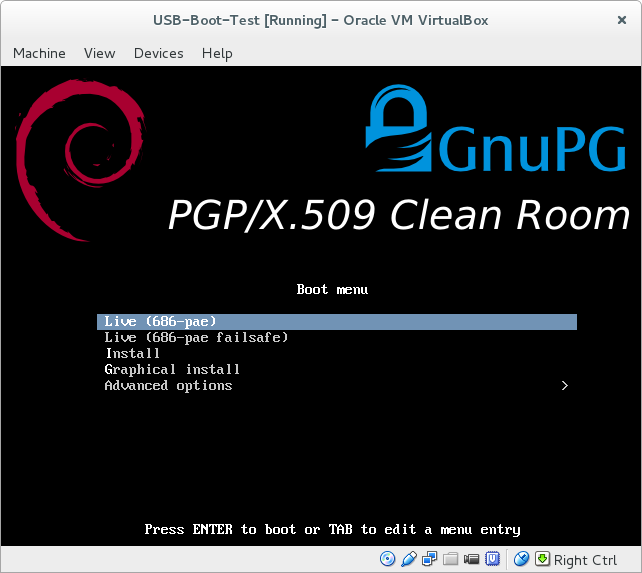
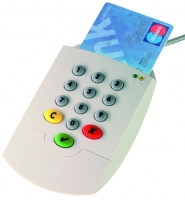
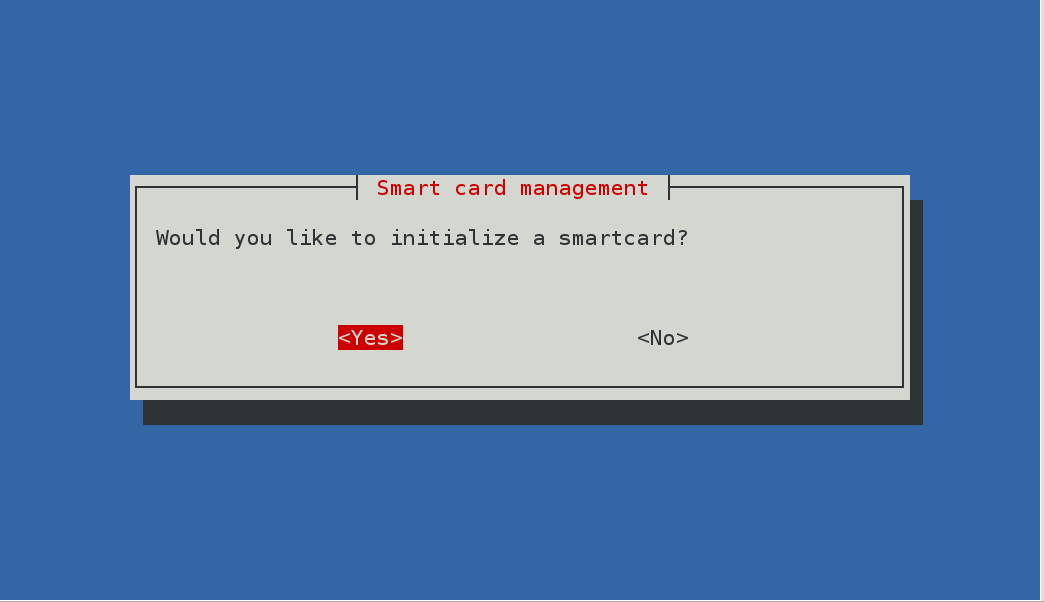
There is increasing interest in computer security these days and more and more people are using some form of PKI, whether it is signing Git tags, signing packages for a GNU/Linux distribution or just signing your emails. There are also more home networks and small offices who require their own in-house Certificate Authority (CA) to issue TLS certificates for VPN users (e.g. StrongSWAN) or IP telephony. Back in April, I started discussing the PGP Clean Room idea (debian-devel discussion and gnupg-users discussion), created a wiki page and started development of a script to build the clean room ISO using live-build on Debian. Keeping the master keys completely offline and putting subkeys onto smart cards and other devices dramatically lowers the risk of mistakes and security breaches. Using a read-only DVD to operate the clean-room makes it convenient and harder to tamper with. Trying it out in VirtualBox It is fairly easy to clone the Git repository, run the script to create the ISO and boot it in VirtualBox to see what is inside: At the moment, it contains a number of packages likely to be useful in a PKI clean room, including GnuPG, smartcard drivers, the lightweight pki utility from StrongSWAN and OpenSSL. I've been trying it out with an SPR-532, one of the GnuPG-supported smartcard readers with a pin-pad and the OpenPGP card. Ready to use today More confident users will be able to build the ISO and use it immediately by operating all the utilities from the command line. For example, you should be able to fully configure PGP smart cards by following this blog from Simon Josefsson. The ISO includes some useful scripts, for example, create-raid will quickly partition and RAID a set of SD cards to store your master key-pair offline. Getting involved To make PGP accessible to a wider user-base and more convenient for those who don't use GnuPG frequently enough to remember all the command line options, it would be interesting to create a GUI, possibly using python-newt to create a similar look-and-feel to popular text-based installer and system administration tools. If you are keen on this project and would like to discuss it further, please come and join the new pki-clean-room mailing list and feel free to ask questions or share your thoughts about it. One way to proceed may be to recruit an Outreachy or GSoC intern to develop the UI. Before they can get started, it would be necessary to more thoroughly document workflow requirements.

Petter Reinholdtsen: Experience and updated recipe for using the Signal app without a mobile phone

In July I wrote how to get the Signal Chrome/Chromium app working without the ability to receive SMS messages (aka without a cell phone). It is time to share some experiences and provide an updated setup. The Signal app have worked fine for several months now, and I use it regularly to chat with my loved ones. I had a major snag at the end of my summer vacation, when the the app completely forgot my setup, identity and keys. The reason behind this major mess was running out of disk space. To avoid that ever happening again I have started storing everything in userdata/ in git, to be able to roll back to an earlier version if the files are wiped by mistake. I had to use it once after introducing the git backup. When rolling back to an earlier version, one need to use the 'reset session' option in Signal to get going, and notify the people you talk with about the problem. I assume there is some sequence number tracking in the protocol to detect rollback attacks. The git repository is rather big (674 MiB so far), but I have not tried to figure out if some of the content can be added to a .gitignore file due to lack of spare time. I've also hit the 90 days timeout blocking, and noticed that this make it impossible to send messages using Signal. I could still receive them, but had to patch the code with a new timestamp to send. I believe the timeout is added by the developers to force people to upgrade to the latest version of the app, even when there is no protocol changes, to reduce the version skew among the user base and thus try to keep the number of support requests down. Since my original recipe, the Signal source code changed slightly, making the old patch fail to apply cleanly. Below is an updated patch, including the shell wrapper I use to start Signal. The original version required a new user to locate the JavaScript console and call a function from there. I got help from a friend with more JavaScript knowledge than me to modify the code to provide a GUI button instead. This mean that to get started you just need to run the wrapper and click the 'Register without mobile phone' to get going now. I've also modified the timeout code to always set it to 90 days in the future, to avoid having to patch the code regularly. So, the updated recipe for Debian Jessie:
  1. First, install required packages to get the source code and the browser you need. Signal only work with Chrome/Chromium, as far as I know, so you need to install it.
    apt install git tor chromium
    git clone https://github.com/WhisperSystems/Signal-Desktop.git
    
  2. Modify the source code using command listed in the the patch block below.
  3. Start Signal using the run-signal-app wrapper (for example using pwd /run-signal-app).
  4. Click on the 'Register without mobile phone', will in a phone number you can receive calls to the next minute, receive the verification code and enter it into the form field and press 'Register'. Note, the phone number you use will be user Signal username, ie the way others can find you on Signal.
  5. You can now use Signal to contact others. Note, new contacts do not show up in the contact list until you restart Signal, and there is no way to assign names to Contacts. There is also no way to create or update chat groups. I suspect this is because the web app do not have a associated contact database.
I am still a bit uneasy about using Signal, because of the way its main author moxie0 reject federation and accept dependencies to major corporations like Google (part of the code is fetched from Google) and Amazon (the central coordination point is owned by Amazon). See for example the LibreSignal issue tracker for a thread documenting the authors view on these issues. But the network effect is strong in this case, and several of the people I want to communicate with already use Signal. Perhaps we can all move to Ring once it work on my laptop? It already work on Windows and Android, and is included in Debian and Ubuntu, but not working on Debian Stable. Anyway, this is the patch I apply to the Signal code to get it working. It switch to the production servers, disable to timeout, make registration easier and add the shell wrapper:
cd Signal-Desktop; cat <<EOF   patch -p1
diff --git a/js/background.js b/js/background.js
index 24b4c1d..579345f 100644
--- a/js/background.js
+++ b/js/background.js
@@ -33,9 +33,9 @@
          );
      );
 
-    var SERVER_URL = 'https://textsecure-service-staging.whispersystems.org';
+    var SERVER_URL = 'https://textsecure-service-ca.whispersystems.org';
     var SERVER_PORTS = [80, 4433, 8443];
-    var ATTACHMENT_SERVER_URL = 'https://whispersystems-textsecure-attachments-staging.s3.amazonaws.com';
+    var ATTACHMENT_SERVER_URL = 'https://whispersystems-textsecure-attachments.s3.amazonaws.com';
     var messageReceiver;
     window.getSocketStatus = function()  
         if (messageReceiver)  
diff --git a/js/expire.js b/js/expire.js
index 639aeae..beb91c3 100644
--- a/js/expire.js
+++ b/js/expire.js
@@ -1,6 +1,6 @@
 ;(function()  
     'use strict';
-    var BUILD_EXPIRATION = 0;
+    var BUILD_EXPIRATION = Date.now() + (90 * 24 * 60 * 60 * 1000);
 
     window.extension = window.extension    ;
 
diff --git a/js/views/install_view.js b/js/views/install_view.js
index 7816f4f..1d6233b 100644
--- a/js/views/install_view.js
+++ b/js/views/install_view.js
@@ -38,7 +38,8 @@
             return  
                 'click .step1': this.selectStep.bind(this, 1),
                 'click .step2': this.selectStep.bind(this, 2),
-                'click .step3': this.selectStep.bind(this, 3)
+                'click .step3': this.selectStep.bind(this, 3),
+                'click .callreg': function()   extension.install('standalone')  ,
              ;
          ,
         clearQR: function()  
diff --git a/options.html b/options.html
index dc0f28e..8d709f6 100644
--- a/options.html
+++ b/options.html
@@ -14,7 +14,10 @@
         <div class='nav'>
           <h1>  installWelcome  </h1>
           <p>  installTagline  </p>
-          <div> <a class='button step2'>  installGetStartedButton  </a> </div>
+          <div> <a class='button step2'>  installGetStartedButton  </a>
+	    <br> <a class="button callreg">Register without mobile phone</a>
+
+	  </div>
           <span class='dot step1 selected'></span>
           <span class='dot step2'></span>
           <span class='dot step3'></span>
--- /dev/null   2016-10-07 09:55:13.730181472 +0200
+++ b/run-signal-app   2016-10-10 08:54:09.434172391 +0200
@@ -0,0 +1,12 @@
+#!/bin/sh
+set -e
+cd $(dirname $0)
+mkdir -p userdata
+userdata=" pwd /userdata"
+if [ -d "$userdata" ] && [ ! -d "$userdata/.git" ] ; then
+    (cd $userdata && git init)
+fi
+(cd $userdata && git add . && git commit -m "Current status."   true)
+exec chromium \
+  --proxy-server="socks://localhost:9050" \
+  --user-data-dir=$userdata --load-and-launch-app= pwd 
EOF
chmod a+rx run-signal-app
As usual, if you use Bitcoin and want to show your support of my activities, please send Bitcoin donations to my address 15oWEoG9dUPovwmUL9KWAnYRtNJEkP1u1b.

9 October 2016

Ben Armstrong: Annual Hike with Ryan: Salt Marsh Trail, 2016

Once again, Ryan Neily and I met last month for our annual hike. This year, to give our aging knees a break, we visited the Salt Marsh Trail for the first time. For an added level of challenge and to access the trail by public transit, we started with the Shearwater Flyer Trail and finished with the Heritage Trail. It was a perfect day both for hiking and photography: cool with cloud cover and a refreshing coastal breeze. The entire hike was over 25 km and took the better part of the day to complete. Good times, great conversations, and I look forward to visiting these beautiful trails again!
Salt Marsh trail hike, 2016. Click to start the slideshow.Salt Marsh trail hike, 2016. Click to start the slideshow.
We start here, on the Shearwater flyer trail.We start here, on the Shearwater flyer trail.
Couldn t ID this bush. The berries are spectacular! A pond to the side of the trail. Different angle for dramatic lighting effect. Rail bridge converted to foot bridge. Cranberries! Reviewing our progress. From the start Map of the Salt Marsh trail ahead. Off we go again! First glimpse through the trees. Appreciating the cloud cover today. Salt-marshy grasses. Never far from rocks in NS. Rocks all laid out in stripes. Lunch & selfie time. Ryan attacking his salad. Vantage point. A bit of causeway coast. Plenty of eel grass. Costal flora. We head for the bridge next. Impressed by the power of the flow beneath. Snapping more marsh shots. Ripples. Gulls, and if you squint, a copter. More ripples. Swift current along this channel. Until it broadens out and slows down. Nearly across. Heron! Sorry it s so tiny. Heron again, before I lost it. Ducks at the head of the Atlantic View trail where we rested and then turned back. Attempt at artsy. Nodding ladies tresses on the way back. Several of them. Sky darkening, but we still have time. A lonely wild rose. The last gasp of late summer. Back across the marshes. A short breather on the Heritage Trail.
Here s the Strava record of our hike:
Facebooktwittergoogle_plusredditpinterestlinkedinmail

Norbert Preining: Reload: Android 7.0 Nougat Root Pokemon Go

Ok, it turned out that a combinations of updates has broken my previous guide on playing Pokemon GO on a rooted Android device. What has happened that the October security update of the Android Nougat has changed the SecurityNet that is used for checking for rooted devices, and at the same time the Magisk rooting system as catapulted itself (hopefully temporarily) into the complete irrelevance by removing the working version and providing an improved version that does neither have SuperSU installed, nor the ability to hide root well done, congratulations. android-nougat-root-poke But there is a way around, and I am now back at the latest security patch level, rooted, and playing Pokemon GO (not very often, no time, though!). My previous guide used Magisk Version 6 to root and hide root. But the recent security updated of Andorid Nougat (October 2016) has rendered Magisk-v6 non-working. I first thought that Magisk-v7 could solve the problem, but I was badly disappointed: After reflashing my device to pristine state, installing Magisk-v7, I suddenly was left with: no SuperSU (that means, X-plore, Titanium Backup etc do not work anymore), nor the ability to hide root for Pokemon Go or banking apps. Great update. Thus, I have decided to remove Magisk completely and make a clean start with SuperSU and suhide (and a GUI for suhide). And it turned out to be more convenient and more standard than Magisk, may it rest in peace (until they fix their stuff together). In the following I assume you have a clean slate Android Nougat device, if not, please see one of the previous guides for hints how to flash back without loosing your user data. Ingredients One need the following few items: Rooting Unzip the CF-Auto-Root-angler-angler-nexus6p.zip and either use the included programs (root-linux.sh, root-mac.sh, root-windows.bat) to root your device, or simply connect your device to your computer, and run (assuming you have adb and fastboot installed):
adb reboot bootloader
sleep 10
fastboot boot image/CF-Auto-Root-angler-angler-nexus6p.img
After that your device will reboot a few times, and you will finally land in your normal Android screen and a new program SuperSU will be available. At this stage you will not be able to play Pokemon GO anymore. Updating SuperSU The version of SuperSU packaged with the CF-AutoRoot is unfortunately too old, so one needs to update using the zip file SR1-SuperSU-v2.78-SR1-20160915123031.zip (or later). Here are two options: Either you use TWRP recovery system, or you install FlashFire (main page, app store page) which allows you to flash zip/ota directly from your Android screen. This time I used for the first time the FlashFire method, and it worked without any problem. Just press the + button in FlashFire, than the Flash zip/ota button, select the SR1-SuperSU-v2.78-SR1-20160915123031.zip, click two times yes, and then wait a bit and a few black screens (don t do anything!) later you will be back in your Nougat environment. Opening the SuperSU app should show you on the Settings tag that the version has been updated to 2.78-SR1. Installing suhide As with the update of SuperSU, install the suhide zip file, smae procedure, nothing special. After this you will be able to add an application (like Pokemon GO) from the command line (shell), but this is not very convenient. Better is to install the suhide GUI from the app store, start it, scroll for Pokemnon GO, add a tick, and you are settled. After that you are free to play Pokemon GO again. At least until the next security update brings again problems. In the long run this is a loosing game, anyway. Enjoy it while you can.

Laura Arjona Reina: New phone: Samsung Galaxy S III phone with Replicant

Thanks to the Bazaar effort of The Guardian Project, I ve been offered a phone to test F-Droid and other free software apps for Android. I accepted the offer, and chose a Samsung Galaxy S III phone with Replicant 4.2.2, installed and shipped by Tehnoetic.
I m using it now as my main phone, and since it uses Android 4.x I m able to install more modern apps than in my old Galaxy Ace (which remains usable with CyanongenMod 7.2 (Android 2.3.7)).
My plans with this new phone are:
  • Test Replicant and free software for Android on it
  • Get more involved in translations of Android apps
  • Get more involved in the F-Droid community
  • Keep an eye on Android tools in Debian
  • Post here in my blog articles about what I ve been doing (and of course report issues and contributions upstream)
Migration to the new phone
I ve migrated my stuff from the old phone to this one. Some notes:
  • Wrote down my list of apps
  • Used Slight Backup for contacts, call logs and messages
  • Periodical has its own backup tool
  • Whatsapp has its own backup tool
  • Exported settings in K-9 Mail
  • Exported Kontalk GPG key
  • Simply Do has its own backup tool
  • I don t use calendars in the phone so I didn t migrate any events (I have Offline Calendar to ad temporary notes/reminders, but that s all)
I moved the SIM card and the SD Card to the new phone and tried the restore tool for each app.
I found out that several apps could not find the backups because they were not looking at the SD Card for the files (seems that they were using internal memory locations). So for recovering my backups, I made new backups in the new phone with the empty apps, then found out where those backups were created (in the internal memory, /storage/emulated/0), and then copied the authentic backup files there (overwriting teh dummy ones), and then used the app to restore the backup.
For some apps (K-9) I had to set again the folder for attachments, since the SD was not anymore in /media/sdcard, now it was in /storage/sdcard1.
Apart from that, everything went well.
I was a bit upset that I could not migrate Kontalk conversations (there is no backup/export tool, and I am not sure where are the files/database stored).
I noticed that although Kontalk is registered using the phone number, and it uses the phone numbers for contacts, it kept working in the old phone (Whatsapp detects when you change to a new phone and kind of deactivates itself in the old one, but that s not the case for Kontalk: it works as any XMPP client (if it s open, it can send/receive messages)).
Replicant 4.2 in a Galaxy S III (i9300)
Here I write some particularities that I found in the phone, mostly bugs or problems. But don t get me wrong: overall I m very happy with it!
I experienced a problem when using the phone to make/receive calls, it seemed that the proximity sensor was not working well. I thought it was a Replicant issue, but later I realized that there was a Tehnoetic sticker that was partially covering the sensor. I removed the sticker and everything worked well.
The phone came with F-Droid installed which is nice. I upgraded to the latest alpha and I m testing the alpha releases since then
I found that I cannot choose where to install apps nor move apps from internal memory to the SD Card: there is no such option in Settings > Apps > Manage Apps (there is such setting in my CyanogenMod 7.2 phone, though). Since my phone is rooted and I have full access to both internal memory and SDCard, and I have plenty of room in the internal memory, I didn t bother too much. I m not sure if this is a bug, a feature, something related to Android 4 or specific to Replicant, o specific to this phone model. Pending to investigate, but low priority.
Replicant is almost fully translated to Spanish, yay!. I only found one untranslated string: You go to Settings > Wireless > Cell Broadcasts, and in the settings page, Cell Broadcasts is untranslated (but the settings themselves are). I still need to find where/how to send a patch for this (not sure if it comes from Android, CyanogenMod, or it s something specific for Replicant. Also, being Android 4.x, I m not sure about the usefulness of reporting such a minimal and unimportant patch upstream ).
When I turn on the phone, I get the Samsung S III splash screen, later the Replicant Splash screen, later the numeric pad to unlock the SIM card. After that, I see the screen lock but when I press the lock to enter the pattern, the screen turns off and on, screen lock appearing again (and I have to press the lock again to enter the pattern). If after unlocking the SIM card I wait a bit, I see the screen lock and again black screen and screen lock, so it s not my tap causing it. Doing like this (waiting a bit for the phone to show the screen lock for 2nd time) is less annoying, but I wonder why this happen and I cannot unlock the screen directly in the first attempt. This is also pending for research, but low priority.
When the phone boots, I find the splash screens too bright (the Samsung Galaxy S III splash, and later the red Replicant one). I don t know if I can change that. I know that other people have created different Replicant splash screens, so maybe I can create one almost black and only the Replicant text in very dark grey. But this is obviously a workaround, not a fix. OTOH, it s an annoying thing just some seconds: when the unlock screen is shown, the phone shows the brightness level that I ve set (usually, the lowest one).
From time to time, I suffer soft reboots:
  1. the phone hangs for 2-3 seconds
  2. then the red Replicant splash screen is shown (the phone is not totally rebooted, because I don t see the Samsung Galaxy S III splash screen and and the SIM card unlock PIN is not requested)
  3. after unlocking the screen, I see a normal desktop (similar to what I see after rebooting the phone: no apps running, and no last used apps history. Time and date are ok, wireless or 3G starts correctly etc).
I ve tried to track the causes of these soft reboots, but I couldn t find anything specific. They are not frequent at all, and when I decide to launch CatLog to try to catch any hint, the phone works perfectly for hours or days :s
Replicant is currently using the fallback Android EGL implementation, which is incomplete. The missing features of this implementation cause multiple issues, which are described in #705. These are the ones that I experience (or I miss):
  • The phone comes with a video editor preinstalled: Movie Studio. I got excited about it, because I was jealous of the small built-in video editor that comes with Whatsapp, but I became sad because Movie Studio does not work
  • The camera does not record video.
  • When I long-press the central button of my phone to see the list of recent apps, I don t see their thumbnails (only the name, and their icons). This is quite unimportant for me, names and icons are enough.
  • The stock Gallery app does not work well: I cannot see thumbnails of the albums. This is not very important, because I installed Gallery.
  • I cannot use Firefox, Orfox and other derivative web browsers (I usually use the stock browser, and I installed Lightning too).
  • I cannot use barcode or QR scanners.
  • My son cannot play Shattered Pixel Dungeon (nor Pixel Dungeon). Fortunately he uses now my old Android 2.x devide for that.
I installed the non-free firmware to be able to use Wifi and tethering, GPS and some other things. This does not fix the graphics problems listed above.
New apps, and translations
Note: when I write about Android apps, I usually link to their pages in the F-Droid website. Here I talk about translations (contributions), so I ll link to their original website or souce code repos. But you can find all those apps in F-Droid too.
As I told before, I installed another gallery app called Gallery and submitted an update to it Spanish translation.
I installed Red Moon to reduce (even more) the screen brightness. At night it s a relieve. Maybe the brightness of the splash screen is not so much, and I perceive them annoying because I got accostumed to Red Moon! I contributed some strings to the Spanish translation.
I liked RadioDroid very much, and I translated the app to Spanish.
I translated Wifi Privacy Police, and I used for some time, but I became tired that it keeps asking all the time that I walk across my workplace (multiple buildings within the same Wifi network, but quite a lot access points ).
I keep on contributing to K-9 Mail to make it 100% translated to Spanish. Now with a modern Android I can move to the development branch (5.1xx releases), and just did it.
I submitted a Spanish translation to DAVDroid, although I m not using it yet (I have to see if my University s Owncloud instance allows to sync contacts and calendar).
I updated the Spanish translation of PassAndroid, although I don t use it yet (I tend to print my train/airplane tickets ). I keep it installed in my phone, just in case.
Other apps that I use
I m testing OwnCloud, NextCloud and NexCloud Beta clients with my University s Owncloud and with Davros in my Sandstorm box (with Davros, I could only make it work installing an old version of Owncloud/Nexcloud client, and then upgrading. See #65).
I didn t get accostumed to Conversations. Not sure why, though. Maybe it s just that I got accostumed to Xabber-Classic, so I upgraded to Xabber. It works like a charm, dark theme, and I can close it easily when I don t want to chat.
I got in love with KDE Connect. Later I realized that I could have been using it in my Android 2.x phone since long
Sometimes I have fun activating Voice Notification and entering the redeslibres XMPP multi user chat at salas.mijabber.es, for example while I m cooking in the kitchen (in that room people talk in Spanish and make many wordplays, mixing Spanish and English, and use tech slang, etc so it s really fun to hear the Spanish-TTS deal with the conversation there!).
More to come
As I told at the beginning of this long post, my plan is to keep on tinkering with the phone, testing and translating apps, and becoming more involved. So expect some more posts about Android in this blog, in the future.
For now, some big things in my TODO:
  • Watching again some videos: DebConf16 videos about Android tools in Debian, FOSDEM talks about Replicant, and some other talks about free software in Android.
  • I track the #fdroid and #fdroid-dev channels in IRC, but I m not very talkative there. I guess I could do more user support.
  • Participate more in the F-Droid (client, server, data) issue trackers (I send reports when the alpha version crashes, and comment on few issues, but I don t triage the issue tracker to find issues that I could reproduce or help to diagnose or contribute to fix).
  • Long time ago I learned to setup an Android development environment and build apps. I would like to re-learn and maybe do some small fixes in unmaintained or near unmaintained apps, and maybe adopt them or join their development teams (I m thinking, for example, in Puma, an Android client for pump.io network, the MediaGoblin app, or the DebianDroid app). And ship new versions of unmaintained apss, including Spanish translations.
We ll see how far I can go!
Comments?
You can comment about this post in this pump.io thread.

Filed under: My experiences and opinion, Tools Tagged: Android, Debian, English, F-Droid

Craig Sanders: Converting to a ZFS rootfs

My main desktop/server machine (running Debian sid) at home has been running XFS on mdadm raid-1 on a pair of SSDs for the last few years. A few days ago, one of the SSDs died. I ve been planning to switch to ZFS as the root filesystem for a while now, so instead of just replacing the failed drive, I took the opportunity to convert it. NOTE: at this point in time, ZFS On Linux does NOT support TRIM for either datasets or zvols on SSD. There s a patch almost ready (TRIM/Discard support from Nexenta #3656), so I m betting on that getting merged before it becomes an issue for me. Here s the procedure I came up with: 1. Buy new disks, shutdown machine, install new disks, reboot. The details of this stage are unimportant, and the only thing to note is that I m switching from mdadm RAID-1 with two SSDs to ZFS with two mirrored pairs (RAID-10) on four SSDs (Crucial MX300 275G at around $100 AUD each, they re hard to resist). Buying four 275G SSDs is slightly more expensive than buying two of the 525G models, but will perform a lot better. When installed in the machine, they ended up as /dev/sdp, /dev/sdq, /dev/sdr, and /dev/sds. I ll be using the symlinks in /dev/disk/by-id/ for the zpool, but for partition and setup, it s easiest to use the /dev/sd? device nodes. 2. Partition the disks identically with gpt partition tables, using gdisk and sgdisk. I need: ZFS On Linux uses partition type bf08 ( Solaris Reserved 1 ) natively, but doesn t seem to care what the partition types are for ZIL and L2ARC. I arbitrarily used bf08 ( Solaris Reserved 2 ) and bf09 ( Solaris Reserved 3 ) for easy identification. I ll set these up later, once I ve got the system booted I don t want to risk breaking my existing zpools by taking away their ZIL and L2ARC (and forgetting to zpool remove them, which I might possibly have done once) if I have to repartition. I used gdisk to interactively set up the partitions:
# gdisk -l /dev/sdp
GPT fdisk (gdisk) version 1.0.1
Partition table scan:
  MBR: protective
  BSD: not present
  APM: not present
  GPT: present
Found valid GPT with protective MBR; using GPT.
Disk /dev/sdp: 537234768 sectors, 256.2 GiB
Logical sector size: 512 bytes
Disk identifier (GUID): 4234FE49-FCF0-48AE-828B-3C52448E8CBD
Partition table holds up to 128 entries
First usable sector is 34, last usable sector is 537234734
Partitions will be aligned on 8-sector boundaries
Total free space is 6 sectors (3.0 KiB)
Number  Start (sector)    End (sector)  Size       Code  Name
   1              40            2047   1004.0 KiB  EF02  BIOS boot partition
   2            2048         2099199   1024.0 MiB  EF00  EFI System
   3         2099200         6293503   2.0 GiB     8300  Linux filesystem
   4         6293504        14682111   4.0 GiB     8200  Linux swap
   5        14682112       455084031   210.0 GiB   BF07  Solaris Reserved 1
   6       455084032       459278335   2.0 GiB     BF08  Solaris Reserved 2
   7       459278336       537234734   37.2 GiB    BF09  Solaris Reserved 3
I then cloned the partition table to the other three SSDs with this little script: clone-partitions.sh
#! /bin/bash
src='sdp'
targets=( 'sdq' 'sdr' 'sds' )
for tgt in "$ targets[@] "; do
  sgdisk --replicate="/dev/$tgt" /dev/"$src"
  sgdisk --randomize-guids "/dev/$tgt"
done
3. Create the mdadm for /boot, the zpool, and and the root filesystem. Most rootfs on ZFS guides that I ve seen say to call the pool rpool, then create a dataset called "$(hostname)-1" and then create a ROOT dataset under that. so on my machine, that would be rpool/ganesh-1/ROOT. Some reverse the order of hostname and the rootfs dataset, for rpool/ROOT/ganesh-1. There might be uses for this naming scheme in other environments but not in mine. And, to me, it looks ugly. So I ll use just $(hostname)/root for the rootfs. i.e. ganesh/root I wrote a script to automate it, figuring I d probably have to do it several times in order to optimise performance. Also, I wanted to document the procedure for future reference, and have scripts that would be trivial to modify for other machines. create.sh
#! /bin/bash
exec &> ./create.log
hn="$(hostname -s)"
base='ata-Crucial_CT275MX300SSD1_'
md='/dev/md0'
md_part=3
md_parts=( $(/bin/ls -1 /dev/disk/by-id/$ base *-part$ md_part ) )
zfs_part=5
# 4 disks, so use the top half and bottom half for the two mirrors.
zmirror1=( $(/bin/ls -1 /dev/disk/by-id/$ base *-part$ zfs_part    head -n 2) )
zmirror2=( $(/bin/ls -1 /dev/disk/by-id/$ base *-part$ zfs_part    tail -n 2) )
# create /boot raid array
mdadm "$md" --create \
    --bitmap=internal \
    --raid-devices=4 \
    --level 1 \
    --metadata=0.90 \
    "$ md_parts[@] "
mkfs.ext4 "$md"
# create zpool
zpool create -o ashift=12 "$hn" \
    mirror "$ zmirror1[@] " \
    mirror "$ zmirror2[@] "
# create zfs rootfs
zfs set compression=on "$hn"
zfs set atime=off "$hn"
zfs create "$hn/root"
zpool set bootfs="$hn/root"
# mount the new /boot under the zfs root
mount "$md" "/$hn/root/boot"
If you want or need other ZFS datasets (e.g. for /home, /var etc) then create them here in this script. Or you can do that later after you ve got the system up and running on ZFS. If you run mysql or postgresql, read the various tuning guides for how to get best performance for databases on ZFS (they both need their own datasets with particular recordsize and other settings). If you download Linux ISOs or anything with bit-torrent, avoid COW fragmentation by setting up a dataset to download into with recordsize=16K and configure your BT client to move the downloads to another directory on completion. I did this after I got my system booted on ZFS. For my db, I stoppped the postgres service, renamed /var/lib/postgresql to /var/lib/p, created the new datasets with:
zfs create -o recordsize=8K -o logbias=throughput -o mountpoint=/var/lib/postgresql \
  -o primarycache=metadata ganesh/postgres
zfs create -o recordsize=128k -o logbias=latency -o mountpoint=/var/lib/postgresql/9.6/main/pg_xlog \
  -o primarycache=metadata ganesh/pg-xlog
followed by rsync and then started postgres again. 4. rsync my current system to it. Logout all user sessions, shut down all services that write to the disk (postfix, postgresql, mysql, apache, asterisk, docker, etc). If you haven t booted into recovery/rescue/single-user mode, then you should be as close to it as possible everything non-esssential should be stopped. I chose not to boot to single-user in case I needed access to the web to look things up while I did all this (this machine is my internet gateway). Then:
hn="$(hostname -s)"
time rsync -avxHAXS -h -h --progress --stats --delete / /boot/ "/$hn/root/"
After the rsync, my 130GB of data from XFS was compressed to 91GB on ZFS with transparent lz4 compression. Run the rsync again if (as I did), you realise you forgot to shut down postfix (causing newly arrived mail to not be on the new setup) or something. You can do a (very quick & dirty) performance test now, by running zpool scrub "$hn". Then run watch zpool status "$hn". As there should be no errorss to correct, you should get scrub speeds approximating the combined sequential read speed of all vdevs in the pool. In my case, I got around 500-600M/s I was kind of expecting closer to 800M/s but that s good enough .the Crucial MX300s aren t the fastest drive available (but they re great for the price), and ZFS is optimised for reliability more than speed. The scrub took about 3 minutes to scan all 91GB. My HDD zpools get around 150 to 250M/s, depending on whether they have mirror or RAID-Z vdevs and on what kind of drives they have. For real benchmarking, use bonnie++ or fio. 5. Prepare the new rootfs for chroot, chroot into it, edit /etc/fstab and /etc/default/grub. This script bind mounts /proc, /sys, /dev, and /dev/pts before chrooting: chroot.sh
#! /bin/sh
hn="$(hostname -s)"
for i in proc sys dev dev/pts ; do
  mount -o bind "/$i" "/$ hn /root/$i"
done
chroot "/$ hn /root"
Change /etc/fstab (on the new zfs root to) have the zfs root and ext4 on raid-1 /boot:
/ganesh/root    /         zfs     defaults                                         0  0
/dev/md0        /boot     ext4    defaults,relatime,nodiratime,errors=remount-ro   0  2
I haven t bothered with setting up the swap at this point. That s trivial and I can do it after I ve got the system rebooted with its new ZFS rootfs (which reminds me, I still haven t done that :). add boot=zfs to the GRUB_CMDLINE_LINUX variable in /etc/default/grub. On my system, that s:
GRUB_CMDLINE_LINUX="iommu=noagp usbhid.quirks=0x1B1C:0x1B20:0x408 boot=zfs"
NOTE: If you end up needing to run rsync again as in step 4. above copy /etc/fstab and /etc/default/grub to the old root filesystem first. I suggest to /etc/fstab.zfs and /etc/default/grub.zfs 6. Install grub Here s where things get a little complicated. Running install-grub on /dev/sd[pqrs] is fine, we created the type ef02 partition for it to install itself into. But running update-grub to generate the new /boot/grub/grub.cfg will fail with an error like this:
/usr/sbin/grub-probe: error: failed to get canonical path of  /dev/ata-Crucial_CT275MX300SSD1_163313AADD8A-part5'.
IMO, that s a bug in grub-probe it should look in /dev/disk/by-id/ if it can t find what it s looking for in /dev/ I fixed that problem with this script: fix-ata-links.sh
#! /bin/sh
cd /dev
ln -s /dev/disk/by-id/ata-Crucial* .
After that, update-grub works fine. NOTE: you will have to add udev rules to create these symlinks, or run this script on every boot otherwise you ll get that error every time you run update-grub in future. 7. Prepare to reboot Unmount proc, sys, dev/pts, dev, the new raid /boot, and the new zfs filesystems. Set the mount point for the new rootfs to / umount-zfs-root.sh
#! /bin/sh
hn="$(hostname -s)"
md="/dev/md0"
for i in dev/pts dev sys proc ; do
  umount "/$ hn /root/$i"
done
umount "$md"
zfs umount "$ hn /root"
zfs umount "$ hn "
zfs set mountpoint=/ "$ hn /root"
zfs set canmount=off "$ hn "
8. Reboot Remember to configure the BIOS to boot from your new disks. The system should boot up with the new rootfs, no rescue disk required as in some other guides the rsync and chroot stuff has already been done. 9. Other notes 10. Useful references Reading these made it much easier to come up with my own method. Highly recommended. Converting to a ZFS rootfs is a post from: Errata

8 October 2016

Joachim Breitner: T430s T460s

Earlier this week, I finally got my new machine that came with my new position at the University of Pennsylvania: A shiny Thinkpad T460s that now replaces my T430s. (Yes, there is a pattern. It continues with T400 and T41p.) I decided to re-install my Debian system from scratch and copy over only the home directory a bit of purification does not hurt. This blog post contains some random notes that might be useful to someone or alternative where I hope someone can tell me how to fix and improve things.

Installation The installation (using debian-installer from a USB drive) went mostly smooth, including LVM on an encrypted partition. Unfortunately, it did not set up grub correctly for the UEFI system to boot, so I had to jump through some hoops (using the grub on the USB drive to manually boot into the installed system, and installing grub-efi from there) until the system actually came up.

High-resolution display This laptop has a 2560 1440 high resolution display. Modern desktop environments like GNOME supposedly handle that quite nicely, but for reasons explained in an earlier post, I do not use a desktop envrionment but have a minimalistic setup based on Xmonad. I managed to get a decent setup now, by turning lots of manual knobs:
  • For the linux console, setting
    FONTFACE="Terminus"
    FONTSIZE="12x24"
    in /etc/default/console-setup yielded good results.
  • For the few GTK-2 applications that I am still running, I set
    gtk-font-name="Sans 16"
    in ~/.gtkrc-2.0. Similarly, for GTK-3 I have
    [Settings]
    gtk-font-name = Sans 16
    in ~/.config/gtk-3.0/settings.ini.
  • Programs like gnome-terminal, Evolution and hexchat refer to the System default document font and System default monospace font . I remember that it was possible to configure these in the GNOME control center, but I could not find any way of configuring these using command line tools, so I resorted to manually setting the font for these. With the help from Alexandre Franke I figured out that the magic incarnation here is:
    gsettings set org.gnome.desktop.interface monospace-font-name 'Monospace 16'
    gsettings set org.gnome.desktop.interface document-font-name 'Serif 16'
    gsettings set org.gnome.desktop.interface font-name 'Sans 16'
  • Firefox seemed to have picked up these settings for the UI, so that was good. To make web pages readable, I set layout.css.devPixelsPerPx to 1.5 in about:config.
  • GVim has set guifont=Monospace\ 16 in ~/.vimrc. The toolbar is tiny, but I hardly use it anyways.
  • Setting the font of Xmonad prompts requires the sytax
    , font = "xft:Sans:size=16"
    Speaking about Xmonad prompts: Check out the XMonad.Prompt.Unicode module that I have been using for years and recently submitted upstream.
  • I launch Chromium (or rather the desktop applications that I use that happen to be Chrome apps) with the parameter --force-device-scale-factor=1.5.
  • Libreoffice seems to be best configured by running xrandr --dpi 194 before hand. This seems also to be read by Firefox, doubling the effect of the font size in the gtk settings, which is annoying. Luckily I do not work with Libreoffice often, so for now I ll just set that manually when needed.
I am not quite satisfied. I have the impression that the 16 point size font, e.g. in Evolution, is not really pretty, so I am happy to take suggestions here. I found the ArchWiki page on HiDPI very useful here.

Trackpoint and Touchpad One reason for me to sticking with Thinkpads is their trackpoint, which I use exclusively. In previous models, I disabled the touchpad in the BIOS, but this did not seem to have an effect here, so I added the following section to /etc/X11/xorg.conf.d/30-touchpad.conf
Section "InputClass"
        Identifier "SynPS/2 Synaptics TouchPad"
        MatchProduct "SynPS/2 Synaptics TouchPad"
        Option "ignore" "on"
EndSection
At one point I left out the MatchProduct line, disabling all input in the X server. Had to boot into recovery mode to fix that. Unfortunately, there is something wrong with the trackpoint and the buttons: When I am moving the trackpoint (and maybe if there is actual load on the machine), mouse button press and release events sometimes get lost. This is quite annoying I try to open a folder in Evolution and accidentially move it. I installed the latest Kernel from Debian experimental (4.8.0-rc8), but it did not help. I filed a bug report against libinput although I am not fully sure that that s the culprit. Update: According to Benjamin Tissoires it is a known firmware bug and the appropriate people are working on a work-around. Until then I am advised to keep my palm of the touchpad. Also, I found the trackpoint too slow. I am not sure if it is simply because of the large resolution of the screen, or because some movement events are also swallowed. For now, I simply changed the speed by writing
SUBSYSTEM=="serio", DRIVERS=="psmouse", ATTRS speed ="120"
to /etc/udev/rules.d/10-trackpoint.rules.

Brightness control The system would not automatically react to pressing Fn-F5 and Fn-F6, which are the keys to adjust the brightness. I am unsure about how and by what software component it should be handled, but the solution that I found was to set
Section "Device"
        Identifier  "card0"
        Driver      "intel"
        Option      "Backlight"  "intel_backlight"
        BusID       "PCI:0:2:0"
EndSection
so that the command line tool xbacklight would work, and then use Xmonad keybinds to perform the action, just as I already do for sound control:
    , ((0, xF86XK_Sleep),       spawn "dbus-send --system --print-reply --dest=org.freedesktop.UPower /org/freedesktop/UPower org.freedesktop.UPower.Suspend")
    , ((0, xF86XK_AudioMute), spawn "ponymix toggle")
    , ((0, 0x1008ffb2  - xF86XK_AudioMicMute - ), spawn "ponymix --source toggle")
    , ((0, xF86XK_AudioRaiseVolume), spawn "ponymix increase 5")
    , ((0, xF86XK_AudioLowerVolume), spawn "ponymix decrease 5")
    , ((shiftMask, xF86XK_AudioRaiseVolume), spawn "ponymix increase 5 --max-volume 200")
    , ((shiftMask, xF86XK_AudioLowerVolume), spawn "ponymix decrease 5")
    , ((0, xF86XK_MonBrightnessUp), spawn "xbacklight +10")
    , ((0, xF86XK_MonBrightnessDown), spawn "xbacklight -10")
The T460s does not actually have a sleep button, that line is a reminiscence from my T430s. I suspend the machine by pressing the power button now, thanks to HandlePowerKey=suspend in /etc/systemd/logind.conf.

Profile Weirdness Something strange happend to my environment variables after the move. It is clearly not hardware related, but I simply cannot explain what has changed: All relevant files in /etc look similar enough. I use ~/.profile to extend the PATH and set some other variables. Previously, these settings were in effect in my whole X session, which is started by lightdm with auto-login, followed by xmonad-session. I could find no better way to fix that than stating . ~/.profile early in my ~/.xmonad/xmonad-session-rc. Very strange.

Norbert Preining: Debian/TeX update October 2016: all of TeX Live and Biber 2.6

Finally a new update of many TeX related packages: all the texlive-* including the binary packages, and biber have been updated to the latest release. This upload was delayed by my travels around the world, as well as the necessity to package a new Perl module (libdatetime-calendar-julian-perl) as required by new Biber. Also, my new job leaves me only the weekends for packaging. Anyway, the packages are now uploaded and should appear soon on your friendly local server. texlive2016-debian There are several highlights: The binaries have been patched with several upstream fixes (tex4ht and XeTeX compatibility, as well as various Japanese TeX engine fixes), updated biber and biblatex, and as usual loads of new and updated packages. Last but not least I want to thank one particular author: His package was removed from TeX Live due to the addition of a rather unusual clause in the license. Instead of simply uploading new packages to Debian with the rather important removed, I contacted the author and asked for clarification. And to my great pleasure he immediately answered with an update of the package with fixed license. All of us user of these many packages should be grateful to the authors of the packages who invest loads of their free time into supporting our community. Thanks! Enough now, here as usual the list of new and updated packages with links to their respective CTAN pages. Enjoy. New packages addfont, apalike-german, autoaligne, baekmuk, beamerswitch, beamertheme-cuerna, beuron, biblatex-claves, biolett-bst, cooking-units, cstypo, emf, eulerpx, filecontentsdef, frederika2016, grant, latexgit, listofitems, overlays, phonenumbers, pst-arrow, quicktype, revquantum, richtext, semantic-markup, spalign, texproposal, tikz-page, unfonts-core, unfonts-extra, uspace. Updated packages achemso, acmart, acro, adobemapping, alegreya, allrunes, animate, arabluatex, archaeologie, asymptote, attachfile, babel-greek, bangorcsthesis, beebe, biblatex, biblatex-anonymous, biblatex-apa, biblatex-bookinother, biblatex-chem, biblatex-fiwi, biblatex-gost, biblatex-ieee, biblatex-manuscripts-philology, biblatex-morenames, biblatex-nature, biblatex-opcit-booktitle, biblatex-phys, biblatex-realauthor, biblatex-science, biblatex-true-citepages-omit, bibleref, bidi, chemformula, circuitikz, cochineal, colorspace, comment, covington, cquthesis, ctex, drawmatrix, ejpecp, erewhon, etoc, exsheets, fancyhdr, fei, fithesis, footnotehyper, fvextra, geschichtsfrkl, gnuplottex, gost, gregoriotex, hausarbeit-jura, ijsra, ipaex, jfontmaps, jsclasses, jslectureplanner, latexdiff, leadsheets, libertinust1math, luatexja, markdown, mcf2graph, minutes, multirow, mynsfc, nameauth, newpx, newtxsf, notespages, optidef, pas-cours, platex, prftree, pst-bezier, pst-circ, pst-eucl, pst-optic, pstricks, pstricks-add, refenums, reledmac, rsc, shdoc, siunitx, stackengine, tabstackengine, tagpair, tetex, texlive-es, texlive-scripts, ticket, translation-biblatex-de, tudscr, turabian-formatting, updmap-map, uplatex, xebaposter, xecjk, xepersian, xpinyin. Enjoy.

6 October 2016

Nathan Handler: FOSSCON

This post is long past due, but I figured it is better late than never. At the start of the year, I set a goal to get more involved with attending and speaking at conferences. Through work, I was able to attend the Southern California Linux Expo (SCALE) in Pasadena, CA in January. I also got to give a talk at O'Relly's Open Source Convention (OSCON) in Austin, TX in May. However, I really wanted to give a talk about my experience contributing in the Ubuntu community. Jos Antonio Rey encouraged me to submit the talk to FOSSCON. While I've been aware of FOSSCON for years thanks to my involvement with the freenode IRC network (which has had a reference to FOSSCON in the /motd for years), I had never actually attended it before. I also wasn't quite sure how I would handle traveling from San Francisco, CA to Philadelphia, PA. Regardless, I decided to go ahead and apply. Fast forward a few weeks, and imagine my surprise when I woke up to an email saying that my talk proposal was accepted. People were actually interested in me and what I had to say. I immediately began researching flights. While they weren't crazy expensive, they were still more money than I was comfortable spending. Luckily, Jos had a solution to this problem as well; he suggested applying for funding through the Ubuntu Community Donations fund. While I've been an Ubuntu Member for over 8 years, I've never used this resource before. However, I was happy when I received a very quick approval. The conference itself was smaller than I was expecting. However, it was packed with lots of friendly and familiar faces of people I've interacted with online and in person over the years at various Open Source events. I started off the day by learning from Jos how to use Juju to quickly setup applications in the cloud. While Juju has definitely come a long way over the last couple of years, and it appears t be quite easy to learn and use, it still appears to be lacking some of the features needed to take full control over how the underlying applications interact with each other. However, I look forward to continuing to watch it grow and mature. Net up, we had a lunch break. There was no catered lunch at this conference, so we decided to get some cheesesteak at Abner's (is any trip to Philadelphia complete without cheesesteak?). Following lunch, I took some time to make a few last minute changes to my presentation and rehearse a bit. Finally, it was time. I got up in front of the audience and gave my presentation. Overall, I was quite pleased. It was not perfect, but for the first time giving the talk, I thought it went pretty well. I will work hard to make it even better for next tme. Following my talk was a series of brief lightning talks prior to the closing keynote. Another long time friend of mine, Elizabeth Krumbach Joseph, was giving the keynote about listening to the needs of your global open source community. While I have seen her speak on several other occassions, I really enjoyed this particular talk. It was full of great examples and anecdotes that were easy for the audience to relate to and start applying to their own communities. After the conference, a few of us went off and played tourist, paying the Liberty Bell a visit before concluding our trip in Philadelpha. Overall, I had a great time as FOSSCON. It was great being re-united with so many friends. A big thank you to Jos for his constant support and encouragement and to Canonical and the Ubuntu Community for helping to make it possible for me to attend this conference. Finally, thanks to the terrific FOSSCON staff for volunteering so much time to put on this great event.

5 October 2016

Joey Hess: battery bank refresh

My house entered full power saving mode with fall. Lantern light and all devices shutdown at bedtime. But, it felt early to need to do this. Comparing with my logbook for last year, the batteries were indeed doing much worse. I had added a couple of new batteries to the bank last winter, and they seemed to have helped at the time, although it's difficult to tell when you have a couple of good batteries amoung a dozen failing ones. The bank was set up like this:
+---- house ----
                
+( 6v )-+( 6v )-
                
+( 6v )-+( 6v )-
                
+( 6v )-+( 6v )-
                
+( 6v )-+( 6v )-
                
+( 6v )-+( 6v )-
                
+(   new 12v  )-
                
+(   new 12v  )-
Tried as an experiement disconnecting all the bridges between the old 6v battery pairs. I expected this would mean only the new 12v ones would be in the circuit, and so I could see how well they powered the house. Instead, making this change left the house without any power at all! On a hunch, I then reconnected one bridge, like this -- and power was restored.
+---- house ----
                
+( 6v )-+( 6v )-
                
+( 6v )  ( 6v )-
                
+( 6v )  ( 6v )-
                
+( 6v )  ( 6v )-
                
+( 6v )  ( 6v )-
                
+(   new 12v  )-
                
+(   new 12v  )-
My best guess of what's going on is that the wires forming the positive and negative rails are not making good connections (due to corrosion, rust, broken wires etc), and so batteries further down are providing less and less power. The new 12v ones may not have been able to push power up to the house at all. (Or, perhaps having partially dead batteries hanging half-connected off the circuit has some effect that my meager electronics knowledge can't account for.) So got longer cables to connect the new batteries directly to the house, bypassing all the old stuff. That's working great -- house power never dropped below 11.9v last night, vs 11.1v the night before. The old battery bank might still be able to provide another day or so of power in a pinch, so I am going to keep them in there for now, but if I don't use them at all this winter I'll be recycling them. Astounding that those batteries were in use for 20 years.

Gustavo Noronha Silva: Web Engines Hackfest 2016!

I had a great time last week and the web engines hackfest! It was the 7th web hackfest hosted by Igalia and the 7th hackfest I attended. I m almost a local Galician already. Brazilian Portuguese being so close to Galician certainly helps! Collabora co-sponsored the event and it was great that two colleagues of mine managed to join me in attendance. It had great talks that will eventually end up in videos uploaded to the web site. We were amazed at the progress being made to Servo, including some performance results that blew our minds. We also discussed the next steps for WebKitGTK+, WebKit for Wayland (or WPE), our own Clutter wrapper to WebKitGTK+ which is used for the Apertis project, and much more.
Zan giving his talk on WPE (former WebKitForWayland)Zan giving his talk on WPE (former WebKitForWayland)
One thing that drew my attention was how many Dell laptops there were. Many collaborans (myself included) and igalians are now using Dells, it seems. Sure, there were thinkpads and macbooks, but there was plenty of inspirons and xpses as well. It s interesting how the brand make up shifted over the years since 2009, when the hackfest could easily be mistaken with a thinkpad shop. Back to the actual hackfest: with the recent release of Gnome 3.22 (and Fedora 25 nearing release), my main focus was on dealing with some regressions suffered by users experienced after a change that made putting the final rendering composited by the nested Wayland compositor we have inside WebKitGTK+ to the GTK+ widget so it is shown on the screen. One of the main problems people reported was applications that use WebKitGTK+ not showing anything where the content was supposed to appear. It turns out the problem was caused by GTK+ not being able to create a GL context. If the system was simply not able to use GL there would be no problem: WebKit would then just disable accelerated compositing and things would work, albeit slower. The problem was WebKit being able to use an older GL version than the minimum required by GTK+. We fixed it by testing that GTK+ is able to create GL contexts before using the fast path, falling back to the slow glReadPixels codepath if not. This way we keep accelerated compositing working inside WebKit, which gives us nice 3D transforms and less repainting, but take the performance hit in the final blit .
Introducing "WebKitClutterGTK+"Introducing WebKitClutterGTK+
Another issue we hit was GTK+ not properly updating its knowledge of the window s opaque region when painting a frame with GL, which led to some really interesting issues like a shadow appearing when you tried to shrink the window. There was also an issue where the window would not use all of the screen when fullscreen which was likely related. Both were fixed. Andr Magalh es also worked on a couple of patches we wrote for customer projects and are now pushing upstream. One enables the use of more than one frontend to connect to a remote web inspector server at once. This can be used to, for instance, show the regular web inspector on a browser window and also use IDE integration for setting breakpoints and so on. The other patch was cooked by Philip Withnall and helped us deal with some performance bottlenecks we were hitting. It improves the performance of painting scroll bars. WebKitGTK+ does its own painting of scrollbars (we do not use the GTK+ widgets for various reasons). It turns out painting scrollbars can be quite a hit when the page is being scrolled fast, if not done efficiently. Emanuele Aina had a great time learning more about meson to figure out a build issue we had when a more recent GStreamer was added to our jhbuild environment. He came out of the experience rather sane, which makes me think meson might indeed be much better than autotools.
Igalia 15 years cakeIgalia 15 years cake
It was a great hackfest, great seeing everyone face to face. We were happy to celebrate Igalia s 15 years with them. Hope to see everyone again next year =)

Next.

Previous.