Search Results: "agi"

4 April 2013

Daniel Pocock: Comparing packaging workflows in Debian and beyond

My blog post yesterday about Debian's git packaging workflows was meant to help fill some gaps in the documentation of this process, one of the most significant being the diagram. I was surprised to find that some people felt my post argues that distribution tarballs are a must-have or that separate repositories are the optimal solution. In fact, my post was more a reflection of how things are being done, and it is great to see contributions from Joey, Russ and Thomas proposing ways to integrate the workflow in a single repository and also raising questions about the future of tarballs. Some of the changes outlined by Russ only entered the tools after many people were already using the workflow I have described. Given the rise of collaboration, through collab-maint and packaging teams, it is more important than ever that workflows and tools are easily understood and documented. This lets new contributors (including people new to Debian) jump in more quickly and with less risk of disruption. It would be great to see some of these latest ideas covered more thoroughly with diagrams and I'm happy for people to rip-off my dia source file for my own diagram and amend it as they please (under the generous terms of the GPL v3) A look at other packaging systems With the role of the tarball in people's sights, it's worth looking outside Debian for a moment:
  • Android packaging is radically different. All packages have a single integer version number. The pretty version number displayed to the user is meaningless. Due to the continuously increasing integer version, and the way that database schemas are versioned, it is not really possible to even keep multiple release branches in a repository. For an example, see the version in the Lumicall AndroidManifest.xml and the database upgrade function. Google Play/Android Market makes no rules about how a project manages its code. f-droid, the open source market for apps, builds projects like Lumicall directly from git, it relies on them having an ant build file in the standard format generated by the SDK.
  • OpenCSW does not keep upstream tarballs at all. They keep a single git repository for tracking all packages. Each package is built from a Makefile (sample), and their tool suite takes care of downloading the upstream sources (using a URL specified in the Makefile) and verifying against checksums tracked in the repository (sample). The common style of the Makefiles makes it very easy for somebody familiar with the tools to work on just about any of the packages, and anybody who knows how to write a Makefile can start quickly.
Of course, these are just a few examples. These days, software is distributed in many different ways, whether it is a runnable VM image or an embedded device implanted during surgery.

Thomas Goirand: Git packaging workflow

Seeing what has been posted recently in planet.d.o, I would like to share as well my thoughts and work-flow, and tell that I do agree with Joey Hess on many of his arguments. Especially when he tells that Debian fetishises upstream tarballs. We re in 2013, at the age of Internet, and more and more upstream authors are using Git, and more and more they don t care about releasing tarballs. I ve seen some upstream authors who simply stopped doing so completely, as a Git tag is really enough. I also fully agree than disk space and network speed isn t much of a problem these days. When there are tags available, I use the following debian/gbp.conf:
[DEFAULT]
upstream-branch = master
debian-branch = debian
upstream-tag = %(version)s
compression = xz
[git-buildpackage]
export-dir = ../build-area/
On many of my packages, I now just use Git tags from upstream if they are available. To make it more easy, I now nearly always use the following piece of code in my debian/rules files:
DEBVERS         ?= $(shell dpkg-parsechangelog   sed -n -e 's/^Version: //p')
VERSION         ?= $(shell echo '$(DEBVERS)'   sed -e 's/^[[:digit:]]*://' -e 's/[-].*//')
DEBFLAVOR       ?= $(shell dpkg-parsechangelog   grep -E ^Distribution:   cut -d" " -f2)
DEBPKGNAME      ?= $(shell dpkg-parsechangelog   grep -E ^Source:   cut -d" " -f2)
DEBIAN_BRANCH   ?= $(shell cat debian/gbp.conf   grep debian-branch   cut -d'=' -f2   awk ' print $1 ')
GIT_TAG         ?= $(shell echo '$(VERSION)'   sed -e 's/~/_/')
get-upstream-sources:
        git remote add upstream git://git.example.org/proj/foo.git   true
        git fetch upstream
        if ! git checkout master ; then \
                echo "No upstream branch: checking out" ; \
                git checkout -b master upstream/master ; \
        fi
        git checkout $(DEBIAN_BRANCH)
make-orig-file:
        if [ ! -f ../$(DEBPKGNAME)_$(VERSION).orig.tar.xz ] ; then \
                git archive --prefix=$(DEBPKGNAME)-$(GIT_TAG)/ $(GIT_TAG)   xz >../$(DEBPKGNAME)_$(VERSION).orig.tar.xz ; \
        fi
        [ ! -e ../build-area ] && mkdir ../build-area   true
        [ ! -e ../build-area/$(DEBPKGNAME)_$(VERSION).orig.tar.xz ] && cp ../$(DEBPKGNAME)_$(VERSION).orig.tar.xz ../build-area   true
Packaging a new upstream VERSION now means that I only have to edit the debian/changelog, do ./debian/rules get-upstream-source so that I get new commits and tags, then git merge -X theirs VERSION to import the changes, then finally invoke ./debian/rules make-orig-file to create the orig.tar.xz. My debian branch is now ready for git-buildpackage. Note that the sed with the GIT_TAG thing is there because unfortunately, Git doesn t support the ~ char in tags, and that most of the time, upstream do not use _ in version numbers. Let s say upstream is releasing version 1.2.3rc1, then I simply do git tag 1.2.3_rc1 1.2.3rc1 so that I have a new tag which points to the same commit as 1.2.3rc1, but that can be used for the Debian 1.2.3~rc1-1 release and the make-orig-file. All this might looks overkill at first, but in fact it is really convenient and efficient. Also, even though there is a master branch above, it isn t needed to build the package. Git is smarter than this, so even if you haven t checked out upstream master branch from the upstream remote, make-orig-file and git-buildpackage will simply continue to work. Which is cool, because this means you can store a single branch on Alioth (which is what I do).

Russ Allbery: Debian packaging of Git upstreams

Since there's a discussion of packaging software for Debian that uses Git upstream on Planet Debian right now, I wanted to weigh in and advocate for my current workflow for this situation, which I'm quite fond of. It's worth noting that I'm also upstream for quite a few of the packages I maintain, all in Git, and I use (almost) exactly the same structure for packaging my own software as for packaging anyone else's. So I have some experience with both sides of this. First off, I completely agree with Joey: if upstream is already using Git, there's no reason not to base the Debian packaging on the upstream repository, and many, many reasons to do so. One of the biggest advantages is that when repositories share a common basis and have been regularly merged, you can easily cherry-pick commits, which is wonderful for security releases and situations where you need a quick bug fix from an unreleased upstream branch. I make very heavy use of this when packaging OpenAFS. I do, however, like to base the Debian packaging on the released tarball, if for no other reason than that's the artifact that other people can more easily confirm. Yes, you can do the same thing with a Git tag, but the tarball is what upstream considers a release, so if one is available, I think it makes the most sense to base the packaging on it. I do this even for my own software. Thankfully, it's not that difficult to do both. Sam Hartman was the one who showed me this technique, and (after I used a manual script for some time for a couple of packages) Guido G nther incorporated the support into git-import-orig. The key idea is to still import the tarball into the upstream branch, but instead of making that import a simple commit, you make it a merge commit referencing the upstream release tag or commit from their Git repository. This means that you still get the exact contents of the release tarball on the upstream branch (and pristine-tar works as normal), but that branch is also based on the full upstream line of development. Therefore, so is your packaging branch (master or what have you) since you merge upstream into it. You can then charry-pick and take advantage of all of the normal Git features when following upstream development. This is dead simple to do with git-import-orig. Just add the upstream repository as a remote for your Git repository, make sure it's up to date with git fetch and you have the upstream tags, and then pass the flag --upstream-vcs-tag <tag> to git-import-orig whenever importing the upstream release tarball. git-import-orig will handle the construction of the merge commit for you and everything will just work, exactly like it normally does with git-buildpackage except with a more complete history. This support was added in git-buildpackage 0.6.0~git20120324, so it's available in unstable and testing. (I was going to update my notes on Debian packaging with Git to include this information before posting this, but I see that it will require some restructuring and quite a few changes to that document and I don't have time tonight. Hopefully soon.)

3 April 2013

Julien Danjou: Hy, Lisp in Python

I've meant to look at Hy since Paul Tagliamonte started to talk to me about it, but never took a chance until now. Yesterday, Paul indicated it was a good time for me to start looking at it, so I spent a few hours playing. But what's Hy? Python is very nice: it has a great community and a wide range of useful libraries. But let's face it, it misses a great language. Hy is an implementation of a Lisp on top of Python. Technically, Hy is built directly with a custom made parser (for now) which then translates expressions using the Python AST module to generate code, which is then run by Python. Therefore, it shares the same properties as Python, and is a Lisp-1 (i.e. with a single namespace for symbols and functions). If you're interested to listen Paul talking about Hy during last PyCon US, I recommend watching his lightning talk. As the name implies, it's only a few minutes long. <iframe allowfullscreen="allowfullscreen" class="shadow" frameborder="0" height="374" src="http://www.youtube.com/embed/1vui-LupKJI?wmode=transparent&amp;autohide=1&amp;egm=0&amp;hd=1&amp;iv_load_policy=3&amp;modestbranding=1&amp;rel=0&amp;showinfo=0&amp;showsearch=0#t=16m14s" width="500"></iframe> Does it work? I've been cloning the code and played around a bit with Hy. And to my greatest surprise and pleasure, it works quite well. You can imagine writing Python from there easily. Part of the syntax smells like Clojure's, which looks like a good thing since they're playing in the same area. You can try a Hy REPL in your Web browser if you want. Here's what some code look like:
(import requests)

(setv req (requests.get "http://hy.pault.ag"))
(if (= req.status_code 200)
(for (kv (.iteritems req.headers))
(print kv))
(throw (Exception "Wrong status code")))

This code would ouput:
('date', 'Wed, 03 Apr 2013 12:09:23 GMT')
('connection', 'keep-alive')
('content-encoding', 'gzip')
('transfer-encoding', 'chunked')
('content-type', 'text/html; charset=utf-8')
('server', 'nginx/1.2.6')
As you can see, it's really simple to write Lispy code that really uses Python idioms. There's obviously still a lots of missing features in Hy. The language if far from complete and many parts are moving, but it's really promising, and Paul's doing a great job implementing every idea. I actually started to hack a bit on Hy, and will try to continue to do so, since I'm really eager to learn a bit more about both Lisp and Python internals in the process. I've already send a few patches on small bugs I've encountered, and proposed a few ideas. It's really exciting to be able to influence early a language design that I'll love to use! Being a recent fan of Common Lisp, I tend to grab the good stuff from it to add them into Hy.

Joey Hess: upstream git repositories

Daniel Pocock posted The multiple repository conundrum in Linux packaging. While a generally good and useful post, which upstream developers will find helpful to understand how Debian packages their software, it contains this statement:
If it is the first download, the maintainer creates a new git repository. If it has been packaged before, he clones the repository. The important point here is that this is not the upstream repository, it is an independent repository for Debian packaging.
The only thing important about that point is that it highlights an unnecessary disconnect between the Debian developer and upstream development. One which upstream will surely find annoying and should certainly not be bothered with. There is absolutely no technical reason to not use the upstream git repository as the basis for the git repository used in Debian packaging. I would never package software maintained in a git repository upstream and not do so. The details are as follows: So using the upstream git repository is valuable. And there is absolutely no technical value, and plenty of potential friction in maintaining a history-disconnected git repository for Debian packaging.

Daniel Pocock: The multiple repository conundrum in Linux packaging

I'm involved with a number of free software projects as both a developer and as the maintainer of packages for various distributions such as Debian (which also feeds packages to Ubuntu) and OpenCSW. I regularly come across the following situations:
  • Developers of great software who would like to see it packaged, distributed and promoted conveniently through platforms like Debian
  • Users of Linux distributions who are keen to use free software if it is presented in a convenient and accessible manner they are familiar with.
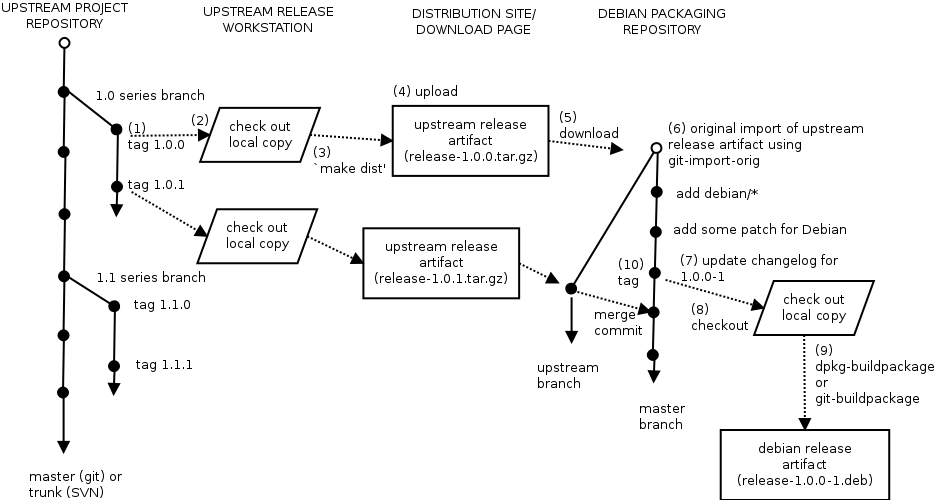
Sadly, despite everybody having the best intentions, there is sometimes a chasm separating these two groups of people. Upstream developers are often busy developing new features and don't have time to work on the intricacies of packaging. I hope that by sharing a few of my own experiences I can help more developers get their software packaged more easily. Fortunately, a number of great tools like git-buildpackage have emerged for streamlining the packaging process, but this has also created more confusion for developers who have their own git repositories and don't quite understand how the Debian git repository and patching process relates to their own repository. The autotools world Here, I focus on autotools based software, because this type of software has it's own peculiar issues when packaging. In particular, these issues appear when using a version control system to track upstream releases. Some of the concepts can be applied to the study of regular Makefile or cmake projects as well. Here is a diagram giving an overview: Let's work through each of the steps in the diagram: The upstream release
  1. The developer/release manager updates the version number in
    configure.ac
    (sometimes called configure.in) and tags the code. (Usually this tag is on a dedicated release branch.)
  2. The developer checks out a copy of the code from the tag into a fresh working directory
  3. The developer runs the autoreconf/automake tools, usually from a bootstrap script. These tools create a number of new files that don't exist in the project repository. Finally, the developer runs
    make dist
    , which puts all the files,
    including the generated files, into a distribution tarball. It is worth emphasizing this point: the tarball is not just an archive of the files from the repository/tag, it also contains a number of
    files generated by autotools.
  4. The developer uploads the tarball to a web site such as the Sourceforge download page. Usually a release announcement is made now containing checksums for the tarball.
At this point, the upstream developer's work is done and packaging teams from various projects such as Debian will take over. Sometimes, the upstream developer is also building the packages and continues
onto the next steps himself: Packaging
  1. The package is downloaded by the package maintainer
  2. If it is the first download, the maintainer creates a new git repository. If it has been packaged before, he clones the repository. The important point here is that this is not the upstream repository, it is an independent repository for Debian packaging. The maintainer uses the git-import-orig tool to import the upstream tarball into the packaging repository. The git-import-orig tool captures an exact snapshot of the upstream release tarball contents in a branch called upstream. One point where the Debian repository differs fundamentally from the upstream repository is that all files from the tarball will be tracked in the Debian git repository, even those automatically generated files that were created by autotools and don't exist in the upstream repository.
  3. The maintainer creates or updates the various artifacts for packaging. These files are kept on the master branch, and the tarball contents from the upstream branch are merged into master to create packages.
  4. When the maintainer feels the code is ready, he will check out a clean copy of the repository to build the package from.
  5. The maintainer executes a tool such as git-buildpackage or regular dpkg-buildpackage, which creates the *.deb files.
  6. The files are checked with a tool like lintian and some manual testing/installation. If all is OK, a tag is made in the packaging repository, with a suffix appended to the upstream version number to indicate which iteration of the package it applies to.
AttachmentSize
release-packaging-workflow.dia3.97 KB

Paul Tagliamonte: Here s my talk from PyCon 2013 (I tried to queue it up to...

<iframe allowfullscreen="allowfullscreen" frameborder="0" height="299" src="http://www.youtube.com/embed/1vui-LupKJI?wmode=transparent&amp;autohide=1&amp;egm=0&amp;hd=1&amp;iv_load_policy=3&amp;modestbranding=1&amp;rel=0&amp;showinfo=0&amp;showsearch=0#t=16m14s" width="400"></iframe>

Here s my talk from PyCon 2013 (I tried to queue it up to where I start (@ 16:14)

A bit more giggley then I intended, but apparently it s endearing.

If anyone s actually interested in Hy, check out #hy on irc.freenode.net, star the code @ git.io/hy - it s actually pretty feature complete. If you want to play with it, check out the magic repl I ve been pondering taking it a bit more serious, so there is even a bit of documentation thanks to Chris Webber (hey, thanks!). Rock on!

2 April 2013

Wouter Verhelst: Switching away from mutt

After having used mutt for about a decade, I decided it's time I move away from it, for various reasons that I won't go into here. I've been evaluating thunderbird^Wicedove now for a few weeks, but I can already see I won't keep using it forever, because I find too many issues with it:
  1. I can't tell the thing that I never ever ever want to write HTML-formatted emails. While there is an option "Compose messages in HTML format" in the "Account settings" dialog, that only seems to impact the behaviour of the client upon "new mail", not its reply behaviour, forcing me to go to Options->Format and switch it off.
  2. To make matters worse, the HTML editor and the plain-text editor are not the same dialog. That means it is not possible to switch on HTML formatting if it wasn't on originally (not a problem for me, but I can imagine it being a problem for others), but also that the fugly quoting style (vertical line next to the text) of the HTML editor is not removed when you switch from HTML to plain-text. Further on, it has issues when you want to remove white space, where it will remove entire quoting levels rather than just an empty line. This is horrible, horrible behaviour.
  3. While there is support for multiple email addresses connected to the same IMAP account, it does appear that there is no support for automatically choosing the right email address based on user-defined rules, such as "which mail folder are we currently in". Having to remember that I need to select the right mail address is tiresome and error-prone; e.g., when I'm in a Debian-related mail folder, I want my mail client to use my Debian mail address automatically. It appears the only way in which icedove can automatically select sender addresses is by checking the recipient list in the To: and Cc: headers for any of its configured mail addresses, and using that to decide what to put in the from: header.
Any one of the above would eventually be enough for me to grow tired of icedove and switch to something else; but the three combined mean that I'll be looking for something else fairly soon. Suggestions are, of course, welcome.

31 March 2013

Russell Coker: Links March 2013

Russ Allbery wrote an informative post about how to determine which charities are worth donating to [1]. He has a link to another article about the charities to which he donates and concentrates on ways of analysing the effectiveness of charities. So someone who has different ideas about which types of charity are worthy of donation could still learn a lot from his post. Adam Green wrote an interesting article for The New Yorker about Apollo Robbins who is one of the world s best pick-pockets [2]. Apollo picks pockets as a magician to entertain people and always returns what he steals. Now he is working with neuroscientists who are devising experiments to determine why his tricks work. Rick Falkvinge wrote an insightful article describing the way that the copyright monopoly is in direct opposition to the freedom to make contracts [3]. It s a good rebuttal of a common argument in favor of copyright law. Seth Godin gave an interesting TED talk about the problems with the education system, how and why it teaches conformity and little else [4]. One of his suggestions for improvement is to have students spend their evenings watching lectures by experts and class time asking questions. He also says that everything should be open book and that there is no value in memorising anything it s a bit of an overstatement but it s essentially correct. Cory Doctorow wrote an interesting article for The Guardian about positive externalities and copyright law [5]. I think that he didn t choose the best way of framing this issue, but he makes some very interesting points anyway. Andrew Norton wrote an interesting article about how to reduce corruption in the police force and other government agencies [6]. A large part of this is based on making them subject to the same laws as everyone else, which seems to be a radical idea. Valerie Aurora wrote an insightful blog post about suicide [7]. Emily Oster gave an interesting TED talk about the factors that determine the spread of AIDS in Africa [8]. It s quite different to what you probably expect.

29 March 2013

Olivier Berger: Managing Python code with UTF-8 (french chars) in org-mode + babel + minted for LaTeX export

The goal of this article is to illustrate how to manage Python code which includes comments in UTF-8 characters inside a latin-1 source org-mode for LaTeX export. Note that I ve pasted in wordpress the HTML generated by org-mode, so I hope it isn t broken too much. My typical use case is a french lecture on Python where the text is written in french, as well as some of the code comments and examples We ll use org-mode s babel module to include and manage the Python
examples. The goal is to write the source of the Python programs
directly in the same org source as the class book s text, and to extract them into a subdir (with the tangle feature), so that they can be shipped to the students to experiment with. The minted LaTeX environment is used, for babel, to make the Python syntax highlighting.

1.1 Issues
  • The source org-mode is in latin-1 so that it compiles with pdflatex
  • The examples source-code will be in UTF-8 so that Python 2.7 executes them well on a modern Linux desktop
  • Minted relies on pygmentize wich doesn t seem to handle UTF-8 so well

1.2 Solution
We ll show how to patch minted s use of pygmentize to take advantage
of its conversion capacity to convert the Python sources from UTF-8 to
latin-1 at document rendering time (LaTeX compilation). It s a hack, but works. The current document s source shows how this works

1.2.1 Customization
The org document should contain the following headers :
#+LANGUAGE:  fr
#+LaTeX_HEADER: \usepackage[latin1] inputenc 
#+LaTeX_HEADER: \usepackage[french] babel 
#+LaTeX_HEADER: \usepackage color \usepackage minted 
and the footers :
# Local Variables:
# coding: latin-1
# org-src-preserve-indentation: true
# tab-width: 4
# End:
Also note that pdflatex should use the -shell-escape option necessary for minted Now, the document should also include the following patch for minted :
#+LATEX_HEADER: \makeatletter
#+LATEX_HEADER: \renewcommand\minted@pygmentize[2][\jobname.pyg] 
#+LATEX_HEADER:   \def\minted@cmd pygmentize -l #2 -f latex -F tokenmerge
#+LATEX_HEADER:     \minted@opt gobble  \minted@opt texcl  \minted@opt mathescape 
#+LATEX_HEADER:     \minted@opt startinline  \minted@opt funcnamehighlighting 
#+LATEX_HEADER:     \minted@opt linenos  -P "verboptions=\minted@opt extra "
#+LATEX_HEADER:     -O encoding=UTF-8,outencoding=iso-8859-1 -o \jobname.out.pyg #1 
#+LATEX_HEADER:   \immediate\write18 \minted@cmd 
#+LATEX_HEADER:   % For debugging, uncomment:
#+LATEX_HEADER:   %\immediate\typeout \minted@cmd 
#+LATEX_HEADER:   \ifthenelse \equal \minted@opt@bgcolor 
#+LATEX_HEADER:     
#+LATEX_HEADER:     \begin minted@colorbg \minted@opt@bgcolor 
#+LATEX_HEADER:   \input \jobname.out.pyg 
#+LATEX_HEADER:   \ifthenelse \equal \minted@opt@bgcolor 
#+LATEX_HEADER:     
#+LATEX_HEADER:     \end minted@colorbg 
#+LATEX_HEADER:   \DeleteFile \jobname.out.pyg 
#+LATEX_HEADER: \makeatother
The important change is the addition of the -O encoding=UTF-8,outencoding=iso-8859-1 option of pygmentize, that will convert the UTF-8 source code to latin-1. Hopefully most of the characters will convert fine, for a document written in french.

2 Examples

2.1 Basic Python
This is a generic verbatim example, which doesn t use babel / minted.
$ python
Python 2.7.3 (default, Jan  2 2013, 16:53:07) 
[GCC 4.7.2] on linux2
Type "help", "copyright", "credits" or "license" for more information.
>>> print "Hello, world!"
Hello, world!
>>>

2.2 Python source code for french speakers
Here, we first include the source code, so that it can be exported to
an examples/ subdir, with the following (note that the #+ BEGIN_src / #+ END_src should be changed to get rid of the space
character between + and BEGIN / END, and that the :shebang and following text should be on the BEGIN_SRC line I seem to have not quoted
these properly in this document):
#+name: helloworld
#+ BEGIN_src python :tangle examples/helloworld.py :noweb yes \\
:shebang #!/usr/bin/python :padline no :exports none
# -*- coding: utf-8 -*-
# Ceci est un exemple d'affichage d'une cha ne accentu e
name = raw_input("Quel est v tre nom ? ")
print "J'esp re que  a va bien aujourd'hui", name
#+ END_src
Editing it with C-c will open an UTF-8 buffer, so hopefully, this will be consistent with the utf-8 coding system declared on the second line. The regeneration of the examples/helloworld.py file is made with C-c C-v t (babel tangling ). Note that we don t add the #!/usr/bin/python first line in the source, as we want it to be added by the tangling process (which will also make the script executable). Once this is done, the script may be run :
$ python examples/helloworld.py 
Quel est v tre nom ? Fran ois
J'esp re que  a va bien aujourd'hui, cher Fran ois
Now, to add the colorized rendering in the lecture book, we do (here again, remove the spaces):
# +BEGIN_latex
\inputminted python examples/helloworld.py 
# +END_latex
And here it is, rendered by minted:
# -*- coding: utf-8 -*-
# Ceci est un exemple d'affichage d'une cha ne accentu e
name = raw_input("Quel est v tre nom ? ")
print "J'esp re que  a va bien aujourd'hui, cher", name
Here are links to : the source, the PDF result, and the generated Python program.

28 March 2013

Russ Allbery: wallet 1.0

Finally. The wallet is a system management tool for storing and retrieving secure data. I originally wrote it as part of our Kerberos v5 migration project to replace the old Kerberos v4 system we had for distributing srvtabs. It's still mostly used at Stanford for distributing keytabs, but it's extensible and supports storing arbitrary secure data. We also use it internally for storing database passwords, SSL private keys, and anything else that needs to be kept secure and retrieved later. It supports a rich ACL mechanism and namespace enforcement and is built on top of remctl for security and confidentiality. I did a bunch of development on it originally in 2006 and 2007, but then it solved our immediate problems and I didn't have much time to work on it. I used pre-1.0 versions because there was so much more on it that I wanted to do. But we've been running it in production for years, and while there's still tons more work that needs to be done, it really deserves a 1.0 version. Jon Robertson converted the database backend to DBIx::Class (which added PostreSQL support) and implemented schema upgrading, which were two of the major things that were keeping me from putting a 1.0 version on it. So it's time. Other new features since the previous release include a change to the default ACLs so that owners of objects can destroy them by default, a new ldap-attr ACL type that checks whether the caller has a particular attribute set in LDAP (which will let us use our entitlement system to control access), and support for storing and managing key rotation for WebAuth keyrings. There's also a new acl check command to determine whether an ACL exists and a new comment field and command to store an arbitrary comment about an object. Our local naming policy has also gotten much more complex, so I turned it into a module to provide an example to others of how to implement some reasonably detailed namespace and object autocreation controls. You can get the latest version from the wallet distribution page. I'm going to upgrade Debian packages to experimental or unstable (depending on the freeze status) as soon as I get a chance to write a bit more documentation and hopefully figure out debconf integration with the database setup support inside Debian for the server piece.

27 March 2013

Bits from Debian: Debian Project Leader elections 2013: interview with Moray Allan

We have asked Moray Allan, one of the three candidates for DPL elections 2013, to tell our readers about himself and his ideas for the Debian Project. You can also read the interviews to the other two candidates: Lucas Nussbaum and Gergely Nagy.
Please tell us a little about yourself. I'm Moray Allan, from Edinburgh in Scotland. I'm 32. After working in academic research for a few years, I'm now working freelance on a wide mixture of topics, with recent projects in Indonesia, Romania and Kuwait. When I'm not working, I'm likely to be found walking through a city or the countryside, or otherwise relaxing at home reading a novel in French or Spanish. What do you do in Debian and how did you started contributing? In recent years, most of my Debian time was taken up organising the annual Debian conferences. But I still have a load of packages, mostly connected to an upstream Linux-on-handheld-computers project I was working on before I joined Debian to create packages for it. Why did you decide to run as DPL? I've been involved in Debian for about 10 years now, including working for the last few years in DebConf in a way similar to how the DPL acts within overall Debian. Previously I'd ruled out running due to lack of time, but currently I'm in a more flexible work situation. It seems the right time to put myself forward, and see if the ideas in my platform interest project members. Three keywords to summarise your platform. Transparency, communication, openness. (Three ways I'd like us to think about teams in Debian.) What are the biggest challenges that you envision for Debian in the future? I think the biggest challenges are for free software in general.
End-users are moving to more closed hardware -- will our software be able to run on the phones and tablets people are shifting towards? At the same time, end-users and server users are moving to "the cloud", and often depending more heavily on non-free infrastructure outside their own control. What are, in your opinion, the areas of the project more in need of technical and/or social improvements? In my platform I give a few ideas about teams and delegations, coordination and mediation, and both internal and external communication, including more organised fundraising. These are areas where I think relatively simple changes can give big benefits. Why should people vote for you? I have proven leadership experience within Debian, as I've been working on coordination and mediation tasks for some years already. At the same time, I do regular packaging work, and work in other parts of Debian like the press and publicity teams, so I'm in touch with the experience of normal Debian contributors. People should vote for me if they support my platform, which is about coordination-level changes that I would have no mandate or authority to push through unless I am elected. Name three tools you couldn't stay without. APT, emacs, ssh. What keep you motivated to work in Debian? I've used Debian on all my computers for a long time, and by now working on the distribution myself feels a natural part of that.
Fortunately I'm constantly positively surprised by Debian and by the Debian community. Are there any other fields where you call yourself a geek, besides computers? Certainly history (such as the eastern Mediterranean region in late antiquity), languages (including dead ones) and music (especially Josquin to Monteverdi).

Bits from Debian: Debian Project Leader elections 2013: interview with Lucas Nussbaum

We have asked Lucas Nussbaum, one of the three candidates for DPL elections 2013, to tell our readers about himself and his ideas for the Debian Project. You can also read the interviews to the other two candidates: Gergely Nagy and Moray Allan.
Please tell us a little about yourself. Hi! I'm a 31 years old french computer geek. In my day job, I'm an assistant professor (Ma tre de Conf rences) of Computer Science at Universit de Lorraine. What do you do in Debian and how did you started contributing? Like many, I started contributing to Debian by creating and maintaining packages for my own software, in the Ruby team. Then, I discovered that, even if it's not so obvious from the outside, there are a lot of areas in Debian that could use more contributors. So I just started to contribute to more and more things. There's a list of things I did in Debian in my platform. What I have been doing recently is: Why did you decide to run as DPL? Two main reasons: Three keywords to summarise your platform. (re-)make Debian the center of the Free Software ecosystem; foster innovation inside Debian; reduce barriers to contributions What are the biggest challenges that you envision for Debian in the future? I often have the impression that the project is losing momentum, positive energy, and slowing down. It feels like we are living on the benefits of the past. A lot of very cool things happen in the Debian ecosystem, but very often outside the Debian project (in derivative distributions). Debian should aim at reinforcing its position in the center of the Free Software ecosystem: it should be the main active intermediary between upstream projects and final users. To achieve that, we need to reinforce the visibility and the impact of Debian. This is extremely important because the values we fight for as a project are often neglected by our derivatives. What are, in your opinion, the areas of the project more in need of technical and/or social improvements? Fostering innovation inside Debian: we should be more welcoming towards innovation and experiments inside the project. Often, we merely tolerate them, and bureaucracy makes them hard and slow to conduct. As a result, people tends to innovate outside the Debian project. Making it easier to contribute to Debian: we compete with more and more projects to attract contributors. While we are already quite good at welcoming new contributors with good documentation and mentoring (much better than people usually think), there's still a lot of room for improvement. Why should people vote for you? A great thing in Debian's voting system is that you don't vote "for" or "against" a specific candidate. Instead, due to our use of the Condorcet method, you rank candidates (and also indicate those who you consider suitable for the role by ranking a virtual "None of the above" candidate). Why am I a good candidate? My previous contributions to Debian show that I have a pretty good understanding of the inner workings of the project, and that I have a track record of managing projects successfully inside Debian. I think that those are two required qualities for a DPL. Name three tools you couldn't stay without. vim, mutt, ssh. What keep you motivated to work in Debian? Debian is a fantastic project from a technical point of view (focus on technical excellence, lots of interesting challenges), but also from a social point of view: the Debian community is a great community where I have lots of good friends. Also, what's great when you contribute to Debian is that your work has a real impact, and that you see people using stuff you worked on everywhere. Are there any other fields where you call yourself a geek, besides computers? I'm not sure this really qualifies as "besides computers", but I've gotten very interested in the OpenStreetMap project lately. I very much enjoy exploring unmapped areas on a mountain bike. It feels like being Christopher Columbus or Marco Polo, but 20 minutes from home. ;) The OpenStreetMap and Debian projects also share many values, such as a great attention to quality and details.

Bits from Debian: Debian Project Leader elections 2013: interview with Gergely Nagy

We have asked Gergely Nagy, one of the three candidates for DPL elections 2013, to tell our readers about himself and his ideas for the Debian Project. You can also read the interviews to the other two candidates: Lucas Nussbaum and Moray Allan.
Please tell us a little about yourself. I was born in Hungary, a little bit over three decades ago, as a son of a biochemist and a pharmacist, who gave me the name Gergely Nagy (however, online - and offline too by now - I'm mostly known by my nickname, algernon). I went on to study human arts (hungarian grammar & literature, in particular), and to support this passion, I work as a software engineer, one who gets paid to work on free software. As such, I'm in a fortunate situation where my hobby supports my passion, and my hobby aligns well with my Debian work too. What do you do in Debian and how did you started contributing? At the moment, apart from maintaining a few packages, I'm doing a few other, mostly invisible things, like reassigning misfiled bugs so they don't end up being forgotten; or review newly uploaded packages before they enter the archive, making sure we are allowed to distribute them, and that their quality is up to our standards. I used to do quite a lot of other things, but I chose to spend the past year mostly invisible, learning. I started contributing by packaging an editor I was using at the time, but quickly ended up adopting another package - things escalated from there quickly. Why did you decide to run as DPL? There were two reasons that motivated me to run: one is that I believe I can bring something new to the table, that I can help Debian expand in new directions. The other reason is that I'm always on the lookout for new ways to contribute back to Debian, and being the project leader is a position where I believe I could contribute most at this point in time. Three keywords to summarise your platform. Non-technical contributors. What are the biggest challenges that you envision for Debian in the future? The biggest challenge is growing up, to become more than a group of computer geeks creating an amazing distribution. To become a community of a wide variety of people, where both computer geeks and art geeks feel equally at home. Yet, at the same time, where we as a project, keep our focus straight, and be the champions of Free Software. We just need to realize that there's much more to Free Software than the software itself. What are, in your opinion, the areas of the project more in need of technical and/or social improvements? I believe that while we do have many areas where we could use technical improvements, we are reasonably safe there, because we do have very skilled technical people to help us solve these problems. We can make our tools better, we can develop our infrastructure better to aid us even more - and so on and so forth. While we need work on many areas, we're on the right track there. However, when it comes to social issues, we're at a loss. We have serious trouble keeping certain topics civilised on mailing lists, we have trouble attracting women, and we have trouble reaching people who are not naturally exposed to Debian (or Free Software). We could really use a more diverse community, but that requires us to overcome quite a lot of social roadblocks, so to say. Outreach is one particular area where we need much more technical and social improvements. Why should people vote for you? People should vote me, because they found my platform, my answers on debian-vote@, and my ideas and goals convincing and worthy to pursue. People should vote me, because they trust I'll be able to serve the project well. Name three tools you couldn't stay without. Emacs, git and a pencil. Because with these three, I can pretty much do anything. What keep you motivated to work in Debian? The community. Over the years, I had the good fortune to meet with a lot of people I hold in high esteem, whose enthusiasm and motivation I found inspiring. For any other common goals Debian and I may share, in the end, it is the people within Debian that keep me motivated. Are there any other fields where you call yourself a geek, besides computers? I'm not quite there yet, but I'm working hard on becoming a human arts geek, or at least a geek of the hungarian language.

26 March 2013

Hideki Yamane: use tmpfs for temporary directory for piuparts

Tips: use tmpfs for temporary directory for piuparts
$ sudo time piuparts -p -t /tmpfs net-snmp_5.7.2~dfsg-1~0.1_amd64.changes
(snip)
0m35.7s INFO: PASS: All tests.
0m35.7s INFO: piuparts run ends.
21.31user 6.04system 0:35.82elapsed 76%CPU (0avgtext+0avgdata 49996maxresident)k
0inputs+336outputs (0major+752059minor)pagefaults 0swaps

$ sudo time piuparts -p net-snmp_5.7.2~dfsg-1~0.1_amd64.changes
(snip)
3m46.7s INFO: PASS: All tests.
3m46.7s INFO: piuparts run ends.
30.00user 12.92system 3:46.89elapsed 18%CPU (0avgtext+0avgdata 50000maxresident)k
912inputs+1662960outputs (53major+781440minor)pagefaults 0swaps
0m35.7s vs 3m46.7s = about 6 times faster and save 3 minites in this case, good (And imagine. If you want to test a package that depends on Eclipse or so, then... ;).

So, if you have enough memory and not want to waste your life, using tmpfs is good choice, IMHO (or buy SSD :)

25 March 2013

Dmitrijs Ledkovs: avahi + apt-cacher-ng + sbuild ?!

Laptop enters the WiFi network and decides that it wants to build some packages using sbuild.
At the same time, on this network there is apt-cacher-ng operating with most of packages cached.
On the other hand, there is a project squid-deb-proxy which provides yet another apt proxy, but with the added bonus of avahi discovery.

Can we throw all of this stuff together and make it work? Well let's try =)

On ubuntu:

$ sudo apt-get install apt-cacher-ng squid-deb-proxy-client

On debian:

Squid-deb-proxy-client is not packaged just fetch and install it. It's really just one python script & one conffile. Or I have published the python script and the config as part of this posts gist.

Next all of the avahi magic, really is just publishing a service file &amp; letting the python-script from the squid-deb-proxy-client package find it, and adding apt-conf.d snippet which calls the above mentioned script and generate correct proxy line.

But we are running apt-cacher-ng! So on the server where apt-cacher-ng is running drop this:

/etc/avahi/services/apt-cacher-ng.service
<?xml version="1.0" standalone='no'?>
<!DOCTYPE service-group SYSTEM "avahi-service.dtd">
<service-group>
<name replace-wildcards="yes">apt-cacher-ng proxy on %h</name>
<service protocol="ipv4">
<type>_apt_proxy._tcp</type>
<port>3142</port>
</service>
</service-group>

Now on any host that you want automatic apt-proxy discovery, simply install squid-deb-proxy-client & your apt-cacher-ng will be auto-discovered.

What about sbuild? Well, you don't really want to install avahi-daemon and start it inside the chroot, so we can cheat with creating an executable hook:

/etc/schroot/setup.d/51aptproxy
#!/bin/sh
set -e

. "$SETUP_DATA_DIR/common-data"
. "$SETUP_DATA_DIR/common-functions"
. "$SETUP_DATA_DIR/common-config"

APT_AVAHI_DISCOVER=/usr/share/squid-deb-proxy-client/apt-avahi-discover

if [ $STAGE = "setup-start" ] [ $STAGE = "setup-recover" ]; then
if type apt-avahi-discover 1>/dev/null; then
APT_AVAHI_DISCOVER=apt-avahi-discover
fi
APT_PROXY= $APT_AVAHI_DISCOVER
if [ -n "$APT_PROXY" ]; then
info "Setting apt-proxy to avahi proxy at $ APT_PROXY "
printf 'Acquire::http Proxy "%s"; ;\n' $ APT_PROXY > "$ CHROOT_PATH /etc/apt/apt.conf.d/30schrootautoproxy"
fi
fi

Tadah. Now I'm using my apt-cacher-ng whenever I'm on my home WiFi =)

Please advertise your apt-cache proxies!

Now to integrate this properly:
  • apt-cacher-ng should auto-create avahi service file in it's init script
  • apt-get or some other package should ship apt-avahi-discover script (there is also a C implementation available)
  • apt-get or some other package should ship the apt.conf.d snippet
  • sbuild / pbuilder / cowbuilder / mk-sbuild / [p cow]builder-dist should have hooks to retrieve hosts' apt proxy settings and use them in the chroots
For full sources see lp:squid-deb-proxy and my gist with all other config snippets.

23 March 2013

Dominique Dumont: Next version of Config::Model will use asynchronous check

Hello To check the validity of Debian dependencies in Debian package, Config::Model queries a remote web server to get the list of package version known to Debian. The first version of this check did sequential requests: when the cache was not very fresh, I had to wait more than 60s before getting results for complex package like padre. That was very frustrating (but less frustrating than checking package names manually) For the following version, I addedhacked AnyEvent in Dpkg model to run parrallel queries. This went much faster but gaves weird results: before getting a response from Debian server, the packages were flagged as unknown. To get consistent results, running twice cme check dpkg was required. So, at new year, I ve decided to bite the bullet and implement correctly value checks with asynchronous queries to remote server. This new feature is now ready and will be delivered in Config::Model 2.030. cme will now return consistent results. This new release is mostly backward compatible. You may notice some quirks with some other modules based on Config::Model: These quirks will disappear once these modules are updated. This should not be long since all the updates are ready in github. All the best
Tagged: Config::Model, debian, dpkg, Perl

22 March 2013

Matthew Palmer: Managing your Databases

The Standalone Sysadmin asks, How do you manage database server instances? :
Do you have one (or a few) centralized database servers, either standalone or clustered, or do you spread the load like we are currently?
His argument for centralisation is one of easing the management burden of configuration and backups, whereas the distributed approach eliminates a central point of failure and performance degradation. I go for distributed, all the way. For a start, we run so many databases for so many customers that there s no way on earth we could stand up a small number of database servers and handle all the load (hell, we ve got single customers who consume a cluster of machines with 384GB of RAM and all the SSDs you can eat). Security and permissions is a whole other kettle of fish; the contortions we d have to do to allow customers the level of management they need with a centralised database system would be immense. Then there s the need of some customers for MySQL, some for PgSQL, different performance tuning for different workloads nope, centralised DBs don t work for us. Given this, we ve bitten the bullet and solved pretty much all of the management problems. Installation and configuration is all handled via Puppet, and backups are trivial the same system that installs the DB server itself also drops a hook script that the backup agent uses to know that it has to dump a database server. Monitoring that this backup is taking place successfully is also automatically provisioned, so we know that we re not missing anything. Ultimately, this same approach applies to practically anything that you re tossing up between centralised and distributed. At scale, you can never rely on centralisation, so you may as well bite the bullet and learn how to do it distributed pretty much from the start. That saves some serious system shock when you discover what your hardware vendor wants for the next step up in big iron hardware

21 March 2013

Daniel Pocock: Migrating to Xen Cloud Platform (XCP Xen-API) on Debian wheezy

I recently decided to upgrade my server and host it in a new location (turns out that leaving the UK hosting was a smart move too, as new UK laws to rein in the press are more likely to punish and censor private web sites and bloggers) As part of the upgrade, starting off with Debian 7 (wheezy) seemed to make a lot of sense. I've been using Xen as a standard server virtualization platform since Debian 5 (lenny), and upgrading through Debian 6 (squeeze) without any major problems. I had been managing it with the traditional xm toolstack without any major concerns. Wheezy benefits from supporting Xen Cloud Platform with a standard set of packages, and it has been promoted heavily as a key technology in wheezy. XCP appealed to me for various reasons: The gotchas Reading through that list, it seems like there is no reason not to use XCP. In fact, there are major differences between the way xl/xm tools manage a host and the way XCP manages a host. While xl/xm offer the flexibility to manually configure networking and storage any way you like, XCP is more like a cookie-cutter virtualization system. It needs to be: without having low level control over networking and storage on the physical host, it could not offer things like hot-migration. Some people might get a shock, however, when moving to such a locked-down platform, as it takes away some of the things you would normally control manually on a Debian server:
  • XCP takes over networking. Your /etc/network/interfaces file must be almost empty - you can still set up firewall rules from a separate script, but don't plan on having any customised IP address configuration or routing.
  • XCP still has some bugs, such as requiring a quick config hack to use any subnet size other than /24, or another hack to make HVM networking function for any non-Linux VM. Hopefully these will be fixed before the official wheezy release.
  • XCP management tools don't support IPv6 - although this doesn't prevent using IPv6 in a VM. If you were planning to use dom0 as an IPv6 gateway for the domUs, it won't work: however, you can set up a domU bridged to the physical ethernet so it can act as an IPv6 gateway for the other VMs.
  • XCP takes over your storage and creates it's own PV, VG and LVs. This can inadvertently lead to the creation of a nested volume group if you are not aware of the exact way this works.
Making it work Despite these gotchas, I have managed to get it working, doing all the things that were possible on regular Xen + Debian squeeze. I would suggest that anybody attempting this read through all the bugs of severity important or serious and the updated README.Debian file (patch in bug 702337) to get off to a quick start without repeating some of the problems faced by early adopters like myself.

20 March 2013

Masayuki Hatta: Recipe for Debian Haskell packaging

The following is what I usually do when I want to debianize a Haskell stuff from Hackage. This is a personal recipe, by no means official procedure or such. I may be wrong, badly at that.
  1. Check pkg-haskell repository whether your intended package already exists or not. Somebody might work on it already.
  2. Find the webpage of your intended package at HackageDB, then download Cabal source package . Untar it. The tarball filename should be changed to fit the Debian source package convention. For example, if the original name is something like foobar-1.0.tar.gz, then it should be haskell-foobar_1.0.orig.tar.gz.
  3. File ITP. reportbug is your friend.
  4. Run cabal-debian in untared dir:
     $ cabal-debian --debianize --quilt
    
    We do have the upstream tarball, so use quilt. See http://wiki.debian.org/UsingQuilt. It might give you warnings about changelog. debian/changelog doesn t exist yet, so ignore it.
  5. Now read http://wiki.debian.org/Haskell/CollabMaint/Processes and http://wiki.debian.org/Haskell/CollabMaint/PackageTemplate carefully. Then do things as they say. These two are short, but well-written instructions. Edit the generated debian/control appropriately. Do not forget to make your debian/copyright machine-friendly. See http://www.debian.org/doc/packaging-manuals/copyright-format/1.0/.
  6. Test whether your package is flawless and really buildable. Do lintian. Use pbuilder.
     $ lintian haskell-foobar_1.0-1_amd64.changes
     # pbuilder --build haskell-foobar_1.0-1.dsc
    
  7. Read http://wiki.debian.org/Haskell/CollabMaint/DarcsBasic. Darcs is quite easy to use, and you don t have to be the master of Darcs to merely debianize things anyway. Basically, what I usually do is
     $ darcs record -a; darcs push --repo=debian
    
    Darcs is well-suited to Haskell-related development, but seems you can use Git, too.
  8. Change debian/changelog. UNRELEASED in the first line should be unstable or experimental . Do not forget to close ITP.
  9. Finally, do
     $ debuild -tc; debcommit -r; debrelease; darcs push --repo=debian
    
    That s all folks!

Next.

Previous.