Russell Coker: QEMU for ARM Processes
I m currently doing some embedded work on ARM systems. Having a virtual ARM environment is of course helpful. For the i586 class embedded systems that I run it s very easy to setup a virtual environment, I just have a chroot run from systemd-nspawn with the --personality=x86 option. I run it on my laptop for my own development and on a server my client owns so that they can deal with the hit by a bus scenario. I also occasionally run KVM virtual machines to test the boot image of i586 embedded systems (they use GRUB etc and are just like any other 32bit Intel system).
ARM systems have a different boot setup, there is a uBoot loader that is fairly tightly coupled with the kernel. ARM systems also tend to have more unusual hardware choices. While the i586 embedded systems I support turned out to work well with standard Debian kernels (even though the reference OS for the hardware has a custom kernel) the ARM systems need a special kernel. I spent a reasonable amount of time playing with QEMU and was unable to make it boot from a uBoot ARM image. The Google searches I performed didn t turn up anything that helped me. If anyone has good references for getting QEMU to work for an ARM system image on an AMD64 platform then please let me know in the comments. While I am currently surviving without that facility it would be a handy thing to have if it was relatively easy to do (my client isn t going to pay me to spend a week working on this and I m not inclined to devote that much of my hobby time to it).
QEMU for Process Emulation
I ve given up on emulating an entire system and now I m using a chroot environment with systemd-nspawn.
The package qemu-user-static has staticly linked programs for emulating various CPUs on a per-process basis. You can run this as /usr/bin/qemu-arm-static ./staticly-linked-arm-program . The Debian package qemu-user-static uses the binfmt_misc support in the kernel to automatically run /usr/bin/qemu-arm-static when an ARM binary is executed. So if you have copied the image of an ARM system to /chroot/arm you can run the following commands like the following to enter the chroot:
cp /usr/bin/qemu-arm-static /chroot/arm/usr/bin/qemu-arm-static
chroot /chroot/arm bin/bash Then you can create a full virtual environment with /usr/bin/systemd-nspawn -D /chroot/arm if you have systemd-container installed. Selecting the CPU Type There is a huge range of ARM CPUs with different capabilities. How this compares to the range of x86 and AMD64 CPUs depends on how you are counting (the i5 system I m using now has 76 CPU capability flags). The default CPU type for qemu-arm-static is armv7l and I need to emulate a system with a armv5tejl. Setting the environment variable QEMU_CPU=pxa250 gives me armv5tel emulation. The ARM Architecture Wikipedia page [2] says that in armv5tejl the T stands for Thumb instructions (which I don t think Debian uses), the E stands for DSP enhancements (which probably isn t relevant for me as I m only doing integer maths), the J stands for supporting special Java instructions (which I definitely don t need) and I m still trying to work out what L means (comments appreciated). So it seems clear that the armv5tel emulation provided by QEMU_CPU=pxa250 will do everything I need for building and testing ARM embedded software. The issue is how to enable it. For a user shell I can just put export QEMU_CPU=pxa250 in .login or something, but I want to emulate an entire system (cron jobs, ssh logins, etc). I ve filed Debian bug #870329 requesting a configuration file for this [1]. If I put such a configuration file in the chroot everything would work as desired. To get things working in the meantime I wrote the below wrapper for /usr/bin/qemu-arm-static that calls /usr/bin/qemu-arm-static.orig (the renamed version of the original program). It s ugly (I would use a config file if I needed to support more than one type of CPU) but it works. #include <stdio.h>
#include <unistd.h>
#include <stdlib.h> int main(int argc, char **argv)
if(setenv("QEMU_CPU", "pxa250", 1))
printf("Can't set $QEMU_CPU\n");
return 1;
execv("/usr/bin/qemu-arm-static.orig", argv);
printf("Can't execute \"%s\" because of qemu failure\n", argv[0]);
return 1;
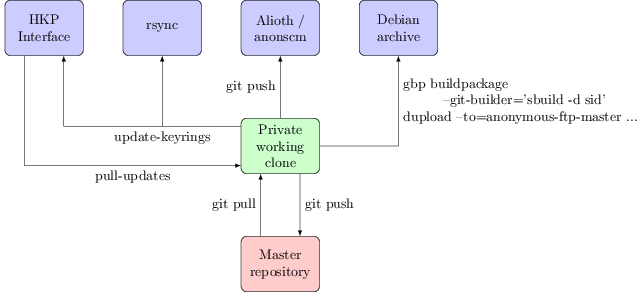
 Every month or two keyring-maint gets a comment about how a key update we say we ve performed hasn t actually made it to the active keyring, or a query about why the keyring is so out of date, or told that although a key has been sent to the HKP interface and that is showing the update as received it isn t working when trying to upload to the Debian archive. It s frustrating to have to deal with these queries, but the confusion is understandable. There are multiple public interfaces to the Debian keyrings and they re not all equal. This post attempts to explain the interactions between them, and how I go about working with them as part of the keyring-maint team.
First, a diagram to show the different interfaces to the keyring and how they connect to each other:
 Once again, my focus was on
 Here is my monthly update covering what I have been doing in the free software world during July 2017 (
 Some news about Calibre in Debian: I have been added to the list of maintainers, thanks Martin, and the recent release of
 Calibre 3.5 separates out one module,







 In the past there used to be a puppet-labs project called
 In


 Having publicly running web application always brings challenges in terms of security and in generally in handling untrusted data. Security wise
 I got several interesting and useful replies, both via the blog and by personal email, to my two previous posts where I mentioned I would be starting a translation of the