Search Results: "sf"

7 January 2012

Christian Perrier: [life] [running] 2011 summary

That time of the year comes where I summarize my running activities. It's now 4.5 years that I resumed running, after nearly 10 years without active sports. Apparently, things continue to improve, though I'm logically reaching my limits in some way. I finally missed the 2500km mark by 14 kilometers, mostly because of a cold I had during the last 2 days of the year. The grand total is thus 2486 kilometers run, in 237 hours (9 days 21hours), at about 10.5km/h. The climbed height difference is 27700 meters, so about three times the altitude of Mount Sagarmatha..:-) This was achieved in 294 "activities". That seems to be a lot (nearly 1 activity per day): indeed, there are days where I have up to 4 activities, when I run to/back work, which means two runs in the morning (3+4km) and two in the evening. If I count the number of days where I had at least one running activity, this lowers to 181. In short, I ran about every 2 days. Indeed, along the year, the biggest timeframe between two runs has been 7 days. In short, I ran at least once every week during this year. The most active month was July with 272km and the less active was September with 163.5. When counted by distance, this summarizes to: When it comes at results, I ran 8 official races during the year : two "ultra" races (70km Le Puy-Firminy in November, by night and 55km Paris Ecotrail), two marathons (Paris, two weeks after Ecotrail, and Berlin in September), one 35km trail race (Trail des Cerfs in May), two half-marathons and one 12km cross-country race in my hometown. The seasons "peaks" were clearly the Ecotrail+Paris Marathon succession in March/April, the Berlin marathon in September and my longest race ever in November. Most were as successful as I expected, except maybe Berlin marathon, were I was secretly hoping to break my record (indeed, I can still be proud of running in the same race than Patrick Makau breaking the world record in 2h03'38"). An injured ankle unfortunately prevented me to prepare it as serously as I was hoping. This year was indeed the first year where I was trying to go beyond the marathon distance as another challenge. And, believe me, ultra distances are really fun (yes, running 9 hours by night *is* fun!). Indeed, I only regret not breaking one of my best times (either half-marathon or marathon). I'll try to do that in 2012. How about next^W this year? Well, my goals are currently being secured: Busy program....I cross fingers for no injury to come and disturb all this.

6 January 2012

Mark Brown: regmap updates in 3.2

Version 3.1 of the Linux kernel was the first release to include regmap support and only included a bare minimum of features in order to ease review so version 3.2 has been a pretty big one for regmap development with some pretty major features being built on top of the core code.

Matthew Garrett: Firmware bugs considered enraging

Part of our work to make it possible to use UEFI Secure Boot on Linux has been to improve our EFI variable support code. Right now this has a hardcoded assumption that variables are 1024 bytes or smaller, which was true in pre-1.0 versions of the EFI spec. Modern implementations allow the maximum variable size to be determined by the hardware, and with implementations using large key sizes and hashes 1024 bytes isn't really going to cut it. My first attempt at this was a little ugly but also fell foul of the fact that sysfs only allows writes of up to the size of a page - so 4KB on most of the platforms we're caring about. So I've now reimplemented it as a filesystem[1], which is trickier but avoids this problem nicely.

Things were almost working fine - I could read variables of arbitrary sizes, and I could write to existing variables. I was just finishing hooking up new variable creation, but in the process accidentally set the contents of the Boot0002 variable to 0xffffffff 0xffffffff 0x00000000. Boot* variables provide the UEFI firmware with the different configured boot devices on the system - they can point either at a raw device or at a bootloader on a device, and they can do so using various different namespaces. They have a defined format, as documented in chapter 9 of the UEFI spec. At boot time the boot manager reads the variables and attempts to boot from them in a configured order as found in the BootOrder variable.

Now, obviously, 0xffffffff 0x00000000 is unlikely to conform to the specification. And when I rebooted the machine, it gave me a flashing cursor and did nothing. Fair enough - I should be able to choose another boot path from the boot manager. Except the boot manager behaves identically, and I get a flashing cursor and nothing else.

I reported this to the EDK2 development list, and Andrew Fish (who invented EFI back in the 90s) pointed me at the code that's probably responsible. It's in the BDS (Boot Device Selection) library that's part of the UEFI reference implementation from Intel, and you can find it here. The relevant function is BdsLibVariableToOption, which is as follows (with irrelevant bits elided):
BdsLibVariableToOption (
  IN OUT LIST_ENTRY                   *BdsCommonOptionList,
  IN  CHAR16                          *VariableName
  )
 
  UINT16                    FilePathSize;
  UINT8                     *Variable;
  UINT8                     *TempPtr;
  UINTN                     VariableSize;
  VOID                      *LoadOptions;
  UINT32                    LoadOptionsSize;
  CHAR16                    *Description;
  //
  // Read the variable. We will never free this data.
  //
  Variable = BdsLibGetVariableAndSize (
              VariableName,
              &gEfiGlobalVariableGuid,
              &VariableSize
              );
  if (Variable == NULL)  
    return NULL;
   
So so far so good - we read the variable from flash and put it in Variable, Variable is now 0xffffffff 0xffffffff 0x00000000. If it hadn't existed we'd have skipped over and continued. VariableSize is 12.
  //
  // Get the option attribute
  //
  TempPtr   =  Variable;
  Attribute =  *(UINT32 *) Variable;
  TempPtr   += sizeof (UINT32);
Attribute is now 0xffffffff and TempPtr points to Variable + 4.
  //
  // Get the option's device path size
  //
  FilePathSize =  *(UINT16 *) TempPtr;
  TempPtr      += sizeof (UINT16);
FilePathSize is 0xffff, TempPtr points to Variable + 6.
  //
  // Get the option's description string size
  //
  TempPtr     += StrSize ((CHAR16 *) TempPtr);
TempPtr points to 0xffff 0x0000, so StrSize (which is basically strlen) will be 4. TempPtr now points to Variable + 10.
  //
  // Get the option's device path
  //
  DevicePath =  (EFI_DEVICE_PATH_PROTOCOL *) TempPtr;
  TempPtr    += FilePathSize;
TempPtr now points to Variable + 65545 (FilePathSize is 0xffff).
  LoadOptions     = TempPtr;
  LoadOptionsSize = (UINT32) (VariableSize - (UINTN) (TempPtr - Variable));
LoadOptionsSize is now 12 - (Variable + 65545 - Variable), or 12 - 65545, or -65533. But it's cast to an unsigned 32 bit integer, so it's actually 4294901763.
  Option->LoadOptions = AllocateZeroPool (LoadOptionsSize);
  ASSERT(Option->LoadOptions != NULL);
We attempt to allocate just under 4GB of RAM. This probably fails - if it does the boot manager exits. This probably means game over. But if it somehow succeeds:
CopyMem (Option->LoadOptions, LoadOptions, LoadOptionsSize);
we then proceed to read almost 4GB of content from uninitialised addresses, and since Variable was probably allocated below 4GB that almost certainly includes all of your PCI space (which is typically still below 4GB) and bits of your hardware probably generate very unhappy signals on the bus and you lose anyway.

So now I have a machine that won't boot, and the clear CMOS jumper doesn't clear the flash contents so I have no idea how to recover from it. And because this code is present in the Intel reference implementation, doing the same thing on most other UEFI machines would probably have the same outcome. Thankfully, it's not something people are likely to do by accident - using any of the standard interfaces will always generate a valid entry, so you could only trigger this when modifying variables by hand. But now I need to set up another test machine.

[1] All code in Linux will evolve until the point where it's implemented as a filesystem.

comment count unavailable comments

Mirco Bauer: Smuxi 0.8.9 "One Giant Leap" Release

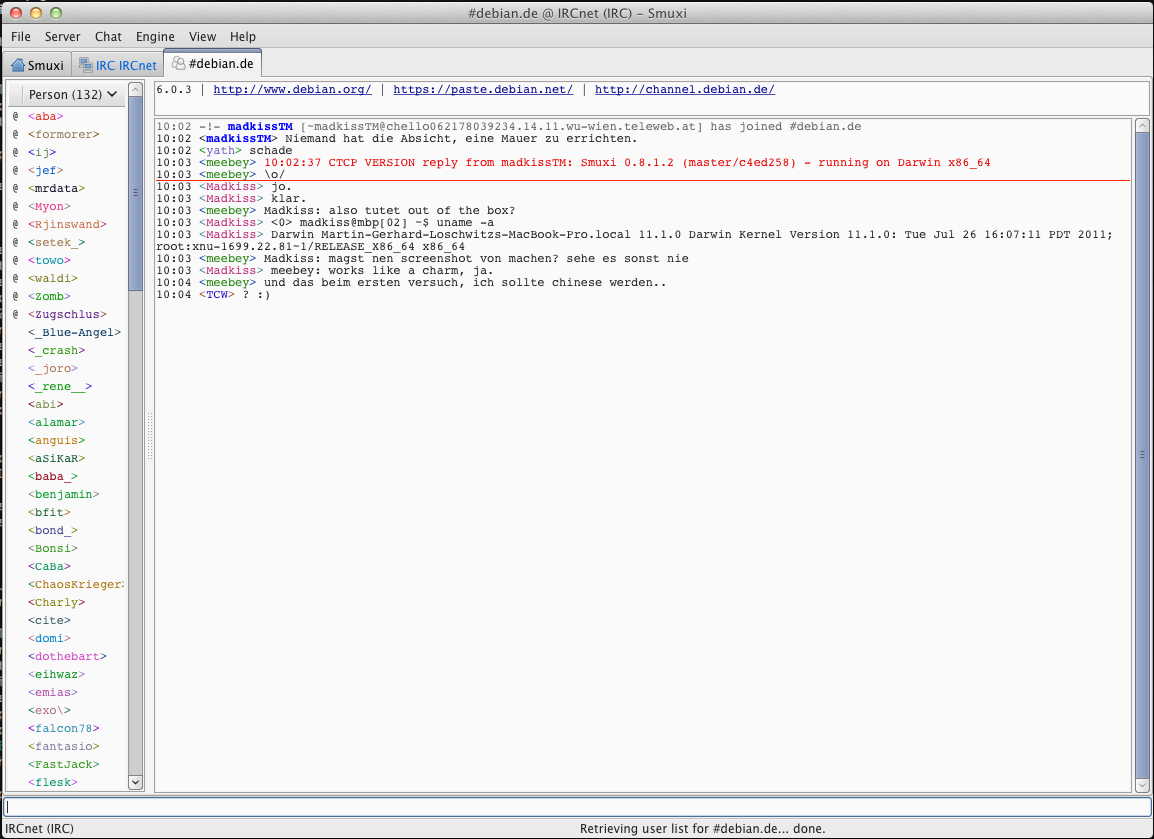
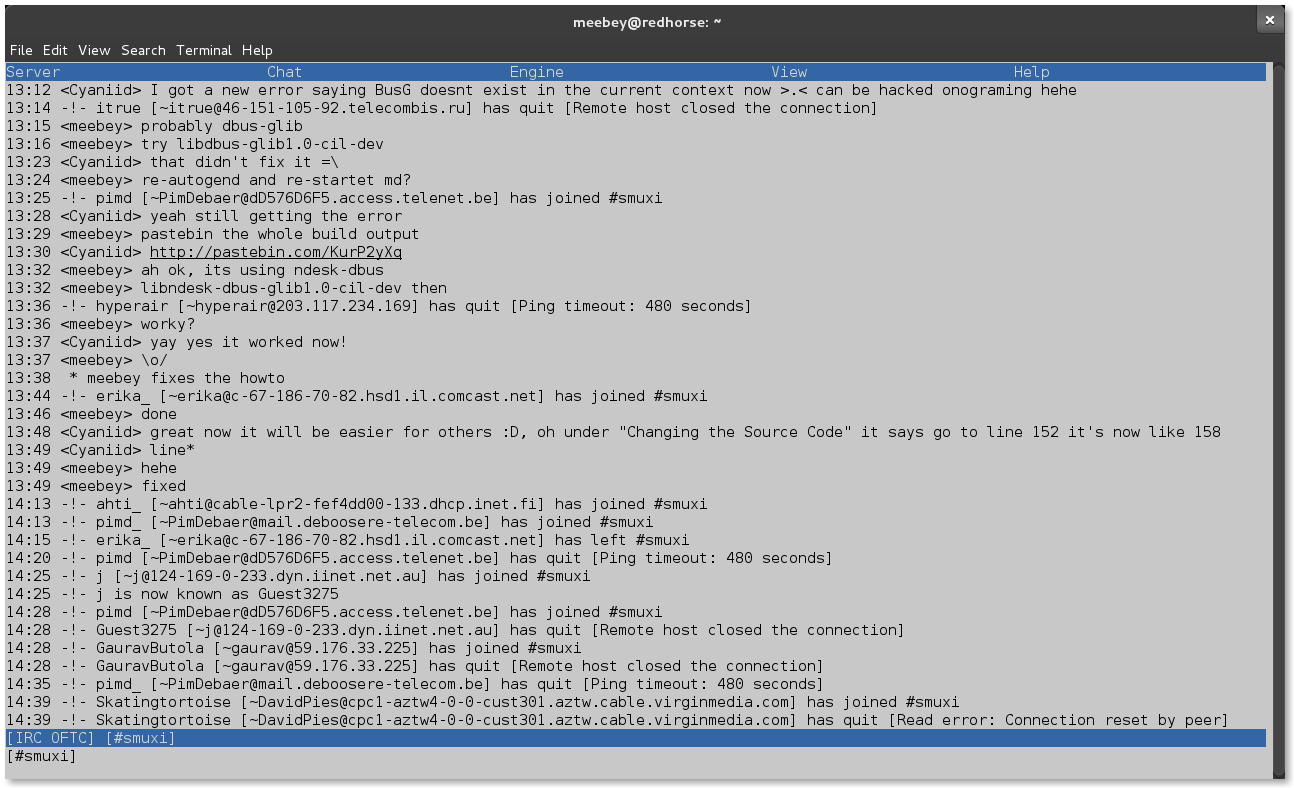
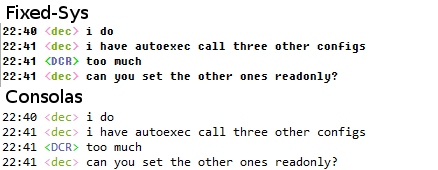
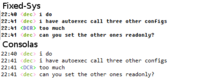
Just in time for 2012 I am very pleased to announce Smuxi 0.8.9 codenamed "One Giant Leap". During the development 56 bug reports and 33 feature requests in 593 commits were worked on making this release a major milestone of the Smuxi project. At the Chaos Communication Congress (28C3) in Berlin I was doing the final development sprint to get 0.8.9 done, which was a very intensive and refreshing experience. Here are the highlights of this release: Development Builds / Rolling Releases After the 0.8 release it became clear that a continious and short development -> test cycle is important to keep the project going quickly. At some point I have received requests if the project is dead while it was more active than ever. The lack of new releases (for about 15 months) lead to this wrong impression. Thus Smuxi can be obtained from development builds now. This includes daily builds for Debian (Squeeze, Wheezy, Sid), Ubuntu (Lucid, Maverick, Natty, Oneiric, Precise) and Windows. Thanks goes to Hannes Tismer for providing the Windows autobuilder and to Canonical for the PPA autobuilder. We invite everyone to use these daily builds to keep track of the latest development of Smuxi. Issues and regressions are fixed in a very short period (usually the same day). Thanks to our users who ran development builds and reported issues which led to many bug fixes prior to this release. On the other hand one of my New Year's resolutions are to "release early, release often" So there should be no nerd left behind... Screenshot of Smuxi 0.8.9 on Mac OS X Mac OS X support With the help of Steven McGrath (Steve[cug]) who created the initial Mac OS X installer for Smuxi we now have official support for Mac OS X. The download page contains the instructions how to obtain and install Smuxi on Mac OS X. This makes the 4th platform where Smuxi can be used on besides Windows, Linux and *BSD. For now Smuxi 0.8.9 doesn't feel as native as it could as it relies on the GTK+ port. We are looking into enhancing the experience though, just stay tuned. Chat History on Disk (Beta) The most exciting feature in this release I think are the "persistent message buffers". With this feature I could solve one of the biggest drawbacks IRC ever had: IRC does not retain any messages you have sent or received. All messages are only relayed to all users. The issue is that if you close your IRC client or even just leave a channel, all your received messages are gone. One workaround in most clients was to create text log files which then contains the chat history, but it is annoying and not user-friendly to open some text file somewhere from your disk to read the history outside of your IRC client. Now with Smuxi 0.8.9 you no longer have this issue, all chat history gets automatically written and read to a message database when you start Smuxi, join channels or open queries! As this feature is not fully stable yet it is not enabled by default. If you want to try it go to: File -> Preferences -> Interface and change "Persistency Type" from "Volatile" to "Persistent", hit OK and restart Smuxi. Now all messages are saved into the database and will automatically be shown. Click here for a screencast of this feature Jabber / XMPP Support (Beta) You probably have friends not on IRC and Twitter, say on Jabber, gTalk or Facebook? This is where the new XMPP engine of Smuxi comes into play. You can send and receive messages to/from them now! The implementation is far from complete, though. It has no buddy list for example and needs only to be treated as a technical preview of what will be coming in future Smuxi releases. Click here for a screencast of this feature Screenshot of Smuxi's Text Interface Text Interface (Alpha) This is the first release that contains a text frontend based on the STFL library. STFL is a library that uses ncurses to draw text based user interface using a markup language (like Glade for GTK+). This frontend is in early alpha state and lacks a lot of interface features and likes to crash. It is still included to attract potential developers who want to enhance this frontend. The frontend can be enabled by passing --enable-frontend-stfl to the configure script and then by executing smuxi-frontend-stfl. NetworkManager Support Everyone with a laptop knows how annoying it can be to suspend and resume when network based applications suddenly go crazy because they have lost the connection and either spew errors or take forever to get back in shape. Smuxi will now detect the network state right away with the help of the new Network Manager support. It automatically reconnects when needed right away for you. Next Generation Internet Support You can now connect to IRC servers using the IPv6 protocol Enhanced Find Group Chat Support Users had real issues to find out how to search for channels, thus Bianca Mix added a neat feature. The /list command will now simply open the Find Group Chat dialog for you. This way everyone used to IRC will find it in no time. Searching for channels on freenode wasn't working correctly, this is now fixed. Smuxi also supports the SAFELIST feature of the IRC protocol now which allows to retrieve a full channel list and do client side search which makes consecutive searches much faster. Enhanced Windows Experience For a long time you could not use Smuxi with the latest GTK# version of 2.12.10 on Windows. The issue was that Smuxi relied on SVG support which 2.12.10 no longer had. Smuxi is no longer using SVG instead it uses pre-scaled PNG images thus it works just fine with GTK# 2.12.10 on Windows now. At the same time the issue that the maximized state of the main window was left when restoring from task bar is fixed with GTK# 2.12.10. Screenshot of Fixed-Sys vs Consolas font Smuxi used by default the FixedSys font on Windows to give it the typical IRC look most people are used to. Since Windows Vista there is a better console-like font available called Consolas. Smuxi will now use the Consolas font instead on Windows Vista or later. Another important enhancement is that Smuxi no longer has issues with multiple GTK+ installs on the same computer, which was getting more common with more popular ported GTK+ applications such as GIMP or Pidgin. SSL for IRC fixed IRC with SSL was only working with the default port of 6697. Thanks to Jo Shields now any port can be used with SSL. Crash Related Issues Desktop notifications could crash Smuxi in case of errors related to the notification system or an absent notification daemon. There was a chance that the crash dialog simply disappeared which made reporting bugs more difficult no longer happens. Rapid use of ctrl+w, /window close (Jimmie Elvenmark) and opening the Find Group Chat dialog on the Smuxi tab do no longer crash. Also number-only network names, /network switch freenode and GTK+ install without SVG support no longer lead into a crash. Enhanced Notice Handling Notices will no longer open query tabs for you instead it will show them on tabs you share with the person who sent it with the server tab as fallback. This also avoids ChanServ, NickServ and spammy IRCop tabs. Twitter fixes Twitter made some changes to their API which broke the Twitter support of Smuxi 0.8. This was taken care of and also a few other issues were solved allowing Smuxi 0.8.9 to work smoothly with Twitter again. Extended Keybindings Smuxi allows now to use the ctrl+tab / ctrl+shift+tab and ctrl+n / ctrl+p keys to switch tabs. The keybindings still work even with a hidden menu bar now. Smuxi Server specific highlights More interactive and much faster synchronization When connecting to a smuxi-server you had to wait till Smuxi finished the synchronization before you could use the interface. Also you could not tell how far the synchronization was and just had to wait till it was completed. With Smuxi 0.8.9 the connect just takes a few seconds and all chats are synchronized in the background with a progress bar so you can use the interface from the first moment on and know how far it is. The speed how much it takes to synchronize all chats also reduced drastictly by 400%! Click here for a screencast of this feature More background communication When using a smuxi-server the interface sometimes had load times like when opening the preferences or when using the nickname completion (Andrew Kannan). These operations are done in the background and no longer blocks the interface. Also when the communication is lost to the smuxi-server the frontend will now automatically reconnect to it in the background. Low Bandwidth Mode When it comes to mobile internet connectivity such as UMTS/HSDPA, Edge and GRPS it can be a real pain to connect to the smuxi-server as it has to transfer all the messages over that. If you just want to ask someone you know then you don't need any old messages to do that. With the "Low Bandwidth Mode" you can now connect to the smuxi-server without loading old messages which makes the connect very quick. You find this option in the engine connect dialog. Stable Protocol Initially I didn't plan to make the protocol of Smuxi stable before the 0.9 release, but as it turned out the 0.8 protocol was good enough to still use it and for that reason Smuxi 0.8.9 is still compatible with 0.8. The 0.8 protocol will see no breakages, instead the next protocol will be on-top or opt-in of the current one. This means future Smuxi versions stay compatible with it. Shutdown Command You can now shutdown the smuxi-server if you like using the /shutdown command. It it safe to use the command, it will do a clean shutdown sequence for you. For example it makes sure all messages are written to disk in the case of enabled persistent message buffers. If you have your smuxi-server daemon monitored (e.g. with runit) it can also automatically be restarted and upgraded this way. Built-in SSH Keyfile Support It is no longer needed to fiddle with the .ssh/config file or pagent to get SSH key authorization working. You can now simply tell Smuxi which SSH keyfile you want to use to connect to your smuxi-server. Updated Translations
  • Catalan (Siegfried-Angel Gevatter Pujals)
  • Danish (Joe Hansen)
  • Finnish (Kalle Kaitala)
  • French (Cl ment Bourgeois)
  • German (Bianca Mix)
  • Italian (Vincenzo Campanella)
  • Portuguese (Americo Monteiro)
  • Spanish (Castilian) (Ricardo A. Hermosilla Carrillo)
New Translations
  • Chinese Simp (Dean Lee)
  • Slovak (Tom Vadina)
  • Swedish (Jimmie Elvenmark)
  • partially Russian (Aleksandr P)
  • partially Turkish (Umut Albayrak)
  • partially Urdu (makki)
Contributors Contributors to this release are the following people:
  • Mirco Bauer (497 commits)
  • Tuukka Hastrup (10 commits)
  • Bianca Mix (10 commits, translations)
  • Cl ment Bourgeois (8 commits, translations)
  • Andrius Bentkus (5 commits)
  • Carlos Mart n Nieto (3 commits)
  • Jimmie Elvenmark (3 commits, translations)
  • Hannes Tismer (1 commit)
  • Jonathan Pryor (1 commit)
  • Jo Shields (1 commit)
  • Siegfried-Angel Gevatter Pujals (translations)
  • Dean Lee (translations)
  • Aleksandr P (translations)
  • Americo Monteiro (translations)
  • Andrew Kannan (translations)
  • Joe Hansen (translations)
  • Kalle Kaitala (translations)
  • makki (translations)
  • Ricardo A. Hermosilla Carrillo (translations)
  • Tom Vadina (translations)
  • Umut Albayrak (translations)
  • Vincenzo Campanella (translations)
Thank you very much for your contributions to Smuxi! After reading this whole pile of text, head over here and grab this smexy stuff!

Posted Sun Jan 1 22:58:29 2012

Timo Jyrinki: I have a new GPG key


-----BEGIN PGP SIGNED MESSAGE-----
Hash: SHA1,SHA512

Hello,

I'm transitioning from my 2003 GPG key to a new one.

The old key will continue to be valid for some time, but I eventually
plan to revoke it, so please use the new one from now on. I would also
like this new key to be re-integrated into the web of trust. This message
is signed by both keys to certify the transition.

The old key was:

pub 1024D/FC7F6D0F 2003-07-10
Key fingerprint = E6A8 8BA0 D28A 3629 30A9 899F 82D7 DF6D FC7F 6D0F

The new key is:

pub 4096R/90BDD207 2012-01-06
Key fingerprint = 6B85 4D46 E843 3CD7 CDC0 3630 E0F7 59F7 90BD D207

To fetch my new key from a public key server, you can simply do:

gpg --keyserver pgp.mit.edu --recv-key 90BDD207

If you already know my old key, you can now verify that the new key is
signed by the old one:

gpg --check-sigs 90BDD207

If you don't already know my old key, or you just want to be double
extra paranoid, you can check the fingerprint against the one above:

gpg --fingerprint 90BDD207

If you are satisfied that you've got the right key, and the UIDs match
what you expect, I'd appreciate it if you would sign my key:

gpg --sign-key 90BDD207

Lastly, if you could send me these signatures, i would appreciate it.
You can either send me an e-mail with the new signatures by attaching
the following file:

gpg --armor --export 90BDD207 > timojyrinki.asc

Or you can just upload the signatures to a public keyserver directly:

gpg --keyserver pgp.mit.edu --send-key 90BDD207

Please let me know if there is any trouble, and sorry for the inconvenience.

(this post has been modified from the example at
http://www.debian-administration.org/users/dkg/weblog/48)

-----BEGIN PGP SIGNATURE-----
Version: GnuPG v1.4.11 (GNU/Linux)

iEYEARECAAYFAk8GuZoACgkQgtffbfx/bQ9nqACglWyHnDTFQfdKmz8OCd3oL6iR
hcEAmgKJ7RZsgwxwkRGPhygy5y1Ztb+3iQIcBAEBCgAGBQJPBrmaAAoJEOD3WfeQ
vdIHdVQQAMT1yvIogzbtK6sUnWqwbrXI9pDEFk7AzJTb80R+wzxsw7gu9gcBDk8G
BL2O26GKUqKWA3ytuApSl42FJam/Lusi9npT3XNkmHs6FaBMNuLYrqEXmCwXwWr/
OrLyeeLiF4yxgbNWbv+600BqAWqFlo6NeTgQKsJWtCjR3RVMxX3R8nzjDnKJuF+z
c6+2JKBWyx/HVUKcJpJrFDDR36HRFvVJomTuma2JCQ/RAl9vzAguqNYOi1QkuuQv
EF1gXH7gLifukGuwquP1DHP6SWWkj77jtRWr5ewC0xymbrArzAwKbvMQl3VpKBHh
MmpJjYP3ECyL14AKi/TY2Lidi0Sf6yqFMcPcreoih01N0OU0NXmD4IrHMT24/ssb
okDUe1o3YImjGq1jTACvlzC8s54EfLsqDgSP98SGVpuoDqPJUwVk4nuHj8q0vDSs
qZox26gVwB2FAOUi1BFiZbIzM5rsyYfCGyWUGiAwBFf54lYRAeCDCt8iAOOL1Ov/
TumIGYdLoXnDuOJq1VjXLGx2OFDrpyU8SPGoa3zNEVz39tgxQ48ASJEqcqt7HvBy
IW+TTsMLdJ1Ait9aCM3mzzr1iwP8TrL0qUsdRLOE6AKdAqocIfqXY8OeDKhbUiOJ
CXWk5q3xheK3sDWUXX7J63bAAUH4jFnpQEOVMJKBUNMKsWa0iXDS
=mklN
-----END PGP SIGNATURE-----

5 January 2012

Patrick Schoenfeld: Bringing GVFS to a good use

One of the GNOME features I really liked since the beginning of my GNOME usage is the ability to mount various network file system by a few clicks and keystrokes. It enables me to quickly access NFS shares or files via SFTP. But so far these mounts weren't actually mounts in a classical sense, so they were only rudimentary useful.

As a user who often works with terminals I was always halfway happy with that feature and halfway not:

- Applications have to be aware and enabled to make use of that feature, so its often neccessary to workaround problems (e.g. movie players not able to open a file on a share)
- No shell access to files

Previously this GNOME feature was realised with an abstraction layer called GNOME VFS, which all applications needed to use if they wanted to provide access to the "virtual mounts". It did no efforts to actually re-use common mechanisms of Un*x-like systems, like mount points. So it were doomed to fail at certain degrees.

Today GNOME uses a new mechanism, called GVFS. Its realized by a shared library and daemon components communicating over DBUS. At first glance it does not seem to change anything, so I was rather disappointed. But then I heard rumors, that Ubuntu was actually making these mounts available in a special mount point in ~/.gvfs.
My Debian GNOME installation were not.

So I investigated a bit and found evidence about a daemon called gvfs-fuse-daemon, which eventually is handling that. After that I figured this daemon to be in a package called gvfs-fuse and learned that installing it and restarting my GNOME session is actually all needed to do.
Now getting shell access to my GNOME "Connect to server" mounts is actually possible, which makes these mounts really useful after all. Only thing to find out is, if e.g. the video player example now works from Nautilus. But if it doesn't I'm still able to use it via a shell.

The solution is quiet obvious, on the one side. But totally non-obvious on the other.

A common user eventually will not find that solutin without aid. After all the package name does not really suggest what the package is used for, since its referring to technologies instead of the problem it solves. Which is understandable. What I don't understand is, why this package is not a dependency of the gnome meta package. But I haven't yet asked the maintainer, so I cannot really blame anybody.

However: Now GVFS is actually useful.

Jaldhar Vyas: Jeopardy!: The Post-Mortem

By now hopefully you got a chance to see my Jeopardy! episode so it won't be much of a spoiler to mention that I didn't win. It went like this. I flew into LA on the night of October 31st. The taping was to take place on the next two days. Jeopardy! tapes two weeks of shows, two days a week for a total of 10 episodes. Contestants are randomly chosen for one of those 10 episodes but you don't find out which one you will be on until the last minute. Randomness and secrecy have become become a big part of the production process in games since the quiz show scandals of the 1950s. (Interesting fact: it is a Federal felony to tamper with a TV game show.) There were a group of just under 20 0f us altogether waiting to go on. All very nice people. Here in the New York area one tends to equate very intelligent people with "Type A" personalities but we got on well together. Interspersed between the tapings, we had short practice sessions to familiarize ourselves with the studio setup and this is where I first started getting a little apprehensive. Jeopardy! is not just about general knowledge, there is a physical element too in that you have to buzz in by pressing a button on a stick which is wired up to some producers console. You can't buzz in before Alex has finished reading the question and obviously you can't buzz in if someone is already answering the question. If you buzz at the wrong time, your buzzer locks for 0.75 seconds so just jamming your finger on the button. I didn't even get that far as on the entire first day I failed to buzz in at all despite changing hands, changing grip different ways and other strategies. I was pretty despondent by the second day but then miraculously I managed to get the hang of it. So when I was finally selected (for the 3rd game of that day.) I was back to my usual cool self. I was up against Dave Leach and Nicholas Campiz who were returning after having tied in the previous game. And the game did start well enough. Oh one thing you may notice is that Alex mispronounces my name Jaldhal. I knew he did that once or twice and even mentioned it to a producer but it was only viewing the episode right now that I see he does it consistently. I assumed such things would be fixed up in post-editting but I guess not. Oh well, after living in this country for so many years I've learned to be happy whenever two consonants are more or less in the right place. This particular mispronunciation is actually fairly common, even Indian people have been known to make it. The alternative theory is that Alex couldn't read my horrible handwriting which is also plausible. Anyway, I digress. I started off fairly well. My first mistake was in a category about alcoholic drinks. I answered vermouth when the correct response was gin. In my defense I'm a strict teetoler so none of these words mean anything to me. I also earned the disapproval of my superhero fan son by mistaking Dr. Strange for Dr. Doom. I did get the one about Spiderman villain Dr. Octopus so that mollified him somewhat. The highlight of my evening was strangely enough in a category about books of the Bible. I got a Daily Double. It was a risky move but I have always wanted to make a "true" daily double so I threw caution to the winds and wagered everything I had. To my surprise as much as anyones, got the answer right doubling my score. I was in a pretty good position for the Double Jeopardy but thats when Dave started dominating. If you haven't been watching previous games, Dave Leach is arguably the best player this season. Not only is he smart but he is almost supernaturally fast on the buzzer. You can't see because I kept my hands behind the podium but I again and again I would desperately try to ring in on a question I knew the answer to only to be beaten to the punch by Dave. This caused me to start getting a bit reckless and answering questions where I was less than certain which cost me dearly. One particularly dumb mistake was in a category where all the answers were supposed to start with the letter g. I said compass when I should said gyrocompass but actually I should have left that category alone entirely. By the time Final Jeopardy came around winning was no longer an option as Dave was too far in the lead. I was slightly ahead of Nicholas in 2nd place. This is where I again made a strategic error. My original plan to bet nothing in Final Jeopardy but the category was "1930s Novels" and I liked my chances. The clue was read out and it involved an anti-war novel whose author was blacklisted. I was elated. It had to be "All Quiet on the Western Front" right? The blacklist bit gave me pause as the author Erich Maria Remarque was German and this was obviously a reference to the anti-Communist blacklist in the 1950s USA. But somehow I remembered that he had spent the end of his life in Hollywood or maybe I just convinced myself that it was plausible. Evidently my thought process wasn't too crazy because all three of us came up with the same answer. All three of us were wrong. The correct answer was "Johnny Got His Gun" by Daltan Trumbo. In hindsight I knew this but it illustrates the strange ways the mind works. I knew because the video for Metallicas song "One" from "...And Justice for All" is based on the film adaptation of this book. However in a previous orientation session the lady who is the contestant coordinator for Jeopardy! had mentioned AQOTHWF as anexample of something and this got stuck in my brain crowding out the previously known fact. So when all was said and done I ended up in 3rd place. (I bet big whereas Nicholas was more conservative.) Oh well. Despite not winning I had a blast. I fulfilled my dream of appearing on Jeopardy! I met Alex Trebek. (And I should be receiving an autographed picture of us together soon.) My witty banter was sufficiently witty. I made enough money to cover my travel expenses and still have a nice amount left. And I got to meet lots of interesting and wonderful people. So I'm satisfied.

1 January 2012

Joey Hess: a resolution that stuck

Last year, my new year's resolution was to write in my journal every day. That actually stuck, I wrote 262 journal entries in 2011. While I've been keeping a journal intermittently since 1998, last year I doubled the number of entries in it. And wrote a novel's worth of entries -- 53 thousand words! Most of it is of course banal and mundane stuff. Not good compared with Lars, who does something with his journal where he goes into some detail about code he's working on, and other work. The excerpts I've seen are quite nice. But after I've written code, written a commit message, documentation, perhaps bug reports etc, I often can't find much to say about it in my journal, beyond the bare bones that I worked on $foo today or faced a particularly hard bug. I also worry that the journal, and my reluctance to repeat myself, often tips the balance away from me blogging, if I write down something in the journal first.
Here's my journal for today:
Compare what jokes are funny now with those in 1982. The 1982 ones from net.jokes on olduse.net seem juvenile. Now compare what Unix joke man pages are funny now with those I'm reading from 1982. They seem basically the same. What would Biella make of this? Liw noticed ikiwiki OOM on pell. Tracked down to a perl markdown bug with long lines. Had quite enough of perl markdown; ikiwiki will be moving to a different engine. Added discount support to it today, still needs Debian package tho. [censored] Really gorgeous sunset, with a high wind, moon, puffy low, fast moving clouds. Enjoyed it ecstaticly. It's going to get cold soon. Very rainy early, but then got intermittently sunny; power is holding out ok. Was going to roast a chicken today, but got distracted and had a large lunch besides. Need to find some quick food for supper. I need to start a new book, should it be the River Cottage book about meat that I stole from Anna, or some SF? Blogged about journaling, and put this journal entry in it, so also journaled about blogging. Wrote it somewhat self-conciously.

The benefits for me have ranged from being able to go back and work out dates of events, to forwarding the odd excerpts to others. The best thing though is certianly having a regular time of introspection, to look back over my the day. If you've not got a new year's resolution yet, I recommend this one. (Learning Haskell would be another good one, if you haven't yet.) Just write something, anything, down in your journal every day.

31 December 2011

Russell Coker: My Blog Server was Cracked

On the 1st of August I noticed that the server which runs my blog among other things was having an occasional SEGV from a sshd process. Unfortunately I was busy and didn t pay much attention to this, which turned out to be a big mistake. On the 12th of September I started investigating this properly and noticed that when someone tried to connect to ssh with password authentication sshd would SEGV after it was denied access to a shared memory region or a semaphore which had a SE Linux type of unconfined_t. I added some SE Linux auditallow rules and discovered that the memory region in question was created by the ssh client. Shortly after that I came to the conclusion that this wasn t some strange feature of ssh (or one of the many shared objects it uses) but hostile activity. The ssh client appeared to be storing passwords that it used in a shared memory region and sshd was also collecting passwords in the same region and presumably offering them to a ssh client which uses some extension to the ssh protocol. The sshd process was crashing because it couldn t handle EPERM on access to shared memory or semaphores. Presumably if the system in question wasn t running SE Linux then the exploit would have remained undetected for a lot longer. At this stage we don t know how the attacker got in. Presumably one of the people with root access ran a ssh client on a compromised system and had their password sniffed. One such client system was mysteriously reinstalled at about that time, the sysadmin of the system in question claimed to have no backups which made it impossible to determine if that system had been compromised. I believe that the sysadmin of the client system knew that their system was compromised, kept that information secret, and allowed other systems to become and remain compromised. The attacker made no good effort to conceal their presence, they replaced ssh, sshd, and ssh-add and didn t bother changing the Debian checksums so the debsums program flagged the files as modified. Note that I have kept copies of the files in question and am willing to share them with anyone who wants to analyse them. Steinar H. Gunderson has named this trojan Ebury [1]. Recovery By the evening of the 13th of September I had the system mostly working again. Jabber still isn t working because ejabberd is difficult to get working at the best of times, I am now investigating whether there is a better Jabber server to use, but as I don t use Jabber often this hasn t been a priority for me. Some of the WordPress plugins I use and all of the WordPress themes that are installed were outside the Debian packaging system, as I couldn t be sure that they hadn t been altered (because the people who wrote WordPress plugins don t keep old versions online) I had to upgrade to the newer versions. Of course the newer versions weren t entirely compatible so I had to use a different theme and I couldn t get all plugins working. Link Within no longer works, not that it ever worked properly [2], I wanted to try Outbrain again but their web site won t let me login (and they haven t responded to my support request). Does anyone know of a good WordPress plugin to provide links to related content? Either related content on my blog or on the Internet in general will be OK. Some people have asked me about the change in appearance of my blog. It was simply impossible (for someone with my PHP skills) to get my blog looking the same way as it did before the server was cracked. I think that the new look is OK and don t mind if people think it looks likw a VW advert VW make great cars, I was very satisfied with the VW Passat I used to drive. Future Plans I had bought some Yubikeys (USB devices that generate one-time passwords) [3] to control access to that server, if I had configured the software to use them then this might not have happened. The use of one-time password devices can prevent passive password-sniffing attacks. It would still allow active attacks (such as using ControlPath/ControlMaster options on the ssh client to allow a hostile party to connect later (EG the -M, -S, and -o ControlPersist options for the ssh client). It s a pity that there doesn t seem to be a way to configure the ssh server to disable ControlMaster. Conclusion It would be good to have some changes to sshd to allow more restrictions on what a client can request, as ControlMaster functionality isn t needed by most users it should be possible to disable it. SE Linux doesn t protect against a compromised client system or any other way of stealing passwords. It did do a good job of stopping Ebury from doing all the things it wanted to do and thus making me aware of the problem. So I count this as a win for SE Linux. Yubikeys are the cheapest and easiest way of managine one-time passwords. I had already bought some for use on the system in question but hadn t got around to configuring them. I have to make that a priority.

30 December 2011

Kartik Mistry: xosview

* Some months back, we (Mark Hills is main culprit here) decided to fork xosview codebase and released new version 1.9.0. I had no luck contacting main authors and there were 23 Debian patches pending. Mark did amazing job here and we ve one major and one minor releases in two months. Kudos to him again. You can always grab latest Debian packages from unstable and code from Mark s Github xosview project page. Temporary homepage until we take over SF.net project is here. Feel free to send patches! (This post is bought to you by myself that this blog exists :) )

28 December 2011

Wouter Verhelst: Rsync'ing over a newer subversion (fsfs) repository

So there are two servers; let's call them srv1 and srv2. Srv1 contains a bunch of subversion repositories, but these are to be migrated to srv2. Since the repositories are not (just) used for ascii-only files, they're fairly big (several tens of gigabytes, altogether), so copying them from one server to the other would take a while. In order to make sure this would happen quickly, we had already copied them over to the new server, so that on the final switch would be quick (an rsync that would copy over just the new done transactions). That final switch was today. Only I didn't know that instead of just testing, the customer had already started using one of the repositories (and they'd forgotten to remind me), so the subversion repository suddenly jumped backwards in time. In addition, the new server wasn't being backed up yet (at least not for the subversion bits), so restoring from backups wasn't an option. Oops. Luckily the solution is fairly simple. You see, fsfs stores each revision in a unique file; that means that as long as nobody has committed to the repository yet (which they couldn't, since system users aren't the same on both servers, so the webserver didn't have write permissions on the repository after the rsync), nothing is lost. One only needs to manually change the repository so that whatever subversion thinks is the latest commit, actually is the latest commit. That information is stored in a file called db/current inside the repository. What's in that file depends on the repository version, which is stored in a file called db/format in the repository. For versions 1 and 2, the format is a single line with three space-separated values, of which the first is the last revision number used in the repository. The other two are counters that are used to give transactions unique names; and they, too, need to be up-to-date. For version 3 and above, the file contains only the revision number; there, the other two are derived from that instead of having their own unique number. Figuring out the last used revision number in an fsfs repository is ridiculously easy:

ls -v db/revs tail -n1
So if you've got a repository of fsfs version 3 or above, just change the revision number in the db/current file (after taking backups and making sure nobody can access the repository while you're doing this, of course), and you're all set. Unfortunately, in my case, the repository was still in fsfs version 2, which meant I could not change just the revision number and not expect trouble. I suppose it should've been possible to figure out what the last transaction numbers are, somehow, so that I could fix the current file completely, but I reasoned that upgrading to a newer repository format might have other advantages too, so I just dumped the repository and reloaded it, and everything worked at that point.

Russell Coker: Secure Boot and Protecting Against Root

There has been a lot of discussion recently about the recent Microsoft ideas regarding secure boot, in case you have missed it Michael Casadevall has written a good summary of the issue [1]. Recently I ve seen a couple of people advocate the concept of secure boot with the stated idea that root should be unable to damage the system, as Microsoft Software is something that doesn t matter to me I ll restrict my comments to how this might work on Linux. Restricting the root account is something that is technically possible, for much of the past 9 years I have been running SE Linux Play Machines which have UID 0 (root) restricted by SE Linux such that they can t damage the system [2] there are other ways of achieving similar goals. But having an account with UID 0 that can t change anything on the system doesn t really match what most people think of as root , I just do it as a way of demonstrating that SE Linux controls all access such that cracking a daemon which runs as root won t result in immediately controlling the entire system. As an aside my Play Machine is not online at the moment, I hope to have it running again soon. Root Can t Damage the System One specific claim was that root should be unable to damage the system. While a secure boot system can theoretically result in a boot to single user mode without any compromise that doesn t apply to fully operational systems. For a file owned by root to be replaced the system security has to be compromised in some way. The same compromise will usually work every time until the bug is fixed and the software is upgraded. So the process of cracking root that might be used to install hostile files can also be used at runtime to exploit running processes via ptrace and do other bad stuff. Even if the attacker is forced to compromise the system at every boot this isn t a great win for the case of servers with months of uptime or for the case of workstations that have confidential data that can be rapidly copied over the Internet. There are also many workstations that are live on the Internet for months nowadays. Also the general claim doesn t really make sense on it s own. root usually means the account that is used for configuring the system. If a system can be configured then the account which is used to configure it will be able to do unwanted things. It is theoretically possible to run workstations without external root access (EG have them automatically update to the latest security fixes). Such a workstation configuration MIGHT be able to survive a compromise by having a reboot trigger an automatic update. But a workstation that is used in such a manner could be just re-imaged as it would probably be used in an environment where data-less operation makes sense. An Android phone could be considered as an example of a Linux system for which the root user can t damage the system if you consider root to mean person accessing the GUI configuration system . But then it wouldn t be difficult to create a configuration program for a regular Linux system that allows the user to change some parts of the system configuration while making others unavailable. Besides there are many ways in which the Android configuration GUI permits the user to make the system mostly unusable (EG by disabling data access) or extremely expensive to operate (EG by forcing data roaming). So I don t think that Android is a good example of root being prevented from doing damage. Signing All Files Another idea that I saw advocated was to have the secure boot concept extended to all files. So you have a boot loader that loads a signed kernel which then loads only signed executables and then every interpreter (Perl, Python, etc) will also check for signatures on files that they run. This would be tricky with interpreters that are designed to run from standard input (most notably /bin/sh but also many other interpreters). Doing this would require changing many programs, I guess you would even have to change mount to check the signature on /etc/fstab etc. This would be an unreasonably large amount of work. Another possibility would be to change the kernel such that it checks file signatures and has restrictions on system calls such as open() and the exec() family of calls. In concept it would be possible to extend SE Linux or any other access control system to include access checks on which files need to be signed (some types such as etc_t and bin_t would need to be signed but others such as var_t wouldn t). Of course this would mean that no sysadmin work could be performed locally as all file changes would have to come from the signing system. I can imagine all sorts of theoretically interesting but practically useless ways of implementing this such as having the signing system disconnected from the Internet with USB flash devices used for one-way file transfer because you can t have the signing system available to the same attacks as the host system. The requirement to sign all files would reduce the use of such a system to a tiny fraction of the user-base. Which would then raise the question of why anyone would spend the effort on that task when there are so many other ways of improving security that involve less work and can be used by more people. Encrypted Root Filesystem One real benefit of a secure boot system is for systems using encrypted filesystems. It would be good to know that a hostile party hasn t replaced the kernel and initrd when you are asked for the password to unlock the root filesystem. This would be good for the case where a laptop is left in a hotel room or other place where a hostile party could access it. Another way of addressing the same problem is to boot from a USB device so that you can keep a small USB boot device with you when it s inconvenient to carry a large laptop (which works for me). Of course it s theoretically possible for the system BIOS to be replaced with something that trojans the boot process (EG runs the kernel in a virtual machine). But I expect that if someone who is capable of doing that gets access to my laptop then I m going to lose anyway. Conclusion The secure boot concept does seem to have some useful potential when the aim is to reboot the system and have it automatically apply security fixes in the early stages of the boot process. This could be used for Netbooks and phones. Of course such a process would have to reset some configuration settings to safe defaults, this means replacing files in /etc and some configuration files in the user s home directory. So such a reboot and upgrade procedure would either leave the possibility that files in /etc were still compromised or it would remove some configuration work and thus give the user an incentive to avoid applying the patch. Any system that tries to extend signature checks all the way would either be vulnerable to valid but hostile changes to system configuration (such as authenticating to a server run by a hostile party) or have extreme ease of use issues due to signing everything. Also a secure boot will only protect a vulnerable system between the time it is rebooted and the time it returns to full operation after the reboot. If the security flaw hasn t been fixed (which could be due to a 0-day exploit or an exploit for which the patch hasn t been applied) then the system could be cracked again. I don t think that a secure boot process offers real benefits to many users.

26 December 2011

Steve Kemp: So I'm a peddler of smut nowadays.

Over the Christmas period I've not been doing too much. December was a month that started out pretty well, in the first 10 days I had five models/friends/random-folk come to pose for me. (I have a few folk lined up for mid-January, but things tailed off quickly this month due to people having little free time). I spent a while mulling over what I was doing with images, as I've recently been doing a fair number of more NSFW images - In December this and this were my two favourite shots. I've posted NSFW images in various places over the past year (with permission; some volunteers/victims/friends don't want me to share anything, so I don't. They just hang on my walls.) but I was never consistent. Anyway I realised that .xxx domains are now available, so I figured I'd snarf one up and use that. That lead to tasteful.xxx - which is mostly full of images I didn't actually take, but that will change. (Sadly "artistic" was gone!) In more on-topic news I reported #651896 - a trivial security issue in another setgid(games) binary. I've got a couple more of those to tidy up and report in the near future. ObQuote: "Bright light. Bright light." - Gremlins

25 December 2011

Gregor Herrmann: RC bugs 2011/51

thanks to my vacations starting I had a bit more time this week for working on RC bugs. here's the usual list; again: thanks to all the restless patch providers!

20 December 2011

Raphaël Hertzog: 300 EUR for Debian

It s the amount of the wire transfer that I made to ffis e.V., the German association that works together with Software in the Public Interest to hold Debian s monetary assets. This amount includes the 10% of the benefits of my Debian DVD sales (for a total of 47 USD =~ 36 EUR) and the 15% affiliate revenue that was granted to Debian by some supporters of the Debian Administrator s Handbook crowdfunding campaign (for a total of 259.49 EUR). Thank you everybody, this donation is really yours and not mine! If you want to complement this donation, and make a nice gift to Debian for Christmas, go to this page and follow the instructions.

No comment Liked this article? Click here. My blog is Flattr-enabled.

18 December 2011

Lars Wirzenius: Obnam 0.24 released (backup software)

I've released version 0.24 of Obnam, my backup application. USER VISIBLE CHANGES BUG FIXES:

Nikita Youshchenko: Life after n900

Since post about lost n900 was on the top of this blog for almost a year, I should probably write a few words about what was next. Since I do need mobile phone every day, I had to get some replacement quickly. Given Maemo was dead and Meego device not available, I decided to go Android. Since after n900 hardware keyboard became a must for me, I decided to try HTC Desire Z. That device made me angry every day, both because of hardware (what a silly idea to place volume buttons such that they are below hardware keyboard when it s opened? they got pressed almost every time when I used keyboard!) and Android itself. I think quite a few things are broken in Android, but most annoying is broken multitasking. I can t live with dialog elements content get lost when I switch to other app and back. Please don t tell me that it s app fault: maybe technically it is, however too many apps have it so I have to generalize. I will likely write more about this later. At the same time, exciting things have been happening in Maemo community. It was the time when Community SSU raised, also several mapping applications went out of dark, and more. I was still subscribed to Maemo resources so I read about all that and got more and more frustrated with my new Android device. And on one sunday evening, after reading more exciting news from Maemo side, I decided that enough is enough. And ordered a new n900. Few days later, I ve sold HTC for about 80% of it s original price. That was an emotional solution, and of course it could not play well in the long term. Despite of individual exciting news, Maemo community was becoming weaker. Device itself had major usability issues (e.g. it could occasionally unlock while being in my pocket, and call a random number from address book and I have quite a few addresses abroad so such calls not only bother people, but also are expensive). There was not many applications, and those available had problems. There was a visible difference between my friends who could just take a phone and quickly do something, and myself who had to struggle with incomplete and buggy software. Also skype quality was very bad. Also when I was planning a 2-week trip to location without mobile network, I tried to preload map of planned route, but it preloaded only part and I was unable to make it preload the rest. Also many similar issues. So it became clear that if I want usability, I have to go to a standard platform. And as such, Android still is the only option. I searched for a device that runs more or less modern Android version, has hardware keyboard, and is not HTC Desire Z. There was not much to choose from. I ordered SonyEricsson sk17i. I m already using it for about 4 months. For common use cases, such as locating a business nearby, or routing to a given address, or quickly browsing a web page, it works. However, all Android flaws including broken multitasking and no-undo-in-text-fields are here, causing everyday frustration. My conclusion is that no smartphone-like devices without major usability issues are available today. What is available probably could be used to somehow satisfy immediate communication needs, but nothing above that. Bells and whistles are there, but I m not interested in those. I want a linux-based pocket-sized mobile computer that will handle both my communication needs and other interests. That could be hacked when I want to, but just works at the rest of time. Something like my Debian desktop. Openmoko was a big hope but it failed. Maemo was a big hope but incompetence of Nokia killed it. Meego was dead before it was born. There is still some life around several mobile linux projects (GTA04, Maemo, Meego, some others), but hopes for it to grow into something that could be used without huge hacking are little. :(

17 December 2011

Matthew Palmer: Rethtool: How I Learned to Stop Worrying and Love the ioctl

Damn those unshaven yaks I m trying to write a Nagios plugin for work that will comprehensively monitor network interfaces and make sure they re up, passing traffic, all those sorts of things. Of course, I m doing it all in Ruby, because that s how I roll. So, I need to Know Things about the interface. Everyone does that with ethtool. Right? Sure, if your eyeballs are parsing it. But have you ever tried to machine parse it? To put it as eloquently as possible:
# ethtool eth0
Settings for eth0:
 Supported ports: [ TP MII ]
 Supported link modes:   10baseT/Half 10baseT/Full 
                         100baseT/Half 100baseT/Full 
                         1000baseT/Half 1000baseT/Full 
 Supports auto-negotiation: Yes
 Advertised link modes:  10baseT/Half 10baseT/Full 
                         100baseT/Half 100baseT/Full 
                         1000baseT/Half 1000baseT/Full 
 Advertised pause frame use: No
 Advertised auto-negotiation: Yes
 Link partner advertised link modes:  10baseT/Half 10baseT/Full 
                                      100baseT/Half 100baseT/Full 
                                      1000baseT/Half 1000baseT/Full 
 Link partner advertised pause frame use: No
 Link partner advertised auto-negotiation: Yes
 Speed: 1000Mb/s
 Duplex: Full
 Port: MII
 PHYAD: 0
 Transceiver: internal
 Auto-negotiation: on
 Supports Wake-on: pumbg
 Wake-on: g
 Current message level: 0x00000033 (51)
 Link detected: yes
Parse that, bitch!
Or perhaps not. At any rate, I decided that it would be most advantageous if I went straight to the source and twiddle the ioctl until it did my bidding. And thus, about 5 hours later, was Rethtool born. Once I worked out a less-than-entirely-crackful way of dealing with C structs in Ruby (after a bit of digging around, I went with the appallingly-undocumented-but-sufficiently-featureful CStruct), and after I finally worked out I was passing the wrong damned struct to ioctl(SIOCETHTOOL) (speaking of appallingly-undocumented: fuck you, ioctl, and all your twisty-passages children), it was smooth sailing. So, if you re one of the eight or so people on earth who will ever need to get at the grubby internals of your network interfaces using Ruby (and can t do it via some sysfs magic), Rethtool is for you.

16 December 2011

Patrick Schoenfeld: Why Gnome3 sucks (for me)

When I started using Linux, I started with a desktop environment (KDE) and then tried a lot of (standalone) window managers, including but not limited to Enlightenment, Blackbox, Fluxbox and Sawfish. But I was never really satisfied as it felt as if something was missing.
It then came, that I became a user of a desktop environment again. Now I have been a GNOME user for at least five years.

Among the users of desktop environments, I'm probably not a typical user. In 2009 my setup drifted from a more or less standard GNOME 2.3 to a combination of GNOME and a tiling window manager, which I called Gnomad, as a logical continuation of something I've done for a long time since using computers: Simplifying tasks, which are not my main business.
I just didn't want to care about the hundred techniques to auto mount an USB stick or similar tasks, which are handed just fine by a common Desktop Environment. And I didn't want to care about arranging windows, because after all the arrangement of my windows was always more or less the same.

But there were rumors that GNOME3 significantly changed the user experience and I wanted to give it a try at some point in the future. This try was forced by latest updates in Debian unstable, so I tested it for some days.

Day 1: Getting to know each other
My first day was GNOME3 was a non-working-day. When I'm at home I'm mostly using my computer for some chatting and surfing in the web, so I don't have great demands on the
Window manager/Desktop Environment.
Accordingly the very first experience with GNOME3 was mostly a good one, except some minor issues.
The first thing to notice in a positive way, is the activities screen. I guess this one is inspired by Mac Expos , but its nevertheless a nice thing, as it provides an overview over opened applications.
Apart from that, its possible to launch applications from there. The classical application menu is gone, but this one is better. One can either choose with the mouse or start typing the applications name and it will incrementally search for it and show it immediately. Hitting Enter is enough to launch the application.
Additionally, on the left, there is a launcher for your favorite applications.

This one lead to the first question mark above my head.

I had opened a terminal via this launcher and now wanted to open another terminal, after I switched to a different workspace.
So I just clicked it again and had to notice that GNOME developers and I have a different perception, of whats intuitive, because that click
led me back to the terminal on the first workspace. It took me some minutes to realize how I'm able to start a second terminal, by just right clicking on the icon and click on Open new window or similar.

Day 2: Doing productive work
The next day was a work day and I was on a customer appointment to do support/maintenance tasks. On this appointments my notebook is not my primary work machine and so I could softly go over to using GNOME3 when doing productive work.
I can say that it worked, although I soon started to miss some keystrokes which I'm used to. Like switching workspaces with Meta4+Number or at least switch workspaces by cycling through them with STRG+Alt+Left and Right Arrow Keys. While the first is a shortcut specific to my GNOmad setup, the latter is something I knew back from the good old Gnome2 days.
It just vanished from the default keybindings and did nothing. Appearently, as I learned afterwards, it has been decided to use the Up/Down arrow keys instead.

While for new users this will not be a problem at all, this is really hard for someone using GNOME for about 5 years as these are keystrokes one is really used to.

Day 3: Going mulithead

The appointment ended on the third day at afternoon, so when I came back into the office, I had the chance to test the whole thing in my usual work environment. At office I have my notebook attached to a docking station which has a monitor attached to it. So usually I work in dual head mode, with my primary work screen being the bigger external screen.

That was the point, where GNOME3 became painful.

At first everything was fine. GNOME3 detected the second monitor and made it available for use with the correct resolution. But things started to become ugly, when I actually wanted to work with it. GNOME3 decided that the internal screen is the primary screen, so the panel (or what has stood around from it) was on that screen. I can live with that, as thats basically the same with GNOME2, but the question was: How to start an application in a way that its started on the big screen?
I knew that I couldn't just use the keystrokes I'm used to, like Meta4+p, which were bound to launching dmenu in my GNOmad setup, as I knew that I was not running GNOmad at present. So I thought hard and remembered that GNOME had a run dialog itself, bound to Alt+F2. Relieved I noticed, that this shortcut had not gone away. I typed 'chromium' and waited. A message appeared telling me that the file was not found. Okay. No, wait. What? I did not uninstall it, so I guess it should be there.
I tried several other applications and all were told not to be available. Most likely this is a bug and bugs happen but this was really serious for me.

Another approach was to use the activity screen. At first I used it manually, by moving the mouse to there, launch chromium (surprise, surprise, it was still there) and moved it to the right screen, because I haven't found a shorter way to do that. There must be a better way to that, I thought and so I googled. Actually there are more then one better way to do it.

  1. There is a hidden hot spot in the corner of the second screen, too. If one finds and moves the mouse over it, the activity screen will open on the primary monitor and on the secondary monitor, but the application list is only one the first. One can now type what he wants to start, hit Enter and Tada its on the screen where my mouse is. Not very intuitive, in my opinion, and I really would prefer if I had the same level of choice on the second screen.
  2. I can hit Meta4 and its opening the activitiy screen. From there everything is the same as described above.

There were many other small quirks that disturbed me, like that the desktop has vanished away (I used it seldom, but it was irritating that it wasn't there anymore), shortcuts I were missing and so on. lot of this is really specific to me being used to my previous setup, but I can't help myself but I really need those little helpers.

So, at some point I decided to go back to GNOmad again, knowing that I will run into the next problem again, because I would have to permanently disable the new gnome3 mode and instead launch GNOME in the fallback mode. Luckily that is as easy as typing the following in a terminal

gsettings set org.gnome.desktop.session session-name 'gnome-fallback'

I quickly got this working again, but had to notice another cruel thing in GNOME3, that even disturbed my GNOmad experience. GNOME3 now binds to Meta4+p to a function, which switches internal/extern monitor setting, and now that is a real PITA.

From this point on another journey began, that eventually ended in switch to a Gnome/Awesome setup but this is a different story for a different time.

14 December 2011

Patrick Schoenfeld: Struggling with Advanced Format during a LVM to RAID migration

Recently I decided to invest in another harddisk for my atom system. That system, I built up almost two years ago, has become the central system in my home network, serving as a fileserver to host my personal data, some git repositories etc., streaming server and since I switched to a cable internet connection it also serves as a router/firewall.Originally, I bought that disk to backup some data, of the systems in the network, but I realized that all data on this system were hosted on a single 320GB 2,5" disk and it became clear to me, that, in absense of a proper backup strategy, I at least should provide some redundancy. So I decided, once the disk was in place, that the whole system should move to a RAID1 over the two disks. Basically this is not that hard as it may seem at a first glance, but I had some problems due to a new sector size in some recent harddisks, which is called Advanced Format. But lets begin from the start. The basic idea of such a migration is:
  1. Install mdadm with apt-get. Make sure to answer 'all' to the question which devices need to be activated in order to boot the system.

  2. Partition the new disk (almost) identical.Because the new drive is somewhat bigger that wouldn't make sense, but at least the two partitions which should be mirrored on the second disk, need to be identical.Usually this is achieved easily by using
    sfdisk -d /dev/sda sfdisk /dev/second/sdb
    In this case, it wasn't that easy. But I will come to that in a minute.

  3. Change the type of the partitions to 'FD' (Linux RAID autodetect) with fdisk

  4. Erase evidence of an eventual old RAID from the partitions, which is probably pointless on a brand-new disk, but we want to be sure:
    mdadm --zero-superblock /dev/sdb1mdadm --zero-superblock /dev/sdb2
  5. Create two DEGRADED raid1 arrays from the partitions:
    mdadm --create /dev/md0 --level=1 --raid-devices=2 /dev/sdb1 missingmdadm --create /dev/md1 --level=1 --raid-devices=2 /dev/sdb2 missing
  6. Create filesystem on the first raid device, which will become /boot.

  7. Mount that filesystem somewhere temporary and move the contents of /boot to it:
    mount /dev/md0 /mnt/somewhere
  8. Unmount /boot, edit fstab to mount /boot from /dev/md0 and re-mount /boot (from md0)

  9. Create mdadm configuration with mdadm and append it to /etc/mdadm/mdadm.conf:
    mdadm --examine --scan >> /etc/mdadm/mdadm.conf
  10. Update the initramfs and grub (no manual modification needed with grub2 on my system)and install grub into the MBR of the second disk.
    update-initramfs -uupdate-grubgrub-install /dev/sdb
  11. The first point to pray: Reboot the system to verify it can boot from the new /boot.

  12. Create a physical volume on /dev/md1:
    pvcreate /dev/md1
  13. Extend the volume group to contain that device:
    vgextend <volgroup_name> /dev/md1</volgroup_name>
  14. Move the whole volume group physically from the first disk to the degraded RAID:
    vgmove <volgroup_name> /dev/md1</volgroup_name>
    (Wait for it to complete... takes some time ;)

  15. Reduce first disk from the VG:
    vgreduce <volgroup_name> /dev/sda2</volgroup_name>
  16. Prepare it for addition to the RAID (see step 3 and 4) and add it:
    mdadm --add /dev/md0 /dev/sda1mdadm --add /dev/md1 /dev/sda2
  17. Hooray! Watch into /proc/mdstat. You should see that the RAID is recovering.

  18. When recovery is finished pray another time and hope that system is still booting with it running from the RAID entirely. If it does: Finished :-)
Now to the problem with the advanced format:There is some action taking place with the hardware vendors to move to a new sector size. Physically my new device has a size of 4096 bytes per sector. Somewhat different to the 512 bytes disks used to have the last decade. Logically it still has 512 bytes per sector. As far as I understand this is achieved by placing 8 logical sectors into one physical sector, so when partitioning a new disk the alignment of the disk has to be so that partitions start in a sector which is a multiple of 8. That, obviously, wasn't the case with the old partitioning on my first disk. So I had to manually create partitions by specifying start points manually and making sure they are dividable by 8.Otherwise fdisk would complain about the layout on the disk.This does not work with cfdisk, because it does not accept manual alignment parameters and unfortunately the partitions it creates do have a wrong alignment. So good old fdisk and some calculations how many sectors are needed and where to start, to the rescue. So the layout is now:

Device Boot Start End Blocks Id System
/dev/sdb1 2048 291154 144553+ fd Linux raid autodetect
/dev/sdb2 291160 625139334 312424087+ fd Linux raid autodetect

Next.

Previous.