Search Results: "reg"

17 December 2015

Iain R. Learmonth: YubiKey NEO as an OpenPGP token

I was first interested in the idea of using a smartcard to store OpenPGP subkeys when I joined the Free Software Foundation Europe as a Fellow and recieved my FSFE Fellowship Card. By performing all cryptographic operations on the smartcard it would remove almost all the routes by which the secret key material could be compromised as the host operating system never has access to that secret material. I decided that this was something I wanted to try out and I purchased two Cherry G83-6644 keyboards. One of the nice things I noticed about this product was that it was both FIPS 201 approved and GOST R approved. If both the Americans and the Russians could agree it was a good keyboard, it had a good chance of being a good keyboard. A little udev magic to handle permissions and the card worked great, but there was a problem. This was not the most friendly form-factor and a USB keyboard was a bit big to be carrying around to use the smartcard with my laptop. I intended to get a smaller reader for my laptop but never did and the Fellowship card fell into disuse. Later, I came across the YubiKey NEO. The YubiKey NEO is capable of emulating an OpenPGP smartcard, just like the Fellowship card, but in the form-factor of a USB stick. This improved form factor was enough to make me give it a go. Since August 2015 I've been using a YubiKey NEO to store my OpenPGP subkeys and, excluding some occasional udev mishaps, it's been working great. When you first get the YubiKey NEO, it does not have the OpenPGP applet enabled. You'll need to enable it yourself using the ykpersonalize tool:
sudo apt install yubikey-personalization  
sudo ykpersonalize -m 82  
Once you've enabled the OpenPGP module, the USB product ID will change, and you can now add a udev rule that will allow you to interact with the device when it's plugged in as your normal user.
/etc/udev/rules.d/99-yubikeys.rules:
------------------------------------
SUBSYSTEMS=="usb", ATTRS idVendor =="1050",ATTRS idProduct =="0111", OWNER="irl"  
This is not the correct way to do this. I've set it so that any YubiKey with the OpenPGP module inserted is set to be owned by my username (irl) when the correct way to do this would be to have it set to the current console user. I do not know enough udev magic to know how to do that. UPDATE: I recieved a lot of good feedback on this, which you can find here. Of course, for my key 0xE9846C49, this key started life as an ordinary key just stored on my laptop, so seperating subkeys onto the YubiKey has not massively increased security as an attacker that has stolen the secret key material can generate new subkeys. I would hopefully notice these new rogue subkeys (I do monitor keyservers for changes to my key regularly), but I would prefer to make the possibility of the key being compromised as low as possible. For this reason I am performing a key transition to a new key, F540ABCD, where the master key is stored offline. In my next post, hopefully within a day or so, I'll explain how I used Tails to generate a key offline and load the subkeys into the YubiKey.

Dirk Eddelbuettel: RcppArmadillo 0.6.400.2.2

armadillo image And yet another updated of Armadillo by Conrad bringing us to 6.400.2. I folded that yesterday into RcppArmadillo 0.6.400.2.2; and this is now on CRAN and Debian. There was even an interim-CRAN-only release 0.6.300.2.2 with a refinement for tests of imcompleye LAPACK libraries---which we encounter whenver R is build with its own (partial) copy of LAPACK as on Windows, and on bigger computers whenver this was chosen over the default of system LAPACK. Armadillo is a powerful and expressive C++ template library for linear algebra aiming towards a good balance between speed and ease of use with a syntax deliberately close to a Matlab. This release brings the following changes:
Changes in RcppArmadillo version 0.6.400.2.0 (2015-12-15)
  • Upgraded to Armadillo 6.400.2 ("Flying Spaghetti Monster Deluxe")
    • expanded each_col(), each_row() and each_slice() to handle C++11 lambda functions
    • added ind2sub() and sub2ind()
    • fixes for corner cases in gmm_diag class
Changes in RcppArmadillo version 0.6.300.2.2 (2015-12-12)
  • Upgraded to Armadillo 6.300.3-test ("Flying Spaghetti Monster")
    • Additional test in auxlib_meat.hpp for limited LAPACK
  • Updated test and #define for limited LAPACK version R might be built with on Unix-alike systems
Courtesy of CRANberries, there is also a diffstat report for the most recent CRAN release. As always, more detailed information is on the RcppArmadillo page. Questions, comments etc should go to the rcpp-devel mailing list off the R-Forge page.

This post by Dirk Eddelbuettel originated on his Thinking inside the box blog. Please report excessive re-aggregation in third-party for-profit settings.

15 December 2015

Antoine Beaupr : Using a Yubikey NEO for SSH and OpenPGP on Debian jessie

I recently ordered two Yubikey devices from Yubico, partly because of a special offer from Github. I ordered both a Yubikey NEO and a Yubikey 4, although I am not sure I remember why I ordered two - you can see their Yubikey product comparison if you want to figure that out, but basically, the main difference is that the NEO has support for NFC while the "4" has support for larger RSA key sizes (4096). This article details my experiment on the matter. It is partly based on first hand experience, but also links to various other tutorials that helped me along the way. Especially thanks to folks on various IRC channels that really helped me out in understanding this. My objective in getting a hardware security token like this was three-fold:
  1. use 2FA on important websites like Github, to improve the security of critical infrastructure (like my Borg backup software)
  2. login to remote SSH servers without exposing my password or my private key material on third party computers
  3. store OpenPGP key material on the key securely, so that the private key material can never be compromised
To make a long story short: this article documents step 2 and implicitly step 3 (because I use OpenPGP to login to SSH servers). However it is not possible to use the key on arbitrary third party computers, given how much setup was necessary to make the thing work at all. 2FA on the Github site completely failed, but could be used on other sites, although this is not covered by this article. I have also not experimented in details the other ways the Yubikey can also be used (sorry for the acronym flood) as: Update: OATH works! It is easy to configure and i added a section below.

Not recommended After experimenting with the device and doing a little more research, I am not sure it was the right decision to buy a Yubikey. I would not recommend buying Yubikey devices because they don't allow changing the firmware, making the device basically proprietary, even in the face of an embarrassing security vulnerability on the Yubikey NEO that came out in 2015. A security device, obviously, should be as open as the protocols it uses, otherwise it's basically impossible to trust that the crypto hasn't been backdoored or compromised, or, in this case, is vulnerable to the simplest drive-by attacks. Furthermore, it turns out that the primary use case that Github was promoting is actually not working as advertised: to use the Yubikey on Github, you actually first need to configure 2FA with another tool, either with your phone's text messages (SMS) or with something like Google Authenticator. After contacting Github support, they explained that the Yubikey is seen as a "backup device", which seems really odd to me, especially considering the promotion and the fact that I don't have a "smart" (aka "Google", it seems these days) phone or the desire to share my personal phone number with Github. Finally, as I mentioned before, the fact that those devices are fairly new and the configuration necessary to make them work at all is completely obtuse, non-standardized or at least not available by default on arbitrary computers makes them basically impossible to use on other computers than your own specially crafted gems.

Plugging it in The Yubikey, when inserted into a USB port, seems to be detected properly. It shows up both as a USB keyboard and a generic device.
d c 14 17:23:26 angela kernel: input: Yubico Yubikey NEO OTP+U2F as /devices/pci0000:00/0000:00:12.0/usb3/3-2/3-2:1.0/0003:1050:0114.0016/input/input127
d c 14 17:23:26 angela kernel: hid-generic 0003:1050:0114.0016: input,hidraw3: USB HID v1.10 Keyboard [Yubico Yubikey NEO OTP+U2F] on usb-0000:00:12.0-2/input0
d c 14 17:23:26 angela kernel: hid-generic 0003:1050:0114.0017: hiddev0,hidraw4: USB HID v1.10 Device [Yubico Yubikey NEO OTP+U2F] on usb-0000:00:12.0-2/input1
We'll be changing this now - we want to to support OTP, U2F and CCID. Don't worry about those acronyms now, but U2F is for the web, CCID is for GPG/SSH, and OTP is for the One Time Passwords stuff mentionned earlier. I am using the Yubikey Personalization tool from stretch because the jessie one is too old, according to Gorzen. Indeed, I found out that the jessie version doesn't ship with the proper udev rules. Also, note that we need to run as sudo otherwise we get a permission denied:
$ sudo apt install yubikey-personalization/stretch
$ sudo ykpersonalize -m86
Firmware version 3.4.3 Touch level 1541 Program sequence 1
The USB mode will be set to: 0x86
Commit? (y/n) [n]: y
To understand better what the above does, see the NEO composite device documentation. The next step is to reconnect the key, for the udev rules to kick in. If you were like me, you enthusiastically plugged in the device before installing the yubikey-personalization package, and the udev rules were not present then.

Configuring a PIN Various operations will require you to enter a PIN when talking to the key. The default PIN is 123456 and the default admin PIN is 12345678. You will want to change that, otherwise someone that gets a hold of your key could do any operation without your consent. For this, you need to use:
$ gpg --card-edit
> passwd
> admin
> passwd
Be sure to remember those passwords! Of course, the key material on the Yubikey can be revoked when you loose the key, but only if you still have control of the master key, or if you have a OpenPGP revocation certification (which you should have).

Configuring GPG To do OpenPGP operations (like decryption, signatures and so on), or SSH operations (like authentication on a remote server), you need to talk with GPG. Yes, OpenPGP keys are RSA keys that can be used to authenticate with SSH servers, that's not new and I have already been doing this with Monkeysphere for a while. Now the challenge is how to make GPG talk with the Yubikey. So the next step is to see if gpg can see the key alright, as described in the Yubikey importing keys howto - you will need first to install scdaemon and pcscd (according to this howto) for gpg-agent to be able to talk with the key:
$ sudo apt install scdaemon gnupg-agent pcscd
$ gpg-connect-agent --hex "scd apdu 00 f1 00 00" /bye
ERR 100663404 Card error <SCD>
Well that failed. At this point, touching the key types a bunch of seemingly random characters wherever my cursor is sitting - fun but totally useless still. That was because I failed to reconnect the key: make sure the udev rules are in place and reconnect the key, the above should work:
$ gpg-connect-agent --hex "scd apdu 00 f1 00 00" /bye
D[0000]  01 00 10 90 00                                     .....
OK
This shows it is running the firmware 1.10, which is not vulnerable to the infamous security issue. (Note: I also happened to install opensc and gpgsm because of this suggestion but I am not sure they are required at all.)

Using SSH To make GPG work with SSH, you need somehow to start gpg-agent with ssh support, for example with:
gpg-agent --daemon --enable-ssh-support bash
Of course, this will work better if it's started with your Xsession. Such an agent should already be started, so you just need to add the ssh emulation to its configuration file and restart your X session.
echo 'enable-ssh-support' >> .gnupg/gpg-agent.conf
In Debian Jessie, the ssh-agent wrapper will not start if it detects that you have already one running (for example from gpg-agent) but if that fails, you can try commenting out use-ssh-agent from /etc/X11/Xsession.options to keep it from starting up in your session. (Thanks to stackexchange for that reference.) Here I assume you have already created an authentication subkey on your PGP key. If you haven't, I suggest trying out simply monkeysphere gen-subkey, which will generate an authentication subkey for you. You can also do it by hand by following one of the OpenPGP/SSH tutorials from Yubikey, especially the more complete one. If you are going to generate a completely new OpenPGP key, you may want to follow this simpler tutorial here. Then you need to move your authentication subkey to the Yubikey. For this, you need to edit the key and use the keytocard command:
$ gpg2 --edit-key anarcat@debian.org
> toggle
> key 2
> keytocard
> save
Here, we use toggle to show the OpenPGP private key material. You should see a key marked with A for Authentication. Mine was the second one so I selected it with key 2 which put a star next to it. The keytocard command moved it to the key and save ensure the key was removed from the local keyring. Obviously, backups are essential before doing this, because it's perfectly possible to loose that key in the process, for example if you destroy or lose the key or forget the password. It's probably better to create a completely different authentication subkey for just this purpose, but that may require reconfiguring all remote SSH hosts, and you may not want to do that. Then SSH should magically talk with the GPG agent and ask you for the PIN! That's pretty much all there is to it - if it doesn't, it means that gpg-agent is not your SSH agent, and obviously things will fail... Also, you should be able to see the key being loaded in the agent when it is:
$ ssh-add -l
2048 23:f3:be:bf:1e:da:e8:ad:4b:c7:f6:60:5e:03:c2:a6 cardno:000603647189 (RSA)
.. that's about it! I have yet to cover 2FA and OpenPGP support, but that got me going for a while and I'll stop geeking around with that thing for now. It was fun, for sure, but not sure it's worth it for now.

Using OATH This is pretty neat: it allows you to add two factor authentication to a lot of things. For example, PAM has such a module, which I will configure here to allow myself to login to my server from untrusted machines. While I will expose my main password to keyloggers, the OTP password will prevent that from being reused. This is a simplified version of this OATH tutorial. We install the PAM module with:
sudo apt install libpam-oath
Then, we can hook it into any PAM consumer, for example with sshd:
--- a/pam.d/sshd
+++ b/pam.d/sshd
@@ -1,5 +1,8 @@
 # PAM configuration for the Secure Shell service
+# for the yubikey
+auth required pam_oath.so usersfile=/etc/users.oath window=5 digits=8
+
 # Standard Un*x authentication.
 @include common-auth
We also needed to allow OTP passwords in sshd explicitely, with:
ChallengeResponseAuthentication yes
This will force the user to enter a valid oath token on the server. Unfortunately, this will affect all users, regardless of whether they are present in the users.oath file. I filed bug #807990 regarding this, with a patch. Also, it means the main password is still exposed on the client machine - you can use the sufficient keyword instead of required to workaround that, but then it means anyone with your key can login to your machine, which is something to keep in mind. The /etc/users.oath file needs to be created with something like:
#type   username        pin     start seed
HOTP    anarcat -   00
00 is obviously a fake, and insecure string. Generate a proper one with:
dd if=/dev/random bs=1k count=1   sha1sum # create a random secret
Then the shared secret needs to be added to the Yubikey:
ykpersonalize -1 -o oath-hotp -o oath-hotp8 -o append-cr -a
You simply paste the random secret you created above, when prompted, and that shared secret will be saved in a Yubikey slot for future use. Next time you login to the SSH server, you will be prompted for a OATH password, you just touch the button on the key and it will be pasted there:
$ ssh -o PubkeyAuthentication=no anarc.at
One-time password (OATH) for  anarcat':
Password:
[... logged in!]
Final note: the centralized file approach makes it hard, if not impossible, for users to update their own secret token.. It would be nice if there would be a user-accessible token file, maybe ~/.oath? Filed feature request #807992 about this as well.

14 December 2015

Alessio Treglia: Big Data: ask the right questions

The Big Data phenomenon has reached a reality that is often baffling to the amount of information to be managed, and what for us today is called Big it will not be anymore in 5 years, from where it will be necessary to coin other terminologies and corresponding analysis technologies . bigdata1.jpg

The scientific and technological world is thus in ferment in a general rush towards finding the most appropriate tools to get the answers to these extensive masses of data. Big Data represents a paradigm shift: from the Society of network and connection the approach is increasingly leaning towards information and database .

<Read more >

Guido G nther: Creating views in Jenkins using jenkins-job-builder-addons

I'm often using jenkins-job-builder to automatically create jenkins jobs since writing them in YAML is more comfortable then doing large amounts of jobs in the GUI, it serves consistency and helps automation. For views and build pipelines I so far resorted to other tools (like templates in the config management tool at use) but now there's jenkins-job-builder-addons by jimbydamonk. Creating a delivery pipeline view and the "All" view then gets as simple as:
- job:
    name: MyApp
    project-type: folder
    views:
      - delivery_pipeline:
          filter-executors: false
          filter-queue: false
          folder: true
          components:
            - name: Deploy
              first-job: app-deploy-test
          name: myapp-deploy-pipeline
          build-view-title: "MyApp Deploy Pipeline"
          number-of-pipelines: 3
          show-aggregated-pipeline: true
          number-of-columns: 1
          sorting: none
          show-avatars: false
          update-interval: 1
          allow-manual-triggers: true
          show-total-buildtime: true
          allow-rebuild: true
          allow-pipeline-start: true
      - all:
         folder: true
         name: All
This also uses the folder plugin to make sure the views end up in separate files. It currently needs a slightly patched jenkins-job-builder with this patch applied. Putting this here since I hit jenkins-job-builder-addons mostly by accident. Once jenkins-job-builder catched up I'll look into packaging this for Debian.

13 December 2015

Gregor Herrmann: RC bugs 2015/38-50

it looks like this autumn was not my best blogging time: this is the first posting in 3 months. anyway, I wanted to give a quick overview about my work on RC bugs. again nothing exciting, mostly just trying to fix the ones popping up in the pkg-perl team.

Vasudev Kamath: Mount ordering and automount options in systemd

Just to give a brief recap of why I'm writing this post, I've to describe a brief encounter I had with systemd which rendered my system unbootable. I first felt its systemd's problem but later figured out it was my mistake. So below is brief story divided into 2 sections Problem and Solution. Here Problem describes issue I faced with systemd and Solution discusses the .mount and .automount suffix files used by systemd.
Problem I have several local bin folders and I don't want to modify PATH environment variable adding every other folder path. I first started using aufs as alternative to symlinks or modifying PATH variable. Recently I learnt about much more light weight union fs which is in kernel, overlayfs. And Google led me to Arch wiki article which showed me a fstab entry like below
overlay        /usr/local/bin        overlay noauto,x-systemd.automount,lowerdir=/home/vasudev/Documents/utilities/bin,upperdir=/home/vasudev/Documents/utilities/jonas-bin,workdir=/home/vasudev/Documents/utilities/bin-overlay    0       0
And after adding this entry, on next reboot systemd is not able to mount my LVM home and swap partition. It does however mount root partition. It gives me emergency target but login never returns. So without any alternative I had to reinstall the system. But funnily enough I started encountering the same issue (yeah after I had added above entry into fstab). Yeah that time I never thought that its culprit. My friend Ritesh finally got my system booting after the weird x-systemd.automount option. I never investigated further that time on why this problem occurred.
Solution After re-encounter with similar problem and some other project I read the manual on systemd.mount, systemd-fstab-generator and systemd.automount and I had some understanding of what really went wrong in my case above. So now let us see what really is happening. All the above happened because, systemd translates the /etc/fstab into .mount units at run time using systemd-fstab-generator. Every entry in fstab translates into a file named after the mount point. The / in the path of the mount point is replaced by a -. So / mount point is named as -.mount and /home is named as home.mount and /boot becomes boot.mount. All these files can be seen in directory /run/systemd/generator. And all these mount points are needed by local-fs.target , if any of these mount points fail, local-fs.target fails. And if local-fs.target fails it will invoke emergency.target. systemd-fstab-generator manual suggests the ordering information in /etc/fstab is discarded. That means if you have union mounts, bind mounts or fuse mounts in the fstab which is normally at end of fstab and uses path from /home or some other device mount points it will fail to get mounted. This happens because systemd-fstab-generator didn't consider the ordering in fstab. This is what happened in my case my overlay mount point which is usr-local-bin.mount was some how happened to be tried before home.mount because there is no explicit dependency like Requires= or After= was declared. When systemd tried to mount it the path required under /home were not really present hence failed which in return invoked emergency.target as usr-local-bin.mount is Requires= dependency for local-fs.target. Now what I didn't understand is why emregency.target never gave me the root shell after entering login information. I feel that this part is unrelated to the problem I described above and is some other bug. To over come this what we can do is provided systemd-fstab-generator some information on dependency of each mount point. systemd.mount manual page suggests several such options. One which I used in my case is x-systemd.requires which should be placed in options column of fstab and specify the mount point which is needed before it has to be mounted. So my overlay fs entry translates to something like below
overlay        /usr/local/bin        overlay noauto,x-systemd.requires=/home,x-systemd.automount,lowerdir=/home/vasudev/Documents/utilities/bin,upperdir=/home/vasudev/Documents/utilities/jonas-bin,workdir=/home/vasudev/Documents/utilities/bin-overlay   0       0
There is another special option called x-systemd.automount this will make systemd-fstab-generator to create a .automount file for this mount point. What does systemd.automount do? It achieves on-demand file mounting and parallelized file system mounting. Something similar to systemd.socket the file system will be mounted when you access the mount point for first time. So now if you try to see dependency of usr-local-bin.mount you will see following.
systemctl show -p After usr-local-bin.mount
After=-.mount systemd-journald.socket local-fs-pre.target system.slice usr-local-bin.automount
This means now usr-local-bin.mount depends on usr-local-bin.automount. And let us see what usr-local-bin.automount needs.
systemctl show -p Requires usr-local-bin.automount
Requires=-.mount home.mount
systemctl show -p After usr-local-bin.automount
After=-.mount home.mount
So clearly usr-local-bin.automount is activated after -.mount and home.mount is activated. Similar can be done for any bind mounts or fuse mounts which require other mount points before it can be mounted. Also note that x-systemd.autmount is not mandatory option for declaring dependencies, I used it just to make sure /usr/local/bin is mounted only when its really needed.
Conclusion A lot of traditional way has been changed by systemd. I never understood why my system failed to boot in first place this happened because I was not really aware of how systemd works and was trying to debug the problem with traditional approach. So there is really a learning curve involved for every sysadmin out there who is going to use systemd. Most of them will read documentation before hand but others like me will learn after having a situation like above. :-). So systemd interfering into /etc/fstab is good?. I don't know but since systemd parallelizes the boot procedure something like this is really needed. Is there a way to make systemd not touch /etc/fstab?. Yes there is you need to pass fstab=0 option in kernel command line and systemd-fstab-generator doesn't create any .mount or .swap files from your /etc/fstab. !NB Also it looks like x-systemd.requires option was introduced recently and is not available in systemd <= 215 which is default in Jessie. So how do you declare dependencies in Jessie system?. I don't have any answer!. I did read that x-systemd.automount which is available in those versions of systemd can be used, but I'm yet to experiment this. If it succeeds I will write a post on it.

12 December 2015

Daniel Pocock: TADHack Paris - 12-13 December 2015

I'm currently in Paris for TADHack, an opportunity to collaborate on a range of telephony APIs and services. People can also win prizes by doing something innovative with the platforms promoted by the sponsors. This has been a great opportunity to raise awareness of the RTC Quick Start Guide, introduce people to DruCall and JSCommunicator and identify other opportunities for business and technical collaboration. If you are in Paris, it is not too late to register and participate, please see the TADHack web site for details.
AttachmentSize
IMG_20151212_182419.jpg131.34 KB

11 December 2015

Matthias Klumpp: What s up in Tanglu?

tanglu logo pureIt is time again for another Tanglu blogpost (to be honest, this article is pretty much overdue  ). I want to shine a spotlight on the work that s done in Tanglu, be it ongoing or past work done for the new release. Why is the new release taking longer than usual? As you might have noticed, usually a new Tanglu release (Tanglu 4 Dasyatis ) should be released this month. We decided a while ago, however, to defer the release and are now aiming for an release in February / March 2016. Reason for this change in schedule is the GCC 5 transition (and more importantly the huge amount of follow-up transitions) as well as some other major infrastructure tasks, which we would like to complete and give them a good amount of testing before releasing. Also, some issues with our build system, and generally less build power than in previous releases is a problem (At least the Debile build-system issues could be worked around or solved). The hard disk crash in the forum and bugtracking server also delayed the start of the Tanglu 4 development process a lot. In all of these tasks, manpower is of course the main problem  Software Tasks General infrastructure tasks Improvements on Synchrotron Synchrotron, the software which is synchronizing the Tanglu archive with the Debian archive, received a few tweaks to make it more robust and detect installability of packages more reliably. We also run it more often now. Rapidumo improvements Rapidumo is a software written to complement dak (the Debian Archive Kit) in managing the Tanglu archive. It performs automatic QA tasks on the archive and provides a collection of tools to perform various tasks (like triggering package rebuilds). For Tanglu 4, we sometimes drop broken packages from the archive now, to speed up transitions and to remove packages which got uninstallable more quickly. Packages removed from the release suite still have a chance to enter it again, but they need to go through Tanglu s staging area again first. The removal process is currently semiautomatic, to avoid unneccessary removals and breakage. Rapidumo could benefit from some improvements and an interactive web interface (as opposed to static HTML pages) would be nice. Some early work on this is done, but not completed (and has a very low priority at the moment). DEP-11 integration There will be a bigger announcement on AppStream and DEP-11 in the next days, so I keep this terse: Tanglu will go for full AppStream integration with the next release, which means no more packaged metadata, but data placed directly in the archive. Work on this has started in Tanglu, but I needed to get back to the drawing board with it, to incorporate some new ideas for using synergies with Debian on generating the DEP-11 metadata. Phabricator Phabricator has been integrated well into our infrastructure, but there are still some pending tasks. E.g. we need subprojects in Phabricator, and a more powerful Conduit interface. Those are upstream bugs on Phabricator, and are actively being worked on. As soon as the missing features are available in Phabricator, we will also pursue the integration of Tanglu bug information with the Debian DistroTracker, which was discussed at DebConf this summer. UEFI support UEFI support is a tricky beast. Full UEFI support is a release-goal for Tanglu 4 (so we won t release without it). At time, our Live-CDs start on pure EFI systems, but there are several reported issues with the Calamares live-installer as well as Debian-Installer, which fails to install GRUB correctly. Work on resolving these problems is ongoing. Major LiveCD rework Tanglu 4 will ship with improved live-cds, which e.g. allow selecting the preferred locale early in the bootloader. We switched from live-boot to manage our live sessions to casper, the same tool which is also used in Ubuntu. Casper fixed a few issues we had, and brought some new, but overall using it was a good choice and work on making top-notch live-cds is progressing well. KDE Plasma Integration of the latest Plasma release is progressing, but its speed has slowed down since fewer people are working on it. If you want to help Tanglu s KDE Workspace integration, please help! For the upcoming release, the Plasma 5 packages which we created based on a collaboration with Kubuntu for the previous Tanglu 3 release have been merged with their Debian counterparts. This action fortunately was possible without major problems. Now Tanglu is (mostly) using the same Plasma 5 packages as Debian again (lots of Kudos go the the Kubuntu and Debian Qt/KDE packagers!). GNOME The same re-merge with Debian has been done on Tanglu s GNOME flavor (Tanglu also shipped with a more recent GNOME release than Debian in Tanglu 3). So Tanglu 4 GNOME and Debian Testing GNOME are at (almost) the same level. Unfortunately, the GNOME team is heavily understaffed a GNOME team member left at the beginning of the year for personal reasons, and the team now only has one semi-active member and me. Other An fvwm-nightshade spin is being worked on :-) . Apart from that, there are no teams maintaining other flavors in Tanglu. Security & Stable maintenance Thanks to several awesome people, the current Tanglu Stable release (Tanglu 3 Chromodoris ) receives regular updates, even for many packages which are not in the fully supported set. Tangluverse Tasks Tasks (not) done in the global Tanglu universe. HTTPS for community sites Thanks to our participation in the Let s Encrypt closed beta program, Tanglu websites like the user forums and bugtracker have been fully encrypted for a while, which should make submitting data to these sites much more secure. So far, we didn t encounter issues, which means that we will likely aim for getting HTTPS encryption enabled on every Tanglu website. Tanglu.org website The Tanglu main website didn t receive much love at all. It could use a facelift and more importantly updated content about Tanglu. So far, nobody volunteered to update the website, so this task is still open. It is, however, a high-priority task to increase our public visibility as a project, so updating the website is definitely something which will be done soon. Promotion It doesn t hurt to think about how to sell Tanglu as brand : What is Tanglu? Our motivation, our goals? What is our slogan? How can we communicate all of this to new users, without having them to read long explanations? (e.g. the Fedora Project has this nicely covered on their main website, and their slogan Freedom, Friends, Features, First immediately communicates the project s key values) Those are issues engineers don t think about often, still it is important to present Tanglu in a way that is easy to grasp for people hearing about it for the first time. So far, no people are working on this task specifically, although it regularly comes up on IRC. Sponsoring & Government Tanglu is by design not backed by any corporation. However, we still need to get our servers paid. Currently, Tanglu is supported by three sponsors, which basically provide the majority of our infrastructure. Also, developers provide additional machines to get Tanglu running and/or packages built. Still, this dependency on very few sponsors paying the majority of the costs is very bad, since it makes Tanglu vulnerable in case one sponsor decides to end sponsorship. We have no financial backing to be able to e.g. continue to pay an important server in case it s sponsor decides to drop sponsorship. Also, since Tanglu is no legal entity, accepting donations is hard for us at time, since a private person would need to accept the money on behalf of Tanglu. So we can t easily make donating to Tanglu possible (at least not in the way we want donations to be). These issues are currently being worked on, there are a couple of possible solutions on the table. I will write about details as soon as it makes sense to go public with them. In general, I am very happy with the Tanglu community: The developer community is a pleasure to work with, and interactions with our users on the forums or via the bugtracker are highly productive and friendly. Although the development speed has slowed down a bit, Tanglu is still an active and awesome project, and I am looking forward to the cool stuff we will do in future!

Lunar: Reproducible builds: week 32 in Stretch cycle

The first reproducible world summit was held in Athens, Greece, from December 1st-3rd with the support of the Linux Foundation, the Open Tech Fund, and Google. Faidon Liambotis has been an amazing help to sort out all local details. People at ImpactHub Athens have been perfect hosts. North of Athens from the Acropolis with ImpactHub in the center Nearly 40 participants from 14 different free software project had very busy days sharing knowledge, building understanding, and producing actual patches. Anyone interested in cross project discussions should join the rb-general mailing-list. What follows focuses mostly on what happened for Debian this previous week. A more detailed report about the summit will follow soon. You can also read the ones from Joachim Breitner from Debian, Clemens Lang from MacPorts, Georg Koppen from Tor, Dhiru Kholia from Fedora, and Ludovic Court s wrote one for Guix and for the GNU project. The Acropolis from  Infrastructure Several discussions at the meeting helped refine a shared understanding of what kind of information should be recorded on a build, and how they could be used. Daniel Kahn Gillmor sent a detailed update on how .buildinfo files should become part of the Debian archive. Some key changes compared to what we had in mind at DebConf15: Hopefully, ftpmasters will be able to comment on the updated proposal soon. Packages fixed The following packages have become reproducible due to changes in their build dependencies: fades, triplane, caml-crush, globus-authz. The following packages became reproducible after getting fixed: Some uploads fixed some reproducibility issues, but not all of them: Patches submitted which have not made their way to the archive yet: akira sent proposals on how to make bash reproducible. Alexander Couzens submitted a patch upstream to add support for SOURCE_DATE_EPOCH in grub image generator (#787795). reproducible.debian.net An issue with some armhf build nodes was tracked down to a bad interaction between uname26 personality and new glibc (Vagrant Cascadian). A Debian package was created for koji, the RPM building and tracking system used by Fedora amongst others. It is currently waiting for review in the NEW queue. (Ximin Luo, Marek Marczykowski-G recki) diffoscope development diffoscope now has a dedicated mailing list to better accommodate its growing user and developer base. Going through diffoscope's guts together enabled several new contributors. Baptiste Daroussin, Ed Maste, Clemens Lang, Mike McQuaid, Joachim Breitner all contributed their first patches to improve portability or add new features. Regular contributors Chris Lamb, Reiner Herrmann, and Levente Polyak also submitted improvements. diffoscope hacking session in Athens The next release should support more operating systems, filesystem image comparison via libguestfs, HTML reports with on-demand loading, and parallel processing for the most noticeable improvements. Package reviews 27 reviews have been removed, 17 added and 14 updated in the previous week. Chris Lamb and Val Lorentz filed 4 new FTBFS reports. Misc. Baptiste Daroussin has started to implement support for SOURCE_DATE_EPOCH in FreeBSD in libpkg and the ports tree. Thanks Joachim Breitner and h01ger for the pictures.

Mike Gabriel: First impressions of my new Jolla Smartphone

"It" has arrived [1]. Finally... Summary first... In a nutshell: Support Jolla, support the Mer Project, support the development of Sailfish OS!!! If you are brave enough, even get a Jolla device yourself and find out what it's like. Impressions then... First impression... Go and get one yourself. Jolla smartphones are awesome. Second impression... Wow, there are some bugs here and there that require being fixed. Dropping the idea of giving away Jolla phones for X-mas to family members for now... Third impression... The Jolla Oy company currently goes through some sort of a death valley [2] that startups regularly face. Let's keep fingers crossed that the company survives. Well, then... Fourth impression... The hosting location of the source code of the free parts of the SailfishOS is not always evident. I am still investigating this... Especially software offered via http://openrepos.net does not always come with a reference to the source code of provided binary blobs. Overall impression... If you are a nerd or brave enough otherwise, go and get one!!! Especially if your N900 gradually starts falling apart. Personally, my impression is that the Jolla smartphone is the best of an "up-to-date" Free Software phone, we can get at the moment. read more

Ben Hutchings: Debian LTS work, November 2015

I've now been working on Debian LTS for a full year, so I'm going to stop counting months. In November, I carried over 5 hours from October and was assigned another 15 hours of work by Freexian's Debian LTS initiative. However, I spent much of the month on sick leave, so I only worked 5 billable hours on Debian LTS plus some unbilled time while on leave. I had another week in the front desk role, and triaged about 20 new issues. Less than half actually affected packages supported in squeeze-lts, and only about 5 were important. CVE-2015-5309 in putty had a patch that was fairly easy to backport, so I did that, uploaded and sent DLA 347-1. I backported several security fixes to linux-2.6 and sent some of those we had already released to Willy Tarreau for inclusion in Linux 2.6.32-longterm. At the end of the month, I reviewed Linux 2.6.32.69-rc1 and found a couple of bugs, leading to an -rc2. I applied that to the linux-2.6 packaging branch for squeeze-lts and spent a little time testing it, thankfully not hitting any regressions.

10 December 2015

Hideki Yamane: more kfreebsd, please

We have regular Debian meeting at Tokyo and Kansai area (mostly Osaka).

Last month at Shibuya ( ), Norimitsu Sugimoto ( @dictoss) had a talk about Debian GNU/kFreeBSD. He's using kFreeBSD for several years, and talk with his experience was interesting. Then, I thought I can do something for kFreeBSD port, and made a patch for adding jail support with jls and jexec.

And the patch was accepted, yeah :-)

8 December 2015

Mark Brown: Maximising the efficiency of chained regulators

Linux v4.4 will include a cool new feature contributed by Sascha Hauer of Pengutronix which propagates voltages set on a regulator to the regulators that supply it (taking into account the minimum headroom that the child regulator needs). The original reason for implementing it was to allow us to set voltages through simple unregulated power switches but the cool bit is that we can also use this to save power in some systems. There are two standard types of voltage regulator, DCDCs which are very efficient but produce noisy output and LDOs which are much less efficient but a lot cheaper and simpler and produce much cleaner output. What a lot of systems do to avoid a lot of the inefficiency of LDOs is to use a DCDC to reduce the voltage from the main system power supply (eg, the battery) to something close to the minimum power supply for the LDOs in the system This means that most of the voltage reduction (which is what generates inefficiency) comes from the DCDC rather than the LDO but you still get the clean power supply from the LDO and can have several different output voltages from a single expensive DCDC. By managing the voltage we set on the DCDC at runtime depending on the LDO configurations we can maximise the power savings from this setup, putting as much of the work onto the DCDC as we can at any given moment. This has been at the back of my mind for a long time, I m really pleased to see it implemented. It s a pretty small change code wise and probably not worth implementing for any one system but when we do it in the core like this hopefully many systems will be able to use it and the effects will add up.

Dirk Eddelbuettel: Rblpapi 0.3.2

The second update to the Rblpapi package (since the initial CRAN upload in August) is now available. Rblpapi connects R to the Bloomberg system, giving access to a truly vast array of time series data and custom calculations. This release brings a new subscribe() function for real-time data, written by Whit. Don't get too excited because R's single-threadedness places some limits of the usefulness of this--but it is still tremendously valuable for checking other data sources etc pp. Also included in this release are a ton of bug fixes, many contributed by Rademeyer -- see below for more details.
Changes in Rblpapi version 0.3.2 (2015-12-07)
  • A new subscribe() function supports live data subscription for a set of tickers and fields (#88).
  • In the beqs() example the correct date format is used (PR #85 by Rademeyer).
  • Both getTicks() and getBars() now check the start and end times for proper Datetime class.
  • The getBars() function now also return the value traded (request of #89).
  • An error in the documentation for bdh was corrected (PR #93 by Rademeyer closing #85).
  • The beqs() function is now more robust with respect to empty return columns (PR #100 by Rademeyer fixing ticket #99).
  • The getBars() function now uses a single (named) vector options to pass optional values to the underlying function (PR #105 updating PR #48 and fixing #47).
  • When R is built with libcurl support, it used to download the build-time library and headers; otherwise curl is used. This avoids an issue on OS X where curl is insufficient.
Courtesy of CRANberries, there is also a diffstat report for the this release. As always, more detailed information is on the Rblpapi page. Questions, comments etc should go to the issue tickets system at the GitHub repo.

This post by Dirk Eddelbuettel originated on his Thinking inside the box blog. Please report excessive re-aggregation in third-party for-profit settings.

7 December 2015

Francois Marier: Tweaking Cookies For Privacy in Firefox

Cookies are an important part of the Web since they are the primary mechanism that websites use to maintain user sessions. Unfortunately, they are also abused by surveillance marketing companies to follow you around the Web. Here are a few things you can do in Firefox to protect your privacy.

Cookie Expiry Cookies are sent from the website to your browser via a Set-Cookie HTTP header on the response. It looks like this:
HTTP/1.1 200 OK
Date: Mon, 07 Dec 2015 16:55:43 GMT
Server: Apache
Set-Cookie: SESSIONID=65576c6c64206e6f2c657920756f632061726b636465742065686320646f2165
Content-Length: 2036
Content-Type: text/html;charset=UTF-8
When your browser sees this, it saves that cookie for the given hostname and keeps it until you close the browser. Should a site want to persist their cookie for longer, they can add an Expires attribute:
Set-Cookie: SESSIONID=65576c...; expires=Tue, 06-Dec-2016 22:38:26 GMT
in which case the browser will retain the cookie until the server-provided expiry date (which could be in a few years). Of course, that's if you don't instruct your browser to do things differently.

Third-Party Cookies So far, we've only looked at first-party cookies: the ones set by the website you visit and which are typically used to synchronize your login state with the server. There is however another kind: third-party cookies. These ones are set by the third-party resources that a page loads. For example, if a page loads JavaScript from a third-party ad network, you can be pretty confident that they will set their own cookie in order to build a profile on you and serve you "better and more relevant ads".

Controlling Third-Party Cookies If you'd like to opt out of these, you have a couple of options. The first one is to turn off third-party cookies entirely by going back into the Privacy preferences and selecting "Never" next to the "Accept third-party cookies" setting (network.cookie.cookieBehavior = 1). Unfortunately, turning off third-party cookies entirely tends to break a number of sites which rely on this functionality (for example as part of their for login process). A more forgiving option is to accept third-party cookies only for sites which you have actually visited directly. For example, if you visit Facebook and login, you will get a cookie from them. Then when you visit other sites which include Facebook widgets they will not recognize you unless you allow cookies to be sent in a third-party context. To do that, choose the "From visited" option (network.cookie.cookieBehavior = 3). In addition to this setting, you can also choose to make all third-party cookies automatically expire when you close Firefox by setting the network.cookie.thirdparty.sessionOnly option to true in about:config.

Other Ways to Limit Third-Party Cookies Another way to limit undesirable third-party cookies is to tell the browser to avoid connecting to trackers in the first place. This functionality is now built into Private Browsing mode and enabled by default. To enable it outside of Private Browsing too, simply go into about:config and set privacy.trackingprotection.enabled to true. You could also install the EFF's Privacy Badger add-on which uses heuristics to detect and block trackers, unlike Firefox tracking protection which uses a blocklist of known trackers.

My Recommended Settings On my work computer I currently use the following:
network.cookie.cookieBehavior = 3
network.cookie.lifetimePolicy = 3
network.cookie.lifetime.days = 5
network.cookie.thirdparty.sessionOnly = true
privacy.trackingprotection.enabled = true
which allows me to stay logged into most sites for the whole week (no matter now often I restart Firefox Nightly) while limiting tracking and other undesirable cookies as much as possible.

5 December 2015

Lunar: Everyone can be a target

My flight from Athens where I had the pleasure to attend the first reproducible world summit landed at the scheduled time in Paris (CDG). While people were getting their bags and putting their coats on, one member of the cabin crew announced that a police control will take place outside the plane and that we should have ready identity documents. My seat was in the back of the plane, so I had time to wait in the cold of the jetway while all passengers were controlled one after the other. Three cops were set up right at the entrance of the terminal. One was taking cards or passports and looking at people's face. He then passed it to another cop in front of a suitcase that seemed to contain a scanner and a computer. The third one was just standing against the wall watching. When it was my turn, after scanning my passport, the cop had this nice gesture where she started to move her hand holding the passport toward me just like she had just did a hundred times before pulling it backward when the result appeared on the screen. I had the confirmation that I was registered as a dangerous political activist in 2012 when David Dufresne published Magasin G n ral. One report from the interior intelligence service from 2008 was leaked to promote the book. My name had not been properly redacted from the very first version that went online and was associated with a political self-organized space in Dijon. Some Debian Developers had the pleasure to visit that space in 2005, 2006, or 2007. The report was full of mistakes, like almost all police files, so I don't want to comment on it. The good news is that since then, I have stopped being paranoid. I knew, and thus could take appropriate precautions. Just like every time I have to approach an airport, all my (encrypted) electronic devices were turned off. I had shaved a couple hours before. I know a lawyer ready to represent me. I am fully aware that it's best to say as little as possible. Although it has been a while since I had such a blatant confirmation that I was still a registered anarchist. It should not be a surprise though. Once you are in, there's no way out. I was then asked to step aside while they proceeded with the rest of the queue. I put my backpack down and leaned against the wall. Once they were over, one of the cops asked me to follow him. We walked through the corridors to reach the office of the border police. While we were walking, they asked me a series of questions. I'm not mentioning the pauses in between, but here's what I can remember:
Do you have a connection?
No.
Are you going to Paris?
To my parents' in the suburbs.
How long have you been staying in Greece?
5 days.
flipping the pages of my passport And you come back from the U.S. in Feb. 2015?
No, that was the maximum stay. I was there in August 2014.
Why were you in Greece? Vacations?
Work. I was at a meeting.
What do you do?
Free software.
What is that?
I am a developper.
Oh, computers.
Yes.
Is that why you also were in the US?
Yes, it was another conference.
And so you travel because of that. That's nice.

Are you a freelancer?
I work with a coop, but yes.
The cop also commented that they had to do some simple checks and that they would then let me go as I was coming back. I did not trust this but said nothing. When then passed through a door where the cop had to use their badge to unlock it. I was asked to sit on a chair in the corridor between two offices (as far as I could see). I could hear one cop explaining the situation to the next: Il a une fiche. Ah, une fiche. They seemed quite puzzled that I was not controlled when I flew out on Monday. After some minutes, another cop came back asking me for my boarding pass. Some more minutes later, he came back asking me if the address on my passport was still valid. I replied no . They gave me a piece of paper asking me for my current address, a phone number and an email address. As these information are all easy to find, I thought it was easier to comply. I gave my @irq7.fr address that I use for all public administrations. When the cop saw it, he asked:
What is it?
I don't understand.
Is it your company?
It is a non-profit.
He gave me my passport back and showed me the way out. (I will spare you details on the discussion I had to listen while waiting between two cops about how one loved to build models of military weapons used in wars against communism because of his origins. And that he was pissed off because fucking Europe disallowed some (toxic) paints he was used to.) To the best of my understanding, what happened is that they made a phone call and were just asked to update my personal details by the intelligence service. I don't know, but I'm left to wonder if all these people might just have been controlled because I was on the flight. All-in-all this didn't take too long: one hour after leaving the plane I was on the platform for the regional trains. The cops stayed polite the whole time. I am privileged: French citizen, white, able to speak French with a teacher accent. I am pretty sure it would have not been that good if I had been displaying a long beard or a djellaba. I took the time to document this because I know too many people who think that what the French government is doing doesn't concern them. It does. It's been a couple of years now that antiterrorism is how governments keep people in check. But we are reaching a whole new level now. We are talking about cops keeping their guns while off duties, house searches at any hours without judge oversight, and the government wants to change the constitution to make the state of emergency permanent. We've seen so many abuses in just two weeks. It will not go well. Meanwhile, instead of asking themselves why young people are killing others and themselves, state officials prefer dropping bombs. Which will surely prevent people ready to die from using suicidal tactics, right? We are at the dawn of an environmental crisis that will end humanity. Every human on this planet is concerned. People get beaten up when they march to pressure governments to do something about it. We need to unite and resist. And yes, we are going to get hurt but freedom is not free.

4 December 2015

Steve Kemp: I jumped on the SSL-bandwagon

Like everybody else on the internet today was the day I started rolling out SSL certificates, via let's encrypt. The process wasn't too difficult, but I did have to make some changes. Pretty much every website I have runs under its own UID, and I use a proxy to pass content through to the right back-end. Running 15+ webservers feels like overkill, but it means that the code running start.steve.org.uk cannot read/modify/break the code that is running this blog - because they run as different UIDs. To start with I made sure that all requests to the top-level /.well-known directory were shunted to a local directory - via this in /etc/apache2/conf-enabled/well-known.conf:
Alias /.well-known/ /srv/well-known/
<Directory "/srv/well-known/">
    ForceType text/plain
    Options Indexes FollowSymLinks MultiViews
    AllowOverride all
    AuthType None
    Require all granted
</Directory>
Then configured each proxy to avoid forwarding that path to the back-ends, by adding this to each of the individual virtual-hosts that run proxying:
<Proxy *>
  Order allow,deny
  Allow from all
</Proxy>
ProxyPass /.well-known !
ProxyPass        / http://localhost:$port/
..
Then it came to be time to actually generate the certificates. Rather than using the official client I used a simpler one that allowed me to generate requests easily:
CSR=/etc/apache2/ssl/csr/
KEYS=/etc/apache2/ssl/keys/
CERTS=/etc/apache2/ssl/certs/
# generate a key
openssl genrsa 4096 > $KEYS/lumail.key
# make a CSR
openssl req -new -sha256 -key $KEYS/lumail.key -subj "/" -reqexts SAN \
   -config <(cat /etc/ssl/openssl.cnf \
   <(printf "[SAN]\nsubjectAltName=DNS:www.lumail.org,DNS:lumail.org")) \
   > $CSR/lumail.csr
# Do the validation
acme_tiny.py --account-key ./account.key --csr $CSR/lumail.csr \
  --acme-dir /srv/well-known/acme-challenge/ > $CERTS/lumail.crt.new
And then I was done. Along the way I found some niggles: The first issue is an annoyance. The second issue is a real pain. For example *.steve.org.uk listens on one machine except for webmail.steve.org.uk. Since there are no wildcards created a single certificate with Alt-names for a bunch of names such as: Then seperately create a certificate for the webmail host - which I've honestly not done yet. Still I wrote a nice little script to generate SSL for a number of domains, with different Alt-Names, wrapping around the acme_tiny.py script, and regenerating all my deployed certificates is now a two minute job. (People talk about renewing certificates. I don't see the gain. Just replace them utterly every two months and you'll be fine.)

Dirk Eddelbuettel: RcppArmadillo 0.6.200.3.0

armadillo image The regular monthly upstream Armadillo update gave us the second update in the 6.* series: version 6.300.2. This was rolled into RcppArmadillo 0.6.300.2 which was once again tested against all reverse-dependencies before being sent to CRAN and Debian where the new packages arrived yesterday. Besides the changes by Conrad, this version of RcppArmadillo also contains a really nice pull request by Nathan Russell which adds input conversion support for Armadillo Cube types, templated to all common inputs, and along with proper unit tests. Thanks! Armadillo is a powerful and expressive C++ template library for linear algebra aiming towards a good balance between speed and ease of use with a syntax deliberately close to a Matlab. This release brings the following changes:
Changes in RcppArmadillo version 0.6.300.2.0 (2015-12-03)
  • Upgraded to Armadillo 6.300.2 ("Flying Spaghetti Monster")
    • expanded solve() to find approximate solutions for rank-deficient systems
    • faster handling of non-contiguous submatrix views in compound expressions
    • added .for_each() to Mat, Row, Col, Cube and field classes
    • added rcond() for estimating the reciprocal condition number
    • fixes for spsolve(), eigs_sym(), eigs_gen(), svds()
  • Added support for Cube types via as<> converters (PR #64 by Nathan Russell, fixing #63 and #42)
Courtesy of CRANberries, there is also a diffstat report for the most recent CRAN release. As always, more detailed information is on the RcppArmadillo page. Questions, comments etc should go to the rcpp-devel mailing list off the R-Forge page.

This post by Dirk Eddelbuettel originated on his Thinking inside the box blog. Please report excessive re-aggregation in third-party for-profit settings.

Dirk Eddelbuettel: RQuantLib 0.4.2: Now with intra-day times

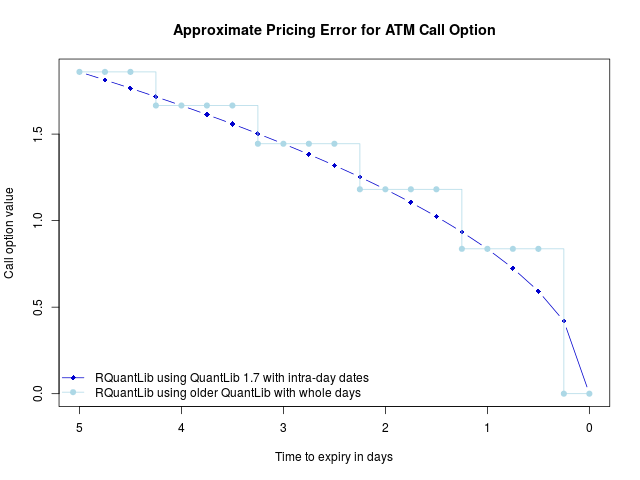
A new minor release of RQuantLib was released onto CRAN and into Debian. It takes advantages of some changes from last week's QuantLib release 1.7. 500 Rcpp packages Particularly noteworthy is the addition of support for intra-daily times in QuantLib based on work by Klaus Spanderen. If QuantLib was configured with the -enable-intraday option, we use the higher granularity of the time representation in all option pricers and implied volatility calculations. The impact of this feature is illustrated in the graph below. The graph shows the valuation of a Call option, European expiry, struck at the money with sensible short rate, dividend yield and volatility. We vary the time to expiry from five days to zero in steps of a quarter day. In darker blue is the correct valuation declining in parabolic shape. In lighter blue is what we get with QuantLib up to release 1.6, or newer releases configured without intra-day time support: an ugly step function that is off, and increasingly so we approach the expiration. Which leads to an appeal: a volunteer is needed to update the QuantLib 1.7 build for Windows. Jeroen tried, but ran into a snag and out of time. If you can help, please get in touch to Jeroen and myself. We suspect that the largest part of RQuantLib users relies on the prebuilt binaries from CRAN, and it would nice to have these updated to the current version of QuantLib. The full changes are detailed below.
Changes in RQuantLib version 0.4.2 (2015-12-03)
  • Changes in RQuantLib code:
    • Intra-day times are now available if QuantLib 1.7 or later is used, and has been configured with --enable-intraday
    • New helper functions getQuantLibVersion() and getQuantLibCapabilties()
    • New package startup code detects and warns about outdated QuantLib versions, or missing intra-day capability, unless not interactive.
    • The missing Monthly parameter has been added to matchFrequency (fixing issue ticket #19)
Courtesy of CRANberries, there is also a diffstat report for the this release. As always, more detailed information is on the RQuantLib page. Questions, comments etc should go to the rquantlib-devel mailing list off the R-Forge page. Issue tickets can be filed at the GitHub repo.

This post by Dirk Eddelbuettel originated on his Thinking inside the box blog. Please report excessive re-aggregation in third-party for-profit settings.

Next.

Previous.