Search Results: "ean"

8 June 2016

Gunnar Wolf: University degrees and sysadmin skills

I'll tune in to the post-based conversation being held on Planet Debian: Russell Coker wonders about what's needed to get university graduates with enough skills for a sysadmin job, to which Lucas Nussbaum responds with his viewpoints. They present a very contrasting view of what's needed for students And for a good reason, I'd say: Lucas is an academician; I don't know for sure about Russell, but he seems to be a down-to-the-earth, dirty-handed, proficient sysadmin working on the field. They both contact newcomers to their fields, and will notice different shortcomings. I tend to side with Lucas' view. That does not come as a surprise, as I've been working for over 15 years in an university, and in the last few years I started walking from a mostly-operative sysadmin in an academic setting towards becoming an academician that spends most of his time sysadmining. Subtle but important distinction. I teach at the BSc level at UNAM, and am a Masters student at IPN (respectively, Mexico's largest and second-largest universities). And yes, the lack of sysadmin abilities in both is surprising. But so is a good understanding of programming. And I'm sure that, were I to dig into several different fields, I'd feel the same: Student formation is very basic at each of those fields. But I see that as natural. Of course, if I were to judge people as geneticists as they graduate from Biology, or were I to judge them as topologists as they graduate from Mathematics, or any other discipline in which I'm not an expert, I'd surely not know where to start Given I have about 20 years of professional life on my shoulders, I'm quite skewed as to what is basic for a computing professional. And of course, there are severe holes in my formation, in areas I never used. I know next to nothing of electronics, my mathematical basis is quite flaky, and I'm a poor excuse when talking about artificial intelligence. Where am I going with this? An university degree (BSc in English, would amount to "licenciatura" in Spanish) is not for specialization. It is to have a sufficiently broad panorama of the field, and all of the needed tools to start digging deeper and specializing either by yourself, working on a given field and learning its details as you go, or going through a postgraduate program (Specialization, Masters, Doctorate). Even most of my colleagues at the Masters in Engineering in Security and Information Technology lack of a good formation in fields I consider essential. However, what does information security mean? Many among them are working on legal implications of several laws that touch our field. Many other are working on authenticity issues in images, audios and other such media. Many other are trying to come up with mathematical ways to cheapen the enormous burden of crypto operations (say, "shaving" CPU cycles off a very large exponentiation). Others are designing autonomous learning mechanisms to characterize malware. Were I as a computing professional to start talking about their research, I'd surely reveal I know nothing about it and get laughed at. That's because I haven't specialized in those fields. University education should give a broad universal basis to enter a professional field. It should not focus on teaching tools or specific procedures (although some should surely be presented as examples or case studies). Although I'd surely be happy if my university's graduates were to know everything about administering a Debian system, that would be wrong for a university to aim at; I'd criticize it the same way I currently criticize programs that mix together university formation and industry certification as if they were related.

Jonathan Dowland: Some tools for working with Docker images

For developing complex, real-world Docker images, there are a number of tools that can make life easier. The first thing to realise is that the Dockerfile format is severely limited. At work, we have eventually outgrown it and it has been replaced with a structured YAML document that is processed into a Dockerfile by a tool called dogen. There are several advantages to this, but I'll point out two: firstly, having data about the image available in a structured format makes automatically deriving technical documentation very easy. Secondly, some of the quirks of Dockerfiles, such as the ADD command respecting the environment's umask, are worked around in the dogen tool. We have a large suite of integration tests that we run against images to make sure that we haven't introduced regressions during their development. The core of this is the Container Testing Framework, which makes use of the Behave system. Each command that is run in a Dockerfile generates a new docker image layer. In practice, this can mean a real-world image has a great number of layers underneath it. Docker-dot-com have resisted introducing layer squashing into their tools, but with both hard limits for layers in some of the storage backends, and performance issues for most of the rest, this is a very real issue. Marek Goldmann wrote a squashing tool that we use to control the number of intermediate layers that are introduced by our images. Finally, even with tools like dogen and ctf, we would like to be able to have more sophisticated tools than shell scripts for configuring images, both at image build time and container run time. We want to do this without introducing extra dependencies inside the images which will not otherwise be used for their operation. Ansible could be a solution for this, but there are practical issues with relying on it for runtime configuration in our situation. For that reason David Becvarik is designing and implementing Container Configuration Tool, or cct, a framework for performing configuration of containers written in Python.

Russell Coker: Sysadmin Skills and University Degrees

I think that a major deficiency in Computer Science degrees is the lack of sysadmin training. Version Control The first thing that needs to be added is the basics of version control. CVS (which is now regarded as obsolete) was initially released when I was in the first year of university. But SCCS and RCS had been in use for some time. I think that the people who designed my course were remiss in not adding any mention of version control (not even strategies for saving old versions of your work), one could say that they taught us about version control by letting us accidentally delete our assignments. :-# If a course is aimed at just teaching programmers (as most CS degrees are) then version control for group assignments should be a standard part of the course. Having some marks allocated for the quality of comments in the commit log would also be good. A modern CS degree should cover distributed version control, that means covering Git as it s the most popular distributed version control system nowadays. For people who want to work as sysadmins (as opposed to developers who run their own PCs) a course should have an optional subject for version control of an entire system. That includes tools like etckeeper for version control of system configuration and tools like Puppet for automated configuration and system maintenance. Dependencies It s quite reasonable for a CS degree to provide simplified problems for the students to solve so they can concentrate on one task. But in the real world the problems are more complex. One of the more difficult parts of managing real systems is dependencies. You have issues of header files etc at compile time and library versions at deployment. Often you need a program to run on systems with different versions of the OS which means making it compile for both and deal with differences in behaviour. There are lots of hacky things that people do to deal with dependencies in systems. People link compiled programs statically, install custom versions of interpreters in user home directories or /usr/local for daemons, and do many other things. These things can have bad consequences including data loss, system downtime, and security problems. It s not always wrong to do such things, but it s something that should only be done with knowledge of the potential consequences and a plan for mitigating them. A CS degree should teach the potential advantages and disadvantages of these options to allow graduates to make informed decisions. Backups I ve met many people who call themselves computer professionals and think that backups aren t needed. I ve seen production systems that were designed in a way that backups were impossible. The lack of backups is a serious problem for the entire industry. Some lectures about backups could be part of a version control subject in a general CS degree. For a degree that majors in Sysadmin at least one subject about backups is appropriate. For any backup (even backing up your home PC) you should have offsite backups to deal with fire damage, multiple backups of different ages (especially important now that encryption malware is a serious threat), and a plan for how fast you can restore things. The most common use of backups is to deal with the case of deleting the wrong file. Unfortunately this case seems to be the most rarely mentioned. Another common situation that should be covered is a configuration error that results in a system that won t boot correctly. It s a very common problem and one that can be solved quickly if you are prepared but which can take a long time if you aren t. For a Sysadmin course it is important to cover backups of systems in remote datacenters. Hardware A good CS degree should cover the process of selecting suitable hardware. Programmers often get to advise on the hardware used to run their code, especially at smaller companies. Reliability features such as RAID, ECC RAM, and clustering should be covered. Planning for upgrades is a very important part of this which is usually not taught. Not only do you need to plan for an upgrade without much downtime or cost but you also need to plan for what upgrades are possible. Next year will your system require hardware that is more powerful than you can buy next year? If so you need to plan for a cluster now. For a Sysadmin course some training about selecting cloud providers and remote datacenter hosting should be provided. There are many complex issues that determine whether it s most appropriate to use a cloud service, hosted virtual machines, hosted physical servers managed by the ISP, hosted physical servers purchased by the client, or on-site servers. Often a large system will involve 2 or more of those options, even some small companies use 3 or more of those options to try and provide the performance and reliability they need at a price they can afford. We Need Sysadmin Degrees Covering the basic coding skills takes a lot of time. I don t think we can reasonably expect a CS degree to cover all that and also give good coverage to sysadmin work. While some basic sysadmin skills are needed by every programmer I think we need to have separate majors for people who want a career in system administration. Sysadmins need some programming skills, but that s mostly scripting and basic debugging. Someone who s main job is as a sysadmin can probably expect to never make any significant change to a program that s more than 10,000 lines long. A large amount of the programming in a CS degree can be replaced by file a bug report for a sysadmin degree. This doesn t mean that sysadmins shouldn t be doing software development or that they aren t good at it. One noteworthy fact is that it appears that the most common job among developers of the Debian distribution of Linux is System Administration. Developing an OS involves some of the most intensive and demanding programming. But I think that more than a few people who do such work would have skipped a couple of programming subjects in favour of sysadmin subjects if they were given a choice. Suggestions Did I miss anything? What other sysadmin skills should be taught in a CS degree? Do any universities teach these things now? If so please name them in the comments, it is good to help people find universities that teach them what they want to learn and help them in their career.

Francois Marier: Simple remote mail queue monitoring

In order to monitor some of the machines I maintain, I rely on a simple email setup using logcheck. Unfortunately that system completely breaks down if mail delivery stops. This is the simple setup I've come up with to ensure that mail doesn't pile up on the remote machine.

Server setup The first thing I did on the server-side is to follow Sean Whitton's advice and configure postfix so that it keeps undelivered emails for 10 days (instead of 5 days, the default):
postconf -e maximal_queue_lifetime=10d
Then I created a new user:
adduser mailq-check
with a password straight out of pwgen -s 32. I gave ssh permission to that user:
adduser mailq-check sshuser
and then authorized my new ssh key (see next section):
sudo -u mailq-check -i
mkdir ~/.ssh/
cat - > ~/.ssh/authorized_keys

Laptop setup On my laptop, the machine from where I monitor the server's mail queue, I first created a new password-less ssh key:
ssh-keygen -t ed25519 -f .ssh/egilsstadir-mailq-check
cat ~/.ssh/egilsstadir-mailq-check.pub
which I then installed on the server. Then I added this cronjob in /etc/cron.d/egilsstadir-mailq-check:
0 2 * * * francois /usr/bin/ssh -i /home/francois/.ssh/egilsstadir-mailq-check mailq-check@egilsstadir mailq   grep -v "Mail queue is empty"
and that's it. I get a (locally delivered) email whenever the mail queue on the server is non-empty. There is a race condition built into this setup since it's possible that the server will want to send an email at 2am. However, all that does is send a spurious warning email in that case and so it's a pretty small price to pay for a dirt simple setup that's unlikely to break.

7 June 2016

Enrico Zini: You'll thank me later

I agree with this post by Matthew Garrett. I am quite convinced that most of the communities that I have known are vulnerable to people who are good manipulators of people. Also, in my experience, manipulation by negating, pushing, or reframing the boundaries of people tends not to be recognised as manipulation, let alone abusive behaviour. It's not about physically forcing people to do things that they don't want to do. It's about pushing people, again and again, wearing them out, making them feel like, despite their actual needs and wants, saying "yes" to you is the only viable way out. It can happen for sex, and it can happen for getting a patch merged. It can happen out of habit. It can happen for pretty much anything. Consent culture was not part of my education, and it was something I've had to discover for myself. I assume that to be a common experience, and that pushing against boundaries does happen, even without malicious intentions, on a regular basis. However, it is not ok. Take insisting. It is not the same as persisting. Persisting is what I do when I advocate for change. Persisting is what I do when the first version of my code segfaults. Insisting is what I do when a person says "no" to me and I don't want to accept it. Is it ok to insist that a friend, whom you think is sick, goes and gets help? Is it ok to insist that a friend, whom you think is sexually repressed, pushes through their boundaries to explore their sexuality with you? In both cases, one may say, or think, trust me, you'll thank me afterwards. In both cases, what if afterwards I have nothing to thank you for? I see a common pattern in you'll thank me afterwards situations. It can be in good faith, it can be creepy, it can be abusive, and most of the time, what it is, is dangerously unclear to most of the people involved. I think that in a community like Debian, at the level of personal interaction, Insisting is not ok. I think that in a community like Debian, at the level of personal interaction, "You'll thank me afterwards" is not ok. When I say it's not ok I mean that it should not happen. If it happens, people must be free to say "stop". If it doesn't stop, people must expect to be able to easily find support, understanding, and help to make it stop. Just like when people upload untested packages. Pushing against personal boundaries of people is not ok, and pushing against personal boundaries does happen. When you get involved in a new community, such as Debian, find out early where, if that happens, you can find support, understanding, and help to make it stop. If you cannot find any, or if the only thing you can find is people who say "it never happens here", consider whether you really want to be in that community.

Matthew Garrett: Be wary of heroes

Inspiring change is difficult. Fighting the status quo typically means being able to communicate so effectively that powerful opponents can't win merely by outspending you. People need to read your work or hear you speak and leave with enough conviction that they in turn can convince others. You need charisma. You need to be smart. And you need to be able to tailor your message depending on the audience, even down to telling an individual exactly what they need to hear to take your side. Not many people have all these qualities, but those who do are powerful and you want them on your side.

But the skills that allow you to convince people that they shouldn't listen to a politician's arguments are the same skills that allow you to convince people that they shouldn't listen to someone you abused. The ability that allows you to argue that someone should change their mind about whether a given behaviour is of social benefit is the same ability that allows you to argue that someone should change their mind about whether they should sleep with you. The visibility that gives you the power to force people to take you seriously is the same visibility that makes people afraid to publicly criticise you.

We need these people, but we also need to be aware that their talents can be used to hurt as well as to help. We need to hold them to higher standards of scrutiny. We need to listen to stories about their behaviour, even if we don't want to believe them. And when there are reasons to believe those stories, we need to act on them. That means people need to feel safe in coming forward with their experiences, which means that nobody should have the power to damage them in reprisal. If you're not careful, allowing charismatic individuals to become the public face of your organisation gives them that power.

There's no reason to believe that someone is bad merely because they're charismatic, but this kind of role allows a charismatic abuser both a great deal of cover and a great deal of opportunity. Sometimes people are just too good to be true. Pretending otherwise doesn't benefit anybody but the abusers.

comment count unavailable comments

6 June 2016

John Goerzen: How git-annex replaces Dropbox + encfs with untrusted providers

git-annex has been around for a long time, but I just recently stumbled across some of the work Joey has been doing to it. This post isn t about it s traditional roots in git or all the features it has for partial copies of large data sets, but rather for its live syncing capabilities like Dropbox. It takes a bit to wrap your head around, because git-annex is just a little different from everything else. It s sort of like a different-colored smell. The git-annex wiki has a lot of great information both low-level reference and a high-level 10-minute screencast showing how easy it is to set up. I found I had to sort of piece together the architecture between those levels, so I m writing this all down hoping it will benefit others that are curious. Ir you just want to use it, you don t need to know all this. But I like to understand how my tools work. Overview git-annex lets you set up a live syncing solution that requires no central provider at all, or can be used with a completely untrusted central provider. Depending on your usage pattern, this central provider could require only a few MBs of space even for repositories containing gigabytes or terabytes of data that is kept in sync. Let s take a look at the high-level architecture of the tool. Then I ll illustrate how it works with some scenarios. Three Layers Fundamentally, git-annex takes layers that are all combined in Dropbox and separates them out. There is the storage layer, which stores the literal data bytes that you are interested in. git-annex indexes the data in storage by a hash. There is metadata, which is for things like a filename-to-hash mapping and revision history. And then there is an optional layer, which is live signaling used to drive the real-time syncing. git-annex has several modes of operation, and the one that enables live syncing is called the git-annex assistant. It runs as a daemon, and is available for Linux/POSIX platforms, Windows, Mac, and Android. I ll be covering it here. The storage layer The storage layer simply is blobs of data. These blobs are indexed by a hash, and can be optionally encrypted at rest at remote backends. git-annex has a large number of storage backends; some examples include rsync, a remote machine with git-annex on it that has ssh installed, WebDAV, S3, Amazon Glacier, removable USB drive, etc. There s a huge list. One of the git-annex features is that each client knows the state of each storage repository, as well as the capability set of each storage repository. So let s say you have a workstation at home and a laptop you take with you to work or the coffee shop. You d like changes on one to be instantly recognized on another. With something like Dropbox or OwnCloud, every file in the set you want synchronized has to reside on a server in the cloud. With git-annex, it can be configured such that the server in the cloud only contains a copy of a file until every client has synced it up, at which point it gets removed. Think about it that is often what you want anyhow, so why maintain an unnecessary copy after it s synced everywhere? (This behavior is, of course, configurable.) git-annex can also avoid storing in the cloud entirely if the machines are able to reach each other directly at least some of the time. The metadata layer Metadata about your files includes a mapping from the file names to the storage location (based on hashes), change history, and information about the status of each machine that participates in the syncing. On your clients, git-annex stores this using git. This detail is very useful to some, and irrelevant to others. Some of the git-annex storage backends can support only storage (S3, for instance). Some can support both storage and metadata (rsync, ssh, local drives, etc.) You can even configure a backend to support only metadata (more on why that may be useful in a bit). When you are working with a git-backed repository for git-annex, it can hold data, metadata, or both. So, to have a working sync system, you must have a way to transport both the data and the metadata. The transport for the metadata is generally rsync or git, but it can also be XMPP in which Git changesets are basically wrapped up in XMPP presence messages. Joey says, however, that there are some known issues with XMPP servers sometimes dropping or reordering some XMPP messages, so he doesn t encourage that method currently. The live signaling layer So once you have your data and metadata, you can already do syncs via git annex sync --contents. But the real killer feature here will be automatic detection of changes, both on the local and the remote. To do that, you need some way of live signaling. git-annex supports two methods. The first requires ssh access to a remote machine where git-annex is installed. In this mode of operation, when the git-annex assistant fires up, it opens up a persistent ssh connection to the remote and runs the git-annex-shell over there, which notifies it of changes to the git metadata repository. When a change is detected, a sync is initiated. This is considered ideal. A substitute can be XMPP, and git-annex actually converts git commits into a form that can be sent over XMPP. As I mentioned above, there are some known reliability issues with this and it is not the recommended option. Encryption When it comes to encryption, you generally are concerned about all three layers. In an ideal scenario, the encryption and decryption happens entirely on the client side, so no service provider ever has any details about your data. The live signaling layer is encrypted pretty trivially; the ssh sessions are, of course, encrypted and TLS support in XMPP is pervasive these days. However, this is not end-to-end encryption; those messages are decrypted by the service provider, so a service provider could theoretically spy on metadata, which may include change times and filenames, though not the contents of files themselves. The data layer also can be encrypted very trivially. In the case of the dumb backends like S3, git-annex can use symmetric encryption or a gpg keypair and all that ever shows up on the server are arbitrarily-named buckets. You can also use a gcrypt-based git repository. This can cover both data and metadata and, if the target also has git-annex installed, the live signalling layer. Using a gcrypt-based git repository for the metadata and live signalling is the only way to accomplish live syncing with 100% client-side encryption. All of these methods are implemented in terms of gpg, and can support symmetric of public-key encryption. It should be noted here that the current release versions of git-annex need a one-character patch in order to fix live syncing with a remote using gcrypt. For those of you running jessie, I recommend the version in jessie-backports, which is presently 5.20151208. For your convenience, I have compiled an amd64 binary that can drop in over /usr/bin/git-annex if you have this version. You can download it and a gpg signature for it. Note that you only need this binary on the clients; the server can use the version from jessie-backports without issue. Putting the pieces together: some scenarios Now that I ve explained the layers, let s look at how they fit together. Scenario 1: Central server In this scenario, you might have a workstation and a laptop that sync up with each other by way of a central server that also has a full copy of the data. This is the scenario that most closely resembles Dropbox, box, or OwnCloud. Here you would basically follow the steps in the git-assistant screencast: install git-annex on a server somewhere, and point your clients to it. If you want full end-to-end encryption, I would recommend letting git-annex generate a gpg keypair for you, which you would then need to copy to both your laptop and workstation (but not the server). Every change you make locally will be synced to the server, and then from the server to your other PC. All three systems would be configured in the client transfer group. Scenario 1a: Central server without a full copy of the data In this scenario, everything is configured the same except the central server is configured with the transfer transfer group. This means that the actual data synced to it is deleted after it has been propagated to all clients. Since git-annex can verify which repository has received a copy of which data, it can easily enough delete the actual file content from the central server after it has been copied to all the clients. Many people use something like Dropbox or OwnCloud as a multi-PC syncing solution anyhow, so once the files have been synced everywhere, it makes sense to remove them from the central server. This is often a good ideal for people. There are some obvious downsides that are sometimes relevant. For instance, to add a third sync client, it must be able to initially copy down from one of the existing clients. Or, if you intend to access the data from a device such as a cell phone where you don t intend for it to have a copy of all data all the time, you won t have as convenient way to download your data. Scenario 1b: Split data/metadata central servers Imagine that you have a shell or rsync account on some remote system where you can run git-annex, but don t have much storage space. Maybe you have a cheap VPS or shell account somewhere, but it s just not big enough to hold your data. The answer to this would be to use this shell or rsync account for the metadata, but put the data elsewhere. You could, for instance, store the data in Amazon S3 or Amazon Glacier. These backends aren t capable of storing the git-annex metadata, so all you need is a shell or rsync account somewhere to sync up the metadata. (Or, as below, you might even combine a fully distributed approach with this.) Then you can have your encrypted data pushed up to S3 or some such service, which presumably will grow to whatever size you need. Scenario 2: Fully distributed Like git itself, git-annex does not actually need a central server at all. If your different clients can reach each other directly at least some of the time, that is good enough. Of course, a given client will not be able to do fully automatic live sync unless it can reach at least one other client, so changes may not propagate as quickly. You can simply set this up by making ssh connections available between your clients. git-annex assistant can automatically generate appropriate ~/.ssh/authorized_keys entries for you. Scenario 2a: Fully distributed with multiple disconnected branches You can even have a graph of connections available. For instance, you might have a couple machines at home and a couple machines at work with no ability to have a direct connection between them (due to, say, firewalls). The two machines at home could sync with each other in real-time, as could the two machines at work. git-annex also supports things like USB drives as a transport mechanism, so you could throw a USB drive in your pocket each morning, pop it in to one client at work, and poof both clients are synced up over there. Repeat when you get home in the evening, and you re synced there. The USB drive s repository can, of course, be of the transport type so data is automatically deleted from it once it s been synced everywhere. Scenario 3: Hybrid git-annex can support LAN sync even if you have a central server. If your laptop, say, travels around but is sometimes on the same LAN as your PC, git-annex can easily sync directly between the two when they are reachable, saving a round-trip to the server. You can assign a cost to each remote, and git-annex will always try to sync first to the lowest-cost path that is available. Drawbacks of git-annex There are some scenarios where git-annex with the assistant won t be as useful as one of the more traditional instant-sync systems. The first and most obvious one is if you want to access the files without the git-annex client. For instance, many of the other tools let you generate a URL that you can email to people, and then they can download files without any special client software. This is not directly possible with git-annex. You could, of course, make something like a public_html directory be managed with git-annex, but it wouldn t provide things like obfuscated URLs, password-protected sharing, time-limited sharing, etc. that you get with other systems. While you can share your repositories with others that have git-annex, you can t share individual subdirectories; for a given repository, it is all or nothing. The Android client for git-annex is a pretty interesting thing: it is mostly a small POSIX environment, providing a terminal, git, gpg, and the same web interface that you get on a standalone machine. This means that the git-annex Android client is fully functional compared to a desktop one. It also has a quick setup process for syncing off your photos/videos. On the other hand, the integration with the Android ecosystem is poor compared to most other tools. Other git-annex features git-annex has a lot to offer besides the git-annex assistant. Besides the things I ve already mentioned, any given git-annex repository including your client repository can have a partial copy of the full content. Say, for instance, that you set up a git-annex repository for your music collection, which is quite large. You want some music on your netbook, but don t have room for it all. You can tell git-annex to get or drop files from the netbook s repository without deleting them remotely. git-annex has quite a few ways to automate and configure this, including making sure that at least a certain number of copies of a file exist in your git-annex ecosystem. Conclusion I initially started looking at git-annex due to the security issues with encfs, and the difficulty with setting up ecryptfs in this way. (I had been layering encfs atop OwnCloud). git-annex certainly ticks the box for me security-wise, and obviously anything encrypted with encfs wasn t going to be shared with others anyhow. I ll be using git-annex more in the future, I m sure.

Petter Reinholdtsen: The new "best" multimedia player in Debian?

When I set out a few weeks ago to figure out which multimedia player in Debian claimed to support most file formats / MIME types, I was a bit surprised how varied the sets of MIME types the various players claimed support for. The range was from 55 to 130 MIME types. I suspect most media formats are supported by all players, but this is not really reflected in the MimeTypes values in their desktop files. There are probably also some bogus MIME types listed, but it is hard to identify which one this is. Anyway, in the mean time I got in touch with upstream for some of the players suggesting to add more MIME types to their desktop files, and decided to spend some time myself improving the situation for my favorite media player VLC. The fixes for VLC entered Debian unstable yesterday. The complete list of MIME types can be seen on the Multimedia player MIME type support status Debian wiki page. The new "best" multimedia player in Debian? It is VLC, followed by totem, parole, kplayer, gnome-mpv, mpv, smplayer, mplayer-gui and kmplayer. I am sure some of the other players desktop files support several of the formats currently listed as working only with vlc, toten and parole. A sad observation is that only 14 MIME types are listed as supported by all the tested multimedia players in Debian in their desktop files: audio/mpeg, audio/vnd.rn-realaudio, audio/x-mpegurl, audio/x-ms-wma, audio/x-scpls, audio/x-wav, video/mp4, video/mpeg, video/quicktime, video/vnd.rn-realvideo, video/x-matroska, video/x-ms-asf, video/x-ms-wmv and video/x-msvideo. Personally I find it sad that video/ogg and video/webm is not supported by all the media players in Debian. As far as I can tell, all of them can handle both formats.

5 June 2016

Iustin Pop: Short trip to Opio en Provence

Short trip to Opio en Provence I had a short work-related trip this week to Opio en Provence. It was not a working trip, but rather a team event, which means almost a vacation! Getting there and back I dislike taking the plane for very short flights (and Z rich-Nice is indeed only around one hour), as that means you're spending 3 as much going to the airport, at the airport, waiting to take off, waiting to get off the plane, and then going from the airport to the actual destination. So I took the opportunity to drive there, since I've never driven that way, and on the map the route seemed reasonably interesting. Not that it's a shorter trip by any measure, but seemed more interesting. Leaving Z rich I went over San Bernardino pass, as I never did that before. On the north side, the pass is actually much less suited to traffic than the Gotthard pass (also on the north side), as you basically climb around 300m in a very short distance, with very sharp hairpins. There was still snow on the top, and the small lake had lots of slush/ice floating on it. As to the south side, it looked much more driveable, but I'm not sure as I made the mistake of re-joining the highway, so instead of driving reasonably nice on the empty pass road, I spent half an hour in a slow moving line. Lesson learned Entering Italy was the usual Como-Milan route, but as opposed to my other trips, this time it was around Milan on the west (A50) and then south on the A7 until it meets the A26 and then down to the coast. From here, along the E80 (Italian A10, French A8) until somewhere near Nice, and then exiting the highway system to get on the small local roads towards Opio. What I read in advance on the internet was that the coastal highway is very nice, and has better views of the sea than the actual seaside drive (which goes through towns and is much slower). I should know better than trust the internet , and I should read maps instead, which would have shown me the fact that the Alps are reaching to the sea in this region, so The road was OK, but it definitely didn't feel like a highway: maximum allowed speed was usually either 90km/h or 110km/h, and half the time you're in a short tunnel, so it's sun, tunnel/dark, sun, dark, and you're eyes get quite tired from this continuous switching. The few glimpses of the sea were nice, but the road required enough concentration (both due to traffic and the amount of curves) that one couldn't look left or right. So that was that a semi-failure; I expected a nice drive, but instead it was a challenge drive If I had even more time to spend, going back via the Rhone valley (Grenoble, Geneva, Z rich) would have been a more interesting alternative. France Going to France always feels strange for me. I learned (some) French way before German, so the French language feels much more familiar to me, even without never actually having used it on a day-to-day basis; so going to France feels like getting back to somewhere where I never lived. Somewhat similar with Italian due to the language closeness between Romanian and Italian, but not the same feeling as I didn't actually hear or learn Italian in the childhood. So I go to France, and I start partially understand what I hear, and I can somewhat talk/communicate. Very weird, while I still struggle with German in my daily life in Z rich. For example, I would hesitate before asking for directions in German, but not so in French, unrelated to my actual understanding of either language. The brain is funny The hotel We stayed at Club Med Opio-en-Provence, which was interesting. Much bigger than I thought from quick looks on the internet (this internet seems quite unreliable), but also better than I expected from a family-oriented, all-inclusive hotel. The biggest problem was the food - French P tisserie is one of my weaknesses, and I failed to resist. I mean, it was much better than I expected, and I indulged a bit too much. I'll have to pay that back on the bike or running :-P The other interesting part of the hotel was the wide range of activities. Again, this being a family hotel, I thought the organised activities would be pretty mild; but at least for our group, they weren't. The mountain bike ride included an easy single-trail section, but while easy it was single-trail and rocky, so complete beginners might have had a small surprise. Overall it was about 50 minutes, 13.5km, with 230m altitude gain, which again for sedentary people might be unusual. I probably spent during the ride one of the deserts I ate later that day ;-) The "hike" they organised for another sub-group was also interesting, involving going through old tunnels and something with broken water pipes that caused people to either get their feet wet or monkey-spidering along the walls. Fun! After the bike ride, on the same afternoon, while walking around the hotel, we found the Ecole de Trap ze volant open, which looked way to exciting not to try it. Try and fail to do things right, but nevertheless it was excellent and unexpected fun. I'll have to do that again some day when I'll be more fit! Plus that the hotel itself had a very nice location and olive garden, so short runs in the morning were very pleasant. Only one cookie though each Back home and then it was over; short, but quite good. The Provence area is nice, and I'd like to be back again someday, for a proper vacation longer and more relaxed. And do the trap ze thing again, properly this time.

Jamie McClelland: Signal and Mobile XMPP Update

First, many thanks to Planet Debian readers for your thoughtful and constructive feedback to my Signal and Mobile Instant Messaging blogs. I learned a lot. Particularly useful was the comment directing me to Daniel Gultsch's The State of Mobile in 2016 post. I had previously listed the outstanding technical challenges as: I am now fairly convined that both problems are well-solved on Android via the Conversations app and a well-tuned XMPP server (I had no idea how easy it was to install your own Prosody modulues -- the client state indicator module is only 22 lines of lua code!) I think the current technical challenges could be better summarized as: adding iOS (iPhone) support. Both end-to-end encryption and receiving messages consistently seem to be hurdles. However, it seems that Chris Ballinger and the Chat Secure team are well on their way toward solving the push issue and facing funder skittishness on the encryption front. Nonetheless, but seem to be progressing. With the obvious technical hurdles in progress, we have the luxury of talking about the less obvious ones - particularly the ones requiring trade-offs. In particular: Signal replaces your SMS client. It looks and feels like an SMS client and automatically sends un-encrypted messages to everyone your address book that is not on signal and sends encrypted messages to those that are on signal. The significance of this feature is hard to over-state. It differentiates tools by and for technically minded people and those designed for a mass audience. When I convince people to use Conversations, in contrast, I have to teach them to: For most people who don't (yet) have their friends XMPP addresses or for people who don't have any friends who use XMPP, it means that they will install it, send me a few messages and then never use it again. The price Signal pays for this convenience is steep: Signal seems to synchronize your entire address book to their servers so they can keep a map of cell phone numbers to signal users. It's not only creepy (I get a text message everytime someone in my address book joins Signal) but it's flies in the face of expectations for a privacy-minded application. How could we take advantage of this feature, without the privacy problems? What if... The main downside (which Signal faces as well) is that you have to contend with the complexities of sending SMS messages on top of the work needed to write a well-functioning XMPP client. As I mentioned in my Signal blog, there are no shortage of MMS bugs against Signal. Nobody wants that head-ache. Additinally, we would still lose one Signal feature: with Signal, when a user joins, everyone automatically sends them encrypted messages. With this proposed app, each user would have to manually add the XMPP address and have no way of knowing when one of their friends gets an XMPP address. Any other ideas?

3 June 2016

Eduard Sanou: No more unencrypted emails to gpg contacts

I have been using mutt for about half a year already and I m very happy with it. The previous email client I used was Thunderbird (with the Enigmail extension to handle GPG). There were two main reasons that made me switch. The first one was that I often would like to check my email while I m offline, and it seems that Thunderbird is not very good at this. Sometimes not all my email would have been downloaded (just the headers), and I also found it frustrating that after marking more than 50 emails as read while offline, they would be marked as unread again once I went back online. With mutt I m using mbsync (which apparently is faster than offlineimap) to sync my email to a local folder with a cron job. I couldn t be happier. The other issue was that I like having many filters, and it was tedious to customize filters in Thunderbird: there s no way to copy a filter and modify it, and there s a limit in the combinations of ANDs and ORs for fields. I m using procmail now, which allows me save the filter configuration in plaintext and define patterns with more flexibility. The setup for mutt took several weeks, but I never felt that I couldn t accomplish what I wanted (unlike in Thunderbird). I m using mutt with several python and bash scripts that I wrote. But the reason for this post is an issue that I believe happens in every email client (or should I say, MUA, to be more precise). I ve seen it happening to people using both Thunderbird and mutt, and I bet it has happened in other cases: sending an email to someone for which you have their GPG key unencrypted unwillingly. I ve seen this happening in email replies with several participants: after a few encrypted messages are exchanged, someone replies in the clear, quoting all the previous messages. I tried to avoid this by configuring mutt to encrypt and sign by default, forcing me to set sign only manually before sending every email that I can t send encrypted (I d like to send all my emails encrypted, but not everybody has a GPG key :( ). So what happened? I got so used to sending many unencrypted emails that I would press P S (PGP setting, Sign only) before sending emails as a reflex act. And I sent an email unencrypted to a friend for which I have his GPG key :( So I thought: It s a very rare case to want to send an unencrypted email to someone for which you have their GPG key. I think extensions like Enigmail should give you a warning when this happens, to alert you about it. In my case, I solved it with a python script that inspects the email, and, if it s unencrypted and the recipient/s is/are in your GPG keyring it warns you about it and returns an error. The script stores a temporary file with the Message-ID so that if you run it again with the same email it will properly send the email without returning an error. Now, I only needed to configure mutt to use this script as the sendmail command:
per_account:set sendmail  = "$HOME/bin/check-mail-gpg /usr/bin/msmtp -a $my_email"
And here goes the python script check-mail-gpg:
#! /usr/bin/python3
import os
import sys
import subprocess
import email.parser
from email.header import decode_header
from email.utils import parseaddr
STATUS_FILE = '/tmp/check-mail-gpg.tmp'
def dec(header):
    head = decode_header(header)
    if len(head) == 1 and head[0][1] == None:
        return head[0][0]
    else:
        return ''.join([h.decode(enc) if enc else h.decode('ascii') \
                for (h,enc) in head])
def send_mail(mail):
    print('Calling external email client to send the email...')
    #return -1 # testing mode
    p = subprocess.Popen(sys.argv[1:], stdin=subprocess.PIPE)
    p.stdin.write(mail.encode('utf-8'))
    p.stdin.close()
    return p.wait()
def main():
    mail = sys.stdin.read()
    heads = email.parser.Parser().parsestr(mail, headersonly=True)
    content = heads['Content-Type'].split(';')[0].strip()
    print('Content is:', content)
    if content == 'multipart/encrypted':
        print('Ok: encrypted mail, we can return now...')
        sys.exit(send_mail(mail))
    addrs = [parseaddr(addr) for addr in heads['To'].split(',')]
    print('Found emails:', addrs)
    gpg_cnt = 0
    for name, addr in addrs:
        print('Looking for', addr, 'in the keyring...')
        res = subprocess.call(['gpg', '--list-keys', addr],
                stdout=subprocess.DEVNULL, stderr=subprocess.DEVNULL)
        if res == 0:
            gpg_cnt += 1
    if gpg_cnt == 0:
        print('Ok: no email found in the gpg keyring, we can return now...')
        sys.exit(send_mail(mail))
    if not os.path.exists(STATUS_FILE):
        open(STATUS_FILE, 'w').close()
    msg_id = heads['Message-ID']
    msg_id_prev = ''
    with open(STATUS_FILE, 'r') as f:
        msg_id_prev = f.read()
    if msg_id.strip() == msg_id_prev.strip():
        sys.exit(send_mail(mail))
    else:
        with open(STATUS_FILE, 'w') as f:
            f.write(msg_id)
        print('Alert: trying to send an unencrypted email to', addrs,
                ', for which some gpg keys were found in the keyring!')
        print('Try again if you are sure to send this message unencrypted.')
        sys.exit(1)
if __name__ == '__main__':
    main()

Update I ve been told about the option crypt_opportunistic_encrypt in mutt, which provides a feature very similar to what I was looking for. This option will automatically enable encryption when the recipient has a GPG key in your keyring. From mutt s man page:
3.41. crypt_opportunistic_encrypt Type: boolean Default: no Setting this variable will cause Mutt to automatically enable and disable encryption, based on whether all message recipient keys can be located by mutt. When this option is enabled, mutt will determine the encryption setting each time the TO, CC, and BCC lists are edited. If $edit_headers is set, mutt will also do so each time the message is edited. While this is set, encryption settings can t be manually changed. The pgp or smime menus provide an option to disable the option for a particular message. If $crypt_autoencrypt or $crypt_replyencrypt enable encryption for a message, this option will be disabled for the message. It can be manually re-enabled in the pgp or smime menus. (Crypto only)

Gunnar Wolf: Stop it with those short PGP key IDs!

Debian is quite probably the project that most uses a OpenPGP implementation (that is, GnuPG, or gpg) for many of its internal operations, and that places most trust in it. PGP is also very widely used, of course, in many other projects and between individuals. It is regarded as a secure way to do all sorts of crypto (mainly, encrypting/decrypting private stuff, signing public stuff, certifying other people's identities). PGP's lineage traces back to Phil Zimmerman's program, first published in 1991 By far, not a newcomer PGP is secure, as it was 25 years ago. However, some uses of it might not be so. We went through several migrations related to algorithmic weaknesses (i.e. v3 keys using MD5; SHA1 is strongly discouraged, although not yet completely broken, and it should be avoided as well) or to computational complexity (as the migration away from keys smaller than 2048 bits, strongly prefering 4096 bits). But some vulnerabilities are human usage (that is, configuration-) related. Today, Enrico Zini gave us a heads-up in the #debian-keyring IRC channel, and started a thread in the debian-private mailing list; I understand the mail to a private list was partly meant to get our collective attention, and to allow for potentially security-relevant information to be shared. I won't go into details about what is, is not, should be or should not be private, but I'll post here only what's public information already. What are short and long key IDs? I'll start by quoting Enrico's mail:
there are currently at least 3 ways to refer to a gpg key: short key ID (last 8 hex digits of fingerprint), long key ID (last 16 hex digits) and full fingerprint. The short key ID used to be popular, and since 5 years it is known that it is computationally easy to generate a gnupg key with an arbitrary short key id. A mitigation to this is using "keyid-format long" in gpg.conf, and a better thing to do, especially in scripts, is to use the full fingerprint to refer to a key, or just ship the public key for verification and skip the key servers. Note that in case of keyid collision, gpg will download and import all the matching keys, and will use all the matching keys for verifying signatures.
So... What is this about? We humans are quite bad at recognizing and remembering randomly-generated strings with no inherent patterns in them. Every GPG key can be uniquely identified by its fingerprint, a 128-bit string, usually encoded as ten blocks of four hexadecimal characters (this allows for 160 bits; I guess there's space for a checksum in it). That is, my (full) key's signature is:
AB41 C1C6 8AFD 668C A045  EBF8 673A 03E4 C1DB 921F
However, it's quite hard to recognize such a long string, let alone memorize it! So, we often do what humans do: Given that strong cryptography implies a homogenous probability distribution, people compromised on using just a portion of the key the last portion. The short key ID. Mine is then the last two blocks (shown in boldface): C1DB921F. We can also use what's known as the long key ID, that's twice as long: 64 bits. However, while I can speak my short key ID on a single breath (and maybe even expect you to remember and note it down), try doing so with the long one (shown in italics above): 673A03E4C1DB921F. Nah. Too much for our little, analog brains. This short and almost-rememberable number has then 32 bits of entropy I have less than one in 4,000,000,000 chance of generating a new key with this same short key ID. Besides, key generation is a CPU-intensive operation, so it's quite unlikely we will have a collision, right? Well, wrong. Previous successful attacks on short key IDs Already five years ago, Asheesh Laroia migrated his 1024D key to a 4096R. And, as he describes in his always-entertaining fashion, he made his computer sweat until he was able to create a new key for which the short key ID collided with the old one. It might not seem like a big deal, as he did this non-maliciously, but this easily should have spelt game over for the usage of short key IDs. After all, being able to generate a collision is usually the end for cryptographic systems. Asheesh specifically mentioned in his posting how this could be abused. But we didn't listen. Short key IDs are just too convenient! Besides, they allow us to have fun, can be a means of expression! I know of at least two keys that would qualify as vanity: Obey Arthur Liu's 0x29C0FFEE (created in 2009) and Keith Packard's 0x00000011 (created in 2012). Then we got the Evil 32 project. They developed Scallion, started (AFAICT) in 2012. Scallion automates the search for a 32-bit collision using GPUs; they claim that it takes only four seconds to find a collision. So, they went through the strong set of the public PGP Web of Trust, and created a (32-bit-)colliding key for each of the existing keys. And what happened now? What happened today? We still don't really know, but it seems we found a first potentially malicious collision that is, the first "nonacademic" case. Enrico found two keys sharing the 9F6C6333 short ID, apparently belonging to the same person (as would be the case of Asheesh, mentioned above). After contacting Gustavo, though, he does not know about the second That is, it can be clearly regarded as an impersonation attempt. Besides, what gave away this attempt are the signatures it has: Both keys are signed by what appears to be the same three keys: B29B232A, F2C850CA and 789038F2. Those three keys are not (yet?) uploaded to the keyservers, though... But we can expect them to appear at any point in the future. We don't know who is behind this, or what his purpose is. We just know this looks very evil. Now, don't panic: Gustavo's key is safe. Same for his certifiers, Marga, Agust n and Maxy. It's just a 32-bit collision. So, in principle, the only parties that could be cheated to trust the attacker are humans, right? Nope. Enrico tested on the PGP pathfinder & key statistics service, a keyserver that finds trust paths between any two arbitrary keys in the strong set. Surprise: The pathfinder works on the short key IDs, even when supplied full fingerprints. So, it turns out I have three faked trust paths into our impostor. What next? There are several things this should urge us to do. And there are surely many other important recommendations. But this is a good set of points to start with. [update] I was pointed at Daniel Kahn Gillmor's 2013 blog post, OpenPGP Key IDs are not useful. Daniel argues, in short, that cutting a fingerprint in order to get a (32- or 64-bit) short key ID is the worst of all worlds, and we should rather target either always showing full fingerprints, or not showing it at all (and leaving all the crypto-checking bits to be done by the software, as comparing 160-bit strings is not natural for us humans). [update] This post was picked up by LWN.net. A very interesting discussion continues in their comments.

1 June 2016

Jamie McClelland: Signal and Google Cloud Services

I just installed Signal on my Android phone. It wasn't an easy decision. I have been running Cyanogenmod, a Google-free version of Android, and installing apps from F-Droid, a repository of free software android apps, for several years now. This setup allows me to run all the applications I need without Google accessing any of my cell phone data. It has been a remarkably successful experiment leaving me with all the phone software I need. And it's consistent with my belief that Google's size, reach and goals are a menace to the left's ability to develop the autonomous communications systems on the Internet that we need to achieve any meaningful political change. However, if I want to install Signal, I have to install Google Play, and the only way to install Google Play is to install Google's base line set of apps and to connect your cell phone to a Gmail account. Why in the world would Signal require Google Play? There is plenty of discussion of the technical debate on this topic, but politically it boils down to this: security is about trade-offs, and the trade-offs you find important are based on your politics. While I consider Signal to be on the same team in the big picture, I think Signal's winning a short term victory for more massively adopted end-to-end encryption at the expense of a longer term and more important struggle for autonomous communication systems specifically for communities fighting corporate power (of which Google itself is an important target) and fighting US hegemony on a global scale. Furthermore, Signal's lead developer's outright hostility to alternate clients connecting to the centralized signal servers demonstrates another political decision that favors central control over any confidence in a broader movement control over what could have become a power new protocol for secure communication. And his refusal to grant an exemption for other developers to use just the encryption algorythm is frustrating to say the least. Given this reasoning, why install Signal? The main reason is because I have yet to convince anyone to remove Google Apps from their phone and Signal, right now, represents a dramatic improvement over most people's current communications habit. And, when it comes down to it, I need to run what I recommend. I'm still running both conversations and Antox which are far better alternatives in the long run. However until they gain more widespread adoption, I'll be experimenting with Signal. Technical Details Oh, and by the way, installing Google Apps nearly bricked my phone. Cyanogenmod's web site conveniently provides instructions for installing Google Apps. However, confusingly, they provide two different links to choose from, one is from OpenGapps which provided my a link to download the zip file to flash on a non-https page (the link itself was over https). The other link was to an https-enabled page on androidfilehost.com that offered a non-https download (but did provide a md5 checksum). I am now sure why people offering software downloads don't enable https from start to finish (well, maybe I do - I haven't yet enabled https on this site...). However, more confusing is that both links were to different files. The OpenGapps one seemed to be a daily build and the androidfilehost was to a file with the date 20140606 in it's name, suggesting it was built nearly 2 years ago. I went with the daily build. When I restarted, I got the error "Unfortunately, Android Keyboard (Aosp) Has Stopped." If you search the web for this error you will see loads of people getting it. However, none of them seem to be using an encrypted disk. Yes, that is a bigger problem since you can't enter your encrypted disk passphrase if your keyboard app has crashed and you can't boot your phone if you can't even hit enter at the passphrase prompt. If you can't boot, you can't clear the keyboard app cache or most of the suggestions. In fact, when you press and hold the power key you don't even get the option to reboot into recovery mode. And, if you connect your device to your USB cable and run the adb tool on your computer, the tool reports that you are not authorized to connect your device. Oh damn. Did I just brick my phone? Fortunately, you can still boot into recovery mode on a Samsung S4 by powering it off. Then, press and hold the up volume button while turning it on. In recovery mode, I as able to convince the adb tool to connect to my device and I copied over the other Gapps zip file from androidfilehost.com and flashing that one seems to have fixed the problem. Once I booted, I ran Google Play and opted to create a new Google Account. I chose the option to not sync my data. Then, I checked in Settings -> Accounts I saw that a Google Account was there and was synchronizing. Great. What was it synchronizing? I clicked the account, then clicked "Accounts and Privacy" and ensured that everything was turned off. Let's hope that works. [Update] Signal's option to take over as your default SMS client and send un-encrypted normal SMS messages while sending encrypted messages to other Signal users is a very good way to smooth adoption. Unfortunately I had some problems with MMS message for which I found a work-around. But sheesh, lots of MMS problems at the moment.

Antoine Beaupr : (Still) working too much on the computer

I have been using Workrave to try to force me to step away from the computer regularly to work around Repetitive Strain Injury (RSI) issues that have plagued my life on the computer intermittently in the last decade. Workrave itself is only marginally efficient at getting me away from the machine: as any warning systems, it suffers from alarm fatigue as you frenetically click the dismiss button every time a Workrave warning pops up. However, it has other uses.

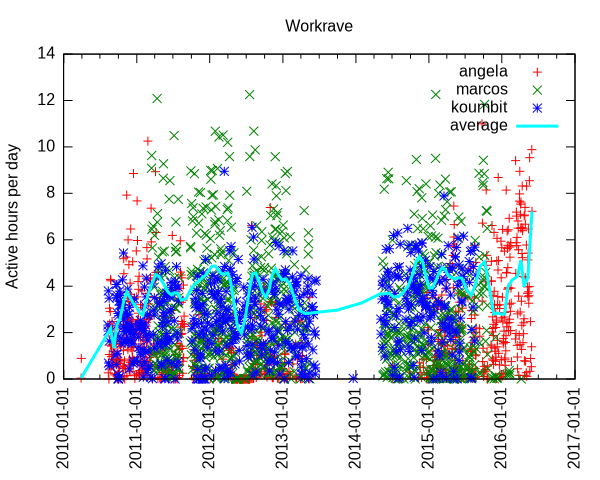
Analyzing data input In the past, I have used Workrave to document how I work too much on the computer, but never went through more serious processing of the vast data store that Workrave accumulates about mouse movements and keystrokes. Interested in knowing how much my leave from Koumbit affected time spent on the computer, I decided to look into this again. It turns out I am working as much, if not more, on the computer since I took that "time off": per machine keystrokes per day and average We can see here that I type a lot on the computer. Normal days range from 10 000 to 60 000 keystrokes, with extremes at around 100 000 keystrokes per day. The average seem to fluctuate around 30 to 40 000 keystrokes per day, but rises sharply around the end of the second quarter of this very year. For those unfamiliar with the underlying technology, one keystroke is roughly one byte I put on the computer. So the average of 40 000 keystrokes is 40 kilobyte (KB) per day on the computer. That means 15 MB over a year or about 150MB (or 100 MiB if you want to be picky about it) over the course of the last decade. That is a lot of typing. I originally thought this could have been only because I type more now, as opposed to use more the mouse previously. Unfortunately, Workrave also tracks general "active time" which we can also examine: per machine keystrokes per day and average Here we see that I work around 4 hours a day continuously on the computer. That is active time: not just login, logout time. In other words, the time where i look away from the computer and think for a while, jot down notes in my paper agenda or otherwise step away from the computer for small breaks is not counted here. Notice how some days go up to 12 hours and how recently the average went up to 7 hours of continuous activity. So we can clearly see that I basically work more on the computer now than I ever did in the last 7 years. This is a problem - one of the reasons of this time off was to step away from the computer, and it seems I have failed.
Update: it turns out the graph was skewed towards the last samples. I went more easy on the keyboard in the last few days and things have significantly improved: per machine keystrokes per day and average, 3 days later
Another interesting thing we can see is when I switched from using my laptop to using the server as my main workstation, around early 2011, which is about the time marcos was built. Now that marcos has been turned into a home cinema downstairs, I went back to using my laptop as my main computing device, in late 2015. We can also clearly see when I stopped using Koumbit machines near the end of 2015 as well.

Further improvements and struggle for meaning The details of how the graph was produced are explained at the end of this article. This is all quite clunky: it doesn't help that the Workrave data structure is not easily parsable and so easily corruptible. It would be best if each data point was on its own separate line, which would be long, granted, but so easier to parse. Furthermore, I do not like the perl/awk/gnuplot data processing pipeline much. It doesn't allow me to do interesting analysis like averages, means and linear regressions easily. It could be interesting to rewrite the tools in Python to allow better graphs and easier data analysis, using the tools I learned in 2015-09-28-fun-with-batteries. Finally, this looks only at keystrokes and non-idle activity. It could be more interesting to look at idle/active times and generally the amount of time spent on the computer each day. And while it is interesting to know that I basically write a small book on the computer every day (according to Wikipedia, 120KB is about the size of a small pocket book), it is mostly meaningless if all that stuff is machine-readable code. Where is, after all, the meaning in all those shell commands and programs we constantly input on our keyboards, in the grand scheme of human existence? Most of those bytes are bound to be destroyed by garbage collection (my shell's history) or catastrophic backup failures.
While the creative works from the 16th century can still be accessed and used by others, the data in some software programs from the 1990s is already inaccessible. - Lawrence Lessig
But is my shell history relevant? Looking back at old posts on this blog, one has to wonder if the battery life of the Thinkpad 380z laptop or how much e-waste I threw away in 2005 will be of any historical value in 20 years, assuming the data survives that long.

How this graph was made I was happy to find that Workrave has some contrib scripts to do such processing. Unfortunately, those scripts are not shipped with the Debian package, so I requested that to be fixed (#825982). There were also some fixes necessary to make the script work at all: first, there was a syntax error in the Perl script. But then since my data is so old, there was bound to be some data corruption in there: incomplete entries or just plain broken data. I had lines that were all NULL characters, typical of power failures or disk corruptions. So I have made a patch to fix that script (#826021). But this wasn't enough: while this processes data on the current machine fine, it doesn't deal with multiple machines very well. In the last 7 years of data I could find, I was using 3 different machines: this server (marcos), my laptop (angela) and Koumbit's office servers (koumbit). I ended up modifying the contrib scripts to be able to collate that data meaningfully. First, I copied over the data from Koumbit in a local fake-koumbit directory. Second, I mounted marcos home directory locally with SSHFS:
sshfs anarc.at:/home/anarcat marcos
I also made this script to sum up datasets:
#!/usr/bin/perl -w
use List::MoreUtils 'pairwise';
$  = 1;
my %data = ();
while (<>)  
    my @fields = split;
    my $date = shift @fields;
    if (defined($data $date ))  
        my @t = pairwise   $a + $b   @ $data $date , @fields;
        $data $date  = \@t;
     
    else  
        $data $date  = \@fields;
     
 
foreach my $d ( sort keys %data )  
    print "$d @ $data $d \n";
 
Then I made a modified version of the Gnuplot script that processes all those files together:
#!/usr/bin/gnuplot
set title "Workrave"
set ylabel "Keystrokes per day"
set timefmt "%Y%m%d%H%M"
#set xrange [450000000:*]
set format x "%Y-%m-%d"
set xtics rotate
set xdata time
set terminal svg
set output "workrave.svg"
plot "workrave-angela.dat" using 1:28 title "angela", \
     "workrave-marcos.dat" using 1:28 title "marcos", \
     "workrave-koumbit.dat" using 1:28 title "koumbit", \
     "workrave-sum.dat" using 1:2 smooth sbezier linewidth 3 title "average"
#plot "workrave-angela.dat" using 1:28 smooth sbezier title "angela", \
#     "workrave-marcos.dat" using 1:28 smooth sbezier title "marcos", \
#     "workrave-koumbit.dat" using 1:28 smooth sbezier title "koumbit"
And finally, I made a small shell script to glue this all together:
#!/bin/sh
perl workrave-dump > workrave-$(hostname).dat
HOME=$HOME/marcos perl workrave-dump > workrave-marcos.dat
HOME=$PWD/fake-koumbit perl workrave-dump > workrave-koumbit.dat
# remove idle days as they skew the average
sed -i '/ 0$/d' workrave-*.dat
# per-day granularity
sed -i 's/^\(........\)....\? /\1 /' workrave-*.dat
# sum up all graphs
cat workrave-*.dat   sort   perl sum.pl > workrave.dat
./gnuplot-workrave-anarcat
I used a different gnuplot script to generate the activity graph:
#!/usr/bin/gnuplot
set title "Workrave"
set ylabel "Active hours per day"
set timefmt "%Y%m%d%H%M"
#set xrange [450000000:*]
set format x "%Y-%m-%d"
set xtics rotate
set xdata time
set terminal svg
set output "workrave.svg"
plot "workrave-angela.dat"  using 1:($23/3600) title "angela", \
     "workrave-marcos.dat"  using 1:($23/3600) title "marcos", \
     "workrave-koumbit.dat" using 1:($23/3600) title "koumbit", \
     "workrave.dat"         using 1:($23/3600) title "average" smooth sbezier linewidth 3
#plot "workrave-angela.dat" using 1:28 smooth sbezier title "angela", \
#     "workrave-marcos.dat" using 1:28 smooth sbezier title "marcos", \
#     "workrave-koumbit.dat" using 1:28 smooth sbezier title "koumbit"

30 May 2016

Daniel Stender: My work for Debian in May

No double posting this time ;-) I've got not so much spare time this month to spend on Debian, but I could work on the following packages: This series of blog postings also includes little introductions of and into new packages in the archive. This month there is: Pyinfra Pyinfra is a new project which is currently still in development state. It has been already pointed out in an interesting German article1, and is now available as package maintained within the Python Applications Team. It's currently a one man production by Nick Barrett, and eagerly developed in the past weeks (we're currently at 0.1~dev24). Pyinfra is a remote server configuration/provisioning/service deployment tool which belongs in the same software category like Puppet or Ansible2. It's for provisioning one or an array of remote servers with software packages and to configure them. Pyinfra runs agentless like Ansible, that means for using it nothing special (like a daemon) has to run on targeted servers. It's written to be used for provisioning POSIX compatible Linux systems and has alternatives when it comes to special features like package managers (e.g. supports apt as well as yum). The documentation could be found in usr/share/doc/pyinfra/html/. Here's a little crash course on how to use Pyinfra: The pyinfra CLI tool is used on the command line like this, deploy scripts, single operations or facts (see below) could be used on a single server or a multitude of remote servers:
$ pyinfra -i <inventory script/single host> <deploy script>
$ pyinfra -i <inventory script/single host> --run <operation>
$ pyinfra -i <inventory script/single host> --facts <fact>
Remote servers which are operated on must provide a working shell and they must be reachable by SSH. For connecting, --port, --user, --password, --key/--key-password and --sudo flags are available, --sudo to gain superuser rights. Root access or sudo rights of course have to be already set up. By the way, localhost could be operated on the same way. Single operations are organized in modules like "apt", "files", "init", "server" etc. With the --run option they could be used individually on servers like follows, e.g. server.user adds a new user on a single targeted system (-v adds verbosity to the pyinfra run):
$ pyinfra -i 192.0.2.10 --run server.user sam --user root --key ~/.ssh/sshkey --key-password 123456 -v
Multiple servers can be grouped in inventories, which hold the targeted hosts and data associated with them, like e.g. an inventory file farm1.py would contain lists like this:
COMPUTE_SERVERS = ['192.0.2.10', '192.0.2.11']
DATABASE_SERVERS = ['192.0.2.20', '192.0.2.21']
Group designators must be all caps. A higher level of grouping are the file names of inventory scripts, thus COMPUTE_SERVERS and DATABASE_SERVERS can be referenced to at the same time by the group designator farm1. Plus, all servers are automatically added to the group all. And, inventory scripts should be stored in the subfolder inventory/ in the project directory. Inventory files then could be used instead of specific IP addresses like this, the single operation then gets performed on all given machines in farm1.py:
$ pyinfra -i inventory/farm1.py  --run server.user sam --user root --key ~/.ssh/sshkey --key-password=123456 -v
Deployment scripts could be used together with group data files in the subfolder group_data/ in the project directory. For example, a group_data/farm1.py designates all servers given in inventory/farm1.py (by the way, all.py designates all servers), and contains the random attribute user_name (attributes must be lowercase), next to authentication data for the whole inventory group:
user_name = 'sam'
ssh_user = 'root'
ssh_key = '~/.ssh/sshkey'
ssh_key_password = '123456'
The random attribute can be picked up by a deployment script using host.data() like follows, user_name could be used again for e.g. server.user(), like this:
from pyinfra import host
from pyinfra.modules import server
server.user(host.data.user_name)
This deploy, the ensemble of inventory file, group data file and deployment script (usually placed top level in the project folder) then could be run that way:
$ pyinfra -i inventory/farm1.py deploy.py
You have guessed it, since deployment scripts are Python scripts they are fully programmable (please regard that Pyinfra is build & runs on Python 3 on Debian), and that's the main advantage point with this piece of software. Quite handy for that come Pyinfra facts, functions which check different things on remote systems and return information as Python data. Like e.g. deb_packages returns a dictionary of installed packages from a remote apt based server:
$ pyinfra -i 192.0.2.10 --fact deb_packages --user root --key ~/.ssh/sshkey --key-password=123456
 
    "192.0.2.10":  
        "libdebconfclient0": "0.192",
        "python-debian": "0.1.27",
        "libavahi-client3": "0.6.31-5",
        "dbus": "1.8.20-0+deb8u1",
        "libustr-1.0-1": "1.0.4-3+b2",
        "sed": "4.2.2-4+b1",
Using facts, Pyinfra reveals its full potential. For example, a deployment script could go like this, linux.distribution() returns a dict containing the installed distribution:
from pyinfra import host
from pyinfra.modules import apt
if host.fact.linux_distribution['name'] == 'Debian':
   apt.packages(packages='gummi', present=True, update=True)
elif host.fact.linux_distribution['name'] == 'CentOS':
   pass
I'll spare more sophisticated examples to keep this introduction simple. Beyond fancy deployment scripts, Pyinfra features an own API by which it could be programmed from the outside, and much more. But maybe that's enough to introduce Pyinfra. That are the usage basics. Pyinfra is a brand new project and it remains to be seen whether the developer can keep on further developing the tool like he does these days. For a private project it's insane to attempt to become a contender for the established "big" free configuration management tools and frameworks, but, if Puppet has become too complex in the meanwhile or not3, I really don't think that's the point here. Pyinfra follows an own approach in being programmable the way which it is. And it's definitely not harm to have it in the toolbox already, not trying to replace nothing. Brainstorm After the first package has been in experimental, the Brainstorm library from Swiss AI research institute IDSIA4 is now available as python3-brainstorm in unstable. Brainstorm is a lean, easy-to-use library for setting up deep learning networks (multiple layered artificial neural networks) for machine learning applications like for image and speech recognition or natural language processing. To set up a working training network for a classifier for handwritten digits like the MNIST dataset (a usual "hello world") just takes a couple of lines, like an example demonstrates. The package is maintained within the Debian Python Modules Team. The Debian package ships a couple of examples in /usr/share/python3-brainstorm/examples (the data/ and examples/ folders of the upstream tarball are combined here). Among them there are5: The current documentation in /usr/share/doc/python3-brainstorm/html/ isn't complete yet (several chapters are under construction), but there's a walkthrough on the CIFAR-10 example. The MNIST example has been extended by Github user pinae, and has been explained in German C't recently6. What are the perspectives for further development? Like Zhou Mo confirmed, there are a couple of deep learning frameworks around having a rather poor outlook since there have been abandoned after being completed as PhD projects. There's really no point for thriving to have them all in Debian, like the ITP of Minerva has been given up partly for this reason, there weren't any commits since 08/2015 (and because cuDNN isn't available and most likely won't). Brainstorm, 0.5 have been released 05/2015, also was a PhD project as IDSIA. It's stated on Github that the project is "under active development", but the rather sparse project page on the other side expresses the "hope the community will help us to further improve Brainstorm". This sentence much often implies that the developers are not actively working on the project. But there are recent commits and it looks that upstream is active and could be reached when there are problems, and that the project is active. So I don't think we're riding a dead horse, here. The downside for Brainstorm in Debian is, it seems that the libraries which are needed for GPU accelerated processing can't be fully provided. Pycuda is available, but scikit-cuda (an additional library which provides wrappers for CUDA features like CUBLAS, CUFFT and CUSOLVER) is not and won't be, because the CULA Dense Toolkit (scikit-cuda also contains wrappers for also that) is not available freely as source. Because of that, a dependency against pycuda, not even as Suggests (it's non-free), has been spared. Without GPU acceleration, Brainstorm computes the matrices on openBLAS using a Cython wrapper on the NumpyHandler, and the PyCudaHandler couldn't be used. openBLAS makes pretty good use of the available hardware (it distributes over all available CPU cores), but it's not yet possible to run Brainstorm full throttle using available floating point devices to reduce training times, which becomes crucial when the projects are getting bigger. Brainstorm belongs to the number of deep learning frameworks already being or becoming available in Debian. Currently there is: I've checked over Microsoft's CNTK, but although it's also set free recently I have my doubts if that could be included. Apparently there are dependencies against non-free software and most likely other issues. So much for a little update on the state of deep learning in Debian, please excuse if my radar misses something.

  1. Tim Sch rmann: "Schlangen l: Automatisiertes Service-Deployment mit Pyinfra". In: IT-Administrator 05/2016, pp. 90-95.
  2. For a comparison of configuration management software like this, see B wetter/Johannsen/Steig: "Baukastensysteme: Konfigurationsmanagement mit Open-Source-Software". In: iX 04/2016, pp. 94-99 (please excuse the prevalence of German articles in the pointers, I've just have them at hand).
  3. On the points of critique on Puppet, see Martin Loschwitz: "David gegen Goliath Zwei Welten treffen aufeinander: Puppet und Ansible". In Linux-Magazin 01/2016, 50-54.
  4. See the interview with IDSIA's deep learning guru J rgen Schmidhuber in German C't 2014/09, p. 148
  5. The examples scripts need some more finetuning. To run the data creation scripts in place the environment variable BRAINSTORM_DATA_DIR could be set, but the trained networks are currently tried to write in place. So please copy the scripts into some workspace if you want to try them out. I'll patch the example scripts to run out-of-the-box, soon.
  6. Johannes Merkert: "Ziffernlerner. Ein k nstliches neuronales Netz selber gebaut". In: C't 2016/06, p. 142-147. Web: http://www.heise.de/ct/ausgabe/2016-6-Ein-kuenstliches-neuronales-Netz-selbst-gebaut-3118857.html.
  7. See Ramon Wartala: "Tiefensch rfe: Deep learning mit NVIDIAs Jetson-TX1-Board und dem Caffe-Framework". In: iX 06/2016, pp. 100-103
  8. https://lists.debian.org/debian-science/2016/03/msg00016.html

Russ Allbery: Review: Empires of EVE

Review: Empires of EVE, by Andrew Groen
Publisher: Andrew Groen
Copyright: 2015
Printing: 2016
ISBN: 0-9909724-0-2
Format: Hardcover
Pages: 171
The version of this book I read was the hardcover Kickstarter campaign reward, since I was a backer. I believe it's the same as the hardcover currently available for sale from the author's site for those who didn't back the project. There are also softcover and Kindle versions. I've lost track of whether they have less sidebar content, or just less high-quality artwork. EVE Online ("EVE" is not an acronym, just the developer's way of writing the name, so you'll also see "Eve" both for the game and for this book) is a massively multiplayer on-line role-playing game (MMORPG) based on interstellar mining, manufacturing, and combat. Its Icelandic developer takes a different, more emergent approach than most MMORPG developers: rather than fill the world exclusively with pre-scripted adventures and enemies (although there is some of that for those who want it), vast regions of EVE's world are left open to the players to govern, exploit, or fight over as they see fit. Player versus player combat plays a large role in that aspect of the game, and many actions that would be prohibited or made impossible in other games (stealing from other players, betrayals, tricking other players into fatal situations) are permitted and sometimes core components of the game. EVE is best-known for its economy, which is almost entirely player-driven and requires extensive mining and manufacturing work by large teams of players to build the largest and most powerful ships in the game. Empires of EVE is an unusual type of book, one that I'm not sure would have been possible ten years ago. Subtitled "a history of the great wars of EVE Online," it's a history of a virtual world, but not one sponsored by the developer or part of the marketing or lore of the game. I love seeing this (which is also why I backed the Kickstarter). Video games have developed beyond just games to play into games to watch other people play (successfully competing, for me and for many others, for the role previously filled by professional sports), and now into emergent events that are complex enough, and dramatic enough, to warrant their own third-party history. I was quite surprised and delighted by how broad the audience for this sort of writing is. And this is not a shallow effort. Andrew Groen is a freelance writer who does not, himself, play EVE. He approaches the complex political and in-game fighting with the attitude of a reporter and historian, cites sources (to the standards I would expect for long-form journalism, if not quite at the level of academic history), discloses where history has been lost or one side of some fight could not be contacted, and puts substantial effort into explaining the political strengths and weaknesses of the shifting in-game alliances. It's a proper political history of an imaginary world, including objective (so far as I can tell) reporting of times when developers were accused of assisting one of the factions. If, like me, you don't play EVE and are primarily interested in this book to get a feel for the game, there are a few caveats to be aware of. EVE is divided into regions with game-enforced security levels. The ones near the center of the game galaxy are heavily policed by the game to prevent most of the player versus player combat and let new players get their feet. Those regions also offer various built-in missions that don't require interacting with other players. As one moves out from that central area, the game-provided security (and I believe the game-provided interactions) drops off. Empires of EVE deals exclusively with nullsec space: the outer regions of the game where the richest resources are, and where there is no law or policing except what's done by the players themselves. The game here, and as described in the book, is relentlessly blood-thirsty, but this isn't representative of the entire game. Second, most of this book is devoted to ship-to-ship combat and missions of conquest and reprisal. But combat is built on top of a vast "civilian" infrastructure of mining and manufacturing, and there are players who focus on those aspects of the game and rarely, if ever, fight. Groen talks about this in passing, since it can have significant influence on the politics of the game, but spends little time describing the day-to-day life in the game for those players. The focus here is on the resulting combat. Finally, Groen starts his history at the EVE beta in 2003 but ends it in 2009. Maneuvering and wars have, of course, continued ever since, but he has to stop somewhere. As he mentioned during the Kickstarter, it takes some years for events to become history, and for people to be willing to talk about them. The developer has kept changing the game, so some of the mechanics here will be mildly stale and the current political alliances are quite likely far different (although many of the players discussed in this book are still playing). With those caveats, though, this is a fascinating book, even if this isn't your sort of game. Personally, I have a deep-seated dislike of games like Diplomacy where alliances, betrayal, and political maneuvering is sanctioned and encouraged by the game. I've never played EVE and I can't imagine ever wanting to, particularly after reading this book. But it's still a fascinating war history and analysis of slightly skew human politics. The alliances and backstabbing are reminiscent of real human history, but the game setting adds some significant twists: players can just quit if they're not having fun, the largest threat to strong alliances is players just not bothering to show up because they're not having fun or because the risk is too high, and without the stability and momentum of real-world institutions, in-game corporations and alliances can collapse overnight when players lose faith in them. From a distance, it's quite entertaining to see how those factors reshape politics and propaganda. (If sadly somewhat reminiscent of the sort of personalities that killed Usenet. I shouldn't have been surprised that organized Internet trolls made an appearance in EVE, although the nature of EVE politics meant they fit right in rather than doing much to spoil other people's fun, at least in nullsec.) I can't speak to the other formats, but the hardcover is also a gorgeous book. The artwork isn't quite my style, and the in-game screen shots are a bit muddy and confusing (not Groen's fault), but the maps are clear and invaluable, the propaganda posters are amazing, and the hardcover printing is clearly of a very high quality. I felt like I got my $50 worth in terms of presentation and quality printing, and have a book that isn't going to fall apart in a few years. The one quibble that I have is that Groen picked a fairly thin and light font for the main text, which my eyes had some trouble with on high-gloss paper. Something thicker and darker may not have looked as good on the page, but it would have been easier to read. The font choice for the sidebars was a lovely high-contrast white on black, but I would have appreciated something a bit larger. If you have vision issues, you may find the ebook more readable, if not as beautiful. Empires of EVE has apparently been very successful within its niche, which makes me happy. I would love to read more books of this type. I know I'm not the only person who grew up with gaming but has been increasingly drawn into watching other people game or reading about other people game. I love watching or reading about people who have put the effort into becoming very good at something they love, and when that comes with emergent history, creative propaganda, and a lot of assholes to root against (although sadly not many people to root for), the history of EVE makes compelling reading, at least for me. Recommended if this is at all your sort of thing; the ebook version of the book is fairly inexpensive. Rating: 8 out of 10

Sean Whitton: Skype inside Firejail version 0.9.40-rc1

Since my PGP key is on its way into the Debian Maintainers keyring, I feel that I should be more careful about computer security. This week I find that I need to run Skype in order to make some calls to some landlines. With the new release candidate of Firejail, it s really easy to minimise the threat from its non-free code. Firstly, check that the Skype .deb you download from their website merely installs files and does not run any prerm or postinst scripts. You can run dpkg-deb --control skype-debian_4.3.0.37-1_i386.deb and confirm that there s nothing executable in there. You should also list the contents with dpkg-deb --contents skype-debian_4.3.0.37-1_i386.deb, and confirm that it doesn t install anything to places that will be executed by the system, such as to /etc/cron.d. For my own reference the safe .deb has sha256 hash a820e641d1ee3fece3fdf206f384eb65e764d7b1ceff3bc5dee818beb319993c, but you should perform these checks yourself. Then install Firejail and Xephyr. You can hook Firejail and Xephyr together manually, but Firejail version 0.9.40-rc1 can do it for you, which is very convenient, so we install that from the Debian Experimental archive:

# apt-get install xserver-xephyr firejail/experimental
Here s an invocation to use the jail:
$ firejail --x11=xephyr --private --private-tmp openbox
$ DISPLAY=$(firemon --x11   grep "DISPLAY"   sed 's/   DISPLAY //') \
  firejail --private --private-tmp skype
This takes advantage of Firejail s existing jail profile for Skype. We get the following: This isn t perfect. An annoyance is that the Xephyr window sticks around when you close Skype. More seriously, computer security is always an attacker s advantage game, so this is just an attempt at reducing (optimistically: minimising) the threat posed by non-free code. Update 2016/vi/1: use openbox

28 May 2016

Russ Allbery: Another small book haul

Book reading is happening, and more book review posting will be happening. I'm a bit behind in writing reviews, but the holiday weekend is a good opportunity to do a bit of catching up. In the meantime, here are some new acquisitions: Roxanne J. Coady & Joy Johannessen (ed.) The Books That Changed My Life (nonfiction)
James S.A. Corey Caliban's War (sff)
James S.A. Corey Abaddon's Gate (sff)
Max Gladstone Full Fathom Five (sff)
Max Gladstone Last First Snow (sff)
N.K. Jemisin The Fifth Season (sff)
Guy Gavriel Kay Children of Earth and Sky (sff)
Naomi Novik Uprooted (sff)
Ada Palmer Too Like the Lightning (sff)
Graydon Saunders Safely You Deliver (sff)
Neal Stephenson Seveneves (sff)
Jeff VanderMeer Annihilation (sff) This is mostly catching up on books that were nominated for awards. I want to read the (legitimate) nominees for Hugo best novel this year if I can find the time, and VanderMeer won the Nebula last year. The rest of Gladstone's series to date was on sale, and I really liked the first book. And of course a new Guy Gavriel Kay is buy on sight. I'm currently re-reading The Sarantine Mosaic, since I read that before I started writing reviews and Children of Earth and Sky is apparently set in historical contact with it. (It's possible all of Kay's historical fantasies are set in the same universe, but they're usually fairly disconnected.)

Evgeni Golov: how to accidentally break DNS for 15 domains or why you maybe could not send mail to me

TL;DR: DNS for golov.de and other (14) domains hosted on my infra was flaky from 15th to 17th of May, which may have resulted in undelivered mail. Yeah, I know, I haven't blogged for quite some time. Even not after I switched the engine of my blog from WordPress to Nikola. Sorry! But this post is not about apologizing or at least not for not blogging. Last Tuesday, mika sent me a direct message on Twitter (around 13:00) that read problem auf deiner Seite? or problem on your side/page? . Given side and page are the same word in German, I thought he meant my (this) website, so I quickly fired up a browser, checked that the site loads (I even checked both, HTTP and HTTPS! :-)) and as everything seemed to be fine and I was at a customer I only briefly replied ? . A couple messages later we found out that mika tried to send a screenshot (from his phone) but that got lost somewhere. A quick protocol change later (yay, Signal!) and I got the screenshot. It said "<evgeni+grml@golov.de>: Host or domain name not found. Name service error for name=golov.de type=AAAA: Host found, but no data record of requested type". Well, yeah, that looks like an useful error message. And here the journey begins. For historical nonsense golov.de currently does not have any AAAA records, so it looked odd that Postfix tried that. Even odder was that dig MX golov.de and dig mail.golov.de worked just fine from my laptop. Still, the message looked worrying and I decided to dig deeper. golov.de is served by three nameservers: ns.die-welt.net, ns2.die-welt and ns.inwx.de and dig was showing proper replies from ns2.die-welt.net and ns.inwx.de but not from ns.die-welt.net, which is the master. That was weird, but gave a direction to look at, and explained why my initial tests were OK. Another interesting data-point was that die-welt.net was served just fine from all three nameservers. Let's quickly SSH into that machine and look what's happening Yeah, but I only have my work laptop with me, which does not have my root key (and I still did not manage to setup a Yubikey/Nitrokey/whatver). Thankfully my key was allowed to access the hypervisor, yay console! Now let's really look. golov.de is served from from the bind backend of my PowerDNS, while die-welt.net is served from the MySQL backend. That explains why one domain didn't work while the other did. The relevant zone file looked fine, but the zones.conf was empty. WTF?! That zones.conf is autogenerated by Froxlor and I had upgraded it during the weekend to get Let's Encrypt support. Oh well, seems I hit a bug, damn. A few PHP hacks later and I got my zones.conf generated properly again and all was good. But what had really happened?
  • On Saturday (around 17:00) I upgraded to Froxlor 0.9.35.1 to get Let's Encrypt support and hit Froxlor bug 1615 without noticing as PowerDNS re-reads zones.conf only when told.

  • On Sunday PowerDNS was restarted because of upgraded packages, thus re-reading zones.conf and properly logging:

    May 15 08:10:59 shokki pdns[2210]: [bindbackend] Parsing 0 domain(s), will report when done
    
  • On Tuesday the issue hit a friend who cared and notified me

  • On Tuesday the issue was fixed (first by a quick restore from etckeeper, later by fixing the generating code):

    May 17 14:56:08 shokki pdns[24422]: [bindbackend] Parsing 15 domain(s), will report when done
    
And the lessons learned?
  • Monitor all your domains, on all your nameservers. (I didn't)
  • Have emergency access to all you servers. (I did, but it was complicated)
  • Use etckeeper, it's easier to use than backups in such cases.
  • When hitting bugs, look in the bugtracker before solving the issue yourself. (I didn't)
  • Have friends who care :-)

27 May 2016

Patrick Matth i: Packages updates from may

There are some news on my packaging work from may:

Next.

Previous.