Search Results: "cas"

31 January 2016

Sean Whitton: Clean forks for GitHub pull requests

As I understand it, having a GitHub profile as a portfolio has become an essential element in applying for entry-level computer programming jobs insightfully, a friend of mine draws a comparison with the rise of unpaid internships in other fields. Something about GitHub that gets in the way of maintaining a presentable portfolio is that forks of other people s repositories made just to submit a pull request can crowd out repositories showcasing one s work. Sometimes pull requests can take months to be responded to by upstream maintainers, leaving unimpressive repositories sitting around on one s profile for all that time. The following Python script, clean-github-pr.py, forks a repository and then sets various attributes of it to make it as obvious as GitHub allows that it s just a temporary fork made in order to submit a pull request. Invoke it like this:
$ clean-github-pr.py upstream-owner/repo-to-fork
You will need the PyGitHub python library, which on a Debian Stretch system can be installed with apt-get install python-github.
#!/usr/bin/python
# clean-github-pr --- Create tidy repositories for pull requests
#
# Copyright (C) 2016  Sean Whitton
#
# clean-github-pr is free software: you can redistribute it and/or modify
# it under the terms of the GNU General Public License as published by
# the Free Software Foundation, either version 3 of the License, or
# (at your option) any later version.
#
# clean-github-pr is distributed in the hope that it will be useful,
# but WITHOUT ANY WARRANTY; without even the implied warranty of
# MERCHANTABILITY or FITNESS FOR A PARTICULAR PURPOSE.  See the
# GNU General Public License for more details.
#
# You should have received a copy of the GNU General Public License
# along with clean-github-pr.  If not, see <http://www.gnu.org/licenses/>.
import github
import sys
import time
import tempfile
import shutil
import subprocess
import os
CREDS_FILE = os.getenv("HOME") + "/.cache/clean-github-pr-creds"
def main():
    # check arguments
    if len(sys.argv) != 2:
        print sys.argv[0] + ": usage: " + sys.argv[0] + " USER/REPO"
        sys.exit(1)
    # check creds file
    try:
        f = open(CREDS_FILE, 'r')
    except IOError:
        print sys.argv[0] + ": please put your github username and password, separated by a colon, in the file ~/.cache/clean-github-pr-creds"
        sys.exit(1)
    # just to be sure
    os.chmod(CREDS_FILE, 0600)
    # make the fork
    creds = f.readline()
    username = creds.split(":")[0]
    pword = creds.split(":")[1].strip()
    g = github.Github(username, pword)
    u = g.get_user()
    source = sys.argv[1]
    fork = sys.argv[1].split("/")[1]
    print "forking repo " + source
    u.create_fork(g.get_repo(source))
    while True:
        try:
            r = u.get_repo(fork)
        except github.UnknownObjectException:
            print "still waiting"
            time.sleep(5)
        else:
            break
    # set up & push github branch
    user_work_dir = os.getcwd()
    work_area = tempfile.mkdtemp()
    os.chdir(work_area)
    subprocess.call(["git", "clone", "https://github.com/" + username + "/" + fork])
    os.chdir(work_area + "/" + fork)
    subprocess.call(["git", "checkout", "--orphan", "github"])
    subprocess.call(["git", "rm", "-rf", "."])
    with open("README.md", 'w') as f:
        f.write("This repository is just a fork made in order to submit a pull request; please ignore.")
    subprocess.call(["git", "add", "README.md"])
    subprocess.call(["git", "commit", "-m", "fork for a pull request; please ignore"])
    subprocess.call(["git", "push", "origin", "github"])
    os.chdir(user_work_dir)
    shutil.rmtree(work_area)
    # set clean repository settings
    r.edit(fork,
           has_wiki=False,
           description="Fork for a pull request; please ignore",
           homepage="",
           has_issues=False,
           has_downloads=False,
           default_branch="github")
if __name__ == "__main__":
    main()
If you have any suggestions for clean-github-pr.py, please send me a patch or a pull request against the version in my dotfiles repository.

Daniel Silverstone: The Beer'o'Meter project

As some of you may know, I have been working on a small hardware project called the Beer'o'Meter whose purpose is to allow us to extend Ye Olde Vic's beer board to indicate the approximate fullness of each cask. For some time now, we've been operating an electronic beer board at the Vic which you may see tweeted out from time to time. The pumpotron has become very popular with the visitors to the pub, especially that it can be viewed online in a basic textual form. Of course, as many of you who visit pubs know only too well. That a beer is "on" is no indication of whether or not you need to get there sharpish to have a pint, or if you can take your time and have a curry first. As a result, some of us have noticed a particular beer on, come to the pub after dinner, and then been very sad that if only we'd come 30 minutes previously, we'd have had a chance at the very beer we were excited about. Combine this kind of sadness with a two week break at Christmas, and I started to develop a Beer'o'Meter to extend the pumpotron with an indication of how much of a given beer had already been served. Recently my boards came back from Elecrow along with various bits and bobs, and I have spent some time today building one up for test purposes. As always, it's important to start with some prep work to collect all the necessary components. I like to use cake cases as you may have noticed on the posting yesterday about the oscilloscope I built. Component prep for the Beer'o'Meter Naturally, after prep comes the various stages of assembly. You start with the lowest-height components, so here's the board after I fitted the ceramic capacitors: Step 1, ceramic capacitors And here's after I fitted the lying-down electrolytic decoupling capacitor for the 3.3 volt line: Step 2, capacitors which lie down Next I should have fitted the six transitors from the middle cake case, but I discovered that I'd used the wrong pinout for them. Even after weeks of verification by myself and others, I'd made a mistake. My good friend Vincent Sanders recently posted about how creativity is allowing yourself to make mistakes and here I had made a doozy I hadn't spotted until I tried to assemble the board. Fortunately TO-92 transistors have nice long legs and I have a pair of tweezers and some electrical tape. As such I soon had six transistors doing the river dance: Transistors doing the river-dance With that done, I noticed that the transistors now stood taller than the pins (previously I had been intending to fit the transistors before the pins) so I had to shuffle things around and fit all my 0.1" pins and sockets next: Step 3, pins and sockets Then I could fit my dancing transistors: Step 4, transistors We're almost finished now, just one more capacitor to provide some input decoupling on the 9v power supply: Finished -- decoupling fitted Of course, it wouldn't be complete without the ESP8266Huzzah I acquired from AdaFruit though I have to say that I'm unlikely to use these again, but rather I might design in the surface-mount version of the module instead. Fitted with the module And since this is the very first Beer'o'Meter to be made, I had to go and put a 1 on the serial-number space on the back of the board. I then tried to sign my name in the box, made a hash of it, so scribbled in the gap :-) The back of the finished module Finally I got to fit all six of my flow meters ready for some testing. I may post again about testing the unit, but for now, here's a big spider of a flow meter for beer: The Beer'o'Meter spider This has been quite a learning experience for me, and I hope in the future to be able to share more of my hardware projects, perhaps from an earlier stage. I have plans for a DAC board, and perhaps some other things.

Chris Lamb: Free software activities in January 2016

Here is my monthly update covering a large part of what I have been doing in the free software world (previously):
Debian
  • Had a talk proposal accepted (Reproducible Builds - fulfilling the original promise of free software) at FOSSASIA 16.
My work in the Reproducible Builds project was also covered in more depth in Lunar's weekly reports (#35, #36, #37, #38, #39)
LTS

This month I have been paid to work 18 hours on Debian Long Term Support (LTS). In that time I did the following:
  • Sevend days of "frontdesk" duties, triaging CVEs, etc.
  • Issued DLA 386-1 for cacti to patch an SQL injection vulnerability.
  • Issued DLA 388-1 for dwarfutils fixing a NULL deference issue.
  • Issued DLA 391-1 for prosody correcting the use of a weak pseudo-random number generator.
  • Issued DLA 404-1 for nginx to prevent against an invalid pointer deference.

Uploads
  • redis (2:3.0.7-1) New upstream stable release, also ensure that test processes are cleaned up and replacing an existing reproducibility patch with a SOURCE_DATE_EPOCH solution.
  • python-django (1.9.1-1) New upstream release.
  • disque (1.0~rc1-4) Make the build reproducible via SOURCE_DATE_EPOCH, ensure that test processes are cleaned up and that the nocheck flag is correctly honoured.
  • gunicorn (19.4.5-1) New upstream release.
  • redis (2:3.2~rc3-1) New upstream RC release (to experimental).


RC bugs


I also filed 100 FTBFS bugs against apache-log4j2, awscli, binutils, brian, ccbuild, coala, commons-beanutils, commons-vfs, composer, cyrus-sasl2, debiandoc-sgml-doc-pt-br, dfvfs, dillo, django-compat, dulwich, git-annex, grpc, hdf-eos5, hovercraft, ideviceinstaller, ircp-tray, isomd5sum, javamail, jhdf, jsonpickle, kivy, klog, libcloud, libcommons-jexl2-java, libdata-objectdriver-perl, libdbd-sqlite3-perl, libpam-krb5, libproc-waitstat-perl, libslf4j-java, libvmime, linuxdcpp, lsh-utils, mailutils, mdp, menulibre, mercurial, mimeo, molds, mugshot, nose, obex-data-server, obexfs, obexftp, orafce, p4vasp, pa-test, pgespresso, pgpool2, pgsql-asn1oid, php-doctrine-cache-bundle, php-net-ldap2, plv8, pngtools, postgresql-mysql-fdw, pyfftw, pylint-common, pylint-django, pylint-django, python-ase, python-axiom, python-biopython, python-dcos, python-falcon, python-instagram, python-markdown, python-pysam, python-requests-toolbelt, python-ruffus, pytsk, pyviennacl, ros-class-loader, ros-ros-comm, ros-roscpp-core, roxterm, ruby-celluloid-extras, ruby-celluloid-fsm, ruby-celluloid-supervision, ruby-eye, ruby-net-scp, ruby-net-ssh, ruby-sidekiq, ruby-sidekiq-cron, ruby-sinatra-contrib, seaview, smc, spatial4j-0.4, swift-plugin-s3, tilecache, typecatcher, ucommon, undertaker, urdfdom, ussp-push, xserver-xorg-video-intel & yt.

FTP Team

As a Debian FTP assistant I ACCEPTed 201 packages: abi-tracker, android-platform-build, android-platform-frameworks-native, android-platform-libcore, android-platform-system-core, animate.css, apitrace, argon2, autosize.js, bagel, betamax, bittorrent, bls-standalone, btfs, caja-dropbox, cegui-mk2, complexity, corebird, courier-authlib, cpopen, ctop, dh-haskell, django-python3-ldap, e2fsprogs1.41, emacs-async, epl, fast5, fastkml, flask-restful, flask-silk, gcc-6, gitlab, golang-github-kolo-xmlrpc, golang-github-kr-fs, golang-github-pkg-sftp, golang-github-prometheus-common, google-auth-library-php, h5py, haskell-aeson-compat, haskell-userid, heroes, hugo, ioprocess, iptables, ivy-debian-helper, ivyplusplus, jquery-timer.js, klaus, kpatch, lazarus, libatteanx-store-sparql-perl, libbrowserlauncher-java, libcgi-test-perl, libdata-sah-normalize-perl, libfsntfs, libjs-fuzzaldrin-plus, libjung-free-java, libmongoc, libmygpo-qt, libnet-nessus-rest-perl, liborcus, libperinci-sub-util-propertymodule-perl, libpodofo, librep, libsodium, libx11-xcb-perl, linux, linux-grsec-base, list.js, lombok, lua-mediator, luajit, maven-script-interpreter, midicsv, mimeo, miniasm, mlpack, mom, mosquitto-auth-plugin, moxie.js, msgpuck, nanopolish, neovim, netcdf, network-manager-applet, network-manager-ssh, node-esprima-fb, node-mocks-http, node-schlock, nomacs, ns3, openalpr, openimageio, openmpi, openms, orafce, pbsim, pd-iemutils, pd-nusmuk, pd-puremapping, pd-purest-json, pg-partman, pg-rage-terminator, pgfincore, pgmemcache, pgsql-asn1oid, php-defaults, php-jwt, php-mf2, php-redis, pkg-info-el, plr, pnmixer, postgresql-multicorn, postgresql-mysql-fdw, powa-archivist, previsat, pylint-flask, pyotherside, python-caldav, python-cookies, python-dcos, python-flaky, python-flickrapi, python-frozendict, python-genty, python-git, python-greenlet, python-instagram, python-ironic-inspector-client, python-manilaclient, python-neutronclient, python-openstackclient, python-openstackdocstheme, python-prometheus-client, python-pymzml, python-pysolr, python-reno, python-requests-toolbelt, python-scales, python-socketio-client, qdox2, qgis, r-cran-biasedurn, rebar.js, repmgr, rfcdiff, rhythmbox-plugin-alternative-toolbar, ripe-atlas-cousteau, ripe-atlas-sagan, ripe-atlas-tools, ros-image-common, ruby-acts-as-list, ruby-allocations, ruby-appraiser, ruby-appraiser-reek, ruby-appraiser-rubocop, ruby-babosa, ruby-combustion, ruby-did-you-mean, ruby-fixwhich, ruby-fog-xenserver, ruby-hamster, ruby-jeweler, ruby-mime-types-data, ruby-monkey-lib, ruby-net-telnet, ruby-omniauth-azure-oauth2, ruby-omniauth-cas3, ruby-puppet-forge, ruby-racc, ruby-reek, ruby-rubinius-debugger, ruby-rubysl, ruby-rubysl-test-unit, ruby-sidekiq-cron, ruby-threach, ruby-wavefile, ruby-websocket-driver, ruby-xmlhash, rustc, s-nail, scrm, select2.js, senlin, skytools3, slurm-llnl, sphinx-argparse, sptk, sunpy, swauth, swift, tdiary, three.js, tiny-initramfs, tlsh, ublock-origin, vagrant-cachier, xapian-core, xmltooling, & yp-tools. I additionally REJECTed 29 packages.

30 January 2016

Simon McVittie: GNOME Developer Experience hackfest: xdg-app + Debian

Over the last few days I've been at the GNOME Developer Experience hackfest in Brussels, looking into xdg-app and how best to use it in Debian and Debian derivatives. xdg-app is basically a way to run "non-core" software on Linux distributions, analogous to apps on Android and iOS. It doesn't replace distributions like Debian or packaging systems, but it adds a layer above them. It's mostly aimed towards third-party apps obtained from somewhere that isn't your distribution vendor, aiming to address a few long-standing problems in that space: To address the first point, each application uses a specified "runtime", which is available as /usr inside its sandbox. This can be used to run application bundles with multiple, potentially incompatible sets of dependencies within the same desktop environment. A runtime can be updated within its branch - for instance, if an application uses the "GNOME 3.18" runtime (consisting of a basic Linux system, the GNOME 3.18 libraries, other related libraries like Mesa, and their recursive dependencies like libjpeg), it can expect to see minor-version updates from GNOME 3.18.x (including any security updates that might be necessary for the bundled libraries), but not a jump to GNOME 3.20. To address the second issue, the plan is for application bundles to be available as a single file, containing metadata (such as the runtime to use), the app itself, and any dependencies that are not available in the runtime (which the app vendor is responsible for updating if necessary). However, the primary way to distribute and upgrade runtimes and applications is to package them as OSTree repositories, which provide a git-like content-addressed filesystem, with efficient updates using binary deltas. The resulting files are hard-linked into place. To address the last point, application bundles run partially isolated from the wider system, using containerization techniques such as namespaces to prevent direct access to system resources. Resources from outside the sandbox can be accessed via "portal" services, which are responsible for access control; for example, the Documents portal (the only one, so far) displays an "Open" dialog outside the sandbox, then allows the application to access only the selected file. xdg-app for Debian One thing I've been doing at this hackfest is improving the existing Debian/Ubuntu packaging for xdg-app (and its dependencies ostree and libgsystem), aiming to get it into a state where I can upload it to Debian experimental. Because xdg-app aims to be a general freedesktop project, I'm currently intending to make it part of the "Utopia" packaging team alongside projects like D-Bus and polkit, but I'm open to suggestions if people want to co-maintain it elsewhere. In the process of updating xdg-app, I sent various patches to Alex, mostly fixing build and test issues, which are in the new 0.4.8 release. I'd appreciate co-maintainers and further testing for this stuff, particularly ostree: ostree is primarily a whole-OS deployment technology, which isn't a use-case that I've tested, and in particular ostree-grub2 probably doesn't work yet. Source code: Binaries (no trust path, so only use these if you have a test VM): The "Hello, World" of xdg-apps Another thing I set out to do here was to make a runtime and an app out of Debian packages. Most of the test applications in and around GNOME use the "freedesktop" or "GNOME" runtimes, which consist of a Yocto base system and lots of RPMs, are rebuilt from first principles on-demand, and are extensive and capable enough that they make it somewhat non-obvious what's in an app or a runtime. So, here's a step-by-step route through xdg-app, first using typical GNOME instructions, but then using the simplest GUI app I could find - xvt, a small xterm clone. I'm using a Debian testing (stretch) x86_64 virtual machine for all this. xdg-app currently requires systemd-logind to put users and apps in cgroups, either with systemd as pid 1 (systemd-sysv) or systemd-shim and cgmanager; I used the default systemd-sysv. In principle it could work with plain cgmanager, but nobody has contributed that support yet. Demonstrating an existing xdg-app Debian's kernel is currently patched to be able to allow unprivileged users to create user namespaces, but make it runtime-configurable, because there have been various security issues in that feature, making it a security risk for a typical machine (and particularly a server). Hopefully unprivileged user namespaces will soon be secure enough that we can enable them by default, but for now, we have to do one of three things to let xdg-app use them: First, we'll need a runtime. The standard xdg-app tutorial would tell you to download the "GNOME Platform" version 3.18. To do that, you'd add a remote, which is a bit like a git remote, and a bit like an apt repository:
$ wget http://sdk.gnome.org/keys/gnome-sdk.gpg
$ xdg-app remote-add --user --gpg-import=gnome-sdk.gpg gnome \
    http://sdk.gnome.org/repo/
(I'm ignoring considerations like trust paths and security here, for brevity; in real life, you'd want to obtain the signing key via https and/or have a trust path to it, just like you would for a secure-apt signing key.) You can list what's available in a remote:
$ xdg-app remote-ls --user gnome
...
org.freedesktop.Platform
...
org.freedesktop.Platform.Locale.cy
...
org.freedesktop.Sdk
...
org.gnome.Platform
...
The Platform runtimes are what we want here: they are collections of runtime libraries with which you can run an application. The Sdk runtimes add development tools, header files, etc. to be able to compile apps that will be compatible with the Platform. For now, all we want is the GNOME 3.18 platform:
$ xdg-app install --user gnome org.gnome.Platform 3.18
Next, we can install an app that uses it, from Alex Larsson's nightly builds of a subset of GNOME. The server they're on doesn't have a great deal of bandwidth, so be nice :-)
$ wget http://209.132.179.2/keys/nightly.gpg
$ xdg-app remote-add --user --gpg-import=nightly.gpg nightly \
    http://209.132.179.2/repo/
$ xdg-app install --user nightly org.mypaint.MypaintDevel
We now have one app, and the runtime it needs:
$ xdg-app list
org.mypaint.MypaintDevel
$ xdg-app run org.mypaint.MypaintDevel
[you see a GUI window]
Digression: what's in a runtime? Behind the scenes, xdg-app runtimes and apps are both OSTree trees. This means the ostree tool, from the package of the same name, can be used to inspect them.
$ sudo apt install ostree
$ ostree refs --repo ~/.local/share/xdg-app/repo
gnome:runtime/org.gnome.Platform/x86_64/3.18
nightly:app/org.mypaint.MypaintDevel/x86_64/master
A "ref" has roughly the same meaning as in git: something like a branch or a tag. ostree can list the directory tree that it represents:
$ ostree ls --repo ~/.local/share/xdg-app/repo \
    runtime/org.gnome.Platform/x86_64/3.18
d00755 0 0      0 /
-00644 0 0    493 /metadata
d00755 0 0      0 /files
$ ostree ls --repo ~/.local/share/xdg-app/repo \
    runtime/org.gnome.Platform/x86_64/3.18 /files
d00755 0 0      0 /files
l00777 0 0      0 /files/local -> ../var/usrlocal
l00777 0 0      0 /files/sbin -> bin
d00755 0 0      0 /files/bin
d00755 0 0      0 /files/cache
d00755 0 0      0 /files/etc
d00755 0 0      0 /files/games
d00755 0 0      0 /files/include
d00755 0 0      0 /files/lib
d00755 0 0      0 /files/lib64
d00755 0 0      0 /files/libexec
d00755 0 0      0 /files/share
d00755 0 0      0 /files/src
You can see that /files in a runtime is basically a copy of /usr. This is not coincidental: the runtime's /files gets mounted at /usr inside the xdg-app container. There is also some metadata, which is in the ini-like syntax seen in .desktop files:
$ ostree cat --repo ~/.local/share/xdg-app/repo \
    runtime/org.gnome.Platform/x86_64/3.18 /metadata
[Runtime]
name=org.gnome.Platform/x86_64/3.16
runtime=org.gnome.Platform/x86_64/3.16
sdk=org.gnome.Sdk/x86_64/3.16
[Extension org.freedesktop.Platform.GL]
version=1.2
directory=lib/GL
[Extension org.freedesktop.Platform.Timezones]
version=1.2
directory=share/zoneinfo
[Extension org.gnome.Platform.Locale]
directory=share/runtime/locale
subdirectories=true
[Environment]
GI_TYPELIB_PATH=/app/lib/girepository-1.0
GST_PLUGIN_PATH=/app/lib/gstreamer-1.0
LD_LIBRARY_PATH=/app/lib:/usr/lib/GL
Looking at an app, the situation is fairly similar:
$ ostree ls --repo ~/.local/share/xdg-app/repo \
    app/org.mypaint.MypaintDevel/x86_64/master
d00755 0 0      0 /
-00644 0 0    258 /metadata
d00755 0 0      0 /export
d00755 0 0      0 /files
This time, /files maps to what will become /app for the application, which was compiled with --prefix=/app:
$ ostree ls --repo ~/.local/share/xdg-app/repo \
    app/org.mypaint.MypaintDevel/x86_64/master /files
d00755 0 0      0 /files
-00644 0 0   4599 /files/manifest.json
d00755 0 0      0 /files/bin
d00755 0 0      0 /files/lib
d00755 0 0      0 /files/share
There is also a /export directory, which is made visible to the host system so that the contained app can appear as a "first-class citizen" in menus:
$ ostree ls --repo ~/.local/share/xdg-app/repo \
    app/org.mypaint.MypaintDevel/x86_64/master /export
d00755 0 0      0 /export
d00755 0 0      0 /export/share
user@debian:~$ ostree ls --repo ~/.local/share/xdg-app/repo \
    app/org.mypaint.MypaintDevel/x86_64/master /export/share
d00755 0 0      0 /export/share
d00755 0 0      0 /export/share/app-info
d00755 0 0      0 /export/share/applications
d00755 0 0      0 /export/share/icons
user@debian:~$ ostree ls --repo ~/.local/share/xdg-app/repo \
    app/org.mypaint.MypaintDevel/x86_64/master /export/share/applications
d00755 0 0      0 /export/share/applications
-00644 0 0    715 /export/share/applications/org.mypaint.MypaintDevel.desktop
$ ostree cat --repo ~/.local/share/xdg-app/repo \
    app/org.mypaint.MypaintDevel/x86_64/master \
    /export/share/applications/org.mypaint.MypaintDevel.desktop
[Desktop Entry]
Version=1.0
Name=(Nightly) MyPaint
TryExec=mypaint
Exec=mypaint %f
Comment=Painting program for digital artists
...
Comment[zh_HK]= 
GenericName=Raster Graphics Editor
GenericName[fr]= diteur d'Image Matricielle
MimeType=image/openraster;image/png;image/jpeg;
Type=Application
Icon=org.mypaint.MypaintDevel
StartupNotify=true
Categories=Graphics;GTK;2DGraphics;RasterGraphics;
Terminal=false
Again, there's some metadata:
$ ostree cat --repo ~/.local/share/xdg-app/repo \
    app/org.mypaint.MypaintDevel/x86_64/master /metadata
[Application]
name=org.mypaint.MypaintDevel
runtime=org.gnome.Platform/x86_64/3.18
sdk=org.gnome.Sdk/x86_64/3.18
command=mypaint
[Context]
shared=ipc;
sockets=x11;pulseaudio;
filesystems=host;
[Extension org.mypaint.MypaintDevel.Debug]
directory=lib/debug
Building a runtime, probably the wrong way The way in which the reference/demo runtimes and containers are generated is... involved. As far as I can tell, there's a base OS built using Yocto, and the actual GNOME bits come from RPMs. However, we don't need to go that far to get a working runtime. In preparing this runtime I'm probably completely ignoring some best-practices and tools - but it works, so it's good enough. First we'll need a repository:
$ sudo install -d -o$(id -nu) /srv/xdg-apps
$ ostree init --repo /srv/xdg-apps
I'm just keeping this local for this demonstration, but you could rsync it to a web server's exported directory or something - a lot like a git repository, it's just a collection of files. We want everything in /usr because that's what xdg-app expects, hence usrmerge:
$ sudo mount -t tmpfs -o mode=0755 tmpfs /mnt
$ sudo debootstrap --arch=amd64 --include=libx11-6,usrmerge \
    --variant=minbase stretch /mnt http://192.168.122.1:3142/debian
$ sudo mkdir /mnt/runtime
$ sudo mv /mnt/usr /mnt/runtime/files
This obviously has a lot of stuff in it that we don't need - most obviously init, apt and dpkg - but it's Good Enough . We will also need some metadata. This is sufficient:
$ sudo sh -c 'cat > /mnt/runtime/metadata'
[Runtime]
name=org.debian.Debootstrap/x86_64/8.20160130
runtime=org.debian.Debootstrap/x86_64/8.20160130
That's a runtime. We can commit it to ostree, and generate xdg-app metadata:
$ ostree commit --repo /srv/xdg-apps \
    --branch runtime/org.debian.Debootstrap/x86_64/8.20160130 \
    /mnt/runtime
$ fakeroot ostree commit --repo /srv/xdg-apps \
    --branch runtime/org.debian.Debootstrap/x86_64/8.20160130
$ fakeroot xdg-app build-update-repo /srv/xdg-apps
(I'm not sure why ostree and xdg-app report "Operation not permitted" when we aren't root or fakeroot - feedback welcome.) build-update-repo would presumably also be the right place to GPG-sign your repository, if you were doing that. We can add that as another xdg-app remote:
$ xdg-app remote-add --user --no-gpg-verify local file:///srv/xdg-apps
$ xdg-app remote-ls --user local
org.debian.Debootstrap
Building an app, probably the wrong way The right way to build an app is to build a "SDK" runtime - similar to that platform runtime, but with development files and tools - and recompile the app and any missing libraries with ./configure --prefix=/app && make && make install. I'm not going to do that, because simplicity is nice, and I'm reasonably sure xvt doesn't actually hard-code /usr into the binary:
$ install -d xvt-app/files/bin
$ sudo apt-get --download-only install xvt
$ dpkg-deb --fsys-tarfile /var/cache/apt/archives/xvt_2.1-20.1_amd64.deb \
      tar -xvf - ./usr/bin/xvt
./usr/
./usr/bin/
./usr/bin/xvt
...
$ mv usr xvt-app/files
Again, we'll need metadata, and it's much simpler than the more production-quality GNOME nightly builds:
$ cat > xvt-app/metadata
[Application]
name=org.debian.packages.xvt
runtime=org.debian.Debootstrap/x86_64/8.20160130
command=xvt
[Context]
sockets=x11;
$ fakeroot ostree commit --repo /srv/xdg-apps \
    --branch app/org.debian.packages.xvt/x86_64/2.1-20.1 xvt-app
$ fakeroot xdg-app build-update-repo /srv/xdg-apps
Updating appstream branch
No appstream data for runtime/org.debian.Debootstrap/x86_64/8.20160130
No appstream data for app/org.debian.packages.xvt/x86_64/2.1-20.1
Updating summary
$ xdg-app remote-ls --user local
org.debian.Debootstrap
org.debian.packages.xvt
The obligatory screenshot OK, good, now we can install it:
$ xdg-app install --user local org.debian.Debootstrap 8.20160130
$ xdg-app install --user local org.debian.packages.xvt 2.1-20.1
$ xdg-app run --branch=2.1-20.1 org.debian.packages.xvt
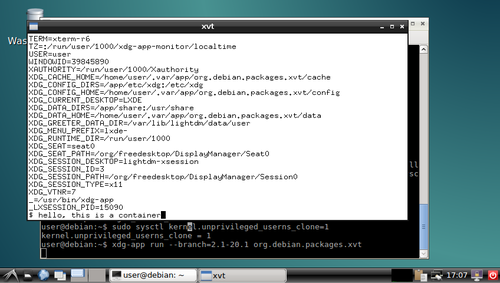
xvt in a container and you can play around with the shell in the xvt and see what you can and can't do in the container. I'm sure there were better ways to do most of this, but I think there's value in having such a simplistic demo to go alongside the various GNOMEish apps.
Acknowledgements: Thanks to all those!

Lunar: Only allow outgoing connections through Tor

Using Tor helps take back control of what data one decides to share online. It also helps in avoiding surveillance from the local network (think of someone listening to the public Wi-Fi) or the Internet access provider. But it is easy to make mistakes: Tor Browser, the easiest and most common way to use Tor, is just a web browser. Extra special care is required to make other applications use Tor, and it is easy to forget to change settings, let alone actual attackers. That's why using Tails is often recommended as everything is preconfigured and it requires traffic to go through Tor by various means. Qubes or Whonix also have interesting properties, but require reinstalling systems and changing habits. Meanwhile, securing the network on an already installed system can help you feel better. A potential solution to prevent connections from leaking out without going through Tor is simply to prevent all connections from leaving the computer, except the ones going to the Tor network. This can quite easily be implemented by setting up an outgoing firewall. Using the default settings, a Tor client can potentially connect to any of the 2,000 Guard relays. While there are ways to get such a list and turn it into firewall rules, we are going to use an easier solution. Because the list of Tor relays is public, censors have often used it to prevent people from connecting to the Tor network. The Tor project came up with bridges as a work-around. Bridges are entry nodes in the Tor network. For public bridges, users can only get a few bridge addresses at a time, preventing an adversary from easily blocking them at all once. When configured to use a set of bridges, Tor will only connect to their addresses. This will make our firewall much shorter. The instructions that follow should work on Debian Jessie and later versions. Adapting them to other systems should not be too hard either. We assume that Tor Browser is already installed. As we will want other applications to use Tor than just the browser, we also want to install a system-wide instance:
# apt install tor
Next, visit bridges.torproject.org to request a set of bridges: BridgeDB landing page You then need to select the type of bridges. Tor standard protocol is easy to identify as such. The Tor project has developed pluggable transports to easily disguise the traffic, but using them is outside the scope for this documentation. So lets stay with the default type of bridges: BridgeDB bridge type selection After solving a CAPTCHA, you'll get a list of addresses and fingerprints for a couple of bridges like the following one: Example bridge list from BridgeDB (blurred to protect the actual bridges To tell Tor to use these bridges, edit /etc/tor/torrc, and at the end, add something like:
UseBridges 1
Bridge 109.XXX.XXX.XXX:4XXX 2244XXXXXXXXXXXXXXXXXXXXXXXXXXXXXXXXXXXX
Bridge 37.XXX.XXX.XXX:1XXXX 9CF0XXXXXXXXXXXXXXXXXXXXXXXXXXXXXXXXXXXX
Bridge 171.XXX.XXX.XXX:4XXX 7705XXXXXXXXXXXXXXXXXXXXXXXXXXXXXXXXXXXX
Replace the actual addresses and fingerprints by those you got earlier. Now reload the daemon and make sure that it still connects to the network:
# service tor reload
# tail -f /var/log/tor/log
Tor Browser also needs to be told to use these bridges. Open the onion menu close to the location bar, and select Tor Network Settings . Tor Browser  onion menu In there, tick My Internet Service Provider (ISP) blocks connections to the Tor network and paste the list of bridges below Enter custom bridges: Tor Browser Network Settings Before we restrict outgoing connections to only use the Tor network, lets configure APT to use Tor as well so we can continue installing and upgrading packages in the future:
# apt install apt-transport-tor
The following command will reconfigure APT to use Tor to access the currently configured package repositories. It basically takes care of replacing every http:// by tor+http://:
# sed -e 's/^[^#]*\(deb\(-src\)\?\W\+\)http/\1tor+http/' -i /etc/apt/sources.list /etc/apt/sources.list.d/*.list
Lets see if it still works:
# apt update
One last thing: sometimes, we still need to bypass our restrictions and access the network directly. Some websites sadly deny access to Tor users, or we might need to login through a captive portal before being able to use a random network. To make it practical, we are going to create a new user account. This will enable us to use the desktop user switching capabilities to start a new browser or sudo for command line applications. In this example, the user is going to be named passthrough:
# adduser passthrough
Make sure to set a proper password! Now lets configure the firewall. Here we are going to use ferm which makes it fairly easy to do low-level firewall rule in a readable manner:
# apt install ferm
We want the firewall to be started at boot time. Now edit its configuration in /etc/ferm/ferm.conf. At the end, add:
# Let's block everything for both IPv4 and IPv6, except to localhost,
# already established connections and the special 'passthrough' user.
domain (ip ip6) chain OUTPUT  
    policy DROP;
    outerface lo ACCEPT;
    proto icmp ACCEPT;
    mod state state (ESTABLISHED RELATED) ACCEPT;
    mod owner uid-owner "passthrough" ACCEPT;
 
# Now for IPv4, we want to restrict output to configured Tor bridges
domain ip chain OUTPUT  
    # Don't break network autoconfiguration
    mod owner uid-owner 0 proto udp dport bootps ACCEPT;
    # Allow bridges defined in torrc by getting them directly
    # from the configuration file.
    @include "sed -n -e 's/^Bridge \([^ ]* \)\?\([0-9.]*\):\([0-9]*\).*/daddr \2 proto tcp dport \3 ACCEPT;/p' /etc/tor/torrc  ";
 
# Let's REJECT everything else so we get notice instead of timeouts
domain (ip ip6) chain OUTPUT REJECT;
Reload the firewall through:
# service ferm reload
Lets do some tests:
# ping check.torproject.org
  ping: unknown host check.torproject.org
# tor-resolve check.torproject.org
  38.229.72.22
# ping 38.229.72.22
  From 192.168.7.234 icmp_seq=1 Destination Port Unreachable
# curl https://check.torproject.org/
  curl: (6) Could not resolve host: check.torproject.org
# curl -I https://38.229.72.22/
  curl: (7) Failed to connect to 38.229.72.22 port 443: Connection refused
# curl --socks5 127.0.0.1:9050 https://check.torproject.org/
  curl: (6) Could not resolve host: check.torproject.org
# curl --silent --socks5-hostname 127.0.0.1:9050 https://check.torproject.org/   grep Congratulations
  Congratulations. This browser is configured to use Tor.
# sudo -u passthrough ping -c 1 check.torproject.org
  64 bytes from sergii.torproject.org (38.229.72.22): icmp_seq=1 ttl=54 time=148 ms
# sudo -u passthrough curl --silent https://check.torproject.org/   grep Sorry
  Sorry. You are not using Tor.
One last thing to complete the setup: for command line applications like SSH, torsocks does wonders. Just prefix your usual commands by torsocks and they should work:
# apt install torsocks
# torsocks curl --silent https://check.torproject.org/   grep Congratulations
  Congratulations. This browser is configured to use Tor.
All set! In case you ever need to turn it all off, just ask ferm to reconfigure the firewall:
# service ferm stop
But don't forget to turn it back on later!
# service ferm start
Ideally, we would have a way to automatically configure a different set of bridges for each network we connect to make it more difficult to trace the computer from network to network. But there's quite some more work to be done on various levels before that can be done in an integrated manner (torshiftchange and tordyguards are promising options). Meanwhile, be aware that you might want to keep a fresh set of bridges handy to configure them after leaving for a trip. Another downside of the setup currently is that it doesn't allow for network time synchronization. That might make the system fingerprintable by using its clock drift. To use obfs4 bridges which helps defeating censored networks, you will need two extra steps. First, install the required software:
# apt install obfs4proxy
Then add the following extra line to /etc/tor/torrc:
ClientTransportPlugin obfs2,obfs3,obfs4,scramblesuit exec /usr/bin/obfs4proxy
You can then request obfs4 bridges from BridgeDB. These changes are only required for the system-wide Tor daemon, as Tor Browser comes with obs4proxy preconfigured. Kudos to Micah for proofreading this article.

28 January 2016

Joachim Breitner: Dreaming of role playing

Recently, at a summer-school-like event, we were discussing pen-and-paper role playing. I m not sure if this was after a session of role-playing, but I was making the point that you don t need much or any at all of the rules, and scores, and dice, if you are one of the story-telling role players, and it can actually be more fun this way. As an example, I said, it can make sense if one of the players (and the game master, I suppose) reads up a lot about one aspect of the fantasy world, e.g. one geographical area, one cult, one person, and then this knowledge is used to create an exciting puzzle, even without any opponents. I m not quite sure, but I think I fell asleep shortly after, and I dreamed of such a role playing session. It was going roughly like this:
I (a human), and my fellows (at least a dwarf, not sure about the rest) went to some castle. It was empty, but scary. We crossed its hall, and went into a room on the other side. It was locked towards the hall by a door that covered the door frame only partly, and suddenly we could see a large Ogre, together with other foul folk not worth mentioning, hammered at the door. My group (which was a bit larger in that moment) all prepared shooting arrows at him the moment it burst through the door. I had the time to appreciate the ingenuity that we all waited for him to burst through, so that none of the arrows would bounce of the door, but it did not help, and we ran from the castle, over a field, through a forest, at the other side of which we could see, below a sleep slope, a house, so we went there. The path towards that was filled with tracks that looked surprisingly like car tracks. When we reached the spot there was no house any more, but rather a cold camp side. We saw digging tools, and helmets (strangely, baseball helmets) were arranged in a circle, as if it was a burial site. We set up camp there and slept. It occurred to me that I must have been the rightful owner of the castle, and it was taken by me from my brother and his wife, who denied my existence or something treacherously like that. When we woke up at the camp side, she were there, together with what must be my niece. My sister in law mocked us for fighting unsuccessfully at the castle, but my niece was surprised to see me, as I must have a very similar appearance to my brother. She said that her mother forbid it, but she nevertheless sneakily takes out something which looks like a Gameboy with a camera attachment and a CompactFlash card from her mothers purse, puts it in and take a photo of me. This is when I realize that I will get my castle back.
At that moment, I woke up. I somewhat liked the story (and it was a bit more coherent in my mind than what I then wrote down here), so I wanted to write it down. I quickly fetched my laptop. My friends at the summer school were a bit worried, and I promised not to mention their names and concrete places, and started writing. They distracted me, so I searched for a place of my own, lied down (why? no idea), and continued writing. I had to to touch writing on my belly, because my laptop was not actually there. I also noticed that I am back at the camp side, and that I am still wearing my back protector that I must have been wearing while fighting in the castle, and which I did not take off while sleeping at the camp side. Funnily, it was not a proper medieval amour, but rather my snowboarding back protector.
At that moment, I woke up. I somewhat liked the story (and it was a bit more coherent in my mind than what I then wrote down here), so I wanted to write it down. I quickly got up, started my laptop, and wrote it down. And this is what you are reading right now. Off to bed again, let s see what happens next.

Holger Levsen: 20160127-torbrowser-daily-tests

Daily tests of torbrowser-launcher, and on every git commit too Tor Browser for reasons beyond this blog post is not part of Debian. To easily and securely use it, one can run
sudo apt-get install torbrowser-launcher
and then run torbrowser-launcher which will download Tor Browser and well, launch it. And this sometimes breaks, when things change, which is rather frequently the case So yesterday I finally woke up to see what I wished to see every morning since November 15th last year, when I started testing torbrowser-launcher systematically on jenkins.debian.net: This is the graphical status overview of torbrowser tests on Debian which are tests installing torbrowser-launcher on and from sid, stretch, jessie-backports, jessie and wheezy-backports, which first download torbrowser via https and via tor, then launches it to finally connect to a debian mirror via an onion-address and then to www.debian.org. In addition to these there are also tests installing the package from stretch on jessie as well as the package from sid on stretch and jessie. Finally there are also tests for building the package from our git branches for various suites and finally we also build a package based on the upstream git master branch merged with our sid packaging. There are 17 different tests currently and they are configured in just two files, a 220 line yaml file defining the jenkins jobs and 528 lines of bash script containing the actual test code. The tests are using schroot, xvfb, kvkbd and gocr and are executed either daily or weekly (those testing the package from ftp.d.o) or on every commit and at least once every month (those testing the package build from git). At least briefly I have been looking at the this page every day since setting up these tests two months ago. Back then, torbrowser-launcher was broken in many suites and then it broke some more and instead of fixing it, I first made these tests so that at least in future there will be automatic notifications when things break. This has worked out rather nicely and torbrowser-launcher got fixed over time too. Doing so in jessie proper took longest as we missed 8.2. Once jessie was fixed the fix for wheezy-backports was also finally accepted very quickly. Which was this Monday, so yesterday on Tuesday I could enjoy for the first time an all "green page"! :-) And then on Wednesday, which is now also yesterday, the nice green page became less green due two new issues: #805173 really needs ca-certificates as depends and not recommends and then also the rendering of the new 5.5 version of torbrowser changed slightly Both issues have been addressed by now. I'm curious how this page will look tomorrow morning. And when I'll consider it the number of false negatives to be low enough so as I'll happily enable notifications to be send to the pkg privacy maintainers mailing list. I think it's almost the case and will keep an eye on the results the coming weeks and months. Last not least: if you want to run similar tests for your Debian project, I'd be glad to help! See you at FOSDEM?

27 January 2016

Jonas Smedegaard: BOSS - Barath Operating System Solutions

Siri and I are on a journey through India and Nepal, with the aim of learning about needs of Debian derivatives, to improve Debian and encourage closer integration.

C-DAC and BOSS Centre for Development of Advanced Computing (C-DAC) is a large organization serving country- and state-level institutions in India, with offices and training facilities several major cities. In Chennai, C-DAC has a staff of 25 developers working full time on Barath Operating System Solutions (BOSS). BOSS is a Debian derivative with several flavors - a desktop for use at primary schools (EduBOSS), a desktop for governmental offices (BOSS), and a range of server-oriented use cases using same core as the desktops with various (non-packaged) code and configuration on top. The core common to all BOSS flavors is a derivative of Debian. Major work has been in strengthening localization and related code - including the development of a font covering all officially supported indic scripts, tuning input methods configuration, and bugfixing LibreOffice handling of complex scripts. All that work is all passed directly to upstream code projects (some still show as derived work until sifting down again into Debian). Besides locale derivations, BOSS currently includes 11 packages not yet in Debian - a mixture of package dependencies, branding data and configuration tweaks. Seems most if not all can fit into Debian with a bit of restructuring work.

small computers As some of you know, I always had a special interest in low-resource (yet general purpose) computers (partly driven by my lack of money to spend on shinier hardware), and since ~2009 particularly in ARM-based computers. After 4 days of meetings and discussion with C-DAC, - literally few minutes before departure - I casually mentioned my interest in small computers, and much to my surprise it turned out that C-DAC also works on that, just didn't get around to mention it yet at the Debian wiki page. C-DAC have worked for a year on tuning BOSS to work on the Vidyut laptop (successor to the Aakash tablet). All except builtin camera is allegedly working. C-DAC is also looking into Olimex boards - my favorites - possibly for use with small server setups but our time was up, we had to leave for our train to Pune, so details on that we will have to figure out through mail.

collaboration In the past, C-DAC have kept in touch with their users through BOSS-specific places like a dedicated IRC channel. Recent changes in management style at the development office have caused less attention available to that communication, however. C-DAC have politely offered their code changes upstram for years, but maybe "too polite": Maybe they have offered only polished fixes, being less loud about "interesting problems". I suggested, as way to improve while limiting (ideally avoiding) extra work, is to mentally take a step up the stream: Treat BOSS not as a derivative but a subset of Debian itself, hang out and discuss issues and ideas at debian irc channels, and maintain your packages directly in Debian. Only parts unfit for Debian - secret stuff done for India military, and dirty configuration hacks not yet possible within Debian Policy - really need to be kept away from Debian. C-DAC agreed, and Debian now has a BOSS team! Anyone interested to follow BOSS as a Debian blend, and perhaps even contribute with opinions and/or code, is quite welcome to join the newly created mailinglist on Debian Alioth: https://lists.alioth.debian.org/mailman/listinfo/boss-devel. Our meetings with BOSS developers have been very pleasant. Even those working at the top of cloud or big data stacks - furthest away from our mindset of tightly "locking down" all parts as packages - were patient with us. Thanks in particular to Prema S and Prathibha B, working on packaging of BOSS for the past 5+ years, and both likely to enter the Debian New Maintainer Queue before long :-)

26 January 2016

Vincent Sanders: Creativity is allowing yourself to make mistakes. Art is knowing which ones to keep.

It seems Scott Adams insights sometimes reach beyond his disturbingly accurate satire. I have written before about my iterative approach to designing the things I make. such as my attempts at furniture and more recently enclosures for various projects.

Raspberry Pi B case design with the faliures
In the workshop today I had a selection of freshly laser cut.completed cases for several single board computers out on the desk. I was asked by a new member of the space how I was able to produce these with no failures?

I was slightly taken aback at the question and had to explain that the designs I was happily running off on the laser cutter are all the result of mistakes, lots of them. The person I was talking to was surprised when I revealed that I was not simply generating fully formed working designs first time.

We chatted for a while and it became apparent that they had been holding themselves back from actually making something because they were afraid the result would be wrong. I went to my box and retrieved the failures from my most recent case design for a Raspberry Pi model B to put alongside the successful end product to try and encourage them.

I explained that my process was fairly iterative, sure I attempted to get it right first time by reusing existing working solutions as a basis but that when the cost of iterating is relatively small it is sometimes worthwhile to just accept the failures.

For example in this latest enclosure:

My collection of failed cases
Generally I do not need this many iterations and get it right second time, however experience caused me to use offcuts and scrap material for the initial versions expecting to have issues. The point is that I was willing to make the iterations and not see them as failures.

The person I was talking to could not get past the possibility of having a pile of scrap material, it was wasteful in their view and my expectation to fail was unfathomable. They left with somewhat of a bad view of me and my approach.

I pondered this turn of events for a time and they did have a point in that I have a collection of thirty or so failures from all my various designs most of which is unusable. I then realised I have produced over fifty copies of those designs not just for myself but for other people and published them for anyone else to replicate, so on balance I think I am doing ok on wastage.

The stronger argument for me personally is that I have made something. I love making things, be that software, electronics or physical designs. It may not always be the best solution but I usually end up with something that works.

That makespace member may not like my approach but in the final reckoning, I have made something, their idea is still just an idea. So Scott I may not be an artist but I am at least creative and that is halfway there.

25 January 2016

Sven Hoexter: blabladns.xyz DynDNS service

In case someone is in need of a free DynDNS service which allows you to configure AAAA recods and the TTL, you might want to look at BLABLADNS. It's rather HTTP API centric so you can configure everything with curl if you like.

Antoine Beaupr : Internet in Cuba

A lot has been written about the Internet in Cuba over the years. I have read a few articles, from New York Times' happy support for Google's invasion of Cuba to RSF's dramatic and fairly outdated report about censorship in Cuba. Having written before about Internet censorship in Tunisia, I was curious to see if I could get a feel of what it is like over there, now that a new Castro is in power and the Obama administration has started restoring diplomatic ties with Cuba. With those political changes coming signifying the end of an embargo that has been called genocidal by the Cuban government, it is surprisingly difficult to get fresh information about the current state of affairs. This article aims to fill that gap in clarifying how the internet works in Cuba, what kind of censorship mechanisms are in place and how to work around them. It also digs more technically into the network architecture and performance. It is published in the hope of providing both Cubans and the rest of the world with a better understanding of their network and, if possible, Cubans ways to access the internet more cheaply or without censorship.

"Censorship" and workarounds Unfortunately, I have been connected to the internet only through the the Varadero airport and the WiFi of a "full included" resort near Jibacoa. I have to come to assume that this network is likely to be on a segregated, uncensored internet while the rest of the country suffers the wrath of the Internet censorship in Cuba I have seen documented elsewhere. Through my research, I couldn't find any sort of direct censorship. The Netalyzr tool couldn't find anything significantly wrong with the connection, other than the obvious performance problems related both to the overloaded uplinks of the Cuban internet. I ran an incomplete OONI probe as well, and it seems there was no obvious censorship detected there as well, at least according to folks in the helpful #ooni IRC channel. Tor also works fine, and could be a great way to avoid the global surveillance system described later in this article. Nevertheless, it still remains to be seen how the internet is censored in the "real" Cuban internet, outside of the tourist designated areas - hopefully future visitors or locals can expand on this using the tools mentioned above, using the regular internet. Usual care should be taken when using any workaround tools, mentioned in this post or not, as different regimes over the world have accused, detained, tortured and killed sometimes for the mere fact of using or distributing circumvention tools. For example, a Russian developer was arrested and detained in 2001 by United States' FBI for exposing vulnerabilities in the Adobe e-books copy protection mechanisms. Similarly, people distributing Tor and other tools have been arrested during the period prior to the revolution in Tunisia.

The Cuban captive portal There is, however, a more pernicious and yet very obvious censorship mechanism at work in Cuba: to get access to the internet, you have to go through what seems to be a state-wide captive portal, which I have seen both at the hotel and the airport. It is presumably deployed at all levels of the internet access points. To get credentials through that portal, you need a username and password which you get by buying a Nauta card. Those cards cost 2$CUC and get you an hour of basically unlimited internet access. That may not seem like a lot for a rich northern hotel party-goer, but for Cubans, it's a lot of money, given that the average monthly salary is around 20$CUC. The system is also pretty annoying to use, because it means you do not get continuous network access: every hour, you need to input a new card, which will obviously make streaming movies and other online activities annoying. It also makes hosting servers basically impossible. So while Cuba does not have, like China or Iran, a "great firewall", there is definitely a big restriction to going online in Cuba. Indeed, it seems to be how the government ensures that Cubans do not foment too much dissent online: keep the internet slow and inaccessible, and you won't get too many Arab spring / blogger revolutions.

Bypassing the Cuban captive portal The good news is that it is perfectly possible for Cubans (or at least for a tourist like me with resources outside of the country) to bypass the captive portal. Like many poorly implemented portals, the portal allows DNS traffic to go through, which makes it possible to access the global network for free by using a tool like iodine which tunnels IP traffic over DNS requests. Of course, the bandwidth and reliability of the connection you get through such a portal is pretty bad. I have regularly seen 80% packet loss and over two minutes of latency:
--- 10.0.0.1 ping statistics ---
163 packets transmitted, 31 received, 80% packet loss, time 162391ms
rtt min/avg/max/mdev = 133.700/2669.535/64188.027/11257.336 ms, pipe 65
Still, it allowed me to login to my home server through SSH using Mosh to workaround the reliability issues. Every once in a while, mosh would get stuck and keep on trying to send packets to probe the server, which would clog the connection even more. So I regularly had to restart the whole stack using these commands:
killall iodine # stop DNS tunnel
nmcli n off # turn off wifi to change MAC address
macchanger -A wlan0 # change MAC address
nmcli n on # turn wifi back on
sleep 3 # wait for wifi to settle
iodine-client-start # restart DNS tunnel
The Koumbit Wiki has good instructions on how to setup a DNS tunnel. I am wondering if such a public service could be of use for Cubans, although I am not sure how it could be deployed only for Cubans, and what kind of traffic it could support... The fact is that iodine does require a server to operate, and that server must be run on the outside of the censored perimeter, something that Cubans may not be able to afford in the first place. Another possible way to save money with the captive portal would be to write something that automates connecting and disconnecting from the portal. You would feed that program a list of credentials and it would connect to the portal only on demand, and disconnect as soon as no traffic goes through. There are details on the implementation of the captive portal below that may help future endeavours in that field.

Private information revealed to the captive portal It should be mentioned, however, that the captive portal has a significant amount of information on clients, which is a direct threat to the online privacy of Cuban internet users. Of course the unique identifiers issued with the Nauta cards can be correlated with your identity, right from the start. For example, I had to give my room number to get a Nauta card issued. Then the central portal also knows which access point you are connected to. For example, the central portal I was connected to Wifi_Memories_Jibacoa which, for anyone that cares to research, will give them a location of about 20 square meters where I was located when connected (there is only one access point in the whole hotel). Finally, the central portal also knows my MAC address, a unique identifier for the computer I am using which also reveals which brand of computer I am using (Mac, Lenovo, etc). While this address can be changed, very few people know that, let alone how. This led me to question whether I would be allowed back in Cuba (or even allowed out!) after publishing this blog post, as it is obvious that I can be easily identified based on the time this article was published, my name and other details. Hopefully the Cuban government will either not notice or not care, but this can be a tricky situation, obviously. I have heard that Cuban prisons are not the best hangout place in Cuba, to say the least...

Network configuration assessment This section is more technical and delves more deeply in the Cuban internet to analyze the quality and topology of the network, along with hints as to which hardware and providers are being used to support the Cuban government.

Line quality The internet is actually not so bad in the hotel. Again, this may be because of the very fact that I am in that hotel, and I get a privileged access to the new fiber line to Venezuela, the ALBA-1 link. The line speed I get is around 1mbps, according to speedtest, which selected a server from LIME in George Town, Cayman Islands:
[1034]anarcat@angela:cuba$ speedtest
Retrieving speedtest.net configuration...
Retrieving speedtest.net server list...
Testing from Empresa de Telecomunicaciones de Cuba (152.206.92.146)...
Selecting best server based on latency...
Hosted by LIME (George Town) [391.78 km]: 317.546 ms
Testing download speed........................................
Download: 1.01 Mbits/s
Testing upload speed..................................................
Upload: 1.00 Mbits/s
Latency to the rest of the world is of couse slow:
--- koumbit.org ping statistics ---
122 packets transmitted, 120 received, 1,64% packet loss, time 18731,6ms
rtt min/avg/max/sdev = 127,457/156,097/725,211/94,688 ms
--- google.com ping statistics ---
122 packets transmitted, 121 received, 0,82% packet loss, time 19371,4ms
rtt min/avg/max/sdev = 132,517/160,095/724,971/93,273 ms
--- redcta.org.ar ping statistics ---
122 packets transmitted, 120 received, 1,64% packet loss, time 40748,6ms
rtt min/avg/max/sdev = 303,035/339,572/965,092/97,503 ms
--- ccc.de ping statistics ---
122 packets transmitted, 72 received, 40,98% packet loss, time 19560,2ms
rtt min/avg/max/sdev = 244,266/271,670/594,104/61,933 ms
Interestingly, Koumbit is actually the closest host in the above test. It could be that Canadian hosts are less affected by bandwidth problems compared to US hosts because of the embargo.

Network topology The various traceroutes show a fairly odd network topology, but that is typical of what I would described as "colonized internet users", which have layers and layers of NAT and obscure routing that keep them from the real internet. Just like large corporations are implementing NAT in a large scale, Cuba seems to have layers and layers of private RFC 1918 IPv4 space. A typical traceroute starts with:
traceroute to koumbit.net (199.58.80.33), 30 hops max, 60 byte packets
 1  10.156.41.1 (10.156.41.1)  9.724 ms  9.472 ms  9.405 ms
 2  192.168.134.137 (192.168.134.137)  16.089 ms  15.612 ms  15.509 ms
 3  172.31.252.113 (172.31.252.113)  15.350 ms  15.805 ms  15.358 ms
 4  pos6-0-0-agu-cr-1.mpls.enet.cu (172.31.253.197)  15.286 ms  14.832 ms  14.405 ms
 5  172.31.252.29 (172.31.252.29)  13.734 ms  13.685 ms  14.485 ms
 6  200.0.16.130 (200.0.16.130)  14.428 ms  11.393 ms  10.977 ms
 7  200.0.16.74 (200.0.16.74)  10.738 ms  10.019 ms  10.326 ms
 8  ix-11-3-1-0.tcore1.TNK-Toronto.as6453.net (64.86.33.45)  108.577 ms  108.449 ms
Let's take this apart line by line:
 1  10.156.41.1 (10.156.41.1)  9.724 ms  9.472 ms  9.405 ms
This is my local gateway, probably the hotel's wifi router.
 2  192.168.134.137 (192.168.134.137)  16.089 ms  15.612 ms  15.509 ms
This is likely not very far from the local gateway, probably still in Cuba. It in one bit away from the captive portal IP address (see below) so it is very likely related to the captive portal implementation.
 3  172.31.252.113 (172.31.252.113)  15.350 ms  15.805 ms  15.358 ms
 4  pos6-0-0-agu-cr-1.mpls.enet.cu (172.31.253.197)  15.286 ms  14.832 ms  14.405 ms
 5  172.31.252.29 (172.31.252.29)  13.734 ms  13.685 ms  14.485 ms
All those are withing RFC 1918 space. Interestingly, the Cuban DNS servers resolve one of those private IPs as within Cuban space, on line #4. That line is interesting because it reveals the potential use of MPLS.
 6  200.0.16.130 (200.0.16.130)  14.428 ms  11.393 ms  10.977 ms
 7  200.0.16.74 (200.0.16.74)  10.738 ms  10.019 ms  10.326 ms
Those two lines are the only ones that actually reveal that the route belongs in Cuba at all. Both IPs are in a tiny (/24, or 256 IP addresses) network allocated to ETECSA, the state telco in Cuba:
inetnum:     200.0.16/24
status:      allocated
aut-num:     N/A
owner:       EMPRESA DE TELECOMUNICACIONES DE CUBA S.A. (IXP CUBA)
ownerid:     CU-CUBA-LACNIC
responsible: Rafael L pez Guerra
address:     Ave. Independencia y 19 Mayo, s/n,
address:     10600 - La Habana - CH
country:     CU
phone:       +53 7 574242 []
owner-c:     JOQ
tech-c:      JOQ
abuse-c:     JEM52
inetrev:     200.0.16/24
nserver:     NS1.NAP.ETECSA.NET
nsstat:      20160123 AA
nslastaa:    20160123
nserver:     NS2.NAP.ETECSA.NET
nsstat:      20160123 AA
nslastaa:    20160123
created:     20030512
changed:     20140610
Then the last hop:
 8  ix-11-3-1-0.tcore1.TNK-Toronto.as6453.net (64.86.33.45)  108.577 ms  108.449 ms  108.257 ms
...interestingly, lands directly in Toronto, in this case going later to Koumbit but that is the first hop that varies according to the destination, hops 1-7 being a common trunk to all external communications. It's also interesting that this shoves a good 90 milliseconds extra in latency, showing that a significant distance and number of equipment crossed. Yet a single hop is crossed, not showing the intermediate step of the Venezuelan link or any other links for that matter. Something obscure is going on there... Also interesting to note is the traceroute to the redirection host, which is only one hop away:
traceroute to 192.168.134.138 (192.168.134.138), 30 hops max, 60 byte packets
 1  192.168.134.138 (192.168.134.138)  6.027 ms  5.698 ms  5.596 ms
Even though it is not the gateway:
$ ip route
default via 10.156.41.1 dev wlan0  proto static  metric 1024
10.156.41.0/24 dev wlan0  proto kernel  scope link  src 10.156.41.4
169.254.0.0/16 dev wlan0  scope link  metric 1000
This means a very close coordination between the different access points and the captive portal system. Finally, note that there seems to be only three peers to the Cuban internet: Teleglobe, formerly Canadian, now owned by the Indian [[!wiki Tata group]], and Telef nica, the Spanish Telco that colonized most of Latin America's internet, all the way down to Argentina. This is confirmed by my traceroutes, which show traffic to Koumbit going through Tata and Google's going through Telef nica.

Captive portal implementation The captive portal is https://www.portal-wifi-temas.nauta.cu/ (not accessible outside of Cuba) and uses a self-signed certificate. The domain name resolves to 190.6.81.230 in the hotel. Accessing http://1.1.1.1/ gives you a status page which allows you to disconnect from the portal. It actually redirects you to https://192.168.134.138/logout.user. That is also a self-signed, but different certificate. That certificate actually reveals the implication of Gemtek which is a "world-leading provider of Wireless Broadband solutions, offering a wide range of solutions from residential to business". It is somewhat unclear if the implication of Gemtek here is deliberate or a misconfiguration on the part of Cuban officials, especially since the certificate is self-signed and was issued in 2002. It could be, however, a trace of the supposed involvement of China in the development of Cuba's networking systems, although Gemtek is based in Taiwan, and not in the China mainland. That IP, in turn, redirects you to the same portal but in a page that shows you the statistics:
https://www.portal-wifi-temas.nauta.cu/?mac=0024D1717D18&script=logout.user&remain_time=00%3A55%3A52&session_time=00%3A04%3A08&username=151003576287&clientip=10.156.41.21&nasid=Wifi_Memories_Jibacoa&r=ac%2Fpopup
Notice how you see the MAC address of the machine in the URL (randomized, this is not my MAC address), along with the remaining time, session time, client IP and the Wifi access point ESSID. There may be some potential in defrauding the session time there, I haven't tested it directly. Hitting Actualizar redirects you back to the IP address, which redirects you to the right URL on the portal. The "real" logout is at:
http://192.168.134.138/logout.user?cmd=logout
The login is performed against https://www.portal-wifi-temas.nauta.cu/index.php?r=ac/login with a referer of:
https://www.portal-wifi-temas.nauta.cu/?&nasid=Wifi_Memories_Jibacoa&nasip=192.168.134.138&clientip=10.156.41.21&mac=EC:55:F9:C5:F2:55&ourl=http%3a%2f%2fgoogle.ca%2f&sslport=443&lang=en-US%2cen%3bq%3d0.8&lanip=10.156.41.1
Again, notice the information revealed to the central portal.

Equipment and providers I ran Nmap probes against both the captive portal and the redirection host, in the hope of finding out how they were built and if they could reveal the source of the equipment used. The complete nmap probes are available in nmap, but it seems that the captive portal is running some embedded device. It is confusing because the probe for the captive portal responds as if it was the gateway, which blurs even more the distinction between the hotel's gateway and the captive portal. This raises the distinct possibility that all access points are actually captive portal that authenticate to another central server. The nmap traces do show three distinct hosts however:
  • the captive portal (www.portal-wifi-temas.nauta.cu, 190.6.81.230)
  • some redirection host (192.168.134.138)
  • the hotel's gateway (10.156.41.1)
They do have distinct signatures so the above may be just me misinterpreting traceroute and nmap results. Your comments may help in clarifying the above. Still, the three devices show up as running Linux, in the two last cases versions between 2.4.21 and 2.4.31. Now, to find out which version of Linux it is running is way more challenging, and it is possible it is just some custom Linux distribution. Indeed, the webserver shows up as G4200.GSI.2.22.0155 and the SSH server is running OpenSSH 3.0.2p1, which is basically prehistoric (2002!) which corroborates the idea that this is some Gemtek embedded device. The fact that those devices are running 14 years old software should be a concern to the people responsible for those networks. There is, for example, a remote root vulnerability that affects that specific version of OpenSSH, among many other vulnerabilities.

A note on Nauta card's security Finally, one can note that it is probably trivial to guess card UIDs. All cards i have here start with the prefix 15100, the following digits being 3576 or 4595, presumably depending on the "batch" that was sent to different hotels, which seems to be batches of 1000 cards. You can also correlate the UID with the date at which the card was issued. For example, 15100357XXX cards are all valid until 19/03/2017, and 151004595XXX cards are all valid until 23/03/2017. Here's the list of UIDs I have seen:
151004595313
151004595974
151003576287
151003576105
151003576097
The passwords, on the other hand, do seem fairly random (although my sample size is small). Interestingly, those passwords are also 12 digits long, which is about as strong as a seven-letter password (mixed uppercase and lowercase). If there are no rate-limiting provisions on that captive portal, it could be possible to guess those passwords, since you have free rein on accessing those routers. Depending on the performance of the routers, you could be lucky and find a working password for free...

Conclusion Clearly, Internet access in Cuba needs to be modernized. We can clearly see that Cuba years behind the rest of the Americas, if only through the percentage of the population with internet access, or download speeds. The existence of a centralized captive portal also enables a huge surveillance potential that should be a concern for any Cuban, or for that matter, anyone wishing to live in a free society. The answer, however, lies not in the liberalization of commerce and opening the doors to the US companies and their own systems of surveillance. It should be possible, and even desirable for Cubans to establish their own neutral network, a proposal I have made in the past even for here in Qu bec. This network could be used and improved by Cubans themselves, prioritizing local communities that would establish their own infrastructure according to their own needs. I have been impressed by this article about the El Paquete system - it shows great innovation and initiative from Cubans which are known for engaging in technology in a creative way. This should be leveraged by letting Cubans do what they want with their networks, not telling them what to do. The best the Googles of this world can do to help Cuba is not to colonize Cuba's technological landscape but to cleanup their own and make their own tools more easily accessible and shareable offline. It is something companies can do right now, something I detailed in a previous article.

24 January 2016

Lunar: Reproducible builds: week 39 in Stretch cycle

What happened in the reproducible builds effort between January 17th and January 23rd:

Toolchain fixes James McCoy uploaded subversion/1.9.3-2 which removes -Wdate-time from CPPFLAGS passed to swig enabling several packages to build again. The switch made in binutils/2.25-6 to use deterministic archives by default had the unfortunate effect of breaking a seldom used feature of make. Manoj Srivastava asked on debian-devel the best way to communicate the changes to Debian users. Lunar quickly came up with a patch that displays a warning when Make encounters deterministic archives. Manoj made it available in make/4.1-2 together with a NEWS file advertising the change. Following Guillem Jover's comment on the latest patch to make mtimes of packaged files deterministic, Daniel Kahn Gillmor updated and extended the patch adding the --clamp-mtime option to GNU Tar. Mattia Rizzolo updated texlive-bin in the reproducible experimental repository.

Packages fixed The following packages became reproducible after getting fixed: Some uploads fixed some reproducibility issues, but not all of them: Patches submitted which have not made their way to the archive yet:

reproducible.debian.net Transition from reproducible.debian.net to the more general tests.reproducible-builds.org has started. More visual changes are coming. (h01ger) A plan on how to run tests for F-Droid has been worked out. (hc, mvdan, h01ger) A first step has been made by adding a Jenkins job to setup an F-Droid build environment. (h01ger)

diffoscope development diffoscope 46 has been released on January 19th, followed-up by version 47 made available on January 23rd. Try it online at try.diffoscope.org! The biggest visible change is the improvement to ELF file handling. Comparisons are now done section by section, using the most appropriate tool and options to get meaningful results, thanks to Dhole's work and Mike Hommey's suggestions. Also suggested by Mike, symbols for IP-relative ops are now filtered out to remove clutter. Understanding differences in ELF files belonging to Debian packages should also be much easier as diffoscope will now try to extract debug information from the matching dbgsym package. This means objdump disassembler should output line numbers for packages built with recent debhelper as long as the associated debug package is in the same directory. As diff tends to consume huge amount of memory on large inputs, diffoscope has a limit in place to prevent crashes. diffoscope used to display a difference every time the limit was hit. Because this was confusing in case there were actually no differences, a hash is now internally computed to only report a difference when one exists. Files in archives and other container members are now compared in the original order. This should not matter in most case but overall give more predictable results. Debian .buildinfo files are now supported. Amongst other minor fixes and improvements, diffoscope will now properly compare symlinks in directories. Thanks Tuomas Tynkkynen for reporting the problem.

Package reviews 70 reviews have been removed, 125 added and 33 updated in the previous week, gcc-5 amongst others. 25 FTBFS issues have been filled by Chris Lamb, Daniel Stender, Martin Michlmayr.

Misc. The 16th FOSDEM will happen in Brussels, Belgium on January 30-31st. Several talks will be about reproducible builds: h01ger about the general ecosystem, Fabian Keil about the security oriented ElectroBSD, Baptiste Daroussin about FreeBSD packages, Ludovic Court s about Guix.

21 January 2016

Jonathan Dowland: Network Attached Storage

little and large little and large
I've just upgraded my home Network Storage box. Until now, it was very discreet, about the size of a car radio. It lived on one of my bookcases and I was very happy with it but it could only take 2.5" sized hard drives and I've outgrown what you can fit on them. I've ended up moving to 2x4T 3.5" drives, a Coolermaster Elite 110 case and re-using the mainboard/CPU and RAM. This is hopefully enough capacity that I don't need to look at another upgrade for a few years, and the case could take more drives if I need it to. The Elite 110 is - by Mini-ITX case terms - pretty small, but still 6 times larger in volume than the old case. In the consumer NAS market, there are plenty of appliances that takes two 3.5" drives and are much smaller than that (such as the WD MyBook Duo, or Synology DS214). Unfortunately I could not find any cases that were of this size for a DIY build. Did I miss anything obvious? (As to why I choose DIY, that could be the subject for a future post.) The full boring details of the build are on the NAS system page.

Jan Wagner: Using nginx as reverse proxy (for containered Ghost)

In some cases it might be a good idea to use a reverse proxy in front of a web application. Nginx is a very common solution for this scenario these days. As I started with containers for some of my playgrounds, I decided to go this route.

Container security When looking around to implement a nginx in front of a Docker web application, in most cases nginx itself is also a Docker container.

In my eyes Docker containers have a huge disadvantage. To get updated software (at least security related) into production, you have to hope that your container image is well maintained or you have to care about it yourself. If this not the case, you might worry.
As long as you don't have container solutions deployed in large scale (and make use of automatically rebuilding and deploying your container images) I would recommend to keep the footprint of your containered applications as small as possible from security point of view. So I decided to run my nginx on the same system where the Docker web applications are living, but you can also have it placed on a system in front of your container systems. Updates are supplied via usual Distribution security updates.

Installing nginx
# aptitude install nginx
I don't will advise you on the usual steps about setting up nginx, but will focus on things required to proxy into your container web application.

Configuration of nginx As our Docker container for Ghost exposes port 2368, we need to define our upstream server. I've done that in conf.d/docker-ghost.conf.
upstream docker-ghost    
  server localhost:2368;
 
The vHost configuration can be taken into /etc/nginx/nginx.conf but I would recommend to use a config file in /etc/nginx/sites-available/ instead.
server    
  listen 80;
  server_name log.cyconet.org;
  include /etc/nginx/snippets/ghost_vhost.conf;
  location /  
    proxy_pass                          http://docker-ghost;
    proxy_set_header  Host              $http_host;   # required for docker client's sake
    proxy_set_header  X-Real-IP         $remote_addr; # pass on real client's IP
    proxy_set_header  X-Forwarded-For   $proxy_add_x_forwarded_for;
    proxy_set_header  X-Forwarded-Proto $scheme;
    proxy_read_timeout                  900;
   
 
Let's enable the configuration and reload nginx:
# ln -s ../sites-available/ghost.conf /etc/nginx/sites-enabled/ghost.conf && \
 service nginx configtest && service nginx reload

Going further This is a very basic configuration. You might think about delivering static content (like images) directly from your Docker data volume, caching and maybe encryption.

Russell Coker: Finding Storage Performance Problems

Here are some basic things to do when debugging storage performance problems on Linux. It s deliberately not an advanced guide, I might write about more advanced things in a later post. Disk Errors When a hard drive is failing it often has to read sectors several times to get the right data, this can dramatically reduce performance. As most hard drives aren t monitored properly (email or SMS alerts on errors) it s quite common for the first notification about an impending failure to be user complaints about performance. View your kernel message log with the dmesg command and look in /var/log/kern.log (or wherever your system is configured to store kernel logs) for messages about disk read errors, bus resetting, and anything else unusual related to the drives. If you use an advanced filesystem like BTRFS or ZFS there are system commands to get filesystem information about errors. For BTRFS you can run btrfs device stats MOUNTPOINT and for ZFS you can run zpool status . Most performance problems aren t caused by failing drives, but it s a good idea to eliminate that possibility before you continue your investigation. One other thing to look out for is a RAID array where one disk is noticeably slower than the others. For example if you have a RAID-5 or RAID-6 array every drive should have almost the same number of reads and writes, if one disk in the array is at 99% performance capacity and the other disks are at 5% then it s an indication of a failing disk. This can happen even if SMART etc don t report errors. Monitoring IO The iostat program in the Debian sysstat package tells you how much IO is going to each disk. If you have physical hard drives sda, sdb, and sdc you could run the command iostat -x 10 sda sdb sdc to tell you how much IO is going to each disk over 10 second periods. You can choose various durations but I find that 10 seconds is long enough to give results that are useful. By default iostat will give stats on all block devices including LVM volumes, but that usually gives too much data to analyse easily. The most useful things that iostat tells you are the %util (the percentage utilisation anything over 90% is a serious problem), the reads per second r/s , and the writes per second w/s . The parameters to iostat for block devices can be hard drives, partitions, LVM volumes, encrypted devices, or any other type of block device. After you have discovered which block devices are nearing their maximum load you can discover which of the partitions, RAID arrays, or swap devices on that disk are causing the load in question. The iotop program in Debian (package iotop) gives a display that s similar to that of top but for disk io. It generally isn t essential (you can run ps ax grep D to get most of that information), but it is handy. It will tell you which programs are causing IO on a busy filesystem. This can be good when you have a busy system and don t know why. It isn t very useful if you have a system that is used for one task, EG a database server that is known to be busy doing database stuff. It s generally a good idea to have sysstat and iotop installed on all systems. If a system is experiencing severe performance problems you might not want to wait for new packages to be installed. In Debian the sysstat package includes the sar utility which can give historical information on system load. One benefit of using sar for diagnosing performance problems is that it shows you the time of day that has the most load which is the easiest time to diagnose performance problems. Swap Use Swap use sometimes confuses people. In many cases swap use decreases overall disk use, this is the design of the Linux paging algorithms. So if you have a server that accesses a lot of data it might swap out some unused programs to make more space for cache. When you have multiple virtual machines on one system sharing the same disks it can be difficult to determine the best allocation for RAM. If one VM has some applications allocating a lot of RAM but not using it much then it might be best to give it less RAM and force those applications into swap so that another VM can cache all the data it accesses a lot. The important thing is not the amount of swap that is allocated but the amount of IO that goes to the swap partition. Any significant amount of disk IO going to a swap device is a serious problem that can be solved by adding more RAM. Reads vs Writes The ratio of reads to writes depends on the applications and the amount of RAM. Some applications can have most of their reads satisfied from cache. For example an ideal configuration of a mail server will have writes significantly outnumber reads (I ve seen ratios of 5:1 for writes to reads on real mail servers). Ideally a mail server will cache all new mail for at least an hour and as the most prolific users check their mail more frequently than that most mail will be downloaded before it leaves the cache. If you have a mail server with reads outnumbering writes then it needs more RAM. RAM is cheap nowadays so if you don t want to compete with Gmail it should be cheap to buy enough RAM to cache all recent mail. The ratio of reads to writes is important because it s one way of quickly determining if you have enough RAM and adding RAM is often the cheapest way of improving performance. Unbalanced IO One common performance problem on systems with multiple disks is having more load going to some disks than to others. This might not be a problem (EG having cron jobs run on disks that are under heavy load while the web server accesses data from lightly loaded disks). But you need to consider whether it s desirable to have some disks under more load than others. The simplest solution to this problem is to just have a single RAID array for all data storage. This is also the solution that gives you the maximum available disk space if you use RAID-5 or RAID-6. A more complex option is to use some SSDs for things that require performance and disks for things that don t. This can be done with the ZIL and L2ARC features of ZFS or by just creating a filesystem on SSD for the data that is most frequently accessed. What Did I Miss? I m sure that I missed something, please let me know of any other basic things to do or suggestions for a post on more advanced things.

20 January 2016

Matthew Garrett: Linux Foundation quietly drops community representation

The Linux Foundation is an industry organisation dedicated to promoting, protecting and standardising Linux and open source software[1]. The majority of its board is chosen by the member companies - 10 by platinum members (platinum membership costs $500,000 a year), 3 by gold members (gold membership costs $100,000 a year) and 1 by silver members (silver membership costs between $5,000 and $20,000 a year, depending on company size). Up until recently individual members ($99 a year) could also elect two board members, allowing for community perspectives to be represented at the board level.

As of last Friday, this is no longer true. The by-laws were amended to drop the clause that permitted individual members to elect any directors. Section 3.3(a) now says that no affiliate members may be involved in the election of directors, and section 5.3(d) still permits at-large directors but does not require them[2]. The old version of the bylaws are here - the only non-whitespace differences are in sections 3.3(a) and 5.3(d).

These changes all happened shortly after Karen Sandler announced that she planned to stand for the Linux Foundation board during a presentation last September. A short time later, the "Individual membership" program was quietly renamed to the "Individual supporter" program and the promised benefit of being allowed to stand for and participate in board elections was dropped (compare the old page to the new one). Karen is the executive director of the Software Freedom Conservancy, an organisation involved in the vitally important work of GPL enforcement. The Linux Foundation has historically been less than enthusiastic about GPL enforcement, and the SFC is funding a lawsuit against one of the Foundation's members for violating the terms of the GPL. The timing may be coincidental, but it certainly looks like the Linux Foundation was willing to throw out any semblance of community representation just to ensure that there was no risk of someone in favour of GPL enforcement ending up on their board.

Much of the code in Linux is written by employees paid to do this work, but significant parts of both Linux and the huge range of software that it depends on are written by community members who now have no representation in the Linux Foundation. Ignoring them makes it look like the Linux Foundation is interested only in promoting, protecting and standardising Linux and open source software if doing so benefits their corporate membership rather than the community as a whole. This isn't a positive step.

[1] Article II of the bylaws
[2] Other than in the case of the TAB representative, an individual chosen by a board elected via in-person voting at a conference

comment count unavailable comments

Scott Kitterman: Python Packaging Build-Depends

As a follow-up to my last post where I discussed common Python packaging related errors, I thought it would be worth to have a separate post on how to decide on build-depends for Python (and Python3) packages. The python ecosystem has a lot of packages built around supporting multiple versions of python (really python3 now) in parallel. I m going to limit this post to packages you might need to build-depend on directly.

Python (2) Since Jessie (Debian 8), python2.7 has been the only supported python version. For development of Stretch and backports to Jessie there is no need to worry about multiple python versions. As a result, several all packages are (and will continue to be) equivalent to their non- all counterparts. We well continue to provide the all packages for backward compatibility, but they aren t really needed any more. python (or python-all) This is the package to build-depend on if your package is pure Python (no C extensions) and does not for some other reason need access to the Python header files (there are a handful of packages this latter caveat applies to, if you don t know if it applies to your package, it almost certainly doesn t). You should also build-depend on dh-python. It was originally shipped as part of the python package (and there is still an old version provided), but to get the most current code with new bug fixes and features, build-depend on dh-python. python-dev (or python-all-dev) If your package contains compiled C or C++ extensions, this package either provides or depends on the packages that provide all the header files you need. Do not also build-depend on python. python-dev depends on it and it is just an unneeded redundancy. python-dbg (or python-all-dbg) Add this if you build a -dbg package (not needed for -dbgsym). Other python packages There is not, AFAICT, any reason to build-dep on any of the other packages provided (e.g. libpython-dev). It is common to see things like python-all, python, python-dev, libpython-dev in build-depends. This could be simplified just to python-all-dev since it will pull the rest in.

Python3 Build-depends selection for Python 3 is generally similar, except that we continue to want to be able to support multiple python3 versions (as we currently support python3.4 and python3.5). There are a few differences: All or not -all Python3 transitions are much easier when C extensions are compiled for all supported versions. In many cases all that s needed if you use pybuild is to build-depend on python3-all-dev. While this is preferred, in many cases this would be technically challenging and not worth the trouble. This is mostly true for python3 based applications. Python3-all is mostly useful for running test suites against all supported python3 versions. Transitions As mentioned in the python section above, build-depends on python3- all- dev is generally only needed for compiled C extensions. For python3 these are also the packages that need to be rebuilt for a transition. Please avoid -dev build-depends whenever possible for non-compiled packages. Please keep your packages that do need rebuilding binNMU safe. Transitions happen in three stages:
  1. A new python3 version is added to supported python3 versions and packages that need rebuilding due to compiled code and that support multiple versions are binNMUed to add support for the new version.
  2. The default python3 is changed to be the new version and packages that only support a single python3 version are rebuilt.
  3. The old python3 version is dropped from supported versions and packages will multiple-version support are binNMUed to remove support for the dropped version.
This may seem complex (OK, it is a bit), but it enables a seamless transition for packages with multi-version support since they always support the default version. For packages that only support a single version there is an inevitable period when they go uninstallable once the default version has changed and until they can be rebuilt with the new default. Specific version requirements Please don t build-depend against specific python3 versions. Those don t show up in the transition tracker. Use X-Python3-Version (see python policy for details) to specify the version you need.

Summary Please check your packages and only build-depend on the -dev packages when you need it. Check for redundancy and remove it. Try and build for all python3 versions. Don t build-depend on specific python3 versions.

19 January 2016

Jan Wagner: Trying icinga2 and icingaweb2 with Docker

In case you ever wanted to look at Icinga2, even into distributed features, without messing with installing whole server setups, this might interesting for you. At first, you need to have a running Docker on your system. For more information, have a look into my previous post!

Initiating Docker images
$ git clone https://github.com/joshuacox/docker-icinga2.git && \
  cd docker-icinga2
$ make temp
[...]
$ make grab
[...]
$ make prod
[...]

Setting IcingaWeb2 password (Or using the default one)
$ make enter
docker exec -i -t  cat cid  /bin/bash  
root@ce705e592611:/# openssl passwd -1 f00b4r  
$1$jgAqBcIm$aQxyTPIniE1hx4VtIsWvt/
root@ce705e592611:/# mysql -h mysql icingaweb2 -p -e \  
  "UPDATE icingaweb_user SET password_hash='$1$jgAqBcIm$aQxyTPIniE1hx4VtIsWvt/' WHERE name='icingaadmin';"
Enter password:  
root@ce705e592611:/# exit  

Setting Icinga Classic UI password
$ make enter
docker exec -i -t  cat cid  /bin/bash  
root@ce705e592611:/# htpasswd /etc/icinga2-classicui/htpasswd.users icingaadmin  
New password:  
Re-type new password:  
Adding password for user icingaadmin  
root@ce705e592611:/# exit  

Cleaning things up and making permanent
$ docker stop icinga2 && docker stop icinga2-mysql
icinga2  
icinga2-mysql  
$ cp -a /tmp/datadir ~/docker-icinga2.datadir
$ echo "~/docker-icinga2.datadir" > ./DATADIR
$ docker start icinga2-mysql && rm cid && docker rm icinga2 && \
  make runprod
icinga2-mysql  
icinga2  
chmod 777 /tmp/tmp.08c34zjRMpDOCKERTMP  
d34d56258d50957492560f481093525795d547a1c8fc985e178b2a29b313d47a  
Now you should be able to access the IcingaWeb2 web interface on http://localhost:4080/icingaweb2 and the Icinga Classic UI web interface at http://localhost:4080/icinga2-classicui. For further information about this Docker setup please consult the documentation written by Joshua Cox who has worked on this project. For information about Icinga2 itself, please have a look into the Icinga2 Documentation.

17 January 2016

Lunar: Reproducible builds: week 38 in Stretch cycle

What happened in the reproducible builds effort between January 10th and January 16th:

Toolchain fixes Benjamin Drung uploaded mozilla-devscripts/0.43 which sorts the file list in preferences files. Original patch by Reiner Herrmann. Lunar submitted an updated patch series to make timestamps in packages created by dpkg deterministic. To ensure that the mtimes in data.tar are reproducible, with the patches, dpkg-deb uses the --clamp-mtime option added in tar/1.28-1 when available. An updated package has been uploaded to the experimental repository. This removed the need for a modified debhelper as all required changes for reproducibility have been merged or are now covered by dpkg.

Packages fixed The following packages have become reproducible due to changes in their build dependencies: angband-doc, bible-kjv, cgoban, gnugo, pachi, wmpuzzle, wmweather, wmwork, xfaces, xnecview, xscavenger, xtrlock, virt-top. The following packages became reproducible after getting fixed: Some uploads fixed some reproducibility issues, but not all of them: Untested changes:

reproducible.debian.net Once again, Vagrant Cascadian is providing another armhf build system, allowing to run 6 more armhf builder jobs, right there. (h01ger) Stop requiring a modified debhelper and adapt to the latest dpkg experimental version by providing a predetermined identifier for the .buildinfo filename. (Mattia Rizzolo, h01ger) New X.509 certificates were set up for jenkins.debian.net and reproducible.debian.net using Let's Encrypt!. Thanks to GlobalSign for providing certificates for the last year free of charge. (h01ger)

Package reviews 131 reviews have been removed, 85 added and 32 updated in the previous week. FTBFS issues filled: 29. Thanks to Chris Lamb, Mattia Rizzolo, and Niko Tyni. New issue identified: timestamps_in_manpages_added_by_golang_cobra.

Misc. Most of the minutes from the meetings held in Athens in December 2015 are now available to the public.

16 January 2016

Russ Allbery: podlators 4.05

Getting all the details right in a highly portable Perl core module that tries to support very old versions of Perl is tricky! And I clearly didn't do a good job of documenting previous decisions. This release reintroduces pod2man.PL and pod2text.PL generator scripts to get the right Perl invocation. I thought ExtUtils::MakeMaker and Module::Build now took care of this, but apparently they only take care of this on UNIX platforms, not on the non-UNIX platforms that require special execution logic. Thanks to a patch by Niko Tyni, this version of Pod::Man also falls back to non-utf8 behavior if the utf8 option is specified but the Encode module doesn't exist. This can help with some cross-build situations. I also finally figured out the problem with occasional test failures on random platforms: I was trying to clean up the temporary directory used by tests after each test, but the CPAN test systems run all the tests in parallel, so the tests were racing with each other. This release just leaves the temporary directory around and deletes it in make clean. You can get the latest version from the podlators distribution page.

Next.

Previous.