Antoine Beaupr : Managing good bug reports
Bug reporting is an art form that is too often neglected in software
projects. Bug reports allow contributors to participate without deep
technical knowledge and at the same time provide a crucial space for
developers to be made aware of issues with their software that they
could not have foreseen or found themselves, for lack of resources,
variety or imagination.
Prior art
Unfortunately, there are rarely good guidelines for submitting bug
reports. Historically, people have pointed towards
How to report bugs effectively or
How to ask questions the smart way. While those guides can be
useful for motivated people and may seem attractive references for
project managers, they suffer from serious issues:
- they are written by technical people, for non-technical people
- as a result, they have a deeply condescending attitude such as
calling people "stupid" or various animal names like "mongoose"
- they are also very technical themselves: one starts with a
copyright notice and a changelog, the other uses magic words
like "Core dumps" and
$Id$
- they are too long: sgtatham's is about 3600 words long,
esr's is even longer at about 11800 words. those texts will
take about 20 to 60 minutes to read by an average reader, according
to research
Individual projects have their own guides as well. Linux has the
REPORTING_BUGS file that is a much shorter 1200 that can be read
under 5 minutes, provided that you can understand the topic at
hand. Interestingly, that guide refers to both esr's and
sgtatham's guidelines, which means, in the degenerate case where
the user hasn't had the "privilege" of reading esr's prose already,
they will have an extra hour and a half of reading to do to have honestly
followed the guidelines before reporting the bug.
I often find good documentation in the Tails project. Their
bug reporting guidelines are easily accessible and quick to read,
although they still might be too technical. It could
be argued that you need to get technical at some point to get that
information out, of course.
In the Monkeysign project, I have started a
bug reporting guide that doesn't yet address all those issues. I am
considering writing a new guide, but I figured I would look
at other people's work and get feedback before writing my own standard.
What's the point?
Why have those documents been written? Are people really expected to
read them before seeking help? It seems to me unlikely that someone
would:
- be motivated enough to do something about a broken part of their
computer
- figure out they can do something about it
- read a fifteen thousand words novel about how to report a bug...
- just to finally write a 20-line bug report that has no warranty of
support attached to it
And if I would be a paying customer, I wouldn't want to be forced to
waste my time reading that prose either: it's your job to help me fix
your broken things, not the reverse. As someone doing consulting these
days: I totally understand: it's not you, the user, it's us, the
developers, that have a problem. We have been socialized through
computers, and it makes us weird and obtuse, but that's no excuse, and
we need to clean up our act.
Furthermore, it's surprising how often we get (and make!) bug reports
that can be difficult to use. The Monkeysign project is very
"technical" and I have expected that the bug reports I would get would
be well written, with ways to reproduce and so on, but it happened
that I received bug reports that were all over the place,
didn't have any ways of reproducing or were simply
incomplete. Those three bug reports were filed by people that I
know to be very technically capable: one is a fellow Debian developer,
the second had filed a good bug report 5 days before, and the
third one is a contributor that sent good patches before.
In all three cases, they knew what they were doing. Those three
people probably read the guidelines mentioned in the past. They may
have even read the Monkeysign bug reporting guidelines as well. I can
only explain those bug reports by the lack of time: people thought the
issue was obvious, that it would get fixed rapidly because, obviously,
something is broken.
We need a better way.
The takeaway
What are those guides trying to tell us?
- ask questions in the right place
- search for similar questions and issues before reporting the
bug
- try to make the developers reproduce the issues
- failing that, try to describe the issue as well as you can
- write clearly, be specific and verbose yet concise
There are obviously contradictions in there, like sgtatham telling
us to be verbose and esr tells us to, basically,
not be verbose. There is definitely a tension in there, and
there are many, many more details about how great bug reports can be
if done properly.
I tend towards the side of terseness in our
descriptions: people that will know how to be concise will be,
people that don't will most likely not learn by reading a 12 000 words
novel that, in itself, didn't manage to be parsimonious.
But I am willing to allow for verbosity in bug reports: I prefer too
many details instead of missing a key bit of information.
Issue trackers
Step 1 is our job: we should send people in the right place, and give
them the right tools. Monkeysign used to manage bugs with
bugs-everywhere and this turned out to be a terrible idea: you had
to understand git and bugs-everywhere to file any bug reports. As a
result, there were exactly zero bug reports filed by non-developers
during the whole time BE was used, although some bugs were filed in
the Debian Bugtracker.
So have a good bug tracker. A mailing list or email address is not a
good bug tracker: you lose track of old issues, and it's hard for
newcomers to search the archives. It does have the advantage of having
a unified interface for the support forum and bug tracking, however.
Redmine, Gitlab, Github and others are all decent-enough bug
trackers. The key point is that the issue tracker should be publicly
available, and users should be able to register easily to file new
issues. You should also be able to mass-edit tickets and users should
be able to discover the tracker's features easily. I am sorry to say
that the Debian BTS somewhat falls short on those two features.
Step 2 is a shared responsibility: there should be an easy way to
search for issues, and we should help the user looking for similar
issues. Stackexchange sites do an excellent job at this, by
automatically searching for similar questions while you write your
question, suggesting similar ones in an attempt to weed out
duplicates. Duplicates still happen, but they can then clearly be
marked and linked with a distinct mechanism. Most bug trackers do not
offer such high level functionality, but should, so I feel the fault
lies more on "our" end than at the user's end.
Reproducing the environment
Step 3 and 4 are more or less the user's responsibility. We can detail
in our documentation how to clearly share the environment where we
reproduced the bug, for example, but in the end, the user decides if
they want to share that information or not.
In Monkeysign, I have finally implemented joeyh's suggestion of
shipping the test suite with the program. I can now tell people to run
the test suite in their environment to see if this is a regression
that is specific to their environment - so a known bug, in a way - or
a novel bug for which I can look at writing a new unit test. I also
include way more information about the environment in the --version
output, an idea I brought forward in the borg project to ease
debugging. That way, people can just send the output of monkeysign
--test and monkeysign --version, and I have a very good overview of
what is happening on their end. Of course, Monkeysign also supports
the usual --verbose and --debug flag that users should enable when
reproducing issues.
Another idea is to report bugs directly from the application. We have
all seen Firefox or other software have automatic bug reporting tools,
but somehow those seem unsatisfactory for a user: we have no feedback
of where the report goes, if it's followed up on. It is useful for
larger project to get statistical data, but not so useful for users in
the short term.
Monkeysign tries to handle exceptions in the code in a graceful way,
but could do better. We use a small library to handle exceptions,
but that library has since then been improved to directly file
bugs against the Github project. This assumes the user is logged into
Github, but it is nice to pre-populate bug reports with the relevant
information up front.
Issue templates
In the meantime, to make sure people provide enough information, I
have now moved a lot of the bug reporting guidelines to a separate
issue template. That issue template is available through the
issue creation form now, although it is not enabled by default, a
weird limitation of Gitlab. Issue templates are available in
Gitlab and Github.
Issue templates somewhat force users in a straight jacket: there is
already something to structure their bug report. Those could be
distinct form elements that had to be filled in, but I like the
flexibility of the template, and the possibility for users to just
escape the formalism and just plead for help in their own way.
Issue guidelines
In the end, I opted for a short few paragraphs in the style of the
Tails documentation, including a reference to sgtatham, as an
optional future reference:
- Before you report a new bug, review the existing issues in the
online issue tracker and the Debian BTS for Monkeysign to
make sure the bug has not already been reported elsewhere.
- The first aim of a bug report is to tell the developers exactly how
to reproduce the failure, so try to reproduce the issue yourself
and describe how you did that.
- If that is not possible, try to describe what went wrong in
detail. Write down the error messages, especially if they have
numbers.
- Take the necessary time to write clearly and precisely. Say what
you mean, and make sure it cannot be misinterpreted.
- Include the output of
monkeysign --test, monkeysign
--version and monkeysign --debug in your bug reports. See the
issue template for more details about what to include in bug
reports.
If you wish to read more about issues regarding communication in bug
reports, you can read How to Report Bugs Effectively, which takes
around 20 to 30 minutes.
Unfortunately, short of rewriting sgtatham's guide, I do not feel
there is much more we can do as a general guide. I find esr's
guide to be too verbose and commanding, so sgtatham it will be for
now.
The prose and literacy
In the end, there is a fundamental issue with reporting bugs: it
assumes our users are literate and capable of writing amazing prose
that we will enjoy reading as the last J.K. Rowling novel (if you're
into that kind of thing). It's just an unreasonable expectation: some
of your users don't even speak the same language as you, let alone
read or write it. This makes for challenging collaboration, to say
the least. This is where automated reporting makes sense: it doesn't
require user's intervention, and the communication is mediated by
machines without human intervention and their pesky culture.
But we should, as maintainers, "be liberal in what we accept and
conservative in what we send". Be tolerant, and help your users in
fixing their issues. It's what you are there for, after all.
And in the end, we all fail the same way. In an attempt to improve the
situation on bug reporting guides, I seem to have myself written a
2000 short story that will have taken up a hopefully pleasant 10
minutes of your time at minimum. Hopefully I will have succeeded at
being clear, specific, verbose and concise all at once and look
forward to your feedback on how to improve our bug reporting culture.
$Id$- be motivated enough to do something about a broken part of their computer
- figure out they can do something about it
- read a fifteen thousand words novel about how to report a bug...
- just to finally write a 20-line bug report that has no warranty of support attached to it
The takeaway
What are those guides trying to tell us?
- ask questions in the right place
- search for similar questions and issues before reporting the
bug
- try to make the developers reproduce the issues
- failing that, try to describe the issue as well as you can
- write clearly, be specific and verbose yet concise
There are obviously contradictions in there, like sgtatham telling
us to be verbose and esr tells us to, basically,
not be verbose. There is definitely a tension in there, and
there are many, many more details about how great bug reports can be
if done properly.
I tend towards the side of terseness in our
descriptions: people that will know how to be concise will be,
people that don't will most likely not learn by reading a 12 000 words
novel that, in itself, didn't manage to be parsimonious.
But I am willing to allow for verbosity in bug reports: I prefer too
many details instead of missing a key bit of information.
Issue trackers
Step 1 is our job: we should send people in the right place, and give
them the right tools. Monkeysign used to manage bugs with
bugs-everywhere and this turned out to be a terrible idea: you had
to understand git and bugs-everywhere to file any bug reports. As a
result, there were exactly zero bug reports filed by non-developers
during the whole time BE was used, although some bugs were filed in
the Debian Bugtracker.
So have a good bug tracker. A mailing list or email address is not a
good bug tracker: you lose track of old issues, and it's hard for
newcomers to search the archives. It does have the advantage of having
a unified interface for the support forum and bug tracking, however.
Redmine, Gitlab, Github and others are all decent-enough bug
trackers. The key point is that the issue tracker should be publicly
available, and users should be able to register easily to file new
issues. You should also be able to mass-edit tickets and users should
be able to discover the tracker's features easily. I am sorry to say
that the Debian BTS somewhat falls short on those two features.
Step 2 is a shared responsibility: there should be an easy way to
search for issues, and we should help the user looking for similar
issues. Stackexchange sites do an excellent job at this, by
automatically searching for similar questions while you write your
question, suggesting similar ones in an attempt to weed out
duplicates. Duplicates still happen, but they can then clearly be
marked and linked with a distinct mechanism. Most bug trackers do not
offer such high level functionality, but should, so I feel the fault
lies more on "our" end than at the user's end.
Reproducing the environment
Step 3 and 4 are more or less the user's responsibility. We can detail
in our documentation how to clearly share the environment where we
reproduced the bug, for example, but in the end, the user decides if
they want to share that information or not.
In Monkeysign, I have finally implemented joeyh's suggestion of
shipping the test suite with the program. I can now tell people to run
the test suite in their environment to see if this is a regression
that is specific to their environment - so a known bug, in a way - or
a novel bug for which I can look at writing a new unit test. I also
include way more information about the environment in the --version
output, an idea I brought forward in the borg project to ease
debugging. That way, people can just send the output of monkeysign
--test and monkeysign --version, and I have a very good overview of
what is happening on their end. Of course, Monkeysign also supports
the usual --verbose and --debug flag that users should enable when
reproducing issues.
Another idea is to report bugs directly from the application. We have
all seen Firefox or other software have automatic bug reporting tools,
but somehow those seem unsatisfactory for a user: we have no feedback
of where the report goes, if it's followed up on. It is useful for
larger project to get statistical data, but not so useful for users in
the short term.
Monkeysign tries to handle exceptions in the code in a graceful way,
but could do better. We use a small library to handle exceptions,
but that library has since then been improved to directly file
bugs against the Github project. This assumes the user is logged into
Github, but it is nice to pre-populate bug reports with the relevant
information up front.
Issue templates
In the meantime, to make sure people provide enough information, I
have now moved a lot of the bug reporting guidelines to a separate
issue template. That issue template is available through the
issue creation form now, although it is not enabled by default, a
weird limitation of Gitlab. Issue templates are available in
Gitlab and Github.
Issue templates somewhat force users in a straight jacket: there is
already something to structure their bug report. Those could be
distinct form elements that had to be filled in, but I like the
flexibility of the template, and the possibility for users to just
escape the formalism and just plead for help in their own way.
Issue guidelines
In the end, I opted for a short few paragraphs in the style of the
Tails documentation, including a reference to sgtatham, as an
optional future reference:
- Before you report a new bug, review the existing issues in the
online issue tracker and the Debian BTS for Monkeysign to
make sure the bug has not already been reported elsewhere.
- The first aim of a bug report is to tell the developers exactly how
to reproduce the failure, so try to reproduce the issue yourself
and describe how you did that.
- If that is not possible, try to describe what went wrong in
detail. Write down the error messages, especially if they have
numbers.
- Take the necessary time to write clearly and precisely. Say what
you mean, and make sure it cannot be misinterpreted.
- Include the output of
monkeysign --test, monkeysign
--version and monkeysign --debug in your bug reports. See the
issue template for more details about what to include in bug
reports.
If you wish to read more about issues regarding communication in bug
reports, you can read How to Report Bugs Effectively, which takes
around 20 to 30 minutes.
Unfortunately, short of rewriting sgtatham's guide, I do not feel
there is much more we can do as a general guide. I find esr's
guide to be too verbose and commanding, so sgtatham it will be for
now.
The prose and literacy
In the end, there is a fundamental issue with reporting bugs: it
assumes our users are literate and capable of writing amazing prose
that we will enjoy reading as the last J.K. Rowling novel (if you're
into that kind of thing). It's just an unreasonable expectation: some
of your users don't even speak the same language as you, let alone
read or write it. This makes for challenging collaboration, to say
the least. This is where automated reporting makes sense: it doesn't
require user's intervention, and the communication is mediated by
machines without human intervention and their pesky culture.
But we should, as maintainers, "be liberal in what we accept and
conservative in what we send". Be tolerant, and help your users in
fixing their issues. It's what you are there for, after all.
And in the end, we all fail the same way. In an attempt to improve the
situation on bug reporting guides, I seem to have myself written a
2000 short story that will have taken up a hopefully pleasant 10
minutes of your time at minimum. Hopefully I will have succeeded at
being clear, specific, verbose and concise all at once and look
forward to your feedback on how to improve our bug reporting culture.
- Before you report a new bug, review the existing issues in the online issue tracker and the Debian BTS for Monkeysign to make sure the bug has not already been reported elsewhere.
- The first aim of a bug report is to tell the developers exactly how to reproduce the failure, so try to reproduce the issue yourself and describe how you did that.
- If that is not possible, try to describe what went wrong in detail. Write down the error messages, especially if they have numbers.
- Take the necessary time to write clearly and precisely. Say what you mean, and make sure it cannot be misinterpreted.
- Include the output of
monkeysign --test,monkeysign --versionandmonkeysign --debugin your bug reports. See the issue template for more details about what to include in bug reports.
 Trust is important in any kind of interpersonal relationship. It's inevitable that there will be cases where something you do will irritate or upset others, even if only to a small degree. Handling small cases well helps build trust that you will do the right thing in more significant cases, whereas ignoring things that seem fairly insignificant (or saying that you'll do something about them and then failing to do so) suggests that you'll also fail when there's a major problem. Getting the small details right is a major part of creating the impression that you'll deal with significant challenges in a responsible and considerate way.
 Previously:


 An interesting side problem in
 It has been a while that I have been contacted by a recruiter, and the last few ones were fairly decent conversations, where they made an effort to research me first, and even if they did not get everything right, they still listened, and we had a productive talk. But four days ago, I had another recruiter reach out to me, from a company I know oh so well: one I

 My monthly report covers a large part of what I have been doing in the free software world. I write it for

 Talks have been finished, and as a special present to the participants, Pavneet has organized an excursion that probably was one of the best I ever had. First we visited the












 During the ceremony, Pavneet also announced the winners of the

 I have a long overdue blog entry about what happened in recent times. People that follow
 It has been often said that you should continually try new things in life so that
a. Unlike the fish you do not mistake the pond to be the sea.
b. You see other people, other types and ways of living and being which you normally won t in your day-to-day existence.
With both of those as mantras I decided to take a leap into the unknown. I was unsure both about the visa process as well as the travel bit as I was traveling to an unknown place and although I had done some research about the place I was unsure about the authenticity of whatever is/was shared on the web.
During the whole journey both to and fro, I couldn t sleep a wink. The Doha airport is huge. There are 5 Concourses, A, B , C, D, E and around 30+ gates in each Concourse. The ambition of the small state is something to be reckoned with. Almost 95% of the blue workers in the entire airport were of Asian sub-continent. While the Qatari Rial is 19 times stronger to us, the workers I suspect are worse-off than people doing similar things back home. Add to that the sharia law, even for all the money in the world, I wouldn t want to settle therein.
Anyways, during the journey, a small surprise awaited me, Ritesh Raj Saraff, a DD was also traveling to Debconf. We bumped into each other while going to see the Doha City, courtesy Al-Hamad International Airport. I would probably share a bit more about Doha and my experiences with the city in upcoming posts.
Cut to Cape Town, South Africa, we landed in the city half an hour after our scheduled time and then we sped along to University of Cape Town (UCT) which was to become our home for the next 13 odd days.
The first few days were a whirlwind as there were new people to meet, old people whom I knew only as an e-mail id or an IRC nickname turned out to be real people and you have to try to articulate yourself in English, which is not a native language of mine. During Debcamp I was fortunate to be able visit some of the places and the wiki page had a lot of places which I knew I wouldn t be able to complete unless I had 15 days unlimited time and money to go around so didn t even try.
I had gone with few goals in mind :-
a. Do some documentation of the event In this I failed completely as just the walk from the venue to where the talks were energy-draining for me. Apart from that, you get swept in meeting new people and talking about one of million topics in Debian which interest you or the other person and while they are fulfilling, it is and was both physically and emotionally draining for me (in a good way). Bernelle (one of the organizers) had warned us of this phenomenon but you disregard it as you know you have a limited time-frame in which to meet and greet people and it is all a over-whelming experience.
b. Another goal was to meet my Indian brethren who had left the country around 60~100 years mostly as slaves of East India company In this I was partially successful. I met a couple of beautiful ladies who had either a father or a mother who was Indian while the other was of African heritage. It seemed in them a yearning to know the culture but from what little they had, only Bollywood and Indian cuisine was what they could make of Indian culture. One of the girls, ummm women to be more truer, shared a somewhat grim tale. She had both an African boyfriend as well as Indian boyfriend in her life and in both cases, she was rejected by the boy s parents because she wasn t pure enough. This was deja vu all over again as the same thing can be seen here happening in casteism so there wasn t any advice I could give but just nod in empathy. What was sort of relevation was when their parents or grandparents came, the name and surnames were thrown off and the surname was just the place from where they belong. From the discussions it emerged that there were also lot of cases of forced conversions to Christianity during that era as well as temptations of a better life.
As shared, this goal succeeded partially, as I was actually interested in their parents or grand-parents to know the events that shaped the Indian diaspora over there. While the children know only of today, yester-years could only be known by those people who made the unwilling perilous journey to Africa. I had also wanted to know more about Gandhiji s role in that era but alas, that part of history would have to wait for another day as I guess, both those goals would only have met had I visited Durban but that was not to be.
I had applied for one talk My Experience with Debian and one workshop for Installation of Debian on systems. The My Experience with Debian was aimed at newbies and I had thought of using show-and-tell to share the differences between proprietary Operating Systems and a FOSS distribution such as Debian. I was going to take simple things such as changelogs, apt-listbugs, real-time knowledge of updates and upgrades as well as /etc/apt/sources.list to share both the versatility of the Debian desktop and real improvements than what proprietary Operating Systems had to offer. But I found myself engaging with Debian Developers (DD s) rather than the newbies so had to change the orientation and fundamentals of the talk on the fly. I knew or suspected rather that the old idea would not work as it would just be repeating to the choir. With that in the back of mind, and the idea that perhaps they would not be so aware of the politics and events which happened in India over the last couple of decades, I tried to share what little I was able to recollect what little I was able to remember about those times. Apart from that, I was also highly conscious that I had been given just the before lunch slot aka You are in the way of my lunch slot. So I knew I had to speak my piece as quickly as possible being as clear as can be. Later, I did get feedback that I was fast and seeing it through couple of times, do agree that I could have done a better job. What s done is done and the only thing I could do to salvage it a bit is to make a presentation which I am sharing as below.


 I just published the videos from
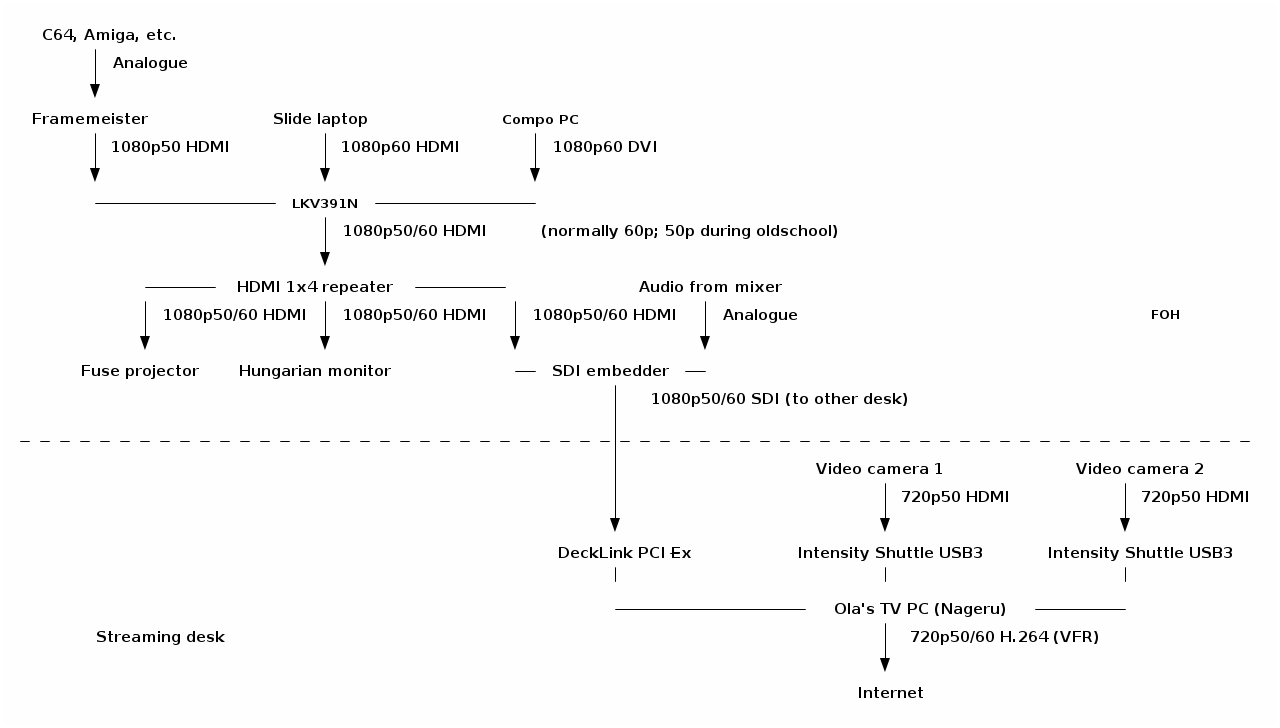 Of course, for me, the really interesting part here is near the end of the
chain, with
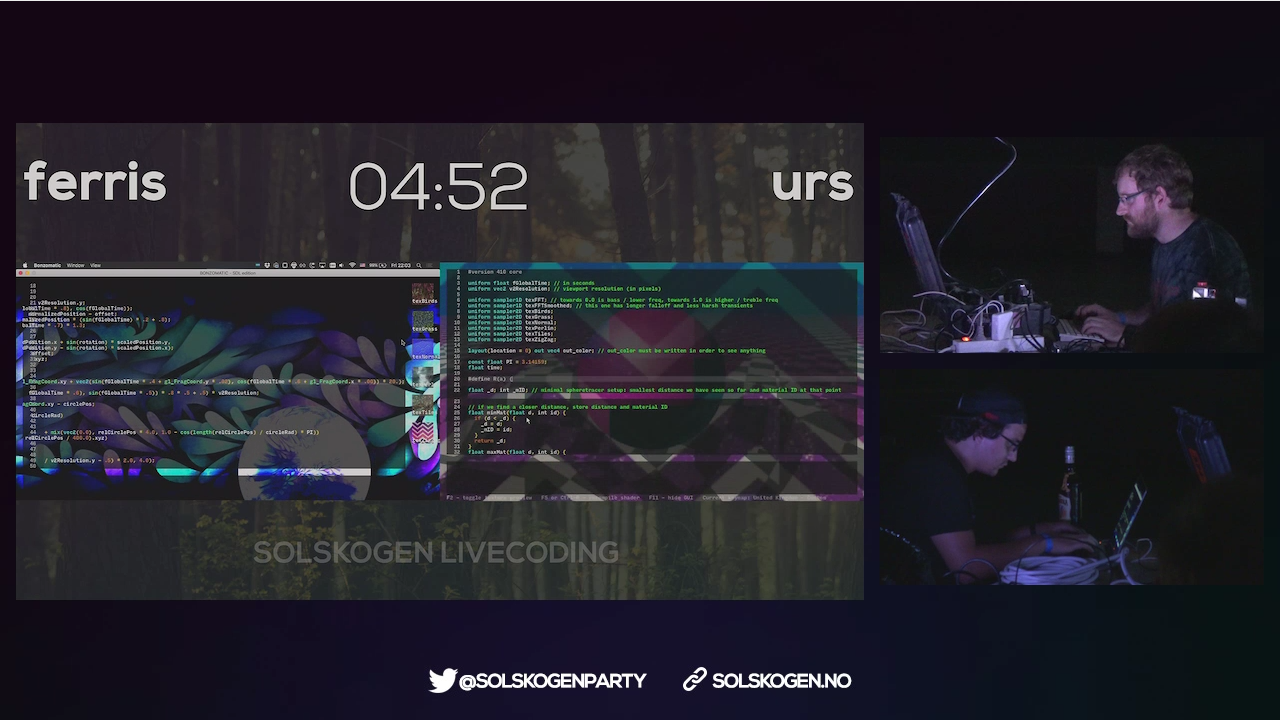 (Unfortunately, I forgot to take a screenshot of Nageru itself during this
run.)
Solskogen was the first time I'd really used Nageru in production, and
despite super-extensive testing, there's always something that can go wrong.
And indeed there was: First of all, we discovered that the local Internet
line was reduced from 30/10 to 5/0.5 (which is, frankly, unusable for
streaming video), and after we'd half-way fixed that (we got it to
25/4 or so by prodding the ISP, of which we could reserve about 2 for
video demoscene content is really hard to encode, so I'd prefer a lot
more) Nageru started crashing.
It wasn't even crashes I understood anything of. Generally it seemed like the
NVIDIA drivers were returning GL_OUT_OF_MEMORY on things like creating
mipmaps; it's logical that they'd be allocating memory, but we had 6 GB of
GPU memory and 16 GB of CPU memory, and lots of it was free. (The PC we used for encoding was much,
much faster than what you need to run Nageru smoothly, so we had plenty of
CPU power left to run x264 in, although you can of course always want more.)
It seemed to be mostly related to zoom transitions, so I generally avoided
those and ran that night's compos in a more static fashion.
It wasn't until later that night (or morning, if you will) that I actually
understood the bug (through the godsend of the

 The story recounts the countless turns the life of Nombeko Mayeki, a black girl born in Soweto as latrine cleaner, who manages to save the Swedish king as well as most of the world from an atomic desaster by first getting driven over by a drunkard of South African nuclear bomb engineer, then meeting a clique of three Chinese sisters excelling in faking antiquities, and two Mossad agents. With the (unwilling) help of those agents she escapes to Sweden (including the atomic bomb) where she meets twins of a psychotic father who brought them up as one child so that the spare one can eradicate the Swedish monarchy. After many twists and setbacks, including several meetings with the Chinese premier Hu Jintao, she finally manages to get rid of the atomic bomb, get her undercover twin a real identity, and set up a proper life ah, and not to forget, save the King of Sweden!
A fast paced, surprisingly funny and lovely story about how little things can change our lives completely.

 Currently, Let's Encrypt's certbot tool issues certificates to servers running on TCP port 443 or 80. These are considered to be a