I ve released man-db 2.11.0
(announcement,
NEWS), and
uploaded it to Debian unstable.
The biggest chunk of work here was fixing some extremely long-standing
issues with how the database is built. Despite being in the package name,
man-db s database is much less important than it used to be: most uses of
man(1) haven t required it in a long time, and both hardware and
software
improvements
mean that even some searches can be done by brute force without needing
prior indexing. However, the database is still needed for the whatis(1)
and apropos(1) commands.
The database has a simple format - no relational structure here, it s just a
simple key-value database using old-fashioned DBM-like interfaces and
composing a few fields to form values - but there are a number of subtleties
involved. The issues tend to amount to this: what does a manual page name
mean? At first glance it might seem simple, because you have file names
that look something like /usr/share/man/man1/ls.1.gz and that s obviously
ls(1). Some pages are symlinks to other pages (which we track separately
because it makes it easier to figure out which entries to update when the
contents of the file system change), and sometimes multiple pages are even
hard links to the same file.
The real complications come with whatis references . Pages can list a
bunch of names in their NAME section, and the historical expectation is
that it should be possible to use those names as arguments to man(1) even
if they don t also appear in the file system (although Debian policy has
deprecated relying on
this
for some time). Not only does that mean that man(1) sometimes needs to
consult the database, but it also means that the database is inherently more
complicated, since a page might list something in its NAME section that
conflicts with an actual file name in the file system, and now you need a
priority system to resolve ambiguities. There are some other possible
causes of ambiguity as well.
The people working on reproducible
builds in Debian branched out to the
related challenge of reproducible installations some time ago: can you take
a collection of packages, bootstrap a file system image from them, and
reproduce that exact same image somewhere else? This is useful for the same
sorts of reasons that reproducible builds are useful: it lets you verify
that an image is built from the components it s supposed to be built from,
and doesn t contain any other skulduggery by accident or design. One of the
people working on this noticed that
man-db s database files were an obstacle to that: in particular, the exact
contents of the database seemed to depend on the order in which files were
scanned when building it. The reporter proposed solving this by processing
files in sorted order, but I wasn t keen on that approach: firstly because
it would mean we could no longer process files in an order that makes it
more efficient to read them all from disk (still valuable on rotational
disks), but mostly because the differences seemed to point to other bugs.
Having understood this, there then followed several late nights of very
fiddly work on the details of how the database is maintained. None of this
was conceptually difficult: it mainly amounted to ensuring that we maintain
a consistent well-order for
different entries that we might want to insert for a given database key, and
that we consider the same names for insertion regardless of the order in
which we encounter files. As usual, the tricky bit is making sure that we
have the right data structures to support this. man-db is written in C
which is not very well-supplied with built-in data structures, and
originally much of the code was written in a style that tried to minimize
memory allocations; this came at the cost of ownership and lifetime often
being rather unclear, and it was often difficult to make changes without
causing leaks or double-frees. Over the years I ve been gradually
introducing better encapsulation to make things easier to follow, and I had
to do another round of that here. There were also some problems with
caching being done at slightly the wrong layer: we need to make use of a
trace of the chain of links followed to resolve a page to its ultimate
source file, but we were incorrectly caching that trace and reusing it for
any link to the same file, with incorrect results in many cases.
Oh, and after doing all that I found that the on-disk representation of a
GDBM database is insertion-order-dependent, so I ended up having to manually
reorganize the database at the end by reading it all in and writing it all
back out in sorted order, which feels really weird to me coming from
spending most of my time with PostgreSQL these days. Fortunately the
database is small so this takes negligible time.
None of this is particularly glamorous work, but it paid off:
# export SOURCE_DATE_EPOCH="$(date +%s)"
# mkdir emptydir disorder
# disorderfs --multi-user=yes --shuffle-dirents=yes --reverse-dirents=no emptydir disorder
# export TMPDIR="$(pwd)/disorder"
# mmdebstrap --variant=standard --hook-dir=/usr/share/mmdebstrap/hooks/merged-usr \
unstable out1.tar
# mmdebstrap --variant=standard --hook-dir=/usr/share/mmdebstrap/hooks/merged-usr \
unstable out2.tar
# cmp out1.tar out2.tar
# echo $?
0
Azide-1.25mm_001.dat, but of course, the purpose of this tutorial is to enable you to work on all of them. The data files contain the time evolution of the absorbance for all wavelengths, in a matrixformat, in which each row correpond to a time point and each column to a wavelength. Start QSoas, and launch the command:
QSoas> load /comments='"'Then, choose the
Azide-1.25mm_001.dat data file. This should bring up a horizontal red line at the bottom of the data display, with X values between about 0 and 2.5. If you zoom on the red line with the mouse wheel, you'll realize it is data. The /comments='"' part is very important since it allows the extraction of the wavelength from the data. We will look at what it means another day. At this stage, you can look at the loaded data using the command:
QSoas> editYou should have a window looking like this: The rows each correspond to a data point displayed on the window below. The first column correspond to the X values, the second the Y values, and all the other ones to extra Y columns (they are not displayed by default). What is especially interesting is the first row, which contains a
nan as the X value and what is obviously the wavelength for all the Y values. To tell that QSoas should take this line as the wavelength (which will be the perpendicular coordinate, the coordinate of the other direction of the matrix), first close the edit window and run:
QSoas> set-perp /from-row=0Splitting and fitting Now, we have a single dataset containing a lot of Y columns. We want to fit all of them simultaneously with a (mono) exponential fit. For that, we first need to split the big matrix into a series of X,Y datasets (because fitting only works on the first Y). This is possible by running:
QSoas> expand /style=red-to-blue /flags=kineticsYour screen should now look like this: You're looking at the kinetics at all wavelengths at the same time (this may take some time to display on your computer, it is after all a rather large number of data points). The
/style=red-to-blue is not strictly necessary, but it gives the red to blue color gradient which makes things easier to look at (and cooler !). The /flags=kinetics is there to attach a label (a flag) to the newly created datasets so we can easily manipulate all of them at the same time. Then it's time to fit, with the following command:
QSoas> mfit-exponential-decay flagged:kineticsThis should bring up a new window. After resizing it, you should have something that looks like this: The bottom of the fit window is taken by the parameters, each with two checkboxes on the right to set them fixed (i.e. not determined by the fitting mechanism) and/or global (i.e. with a single value for all the datasets, here all the wavelengths). The top shows the current dataset along with the corresponding fit (in green), and, below, the residuals. You can change the dataset by clicking on the horizontal arrows or using Ctrl+PgUp or Ctrl+PgDown (keep holding it to scan fast). See the
Z = 728.15 showing that QSoas has recognized that the currently displayed dataset corresponds to the wavelength 728.15. The equation fitted to the data is: $$y(x) = A_\infty + A_1 \times \exp -(x - x_0)/\tau_1$$
In this case, while the \(A_1\) and \(A_\infty\) parameters clearly depend on the wavelength, the time constant of evolution should be independent of wavelength (the process happens at a certain rate regardless of the wavelength we're analyzing), so that the \(\tau_1\) parameter should be common for all the datasets/wavelengths. Just click on the globalcheckbox at the right of the
tau_1 parameter, make sure it is checked, and hit the Fitbutton... The fit should not take long (less than a minute), and then you end up with the results of the fits: all the parameters. The best way to look at the non global parameters like \(A_1\) and \(A_\infty\) is to use the
Show Parametersitem from the
Parametersmenu. Using it and clicking on
A_inf too should give you a display like this one:
The A_inf parameter corresponds to the spectum at infinite time (of azide-bound heme), while the A_1 parameter corresponds to the difference spectrum between the initial (azide-free) and final (azide-bound) states.
Now, the fit is finished, you can save the parameters if you want to reload them in a later fit by using the Parameters/
Savemenu item or export them in a form more suitable for plotting using
Parameters/
Export(although QSoas can also display and the parameters saved using
Save). This concludes this first approach to fitting the data. What you can do is
tau_1 parameter as a function of the azide concentration;QSoas> mfit-exponential-decay /exponentials=2 flagged:kinetics
QSoas> in the code areas above are meant to be typed into the QSoas command line (at the bottom of the window), and started by pressing enter at the end. You must remove the QSoas> bit. The other lines (when applicable) show you the response of QSoas, in the terminal just above the command-line. You may want to play with the QSoas tutorial to learn more about how to interact with QSoas.
About QSoas
QSoas is a powerful open source data analysis program that focuses on flexibility and powerful fitting capacities. It is released under the GNU General Public License. It is described in Fourmond, Anal. Chem., 2016, 88 (10), pp 5050 5052. Current version is 3.1. You can freely (and at no cost) download its source code or precompiled versions for MacOS and Windows there. Alternatively, you can clone from the GitHub repository.

. For those who have read this blog, do know that India is and has been in casteism from ever. They even took the fair comment and applied it to all Brahmins. According to them, all Brahmins are fair and hence have god-given right to lord over others. What is called the Eton boy s network serves the same in this casteism. The only solution is those idea under limelight and investigate. To take the above, how does one prove that all fair people are wise and peaceful while all people black and brown are violent. If that is so, how does one count for Mahatma Gandhi, Martin Luther King Junior, Nelson Mandela, Michael Jackson the list is probably endless. And not to forget that when Mahatma Gandhiji did his nonviolent movements either in India or in South Africa, both black and brown people in millions took part. Similar examples of Martin Luther King Jr. I know and read of so many non-violent civl movements that took place in the U.S. For e.g. Rosa Parks and the Montgomery Bus Boycott. So just based on these examples, one can conclude that at least the part about the fair having exclusive rights to being fair and noble is not correct.
Now as far as violence goes, while every race, every community has had done violence in the past or been a victim of the same. So no one is and can be blameless, although in light of the above statement, the question can argumentated as to who were the Vikings? Both popular imagination and serious history shares stories about Vikings. The Vikings were somewhat nomadic in nature even though they had permanent settlements but even then they went on raids, raped women, captured both men and women and sold them at slaves. So they are what pirates came to be, but not the kind Hollywood romanticizes about. Europe in itself has been a tale in conflict since time immemorial. It is only after the formation of EU that most of these countries stopped fighting each other From a historical point perspective, it is too new. So even the part of fair being non-violent dies in face of this evidence. I could go on but this is enough on that topic.
There is also the EU Entry/Exit system that would come next year.
Why am I sharing about what is happening in UK Rail, because the Indian Government wants to follow the same thing, and fooling the public into saying we would do it better. What inevitably will happen is that ticket prices go up, people no longer use the service, the number of services go down and eventually they are cancelled. This has happened both in Indian Railways as well as Airlines. In fact, GOI just recently announced a credit scheme just a few days back to help Airlines stay afloat. I was chatting with a friend who had come down to Pune from Chennai and the round-trip cost him INR 15k/- on that single trip alone. We reminisced how a few years ago, 8 years to be precise, we could buy an Air ticket for 2.5k/- just a few days before the trip and did it. I remember doing/experiencing at least a dozen odd trips via air in the years before 2014. My friend used to come to Pune, almost every weekend because he could afford it, now he can t do that. And these are people who are in the above 5-10% of the population. And this is not just in UK, but also in the United States. There is one big difference though, the U.S. is mainly a freight carrier while the UK Railway Operations are mostly passenger based. What was and is interesting that Scotland had to nationalize their services as they realized the Operators cannot or will not function when they were most needed. Most of the public even in the UK seem to want a nationalized rail service, at least their polls say so. So, it would definitely be interesting to see what happens in the UK next year.
In the end, I know I promised to share about books, but the above incidents have just been too fascinating to not just share the news but also share what I think about them. Free markets function good where there is competition, for example what is and has been happening in China for EV s but not where you have natural monopolies. In all Railway privatization, you have to handover the area to one person, then they have no motivation. If you have multiple operators, then there would always be haggling as to who will run the train and at what time. In either scenario, it doesn t work and raises prices while not delivering anything better
I do take examples from UK because lot of things are India are still the legacy of the British. The whole civil department that was created in 1953 is/was a copy of the British civil department at that time and it is to this day.
P.S. Just came to know that the UK Chancellor Kwasi Kwarteng was just sacked as UK Chancellor. I do commend Truss for facing the press even though she might be dumped a week later unlike our PM who hasn t faced a single press conference in the last 8 odd years.
Just read this, beautifully done.
Hello everyone. I am back to bringing KDE to your desktops in a variety of formats. I am always working on Debian packages, but now I will be working diligently to get these packages in Debian proper. Along with Debian packaging, I will be working on getting KDE into a variety of new packaging formats that are self contained packages of awesomeness. These formats are Snaps, Appimages and Flatpacks. I am starting with Snaps because I started the effort many years ago, but didn t have the time to keep them up. As such, they are in a sad state, so I am working hard with Jonathan and ppd to get them back in shape. Keep an eye out in your favorite store for shiny new apps from KDE! https://snapcraft.io/search?q=KDE https://www.appimagehub.com/find?search=KDE https://flathub.org/apps/search/KDE Our latest snap releases can be found here:
kinetic-system fits, and the handling of Marcus-Hush-Chidsey (or Marcus "distribution of states") kinetics for electron transfers.
Column and row names
This release greatly improves the handling of column and row names, including commands to easily modify them, the possibility to use Ruby formulas to change them, and a much better way read and write them to data files. Mastering the use of column names (and to a lesser extent, row names) can greatly simplify data handling, especially when dealing with files with a large number of columns.
Complex numbers
Version 3.1 brings in support for formulas handling complex numbers. Although it is not possible to store complex numbers directly into datasets, it is easy to separate them in real and imaginary parts to your liking.
Scripting improvement
Two important improvements for scripting are included in version 3.1. The first is the possibility to define virtual files inside a script file, which makes it easy to define subfunctionsto run using commands like run-for-each. The second is the possibility to define
variablesto be reused later (like the script arguments) using the new command let. There are a lot of other new features, improvements and so on, look for the full list there. About QSoas
root@foo:~# apt-get update
root@foo:~# apt-get install -y apache2 libapache2-mod-auth-gssapi gssproxy curl
This should give you a working and running web server. Verify it is operational under the proper hostname, I ll use foo.sjd.se in this writeup.
root@foo:~# curl --head http://foo.sjd.se/
HTTP/1.1 200 OK
The next step is to create a keytab containing the Kerberos V5 secrets for your host, the exact steps depends on your environment (usually kadmin ktadd or ipa-getkeytab), but use the string HTTP/foo.sjd.se and then confirm using something like the following.root@foo:~# ls -la /etc/gssproxy/httpd.keytab
-rw------- 1 root root 176 Sep 18 06:44 /etc/gssproxy/httpd.keytab
root@foo:~# klist -k /etc/gssproxy/httpd.keytab -e
Keytab name: FILE:/etc/gssproxy/httpd.keytab
KVNO Principal
---- --------------------------------------------------------------------------
2 HTTP/foo.sjd.se@GSSPROXY.EXAMPLE.ORG (aes256-cts-hmac-sha1-96)
2 HTTP/foo.sjd.se@GSSPROXY.EXAMPLE.ORG (aes128-cts-hmac-sha1-96)
root@foo:~#
The file should be owned by root and not be in the default /etc/krb5.keytab location, so Apache s libapache2-mod-auth-gssapi will have to use gssproxy to use it.root@foo:~# cat<<EOF > /etc/gssproxy/80-httpd.conf
[service/HTTP]
mechs = krb5
cred_store = keytab:/etc/gssproxy/httpd.keytab
cred_store = ccache:/var/lib/gssproxy/clients/krb5cc_%U
euid = www-data
process = /usr/sbin/apache2
EOF
For debugging, it may be useful to enable more gssproxy logging:
root@foo:~# cat<<EOF > /etc/gssproxy/gssproxy.conf
[gssproxy]
debug_level = 1
EOF
root@foo:~#
Restart gssproxy so it finds the new configuration, and monitor syslog as follows:
root@foo:~# tail -F /var/log/syslog &
root@foo:~# systemctl restart gssproxy
You should see something like this in the log file:
Sep 18 07:03:15 foo gssproxy[4076]: [2022/09/18 05:03:15]: Exiting after receiving a signalThe NFS-related errors is due to a default gssproxy configuration file, it is harmless and if you don t use NFS with GSS-API you can silence it like this:
Sep 18 07:03:15 foo systemd[1]: Stopping GSSAPI Proxy Daemon
Sep 18 07:03:15 foo systemd[1]: gssproxy.service: Deactivated successfully.
Sep 18 07:03:15 foo systemd[1]: Stopped GSSAPI Proxy Daemon.
Sep 18 07:03:15 foo gssproxy[4092]: [2022/09/18 05:03:15]: Debug Enabled (level: 1)
Sep 18 07:03:15 foo systemd[1]: Starting GSSAPI Proxy Daemon
Sep 18 07:03:15 foo gssproxy[4093]: [2022/09/18 05:03:15]: Kernel doesn't support GSS-Proxy (can't open /proc/net/rpc/use-gss-proxy: 2 (No such file or directory))
Sep 18 07:03:15 foo gssproxy[4093]: [2022/09/18 05:03:15]: Problem with kernel communication! NFS server will not work
Sep 18 07:03:15 foo systemd[1]: Started GSSAPI Proxy Daemon.
Sep 18 07:03:15 foo gssproxy[4093]: [2022/09/18 05:03:15]: Initialization complete.
root@foo:~# rm /etc/gssproxy/24-nfs-server.conf
root@foo:~# systemctl try-reload-or-restart gssproxy
The log should now indicate that it loaded the keytab:
Sep 18 07:18:59 foo systemd[1]: Reloading GSSAPI Proxy DaemonTo instruct Apache or actually, the MIT Kerberos V5 GSS-API library used by mod_auth_gssap loaded by Apache to use gssproxy instead of using
Sep 18 07:18:59 foo gssproxy[4182]: [2022/09/18 05:18:59]: Received SIGHUP; re-reading config.
Sep 18 07:18:59 foo gssproxy[4182]: [2022/09/18 05:18:59]: Service: HTTP, Keytab: /etc/gssproxy/httpd.keytab, Enctype: 18
Sep 18 07:18:59 foo gssproxy[4182]: [2022/09/18 05:18:59]: New config loaded successfully.
Sep 18 07:18:59 foo systemd[1]: Reloaded GSSAPI Proxy Daemon.
/etc/krb5.keytab as usual, Apache needs to be started in an environment that has GSS_USE_PROXY=1 set. The background is covered by the gssproxy-mech(8) man page and explained by the gssproxy README.root@foo:~# mkdir -p /etc/systemd/system/apache2.service.d
root@foo:~# cat<<EOF > /etc/systemd/system/apache2.service.d/gssproxy.conf
[Service]
Environment=GSS_USE_PROXY=1
EOF
root@foo:~# systemctl daemon-reload
The next step is to configure a GSS-API protected Apache resource:
root@foo:~# cat<<EOF > /etc/apache2/conf-available/private.conf
<Location /private>
AuthType GSSAPI
AuthName "GSSAPI Login"
Require valid-user
</Location>
Enable the configuration and restart Apache the suggested use of reload is not sufficient, because then it won t be restarted with the newly introduced GSS_USE_PROXY variable. This just applies to the first time, after the first restart you may use reload again.
root@foo:~# a2enconf privateWhen you have debug messages enabled, the log may look like this:
Enabling conf private.
To activate the new configuration, you need to run:
systemctl reload apache2
root@foo:~# systemctl restart apache2
Sep 18 07:32:23 foo systemd[1]: Stopping The Apache HTTP ServerFinally, set up a dummy test page on the server:
Sep 18 07:32:23 foo gssproxy[4182]: [2022/09/18 05:32:23]: Client [2022/09/18 05:32:23]: (/usr/sbin/apache2) [2022/09/18 05:32:23]: connected (fd = 10)[2022/09/18 05:32:23]: (pid = 4651) (uid = 0) (gid = 0)[2022/09/18 05:32:23]:
Sep 18 07:32:23 foo gssproxy[4182]: message repeated 4 times: [ [2022/09/18 05:32:23]: Client [2022/09/18 05:32:23]: (/usr/sbin/apache2) [2022/09/18 05:32:23]: connected (fd = 10)[2022/09/18 05:32:23]: (pid = 4651) (uid = 0) (gid = 0)[2022/09/18 05:32:23]:]
Sep 18 07:32:23 foo systemd[1]: apache2.service: Deactivated successfully.
Sep 18 07:32:23 foo systemd[1]: Stopped The Apache HTTP Server.
Sep 18 07:32:23 foo systemd[1]: Starting The Apache HTTP Server
Sep 18 07:32:23 foo gssproxy[4182]: [2022/09/18 05:32:23]: Client [2022/09/18 05:32:23]: (/usr/sbin/apache2) [2022/09/18 05:32:23]: connected (fd = 10)[2022/09/18 05:32:23]: (pid = 4657) (uid = 0) (gid = 0)[2022/09/18 05:32:23]:
root@foo:~# Sep 18 07:32:23 foo gssproxy[4182]: message repeated 8 times: [ [2022/09/18 05:32:23]: Client [2022/09/18 05:32:23]: (/usr/sbin/apache2) [2022/09/18 05:32:23]: connected (fd = 10)[2022/09/18 05:32:23]: (pid = 4657) (uid = 0) (gid = 0)[2022/09/18 05:32:23]:]
Sep 18 07:32:23 foo systemd[1]: Started The Apache HTTP Server.
root@foo:~# echo OK > /var/www/html/private
To verify that the server is working properly you may acquire tickets locally and then use curl to retrieve the GSS-API protected resource. The "--negotiate" enables SPNEGO and "--user :" asks curl to use username from the environment.
root@foo:~# klist
Ticket cache: FILE:/tmp/krb5cc_0
Default principal: jas@GSSPROXY.EXAMPLE.ORG
Valid starting Expires Service principal
09/18/22 07:40:37 09/19/22 07:40:37 krbtgt/GSSPROXY.EXAMPLE.ORG@GSSPROXY.EXAMPLE.ORG
root@foo:~# curl --negotiate --user : http://foo.sjd.se/private
OK
root@foo:~#
The log should contain something like this:
Sep 18 07:56:00 foo gssproxy[4872]: [2022/09/18 05:56:00]: Client [2022/09/18 05:56:00]: (/usr/sbin/apache2) [2022/09/18 05:56:00]: connected (fd = 10)[2022/09/18 05:56:00]: (pid = 5042) (uid = 33) (gid = 33)[2022/09/18 05:56:00]:The Apache log will look like this, notice the authenticated username shown.
Sep 18 07:56:00 foo gssproxy[4872]: [CID 10][2022/09/18 05:56:00]: gp_rpc_execute: executing 6 (GSSX_ACQUIRE_CRED) for service "HTTP", euid: 33,socket: (null)
Sep 18 07:56:00 foo gssproxy[4872]: [CID 10][2022/09/18 05:56:00]: gp_rpc_execute: executing 1 (GSSX_INDICATE_MECHS) for service "HTTP", euid: 33,socket: (null)
Sep 18 07:56:00 foo gssproxy[4872]: [CID 10][2022/09/18 05:56:00]: gp_rpc_execute: executing 6 (GSSX_ACQUIRE_CRED) for service "HTTP", euid: 33,socket: (null)
Sep 18 07:56:00 foo gssproxy[4872]: [CID 10][2022/09/18 05:56:00]: gp_rpc_execute: executing 9 (GSSX_ACCEPT_SEC_CONTEXT) for service "HTTP", euid: 33,socket: (null)
127.0.0.1 - jas@GSSPROXY.EXAMPLE.ORG [18/Sep/2022:07:56:00 +0200] "GET /private HTTP/1.1" 200 481 "-" "curl/7.81.0"Congratulations, and happy hacking!
nncp-xfer -rx to process incoming packets from the USB (or other media) device. This moves them into the NNCP inbound queue, deleting them from the media device, and verifies the packet integrity.nncp-ack -node $NODE to create ACK packets responding to the packets we just loaded into the rx queue. It writes a list of generated ACKs onto fd 4, which we save off for later use.nncp-toss -seen to process the incoming queue. The use of -seen causes NNCP to remember the hashes of packets seen before, so a duplicate of an already-seen packet will not be processed twice. This command also processes incoming ACKs for packets we ve sent out previously; if they pass verification, the relevant packets are removed from the local machine s tx queue.nncp-xfer -keep -tx -mkdir -node $NODE to send outgoing packets to a given node by writing them to a given directory on the media device. -keep causes them to remain in the outgoing queue.nncp-rm -node $NODE -pkt < $FILE to remove those specific packets from the outbound queue. The reason is that there will never be an ACK of ACK packet (that would create an infinite loop), so if we don t delete them in this manner, they would hang around forever.nncp-toss, there is a chance of a race condition between steps 1 and 2 (if nncp-toss gets to it first, it might not get an ack generated). This would sort itself out eventually, presumably, as the sender would retransmit and it would be ACKed later.
#!/bin/bash
set -eo pipefail
MEDIABASE="/media/$USER"
# The local node name
NODENAME=" hostname "
# All nodes. NODENAME should be in this list.
ALLNODES="node1 node2 node3"
RUNNNCP=""
# If you need to sudo, use something like RUNNNCP="sudo -Hu nncp"
NNCPPATH="/usr/local/nncp/bin"
ACKPATH=" mktemp -d "
# Process incoming packets.
#
# Parameters: $1 - the path to scan. Must contain a directory
# named "nncp".
procrxpath ()
while [ -n "$1" ]; do
BASEPATH="$1/nncp"
shift
if ! [ -d "$BASEPATH" ]; then
echo "$BASEPATH doesn't exist; skipping"
continue
fi
echo " *** Incoming: processing $BASEPATH"
TMPDIR=" mktemp -d "
# This rsync and the one below can help with
# certain permission issues from weird foreign
# media. You could just eliminate it and
# always use $BASEPATH instead of $TMPDIR below.
rsync -rt "$BASEPATH/" "$TMPDIR/"
# You may need these next two lines if using sudo as above.
# chgrp -R nncp "$TMPDIR"
# chmod -R g+rwX "$TMPDIR"
echo " Running nncp-xfer -rx"
$RUNNNCP $NNCPPATH/nncp-xfer -progress -rx "$TMPDIR"
for NODE in $ALLNODES; do
if [ "$NODE" != "$NODENAME" ]; then
echo " Running nncp-ack for $NODE"
# Now, we generate ACK packets for each node we will
# process. nncp-ack writes a list of the created
# ACK packets to fd 4. We'll use them later.
# If using sudo, add -C 5 after $RUNNNCP.
$RUNNNCP $NNCPPATH/nncp-ack -progress -node "$NODE" \
4>> "$ACKPATH/$NODE"
fi
done
rsync --delete -rt "$TMPDIR/" "$BASEPATH/"
rm -fr "$TMPDIR"
done
proctxpath ()
while [ -n "$1" ]; do
BASEPATH="$1/nncp"
shift
if ! [ -d "$BASEPATH" ]; then
echo "$BASEPATH doesn't exist; skipping"
continue
fi
echo " *** Outgoing: processing $BASEPATH"
TMPDIR=" mktemp -d "
rsync -rt "$BASEPATH/" "$TMPDIR/"
# You may need these two lines if using sudo:
# chgrp -R nncp "$TMPDIR"
# chmod -R g+rwX "$TMPDIR"
for DESTHOST in $ALLNODES; do
if [ "$DESTHOST" = "$NODENAME" ]; then
continue
fi
# Copy outgoing packets to this node, but keep them in the outgoing
# queue with -keep.
$RUNNNCP $NNCPPATH/nncp-xfer -keep -tx -mkdir -node "$DESTHOST" -progress "$TMPDIR"
# Here is the key: that list of ACK packets we made above - now we delete them.
# There will never be an ACK for an ACK, so they'd keep sending forever
# if we didn't do this.
if [ -f "$ACKPATH/$DESTHOST" ]; then
echo "nncp-rm for node $DESTHOST"
$RUNNNCP $NNCPPATH/nncp-rm -debug -node "$DESTHOST" -pkt < "$ACKPATH/$DESTHOST"
fi
done
rsync --delete -rt "$TMPDIR/" "$BASEPATH/"
rm -rf "$TMPDIR"
# We only want to write stuff once.
return 0
done
procrxpath "$MEDIABASE"/*
echo " *** Initial tossing..."
# We make sure to use -seen to rule out duplicates.
$RUNNNCP $NNCPPATH/nncp-toss -progress -seen
proctxpath "$MEDIABASE"/*
echo "You can unmount devices now."
echo "Done."
kubeadm install.
| AWS | OpenShift | OpenShift upstream project |
|---|---|---|
| Cloud Trail | Kubernetes API Server audit log | Kubernetes |
| Cloud Watch | OpenShift Monitoring | Prometheus |
| AWS Artifact | Compliance Operator | OpenSCAP |
| AWS Trusted Advisor | Insights | |
| AWS Marketplace | OpenShift Operator Hub | |
| AWS Identity and Access Management (IAM) | Red Hat SSO | Keycloack |
| AWS Elastisc Beanstalk | OpenShift Source2Image (S2I) | Source2Image (S2I) |
| AWS S3 | ODF Rados Gateway | Rook RGW |
| AWS Elastic Bloc Storage | ODF Rados Block Device | Rook RBD |
| AWS Elastic File System | ODF Ceph FS | Rook CephFS |
| Amazon Simple Notification Service | OpenShift Streams for Apache Kafka | Apache Kafka |
| Amazon Guard Duty | API Server audit log review, ACS Runtime detection | Stackrox |
| Amazon Inspector | Quay.io container scanner, ACS Vulnerability Assessment | Clair, Stackrox |
| AWS Lambda | Openshift Serverless* |
Knative |
| AWS Key Management System | could be done with Hashicorp Vault | Vault |
| AWS WAF | NGINX Ingress Controller Operator with ModSecurity | NGINX ModSecurity |
| Amazon Elasticache | Redis Enterprise Operator | Redis, memcached as alternative |
| AWS Relational Database Service | Crunchy Data Operator | PostgreSQL |
* OpenShift Serverless requires the application to be packaged as a container, something AWS Lamda does not require.
My youngest has a cute little wooden Rocket puzzle, made by a French company
called Janod.

Sadly, at some point, we lost the nose cone part, so I designed and printed a
replacement.
It's substantially based on one module from an OpenSCAD "Nose Cone Library" by
Garrett
Goss,
which he kindly released to the public domain.
I embellished the cone with a top pointy bit and a rounded brim. I also
hollowed out the bottom to make space for a magnet. Originally I designed an
offset-from-centre slot for the magnet, the idea being, you would insert the
magnet off-centre and it would slot into position and be partly held in by the
offset, and you could then stick a blob of glue or similar to finish the job.
Unfortunately I had a layer shift during the print, so that didn't work. I
reamed out a small alcove instead. The white trim is adapted from the lid from
some kitchen herbs, trimmed back. I secured the magnet and glued the lid over
the bottom.
Here it is: rocket.scad. My contributions are under the terms
of Creative Commons Attribution-ShareAlike 4.0 International (CC BY-SA
4.0).
synchronous_standby_names = ANY 1 (az2, az3) and synchronous_commit = on.
In regards to safety of data, it looks similar to the raft algorithm used by etcd with three members as a write is only ack ed if it has been fsynced by two servers, the difference is that raft has a leader election, whereas in PostgreSQL the leader is set at startup and you have to build yourself the election mechanism.
There is no special cloud magic here, it is just database good practices paid by the minute.
Resolved disagreements and personality clashes result in greater intimacy, and a spirit of co-operation emerges.Teams need to understand these stages because a team can regress to earlier stages when its composition or goals change. A new member, the departure of an existing member, changes in supervisor or leadership style can all lead a team to regress to the storming stage and fail to perform for a time. When you see a team member say this, as I observed in an IRC channel recently, you know the team is performing:
nice teamwork these busy days Seen on IRC in the channel of a performing teamTuckman s model describes a team s performance overall, but how can team members establish what they can contribute and how can they go doing so confidently and effectively? Belbin s Team Roles
The types of behaviour in which people engage are infinite. But the range of useful behaviours, which make an effective contribution to team performance, is finite. These behaviours are grouped into a set number of related clusters, to which the term Team Role is applied. Belbin, R M. Team Roles at Work. Oxford: Butterworth-Heinemann, 2010Dr Meredith Belbin s thesis, based on nearly ten years research during the 1970s and 1980s, is that each team has a number of roles which need to be filled at various times, but they re not innate characteristics of the people filling them. People may have attributes which make them more or less suited to each role, and they can consciously take up a role if they recognise its need in the team at a particular time. Belbin s nine team roles are:
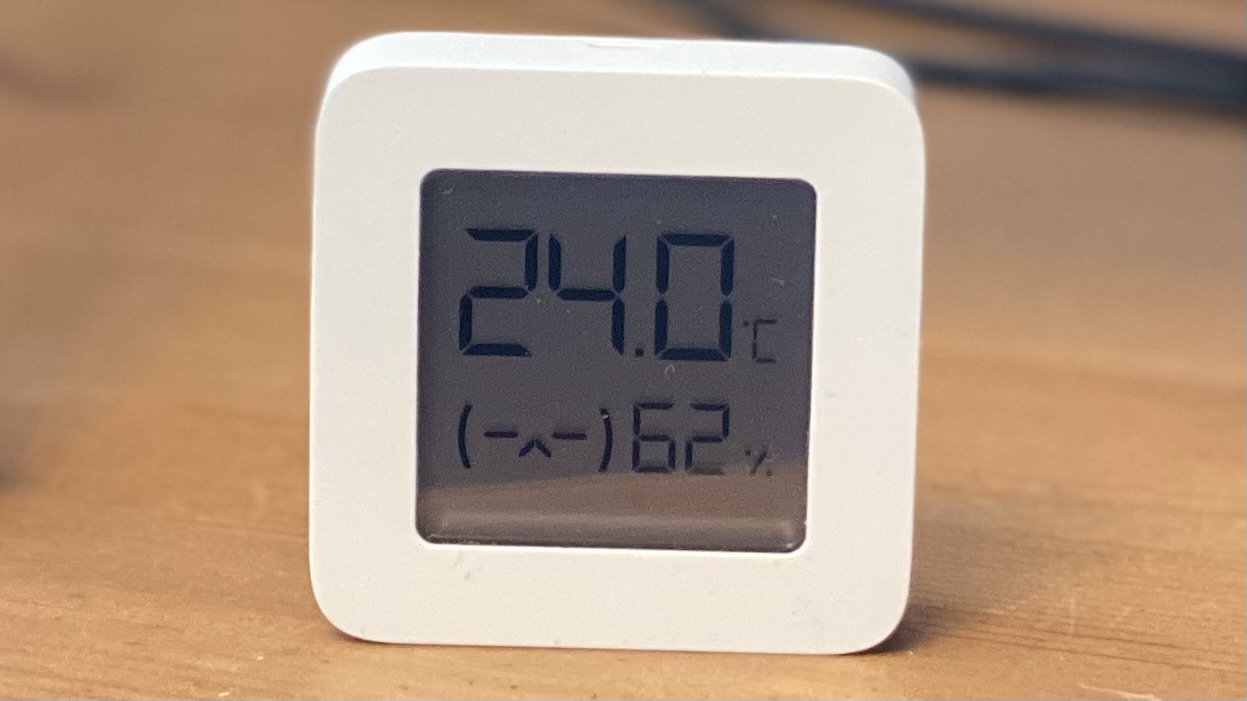
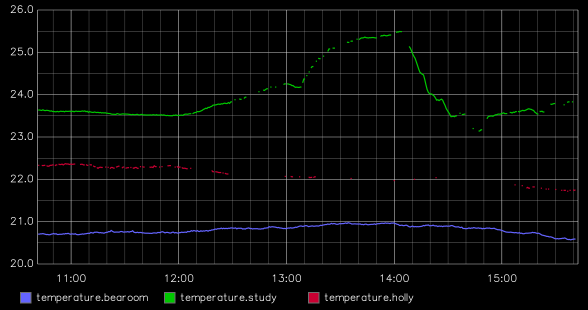
I've been having some temperature problems in my house, so I wanted to set
up some thermometers which I could read from a computer, and look at trends.
I bought a pack of three cheap Xiaomi IoT thermometers. There's some official
Xiaomi tooling to access them from smartphones and suchlike, but I wanted
something more open. The thermometers have some rudimentary security on them
to try and ensure you use the official tooling. This is pretty weak, and
the open-source Home Assistant (HA) has support
for querying them. I wasn't already running HA and it looked to do more than I
needed right now.
gathering
A friend told me that it was trivial to write custom firmware to the
devices.
It's so easy you can do it from a web-based flasher: in fact, anyone in
range can. There's a family of custom firmwares out there, and most move the
sensors readings into the BTLE announce packets, meaning, you can scrape the
temperature by simply reading and decoding the announcement packets, no need
to handshake at all, and certainly no need to navigate Xiaomi's weird security.
This is the one I used.
I hacked up a Python script to read the values with the help of this
convenience library1.
Next, I needed to set up somewhere to write the values.
reporting
It's been long enough since I last looked at something like this that the best
in class software was things like multi router traffic
grapher, and
rrdtool, or things that build on top of them
like Munin. The world seems to have moved on
(rightly or wrongly) with a cornucopia of options like Prometheus, Grafana,
Graphite/Carbon, InfluxDB, statsd, etc.
I ruled most of these out as being too complex for what I want to do, and got
something working with Graphite (front-end) and Carbon (back-end). I was
surprised that this wasn't packaged in Debian, and opted to try the Docker
container. This works, although even that is more complex than I need: it's
got graphite and carbon, but also nginx and statsd too; I'm submitting
directly to carbon, side-stepping statsd entirely. So as I refine what I'm
doing I might possibly strip that back.
next steps
I might add more sensors in my house! My scripts also need a lot of tidying up.
But, I think it would be useful to add some external temperature data, such as
something from a Weather service. I am also considering pulling in some of the
sensor data from the Newcastle University Urban
Observatory, which is something I
looked at a while ago for my PhD but didn't ultimately end up using. There
are several temperature sensors nearby, but they seem to operate relatively
sporadically.
There's a load of other interesting sensors in my vicinity, such as air quality
monitors.
I'm currently ignoring the humidity data from the sensors but I should collect
that too.
It would be useful to mark relevant "events", too: does switching on or off my
desktop PC, or printer, etc. correlate to a jump in temperature?
debian.org machine, so I'm hoping this will have better
reputation than my current setup.
In general, you should follow the DSA documentation which includes a
Postfix configuration. In my case, it was basically this patch:
diff --git a/postfix/main.cf b/postfix/main.cf
index 7fe6dd9e..eabe714a 100644
--- a/postfix/main.cf
+++ b/postfix/main.cf
@@ -55,3 +55,4 @@ smtp_sasl_security_options =
smtp_sender_dependent_authentication = yes
sender_dependent_relayhost_maps = hash:/etc/postfix/sender_relay
sender_dependent_default_transport_maps = hash:/etc/postfix/sender_transport
+smtp_tls_policy_maps = hash:/etc/postfix/tls_policy
diff --git a/postfix/sender_relay b/postfix/sender_relay
index b486d687..997cce19 100644
--- /dev/null
+++ b/postfix/sender_relay
@@ -0,0 +1,2 @@
+# Per-sender provider; see also /etc/postfix/sasl_passwd.
+@debian.org [mail-submit.debian.org]:submission
diff --git a/postfix/sender_transport b/postfix/sender_transport
index ca69bc7a..c506c1fc 100644
--- /dev/null
+++ b/postfix/sender_transport
@@ -0,0 +1,1 @@
+anarcat@debian.org smtp:
diff --git a/postfix/tls_policy b/postfix/tls_policy
new file mode 100644
index 00000000..9347921a
--- /dev/null
+++ b/postfix/tls_policy
@@ -0,0 +1,1 @@
+submission.torproject.org:submission verify ciphers=high
This configuration differs from the one provided by DSA because I
already had the following configured:
sender_dependent_relayhost_maps = hash:/etc/postfix/sender_relay
smtp_sender_dependent_authentication = yes
smtp_sasl_auth_enable = yes
smtp_sasl_password_maps = hash:/etc/postfix/sasl_passwd
smtp_sasl_tls_security_options = noanonymous
I also don't show the patch on /etc/postfix/sasl_passwd for obvious
security reasons.
I also had to setup a tls_policy map, because I couldn't use dane
for all my remotes. You'll notice I also had to setup a
sender_transport because I use a non-default default_transport as
well.
It also seems like you can keep the previous DKIM configuration in
parallel with this one, as long as you don't double-sign outgoing
mail. Since this configuration here is done on my mail client
(i.e. not on the server where I am running OpenDKIM), I'm not
double-signing so I left the DKIM configuration alone. But if I wanted
to remove it, the magic command is:
echo "del dkimPubKey" gpg --clearsign mail changes@db.debian.org
We currently use cookies to support our use of Google Analytics on the Website and Service. Google Analytics collects information about how you use the Website and Service. [...] This helps us to provide you with a good experience when you browse our Website and use our Service and also allows us to improve our Website and our Service.When I asked Matrix people about why they were using Google Analytics, they explained this was for development purposes and they were aiming for velocity at the time, not privacy (paraphrasing here). They also included a "free to snitch" clause:
If we are or believe that we are under a duty to disclose or share your personal data, we will do so in order to comply with any legal obligation, the instructions or requests of a governmental authority or regulator, including those outside of the UK.Those are really broad terms, above and beyond what is typically expected legally. Like the current retention policies, such user tracking and ... "liberal" collaboration practices with the state set a bad precedent for other home servers. Thankfully, since the above policy was published (2017), the GDPR was "implemented" (2018) and it seems like both the Element.io privacy policy and the Matrix.org privacy policy have been somewhat improved since. Notable points of the new privacy policies:
matrix.org serviceWe will forget your copy of your data upon your request. We will also forward your request to be forgotten onto federated homeservers. However - these homeservers are outside our span of control, so we cannot guarantee they will forget your data.It's great they implemented those mechanisms and, after all, if there's an hostile party in there, nothing can prevent them from using screenshots to just exfiltrate your data away from the client side anyways, even with services typically seen as more secure, like Signal. As an aside, I also appreciate that Matrix.org has a fairly decent code of conduct, based on the TODO CoC which checks all the boxes in the geekfeminism wiki.
matrix.org to block
known abusers (users or servers). Bans are pretty flexible and
can operate at the user, room, or server level.
Matrix people suggest making the bot admin of your channels, because
you can't take back admin from a user once given.
This tool and Mjolnir are based on the admin API built into Synapse.
- System notify users (all users/users from a list, specific user)
- delete sessions/devices not seen for X days
- purge the remote media cache
- select rooms with various criteria (external/local/empty/created by/encrypted/cleartext)
- purge history of theses rooms
- shutdown rooms
+R mode ("only
registered users can join") by default, except that anyone can
register their own homeserver, which makes this limited.
Server admins can block IP addresses and home servers, but those tools
are not easily available to room admins. There is an API
(m.room.server_acl in /devtools) but it is not reliable
(thanks Austin Huang for the clarification).
Matrix has the concept of guest accounts, but it is not used very
much, and virtually no client or homeserver supports it. This contrasts with the way
IRC works: by default, anyone can join an IRC network even without
authentication. Some channels require registration, but in general you
are free to join and look around (until you get blocked, of course).
I have seen anecdotal evidence (CW: Twitter, nitter link) that "moderating bridges is hell", and
I can imagine why. Moderation is already hard enough on one
federation, when you bridge a room with another network, you inherit
all the problems from that network but without the entire abuse
control tools from the original network's API...
joe on server B,
they will hijack that room on that specific server. This will not
(necessarily) affect users on the other servers, as servers could
refuse parts of the updates or ban the compromised account (or
server).
It does seem like a major flaw that room credentials are bound to
Matrix identifiers, as opposed to the E2E encryption credentials. In
an encrypted room even with fully verified members, a compromised or
hostile home server can still take over the room by impersonating an
admin. That admin (or even a newly minted user) can then send events
or listen on the conversations.
This is even more frustrating when you consider that Matrix events are
actually signed and therefore have some authentication attached
to them, acting like some sort of Merkle tree (as it contains a link
to previous events). That signature, however, is made from the
homeserver PKI keys, not the client's E2E keys, which makes E2E feel
like it has been "bolted on" later.
connect block on both servers@anarcat:matrix.org) is bound to
that specific home server. If that server goes down, that user is
completely disconnected. They could register a new account elsewhere
and reconnect, but then they basically lose all their configuration:
contacts, joined channels are all lost.
(Also notice how the Matrix IDs don't look like a typical user address
like an email in XMPP. They at least did their homework and got the
allocation for the scheme.)
#room:matrix.org is also
visible as #room:example.com on the example.com home server. Both
addresses refer to the same room underlying room.
(Finding this in the Element settings is not obvious though, because
that "alias" are actually called a "local address" there. So to create
such an alias (in Element), you need to go in the room settings'
"General" section, "Show more" in "Local address", then add the alias
name (e.g. foo), and then that room will be available on your
example.com homeserver as #foo:example.com.)
So a room doesn't belong to a server, it belongs to the federation,
and anyone can join the room from any serer (if the room is public, or
if invited otherwise). You can create a room on server A and when a
user from server B joins, the room will be replicated on server B as
well. If server A fails, server B will keep relaying traffic to
connected users and servers.
A room is therefore not fundamentally addressed with the above alias,
instead ,it has a internal Matrix ID, which basically a random
string. It has a server name attached to it, but that was made just to
avoid collisions. That can get a little confusing. For example, the
#fractal:gnome.org room is an alias on the gnome.org server, but
the room ID is !hwiGbsdSTZIwSRfybq:matrix.org. That's because the
room was created on matrix.org, but the preferred branding is
gnome.org now.
As an aside, rooms, by default, live forever, even after the last user
quits. There's an admin API to delete rooms and a tombstone
event to redirect to another one, but neither have a GUI yet. The
latter is part of MSC1501 ("Room version upgrades") which allows
a room admin to close a room, with a message and a pointer to another
room.
matrix.example.com) must never change in
the future, as renaming home servers is not supported.
The documentation used to say you could "run a hot spare" but that has
been removed. Last I heard, it was not possible to run a
high-availability setup where multiple, separate locations could
replace each other automatically. You can have high performance
setups where the load gets distributed among workers, but those
are based on a shared database (Redis and PostgreSQL) backend.
So my guess is it would be possible to create a "warm" spare server of
a matrix home server with regular PostgreSQL replication, but
that is not documented in the Synapse manual. This sort of setup
would also not be useful to deal with networking issues or denial of
service attacks, as you will not be able to spread the load over
multiple network locations easily. Redis and PostgreSQL heroes are
welcome to provide their multi-primary solution in the comments. In
the meantime, I'll just point out this is a solution that's handled
somewhat more gracefully in IRC, by having the possibility of
delegating the authentication layer.
.well-known pattern (or SRV
records, but that's "not recommended" and a bit confusing) to
delegate that service to another server. Be warned that the server
still needs to be explicitly configured for your domain. You can't
just put:
"m.server": "matrix.org:443"
... on https://example.com/.well-known/matrix/server and start using
@you:example.com as a Matrix ID. That's because Matrix doesn't
support "virtual hosting" and you'd still be connecting to rooms and
people with your matrix.org identity, not example.com as you would
normally expect. This is also why you cannot rename your home
server.
The server discovery API is what allows servers to find each
other. Clients, on the other hand, use the client-server discovery
API: this is what allows a given client to find your home server
when you type your Matrix ID on login.
matrix.debian.social) takes a few minutes
and then fails. That is because the home server has to sync the
entire room state when you join the room. There was promising work on
this announced in the lengthy 2021 retrospective, and some of
that work landed (partial sync) in the 1.53 release already.
Other improvements coming include sliding sync, lazy loading
over federation, and fast room joins. So that's actually
something that could be fixed in the fairly short term.
But in general, communication in Matrix doesn't feel as "snappy" as on
IRC or even Signal. It's hard to quantify this without instrumenting a
full latency test bed (for example the tools I used in the terminal
emulators latency tests), but
even just typing in a web browser feels slower than typing in a xterm
or Emacs for me.
Even in conversations, I "feel" people don't immediately respond as
fast. In fact, this could be an interesting double-blind experiment to
make: have people guess whether they are talking to a person on
Matrix, XMPP, or IRC, for example. My theory would be that people
could notice that Matrix users are slower, if only because of the TCP
round-trip time each message has to take.
matrix: scheme, it's just not exactly clear what they should do with
it, especially when the handler is just another web page (e.g. Element
web).
In general, when compared with tools like Signal or WhatsApp, Matrix
doesn't fare so well in terms of user discovery. I probably have some
of my normal contacts that have a Matrix account as well, but there's
really no way to know. It's kind of creepy when Signal tells you
"this person is on Signal!" but it's also pretty cool that it works,
and they actually implemented it pretty well.
Registration is also less obvious: in Signal, the app confirms your
phone number automatically. It's friction-less and quick. In Matrix,
you need to learn about home servers, pick one, register (with a
password! aargh!), and then setup encryption keys (not default),
etc. It's a lot more friction.
And look, I understand: giving away your phone number is a huge
trade-off. I don't like it either. But it solves a real problem and
makes encryption accessible to a ton more people. Matrix does have
"identity servers" that can serve that purpose, but I don't feel
confident sharing my phone number there. It doesn't help that the
identity servers don't have private contact discovery: giving them
your phone number is a more serious security compromise than with
Signal.
There's a catch-22 here too: because no one feels like giving away
their phone numbers, no one does, and everyone assumes that stuff
doesn't work anyways. Like it or not, Signal forcing people to
divulge their phone number actually gives them critical mass that
means actually a lot of my relatives are on Signal and I don't have
to install crap like WhatsApp to talk with them.
/READ command for
the latter:
/ALIAS READ script exec \$_->activity(0) for Irssi::windows
And yes, that's a Perl script in my IRC client. I am not aware of any
Matrix client that does stuff like that, except maybe Weechat, if we
can call it a Matrix client, or Irssi itself, now that it has a
Matrix plugin (!).
As for other clients, I have looked through the Matrix Client
Matrix (confusing right?) to try to figure out which one to try,
and, even after selecting Linux as a filter, the chart is just too
wide to figure out anything. So I tried those, kind of randomly:
weechat-matrix or gomuks. At least Weechat
is scriptable so I could continue playing the power-user. Right now my
strategy with messaging (and that includes microblogging like Twitter
or Mastodon) is that everything goes through my IRC client, so Weechat
could actually fit well in there. Going with gomuks, on the other
hand, would mean running it in parallel with Irssi or ... ditching
IRC, which is a leap I'm not quite ready to take just yet.
Oh, and basically none of those clients (except Nheko and Element)
support VoIP, which is still kind of a second-class citizen in
Matrix. It does not support large multimedia rooms, for example:
Jitsi was used for FOSDEM instead of the native videoconferencing
system.
matrix.org publishes a (federated) block list
of hostile servers (#matrix-org-coc-bl:matrix.org, yes, of course
it's a room).
Interestingly, Email is also in that stage, where there are block
lists of spammers, and it's a race between those blockers and
spammers. Large email providers, obviously, are getting closer to the
EFnet stage: you could consider they only accept email from themselves
or between themselves. It's getting increasingly hard to deliver mail
to Outlook and Gmail for example, partly because of bias against small
providers, but also because they are including more and more
machine-learning tools to sort through email and those systems are,
fundamentally, unknowable. It's not quite the same as splitting the
federation the way EFnet did, but the effect is similar.
HTTP has somehow managed to live in a parallel universe, as it's
technically still completely federated: anyone can start a web server
if they have a public IP address and anyone can connect to it. The
catch, of course, is how you find the darn thing. Which is how Google
became one of the most powerful corporations on earth, and how they
became the gatekeepers of human knowledge online.
I have only briefly mentioned XMPP here, and my XMPP fans will
undoubtedly comment on that, but I think it's somewhere in the middle
of all of this. It was co-opted by Facebook and Google, and
both corporations have abandoned it to its fate. I remember fondly the
days where I could do instant messaging with my contacts who had a
Gmail account. Those days are gone, and I don't talk to anyone over
Jabber anymore, unfortunately. And this is a threat that Matrix still
has to face.
It's also the threat Email is currently facing. On the one hand
corporations like Facebook want to completely destroy it and have
mostly succeeded: many people just have an email account to
register on things and talk to their friends over Instagram or
(lately) TikTok (which, I know, is not Facebook, but they started that
fire).
On the other hand, you have corporations like Microsoft and Google who
are still using and providing email services because, frankly, you
still do need email for stuff, just like fax is still around
but they are more and more isolated in their own silo. At this point,
it's only a matter of time they reach critical mass and just decide
that the risk of allowing external mail coming in is not worth the
cost. They'll simply flip the switch and work on an allow-list
principle. Then we'll have closed the loop and email will be
dead, just like IRC is "dead" now.
I wonder which path Matrix will take. Could it liberate us from these
vicious cycles?
Update: this generated some discussions on lobste.rs.
As promised, on this post I m going to explain how I ve configured this blog
using hugo, asciidoctor and the papermod theme, how I publish it using
nginx, how I ve integrated the remark42 comment system and how I ve
automated its publication using gitea and json2file-go.
It is a long post, but I hope that at least parts of it can be interesting for
some, feel free to ignore it if that is not your case
config.yml file is the one shown below (probably some of the
settings are not required nor being used right now, but I m including the
current file, so this post will have always the latest version of it):
baseURL: https://blogops.mixinet.net/
title: Mixinet BlogOps
paginate: 5
theme: PaperMod
destination: public/
enableInlineShortcodes: true
enableRobotsTXT: true
buildDrafts: false
buildFuture: false
buildExpired: false
enableEmoji: true
pygmentsUseClasses: true
minify:
disableXML: true
minifyOutput: true
languages:
en:
languageName: "English"
description: "Mixinet BlogOps - https://blogops.mixinet.net/"
author: "Sergio Talens-Oliag"
weight: 1
title: Mixinet BlogOps
homeInfoParams:
Title: "Sergio Talens-Oliag Technical Blog"
Content: >

taxonomies:
category: categories
tag: tags
series: series
menu:
main:
- name: Archive
url: archives
weight: 5
- name: Categories
url: categories/
weight: 10
- name: Tags
url: tags/
weight: 10
- name: Search
url: search/
weight: 15
outputs:
home:
- HTML
- RSS
- JSON
params:
env: production
defaultTheme: light
disableThemeToggle: false
ShowShareButtons: true
ShowReadingTime: true
disableSpecial1stPost: true
disableHLJS: true
displayFullLangName: true
ShowPostNavLinks: true
ShowBreadCrumbs: true
ShowCodeCopyButtons: true
ShowRssButtonInSectionTermList: true
ShowFullTextinRSS: true
ShowToc: true
TocOpen: false
comments: true
remark42SiteID: "blogops"
remark42Url: "/remark42"
profileMode:
enabled: false
title: Sergio Talens-Oliag Technical Blog
imageUrl: "/images/mixinet-blogops.png"
imageTitle: Mixinet BlogOps
buttons:
- name: Archives
url: archives
- name: Categories
url: categories
- name: Tags
url: tags
socialIcons:
- name: CV
url: "https://www.uv.es/~sto/cv/"
- name: Debian
url: "https://people.debian.org/~sto/"
- name: GitHub
url: "https://github.com/sto/"
- name: GitLab
url: "https://gitlab.com/stalens/"
- name: Linkedin
url: "https://www.linkedin.com/in/sergio-talens-oliag/"
- name: RSS
url: "index.xml"
assets:
disableHLJS: true
favicon: "/favicon.ico"
favicon16x16: "/favicon-16x16.png"
favicon32x32: "/favicon-32x32.png"
apple_touch_icon: "/apple-touch-icon.png"
safari_pinned_tab: "/safari-pinned-tab.svg"
fuseOpts:
isCaseSensitive: false
shouldSort: true
location: 0
distance: 1000
threshold: 0.4
minMatchCharLength: 0
keys: ["title", "permalink", "summary", "content"]
markup:
asciidocExt:
attributes:
backend: html5s
extensions: ['asciidoctor-html5s','asciidoctor-diagram']
failureLevel: fatal
noHeaderOrFooter: true
preserveTOC: false
safeMode: unsafe
sectionNumbers: false
trace: false
verbose: false
workingFolderCurrent: true
privacy:
vimeo:
disabled: false
simple: true
twitter:
disabled: false
enableDNT: true
simple: true
instagram:
disabled: false
simple: true
youtube:
disabled: false
privacyEnhanced: true
services:
instagram:
disableInlineCSS: true
twitter:
disableInlineCSS: true
security:
exec:
allow:
- '^asciidoctor$'
- '^dart-sass-embedded$'
- '^go$'
- '^npx$'
- '^postcss$'disableHLJS and assets.disableHLJS are set to true; we plan to use
rouge on adoc and the inclusion of the hljs assets adds styles that
collide with the ones used by rouge.ShowToc is set to true and the TocOpen setting is set to false to
make the ToC appear collapsed initially. My plan was to use the asciidoctor
ToC, but after trying I believe that the theme one looks nice and I don t
need to adjust styles, although it has some issues with the html5s
processor (the admonition titles use <h6> and they are shown on the ToC,
which is weird), to fix it I ve copied the layouts/partial/toc.html to my
site repository and replaced the range of headings to end at 5 instead of
6 (in fact 5 still seems a lot, but as I don t think I ll use that heading
level on the posts it doesn t really matter).params.profileMode values are adjusted, but for now I ve left it disabled
setting params.profileMode.enabled to false and I ve set the
homeInfoParams to show more or less the same content with the latest posts
under it (I ve added some styles to my custom.css style sheet to center the
text and image of the first post to match the look and feel of the profile).asciidocExt section I ve adjusted the backend to use html5s,
I ve added the asciidoctor-html5s and asciidoctor-diagram extensions to
asciidoctor and adjusted the workingFolderCurrent to true to make
asciidoctor-diagram work right (haven t tested it yet).asciidoctor using the html5s processor I ve added some files to
the assets/css/extended directory:
assets/css/extended/custom.css to
make the homeInfoParams look like the profile page and I ve also changed a
little bit some theme styles to make things look better with the html5s
output:/* Fix first entry alignment to make it look like the profile */
.first-entry text-align: center;
.first-entry img display: inline;
/**
* Remove margin for .post-content code and reduce padding to make it look
* better with the asciidoctor html5s output.
**/
.post-content code margin: auto 0; padding: 4px; assets/css/extended/adoc.css with some styles
taken from the asciidoctor-default.css, see this
blog
post about the original file; mine is the same after formatting it with
css-beautify and editing it to use variables for
the colors to support light and dark themes:/* AsciiDoctor*/
table
border-collapse: collapse;
border-spacing: 0
.admonitionblock>table
border-collapse: separate;
border: 0;
background: none;
width: 100%
.admonitionblock>table td.icon
text-align: center;
width: 80px
.admonitionblock>table td.icon img
max-width: none
.admonitionblock>table td.icon .title
font-weight: bold;
font-family: "Open Sans", "DejaVu Sans", sans-serif;
text-transform: uppercase
.admonitionblock>table td.content
padding-left: 1.125em;
padding-right: 1.25em;
border-left: 1px solid #ddddd8;
color: var(--primary)
.admonitionblock>table td.content>:last-child>:last-child
margin-bottom: 0
.admonitionblock td.icon [class^="fa icon-"]
font-size: 2.5em;
text-shadow: 1px 1px 2px var(--secondary);
cursor: default
.admonitionblock td.icon .icon-note::before
content: "\f05a";
color: var(--icon-note-color)
.admonitionblock td.icon .icon-tip::before
content: "\f0eb";
color: var(--icon-tip-color)
.admonitionblock td.icon .icon-warning::before
content: "\f071";
color: var(--icon-warning-color)
.admonitionblock td.icon .icon-caution::before
content: "\f06d";
color: var(--icon-caution-color)
.admonitionblock td.icon .icon-important::before
content: "\f06a";
color: var(--icon-important-color)
.conum[data-value]
display: inline-block;
color: #fff !important;
background-color: rgba(100, 100, 0, .8);
-webkit-border-radius: 100px;
border-radius: 100px;
text-align: center;
font-size: .75em;
width: 1.67em;
height: 1.67em;
line-height: 1.67em;
font-family: "Open Sans", "DejaVu Sans", sans-serif;
font-style: normal;
font-weight: bold
.conum[data-value] *
color: #fff !important
.conum[data-value]+b
display: none
.conum[data-value]::after
content: attr(data-value)
pre .conum[data-value]
position: relative;
top: -.125em
b.conum *
color: inherit !important
.conum:not([data-value]):empty
display: none
theme-vars.css
file that changes the highlighted code background color and adds the color
definitions used by the admonitions::root
/* Solarized base2 */
/* --hljs-bg: rgb(238, 232, 213); */
/* Solarized base3 */
/* --hljs-bg: rgb(253, 246, 227); */
/* Solarized base02 */
--hljs-bg: rgb(7, 54, 66);
/* Solarized base03 */
/* --hljs-bg: rgb(0, 43, 54); */
/* Default asciidoctor theme colors */
--icon-note-color: #19407c;
--icon-tip-color: var(--primary);
--icon-warning-color: #bf6900;
--icon-caution-color: #bf3400;
--icon-important-color: #bf0000
.dark
--hljs-bg: rgb(7, 54, 66);
/* Asciidoctor theme colors with tint for dark background */
--icon-note-color: #3e7bd7;
--icon-tip-color: var(--primary);
--icon-warning-color: #ff8d03;
--icon-caution-color: #ff7847;
--icon-important-color: #ff3030
font-awesome, so I ve downloaded its resources for
version 4.7.0 (the one used by asciidoctor) storing the
font-awesome.css into on the assets/css/extended dir (that way it is
merged with the rest of .css files) and copying the fonts to the
static/assets/fonts/ dir (will be served directly):FA_BASE_URL="https://cdnjs.cloudflare.com/ajax/libs/font-awesome/4.7.0"
curl "$FA_BASE_URL/css/font-awesome.css" \
> assets/css/extended/font-awesome.css
for f in FontAwesome.otf fontawesome-webfont.eot \
fontawesome-webfont.svg fontawesome-webfont.ttf \
fontawesome-webfont.woff fontawesome-webfont.woff2; do
curl "$FA_BASE_URL/fonts/$f" > "static/assets/fonts/$f"
donecss
compatible with rouge) so we need a css to do the highlight styling; as
rouge provides a way to export them, I ve created the
assets/css/extended/rouge.css file with the thankful_eyes theme:rougify style thankful_eyes > assets/css/extended/rouge.csshtml5s backend with admonitions I ve added a
variation of the example found on this
blog
post to assets/js/adoc-admonitions.js:// replace the default admonitions block with a table that uses a format
// similar to the standard asciidoctor ... as we are using fa-icons here there
// is no need to add the icons: font entry on the document.
window.addEventListener('load', function ()
const admonitions = document.getElementsByClassName('admonition-block')
for (let i = admonitions.length - 1; i >= 0; i--)
const elm = admonitions[i]
const type = elm.classList[1]
const title = elm.getElementsByClassName('block-title')[0];
const label = title.getElementsByClassName('title-label')[0]
.innerHTML.slice(0, -1);
elm.removeChild(elm.getElementsByClassName('block-title')[0]);
const text = elm.innerHTML
const parent = elm.parentNode
const tempDiv = document.createElement('div')
tempDiv.innerHTML = <div class="admonitionblock $ type ">
<table>
<tbody>
<tr>
<td class="icon">
<i class="fa icon-$ type " title="$ label "></i>
</td>
<td class="content">
$ text
</td>
</tr>
</tbody>
</table>
</div>
const input = tempDiv.childNodes[0]
parent.replaceChild(input, elm)
)layouts/partials/extend_footer.html file
adding the following lines to it:
- $admonitions := slice (resources.Get "js/adoc-admonitions.js")
resources.Concat "assets/js/adoc-admonitions.js" minify fingerprint
<script defer crossorigin="anonymous" src=" $admonitions.RelPermalink "
integrity=" $admonitions.Data.Integrity "></script>layouts/partials/comments.html with the following content
based on the remark42
documentation, including extra code to sync the dark/light setting with the
one set on the site:
<div id="remark42"></div>
<script>
var remark_config =
host: .Site.Params.remark42Url ,
site_id: .Site.Params.remark42SiteID ,
url: .Permalink ,
locale: .Site.Language.Lang
;
(function(c)
/* Adjust the theme using the local-storage pref-theme if set */
if (localStorage.getItem("pref-theme") === "dark")
remark_config.theme = "dark";
else if (localStorage.getItem("pref-theme") === "light")
remark_config.theme = "light";
/* Add remark42 widget */
for(var i = 0; i < c.length; i++)
var d = document, s = d.createElement('script');
s.src = remark_config.host + '/web/' + c[i] +'.js';
s.defer = true;
(d.head d.body).appendChild(s);
)(remark_config.components ['embed']);
</script>remark42 I ve also added the following inside
the layouts/partials/extend_footer.html file:
- if (not site.Params.disableThemeToggle)
<script>
/* Function to change theme when the toggle button is pressed */
document.getElementById("theme-toggle").addEventListener("click", () =>
if (typeof window.REMARK42 != "undefined")
if (document.body.className.includes('dark'))
window.REMARK42.changeTheme('light');
else
window.REMARK42.changeTheme('dark');
);
</script>
- end theme-toggle button is pressed we change the remark42
theme before the PaperMod one (that s needed here only, on page loads the
remark42 theme is synced with the main one using the code from the
layouts/partials/comments.html shown earlier).docker-compose with the following
configuration:
version: "2"
services:
hugo:
build:
context: ./docker/hugo-adoc
dockerfile: ./Dockerfile
image: sto/hugo-adoc
container_name: hugo-adoc-blogops
restart: always
volumes:
- .:/documents
command: server --bind 0.0.0.0 -D -F
user: $ APP_UID :$ APP_GID
nginx:
image: nginx:latest
container_name: nginx-blogops
restart: always
volumes:
- ./nginx/default.conf:/etc/nginx/conf.d/default.conf
ports:
- 1313:1313
remark42:
build:
context: ./docker/remark42
dockerfile: ./Dockerfile
image: sto/remark42
container_name: remark42-blogops
restart: always
env_file:
- ./.env
- ./remark42/env.dev
volumes:
- ./remark42/var.dev:/srv/var.env file with the current user ID
and GID on the variables APP_UID and APP_GID (if we don t do it the files
can end up being owned by a user that is not the same as the one running the
services):
$ echo "APP_UID=$(id -u)\nAPP_GID=$(id -g)" > .envDockerfile used to generate the sto/hugo-adoc is:
FROM asciidoctor/docker-asciidoctor:latest
RUN gem install --no-document asciidoctor-html5s &&\
apk update && apk add --no-cache curl libc6-compat &&\
repo_path="gohugoio/hugo" &&\
api_url="https://api.github.com/repos/$repo_path/releases/latest" &&\
download_url="$(\
curl -sL "$api_url" \
sed -n "s/^.*download_url\": \"\\(.*.extended.*Linux-64bit.tar.gz\)\"/\1/p"\
)" &&\
curl -sL "$download_url" -o /tmp/hugo.tgz &&\
tar xf /tmp/hugo.tgz hugo &&\
install hugo /usr/bin/ &&\
rm -f hugo /tmp/hugo.tgz &&\
/usr/bin/hugo version &&\
apk del curl && rm -rf /var/cache/apk/*
# Expose port for live server
EXPOSE 1313
ENTRYPOINT ["/usr/bin/hugo"]
CMD [""]asciidoctor
and to use hugo I only need to download the binary from their latest release
at github (as we are using an
image based on alpine we also need to install the
libc6-compat package, but once that is done things are working fine for me so
far).
The image does not launch the server by default because I don t want it to; in
fact I use the same docker-compose.yml file to publish the site in production
simply calling the container without the arguments passed on the
docker-compose.yml file (see later).
When running the containers with docker-compose up (or docker compose up if
you have the docker-compose-plugin package installed) we also launch a nginx
container and the remark42 service so we can test everything together.
The Dockerfile for the remark42 image is the original one with an updated
version of the init.sh script:
FROM umputun/remark42:latest
COPY init.sh /init.shinit.sh is similar to the original, but allows us to use an
APP_GID variable and updates the /etc/group file of the container so the
files get the right user and group (with the original script the group is
always 1001):
#!/sbin/dinit /bin/sh
uid="$(id -u)"
if [ "$ uid " -eq "0" ]; then
echo "init container"
# set container's time zone
cp "/usr/share/zoneinfo/$ TIME_ZONE " /etc/localtime
echo "$ TIME_ZONE " >/etc/timezone
echo "set timezone $ TIME_ZONE ($(date))"
# set UID & GID for the app
if [ "$ APP_UID " ] [ "$ APP_GID " ]; then
[ "$ APP_UID " ] APP_UID="1001"
[ "$ APP_GID " ] APP_GID="$ APP_UID "
echo "set custom APP_UID=$ APP_UID & APP_GID=$ APP_GID "
sed -i "s/^app:x:1001:1001:/app:x:$ APP_UID :$ APP_GID :/" /etc/passwd
sed -i "s/^app:x:1001:/app:x:$ APP_GID :/" /etc/group
else
echo "custom APP_UID and/or APP_GID not defined, using 1001:1001"
fi
chown -R app:app /srv /home/app
fi
echo "prepare environment"
# replace % REMARK_URL % by content of REMARK_URL variable
find /srv -regex '.*\.\(html\ js\ mjs\)$' -print \
-exec sed -i "s % REMARK_URL % $ REMARK_URL g" \;
if [ -n "$ SITE_ID " ]; then
#replace "site_id: 'remark'" by SITE_ID
sed -i "s 'remark' '$ SITE_ID ' g" /srv/web/*.html
fi
echo "execute \"$*\""
if [ "$ uid " -eq "0" ]; then
exec su-exec app "$@"
else
exec "$@"
firemark42 for development is quite minimal:
TIME_ZONE=Europe/Madrid
REMARK_URL=http://localhost:1313/remark42
SITE=blogops
SECRET=123456
ADMIN_SHARED_ID=sto
AUTH_ANON=true
EMOJI=truenginx/default.conf file used to publish the service locally is simple
too:
server
listen 1313;
server_name localhost;
location /
proxy_pass http://hugo:1313;
proxy_set_header Host $http_host;
proxy_set_header X-Real-IP $remote_addr;
proxy_set_header X-Forwarded-For $proxy_add_x_forwarded_for;
proxy_set_header X-Forwarded-Proto $scheme;
proxy_set_header Upgrade $http_upgrade;
proxy_set_header Connection "upgrade";
location /remark42/
rewrite /remark42/(.*) /$1 break;
proxy_pass http://remark42:8080/;
proxy_set_header Host $http_host;
proxy_set_header X-Real-IP $remote_addr;
proxy_set_header X-Forwarded-For $proxy_add_x_forwarded_for;
proxy_set_header X-Forwarded-Proto $scheme;
main Debian repository:
git to clone & pull the repository,jq to parse json files from shell scripts,json2file-go to save the webhook messages to files,inotify-tools to detect when new files are stored by json2file-go and
launch scripts to process them,nginx to publish the site using HTTPS and work as proxy for
json2file-go and remark42 (I run it using a container),task-spool to queue the scripts that update the deployment.docker and docker compose from the debian packages on the
docker repository:
docker-ce to run the containers,docker-compose-plugin to run docker compose (it is a plugin, so no - in
the name).git repository I ve created a deploy key, added it to gitea
and cloned the project on the /srv/blogops PATH (that route is owned by a
regular user that has permissions to run docker, as I said before).hugoTo compile the site we are using the docker-compose.yml file seen before, to
be able to run it first we build the container images and once we have them we
launch hugo using docker compose run:
$ cd /srv/blogops
$ git pull
$ docker compose build
$ if [ -d "./public" ]; then rm -rf ./public; fi
$ docker compose run hugo --/srv/blogops/public (we remove the
directory first because hugo does not clean the destination folder as
jekyll does).
The deploy script re-generates the site as described and moves the public
directory to its final place for publishing.remark42 with dockerOn the /srv/blogops/remark42 folder I have the following docker-compose.yml:
version: "2"
services:
remark42:
build:
context: ../docker/remark42
dockerfile: ./Dockerfile
image: sto/remark42
env_file:
- ../.env
- ./env.prod
container_name: remark42
restart: always
volumes:
- ./var.prod:/srv/var
ports:
- 127.0.0.1:8042:8080../.env file is loaded to get the APP_UID and APP_GID variables that
are used by my version of the init.sh script to adjust file permissions and
the env.prod file contains the rest of the settings for remark42, including
the social network tokens (see the
remark42 documentation for
the available parameters, I don t include my configuration here because some of
them are secrets).nginx configuration for the blogops.mixinet.net site is as simple as:
server
listen 443 ssl http2;
server_name blogops.mixinet.net;
ssl_certificate /etc/letsencrypt/live/blogops.mixinet.net/fullchain.pem;
ssl_certificate_key /etc/letsencrypt/live/blogops.mixinet.net/privkey.pem;
include /etc/letsencrypt/options-ssl-nginx.conf;
ssl_dhparam /etc/letsencrypt/ssl-dhparams.pem;
access_log /var/log/nginx/blogops.mixinet.net-443.access.log;
error_log /var/log/nginx/blogops.mixinet.net-443.error.log;
root /srv/blogops/nginx/public_html;
location /
try_files $uri $uri/ =404;
include /srv/blogops/nginx/remark42.conf;
server
listen 80 ;
listen [::]:80 ;
server_name blogops.mixinet.net;
access_log /var/log/nginx/blogops.mixinet.net-80.access.log;
error_log /var/log/nginx/blogops.mixinet.net-80.error.log;
if ($host = blogops.mixinet.net)
return 301 https://$host$request_uri;
return 404;
/srv/blogops/nginx/public_html and not on /srv/blogops/public; the reason
for that is that I want to be able to compile without affecting the running
site, the deployment script generates the site on /srv/blogops/public and if
all works well we rename folders to do the switch, making the change feel almost
atomic.gitea at my home and the VM where the blog is served, I m
going to configure the json2file-go to listen for connections on a high port
using a self signed certificate and listening on IP addresses only reachable
through the VPN.
To do it we create a systemd socket to run json2file-go and adjust its
configuration to listen on a private IP (we use the FreeBind option on its
definition to be able to launch the service even when the IP is not available,
that is, when the VPN is down).
The following script can be used to set up the json2file-go configuration:
#!/bin/sh
set -e
# ---------
# VARIABLES
# ---------
BASE_DIR="/srv/blogops/webhook"
J2F_DIR="$BASE_DIR/json2file"
TLS_DIR="$BASE_DIR/tls"
J2F_SERVICE_NAME="json2file-go"
J2F_SERVICE_DIR="/etc/systemd/system/json2file-go.service.d"
J2F_SERVICE_OVERRIDE="$J2F_SERVICE_DIR/override.conf"
J2F_SOCKET_DIR="/etc/systemd/system/json2file-go.socket.d"
J2F_SOCKET_OVERRIDE="$J2F_SOCKET_DIR/override.conf"
J2F_BASEDIR_FILE="/etc/json2file-go/basedir"
J2F_DIRLIST_FILE="/etc/json2file-go/dirlist"
J2F_CRT_FILE="/etc/json2file-go/certfile"
J2F_KEY_FILE="/etc/json2file-go/keyfile"
J2F_CRT_PATH="$TLS_DIR/crt.pem"
J2F_KEY_PATH="$TLS_DIR/key.pem"
# ----
# MAIN
# ----
# Install packages used with json2file for the blogops site
sudo apt update
sudo apt install -y json2file-go uuid
if [ -z "$(type mkcert)" ]; then
sudo apt install -y mkcert
fi
sudo apt clean
# Configuration file values
J2F_USER="$(id -u)"
J2F_GROUP="$(id -g)"
J2F_DIRLIST="blogops:$(uuid)"
J2F_LISTEN_STREAM="172.31.31.1:4443"
# Configure json2file
[ -d "$J2F_DIR" ] mkdir "$J2F_DIR"
sudo sh -c "echo '$J2F_DIR' >'$J2F_BASEDIR_FILE'"
[ -d "$TLS_DIR" ] mkdir "$TLS_DIR"
if [ ! -f "$J2F_CRT_PATH" ] [ ! -f "$J2F_KEY_PATH" ]; then
mkcert -cert-file "$J2F_CRT_PATH" -key-file "$J2F_KEY_PATH" "$(hostname -f)"
fi
sudo sh -c "echo '$J2F_CRT_PATH' >'$J2F_CRT_FILE'"
sudo sh -c "echo '$J2F_KEY_PATH' >'$J2F_KEY_FILE'"
sudo sh -c "cat >'$J2F_DIRLIST_FILE'" <<EOF
$(echo "$J2F_DIRLIST" tr ';' '\n')
EOF
# Service override
[ -d "$J2F_SERVICE_DIR" ] sudo mkdir "$J2F_SERVICE_DIR"
sudo sh -c "cat >'$J2F_SERVICE_OVERRIDE'" <<EOF
[Service]
User=$J2F_USER
Group=$J2F_GROUP
EOF
# Socket override
[ -d "$J2F_SOCKET_DIR" ] sudo mkdir "$J2F_SOCKET_DIR"
sudo sh -c "cat >'$J2F_SOCKET_OVERRIDE'" <<EOF
[Socket]
# Set FreeBind to listen on missing addresses (the VPN can be down sometimes)
FreeBind=true
# Set ListenStream to nothing to clear its value and add the new value later
ListenStream=
ListenStream=$J2F_LISTEN_STREAM
EOF
# Restart and enable service
sudo systemctl daemon-reload
sudo systemctl stop "$J2F_SERVICE_NAME"
sudo systemctl start "$J2F_SERVICE_NAME"
sudo systemctl enable "$J2F_SERVICE_NAME"
# ----
# vim: ts=2:sw=2:et:ai:sts=2mkcert to create the temporary certificates, to install the
package on bullseye the backports repository must be available.json2file-go server we go to the project and enter into
the hooks/gitea/new page, once there we create a new webhook of type gitea
and set the target URL to https://172.31.31.1:4443/blogops and on the secret
field we put the token generated with uuid by the setup script:
sed -n -e 's/blogops://p' /etc/json2file-go/dirlist*webhook section of the app.ini of our gitea
server allows us to call the IP and skips the TLS verification (you can see the
available options on the
gitea
documentation).
The [webhook] section of my server looks like this:
[webhook]
ALLOWED_HOST_LIST=private
SKIP_TLS_VERIFY=truewebhook configured we can try it and if it works our
json2file server will store the file on the
/srv/blogops/webhook/json2file/blogops/ folder.gitea and store the messages on files, but we have to do something to
process those files once they are saved in our machine.
An option could be to use a cronjob to look for new files, but we can do
better on Linux using inotify we will use the inotifywait command from
inotify-tools to watch the json2file output directory and execute a script
each time a new file is moved inside it or closed after writing
(IN_CLOSE_WRITE and IN_MOVED_TO events).
To avoid concurrency problems we are going to use task-spooler to launch the
scripts that process the webhooks using a queue of length 1, so they are
executed one by one in a FIFO queue.
The spooler script is this:
#!/bin/sh
set -e
# ---------
# VARIABLES
# ---------
BASE_DIR="/srv/blogops/webhook"
BIN_DIR="$BASE_DIR/bin"
TSP_DIR="$BASE_DIR/tsp"
WEBHOOK_COMMAND="$BIN_DIR/blogops-webhook.sh"
# ---------
# FUNCTIONS
# ---------
queue_job()
echo "Queuing job to process file '$1'"
TMPDIR="$TSP_DIR" TS_SLOTS="1" TS_MAXFINISHED="10" \
tsp -n "$WEBHOOK_COMMAND" "$1"
# ----
# MAIN
# ----
INPUT_DIR="$1"
if [ ! -d "$INPUT_DIR" ]; then
echo "Input directory '$INPUT_DIR' does not exist, aborting!"
exit 1
fi
[ -d "$TSP_DIR" ] mkdir "$TSP_DIR"
echo "Processing existing files under '$INPUT_DIR'"
find "$INPUT_DIR" -type f sort while read -r _filename; do
queue_job "$_filename"
done
# Use inotifywatch to process new files
echo "Watching for new files under '$INPUT_DIR'"
inotifywait -q -m -e close_write,moved_to --format "%w%f" -r "$INPUT_DIR"
while read -r _filename; do
queue_job "$_filename"
done
# ----
# vim: ts=2:sw=2:et:ai:sts=2systemd service using the following
script:
#!/bin/sh
set -e
# ---------
# VARIABLES
# ---------
BASE_DIR="/srv/blogops/webhook"
BIN_DIR="$BASE_DIR/bin"
J2F_DIR="$BASE_DIR/json2file"
SPOOLER_COMMAND="$BIN_DIR/blogops-spooler.sh '$J2F_DIR'"
SPOOLER_SERVICE_NAME="blogops-j2f-spooler"
SPOOLER_SERVICE_FILE="/etc/systemd/system/$SPOOLER_SERVICE_NAME.service"
# Configuration file values
J2F_USER="$(id -u)"
J2F_GROUP="$(id -g)"
# ----
# MAIN
# ----
# Install packages used with the webhook processor
sudo apt update
sudo apt install -y inotify-tools jq task-spooler
sudo apt clean
# Configure process service
sudo sh -c "cat > $SPOOLER_SERVICE_FILE" <<EOF
[Install]
WantedBy=multi-user.target
[Unit]
Description=json2file processor for $J2F_USER
After=docker.service
[Service]
Type=simple
User=$J2F_USER
Group=$J2F_GROUP
ExecStart=$SPOOLER_COMMAND
EOF
# Restart and enable service
sudo systemctl daemon-reload
sudo systemctl stop "$SPOOLER_SERVICE_NAME" true
sudo systemctl start "$SPOOLER_SERVICE_NAME"
sudo systemctl enable "$SPOOLER_SERVICE_NAME"
# ----
# vim: ts=2:sw=2:et:ai:sts=2hugo with docker
compose,#!/bin/sh
set -e
# ---------
# VARIABLES
# ---------
# Values
REPO_REF="refs/heads/main"
REPO_CLONE_URL="https://gitea.mixinet.net/mixinet/blogops.git"
MAIL_PREFIX="[BLOGOPS-WEBHOOK] "
# Address that gets all messages, leave it empty if not wanted
MAIL_TO_ADDR="blogops@mixinet.net"
# If the following variable is set to 'true' the pusher gets mail on failures
MAIL_ERRFILE="false"
# If the following variable is set to 'true' the pusher gets mail on success
MAIL_LOGFILE="false"
# gitea's conf/app.ini value of NO_REPLY_ADDRESS, it is used for email domains
# when the KeepEmailPrivate option is enabled for a user
NO_REPLY_ADDRESS="noreply.example.org"
# Directories
BASE_DIR="/srv/blogops"
PUBLIC_DIR="$BASE_DIR/public"
NGINX_BASE_DIR="$BASE_DIR/nginx"
PUBLIC_HTML_DIR="$NGINX_BASE_DIR/public_html"
WEBHOOK_BASE_DIR="$BASE_DIR/webhook"
WEBHOOK_SPOOL_DIR="$WEBHOOK_BASE_DIR/spool"
WEBHOOK_ACCEPTED="$WEBHOOK_SPOOL_DIR/accepted"
WEBHOOK_DEPLOYED="$WEBHOOK_SPOOL_DIR/deployed"
WEBHOOK_REJECTED="$WEBHOOK_SPOOL_DIR/rejected"
WEBHOOK_TROUBLED="$WEBHOOK_SPOOL_DIR/troubled"
WEBHOOK_LOG_DIR="$WEBHOOK_SPOOL_DIR/log"
# Files
TODAY="$(date +%Y%m%d)"
OUTPUT_BASENAME="$(date +%Y%m%d-%H%M%S.%N)"
WEBHOOK_LOGFILE_PATH="$WEBHOOK_LOG_DIR/$OUTPUT_BASENAME.log"
WEBHOOK_ACCEPTED_JSON="$WEBHOOK_ACCEPTED/$OUTPUT_BASENAME.json"
WEBHOOK_ACCEPTED_LOGF="$WEBHOOK_ACCEPTED/$OUTPUT_BASENAME.log"
WEBHOOK_REJECTED_TODAY="$WEBHOOK_REJECTED/$TODAY"
WEBHOOK_REJECTED_JSON="$WEBHOOK_REJECTED_TODAY/$OUTPUT_BASENAME.json"
WEBHOOK_REJECTED_LOGF="$WEBHOOK_REJECTED_TODAY/$OUTPUT_BASENAME.log"
WEBHOOK_DEPLOYED_TODAY="$WEBHOOK_DEPLOYED/$TODAY"
WEBHOOK_DEPLOYED_JSON="$WEBHOOK_DEPLOYED_TODAY/$OUTPUT_BASENAME.json"
WEBHOOK_DEPLOYED_LOGF="$WEBHOOK_DEPLOYED_TODAY/$OUTPUT_BASENAME.log"
WEBHOOK_TROUBLED_TODAY="$WEBHOOK_TROUBLED/$TODAY"
WEBHOOK_TROUBLED_JSON="$WEBHOOK_TROUBLED_TODAY/$OUTPUT_BASENAME.json"
WEBHOOK_TROUBLED_LOGF="$WEBHOOK_TROUBLED_TODAY/$OUTPUT_BASENAME.log"
# Query to get variables from a gitea webhook json
ENV_VARS_QUERY="$(
printf "%s" \
'(. @sh "gt_ref=\(.ref);"),' \
'(. @sh "gt_after=\(.after);"),' \
'(.repository @sh "gt_repo_clone_url=\(.clone_url);"),' \
'(.repository @sh "gt_repo_name=\(.name);"),' \
'(.pusher @sh "gt_pusher_full_name=\(.full_name);"),' \
'(.pusher @sh "gt_pusher_email=\(.email);")'
)"
# ---------
# Functions
# ---------
webhook_log()
echo "$(date -R) $*" >>"$WEBHOOK_LOGFILE_PATH"
webhook_check_directories()
for _d in "$WEBHOOK_SPOOL_DIR" "$WEBHOOK_ACCEPTED" "$WEBHOOK_DEPLOYED" \
"$WEBHOOK_REJECTED" "$WEBHOOK_TROUBLED" "$WEBHOOK_LOG_DIR"; do
[ -d "$_d" ] mkdir "$_d"
done
webhook_clean_directories()
# Try to remove empty dirs
for _d in "$WEBHOOK_ACCEPTED" "$WEBHOOK_DEPLOYED" "$WEBHOOK_REJECTED" \
"$WEBHOOK_TROUBLED" "$WEBHOOK_LOG_DIR" "$WEBHOOK_SPOOL_DIR"; do
if [ -d "$_d" ]; then
rmdir "$_d" 2>/dev/null true
fi
done
webhook_accept()
webhook_log "Accepted: $*"
mv "$WEBHOOK_JSON_INPUT_FILE" "$WEBHOOK_ACCEPTED_JSON"
mv "$WEBHOOK_LOGFILE_PATH" "$WEBHOOK_ACCEPTED_LOGF"
WEBHOOK_LOGFILE_PATH="$WEBHOOK_ACCEPTED_LOGF"
webhook_reject()
[ -d "$WEBHOOK_REJECTED_TODAY" ] mkdir "$WEBHOOK_REJECTED_TODAY"
webhook_log "Rejected: $*"
if [ -f "$WEBHOOK_JSON_INPUT_FILE" ]; then
mv "$WEBHOOK_JSON_INPUT_FILE" "$WEBHOOK_REJECTED_JSON"
fi
mv "$WEBHOOK_LOGFILE_PATH" "$WEBHOOK_REJECTED_LOGF"
exit 0
webhook_deployed()
[ -d "$WEBHOOK_DEPLOYED_TODAY" ] mkdir "$WEBHOOK_DEPLOYED_TODAY"
webhook_log "Deployed: $*"
mv "$WEBHOOK_ACCEPTED_JSON" "$WEBHOOK_DEPLOYED_JSON"
mv "$WEBHOOK_ACCEPTED_LOGF" "$WEBHOOK_DEPLOYED_LOGF"
WEBHOOK_LOGFILE_PATH="$WEBHOOK_DEPLOYED_LOGF"
webhook_troubled()
[ -d "$WEBHOOK_TROUBLED_TODAY" ] mkdir "$WEBHOOK_TROUBLED_TODAY"
webhook_log "Troubled: $*"
mv "$WEBHOOK_ACCEPTED_JSON" "$WEBHOOK_TROUBLED_JSON"
mv "$WEBHOOK_ACCEPTED_LOGF" "$WEBHOOK_TROUBLED_LOGF"
WEBHOOK_LOGFILE_PATH="$WEBHOOK_TROUBLED_LOGF"
print_mailto()
_addr="$1"
_user_email=""
# Add the pusher email address unless it is from the domain NO_REPLY_ADDRESS,
# which should match the value of that variable on the gitea 'app.ini' (it
# is the domain used for emails when the user hides it).
# shellcheck disable=SC2154
if [ -n "$ gt_pusher_email##*@"$ NO_REPLY_ADDRESS " " ] &&
[ -z "$ gt_pusher_email##*@* " ]; then
_user_email="\"$gt_pusher_full_name <$gt_pusher_email>\""
fi
if [ "$_addr" ] && [ "$_user_email" ]; then
echo "$_addr,$_user_email"
elif [ "$_user_email" ]; then
echo "$_user_email"
elif [ "$_addr" ]; then
echo "$_addr"
fi
mail_success()
to_addr="$MAIL_TO_ADDR"
if [ "$MAIL_LOGFILE" = "true" ]; then
to_addr="$(print_mailto "$to_addr")"
fi
if [ "$to_addr" ]; then
# shellcheck disable=SC2154
subject="OK - $gt_repo_name updated to commit '$gt_after'"
mail -s "$ MAIL_PREFIX $ subject " "$to_addr" \
<"$WEBHOOK_LOGFILE_PATH"
fi
mail_failure()
to_addr="$MAIL_TO_ADDR"
if [ "$MAIL_ERRFILE" = true ]; then
to_addr="$(print_mailto "$to_addr")"
fi
if [ "$to_addr" ]; then
# shellcheck disable=SC2154
subject="KO - $gt_repo_name update FAILED for commit '$gt_after'"
mail -s "$ MAIL_PREFIX $ subject " "$to_addr" \
<"$WEBHOOK_LOGFILE_PATH"
fi
# ----
# MAIN
# ----
# Check directories
webhook_check_directories
# Go to the base directory
cd "$BASE_DIR"
# Check if the file exists
WEBHOOK_JSON_INPUT_FILE="$1"
if [ ! -f "$WEBHOOK_JSON_INPUT_FILE" ]; then
webhook_reject "Input arg '$1' is not a file, aborting"
fi
# Parse the file
webhook_log "Processing file '$WEBHOOK_JSON_INPUT_FILE'"
eval "$(jq -r "$ENV_VARS_QUERY" "$WEBHOOK_JSON_INPUT_FILE")"
# Check that the repository clone url is right
# shellcheck disable=SC2154
if [ "$gt_repo_clone_url" != "$REPO_CLONE_URL" ]; then
webhook_reject "Wrong repository: '$gt_clone_url'"
fi
# Check that the branch is the right one
# shellcheck disable=SC2154
if [ "$gt_ref" != "$REPO_REF" ]; then
webhook_reject "Wrong repository ref: '$gt_ref'"
fi
# Accept the file
# shellcheck disable=SC2154
webhook_accept "Processing '$gt_repo_name'"
# Update the checkout
ret="0"
git fetch >>"$WEBHOOK_LOGFILE_PATH" 2>&1 ret="$?"
if [ "$ret" -ne "0" ]; then
webhook_troubled "Repository fetch failed"
mail_failure
fi
# shellcheck disable=SC2154
git checkout "$gt_after" >>"$WEBHOOK_LOGFILE_PATH" 2>&1 ret="$?"
if [ "$ret" -ne "0" ]; then
webhook_troubled "Repository checkout failed"
mail_failure
fi
# Remove the build dir if present
if [ -d "$PUBLIC_DIR" ]; then
rm -rf "$PUBLIC_DIR"
fi
# Build site
docker compose run hugo -- >>"$WEBHOOK_LOGFILE_PATH" 2>&1 ret="$?"
# go back to the main branch
git switch main && git pull
# Fail if public dir was missing
if [ "$ret" -ne "0" ] [ ! -d "$PUBLIC_DIR" ]; then
webhook_troubled "Site build failed"
mail_failure
fi
# Remove old public_html copies
webhook_log 'Removing old site versions, if present'
find $NGINX_BASE_DIR -mindepth 1 -maxdepth 1 -name 'public_html-*' -type d \
-exec rm -rf \; >>"$WEBHOOK_LOGFILE_PATH" 2>&1 ret="$?"
if [ "$ret" -ne "0" ]; then
webhook_troubled "Removal of old site versions failed"
mail_failure
fi
# Switch site directory
TS="$(date +%Y%m%d-%H%M%S)"
if [ -d "$PUBLIC_HTML_DIR" ]; then
webhook_log "Moving '$PUBLIC_HTML_DIR' to '$PUBLIC_HTML_DIR-$TS'"
mv "$PUBLIC_HTML_DIR" "$PUBLIC_HTML_DIR-$TS" >>"$WEBHOOK_LOGFILE_PATH" 2>&1
ret="$?"
fi
if [ "$ret" -eq "0" ]; then
webhook_log "Moving '$PUBLIC_DIR' to '$PUBLIC_HTML_DIR'"
mv "$PUBLIC_DIR" "$PUBLIC_HTML_DIR" >>"$WEBHOOK_LOGFILE_PATH" 2>&1
ret="$?"
fi
if [ "$ret" -ne "0" ]; then
webhook_troubled "Site switch failed"
mail_failure
else
webhook_deployed "Site deployed successfully"
mail_success
fi
# ----
# vim: ts=2:sw=2:et:ai:sts=2| Publisher: | Tillie Walden |
| Copyright: | 2016-2017 |
| Format: | Online graphic novel |
| Pages: | 544 |
Next.