Search Results: "tca"

12 June 2010

Russell Coker: Defense in Depth and Sudo

My blog post about logging in as root and whether sudo provides any benefit [1] got some interest on Redit. In the Reddit comments on my post [2] there are a lot of strange things. One interesting comment was to suggest that logging in as non-root provided defense in depth . The NSA is credited with inventing the term Defense in Depth as applied to the computer industry, they have a PDF that gives an overview of the concept [3]. It seems that Defense in Depth is all about having multiple different layers of security, firewalls, IDS/IPS, passwords, PKI, etc. Entering the same password twice (once to login and once to run sudo which seems to be a fairly typical configuration of sudo) hardly seems to count. Can using sudo provide Defense in Depth benefits? With a typical configuration the use of sudo provides no real protection. The user either enters their own password or the root password to gain full root access, in either case the attacker can exploit their session and get the password. A session exploit can be easily arranged by creating a shell function or alias that makes sudo run something else (such as using netcat to send the password out over the network). One way of making this sort of attack more difficult is to make root own the user home directory, files such as ~/.login that are used by the user shell, the ~/.ssh directory and the ~/.ssh/authorized_keys file. This way a hostile party can t change the configuration, so a successful attack has to involve a long running process that uses ptrace to intercept the shell and divert an attempt to run sudo. If the non-root user is prevented from using ptrace then things start to become a little more difficult for the attacker. In some quick tests I was able to capture about half the data through messing with /proc/X/fd/0 and /proc/X/fd/1 for a target process, but it seems that it would be difficult to get an entire password that way. To disable ptrace you could compile a kernel without ptrace support, use a SE Linux policy that prevents prevent ptrace access for the sessions in question, or make the user s shell SETGID. If the root account and the account used for su or sudo use different authentication methods, where the options include ssh authorized keys, password, and security token (maybe both password and token for the root account) then it does seem that it would provide some Defense in Depth benefits. sudo can be used to only permit executing certain commands. While this is a real security benefit it doesn t allow full sysadmin work, merely delegating some portions of operations to people who don t have full sysadmin rights. As someone needs to have full access to fix any problem that might occur on the machine someone needs to have access to run any command as root. So while sudo is great for providing limited administrative access to certain junior people, it s not going to stop an attack on a member of the sysadmin team. Conclusion In a typical sudo configuration the non-root account is configured in a default Unix manner (with the user having ownership of their home directory). The user who logs in to that account controls it s environment through .login and other scripts, so sudo doesn t gain anything. In a typical configuration ptrace is enabled so even if the critical environment files can t be modified by a hostile party they can get the same result through ptrace. Admittedly using a SETGID shell is not going to be difficult to implement after you have changed the ownership of the home directory. If you have a configuration where ptrace is not available and the non-root user can t modify their own profile files then it starts to become difficult for an attacker. If root authentication requires using a security token such that every login uses a different code and the code expires rapidly then it becomes even more difficult for an attacker. But for all configurations that are close to the default for every OS that I ve ever used none of these conditions hold. Also none of those conditions held for any of the systems I ve been employed to use which were configured to require su or sudo for root access. As it seems that most sudo configurations don t provide any extra security, and that auditing the actions of the sysadmin can be better done in other ways (such as the Bash 4.1 syslog feature) [4] it seems that for the vast majority of systems sudo doesn t provide a benefit. The fact that sudo could provide a benefit if configured in a way that is quite different to all the defaults and the ways that it is typically used is worth noting. I m not going to argue with anyone who wants to configure their systems in such a manner and who believes that they need to do so. But anyone who thinks that sudo is the only way to go because the Ubuntu default configuration does it really needs to investigate the issues. Remember that blind faith in the security choices of other people can be a security problem.

2 June 2010

Christoph Egger: [FAIL] Security

I'm all for security and really like encryption (my Notebook's harddrive is encrypted, I've recently got a GPG Smartcard, ...) but sometimes you see big failes where security is atemted but doesn't actually secure anything but only hinders the legitimate user. Today one of these candidates ate way to much of my time again. I'm currently getting more and more used to GNU Emacs and currently experimenting with emacs-jabber. Therefore copying my jabber accounts over from psi. As with these passwords you never type in I couldn't remember some of my jabber passwords -- no problem psi has to store them so it should be easy to get them, right? Well actually not. The configuration file (XML) had a password entry but all that was in it was just obviously hex-encoded numbers. These numbers turned out to be be 16bit packages of characters that are XOR-ed against the JID So now you have to read them in in junks of 16bit, XOR them against the JID and get the password. Time to recapitulate what this security helped. I've written a hacky 10 lines C Program that can reliably retrieve passwords from any config file I might come across. Seems you can do the same in 2 lines of perl. Ergo no security at all was added. Next question: What did it cost? Needed an hour or so of researching the encryption and trial&error out the right program fragment. For nothing gained at all. Fail.

29 May 2010

Russell Coker: Logging in as Root

Martin Meredith wrote a blog post about logging in as root and the people who so strongly advocate against it [1]. The question is whether you should ssh directly to the root account on a remote server or whether you should ssh to a non-root account and use sudo or su to gain administrative privileges. Does sudo/su make your system more secure? Some years ago the administrator of a SE Linux Play Machine used the same home directory for play users to login as for administrative logins as for his own logins he used newrole to gain administrative access (like su or sudo but for SE Linux). His machine was owned by one of his friends who created a shell function named newrole in one of his login scripts that used netcat to send the administrative password out over the net. He didn t immediately realise that this was a problem until his friend changed the password and locked him out! This is one example of a system being 0wned due to having the double-authentication of course if he had logged in directly with administrative privs while using the same home directory that the attacker could write to then he would still have lost but the attacker would have had to do a little more work. When you login you have lots of shell scripts run on your behalf which have the ability to totally control your environment, if someone has taken over those scripts then they can control everything you see, when you think you run sudo or something they can get the password. When you ssh in to a server your security relies on the security of the client end-point, the encryption of the ssh protocol (including keeping all keys secure to prevent MITM attacks), and the integrity of all the programs that are executed before you have control of the remote system. One benefit for using sshd to spawn a session without full privileges is in the case where you fear an exploit against sshd and are running SE Linux or some other security system that goes way beyond Unix permissions. It is possible to configure SE Linux in the strict configuration to deny administrative rights to any shell that is launched directly by the sshd. Therefore someone who cracks sshd could only wait until an administrator logs in and runs newrole and they wouldn t be able to immediately take over the system. If the sysadmin suspected that a sshd compromise is possible then a sysadmin could login through some other method (maybe visit the server and login at the console) to upgrade the sshd. This is however a very unusual scenario and I suspect that most people who advocate using sudo exclusively don t use a SE Linux strict configuration. Does su/sudo improve auditing? If you have multiple people with root access to one system it can be difficult to determine who did what. If you force everyone to use su or sudo then you will have a record of which Unix account was used to start the root session. Of course if multiple people start root shells via su and leave them running then it can be difficult to determine which of the people who had such shells running made the mistake but at least that reduces the list of suspects. If you put PermitUserEnvironment yes in /etc/ssh/sshd_config then you have the option of setting environment variables by ssh authorized_keys entries, so you could have an entry such as the following: environment= ORIG_USER=john@example.com ssh-rsa AAAAB3Nz[...]/w== john@example.com Then you could have the .bashrc file (or a similar file for your favorite shell) have code such as the following to log the relevant data to syslogd:
if [ "$SSH_TTY" = "" ]; then
logger -p auth.info "user $ORIG_USER ran command \"$BASH_EXECUTION_STRING\" as root"
else
logger -p auth.info "user $ORIG_USER logged in as root on tty $(tty)"
fi I think that forcing the use of su or sudo might improve the ability to track other sysadmins if the system is not well configured. But it seems obvious that the same level of tracking can be implemented in other ways with a small amount of effort. It took me about 30 minutes to devise the above shell code and configuration options, it should take people who read this blog post about 5 minutes to implement it (or maybe 10 minutes if they use a different shell or have some other combination of Bash configuration that results in non-obvious use of initialisation scripts (EG if you have a .bash_profile file then .bashrc may not be executed). Once you have the above infrastructure for logging root login sessions it wouldn t be difficult to run a little script that asks the sysadmin what is the purpose for your root login and logs what they type. If several sysadmins are logged in at the same time and one of them describes the purpose of their login as to reconfigure LDAP then you know who to talk to if your LDAP server stops working! Should you run commands with minimum privilege? It s generally regarded that running each command with the minimum privilege is a good idea. But if the only reason you login to a server is to do root tasks (restarting daemons, writing to files that are owned by root, etc) then there really isn t a lot of potential for achieving anything by doing so. If you need to use a client for a particular service (EG a web browser to test the functionality of a web server or proxy server) then you can login to a different account for that purpose the typical sysadmin desktop has a dozen xterms open at once, using one for root access to do the work and another for non-root access to do the testing is probably a good option. Can root be used for local access? Linux Journal has an article about the distribution that used to be known as Lindows (later Linspire) which used root as the default login for desktop use [2]. It suggests using a non-root account because If someone can trick you into running a program or if a virus somehow runs while you are logged in, that program then has the ability to do anything at all of course someone could trick you into running a program or virus that attempts to run sudo (to see if you enabled it without password checks) and if that doesn t work waits until you run sudo and sniffs the password (using pty interception or X event sniffing). The article does correctly note that you can easily accidentally damage your system as root. Given that the skills of typical Linux desktop users are significantly less than those of typical system administrators it seems reasonable to assume that certain risks of mistake which are significant for desktop users aren t a big deal with skilled sysadmins. I think that it was a bad decision by the Lindows people to use root for everything due to the risk of errors. If you make a mistake on a desktop system as non-root then if your home directory was backed up recently and you use IMAP or caching IMAP for email access then you probably won t lose much of note. But if you make a serious mistake as root then the minimum damage is being forced to do a complete reinstall, which is time consuming and annoying even if you have the installation media handy and your Internet connection has enough quota for the month to complete the process. Finally there are some services that seek out people who use the root account for desktop use. Debian has some support channels on IRC [3] and I decided to use the root account from my SE Linux Play Machine [4] to see how they go. #debian has banned strings matching root. #linpeople didn t like me because Deopped you on channel #linpeople because it is registered with channel services . #linuxhelp and #help let me in, but nothing seemed to be happening in those channels. Last time I tried this experiment I had a minor debate with someone who repeated a mantra about not using root and didn t show any interest in reading my explanation of why root:user_r:user_t is safe for IRC. I can t imagine that good the #debian people expect to gain from denying people the ability to access that channel with an IRC client that reports itself to be running as root. Doing so precludes the possibility of educating them if you think that they are doing something wrong (such as running a distribution like Lindows/Linspire). Conclusion I routinely ssh directly to servers as root. I ve been doing so for as long as ssh has been around and I used to telnet to systems as root before that. Logging in to a server as root without encryption is in most cases a really bad idea, but before ssh was invented it was the only option that was available. For the vast majority of server deployments I think that there is no good reason to avoid sshing directly as root.

17 May 2010

Matt Zimmerman: Ubuntu 10.10 (Maverick) Developer Summit

I spent last week at the Ubuntu Developer Summit in Belgium, where we kicked off the 10.10 development cycle. Due to our time-boxed release cycle, not everything discussed here will necessarily appear in Ubuntu 10.10, but this should provide a reasonable overview of the direction we re taking. Presentations While most of our time at UDS is spent in small group meetings to discuss specific topics, there are also a handful of presentations to convey key information and stimulate creative thinking. A few of the more memorable ones for me were: The talks were all recorded, though they may not all be online yet. Foundations The Foundations team provides essential infrastructure, tools, packages and processes which are central to the development of all Ubuntu products. They make it possible for the desktop and server teams to focus on their areas of expertise, building on a common base system and development procedures. Highlights from their track: Desktop The desktop team manages both Desktop Edition and Netbook Edition, on a mission to provide a top-notch experience to users across a range of client computing devices. Highlights from their track: Server/Cloud The server team is charging ahead with making Ubuntu the premier server OS for cloud computing environments. Highlights from their track: ARM Kiko Reis gave a talk introducing ARM and the corresponding opportunity for Ubuntu. The ARM team ran a full track during the week on all aspects of their work, from the technical details of the kernel and toolchain, to the assembly of a complete port of Netbook Edition 10.10 for several ARM platforms. Kernel The kernel team provided essential input and support for the above efforts, and also held their own track where they selected 2.6.35 as their target version, agreed on a variety of changes to the Ubuntu kernel configuration, and created a plan for providing backports of newer kernels to LTS releases to support deployment on newer hardware. Security Like the kernel team, the security team provided valuable input into the technical plans being developed by other teams, and also organized a security track to tackle some key security topics such as clarifying the duration of maintenance for various collections of packages, and the ongoing development of AppArmor and Ubuntu s AppArmor profiles. QA The QA team focuses on testing, test automation and bug management throughout the project. While quality is everyone s responsibility, the QA team helps to coordinate these activities across different teams, establish common standards, and maintain shared infrastructure and tools. Highlights from their track include: Design The design team organized a track at UDS for the first time this cycle, and team manager Ivanka Majic gave a presentation to help explain its purpose and scope. Toward the end of the week, I joined in a round table discussion about some of the challenges faced by the team in engaging with the Ubuntu community and building support for their work. This is a landmark effort in mating professional design with free software community, and there is still much to learn about how to do this well. Community The community track discussed the usual line-up of events, outreach and advocacy programs, organizational tools, and governance housekeeping for the 10.10 cycle, as well as goals for improving the translation of Ubuntu and related resources into many languages. One notable project is an initiative to aggressively review patches submitted to the bug tracker, to show our appreciation for these contributions by processing them more quickly and completely.

10 May 2010

Colin Watson: OpenSSH 5.5p1 for Lucid

For various reasons, I chose to leave Ubuntu 10.04 LTS using OpenSSH 5.3p1. The new features in 5.4p1 such as certificate authentication, the new smartcard handling, netcat mode, and tab-completion in sftp are great, but unfortunately it was available just a little bit too late for me to be able to land it for 10.04 LTS. I realise that many Lucid users want to make use of these features for one reason or another, though, so as a compromise here's a PPA containing OpenSSH 5.5p1 for Lucid. I intend to keep this up to date for as long as I reasonably can, and I'm happy to accept bug reports on it in the usual place.

9 May 2010

Robert Collins: Maintainable pyunit test suites

There s a test code maintenance issue I ve been grappling with, and watching others grapple with for a while now. I ve blogged about some infrastructural things related to it before, but now I think its time to talk about the problem itself. The problem shows up as soon as you start writing setUp functions, or custom assertThing functions. And the problem is where do you put this code?
If you have a single TestCase, its easy. But as soon as you have two test classes it becomes more difficult. If you choose either class, the other class cannot use your setUp or assertion code. If you create a base class for your tests and put the code there you end up with a huge base class, and every test paying the total overhead of your test needs, rather than just the overhead needed to test the particular system you want to test. Or with a large and growing list of assertions most of which are irrelevant for most tests.
The reason the choices have to be made is because test code is just code; and all the normal issues there separation of concerns, composition often being better than inheritance, do-one-thing-well all apply to our test code. These issues are exacerbated by pyunit (that is the Python unittest module included with the standard library and extended by various projects)
Lets look some (some) of the concerns involved in a test environment: Test execution, fixture management, outcome decision making. I m using slightly abstract terms here because I don t want to bind the discussion down to an existing implementation. However the down side is that I need to define these terms a little.
Test execution by this I mean the basic machinery of running a single test: the test framework calling into user code and receiving back an outcome with details. E.g. in pyunit your test_method() code is called, success is determined by it returning successfully, and other outcomes by raising specific exceptions. Other languages without exceptions might do this returning an outcome object, or passing some object into the user code to be called by the test.
Fixture management the non trivial code that prepares a situation where you can make assertions. On the small side, creating a few object instances and glueing them together, on the large end, loading data into a database (and creating the database instance at the same time). Isolation issues such as masking out environment variables and creating temp directories are included in this category in my opinion.
Outcome decision making possibly the most obtuse label I ve ever given this, I m referring the process of deciding *what* outcome you wish to have happen. This takes different forms depending on your testing framework. For instance, in Python s doctest:
>>> x
45
provides a specification the test framework calls str(x) and then compares that to the string 45 . In pyunit assertions are typically used:
self.assertEqual(45, x)
Will call 45 == x and if the result is not True, raise an exception indicating a Failure has occured. Unexpected exceptions cause Errors, and in the most recent pyunit, and some extensions, other exceptions can signal that a test should not be run, or should have failed.
So, those are the three concerns that we have when testing; where should each be expressed (in pyunit)? Pragmatically the test execution code is the hardest to separate out: Its partly outside of user control , in that the contract is with the test framework. So lets start by saying that this core facility, which we should very rarely need to change, should be in TestCase.
That leaves fixture management and outcome decision making. Lets tackle decision making if you consider the earlier doctest and assertion examples, I think its fairly clear that there are multiple discrete components at play. Two in particular I d like to highlight are: matching and signalling. In the doctest example the matching is done by string matching the reference object(s) are stringified and compared to an example the test writer provides. In the pyunit example the matching is done by the __eq__ protocol. The signalling in the doctest example is done inside the test framework (so we don t see any evidence of it at all). In the pyunit example the signalling is done by the assertion method calling self.fail(), that being the defined contract for causing a failure. Now for a more complex example: testing a float. In doctest:
>>> %0.3f % x
0.123
In pyunit:
self.assertAlmostEqual(0.123, x, places=3)
This very simple check that a floating point number is effectively 0.123 exposes two problems immediately. The first, in doctest, is that literal string comparisons are extremely limited. A regex or other language would be much more powerful (and there are some extensions to doctest; the point remains though the operator is not enough). The second problem is in pyunit. It is that the contract of assertEqual and assertAlmostEqual are different: you cannot substitute one in where the other was expected without partial function application something that while powerful is not the most obvious thing to reach for, or to read in code. The JUnit folk came up with a nice way to address this: they decoupled /matching/ and /deciding/ with a new assertion called assertThat and a language for matching expressed as classes. The initial matcher library, hamcrest, is pretty ugly in Python; I don t use it because it tries too hard to be english like rather than being honest about being code. (Aside, what would is_() in a python library mean to you? Unless you ve read the hamcrest code, or are not a Python programmer, you ll probably get it wrong. However the concept is totally sound. So, outcome decision making should be done by using a matching language totally seperate from testing, and a small bit of glue for your test framework. In testtools that glue is assertThat , and the matching language is a narrow Matcher contract (in testtools.matchers) which I m going to describe here, in case you cannot or don t want to use the testtools one.
class Matcher:
    def __str__(self):
        "Describe this matcher."""
    def match(self, something):
        """Determine if something is matched.
        :param something: Something to match.
        :return: None if something matched, or a Mismatch object otherwise.
        """
class Mismatch:
    def describe(self):
        """Describe a mismatch that has occured."""
This permits composition and inheritance within your matching code in a pretty clean way. Using == only permits this if you can simultaneously define an __eq__ for your objects that matches with arbitrarily sensitivity (e.g. you might not want to be examining the process_id value for a process a test ran, but do want to check other fields).
Now for fixture management. This one is pretty simple really: stop using setUp (and other similar on-TestCase methods). If you use them, you will end up with a hierarchy like this:
BaseTestCase1
 +TestCase1
 +TestCase2
 +BaseTestCase2
   +TestCase3
   +TestCase4
   +BaseTestCase3
     +TestCase5
     ...
That is, you ll have a tree of base classes, and hanging off them actual test cases. Instead, write on your base TestCase a single glue method e.g.
def useFixture(self, fixture):
      fixture.setUp()
      self.addCleanup(fixture.tearDown)
      return fixture
And then rather than having a setUp function which performs complex operations, define a fixture an object with a setUp and a tearDown method. Use this in tests that need that code::
def test_foo(self):
      server = self.useFixture(NewServerWithUsers())
      self.assertThat(server, HasUser('fred'))
Note that there are some things around that offer this sort of convention already: thats all it is convention. Pick one, and run with it. But please don t use setUp; it was a conflated idea in the first place and is a concrete problem. Something like testresources or testscenarios may fit your needs if it does, great! However they are not the last word they aren t convenient enough to replace just calling a simple helper like I ve presented here.
To conclude, the short story is:
  • use assertThat and have a seperate hierarchy of composable matchers
  • use or create a fixture/resouce framework rather than setUp/tearDown
  • any old TestCase that has the outcomes you want should do at this point (but I love testtools).

20 April 2010

Andrew McMillan: DAViCal 0.9.9 - Tickets, Binds & CalDAV Scheduling

I've now released DAViCal 0.9.9, after five pretty intensive weeks of work. This includes a number of features that were implemented to support dotCal, which has now replaced their old Cosmo backend with DAViCal to break through a performance bottleneck. That turned into a six-week challenge, because Cosmo had wandered some distance from where calendaring standards are currently going, and so there was a lot of work under the covers of dotCal to switch from using various Cosmo-specific features to do the same thing, using open calendaring standards like CalDAV. One standard that Cosmo did support, and which DAViCal now supports also, are WebDAV tickets. Unfortunately the draft RFC for webdav tickets expired, and was never very well thought through, but the functionality is useful, in order to be able to hand people a secret 'ticket' that they can use to grant specific privileges to a single calendar. There's no UI in the DAViCal admin pages for this yet, but expect one to arrive in 0.9.9.1. Something that dotCal lets people do in the web calendar, is to add subscriptions to other dotCal user's calendars, which is a very nice feature, and certainly one we didn't want to lose. In Cosmo this was done by simply duplicating the calendars on a regular basis - a very resource intensive approach! So in order to support this in DAViCal I decided to add support for the WebDAV 'BIND' method, allowing calendars to be linked from one place into another, without requiring all the events to be duplicated. Mixing that up with the WebDAV tickets, it turns out to be very easy to make that stuff work in a read/write manner, and so I did that as well. Again, unfortunately there is no UI to see this at 0.9.9, but something should be in place for 0.9.9.1 because I know that this combination will be particularly useful to people using principal-centric CalDAV clients like the iCal, and especially like the iPhone, which can't see delegations, and where this would be an especially useful feature. The other major feature added in 0.9.9 is the long-awaited work on the Scheduling Extensions for CalDAV. This is currently an expired draft, but I've checked with Bernard Desruisseaux and there will definitely be a new draft out very soon with a few minor changes, and then there will be a push to finalise it as an RFC. Most of the work on this was done by Rob Ostensen, who has been working on a few DAViCal features now, and it was great to meet up with him in person at LCA 2010. Rob has also added support for pulling groups from LDAP into DAViCal 0.9.9 too, which will please a few people. This is the 0.9.9 release for a reason, too: it implements pretty much all of the functionality that a CalDAV server can usefully do at this point. The work that Rob did to get the scheduling extensions done was really the only hole in coverage of what current clients can do, and in the 0.9.9 series I plan to polish up what we have, add some basic UI to expose the tickets and binds (since no clients really do that at all, other than dotCal, which is proprietary :-). I'll also be working on implementing the bones of CardDAV support, and Rob will be moving on to implementing some parts of the iSchedule draft for server-to-server calendar scheduling. Enjoy!

11 April 2010

John Goerzen: Final comments on our trip to Europe

I wrote a lot about our trip to Europe here, and I had a few more comments to share. I had a great time there. It was fun to stay with people, and it was also fun to explore cities on our own. I am eager to be able to go back. Communication
I ll admit I wasn t sure how I d do there. I speak only a little German, and no Czech at all. I have never been in a situation in which I don t speak the dominant language, and this is probably typical for Americans. (I m not going to count the few exceptions of eating at small Mexican restaurants in the USA where the staff speaks little English, as it s not really the same experience to be in that situation for an hour or two.) I was most apprehensive about our time in Berlin and Prague. In those cities, we didn t know anyone. And, although I speak a little German, I speak no Czech at all. In the end, though, it all worked out fine. I never saw anyone get frustrated with us for our lack of language knowledge, and we also never got rattled. With patience and a bit of ingenuity, we figured things out in every different situation. I feel a sense of accomplishment from that, and I think it s left me more ready to travel in the future. And, I d also have to say, that was one of the most interesting lessons of the trip: how two people that don t share a common language can still communicate. It might be slow, but it s also rewarding and easier than I might ever have thought. I remember particularly buying a couple of fragile carved wood souvenirs at the Zeidler Holzkunst (wood art) shop in the Altes Rathaus in Leipzig (Seiffener Volkskunsterzeugnisse was on the window). The shopkeeper spoke no English. We were interested in some rather fragile items, and I wanted to ask her if she could pack it in a box. I didn t know the German words for pack or box . So after a couple seconds thought, I realized I knew how to tell her, in German, that we re from America. And then I asked, Can you? (in German) and gestured for a square box, figuring maybe she d put it together that we d need to pack it well to take it home with us. Success. She quickly produced a box, and asked if that s what we wanted. A few minutes later, a bit of pointing towards the glass case communicated what we wanted to buy. It took a little longer than it would have from someone that spoke English, but this was more rewarding in the end. The train station in Prague was another challenge. It didn t have nearly as much English signage as other train stations we d been in. We did a little wondering around, and some educated guesses, and a brief English conversation in a bank, we eventually found an ATM, a place to change the big bills for smaller ones, and a Metro ticket shop that was open. Clothes Many Americans, and American travel books, suggest not wearing jeans and tennis shoes in Europe. Many commented that people dressed more formally in Europe. That advice appeared to be rather wrong, especially in L beck, where it appeared that many people dressed less formally than in the USA. As we went south and east, we saw fewer jeans, but still they were rather common. Our biggest blunder here was probably the shoes that we brought for Terah. She brought some shoes that looked nice, but weren t very good for walking. She wound up with some painful blisters on her feet, and wished she had just brought her regular tennis shoes. Luggage and Packing We try to travel light when we can. All of our luggage for the entire trip fit into two carryon-size suitcases, though we sometimes separated some items out into a backpack for ease of use in airports/airplanes. This worked out about right. We did laundry once in Germany so we didn t have to pack enough clothes for the entire trip. As far as electronics go, we brought along an international GSM phone from onesimcard.com, my Droid (which could use Wifi but not GSM), Terah s iPod Touch, a GPS, my digital camera, and a laptop. That also was about right. We used the Droid to call back to Indiana to check on the boys, using SIP over WiFi for free calling via Google Voice. The laptop is a small one, so didn t add a lot of weight or bulk. It was nice to have to check out maps and Facebook. The GPS was somewhat less useful than I had anticipated. I had pre-loaded it with street-level maps of most of Europe, and also put on it points in Berlin that had been suggested to us. The transit maps were really more useful most places, especially when combined with a detailed street-level map. In Berlin, though, the detail on the street-level map from our hotel was somewhat lacking, so the GPS came in handy. It was also nice to quickly be able to see where the nearest S-Bahn and U-Bahn stops were, then cross-referencing with our transit map to figure out how to get where we wanted to go. One night in Leipzig, after a concert at the Gewandhaus, we made a couple of wrong turns on our way to a tram stop. The GPS would have saved us 15 minutes of walking had we brought it along, but we figured it out with our street map and it wasn t really a problem. Rick Steves is a big advocate of money belts when traveling. These are a belt with a zippered pouch, and are worn under your pants (though over your shirt, if it s tucked in). The idea is that it s hard to pickpocket. He suggests having a days worth of cash in a front pocket, and passports and larger bills in the money belt. We brought one but never used it. I kept small cash in my pocket, and we kept passports and my wallet (with larger bills) in Terah s purse, which was on a strap around her neck, zippered shut, and held under her arm. We had no problems. I tend not to keep my wallet in my back pocket even when traveling in the USA. Also, the hotels we stayed in had safes, and the residences were of course plenty safe, so we had no problem leaving valuables there. I brought only a single lens for my Digital Rebel XTi, a 28mm fixed lens that is small and light. That was just fine, and I was happy to have a fixed lens for photography in dark churches. Also, I wouldn t have wanted to carry around a bulky zoom lens all over. We sometimes took the camera with us, and sometimes not. In Berlin in particular, we just left it in the hotel room. I figured (correctly) that there would be plenty of photos on Flickr of the sites we were visiting, and we could just enjoy the time a little better if we weren t worrying about a camera too. But I was glad to have it along. Transportation The transportation systems in the cities we visited felt more, well, balanced than they often are in the USA. It s not that there weren t busy car-filled avenues, but more that there were also quiet shopping streets where cars were banned. Cars often seemed to be more of an option than a necessity, and not always the best option at that. Public transportation was common, as were pedestrian routes and bicycle lanes. The only American city I ve visited that felt even close to this approach was Portland, OR. I wish we adopted it more often here. I also admire the German intercity rail service, operated by Deutsche Bahn. You can get all over the country pretty quickly. The trains we rode on were quiet, smooth, and timely. I wish we had that kind of service in more parts of the USA.

31 March 2010

John Goerzen: It s that time of the decade: I m reinstalling Debian

My main home workstation (previously named katherina, after a distant ancestor) was originally bought a few years ago probably 2002 or 2003. Since then, it s had its motherboard upgraded twice, new hard disks, and then even was moved to a completely new machine back in January. Throughout all of that, it s still running the original sid that I put on it when it was new, dist-upgraded since then, copied to new disks via tar and netcat, but never reinstalled. So it s probably been less than my average of 10 years on a given Debian install. But it s time. For one thing, despite the fact that I was one of the people that helped start Debian s amd64 port (then known as the pure64 effort), I ve been running i386 on my 64-bit workstation. For another, I want to switch from XFS to ext4. And finally, it has not escaped my notice that my laptop running Gnome with xmonad feels a lot faster than the far more powerful desktop running KDE4 with xmonad, plus Gnome integrates better with xmonad. And there are some nice gnome bits installed by default that my KDE system doesn t have, and 400 packages installed on my system that are no longer in any archive. I could, of course, clean that stuff up but all this adds up to enough of an excuse to start from scratch. I continue to be very impressed with the quality of squeeze. This will be a very nice release when it comes out.

Francois Marier: "Abusing" git storage

A git repository is primarily intended to store multiple branches of a single program or component. The underlying system however is much more flexible. Here are two ways to add files which are related to the project but outside the normal history.
Storing a single file all by itselfThis intermediate trick allows you to store a single file into a git repository without the file being in any of the branches.

First of all, let's create a new file:
echo "Hi" > message.txt
and store it in git:
git hash-object -w message.txt
b14df6442ea5a1b382985a6549b85d435376c351
At this stage, the file is stored within the git repository but there is no other way to get to it other than using the hash:
git cat-file blob b14df6442ea5a1b382985a6549b85d435376c351
Hi
A good way to point to the stored contents is to use a tag:
git tag message.txt b14df6442ea5a1b382985a6549b85d435376c351
Now you can access your file this way:
git cat-file blob message.txt
Hi
Creating an empty branchAs seen in this git screencast or in the Git Community Book, you can create a branch without a parent or any initial contents:
git symbolic-ref HEAD refs/heads/foo
rm .git/index
git clean -fdx
To finish it off, add what you were planning on storing there and commit it:
git add myfile
git commit -m 'Initial commit'

26 March 2010

John Goerzen: Trip part 3: L beck

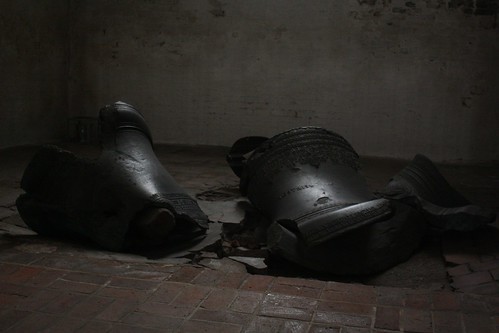
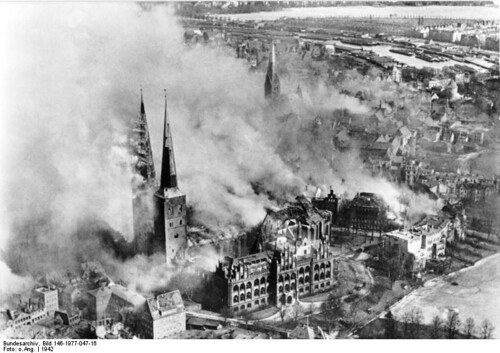
Note: This post was written in March 14-15 and posted after our return. When I think about L beck, the first thing that strikes me is the feeling of history underfoot. It struck me most when we set foot inside the Marienkirche. I had never quite felt a wave of a feeling of stepping back in time like that before. The stones on the floor were uneven and imperfect. L beck has had a wet and snowy winter, so the city had spread sand everywhere: sidewalks and roads. Walking into any grand church, I could hear the sound of sand under the shoes of everyone nearby, and feel it under my own shoes. I think I will long associate with L beck the feeling of walking into a grand old church, looking up at the top of the old building at seemingly impossible heights, while feeling the grit of sand and uneven stone beneath my feet. IMG_2643 Marienkirche isn t perfect, like some American churches I ve been in, such as the Basilica of Notre Dame. It doesn t have a lot of gold, either, and both of these attributes are wonderful. Look at a column of bricks, and you can see that each brick isn t exactly like its neighbor, and the entire column isn t perfectly straight. Lots of things in L beck are so old that they aren t perfectly straight, and it made me think that our American notion of always having to fix such things might be somewhat off sometimes. IMG_2629 Look up, and you see the frescos from the 1300s, revealed after many years after the building was struck by an allied bombing raid in 1942. This heavily damaged the building and knocked down plaster from the walls and ceiling, revealing the old artwork. Many parts of Marienkirche were lost as a result of the bombing, which perhaps adds to its slightly sparse and ancient feel. The church bells were sadly melted and crashed to the ground due to the bombing, and have been left exactly where they fell as a memorial. IMG_2641 Look down, and you see the uneven floor, and the concrete slabs above where important people were buried under the floor an attribute common to many of the churches we visited. It was common to see dates of graves from the 1600s and 1700s, though in some places it would go as far back as the 900s. The main part of the church has no heating or cooling, and visiting it on a day just a bit above freezing adds to the feeling of, well, old. Marienkirche has to be my favorite sight in L beck. Walking around the city, I get a similar feel. Many streets and sidewalks are made of stone. The streets that weren t damaged in the war have rows of beautiful old facades. Walk down many streets, and every so often I d see a little tunnel ( just wide enough for a coffin ) that goes under the street-facing houses to a nice little inner courtyard. These are open to the public, but tend to be very quiet and somewhat private. In the courtyard are smaller houses, which would have originally been used by the less wealthy. We also saw the L beck Dom (cathedral), which had a small museum about the destruction due to the Royal Air Force bombing in 1942. It was very sad to see the photo of the Dom in ruins, still smoking, even now. Burning L beck Cathedral after an air raid in 1942 I can only imagine what it must have felt like to residents of L beck to wake up to see many of their priceless centuries-old landmarks and places of worship so horribly destroyed and all of this for little strategic purpose really focused on the morale of the enemy civil population . It s sad that the allies would do such a short-sighted and terrible thing. Europeans have long had to live with the legacy of war upon war, while we Americans have rarely had to see the consequences of war up close. I think it would be good for more of us to visit these sites and come up face to face with what a bomb can do, and then perhaps we will be more judicious with them in the future. Shifting gears now to where we stayed: Andreas & Sigrid, with whom we stayed, have a beautiful 500-year-old house, with lots of original wood beams exposed, and some very old paintings on the walls and ceilings. Nearby were excellent bakeries and a chocolate shop. Terah and I visited it today and bought some very good chocolate. And this brings me to the second thing I ll remember: Andreas & Sigrid s children, Lukas and Rahel. Now, Terah knows no German, I know only a little bit, and the children know no English. So it was a bit slow getting to know each other to start out, but we managed to work around the communication barrier and had a great time. Terah played board games with Rahel, while with me, she kept inventing games to play: hiding somewhere, saying Hallo! , and laughing at how many unsuccessful attempts I might make to find her. I showed Lukas the camera on my Droid, which he used a lot, though a racing game on Terah s iPod Touch was more exciting. They both enjoyed looking at videos of American trains a bit, but especially pictures of our house and yard with Jacob and Oliver. They tried to teach me the German words for things, and also made futile attempts to correct my pronunciation! When we were leaving today, Rahel came over and gave me a kiss on the hand, then the same to Terah s hand, then a little kiss on one of our suitcases. It was touching and sweet. This was one of those experiences no guidebook prepared me for, and no tour bus would have provided. It is something neat to make friends with children despite the large language barrier. On to the rest of the visit We had arrived a little late into Hamburg. After getting our bags and some Euros at an ATM, the next step was to find the bus to L beck. No signs for it were evident, so I found an information desk. The person at the desk was carrying on a conversation in German with the person ahead of me in line. I figured an information desk person in a busy airport would speak English, and was all ready to ask Sprechen Sie Englisch? , but when I walked up, he got a polite smile, and said, Good morning! How can I help? Guess I m obvious. He directed me to the bus, gave me a brochure about it, and told me what time it would leave. Terah and I found the spot to wait, and for a moment I stepped inside the airport terminal. Terah won t let me forget that someone came up to her and asked a question in German, whereas I was spoken to in English. Anyhow, we found the bus, managed to communicate with the driver that doesn t speak English, and sat next to the friendly person that was talking to Terah. He turned out to be a violin player from Munich, and we had a great conversation for the next hour he asking questions about the USA, us asking questions about Germany and Munich. At one point, he commented, You two are so open minded and you re also Americans! He sounded surprised. We exchanged email addresses at the train station. Andreas found us there, and we walked through the city to his house, with him pointing out the sights along the way. L beck is a beautiful city, and though it was damaged in World War II, much of the really old parts still remain. The famous Holstentor Gate has a museum inside, which was fascinating to visit. On Sunday, we went to church with the family we were staying with, Andreas helpfully translating for us. There I met a British Python programmer, which was fun. His wife is a social worker, which was fun for Terah. Monday it was time to get on the train to Berlin. We again walked through a cold and rainy city to the Hauptbahnhof, ready to head to Berlin. There we got on a train to Hamburg, then an ICE train to Berlin. Despite having just a few minutes for a connection in Hamburg, it all went perfectly smoothly. The train left Leipzig about 10 seconds late the clock inside turned over to the minute, then the doors closed and we were off. Impressive. Note: the rest of my photos from L beck are available on Flickr.

20 March 2010

Maximilian Attems: New klibc release 1.5.17

Not only fixes ipconfig regressions due to fixes in 1.5.16, but ipconfig should no longer discard useful packages. We also fixed a long standing klibc sparc specific socket bug (#444087): sparc lists socket system calls, but does not provide all of them natively. So one is better off on sparc to use sys_socketcall. Thanks to Jan Hauke Rahm the packaging switched to modern Source Format 3.0 (quilt) with debhelper 7 usage reducing cdbs overhead on build. This is a big switch and makes me very happy. New addition include a $(make help) target in Makefile to ease klibc build. A small losetup got added to klibc-utils. i386 and sparc build fine against current linux-libc-dev: klibc-1.5.17 released
P.S.: New outfall seem to include armel and s390 due to libgcc changes.
Update: Seems only a small packaging error due to test target invocation, should be fixed in 1.5.17-3.

15 March 2010

Russell Coker: Types of Security Tokens

The Security Token Wikipedia page doesn t seem to clearly describe the types of token. Categories of Security Token It seems to me that the following categories encompass all security tokens:
  1. Biometric tokens which seems rather pointless to me. Having a device I control verify my biometric data doesn t seem to provide a benefit. The only possible benefit seems to be if the biometric token verifies the identity of the person holding it before acting as one of the other types of token.
  2. Challenge-response devices. The server will send a challenge (usually a random number) and will expect a response (usually some sort of cryptographically secure hash of the number and a shared secret). A challenge-response device may take a password from the user and combine it with the challenge from the server and the shared secret when calculating the response.
  3. Time-based tokens (one-time passwords). They will provide a new pseudo-random number that changes periodically, often a 30 second time interval is used and the number is presumably a cryptographically secure hash of the time and a shared secret. This requires a battery in the token and the token will become useless when the battery runs out. It also requires that the server have an accurate clock.
  4. Use-based tokens. They will give a new pseudo-random number every time a button is pressed (or some other event happens to indicate that a number has been used). These do not work well if you have multiple independent servers and an untrusted network.
Here is my analysis of the theory of token use, note that I am not sure how the implementations of the various token systems deal with these issues.
  1. Biometric security seems like a bad idea for most non-government use. I have seen a retina scanner in use at a government office that made some sense as the people being scanned were in a secure area (they had passed some prior checks) and they were observed (to prevent coercion and the use of fake eyes). Biometric authentication for logging in over the net just seems like a bad idea as you will never know if you can trust the scanner.
  2. It seems to me that challenge-response devices are by far the most secure option. CR is resistant to replay attacks provided that it is not possible to have re-used challenges. If the calculation of the response includes a password (which is performed on some tokens that resemble pocket calculators) then a CR token will meet the something you have and something you know criteria.
    One potential problem with CR systems is that of not including the server or account ID in the calculation. So if I was to use a terminal in an insecure location to login to a server or account with data that is not particularly important then it would be possible for an attacker who had compromised the terminal to perform a Man In The Middle (MITM) attack against other servers. Of course you are supposed to use a different password for each account, if you do this then a CR token that includes a password will be resistant to this attack but I expect that people who use tokens are more likely to use one password for multiple accounts.
  3. Time-based tokens have a weakness in that an attacker who can immediately discover the number used for one connection could then immediately login to other servers. One example of a potential attack using this avenue would be to compromise a terminal in an Internet cafe, steal a hash used for logging in to server A and then immediately login to server B. This means that it may not be safe to use the same token for logging in to servers (or accounts) that have different sensitivity levels unless a strong password was used as well I expect that people who have hardware tokens tend to use weaker passwords.
    Also one factor that will make some MITM attacks a lot easier is the fact that the combination of the hash from the token and the password are valid for a period of time so an attacker could establish a second connection within the 30 second interval. It seems that only allowing one login with a particular time-coded password is the correct thing to do, but this may be impossible if multiple independent servers use the same token.
    Time based tokens expire when the battery runs out. The measures taken to make them tamper-proof may make it difficult or impossible to replace the battery so a new token must be purchased every few years.
  4. Use-based tokens are very similar to time-based tokens, it s just a different number that is used for generating the hash. The difference in the token is that a time-based token needs a battery so that it can track the time while a use-based token needs a small amount of flash memory to store the usage count. The difference at the server end is that for a use-based token the server needs a database of the use count of each token, which is usually not overly difficult for a single server.
    One problem is the case of a restore from backup of the server which maintains the use count database. The only secure way of managing this is to either inspect every token (to discover it s use count) or to issue a new password (for using password plus token authentication). Either option would be really painful if you have many users at remote sites. Also it would be required to get the database transaction committed to disk before an authentication attempt is acknowledged so that a server crash could not lose the count this should be obvious but many people get these things wrong.
    An additional complication for use-based tokens comes with the case of a token that is used for multiple servers. One server needs to maintain the database of the usage counts and the other servers need to query it by secure links. If a login attempt with use count 100 has been made to server A then server B must not accept a login with a hash that has a use count less than or equal to 100. This is firstly to cover the case where a MITM attack is used to login to server B with credentials that were previously used for server A. The second aim of this is to cover the case where a token that is temporarily unguarded is used to generate dozens of hashes while the hashes could be immediately used it is desirable to have them expire as soon as possible, and having the next login update the use count and invalidate such hashes is a good thing.
    The requirement that all servers know the current use count requires that they all trust a single server. In some situations this may not be possible, so it seems that this only works for servers within a single authentication domain or for access to less important data.
Methods of Accessing Tokens It seems that the following are the main ways of accessing tokens. To avoid driver issues and allow the use on random machines it seems that the USB keyboard and manual entry types of token are best. While for corporate Intranet use it seems that a SmartCard is best as it can be used for opening doors as well, you could use a USB keyboard token (such as a Yubikey) to open doors but it would be slower and there is no off the shelf hardware. For low cost and ease of implementation it seems that use-based tokens that connect via the USB keyboard interface are best. For best security it seems that a smart-card or USB interface to a device with a keypad for entering a password is ideal.

13 March 2010

Joerg Jaspert: Vacation fun

As some people know, I had a vacation in February. Only very few knew that I was heading down to Taiwan. I was leaving Germany at the 8th and back here on the 24th of February. Yes, that neatly fit this years Chinese New Years parties. Was at home for four days (and at work for one), after which I went off to this years Cebit. Until the day I arrived in Taiwan it looked like we do not have a booth there, but then everything changed while I was having a nice vacation. I really have to thank Alex here. Cebit was actually my task, but he jumped in and did all the preparatory work that was needed right in the time I started my vacation. Without that either my vacation would have been much different and less nice or we wouldn t have had a booth. I am back home since some days now, without any travel plans for the next few weeks/months to come. Though I wish I had a job (and private life) that would allow me to just go off again, ie. something I could do everywhere where there is net. Meh. Of course I did take some pictures (more than 2500) and also some notes during the trip. And having a blog that one or two people read, I think I should bore you all with it. But hey, you can skip it if you want. :) Yes, I should really take some time and work a bit on the pictures I took. Right now I only selected around seven hundred which I show off to people (and to link to from here), but they are basically just copies. While some are great in itself, many can need a bit of work here and there (cut out unimportant, blurry, colors, the usual stuff). And I also prepared multiple shots for HDR processing or to make a panorama view from, but thats something that takes time and has to wait. Just for the record, I think that this, this and this are very nice ones.
This is a public version of this text, so names and also various events and days have been cut out. Yes, people who know those in my pictures will know names, but thats no reason to feed the evil $searchengine caches more with hits for their names. Flight down, 8 Feb. Flight down from Frankfurt, using KLM so it went via Amsterdam and Bangkok (short Transit stop) to Taipei. The days before we had lots of snow and cold and all that stuff which tends to get flights cancelled, but I was lucky, none of that for me. The only slightly annoying thing was in Taipei, where KLM demonstrated how much a Business class Priority luggage sign is worth for them sometimes. We came in half an hour before schedule, but then had to wait an hour for our luggage (while all of economy luggage passed by). I think the business class Priority sign actually meant Priority to wait . The food on the flight from AMS to BGK was good, having a No Lactose Meal actually tasting well. Can t remember what it was, but better than the fish I got from BGK to TPE. Catering from Thai Airways, they do not know anything besides Fish when preparing No lactose meal and then they also manage to prepare it in the most boring way possible. Sad thing, but happened four times now, all the times I had catering prepared by them. Other than those points, no trouble at all. Immigration was done in about 20 seconds, customs didn t want to look at me, just the asians in front and behind me, all fine. Met my Travel Companion outside and off we got. First to the Taipei Main Station, where we got some food. Some rice (with a bit of meat) and red sauce, together with a soup. And a glass of tea, but that had an oily surface. Umm. Guess the cup wasn t all that clean, we both skipped that. Then I tried to get money from an ATM. First had to find one that actually wants my european credit card. And then, as usual when I travel offroad, I managed to forget my pin. Bah. Well, found an HSBC somewhere that actually takes my Maestro card, so at some point I got money (a pretty helpful thing, that is).
Wednesday, 10 Feb. First night in a new Timezone which is 7 hours before my normal one. Makes my body think I should not be allowed to sleep much. So it only allowed me some two hours before I woke up again. It didn t listen to any argument and didn t care that it was all dark and night, so I couldn t sleep more. Wellwell, got up at the same time as $TC then, we got some breakfast, egg/ham sandwich and tea. From there I set off and juggled my way through Taipei MRT over to YuanShan Station.
Confucius Temple
It is good for a visit of the Confucius Temple and also the Dalongdong Baoan Temple which is right beside it. Later on I got told there are much more impressive Confucius temples elsewhere, but it is still a good place to start off. And it just means I have one more reason for another visit. After those two temples I moved over to the Taipei Fine Arts Museum. Took about an hour to go through that museum, which again made it pretty clear to me: Some people just have too much time and money. I do not even get the setup in the entry hall, even though it looks nice, and let s not start about the rest they show there. Definitely not my thing, Fine Arts , nothing worth to waste money on, at least for me.
Having fun
So I left there after just about an hour and fought the MRT again. This time it spit me out at the Taipei Zoo station and I went through that. Appearently the nice sunny weather let some animals have fun, and that all in public. Tssk. Won t someone please think of the children?! :) Otherwise it is a pretty big area with lots of animals. Not all of them seem to be in areas that (I think) are big enough for them, though I m no expert in that. But it looked small for them. Also, while I thought it pretty well visited, many people there, I bet for Taiwanese standards the zoo was nearly empty. At least looking at their preparations for queues, like in front of the koala house, they are used to deal with like 20 times the amount of people. I count me lucky that there haven t been that many, else I would have needed to wait everywhere, which I hate. Queues are bad, mmmmmkay? As I already mentioned, the weather that day was pretty nice. Mostly sunny, only few clouds and some 25 til 29 degrees. No rain. Now that s a nice winter day.
HotPot
Dinner was scheduled for 1800h, a Hot Pot session. 5 people in total. Appears you order the meat for the hot pots from the waiter and let them bring it, but all the additional stuff you get yourself. They have a big selection of vegetables, seafood, bread/cake like stuff and whatnot you can take. I first also went there and got a small dish with stuff. But stopped right then and let the Taiwanese do the rest. Better that way, they know it. And hey, we had been 5 and they got stuff for like 35 people. :) It was a nice 2 hour session, in which we had lots of different kinds of additions to the hotpot (two pots actually, one spicy and one not spicy). I know of some meats, some vegetables, but then there also was said to be duck bladder and some other organs which they couldn t (or didn t want to? :) ) name in english. Now, db sounds worse than it is, it doesn t have a special taste and is mostly boring, I think. Of course, not liking seafood, I skipped on that, but about all the rest was nice. I like Hot Pot :) After this session the other 3 left for various reasons and $TC and me had a nice walk around/through the University, before going back to $TCs place.
Thursday, 11 Feb Had another short night as I only got to bed around 2AM, just to get up around 9AM. Additional fun that my body again insisted in being elsewhere, not accustomed to the timezone in Taiwan yet, waking me up a few times during the night.
Fishermans Wharf
Got an easypass for the MRT as that is a little better than buying a chip for every single trip and battled with MRT again, finally emerging at Danshui station. Sat a bit at the beach eating breakfast before finally starting a walk out to the Fisherman s Wharf . It is some 4 kilometers to it, made out as a bicycle path, but I just walked. Visited Fort San Domingo on the way and then went all the way up in that Wharf area, another kilometer. Got me a nice peppermint ice tea, though it was a funny process to it. The salesperson didn t speak english and my chinese is - well, limited is a too soft word to describe it. But it worked pretty well, with us pointing around on the menu and then the salesman showing me various additions, if I would want them. Like showing a milk bottle Want milk in tea? , showing sugar,
Spongebob
At the bridge in that Wharf I was approached by some Asian people, asking me to take a picture of them in front of the bridge. Fine, did it, did it again in another setting and then, when done, they asked me where I am from. When I said Germany they thanked me in German which surprised me a little. :) That is something funny anyways. Wherever I go, people look. They aren t much used to someone my size. Kids are usually more direct with pointing, grinning and sometimes crossing my way on purpose, just saying hi (some kind of test of courage, I bet). Every now and then I also get asked if they can take a picture with me. Right now there are like 20 pictures of me (that I know of) all over Taiwan that I didn t take, nor have. :) Now, who here loves Spongebob? This is the country for you! The picture only shows one small table, you can find much much more. Same goes for Hello Kitty and other such stuff.
Food!
Dinner this day was initially planned to be at some place called Maokong, but then plans changed, as $TC and others that we should meet there needed to pack for the next day. So $TC and me just went to the Shilin Night Market. Right beside it is a big food plaza. Like a thousand square meters (or probably a few more, what do I know, I haven t measured it, but it wasn t all too big) having some hundred or more little kitchens where you can get a very broad mix of things. We had cold noodles with some slightly spicy sauce and then some fresh guava juice. Tasty tasty. Though noodles with chopsticks was something new, but it worked out well enough. Later I had a noodle soup, that was something more tricky, but in the end you just need to find the right trick.
Little crowded
After food we went through the night market. Well. Parts of it. It s big. And its crowded. About the most crowded place I ve been to. Heck, half of Taiwan was in that street area. :) Didn t buy anything. The only stuff I thought interesting was a T-Shirt with a Taiwan map on it, but do try getting some in my size. Ha. Small asians. They say they have big sizes, but then its XL only (or a totally ugly color, brrr). We finished early here, as the packing for the trip starting Friday right in the middle of the night still needed to be done, and getting up at 6AM you do not want to stay up too late. But it was nice there anyways.
Friday, 12 Feb Got up early. I mean, early. 6 AM. ARGS. Not really my favorite thing to do, but as our plan said we have to get the HighSpeedRail to Kaohsiung at 7:42AM there wasn t much else to do. Pretty nice train, lots of room to sit, even in second class. Don t know business, but probably even more. And it looks fast, if I can trust the display it had we where going near 300km/h. After arrival in Kaohsiung we went out to $TC s place to get our luggage away, as it is annoying to move around with all the stuff. I got another easypass here, this time a lent one from $TC s Mother. It s fun, there are two MRT systems in Taiwan using the same technics, basically the one in Kaohsiung is built like the one in Taipei, using the same style of RFID cards (and chips for single trips). But they made them incompatible. One can not use a pass from Taipei in Kaohsiung and vice versa, for whatever reason. It s not like the two cities are very far away from each other, it would actually make sense to be compatible, but that is probably what stops them doing it. We took this Friday and also the Saturday to get around Kaohsiung, visiting several places. As the MRT in Kaohsiung has a different station design at every of its stations we did look at some of those too. Especially Formosa Boulevard , a station that has two points describing it best:
one part of the dome of light
Right outside one of the exits is a funny little cosmetic surgery. I only remember it thanks to the english name of the Doc, but somehow I don t think it was chosen wisely: Dr. Luck . . Aiik, you need be lucky to get out there looking better? Dr. Unlucky might not be good for you taking a wrong cut? :) (Yes, I know, I m crazy, don t tell me. Ok, if you really want, queue up, you aren t the first.) At one point we went out to Sizihwan, where we walked to a ferry. Actually we tried renting bikes, but this little bike shop wasn t prepared for a small german like me, not having bikes my size. (And no safe way to get the saddle of the smaller ones into a height I could start using the bike). So walk it was, not nice bike trip. Still ok, got to the ferry, got over to the other side and had a nice walk there to the/along the coast.
one more temple
We bypassed multiple temples there, at one of which a great cite came up: Temples in Taiwan are something like 7-eleven. They are everywhere. I love it. And somehow it s true, you can find one around each other corner, a little like those churches in Puebla, Mexico. In the evening we had been out for a night market. The first one was pretty boring. While having been announced in the MRT station near it to be a night market for New Years things, we found it to be about empty and very boring, so we went over to another one nearby. Wasn t as crowded as the Shilin one, and not as large, but nice. At the end of it had been a small game stand, where one could shoot balloons to get some price. I ended up getting the biggest available, as this isn t really a challenge. How anyone can miss hitting a balloon there I don t know. They are only like 3m away, not moving, you have clear view, and if you really need it even get a laser pointer on your gun. Anyways, was fun enough, I repeated shooting enough times to get the biggest available Patrick doll they had (a meter). Hrhr. Who likes Spongebob, eh? Speak up! :) I got a few nice shots of the night skyline of Kaohsiung late one of those evenings, where we went to the Dream Mall and up into the big wheel . Also had some game spots there, but turns out I m not as good throwing things at a target than I am shooting at them. We also went out to a historical sugar refinery, looking around. Of course, this being Chinese New Years eve, there haven t been that much people moving around, it was pretty empty. And the people working there all just waiting for their shift to end. But still got some pretty nice pictures from and around it. Also tasted a new kind of icecream (new for me that is), which actually has a kind of sand like feel. I like it. Like I actually liked most of the food, pretty much all the time. Of course everyone has things one does not like, but in general the food is great. Especially the largely different style compared to the european way of cooking. I ate lots of things I won t ever touch here in Germany.
Sunday, 14 Feb; Monday 15 Feb A nice two days some way out of Kaohsiung. Found out I am pretty good at losing various things: I got a bag full of (Li n w ; Syzygium samarangense; wax apple, love apple, java apple, bellfruit, see the wikipedia page for more on it) and about an hour later I totally had lost track where it ended up. The same happened with a big bag of tissues I had bought. Somehow both of the bags got feet and ended up elsewhere without telling me.
ocean place
That one evening we went out for Dinner, a big party of people. Was a place right beside the ocean, so yes, seafood. Oh yay, I don t like that too much. Happy enough there must have been a conversation going on like Hey people, this silly german doesn t like seafood much, lets get one other option too . So we had a plate with some cold chicken on. But I tried various of the seafood dishes too and liked some of them. Actually some I had tried in Germany at some point where I learned to hate them and now I liked them as I got them in Taiwan. People also seemed to think I am good at using chopsticks, though I think I am just fiddling around and be lucky when I get my stuff. But maybe it just means Hey, it looks funny what you are doing. Keep going, we like to laugh. :) ). We actually had been around this place a little earlier that day, taking a walk around it, drinking some tea, that type of thing. And got a set of nice bottles of fresh coconut juice. My first time i got it fresh, I think. But I also managed to lose track of it. I bet somewhere there is a party consisting of tissues, (Li n w ) and a bottle of coconut juice, singing classic songs like Strike, we escaped the german Lunch the other day happened to be a big family meetup. Lots of people, lots of chatting, lots of fun (I think :) ). When we arrived it started out by about all of them trying to get me to sit down somewhere. And me bad impolite german not wanting to. But there was no way to escape, so finally they won and I sat, with a number of people around me, trying to chat with me. Which is actually hard work for both sides, but every now and then gets a good laugh. But my chinese is far far away from being useful for even a small meaningful sentence, so they had to activate their english knowledge, especially for the times $TC had been elsewhere and couldn t help out translating. Somehow the job got done, they asked their questions and I hope they mostly understood my replies. Bad me, speaking too fast english sometimes. We had a nice lunch there, with the most notable part being the way I got called to it. It s interesting how much you can say by just using body language and pointing. (Oh, of course food was very good too, but that fact is one you can take as a given, even if I don t mention it again). Later on a dice game started, and after a short explanation of the rules I joined in. Took only a little, but then I got the rules, its easy. I didn t get any of the chatting that happened during the whole game, but it was very much fun and really insane (so would also fit DebConf very well) and nearly no times you do need words to understand what is going on. I like this game and they gave me a set of dices, so I can train it and come back to play again. Ha. A bit after that dice game people unpacked some of the sweets I brought from Germany. One of them being spicy. Really nicely spicy, at least for the average Taiwanese. If you happen to have been at DebConf9 and also had the luck to be one of those I offered some chocolate or wine gum to, you know what I write about. The stuff here was slightly less spicy, but still more than enough to leave a nice impression. They had lots of - well - fun trying them out, gave a good set of laughter. And ordered more for next time. Uhoh, I already know which I will take with me, but then there have to be special preparations before testing. :) I ve also got invited to come back next year. Might be I haven t made the worst impression. Well, lets see if I can take this up and if they still want me in a years time. At least my chinese should be much better by then, given another year of training. (Even if I find it actually hard to learn. For some reason its not easy for me to memorize language things, at least not chinese. Oh my, one year, I should have some 3 words more, I hope :) ). In the evening, back in Kaohsiung, $TC also told me rules of a second dice game that I had seen some people playing. Also seems like fun if played with enough people.
Tuesday, 16th Feb
35mins delay
We started the trip by taking the train from Kaohsiung to Taitung. We had been a little late for it, had to run from the MRT to the train station. Silly me took that as an opportunity to fall down a set of stairs. Only to discover, when getting to the platform, that the Taiwan Railway wanted to give me a feeling of home, delaying the train. First by 31 minutes, later it got up to 43 minutes. Somehow felt like Deutsche Bahn, being late is also their best quality. When the train finally got in we saw that we had been lucky to have seats reserved, this train was full, lots of people moving around within Taiwan that day. We got to Taitung all fine and had the Hotel send someone to pick us up at the train station, as it is a long way from the train station over to the Hotel. Got our room and left it pretty soon again to look around.
Hello Kitty
Spotted a funny little Hello Kitty car and got some food for lunch followed by a walk along the beach. Found some sculptures made of wood, where one of it seems to have some bad stomach problems
Wooden figure with stomach problems
Later on we had a nice and long walk through Taitung Forest Park. Took some time, got some nice pictures. It was getting dark when we got back into town, time for Dinner already. Yay, food. Next day a train trip to Hualien was set, but only for the afternoon, so we had time to look around. We first went through the Peinan Cultural Park, but unfortunately
Park your dog
we had no dog to park there. After that we rented a scooter to get a little farther away from the train station. After getting some fuel for it we headed to National Museum of Prehistory (which was much more interesting than the Fine Arts one earlier) and later on just drove around some time. Just looking around, without a clear direction, simply for the look around. Was fun, but too short actually. But we had to head back at some point to catch our train over to Hualien. In Hualien we again got a Taxi to the Hotel. We left that soon after arriving, Hotel rooms are boring, and it was food time again anyways. Only a little annoying, one of the few days we had rain and I can imagine something nicer than rain when I am outside. But somehow this damn weather doesn t bother to stop raining when I go out.
Thursday, 18th Feb A full day stay in Hualien, no Hotel change. Just a trip over to the Taroko Gorge.
Taroko Gorge
Which is a very nice and impressive place to visit, sure too much for a single day, I definitely have to come back here. (Well, I have to come back for multiple other reasons, but this sure is one). We took the bus to the first stop in that park, somewhere around the Leader Village Taroko. Probably a nice place for a night or ten.
Nice place?
There was a short trail we followed, getting some more pictures and impressions, but it didn t take us long until we where back in a queue for a bus, this one going all the way up to the furthest away spot a bus goes to. There we had some lunch before we wanted to start walking around. Unfortunately (for my nose) we then passed by a place selling Stinking Tofu . Other customers there said that this is not the best available, but I got a taste of it. Don t really need that version more often, even though its not as bad as it smells or the name suggests. We walked a little there and I got some more pictures before we set off to climb the stairs to the Hsiang-Te Temple of Taroko .
Hsiang-Te Temple of Taroko
Looking down from there we saw a lot of buses which was our sign to get back to the bus station, as the last bus was scheduled to get off somewhere at 3 in the afternoon. And as we didn t have a Hotel place here it is pretty helpful to catch the bus. So we queued up once more and had a bus ride back to the train station. Next time there should definitely be a night or more in some Hotel somewhere there. On the way back we took a slight detour, having another time at the beach, not enjoying the weather which insisted on a little rain and lots of wind.
Friday, 19th Feb This day saw us moving to Luodong, another place with a day of rain. Still, my gps log tells me we where moving around a lot, even though I do not have a single picture from the whole day. And as pictures are the main source of my memory ups. Well, I remember the rain, of course. I also remember that I got a steak at some place and that we bought various kinds of food (and tea and juice! :) ) on one of those markets, eating it in our Hotel room. (Rain is bad, mmmmmmmkay?!). And there was some kind of park too, in which I got a funny little game. Oh well.
Saturday, 20th Feb
Way to go
There is nothing nicer than starting a day with a fun bus trip in the morning. Going high up into the mountains. On a day where the clouds reach down to some level underground, more or less. Using very narrow streets and the usual mountain like narrow curves. While not being able to see far. We got up to Taipingshan all fine but once there we had to wait for our room to be ready. So we took a walk around. Actually not a walk. More a climb. Being a mountain place, and those mountains never having heard of those nice invention called elevator or that other named escalator, people setup stairs. Millions of them.
atmosphere
Besides the stairs it is a very nice place to walk around. We took various of the trails through the area and besides me sometimes nearly falling down (damn slippery grounds) it was great. At some point in the afternoon we got our room and also ate some instant noodles before taking another trail, one that took us some 2 hours. You should really take a look at all the pictures I took, as the few I link directly sure do not present this area right. Taipingshan starts at Picture 434 and continues up to Picture 634, but a good number of them is from the second day too.
Sunday, 21st Feb Contrary to the day before there wasn t a single cloud to spot. Ok, ok, there have been some, pictures proof it, but it was a nice sunny day. Nice start of the end of the trip through Taiwan (still one and a half day in Taipei to follow, but the trip around country is over). Of course that meant taking a lot of pictures again,
a sunny morning
and soon after breakfast we took the BongBong Train over over to the Maosing station. There are again a few prepared trails, most of which we took. We only skipped on the one going to the waterfalls, as it wouldn t have fit into our schedule. Got compensated with a pretty adventurous track with lots of nice sights following the old train tracks. Thanks to a number of landslides there is no train going anymore and thus it is a nice way to walk.
rails
It is a 1500m long walk and sometimes you really have to be careful, but it provides many great views and is a really nice trail. Got a few hundred pictures, yay. Including a proof I ve really been there. I hate pictures with me, really, they are just shit by default (maybe I shouldn t be in them?), but in total I got 11 pictures that proof I was really there and not only sent a camera (four of those are included in that gallery I always link to). We got back to the main place around noon and after Lunch we took the Bus back down to Ylan. The bus was scheduled to go at 15:30h, so we went to it fifteen minutes earlier. While we had a sunny day, clouds had started coming in at 15:00h, and at the time the bus started it was all white and there wasn t much too see for the driver again.
me was there
But it turned out that this makes no difference. The driver must have a very prominent wish to die while taking his passengers with him. Or he is insane. Or has a very important appointment somewhere else. Whatever it is, he drove down, on narrow streets, very tight curves, not too much sight and all that with a speed thats incredible. Several times a part of our bus was out over the abyss. I found it pretty fun and all that, especially as it made for a set of very nice views all over the area, and appearently another passenger thought similar, but $TC did have quite the opposite of thoughts and did not feel all that great. We arrived in Ylan one hour before schedule, which, on a 70km trip through mountain area should give a hint how it was. Took a minute off to regenerate and then we wanted to look around a bit. Having our luggage with us that is annoying so we tried to leave that at the train stations baggage service counter. Turns out the personell there is a bunch of crackmonkeys not following their own advertised opening times. Probably wanted to go home early, those lazy dolts. Fortunately the people at the ticket counter were better and exchanged our tickets and we took the Train back to Taipei a little earlier than initially planned.
Monday, 22nd Feb Bad day for all those people who had a nice vacation during Chinese New Year, they had to get back to work. I didn t have that problem and so went around Taipei a bit. Initially I had plans of going to some tourist spots, like the National Palace Museum or others, but then just skipped them all and just took a walk through various spots of Taipei. Basically just Get out of MRT station XY, walk around . The GPS track later told me that I actually covered about 15 km that way, and my feet agreed to that. At some point I did bypass a German Cuisine restaurant, called Zum Fass . Don t ask me how the food is there, I wasn t in, but still had to grin a little when reading the menu. In the evening we went out to get me some Tea to bring back to Germany. Well, some is some kind of understatement, it was lots, as much as I could pack. But good stuff, some of it is steaming right now right besides the keyboard here. Yummy.
Tuesday, 23rd Feb
lantern
As always, the worst day of any vacation. The day you have to leave and go back home. My flight was scheduled for 20:00h, so I took another half a day just looking around Taipei. Which made me even more jealous of those not having to get away, as I happened to pass by some preparations for the Lantern festival. Which happened only a few days after I got away. Next year I have to plan better and stay longer, what I saw on preparations, and that only at the Sun Yat-sen Memorial Hall definitely makes it worth it. Timing in the afternoon was very tight, I actually got the last bus that was in time for my flight. Just one later would have created some trouble, my total time on the airport was something around 30 minutes before boarding started. Just enough to get the minimum needed amount of postcards written and off to boarding. The flight back was boring. Food from TPE to BGK was a pretty good variation on No lactose , some noodles with stuff. Of course from BGK over to AMS it was fish again, same boring Thai Catering as usual. I was unable to sleep well on the flight. Somehow I woke up very often despite earplugs and eye mask. With all that I turned out to be half asleep when we arrived in Amsterdam and so I accidently took an opened half litre bottle of water with me through security. Funny, they didn t spot it. Instead they decided to make a big fuss about my camera bag, asking me in detail what I have in there, supposedly trying to check if I know what I carry. And made an even bigger show of scanning it again. And that bad liquid that those idiotic stupid laws written by brainless monkeys from our governments forbid got no notice at all. Imagine what I could have done to air safety with it! Oh my. Back in Germany my luggage got out first, so no waiting at all. I passed by work to leave some weight there (Hello boss, want some tea?) and went back home. This was also my first trip where I had a noticable jetlag after coming back. For nearly a week my damn body insisted on being in Taiwans timezone, waking me up at times I should sleep, feeling tired when I should be awake. Tssk. Conclusion of this trip: I will be back in Taiwan for sure. I don t care if you take this as a promise or threat, but I will be back! :)

11 March 2010

Martin F. Krafft: Splitting puppetd from puppetmaster

My relationship with Puppet is one of love and hate. I am forced to use it simply because there is no better tool around, but I hate it in so many ways that I don t even want to start to enumerate (hint: most have to do with Ruby, actually). Today I decided to put an end to one thing that has been driving me insane: the fact that puppetd (the client) and puppetmasterd (the server) use the same working directory, /var/lib/puppet. Since I consider and would like to treatthe machine on which puppetmasterd is running just another puppet client, I was running into funky issues related to SSL certificate confusion, obscure errors, and SSL revocation horrors. The following hence assumes that you have installed or are planning to install puppetd on the machine running your puppetmaster, and that you have two fully-qualified domain names for the machine. For instance, I run puppetmaster on vera.madduck.net, and puppetmaster.madduck.net is an alias for the same machine. I ll use these names in the following as examples. The following may be Debian-specific, as I am solely using the puppet and puppetmaster packages for my experimentation and verification. Your mileage may vary, but the concept shall be the same.
  1. Stop everything:
    /etc/init.d/puppetmaster stop
    /etc/init.d/puppet stop
    
    
    (also verify that you have not instructed cron to restart these services)
  2. Rename the working directory:
    mv /var/lib/puppet /var/lib/puppetmaster
    
    
    and amend /etc/puppet/puppet.conf accordingly:
    [main]
    #  
    vardir=/var/lib/puppetmaster
    ssldir=$vardir/ssl
    #  
    [puppetmasterd]
    certname=puppetmaster.madduck.net
    #  
    
    
    I am doing this in [main], planning to override it for puppetd later, because puppetd is the only program which makes sense to be separated from the rest. Since only the puppetmaster needs a special certificate name, that is set specifically in the [puppetmasterd] section. If you use apache2 or nginx in front of your puppetmasters, make sure to amend the SSL file locations in the virtual host definition and restart (!) the service. You can verify that the configuration has been amended by making sure that there is no output from the following command:
    # puppetmasterd --genconfig   grep -q '/var/lib/puppet/' && echo SOMETHING IS WRONG
    
    
  3. Now restart puppetmaster:
    /etc/init.d/puppetmaster start
    
    
    and verify that it starts. If your puppetmaster previously ran under a different name, it will create itself a new certificate and sign it. Since the client will get its own working directory (and thus a new SSL certificate), you want to remove all records of the old certificate:
    # puppetca --list --all
    + puppetmaster.madduck.net
    + vera.madduck.net
    # puppetca --clean vera.madduck.net
    
    
  4. Change the configuration file to tell puppetd about its working directory:
    [puppetd]
    server=puppetmaster.madduck.net
    vardir=/var/lib/puppetmaster
    ssldir=$vardir/ssl
    #  
    
    
    This you can verify with the following command, which should not print anything:
    # puppetd --genconfig   grep -q '/var/lib/puppet[^/]' && echo SOMETHING IS WRONG
    
    
  5. Now install puppet, or (re)start it if it s already installed:
    # /etc/init.d/puppet stop
    # puppetd --no-daemonize --onetime --verbose --waitforcert 30 &
    info: Creating a new SSL key for vera.madduck.net
    warning: peer certificate won't be verified in this SSL session
    info: Caching certificate for ca
    info: Creating a new SSL certificate request for vera.madduck.net
    # puppetca --list
    vera.madduck.net
    # puppetca --sign vera.madduck.net
    notice: Signed certificate request for vera.madduck.net
    notice: Removing file Puppet::SSL::CertificateRequest vera.madduck.net at '/var/lib/puppetmaster/ssl/ca/requests/vera.madduck.net.pem'
    # fg
    info: Caching certificate for vera.madduck.net
    info: Caching certificate_revocation_list for ca
    [ ]
    # puppetca --list --all
    + puppetmaster.madduck.net
    + vera.madduck.net
    # /etc/init.d/puppet start
    
    
    Do yourself the favour and check that it s all working.
  6. Optionally, you can now clean up the client stuff in the server s working directory, for instance like this (it worked for me, but this is the sledgehammer approach):
    # /etc/init.d/puppetmaster stop
    # cd /var/lib/puppetmaster
    # tar -cf /tmp/puppetmaster.workingdir-backup.tar .
    # find ../puppet -type f -printf '%P\n'   xargs rm
    # /etc/init.d/puppetmaster start
    
    
  7. If you stopped cron before (and your puppet recipes have not since restarted it):
    /etc/init.d/cron start
    
    
All done. I wish puppet, or at least Debian s puppet packages would do this by default. Please let me know if the above conversion works for you. Then I might start working on an automated migration. NP: Genesis: Selling England by the Pound

8 March 2010

Gunnar Wolf: OpenSSH 5.4 and netcat mode

The release of OpenSSH 5.4 was announced today. Its announced features include many small improvements, in usability and in crypto strength. One of my favorite tricks using ssh is what Ganneff named ssh jumphosts Many (most?) of my machines are not directly accessible from across the firewall, so the ability to specify in the configuration files where to jump through is most welcome. Well, with this "netcat mode" it will be much clearer to read and less of a hack Of course, it loses a bit of the hackish sthetic value, but becomes easier! (yes, this post is basically a marker so I remember about it But others might find it interesting)

16 February 2010

Jan Dittberner: New hardware for my server at home

After some stability problems and an unresolvable PCI IRQ problem with my Debian server at home (Internet gateway, mail, PostgreSQL, LDAP and NFS server and test system), I decided to get a new mainboard and wireless card last week. I did some research to get hardware that is properly supported and where I can use the rest of my current components. I had So I had to find a mainboard with at least 2 DDR2 DIMM sockets, an AM2 compatible CPU socket in ATX format with SATA ports at least one IDE Port, a Gigabit ethernet port (serving NFS home directories) and at least 2 PCI slots (one for the wireless card) that is well supported by the current Debian Squeeze Linux kernel. As I had some issues with the previous board's nvidia SATA chipset I wanted to get something else that is AHCI compatible. After some research I decided to buy a Gigabyte GA-MA74GM-S2H (rev. 3.0) which is available for a good price and fits all my criteria (2 DDR2 DIMM slots, 6 SATA ports, an RTL8169 based Gigabit ethernet ports, 2 PCI slots, ...). The mainboard uses an AMD 740G + SB710 Chipset. It has an integrated graphics chipset which I don't really need because I run the machine as a headless system. As I use the server as a wireless access point I need a wireless network adapter that supports AP mode. There are not many chipsets that are properly supported in AP mode and allow good data rates so I decided to get an Atheros ath9k based card, because I don't need non-free firmware like with broadcom based cards and could find some affordable hardware. The previous was a Netgear WG311 ath5k card that had issues that it lost its connection under more than minimum load and could only be reanimated by a system reboot. I looked at the Linux Wireless pages and found out that D-Link has a matching adapter the DWL-G520. Unfortunatelly they don't tell about the used chipset (as almost all other vendors too) and write about possibly changing hardware at the product sheet. To be sure I looked at their Windows driver's .inf files and found nothing indicating that there are any non Atheros variants of the card. I also ordered two Fantec MR-35 SATA mobile racks for more comfort when one of the RAID1 discs crashes (had 2 crashes last year) and a 12" chassis fan to keep the system cool. Today the package arrived and after unpacking and putting everything together I started the system (with keyboard and a display attached) to see how it works. All hardware was automatically detected by the current Debian Squeeze system and I only had to remove the entries for the old onboard network adapter and the old wireless adapter from /etc/udev/rules.d/70-persistent-net.rules and fix the device names for the new network cards. I added a new stanza for the Intel ethernet adapter in /etc/network/interfaces and setup a set of ferm rules to have a working firewall (thanks to Formorer for the suggestion to use ferm). After this was finished everything worked fine so far and I put the machine at its normal place without keyboard and display. To verify that the stability situation had really improved, I copied some huge files over the network (both wired and wireless and in both
directions). Afterwards I did a bonnie++ benchmark to test the SATA and hard drive reliability. Everything went well and I'm happy with my investment.

14 February 2010

Andreas Barth: Transit network during olympic games Vancouver?

As Munich is currently trying to get the olympic games in 2018, I looked at what Vancouver did. I could see that there is a new streetcar operating, however the tracks aren't brand new but used to be there while I was in Vancouver (just with not so new platforms and rails). To Whistler there are Busses operating. Inside the city there seem to be Olympic Lanes (which of course makes public transport faster). I'm wondering if there are new built lines at all for the games?

9 February 2010

Martin F. Krafft: Baffling Exchange

I found out yesterday that my university s Microsoft Exchange Server account stopped forwarding my mail on 8 December 2009. As a result, mail accumulated there and remained unseen. Dear examiners, paper authors, supervisors, sponsors, participants, and peers who responded to my calls and cries related to my PhD thesis. I am terribly sorry that you were subjected to this. You replied usually within a few days, but I still sent you reminder after reminder in the weeks to follow. You must have thought that I was a real dork. Please forgive me. I really appreciate your patience! I filed a ticket with my university s IT service provider, which got closed the next day with it should now work again . That wasn t going to cut it for me, so I reopened the ticket, asking for an explanation. Next, I received an apology with a bit of speculation. After a bit of research, it seems that the reason was to be found in the inconsistency of being an external staff member (i.e. an e-mail address outside of the Active Directory domain), but still having an account on the server. On 8 December 2009, the server was upgraded with a service pack. This caused Exchange to go a little manic on the housekeeping. After all, why would anyone ever want to forward their e-mail elsewhere, and still have an account? Well, I certainly don t want an account, and yet I have to have one: Microsoft has bought their ways into the university and spread their germs all across, I need credentials to be able to access shared files, print, browse the library, or search the phone book. However, considering that UL s Outlook Web Access instance does not let users of decent browsers search their mailboxes (a premium feature reserved for users of Internet Exploder), one cannot manipulate more than a page-full of e-mails at a time, bounce messages, or do many of the other operations that make dealing with large amounts of e-mail possible, and because Exchange mail if it doesn t get lost in the first place sucks in so many other ways, I certainly prefer my mail to be handled by a real mail server with a proper mail filter (writeup in progress). Maybe the Exchange service pack was simply designed to get rid of outcasts like me who don t buy into the low-Microsoft-quality vendor lock-in? We ll never know, thanks to the proprietarity of their software (and the fact that the university service provider apparently does not keep logs of changes). NP: AC/DC: Back in Black

Kees Cook: easy example of filesystem capabilities

Instead of using setuid programs, the goal for the future is to use fine-grained capabilities. For example, here is /bin/ping:
$ ls -la /bin/ping
-rwsr-xr-x 1 root root 35680 2009-11-05 00:41 /bin/ping
$ ./ping 127.0.0.1
PING 127.0.0.1 (127.0.0.1) 56(84) bytes of data.
64 bytes from 127.0.0.1: icmp_seq=1 ttl=64 time=0.041 ms

$ sudo setcap CAP_NET_RAW=ep /bin/ping
$ getcap /bin/ping
/bin/ping = cap_net_raw+ep
$ ./ping 127.0.0.1
PING 127.0.0.1 (127.0.0.1) 56(84) bytes of data.
64 bytes from 127.0.0.1: icmp_seq=1 ttl=64 time=0.041 ms

$ dmesg tail -n1
[212275.772124] warning: /bin/ping has both setuid-root and effective capabilities. Therefore not raising all capabilities.
The best part is that the kernel will choose the set of least privileges when both setuid and capabilities exist. Easy way to transition!

Next.

Previous.