Search Results: "rkd"

11 December 2011

Stefano Zacchiroli: bits from the DPL for November 2011

Mako's IronBlogger is a great idea. I often find myself postponing blog posts for a very long time, simply out of laziness. IronBlogger provides a nice community incentive to counter (my) laziness and blogging more often. As a related challenge, we have to face the fact that different subsets of our communities use different media to stay informed: mailing lists, blog (aggregators), social media, IRC, etc. Disparities in how they stay informed are a pity and can be countered using multiple medias at a time. Although I haven't blogged very often as of lately, I managed to keep the Debian (Developer) community informed of what happens in "DPL land" on a monthly basis, by the means of bits from the DPL mails sent to d-d-a. While the target of bits mails perfectly fits d-d-a, there is no reason to exclude a broader public from them. After all, who knows, maybe we'll find the next DPL victim^W candidate among Planet readers! Bonus point: blogging this also helped me realize that my mails are not as markdown-clean as I thought they were. I still have no IronBlogger squad, though. (And sharing beers with folks in the Boston area is not terribly handy for me ). Anyone interested in setting up a BloggeurDeFer in the Paris area? (SCNR)
Dear Project Members,
another month has passed, it's time to bother you again about what has happened in DPL land in November (this time, with even less delay than the last one, ah!). Call for Help: press/publicity team I'd like to highlight the call for help by the press / publicity teams. They are "hiring" and have sent out a call for new members a couple of weeks ago. The work they do is amazing and is very important for Debian, as important as maintaining packages or fixing RC bugs during a freeze. It is only by letting the world know what Debian is and what we do, that we can keep the Project thriving. And letting the world know is exactly what the publicity and press teams do. If you're into writing, blogging, or simply have a crush for social media, please read the call and "apply"! Interviews November has apparently been the "let's interview the DPL" month. I've spent quite some time giving interviews to interested journalists about various topics. For both my embarrassment and transparency on what I've said on behalf of Debian, here are the relevant links: Assets Legal advice (work in progress) Relationships with others Miscellanea Thanks for reading thus far,
and happy hacking.
PS as usual, the boring day-to-day activity log is available at master:/srv/leader/news/bits-from-the-DPL.*

1 December 2011

Dirk Eddelbuettel: Wicked Webapps with R, err, Wt

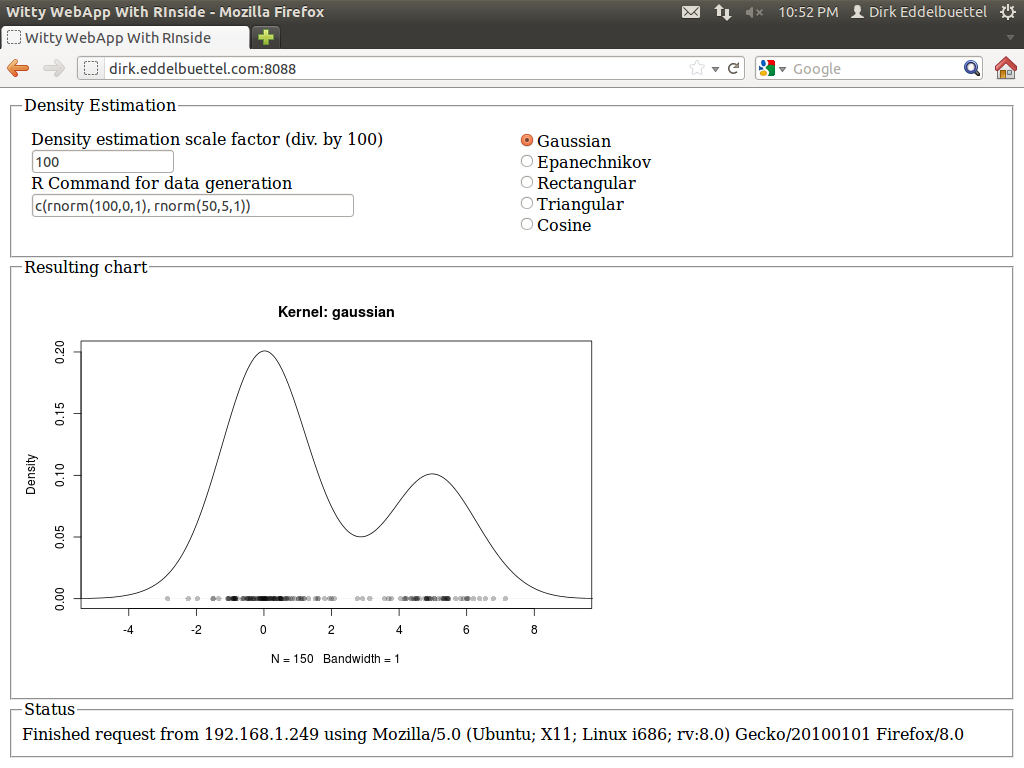
A few months ago, I had blogged about using R inside of Qt. This used our RInside package for embedding the statistical programming environment and language R inside of a C++ application, and further relies on our Rcpp package for R and C++ integration and object mapping. The example was simple yet powerful: a reimplementation of the standard GUI application of a standard density estimate. Here the user can pick a kernel density function from a selection, and also slide a bandwidth parameter. One nice addition was an entry field already populated with a simple expression for a mixture of Normals, allowing for arbitrary random distributions over which to estimate. The example is pretty (thanks to Qt), and was added to RInside with the last CRAN release 0.2.4. The blog post has a nice screenshot. I had long wondered how to do something similar 'on the web'. Web integration and application frameworks are of course a dime a dozen: Just about any language offers this, with more or less ease. But I wanted something simple yet powerful and fast. And I did not like the idea of a multi-tier app, or of a multi-language mix. I remember having seen something about a web-application framework not unlike Qt, and studying the very useful Wikipedia web application framework comparison I re-discovered Wt (pronounced "Witty"). So there it is, using C++ which brings us ample performance, the ability to connect to a number of libraries and applications (which is important in my quantitatively-minded workd) and avoid the whole multi-tier, multi-language combination. The Wt website has a few more good reason why this may be a suitable idea; the toolkit also offers a very decent amount of features and is amply documented with a fair number of examples. And after just a little bit poking around during two weekends, I now have the following webapp committed in the SVN repository of RInside, and it is all implemented in in less than two hundred (generously commented) lines of code. Example of embedding R via RInside into a Wt C++ application: density estimation for a mixture It is currently up and running at the address shown in the screenshot, so give it a go (though I may take it down at another point in time). I quite like it: The application is responsive: changes in the radio buttons (for the density), or the bandwidth, each trigger reestimation of the density, and a new and updated chart is displayed immediately with no noticeable delay---just like the desktop application did. Best of all, the code logic is essentially unchanged from the Qt-based app. Signals and slots related events to actions, the layout is in terms of standard GUI boxen and containers. And best of all, I did not have to write a line of html, javascript, css or ajax: it is all handled by the Wt toolkit. I was able to drive the app from an Android phone, my tablet, various computers around the house, and had a few friends poke a stick at it from afar. There is at one open issue. Wt launches new instances of the application object with each connection, which is a very clean model. That doesn't map perfectly with R (which is single-threaded) and RInside (which runs as a singleton for the same reason). So right now, each action sends its state back to the client. In other words, each clients own its parameters and well as vector of random numbers. Each new action sends these back to the app which passes it to R, launches the re-estimation and gets an updated chart back which is then shown by the the client. That is not perfect, and maybe a forking model as used by Simon's RServe would be better, though it would require a rewrite of RInside. Not sure if we get there anytime soon. And for simple applications not facing legions of concurrent users, the singleton should still work. It's a proof of concept at this point. Feedback welcome, and RInside and Rcpp questions should go to the rcpp-devel list as usual.
1 November 2011

Sylvain Beucler: Build a SFML project with CMake

[Latest version of these instructions can be found at the SFML Wiki] CMake allows your project to be built in various environments, including command-line make, Code::Blocks project files, Eclipse project files, etc. It's used in SFML 2.0. In this tutorial we'll write a simple CMake configuration file with centralized version numbering, and see how to integrate SFML in it. The source files First, create a cmake_modules directory and copy FindSFML.cmake in it. FindXXXX is automatically searched by CMake's find_package command. Then create a main.cpp, for instance:
#include "config.h"
#include <iostream>
#include <SFML/Window.hpp>
using namespace std;
int main(int argc, char* argv[])  
  cout << "Version " << myproject_VERSION_MAJOR << "." << myproject_VERSION_MINOR << endl;
  sf::Window screen(sf::VideoMode(800, 600), "myproject");
  bool running = true;
  while (running)  
    screen.Display();
   
 
We use a config.h file that is built by CMake, let's also create a config.h.in file:
#define myproject_VERSION_MAJOR @myproject_VERSION_MAJOR@
#define myproject_VERSION_MINOR @myproject_VERSION_MINOR@
And place your project license (such as the GNU GPL) in a file named COPYING. CMake configuration Let's describe our project configuration in the CMakeLists.txt file:
cmake_minimum_required(VERSION 2.6)
project(myproject)
# Set version information in a config.h file
set(myproject_VERSION_MAJOR 1)
set(myproject_VERSION_MINOR 0)
configure_file(
  "$ PROJECT_SOURCE_DIR /config.h.in"
  "$ PROJECT_BINARY_DIR /config.h"
  )
include_directories("$ PROJECT_BINARY_DIR ")
# Define sources and executable
set(EXECUTABLE_NAME "myproject")
add_executable($ EXECUTABLE_NAME  main.cpp)
# Detect and add SFML
set(CMAKE_MODULE_PATH "$ CMAKE_SOURCE_DIR /cmake_modules" $ CMAKE_MODULE_PATH )
find_package(SFML 1.6 REQUIRED system window graphics network audio)
target_link_libraries($ EXECUTABLE_NAME  $ SFML_LIBRARIES )
# Install target
install(TARGETS $ EXECUTABLE_NAME  DESTINATION bin)
# CPack packaging
include(InstallRequiredSystemLibraries)
set(CPACK_RESOURCE_FILE_LICENSE "$ CMAKE_SOURCE_DIR /COPYING")
set(CPACK_PACKAGE_VERSION_MAJOR "$ myproject_VERSION_MAJOR ")
set(CPACK_PACKAGE_VERSION_MINOR "$ myproject_VERSION_MINOR ")
include(CPack)
The interesting part is:
# Detect and add SFML
set(CMAKE_MODULE_PATH "$ CMAKE_SOURCE_DIR /cmake_modules" $ CMAKE_MODULE_PATH )
find_package(SFML 1.6 REQUIRED system window graphics network audio)
target_link_libraries($ EXECUTABLE_NAME  $ SFML_LIBRARIES )
Compilation To build with Make and the GCC compiler on the command-line:
cd build/  # a separate directory so we can easily remove all the CMake work files
cmake ..  # generate Makefile's
make
To create Code::Blocks project files:
cmake .. -G "CodeBlocks - Unix Makefiles"
and open project.cbp with Code::Blocks. Installation CMake supports the classic:
make install
It also supports DESTDIR, useful in packaging:
make install DESTDIR= pwd /myworkdir
You can also define CMAKE_INSTALL_PREFIX when invoking cmake to change the default install path (/usr/local under Unix). DESTDIR would still override this setting. Packaging You then can use cpack to make a project release:
# Binary package:
cpack -C CPackConfig.cmake
# Source package:
cpack -C CPackSourceConfig.cmake
You will get a nice myproject-1.0.tar.gz, among others. Further information
$ cmake --help-variable CMAKE_SOURCE_DIR
cmake version 2.8.5
  CMAKE_SOURCE_DIR
       The path to the top level of the source tree.
       This is the full path to the top level of the current CMake source
       tree.  For an in-source build, this would be the same as
       CMAKE_BINARY_DIR.

16 October 2011

Alastair McKinstry: Testing DIASPORA*

As you may have noticed, I'm testing DIASPORA* as a blogging platform. Its been working reasonably well recently for me, with friends and family; even though the "Main" platform joindiaspora.com is not giving general invites, the code works and a bunch of distributed 'pods' have been set up. You can make entries public, and I've tested a public address for this: http://diaspora.sceal.ie/u/amckinstry which looks ok, a bit plain for the moment, but I'll work on that later. The problem has been the atom feed is garbage. (It's putting the content into both the Subject line (as unadulterated MarkDown, no less), and into the content). So, I've put the old blog back up for the moment. While I debug some Ruby on Rails, not a language i'm too familiar with ... Note: only logged in DIASPORA users can leave notes on the Diaspora site, but go to the login page and registrations are open. At least until spammers notice... Tags , , ,

Alastair McKinstry: Dear Lazyweb, I'm building a #debian package, CDAT. The latest version 6.0.alpha uses CMAKE to build, rather than configure. The trouble is that CMake doesn't build. It doesn't even fail. $ mkdir build $ cd build $ cmake .. ()-- Configuring done -- Generating done -- Build files have been written to: /home/amckinstry/deb-packages /cdat/cdat-6.0.alpha/build $ make $ The problem is, 'make' does nothing. A Makefile is generated by CMake, which calls cmake which calls make again on ./CMakeFiles/Makefile2 ... which does nothing useful. Apparently the CMake is supposed to put useful stuff in there, but doesn't. What puts stuff into Makefile2, and where should I pick up the bugs trail? (It would appear I also have issues with DIASPORA*'s Markdown over RSS to fix ...)

Dear Lazyweb, I'm building a #debian package, CDAT. The latest version 6.0.alpha uses CMAKE to build, rather than configure. The trouble is that CMake doesn't build. It doesn't even fail. $ mkdir build $ cd build $ cmake .. ()-- Configuring done -- Generating done -- Build files have been written to: /home/amckinstry/deb-packages /cdat/cdat-6.0.alpha/build $ make $ The problem is, 'make' does nothing. A Makefile is generated by CMake, which calls cmake which calls make again on ./CMakeFiles/Makefile2 ... which does nothing useful. Apparently the CMake is supposed to put useful stuff in there, but doesn't. What puts stuff into Makefile2, and where should I pick up the bugs trail? (It would appear I also have issues with DIASPORA*'s Markdown over RSS to fix ...)

1 October 2011

Sergio Talens-Oliag: Static website generators

The last month I was supposed to work on a OpenStack related project, but for administrative reasons it has been delayed and I've tried to do small tasks to be able to finish them quickly and start the work on the main project when the issues get solved. As the delay has been longer than expected last Wednesday I've realized than on the last weeks I did a lot of small system administration tasks: With all the changes I did I noticed that I had to do something with our Intranet server; it is just a reverse proxy for a lot of different web services and its main page was one static HTML page with links to them, nothing else. In the long term maybe we will replace it with something based on Drupal or Lifeay, but for now I just wanted something to be able to organize the links and provide some information about the services for the new users without having to write HTML (I really like Agile Documentation Tools that let me focus on the content and forget about the markup), and started to look at some of them. My first idea was to use ikiwiki, as it has all the features I was looking for: I can use Markdown or reStructuredText to write the contents, the source pages are easily handled on a Version Control System, it supports the use of templates for the HTML, etc., but it seemed to me that using ikiwiki was like killing flies with a cannon (that's a Spanish say, I guess it's easy to understand it in English, no?) and I decided to review other tools to build static web sites. To make a long story short, I selected some tools that met my requirements and looked nice on their demo sites; after my first review I thought that Hyde was going to be my bet, as it uses technologies I'm already familiar with, but after trying it I saw that I was going to have a problem with documentation (the current Hyde version lacks it) and it was going to be more complicated that using ikiwiki. Before giving up I decided to review simpler tools, just in case, and after looking some of them I ended up using poole, a simple python script (the source is just one file and it only requires python-markdown to work). Before moving to the content I tried to adapt a couple of free themes to be used by the tool, but I didn't liked the result, so I went back to the plain style provided by the tool and added a logo and a background. With that simple look and feel I started to work with the content, splitting it into eight markdown files and a python macro to include a file that has all the links used on the site. While trying to make the main page look good I noticed how little I know about CSS, but using search engines I was able to build a two column block into the main page and publish the contents and with the help of some CSS enabled co-workers I changed the look and feel of the site in about 30 minutes. In summary, if you want a really simple website, you know a little bit of python and don't want to spend much time learning how to use a website generator then Poole is a good option. If you want something more complex I still think that ikiwiki is a good option, but YMMV.

25 July 2011

Andrea Veri: Backup your Gmail in a few easy steps!

I ve actually spent a few hours searching around for a good backup solution for my mailbox until I decided to stick with getmail. What you ll be able to achieve after reading this HowTo and deploying the following setup is:
  1. A full backup of your e-mail DATA in the Mbox format. (yes, Gmail s labels / folders as well)
  2. Prevent getmail to mark all mails as read after delivering them. (this was a pretty bad issue since getmail was marking all my mails as read even if I did not access my e-mail at all)
  3. Keep your backups up-to-date with the latest content from your mailbox. (by default getmail grabs all the DATA from your mailbox and fills up the Mbox / Maildir content keeping deleted mails. So let s say I deleted a mail two days ago, well it ll still appear on today s backups. This behaviour is definitely unwanted)
I ll now move to explain a few details about my new configuration but before moving to tweak getmail s main config file, please do the following change on _retrieverbases.py* :
return self._getmsgpartbyid(msgid, (RFC822) ) to return self._getmsgpartbyid(msgid, (BODY.PEEK[]) )
When done grab the following getmailrc and adapt it to your needs**:
[retriever]
type = SimpleIMAPSSLRetriever ## or SimplePOP3SSLRetriever.
server = imap.gmail.com ## or pop.gmail.com for POP3.
username = example@gmail.com
password = password ## so-called Gmail s labels should be listed one by one here for getmail to retrieve mail from them successfully. mailboxes = ( INBOX , [Gmail]/Sent mail ,
ubuntu , gnome/example , linux/example ) [destination]
type = Mboxrd
path = ~/.getmail/backup.mbox [options]
delivered_to = false ## No delivered_to header added automatically.
received = false ## No received header added automatically.
verbose = 2 ## getmail will print messages about each of its actions.
When done we should go ahead setting up getmail s directories and config file:
mkdir $HOME/.getmail cp $HOME/getmailrc $HOME/.getmail/ ## Adapt $HOME/getmailrc to whatever dir you put that file into.
But pretty much all the remaining work will be done by a small shell script I wrote:
#!/bin/sh WORKDIR=$HOME/.getmail
date= date +%d-%m-%Y_%H:%M if [ ! -f $WORKDIR/backup.mbox ]
then
touch $WORKDIR/backup.mbox
fi getmail > $WORKDIR/getmail.log
OUT=$?
if [ $OUT -eq 0 ]
then
mkdir -p $WORKDIR/backups/ && mv $WORKDIR/backup.mbox $WORKDIR/backups/backup_$date.mbox ;
else [ $OUT -eq 1 ]
exit 1
fi ## Cleanup older than 3 days backups
find $WORKDIR/backups/* -mtime +3 -exec rm ;
cd $WORKDIR && rm -rf oldmail-* ;
This script will:
  1. Run getmail using the getmailrc config file you previously worked on.
  2. If the above command will be successful, it ll create a backups dir into $HOME/.getmail and move the latest Mbox file there appending a date and time to its name. (by doing this we are sure next getmail run will happen on an empty backup.mbox file, thus it will just contain the latest content from your mailbox)
  3. It ll re-create a backup.mbox file on $HOME/.getmail to avoid the next getmail run to fail.
  4. In the end, it ll clean up older than 3 days backups to avoid a too crowded backups folder. (it removes the oldmail file as well since it is useless in our case)
In the end set up a cronjob that will run the above script and generate the backups for you every one hour:
0 * * * * $HOME/.getmail/getmail_run.sh > /dev/null
Feel free to let me know if you ve encountered any issue while following the above HowTo. Enjoy! * /usr/share/getmail4/getmailcore/_retrieverbases.py on line 901. ** More documentation about the getmailrc file and syntax can be found on getmail s documentation page.

27 June 2011

Marco Silva: darcs setpref test substitute in git

git doesn't have a feature as simple and useful as darcs setpref test. To emulate it, I have created a script in .git/hooks/pre-commit. For instance, if the use was darcs setpref test make, the git script goes as:
erase()  
    rm -rf /tmp/workdir$$ /tmp/patch$$
 
handle()  
    erase
    exit 1
 
git new-workdir  git rev-parse --show-toplevel  /tmp/workdir$$
git diff --cached > /tmp/patch$$
cd /tmp/workdir$$
patch -p1 < ../patch$$
make   handle
erase
By the way, I miss darcs revert, and specially darcs unrevert. It's possible to emulate darcs revert -a using git reset --hard, but this comes without darcs unrevert latter. Yes, there is git stash, but it's not the same thing. Also, I could not find a way to have something like darcs revert.

16 May 2011

Vincent Bernat: Migrating from Trac to GitHub

I was hosting my projects on several Trac instances on a dedicated server. However, since several months, spam was pourring.

Trac & spam

How to fight spam with Trac There is not built-in mechanism in Trac to fight spam. However, plugins enable to setup several ways to stop spam (or at least, reduce it). One of them is Akismet, a web service who can tell you if some message is a spam or not. It is able to catch most of the spam. A bayesian filter complement this service. A learning step is mandatory and can become cumbersome when the vast majority of the tickets you receive is just spam. I used those two mechanisms on my Trac instances. Another path is to require an account to post a ticket. Creating an account each time you want to create a ticket for some software is burdensome. I did not want to do this to the poor souls that have found a bug in one of my projects. An alternative is to setup a public account and adding somewhere in the page some instructions on how to use it when you want to open a ticket but don t want to open an account.

Removing spam Despite Akismet and the bayesian filter, I still got two or three spams a day. I catched them in my RSS flow or in my email if they were not classified as spam. There are two steps to remove the spam:
  • tell the bayesian filter by using the administration panel in the web interface,
  • remove the spam from the database using some SQLite commands directly on the server hosting the Trac instance.
Indeed, Trac does not propose the possibility to remove a ticket. Of course, there are plugins, but you must find them, install them, find how to configure them, etc. Cumbersome.

GitHub GitHub is a popular source code hosting service which uses Git as a backend. This is a proprietary platform but a lot of open source projects have migrated to it, thanks to its features and the good performances. Everybody is on GitHub. This was the ideal opportunity.

Features First, GitHub allows to host Git repository. You push your Git repositories. There is a nice and fast web interface to browse them. However, I still keep an instance of cgit. Then, GitHub is very popular because they drive people to fork projects. With one single click, you can fork your favorite project. You get a copy which is synchronised with the forked project. There is also a wiki (accepting many markup syntaxes). This wiki is also available through Git. At last, GitHub offers a minimalistic ticket system. You open a ticket, you make some comments, you can add a tag or two and you can close it. That s all. Quite light. But enough for small projects like mine. However, there is more! Do not open a ticket to send a patch. There is no way to attach files to tickets. You need to fork the project, create a branch with your patch and request a pull for your branch. This will appear as a ticket but your commits will be linked to it. The author can then review and comment your branch, ask for some changes and if he wants to integrate it, a simple merge is sufficient. He can even do it using the web interface. Convenient. Socially, you can comment commits, tickets, projects and subscribe to a lot of events. You can receive and answers tickets by mail. However, an accound is mandatory to open a ticket. Since there is a lot of projects on GitHub, this account should be useful for a lot of software. To cut a long story short, even if GitHub is a proprietary platform, it offers nice and interesting features. More and more projects migrate from Google Code to GitHub even if there is less features on the latter.

Migration I have searched for tools to migrate automatically tickets from Trac to GitHub. For example, there is SD. At last, I have done it manually. GitHub API is well documented and there exists bindings in various languages including Python but it is a very limited API. You can t choose the number of the ticket nor its date. I have also rewritten README files to use the markdown markup and avoid the use of wiki pages when possible. I have also put some URL redirections with the help of nginx. In conclusion, even if maintaining Trac instances was not a lot of work, one thing that I do not have to do anymore. And no spam on GitHub, I assume.

12 May 2011

Alexander Reichle-Schmehl: Debian Theme for LaTeX-Beamer

Just stumbled over Debian beamer themes by Richard Darst. Very cool and exactly what I needed! Thanks!

11 May 2011

Vincent Bernat: New website with Hyde

My previous website was generated (dynamically) with mod_autoindex, a module from Apache targeted at rendering an index page for the files contained in a directory. Pretty basic (but themable). Here is a new revamped web site using Hyde, a static web generator written in Python.

Static or dynamic ? It has been a long time since almost everybody is creating dynamic websites. Most often, they are powered by some blog engine written in PHP like DotClear or WordPress. Infrequently, they are crafted with bare hands using one s preferred language. Nowadays, hosting a dynamic website is pretty easy. There are a lot of cheap virtual servers solution that allow you to get a root access. However, dynamic websites have some drawbacks:
  • Security need to be monitored tightly, especially security upgrades; some platforms are more often vulnerable than others.
  • Dynamic websites may have some problem to handle increased load.
With a static website, security problems are easier: there are far less components to monitor and most of them (for example, the web server) are pretty solid and well audited. A site powered by nginx can handle several thousands of new connections per second without any special tuning. Getting this kind of performance with a dynamic website is far more difficult. Scaling is also easier. Just add more webservers and copy the content. No database, no synchronisation mechanism needed. Hosting can even be done on simple platforms like Amazon S3, even if there is now more appropriate platforms for this like Amazon CloudFront. Moreover, even a static website can receive comments using a system like Disqus which leverages the use of Javascript to add comment system to any static page.

Hyde Hyde is a static website generator written in Python. There exists a lot of those beasts. On StackOverflow, a question about this got some interesting answers. You will also find a fairly complete list on this blog. If you like Ruby, I assume that nanoc and Webgen are good candidates. Let s go back to Hyde. It was rewritten recently and the documentation is a bit incomplete. You will need to read the source code or look at examples (like the shipped one or this site) to understand how things are handled. Everything is handled by a plugin system. I hope it will not become a mess in one year (I play a large part in this). Hyde takes your files, apply a lot of filters on them and generate the final website. It uses Jinja as a template system, Markdown for markup syntax, Less to write CSS in a more efficient way (and to minify them), UglifyJS to minify Javascript, etc. It is also possible to add metadata to files (title, author, creation date, etc.). But since everything comes as a plugin, you can use any technology you like. In the end, you can tune all knobs but you need to do most of the work (HTML, CSS, Javascript), as well. Conveniently, there is a small web server that rebuild modified files on the fly. This comes handy but this is a common feature with this kind of generator.

New website Here is a new website crafted with Hyde. It is translated both in French and in English. This is done with the help of a small plugin plugin. I am quite happy about the result. Technically, there is one minified CSS file, one minified Javascript file and the dependencies (like jQuery) are loaded with the help of yepnope.js which will become part of Modernizr. I don t want to support Internet Explorer 6, but I plan to support Firefox 3, Internet Explorer 7 and recent versions of Chrome and Safari. For the design, I have always been undecided. I am pretty impressed by some raw website but also by some others more elaborate. Since I am not a talented graphic designer, I have tried to keep things plain and simple. If you are interested, sources are available on GitHub !

13 April 2011

Mirco Bauer: Goodbye Jaws, Hello ikiwiki

Yes, it's that time of the year: I am blogging. I was using Jaws as my blogging tool and CMS for the past few years more or less and I am finally switching to something new. I was running a SVN snapshot of Jaws and haven't updated nor maintained that one for about 3 years. This reduced my abilility to blog a lot as I had to look after bugs and jumping through the hoops to make a post. At some point I wanted to replace Jaws with something better that fits my needs but didn't find anything. I have been keeping an eye on Joey Hess' ikiwiki for quite some time, but never felt the desire to blog something important and thus postponed solving my website mess. ikiwiki logo For those who don't know ikiwiki yet, it is a wiki compiler based on a version control system like git which generates the website when you push your commits to the git repository. The wiki uses the markdown syntax but also supports other engines. ikiwiki is written in Perl which is not my favourite language, but I have seen worse. :-D When I wrote the Debian packaging tools for the Common Language Infrastructure, which are based on debhelper, I had to study code written by Joey Hess. Putting the syntax aside (I mean it's Perl, it can't be beautiful because of that) he does well designed and implemented software and this is the reason ikiwiki is a great candidate despite the used language. Jo Shields suggested dogfeeding myself with a .NET based blog, but ASP.NET is just junk, but with Manos de Mono I am actually considering it! Manos is written in beautiful C# without any ASP.NET close to it, but is extremely new and has no blogging or wiki engine written for it yet. I was involved in Jaws's development and I didn't want to run into the same issue again for now (more hacking the tools, less using them). So last night I finally made the decision, installed ikiwiki and made my first post with it, yay! The markdown syntax feels very naturaly to me. I usually end up searching for the syntax documentation every 2nd paragraph, but not on this one...

3 April 2011

Cyril Brulebois: Debian XSF News #8

This is the eighth Debian XSF News issue. For a change, I m going to use a numbered list, which should help telling people which item to look for when pointing to a given URL. Feel free to let me know if that seems like a nice idea or whether that hurts readability. Also, it was prepared several days ago already, so I m publishing it (with the needed bits of polishing it still needed) without mentioning what happened in the last few days (see you in the next DXN issue!).

  1. Let s start with a few common bugs reported over the past few weeks:
    • The server can crash due to some X Font Server (XFS) issue as reported upstream in FDO#31501 or in Debian as #616578. The easy fix is to get rid of FontPath in xorg.conf, or to remove the xfs package. It s deprecated anyway.
    • Xdm used to crash when started from init, but not afterwards (#617208). Not exactly fun to reproduce, but with the help of a VM, bisecting libxt to find the guilty commit was quite easy. After a quick upload with this commit reverted, a real fix was pushed upstream; a new upstream was released, packaged, and uploaded right after that.
    • We ve had several reports of flickering screens, which are actually due to upowerd s polling every 30 seconds: #613745.
    • Many bug reports were filed due to a regression on the kernel side for the 6.0.1 squeeze point release, leading to cursor issues with Intel graphics: #618665.
  2. Receiving several similar reports reminded me of the CurrentProblemsInUnstable page on the wiki, which is long unmaintained (and that s why I m not linking to it). I m not exactly sure what to do at this point, but I think having a similar page on http://pkg-xorg.alioth.debian.org/, linked from the how to report bugs page would make sense. Common issues as well as their solutions or workarounds for stable should probably go to the FAQ instead.
  3. As explained in DXN#7, we re waiting for the kernel to migrate to wheezy. The 2.6.38 upstream release was quickly pushed to unstable, which is great news, even if it s not really ready yet (since it s still failing to build on armel and mips).
  4. I ve been using markdown for our documentation, basically since it looked sufficient for our needs, and since I ve been using it to blog for years now, but it had some limitations. I ve been hearing a lot of nice things about asciidoc for a while (hi, Corsac!), so I gave it a quick shot. Being quite happy with it, I converted our documentation to asciidoc, which at the bare minimum buys us a nice CSS (at least nicer than the one I wrote ), and with automatic table of contents if we ask for it, which should help navigating to the appropriate place. A few drawbacks:
    • The syntax (or the parser s behaviour) changed a lot since lenny s version, so updating the online documentation broke badly. Thanks to the nice Alioth admins, the version from lenny-backports was quickly installed and the website should look fine.
    • The automatic table of contents is generated through JavaScript, which doesn t play nicely with wkhtmltopdf (WebKit-based HTML to PDF converter), since the table of contents gets pixelated in the generated PDF documents. We could use a2x to generate documents through the DocBook way, but that means dealing with XSL stylesheets as far as I can tell; that looks time-consuming and a rather low-priority task. But of course, contributions are welcome.
  5. When I fixed missing XSecurity (#599657) for squeeze, I didn t notice the 1.9 packages were forked right before that, so were affected too. I fixed it in sid since then (and in git for experimental). I noticed that when Ian reported a crash with large timeouts in xauth calls, which I couldn t reproduce since untrusted cookies without XSecurity don t trigger this issue. I reported that upstream as FDO#35066, which got marked as a duplicate of (currently restricted) FDO#27134. My patch is currently still waiting for a review.
  6. Let s mention upcoming updates, prepared in git, but not uploaded yet:
    • mesa 7.10.1, prepared by Chris (RAOF); will probably be uploaded to experimental, unless 7.10 migrates to testing first, in which case that update will target unstable.
    • Intel driver: Lintian s been complaining about the .so symlinks for a while, and I finally gave it a quick look. It seems one is supposed to put e.g. libI810XvMC.so.1 in /etc/X11/XvMCConfig to use that library, so the symlinks are indeed not needed at all, and I removed them.
    • Tias Guns and Timo Aaltonen introduced xinput-calibrator in a git repository; that s a generic touchscreen calibration tool.
  7. Here come the updated packages, with uploader between square brackets (JVdG = Julien Viard de Galbert, Sean = Sean Finney). For the next issue, I ll try to link to the relevant entries in the Package Tracking System.
    • [KiBi] libxt: to unstable, as mentioned above, with a hot fix, then with a real fix.
    • [KiBi] synaptics input driver: to unstable and experimental, fixing the FTBFS on GNU/kFreeBSD.
    • [KiBi] xterm: new upstream, to unstable.
    • [KiBi] libdrm: new upstream, to experimental. A few patches to hide private symbols were sent upstream, but I ve seen no reactions yet (and that apparently happened in the past already).
    • [KiBi] xorg-server 1.9.5rc1 then 1.9.5, to unstable.
    • [KiBi] xutils-dev to unstable: the bootstrap issue goes away, thanks to Steve s report.
    • [KiBi] libxp to unstable, nothing fancy, that s libxp
    • [KiBi] keyboard input driver: mostly documentation update, to unstable and experimental.
    • [KiBi] mouse input driver: fixes BSD issues, to unstable and experimental.
    • [KiBi] intel video driver: to experimental, but the debian-unstable branch can be used to build the driver against unstable s server.
    • [KiBi] xfixes: protocol to unstable, and library to experimental (just in case); this brings support for pointer barriers.
    • [JVdG] openchrome video driver: Julien introduced a debugging package, and got rid of the (old!) via transitional package. He also performed his first upload as a Debian Maintainer. Yay!
    • [KiBi] siliconmotion video driver: to unstable.
    • [KiBi] pixman: new upstream release candidate, to experimental
    • [Sean] last but not least: many compiz packages to experimental.

24 March 2011

Jan Wagner: Virtualisation on HP ProLiant hardware with squeeze

In case you are using HP ProLiant G6-series or G7-series with Intel-based hardware and you are thinking about virtualistion (e.g. booting the hypervisor), you should have a look into this customer advisory. To make it short, the following should work:

# grep GRUB_CMDLINE_XEN /etc/default/grub
GRUB_CMDLINE_XEN= pci=use_crs
# update-grub It took me two workdays to discover this solution for a DL180G6. Anyways I m still having trouble on a DL160G6 when booting the hypervisor, suggestions are welcome.

3 March 2011

Kai Wasserb ch: Extending Chronicle

This little blog is created/compiled with Chronicle, coded by Steve Kemp, and one of the cool features is that you can specify a command run before/after your blog gets compiled from the input files. This presents us with one problem and a lot of opportunities. First to the problem: the singular "a command" (from the manual page) might not be enough. Maybe you want to run more than one command. This can be achieved by creating a directory for the commands you want to run before the compilation and one for the commands you want to run after the chronicle run. Then you create a small shell script one directory above and call that from chronicle, the script for the post-run might look like:
#!/bin/sh
set -e
WORKDIR=" dirname $ 0  /post"
find $ WORKDIR  -name "*.sh" -exec " " ";"
This script makes the assumption, that the scripts to run have a .sh suffix and are in a subdirectory named "post". But you can surely adapt this to your needs. Now to one of the oppurtunities this offers: you can now, for example, create static pages, which share the general visual appearance with your blog entries but don't show up in the tags or archive system. I'm using this to generate an imprint for this blog. The script to generate the imprint looks like:
#!/bin/sh
set -e
OUTPUT_PATH= grep output $ HOME /.chroniclerc   cut -d= -f2   tr -d [:blank:] 
sed -ne'/<\?xml version/,/blosxomFirstDayDiv/  /blosxomFirstDayDiv/b;p ' \
        $ OUTPUT_PATH /index.html > $ HOME /tmp/imprint.html
cat  dirname $ 0  /imprint.data >> $ HOME /tmp/imprint.html
echo -e "\n" >> $ HOME /tmp/imprint.html
sed -ne'/imprint_match/,$p' $ OUTPUT_PATH /index.html >> $ HOME /tmp/imprint.html
mv $ HOME /tmp/imprint.html $ OUTPUT_PATH /imprint.html
There are again some assumptions made here, which you'd need to adopt to your setup: Now you have a very powerful system to modify/extend your chronicle-generated blog. I hope you enjoy it as much as I do! A little P.S.: you might want to use version 4.5, as 4.4 had a nasty encoding bug.

9 February 2011

Richard Darst: whiteboard.debian.net

A while ago (early 2009), I created whiteboard.debian.net as a way to do real-time editing collaboration. While working for DebConf, I really wanted to be able to collaboratively edit text with people, and all of the web-based solutions I found at the time were non-free. Thus, I took mobwrite and wrote a very thin wrapper around it. Mobwrite is where all the cleverness is (and mobwrite is way beyond my expertise, by the way). Mobwrite is Apache licensed, so you can use it in other places, too.Thus, whiteboard.debian.net was begun. It was never publicized very much. It has no authentication required and no history (the "static link" does provide limited recovery for mistakes, though). Here is a test whiteboard; open it in two tabs and watch the text areas sync. Any whiteboard is created if you go to a valid URL.I just deployed a slightly newer version of whiteboard. You can now see an options page for each whiteboard, and it can render in several lightweight markup languages (good for drafting+previewing things). If you have other options to add there, let me know.If you are interested in collaborative text editing, there are some other options. There is a Debian titanpad, an "open" instance of now-open-sourced Etherpad, and it has history support. Use titanpad.com and you don't have to log in. Here is a test pad. For a non-web application, Gobby exists. Use gobby-0.5 for smart undo history if everyone uses squeeze or above.Is whiteboard still relevant in light of the options above that store history? I'm sure it depends, but for now, whiteboard works well for a low-overhead scratch space and for cases where you don't want to have a history trail. I also tend to use it as a simple pastebin or a personal notepad when I don't want to worry about having traces left behind. In short, it is so minimal you don't have to think about starting one up for something. I have found that collaborative writing really helps to get things done, thus, I hope that whiteboard (or a similar tool) can be useful to you.

8 February 2011

Richard Darst: Debian latex-beamer theme

A while ago, I gave a presentation on Debian, and made a latex-beamer color scheme for it. Over time I improved it some. Eventually, I grabbed the colors from the new debian website, since they are much nicer (lighter) than the old colors, and thus fit in a presentation better. Last year, I wanted to write this up so that others could use the scheme.The theme can be found here, and there are examples in this gallery. This is distributed as a few color lines you need to copy and paste into your presentation (it is not much, and I thought that was better than an external dependency). You need to select your own layout theme from those included in beamer, for examples see the gallery. The theme page lists many credits for ideas, in particular zack for the idea of the logo on the background, and some other useful links. I would welcome others to improve this theme and make it more distributable.As a reminder, there is another Debian wiki page for collecting presentations people have given, and it has some other useful links on it.

5 February 2011

Craig Small: Syntax Highlighting with Mid-Century themes

As a site that discusses a variety of programming languages, I thought it would be good to have syntax highlighting for the code snippets. This blog runs Movable Type so it had to fit in with the setup I have already. So I found the Syntax Highlighter module ok and the initial installation went fine, it was simply:
  1. Download the .zip archive
  2. Unzip the archive into a temporary directory
  3. Copy the plugins/SyntaxHighlighter directory to my plugins directory
  4. Copy the mt-static/plugins/SyntaxHighlighter directory to static/plugins
You then need to edit the HTML Head template and add to the bottom of it the following line:
<$MTSyntaxHighlighterInclude$>
Next, I like to use Markdown as my markup language. But you can only have one type text filter. Another plugin called FormatStack solves this. Create a new stack and put Syntax Highlighter before Markdown. You can then create documents with both sorts of tags and it works quite nicely, well almost. Mid Century Problems This is probably not a Mid-Century specific problem but the modern templates or styles may cause a problem. You ll find you switch styles and suddenly, no more syntax highlighting. The problem is the onLoad functions get overloaded. Some styles have an onload property on their body. You ll see lines similiar to
 <body id="blogbase" class="whatever" onload="mtEntryOnLoad">
This onload event stops other onload events, which means Syntax Highlighter cannot do its thing. The fix is rather simple, you just adjust the templates so they look like the following:
<body id="blogbase" class="mt-entry-archive layout-wtt">
<script type="text/javascript">
 mtAttachEvent("load", mtEntryOnLoad);
</script> 
After doing this and publishing it all worked! You may also see this sort of problem with other plugins that use the mtAttachEvent() Javascript call. Reducing Includes By default, the script includes all syntaxes it knows. If you want to only include some, you do this by specifying what brushes you want. For example if you only will highlight perl and python scripts then you can change the line to:
<$MTSyntaxHighlighterInclude brush="perl,python"$>
Syntax Themes The other attribute the Include line will take is theme. There are several themes but default is alternating white on grey with the rest being variations on light text on a dark background.

4 February 2011

Richard Darst: DebianNYC Squeeze release party

DebianNYC is having a Squeeze release/super bowl party this Sunday. It is in Park Slope, Brooklyn, and there will be both super bowl watchers and Debian installers/hackers who didn't know the super bowl was this weekend. For more information and to RSVP, see the wiki.Someone in IRC had the bright idea to have a "upgrade to half-broken testing" party in a few weeks. This sounds a lot more fun - and educational. We have been having so many events lately that I am a bit worried about having things too close together, so I guess we'll take it as it comes and people want to organize things. In the near future, we could have a Novice Night in Brooklyn, a Novice Night in the Bronx, a workshop on configuration management of clusters, and now this testing upgrade party.

28 January 2011

Richard Darst: DebConf communication channels and decisions

This post is designed to describe communications channels and decision processes of DebConf. This is mostly designed to help new team members integrate into the team better and be able to contribute substantially. This only describes internal communication channels, not between DebConf and attendees.I should emphasize that this is the ideal process. Since time is so limited, things get rushed. You shouldn't worry about the steps above slowing you down, they are mostly what you'd do anyway if you are working transparently. Furthermore, once something has been delegated to you, just try to be public in your discussions and document what you will do. This is supposed to be a guide to help you take initiative, not slow you down.
#debconf-team (on OFTC) is the primary IRC channel. Most people idle here. Discussion and decisions often happen here, but saying things only in IRC isn't enough. IRC is ephemeral, so important information and decisions should be on the website, wiki, or mailing lists. IRC is good for getting advice from past members and keeping people up to date, and real-time communication among teams. Groups actively talking among each other usually use this channel. Not everyone can be expected to watch IRC all the time.The mailing lists, in particular debconf-team@ are for permanent records of meetings, and for getting feedback from all team members. For a decision to have weight, there should be a chance given for this list to provide feedback.The wiki is the place for permanent and organized documentation. Ideally, the wiki is a place for team members and others to go to find out just what we are doing. (Official information for attendees goes on the website, not the wiki.)Decisions in DebConf are hopefully made by delegation or rough consensus, but often time gets short and things have got to get done. Tradition and historical precedent play a big part: not everything can be re-designed every year. What follows below is a rough best-practice for a decision process, but I'm not saying that everything always is or has to be like this. Things get faster once you get more familiar with people.People first should read historical documents or chat with people and learn how things have worked in the past. People should know what you are working on, either through IRC or a mail to debconf-team@. This will get you feedback early and perhaps some additional advice and help.The group discusses and decides on some sort of proposal or course of action. This could be by IRC, lists, or whatever they need. It should be some public forum so that other people can watch and give feedback.The group's proposal is sent to list for feedback. Hopefully, they would have a preliminary write-up on the wiki so others can add to it there. Perhaps there is more than one proposal and they can be given side by side. Sending a proposal isn't just so that people can object: even if everyone thinks it looks good, it is important that there is some record of the process. You can get other opinions on the proposal here, and if it seems there is rough consensus, then you could consider it decided - just let someone know that you are implementing it.If it's not clear that there is agreement on the proposal, you should bring it up in a IRC meeting. Add it to an agenda, and we can discuss it. Discussing it at a meeting has the advantage that most people are there, so we can make sure that the idea isn't lost due to indecision. We want meetings to be efficient, so try to have at least a description on the lists first.Finally, things should be documented on the wiki or website. This is important to maintain transparency, and since this will be the first place people look for reference in future years.

Next.

Previous.