Search Results: "pere"

22 November 2014

Petter Reinholdtsen: How to stay with sysvinit in Debian Jessie

By now, it is well known that Debian Jessie will not be using sysvinit as its boot system by default. But how can one keep using sysvinit in Jessie? It is fairly easy, and here are a few recipes, courtesy of Erich Schubert and Simon McVittie. If you already are using Wheezy and want to upgrade to Jessie and keep sysvinit as your boot system, create a file /etc/apt/preferences.d/use-sysvinit with this content before you upgrade:
Package: systemd-sysv
Pin: release o=Debian
Pin-Priority: -1
This file content will tell apt and aptitude to not consider installing systemd-sysv as part of any installation and upgrade solution when resolving dependencies, and thus tell it to avoid systemd as a default boot system. The end result should be that the upgraded system keep using sysvinit. If you are installing Jessie for the first time, there is no way to get sysvinit installed by default (debootstrap used by debian-installer have no option for this), but one can tell the installer to switch to sysvinit before the first boot. Either by using a kernel argument to the installer, or by adding a line to the preseed file used. First, the kernel command line argument:
preseed/late_command="in-target apt-get install --purge -y sysvinit-core"
Next, the line to use in a preseed file:
d-i preseed/late_command string in-target apt-get install -y sysvinit-core
One can of course also do this after the first boot by installing the sysvinit-core package. I recommend only using sysvinit if you really need it, as the sysvinit boot sequence in Debian have several hardware specific bugs on Linux caused by the fact that it is unpredictable when hardware devices show up during boot. But on the other hand, the new default boot system still have a few rough edges I hope will be fixed before Jessie is released. Update 2014-11-26: Inspired by a blog post by Torsten Glaser, added --purge to the preseed line.

10 November 2014

Petter Reinholdtsen: A Debian package for SMTP via Tor (aka SMTorP) using exim4

The right to communicate with your friends and family in private, without anyone snooping, is a right every citicen have in a liberal democracy. But this right is under serious attack these days. A while back it occurred to me that one way to make the dragnet surveillance conducted by NSA, GCHQ, FRA and others (and confirmed by the whisleblower Snowden) more expensive for Internet email, is to deliver all email using SMTP via Tor. Such SMTP option would be a nice addition to the FreedomBox project if we could send email between FreedomBox machines without leaking metadata about the emails to the people peeking on the wire. I proposed this on the FreedomBox project mailing list in October and got a lot of useful feedback and suggestions. It also became obvious to me that this was not a novel idea, as the same idea was tested and documented by Johannes Berg as early as 2006, and both the Mailpile and the Cables systems propose a similar method / protocol to pass emails between users. To implement such system one need to set up a Tor hidden service providing the SMTP protocol on port 25, and use email addresses looking like username@hidden-service-name.onion. With such addresses the connections to port 25 on hidden-service-name.onion using Tor will go to the correct SMTP server. To do this, one need to configure the Tor daemon to provide the hidden service and the mail server to accept emails for this .onion domain. To learn more about Exim configuration in Debian and test the design provided by Johannes Berg in his FAQ, I set out yesterday to create a Debian package for making it trivial to set up such SMTP over Tor service based on Debian. Getting it to work were fairly easy, and the source code for the Debian package is available from github. I plan to move it into Debian if further testing prove this to be a useful approach. If you want to test this, set up a blank Debian machine without any mail system installed (or run apt-get purge exim4-config to get rid of exim4). Install tor, clone the git repository mentioned above, build the deb and install it on the machine. Next, run /usr/lib/exim4-smtorp/setup-exim-hidden-service and follow the instructions to get the service up and running. Restart tor and exim when it is done, and test mail delivery using swaks like this:
torsocks swaks --server dutlqrrmjhtfa3vp.onion \
  --to fbx@dutlqrrmjhtfa3vp.onion
This will test the SMTP delivery using tor. Replace the email address with your own address to test your server. :) The setup procedure is still to complex, and I hope it can be made easier and more automatic. Especially the tor setup need more work. Also, the package include a tor-smtp tool written in C, but its task should probably be rewritten in some script language to make the deb architecture independent. It would probably also make the code easier to review. The tor-smtp tool currently need to listen on a socket for exim to talk to it and is started using xinetd. It would be better if no daemon and no socket is needed. I suspect it is possible to get exim to run a command line tool for delivery instead of talking to a socket, and hope to figure out how in a future version of this system. Until I wipe my test machine, I can be reached using the fbx@dutlqrrmjhtfa3vp.onion mail address, deliverable over SMTorP. :)

6 November 2014

Lisandro Damián Nicanor Pérez Meyer: Early announce: Qt4 removal in Jessie+1

We the Debian Qt/KDE Team want to early-announce [maintainer warning] our decision to remove Qt4 from Jessie+1. This warning is mostly targeted at upstreams.

Qt4 has been deprecated since Qt5's first release on December 19th 2012, that means almost two years ago!

So far we had bugfixes-only releases, but upstream has announced that they will end this support on august 2015. This already means we will have to do a special effort from that point on for Jessie in case RC bugs appears, so having it in Jessie+1 is simply a non-go.

Some of us where involved in various Qt4 to Qt5 migrations [0] and we know for sure that porting stuff from Qt4 to Qt5 is much much easier and less painful than it was from Qt3 to Qt4.

We also understand that there is still a lot of software still using Qt4. In order to easy the transition time we have provided Wheezy backports for Qt5.

Don't forget to take a look at the C++ API change page [1] whenever you start porting your application.

[0] http://perezmeyer.blogspot.com.ar/2014/03/porting-qt-4-apps-to-qt-5-example-with.html
[1] http://qt-project.org/doc/qt-5.0/qtdoc/sourcebreaks.html

[maintainer warning] **Remember the freeze** and do not upload packages ported to Qt5 to unstable. The best thing you can do now is to ask your upstream if the code can be compiled against Qt5 and, why not, try it yourself.

Our first priority now is to release Jessie, and this is why this is an early announce.

27 October 2014

Petter Reinholdtsen: First Jessie based Debian Edu released (alpha0)

I am happy to report that I on behalf of the Debian Edu team just sent out this announcement:
The Debian Edu Team is pleased to announce the release of Debian Edu
Jessie 8.0+edu0~alpha0
Debian Edu is a complete operating system for schools. Through its
various installation profiles you can install servers, workstations
and laptops which will work together on the school network. With
Debian Edu, the teachers themselves or their technical support can
roll out a complete multi-user multi-machine study environment within
hours or a few days. Debian Edu comes with hundreds of applications
pre-installed, but you can always add more packages from Debian.
For those who want to give Debian Edu Jessie a try, download and
installation instructions are available, including detailed
instructions in the manual[1] explaining the first steps, such as
setting up a network or adding users. Please note that the password
for the user your prompted for during installation must have a length
of at least 5 characters!
 [1] <URL: https://wiki.debian.org/DebianEdu/Documentation/Jessie >
Would you like to give your school's computer a longer life? Are you
tired of sneaker administration, running from computer to computer
reinstalling the operating system? Would you like to administrate all
the computers in your school using only a couple of hours every week?
Check out Debian Edu Jessie!
Skolelinux is used by at least two hundred schools all over the world,
mostly in Germany and Norway.
About Debian Edu and Skolelinux
===============================
Debian Edu, also known as Skolelinux[2], is a Linux distribution based
on Debian providing an out-of-the box environment of a completely
configured school network. Immediately after installation a school
server running all services needed for a school network is set up just
waiting for users and machines being added via GOsa , a comfortable
Web-UI. A netbooting environment is prepared using PXE, so after
initial installation of the main server from CD or USB stick all other
machines can be installed via the network.  The provided school server
provides LDAP database and Kerberos authentication service,
centralized home directories, DHCP server, web proxy and many other
services.  The desktop contains more than 60 educational software
packages[3] and more are available from the Debian archive, and
schools can choose between KDE, Gnome, LXDE, Xfce and MATE desktop
environment.
 [2] <URL: http://www.skolelinux.org/ >
 [3] <URL: http://people.skolelinux.org/pere/blog/Educational_applications_included_in_Debian_Edu___Skolelinux__the_screenshot_collection____.html >
Full release notes and manual
=============================
Below the download URLs there is a list of some of the new features
and bugfixes of Debian Edu 8.0+edu0~alpha0 Codename Jessie. The full
list is part of the manual. (See the feature list in the manual[4] for
the English version.) For some languages manual translations are
available, see the manual translation overview[5].
 [4] <URL: https://wiki.debian.org/DebianEdu/Documentation/Jessie/Features >
 [5] <URL: http://maintainer.skolelinux.org/debian-edu-doc/ >
Where to get it
---------------
To download the multiarch netinstall CD release (624 MiB) you can use
 * ftp://ftp.skolelinux.org/skolelinux-cd/debian-edu-8.0+edu0~alpha0-CD.iso
 * http://ftp.skolelinux.org/skolelinux-cd/debian-edu-8.0+edu0~alpha0-CD.iso
 * rsync -avzP ftp.skolelinux.org::skolelinux-cd/debian-edu-8.0+edu0~alpha0-CD.iso .
The SHA1SUM of this image is: 361188818e036ce67280a572f757de82ebfeb095
New features for Debian Edu 8.0+edu0~alpha0 Codename Jessie released 2014-10-27
===============================================================================
Installation changes
--------------------
 * PXE installation now installs firmware automatically for the hardware present.
Software updates
----------------
Everything which is new in Debian Jessie 8.0, eg:
 * Linux kernel 3.16.x
 * Desktop environments KDE "Plasma" 4.11.12, GNOME 3.14, Xfce 4.10,
   LXDE 0.5.6 and MATE 1.8 (KDE "Plasma" is installed by default; to
   choose one of the others see manual.)
 * the browsers Iceweasel 31 ESR and Chromium 38 
 * !LibreOffice 4.3.3
 * GOsa 2.7.4
 * LTSP 5.5.4
 * CUPS print system 1.7.5
 * new boot framework: systemd
 * Educational toolbox GCompris 14.07 
 * Music creator Rosegarden 14.02
 * Image editor Gimp 2.8.14
 * Virtual stargazer Stellarium 0.13.0
 * golearn 0.9
 * tuxpaint 0.9.22
 * New version of debian-installer from Debian Jessie.
 * Debian Jessie includes about 42000 packages available for
   installation.
 * More information about Debian Jessie 8.0 is provided in the release
   notes[6] and the installation manual[7].
 [6] <URL: http://www.debian.org/releases/jessie/releasenotes >
 [7] <URL: http://www.debian.org/releases/jessie/installmanual >
Fixed bugs
----------
 * Inserting incorrect DNS information in Gosa will no longer break
   DNS completely, but instead stop DNS updates until the incorrect
   information is corrected (Debian bug #710362)
 * and many others.
Documentation and translation updates
------------------------------------- 
 * The Debian Edu Jessie Manual is fully translated to German, French,
   Italian, Danish and Dutch. Partly translated versions exist for
   Norwegian Bokmal and Spanish.
Other changes
-------------
 * Due to new Squid settings, powering off or rebooting the main
   server takes more time.
 * To manage printers localhost:631 has to be used, currently www:631
   doesn't work.
Regressions / known problems
----------------------------
 * Installing LTSP chroot fails with a bug related to eatmydata about
   exim4-config failing to run its postinst (see Debian bug #765694
   and Debian bug #762103).
 * Munin collection is not properly configured on clients (Debian bug
   #764594).  The fix is available in a newer version of munin-node.
 * PXE setup for Main Server and Thin Client Server setup does not
   work when installing on a machine without direct Internet access.
   Will be fixed when Debian bug #766960 is fixed in Jessie.
See the status page[8] for the complete list.
 [8] <URL: https://wiki.debian.org/DebianEdu/Status/Jessie >
How to report bugs
------------------
<URL: http://wiki.debian.org/DebianEdu/HowTo/ReportBugs >
About Debian
============
The Debian Project was founded in 1993 by Ian Murdock to be a truly
free community project. Since then the project has grown to be one of
the largest and most influential open source projects. Thousands of
volunteers from all over the world work together to create and
maintain Debian software. Available in 70 languages, and supporting a
huge range of computer types, Debian calls itself the universal
operating system.
Contact Information
For further information, please visit the Debian web pages[9] or send
mail to press@debian.org.
 [9] <URL: http://www.debian.org/ >

23 October 2014

Petter Reinholdtsen: I spent last weekend recording MakerCon Nordic

I spent last weekend at Makercon Nordic, a great conference and workshop for makers in Norway and the surrounding countries. I had volunteered on behalf of the Norwegian Unix Users Group (NUUG) to video record the talks, and we had a great and exhausting time recording the entire day, two days in a row. There were only two of us, Hans-Petter and me, and we used the regular video equipment for NUUG, with a dvswitch, a camera and a VGA to DV convert box, and mixed video and slides live. Hans-Petter did the post-processing, consisting of uploading the around 180 GiB of raw video to Youtube, and the result is now becoming public on the MakerConNordic account. The videos have the license NUUG always use on our recordings, which is Creative Commons Navngivelse-Del p samme vilk r 3.0 Norge. Many great talks available. Check it out! :)

Gunnar Wolf: Listadmin *YES*

Petter posted yesterday about Listadmin, the quick way to moderate mailman lists. Petter: THANKS. I am a fan of automatization. But, yes, I had never thouguht of doing this. Why? Don't know. But this is way easier than using the Web interface for Mailman:
$ listadmin 
fetching data for conoc_des@my.example.org ... nothing in queue
fetching data for des_polit_pub@my.example.org ... nothing in queue
fetching data for econ_apl@my.example.org ... nothing in queue
fetching data for educ_ciencia_tec@my.example.org ... nothing in queue
fetching data for est_hacend_sec_pub@my.example.org ... 
[1/1] ============== est_hacend_sec_pub@my.example.org ======
From:     sender@example.org                                            
Subject:  Invitaci n al Taller Insumo Producto                          
Reason:   El cuerpo del mensaje es demasiado grande: 777499    Spam? 0  
Approve/Reject/Discard/Skip/view Body/Full/jump #/Undo/Help/Quit ? a
Submit changes? [yes] 
fetching data for fiscal_fin@my.example.org ... nothing in queue
fetching data for historia@my.example.org ... nothing in queue
fetching data for industrial@my.example.org ... nothing in queue
fetching data for medio_amb@my.example.org ... nothing in queue
fetching data for mundial@my.example.org ... nothing in queue
fetching data for pol_des@my.example.org ... nothing in queue
fetching data for sec_ener@my.example.org ... nothing in queue
fetching data for sec_prim@my.example.org ... nothing in queue
fetching data for trab_tec@my.example.org ... nothing in queue
fetching data for urb_reg@my.example.org ... nothing in queue
fetching data for global@my.example.org ... nothing in queue
I don't know how in many years of managing several mailing lists I never thought about this! I'm echoing this, as I know several of my readers run mailman as well, and might not be following Planet Debian.

Alessio Treglia: Bits from the Debian Multimedia Maintainers

This brief announcement was released yesterday to the debian-devel-announce mailing list. Ciao! The Debian Multimedia Maintainers have been quite active since the Wheezy release, and have some interesting news to share for the Jessie release. Here we give you a brief update on what work has been done and work that is still ongoing. Let s see what s cooking for Jessie then. Frameworks and libraries Support for many new media formats and codecs. The codec library libavcodec, which is used by popular media playback applications including vlc, mpv, totem (using gstreamer1.0-libav), xine, and many more, has been updated to the latest upstream release version 11 provided by Libav. This provides Debian users with HEVC playback, a native Opus decoder, Matroska 3D support, Apple ProRes, and much more. Please see libav s changelog for a full list of functionality additions and updates. libebur128 libebur128 is a free implementation of the European Broadcasting Union Loudness Recommendation (EBU R128), which is essentially an alternative to ReplayGain. The library can be used to analyze audio perceived loudness and subsequentially normalize the volume during playback. libltc libltc provides functionalities to encode and decode Linear (or Longitudinal) Timecode (LTC) from/to SMPTE data timecode. libva libva and the driver for Intel GPUs has been updated to the 1.4.0 release. Support for new GPUs has been added. libva now also supports Wayland. Pure Data A number of new additional libraries (externals) will appear in Jessie, including (among others) Eric Lyon s fftease and lyonpotpourrie, Thomas Musil s iemlib, the pdstring library for string manipulation and pd-lua that allows to write Pd-objects in the popular lua scripting language. JACK and LADI LASH Audio Session Handler was abandoned upstream a long time ago in favor of the new session management system, called ladish (LADI Session Handler). ladish allows users to run many JACK applications at once and save/restore their configuration with few mouse clicks. The current status of the integration between the session handler and JACK may be summarized as follows: Note that ladish uses the D-Bus interface to the jack daemon, therefore only Jessie s jackd2 provides support for and also cooperates fine with it. Plugins: LV2 and LADSPA Debian Jessie will bring the newest 1.10.0 version of the LV2 technology. Most changes affect the packaging of new plugins and extensions, a brief list of packaging guidelines is now available.
A number of new plugins and development tools too have been made available during the Jessie development cycle: LV2 Toolkit LVTK provides libraries that wrap the LV2 C API and extensions into easy to use C++ classes. The original work for this was mostly done by Lars Luthman in lv2-c++-tools. Vee One Suite The whole suite by Rui Nuno Capela is now available in Jessie, and consists of three components: All three are provided in both forms of LV2 plugins and stand-alone JACK client. JACK session, JACK MIDI, and ALSA MIDI are supported too. x42-plugins and zam-plugins LV2 bundles containing many audio plugins for high quality processing. Fomp Fomp is an LV2 port of the MCP, VCO, FIL, and WAH plugins by Fons Adriaensen. Some other components have been upgraded to more recent upstream versions: We ve packaged ste-plugins, Fons Adriaensen s new stereo LADSPA plugins bundle. A major upgrade of frei0r, namely the standard collection for the minimalistic plugin API for video effects, will be available in Jessie. New multimedia applications Advene Advene (Annotate Digital Video, Exchange on the NEt) is a flexible video
annotation application. Ardour3 The new generation of the popular digital audio workstation will make its very first appearance in Debian Jessie. Cantata Qt4 front-end for the MPD daemon. Csound Csound for jessie will feature the new major series 6, with the improved IDE CsoundQT. This new csound supports improved array data type handling, multi-core rendering and debugging features. din DIN Is Noise is a musical instrument and audio synthesizer that supports JACK audio output, MIDI, OSC, and IRC bot as input sources. It could be extended and customized with Tcl scripts too. dvd-slideshow dvd-slideshow consists of a suite of command line tools which come in handy to make slideshows from collections of pictures. Documentation is provided and available in /usr/share/doc/dvd-slideshow/ . dvdwizard DVDwizard can fully automate the creation of DVD-Video filesystem. It supports graphical menus, chapters, multiple titlesets and multi-language streams. It supports both PAL and NTSC video modes too. flowblade Flowblade is a video editor like the popular KDenlive based on the MLT engine, but more lightweight and with some difference in editing concepts. forked-daapd Forked-daapd switched to a new, active upstream again dropping Grand Central Dispatch in favor of libevent. The switch fixed several bugs and made forked-daapd available on all release architectures instead of shipping only on amd64 and i386. Now nothing prevents you from setting up a music streaming (DAAP/DACP) server on your favorite home server no matter if it is based on mips, arm or x86! harvid HTTP Ardour Video Daemon decodes still images from movie files and serves them via HTTP. It provides frame-accurate decoding and is main use-case is to act as backend and second level cache for rendering the
videotimeline in Ardour. Groove Basin Groove Basin is a music player server with a web-based user interface inspired by Amarok 1.4. It runs on a server optionally connected to speakers. Guests can control the music player by connecting with a laptop, tablet, or smart phone. Further, users can stream their music libraries remotely.
It comes with a fast, responsive web interface that supports keyboard shortcuts and drag drop. It also provides the ability to upload songs, download songs, and import songs by URL, including YouTube URLs. Groove Basin supports Dynamic Mode which automatically queues random songs, favoring songs that have not been queued recently.
It automatically performs ReplayGain scanning on every song using the EBU R128 loudness standard, and automatically switches between track and album mode. Groove Basin supports the MPD protocol, which means it is compatible with MPD clients. There is also a more powerful Groove Basin protocol which you can use if the MPD protocol does not meet your needs. HandBrake HandBrake, a versatile video transcoder, is now available for Jessie. It could convert video from nearly any format to a wide range of commonly supported codecs. jack-midi-clock New jackd midiclock utility made by Robin Gareus. laborejo Laborejo, Esperanto for Workshop , is used to craft music through notation. It is a LilyPond GUI frontend, a MIDI creator and a tool collection to inspire and help music composers. mpv mpv is a movie player based on MPlayer and mplayer2. It supports a wide variety of video file formats, audio and video codecs, and subtitle types. The project focuses mainly on modern systems and encourages developer activity. As such, large portions of outdated code originating from MPlayer have been removed, and many new features and improvements have been added. Note that, although there are still some similarities to its predecessors, mpv should be considered a completely different program (e.g. lacking compatibility with both mplayer and mplayer2 in terms of command-line arguments and configuration). smtube SMTube is a stand-alone graphical video browser and player, which makes YouTube s videos browsing, playing, and download such a piece of cake.
It has so many features that, we are sure, will make YouTube lovers very, very happy. sonic-visualiser Sonic Visualiser Application for viewing and analysing the contents of music audio files. SoundScapeRenderer SoundScapeRenderer (aka SSR) is a (rather) easy to use render engine for spatial audio, that provides a number of different rendering algorithms, ranging from binaural (headphone) playback via wave field synthesis to higher-order ambisonics. Videotrans videotrans is a set of scripts that allow its user to reformat existing movies into the VOB format that is used on DVDs. XBMC XBMC has been partially rebranded as XBMC from Debian to make it clear that it is changed to conform to Debian s Policy. The latest stable release, 13.2 Gotham will be part of Jessie making Debian a good choice for HTPC-s. zita-bls1 Binaural stereo signals converter made by Fons Adriaensen zita-mu1 Stereo monitoring organiser for jackd made by Fons Adriaensen zita-njbridge Jack clients to transmit multichannel audio over a local IP network made by Fons Adriaensen radium-compressor Radium Compressor is the system compressor of the Radium suite. It is provided in the form of stand-alone JACK application. Multimedia Tasks With Jessie we are shipping a set of multimedia related tasks.
They include package lists for doing several multimedia related tasks. If you are interested in defining new tasks, or tweaking the current, existing ones, we are very much interested in hearing from you. Upgraded applications and libraries What s not going to be in Jessie With the aim to improve the overall quality of the multimedia software available in Debian, we have dropped a number of packages which were abandoned upstream: We ve also dropped mplayer, presently nobody seems interested in maintaining it.
The suggested replacements for users are mplayer2 or mpv. Whilst the former is mostly compatible with mplayer in terms of command-line arguments and configuration (and adds a few new features too), the latter adds a lot of new features and improvements, and it is actively maintained upstream. Please note that although the mencoder package is no longer available anymore, avconv and mpv do provide encoding functionality. For more information see avconv s manual page and documentation, and mpv s encoding documentation. Broken functionalities rtkit under systemd is broken at the moment. Activity statistics More information about team s activity are available. Where to reach us The Debian Multimedia Maintainers can be reached at pkg-multimedia-maintainers AT lists.alioth.debian.org for packaging related topics, or at debian-multimedia AT lists.debian.org for user and more general discussion.
We would like to invite everyone interested in multimedia to join us there. Some of the team members are also in the #debian-multimedia channel on OFTC. Cheers! Alessio Treglia
on behalf of the Debian Multimedia Maintainers

22 October 2014

Petter Reinholdtsen: listadmin, the quick way to moderate mailman lists - nice free software

If you ever had to moderate a mailman list, like the ones on alioth.debian.org, you know the web interface is fairly slow to operate. First you visit one web page, enter the moderation password and get a new page shown with a list of all the messages to moderate and various options for each email address. This take a while for every list you moderate, and you need to do it regularly to do a good job as a list moderator. But there is a quick alternative, the listadmin program. It allow you to check lists for new messages to moderate in a fraction of a second. Here is a test run on two lists I recently took over:
% time listadmin xiph
fetching data for pkg-xiph-commits@lists.alioth.debian.org ... nothing in queue
fetching data for pkg-xiph-maint@lists.alioth.debian.org ... nothing in queue
real    0m1.709s
user    0m0.232s
sys     0m0.012s
%
In 1.7 seconds I had checked two mailing lists and confirmed that there are no message in the moderation queue. Every morning I currently moderate 68 mailman lists, and it normally take around two minutes. When I took over the two pkg-xiph lists above a few days ago, there were 400 emails waiting in the moderator queue. It took me less than 15 minutes to process them all using the listadmin program. If you install the listadmin package from Debian and create a file ~/.listadmin.ini with content like this, the moderation task is a breeze:
username username@example.org
spamlevel 23
default discard
discard_if_reason "Posting restricted to members only. Remove us from your mail list."
password secret
adminurl https:// domain /mailman/admindb/ list 
mailman-list@lists.example.com
password hidden
other-list@otherserver.example.org
There are other options to set as well. Check the manual page to learn the details. If you are forced to moderate lists on a mailman installation where the SSL certificate is self signed or not properly signed by a generally accepted signing authority, you can set a environment variable when calling listadmin to disable SSL verification:
PERL_LWP_SSL_VERIFY_HOSTNAME=0 listadmin
If you want to moderate a subset of the lists you take care of, you can provide an argument to the listadmin script like I do in the initial screen dump (the xiph argument). Using an argument, only lists matching the argument string will be processed. This make it quick to accept messages if you notice the moderation request in your email. Without the listadmin program, I would never be the moderator of 68 mailing lists, as I simply do not have time to spend on that if the process was any slower. The listadmin program have saved me hours of time I could spend elsewhere over the years. It truly is nice free software. As usual, if you use Bitcoin and want to show your support of my activities, please send Bitcoin donations to my address 15oWEoG9dUPovwmUL9KWAnYRtNJEkP1u1b. Update 2014-10-27: Added missing 'username' statement in configuration example. Also, I've been told that the PERL_LWP_SSL_VERIFY_HOSTNAME=0 setting do not work for everyone. Not sure why.

17 October 2014

Petter Reinholdtsen: Debian Jessie, PXE and automatic firmware installation

When PXE installing laptops with Debian, I often run into the problem that the WiFi card require some firmware to work properly. And it has been a pain to fix this using preseeding in Debian. Normally something more is needed. But thanks to my isenkram package and its recent tasksel extension, it has now become easy to do this using simple preseeding. The isenkram-cli package provide tasksel tasks which will install firmware for the hardware found in the machine (actually, requested by the kernel modules for the hardware). (It can also install user space programs supporting the hardware detected, but that is not the focus of this story.) To get this working in the default installation, two preeseding values are needed. First, the isenkram-cli package must be installed into the target chroot (aka the hard drive) before tasksel is executed in the pkgsel step of the debian-installer system. This is done by preseeding the base-installer/includes debconf value to include the isenkram-cli package. The package name is next passed to debootstrap for installation. With the isenkram-cli package in place, tasksel will automatically use the isenkram tasks to detect hardware specific packages for the machine being installed and install them, because isenkram-cli contain tasksel tasks. Second, one need to enable the non-free APT repository, because most firmware unfortunately is non-free. This is done by preseeding the apt-mirror-setup step. This is unfortunate, but for a lot of hardware it is the only option in Debian. The end result is two lines needed in your preseeding file to get firmware installed automatically by the installer:
base-installer base-installer/includes string isenkram-cli
apt-mirror-setup apt-setup/non-free boolean true
The current version of isenkram-cli in testing/jessie will install both firmware and user space packages when using this method. It also do not work well, so use version 0.15 or later. Installing both firmware and user space packages might give you a bit more than you want, so I decided to split the tasksel task in two, one for firmware and one for user space programs. The firmware task is enabled by default, while the one for user space programs is not. This split is implemented in the package currently in unstable. If you decide to give this a go, please let me know (via email) how this recipe work for you. :) So, I bet you are wondering, how can this work. First and foremost, it work because tasksel is modular, and driven by whatever files it find in /usr/lib/tasksel/ and /usr/share/tasksel/. So the isenkram-cli package place two files for tasksel to find. First there is the task description file (/usr/share/tasksel/descs/isenkram.desc):
Task: isenkram-packages
Section: hardware
Description: Hardware specific packages (autodetected by isenkram)
 Based on the detected hardware various hardware specific packages are
 proposed.
Test-new-install: show show
Relevance: 8
Packages: for-current-hardware
Task: isenkram-firmware
Section: hardware
Description: Hardware specific firmware packages (autodetected by isenkram)
 Based on the detected hardware various hardware specific firmware
 packages are proposed.
Test-new-install: mark show
Relevance: 8
Packages: for-current-hardware-firmware
The key parts are Test-new-install which indicate how the task should be handled and the Packages line referencing to a script in /usr/lib/tasksel/packages/. The scripts use other scripts to get a list of packages to install. The for-current-hardware-firmware script look like this to list relevant firmware for the machine:
#!/bin/sh
#
PATH=/usr/sbin:$PATH
export PATH
isenkram-autoinstall-firmware -l
With those two pieces in place, the firmware is installed by tasksel during the normal d-i run. :) If you want to test what tasksel will install when isenkram-cli is installed, run DEBIAN_PRIORITY=critical tasksel --test --new-install to get the list of packages that tasksel would install. Debian Edu will be pilots in testing this feature, as isenkram is used there now to install firmware, replacing the earlier scripts.

9 October 2014

Lisandro Dami&aacute;n Nicanor P&eacute;rez Meyer: Qt 5.3.2 in Wheezy-backports: just a few hours away

In more or less 24 hs a few days most of Qt 5.3.2 will be available as a Wheezy backport. That means that if you are using Debian stable you don't need to wait for Jessie: just wait a few hours, add wheezy-backports's repo to your sources.list and get it :)

The rest of Qt 5 will arrive soon.

This is the same version that will be shipped in Jessie, so whatever you develop with it will work with the next Debian stable release :)

Don't forget: you better start porting your Qt4 apps to Qt5!

Note 2014-10-10: uups, it will still take a few days, but it will be there soon :)

Note 2014-10-15: currently building!

4 October 2014

Petter Reinholdtsen: Ubuntu used to show the bread prizes at ICA Storo

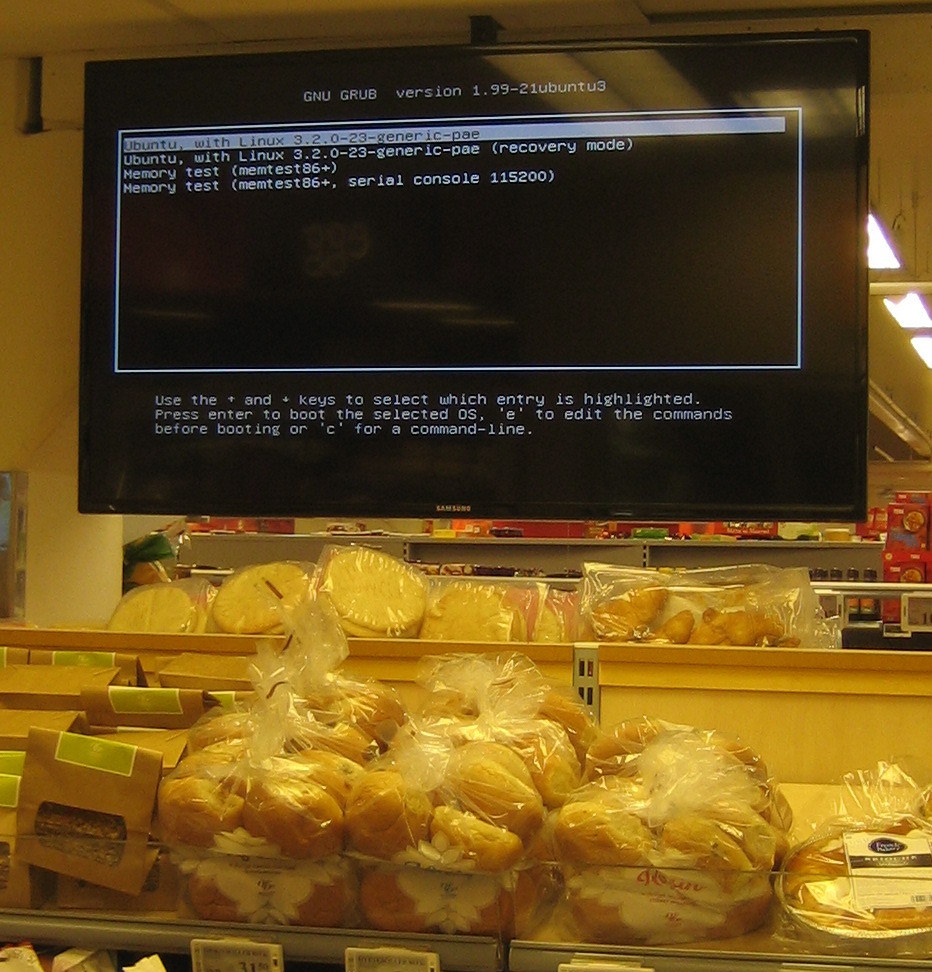
Today I came across an unexpected Ubuntu boot screen. Above the bread shelf on the ICA shop at Storo in Oslo, the grub menu of Ubuntu with Linux kernel 3.2.0-23 (ie probably version 12.04 LTS) was stuck on a screen normally showing the bread types and prizes:

If it had booted as it was supposed to, I would never had known about this hidden Linux installation. It is interesting what errors can reveal.

Petter Reinholdtsen: New lsdvd release version 0.17 is ready

The lsdvd project got a new set of developers a few weeks ago, after the original developer decided to step down and pass the project to fresh blood. This project is now maintained by Petter Reinholdtsen and Steve Dibb. I just wrapped up a new lsdvd release, available in git or from the download page. This is the changelog dated 2014-10-03 for version 0.17. This change bring together patches for lsdvd in use in various Linux and Unix distributions, as well as patches submitted to the project the last nine years. Please check it out. :)

30 September 2014

Lisandro Dami&aacute;n Nicanor P&eacute;rez Meyer: Qt5 in Jessie: we will release with 5.3.2

Qt 5.3.2 has entered testing a few hours ago. This will be the version of Qt we will release with Debian Jessie, and it happens to be a nice coincidence, because upstream focused in stability for the 5.3 branch.

I'll now focus in fixing as many bugs as possible and in backporting Qt5 to Wheezy.

Let me warn you: if you are an upstream for a Qt4 based project be sure to be ready to switch to Qt5. If you are a maintainer of a Qt4 based project you better start asking your upstream to be ready for it :)

26 September 2014

Petter Reinholdtsen: How to test Debian Edu Jessie despite some fatal problems with the installer

The Debian Edu / Skolelinux project provide a Linux solution for schools, including a powerful desktop with education software, a central server providing web pages, user database, user home directories, central login and PXE boot of both clients without disk and the installation to install Debian Edu on machines with disk (and a few other services perhaps to small to mention here). We in the Debian Edu team are currently working on the Jessie based version, trying to get everything in shape before the freeze, to avoid having to maintain our own package repository in the future. The current status can be seen on the Debian wiki, and there is still heaps of work left. Some fatal problems block testing, breaking the installer, but it is possible to work around these to get anyway. Here is a recipe on how to get the installation limping along. First, download the test ISO via ftp, http or rsync (use ftp.skolelinux.org::cd-edu-testing-nolocal-netinst/debian-edu-amd64-i386-NETINST-1.iso). The ISO build was broken on Tuesday, so we do not get a new ISO every 12 hours or so, but thankfully the ISO we already got we are able to install with some tweaking. When you get to the Debian Edu profile question, go to tty2 (use Alt-Ctrl-F2), run
nano /usr/bin/edu-eatmydata-install
and add 'exit 0' as the second line, disabling the eatmydata optimization. Return to the installation, select the profile you want and continue. Without this change, exim4-config will fail to install due to a known bug in eatmydata. When you get the grub question at the end, answer /dev/sda (or if this do not work, figure out what your correct value would be. All my test machines need /dev/sda, so I have no advice if it do not fit your need. If you installed a profile including a graphical desktop, log in as root after the initial boot from hard drive, and install the education-desktop-XXX metapackage. XXX can be kde, gnome, lxde, xfce or mate. If you want several desktop options, install more than one metapackage. Once this is done, reboot and you should have a working graphical login screen. This workaround should no longer be needed once the education-tasks package version 1.801 enter testing in two days. I believe the ISO build will start working on two days when the new tasksel package enter testing and Steve McIntyre get a chance to update the debian-cd git repository. The eatmydata, grub and desktop issues are already fixed in unstable and testing, and should show up on the ISO as soon as the ISO build start working again. Well the eatmydata optimization is really just disabled. The proper fix require an upload by the eatmydata maintainer applying the patch provided in bug #702711. The rest have proper fixes in unstable. I hope this get you going with the installation testing, as we are quickly running out of time trying to get our Jessie based installation ready before the distribution freeze in a month.

25 September 2014

Petter Reinholdtsen: Suddenly I am the new upstream of the lsdvd command line tool

I use the lsdvd tool to handle my fairly large DVD collection. It is a nice command line tool to get details about a DVD, like title, tracks, track length, etc, in XML, Perl or human readable format. But lsdvd have not seen any new development since 2006 and had a few irritating bugs affecting its use with some DVDs. Upstream seemed to be dead, and in January I sent a small probe asking for a version control repository for the project, without any reply. But I use it regularly and would like to get an updated version into Debian. So two weeks ago I tried harder to get in touch with the project admin, and after getting a reply from him explaining that he was no longer interested in the project, I asked if I could take over. And yesterday, I became project admin. I've been in touch with a Gentoo developer and the Debian maintainer interested in joining forces to maintain the upstream project, and I hope we can get a new release out fairly quickly, collecting the patches spread around on the internet into on place. I've added the relevant Debian patches to the freshly created git repository, and expect the Gentoo patches to make it too. If you got a DVD collection and care about command line tools, check out the git source and join the project mailing list. :)

16 September 2014

Petter Reinholdtsen: Speeding up the Debian installer using eatmydata and dpkg-divert

The Debian installer could be a lot quicker. When we install more than 2000 packages in Skolelinux / Debian Edu using tasksel in the installer, unpacking the binary packages take forever. A part of the slow I/O issue was discussed in bug #613428 about too much file system sync-ing done by dpkg, which is the package responsible for unpacking the binary packages. Other parts (like code executed by postinst scripts) might also sync to disk during installation. All this sync-ing to disk do not really make sense to me. If the machine crash half-way through, I start over, I do not try to salvage the half installed system. So the failure sync-ing is supposed to protect against, hardware or system crash, is not really relevant while the installer is running. A few days ago, I thought of a way to get rid of all the file system sync()-ing in a fairly non-intrusive way, without the need to change the code in several packages. The idea is not new, but I have not heard anyone propose the approach using dpkg-divert before. It depend on the small and clever package eatmydata, which uses LD_PRELOAD to replace the system functions for syncing data to disk with functions doing nothing, thus allowing programs to live dangerous while speeding up disk I/O significantly. Instead of modifying the implementation of dpkg, apt and tasksel (which are the packages responsible for selecting, fetching and installing packages), it occurred to me that we could just divert the programs away, replace them with a simple shell wrapper calling "eatmydata $program $@", to get the same effect. Two days ago I decided to test the idea, and wrapped up a simple implementation for the Debian Edu udeb. The effect was stunning. In my first test it reduced the running time of the pkgsel step (installing tasks) from 64 to less than 44 minutes (20 minutes shaved off the installation) on an old Dell Latitude D505 machine. I am not quite sure what the optimised time would have been, as I messed up the testing a bit, causing the debconf priority to get low enough for two questions to pop up during installation. As soon as I saw the questions I moved the installation along, but do not know how long the question were holding up the installation. I did some more measurements using Debian Edu Jessie, and got these results. The time measured is the time stamp in /var/log/syslog between the "pkgsel: starting tasksel" and the "pkgsel: finishing up" lines, if you want to do the same measurement yourself. In Debian Edu, the tasksel dialog do not show up, and the timing thus do not depend on how quickly the user handle the tasksel dialog.
Machine/setup Original tasksel Optimised tasksel Reduction
Latitude D505 Main+LTSP LXDE 64 min (07:46-08:50) <44 min (11:27-12:11) >20 min 18%
Latitude D505 Roaming LXDE 57 min (08:48-09:45) 34 min (07:43-08:17) 23 min 40%
Latitude D505 Minimal 22 min (10:37-10:59) 11 min (11:16-11:27) 11 min 50%
Thinkpad X200 Minimal 6 min (08:19-08:25) 4 min (08:04-08:08) 2 min 33%
Thinkpad X200 Roaming KDE 19 min (09:21-09:40) 15 min (10:25-10:40) 4 min 21%
The test is done using a netinst ISO on a USB stick, so some of the time is spent downloading packages. The connection to the Internet was 100Mbit/s during testing, so downloading should not be a significant factor in the measurement. Download typically took a few seconds to a few minutes, depending on the amount of packages being installed. The speedup is implemented by using two hooks in Debian Installer, the pre-pkgsel.d hook to set up the diverts, and the finish-install.d hook to remove the divert at the end of the installation. I picked the pre-pkgsel.d hook instead of the post-base-installer.d hook because I test using an ISO without the eatmydata package included, and the post-base-installer.d hook in Debian Edu can only operate on packages included in the ISO. The negative effect of this is that I am unable to activate this optimization for the kernel installation step in d-i. If the code is moved to the post-base-installer.d hook, the speedup would be larger for the entire installation. I've implemented this in the debian-edu-install git repository, and plan to provide the optimization as part of the Debian Edu installation. If you want to test this yourself, you can create two files in the installer (or in an udeb). One shell script need do go into /usr/lib/pre-pkgsel.d/, with content like this:
#!/bin/sh
set -e
. /usr/share/debconf/confmodule
info()  
    logger -t my-pkgsel "info: $*"
 
error()  
    logger -t my-pkgsel "error: $*"
 
override_install()  
    apt-install eatmydata   true
    if [ -x /target/usr/bin/eatmydata ] ; then
        for bin in dpkg apt-get aptitude tasksel ; do
            file=/usr/bin/$bin
            # Test that the file exist and have not been diverted already.
            if [ -f /target$file ] ; then
                info "diverting $file using eatmydata"
                printf "#!/bin/sh\neatmydata $bin.distrib \"\$@\"\n" \
                    > /target$file.edu
                chmod 755 /target$file.edu
                in-target dpkg-divert --package debian-edu-config \
                    --rename --quiet --add $file
                ln -sf ./$bin.edu /target$file
            else
                error "unable to divert $file, as it is missing."
            fi
        done
    else
        error "unable to find /usr/bin/eatmydata after installing the eatmydata pacage"
    fi
 
override_install
To clean up, another shell script should go into /usr/lib/finish-install.d/ with code like this:
#! /bin/sh -e
. /usr/share/debconf/confmodule
error()  
    logger -t my-finish-install "error: $@"
 
remove_install_override()  
    for bin in dpkg apt-get aptitude tasksel ; do
        file=/usr/bin/$bin
        if [ -x /target$file.edu ] ; then
            rm /target$file
            in-target dpkg-divert --package debian-edu-config \
                --rename --quiet --remove $file
            rm /target$file.edu
        else
            error "Missing divert for $file."
        fi
    done
    sync # Flush file buffers before continuing
 
remove_install_override
In Debian Edu, I placed both code fragments in a separate script edu-eatmydata-install and call it from the pre-pkgsel.d and finish-install.d scripts. By now you might ask if this change should get into the normal Debian installer too? I suspect it should, but am not sure the current debian-installer coordinators find it useful enough. It also depend on the side effects of the change. I'm not aware of any, but I guess we will see if the change is safe after some more testing. Perhaps there is some package in Debian depending on sync() and fsync() having effect? Perhaps it should go into its own udeb, to allow those of us wanting to enable it to do so without affecting everyone. Update 2014-09-24: Since a few days ago, enabling this optimization will break installation of all programs using gnutls because of bug #702711. An updated eatmydata package in Debian will solve it.

10 September 2014

Petter Reinholdtsen: Good bye subkeys.pgp.net, welcome pool.sks-keyservers.net

Yesterday, I had the pleasure of attending a talk with the Norwegian Unix User Group about the OpenPGP keyserver pool sks-keyservers.net, and was very happy to learn that there is a large set of publicly available key servers to use when looking for peoples public key. So far I have used subkeys.pgp.net, and some times wwwkeys.nl.pgp.net when the former were misbehaving, but those days are ended. The servers I have used up until yesterday have been slow and some times unavailable. I hope those problems are gone now. Behind the round robin DNS entry of the sks-keyservers.net service there is a pool of more than 100 keyservers which are checked every day to ensure they are well connected and up to date. It must be better than what I have used so far. :) Yesterdays speaker told me that the service is the default keyserver provided by the default configuration in GnuPG, but this do not seem to be used in Debian. Perhaps it should? Anyway, I've updated my ~/.gnupg/options file to now include this line:
keyserver pool.sks-keyservers.net
With GnuPG version 2 one can also locate the keyserver using SRV entries in DNS. Just for fun, I did just that at work, so now every user of GnuPG at the University of Oslo should find a OpenGPG keyserver automatically should their need it:
% host -t srv _pgpkey-http._tcp.uio.no
_pgpkey-http._tcp.uio.no has SRV record 0 100 11371 pool.sks-keyservers.net.
%
Now if only the HKP lookup protocol supported finding signature paths, I would be very happy. It can look up a given key or search for a user ID, but I normally do not want that, but to find a trust path from my key to another key. Given a user ID or key ID, I would like to find (and download) the keys representing a signature path from my key to the key in question, to be able to get a trust path between the two keys. This is as far as I can tell not possible today. Perhaps something for a future version of the protocol?

29 August 2014

Jakub Wilk: More spell-checking

Have you ever wanted to use Lintian's spell-checker against arbitrary files? Now you can do it with spellintian:
$ zrun spellintian --picky /usr/share/doc/RFC/best-current-practice/rfc*
/tmp/0qgJD1Xa1Y-rfc1917.txt: amoung -> among
/tmp/kvZtN435CE-rfc3155.txt: transfered -> transferred
/tmp/o093khYE09-rfc3481.txt: unecessary -> unnecessary
/tmp/4P0ux2cZWK-rfc6365.txt: charater -> character
mwic (Misspelled Words In Context) takes a different approach. It uses classic spell-checking libraries (via Enchant), but it groups misspellings and shows them in their contexts. That way you can quickly filter out false-positives, which are very common in technical texts, using visual grep:
$ zrun mwic /usr/share/doc/debian/social-contract.txt.gz
DFSG:
   an Free Software Guidelines (DFSG)
   an Free Software Guidelines (DFSG) part of the
                                ^^^^
Perens:
     Bruce Perens later removed the Debian-spe 
  by Bruce Perens, refined by the other Debian 
           ^^^^^^
Ean, Schuessler:
  community" was suggested by Ean Schuessler. This document was drafted
                              ^^^ ^^^^^^^^^^
GPL:
  The "GPL", "BSD", and "Artistic" lice 
       ^^^
contrib:
  created "contrib" and "non-free" areas in our 
           ^^^^^^^
CDs:
  their CDs. Thus, although non-free wor 
        ^^^

25 August 2014

Petter Reinholdtsen: Do you need an agreement with MPEG-LA to publish and broadcast H.264 video in Norway?

Two years later, I am still not sure if it is legal here in Norway to use or publish a video in H.264 or MPEG4 format edited by the commercially licensed video editors, without limiting the use to create "personal" or "non-commercial" videos or get a license agreement with MPEG LA. If one want to publish and broadcast video in a non-personal or commercial setting, it might be that those tools can not be used, or that video format can not be used, without breaking their copyright license. I am not sure. Back then, I found that the copyright license terms for Adobe Premiere and Apple Final Cut Pro both specified that one could not use the program to produce anything else without a patent license from MPEG LA. The issue is not limited to those two products, though. Other much used products like those from Avid and Sorenson Media have terms of use are similar to those from Adobe and Apple. The complicating factor making me unsure if those terms have effect in Norway or not is that the patents in question are not valid in Norway, but copyright licenses are. These are the terms for Avid Artist Suite, according to their published end user license text (converted to lower case text for easier reading):
18.2. MPEG-4. MPEG-4 technology may be included with the software. MPEG LA, L.L.C. requires this notice: This product is licensed under the MPEG-4 visual patent portfolio license for the personal and non-commercial use of a consumer for (i) encoding video in compliance with the MPEG-4 visual standard ( MPEG-4 video ) and/or (ii) decoding MPEG-4 video that was encoded by a consumer engaged in a personal and non-commercial activity and/or was obtained from a video provider licensed by MPEG LA to provide MPEG-4 video. No license is granted or shall be implied for any other use. Additional information including that relating to promotional, internal and commercial uses and licensing may be obtained from MPEG LA, LLC. See http://www.mpegla.com. This product is licensed under the MPEG-4 systems patent portfolio license for encoding in compliance with the MPEG-4 systems standard, except that an additional license and payment of royalties are necessary for encoding in connection with (i) data stored or replicated in physical media which is paid for on a title by title basis and/or (ii) data which is paid for on a title by title basis and is transmitted to an end user for permanent storage and/or use, such additional license may be obtained from MPEG LA, LLC. See http://www.mpegla.com for additional details. 18.3. H.264/AVC. H.264/AVC technology may be included with the software. MPEG LA, L.L.C. requires this notice: This product is licensed under the AVC patent portfolio license for the personal use of a consumer or other uses in which it does not receive remuneration to (i) encode video in compliance with the AVC standard ( AVC video ) and/or (ii) decode AVC video that was encoded by a consumer engaged in a personal activity and/or was obtained from a video provider licensed to provide AVC video. No license is granted or shall be implied for any other use. Additional information may be obtained from MPEG LA, L.L.C. See http://www.mpegla.com.
Note the requirement that the videos created can only be used for personal or non-commercial purposes. The Sorenson Media software have similar terms:
With respect to a license from Sorenson pertaining to MPEG-4 Video Decoders and/or Encoders: Any such product is licensed under the MPEG-4 visual patent portfolio license for the personal and non-commercial use of a consumer for (i) encoding video in compliance with the MPEG-4 visual standard ( MPEG-4 video ) and/or (ii) decoding MPEG-4 video that was encoded by a consumer engaged in a personal and non-commercial activity and/or was obtained from a video provider licensed by MPEG LA to provide MPEG-4 video. No license is granted or shall be implied for any other use. Additional information including that relating to promotional, internal and commercial uses and licensing may be obtained from MPEG LA, LLC. See http://www.mpegla.com. With respect to a license from Sorenson pertaining to MPEG-4 Consumer Recorded Data Encoder, MPEG-4 Systems Internet Data Encoder, MPEG-4 Mobile Data Encoder, and/or MPEG-4 Unique Use Encoder: Any such product is licensed under the MPEG-4 systems patent portfolio license for encoding in compliance with the MPEG-4 systems standard, except that an additional license and payment of royalties are necessary for encoding in connection with (i) data stored or replicated in physical media which is paid for on a title by title basis and/or (ii) data which is paid for on a title by title basis and is transmitted to an end user for permanent storage and/or use. Such additional license may be obtained from MPEG LA, LLC. See http://www.mpegla.com for additional details.
Some free software like Handbrake and FFMPEG uses GPL/LGPL licenses and do not have any such terms included, so for those, there is no requirement to limit the use to personal and non-commercial.

31 July 2014

Petter Reinholdtsen: Debian Edu interview: Bernd Zeitzen

The complete and free out of the box software solution for schools, Debian Edu / Skolelinux, is used quite a lot in Germany, and one of the people involved is Bernd Zeitzen, who show up on the project mailing lists from time to time with interesting questions and tips on how to adjust the setup. I managed to interview him this summer. Who are you, and how do you spend your days? My name is Bernd Zeitzen and I'm married with Hedda, a self employed physiotherapist. My former profession is tool maker, but I haven't worked for 30 years in this job. 30 years ago I started to support my wife and become her officeworker and a few years later the administrator for a small computer network, today based on Ubuntu Server (Samba, OpenVPN). For her daily work she has to use Windows Desktops because the software she needs to organize her business only works with Windows . :-( In 1988 we started with one PC and DOS, then I learned to use Windows 98, 2000, XP, , 8, Ubuntu, MacOSX. Today we are running a Linux server with 6 Windows clients and 10 persons (teacher of children with special needs, speech therapist, occupational therapist, psychologist and officeworkers) using our Samba shares via OpenVPN to work with the documentations of our patients. How did you get in contact with the Skolelinux / Debian Edu project? Two years ago a friend of mine asked me, if I want to get a job in his school (Gymnasium Harsewinkel). They started with Skolelinux / Debian Edu and they were looking for people to give support to the teachers using the software and the network and teaching the pupils increasing their computer skills in optional lessons. I'm spending 4-6 hours a week with this job. What do you see as the advantages of Skolelinux / Debian Edu? The independence. First: Every person is allowed to use, share and develop the software. Even if you are poor, you are allowed to use the software included in Skolelinux/Debian Edu and all the other Free Software. Second: The software runs on old machines and this gives us the possibility to recycle computers, weeded out from offices. The servers and desktops are running for more than two years and they are working reliable. We have two servers (one tjener and one terminal server), 45 workstations in three classrooms and seven laptops as a mobile solution for all classrooms. These machines are all booting from the terminal server. In the moment we are installing 30 laptops as mobile workstations. Then the pupils have the possibility to work with these machines in their classrooms. Internet access is realized by a WLAN router, connected to the schools network. This is all done without a dedicated system administrator or a computer science teacher. What do you see as the disadvantages of Skolelinux / Debian Edu? Teachers and pupils are Windows users. <Irony on> And Linux isn't cool. It's software for freaks using the command line. <Irony off> They don't realize the stability of the system. Which free software do you use daily? Firefox, Thunderbird, LibreOffice, Ubuntu Server 12.04 (Samba, Apache, MySQL, Joomla!, and Skolelinux / Debian Edu) Which strategy do you believe is the right one to use to get schools to use free software? In Germany we have the situation: every school is free to decide which software they want to use. This decision is influenced by teachers who learned to use Windows and MS Office. They buy a PC with Windows preinstalled and an additional testing version of MS Office. They don't know about the possibility to use Free Software instead. Another problem are the publisher of school books. They develop their software, added to the school books, for Windows.

Next.

Previous.