Search Results: "andy"

12 March 2014

Andrew Pollock: [life] Day 43, a lovely lazy day, until we got on the bike

Zoe slept through the night again last night. Two nights of uninterrupted sleep has been totally amazing! We had a slower start to the day because we didn't have to be anywhere. I've been meaning to do a massive cull of Zoe's wardrobe for a while, and this morning seemed like as good an opportunity as any, so after TV, I managed to get Zoe to cooperate with trying on clothes for about an hour. She really enjoyed pulling everything out of her wardrobe and putting it all back again neatly. After that, she asked me if I could make her a bus out of the last remaining moving box, so I managed to make something approximating a bus. The port-a-robe boxes are really rather handy for this sort of thing. The balcony is starting to look like a cardboard box shanty town, with a cubby house, a rocket and now a bus. I think we need to host a few more play dates so they all get a good work out. It was time for lunch after that. I'd had a bucket of caramel popcorn, which I used for the journey to Coochiemudlo the other week. Zoe had asked me how popcorn was made, so I had resolved to make popcorn with her sometime soon. Yesterday at the health food shop, I opportunistically noticed some popping corn, so I grabbed a small bag of it. It turned out that buying peanut oil was good for more than just making peanut butter, as it came in handy today for popping corn. I've never popped corn before, aside from occasionally getting a bag of the microwave stuff, so it was a fun experience to do it "from scratch". It turned out pretty well, with only a few burned ones and a few unpopped ones. It'd be fun to try and dry out a corn cob and totally do it from scratch. After that I tried to get Zoe to take a nap, but it didn't work out so well, so after her quiet time we cleaned up her bedroom and generally fooled around for a bit. Throughout the day, Zoe did lots of little bouts of self-directed play. She dredged up this little wooden xylophone that we'd made in the US from a Kiwi Crate and had a great time banging away on it until she stood on it and broke it. The doctor's kit got a good workout. It was just a really nice, relaxing day at home. Zoe's Kindergarten was having a play date meet-and-greet in the park, for all the parents to meet each other. It was a fair way from home, but there was a nice, albeit circuitous, bike path to get there, and I decided to try and bike there, without really properly estimating the distance or length of time it would take. The play date was due to start at 3:30pm, and I was planning on leaving at 3pm. We were about 5 minutes late getting out of the door. I think it ended up taking us about 50 minutes to get there. It was a beautiful ride though, once we got onto the Bulimba Creek bikeway, through the Minippi Parklands. It would have been the longest ride Zoe's had on the bike, and she wasn't fazed at all. The play date itself was nice. For some reason, I'm a bit shy about going and introducing myself to the mothers (I kept wanting to write "other mothers"), but I sucked it up and made a few introductions. I'm terrible about remembering names though. At least I've got a few faces I can say hi to at drop off and pick up now. Sarah met us at the park and hung out for a bit as well, and then Zoe and her left together and I biked back home. I was feeling pretty good, and thought I'd try and bang out a run when I got home, but I didn't end up having the fuel in the tank, and blew up after about 1.5km.

24 February 2014

Vincent Bernat: Coping with the TCP TIME-WAIT state on busy Linux servers

TL;DR: Do not enable net.ipv4.tcp_tw_recycle. The Linux kernel documentation is not very helpful about what net.ipv4.tcp_tw_recycle does:
Enable fast recycling TIME-WAIT sockets. Default value is 0. It should not be changed without advice/request of technical experts.
Its sibling, net.ipv4.tcp_tw_reuse is a little bit more documented but the language is about the same:
Allow to reuse TIME-WAIT sockets for new connections when it is safe from protocol viewpoint. Default value is 0. It should not be changed without advice/request of technical experts.
The mere result of this lack of documentation is that we find numerous tuning guides advising to set both these settings to 1 to reduce the number of entries in the TIME-WAIT state. However, as stated by tcp(7) manual page, the net.ipv4.tcp_tw_recycle option is quite problematic for public-facing servers as it won t handle connections from two different computers behind the same NAT device, which is a problem hard to detect and waiting to bite you:
Enable fast recycling of TIME-WAIT sockets. Enabling this option is not recommended since this causes problems when working with NAT (Network Address Translation).
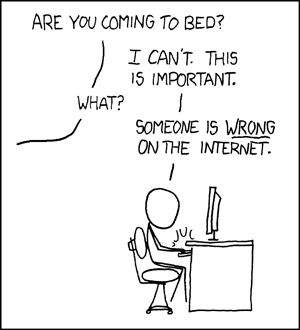
I will provide here a more detailed explanation in the hope to teach people who are wrong on the Internet. xkcd illustration As a sidenote, despite the use of ipv4 in its name, the net.ipv4.tcp_tw_recycle control also applies to IPv6. Also, keep in mind we are looking at the TCP stack of Linux. This is completely unrelated to Netfilter connection tracking which may be tweaked in other ways1.

About TIME-WAIT state Let s rewind a bit and have a close look at this TIME-WAIT state. What is it? See the TCP state diagram below2: TCP state diagram Only the end closing the connection first will reach the TIME-WAIT state. The other end will follow a path which usually permits to quickly get rid of the connection. You can have a look at the current state of connections with ss -tan:
$ ss -tan   head -5
LISTEN     0  511             *:80              *:*     
SYN-RECV   0  0     192.0.2.145:80    203.0.113.5:35449
SYN-RECV   0  0     192.0.2.145:80   203.0.113.27:53599
ESTAB      0  0     192.0.2.145:80   203.0.113.27:33605
TIME-WAIT  0  0     192.0.2.145:80   203.0.113.47:50685

Purpose There are two purposes for the TIME-WAIT state:
  • The most known one is to prevent delayed segments from one connection being accepted by a later connection relying on the same quadruplet (source address, source port, destination address, destination port). The sequence number also needs to be in a certain range to be accepted. This narrows a bit the problem but it still exists, especially on fast connections with large receive windows. RFC 1337 explains in details what happens when the TIME-WAIT state is deficient3. Here is an example of what could be avoided if the TIME-WAIT state wasn t shortened:
Duplicate segments accepted in another connection
  • The other purpose is to ensure the remote end has closed the connection. When the last ACK is lost, the remote end stays in the LAST-ACK state4. Without the TIME-WAIT state, a connection could be reopened while the remote end still thinks the previous connection is valid. When it receives a SYN segment (and the sequence number matches), it will answer with a RST as it is not expecting such a segment. The new connection will be aborted with an error:
Last ACK lost RFC 793 requires the TIME-WAIT state to last twice the time of the MSL. On Linux, this duration is not tunable and is defined in include/net/tcp.h as one minute:
#define TCP_TIMEWAIT_LEN (60*HZ) /* how long to wait to destroy TIME-WAIT
                                  * state, about 60 seconds     */
There have been propositions to turn this into a tunable value but it has been refused on the ground the TIME-WAIT state is a good thing.

Problems Now, let s see why this state can be annoying on a server handling a lot of connections. There are three aspects of the problem:
  • the slot taken in the connection table preventing new connections of the same kind,
  • the memory occupied by the socket structure in the kernel, and
  • the additional CPU usage.
The result of ss -tan state time-wait wc -l is not a problem per se!

Connection table slot A connection in the TIME-WAIT state is kept for one minute in the connection table. This means, another connection with the same quadruplet (source address, source port, destination address, destination port) cannot exist. For a web server, the destination address and the destination port are likely to be constant. If your web server is behind a L7 load-balancer, the source address will also be constant. On Linux, the client port is by default allocated in a port range of about 30,000 ports (this can be changed by tuning net.ipv4.ip_local_port_range). This means that only 30,000 connections can be established between the web server and the load-balancer every minute, so about 500 connections per second. If the TIME-WAIT sockets are on the client side, such a situation is easy to detect. The call to connect() will return EADDRNOTAVAIL and the application will log some error message about that. On the server side, this is more complex as there is no log and no counter to rely on. In doubt, you should just try to come with something sensible to list the number of used quadruplets:
$ ss -tan 'sport = :80'   awk ' print $(NF)" "$(NF-1) '   \
>     sed 's/:[^ ]*//g'   sort   uniq -c
    696 10.24.2.30 10.33.1.64
   1881 10.24.2.30 10.33.1.65
   5314 10.24.2.30 10.33.1.66
   5293 10.24.2.30 10.33.1.67
   3387 10.24.2.30 10.33.1.68
   2663 10.24.2.30 10.33.1.69
   1129 10.24.2.30 10.33.1.70
  10536 10.24.2.30 10.33.1.73
The solution is more quadruplets5. This can be done in several ways (in the order of difficulty to setup):
  • use more client ports by setting net.ipv4.ip_local_port_range to a wider range,
  • use more server ports by asking the web server to listen to several additional ports (81, 82, 83, ),
  • use more client IP by configuring additional IP on the load balancer and use them in a round-robin fashion,
  • use more server IP by configuring additional IP on the web server6.
Of course, a last solution is to tweak net.ipv4.tcp_tw_reuse and net.ipv4.tcp_tw_recycle. Don t do that yet, we will cover those settings later.

Memory With many connections to handle, leaving a socket open for one additional minute may cost your server some memory. For example, if you want to handle about 10,000 new connections per second, you will have about 600,000 sockets in the TIME-WAIT state. How much memory does it represent? Not that much! First, from the application point of view, a TIME-WAIT socket does not consume any memory: the socket has been closed. In the kernel, a TIME-WAIT socket is present in three structures (for three different purposes):
  1. A hash table of connections, named the TCP established hash table (despite containing connections in other states) is used to locate an existing connection, for example when receiving a new segment. Each bucket of this hash table contains both a list of connections in the TIME-WAIT state and a list of regular active connections. The size of the hash table depends on the system memory and is printed at boot:
    $ dmesg   grep "TCP established hash table"
    [    0.169348] TCP established hash table entries: 65536 (order: 8, 1048576 bytes)
    
    It is possible to override it by specifying the number of entries on the kernel command line with the thash_entries parameter. Each element of the list of connections in the TIME-WAIT state is a struct tcp_timewait_sock, while the type for other states is struct tcp_sock7:
    struct tcp_timewait_sock  
        struct inet_timewait_sock tw_sk;
        u32    tw_rcv_nxt;
        u32    tw_snd_nxt;
        u32    tw_rcv_wnd;
        u32    tw_ts_offset;
        u32    tw_ts_recent;
        long   tw_ts_recent_stamp;
     ;
    struct inet_timewait_sock  
        struct sock_common  __tw_common;
        int                     tw_timeout;
        volatile unsigned char  tw_substate;
        unsigned char           tw_rcv_wscale;
        __be16 tw_sport;
        unsigned int tw_ipv6only     : 1,
                     tw_transparent  : 1,
                     tw_pad          : 6,
                     tw_tos          : 8,
                     tw_ipv6_offset  : 16;
        unsigned long            tw_ttd;
        struct inet_bind_bucket *tw_tb;
        struct hlist_node        tw_death_node;
     ;
    
  2. A set of lists of connections, called the death row , is used to expire the connections in the TIME-WAIT state. They are ordered by how much time left before expiration. It uses the same memory space as for the entries in the hash table of connections. This is the struct hlist_node tw_death_node member of struct inet_timewait_sock.
  3. A hash table of bound ports, holding the locally bound ports and the associated parameters, is used to determine if it is safe to listen to a given port or to find a free port in the case of dynamic bind. The size of this hash table is the same as the size of the hash table of connections:
    $ dmesg   grep "TCP bind hash table"
    [    0.169962] TCP bind hash table entries: 65536 (order: 8, 1048576 bytes)
    
    Each element is a struct inet_bind_socket. There is one element for each locally bound port. A TIME-WAIT connection to a web server is locally bound to the port 80 and shares the same entry as its sibling TIME-WAIT connections. On the other hand, a connection to a remote service is locally bound to some random port and does not share its entry.
So, we are only concerned by the space occupied by struct tcp_timewait_sock and struct inet_bind_socket. There is one struct tcp_timewait_sock for each connection in the TIME-WAIT state, inbound or outbound. There is one dedicated struct inet_bind_socket for each outbound connection and none for an inbound connection. A struct tcp_timewait_sock is only 168 bytes while a struct inet_bind_socket is 48 bytes:
$ sudo apt-get install linux-image-$(uname -r)-dbg
[...]
$ gdb /usr/lib/debug/boot/vmlinux-$(uname -r)
(gdb) print sizeof(struct tcp_timewait_sock)
 $1 = 168
(gdb) print sizeof(struct tcp_sock)
 $2 = 1776
(gdb) print sizeof(struct inet_bind_bucket)
 $3 = 48
So, if you have about 40,000 inbound connections in the TIME-WAIT state, it should eat less than 10MB of memory. If you have about 40,000 outbound connections in the TIME-WAIT state, you need to account for 2.5MB of additional memory. Let s check that by looking at the output of slabtop. Here is the result on a server with about 50,000 connections in the TIME-WAIT state, 45,000 of which are outbound connections:
$ sudo slabtop -o   grep -E '(^  OBJS tw_sock_TCP tcp_bind_bucket)'
  OBJS ACTIVE  USE OBJ SIZE  SLABS OBJ/SLAB CACHE SIZE NAME                   
 50955  49725  97%    0.25K   3397       15     13588K tw_sock_TCP            
 44840  36556  81%    0.06K    760       59      3040K tcp_bind_bucket
There is nothing to change here: the memory used by TIME-WAIT connections is really small. If your server need to handle thousands of new connections per second, you need far more memory to be able to efficiently push data to clients. The overhead of TIME-WAIT connections is negligible.

CPU On the CPU side, searching for a free local port can be a bit expensive. The work is done by the inet_csk_get_port() function which uses a lock and iterate on locally bound ports until a free port is found. A large number of entries in this hash table is usually not a problem if you have a lot of outbound connections in the TIME-WAIT state (like ephemeral connections to a memcached server): the connections usually share the same profile, the function will quickly find a free port as it iterates on them sequentially.

Other solutions If you still think you have a problem with TIME-WAIT connections after reading the previous section, there are three additional solutions to solve them:
  • disable socket lingering,
  • net.ipv4.tcp_tw_reuse, and
  • net.ipv4.tcp_tw_recycle.

Socket lingering When close() is called, any remaining data in the kernel buffers will be sent in the background and the socket will eventually transition to the TIME-WAIT state. The application can continue to work immediatly and assume that all data will eventually be safely delivered. However, an application can choose to disable this behaviour, known as socket lingering. There are two flavors:
  1. In the first one, any remaining data will be discarded and instead of closing the connection with the normal four-packet connection termination sequence, the connection will be closed with a RST (and therefore, the peer will detect an error) and will be immediatly destroyed. No TIME-WAIT state in this case.
  2. With the second flavor, if there is any data still remaining in the socket send buffer, the process will sleep when calling close() until either all the data is sent and acknowledged by the peer or the configured linger timer expires. It is possible for a process to not sleep by setting the socket as non-blocking. In this case, the same process happens in the background. It permits the remaining data to be sent during a configured timeout but if the data is succesfully sent, the normal close sequence is run and you get a TIME-WAIT state. And on the other case, you ll get the connection close with a RST and the remaining data is discarded.
In both cases, disabling socket lingering is not a one-size-fits-all solution. It may be used by some applications like HAProxy or Nginx when it is safe to use from the upper protocol point of view. There are good reasons to not disable it unconditionnaly.

net.ipv4.tcp_tw_reuse The TIME-WAIT state prevents delayed segments to be accepted in an unrelated connection. However, on certain conditions, it is possible to assume a new connection s segment cannot be misinterpreted with an old connection s segment. RFC 1323 presents a set of TCP extensions to improve performance over high-bandwidth paths. Among other things, it defines a new TCP option carrying two four-byte timestamp fields. The first one is the current value of the timestamp clock of the TCP sending the option while the second one is the most recent timestamp received from the remote host. By enabling net.ipv4.tcp_tw_reuse, Linux will reuse an existing connection in the TIME-WAIT state for a new outgoing connection if the new timestamp is strictly bigger than the most recent timestamp recorded for the previous connection: an outgoing connection in the TIME-WAIT state can be reused after just one second. How is it safe? The first purpose of the TIME-WAIT state was to avoid duplicate segments to be accepted in an unrelated connection. Thanks to the use of timestamps, such a duplicate segments will come with an outdated timestamp and therefore be discarded. The second purpose was to ensure the remote end is not in the LAST-ACK state because of the lost of the last ACK. The remote end will retransmit the FIN segment until:
  1. it gives up (and tear down the connection), or
  2. it receives the ACK it is waiting (and tear down the connection), or
  3. it receives a RST (and tear down the connection).
If the FIN segments are received in a timely manner, the local end socket will still be in the TIME-WAIT state and the expected ACK segments will be sent. Once a new connection replaces the TIME-WAIT entry, the SYN segment of the new connection is ignored (thanks to the timestamps) and won t be answered by a RST but only by a retransmission of the FIN segment. The FIN segment will then be answered with a RST (because the local connection is in the SYN-SENT state) which will allow the transition out of the LAST-ACK state. The initial SYN segment will eventually be resent (after one second) because there was no answer and the connection will be established without apparent error, except a slight delay: Last ACK lost and timewait reuse It should be noted that when a connection is reused, the TWRecycled counter is increased (despite its name).

net.ipv4.tcp_tw_recycle This mechanism also relies on the timestamp option but affects both incoming and outgoing connections which is handy when the server usually closes the connection first8. The TIME-WAIT state is scheduled to expire sooner: it will be removed after the retransmission timeout (RTO) interval which is computed from the RTT and its variance. You can spot the appropriate values for a living connection with the ss command:
$ ss --info  sport = :2112 dport = :4057
State      Recv-Q Send-Q    Local Address:Port        Peer Address:Port   
ESTAB      0      1831936   10.47.0.113:2112          10.65.1.42:4057    
         cubic wscale:7,7 rto:564 rtt:352.5/4 ato:40 cwnd:386 ssthresh:200 send 4.5Mbps rcv_space:5792
To keep the same guarantees the TIME-WAIT state was providing, while reducing the expiration timer, when a connection enters the TIME-WAIT state, the latest timestamp is remembered in a dedicated structure containing various metrics for previous known destinations. Then, Linux will drop any segment from the remote host whose timestamp is not strictly bigger than the latest recorded timestamp, unless the TIME-WAIT state would have expired:
if (tmp_opt.saw_tstamp &&
    tcp_death_row.sysctl_tw_recycle &&
    (dst = inet_csk_route_req(sk, &fl4, req, want_cookie)) != NULL &&
    fl4.daddr == saddr &&
    (peer = rt_get_peer((struct rtable *)dst, fl4.daddr)) != NULL)  
        inet_peer_refcheck(peer);
        if ((u32)get_seconds() - peer->tcp_ts_stamp < TCP_PAWS_MSL &&
            (s32)(peer->tcp_ts - req->ts_recent) >
                                        TCP_PAWS_WINDOW)  
                NET_INC_STATS_BH(sock_net(sk), LINUX_MIB_PAWSPASSIVEREJECTED);
                goto drop_and_release;
         
 
When the remote host is in fact a NAT device, the condition on timestamps will forbid allof the hosts except one behind the NAT device to connect during one minute because they do not share the same timestamp clock. In doubt, this is far better to disable this option since it leads to difficult to detect and difficult to diagnose problems. The LAST-ACK state is handled in the exact same way as for net.ipv4.tcp_tw_recycle.

Summary The universal solution is to increase the number of possible quadruplets by using, for example, more server ports. This will allow you to not exhaust the possible connections with TIME-WAIT entries. On the server side, do not enable net.ipv4.tcp_tw_recycle unless you are pretty sure you will never have NAT devices in the mix. Enabling net.ipv4.tcp_tw_reuse is useless for incoming connections. On the client side, enabling net.ipv4.tcp_tw_reuse is another almost-safe solution. Enabling net.ipv4.tcp_tw_recycle in addition to net.ipv4.tcp_tw_reuse is mostly useless. And a final quote by W. Richard Stevens, in Unix Network Programming:
The TIME_WAIT state is our friend and is there to help us (i.e., to let old duplicate segments expire in the network). Instead of trying to avoid the state, we should understand it.

  1. Notably, fiddling with net.netfilter.nf_conntrack_tcp_timeout_time_wait won t change anything on how the TCP stack will handle the TIME-WAIT state.
  2. This diagram is licensed under the LaTeX Project Public License 1.3. The original file is available on this page.
  3. The first work-around proposed in RFC 1337 is to ignore RST segments in the TIME-WAIT state. This behaviour is controlled by net.ipv4.rfc1337 which is not enabled by default on Linux because this is not a complete solution to the problem described in the RFC.
  4. While in the LAST-ACK state, a connection will retransmit the last FIN segment until it gets the expected ACK segment. Therfore, it is unlikely we stay long in this state.
  5. On the client side, older kernels also have to find a free local tuple (source address and source port) for each outgoing connection. Increasing the number of server ports or IP won t help in this case. Linux 3.2 is recent enough to be able to share the same local tuple for different destinations. Thanks to Willy Tarreau for his insight on this aspect.
  6. This last solution may seem a bit dumb since you could just use more ports but some servers are not able to be configured this way. The before last solution can also be quite cumbersome to setup, depending on the load-balancing software, but uses less IP than the last solution.
  7. The use of a dedicated memory structure for sockets in the TIME-WAIT is here since Linux 2.6.14. The struct sock_common structure is a bit more verbose and I won t copy it here.
  8. When the server closes the connection first, it gets the TIME-WAIT state while the client will consider the corresponding quadruplet free and hence may reuse it for a new connection.

4 February 2014

Diego Escalante Urrelo: Booting Fedora 20 from USB on a black MacBook3,1 (2007)

Here s a trick that is so obvious, I m still hitting my head against the desk. Let s say you want to install an EFI-friendly distribution on your MacBook. However, your MacBook does not detect bootable USB drives on startup (known bug on old Apple hardware). I found a blog post that had success rebuilding the ISO without EFI support and installing in BIOS mode, but I had a clear memory of getting this to work a few months ago without doing that. I just couldn t remember how. Well, turns out that OSX can boot from USB drives as long as you tell it to do so in advance. You can do this in the Boot disk/Startup disk panel in System Settings:
Startup disks panel in OSX
You don t see me complaining that everything on the web is in English, do you?
You only need to select the drive and close the panel, or reboot directly using that handy Reboot button. So considerate of Apple. Important: After you install, or try, your EFI friendly live USB you have to go back to the panel and select your OSX drive again, otherwise your MacBook will keep waiting for the (now gone) USB drive for about 30 seconds on startup. For Debian, the last few times I have just booted with a CD in BIOS mode without problems. After the installation you can configure Debian for EFI boot following this instructions. I haven t tried any other distribution on this machine.

2 February 2014

Gunnar Wolf: CuBox-i4Pro

CuBox-i4Pro
Somewhere back in August or September, I pre-ordered a CuBox-i A nicely finished, completely hackable, and reasonably powerful ARM system, nicely packaged and meant to be used to hack on. A sweet deal! There are four models (you can see the different models' specs here) I went for the top one, and bought a CuBox-i4Pro. That means, I have a US$130 nice little box, with 4 ARM7 cores, 2GB RAM, WiFi, and... well, all of its basic goodies and features. For some more details, look at the CuBox-i block diagram. I got it delivered by early January, and (with no real ARM experience on my side) I finally got to a point where I can, I believe, contribute something to its adoption/usage: How to get a basic Debian system installed and running in it. The ARM world is quite different to the x86 one: Compatibility is much harder, the computing platform does not self-describe properly, and a kernel must first understand how a specific subarchitecture is before being able to boot on it. Somewhere in the CuBox forums (or was it the IRC channel?) I learnt that the upstream Linux kernel does not yet boot on the i.MX6 chip (although support is rumored to be merged for the 3.14 release), so I am using both a kernel and an uBoot bootloader not built for (or by) Debian people. Besides that, the result I will describe is a kosher Debian install. Yes, I know that my orthodox friends and family will say that 99% kosher is taref... But remember I'm never ever that dogmatic. (yeah, right!) Note that there is a prebuilt image you can run if you are so inclined: In the CuBox-i forums and wiki, you will find links to a pre-installed Debian image you can use... But I cannot advise to do so. First, it is IMO quite bloated (you need a 4GB card for a very basic Debian install? Seriously?) Second, it has a whole desktop environment (LXDE, if I recall correctly) and a whole set of packages I will probably not use in this little box. Third, there is a preinstalled user, and that's a no-no (user: debian, password: debian). But, most importantly, fourth: It is a nightly build of the Testing (Jessie) suite... Built back in December. So no, as a Debian Developer, it's not something we should recommend our users to run! So, in the end and after quite a bit of frustration due to my lack of knowledge, here goes the list of steps I followed:
Using the CuBox
On the i2 and i4 models, you can use it either with a USB keyboard and a HDMI monitor, or by a serial consoles (smaller models do not have a serial console). I don't have a HDMI monitor handy (only a projector), so I prefer to use the serial terminal. Important details to avoid frustration: The USB keyboard has to be connected to the lower USB port, or it will be ignored during the boot process. And make sure your serial terminal is configured not to use hardware flow control. Minicom is configured by default to use hardware flow control, so it was not sending any characters to the CuBox. ^A-O gets you to the Minicom configuration, select Serial port setup, and disable it.
Set up the SD card
I created a 2GB partition, but much less can suffice; I'd leave it at least to 1GB to do the base install, although it can be less once the system is set up (more on this later). Partition and format using your usual tools (fdisk+mke2fs, or gparted, or whatever suits your style).
Install the bootloader
I followed up the instructions on this CuBox-i forums thread to get the SPL and uBoot bootloader running. In short, from this Google Drive folder, download the SPL-U-Boot.img.xz file, uncompress it (xz --decompress SPL-U-Boot.img.xz), and write it to the SD card just after the partition map: As root,
# dd if=SPL-U-Boot.img of=/dev/mmcblk0 bs=1024 seek=1.
Actually, to be honest: As I wanted something basic to be able to debug from, I downloaded (from the same Google Drive) the busybox.img.gz file. That's a bit easier to install from: xz --decompress busybox.img.xz, and just dump it into the SD from the beginning (as it does already include a partition table):
# dd if=busybox.img of=/dev/mmcblk0
This card is already bootable and minimal, and allows to debug some bits from the CuBox-i itself (as we will see shortly).
After this step, I created a second partition, as I said earlier. So, my mmcblk0p1 partition holds Busybox, and the second will hold Debian. We are still working from the x86 system, so we mount the SD card in /media/mmcblk0p2
Installing the base system
Without debian-installer to do the heavy lifting, I went for debootstrap. As I ran it from my PC, debootstrap's role will be for this first stage only to download and do a very initial pre-unpacking of the files: Bootstrapping a foreign architecture implies, right, using the --foreign switch:
debootstrap --foreign --arch=armhf wheezy /media/mmcblk0p2 http://http.debian.net/debian
You can add some packages you often use by specifying --include=foo,bar,baz
So, take note notes: This board is capable of running the armhf architecture (HF for Hardware Float). It can also run armel, but I understand it is way slower.
First boot (with busybox)
So, once debootstrap finishes, you are good to go to the real hardware! Unmount the SD card, put it in the little guy, plug your favorite console in (I'm using the serial port), and plug the power in! You should immediately see something like:
  1. U-Boot SPL 2013.10-rc4-gd05c5c7-dirty (Jan 12 2014 - 02:18:28)
  2. Boot Device: SD1
  3. reading u-boot.img
  4. Load image from RAW...
  5. U-Boot 2013.10-rc4-gd05c5c7-dirty (Jan 12 2014 - 02:18:28)
  6. CPU: Freescale i.MX6Q rev1.2 at 792 MHz
  7. Reset cause: POR
  8. Board: MX6-CuBox-i
  9. DRAM: 2 GiB
  10. MMC: FSL_SDHC: 0
  11. In: serial
  12. Out: vga
  13. Err: vga
  14. Net: phydev = 0x0
  15. Phy not found
  16. PHY reset timed out
  17. FEC
  18. (Re)start USB...
  19. USB0: USB EHCI 1.00
  20. scanning bus 0 for devices... 1 USB Device(s) found
  21. scanning usb for storage devices... 0 Storage Device(s) found
  22. scanning usb for ethernet devices... 0 Ethernet Device(s) found
  23. Hit any key to stop autoboot: 3

Let it boot (that means, don't stop autoboot), and you will soon see a familiar #, showing you are root in the busybox environment. Great! Now, mount the Debian partition:
# mount /dev/mmcblk0p2 /mnt
Finishing debootstrap's task
With everything in place, it's time for debootstrap to work. Chroot into the Debian partition:
# chroot /mnt
And ask Debootstrap to finish what it started:
# debootstrap --second-stage
Be patient, as this step takes quite a bit to be finished.
Some extra touches...
After this is done, your Debian system is almost ready to be booted into. Why almost? Because it still does not have any users, does not know its own name nor knows I want to use it via a serial terminal. Three very simple tasks to fix. First two:
  1. # passwd
  2. Enter new UNIX password:
  3. Retype new UNIX password:
  4. passwd: password updated successfully
  5. # echo cubox-i.gwolf.org > /etc/hostname

For the second one, add a line to /etc/inittab specifying the details of the serial console. You can just do this:
# echo 'T0:23:respawn:/sbin/getty -L ttymxc0 115200 vt100' >> /etc/inittab
Boot into Debian!
So, ready to boot Debian? Ok, first exit the chroot shell, to go back to the Busybox shell, unmount the Debian partition, and set the root partition read-only:
  1. # exit
  2. # umount /mnt
  3. # mount / -o remount,ro

Disconnect and connect power, and now, do interrupt the boot process when you see the Hit any key to stop automount prompt. To see the configuration of uboot, you can type printenv We will only modify the parameters given to the kernel:
  1. CuBox-i U-Boot > setenv root /dev/mmcblk0p2 rootfstype=ext3 ro rootwait
  2. CuBox-i U-Boot > boot

So, the kernel will load, and a minimal Debian system will be initialized. In my case, I get the following output:
  1. ** File not found /boot/busyEnv.txt **
  2. 4703740 bytes read in 390 ms (11.5 MiB/s)
  3. ## Booting kernel from Legacy Image at 10000000 ...
  4. Image Name: Linux-3.0.35-8
  5. Image Type: ARM Linux Kernel Image (uncompressed)
  6. Data Size: 4703676 Bytes = 4.5 MiB
  7. Load Address: 10008000
  8. Entry Point: 10008000
  9. Verifying Checksum ... OK
  10. Loading Kernel Image ... OK
  11. Starting kernel ...
  12. Unable to get enet.0 clock
  13. pwm-backlight pwm-backlight.0: unable to request PWM for backlight
  14. pwm-backlight pwm-backlight.1: unable to request PWM for backlight
  15. _regulator_get: get() with no identifier
  16. mxc_sdc_fb mxc_sdc_fb.2: NO mxc display driver found!
  17. INIT: version 2.88 booting
  18. [info] Using makefile-style concurrent boot in runlevel S.
  19. [....] Starting the hotplug events dispatcher: udevd. ok
  20. [....] Synthesizing the initial hotplug events...done.
  21. [....] Waiting for /dev to be fully populated...done.
  22. [....] Activating swap...done.
  23. [....] Cleaning up temporary files... /tmp. ok
  24. [....] Activating lvm and md swap...done.
  25. [....] Checking file systems...fsck from util-linux 2.20.1
  26. done.
  27. [....] Mounting local filesystems...done.
  28. [....] Activating swapfile swap...done.
  29. [....] Cleaning up temporary files.... ok
  30. [....] Setting kernel variables ...done.
  31. [....] Configuring network interfaces...done.
  32. [....] Cleaning up temporary files.... ok
  33. [....] Setting up X socket directories... /tmp/.X11-unix /tmp/.ICE-unix. ok
  34. INIT: Entering runlevel: 2
  35. [info] Using makefile-style concurrent boot in runlevel 2.
  36. [....] Starting enhanced syslogd: rsyslogd. ok
  37. [....] Starting periodic command scheduler: cron. ok
  38. Debian GNU/Linux 7 cubox-i.gwolf.org ttymxc0
  39. cubox-i login:

And that's it, the system is live and ready for my commands!
So, how big is this minimal Debian installed system? I cheated a bit on this, as I had already added emacs and screen to the system, so yours will be a small bit smaller. But anyway Lets clear our cache of downloaded packages, and see the disk usage information:
  1. root@cubox-i:~# apt-get clean
  2. root@cubox-i:~# df -h
  3. Filesystem Size Used Avail Use% Mounted on
  4. rootfs 1008M 347M 611M 37% /
  5. /dev/root 1008M 347M 611M 37% /
  6. devtmpfs 881M 0 881M 0% /dev
  7. tmpfs 177M 132K 177M 1% /run
  8. tmpfs 5.0M 0 5.0M 0% /run/lock
  9. tmpfs 353M 0 353M 0% /run/shm

So, instead of a 4GB install, we have a 350MB one. Great improvement! Now, lets get it to do something useful, in a most Debianic way!

Vasudev Kamath: Moving weblog from Jekyll to Pelican

Its been a while and I was not actively blogging. I wanted to start blogging again but I was for some reason not happy with Jekyll static site generator which was powering my previous site. So I took this chance to explore other static site generators and redesign my blog. I explored a bit of Pelican, Nikola and Frog. I didn't feel comfortable with Nikola. Frog is a static site generator written using *Racket* and since I'm learning Scheme using racket I was leaning towards using it but at the last moment I decided to settle with Pelican. The main reason for not using Frog was that I just wanted to get my site up rather than waiting for me to complete learning racket and use Frog. My feeling about Pelican is that its a nice tool and is simple and gives all basic things like generating RSS/ATOM feeds and nice theming support. In case of Jekyll I had to write custom page for creating RSS feed and had pain in creating my first theme (yeah I'm not a designer). But now things might have changed in Jekyll land but anyway I don't care anymore. New design uses pelican-bootstrap3 theme and there is no comment facility available. If you want to comment or suggesting things on my post consider writing mail to me :-). So what happened to older entries? Moving the old entries from Jekyll format to Pelican was real PITA so I just renamed my old site to blog-archive. So this is a from scratch site and will contain only new entries. So how do you like my new blog design? :-)

30 January 2014

Rog rio Brito: Trivial fact #2: Harmonic Numbers

I don't know how Debian planet deals with MathJax (it seems to become illegible), but I will try to post this, anyway.
Fact: Since the harmonic numbers can be approximated by the natural logarithm, that is, !!mathjaxbegin-i!! SF9uIFxzaW1lcSBcbG4gbg== !!mathjaxend-i!!, we can clearly see that !!mathjaxbegin-d!! CiBcZnJhY3sxfXtpKzF9ICsgXGNkb3RzICsgXGZyYWN7MX17bn0gPSBIX24gLSBIX2kgXHNpbWVx IFxsbiBuIC0gXGxuIGkgPSBcbG4gXGZyYWN7bn17aX0sCg== !!mathjaxend-d!! which is a trivial approximation that may be handy sometimes. If you spot any errors on this, please let me know.

29 January 2014

Emanuele Rocca: Antifeatures and Antibugs

Software Engineering distinguishes between software features and software bugs. It is usually understood that features are positive, expected characteristics of a computer program. Features make users happy by allowing them to do something useful, interesting, or fun. Something good, anyways. Bugs are instead undesirable and annoying. You're sitting there at your computer writing a long email and the software crashes right before your email is sent. Bad stuff. Features are generally implemented by programmers on purpose, whereas bugs are purely unintentional. They are mistakes. You don't make a mistake on purpose. We might at this point be inclined to think that: i) what is good for users is done on purpose by software manufacturers; ii) what is bad for users was not meant to be. It happened by mistake. Here is a handy table to visualize this idea:
On purpose By mistake
Good Feature
Bad Bug
It seems to make a lot of sense. But you might have noticed that two cells of the table are empty. Right! In a great talk titled When Free Software isn't better, Benjamin Mako Hill mentions the concept of antifeatures, and how they relate to Free Software. Antifeatures are features that make the software do something users will hate. Something they will hate so much they would pay to have those features removed, if that's an option. Microsoft Windows 7 is used in the talk to provide some examples of software antifeatures: the Starter Edition does not allow users to change their background image. Also, it limits the amount of usable memory on the computer to 2GBs, regardless of how much memory the system actually has. Two antifeatures engineered to afflict users to the point that they will purchase a more expensive version of the software, if they have the means to do that. I have another nice example. The Spotify music streaming service plays advertisements between songs every now and then. To make sure users are annoyed as much as possible, Spotify automatically pauses an advertisement if it detects that the volume is being lowered. A poor Spotify user even tried to report the bug on The Spotify Community forum, only to find out that what she naively considered as a software error was "intentional behavior". A spectacular antifeature indeed. Whenever a piece of technology does something you most definitely do not want it to do, such as allowing the NSA to take complete control of your Apple iPhone, including turning on its microphone and camera against your will, that's an antifeature.
On purpose By mistake
Good Feature
Bad Antifeature Bug
Both bugs and antifeatures are bad for users. The difference between them is that antifeatures are engineered. Time and money are spent to make sure the goal is reached. A testing methodology is followed. "Are we really sure customers cannot change their wallpaper even if they try very very hard?" Engineering processes, of course, can fail. If the poor devils at Microsoft who implemented those harassments would have made a mistake that allows users to somehow change their wallpaper on Windows Starter... Well, I would call that a glorious antibug.
On purpose By mistake
Good Feature Antibug
Bad Antifeature Bug
There is no place for antifeatures in Free and Open Source Software. Free Software gives users control over what their software does. Imagine Mozilla adding a feature to Firefox that sets your speakers volume to 11 and starts playing a random song from the black metal artist Burzum every time you add a bookmark, unless you pay for Mozilla Firefox Premium Edition. The source code for Firefox is available under a free license. People who are not into Burzum's music would immediately remove this neat antifeature. I have spent many years of my life advocating Free and Open Source Software, perhaps using the wrong arguments. Mako's talk made me think about all this (thanks mate!). All these years I've been preaching about the technical superiority of Free Software, despite evidence of thousands of bugs and usability issues in the very programs I am using, and contributing to develop. Free Software is not better than Proprietary Software per se. Sometimes it is, sometimes it's not. But it gives you control, and freedom. When it annoys you, when it doesn't do what you expect and want, you can be sure it's not on purpose. And we can fix it together.

28 January 2014

Andrea Colangelo: The (brand new) Debian 3D-Printing Team is hiring!

The 3D-printing technology has gained quite a big momentum in recent times. Its use is spreading widely even among hobbyists and many sources report daily several (sometimes weird) examples of its usage. The thing I like most, as a Free Software activist, is that several 3D-printing-related free and open source software are already available and quite good, and some printers are even released as free hardware. Unfortunately, Debian is quite lagged behind with regard to the availability of such software in our archive, especially compared to other distributions who already ship much of it. Hopefully this situation will change drastically thanks to the brand new Debian 3D-Printing team, whose purpose is to make Debian a rocking platform to do some serious 3D-printing. The team is bootstrapping right now, and we are looking for volunteers who are willing to help us. Packagers are greatly welcomed, but also triagers, users and passionate people with some experience in the field are extremely valuable. People willing to join the team can take a look at our (in-progress) wiki page and apply on the team page on Alioth. As with any good packaging team, a mailing list is available to share ideas, feel free to subscribe it, and feel free to join #debian-3dprinting on OFTC if you want to hang out with other team members.

27 January 2014

Richard Hartmann: Public Consultation on the review of the EU copyright rules

You probably didn't know there's a Public Consultation on the review of the EU copyright rules under way as of right now. It states explicitly that "All stakeholders are welcome to contribute to this consultation." This means you. No matter where you live or what you do, this is your chance to potentially influence copyright reform. You have time until 2014-02-05. Don't wait that long, fill the survey out now. Else you will forget. And then lament the fact that legacy industries are upheld with artifical government-sanctioned monopolies. If you find the ~40 A4 pages of text scary, there's a handy guide as to what questions will interest you the most, but I suggest you fill it out on your own. Stop what you're doing, fill this out, and return. Thanks.

26 January 2014

Neil Williams: Home server rack

The uses of this particular rack I ll cover in future entries this is about how I made the rack itself, with help from friends (Steve McIntyre & Andy Simpkins). A common theme is making allowances for using dev kit boards ready-to-rack ARM servers are not here yet. My aim was to have 4, possibly 6 ARM dev kit boards running services from home, so there was no need for a standard 42U rack, a 9U rack is enough. Hence:
Wall Mounted 9U 450mm deep 19 inch rack enclosure glass door To run various other services around the house (firewall, file server etc.), a microserver was also necessary:
HP 704941-421 ProLiant Micro Server (AMD Turion II Neo N54L 2.2GHz, 2GB RAM, 250GB HDD, 2 Core, 7th Generation) I chose to mount that on a bookcase beneath the wall mounted rack as it kept all the cables at the bottom of the rack itself. The microserver needed a second gigabit network card fitted to cope with being a firewall as well, if you do the same, ensure you find a suitable card with a low profile bracket. Some are described as being low profile but do not package the low profile bracket, only a low profile card and a full height bracket.
Intel EXPI9301CTBLK PRO1000 Network Card note the low profile bracket in the pack. The first of the dev kit requirements is the lack of boards which can be racked, so shelves are going to be needed, leading on to something to stop the boards wandering across the shelf when the cables are adjusted velcro pads in my case. Second requirement is that dev kit boards are notorious for not rebooting cleanly. Nothing to do with the image being run, the board just doesn t cut power or doesn t come back after cutting power. Sometimes this is down to early revisions of the board, sometimes the board pulls enough power through the USB serial converter to remain alive, whatever the cause, it won t reboot without user involvement. So a PDU becomes necessary remotely controllable. New units tend to be expensive and/or only suitable for larger racks, I managed to find an older 8 port APC unit, something like: (Don t be surprised if that becomes a dead link search for APC Smart Slot Master Switch Power Distribution Unit). Talking of power, I m looking to use SATA drives with these boards and the boards themselves come with a variety of wall wart plugs or USB cables, so a number of IEC sockets are needed not the usual plugs:
Power cable IEC C14 plug 13A socket 25 cm or, for devices which genuinely need 2A to boot (use the 1A for attached SATA or leave empty):

Black Universal 3.1A 15W 5V Dual USB Rapid Mains Charger Plug Check the power output rating of the USB plugs used to connect to the mains as well many are 1A or less. Keep the right plug for the right board.
Power is going to also be a problem if, like me, you want to run SATA drives off boards which support SATA. The lack of a standard case means that ATX power is awkward, so check out some cheap SATA enclosures to get a SATA connector with USB power. I am using these enclosures (prices seem to have risen since I obtained them):

Startech 2.5 inch eSATA USB External Hard Drive Enclosure for SATA HDD Along with these:
eSATA to SATA Serial External Shielded Cable 1m because the iMx53 boards have SATA connectors but the enclosure exports eSATA. Whilst this might seem awkward, the merit of having both eSATA and simple USB power on one enclosure is not to be under-estimated. (Avoid the stiffer black cables space will get tight inside the rack.) Naturally, a 2.5 inch SATA drive is going to be needed for each enclosure, I m using HDD but SSD is also an option. Also, consider simple 2 or 3 way fused adaptors so that the board and the SATA drive can be powered from a single PDU port, this makes rebooting much simpler if the board needs a power supply with integrated plug instead of over USB. Now to the networking (2 x 8 port was cheaper than 1 x 16):
Netgear GS108 8-port Gigabit Ethernet Unmanaged Switch Don t forget the cat5 cables too you ll want lots of short cables, 1m or shorter inside the rack and a few longer ones going to the microserver and wall socket. I used 8x1m. Naturally, on the floor below your rack you are going to put a UPS, so the PDU power then needs to be converted to draw from the UPS via IEC plugs instead of standard mains. I decided to use a 6 gang extension 1m cable with an IEC plug it was the only bit of wiring I had to do and even those are available ready-made if you want to do it that way. Depending on the board, you may need your own serial to USB converters, you ll certainly need some powered USB hubs. I m using a wall mounted 9U rack, so I also needed a masonry drill and 4 heavy duty masonry M8 bolts. The rack comes with a mounting plate which needs to be bolted to the wall but nothing else is included. This step is much easier with someone else to take the weight of the rack as it is guided into the brackets on the mounting plate the bracket may need a little persuasion to allow for the bolt heads to not get in the way during mounting. Once mounted, the holes in the back of the rack allow for plenty of room, it s just getting to that point. The rack has side panels which latch out easily, providing easy maintenance. The glass door can be easily reversed to open from the opposite side. However, the key in the glass door is largely useless. The expectation is that the units in the rack are attached at the front but the dev boards on shelves are not going to be protected by a key in the front door. The key therefore ends up being little more than a handle for the glass door. OK. If you ve got this far, it s a case of putting things together:
Economy Cage Nut Tool 19 inch racking for cagenut extraction Yes, you really do want one. Fine, do without the premium one, but the economy one will save you a lot of (physical) pain. At this stage, it becomes clear that the normal 19 inch server rack shelves don t leave a lot of room at the back of the rack for the cables and there are a lot of cables. Each board has power, USB serial connection and network. The SATA has power too. The PDU has a power lead and you ll need network switches too. The network switches need power and an uplink cable. I positioned the supports in the rack as far forward as possible and attached the shelves to give enough room for the PDU on the base of the rack, the network switches resting on top and the extension bar (with the heavier, stiffer cables) at the back. (I need to bring my shelves another 1 or 2 positions further forward as there is barely enough room for one cable between the shelf and the back of the rack and that makes moving boards around harder than it needs to be.) The PDU defaults to enabling all ports at startup, so connect to it over telnet and turn off the ports before connecting things and sorting out the network interface to what the rest of the lab needs. (I m using a 10. range and the PDU was originally set to use 192.168.1.) That s about it as far as the hardware setup is concerned. Just time to label up each board, note down which PDU port does which device, which serial to USB converter is on which device on the microserver and check the power my initial problem with one board was traced to the inability of the board to power SATA off the on-board USB port even when using the provided 2A power supply. That meant adding a standard mains adaptor to feed both the SATA power and the board power off the one PDU port there is little point powering off the board but not the SATA, or vice versa. I haven t totalled up the expenditure but the biggest expenses were the microserver and the wall mounted rack but don t underestimate how much it will cost to buy 6 IEC plugs, various USB serial converters and how much you may spend on peripheral items. There is quite a lot of room on the 2 shelves for more boards, what will limit the deployment in this rack is space for the cables, especially power. The shorter the power cables, the easier it will be to maintain the devices in the rack. It might be worth looking at a 12U rack, if only to give plenty of space for cables. Once I ve got the software working, I ll describe what this rack will be doing it s got something to do with Debian, ARM, Linux and tests but you ve probably already guessed that much

11 January 2014

Wouter Verhelst: Computer education in Belgium

Today (well, technically yesterday by now), the Media were reporting of an open letter by '5 belgian university professors from the IT field' without calling them by name about how Belgian primary education should introduce programming into the curriculum, starting at age 5. Unsurprisingly, this did not go well with a majority of the Belgian populace. Arguments like "what should the school drop to make place for that, then" and "why would people ever need to learn programming" were rampant on some internet fora that I had a short look at. That being said, though, I think these five unnamed professors are correct. Understanding how a tool works is essential to proficient usage of said tool; and while it is possible to teach particular common and popular use cases of a given tool without providing enough background, doing so will only result in confusion when the computer "is acting up" an oxymoron if there ever was one. After all, a computer can't "act up"; it can only follow instructions. Whenever your seems to be "acting up", what's really happening is that someone (most likely, you) gave it the wrong instructions. Or, perhaps, someone evil on the Internet gave it the right instructions (for their goals, anyway) and infected your computer with a virus. But that's unlikely. Computer education currently mostly consists of "teaching software": rather than explaining how a computer does what it does, people are taught that if you click this button, the text will be bold, or if you click that button, the printer will start buzzing. That's all nice and dandy, until the actual computer people encounter when off the school bench and at work has this other piece of software, where all the buttons are in other places and look all "wrong". Because then they get all confused about the fact that things aren't where they're supposed to be. So, yes, it is my opinion that any computer education should help people understand how a computer does the things it does. And what better way to do that than to actually explain things to a computer, the way computer programmers do such things? Note that programming a computer doesn't have to be hard, and it can be something which kids can understand and will find fun to do. For instance, there's this scratch thing from MIT, which was made for teaching programming in such a context. Yes, adding programming to the primary school curriculum will require that some other things are dropped instead, and I could see that being a problem. However, in our modern world computers have become so pervasively important that we would be doing our kids a disservice not to explain them how to understand computers, as opposed to just learn how to use them...

9 January 2014

Gerfried Fuchs: Clawfinger

It's almost a month since I last blogged something, and one of my new year's resolution is to change that, a bit. Let's see how it goes. I've been listening a lot to this great band from Sweden recently again, put all their songs onto my mobile phone. It might sound weird because they have a rather aggressive style, both soundwise but also lyricswise, but it helps me to get things off my chest and stay relaxed in the rest of my life. The band I want to present to you was already twice mentioned in some other articles of my blog I noticed, but this is the proper post about them: I'm talking about Clawfinger. They came up in the nineties during the crossover phase and did blend in pretty well, but it's mostly their direct and political statements they carry in their lyrics that did let them stand out. One warning though: the direct language they use might be considered blunt and maybe even offensive by some. The message behind it though should rather get you thinking of your own doings if you consider it to be offensive. Here are the songs: Like always, enjoy! And maybe also think about it a bit. :)

/music permanent link Comments: 4 Flattr this

24 December 2013

Andrea Veri: Manage passwords with pass

Fighting with passwords have always been one of my favorite battles in the past and unfortunately the former always won. I never liked using the root user that much for administering a machine and made a massive use of sudo, I won t list all the benefits of using sudo, but the following wiki page has a pretty nice overview of them. Said that, when using sudo it s definitely ideal to combine a strong password that is also easy to remember and type again when prompted. Sadly strong passwords that are also easy to remember can be considered an oxymoron. How hard would it be to recall a 30+ chars long password? Honestly that would be close to impossible for an human being but what if a little software available on the major GNU/Linux distributions could handle that for us? That s where pass comes handy, but what is pass? from the pass manpage itself:
pass is a very simple password store that keeps passwords inside gpg2(1) encrypted files inside a simple directory tree residing at ~/.password-store. The pass utility provides a series of commands for manipulating the password store, allowing the user to add, remove, edit, synchronize, generate, and manipulate passwords.
I m sure that a lot of you guys have been looking for a tool like this one for ages: pass allows you to generate very strong passwords with pwgen, GPG encrypt them with your GPG Key, store them safely on your disk and make them available whenever you need them with a single command. But let s move to the practice, give the following steps a try and enjoy how powerful your pass setup will be. First setup 1. Install the software:
yum/apt-get install pass

2. Generate a GPG Key if you don t have one already, a detailed guide can be found here. 3. Initialize your passwords storage. (GPGKEYID can be retrieved by running gpg list-keys and then looking for a line similar to this one: pub 4096R/B3A6223D 2012-06-25)
pass init GPGKEYID

4. Generate your first password and call it sudo_password given you are going to make use of it as your brand new sudo password. (we want it at least 30+ chars long)
pass generate sudo_password 30

5. (Optional) Create as much passwords as you need and make sure to save them with unique names, that way you will be able to identify what a password is used for easily.
pass generate gmail_password 30

Additional maintenance commands on your password database 1. Look at the existing passwords on your database.
pass ls

Result:
Password Store
  gmail_password
  sudo_password
  root_password

2. Manually edit a password.
pass edit password_name

3. Remove a password from your database.
pass rm password_name

4. Copy a password on your clipboard and paste it.
pass -c password_name

Are you wondering if pass supports a VCS? Yeah, it does, it currently allows you to manage your passwords database with Git, so that each applied change to the database will be tracked through a VCS so that you won t forget when and how you updated a specific password.

20 December 2013

Matthew Palmer: I am officially smarter than the Internet

Yes, the title is just a scootch self-aggrandising, but I m rather chuffed with myself at the moment, so please forgive me. It all started with my phone (a regular Samsung Galaxy S3) suddenly refusing to boot, stuck at the initial splash screen ( Samsung Galaxy SIII GT-I9300 ). After turning it off and on again a few times (I know my basic problem-solving strategies) and clearing the cache, I decided to start looking deeper. In contrast to pretty much every other Android debugging experience ever, I almost immediately found a useful error message in the recovery system:
E:Failed to mount /efs (Invalid Argument)
Excellent! , thought I. An error message. Google will tell me how to fix this! Nope. The combined wisdom of the Internet, distilled from a great many poorly-spelled forum posts, unhelpful blog posts, and thoroughly pointless articles, was simple: You re screwed. Send it back for service. I tried that. Suffice it to say that I will never, ever buy anything from Kogan ever again. I have learnt my lesson. Trying to deal with their support people was an exercise in frustration, and ultimately fruitless. In the end, I decided I d have some fun trying to fix it myself after all, it s a failure at the base Linux level. I know a thing or two about troubleshooting Linux, if I do say so myself. If I really couldn t fix it, I d just go buy a new phone. It turned out be relatively simple. Here s the condensed version of my notes, in case someone wants to follow in my footsteps. If you d like expansion, feel free to e-mail me. Note that these instructions are specifically for my Galaxy S3 (GT-I9300), but should work with some degree of adaptation on pretty much any Android phone, as far as I can determine, within the limits of the phone s willingness to flash a custom recovery.
  1. Using heimdall, flash the TeamWin recovery onto your phone (drop into download mode first hold VolDown+Home+Power):
    heimdall flash --recovery twrp.img
    
  2. Boot into recovery (VolUp+Home+Power), select Advanced -> Terminal , and take an image of the EFS partition onto the external SD card you should have already in the phone:
    dd if=/dev/block/mmcblk0p3 of=/external_sd/efs.img
    
  3. Shutdown the phone, mount the SD card on your computer, then turn your EFS partition image into a loopback device and fsck it:
    sudo losetup -f .../efs.img
    sudo fsck -f /dev/loop0
    
    With a bit of luck, the partition won t be a complete write-off and you ll be able to salvage the contents of the files, if not the exact filesystem structure. Incidentally, if the filesystem was completely stuffed, you could get someone else s EFS partition and change the IMEI and MAC addresses and you d probably be golden, but that would quite possibly be illegal or something, so don t do that.
  4. Now comes the fun part putting the filesystem back together. After fscking, mount the image somewhere on your computer:
    mount /dev/loop0 /mnt
    
    In my case, I had about a dozen files living in lost+found, and I figured that wasn t a positive outcome. I did try, just in case, writing the fsck d filesystem image back to the phone, in the hope that it just needed to mount the filesystem to boot, but no dice. Instead, I had to find out where these lost soul^Wfiles were supposed to live. Luckily, a colleague of mine also has an S3 (the ever-so-slightly-different GT-I9300T), and he was kind enough to let me take a copy of his EFS partition, and use that as a file location template. Using a combination of file sizes, permissions/ownerships, and inode numbers (I knew the -i option to ls would come in handy someday!), I was able to put all the lost files back where they should be.
  5. Unmount all those EFS filesystems, losetup -d /dev/loop0, and put the fixed up EFS partition image back onto your SD card for the return trip to the phone.
  6. Now, with a filesystem image that looks reasonable, it s time to write it back onto the phone and see what happens. Copy it onto the SD card, boot up into recovery again, get a shell, and a bit more dd:
    dd if=/external_sd/efs.img of=/dev/block/mmcblk0p3
    
  7. With a bit of luck, your phone may just boot back up now. In my case, I d done so many other things to my phone trying to get it back up and running (including flashing custom ROMs and what have you) that I needed to flash Cyanogen, boot it, and wait at the boot screen for about 15 minutes (I shit you not, 15 minutes of Gah is my phone going to work?!? ) before it came up and lo! I had a working phone again. And about 27 SMSes. Sigh, back to work
So, yeah, neener-neener to the collected wisdom of the tubes. I fixed my EFS partition, and in the great, grand scheme of things, it wasn t even all that difficult. For any phone which (a) allows you to flash a custom recovery and (b) you can find another of the same model to play with, EFS corruption doesn t necessarily mean a fight with tech support. Incidentally, if you happen to have an S3 exhibiting this problem, but you re not comfortable fiddling with it, I m happy to put your EFS back together again if you pay shipping both ways. It s about a 5 minute job now I know how to do it. E-mail me.

13 December 2013

Daniel Pocock: xWiki: 10 years and a WebRTC success story

Six months ago, I wrote to the leaders of several open source web frameworks and asked them about their vision for WebRTC and if they would come to the WebRTC Conference in Paris this week (now finished). The most promising response was from Ludovic Dubost, founder of the xWiki project. Ludovic successfully demonstrated their shiny new WebRTC capabilities today in front of an audience including many far more experienced telephony operators who are still only getting to terms with this technology. What is xWiki? Don't let the wiki name limit your perception of this project. xWiki is a lot more than just another wiki hosting framework. As a bare minimum, you can certainly use it in the same way as other wikis, doing lightweight markup that is easier than HTML. On the other hand, xWiki really shines when it comes to extensibility. The xWiki team are Java developers and so xWiki appeals most to other Java developers who may want to leverage some library code from their web portal from time to time, without even having to compile anything. Here are some examples and here is one of the most trivial ones:
 velocity 
Your username is $xcontext.getUser(), welcome to the site.
 /velocity 
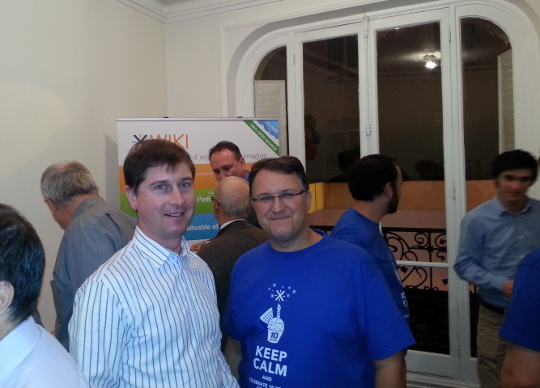
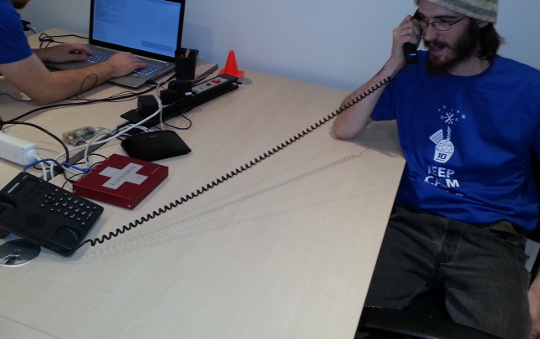
WebRTC capabilities The xWiki team chose XMPP as a chat protocol (using the Candy XMPP JavaScript chat) as the foundation for real-time communication. They have then extended this by creating a custom signalling mechanism and making it convenient for users of a chat session to upgrade the session to voice/video with a mouseclick. The whole experience works within the browser without any plugins. 10 years of xWiki It was also xWiki's 10th birthday today and this provided the perfect opportunity for a party: cjdns and enigmabox While at the xWiki office, it was interesting to see a lot of innovative work taking place, including this VoIP setup where a Grandstream phone is attached to an Enigmabox operated by Caleb from the cjdns project.

11 December 2013

Gustavo Noronha Silva: WebKitGTK+ hackfest 5.0 (2013)!

For the fifth year in a row the fearless WebKitGTK+ hackers have gathered in A Coru a to bring GNOME and the web closer. Igalia has organized and hosted it as usual, welcoming a record 30 people to its office. The GNOME foundation has sponsored my trip allowing me to fly the cool 18 seats propeller airplane from Lisbon to A Coru a, which is a nice adventure, and have pulpo a feira for dinner, which I simply love! That in addition to enjoying the company of so many great hackers.
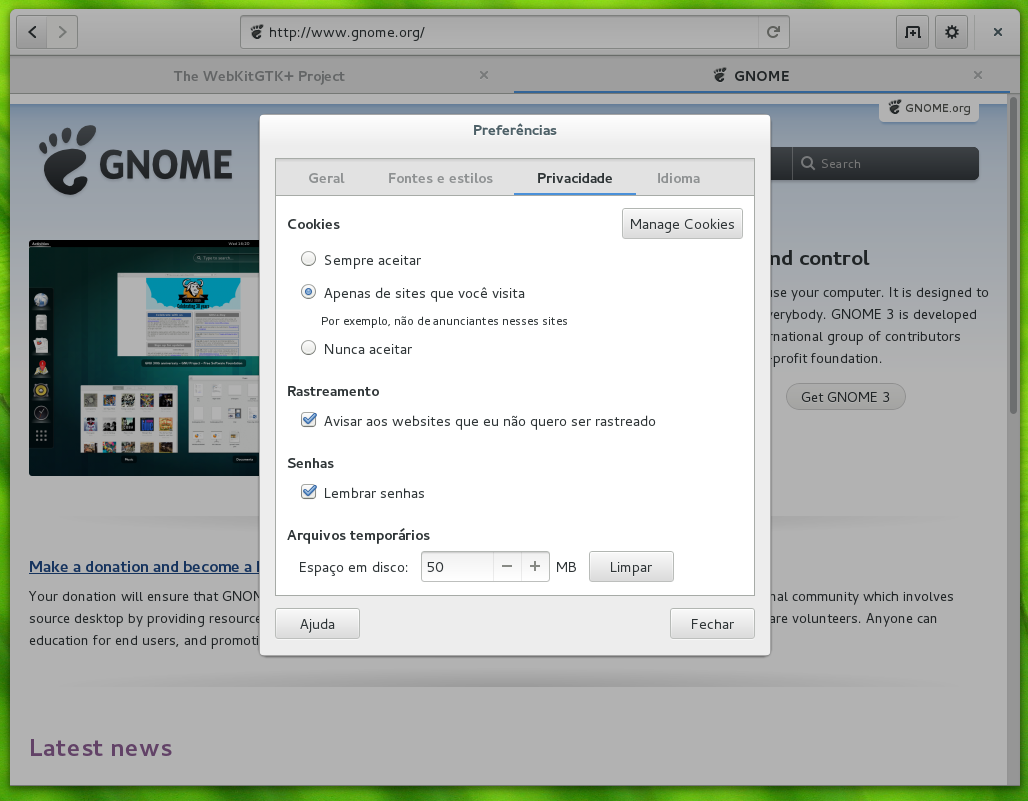
Web with wider tabs and the new prefs dialog

Web with wider tabs and the new prefs dialog

The goals for the hackfest have been ambitious, as usual, but we made good headway on them. Web the browser (AKA Epiphany) has seen a ton of little improvements, with Carlos splitting the shell search provider to a separate binary, which allowed us to remove some hacks from the session management code from the browser. It also makes testing changes to Web more convenient again. Jon McCan has been pounding at Web s UI making it more sleek, with tabs that expand to make better use of available horizontal space in the tab bar, new dialogs for preferences, cookies and password handling. I have made my tiny contribution by making it not keep tabs that were created just for what turned out to be a download around. For this last day of hackfest I plan to also fix an issue with text encoding detection and help track down a hang that happens upon page load.
Martin Robinson and Dan Winship hack

Martin Robinson and Dan Winship hack

Martin Robinson and myself have as usual dived into the more disgusting and wide-reaching maintainership tasks that we have lots of trouble pushing forward on our day-to-day lives. Porting our build system to CMake has been one of these long-term goals, not because we love CMake (we don t) or because we hate autotools (we do), but because it should make people s lives easier when adding new files to the build, and should also make our build less hacky and quicker it is sad to see how slow our build can be when compared to something like Chromium, and we think a big part of the problem lies on how complex and dumb autotools and make can be. We have picked up a few of our old branches, brought them up-to-date and landed, which now lets us build the main WebKit2GTK+ library through cmake in trunk. This is an important first step, but there s plenty to do.
Hackers take advantage of the icecream network for faster builds

Hackers take advantage of the icecream network for faster builds

Under the hood, Dan Winship has been pushing HTTP2 support for libsoup forward, with a dead-tree version of the spec by his side. He is refactoring libsoup internals to accomodate the new code paths. Still on the HTTP front, I have been updating soup s MIME type sniffing support to match the newest living specification, which includes specification for several new types and a new security feature introduced by Internet Explorer and later adopted by other browsers. The huge task of preparing the ground for a one process per tab (or other kinds of process separation, this will still be topic for discussion for a while) has been pushed forward by several hackers, with Carlos Garcia and Andy Wingo leading the charge.
Jon and Guillaume battling code

Jon and Guillaume battling code

Other than that I have been putting in some more work on improving the integration of the new Web Inspector with WebKitGTK+. Carlos has reviewed the patch to allow attaching the inspector to the right side of the window, but we have decided to split it in two, one providing the functionality and one the API that will allow browsers to customize how that is done. There s a lot of work to be done here, I plan to land at least this first patch durign the hackfest. I have also fought one more battle in the never-ending User-Agent sniffing war, in which we cannot win, it looks like.
Hackers chillin' at A Coru a

Hackers chillin at A Coru a

I am very happy to be here for the fifth year in a row, and I hope we will be meeting here for many more years to come! Thanks a lot to Igalia for sponsoring and hosting the hackfest, and to the GNOME foundation for making it possible for me to attend! See you in 2014!

7 December 2013

Dirk Eddelbuettel: R and Big Data at Big Data Summit at UI Research Park

I spent yesterday at the very enjoyable Big Data Summit held at the University of Illinois Research Park at the edge of the University of Illinois at Urbana-Champaign. campus. My (short) presentation was part of a panel session on R and Big Data which Doug Simpson of the UIUC Statistics department had put together very well. We heard from a vendor / technology provider with Christopher Nguyen from Adatao talking about their "Big R", from industry with Andy Stevens talking about a number of some real-life challenges with big data at John Deere, from academia with Jonathon Greenberg talking about R and HPC for geospatial research and I added a few short comments and links about R, HPC and Rcpp. My few slides are now up on my talks / presentations page. Overall, a good day with a number of interesting presentations and of course a number of engaging hallway discussions.

This post by Dirk Eddelbuettel originated on his Thinking inside the box blog. Please report excessive re-aggregation in third-party for-profit settings.

5 December 2013

Daniel Kahn Gillmor: The legal utility of deniability in secure chat

This Monday, I attended a workshop on Multi-party Off the Record Messaging and Deniability hosted by the Calyx Institute. The discussion was a combination of legal and technical people, looking at how the characteristics of this particular technology affect (or do not affect) the law. This is a report-back, since I know other people wanted to attend. I'm not a lawyer, but I develop software to improve communications security, I care about these questions, and I want other people to be aware of the discussion. I hope I did not misrepresent anything below. I'd be happy if anyone wants to offer corrections. BackgroundOff the Record Messaging (OTR) is a way to secure instant messaging (e.g. jabber/XMPP, gChat, AIM). The two most common characteristics people want from a secure instant messaging program are:
Authentication
Each participant should be able to know specifically who the other parties are on the chat.
Confidentiality
The content of the messages should only be intelligible to the parties involved with the chat; it should appear opaque or encrypted to anyone else listening in. Note that confidentiality effectively depends on authentication -- if you don't know who you're talking to, you can't make sensible assertions about confidentiality.
As with many other modern networked encryption schemes, OTR relies on each user maintaining a long-lived "secret key", and publishing a corresponding "public key" for their peers to examine. These keys are critical for providing authentication (and by extension, for confidentiality). But OTR offers several interesting characteristics beyond the common two. Its most commonly cited characteristics are "forward secrecy" and "deniability".
Forward secrecy
Assuming the parties communicating are operating in good faith, forward secrecy offers protection against a special kind of adversary: one who logs the encrypted chat, and subsequently steals either party's long-term secret key. Without forward secrecy, such an adversary would be able to discover the content of the messages, violating the confidentiality characteristic. With forward secrecy, this adversary is be stymied and the messages remain confidential.
Deniability
Deniability only comes into play when one of the parties is no longer operating in good faith (e.g. their computer is compromised, or they are collaborating with an adversary). In this context, if Alice is chatting with Bob, she does not want Bob to be able to cryptographically prove to anyone else that she made any of the specific statements in the conversation. This is the focus of Monday's discussion. To be clear, this kind of deniability means Alice can correctly say "you have no cryptographic proof I said X", but it does not let her assert "here is cryptographic proof that I did not say X" (I can't think of any protocol that offers the latter assertion). The opposite of deniability is a cryptographic proof of origin, which usually runs something like "only someone with access to Alice's secret key could have said X."
The traditional two-party OTR protocol has offered both forward secrecy and deniability for years. But deniability in particular is a challenging characteristic to provide for group chat which is the domain of Multi-Party OTR (mpOTR). You can read some past discussion about the challenges of deniability in mpOTR (and why it's harder when there are more than two people chatting) from the otr-users mailing list. If you're not doing anything wrong... The discussion was well-anchored by a comment from another participant who cheekily asked "If you're not doing anything wrong, why do you need to hide your chat at all, let alone be able to deny it?" The general sense of the room was that we'd all heard this question many times, from many people. There are lots of problems with the ideas behind the question from many perspectives. But just from a legal perspective, there are at least two problems with the way this question is posed: In these situations, people confront real risk from the law. If we care about these people, we need to figure out if we can build systems to help them reduce that legal risk (of course we also need to fix broken laws, and the legal environment in general, but those approaches were out of scope for this discussion). The Legal Utility of Deniability Monday's meeting was called specifically because it wasn't clear how much real-world usefulness there is in the "deniability" characteristic, and whether this feature is worth the development effort and implementation tradeoffs required. In particular, the group was interested in deniability's utility in legal contexts; many (most?) people in the room were lawyers, and it's also not clear that deniability has much utility outside of a formal legal setting. If your adversary isn't constrained by some rule of law, they probably won't care at all whether there is a cryptographic proof or not that you wrote a particular message (In retrospect, one possible exception is exposure in the media, but we did not discuss that scenario). Places of possible usefulness So where might deniability come in handy during civil litigation or a criminal trial? Presumably the circumstance is that a piece of a chat log is offered as incriminating evidence, and the defendant is trying to deny something that they appear to have said in the log. This denial could take place in two rather different contexts: during rules over admissibility of evidence, or (once admitted) in front of a jury. In legal wrangling over admissibility, apparently a lot of horse-trading can go on -- each side concedes some things in exchange for the other side conceding other things. It appears that cryptographic proof of origin (that is, a lack of deniability) on the chat logs themselves might reduce the amount of leverage a defense lawyer can get from conceding or arguing strongly over that piece of evidence. For example, if the chain of custody of a chat transcript is fuzzy (i.e. the transcript could have been mishandled or modified somehow before reaching trial), then a cryptographic proof of origin would make it much harder for the defense to contest the chat transcript on the grounds of tampering. Deniability would give the defense more bargaining power. In arguing about already-admitted evidence before a jury, deniability in this sense seems like a job for expert witnesses, who would need to convince the jury of their interpretation of the data. There was a lot of skepticism in the room over this, both around the possibility of most jurors really understanding what OTR's claim of deniability actually means, and on jurors' ability to distinguish this argument from a bogus argument presented by an opposing expert witness who is willing to lie about the nature of the protocol (or who misunderstands it and passes on their misunderstanding to the jury). The complexity of the tech systems involved in a data-heavy prosecution or civil litigation are themselves opportunities for lawyers to argue (and experts to weigh in) on the general reliability of these systems. Sifting through the quantities of data available and ensuring that the appropriate evidence is actually findable, relevant, and suitably preserved for the jury's inspection is a hard and complicated job, with room for error. OTR's deniability might be one more element in a multi-pronged attack on these data systems. These are the most compelling arguments for the legal utility of deniability that I took away from the discussion. I confess that they don't seem particularly strong to me, though some level of "avoiding a weaker position when horse-trading" resonates with me. What about the arguments against its utility? Limitations The most basic argument against OTR's deniability is that courts don't care about cryptographic proof for digital evidence. People are convicted or lose civil cases based on unsigned electronic communications (e.g. normal e-mail, plain chat logs) all the time. OTR's deniability doesn't provide any legal cover stronger than trying to claim you didn't write a given e-mail that appears to have originated from your account. As someone who understands the forgeability of e-mail, i find this overall situation troubling, but it seems to be where we are. Worse, OTR's deniability doesn't cover whether you had a conversation, just what you said in that conversation. That is, Bob can still cryptographically prove to an adversary (or before a judge or jury) that he had a communication with someone controlling Alice's secret key (which is probably Alice); he just can't prove that Alice herself said any particular part of the conversation he produces. Additionally, there are runtime tradeoffs depending on how the protocol manages to achieve these features. For example, forward secrecy itself requires an additional round trip or two when compared to authenticated, encrypted communications without forward secrecy (a "round trip" is a message from Alice to Bob followed by a message back from Bob to Alice). Getting proper deniability into the mpOTR spec might incur extra latency (imagine having to wait 60 seconds after everyone joins before starting a group chat, or a pause in the chat of 15 seconds when a new member joins) or extra computational power (meaning that they might not work well on slower/older devices) or an order of magnitude more bandwidth (meaning that chat might not work at all on a weak connection). There could also simply be complexity that makes it harder to correctly implement a protocol with deniability than an alternate protocol without deniability. Incorrectly-implemented software can put its users at risk. I don't know enough about the current state of mpOTR to know what the specific tradeoffs are for the deniability feature, but it's clear there will be some. Who decides whether the tradeoffs are worth the feature? Other kinds of deniability Further weakening the case for the legal utility of OTR's deniability, there seem to be other ways to get deniability in a legal context over a chat transcript. There are deniability arguments that can be made from outside the protocol. For example, you can always claim someone else took control of your computer while you were asleep or using the bathroom or eating dinner, or you can claim that your computer had a virus that exported your secret key and it must have been used by someone else. If you're desperate enough to sacrifice your digital identity, you could arrange to have your secret key published, at which point anyone can make signed statements with it. Having forward secrecy makes it possible to expose your secret key without exposing the content of your past communications to any listener who happened to log them. Conclusion My takeaway from the discussion is that the legal utility of OTR's deniability is non-zero, but quite low; and that development energy focused on deniability is probably only justified if there are very few costs associated with it. Several folks pointed out that most communications-security tools are too complicated or inconvenient to use for normal people. If we have limited development energy to spend on securing instant messaging, usability and ubiquity would be a better focus than this form of deniability. Secure chat systems that take too long to make, that are too complex, or that are too cumbersome are not going to be adopted. But this doesn't mean people won't chat at all -- they'll just use cleartext chat, or maybe they'll use supposedly "secure" protocols with even worse properties: for example, without proper end-to-end authentication (permitting spoofing or impersonation by the server operator or potentially by anyone else); with encryption that is reversible by the chatroom operator or flawed enough to be reversed by any listener with a powerful computer; without forward secrecy; or so on. As a demonstration of this, we heard some lawyers in the room admit to using Skype to talk with their clients even though they know it's not a safe communications channel because their clients' adversaries might have access to the skype messaging system itself. My conclusion from the meeting is that there are a few particular situations where deniability could be useful legally, but that overall, it is not where we as a community should be spending our development energy. Perhaps in some future world where all communications are already authenticated, encrypted, and forward-secret by default, we can look into improving our protocols to provide this characteristic, but for now, we really need to work on usability, popularization, and wide deployment. Thanks Many thanks to Nick Merrill for organizing the discussion, to Shayana Kadidal and Stanley Cohen for providing a wealth of legal insight and legal experience, to Tom Ritter for an excellent presentation of the technical details, and to everyone in the group who participated in the interesting and lively discussion. Tags: chat, deniability, otr, security

11 November 2013

Vincent Bernat: Snimpy: SNMP & Python

While quite old fashioned, SNMP is still an ubiquitous protocol supported by most network equipments. It comes handy to expose various metrics, like network interface counters, to be gathered for the purpose of monitoring. It can also be used to retrieve and modify equipments configuration. Variables exposed by SNMP agents (servers) are organized inside a Management Information Base (MIB) which is a hierarchical database1. Each entry is identified by an OID. Querying a specific OID allows a manager (client) to get the value of an associated variable. For example, one common MIB-module is IF-MIB defined in RFC 2863. It contains objects used to manage network interfaces. One of them is ifTable whose rows are representing agent s logical network interfaces. Each row will expose the interface name, characteristics and various associated counters.
ifIndex ifDescr ifPhysAddress ifOperStatus ifOutOctets
1 lo up 545721741
2 eth0 0:18:f3:3:4e:4 up 78875421
3 eth1 0:18:f3:3:4e:5 down 0
ifTable is indexed by its first column ifIndex. If you want to get the operational status of the second interface, you need to query IF-MIB::ifOperStatus.2 which is translated to OID .1.3.6.1.2.1.2.2.1.8.2 using information provided by the MIB definition.

Scripting SNMP An SNMP agent can deliver a lot of interesting information: You can gather those information manually with tools like snmpget and snmpwalk:
$ snmpwalk -v 2c -c public localhost IF-MIB::ifDescr      
IF-MIB::ifDescr.1 = STRING: lo
IF-MIB::ifDescr.2 = STRING: eth0
IF-MIB::ifDescr.3 = STRING: eth1
However, building robust scripts with them is quite challenging. For example, if you wanted to get the descriptions of all active interfaces as well as the total number of octets transmitted, you could do something like that:
#!/bin/sh
set -e
host="$ 1:-localhost "
community="$ 2:-public "
args="-v2c -c $community $host"
for idx in $(snmpwalk -Ov -OQ $args IF-MIB::ifIndex); do
    descr=$(snmpget -Ov -OQ $args IF-MIB::ifDescr.$idx)
    oper=$(snmpget -Ov -OQ $args IF-MIB::ifOperStatus.$idx)
    in=$(snmpget -Ov -OQ $args IF-MIB::ifInOctets.$idx)
    out=$(snmpget -Ov -OQ $args IF-MIB::ifOutOctets.$idx)
    [ x"$descr" != x"lo" ]   continue
    [ x"$oper" = x"up" ]   continue
    echo $descr $in $out
done
Hopefully, SNMP bindings in various languages are pretty common. For example, Net-SNMP ships with a Python binding:
import argparse
import netsnmp
parser = argparse.ArgumentParser()
parser.add_argument("host", default="localhost", nargs="?",
                    help="Agent to retrieve variables from")
parser.add_argument("community", default="public", nargs="?",
                    help="Community to query the agent")
options = parser.parse_args()
args =  
    "Version": 2,
    "DestHost": options.host,
    "Community": options.community
 
for idx in netsnmp.snmpwalk(netsnmp.Varbind("IF-MIB::ifIndex"),
                            **args):
    descr, oper, cin, cout = netsnmp.snmpget(
        netsnmp.Varbind("IF-MIB::ifDescr", idx),
        netsnmp.Varbind("IF-MIB::ifOperStatus", idx),
        netsnmp.Varbind("IF-MIB::ifInOctets", idx),
        netsnmp.Varbind("IF-MIB::ifOutOctets", idx),
        **args)
    assert(descr is not None and
           cin is not None and
           cout is not None) #  
    if descr == "lo":
        continue
    if oper != "1": #  
        continue
    print("     ".format(descr, cin, cout))
This binding is quite primitive and has several drawbacks:
  1. It exports everything as strings. See .
  2. Error handling is just deficient. If you mispell something, like a variable name, you ll get snmp_build: unknown failure on the standard error. No exception. If a variable does not exist, you ll get None instead. See .
This inability to sanely handle failures makes this binding quite dangerous to use in scripts. Imagine making important modifications on the basis of the returned values. If you forget to check against None, your script may cause havoc!

Snimpy Because I didn t find any reliable Python binding for SNMP, I decided to write Snimpy with two goals in mind:
  1. Leverage information contained in MIBs to provide a pythonic interface.
  2. Any error condition should raise an exception.
Here is how the previous script could be written:
#!/usr/bin/env snimpy
import argparse
parser = argparse.ArgumentParser()
parser.add_argument("host", default="localhost", nargs="?",
                    help="Agent to retrieve variables from")
parser.add_argument("community", default="public", nargs="?",
                    help="Community to query the agent")
options = parser.parse_args()
m = M(options.host, options.community, 2)
load("IF-MIB")
for idx in m.ifDescr:
    if m.ifDescr[idx] == "lo":
        continue
    if m.ifOperStatus[idx] != "up":
        continue
    print("     ".format(m.ifDescr[idx],
                            m.ifInOctets[idx],
                            m.ifOutOctets[idx]))
You can also use a list comprehension:
load("IF-MIB")
print("\n".join([ "     ".format(m.ifDescr[idx],
                                    m.ifInOctets[idx],
                                    m.ifOutOctets[idx])
                  for idx in m.ifDescr
                  if m.ifDescr[idx] != "lo"
                  and m.ifOperStatus[idx] == "up" ]))
Here is another simple example to get the routing database from the agent:
load("IP-FORWARD-MIB")
m=M("localhost", "public", 2)
routes = m.ipCidrRouteNextHop
for x in routes:
    net, netmask, tos, src = x
    print(" :>15s / :<15s  via  :<15s  src  :<15s ".format(
        net, netmask, routes[x], src))
IP-FORWARD-MIB::ipCidrRouteNextHop is a more complex table with a compound index. Despite this, querying the table still seems natural. Have a look at Snimpy s documentation for more information. Behind the hood, SNMP requests are handled by PySNMP and MIB parsing is done with libsmi2. Snimpy supports both Python 2, Python 3 and Pypy.

  1. A MIB is defined using a subset of ASN.1 called SMI. However, it is not uncommon to refer to the definition as a MIB too.
  2. Unfortunately, there is currently no robust SMI parser written in pure Python. For example, PySNMP relies on smidump which comes with libsmi. Snimpy uses a custom CFFI wrapper around libsmi.

14 October 2013

Clint Adams: The Windy City is full of meat

As you know, I am not big on reviews, so you should disregard the remainder of this entry. I recently found myself in what is called a theatre complex , watching an adaptation of Moli re's Les Femmes savantes by Freyda Thomas, who is apparently famous for playing Alenis Grem on Deep Space Nine. Called The Learned Ladies, this translation to English manages to approximate some of the rhyme of the original, thereby making it unquestionably better than DS9. Also noteworthy is the all-female cast, cobbled together from two all-female theater groups. Elizabeth Neptune plays Chrysale, occasionally channeling the spirit of Jackie Gleason or bringing adorable ardor to such epic lines as Tea! I won't say anything about her eyes, but I will say something about her slippers. Sara Montgomery, as B lise, is delightfully crazy in her singing, dancing, costume changes, and other antics, which serve to transform this otherwise-completely-serious play into a comedy. I definitely won't say anything about her shoes. Madeleine Maby begins playing Philaminte well before the show starts. Spoiler alert: she sits on the stage, pretending to look through a telescope and make notes from before the house opens until right before the start of the first scene. I still feel exhausted by the thought of having to do that myself. L' pine is portrayed by Alyssa Lott, who also plays three minor roles. Her mastery of physical comedy is not wasted on this production. Marta Kuersten plays Clitandre opposite Sarah Brill's Henriette. While Marta's performance was quite good, she looks much better as a woman. I will not be saying this about everyone. Katie Honaker delivers visceral smarm and sleaze as Trissotin. Even her hairstyle is somehow evocative of contempt. Susan Finch plays Vadius and Le notaire. Susan was definitely most convincing as a man. Despite mutterings to the contrary, some suspension of disbelief was necessary for the other male roles, but not for Vadius, oh no. Finishing out the list we have Janna Emig as Martine, Francesca Day as Armande, and Kathryn Alexander as Ariste, with good performances, particularly in the second half. Even though it didn't have Coppertop from Strangers With Candy and a boy-band song-and-dance cover of To Be with You by Mr. Big, I recommend this play.

Next.

Previous.