Search Results: "will"

2 May 2020

Jonathan Carter: Free Software Activities for 2020-04

Debian project leader This month contained the first week and a half or so of my term as Debian Project Leader. So far my focus has been getting up to speed and keeping the gears turning with day to day DPL tasks. The updates listed here will also be available on the DPL blog, where I aim to make more frequent updates. During May, Debian Brazil will host Debian talks throughout the month which they will stream to their YouTube channel. You can find the schedule in this git repository, most of the talks will be in Portuguese, but on the 4th of May at 21:00 UTC, I ll be covering some Debian project topics for an hour or so and take some questions if there s time left. 2020-04-19: Handover session with Sam, our outgoing DPL. We covered a lot of questions I had and main areas that the DPL works in. Thanks to Sam for having taken the time to do this. 2020-04-21: First day of term! Thank you to everybody who showed support and have offered to help! 2020-04-21: Request feedback from the trademark team on an ongoing trademark dispute. 2020-04-21: Join the GNOME Advisory Board as a representative from Debian. 2020-04-21: Reply on an ongoing community conflict issue. 2020-04-21: Update Debian project summary for SPI annual report. 2020-04-21: Received a great e-mail introduction from Debian France and followed up on that. 2020-04-21: Posted Bits from the new DPL to debian-devel-announce. 2020-04-22: Became Debian s OSI Affilliate representative. 2020-04-22: Reply to a bunch of media inquiries for interviews, will do them later when initial priorities are on track. 2020-04-23: Resign as Debian FTP team trainee and mailing list moderator. In both these areas there are enough people taking care of it and I intend to maximise available time for DPL and technical areas in the project. 2020-04-25: Review outgoing mail for trademark team. 2020-04-25: Answer some questions in preparation for DAM/Front Desk delegation updates. 2020-04-26: Initiated wiki documentation for delegation updates process. 2020-04-27: Update delegation for the Debian Front Desk team. 2020-04-29: Schedule video call with Debian treasurer team. 2020-04-29: OSI affiliate call. Learned about some Open Source projects including OpenDev, OpenSourceMatters, FOSS Responders and Democracy Labs.

Debian Social Work on the Debian Social project is progressing, we plan to start a separate blog syndicated to Planet Debian that contains progress and status updates. I ve been terrible at tracking the work we ve been doing on this, so for now, here are some micro updates:

MiniDebConf Online In the DebConf video team, we ve been wondering whether we have all the tools required to successfully host a DebConf (or even a mini DebConf) entirely online. There s really just one way to know for sure, so we re going to host MiniDebConf Online from 28 May to 31 May. The first two days will be an online MiniDebCamp, where we can try to hold online spints, meetings and general chit-chat. The last two days will be for talks and lightnight talks, with BoFs likely to take place throughout the 4 days (this will probably be decided once we have a content team). Announcements should go out within the next week, in the meantime, save the dates.

Debian package uploads 2020-04-07: Upload package flask-autoindex (0.6.6-1) to Debian unstable. 2020-04-07: Upload package gamemode (1.5.1-1) to Debian unstable. 2020-04-08: Accept MR#2 for live-tasks (add usbutils to live-task-standard). 2020-04-08: Upload package live-tasks (11.0.2) to Debian unstable (Closes: #955526, #944578, #942837, #942834). 2020-04-08: Close live-config bug #655198 (Only affects squeeze which is no longer supported). 2020-04-08: Upload package live-config (11.0.1) to Debian unstable. 2020-04-08: Upload package calamares (3.2.22-1) to Debian unstable. 2020-04-15: Upload package xabacus (8.2.6-1) to Debian unstable. 2020-04-16: Merge MR#1 for gnome-shell-extension-dashtodock (new upstream release). 2020-04-16: Upload package gnome-shell-extension-dashtodock (67+git20200225-1) to Debian unstable. 2020-04-16: Merge MR#1 for gnome-shell-extension-hard-disk-led (fix some lintian issues). 2020-04-16: Merge MR#1 for gnome-shell-extension-system-monitor (fix some lintian issues). 2020-04-17: Upload package calamares (3.2.23-1) to Debian unstable. 2020-04-17: Upload package catimg (2.6.0-1) to Debian unstable (Closes: #956150). 2020-04-17: Upload package fabulous (0.3.0+dfsg1-7) to Debian unstable (Closes: #952242). 2020-04-17: Upload package gnome-shell-extension-system-monitor (38+git20200414-32cc79e-1) to Debian unstable (Closes: #956656, #956171). 2020-04-17: Upload package gnome-shell-extension-arc-menu (45-1) to Debian unstable (Closes: #956168). 2020-04-18: Upload package toot (0.26.0-1) to Debian unstable. 2020-04-23: Update packaging for gnome-shell-extension-tilix-shortcut, upstream section needs some additional work before release is possible. 2020-04-23: Upload package xabacus (8.2.7-1) to Debian unstable. 2020-04-27: Upload package gnome-shell-extension-dash-to-panel (37-1) to Debian unstable (Closes: #956162, #954978). 2020-04-27: Upload package gnome-shell-extension-dash-to-panel (37-2) to Debian unstable. 2020-04-27: Upload package gnome-shell-extension-dashtodock (68-1) to Debian unstable. 2020-04-30: Merge MR#8 for gamemode (add symbol files) (Closes: #952425). 2020-04-30: Merge MR#9 for gamemode (reduce number of -dev packages generated). 2020-04-30: Merge MR#10 for gamemode (deal better with upgrades on a buggy version). 2020-04-30: Manually merge changes from MR#11 for gamemode (packaging fixes). 2020-04-30: Upload package gamemode (1.5.1-2) to Debian unstable.

Sylvain Beucler: Debian LTS and ELTS - April 2020

Debian LTS Logo Here is my transparent report for my work on the Debian Long Term Support (LTS) and Debian Extended Long Term Support (ELTS), which extend the security support for past Debian releases, as a paid contributor. In April, the monthly sponsored hours were split evenly among contributors depending on their max availability - I was assigned 28.75h for LTS (out of 30 max; all done) and 7.75h for ELTS (out of 20 max; I did 2.75). Escalation procedures were (internally) documented with a focus on discussing issues with team coordinator(s) first. Debian LTS had its first team meeting through IRC and lots of workflow question were discussed. This should help discuss questions that are a bit hard to bring up, and ensure everybody participates. There were lots of topics and it was a bit rushed, but this is something we want to repeat monthly now, possibly with audio/video in a couple months. Remarks from last month's report were discussed, strengthening the Front-Desk role. 10% of the global funding is now reserved for infrastructure work. What kind of work, and who (LTS or external) will do the work, will be discussed further. A fellow DD suggested (in a private conversation) that LTS may be taking time from the Debian Security team, due to additional commits to review. Conversely, this is another opportunity to mention all the global, non-LTS-specific work that LTS provides, which I usually highlight in my reports, and maybe I should be even more ;) ELTS - Wheezy LTS - Jessie Documentation/Scripts

1 May 2020

Utkarsh Gupta: FOSS Activites in April 2020

Here s my (seventh) monthly update about the activities I ve done in the F/L/OSS world.

Debian
It s been 14 months since I ve started contributing to Debian. And 4 months since I ve been a Debian Developer. And in this beautiful time, I had this opprotunity to do and learn lots of new and interesting things. And most importantly, meet and interact with lots of lovely people!
Debian is $home.

Uploads:

Other $things:
  • Attended Ruby team meeting. Logs here.
  • Attended Perl team LHF. Report here.
  • Sponsored a lot of uploads for William Desportes and Adam Cecile.
  • Mentoring for newcomers.
  • FTP Trainee reviewing.
  • Moderation of -project mailing list.
  • Applied for DUCI project for Google Summer of Code 2020.

Ruby2.7 Migration:
Ruby2.7 was recently released on 25th December, 2019. Santa s gift. Believe it or not. We, the Debian Ruby team, have been trying hard to make it migrate to testing. And it finally happened. The default version in testing is ruby2.7. Here s the news! \o/
Here s what I worked on this month for this transition.

Upstream: Opened several issues and proposed patches (in the form of PRs):
  • Issue #35 against encryptor for Ruby2.7 test failures.
  • Issue #28 against image_science for removing relative paths.
  • Issue #106 against ffi-yajl for Ruby2.7 test failures.
  • PR #5 against aggregate for simply using require.
  • PR #6 against aggregate for modernizing CI and adding Ruby 2.5 and 2.7 support.
  • Issue #13 against espeak-ruby for Ruby2.7 test failures.
  • Issue #4 against tty-which for test failures in general.
  • Issue #11 against packable for Ruby2.7 test failures. PR #12 has been proposed.
  • Issue #10 against growl for test failures and proposed an initial patch.

Downstream: I fixed and uploaded the following packages in Debian:

Debian LTS
Debian Long Term Support (LTS) is a project to extend the lifetime of all Debian stable releases to (at least) 5 years. Debian LTS is not handled by the Debian security team, but by a separate group of volunteers and companies interested in making it a success.
This was my seventh month as a Debian LTS paid contributor. I was assigned 24.00 hours and worked on the following things:

CVE Fixes and Announcements:

Other LTS Work:

Other(s)
Sometimes it gets hard to categorize work/things into a particular category.
That s why I am writing all of those things inside this category.
This includes two sub-categories and they are as follows.

Personal: This month I could get the following things done:
  • Most importantly, I finally migrated to a new website. Huge UI imporvement! \o/
    From Jekyll to Hugo, it was not easy. But it was worth it! Many thanks to Luiz for writing hugo-coder, Clement, and Samyak!
    If you find any flaws, issues and pull requests are welcomed at utkarsh2102/utkarsh2102.com
  • Wrote battery-alert, a mini-project of my own to show battery alerts at <10% and >90%.
    Written in shell, it brings me all the satisfaction as it has saved my life on many occasions.
    And guess what? It has more users than just myself!
    Reviews and patches are welcomed \o/
  • Mentored in HackOn Hackathon. Thanks to Manvi for reaching out!
    It was fun to see people developing some really nice projects.
  • Thanks to Ray and John, I became a GitLab Hero!
    (I am yet to figure out my role and responibility though)
  • Atteneded Intro Sec Con and had the most fun!
    Heard Ian s keynote and attended other talks and learned how to use WireShark!

Open Source: Again, this contains all the things that I couldn t categorize earlier.
Opened several issues and pull requests:
  • Issue #297 against hugo-coder, asking to enable RSS feed for blogs.
  • PR #316 for hugo-coder for fixing the above issue myself.
  • Issue #173 against arbre for requesting a release.
  • Issue #104 against combustion, asking to relax dependency on rubocop. Fixed in this commit.
  • Issue #16 against ffi-compiler for requesting to fix homepage and license.
  • Issue #57 against gographviz for requesting a release.
  • Issue #14 against crb-blast, suggesting compatability with bio 2.0.x.
  • Issue #58 against uniform_notifier for asking to drop the use of ruby-growl.
  • PR #2072 for polybar, adding installation instructions on Debian systems.

Until next time.
:wq for today.

30 April 2020

Chris Lamb: Free software activities in April 2020

Here is my monthly update covering what I have been doing in the free software world during April 2020 (previous month's report). Looking it over prior to publishing, I am surprised how much I got done this month I felt that I was not only failing to do all the extra things I had planned, but I was doing far less than normal. But let us go easy on ourselves; nobody is nailing this. In addition, I did more hacking on the Lintian static analysis tool for Debian packages:
Reproducible builds One of the original promises of open source software is that distributed peer review and transparency of process results in enhanced end-user security. However, whilst anyone may inspect the source code of free and open source software for malicious flaws, almost all software today is distributed as pre-compiled binaries. This allows nefarious third-parties to compromise systems by injecting malicious code into ostensibly secure software during the various compilation and distribution processes. The motivation behind the Reproducible Builds effort is to ensure no flaws have been introduced during this compilation process by promising identical results are always generated from a given source, thus allowing multiple third-parties to come to a consensus on whether a build was compromised. The initiative is proud to be a member project of the Software Freedom Conservancy, a not-for-profit 501(c)(3) charity focused on ethical technology and user freedom. Conservancy acts as a corporate umbrella allowing projects to operate as non-profit initiatives without managing their own corporate structure. If you like the work of the Conservancy or the Reproducible Builds project, please consider becoming an official supporter. Elsewhere in our tooling, I made the following changes to diffoscope, our in-depth and content-aware diff utility that can locate and diagnose reproducibility issues, including preparing and uploading versions 139, 140, 141 and 142 to Debian: Lastly, I made a large number of changes to our website and documentation in the following categories:
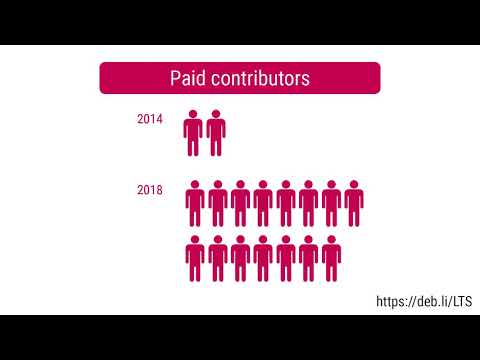
Debian LTS This month I have contributed 18 hours to Debian Long Term Support (LTS) and 7 hours on its sister Extended LTS project. You can find out more about the project via the following video:
Debian I only filed three bugs in April, including one against snapshot.debian.org to report that a Content-Type HTTP header is missing when downloading .deb files (#956471) and to report build failures in the macs & ruby-enumerable-statistics packages:

29 April 2020

Ian Jackson: subdirmk 1.0 - ergonomic preprocessing assistant for non-recursive make

I have made the 1.0 release of subdirmk. subdirmk is a tool to help with writing build systems in make, without use of recursive make. Why Peter Miller's 1997 essay Recursive Make Considered Harmful persuasively argues that it is better to arrange to have a single make invocation with the project's complete dependency tree, rather than the conventional $(MAKE) -C subdirectory approach. This has become much more relevant with modern projects which tend to be large and have deep directory trees. Invoking make separately for each of these subdirectories can be very slow. Nowadays everyone needs to run a parallel build, but with the recursive make approach great discipline is needed to avoid introducing races which cause the build to sometimes fail. There are various new systems which aim to replace make. My general impression of these is that they mostly threw away the good parts of make (often, they discard the flexibility, and the use of the shell command as the basic unit of execution, making them hard to extend), or make other unfortunate assumptions. And there are a lot of programming-language-specific systems - a very unsatisfactory development. Having said all that, I admit I haven't properly evaluated every make competitor. Other reasons for staying with make including that it is widely available, relatively widely understood, and has a model relatively free of high-level abstract concepts. (I like my languages with high-level concepts, but not my build systems.) But, with make, I found that actually writing a project's build system in non-recursive make was not very ergonomic. So with some help and prompting from Mark Wooding, I have made a tool to help. What subdirmk is a makefile preprocessor and aggregator, typically run from autoconf. subdirmk provides convenience syntaxes for references to per-directory variables and pathnames. It also helps by providing a little syntactic sugar for GNU make's macro facilities, which are awkward to use in raw make. subdirmk's features are triggered by the sigil &. The syntax is carefully designed to avoid getting in the way of makefile programming (and programming of shell commands in make rules). subdirmk is fully documented in the README. There is a demo in the example directory (which also serves as part of the test suite). What's new The version number. I have not felt the need to make any changes since releasing 0.4 in mid-February. The last non-docs change was a (backwards-compatible) extension, in late January, to pass through unaltered GNU make's new grouped multiple targets syntax. Advantages and disadvantages of subdirmk Compared to recursive make, subdirmk is easier and simpler, although you do have to decorate a lot of your variables and filenames with & to indicate that they are directory-local. It is much easier to avoid writing parallel make bugs. You naturally get properly working per-subdirectory targets. subdirmk-based nonrecursive make is much, much faster than recursive make. Compared to many other recent build system tools, subdirmk retains all the flexibility and extensibility of make, and operates at a fairly low level of abstraction. subdirmk-based makefiles can easily invoke other build systems. make knows it's not the only thing in the universe. You can adopt subdirmk incrementally or partially, gradually bringing your recursive submakefiles into the unified build. The build system code in subdirmk's Dir.sd.mk files will be readily navigable by most readers; much will be familiar. Because subdirmk is a small collection of (fairly simple) scripting and makefile code, there is no need to build it; you can simply ship it with your project using git-subtree. For an autoconf-based project, there need be no change to how your users and downstreams invoke your build. On the other hand the price you (continue to) pay is make's punctation soup, which subdirmk adds a new sigil to. subdirmk-based makefiles are terse and help you use make's facilities to abstract away repetition, but that can make them dense. The new & sigil will faze some readers. Currently, the provided mechanism for incorporating subdirmk into your project assumes you are using autoconf but not automake. It would be possible to use subdirmk with autoconf-less projects, or with automake-based ones, but I haven't done the glue work to make that easy. subdirmk does require GNU make and it assumes you have perl installed. But GNU make is very portable, and perl is very widely available. (The perl used is very conservative.) The make competitors are, themselves, even less standard build tools. I don't think a build-dependency on GNU make, or perl, is a significant barrier nowadays, for most projects. Note about comment moderation I have deliberately been vague about other build systems and avoided specific criticisms or references. I don't want the comments to become a build system advocacy debate. Comments may be screened and moderated accordingly. Pointers to other obscure build system tools are very welcome. If you want to write a survey of build tools, or a critique of subdirmk, please do so on your own blog; I would be happy to consider linking to it.

comment count unavailable comments

Craig Small: Sending data in a signal

The well-known kill system call has been around for decades and is used to send a signal to another process. The most common use is to terminate or kill another process by sending the KILL or TERM signal but it can be used for a form of IPC, usually around giving the other process a kick to do something. One thing that isn t as well known is besides sending a signal to a process, you can send some data to it. This can either be an integer or a pointer and uses similar semantics to the known kill and signal handler. I came across this when there was a merge request for procps. The main changes are using sigqueue instead of kill in the sender and using a signal action not a signal handler in the receiver. To illustrate this feature, I have a small set of programs called sender and receiver that will pass an integer between them. The Sender The sender program is extremely simple, use a random(ish) from time masked to two bytes, put it in the required union and send the lot to sendqueue.
# include <signal.h>
# include <stdlib.h>
# include <stdio.h>
# include <time.h>
int main(int argc, char **argv)
 
    union sigval sigval;
    pid_t pid;
    if (argc < 2   (pid = atoi(argv[1])) < 0)
	return EXIT_FAILURE;
    sigval.sival_int = time(NULL) &amp; 0xff;
    printf("sender: sending %d to PID %d\n",
        sigval.sival_int, pid);
    sigqueue(pid, SIGUSR1, sigval);
    return EXIT_SUCCESS;
 
The key lines are 13 and 16 where the random (ish) integer is stored in the sigval union and then sent to the other process with the sigqueue. The receiver The receiver just sets up the signal handler, sends its PID (so I know what to tell the sender) and sits in a sleeping loop.
# include <stdio.h>
# include <stdlib.h>
# include <sys/types.h>
# include <unistd.h>
# include <signal.h>
void signal_handler(int signum, siginfo_t *siginfo, void *ucontext)
 
    if (signum != SIGUSR1) return;
    if (siginfo->si_code != SI_QUEUE) return;
    printf("receiver: Got value %d\n",
	    siginfo->si_int);
 
int main(int argc, char **argv)
 
    pid_t pid = getpid();
    struct sigaction signal_action;
    printf("receiver: PID is %d\n", pid);
    signal_action.sa_sigaction = signal_handler;
    sigemptyset (&amp;signal_action.sa_mask);
    signal_action.sa_flags = SA_SIGINFO;
    sigaction(SIGUSR1, &amp;signal_action, NULL);
    while(1) sleep(100);
    return EXIT_SUCCESS;
 
Lines 16-26 setup the signal handler. The main difference here is SA_SIGINFO used for the signal flags and sigaction references a sa_sigaction function rather than sa_handler. We need to use a different function because the sigaction only is passed the signal number but we need more information, including the integer that the sender process stored in sigval. Lines 7-14 are the signal handler function itself. It first checks that the receiver process got the correct signal (SIGUSR1 in this case) and that we got this signal from sigqueue because the type is SI_QUEUE. Checking the type of signal is important because different signals give you different data. For example, if you signalled this process with kill then si_int is undefined. The result As a proof of concept, the results are not terribly exciting. We see the sender say what it will be sending and the receiver saying it got it. It was useful to get some results, especially when things went wrong.
$ ./receiver &amp;
[1] 370216
receiver: PID is 370216
$ ./sender 370216
sender: sending 133 to (gdPID 370216
receiver: Got value 133
Gotchas While testing the two process there was two gotchas I encountered. GDB and the siginfo structure The sigaction manual page shows a simple siginfo_t structure, however when looking at what is passed to the signal handler, it s much more complicated.
(gdb) p *siginfo
$2 =  si_signo = 10, si_errno = 0, si_code = -1, __pad0 = 0, _sifields =  _pad =  371539, 1000, 11, 32766, 0 <repeats 24 times> , _kill =  si_pid = 371539, si_uid = 1000 , _timer =  si_tid = 371539, 
      si_overrun = 1000, si_sigval =  sival_int = 11, sival_ptr = 0x7ffe0000000b , _rt =  si_pid = 371539, si_uid = 1000, si_sigval =  sival_int = 11, sival_ptr = 0x7ffe0000000b , _sigchld =  
      si_pid = 371539, si_uid = 1000, si_status = 11, si_utime = 0, si_stime = 0 , _sigfault =  si_addr = 0x3e80005ab53, si_addr_lsb = 11, _bounds =  _addr_bnd =  _lower = 0x0, _upper = 0x0 , _pkey = 0 , 
    _sigpoll =  si_band = 4294967667539, si_fd = 11 , _sigsys =  _call_addr = 0x3e80005ab53, _syscall = 11, _arch = 32766 
(gdb) p siginfo->_sifields._rt.si_sigval.sival_int
$3 = 11
So the integer is stored in a union in a structure in a structure. Much harder to find than just simply sival_int. The pointer is just a pointer So perhaps sending an integer is not enough. The sigval is a union with an integer and a pointer. Could a string be sent instead? I changed line 13 of the sender so it used a string instead of an integer.
    sigval.sival_ptr = "Hello, World!"
The receiver needed a minor adjustment to print out the string. I tried this and the receiver segmentation faulted. What was going on? The issue is the set of system calls does a simple passing of the values. So if the sender sends a pointer to a string located at 0x1234567 then the receiver will have a pointer to the same location. When the receiver tries to dereference the sival_ptr, it is pointing to memory that is not owned by it but by another process (the sender) so it segmentation faults. The solution would be to use shared memory between the processes. The signal queue would then use the pointer to the shared memory and, in theory, all would be well.

28 April 2020

Steve Kemp: I'm a contractor, available for work

For the foreseeable future I'm working for myself, as a contractor, here in sunny Helsinki, Finland. My existing contract only requires me to work 1.5-2.0 days a week, meaning my week looks something like this: It does mean that I'm available for work Wednesday-Friday though, in the event I can find projects to work upon, or companies who would be willing to accept my invoices. I think of myself as a sysadmin, but I know all about pipelines, automation, system administration, and coding in C, C++, Perl, Ruby, Golang, Lua, etc. On the off-chance anybody reading this has a need for small projects, services, daemons, or APIs to be implemented then don't hesitate to get in touch. I did manage to fill a few days over the past few weeks completing an online course from Helsinki Open University, Devops with Docker, it is possible I'll find some more courses to complete in the future. (There is an upcoming course Devops with Kubernetes which I'll definitely complete.)

Antoine Beaupr : Drowned my camera: dealing with liquid spills in electronics

Folks who acutely dig into this website might know that I have been taking more pictures recently, as I got a new camera since January 2018: a beautiful Fujifilm X-T2 that I really like. Recently, I went out on a photo shoot in the rain. It was intermittent, light rain when I left so I figured the "weather proofing" (dpreview.com calls this "environmentally sealed") would keep the camera secure. After an hour of walking outside, however, rain intensified and I was just quickly becoming more and more soaked. Still trusting the camera would function, I carried on. But after about 90 minutes of dutiful work, the camera just turned off and wouldn't power back on. It had drowned. I couldn't believe it; "but this is supposed to be waterproof! This can't be happening!", I thought. I tried swapping out the battery for a fresh one, which was probably a bad idea (even if I was smart enough to do this under cover): still no luck, yet I could still not believe it was dead, so I figured I would look at it later when I was home. I still eventually removed the battery after a while, remembering that it mattered. Turns out the camera was really dead. Even at home, it wouldn't power up, even with fresh batteries. After closer inspection, the camera was as soaked as I was...
Two Sandisk memory cards with water droplets on them ...even the SD cards were wet!
I was filled with despair! My precious camera! I had been waiting for litterally decades to find the right digital camera that was as close to the good old film cameras I was used to. I was even working on black and white "film" to get back to basics, which turned into a project to witness the impact of the coronavirus on city life! All that was lost, or at least stopped: amazingly, the SD cards were just absolutely fine and survived the flooding without problem.
A one-way sign broken, fallen on the side in a gray cityscape The last photo my camera took before it died
A good photographer friend told me that this was actually fairly common: "if you shoot outside, get used to this, it will happen". So I tried "the rice trick": plunge your camera in a pile of rice and let it rest there for a long time. It didn't work so well: I didn't have a big enough container to hold the camera and the rice. I was also worried about rice particles inserting themselves into the camera holes, as I had opened all the ports to let it dry. I could also not keep myself from inserting a battery and trying it out again: amazingly, it powered up, only once, and died again. After shopping in desperation for dessicators (who would have thought you should keep those little bags from the stuff you order online!), I ended up buying silica gel dehumidifier from Lee Valley (13$, the small one!) which comes in a neat little metal box. But that never arrived in time so I had to find another solution. My partner threw the idea out in jest, but the actual solution worked, and it was surprisingly simple!
My camera and lens drying in a food dehydrator, at 30 C with 22 hours left Tada! Turns out you can dehydrate hardware too!
We have a food dehydrator at home (a Sedna Express if you really want to know) since we do a lot of backpacking and canot-camping, but I never thought I would put electronics in there. Turns out a food dehydrator is perfect: it has a per degree temperature control that can go very low and a timer. I set it to 30 C for 24 hours. (I originally set it to 40 C but it smelled like plastic after a while so my partner turned it off thinking it was melting the camera.) And now the camera is back! I was so happy! There is probably some permanent damage to the delicate circuitry in the camera. And I will probably not go back out in heavy rain again with the camera, or at least not without a rainjacket (35$USD at B&H) on the camera. And I am now in a position to tell other people what to do if they suffer the same fate...

Tips for dealing with electronic liquid damage So, lessons learned...
  1. when you have a liquid spill over your electronics: IMMEDIATELY REMOVE ALL ELECTRIC POWER, including the battery! (this is another reason why all batteries should be removable)
  2. if the spill is "sticky" (e.g. coffee, beer, maple syrup, etc) or "salty", do try to wash it with water, yet without flooding it any further (delicate balance, I know) some devices are especially well adapted to this: I have washed a keyboard with a shower head and drowned the thing completely, it worked fine after drying.
  3. do NOT power it back on until you are certain the equipment is dry
  4. let the electronics device dry for 24 to 48 hours with all ports open in a humidity-absorbing environment: a bag of rice works, but a food dehydrator is best. make sure the rice doesn't get stuck inside the machine: use a small mesh bag if necessary
  5. once you are confident the device has dried, fiddle with the controls and see if water comes out: it might not have dried because it was stuck inside a button or dial. if dry, try powering it back on and watch the symptoms. if it's still weird, try drying it for another day.
  6. if you get tired of waiting and the machine doesn't come back up, you will have to send it to the repair shop or open it up yourself to see if there is soldering damage you can fix.
I hope it might help careless people who dropped their coffee or ran out in the rain, believing the hype of waterproof cameras. Amateur tip: waterproof cameras are not waterproof...

Dirk Eddelbuettel: RcppArmadillo 0.9.870.2.0

armadillo image Armadillo is a powerful and expressive C++ template library for linear algebra aiming towards a good balance between speed and ease of use with a syntax deliberately close to a Matlab. RcppArmadillo integrates this library with the R environment and language and is widely used by (currently) 705 other packages on CRAN. A new upstream release 9.870.2 of Armadillo was released a few days ago. We had tested two release candidates, and this caught one bug. The release was held up at CRAN for a few days as one package had an overly sensitive test depending on random input data; eventually we all convinced ourselves that there was no (Rcpp)Armadillo issue here. So morale: friends don t let friends have tests depend on random behavior. Changes in the new release are noted below.

Changes in RcppArmadillo version 0.9.870.2.0 (2020-04-24)
  • Upgraded to Armadillo release 9.870.2 (Roasted Mocha Retox)
    • faster handling of matrix multiplication expressions by diagvec() and diagmat()
    • added trimatu_ind() and trimatl_ind()
    • more consistent detection of sparse vector expressions

Courtesy of CRANberries, there is a diffstat report relative to previous release. More detailed information is on the RcppArmadillo page. Questions, comments etc should go to the rcpp-devel mailing list off the R-Forge page. If you like this or other open-source work I do, you can now sponsor me at GitHub. For the first year, GitHub will match your contributions.

This post by Dirk Eddelbuettel originated on his Thinking inside the box blog. Please report excessive re-aggregation in third-party for-profit settings.

27 April 2020

Norbert Preining: KDE Apps 20.04 (and Plasma) for Debian

A few days ago KDE Apps 20.04 were released, and I am happy that thanks to the openSUSE Build Service (and a lot of scripting and some hand-work), packages for Debian Unstable and Testing are available in by repositories!
The previous location (debian-plasma at OBS) should be replaced by the following entries in /etc/apt/sources.list.d/obs-npreining-kde.list: For Unstable:

deb https://download.opensuse.org/repositories/home:/npreining:/debian-kde:/other-deps/Debian_Unstable/ ./
deb https://download.opensuse.org/repositories/home:/npreining:/debian-kde:/frameworks/Debian_Unstable/ ./
deb https://download.opensuse.org/repositories/home:/npreining:/debian-kde:/plasma/Debian_Unstable/ ./
deb https://download.opensuse.org/repositories/home:/npreining:/debian-kde:/apps/Debian_Unstable/ ./
deb https://download.opensuse.org/repositories/home:/npreining:/debian-kde:/other/Debian_Unstable/ ./
For Testing:
deb https://download.opensuse.org/repositories/home:/npreining:/debian-kde:/other-deps/Debian_Testing/ ./
deb https://download.opensuse.org/repositories/home:/npreining:/debian-kde:/frameworks/Debian_Testing/ ./
deb https://download.opensuse.org/repositories/home:/npreining:/debian-kde:/plasma/Debian_Testing/ ./
deb https://download.opensuse.org/repositories/home:/npreining:/debian-kde:/apps/Debian_Testing/ ./
deb https://download.opensuse.org/repositories/home:/npreining:/debian-kde:/other/Debian_Testing/ ./
The different repositories provide different package groups: To make these repositories work out of the box, you need to import my OBS gpg key: obs-npreining.asc, best to download it and put the file into /etc/apt/trusted.gpg.d/obs-npreining.asc. I don t provide an apt-gettable source archive anymore, in particular since one of the Debian KDE maintainers has rejected my help and told me Go away . So it seems that this convenience is not appreciated, and necessary. The source packages are available from the OBS web sites of the respective repositories. Well, if they are not doing the work, I cannot more than offer my help. Thanks Debian! Currently there are two packages missing: kio-extras and kdeconnect, both of which need new (hitherto unavailable) packages which I will hopefully package in the next days. Two other, juk and okular, are already at version 20.04 in Debian and co-installable. Enjoy!

Dirk Eddelbuettel: #26: Upgrading to R 4.0.0

Welcome to the 26th post in the rationally regularized R revelations series, or R4 for short. R 4.0.0 was released two days ago, and a casual glance at some social media conversations appears to suggest quite some confusion, almost certainly some misunderstandings, and possibly also a fair amount of fear, uncertainty, and doubt about the process. So I thought I could show how I upgrade my own main workstation, live and in colour without a safety net. (Almost: I did upgrade my laptop yesterday which went swimmingly, if more slowly.) So here is a fresh video about upgrading to R 4.0.0, with some support slides as usual:

The slides used in the video are at this link. A few quick follow-ups to the live nature of this. The pbdZMQ package did in fact install smoothly once the (Ubuntu) -dev packages for Zero MQ were (re-)installed; then IRkernel also followed. BioConductor completed once I realized that GOSemSim needed the annotation package GO.db to be updated, that allowed MNF to install. So the only bug, really, was the circular depdency between pkgload and testthat. Overall, not bad at all for a quick afternoon session! And as mentioned, if you are interested and have questions concerning use of R on a .deb based system like Debain or Ubuntu (or Mint or ), the r-sig-debian list is a very good and friendly place to ask them. If you like this or other open-source work I do, you can now sponsor me at GitHub. For the first year, GitHub will match your contributions.

This post by Dirk Eddelbuettel originated on his Thinking inside the box blog. Please report excessive re-aggregation in third-party for-profit settings.

26 April 2020

Russ Allbery: Review: The Last Goodbye

Review: The Last Goodbye, by Matt Potter
Publisher: Silvertail
Copyright: 2014-2016
Printing: 2016
ISBN: 1-909269-42-5
Format: Kindle
Pages: 308
In the contested space between the interested amateur and the trained expert lies the enthusiast. A topic has, for often inexplicable reasons, caught fire in their thoughts and become a mild obsession. They may not have formal training or systematic conceptual grounding beneath their interest, but they partly make up for that lack with sustained fascination. They research widely and obscurely about their particular focus, develop novel theories, see distinctions and classifications that few others would bother to investigate, and present their discoveries to anyone who will stand still long enough. And occasionally, when that interest happens to coincide with writing skill, they produce some surprisingly excellent essays or books. Matt Potter's enthusiasm is resignation letters.
Every damaging resignation letter, every cornered truth attack, every out-of-control speech by a former friend, is more than just an inconvenience, to be countered with positive spin and internal memos: it's an open challenge to the official version of the story, the perfectly controlled brand. They are breaks in an otherwise perfectly planned, smoothly executed narrative of the powerful. Holes in the program code. A rare, irresistible chance to hack into history's shiny, unstoppable operation.
The Last Goodbye: A History of the World in Resignation Letters is not, in truth, a history of the world. It is, first and foremost, a taxonomy, because there are types of resignation letters. The opening chapter, the truth bomb, is the type that one would expect upon discovering that someone wrote a book on the topic (that wasn't advice on how to write a good one). But there are other types, less heavy on the fireworks but just as fascinating. The unquotable expert construction. The knife in the back. The incoherent scream of rage. But also the surprisingly gentle and graceful conclusion.
It is the question that the letters themselves try in vain to answer, over and over again even as they explain, analyse, protest and bear witness to a million other details. The question is: Why? All the forces in the universe stack up against unburdening ourselves in a resignation letter. Professionally, it can be suicide. In practical terms, it is often self-defeating. Self-help books coach against unleashing its force; colleagues and confidantes urge caution, self-restraint. And yet we do it, and damn the consequences. We have no choice but to speak in sorrow, love, grief, cold anger, thirst for revenge, wounded pride, the pain of injustice, loyalty, pangs of regret, throes of vengeful madness, deluded righteousness, panic, black distress, isolation, ecstasies of martyrdom, and a million other shades of human extremity we need to say our piece even as we leave the stage.
The risk of the enthusiast's book is that the lack of structural grounding can leave the conclusions unsupported. A fair critique of this book is that it contains a lot of amateur sociology. Potter has a journalist's eye for motive and narrative, but some of his conclusions may not be warranted. But he compensates for the lack of rigor with, well, enthusiasm. Potter is fascinated by resignation letters and the insight they offer, and that fascination is irresistibly contagious. It's probably obvious that the chapters on truth bombs, fuck yous, and knives in the back have visceral appeal. The resignation letter as a force of truth-telling, as the revenge of a disregarded peon, as a crack in the alliance between the powerful that may let some truth shine through, is what got me to buy this book. And Potter doesn't disappoint; he quotes from both famous and nearly unknown examples, dissects the writing and the intent, and gives us a ringside seat to a few effective acts of revenge. That's not the best part of this book, though. The chapter that I will remember the longest is Potter's dissection of the constructed resignation letter. The carefully drafted public relations statement, the bland formality, the attempt to make a news story disappear. The conversation-ender. It's a truism that any area of human endeavor involves more expertise than those who have only observed it from the outside will realize, but I had never thought to apply that principle to the ghost-written resignation letter. The careful non-apology, the declaration that one has "become a distraction," the tell-tale phrasing of "spending more time with my family" is offensive in its bland dishonesty. But Potter shows that the blandness is expertly constructed to destroy quotability. Those statements are nearly impossible to remember or report on because they have been built that way: nouns carefully separated from verbs, all force dissipated by circuities and modifiers, and subtle grammatical errors introduced to discourage written news from including direct quotes. Potter's journalism background shines here because he can describe the effect on news reporting. He walks the reader through the construction to reveal that the writing is not incompetent but instead is skillfully bad in a way that causes one's attention to skitter off of it. The letter vanishes into its own vagueness. The goal is to smother the story in such mediocrity that it becomes forgettable. And it works. I've written several resignation letters of my own. Somewhat unusually, I've even sent several of them, although (as Potter says is typical) fewer than I've written. I've even written (and sent) the sort of resignation letter that every career advisor will say to never send. Potter's discussion of the motives and thought process behind those letters rang true for me. It's a raw and very human moment, one is never in as much control of it as one wishes, the cracks and emotions break through in the writing, and often those letters are trying to do far too many things at the same time. But it's also a moment in which one can say something important and have others listen, which can be weirdly challenging to do in the normal course of a job. Potter ends this book beautifully by looking at resignation letters that break or transcend the mold of most of the others he's examined: letters where the author seems to have found some peace and internal understanding and expresses that simply and straightforwardly. I found this surprisingly touching after the emotional roller-coaster of the rest of the book, and a lovely note on which to end. This is a great book. Potter has a good eye for language and the emotion encoded in it, a bracing preference for the common worker or employee over the manager or politician, and the skill to produce some memorable turns of phrase. Most importantly, he has the enthusiast's love of the topic. Even if you don't care about resignation letters going in, it will be hard to avoid some fascination with them by the end of this book. Recommended. This book was originally published as F*ck You and Goodbye in the UK. Rating: 8 out of 10

25 April 2020

Reinhard Tartler: Building Packages with Buildah in Debian

1 Building Debian Packages with buildah
Building packages in Debian seems to be a solved problem. But is it? At the bottom, installing the dpkg-dev package provides all the basic tools needed. Assuming that you already succeeded with creating the necessary packaging metadata (i.e., debian/changelog, debian/control, debian/copyright, etc., and there are great helper tools for this such ash dh-make, dh-make-golang, etc.,) it should be as simple as invoking the dpkg-buildpackage tool. So what's the big deal here?

The issue is that dpkg-buildpackage expects to be called with an appropriately setup build context, that is, it needs to be called in an environment that satisfies all build dependencies on the system. Let's say you are building a package for Debian unstable on your Debian stable system (this is the common scenario for the official Debian build machines), you would need your build to link against libraries in unstable, not stable. So how to tell the package build process where to find its dependencies?

The answer (in Debian and many other Linux distributions) is you do not at all. This is actually a somewhat surprising answer for software developers without a Linux distribution development background1. Instead, chroots "simulate" an environment that has all dependencies that we want to build against at the system locations, that is. /usr/lib, etc.

Chroots are basically full system installations in a subdirectory that includes system and application libraries. In order to use them, a package build needs to use the chroot(2) system call, which is a privileged operation. Also creating these system installations is a somewhat finicky process. In Debian, we have tools that make this process easier, the most popular ones are probably pbuilder(1)2 and sbuild(1)3. Still, they are somewhat clumsy to use, add significant levels of abstraction in the sense that they do quite a bit of magic behind the scenes to work hide the fact that privileged operations (need root to run chroot(2), etc.) are required. They are also somewhat brittle, for instance, if a build process is aborted (SIGKILL, or system crash), you may end up with temporary directories and files under userids other than your own that again may require root-privileges to cleanup.

What if there was an easy way to do all of the above without any process running as root? Enter rootless buildah.

Modern Linux container technologies allow unprivileged users to "untie" a process from the system (cf. the unshare(2) system call). This means that a regular user may run a process (and its child processes) in an "environment" where system calls behave differently and provide a configurable amount of isolation levels. This article demonstrates a novel build tool buildah, which is:
  • easy to setup build environment from the command line
  • secure, as no process needs to run as root
  • simple in architecture, requires no running daemon like for example docker
  • convenient to use: you can debug your debian/rules interactively
Architecturally, buildah is written in golang and compiled as a (mostly) statically linked executable. It builds on top a number of libraries written in golang, including github.com/containers/storage and github.com/containers/image. The overlay functionality is provided by the fuse-overlayfs(1) utility.

1.1 Preparation:
The Kernel in Debian bullseye (and in buster, and recent Ubuntu kernels to the best of my knowledge) do support usernamespaces, but leave them disabled by default. Here is how to enable them:
echo kernel.unprivileged_userns_clone = 1   sudo tee -a /etc/sysctl.d/containers.conf
systemctl -p /etc/sysctl.d/containers.conf
I have to admit that I'm not entirely sure why the Debian kernels don't enable usernamespaces by default. I've found a reference on stackexchange4 that claims this disables some "hardening" features in the Debian kernel. I also understand this step is not necessary if you chose to compile and run a vanilla upstream kernel. I'd appreciate a better reference and am happy to update this text.
$ c=$(buildah from docker.io/debian:sid)
Getting image source signatures
Copying blob 2bbc6b8c460d done
Copying config 9b90abe801 done
Writing manifest to image destination
Storing signatures
This command downloads the image from docker.io and stores it locally in your home directory. Let's install essential utilities for building Debian packages:
1: buildah run $c apt-get update -qq
2: buildah run $c apt-get install dpkg-dev -y
3: buildah config --workingdir /src $c
4: buildah commit $c dpkg-dev
The command on line 1 and 2 execute the installation of compilers and dpkg development tools such as dpkg-buildpackage, etc. The buildah config command in line 4 arranges that whenever you start a shell in the container, the current working directory in the container is in /src. Don't worry about this location not existing yet, we will make sources from your host system available there. The last command creates an OCI image with the name dpkg-dev. BTW, the name you use for the image in the commit command can be used in podman (but not the "containers"). See 5 and 6 for a comparison between podman and buildah.
buildah images -a
This output might look like this:
  REPOSITORY                 TAG      IMAGE          ID   CREATED   SIZE             
localhost/dpkg-dev latest b85c34f95d3e 16 seconds ago 406 MB
docker.io/library/debian sid 9b90abe801db 11 hours ago 124 MB

1.2 Running a package build
Now we have a working container with the reference in the variable $c. To use it conveniently with source packages that I have stored in /srv/scratch/packages/containers, let's introduce a shell alias r like this:
alias r='buildah run --tty -v /srv/scratch/packages/containers:/src $c '
This allows you to easily execute commands in that container:
r pwd
r bash
The last command will give you an interactive shell that we'll be using for building packages!
siretart@x1:~/scratch/packages/containers/libpod$ r bash

root@x1:/src# cd golang-github-openshift-imagebuilder

root@x1:/src/golang-github-openshift-imagebuilder# dpkg-checkbuilddeps
dpkg-checkbuilddeps: error: Unmet build dependencies: debhelper (>= 11) dh-golang golang-any golang-github-containers-storage-dev (>= 1.11) golang-github-docker-docker-dev (>= 18.09.3+dfsg1) golang-github-fsouza-go-dockerclient-dev golang-glog-dev

root@x1:/src/golang-github-openshift-imagebuilder# apt-get build-dep -y .
Note, using directory '.' to get the build dependencies
Reading package lists... Done
Building dependency tree
Reading state information... Done
The following NEW packages will be installed:
[...]

root@x1:/src/golang-github-openshift-imagebuilder# dpkg-checkbuilddeps

root@x1:/src/golang-github-openshift-imagebuilder#
Now we have a environment that has all build-dependencies available and we are ready to build the package:
root@x1:/src/golang-github-openshift-imagebuilder# dpkg-buildpackage -us -uc -b
Assuming the package builds, the package build results are placed in /src inside the container, and are visible at ~/scratch/packages/containers on the host. There you can inspect, extract or even install them. The latter part allows you to interactively rebuild packages against updated dependencies, without the need of setting up an apt archive or similar.

2 Availability
The buildah(1) tool is available in debian/bullseye since 2019-12-17. Since is a golang binary, it only links dynamically against system libraries such as libselinux and libseccomp, which are all available in buster-backports. I'd expect buildah to just work on a debian/buster system as well provided you install those system libraries and possibly the backported Linux kernel.

Keeping the package at the latest upstream version is challenging because of its fast development pace that picks up new dependencies on golang libraries and new versions of existing libraries with every new upstream release. In general, this requires updating several source packages, and in many cases also uploading new source packages to the Debian archive that need to be processed by the Debian ftp-masters.

As an exercise, I suggest to install the buildah package from bullseye, 'git clone' the packaging repository from https://salsa.debian.org/go-team/packages/golang-github-containers-buildah and build the latest version yourself. Note, I would expect the above to even work on a Fedora laptop.

The Debian packages have not swept into the Ubuntu distributions yet, but I expect them to be included in the Ubuntu 20.10 release. In the mean time, ubuntu users can install the package that are provided by the upstream maintainers in the "Project Atomic" PPA at https://launchpad.net/~projectatomic/+archive/ubuntu/ppa

3 Related Tools
The buildah tool is accompanied with two "sister" tools:

The Skopeo package provides tooling to work with remote images registries. This allows you download, upload images to remote registries, convert container images between different formats. It has been available in Debian since 2020-04-20.

The podman tool is a 'docker' replacement. It provides a command-line interface that mimics the original docker command to an extend that a user familiar with docker might want to place this in their ~/.bashrc file:
alias docker='podman'
Unfortunately, at the time of writing podman is still being processed by the ftp-masters since 01-03-2020. At this point, I recommend building the package from our salsa repository at https://salsa.debian.org/debian/libpod

4 Conclusion
Building packages in the right build context is a fairly technical issue for which many tools have been written for. They come with different trade-off when it comes to usability. Containers promise a secure alternative to the tried and proven chroot-based approaches, and the buildah makes using this technology very easy to use.

I'd love to get into a conversation with you on how these tools work for you, and would like to encourage participation and assistance with keeping the complicated software stack up-to-date in Debian (and by extension, in derived distribution such as Ubuntu, etc.).

Footnotes:
1
At my day-job, we build millions of lines of C++ code on Solaris10 and AIX6, where concepts such as "chroots" are restricted to the super user 'root' and is therefore not available to developers, not even through wrappers. Instead, libraries and headers are installed into "refroots", that is, subdirectories that mimic the structure of the "sysroot" directories that are used in the embedded Linux community for cross-compiling packages, and we use Makefiles that set include flags (-I rules and -L flags) to tell the compiler and linker where to look.

24 April 2020

Norbert Preining: (Working) Unison Sync between for Debian/Buster and Sid

Since many years I am a big big fan of Unison. It is a two-way synchronization tool, meaning that changes on both sides are carried over as long as there is no conflict. Unison is the bread and butter for keeping my computers (main desktop, laptop, server) in sync. There is only one problem with Unison it is extremely picky about with what kind of Unison on the other side it speaks: Even the very same version, compiled with a slightly different OCaml compiler version, already produces incompatibilities. And with me having to sync between Debian/Buster (my server) and Debian/sid (my other machines), this always ended in tears. But heyhoh! the pain is over! My solution up to now was to keep a Unison binary from Buster on my Sid system, and used that binary when syncing to Buster server, but the normal Unison binary when syncing between two sid computers. This created lots of pain, because, when using a incompatible Unison binary, already a simple connect without a sync trial messed up the state files and required a complete resync. And so it happened often that I used the wrong binary, and had to resync a few gigabyte, what a pain. The Debian maintainer is working with upstream to improve this rather unfortunate situation, so maybe this will change in the future, but I need a solution now. BTW, thanks a lot to the excellent work of the current maintainers, setting up the new package was a blaze and only needed a bit of adjustments for the changed layout of recent sources. Big kudos to the maintainers of unison!!! So I have ventured out to create my own Unison package for Debian. And what I mean for Debian/Buster and Debian/sid, so that they are compatible, by using the very same compiler and the very same source and the very same dependencies to build the binaries. Fortunately, the lessons learned from my KDE/Plasma updates for Debian helped, and with a bit of magic and the nice service from the openSUSE build service, I now have packages for Unison ready for Debian/Buster and Debian/sid that are compatible, and in addition also the latest version, not the 5 year old package that is currently Debian. So here it is, the Debian Unison repository, binaries of (currently) Unison 2.51.2 are available for both i386 and amd64: For Debian/Buster

deb http://download.opensuse.org/repositories/home:/npreining:/debian-unison/Debian_10  ./
For Debian/sid:
deb http://download.opensuse.org/repositories/home:/npreining:/debian-unison/Debian_Unstable  ./
To use this repository, you need to import my OBS key obs-npreining.asc, best put it as is into /etc/apt/trusted.gpg.d/obs-npreining.asc. The sources are available at the OBS project debian-unison. For those interested, I had to backport a few package to Buster to ensure that the builds agree: debhelper (because dh_dwz is buggy in Buster), dh-ocaml, findlib, lablgl, lablgtk2, labltk, and ocaml. These packages are available in the OBS debian-ocaml-backports repository, and are also apt accessible if necessary. I guess you can conjure up the correct line ;-). That s it. I can now forget about all the differences between versions and happily sync between Buster and sid. Enjoy.

23 April 2020

Evgeni Golov: Controlling roller shutters using a Shelly 2.5, ESPHome and Home Assistant

Our house has roller shutters on all windows and most of them have an electric motor to open and close them. The motors are Schellenberg shaft motors (not sure this is the right English term), that you can configure end positions for and then by applying current to the right pair of pins they move the shutters up and down until the current is removed or one of the endstops is reached. As the motors were installed over a long period of time, the attached control units varied in functionality: different ways to program open/close times, with and without battery for the clock/settings etc, but they all had something in common: no central management and pretty ugly. We decided to replace those control units with regular 2 gang light switches that match the other switches in the house. And as we didn't want to lose the automatic open/close timer, we had to add some smarts to it. Shelly 2.5 and ESPHome Say hello to Shelly 2.5! The Shelly 2.5 is an ESP8266 with two relays attached to it in a super tiny package you can hide in the wall behind a regular switch. Pretty nifty. It originally comes with a Mongoose OS based firmware and an own app, but ain't nobody needs that, especially nobody who wants to implement some crude logic. That said, the original firmware isn't bad. It has a no-cloud mode, a REST API and does support MQTT for integration into Home Assistant and others. My ESP firmware of choice is ESPHome, which you can flash easily onto a Shelly (no matter 1, 2 or 2.5) using a USB TTL adapter that provides 3.3V. Home Assistant has native ESPHome support with auto-discovery, which is much nicer than manually attaching things to MQTT topics. To get ESPHome compiled for the Shelly 2.5, we'll need a basic configuration like this:
esphome:
  name: shelly25
  platform: ESP8266
  board: modwifi
  arduino_version: 2.4.2
We're using board: modwifi as the Shelly 2.5 (and all other Shellys) has 2MB flash and the usually recommended esp01_1m would only use 1MB of that - otherwise the configurations are identical (see the PlatformIO entries for modwifi and esp01_1m). And arduino_version: 2.4.2 is what the Internet suggests is the most stable SDK version, and who will argue with the Internet?! Now an ESP8266 without network connection is boring, so we add a WiFi configuration:
wifi:
  ssid: !secret wifi_ssid
  password: !secret wifi_password
  power_save_mode: none
The !secret commands load the named variables from secrets.yaml. While testing, I found the network connection of the Shelly very unreliable, especially when placed inside the wall and thus having rather bad bad reception (-75dBm according to ESPHome). However, setting power_save_mode: none explicitly seems to have fixed this, even if NONE is supposed to be the default on ESP8266. At this point the Shelly has a working firmware and WiFi, but does not expose any of its features: no switches, no relays, no power meters. To fix that we first need to find out the GPIO pins all these are connected to. Thankfully we can basically copy paste the definition from the Tasmota (another open-source firmware for ESPs) template:
pin_led1: GPIO0
pin_button1: GPIO2
pin_relay1: GPIO4
pin_switch2n: GPIO5
pin_sda: GPIO12
pin_switch1n: GPIO13
pin_scl: GPIO14
pin_relay2: GPIO15
pin_ade7953: GPIO16
pin_temp: A0
If we place that into the substitutions section of the ESPHome config, we can use the names everywhere and don't have to remember the pin numbers. The configuration for the ADE7953 power sensor and the NTC temperature sensor are taken verbatim from the ESPHome documentation, so there is no need to repeat them here. The configuration for the switches and relays are also rather straight forward:
binary_sensor:
  - platform: gpio
    pin: $ pin_switch1n 
    name: "Switch #1"
    internal: true
    id: switch1
  - platform: gpio
    pin: $ pin_switch2n 
    name: "Switch #2"
    internal: true
    id: switch2
switch:
  - platform: gpio
    pin: $ pin_relay1 
    name: "Relay #1"
    internal: true
    id: relay1
    interlock: &interlock_group [relay1, relay2]
  - platform: gpio
    pin: $ pin_relay2 
    name: "Relay #2"
    internal: true
    id: relay2
    interlock: *interlock_group
All marked as internal: true, as we don't need them visible in Home Assistant. ESPHome and Schellenberg roller shutters Now that we have a working Shelly 2.5 with ESPHome, how do we control Schellenberg (and other) roller shutters with it? Well, first of all we need to connect the Up and Down wires of the shutter motor to the two relays of the Shelly. And if they would not be marked as internal: true, they would show up in Home Assistant and we would be able to flip them on and off, moving the shutters. But this would also mean that we need to flip them off each time after use, as while the motor knows when to stop and will do so, applying current to both wires at the same time produces rather interesting results. So instead of fiddling around with the relays directly, we define a time-based cover in our configuration:
cover:
  - platform: time_based
    name: "$ location  Rolladen"
    id: rolladen
    open_action:
      - switch.turn_on: relay2
    open_duration: $ open_duration 
    close_action:
      - switch.turn_on: relay1
    close_duration: $ close_duration 
    stop_action:
      - switch.turn_off: relay1
      - switch.turn_off: relay2
We use a time-based cover because that's the easiest thing that will also turn the relays off for us after the shutters have been opened/closed, as the motor does not "report" any state back. We could use the integrated power meter of the Shelly to turn off when the load falls under a threshold, but I was too lazy and this works just fine as it is. Next, let's add the physical switches to it. We could just add on_press automations to the binary GPIO sensors we configured for the two switch inputs the Shelly has. But if you have kids at home, you'll know that they like to press ALL THE THINGS and what could be better than a small kill-switch against small fingers?
switch:
  [ previous definitions go here ]
  - platform: template
    id: block_control
    name: "$ location  Block Control"
    optimistic: true
  - platform: template
    name: "Move UP"
    internal: true
    lambda:  -
      if (id(switch1).state && !id(block_control).state)  
        return true;
        else  
        return false;
       
    on_turn_on:
      then:
        cover.open: rolladen
    on_turn_off:
      then:
        cover.stop: rolladen
  - platform: template
    name: "Move DOWN"
    internal: true
    lambda:  -
      if (id(switch2).state && !id(block_control).state)  
        return true;
        else  
        return false;
       
    on_turn_on:
      then:
        cover.close: rolladen
    on_turn_off:
      then:
        cover.stop: rolladen
This adds three more template switches. The first one, "Block Control", is exposed to Home Assistant, has no lambda definition and is set to optimistic: true, which makes is basically a dumb switch that can be flipped at will and the only thing it does is storing the binary on/off state. The two others are almost identical. The name differs, obviously, and so does the on_turn_on automation (one triggers the cover to open, the other to close). And the really interesting part is the lambda that monitors one of the physical switches and if that is turned on, plus "Block Control" is off, reports the switch as turned on, thus triggering the automation. With this we can now block the physical switches via Home Assistant, while still being able to control the shutters via the same. All this (and a bit more) can be found in my esphome-configs repository on GitHub, enjoy!

21 April 2020

Debian Project Leader: Bits from the new DPL

My fellow Debianites, It's been one month, one week and one day since I decided to run for this DPL term. The Debian community has been through a variety of interesting times during the last decade, and instead of focusing on grand, sweeping changes for Debian, core to my DPL campaign was to establish a sense of normality and stability so that we can work on community building, continue to focus on technical excellence and serve our users the best we can. Thing don't always work out as we plan, and for many of us, Debian recently had to take a back seat to personal priorities. Back when I posted my intention to run, there were 125 260 confirmed cases of COVID-19 globally. Today, that number is 20 times higher, with the actual infected number likely to be significantly higher. A large number of us are under lock-down, where we not only fear the disease and its effect on local hospitals and how it will affect our loved ones, but also our very livelihoods and the future of our local businesses and industry. I don't mean to be gloomy with the statement above, I am after all, an optimist - but unfortunately it does get even worse. Governments and corporations around the world have started to take advantage of COVID-19 in negative ways and are making large sweeping changes that undermine the privacy and rights of individuals everywhere. For many reasons, including those above, I believe that the Debian project is more important and relevant now than it's ever been before. The world needs a free, general purpose operating system, unburdened by the needs of profit, which puts the needs of its users first, providing a safe and secure platform for the computing needs of the masses. While we can't control or fix all the problems in the world, we can control our response to it, and be part of the solutions that bring the change we want to see. During my term as DPL, I will be available to help with problems in our community to the maximum extent that my time permits. If we help ourselves, we will be in a better position to help others. If you (or your team) get stuck and are in need of help, then please do not hessitate to e-mail me. A few thank-yous As incoming DPL, I'd like to thank Sam Hartman on behalf of the project for the work that he's done over the last year as DPL. It's a tremendous time commitment that requires constant attention to detail. On Sunday, Sam and I had a handover meeting where we discussed various DPL responsibilities including finances, delegations (including specifics of some delegations), legal matters, outreach and other questions I had. I'd also like to thank Sam for taking the time to do this. Thank you to Sruthi Chadran and Brian Gupta who took the time to also run for DPL this year. Both candidates brought important issues to the forefront and I hope to work with both of them on those in the near future. DPL Blog Today, I've started a new blog for the Debian Project Leader to help facilitate more frequent communication, and to reach a wider audience via Planet Debian. This will contain supplemental information to what I send to the debian-devel-announce mailing list. Want to help? In my platform, I listed some key areas that I'd like to work on. My work won't be limited to those, but it should give you some idea of the type of DPL that I'll be. If you'd like to get involved, feel free to join the #debian-dpl channel on the oftc IRC network, and please introduce yourself along with any areas of interest that you'd like to contribute to.

Debian Project Leader: Bits from the new DPL

My fellow Debianites, It's been one month, one week and one day since I decided to run for this DPL term. The Debian community has been through a variety of interesting times during the last decade, and instead of focusing on grand, sweeping changes for Debian, core to my DPL campaign was to establish a sense of normality and stability so that we can work on community building, continue to focus on technical excellence and serve our users the best we can. Thing don't always work out as we plan, and for many of us, Debian recently had to take a back seat to personal priorities. Back when I posted my intention to run, there were 125 260 confirmed cases of COVID-19 globally. Today, that number is 20 times higher, with the actual infected number likely to be significantly higher. A large number of us are under lock-down, where we not only fear the disease and its effect on local hospitals and how it will affect our loved ones, but also our very livelihoods and the future of our local businesses and industry. I don't mean to be gloomy with the statement above, I am after all, an optimist - but unfortunately it does get even worse. Governments and corporations around the world have started to take advantage of COVID-19 in negative ways and are making large sweeping changes that undermine the privacy and rights of individuals everywhere. For many reasons, including those above, I believe that the Debian project is more important and relevant now than it's ever been before. The world needs a free, general purpose operating system, unburdened by the needs of profit, which puts the needs of its users first, providing a safe and secure platform for the computing needs of the masses. While we can't control or fix all the problems in the world, we can control our response to it, and be part of the solutions that bring the change we want to see. During my term as DPL, I will be available to help with problems in our community to the maximum extent that my time permits. If we help ourselves, we will be in a better position to help others. If you (or your team) get stuck and are in need of help, then please do not hessitate to e-mail me. A few thank-yous As incoming DPL, I'd like to thank Sam Hartman on behalf of the project for the work that he's done over the last year as DPL. It's a tremendous time commitment that requires constant attention to detail. On Sunday, Sam and I had a handover meeting where we discussed various DPL responsibilities including finances, delegations (including specifics of some delegations), legal matters, outreach and other questions I had. I'd also like to thank Sam for taking the time to do this. Thank you to Sruthi Chadran and Brian Gupta who took the time to also run for DPL this year. Both candidates brought important issues to the forefront and I hope to work with both of them on those in the near future. DPL Blog Today, I've started a new blog for the Debian Project Leader to help facilitate more frequent communication, and to reach a wider audience via Planet Debian. This will contain supplemental information to what I send to the debian-devel-announce mailing list. Want to help? In my platform, I listed some key areas that I'd like to work on. My work won't be limited to those, but it should give you some idea of the type of DPL that I'll be. If you'd like to get involved, feel free to join the #debian-dpl channel on the oftc IRC network, and please introduce yourself along with any areas of interest that you'd like to contribute to.

Wouter Verhelst: Extrepo GitLab update

Earlier this month, GitLab B.V.'s package signing key expired, requiring them to rotate their key. This means that anyone who uses one of their packages needs to jump through a number of manual hoops to update their apt key configuration, which is an annoying manual process that also requires people to download random files from the Internet -- something extrepo was written to prevent. At least they're served over https, but still. I didn't notice until today, but I just updated the extrepo metadata to carry the new key. That means that if you enable one of the GitLab repositories through extrepo enable, you will get the new key rather than the old one. On top of that, if you had already enabled the repository through extrepo, all that is needed for you right now to pull in the new key is to run extrepo update. While I do apologise for the late update, hopefully this should make some people's lives a bit easier. And if GitLab B.V. reads this: please send me a MR to the repository next time, so that we can make process be done in time ;-)

Gunnar Wolf: Fresh, daily built Debian images for your Raspberries (finally!)

So, after I took over or at least, said to take over maintainership of the Raspberry Pi build images originally produced by Michael Stapelberg in mid-2018, I pushed very few updates. Yes, there was some good and visible work, migrated the image-spec repository from GitHub to Salsa, ironed out several outstanding issues, and most important for me managed to get an image built and running for all Raspberry models below the Raspberry Pi 4 Today, I am happy to announce a very good step in the right direction, so I am now

Announcing raspi.debian.net! I have registered and set up an (unofficial!) site, raspi.debian.net, that should serve as a go-grab-it destination for regularly autobuilt images for the Raspberry Pi family. Of course, today you will get an early view of the site. I plan to fix the lack of https due to a mistake on my part WRT the processes at my hosting provider, do some testing in the hardware I have handy (and bless + gpg-sign some images as tested), migrate and update the information in the Debian Wiki, etc. Oh! And I hope to get good news on the Raspberry 4 front, as I know work is actively underway to achieve it.

19 April 2020

Enrico Zini: Little wonders

Gibbsdavidl/CatterPlots
devel
Did you ever wish you could make scatter plots with cat shaped points? Now you can! - Gibbsdavidl/CatterPlots
What is the best tool to use for drawing vector pictures? For me and probably for many others, the answer is pretty obvious: Illustrator, or, maybe, Inkscape.
A coloring book to help folks understand how SELinux works. - mairin/selinux-coloring-book
The EURion constellation (also known as Omron rings[1] or doughnuts[2]) is a pattern of symbols incorporated into a number of banknote designs worldwide since about 1996. It is added to help imaging software detect the presence of a banknote in a digital image. Such software can then block the user from reproducing banknotes to prevent counterfeiting using colour photocopiers. According to research from 2004, the EURion constellation is used for colour photocopiers but probably not used in computer software.[3] It has been reported that Adobe Photoshop will not allow editing of an image of a banknote, but in some versions this is believed to be due to a different, unknown digital watermark rather than the EURion constellation.[4][3]
This huge collection of non-scary optical illusions and fascinating visual phenomena emphasizes interactive exploration, beauty, and scientific explanation.
Generated photos are created from scratch by AI systems. All images can be used for any purpose without worrying about copyrights, distribution rights, infringement claims, or royalties.
Dokumentarfilm ber die Rangierer im Bahnhof Dresden-Friedrichstadt in der DDR aus dem Jahr 1984.
Il termine sardo femina accabadora, femina agabbad ra o, pi comunemente, agabbadora o accabadora (s'agabbad ra, lett. "colei che finisce", deriva dal sardo s'acabbu, "la fine" o dallo spagnolo acabar, "terminare") denota la figura storicamente incerta di una donna che si incaricava di portare la morte a persone di qualunque et , nel caso in cui queste fossero in condizioni di malattia tali da portare i familiari o la stessa vittima a richiederla. In realt non ci sono prove di tale pratica, che avrebbe riguardato alcune regioni sarde come Marghine, Planargia e Gallura[1]. La pratica non doveva essere retribuita dai parenti del malato poich il pagare per dare la morte era contrario ai dettami religiosi e della superstizione.
Alright the people have spoken and they want more cat genetics. So, I present to you all "Cat Coat Genetics 101: A Tweetorial", feat. pics of many real life cats (for science, of course...this baby is Caterpillar).

Next.

Previous.