Search Results: "tb"

22 August 2012

Gunnar Wolf: An industry commits suicide and blames us

[ once again, I am translating somebody else's material In this case, my good Costa Rican friend Carolina Flores. Please excuse my stylistic mistakes My English is far from native as you well know. But this material is worth sharing, and worth investing some tens of minutes doing a quick translation. If you can read Spanish, go read Caro's original entry ] Have you been to a music record store lately? I did so last Saturday, as a mere excercise. I was not planning on buying anything but I wanted to monitor things and confirm my suspicions. What was I suspicious of? First, that I would only find old records. And so it was: The only recent record I found was ...little broken hearts by Norah Jones. the second, that I would only find music for over 50 year old people. so it was: Were I there to look for a present for my father, I would have walked out with 10 good records. Third, that in the store nothing worth commenting would happen. About that last point, I should point out it was around 10 AM and the store had just opened its doors. Lets concede the benefit of doubt. I don't think many of you will remember, but in Barrio La California (where there is now a beauty parlour, almost in front of AM.PM) there was Auco Disco. In Auco Disco there was a guy specialized in rock (Mauricio Alice) and another one specialized in jazz (I don't remember his name). In that record you could always find rare records, but if they were not there, at least you were sure to find somebody to say: "No, we don't have that, but that's an excellent record, it's the best that [insert group here] have ever recorded because just afterwards they switched their guitar player, they had gone a bit south but with that record they are flying. But no, we don't have it; I can recommend you this record by [insert another group] because it has a guitar solo in track six that is amazing". It would happen more or less like that, which means, one would arrive to Auco Disco at 10 AM and leave around 5 PM with three new records, after having listened to a spectacular music selection. What happened to those stores? Were they killed by The Pirate Bay? That's the simplistic answer from the recording industry! The answer is that those stores never got anything from the industry but an invoice. The industry specially in prescindible markets such as ours was limited to hiring artists, taking care of them recording a sellable product, producing the object called record, and that's it. The more commercial radio stations were paid to program those songs as it cannot be casual that "Mosa, mosa" is the summer hit in all of Latin America, can it? but, record stores? Nothing. Lets carry on with that idea: Radio stations are paid to program said music. This idea should not lead us to believe that recording companies are to blame for bad taste. I won't reveal my sources, but I know the success of the "Locura autom tica" song by La Secta was a real example. Nobody paid for it. That song got to the number one because of its own merits(?) (you don't know the effort it took to find that thing, I cannot recommend it to you). Same thing happens with other stations that don't program reggaet n, that try to save the species, and where they play what we do like. But the thing is, everything we like is not available in any record store in this country. Then, even if we wanted to buy a record or give it as a gift to somebody, it is plain impossible. And don't tell me it's the same to present as a gift a link or a CD full of downloaded MP3 as it is to give a record with cover and booklet, wrapped in gift paper. I might be old-school, but the fetish object record still exists, not only because of its cover, but because of its sound. A 3MB MP3 is akin to drinking coffee dripping from a bag that has been used eight times with the same coffee beans. That format is the worst that has ever happened to music, and if we had any bit dignity we would never purchase digital files in Amazon or iTunes safe for MP3 with an acceptable compression level. That, if we could buy them, because not only that is allowed to us. As the musical industry has no interest in resolving ITS problem (that is not our problem, it is those companies') it has not even been resolved how to charge for a MP3 download that includes import fees (well, if downloading from here a MP3 from a USA-based file server can be considered importing goods into Costa Rica!!!) so we don't have to get dizzy entering into the nineties to Titi Online to discover there is nothing by Muse, Andrew Bird, The Killers, Death Cab for Cutie, Paramore, Bj rk... (believe me, I looked them all up, even Norah jones and La Secta. They also were not there). This all leads me to the question, which I present with all due respect (NOT): What the fuck do they expect us to do??? It is outrageous; above all because in the best case they will sell us a watery coffee download that won't allow us to get all the details a vinyl or less compression would give us. In the worst case, post-MP3 groups will end up recording music with no harmonics or hidden sounds, because, what for? Nobody will hear it. They even admit it: "Some musicians and audio engineers say the MP3 format is changing the way studios mix their recordings. They say the MP3 format "flattens" dynamics differences in tone and volume in a song. As a result, a great deal of new music sounds very much alike, and there is nothing as focusing to create a dynamic listening experience. Why working so hard in creating complex sound if nobody can detect it?" (Rolling Stone, The Death of High fidelity, December 26 2007, taken from here). That's why I am not surprised by Adri n's post regarding the sales of old records. The price has nothing to do with it. The causes are related to the fetish object record and what it means or does not mean for people that have never purchased one. Adri n also asks if somebody here keeps buying records. I answered that I would if the stores sold anything I like. I do it even after the nausea I feel while reading "This phonogram is an intellectual work protected in favor of its producer COPYING IT IN WHOLE OR PARTIALLY IS FORBIDDEN " (like that, uppercased, yelling to whoever is only guilty of having bought a record and defending the producer, not the artist). But I am sure that almost nobody buys records because doing so is no longer a gratifying experience; because if buying a record is clicking to wait 15 days for it to reach the mailbox, we prefer clicking on the download link. But there is another reason for people not to buy records anymore. In one of my talks regarding the dictatorship of the all rights reserved, I asked the 30 twenty-something-year-old students if any of them had ever bought a record. One answered he had, because he is an author and performer (cantautor in Spanish) and understands the effort that producing a record entails. The rest of them had never done so. Is it possible that said young people have never listened to real music? Is it possible that, were it not for concerts, what they consider music is a set of washed-out MP3 that are about to fill up 1TB of their computer? Does people no longer buy records because they cannot differentiate one sound from the other? It is not very clear for me where do I want to get to. The recording industry is despicable. An industry that instead of innovating sets its energy on suing adolescents for downloading songs, trying to pass laws restricting our freedoms in Internet, putting up DRMs making us hostages to our devices* and forcing us to listen just the aroma of music, deserves my whole contempt. If we add ot this that said industry won't allow us to legally download their breadcrumbs because it has not understood that Internet does not need a van crossing borders, besides my contempt they deserve my pity and my heartfelt condolence. But the condolence is also for music, real music, that which is not compressed under the shoe using a terrible format. It is also for independent musicians that have not realized that begging for a bit of space to that industry they just add to themselves the "despicable" tag, given they deserve the fruits of their work to enter their bank account. However, there are good things that have come out of this absurdity. Be it for those that have joined projects such as Aut mata (even if it is in MP3) and for dreams come true such as Musopen (that have achieved that the music that's in theory Public Domain becomes so in practice as well). Good for the Electronic Frontier Foundation and the list of lawyers willing to defend people accused of ilegally downloading music in the USA. Good for the Creative Commons licenses that allow free sharing. All those are growing solutions, although none of them allows me to buy the Panamanian Carlos M ndez's record. Thankfully, a friend of mine who knows I will never give a dime to Apple, bought the files for me in iTunes. I thank him deeply, although I would have prefered to go to Auco Disco and have Mauricio tell me that the 2007 EP I have from Carlos is better than the record he did on 2009. * My devices don't have DRM because I use free software. I also use the ogg file format. Image by verbeeldingskr8

Thomas Goirand: MiniUPnP now fully in Debian

IT S FINALLY IN! With this last upload of the MiniUPnP daemon 1.7-3, I ve reached a first milestone: all of the MiniUPnP libraries, daemons and clients are finally in Debian, in a shape which I am not ashamed anymore. What is UPnP for? Back in the days (around Linux 2.0.3x), the only way to share a single Internet connection was to run a Linux box as your gateway. These days are far gone, and nearly every home connection is done through a mini home router, which also often provides a small switch and a WiFi access point. Every computer on the LAN gets its connectivity through the router thanks to NAT, and to be more accurate, masquerading. That works very well for outbound connections (browse the web, send a mail, etc.), but it is then a lot harder that something connects to a server located in the LAN. If you run a permanent server with a fixed LAN IP address, that s fine, you just configure your router to do some port forwarding, so that any inbound connection will be forwarded to the computer of your choice in the LAN. But if one application needs to listen on the public IP address just for a while (for example, IRC using DCC connection), so that something can connect to it, it becomes a way more tricky. That s when UPnP comes into play. UPnP stands for Universal Plug and Play. It s a protocol so that any application on the LAN can open ports on the public IP address of the gateway. Note that an UPnP router is also often referenced as UPnP IGD (Internet Gateway Device). Why using MiniUPnP, don t we have already linux-igd? Before my packaging work, the only UPnP server that was available in Debian was linux-igd, which has a dependency on libupnpX. That library is quite big for what it does (about 500KiB, on top of which you have to install the 200KiB daemon itself), while MiniUPnP is designed to be lightweight (only 158K, with dependencies on iptables, iproute, uuid-runtime and libc6 only). That seems ridiculous, but when you have only 8MiB of flash in your old router, saving few hundreds KiB is really important, and here, we re saving more than 500 KiB, with a full implementation of the UPnP protocol, and the Microsoft NATPmP implemented as well (yes, Microsoft decided that one protocol wasn t enough, and that they should implement their own (sic!)). Who is using MiniUPNP? Probably, you already have the libminiupnpc installed in your SID/wheezy desktop, because the transmission bittorent client which is installed with Gnome by default, depends on it, and minissdpd might be in your desktop too, if you installed the Recommends: packages as well. Which is why these are scoring quite high already in popcon. Previously, transmission was embedding its own version of the MiniUPnP client library, so it s nice to have it as a standalone shared library now. Also, because of its very light weight, and the fact that UPnP is often needed for gaming (both XBOX 360 and PSP need, and can use, the MiniUPnP daemon that runs on your IGD), many ISP who ship a router to their customer, install MiniUPnP in it. For example, at least, the 2nd and 3rd largest Internet access provider in France (Free Telecom and SFR) are shipping MiniUPnPd in their box (one of them using OpenWRT on their router). So probably as well, you are also using MiniUPnP daemon without knowing it. But isn t UPnP unsafe? To this question, I d answer that connecting to Internet is unsafe. It isn t less safe than connecting to Internet on a WiFi hotspot for example. So adding UPnP support on your gateway doesn t make it less safe, especially since MiniUPnP has some features to help with security (like an ACL with IP and port lists, or a secure mode were the router will only open ports to the client requesting it). Also, we are running a distribution where dependencies are easy to check, so it s easy for you to check if a client uses UPnP or not, and decide to trust it (or not). I personally have no issue trusting transmission, x-chat or warzone2010 (more exactly: I don t trust that incoming connectivity will make it less safe for these applications, there are so many other things that could go wrong). MiniUPnP consists of what? MiniUPnP is a set of 4 source packages to handle all of your UPnP needs: - The client library, libminiupnpc (and the corresponding -dev package), with its sidekick miniupnpc client program (you can use it to check the public IP of your gateway, or manually open ports). - The UPnP IGD daemon, miniupnpd, which just reached Debian Experimental. The latest version, 1.7-3, also includes debconf configuration so that you can choose the NIC and IP address to bind on. If you installed previous version, I strongly recommend upgrading to fix previous problems. - The libnatpmp client library (and the -dev package) for implementing the Microsoft protocol as a client (it also has a client package binary for your tests). - The minissdpd daemon to keep memory of all UPnP devices that announced themselves, and speed-up using the UPnP protocol (used by the MiniUPnP client library). A long process to have MiniUPnP in Debian All these 4 pieces of the puzzle were not as easy as it seems to be packaged in Debian. Especially, the IGD daemon, MiniUPnPd, used to depend on some header files that were not packaged in Debian. This was a decision of the iptables maintainers, which even after a long discussion, refused to add the necessary headers because it wasn t supposed to be a kernel API. While this might really be truth, the issue was that there was no public API available in the Linux kernel at all, and other distributions (Fedora, Gentoo, etc.) really did supply these needed files. As a consequence, during a very long time (years literally), shamefully, it was impossible to build the MiniUPnP daemon in Debian, while it was no problem on other distributions. Note that I do not want to start a troll discussion here, I m just stating facts, both parties have very strong and respectable arguments. Anyway, this needed API was finally embedded in MiniUPnPd itself thanks to a contributor to the project, and now it builds on both the Squeeze and the Wheezy (that is Linux 3.2) kernel without any issue. Call for testing Unfortunately, I don t have a Linux box as my Internet gateway. So I did the tests that I could: I installed MiniUPnPd on one computer on my LAN, and checked that I could open ports from another computer. So it seems to work, but I had no way to really test it live , with some real clients. So if you have an Debian SID box as your Internet gateway, feedback would be highly appreciated. What is remaining to do? A transition from libminiupnpc5 to libminiupnpc8 has to happen. Of course, this is too late for Wheezy, so this will happen right after the release. There s not so many reverse dependencies, so it should be ok, but I (yet) have zero experience with transitions. BTW, I had hard time to find out what this transition process was, and maybe some more effort for documenting it would help others (I m thinking about adding some text in the Debian wiki for that). Also, I have called for help on debian-devel, because I m currently the only one maintaining all these 4 source packages, and I m trying to have all my packages checked by others, and team maintained. So if you want to give a hand, or just declare yourself as a backup if I m busy, please raise your hand! Upstream is a friend of mine, and is very reactive to any requests (it very rarely took more than 48 hours to get a reply). Enjoy MiniUPnP and report bugs! Again, feedback would be appreciated. :)
21 August 2012

Gunnar Wolf: Impromptu session on information freedom, network neutrality, etc. COSIT 2011, Mexico

TitleImpromptu session on information freedom, network neutrality, etc. COSIT 2011, Mexico
Publication TypeFilm
Year Released2011
AuthorsWolf G, Romo F, Miranda A, M ndez O, Hern ndez C, Araico S
Refereed DesignationNon-Refereed
Running Time0:56:00
Date Released2011-03-30
PublisherCongreso Mexicano de la Sociedad de la Informaci n y Conocimiento Libre (COSIT)
CountryMexico
Full TextDuring the COSIT 2011 conference, we held a very celebrated and fun impromptu talk. This was a very interesting session where many of the long-time Free Software activists in Mexico took the stage (we were waiting for a speaker who was late, so the audience was bored and waiting) and started talking in a completely irreverent, disorganized way about the status of network neutrality, ACTA, Free Software, Free Culture, legal issues regarding copyright and many other similar points.
At some point or another, we had on stage: Fernando Romo "el Pop", Alejandro Miranda "Pooka", Sandino Araico, Claudia Hern ndez, Octavio M ndez... Anybody else?
Regarding the quality of the recording: Regina just found this file in her cheap, aging hand-held, photo camera. Again, this was not a planned session, so don't expect a high quality recording. It is hard to follow the audio at points, and the video is not steady. Anyway, it's worth following!
Great thanks to Regina, and to her quick sense of opportunity, for reaching for her camera and filming this, as it would otherwise just get lost and stay only in our memory!
AttachmentSize
Full video (Ogg Vorbis+Theora encoded)81.19 MB

Russell Coker: Mirror Displays

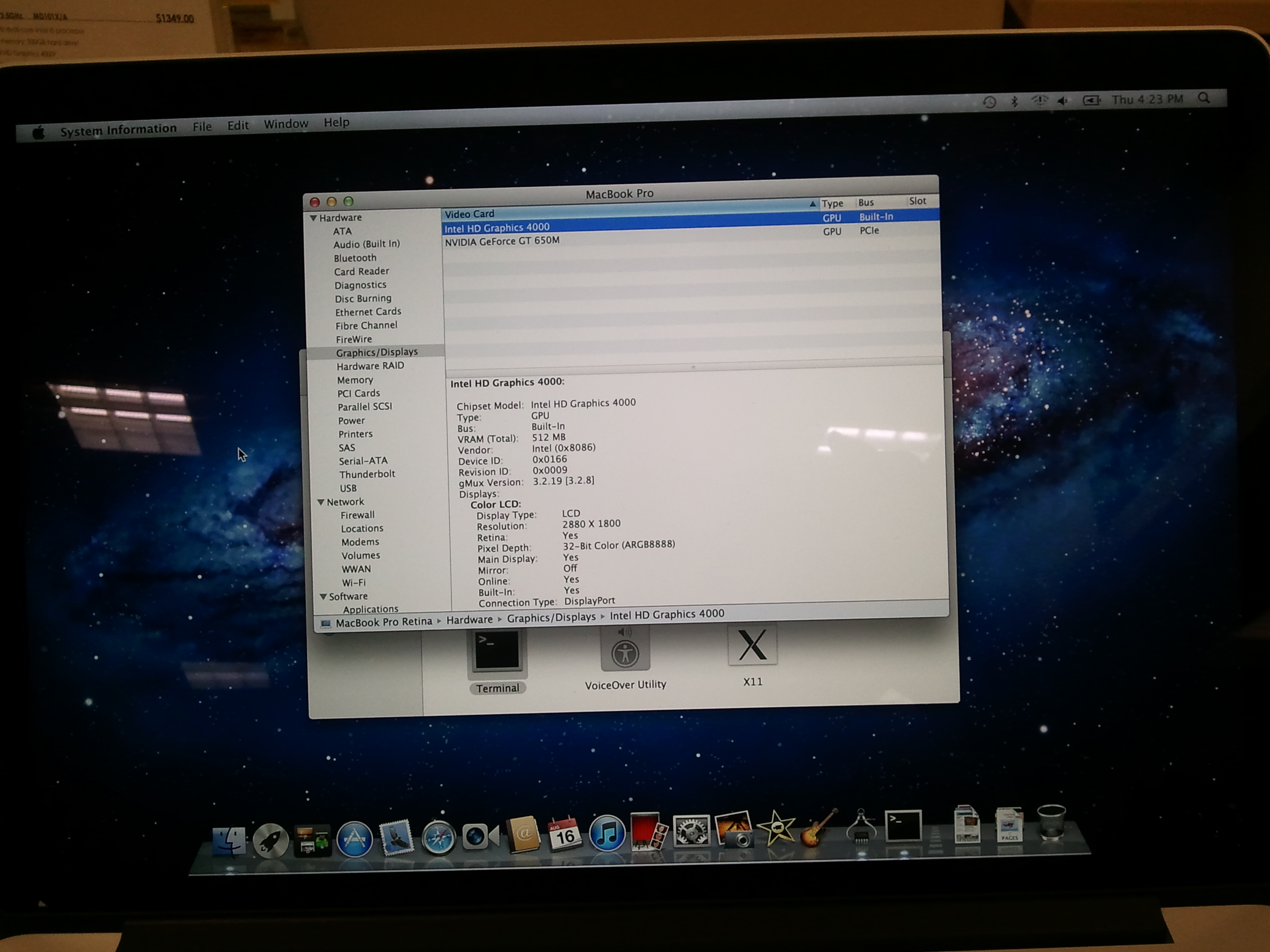
Image of a Macbook Pro with a Retina display showing how badly it reflects When I previously wrote about the Retina display in the new Macbook Pro I was so excited that I forgot to even check whether the display reflects light [1]. A TFT display with a mirrored surface apparently permits more intense color which is generally a good thing. It also makes it easier to clean the surface which is really important for phones and tablets. The down-side of a mirrored surface on a display is that it can reflect whatever else is in the area. This generally isn t a problem in an office as you can usually adjust the angle of the monitor and the background lighting to avoid the worst problems. It s also not a serious problem for a hand-held device as it s usually easy to hold it at an angle such that you don t have light from anything particularly bright reflecting. But my experience of laptop use includes using them anywhere at any time. I ve done a lot of coding on all forms of public transport in all weather conditions. Doing that with a Thinkpad which has a matte surface on it s screen is often difficult but almost always possible. Doing that on a system with a mirrored display really isn t possible. The above photo of a 15 Macbook Pro model MD103X/A was taken at a Myer store which was specifically designed to make the computers look their best. The overall lighting wasn t particularly bright so that the background didn t reflect too much and the individual lights were diffuse to avoid dazzling point reflections. But even so the lights can be clearly seen. Note that the photo was taken with a Samsung Galaxy S, far from the best possible camera. If I was buying a laptop that would only ever be used in the more northern parts of Europe or if I was buying a laptop to use only at home and at the office then I might consider a mirror display. But as I mostly use my laptop in mainland Australia including trips to tropical parts of Australia and I use it in all manner of locations a mirror display isn t going to work for me. This isn t necessarily a bad decision by Apple designers. My observation of Macbook use includes lots of people using them only in offices and homes. Of the serious geeks who describe their laptop as My Precious hardly anyone has a Macbook while Thinkpads seem quite popular in that market segment. I don t think that it s just the matte screen that attracts serious geeks to the Thinkpad, but it does seem like part of a series of design decisions (which include the past tradition of supporting hard drive removal without tools and the option of a second hard drive for RAID-1) that make Thinkpads more suitable for geeks than Macbooks. While the new tradition in Apple design of gluing things together so they can never be repaired, recycled, or even have their battery replaced seems part of a pattern that goes against geek use. Even when Apple products are technically superior in some ways their catering to the less technical buyers makes them unsuitable to people like me. Maybe the ability to use a Macbook as a shaving mirror could be handy, but I d rather grow a beard and use a Thinkpad. Related posts:
  1. The Retina Display Last night I played with an Apple Macbook Pro with...
  2. are Thinkpads meant to run 24*7? My Thinkpad has started to run hot recently. If I...
  3. presentations and background color In response to my last post about using laptops for...

19 August 2012

Gregor Herrmann: RC bugs 2012/33

it's sunday evening again, & again, here comes my report about activities around RC bugs:
16 August 2012

Gunnar Wolf: 19 years of Debian

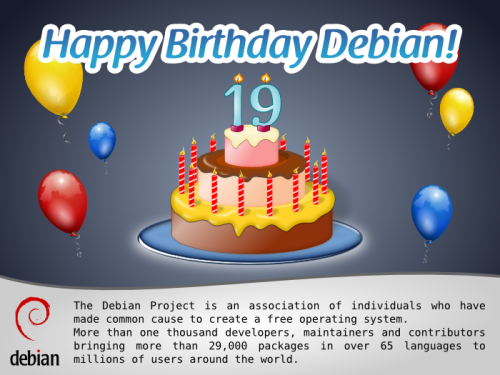
Happy 19th birthday, Debian! The Debian project is 19 years old now. Following Francesca's invitation (and Rapha l's lead, and using Leandro's image, collaboratively as it always happens here), I will tell a bit of my memories: How I got to Debian. I am a Debian user since ~2000, and a Debian Developer since April 2003. But, just as Rapha l's, my history must go somewhat further back in time. In 1992, I got my first 1200bps modem, and almost immediately became an avid BBS user (what's that? Javier Matuk talks [in Spanish] about BBSes in his newspaper column back in 1994). By mid 1993 I started operating my own BBS, CatarSYS. One of the key points that defined CatarSYS is that my focus was large-scale communication. I started connecting to several BBS networks, allowing messages to be relayed to distant people, mainly in the USA and Spain, and getting some feeds that could be seen as the poor man's Usenet. At some point during the year I kept CatarSYS going, I got connected through a strange set of gateways to pure gold: A UUCP feed! This means, during some months, I operated the first (free, hobbyist) service that offered its users a free Internet mail address in Mexico. Yes, it was completely different to what we are used to today. I tried to connect to my provider at least three times a week, but this meant less than one week turnover time for messages sent to people anywhere in the world! But, back to Debian: Via this UUCP feed, I also got some real Usenet newsgroups Including several on the comp.os category. I remember reading about Linux back then, and learning some commands, but didn't really get hooked into it. I was in Israel from July 1994 to June 1995, doing completely non-computer-related tasks. Came back in 1995, and due to my father being an academic, got dialup internet access at home. WOW, *real* Internet! It didn't take me long to start downloading Linux information and floppy images. One failed after another. But before the end of the year, I found in a bookshop a book (that included a CD-ROM) called "Build your own web server with Linux". WOW again Remember this was still 1995! I bought it, and shortly afterwards, I had a Slackware system (Linux kernel 1.0.9) running. That meant many sleepless nights full of joy and frustration (as getting hardware to work was cloe to impossible). By 1996, I got (within one week) my two first real jobs: A systems administrator at a small ISP and a highschool teacher. At the ISP, I got a spare computer to play with Linux, as of course the Big Server was running with Windows NT 3.51. Poor little machine... By then I was already a part of the Mexican Linux User Group. This group had just printed a batch of Linux CDs RedHat 4.0. This was the first release that really made me happy and allowed me to do good work. Together with a friend I took to work with us, Juan Pablo Romero, we installed over a weekend a full replacement for our buggy NT machine, in much cheaper hardware. Of course, Linux was nowhere near corporate-recognition, and our project remained a project, not touching the Windows machine. Anyway... Several years passed, and I was happy with my RedHat choice. I won't mention the milestones and job changes, as it would get boring and leave the point completely aside. By the year 2000, I was quite more involved with the LUG, as well as with the computer security group in DGSCA-UNAM. I became also an OpenBSD user, and had got so hooked up in free software that I felt the need to collaborate: To be a little part of one of those Big Projects that had given me so much. But which one? I have never been much of a programmer Yes, I can solve my everyday needs and have fun with it, and sometimes a bit beyond that. I enjoy programming. But all of my projects have begun little and stayed little. I wanted to join OpenBSD, as it was a community I really believed in, but given my skillset (and given a flame-prone, aggressive developer community), I lost motivation to do so. By 2000, I had also lost faith in RedHat. I don't have the exact dates, so I might be some months off But after RedHat's IPO, I felt a sharp change. Version 7.0 was really demotivating It tried to offer a polished desktop experience, but was really buggy, unstable, and full of bad decisions. In Mexico, Pepe Neif had taken up the job of making a derivative distribution of RedHat (called LinuxPPP), pressing hundreds of CDs and making a teaching program I was part of several times. Talking with Pepe (who continued to release based on RedHat 6), he told me he was interested in switching over to become a Debian-based distribution, but the job of migrating his installed base made the project stall LinuxPPP reached only version 6.4. But I installed Debian in early 2000, and loved it. I started getting familiar with its social philosophy and foundation documents at the same time I started migrating my servers from RedHat to Debian This must have been by Spring 2000, as I installed Potato while it was frozen but not yet stable. By January 2002 I applied for NM. My process took a long time, as my AM got MIA when he had already approved me (but before sending the AM report), so basically I had to go through AM twice And by April 16, 2003, I got accepted as a DD. Contrary to what is acceptable today, I requested the full process to be done before starting to maintain any packages, as I didn't want to bother people with package sponsorship requests, so my whole process was done evaluating packages I would eventually upload. Since becoming a DD, my main involvement in the project has been in packaging groups (I was a pkg-perl founder and member for many years, and am currently working in the pkg-ruby-extras group). But, as I said, my main strength is not programming So my main involvement in Debian has been more social than technical: I have been a DebConf organizer since 2005, a very interesting, stressing, rewarding and (for some months) time-demanding role, and since 2009 I am part of the keyring maintainence team, which is much easier workload, although carries important ramifications. So, after 19 years of Debian, and after nine years of me being part of it, Debian is clearly my strongest link to the Free Software community, a project I have grown to love and whose way of being I share and enjoy studying and explaining. And it is a technically excellent product, and a great place to start and keep learning both about how every aspect and layer of an operating system works, and how human-to-human interaction works in such a diverse, almost impossible environment happens. Congratulations, Debian!

AttachmentSize
debian-19_500.png149.81 KB

Matthew Garrett: Building personal trust with UEFI Secure Boot

The biggest objection that most people have to UEFI Secure Boot as embodied in the Windows 8 certification requirements is the position of Microsoft as the root of trust. But we can go further than that - putting any third party in a position of trust means that there's the risk that your machine will end up trusting code that you don't want it to trust. Can we avoid that?

It turns out that the answer is yes, although perhaps a little more complicated than ideal. The Windows 8 certification requirements insist that (on x86, at least) the key databases be completely modifiable. That means you can delete all the keys provided by your manufacturer, including Microsoft's. However, as far as the spec is concerned, a system without keys is in what's called "Setup Mode", and in this state it'll boot anything - even if it doesn't have a signature.

So, we need to populate the key database. This isn't terribly difficult. James Bottomley has a suite of tools here, including support for generating keys and building an EFI binary that will enrol them into the key databases. So, now you have a bunch of keys and the public half of them is in your platform firmware. What next?

If you've got a system with plug-in graphics hardware, what happens next is that your system no longer has any graphics. The firmware-level drivers for any plug-in hardware also need to be signed, and won't run otherwise. That means no graphics in the firmware. If you're netbooting off a plug-in network card, or booting off a plug-in storage controller, you're going to have similar problems. This is the most awkward part of the entire process. The drivers are all signed with a Microsoft key, so you can't just enrol that without trusting everything else Microsoft have signed. There is a way around this, though. The typical way to use Secure Boot is to provide a list of trusted keys, but you can also provide trusted hashes. Doing this involves reading the device ROM, generating a SHA256 hash of it and then putting that hash in the key database.

This is, obviously, not very practical to do by hand. We intend to provide support for this in Fedora by providing a tool that gets run while the system is in setup mode, reads the ROMs, hashes them and enrols the hashes. We'll probably integrate that into the general key installation tool to make it a one-step procedure. The only remaining problem is that swapping your hardware or updating the firmware will take it back to a broken state, and sadly there's no good answer for that at the moment.

Once you've got a full set of enrolled keys and the hashes of any option ROMs, the only thing to do is to sign your bootloader and kernel. Peter Jones has written a tool to do that, and it's available here. It uses nss and so has support for using any signing hardware that nss supports, which means you can put your private key on a smartcard and sign things using that.

At that point, assuming your machine implements the spec properly everything that it boots will be code that you've explicitly trusted. But how do you know that your firmware is following the spec and hasn't been backdoored? That's tricky. There's a complete open implementation of UEFI here, but it doesn't include the platform setup code that you'd need to run it on any x86 hardware. In theory it'd be possible to run it on top of Coreboot, but right now that's not implemented. There is a complete port to the Beagleboard hardware, and there's instructions for using it here. The remaining issue is that you need a mechanism for securing access to the system flash, since if you can make arbitrary writes to it an attacker can just modify the key store. On x86 this is managed by the flash controller being switched into a mode where all writes have to be carried out from System Management Mode, and the code that runs there verifies that writes are correctly authenticated. I've no idea how you'd implement that on ARM.

There's still some work to be done in order to permit users to verify the entire stack, but Secure Boot does make it possible for the user to have much greater control over what their system runs. The freedom to make decisions about not only what your computer will run but also what it won't is an important one, and we're doing what we can to make sure that users have that freedom.

comment count unavailable comments

Joey Hess: California postcard 2012

San Francisco skyline, Errol & Dani, Dani on cliffs at Mendocino, Sango on Hendy woods redwood

Russ Allbery: Review: Getting Started with Dwarf Fortress

Review: Getting Started with Dwarf Fortress, by Peter Tyson
Publisher: O'Reilly
Copyright: May 2012
ISBN: 1-4493-1494-5
Format: Trade paperback
Pages: 219
If you're unfamiliar with Dwarf Fortress, you're in good company. Most people are, even people who play video games regularly. It was heavily inspired by roguelike games: games such as Hack and Rogue and their more recent variations, which have been around since the 1970s and are still frequently played with simple character graphics on 2D maps. Dwarf Fortress even has a roguelike gameplay mode, but the core of the game (and the only part of the game covered in this book) is the fortress mode, where the player controls a band of dwarfs in an attempt to construct and maintain a fortress. All of this is done (by default, at least) in a simulated-text interface filled with a barrage of strange characters and symbols. A Dwarf Fortress game in progress is almost incomprehensible to the uninitiated. (There are graphical tile sets available, but all the illustrations in this book assume the default display mode.) Dwarf Fortress gains its cult popularity (sufficient to support the primary developer solely through voluntary donations; the game is free) from the incredible depth and richness of the world. Almost everything is modeled in startling detail, down to the individual items of clothing that each dwarf wears, their personalities and history, and a considerable part of the industrial lifecycle of any goods that the fortress needs to produce (such as food and all-important alcohol). That's where this book comes in. The game is so massive and involves so many variables, industries, needs, requirements, and perils that the first-time player is likely to see their first games collapse due to resource problems they have no idea how to address. Getting Started with Dwarf Fortress walks the player through the initial fortress setup, the resource cycles, and the fundamentals of the various parts of the game one has to monitor. The fact that this discussion takes over 200 pages should give you an idea of the depth of the game. I should stop here and warn that, similar to my RPG sourcebook reviews, I read this book somewhat against its intended purpose. I haven't played Dwarf Fortress and don't currently intend to. It's not quite my game type: I don't like open world construction games in which it's possible to lose (and thereby lose all the things that one has built). But the idea of the game, the way it's developed, and the fact that O'Reilly would publish a book about it is so delightfully strange that I wanted to get a feel for the game without investing the time required to learn it. Thankfully, while the book is designed to be a tutorial, it also does an excellent job at conveying the feel of a game. Getting Started with Dwarf Fortress is divided into eleven chapters. After a chapter of introduction, it goes over site selection, some of the options for your initial party, and recommended settings for both. It then provides some advice for the initial rooms and initial fortress layout to get started. Subsequent chapters are more topic-oriented, covering food, merchants, resource management (including Strange Moods), digging, and the various chains of industry. The final chapters cover some of the more intricate details of dwarven life, such as justice, vampires, and hospitals, and then provide an introduction to the military and to dwarven engineering. The engineering chapter, in particular, makes it clear that vast complexity and possibility is left unexamined. One drawback of the printed version of the book (I don't know if this also applies to the ebook) is that all of the screen shots here are black and white. This makes Dwarf Fortress's already-forbidding presentation even more difficult to understand. At times, I had a hard time picking out features that were described in the text. A look at on-line screenshots quickly shows that color is massively helpful in making sense of all the little glyphs. I'm sure color printing would have made the printed version prohibitively expensive, but it is a loss. The text, though, is excellent. Not only is it clear and helpful (although with the caveat that I've not personally tested it), it captures much of the humor and feel of the game. Dwarf Fortress incorporates computer-generated storytelling that narrates the events of the game (and the backstory of the world), which has sparked a tradition of delightfully wry commentary on games, game mechanics, and events in the game (particularly the ones that cause the cascading destruction of the whole fortress). Tyson captures that tone brilliantly, weaving it throughout his descriptions. This is a tutorial that's genuinely fun to read. (Although the Tim Denee comics ending chapters sadly didn't work for me.) It's certainly possible to get started with Dwarf Fortress without this book. There are other tutorials on-line, as well as an impressively huge wiki. But this is a great introduction and is entertainment in its own right. If you've thought about playing the game, or if, like me, you want a good feel for what it's like without investing the time in actually playing it, I recommend it. I should probably note that this book covers Dwarf Fortress up to 0.34.07, and the dead tree version that I have obviously won't be further updated. O'Reilly does note on the back cover that if you purchase the ebook edition, it will receive free updates for the "life of the edition" (however long that is). If you're worried about subsequent changes in the game making the book obsolete (given the ongoing active development, this is something of a worry, although this book mostly covers fundamentals), you may want to grab the electronic version. Rating: 8 out of 10

12 August 2012

Gregor Herrmann: RC bugs 2012/32

this was a weird RCBW week for me. although we are not that far into the freeze yet, the amount of easy-enough-for-me-to-fix RC bugs on UDD is already rather low. besides the not very impressive list below, I at least tried to do some housekeeping on some bugreports (tagging, reassigning, forwarding, ).

11 August 2012

Russ Allbery: Review: Design Patterns

Review: Design Patterns, by Erich Gamma, et al.
Author: Erich Gamma
Author: Richard Helm
Author: Ralph Johnson
Author: John Vlissides
Publisher: Addison-Wesley
Copyright: 1995
Printing: September 1999
ISBN: 0-201-63361-2
Format: Hardcover
Pages: 374
Design Patterns: Elements of Reusable Object-Oriented Software by the so-called "Gang of Four" (Gamma, Helm, Johnson, and Vlissides) is one of the best-known books ever written about software design, and one of the most widely cited. The language introduced here, including the names of specific design patterns, is still in widespread use in the software field, particularly with object-oriented languages. I've had a copy for years, on the grounds that it's one of those books one should have a copy of, but only recently got around to reading it. The goal of this book is to identify patterns of design that are widely used, and widely useful, for designing object-oriented software. It's specific to the object-oriented model; while some of the patterns could be repurposed for writing OO-style programs in non-OO languages, they are about inheritance, encapsulation, and data hiding and make deep use the facilities of object-oriented design. The patterns are very general, aiming for a description that's more general than any specific domain. They're also high-level, describing techniques and methods for constructing a software system, not algorithms. You couldn't encapsulate the ideas here in a library and just use them; they're ideas about program structure that could be applied to any program with the relevant problem. With the benefit of seventeen years of hindsight, I think the primary impact of this book has been on communication within the field. The ideas in here are not new to this book. Every pattern in Design Patterns was already in use in the industry before it was published; the goal was taxonomy, not innovation. One would not come to Design Patterns to learn how to program, although most introductory texts on object-oriented programming now borrow much of the pattern terminology. Rather, Design Patterns is as influential as it is because it introduced a shared terminology and a rigor around that terminology, allowing writers and programmers to put a name to specific program structures and thus talk about them more clearly. This also allows one to take a step back and see a particular structure in multiple programs, compare and contrast how it's used, and draw some general conclusions about where it would be useful. I have the feeling that the authors originally hoped the book would serve as a toolbox, but I think it's instead become more of a dictionary. The pattern names standardized here are widely used even by people who have never read this book, but I doubt many people regularly turn to this book for ideas for how to structure programs. Design Patterns is divided into two parts: a general introduction to and definition of a software pattern followed by a case study, and then a catalog of patterns. The catalog is divided into creational patterns (patterns for creating objects), structural patterns (patterns for composing objects into larger structures), and behavioral patterns (patterns for interactions between objects). Each pattern in turn follows a very rigid presentation structure consisting of the pattern name and high-level classification, its basic intent, other common names, a scenario that motivates the pattern, comments on the applicability of the pattern, the structure and classes or objects that make up the pattern, how those participants collaborate, how the pattern achieves its goals, comments on implementation issues, sample code, known uses of the pattern in real-world software, and related patterns. As with a dictionary, the authors go to great lengths to keep the structure, terminology, and graphical representations uniform throughout, and the cross-referencing is comprehensive (to the point of mild redundancy). As for the patterns themselves, their success, both as terminology and as useful design elements, varies. Some have become part of the core lexicon of object-oriented programming (Factory Method, Builder, Singleton), sometimes to the point of becoming syntactic elements in modern OO languages (Iterator). These are terms that working programmers use daily. Others aren't quite as widespread, but are immediately recognizable as part of the core toolkit of object-oriented programming (Adapter, Decorator, Proxy, Observer, Strategy, Template Method). In some cases, the technique remains widespread, but the name hasn't caught on (Command, for example, which will be immediately familiar but which I rarely hear called by that name outside of specific uses inside UI toolkits due to ambiguity of terms). Other patterns are abstract enough that it felt like a bit of a reach to assign a name to them (Bridge, Composite, Facade), and I don't think use of those names is common, but the entries are still useful for definitional clarity and for comparing similar approaches with different implications. Only one pattern (Interpreter) struck me as insufficiently generic to warrant recording in a catalog of this type. So far, so good, but the obvious question arises: if you've not already read this book, should you read it? I think the answer to that is debatable. The largest problem with Design Patterns is that it's old. It came late enough in the development of object-oriented programming that it does capture much of the foundation, but OO design has continued to change and grow, and some patterns have either been developed subsequently or have become far more important. For example, Model-View-Controller is conspicuous by its absence, mentioned only in passing in the discussion of the Observer pattern. Any pattern catalog written today would have an extensive discussion. Similarly absent are Inversion of Control and Data Access Object, which are much more central to the day-to-day world of the modern programmer than, say, Memento or Visitor. One could easily go on: Lazy Initialization, Mock Object, Null Object... everyone will have their own list. A related problem is that all the implementation examples are shown in either C++ or Smalltalk (occasionally both). Those were probably the best languages to use at the time, but it's doubtful a modern rewrite would choose them. Smalltalk, in particular, I found nearly incomprehensible for the uninitiated, to the point where I ignored the code and only read the surrounding English description. C++ fares better, but Design Patterns occasionally drifts off into tedious discussions of how to work around C++'s limitations in ways that are irrelevant to the pattern itself and would not be necessary in, say, Java or Python. (This is ameliorated by the fact that C++, unlike Smalltalk, is still in widespread use, so those discussions remain moderately helpful for some readers.) Design Patterns is not, therefore, a very good source for a working knowledge of the most common patterns in use today. It has also become somewhat obsolete via its own success: the concept of a design pattern has become so popular that nearly all introductory texts include at least a basic discussion of design patterns and an introduction to the most notable and useful patterns. I think that's a more comfortable and more efficient way to pick up the basics than reading through this book, which is somewhat dense and which expects from the reader a reasonably good working knowledge of object-oriented programming. And, once you have the basics, MVC, DAO, and similar design patterns are probably more important than the more subtle design patterns presented here. That said, I think the rigor of description and the comparisons and discussions here still have some value. Design Patterns encourages the reader to look at patterns from a higher-level perspective, to think about meta-patterns such as the balance between data hiding and access, or between structure designed for the present purpose and structure that's adaptable to future needs. It's also mildly interesting from a historical standpoint; one can see the inspiration for future language designers in how problems are described here, and see how many of the implementation issues and negative consequences have been corrected or simplified by richer language designs. Overall, I would hesitate to recommend buying this book today, particularly at new textbook prices. But if you're a working object-oriented software designer or programmer, I think it's worth checking out from a library (and, thanks to its influence, any library with a decent software design section will almost certainly have a copy). Read the overall discussion, skim the catalog, and read the discussion of the patterns that strike your interest. It may help provide some additional structure and perspective to how you think about OO design. Rating: 6 out of 10

10 August 2012

Matthew Garrett: Thoughts on the SUSE Secure Boot implementation

There's a post here describing SUSE's approach to implementing Secure Boot support. In summary, it's pretty similar to the approach we're taking in Fedora - a first stage shim loader is signed with a key in db, it loads a second stage bootloader (grub 2) that's signed with a key that's in shim, the second stage bootloader loads a signed kernel. The main difference between the approaches is the use of a separate key database in shim, whereas we are currently planning on using a built-in key and the contents of the firmware key database.

The main concern about using a separate key database is that applications are able to modify variable content at runtime. The Secure Boot databases are protected by requiring that any updates be signed, but this is less practical for scenarios where you want the user to be able to modify the database themselves while still protecting them from untrusted applications installing their own keys. SUSE have solved this problem by not setting the runtime access flag on the variable, meaning that it's inaccessible once ExitBootServices() has been called early in the init sequence. Since we only start running any untrusted code after ExitBootServices(), the variable can only be accessed by trusted code.

It's a wonderfully elegant solution. We've been planning on supporting user keys by trusting the contents of db, and the Windows 8 requirements specify that it must be possible for a physically present user to add keys to it. The problem there has been that different vendors offer different UI for this, in some cases even requiring that the keys be in different formats. Using an entirely separate database and offering support for enrolment in the early boot phase means that the UI and formats can be kept consistent, which makes it much easier for users to manage their own keys.

I suspect that we'll adopt this approach in Fedora as well - it doesn't allow anything that our solution wouldn't have, but it does make some of them easier. Full marks to SUSE on this.

comment count unavailable comments

8 August 2012

Russell Coker: Hard Drives for Backup

The general trend seems to be that cheap hard drives are increasing in capacity faster than much of the data that is commonly stored. Back in 1998 I had a 3G disk in my laptop and about 800M was used for my home directory. Now I have 6.2G used for my home directory (and another 2G in ~/src) out of the 100G capacity in my laptop. So my space usage for my home directory has increased by a factor of about 8 while my space available has increased by a factor of about 30. When I had 800M for my home directory I saved space by cropping pictures for my web site and deleting the originals (thus losing some data I would rather have today) but now I just keep everything and it s still doesn t take up much of my hard drive. Similar trends apply to most systems that I use and that I run for my clients. Due to the availability of storage people are gratuitously using a lot of disk space. A relative recently took 10G of pictures on a holiday, her phone has 12G of internal storage so there was nothing stopping her. She might decide that half the pictures aren t that great if she had to save space, but that space is essentially free (she couldn t buy a cheaper phone with less storage) so there s no reason to delete any pictures. When considering backup methods one important factor is the ability to store all of one type of data on one backup device. Having a single backup span multiple disks, tapes, etc has a dramatic impact on the ease of recovery and the potential for data loss. Currently 3TB SATA disks are really cheap and 4TB disks are available but rather expensive. Currently only one of my clients has more than 4TB of data used for one purpose (IE a single filesystem) so apart from that client a single SATA disk can backup anything that I run. Benefits of Hard Drive Backup When using a hard drive there is an option to make it a bootable disk in the same format as the live disk. I haven t done this, but if you want the option of a quick recovery from a hardware failure then having a bootable disk with all the data on it is a good option. For example a server with software RAID-1 could have a backup disk that is configured as a degraded RAID-1 array. The biggest benefit is the ability to read a disk anywhere. I ve read many reports of tape drives being discovered to be defective at the least convenient time. With a SATA disk you can install it in any PC or put it in a USB bay if you have USB 3.0 or the performance penalty of USB 2.0 is bearable a USB 2.0 bay is great if you want to recover a single file, but if you want terabytes in a hurry then it won t do. A backup on a hard drive will typically use a common filesystem. For backing up Linux servers I generally use Ext3, at some future time I will move to BTRFS as having checksums on all data is a good feature for a backup. Using a regular filesystem means that I can access the data anywhere without needing any special software, I can run programs like diff on the backup, and I can export the backup via NFS or Samba if necessary. You never know how you will need to access your backup so it s best to keep your options open. Hard drive backups are the best solution for files that are accidentally deleted. You can have the first line of backups on a local server (or through a filesystem like BTRFS or ZFS that supports snapshots) and files can be recovered quickly. Even a SATA disk in a USB bay is very fast for recovering a single file. LTO tapes have a maximum capacity of 1.5TB at the moment and tape size has been increasing more slowly than disk size. Also LTO tapes have an expected lifetime of only 200 reads/writes of the entire tape. It seems to me that tapes don t provide a great benefit unless you are backing up enough data to need a tape robot. Problems with a Hard Drive Backup Hard drives tend not to survive being dropped so posting a hard drive for remote storage probably isn t a good option. This can be solved by transferring data over the Internet if the data isn t particularly big or doesn t change too much (I have a 400G data set backed up via rsync to another country because most of the data doesn t change over the course of a year). Also if the data is particularly small then solid state storage (which costs about $1 per GB) is a viable option, I run more than a few servers which could be entirely backed up to a 200G SSD. $200 for a single backup of 200G of data is a bit expensive, but the potential for saving time and money on the restore means that it can be financially viable. Some people claim that tape storage will better survive a Carrington Event than hard drives. I m fairly dubious about the benefits of this, if a hard drive in a Faraday Cage (such as a regular safe that is earthed) is going to be destroyed then you will probably worry about security of the food supply instead of your data. Maybe I should just add a disclaimer this backup system won t survive a zombie apocalypse . ;) It s widely regarded that tape storage lasts longer than hard drives. I doubt that this provides a real benefit as some of my personal servers are running on 20G hard drives from back when 20G was big. The fact that drives tend to last for more than 10 years combined with the fact that newer bigger drives are always being released means that important backups can be moved to bigger drives. As a general rule you should assume that anything which isn t regularly tested doesn t work. So whatever your backup method you should test it regularly and have multiple copies of the data to deal with the case when one copy becomes corrupt. The process of testing a backup can involve moving it to newer media. I ve seen it claimed that a benefit of tape storage is that part of the data can be recovered from a damaged tape. One problem with this is that part of a database often isn t particularly useful. Another issue is that in my experience hard drives usually don t fail entirely unless you drop them, drives usually fail a few sectors at a time. How to Implement Hard Drive Backup The most common need for backups is when someone deletes the wrong file. It s usually a small restore and you want it to be an easy process. The best solution to this is to have a filesystem with snapshots such as BTRFS or ZFS. In theory it shouldn t be too difficult to have a cron job manage snapshots, but as I ve only just started putting BTRFS and ZFS on servers I haven t got around to changing my backups. Snapshots won t cover more serious problems such as hardware, software, or user errors that wipe all the disks in a server. For example the only time I lost a significant amount of data from a hosted server was when the data center staff wiped it, so obviously good off-site backups are needed. The easiest way to deal with problems that wipe a server is to have data copied to another system. For remote backups you can rsync to a local system and then use cp -rl or your favorite snapshot system to make a hard linked copy of the tree. A really neat feature is the ZFS ability to send a filesystem snapshot (or the diff between two snapshots) to a remote system [1]. Once you have regular backups on local storage you can then copy them to removable disks as often as you wish, I think I ll have to install ZFS on some of my servers for the sole purpose of getting the send feature! There are NAS devices that provide similar functionality to the ZFS send/receive (maybe implemented with ZFS), but I m not a fan of cheap NAS devices [2]. It seems that the best way to address the first two needs of backup (fast local restore and resilience in the face of site failure) is to use ZFS snapshots on the server and ZFS send/receive to copy the data to another site. The next issue is that the backup server probably won t be big enough for all the archives and you want to be able to recover from a failure on the backup server. This requires some removable storage. The simplest removable backup is to use a SATA drive bay with eSATA and USB connectors. You use a regular filesystem like Ext3 and just copy the files on. It s easy, cheap, and requires no special skill or software. Requiring no special skill is important, you never know who will be called on to recover from backups. When a server is backing up another server by rsync (whether it s in the same rack or another country) you want the backup server to be reliable. However there is no requirement for a single reliable server and sometimes having multiple backup servers will be cheaper. At current purchase prices you can buy two cheap tower systems with 4*3TB disks for less money than a single server that has redundant PSUs and other high end server features. Having two cheap servers die at once seems quite unlikely so getting two backup servers would be the better choice. For filesystems that are bigger than 4TB a disk based backup would require backup software that handles multi part archives. One would hope that any software that is designed for tape backup would work well for this (consider a hard drive as a tape with a very fast seek), but often things don t work as desired. If anyone knows of a good Linux backup program that supports multiple 4TB SATA disks in eSATA or USB bays then please let me know. Conclusion BTRFS or ZFS snapshots are the best way of recovering from simple mistakes. ZFS send/receive seems to be the best way of synchronising updates to filesystems to other systems or sites. ZFS should be used for all servers. Even if you don t currently need send/receive you never know what the future requirements may be. Apart from needing huge amounts of RAM (one of my servers had OOM failures when it had a mere 4G of RAM) there doesn t seem to be any down-side to ZFS. I m unsure of whether to use BTRFS for removable backup disks. The immediate up-sides are checksums on all data and meta-data and the possibility of using built-in RAID-1 so that a random bad sector is unlikely to lose data. There is also the possibility of using snapshots on a removable backup disk (if the disk contains separate files instead of an archive). The down-sides are lack of support on older systems and the fact that BTRFS is fairly new. Have I missed anything? Related posts:
  1. New Storage Developments Eweek has an article on a new 1TB Seagate drive....
  2. IDE hard drives I just lent two 80G IDE drives to a friend,...
  3. Hot-swap Storage I recently had to decommission an old Linux server and...

5 August 2012

Gregor Herrmann: RC bugs 2012/31

this was my first week at work after my vacations, & also the first week of "normal" RC bug work. here's my short report:

Craig Small: Context sensitive menus with GtkTreeView

A project I now maintain called GJay uses the GTK+ toolkit and has a GtkTreeView that shows the directories and the songs in them. I was wanting to add a context sensitive menu on that view so that you could do things to the item you have right-clicked on; generally file specific things like give me information about this song or queue it to play. My only problem was, how to do it? A few Google searches showed things that were almost, but not quite, what I was after. The main problem being either the documentation was incomplete or it assumed I was after the selected field (the row I may of left-clicked on) and not the one I right-clicked on to get this event. This GtkTreeView uses a store where NAME_COLUMN is defined at 0, meaning it is the first column. The program uses this column to store the filename of the song. So first I needed to create an event to kick things off, we need to connect the button-press-event to our tree_view, which calls a function in this case view_on_button_pressed.
 g_signal_connect(tree_view, "button-press-event", 
   G_CALLBACK(view_on_button_pressed), NULL);
gboolean view_on_button_pressed(GtkWidget *tree_view, 
                                GdkEventButton *event, 
                                gpointer user_data)  
  GtkTreeSelection *selection;
  GtkTreePath *tree_path;
  GtkTreeModel *tree_model;
  GtkTreeIter tree_iter;
  gchar *name;
 
  if (event->type == GDK_BUTTON_PRESS && event->button == 3)  
    tree_model = gtk_tree_view_get_model(GTK_TREE_VIEW(tree_view));
    if (gtk_tree_view_get_path_at_pos(GTK_TREE_VIEW(tree_view),
          (int)event->x, (int)event->y,
          &tree_path, NULL, NULL, NULL))  
      if (gtk_tree_model_get_iter(tree_model, &tree_iter, tree_path))  
        gtk_tree_model_get(tree_model, &tree_iter, NAME_COLUMN, &name, -1);
        g_print("rc name is %s\n", name);


So a breakdown of what my callback is doing: The program, now that it knows the song title, can then go off and generate a menu for that song.

4 August 2012

Russell Coker: Love of Technology at First Sight

After seeing the Retina display I ve been thinking about the computer products that I ve immediately desired. Here is the list of the ones I can still remember:
  1. My first computer which was the TEC-1 [1], in 1982 or 1983.
  2. A computer with a full keyboard and a monitor (Microbee), in about 1984. A hex-only keypad is very limiting.
  3. Unix, initially SunOS 4.0 in 1991. Primarily the benefits of this were TCP/IP networking, fast email (no multi-day delay for Fidonet mail), IRC, and file transfer from anywhere in the world. Not inherent benefits to Unix, but at the time only Unix systems did TCP/IP at all well.
  4. OS/2 2.0 in 1992. At the time OS/2 had the best GUI of any system available (IMHO) and clearly the best multitasking of DOS and Windows programs.
  5. Linux in 1992. I started with the TAMU and MCC Interim distributions and then moved to SLS when it was released. The first kernel I compiled was about 0.52. At the time the main use of Linux for almost everyone was to learn about Unix and compile kernels. In 1993 I started running a public access Linux server.
  6. Trinitron monitors in 1996. I first saw an IBM Trinitron monitor when working on an IBM project and had to buy one for home use, at the time a 17 Trinitron monitor beat the hell out of any other display device that one could reasonably afford. A bigger screen allowed me to display more code at once which allowed easier debugging.
  7. Thinkpad laptops from 1998 until now. They just keep working well and seem to be better than other products every time I compare them. I also like the TrackPoint. 1998 was when a Thinkpad dropped to a mere $3,800 for a system that could run with 96M of RAM, enough compute power for the biggest compiles and it cost less than most cars!
  8. The KDE desktop environment in 1998. In 1998 I switched my primary workstation from a PC running OS/2 to a Thinkpad running Linux because of KDE. Prior to KDE nothing on Linux was user-friendly enough.
  9. The iPaQ hand-held PC. I got one in 2002 and ran the Familiar distribution of Linux on it. I had it running SE Linux and used it for writing an article for Linux Journal. Being able to get a computer out on public transport to do some work really saved some time. In some ways the iPaQ hardware and the Familiar OS beat modern Android systems.
  10. The EeePC 701 which I bought in 2008 [2]. In the last 4 years someone has probably released a system that s no larger or heavier and has the same amount of compute power (enough for web browsing, email, and ssh). But most Netbooks that I ve seen don t compete. The EeePC allowed me to take laptops to places where it previously wasn t convenient.
  11. Android, before using Android I never had a smart phone that I used for anything other than taking photos. The other smart phone OSs are either locked down or don t have the app support that Android has. I listed lots of problems with my first phone the Sony Ericsson Xperia X10, but I still really enjoyed using it a lot [3]. Since getting an Android phone I ve read a lot of email while on the go, this means I can respond faster when necessary and use time that might otherwise be wasted. The ssh client means that I don t need to carry a laptop with me when there s a risk that emergency sysadmin work may be required.
  12. Cheap rented servers, Amazon defined cloud computing with EC2, Linode offers great deals for small virtual servers, and Hetzner offers amazing deals on renting entire servers. Getting your own Internet connection or running your own physical server in someone s data-center is a lot of effort and expense. Being able to just rent servers is so much easier and allows so many new projects. I can t remember when I first started using such services, maybe 5 years ago.
  13. The Apple Retina Display [4] a few days ago.
For the period between 1998 and 2008 I can t think of anything that really excited me apart from the iPaQ. Computers became a lot smaller, faster, cheaper, etc. But it was never a big exciting change. The AMD64 architecture wasn t particularly exciting as most systems didn t need more than 4G of RAM and the ones that did could use PAE. What are the most exciting computer products you have seen? Related posts:
  1. Old PDA vs New Mobile Phone for PDA use Since about 2002 I have been using a iPaQ [1]...
  2. CyanogenMod and the Galaxy S Thanks to some advice from Philipp Kern I have now...
  3. Moving from a Laptop to a Cloud Lifestyle My Laptop History In 1998 I bought my first laptop,...

2 August 2012

Russell Coker: Sam Harris on Lying

The Neuroscientist and atheism advocate Sam Harris has written a short blog post about a journalist named Jonah Lehrer who destroyed his career through false quotes and lies about them [1]. The main point of the article seems to be to promote his new eBook about Lying. The book is available for free until the end of the week (not sure if that is Friday, Saturday, or Sunday and in what time zone get it quick if you want it). The book is very short, 58 pages with a single column of large font text. If written a densely as a typical research paper it would probably be about 12 pages. But it has some good points to make. He makes a good moral case against most forms of lying, even answering questions such as do I look fat . It seems that anyone who was to follow his advice would be unusually honest even by Aspie standards. Related posts:
  1. Lies and Online Dating Separating Fact From Fiction: An Examination of Deceptive Self-Presentation in...
  2. Links January 2012 Cops in Tennessee routinely steal cash from citizens [1]. They...
  3. Desks Lindsay Holmwood has written about the benefits of a standing...

1 August 2012

Russell Coker: Hetzner now Offers SSD

Hetzner is offering new servers with SSD, good news for people who want to run ZFS (for ZIL and/or L2ARC). See the EX server configuration list for more information [1]. Unfortunately they don t specify what brand of SSD, this is a concern for me as some of the reports about SSD haven t been that positive, getting whichever SSD is cheapest isn t appealing. A cheap SSD might be OK for L2ARC (read cache), but for ZIL (write cache) reliability is fairly important. If anyone has access to a Hetzner server with SSD then please paste the relevant output of lsscsi into a comment. The next issue is that they only officially offer it on the new EX 8S server. SSD will be of most interest to people who also want lots of RAM (the zfsonlinux.org code has given me kernel panics when running with a mere 4G of RAM even when I did the recommended tuning to reduce ARC size). Also people who want more capable storage options will tend to want more RAM if only for disk caching. But I m sure that there are plenty of people who would be happy to have SSD on a smaller and cheaper server. The biggest SSD offering of 240G is bigger than a lot of servers. I run a Hetzner server that has only 183G of disk space in use (and another 200G of backups). If the backups were on another site then the server in question could have just a RAID-1 of SSD for all it s storage. In this case it wouldn t be worth doing as the server doesn t have much disk IO load, but it would be nice to have the option the exact same server plus some more IO load would make SSD the ideal choice. The biggest problem is that the EX 8S server is really expensive. Hard drives which are included in the base price for cheaper options are now expensive additions. A server with 2*3TB disks and 2*240G SSD is E167 per month! That s more expensive than three smaller servers that have 2*3TB disks! The good news for someone who wants SSD is that the Hetzner server auction has some better deals [2]. As is always the case with auction sites the exact offers will change by the moment, but currently they offer a server with 2*120G SSD and 24G of RAM for E88 per month and a server with 2*120G SSD, 2*1.5T HDD, and 24G of RAM for E118. E88 is a great deal if your storage fits in 240G and E118 could be pretty good if you only have 1.5T of data that needs ZFS features. The main SSD offering is still a good option for some cases. A project that I did a couple of years ago would probably have worked really well on a E167/month server with 2*3TB and 2*240G SSD. It was designed around multiple database servers sharding the load which was largely writes, so SSD would have allowed a significant reduction in the number of servers. They also don t offer SSD on their storage servers which is a significant omission. I presume that they will fix that soon enough. 13 disks and 2 SSD will often be more useful than 15 disks. That s assuming the SSD doesn t suck of course. The reason this is newsworthy is that most hosted server offerings have very poor disk IO and no good options for expanding it. For servers that you host yourself it s not too difficult to buy extra trays of disks or even a single rack-mount server that has any number of internal disks in the range 2 to 24 and any choice as to how you populate them. But with rented servers it s typically 2 disks with no options to add SSD or other performance enhancements and no possibility of connecting a SAN. As an aside it would still be nice if someone ran a data center that supported NetApp devices and gave the option of connecting an arbitrary number of servers to a NetApp Filer (or a redundant pair of Filers). If anyone knows of a hosting company that provides options for good disk IO which are better than just providing SSD or cheaper than E167 per month then please provide the URL in a comment. Update: It seems that I can get SSD added to one of the cheaper servers. This is a good option as I have some servers that already have the flexi-pack due to a need for more IP addresses. Related posts:
  1. Servers vs Phones Hetzner have recently updated their offerings to include servers with...
  2. Hetzner Failover Konfiguration The Wiki documenting how to configure IP failover for Hetzner...
  3. Dedicated vs Virtual Servers A common question about hosting is whether to use a...

31 July 2012

Russell Coker: Cheap SATA Disks in a Dell PowerEdge T410

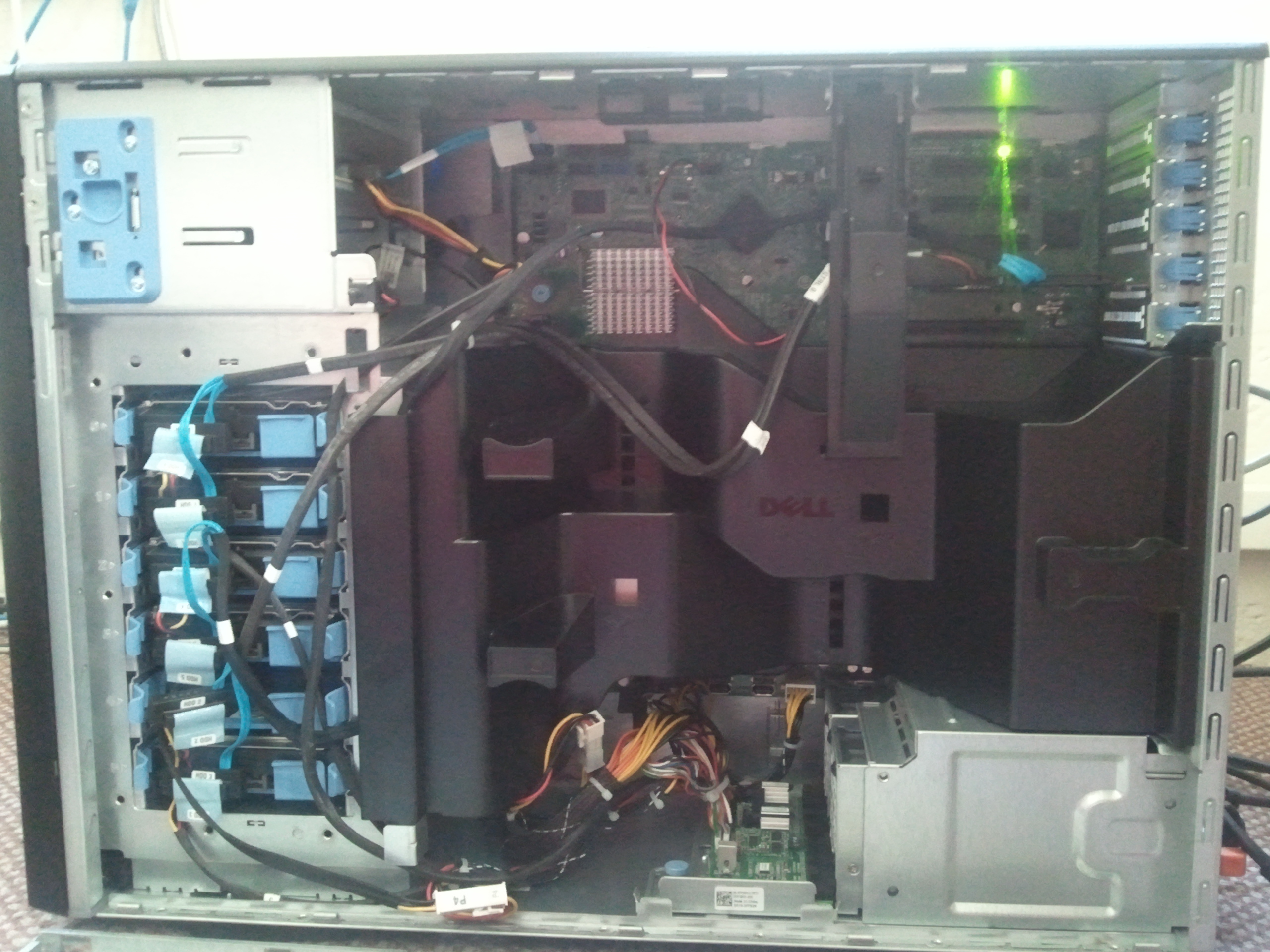
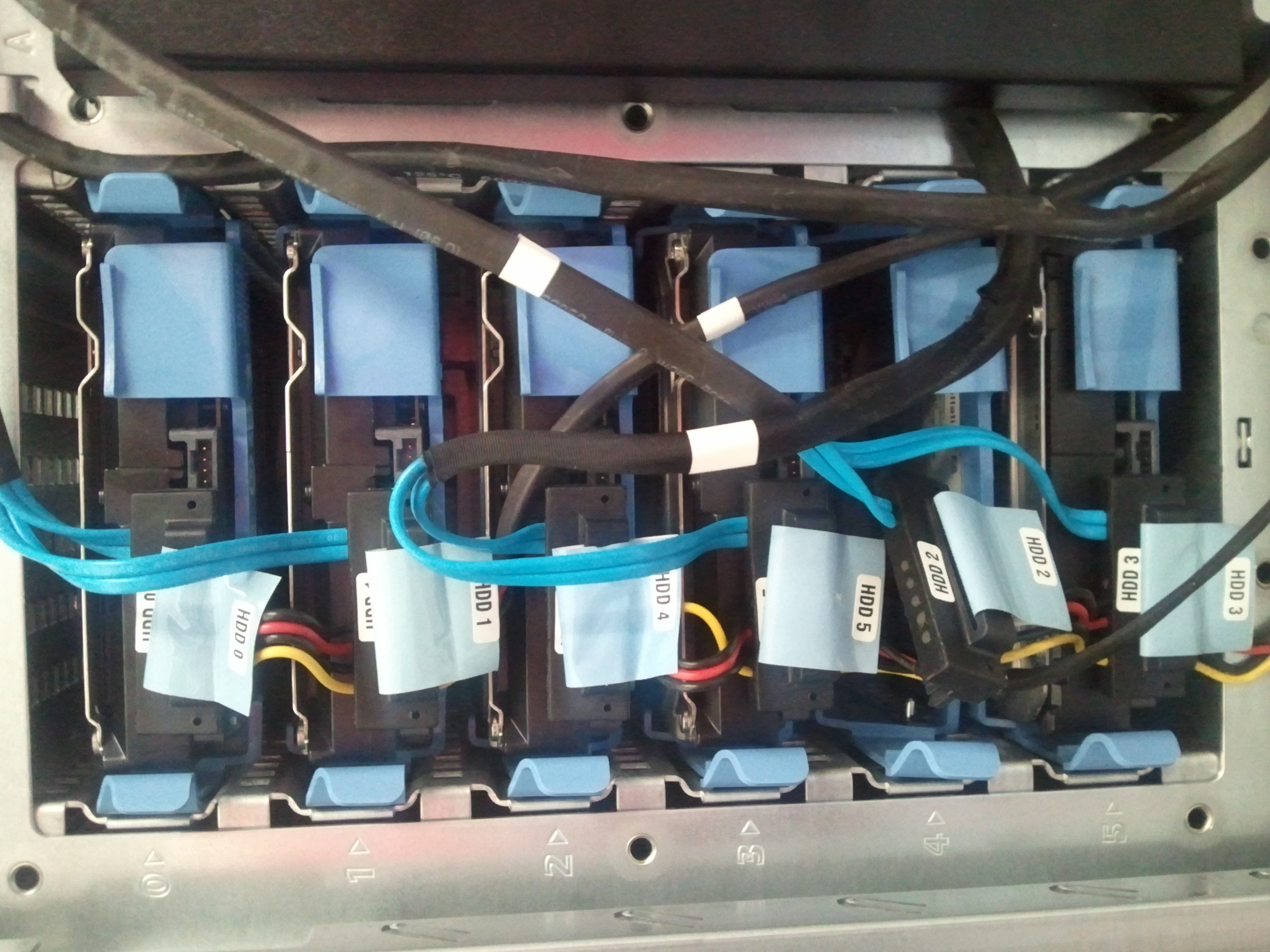
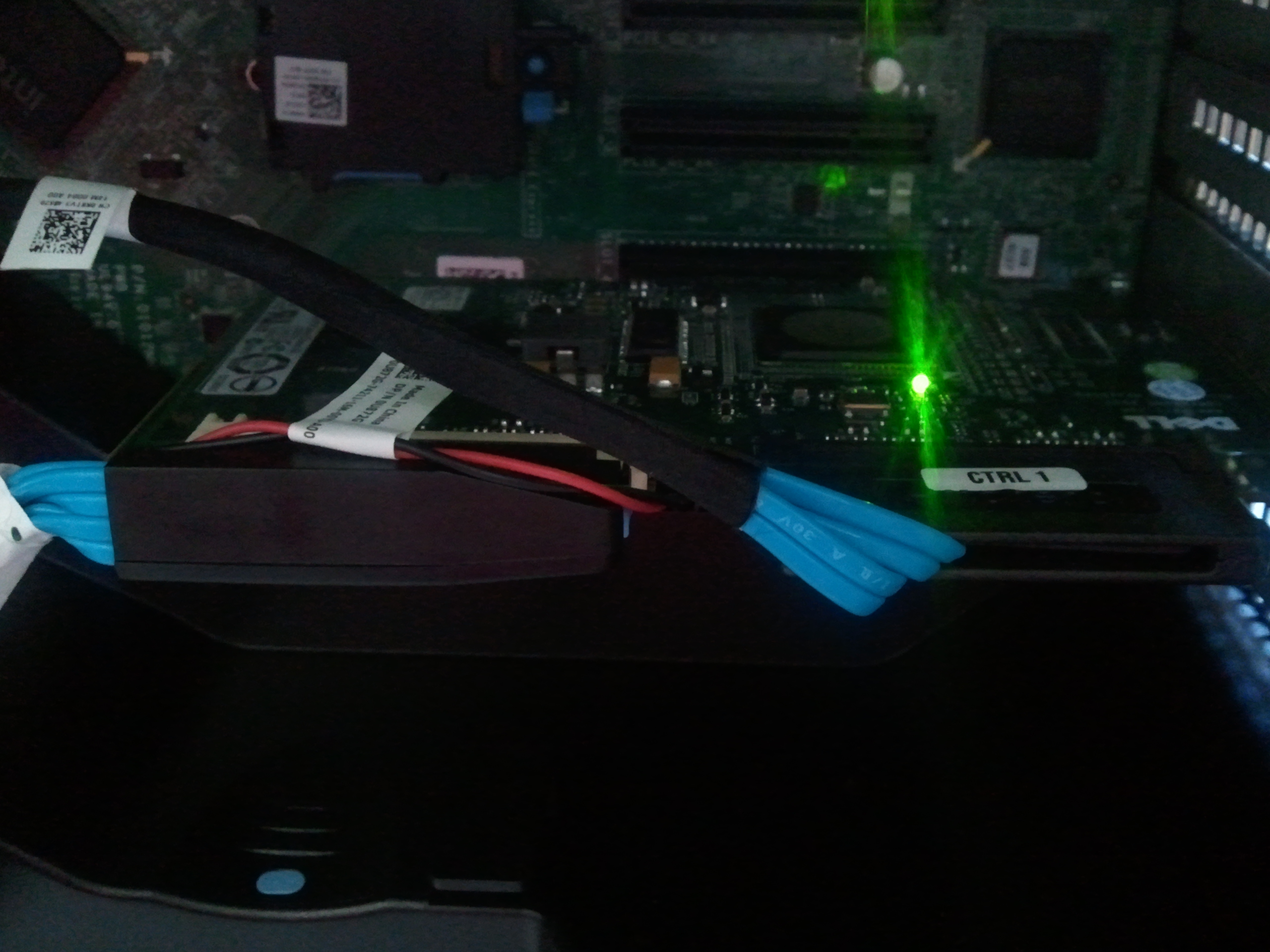
A non-profit organisation I support has just bought a Dell PowerEdge T410 server to be mainly used as a file server. We need a reasonable amount of space and really good reliability features because the system may have periods without being actively monitored, it also has to be relatively cheap. Dell servers are quite cheap, but disks are not cheap at all when Dell sells them. I get the impression that disks and RAM are major profit centers for Dell and that the profit margins on the basic servers are quite small. So naturally we decided to buy some SATA disks from a local store, one advantage of this is that Dell sells nothing bigger than 2TB while 3TB disks are available cheaply everywhere else. So we bought 4 cheap 3TB (2.7TiB) SATA disks, connected them to the server, and found that only 2TiB was accessible. The Dell Tech Center says that some of the RAID controllers don t support anything larger than 2TiB [1]. Obviously we have one of the older models. There s lots of SATA sockets on the motherboard that could be used, however there is one problem. View of the open side of a PowerEdge T410 The above picture is the side view of the T410, it was taken with a Samsung Galaxy S so the quality is a little poor (click for the original picture). The server is quite neat, not many cables for a system with 6 disks, not the 12 separate cables you would get in a typical white-box system. Disks in a PowerEdge T410 The above picture shows the disk enclosure. You can see that each disk has a single connector for power and data, also the disks aren t separate, multiple disks have the same power wires and the data cables are paired. SAS controller in a PowerEdge T410 Above you can see the SAS controller, it has two large connectors that can each handle the data cables for 4 disks, nothing like the standard cables. It s easy to buy SATA data cables and connect them, but there are no spare power cables in the box. The connector that supplies power to all the disks appears to be something proprietary to Dell which goes straight to the double-connectors on each disk that supply power and data. This setup makes cabling very neat but also provides no good option for cabling regular disks. I m sure I could make my own cables and if I hunted around the net enough I could probably buy some matching power cables, but it would be a hassle and the result wouldn t be neat. So the question was then whether to go to more effort, expense, and possibly risk the warranty to get the full 3TB or to just use the SAS controller and get 2TiB (2.2TB) per disk. One factor we considered is the fact that the higher sector numbers typically give much slower access times due to being on shorter tracks (see my ZCAV results page for test results from past disks [2]). We decided that 2.2TB (2TiB) out of 3TB (2.7TiB) was adequate capacity and that losing some of the slow parts of the disk wasn t a big deal. I ve now setup a RAID-Z2 array on the disks, and ZFS reports 3.78TiB available capacity, which isn t a lot considering that we have 4*3TB disks in the array. But the old server had only 200G of storage, so it s a good improvement in capacity, performance, and RAID-Z2 should beat the hell out of RAID-6 for reliability. Related posts:
  1. Dell PowerEdge T105 Today I received a Dell PowerEDGE T105 for use by...
  2. ZFS vs BTRFS on Cheap Dell Servers I previously wrote about my first experiences with BTRFS [1]....
  3. How I Partition Disks Having had a number of hard drives fail over the...

Martin Pitt: My impressions from GUADEC

I have had the pleasure of attending GUADEC in full this year. TL;DR: A lot of great presentations + lots of hall conversations about QA stuff + the obligatory be er,ach = . Last year I just went to the hackfest, and I never made it to any previous one, so GUADEC 2012 was a kind of first-time experience for me. It was great to put some faces and personal impressions to a lot of the people I have worked with for many years, as well as catching up with others that I did meet before. I discussed various hardware/software testing stuff with Colin Walters, Matthias Clasen, Lennart Poettering, Bertrand Lorentz, and others, so I have a better idea how to proceed with automated testing in plumbing and GNOME now. It was also really nice to meet my fellow PyGObject co-maintainer Paolo Borelli, as well as seeing Simon Schampier and Ignacio Casal Quinteiro again. No need to replicate the whole schedule here (see for yourself on the interwebs), so I just want to point out some personal highlights in the presentations: There were a lot of other good ones, some of them technical and some amusing and enlightening, such as Frederico s review of the history of GNOME. On Monday I prepared and participated in a PyGObject hackfest, but I ll blog about this separately. I want to thank all presenters for the excellent program, as well as the tireless GUADEC organizer team for making everything so smooth and working flawlessly! Great Job, and see you again in Strasbourg or Brno!

Next.

Previous.