Search Results: "nic"

22 October 2016

Iain R. Learmonth: The Domain Name System

As I posted yesterday, we released PATHspider 1.0.0. What I didn t talk about in that post was an event that occured only a few hours before the release. Everything was going fine, proofreading of the documentation was in progress, a quick git push with the documentation updates and CI FAILED!?! Our CI doesn t build the documentation, only tests the core code. I m planning to release real soon and something has broken. Starting to panic.
irl@orbiter# ./tests.sh
................
----------------------------------------------------------------------
Ran 16 tests in 0.984s
OK
This makes no sense. Maybe I forgot to add a dependency and it s been broken for a while? I scrutinise the dependencies list and it all looks fine. In fairness, probably the first thing I should have done is look at the build log in Jenkins, but I ve never had a failure that I couldn t reproduce locally before. It was at this point that I realised there was something screwy going on. A sigh of relief as I realise that there s not a catastrophic test failure but now it looks like maybe there s a problem with the University research group network, which is arguably worse. Being focussed on getting the release ready, I didn t realise that the Internet was falling apart. Unknown to me, a massive DDoS attack against Dyn, a major DNS host, was in progress. After a few attempts to debug the problem, I hardcoded a line into /etc/hosts, still believing it to be a localised issue.
192.30.253.112  github.com
I ve just removed this line as the problem seems to have resolved itself for now. There are two main points I ve taken away from this: This afternoon I read a post by [tj] on the 57North Planet, and this is where I learnt what had really happened. He mentions multicast DNS and Namecoin as distributed name system alternatives. I d like to add some more to that list: Only the first of these is really a distributed solution. My idea with ICMP Domain Name Messages is that you send an ICMP message to a webserver. Somewhere along the path, you ll hit either a surveillance or censorship middlebox. These middleboxes can provide value by caching any DNS replies that are seen so that an ICMP DNS request message will cause the message to not be forwarded but a reply is generated to provide the answer to the query. If the middlebox cannot generate a reply, it can still forward it to other surveillance and censorship boxes. I think this would be a great secondary use for the NSA and GCHQ boxen on the Internet, clearly fits within the scope of defending national security as if DNS is down the Internet is kinda dead, plus it d make it nice and easy to find the boxes with PATHspider.

Christoph Egger: Running Debian on the ClearFog

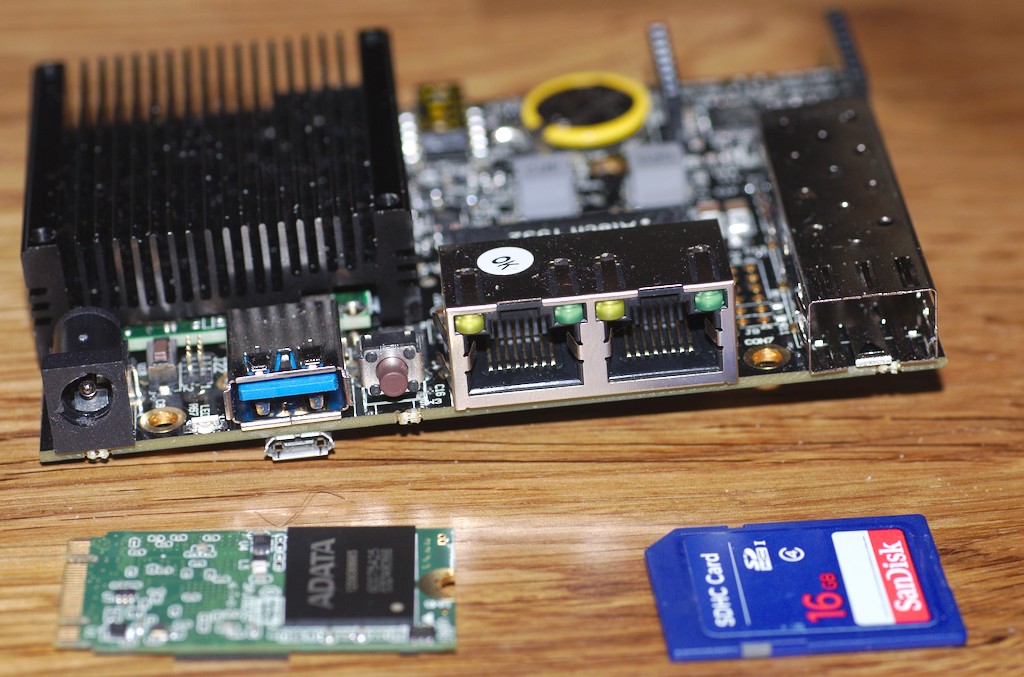
Back in August, I was looking for a Homeserver replacement. During FrOSCon I was then reminded of the Turris Omnia project by NIC.cz. The basic SoC (Marvel Armada 38x) seemed to be nice hand have decent mainline support (and, with the turris, users interested in keeping it working). Only I don't want any WIFI and I wasn't sure the standard case would be all that usefully. Fortunately, there's also a simple board available with the same SoC called ClearFog and so I got one of these (the Base version). With shipping and the SSD (the only 2242 M.2 SSD with 250 GiB I could find, a ADATA SP600) it slightly exceeds the budget but well. ClearFog with SSD When installing the machine, the obvious goal was to use mainline FOSS components only if possible. Fortunately there's mainline kernel support for the device as well as mainline U-Boot. First attempts to boot from a micro SD card did not work out at all, both with mainline U-Boot and the vendor version though. Turns out the eMMC version of the board does not support any micro SD cards at all, a fact that is documented but others failed to notice as well. U-Boot As the board does not come with any loader on eMMC and booting directly from M.2 requires removing some resistors from the board, the easiest way is using UART for booting. The vendor wiki has some shell script wrapping an included C fragment to feed U-Boot to the device but all that is really needed is U-Boot's kwboot utility. For some reason the SPL didn't properly detect UART booting on my device (wrong magic number) but patching the if (in arch-mvebu's spl.c) and always assume UART boot is an easy way around. The plan then was to boot a Debian armhf rootfs with a defconfig kernel from USB stick. and install U-Boot and the rootfs to eMMC from within that system. Unfortunately U-Boot seems to be unable to talk to the USB3 port so no kernel loading from there. One could probably make UART loading work but switching between screen for serial console and xmodem seemed somewhat fragile and I never got it working. However ethernet can be made to work, though you need to set eth1addr to eth3addr (or just the right one of these) in U-Boot, saveenv and reboot. After that TFTP works (but is somewhat slow). eMMC There's one last step required to allow U-Boot and Linux to access the eMMC. eMMC is wired to the same PINs as the SD card would be. However the SD card has an additional indicator pin showing whether a card is present. You might be lucky inserting a dummy card into the slot or go the clean route and remove the pin specification from the device tree.
--- a/arch/arm/dts/armada-388-clearfog.dts
+++ b/arch/arm/dts/armada-388-clearfog.dts
@@ -306,7 +307,6 @@
                        sdhci@d8000  
                                bus-width = <4>;
-                               cd-gpios = <&gpio0 20 GPIO_ACTIVE_LOW>;
                                no-1-8-v;
                                pinctrl-0 = <&clearfog_sdhci_pins
                                             &clearfog_sdhci_cd_pins>;
Next Up is flashing the U-Boot to eMMC. This seems to work with the vendor U-Boot but proves to be tricky with mainline. The fun part boils down to the fact that the boot firmware reads the first block from eMMC, but the second from SD card. If you write the mainline U-Boot, which was written and tested for SD card, to eMMC the SPL will try to load the main U-Boot starting from it's second sector from flash -- obviously resulting in garbage. This one took me several tries to figure out and made me read most of the SPL code for the device. The fix however is trivial (apart from the question on how to support all different variants from one codebase, which I'll leave to the U-Boot developers):
--- a/include/configs/clearfog.h
+++ b/include/configs/clearfog.h
@@ -143,8 +143,7 @@
 #define CONFIG_SPL_LIBDISK_SUPPORT
 #define CONFIG_SYS_MMC_U_BOOT_OFFS             (160 << 10)
 #define CONFIG_SYS_U_BOOT_OFFS                 CONFIG_SYS_MMC_U_BOOT_OFFS
-#define CONFIG_SYS_MMCSD_RAW_MODE_U_BOOT_SECTOR        ((CONFIG_SYS_U_BOOT_OFFS / 512)\
-                                                + 1)
+#define CONFIG_SYS_MMCSD_RAW_MODE_U_BOOT_SECTOR        (CONFIG_SYS_U_BOOT_OFFS / 512)
 #define CONFIG_SYS_U_BOOT_MAX_SIZE_SECTORS     ((512 << 10) / 512) /* 512KiB */
 #ifdef CONFIG_SPL_BUILD
 #define CONFIG_FIXED_SDHCI_ALIGNED_BUFFER      0x00180000      /* in SDRAM */
Linux Now we have a System booting from eMMC with mainline U-Boot (which is a most welcome speedup compared to the UART and TFTP combination from the beginning). Getting to fine-tune linux on the device -- we want to install the armmp Debian kernel and have it work. As all the drivers are build as modules for that kernel this also means initrd support. Funnily U-Boots bootz allows booting a plain vmlinux kernel but I couldn't get it to boot a plain initrd. Passing a uImage initrd and a normal kernel however works pretty well. Back when I first tried there were some modules missing and ethernet didn't work with the PHY driver built as a module. In the meantime the PHY problem was fixed in the Debian kernel and almost all modules already added. Ben then only added the USB3 module on my suggestion and as a result, unstable's armhf armmp kernel should work perfectly well on the device (you still need to patch the device tree similar to the patch above). Still missing is an updated flash-kernel to automatically generate the initrd uImage which is work in progress but got stalled until I fixed the U-Boot on eMMC problem and everything should be fine -- maybe get debian u-boot builds for that board. Pro versus Base The main difference so far between the Pro and the Base version of the ClearFog is the switch chip which is included on the Pro. The Base instead "just" has two gigabit ethernet ports and a SFP. Both, linux' and U-Boot's device tree are intended for the Pro version which makes on of the ethernet ports unusable (it tries to find the switch behind the ethernet port which isn't there). To get both ports working (or the one you settled on earlier) there's a second patch to the device tree (my version might be sub-optimal but works), U-Boot -- the linux-kernel version is a trivial adaption:
--- a/arch/arm/dts/armada-388-clearfog.dts
+++ b/arch/arm/dts/armada-388-clearfog.dts
@@ -89,13 +89,10 @@
                internal-regs  
                        ethernet@30000  
                                mac-address = [00 50 43 02 02 02];
+                               managed = "in-band-status";
+                               phy = <&phy1>;
                                phy-mode = "sgmii";
                                status = "okay";
-
-                               fixed-link  
-                                       speed = <1000>;
-                                       full-duplex;
-                                ;
                         ;
                        ethernet@34000  
@@ -227,6 +224,10 @@
                                pinctrl-0 = <&mdio_pins>;
                                pinctrl-names = "default";
+                               phy1: ethernet-phy@1   /* Marvell 88E1512 */
+                                    reg = <1>;
+                                ;
+
                                phy_dedicated: ethernet-phy@0  
                                        /*
                                         * Annoyingly, the marvell phy driver
@@ -386,62 +386,6 @@
                tx-fault-gpio = <&expander0 13 GPIO_ACTIVE_HIGH>;
         ;
-       dsa@0  
-               compatible = "marvell,dsa";
-               dsa,ethernet = <&eth1>;
-               dsa,mii-bus = <&mdio>;
-               pinctrl-0 = <&clearfog_dsa0_clk_pins &clearfog_dsa0_pins>;
-               pinctrl-names = "default";
-               #address-cells = <2>;
-               #size-cells = <0>;
-
-               switch@0  
-                       #address-cells = <1>;
-                       #size-cells = <0>;
-                       reg = <4 0>;
-
-                       port@0  
-                               reg = <0>;
-                               label = "lan1";
-                        ;
-
-                       port@1  
-                               reg = <1>;
-                               label = "lan2";
-                        ;
-
-                       port@2  
-                               reg = <2>;
-                               label = "lan3";
-                        ;
-
-                       port@3  
-                               reg = <3>;
-                               label = "lan4";
-                        ;
-
-                       port@4  
-                               reg = <4>;
-                               label = "lan5";
-                        ;
-
-                       port@5  
-                               reg = <5>;
-                               label = "cpu";
-                        ;
-
-                       port@6  
-                               /* 88E1512 external phy */
-                               reg = <6>;
-                               label = "lan6";
-                               fixed-link  
-                                       speed = <1000>;
-                                       full-duplex;
-                                ;
-                        ;
-                ;
-        ;
-
        gpio-keys  
                compatible = "gpio-keys";
                pinctrl-0 = <&rear_button_pins>;
Conclusion Apart from the mess with eMMC this seems to be a pretty nice device. It's now happily running with a M.2 SSD providing enough storage for now and still has a mSATA/mPCIe plug left for future journeys. It seems to be drawing around 5.5 Watts with SSD and one Ethernet connected while mostly idle and can feed around 500 Mb/s from disk over an encrypted ethernet connection which is, I guess, not too bad. My plans now include helping to finish flash-kernel support, creating a nice case and probably get it deployed. I might bring it to FOSDEM first though. Working on it was really quite some fun (apart from the frustrating parts finding the one-block-offset ..) and people were really helpful. Big thanks here to Debian's arm folks, Ben Hutchings the kernel maintainer and U-Boot upstream (especially Tom Rini and Stefan Roese)

21 October 2016

Dirk Eddelbuettel: anytime 0.0.4: New features and fixes

A brand-new release of anytime is now on CRAN following the three earlier releases since mid-September. anytime aims to convert anything in integer, numeric, character, factor, ordered, ... format to POSIXct (or Date) objects -- and does so without requiring a format string. See the anytime page for a few examples. With release 0.0.4, we add two nice new features. First, NA, NaN and Inf are now simply skipped (similar to what the corresponding Base R functions do). Second, we now also accept large numeric values so that, _e.g., anytime(as.numeric(Sys.time()) also works, effectively adding another input type. We also have squashed an issue reported by the 'undefined behaviour' sanitizer, and the widened the test for when we try to deploy the gettz package get missing timezone information. A quick example of the new features:
anydate(c(NA, NaN, Inf, as.numeric(as.POSIXct("2016-09-01 10:11:12"))))
[1] NA           NA           NA           "2016-09-01"
The NEWS file summarises the release:

Changes in anytime version 0.0.4 (2016-10-20)
  • Before converting via lexical_cast, assign to atomic type via template logic to avoid an UBSAN issue (PR #15 closing issue #14)
  • More robust initialization and timezone information gathering.
  • More robust processing of non-finite input also coping with non-finite values such as NA, NaN and Inf which all return NA
  • Allow numeric POSIXt representation on input, also creating proper POSIXct (or, if requested, Date)

Courtesy of CRANberries, there is a comparison to the previous release. More information is on the anytime page. For questions or comments use the issue tracker off the GitHub repo.

This post by Dirk Eddelbuettel originated on his Thinking inside the box blog. Please report excessive re-aggregation in third-party for-profit settings.

20 October 2016

H ctor Or n Mart nez: Build a Debian package against Debian 8.0 using Download On Demand (DoD) service

In the previous post Open Build Service software architecture has been overviewed. In the current blog post, a tutorial on setting up a package build with OBS from Debian packages is presented. Steps: Generate a test environment by creating Stretch/SID VM Really, use whatever suits you best, but please create an untrusted test environment for this one. In the current tutorial it assumes $hostname is stretch , which should be stretch or sid suite. Be aware that copy & paste configuration files from current post might lead you into broken characters (i.e. ). Debian Stretch weekly netinst CD Enable experimental repository
# echo "deb http://httpredir.debian.org/debian experimental main" >> /etc/apt/sources.list.d/experimental.list
# apt-get update
Install and setup OBS server, api, worker and osc CLI packages
# apt-get install obs-server obs-api obs-worker osc
In the install process mysql database is needed, therefore if mysql server is not setup, a password needs to be provided.
When OBS API database obs-api is created, we need to pick a password for it, provide opensuse . The obs-api package will configure apache2 https webserver (creating a dummy certificate for stretch ) to serve OBS webui.
Add stretch and obs aliases to localhost entry in your /etc/hosts file.
Enable worker by setting ENABLED=1 in /etc/default/obsworker
Try to connect to the web UI https://stretch/
Login into OBS webui, default login credentials: Admin/opensuse).
From command line tool, try to list projects in OBS
 $ osc -A https://stretch ls
Accept dummy certificate and provide credentials (defaults: Admin/opensuse)
If the install proceeds as expected follow to the next step. Ensure all OBS services are running
# backend services
obsrun     813  0.0  0.9 104960 20448 ?        Ss   08:33   0:03 /usr/bin/perl -w /usr/lib/obs/server/bs_dodup
obsrun     815  0.0  1.5 157512 31940 ?        Ss   08:33   0:07 /usr/bin/perl -w /usr/lib/obs/server/bs_repserver
obsrun    1295  0.0  1.6 157644 32960 ?        S    08:34   0:07  \_ /usr/bin/perl -w /usr/lib/obs/server/bs_repserver
obsrun     816  0.0  1.8 167972 38600 ?        Ss   08:33   0:08 /usr/bin/perl -w /usr/lib/obs/server/bs_srcserver
obsrun    1296  0.0  1.8 168100 38864 ?        S    08:34   0:09  \_ /usr/bin/perl -w /usr/lib/obs/server/bs_srcserver
memcache   817  0.0  0.6 346964 12872 ?        Ssl  08:33   0:11 /usr/bin/memcached -m 64 -p 11211 -u memcache -l 127.0.0.1
obsrun     818  0.1  0.5  78548 11884 ?        Ss   08:33   0:41 /usr/bin/perl -w /usr/lib/obs/server/bs_dispatch
obsserv+   819  0.0  0.3  77516  7196 ?        Ss   08:33   0:05 /usr/bin/perl -w /usr/lib/obs/server/bs_service
mysql      851  0.0  0.0   4284  1324 ?        Ss   08:33   0:00 /bin/sh /usr/bin/mysqld_safe
mysql     1239  0.2  6.3 1010744 130104 ?      Sl   08:33   1:31  \_ /usr/sbin/mysqld --basedir=/usr --datadir=/var/lib/mysql --plugin-dir=/usr/lib/mysql/plugin --log-error=/var/log/mysql/error.log --pid-file=/var/run/mysqld/mysqld.pid --socket=/var/run/mysqld/mysqld.sock --port=3306
# web services
root      1452  0.0  0.1 110020  3968 ?        Ss   08:34   0:01 /usr/sbin/apache2 -k start
root      1454  0.0  0.1 435992  3496 ?        Ssl  08:34   0:00  \_ Passenger watchdog
root      1460  0.3  0.2 651044  5188 ?        Sl   08:34   1:46      \_ Passenger core
nobody    1465  0.0  0.1 444572  3312 ?        Sl   08:34   0:00      \_ Passenger ust-router
www-data  1476  0.0  0.1 855892  2608 ?        Sl   08:34   0:09  \_ /usr/sbin/apache2 -k start
www-data  1477  0.0  0.1 856068  2880 ?        Sl   08:34   0:09  \_ /usr/sbin/apache2 -k start
www-data  1761  0.0  4.9 426868 102040 ?       Sl   08:34   0:29 delayed_job.0
www-data  1767  0.0  4.8 425624 99888 ?        Sl   08:34   0:30 delayed_job.1
www-data  1775  0.0  4.9 426516 101708 ?       Sl   08:34   0:28 delayed_job.2
nobody    1788  0.0  5.7 496092 117480 ?       Sl   08:34   0:03 Passenger RubyApp: /usr/share/obs/api
nobody    1796  0.0  4.9 488888 102176 ?       Sl   08:34   0:00 Passenger RubyApp: /usr/share/obs/api
www-data  1814  0.0  4.5 282576 92376 ?        Sl   08:34   0:22 delayed_job.1000
www-data  1829  0.0  4.4 282684 92228 ?        Sl   08:34   0:22 delayed_job.1010
www-data  1841  0.0  4.5 282932 92536 ?        Sl   08:34   0:22 delayed_job.1020
www-data  1855  0.0  4.9 427988 101492 ?       Sl   08:34   0:29 delayed_job.1030
www-data  1865  0.2  5.0 492500 102964 ?       Sl   08:34   1:09 clockworkd.clock
www-data  1899  0.0  0.0  87100  1400 ?        S    08:34   0:00 /usr/bin/searchd --pidfile --config /usr/share/obs/api/config/production.sphinx.conf
www-data  1900  0.1  0.4 161620  8276 ?        Sl   08:34   0:51  \_ /usr/bin/searchd --pidfile --config /usr/share/obs/api/config/production.sphinx.conf
# OBS worker
root      1604  0.0  0.0  28116  1492 ?        Ss   08:34   0:00 SCREEN -m -d -c /srv/obs/run/worker/boot/screenrc
root      1605  0.0  0.9  75424 18764 pts/0    Ss+  08:34   0:06  \_ /usr/bin/perl -w ./bs_worker --hardstatus --root /srv/obs/worker/root_1 --statedir /srv/obs/run/worker/1 --id stretch:1 --reposerver http://obs:5252 --jobs 1
Create an OBS project for Download on Demand (DoD) Create a meta project file:
$ osc -A https://stretch:443 meta prj Debian:8 -e
<project name= Debian:8 >
<title>Debian 8 DoD</title>
<description>Debian 8 DoD</description>
<person userid= Admin role= maintainer />
<repository name= main >
<download arch= x86_64 url= http://deb.debian.org/debian/jessie/main repotype= deb />
<arch>x86_64</arch>
</repository>
</project>
Visit webUI to check project configuration Create a meta project configuration file:
$ osc -A https://stretch:443 meta prjconf Debian:8 -e
Add the following file, as found at build.opensuse.org
Repotype: debian
# create initial user
Preinstall: base-passwd
Preinstall: user-setup
# required for preinstall images
Preinstall: perl
# preinstall essentials + dependencies
Preinstall: base-files base-passwd bash bsdutils coreutils dash debconf
Preinstall: debianutils diffutils dpkg e2fslibs e2fsprogs findutils gawk
Preinstall: gcc-4.9-base grep gzip hostname initscripts insserv libacl1
Preinstall: libattr1 libblkid1 libbz2-1.0 libc-bin libc6 libcomerr2 libdb5.3
Preinstall: libgcc1 liblzma5 libmount1 libncurses5 libpam-modules
Preinstall: libpcre3 libsmartcols1
Preinstall: libpam-modules-bin libpam-runtime libpam0g libreadline6
Preinstall: libselinux1 libsemanage-common libsemanage1 libsepol1 libsigsegv2
Preinstall: libslang2 libss2 libtinfo5 libustr-1.0-1 libuuid1 login lsb-base
Preinstall: mount multiarch-support ncurses-base ncurses-bin passwd perl-base
Preinstall: readline-common sed sensible-utils sysv-rc sysvinit sysvinit-utils
Preinstall: tar tzdata util-linux zlib1g
Runscripts: base-passwd user-setup base-files gawk
VMinstall: libdevmapper1.02.1
Order: user-setup:base-files
# Essential packages (this should also pull the dependencies)
Support: base-files base-passwd bash bsdutils coreutils dash debianutils
Support: diffutils dpkg e2fsprogs findutils grep gzip hostname libc-bin 
Support: login mount ncurses-base ncurses-bin perl-base sed sysvinit 
Support: sysvinit-utils tar util-linux
# Build-essentials
Required: build-essential
Prefer: build-essential:make
# build script needs fakeroot
Support: fakeroot
# lintian support would be nice, but breaks too much atm
#Support: lintian
# helper tools in the chroot
Support: less kmod net-tools procps psmisc strace vim
# everything below same as for Debian:6.0 (apart from the version macros ofc)
# circular dependendencies in openjdk stack
Order: openjdk-6-jre-lib:openjdk-6-jre-headless
Order: openjdk-6-jre-headless:ca-certificates-java
Keep: binutils cpp cracklib file findutils gawk gcc gcc-ada gcc-c++
Keep: gzip libada libstdc++ libunwind
Keep: libunwind-devel libzio make mktemp pam-devel pam-modules
Keep: patch perl rcs timezone
Prefer: cvs libesd0 libfam0 libfam-dev expect
Prefer: gawk locales default-jdk
Prefer: xorg-x11-libs libpng fam mozilla mozilla-nss xorg-x11-Mesa
Prefer: unixODBC libsoup glitz java-1_4_2-sun gnome-panel
Prefer: desktop-data-SuSE gnome2-SuSE mono-nunit gecko-sharp2
Prefer: apache2-prefork openmotif-libs ghostscript-mini gtk-sharp
Prefer: glib-sharp libzypp-zmd-backend mDNSResponder
Prefer: -libgcc-mainline -libstdc++-mainline -gcc-mainline-c++
Prefer: -libgcj-mainline -viewperf -compat -compat-openssl097g
Prefer: -zmd -OpenOffice_org -pam-laus -libgcc-tree-ssa -busybox-links
Prefer: -crossover-office -libgnutls11-dev
# alternative pkg-config implementation
Prefer: -pkgconf
Prefer: -openrc
Prefer: -file-rc
Conflict: ghostscript-library:ghostscript-mini
Ignore: sysvinit:initscripts
Ignore: aaa_base:aaa_skel,suse-release,logrotate,ash,mingetty,distribution-release
Ignore: gettext-devel:libgcj,libstdc++-devel
Ignore: pwdutils:openslp
Ignore: pam-modules:resmgr
Ignore: rpm:suse-build-key,build-key
Ignore: bind-utils:bind-libs
Ignore: alsa:dialog,pciutils
Ignore: portmap:syslogd
Ignore: fontconfig:freetype2
Ignore: fontconfig-devel:freetype2-devel
Ignore: xorg-x11-libs:freetype2
Ignore: xorg-x11:x11-tools,resmgr,xkeyboard-config,xorg-x11-Mesa,libusb,freetype2,libjpeg,libpng
Ignore: apache2:logrotate
Ignore: arts:alsa,audiofile,resmgr,libogg,libvorbis
Ignore: kdelibs3:alsa,arts,pcre,OpenEXR,aspell,cups-libs,mDNSResponder,krb5,libjasper
Ignore: kdelibs3-devel:libvorbis-devel
Ignore: kdebase3:kdebase3-ksysguardd,OpenEXR,dbus-1,dbus-1-qt,hal,powersave,openslp,libusb
Ignore: kdebase3-SuSE:release-notes
Ignore: jack:alsa,libsndfile
Ignore: libxml2-devel:readline-devel
Ignore: gnome-vfs2:gnome-mime-data,desktop-file-utils,cdparanoia,dbus-1,dbus-1-glib,krb5,hal,libsmbclient,fam,file_alteration
Ignore: libgda:file_alteration
Ignore: gnutls:lzo,libopencdk
Ignore: gnutls-devel:lzo-devel,libopencdk-devel
Ignore: pango:cairo,glitz,libpixman,libpng
Ignore: pango-devel:cairo-devel
Ignore: cairo-devel:libpixman-devel
Ignore: libgnomeprint:libgnomecups
Ignore: libgnomeprintui:libgnomecups
Ignore: orbit2:libidl
Ignore: orbit2-devel:libidl,libidl-devel,indent
Ignore: qt3:libmng
Ignore: qt-sql:qt_database_plugin
Ignore: gtk2:libpng,libtiff
Ignore: libgnomecanvas-devel:glib-devel
Ignore: libgnomeui:gnome-icon-theme,shared-mime-info
Ignore: scrollkeeper:docbook_4,sgml-skel
Ignore: gnome-desktop:libgnomesu,startup-notification
Ignore: python-devel:python-tk
Ignore: gnome-pilot:gnome-panel
Ignore: gnome-panel:control-center2
Ignore: gnome-menus:kdebase3
Ignore: gnome-main-menu:rug
Ignore: libbonoboui:gnome-desktop
Ignore: postfix:pcre
Ignore: docbook_4:iso_ent,sgml-skel,xmlcharent
Ignore: control-center2:nautilus,evolution-data-server,gnome-menus,gstreamer-plugins,gstreamer,metacity,mozilla-nspr,mozilla,libxklavier,gnome-desktop,startup-notification
Ignore: docbook-xsl-stylesheets:xmlcharent
Ignore: liby2util-devel:libstdc++-devel,openssl-devel
Ignore: yast2:yast2-ncurses,yast2-theme-SuSELinux,perl-Config-Crontab,yast2-xml,SuSEfirewall2
Ignore: yast2-core:netcat,hwinfo,wireless-tools,sysfsutils
Ignore: yast2-core-devel:libxcrypt-devel,hwinfo-devel,blocxx-devel,sysfsutils,libstdc++-devel
Ignore: yast2-packagemanager-devel:rpm-devel,curl-devel,openssl-devel
Ignore: yast2-devtools:perl-XML-Writer,libxslt,pkgconfig
Ignore: yast2-installation:yast2-update,yast2-mouse,yast2-country,yast2-bootloader,yast2-packager,yast2-network,yast2-online-update,yast2-users,release-notes,autoyast2-installation
Ignore: yast2-bootloader:bootloader-theme
Ignore: yast2-packager:yast2-x11
Ignore: yast2-x11:sax2-libsax-perl
Ignore: openslp-devel:openssl-devel
Ignore: java-1_4_2-sun:xorg-x11-libs
Ignore: java-1_4_2-sun-devel:xorg-x11-libs
Ignore: kernel-um:xorg-x11-libs
Ignore: tetex:xorg-x11-libs,expat,fontconfig,freetype2,libjpeg,libpng,ghostscript-x11,xaw3d,gd,dialog,ed
Ignore: yast2-country:yast2-trans-stats
Ignore: susehelp:susehelp_lang,suse_help_viewer
Ignore: mailx:smtp_daemon
Ignore: cron:smtp_daemon
Ignore: hotplug:syslog
Ignore: pcmcia:syslog
Ignore: avalon-logkit:servlet
Ignore: jython:servlet
Ignore: ispell:ispell_dictionary,ispell_english_dictionary
Ignore: aspell:aspel_dictionary,aspell_dictionary
Ignore: smartlink-softmodem:kernel,kernel-nongpl
Ignore: OpenOffice_org-de:myspell-german-dictionary
Ignore: mediawiki:php-session,php-gettext,php-zlib,php-mysql,mod_php_any
Ignore: squirrelmail:mod_php_any,php-session,php-gettext,php-iconv,php-mbstring,php-openssl
Ignore: simias:mono(log4net)
Ignore: zmd:mono(log4net)
Ignore: horde:mod_php_any,php-gettext,php-mcrypt,php-imap,php-pear-log,php-pear,php-session,php
Ignore: xerces-j2:xml-commons-apis,xml-commons-resolver
Ignore: xdg-menu:desktop-data
Ignore: nessus-libraries:nessus-core
Ignore: evolution:yelp
Ignore: mono-tools:mono(gconf-sharp),mono(glade-sharp),mono(gnome-sharp),mono(gtkhtml-sharp),mono(atk-sharp),mono(gdk-sharp),mono(glib-sharp),mono(gtk-sharp),mono(pango-sharp)
Ignore: gecko-sharp2:mono(glib-sharp),mono(gtk-sharp)
Ignore: vcdimager:libcdio.so.6,libcdio.so.6(CDIO_6),libiso9660.so.4,libiso9660.so.4(ISO9660_4)
Ignore: libcdio:libcddb.so.2
Ignore: gnome-libs:libgnomeui
Ignore: nautilus:gnome-themes
Ignore: gnome-panel:gnome-themes
Ignore: gnome-panel:tomboy
Substitute: utempter
%ifnarch s390 s390x ppc ia64
Substitute: java2-devel-packages java-1_4_2-sun-devel
%else
 %ifnarch s390x
Substitute: java2-devel-packages java-1_4_2-ibm-devel
 %else
Substitute: java2-devel-packages java-1_4_2-ibm-devel xorg-x11-libs-32bit
 %endif
%endif
Substitute: yast2-devel-packages docbook-xsl-stylesheets doxygen libxslt perl-XML-Writer popt-devel sgml-skel update-desktop-files yast2 yast2-devtools yast2-packagemanager-devel yast2-perl-bindings yast2-testsuite
#
# SUSE compat mappings
#
Substitute: gcc-c++ gcc
Substitute: libsigc++2-devel libsigc++-2.0-dev
Substitute: glibc-devel-32bit
Substitute: pkgconfig pkg-config
%ifarch %ix86
Substitute: kernel-binary-packages kernel-default kernel-smp kernel-bigsmp kernel-debug kernel-um kernel-xen kernel-kdump
%endif
%ifarch ia64
Substitute: kernel-binary-packages kernel-default kernel-debug
%endif
%ifarch x86_64
Substitute: kernel-binary-packages kernel-default kernel-smp kernel-xen kernel-kdump
%endif
%ifarch ppc
Substitute: kernel-binary-packages kernel-default kernel-kdump kernel-ppc64 kernel-iseries64
%endif
%ifarch ppc64
Substitute: kernel-binary-packages kernel-ppc64 kernel-iseries64
%endif
%ifarch s390
Substitute: kernel-binary-packages kernel-s390
%endif
%ifarch s390x
Substitute: kernel-binary-packages kernel-default
%endif
%define debian_version 800
Macros:
%debian_version 800
Visit webUI to check project configuration Create an OBS project linked to DoD
$ osc -A https://stretch:443 meta prj test -e
<project name= test >
<title>test</title>
<description>test</description>
<person userid= Admin role= maintainer />
<repository name= Debian_8.0 >
<path project= Debian:8 repository= main />
<arch>x86_64</arch>
</repository>
</project>
Visit webUI to check project configuration Adding a package to the project
$ osc -A https://stretch:443 co test ; cd test
$ mkdir hello ; cd hello ; apt-get source -d hello ; cd - ; 
$ osc add hello 
$ osc ci -m "New import" hello
The package should go to dispatched state then get in blocked state while it downloads build dependencies from DoD link, eventually it should start building. Please check the journal logs to check if something went wrong or gets stuck. Visit webUI to check hello package build state OBS logging to the journal Check in the journal logs everything went fine:
$ sudo journalctl -u obsdispatcher.service -u obsdodup.service -u obsscheduler@x86_64.service -u obsworker.service -u obspublisher.service
Troubleshooting Currently we are facing few issues with web UI: And there are more issues that have not been reported, please do reportbug obs-api .

Daniel Pocock: Choosing smartcards, readers and hardware for the Outreachy project

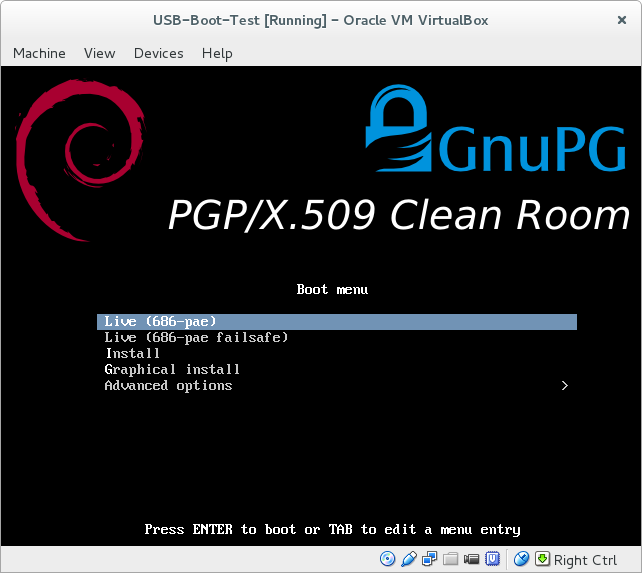
One of the projects proposed for this round of Outreachy is the PGP / PKI Clean Room live image. Interns, and anybody who decides to start using the project (it is already functional for command line users) need to decide about purchasing various pieces of hardware, including a smart card, a smart card reader and a suitably secure computer to run the clean room image. It may also be desirable to purchase some additional accessories, such as a hardware random number generator. If you have any specific suggestions for hardware or can help arrange any donations of hardware for Outreachy interns, please come and join us in the pki-clean-room mailing list or consider adding ideas on the PGP / PKI clean room wiki. Choice of smart card For standard PGP use, the OpenPGP card provides a good choice. For X.509 use cases, such as VPN access, there are a range of choices. I recently obtained one of the SmartCard HSM cards, Card Contact were kind enough to provide me with a free sample. An interesting feature of this card is Elliptic Curve (ECC) support. More potential cards are listed on the OpenSC page here. Choice of card reader The technical factors to consider are most easily explained with a table:
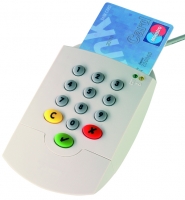
On disk Smartcard reader without PIN-pad Smartcard reader with PIN-pad
Software Free/open Mostly free/open, Proprietary firmware in reader
Key extraction Possible Not generally possible
Passphrase compromise attack vectors Hardware or software keyloggers, phishing, user error (unsophisticated attackers) Exploiting firmware bugs over USB (only sophisticated attackers)
Other factors No hardware Small, USB key form-factor Largest form factor
Some are shortlisted on the GnuPG wiki and there has been recent discussion of that list on the GnuPG-users mailing list. Choice of computer to run the clean room environment There are a wide array of devices to choose from. Here are some principles that come to mind:
  • Prefer devices without any built-in wireless communications interfaces, or where those interfaces can be removed
  • Even better if there is no wired networking either
  • Particularly concerned users may also want to avoid devices with opaque micro-code/firmware
  • Small devices (laptops) that can be stored away easily in a locked cabinet or safe to prevent tampering
  • No hard disks required
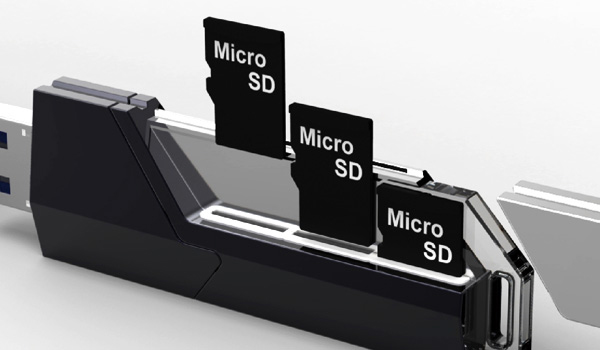
  • Having built-in SD card readers or the ability to add them easily
SD cards and SD card readers The SD cards are used to store the master private key, used to sign the certificates/keys on the smart cards. Multiple copies are kept. It is a good idea to use SD cards from different vendors, preferably not manufactured in the same batch, to minimize the risk that they all fail at the same time. For convenience, it would be desirable to use a multi-card reader: although the software experience will be much the same if lots of individual card readers or USB flash drives are used. Other devices One additional idea that comes to mind is a hardware random number generator (TRNG), such as the FST-01. Can you help with ideas or donations? If you have any specific suggestions for hardware or can help arrange any donations of hardware for Outreachy interns, please come and join us in the pki-clean-room mailing list or consider adding ideas on the PGP / PKI clean room wiki.

19 October 2016

Pau Garcia i Quiles: FOSDEM Desktops DevRoom 2017 all for Participation

FOSDEM is one of the largest (5,000+ hackers!) gatherings of Free Software contributors in the world and happens each February in Brussels (Belgium, Europe). Once again, one of the tracks will be the Desktops DevRoom (formerly known as CrossDesktop DevRoom ), which will host Desktop-related talks. We are now inviting proposals for talks about Free/Libre/Open-source Software on the topics of Desktop development, Desktop applications and interoperability amongst Desktop Environments. This is a unique opportunity to show novel ideas and developments to a wide technical audience. Topics accepted include, but are not limited to: Talks can be very specific, such as the advantages/disadvantages of distributing a desktop application with snap vs flatpak, or as general as using HTML5 technologies to develop native applications. Topics that are of interest to the users and developers of all desktop environments are especially welcome. The FOSDEM 2016 schedule might give you some inspiration. Submissions Please include the following information when submitting a proposal: How to submit All submissions are made in the Pentabarf event planning tool: https://penta.fosdem.org/submission/FOSDEM17 To submit your talk, click on Create Event , then make sure to select the Desktops devroom as the Track . Otherwise your talk will not be even considered for any devroom at all. If you already have a Pentabarf account from a previous year, even if your talk was not accepted, please reuse it. Create an account if, and only if, you don t have one from a previous year. If you have any issues with Pentabarf, please contact desktops-devroom@lists.fosdem.org. Deadline The deadline for submissions is December 5th 2016. FOSDEM will be held on the weekend of 4 & 5 February 2017 and the Desktops DevRoom will take place on Sunday, February 5th 2017. We will contact every submitter with a yes or no before December 11th 2016. Recording permission The talks in the Desktops DevRoom will be audio and video recorded, and possibly streamed live too. In the Submission notes field, please indicate that you agree that your presentation will be licensed under the CC-By-SA-4.0 or CC-By-4.0 license and that you agree to have your presentation recorded. For example:
If my presentation is accepted for FOSDEM, I hereby agree to license all recordings, slides, and other associated materials under the Creative Commons Attribution Share-Alike 4.0 International License. Sincerely, <NAME>.
If you want us to stop the recording in the Q & A part (should you have one), please tell us. We can do that but only for the Q & A part. More information The official communication channel for the Desktops DevRoom is its mailing list desktops-devroom@lists.fosdem.org. Use this page to manage your subscription: https://lists.fosdem.org/listinfo/desktops-devroom Organization The Desktops DevRoom 2017 is managed by a team representing the most notable open desktops: If you want to join the team, please contact desktops-devroom@lists.fosdem.org

Rapha&#235;l Hertzog: Freexian s report about Debian Long Term Support, September 2016

A Debian LTS logoLike each month, here comes a report about the work of paid contributors to Debian LTS. Individual reports In September, about 152 work hours have been dispatched among 13 paid contributors. Their reports are available: Evolution of the situation The number of sponsored hours reached 172 hours per month thanks to maxcluster GmbH joining as silver sponsor and RHX Srl joining as bronze sponsor. We only need a couple of supplementary sponsors now to reach our objective of funding the equivalent of a full time position. The security tracker currently lists 39 packages with a known CVE and the dla-needed.txt file 34. It s a small bump compared to last month but almost all issues are affected to someone. Thanks to our sponsors New sponsors are in bold.

No comment Liked this article? Click here. My blog is Flattr-enabled.

Reproducible builds folks: Reproducible Builds: week 77 in Stretch cycle

What happened in the Reproducible Builds effort between Sunday October 9 and Saturday October 15 2016: Media coverage Documentation update After discussions with HW42, Steven Chamberlain, Vagrant Cascadian, Daniel Shahaf, Christopher Berg, Daniel Kahn Gillmor and others, Ximin Luo has started writing up more concrete and detailed design plans for setting SOURCE_ROOT_DIR for reproducible debugging symbols, buildinfo security semantics and buildinfo security infrastructure. Toolchain development and fixes Dmitry Shachnev noted that our patch for #831779 has been temporarily rejected by docutils upstream; we are trying to persuade them again. Tony Mancill uploaded javatools/0.59 to unstable containing original patch by Chris Lamb. This fixed an issue where documentation Recommends: substvars would not be reproducible. Ximin Luo filed bug 77985 to GCC as a pre-requisite for future patches to make debugging symbols reproducible. Packages reviewed and fixed, and bugs filed The following updated packages have become reproducible - in our current test setup - after being fixed: The following updated packages appear to be reproducible now, for reasons we were not able to figure out. (Relevant changelogs did not mention reproducible builds.) Some uploads have addressed some reproducibility issues, but not all of them: Some uploads have addressed nearly all reproducibility issues, except for build path issues: Patches submitted that have not made their way to the archive yet: Reviews of unreproducible packages 101 package reviews have been added, 49 have been updated and 4 have been removed in this week, adding to our knowledge about identified issues. 3 issue types have been updated: Weekly QA work During of reproducibility testing, some FTBFS bugs have been detected and reported by: tests.reproducible-builds.org Debian: Openwrt/LEDE/NetBSD/coreboot/Fedora/archlinux: Misc. We are running a poll to find a good time for an IRC meeting. This week's edition was written by Ximin Luo, Holger Levsen & Chris Lamb and reviewed by a bunch of Reproducible Builds folks on IRC.

18 October 2016

MJ Ray: Rinse and repeat

Forgive me, reader, for I have sinned. It has been over a year since my last blog post. Life got busy. Paid work. Another round of challenges managing my chronic illness. Cycle campaigning. Fun bike rides. Friends. Family. Travels. Other social media to stroke. I m still reading some of the planets where this blog post should appear and commenting on some, so I ve not felt completely cut off, but I am surprised how many people don t allow comments on their blogs any more (or make it too difficult for me with reCaptcha and the like). The main motive for this post is to test some minor upgrades, though. Hi everyone. How s it going with you? I ll probably keep posting short updates in the future. Go in peace to love and serve the web.

17 October 2016

Russ Allbery: pgpcontrol 2.5

pgpcontrol is the collection of the original signing and verification scripts that David Lawrence wrote (in Perl) for verification of Usenet control messages. I took over maintenance of it, with a few other things, but haven't really done much with it. It would benefit a lot from an overhaul of both the documentation and the code, and turning it into a more normal Perl module and supporting scripts. This release is none of those things. It's just pure housekeeping, picking up changes made by other people (mostly Julien LIE) to the copies of the scripts in INN and making a few minor URL tweaks. But I figured I may as well, rather than distribute old versions of the scripts. You can tell how little I've done with this stuff by noting that they don't even have a distribution page on my web site. The canonical distribution site is ftp.isc.org, although I'm not sure if that site will pick up the new release. (This relies on a chain of rsync commands that have been moved multiple times since the last time I pushed the release button, and I suspect that has broken.) I'll ping someone about possibly fixing that; in the meantime, you can find the files on archives.eyrie.org.

Russell Coker: Improving Memory

I ve just attended a lecture about improving memory, mostly about mnemonic techniques. I m not against learning techniques to improve memory and I think it s good to teach kids a variety of things many of which won t be needed when they are younger as you never know which kids will need various skills. But I disagree with the assertion that we are losing valuable skills due to digital amnesia . Nowadays we have programs to check spelling so we can avoid the effort of remembering to spell difficult words like mnemonic, calendar apps on our phones that link to addresses and phone numbers, and the ability to Google the world s knowledge from the bathroom. So the question is, what do we need to remember? For remembering phone numbers it seems that all we need is to remember numbers that we might call in the event of a mobile phone being lost or running out of battery charge. That would be a close friend or relative and maybe a taxi company (and 13CABS isn t difficult to remember). Remembering addresses (street numbers etc) doesn t seem very useful in any situation. Remembering the way to get to a place is useful and it seems to me that the way the navigation programs operate works against this. To remember a route you would want to travel the same way on multiple occasions and use a relatively simple route. The way that Google maps tends to give the more confusing routes (IE routes varying by the day and routes which take all shortcuts) works against this. I think that spending time improving memory skills is useful, but it will either take time away from learning other skills that are more useful to most people nowadays or take time away from leisure activities. If improving memory skills is fun for you then it s probably better than most hobbies (it s cheap and provides some minor benefits in life). When I was in primary school it was considered important to make kids memorise their times tables . I m sure that memorising the multiplication of all numbers less than 13 is useful to some people, but I never felt a need to do it. When I was young I could multiply any pair of 2 digit numbers as quickly as most kids could remember the result. The big difference was that most kids needed a calculator to multiply any number by 13 which is a significant disadvantage. What We Must Memorise Nowadays the biggest memory issue is with passwords (the Correct Horse Battery Staple XKCD comic is worth reading [1]). Teaching mnemonic techniques for the purpose of memorising passwords would probably be a good idea and would probably get more interest from the audience. One interesting corner-case of passwords is ATM PIN numbers. The Wikipedia page about PIN numbers states that 4-12 digits can be used for PINs [2]. The 4 digit PIN was initially chosen because John Adrian Shepherd-Barron (who is credited with inventing the ATM) was convinced by his wife that 6 digits would be too difficult to memorise. The fact that hardly any banks outside Switzerland use more than 4 digits suggests that Mrs Shepherd-Barron had a point. The fact that this was decided in the 60 s proves that it s not digital amnesia . We also have to memorise how to use various supposedly user-friendly programs. If you observe an iPhone or Mac being used by someone who hasn t used one before it becomes obvious that they really aren t so user friendly and users need to memorise many operations. This is not a criticism of Apple, some tasks are inherently complex and require some complexity of the user interface. The limitations of the basic UI facilities become more obvious when there are operations like palm-swiping the screen for a screen-shot and a double-tap plus drag for a 1 finger zoom on Android. What else do we need to memorise?

16 October 2016

Thomas Goirand: Released OpenStack Newton, Moving OpenStack packages to upstream Gerrit CI/CD

OpenStack Newton is released, and uploaded to Sid OpenStack Newton was released on the Thursday 6th of October. I was able to upload nearly all of it before the week-end, though there was a bit of hick-ups still, as I forgot to upload python-fixtures 3.0.0 to unstable, and only realized it thanks to some bug reports. As this is a build time dependency, it didn t disrupt Sid users too much, but 38 packages wouldn t build without it. Thanks to Santiago Vila for pointing at the issue here. As of writing, a lot of the Newton packages didn t migrate to Testing yet. It s been migrating in a very messy way. I d love to improve this process, but I m not sure how, if not filling RC bugs against 250 packages (which would be painful to do), so they would migrate at once. Suggestions welcome. Bye bye Jenkins For a few years, I was using Jenkins, together with a post-receive hook to build Debian Stable backports of OpenStack packages. Though nearly a year and a half ago, we had that project to build the packages within the OpenStack infrastructure, and use the CI/CD like OpenStack upstream was doing. This is done, and Jenkins is gone, as of OpenStack Newton. Current status As of August, almost all of the packages Git repositories were uploaded to OpenStack Gerrit, and the build now happens in OpenStack infrastructure. We ve been able to build all packages a release OpenStack Newton Debian packages using this system. This non-official jessie backports repository has also been validated using Tempest. Goodies from Gerrit and upstream CI/CD It is very nice to have it built this way, so we will be able to maintain a full CI/CD in upstream infrastructure using Newton for the life of Stretch, which means we will have the tools to test security patches virtually forever. Another thing is that now, anyone can propose packaging patches without the need for an Alioth account, by sending a patch for review through Gerrit. It is our hope that this will increase the likeliness of external contribution, for example from 3rd party plugins vendors (ie: networking driver vendors, for example), or upstream contributors themselves. They are already used to Gerrit, and they all expected the packaging to work this way. They are all very much welcome. The upstream infra: nodepool, zuul and friends
The OpenStack infrastructure has been described already in planet.debian.org, by Ian Wienand. So I wont describe it again, he did a better job than I ever would. How it works All source packages are stored in Gerrit with the deb- prefix. This is in order to avoid conflict with upstream code, and to easily locate packaging repositories. For example, you ll find Nova packaging under https://git.openstack.org/cgit/openstack/deb-nova. Two Debian repositories are stored in the infrastructure AFS (Andrew File System, which means a copy of that repository exist on each cloud were we have compute resources): one for the actual deb-* builds, under jessie-newton , and one for the automatic backports, maintained in the deb-auto-backports gerrit repository. We re using a git tag based workflow. Every Gerrit repository contains all of the upstream branch, plus a debian/newton branch, which contains the same content as a tag of upstream, plus the debian folder. The orig tarball is generated using git archive , then used by sbuild to produce binaries. To package a new upstream release, one simply needs to git merge -X theirs FOO (where FOO is the tag you want to merge), then edit debian/changelog so that the Debian package version matches the tag, then do git commit -a amend , and simply git review . At this point, the OpenStack CI will build the package. If it builds correctly, then a core reviewer can approve the merge commit , the patch is merged, then the package is built and the binary package published on the OpenStack Debian package repository. Maintaining backports automatically The automatic backports is maintained through a Gerrit repository called deb-auto-backports containing a packages-list file that simply lists source packages we need to backport. On each new CR (change request) in Gerrit, thanks to some madison-lite and dpkg compare-version magic, the packages-list is used to compare what s in the Debian archive and what we have in the jessie-newton-backports repository. If the version is lower in our repository, or if the package doesn t exist, then a build is triggered. There is the possibility to backport from any Debian release (using the -d flag in the packages-list file), and even we can use jessie-backports to just rebuild the package. I also had to write a hack to just download from jessie-backports without rebuilding, because rebuilding the webkit2gtk package (needed by sphinx) was taking too resources (though we ll try to never use it, and rebuild packages when possible). The nice thing with this system, is that we don t need to care much about maintaining packages up-to-date: the script does that for us. Upstream Debian repository are NOT for production The produced package repositories are there because we have interconnected build dependencies, needed to run unit test at build time. It is the only reason why such Debian repository exist. They are not for production use. If you wish to deploy OpenStack, we very much recommend using packages from distributions (like Debian or Ubuntu). Indeed, the infrastructure Debian repositories are updated multiple times daily. As a result, it is very likely that you will experience failures to download (hash or file size mismatch and such). Also, the functional tests aren t yet wired in the CI/CD in OpenStack infra, and therefore, we cannot guarantee yet that the packages are usable. Improving the build infrastructure There s a bunch of things which we could do to improve the build process. Let me give a list of things we want to do. Generalizing to Debian During Debconf 16, I had very interesting talks with the DSA (Debian System Administrator) about deploying such a CI/CD for the whole of the Debian archive, interfacing Gerrit with something like dgit and a build CI. I was told that I should provide a proof of concept first, which I very much agreed with. Such a PoC is there now, within OpenStack infra. I very much welcome any Debian contributor to try it, through a packaging patch. If you wish to do so, you should read how to contribute to OpenStack here: https://wiki.openstack.org/wiki/How_To_Contribute#If_you.27re_a_developer and then simply send your patch with git review . This system, however, currently only fits the git tag based packaging workflow. We d have to do a little bit more work to make it possible to use pristine-tar (basically, allow to push in the upstream and pristine-tar branches without any CI job connected to the push). Dear DSA team, as we now nice PoC that is working well, on which the OpenStack PKG team is maintaining 100s of packages, shall we try to generalize and provide such infrastructure for every packaging team and DDs?

Steinar H. Gunderson: backup.sh opensourced

It's been said that backup is a bit like flossing; everybody knows you should do it, but nobody does it. If you want to start flossing, an immediate question is what kind of dental floss to get and conversely, for backup, which backup software do you want to rely on? I had some criteria: I looked at basically everything that existed in Debian and then some, and all of them failed. But Samfundet had its own script that's basically just a simple wrapper around tar and ssh, which has worked for 15+ years without a hitch (including several restores), so why not use it? All the authors agreed to a GPLv2+ licensing, so now it's time for backup.sh to meet the world. It does about the simplest thing you can imagine: ssh to the server and use GNU tar to tar down every filesystem that has the dump bit set in fstab. Every 30 days, it does a full backup; otherwise, it does an incremental backup using GNU tar's incremental mode (which makes sure you will also get information about file deletes). It doesn't do inter-file diffs (so if you have huge files that change only a little bit every day, you'll get blowup), and you can't do single-file restores without basically scanning through all the files; tar isn't random-access. So it doesn't do much fancy, but it works, and it sends you a nice little email every day so you can know your backup went well. (There's also a less frequently used mode where the backed-up server encrypts the backup using GnuPG, so you don't even need to trust the backup server.) It really takes fifteen minutes to set up, so now there's no excuse. :-) Oh, and the only good dental floss is this one. :-)

R&#233;mi Vanicat: Trying to install Debian on G752VM-GC006T

I'm trying to install Debian GNU/linux on my new ASUS G752VM-GC006T So what I've discovered: So I've a working linux. My problem are: And the question is: where to report those bug. First edit: rEFInd seem to find windows and Debian, thanks to blackcat77

14 October 2016

Antoine Beaupr : Managing good bug reports

Bug reporting is an art form that is too often neglected in software projects. Bug reports allow contributors to participate without deep technical knowledge and at the same time provide a crucial space for developers to be made aware of issues with their software that they could not have foreseen or found themselves, for lack of resources, variety or imagination.

Prior art Unfortunately, there are rarely good guidelines for submitting bug reports. Historically, people have pointed towards How to report bugs effectively or How to ask questions the smart way. While those guides can be useful for motivated people and may seem attractive references for project managers, they suffer from serious issues:
  • they are written by technical people, for non-technical people
  • as a result, they have a deeply condescending attitude such as calling people "stupid" or various animal names like "mongoose"
  • they are also very technical themselves: one starts with a copyright notice and a changelog, the other uses magic words like "Core dumps" and $Id$
  • they are too long: sgtatham's is about 3600 words long, esr's is even longer at about 11800 words. those texts will take about 20 to 60 minutes to read by an average reader, according to research
Individual projects have their own guides as well. Linux has the REPORTING_BUGS file that is a much shorter 1200 that can be read under 5 minutes, provided that you can understand the topic at hand. Interestingly, that guide refers to both esr's and sgtatham's guidelines, which means, in the degenerate case where the user hasn't had the "privilege" of reading esr's prose already, they will have an extra hour and a half of reading to do to have honestly followed the guidelines before reporting the bug. I often find good documentation in the Tails project. Their bug reporting guidelines are easily accessible and quick to read, although they still might be too technical. It could be argued that you need to get technical at some point to get that information out, of course. In the Monkeysign project, I have started a bug reporting guide that doesn't yet address all those issues. I am considering writing a new guide, but I figured I would look at other people's work and get feedback before writing my own standard.

What's the point? Why have those documents been written? Are people really expected to read them before seeking help? It seems to me unlikely that someone would:
  1. be motivated enough to do something about a broken part of their computer
  2. figure out they can do something about it
  3. read a fifteen thousand words novel about how to report a bug...
  4. just to finally write a 20-line bug report that has no warranty of support attached to it
And if I would be a paying customer, I wouldn't want to be forced to waste my time reading that prose either: it's your job to help me fix your broken things, not the reverse. As someone doing consulting these days: I totally understand: it's not you, the user, it's us, the developers, that have a problem. We have been socialized through computers, and it makes us weird and obtuse, but that's no excuse, and we need to clean up our act. Furthermore, it's surprising how often we get (and make!) bug reports that can be difficult to use. The Monkeysign project is very "technical" and I have expected that the bug reports I would get would be well written, with ways to reproduce and so on, but it happened that I received bug reports that were all over the place, didn't have any ways of reproducing or were simply incomplete. Those three bug reports were filed by people that I know to be very technically capable: one is a fellow Debian developer, the second had filed a good bug report 5 days before, and the third one is a contributor that sent good patches before. In all three cases, they knew what they were doing. Those three people probably read the guidelines mentioned in the past. They may have even read the Monkeysign bug reporting guidelines as well. I can only explain those bug reports by the lack of time: people thought the issue was obvious, that it would get fixed rapidly because, obviously, something is broken. We need a better way.

The takeaway What are those guides trying to tell us?
  1. ask questions in the right place
  2. search for similar questions and issues before reporting the bug
  3. try to make the developers reproduce the issues
  4. failing that, try to describe the issue as well as you can
  5. write clearly, be specific and verbose yet concise
There are obviously contradictions in there, like sgtatham telling us to be verbose and esr tells us to, basically, not be verbose. There is definitely a tension in there, and there are many, many more details about how great bug reports can be if done properly. I tend towards the side of terseness in our descriptions: people that will know how to be concise will be, people that don't will most likely not learn by reading a 12 000 words novel that, in itself, didn't manage to be parsimonious. But I am willing to allow for verbosity in bug reports: I prefer too many details instead of missing a key bit of information.

Issue trackers Step 1 is our job: we should send people in the right place, and give them the right tools. Monkeysign used to manage bugs with bugs-everywhere and this turned out to be a terrible idea: you had to understand git and bugs-everywhere to file any bug reports. As a result, there were exactly zero bug reports filed by non-developers during the whole time BE was used, although some bugs were filed in the Debian Bugtracker. So have a good bug tracker. A mailing list or email address is not a good bug tracker: you lose track of old issues, and it's hard for newcomers to search the archives. It does have the advantage of having a unified interface for the support forum and bug tracking, however. Redmine, Gitlab, Github and others are all decent-enough bug trackers. The key point is that the issue tracker should be publicly available, and users should be able to register easily to file new issues. You should also be able to mass-edit tickets and users should be able to discover the tracker's features easily. I am sorry to say that the Debian BTS somewhat falls short on those two features. Step 2 is a shared responsibility: there should be an easy way to search for issues, and we should help the user looking for similar issues. Stackexchange sites do an excellent job at this, by automatically searching for similar questions while you write your question, suggesting similar ones in an attempt to weed out duplicates. Duplicates still happen, but they can then clearly be marked and linked with a distinct mechanism. Most bug trackers do not offer such high level functionality, but should, so I feel the fault lies more on "our" end than at the user's end.

Reproducing the environment Step 3 and 4 are more or less the user's responsibility. We can detail in our documentation how to clearly share the environment where we reproduced the bug, for example, but in the end, the user decides if they want to share that information or not. In Monkeysign, I have finally implemented joeyh's suggestion of shipping the test suite with the program. I can now tell people to run the test suite in their environment to see if this is a regression that is specific to their environment - so a known bug, in a way - or a novel bug for which I can look at writing a new unit test. I also include way more information about the environment in the --version output, an idea I brought forward in the borg project to ease debugging. That way, people can just send the output of monkeysign --test and monkeysign --version, and I have a very good overview of what is happening on their end. Of course, Monkeysign also supports the usual --verbose and --debug flag that users should enable when reproducing issues. Another idea is to report bugs directly from the application. We have all seen Firefox or other software have automatic bug reporting tools, but somehow those seem unsatisfactory for a user: we have no feedback of where the report goes, if it's followed up on. It is useful for larger project to get statistical data, but not so useful for users in the short term. Monkeysign tries to handle exceptions in the code in a graceful way, but could do better. We use a small library to handle exceptions, but that library has since then been improved to directly file bugs against the Github project. This assumes the user is logged into Github, but it is nice to pre-populate bug reports with the relevant information up front.

Issue templates In the meantime, to make sure people provide enough information, I have now moved a lot of the bug reporting guidelines to a separate issue template. That issue template is available through the issue creation form now, although it is not enabled by default, a weird limitation of Gitlab. Issue templates are available in Gitlab and Github. Issue templates somewhat force users in a straight jacket: there is already something to structure their bug report. Those could be distinct form elements that had to be filled in, but I like the flexibility of the template, and the possibility for users to just escape the formalism and just plead for help in their own way.

Issue guidelines In the end, I opted for a short few paragraphs in the style of the Tails documentation, including a reference to sgtatham, as an optional future reference:
  • Before you report a new bug, review the existing issues in the online issue tracker and the Debian BTS for Monkeysign to make sure the bug has not already been reported elsewhere.
  • The first aim of a bug report is to tell the developers exactly how to reproduce the failure, so try to reproduce the issue yourself and describe how you did that.
  • If that is not possible, try to describe what went wrong in detail. Write down the error messages, especially if they have numbers.
  • Take the necessary time to write clearly and precisely. Say what you mean, and make sure it cannot be misinterpreted.
  • Include the output of monkeysign --test, monkeysign --version and monkeysign --debug in your bug reports. See the issue template for more details about what to include in bug reports.
If you wish to read more about issues regarding communication in bug reports, you can read How to Report Bugs Effectively, which takes around 20 to 30 minutes.
Unfortunately, short of rewriting sgtatham's guide, I do not feel there is much more we can do as a general guide. I find esr's guide to be too verbose and commanding, so sgtatham it will be for now.

The prose and literacy In the end, there is a fundamental issue with reporting bugs: it assumes our users are literate and capable of writing amazing prose that we will enjoy reading as the last J.K. Rowling novel (if you're into that kind of thing). It's just an unreasonable expectation: some of your users don't even speak the same language as you, let alone read or write it. This makes for challenging collaboration, to say the least. This is where automated reporting makes sense: it doesn't require user's intervention, and the communication is mediated by machines without human intervention and their pesky culture. But we should, as maintainers, "be liberal in what we accept and conservative in what we send". Be tolerant, and help your users in fixing their issues. It's what you are there for, after all. And in the end, we all fail the same way. In an attempt to improve the situation on bug reporting guides, I seem to have myself written a 2000 short story that will have taken up a hopefully pleasant 10 minutes of your time at minimum. Hopefully I will have succeeded at being clear, specific, verbose and concise all at once and look forward to your feedback on how to improve our bug reporting culture.

Jonathan Dowland: Hi-Fi Furniture

sadly obsolete sadly obsolete
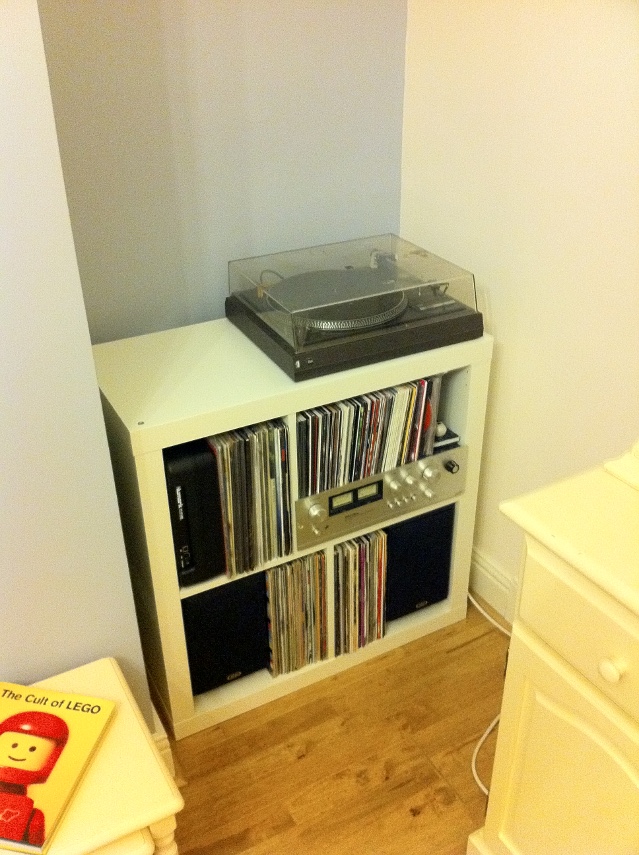
For the last four years or so, I've had my Hi-Fi and the vast majority of my vinyl collection stored in a self-contained, mildly-customized Ikea unit. Since moving house this has been in my dining room which we have always referred to as the "play room", since we have a second dining room in which we actually dine. The intention for the play room was for it to be the room within which all our future children would have their toys kept, in an attempt to keep the living room from being overrun with plastic. The time has thus come for my Hi-Fi to come out of there, so we've moved it to our living room. Unfortunately, there's not enough room in the living room for the Ikea unit: I need something narrower for the space available.
via IkeaHackers.net via IkeaHackers.net
In the spirit of my original hack, I started looking at what others might have achieved with Ikea components. There are some great examples of open-style units built out of the (extremely cheap) Lack coffee tables, such as this ikeahackers article, but I'd prefer something more enclosed. One problem I've had with the Expedit unit was my cat trying to scratch the records. I ended up putting framed records at the front to cover the spines of the records within. If I were keeping the unit, I'd look at fitting hinges (another ikeahackers article) Asides from hacked Ikea stuff, there are a few companies offering traditional enclosed Hi Fi cabinets. I'm going to struggle to fit both the equipment and a subset of records into these, so I might have to look at storing them separately. In some ways that makes life easier: the records could go into a 1x4 Ikea KALLAX unit, leaving the amp and deck to home somewhere. Perhaps I could look at a bigger unit for under the TV. My parents have a nice Hi-Fi unit that pretends to be a chest of drawers. I'm fairly sure my Dad custom-built it, as it has a hinged top to provide access to the turntable and I haven't seen anything like that on the market. That brings me onto thinking about other AV things I'd like to achieve in the living room. I've always been interested in exploring surround sound, but my initial attempt in my prior flat did not go well, either because the room was not terribly suited accoustically, or because the Pioneer unit I bought was rubbish, or both. It seems that there aren't really AV receivers which are designed to satisfy both people wanting to use them in a Hi-Fi and a home cinema setting. I could stick to stereo and run the TV into my existing (or a new) amplifier, subject to some logistics around wiring. A previous house owner ran some phono cables under the hard-wood flooring from the TV alcove to the opposite side of the fire place, which might give me some options. There's also the world of wireless audio, Sonos etcetera. Realistically the majority of my music is digital nowadays, and it would be good to be able to listen to it conveniently in the house. I've heard good reports on the entry level Sonos stuff, but they seem to be Mono, and even the more high-end ones with lots of drivers have very small separation. I did buy a Chromecast Audio on a whim recently, but I haven't looked at it much yet: perhaps that's part of the solution. So, lots of stuff in the melting pot to figure out here!

13 October 2016

Norbert Preining: John Oliver and news in Japan

Yesterday evening I was enjoying several features by John Oliver, mostly about the upcoming election in the US (Scandals), but also one of the best features I have heard from him on Guant namo. It sadly reminded me of the completely different landscape in Japan.
news-around-the-world Not only since the unprecedented warning to close down biased broadcasters by the Ministry of Internal Affairs and Communication, but ever since Abe is building up his more and more totalitarian control over the country, the freedom of press has been on shaky grounds. Even worse, newspapers and TV outlets restrict themselves to save topics, which means: stupid talk shows, food, and above all praise of Japan and how good, how lovely, how great it is (Make Japan great again!). All this despite the fact that there would be a lot to rumble upon: covering up the truth around Fukushima, mountains of scandals around Olympia 2020, police brutality in Okinawa, the list is long. Only thinking about having something remotely similar to John Oliver on TV in Japan is as unthinkable as Trump donating all his money to a charity for immigrants. Sure enough, John Oliver is one great example out of tons of rubbish in the US, sure enough, but this one example is missing in Japan. What remains are Japanese media stations that crawl into the *** of the government, what a sad state. (Photo credit partially due to ber Arschkriecher)
12 October 2016

Craig Small: axdigi resurrected

Seems funny to talk about 20 year old code that was a stop-gap measure to provide a bridging function the kernel had not (as yet) got, but here it is, my old bridge code. When I first started getting involved in Free Software, I was also involved with hamradio. In 1994 I release my first Free Software, or Open Source program called axdigi. This program allowed you to digipeat . This was effectively source route bridging across hamradio packet networks. The code I used for this was originally network sniffer code to debug my PackeTwin kernel driver but got frustrated at there being no digipeating function within Linux, so I wrote axdigi which is about 200 lines. The funny thing is, back then I thought it would be a temporary solution until digipeating got put into the kernel, which it temporarily did then got removed. Recently some people asked me about axdigi and where there is an official place where the code lives. The answer is really the last axdigi was 0.02 written in July 1995. It seems strange to resurrect 20 year old code but it is still in use; though it does show its age. I ve done some quick work on getting rid of the compiler warnings but there is more to do. So now axdigi has a nice shiny new home on GitHub, at https://github.com/csmall/axdigi

11 October 2016

Daniel Pocock: Outreachy and GSoC 2017 opportunities in Multimedia Real-Time Communication

I've proposed Free Real-Time Communication as a topic in Outreachy this year. The topic will also be promoted as part of GSoC 2017. If you are interested in helping as either an intern or mentor, please follow the instructions there to make contact. Even if you can't participate, if you have the opportunity to promote the topic in a university or any other environment where potential interns will see it, please do so as this makes a big difference to the success of these programs. The project could involve anything related to SIP, XMPP, WebRTC or peer-to-peer real-time communication, as long as it emphasizes a specific feature or benefit for the Debian community. If other Outreachy organizations would also like to have a Free RTC project for their community, then this could also be jointly mentored.

10 October 2016

Petter Reinholdtsen: Experience and updated recipe for using the Signal app without a mobile phone

In July I wrote how to get the Signal Chrome/Chromium app working without the ability to receive SMS messages (aka without a cell phone). It is time to share some experiences and provide an updated setup. The Signal app have worked fine for several months now, and I use it regularly to chat with my loved ones. I had a major snag at the end of my summer vacation, when the the app completely forgot my setup, identity and keys. The reason behind this major mess was running out of disk space. To avoid that ever happening again I have started storing everything in userdata/ in git, to be able to roll back to an earlier version if the files are wiped by mistake. I had to use it once after introducing the git backup. When rolling back to an earlier version, one need to use the 'reset session' option in Signal to get going, and notify the people you talk with about the problem. I assume there is some sequence number tracking in the protocol to detect rollback attacks. The git repository is rather big (674 MiB so far), but I have not tried to figure out if some of the content can be added to a .gitignore file due to lack of spare time. I've also hit the 90 days timeout blocking, and noticed that this make it impossible to send messages using Signal. I could still receive them, but had to patch the code with a new timestamp to send. I believe the timeout is added by the developers to force people to upgrade to the latest version of the app, even when there is no protocol changes, to reduce the version skew among the user base and thus try to keep the number of support requests down. Since my original recipe, the Signal source code changed slightly, making the old patch fail to apply cleanly. Below is an updated patch, including the shell wrapper I use to start Signal. The original version required a new user to locate the JavaScript console and call a function from there. I got help from a friend with more JavaScript knowledge than me to modify the code to provide a GUI button instead. This mean that to get started you just need to run the wrapper and click the 'Register without mobile phone' to get going now. I've also modified the timeout code to always set it to 90 days in the future, to avoid having to patch the code regularly. So, the updated recipe for Debian Jessie:
  1. First, install required packages to get the source code and the browser you need. Signal only work with Chrome/Chromium, as far as I know, so you need to install it.
    apt install git tor chromium
    git clone https://github.com/WhisperSystems/Signal-Desktop.git
    
  2. Modify the source code using command listed in the the patch block below.
  3. Start Signal using the run-signal-app wrapper (for example using pwd /run-signal-app).
  4. Click on the 'Register without mobile phone', will in a phone number you can receive calls to the next minute, receive the verification code and enter it into the form field and press 'Register'. Note, the phone number you use will be user Signal username, ie the way others can find you on Signal.
  5. You can now use Signal to contact others. Note, new contacts do not show up in the contact list until you restart Signal, and there is no way to assign names to Contacts. There is also no way to create or update chat groups. I suspect this is because the web app do not have a associated contact database.
I am still a bit uneasy about using Signal, because of the way its main author moxie0 reject federation and accept dependencies to major corporations like Google (part of the code is fetched from Google) and Amazon (the central coordination point is owned by Amazon). See for example the LibreSignal issue tracker for a thread documenting the authors view on these issues. But the network effect is strong in this case, and several of the people I want to communicate with already use Signal. Perhaps we can all move to Ring once it work on my laptop? It already work on Windows and Android, and is included in Debian and Ubuntu, but not working on Debian Stable. Anyway, this is the patch I apply to the Signal code to get it working. It switch to the production servers, disable to timeout, make registration easier and add the shell wrapper:
cd Signal-Desktop; cat <<EOF   patch -p1
diff --git a/js/background.js b/js/background.js
index 24b4c1d..579345f 100644
--- a/js/background.js
+++ b/js/background.js
@@ -33,9 +33,9 @@
          );
      );
 
-    var SERVER_URL = 'https://textsecure-service-staging.whispersystems.org';
+    var SERVER_URL = 'https://textsecure-service-ca.whispersystems.org';
     var SERVER_PORTS = [80, 4433, 8443];
-    var ATTACHMENT_SERVER_URL = 'https://whispersystems-textsecure-attachments-staging.s3.amazonaws.com';
+    var ATTACHMENT_SERVER_URL = 'https://whispersystems-textsecure-attachments.s3.amazonaws.com';
     var messageReceiver;
     window.getSocketStatus = function()  
         if (messageReceiver)  
diff --git a/js/expire.js b/js/expire.js
index 639aeae..beb91c3 100644
--- a/js/expire.js
+++ b/js/expire.js
@@ -1,6 +1,6 @@
 ;(function()  
     'use strict';
-    var BUILD_EXPIRATION = 0;
+    var BUILD_EXPIRATION = Date.now() + (90 * 24 * 60 * 60 * 1000);
 
     window.extension = window.extension    ;
 
diff --git a/js/views/install_view.js b/js/views/install_view.js
index 7816f4f..1d6233b 100644
--- a/js/views/install_view.js
+++ b/js/views/install_view.js
@@ -38,7 +38,8 @@
             return  
                 'click .step1': this.selectStep.bind(this, 1),
                 'click .step2': this.selectStep.bind(this, 2),
-                'click .step3': this.selectStep.bind(this, 3)
+                'click .step3': this.selectStep.bind(this, 3),
+                'click .callreg': function()   extension.install('standalone')  ,
              ;
          ,
         clearQR: function()  
diff --git a/options.html b/options.html
index dc0f28e..8d709f6 100644
--- a/options.html
+++ b/options.html
@@ -14,7 +14,10 @@
         <div class='nav'>
           <h1>  installWelcome  </h1>
           <p>  installTagline  </p>
-          <div> <a class='button step2'>  installGetStartedButton  </a> </div>
+          <div> <a class='button step2'>  installGetStartedButton  </a>
+	    <br> <a class="button callreg">Register without mobile phone</a>
+
+	  </div>
           <span class='dot step1 selected'></span>
           <span class='dot step2'></span>
           <span class='dot step3'></span>
--- /dev/null   2016-10-07 09:55:13.730181472 +0200
+++ b/run-signal-app   2016-10-10 08:54:09.434172391 +0200
@@ -0,0 +1,12 @@
+#!/bin/sh
+set -e
+cd $(dirname $0)
+mkdir -p userdata
+userdata=" pwd /userdata"
+if [ -d "$userdata" ] && [ ! -d "$userdata/.git" ] ; then
+    (cd $userdata && git init)
+fi
+(cd $userdata && git add . && git commit -m "Current status."   true)
+exec chromium \
+  --proxy-server="socks://localhost:9050" \
+  --user-data-dir=$userdata --load-and-launch-app= pwd 
EOF
chmod a+rx run-signal-app
As usual, if you use Bitcoin and want to show your support of my activities, please send Bitcoin donations to my address 15oWEoG9dUPovwmUL9KWAnYRtNJEkP1u1b.

Next.

Previous.