Search Results: "cas"

4 March 2016

Enrico Zini: Praise of component reuse

I farm bits and pieces out to the guys who are much more brilliant than I am. I say, "build me a laser", this. "Design me a molecular analyzer", that. They do, and I just stick 'em together. (Seth Brundle, "The Fly")
When I decided to try and turn siterefactor into staticsite, I decided that I would go ahead only for as long as it could be done with minimal work, writing code in the most straightforward way on top of existing and stable components. I am pleased by how far that went. Python-Markdown It works fast enough, already comes with extensions for most of what I needed, and can be extended in several ways. One of the extension methods is a hook for manipulating the ElementTree of the rendered document before serializing it to HTML, which made it really easy to go and process internal links in all <a href= and <img src= attributes. To tell an internal link from an external link I just use the standard python urlparse and see if the link has a scheme or a netloc component. If it does not, and if it has a path, then it is an internal link. This also means that I do not need to invent new Markdown syntax for internal references, avoiding the need for remembering things like [text]( < relref "blog/post.md" > ) or [text]( filename /blog/post.md). In staticsite, it's just [text](/blog/post.md) or [text](post.md) if the post is nearby. This feels nicely clean to me: if I wanted to implement fancy markdown features, I could do it as Python-Markdown extensions and submit them upstream. If I wanted to implement fancy interlinking features, I could do it with a special url scheme in links. For example, it would be straigtforward to implement a ssite: url scheme that expanded the url with elements from staticsite's settings using a call to python's string.format (ssite: SETTING_NAME /bar maybe?), except I do not currently see any use cases for extending internal linking from what it is now. Jinja2 Jina2 is a template engine that I already knew, it is widely used, powerful and pleasant to use, both on the templating side and on the API's side. It is not HTML specific, so I can also use it to generate Atom, RSS2, "dynamic" site content, and even new site Markdown pages. Implementing RSS and Atom feeds was just a matter of writing and testing these Jinja2 macros and then reusing them anywhere. toml, yaml, json No need to implement my own front matter parsing. Also, reusing the same syntax as Hugo allows me to just link to its documentation. python-slugify I found python-slugify so I did not bother writing a slug-generating function. As a side effect, now things works better than I would even have thought to implement, including transliteration of non-ascii characters:
$ ./ssite new example --noedit --title "Cos  parl  Enrico"
/enrico-dev/staticsite/example/site/blog/2016/cosi-parlo-enrico.md
(I just filed an RFP) python-livereload Implementing ssite serve which monitors the file system and autoreloads when content changes and renders everything on the fly, took about an hour. Most of that hour went into implementing rendering pages on demand. Then I discovered that it autoreloads even when I edit staticsite's source code. Then I discovered that it communicates with the browser and even automatically triggers a page refresh. I can keep vim on half my screen and a browser in the other half, and I get live preview for free every time I save, without ever leaving the editor. Bootstrap I already use Bootstrap at work, so creating the default theme templates with it took about 10 minutes. This morning I tried looking at my website using my mobile phone, and I pleasantly saw it automatically turning into a working mobile version of itself. Pygments Python-Markdown uses Pygments for syntax highlighting, and it can be themed just by loading a .css. So, without me really doing anything, even staticsite's syntax highligthing is themable, and there's even a nice page with a list of themes to choose from. Everything else... Command line parsing? Straight argparse. Logging? python's logging support. Copying static resource files? shutil.copy2. Parsing dates? dateutil.parser. Timing execution? time.perf_counter. Timezone handling? pytz. Building the command to run an editor? string.format. Matching site pages? fnmatch.translate. ...and then some. If I ever decide to implement incremental rendering, how do I implement tracking which source files have changed? Well, for example, how about just asking git?

3 March 2016

Simon Richter: Why sysvinit?

As most distributions have switched to systemd as default "init", some people have asked why we actually keep sysvinit around, as it's old and crusty, and systemd can do so much more. My answer is: systemd and sysvinit solve entirely different problems, and neither can ever replace the other fully. The big argument in favour of systemd is integration: when you keep everything in one process, it is easy to make sure that components talk to each other. That is nice, but kind of misses the point: integration could be done via IPC as well, and systemd uses a lot of it to separate privileges anyway. The tighter integration comes from something else: the configuration format. Where sysvinit uses a lot of shell scripts ("imperative" format), systemd uses explicit keywords ("descriptive" format), and this is the important design decision here: descriptive formats cannot do anything unanticipated, neither good nor bad. This is important for UI programmers: if there is a button that says "if I close the lid switch, suspend the laptop", then this needs to be connected to functionality that behaves this way, and this connection needs to work in both directions, so the user will find the active setting there when opening the dialog. So, we need to limit ourselves to a closed set of choices, so the UI people can prepare translations. This is the design tradeoff systemd makes: better integration in exchange for less flexibility. Of course, it is simple to allow "custom" actions everywhere, but that starts to break the "well-integrated" behaviour. There is an old blog post from Joey Hess about how to implement a simple alarm clock, using systemd, and this shows both how powerful and how limited the system is. On one hand, the single line WakeSystem=true takes care of the entire dependency chain attached to making sure the system is actually on -- when the system is going to suspend mode, some program needs to determine that there are scheduled jobs that should wake up the system, determined which of these is the next one, program the wakeup time into the hardware and only then allow the suspend to continue. On the other hand, the descriptive framework already breaks down in this simple example, because the default behaviour of the system is to go to sleep if the lid switch is closed, and the easiest way to fix this is to tell systemd to ignore the lid switch while the program is running. The IPC permissions disallow scheduled user jobs from setting this, so a "custom" action is taken that sets up the "ignore the lid switch" policy, changes to an unprivileged user, and runs the actual job. So, it is possible to get back flexibility, but this is traded for integration: while the job is running, any functionality that the "suspend laptop when the lid is closed" button had, is broken. For something simple as a switch on a personal laptop that breaks if the user configures something that is non-standard, that is acceptable. However, the keywords in the service unit files, the timer files, etc. are also part of a descriptive framework, and the services using them expect that the things they promise are kept by the framework, so there is a limit to how many exceptions you can grant. SystemV init really comes from the other direction here. Nothing is promised to init scripts but a vague notion that they will be run with sufficient privileges. There is no dependency tracking that ensures that certain services will always start before others, just priorities. You can add a dependency system like insserv if you like and make sure that all the requirements for it to work (i.e. services declaring their dependencies) are given, and there is a safe fallback of not parallelizing so we can always play it safe. Because there is so little promised to scripts, writing them becomes a bit tedious -- all of them have a large case statement where they parse the command line, all of them need to reimplement dropping privileges and finding the PID of a running process. There are lots of helpers for the more common things, like the LSB standard functions for colorful and matching console output, and Debian's start-stop-daemon for privilege and PID file handling, but in the end it remains each script's responsibility. Systemd will never be able to provide the same flexibility to admins while at the same time keeping the promises made in the descriptive language, and sysvinit will never reach the same amount of easy integration. I think it is fairly safe to predict both of these things, and I'd even go a step further: if any one of them tried, I'd ask the project managers what they were thinking. The only way to keep systems as complex as these running is to limit the scope of the project. With systemd, the complexity is kept in the internals, and it is important for manageability that all possible interactions are well-defined. That is a huge issue when writing adventure games, where you need to define interaction rules for each player action in combination with each object, and each pair of objects that can be combined with the "Use" action. Where adventure games would default to "This doesn't seem to work." or "I cannot use this.", this would not be a helpful error message when we're trying to boot, so we really need to cut down on actions and object types here. Sysvinit, on the other hand, is both more extreme in limiting the scope to very few actions (restart, wait, once) and only one object type (process that can be started and may occasionally terminate) in the main program, and a lot more open in what scripts outside the main program are allowed to do. The prime example for this is that the majority of configuration takes place outside the inittab even -- a script is responsible for the interface that services are registered by dropping init scripts into specific directories, and scripts can also create additional interfaces, but none of this is intrinsic to the init system itself. Which system is the right choice for your system is just that: your choice. You would choose a starting point, and customize what is necessary for your computer to do what you want it to do. Here's the thing: most users will be entirely happy with fully uncustomized systemd. It will suspend your laptop if you close the lid, and even give your download manager veto power. I fully support Debian's decision to use systemd as the default init for new installs, because it makes sense to use the default that is good for the vast majority of users. However, my opening statement still stands: systemd can never support all use cases, because it is constrained by its design. Trying to change that would turn it into an unmaintainable mess, and the authors are right in rejecting this. There are use cases that define the project, and use cases that are out of scope. This is what we need sysvinit for: the bits that the systemd project managers rightfully reject, but that are someone's use case. Telling these users to get lost would be extremely bad style for the "universal operating system." For example, if someone needs a service that asks a database server for a list of virtual machines to start, runs each in its private network namespace that is named after replacing part of the virtual machine name with the last two octets of the host machine's IP address, then binds a virtual Ethernet device into the network namespace and sets up a NAT rule that allows devices to talk to the public Internet and a firewall rule to stop VMs from talking to each other. Such a beast would live outside of systemd's world view. You can easily start it, but systemd would not know how to monitor it (as long as there is some process still running, is that a good sign), not know how to shut down one instance, not know how to map processes to instances and so on. SystemV init has the advantage here that none of these things are defined by the system, and as long as my init script has some code to handle "status", I can easily check up on my processes with the same interface I'd use for everything else. This requires me to have more knowledge of how the init system works, that is true, however I'd also venture that the learning curve for sysvinit is shallower. If you know shell scripting, you can understand what init scripts do, without memorizing special rules that govern how certain keywords interact, and keeping track of changes to these rules as the feature set is expanded. That said, I'm looking at becoming the new maintainer of the sysvinit package so we can continue to ship it and give our users a choice, but I'd definitely need help, as I only have a few systems left that won't run properly with systemd because of its nasty habit to keep lots of code in memory where sysvinit would unload it after use (by letting the shell process end), and these don't make good test systems. The overall plan is to set up a CI system that Ideally, I'd like to reach a state where we can actually ensure that the default configuration is somewhat similar regardless of which init system we use, and that it is possible to install with either (this is a nasty regression in jessie: bootstrapping a foreign-architecture system broke). This will take time, and step one is probably looking at bugs first -- I'm grateful for any help I can get here, primarily I'd like to hear about regressions via bug reports. tl;dr: as a distribution, we need both systemd and sysvinit. If you suggest that systemd can replace sysvinit, I will probably understand that you think that the systemd maintainers don't know project management. I'm reluctantly looking at becoming the official maintainer because I think it is important to keep around.

Simon Richter: UI Design is Hard, Let's Go Shopping

As I have a few hours of downtime on the train, I'm working on one of my favourite KiCad features again: the pin table. This silently appeared in the last KiCad release -- when you have a schematic component open in the editor, there is a new icon, currently on the right of the toolbar, that brings up a table of all pins. Currently, I have the pin number, name and type in the table (as well as the coordinates on the grid, but that's probably not that useful). For the release, this table is read-only, but can at least be useful for proofreading: left mouse click on a column header sorts (as would be expected), and right mouse click on a column header creates a grouping (i.e. all pins that have the same value in this column are collapsed into a single row). The latter is entirely unintuitive, but I have no idea how to show the user that this option exists at all. The good old DirectoryOpus on Amiga had a convention that buttons that had right-click functionality had an earmark to indicate that a "backside" exists, but that is a fairly obscure UI pattern, and would be hard to reproduce across all platforms. I could make the right click drop down a menu instead of immediately selecting this column for grouping -- at least this way it would be explained what is happening, but advanced users may get annoyed at the extra step. I could add a status bar with a hint, but that will always cost me screen space, and this only papers over the issue. I could add a menu with sorting/grouping options, which would allow novice and intermediate users to find the function, but that still does not hint at the shortcut, and the functions to set the sorting would have to be disabled on Linux because wxGTK cannot set the sort column from a program. For editing, another problem turns up in the collapsed rows: what should editing do when we are basically editing multiple pins at once. The most useful mapping would be: However, I'd like to later on introduce multiple-function pins, which would add multiple (partially) exclusive pin names per pin number, which would change the semantics: At the moment, I'm mostly inclined to have separate modes for "grouped by pin number" and "grouped by pin name" -- these modes could be switched by the current grouping column, but that is neither intuitive, nor does it provide a full solution (because grouping by pin type is also supported). Time to look at the use cases: At 32C3, I've implemented a quick completeness check, consisting of a summary line that collapses the pin number column into a comma-separated list of ranges (where a range is defined as consecutive numbers in the last group of digits). I wonder if there is a group of developers with an UI focus who are happy about solving problems like these...

Antonio Terceiro: Debian Ruby Sprint 2016 - day 3: Ruby 2.3 in unstable, Reproducible Builds, and Data Structures for Dinner Booths

Day 3 was again a full of useful work. Since the beginning of the sprint, we were able to fix more than 50 FTBFS bugs, alongside general quality improvements in the packages.
in the Debian jargon, FTBFS means that a package fails to build from source , which in Debian is a critical bug because users need to be able to produce binary packages from their source code to fully exercise the free software principles.
An important milestone that was also achieved on day 3 was the upload of ruby-defaults 1:2.3.0+1, making ruby2.3 the new default version of Ruby. That is the version that will shipped in the next Debian release, codenamed stretch. This is the culmination of a joint effort between the Ruby team and Debian Release Team that involves rebuilding a little more than 130 packages that use the Ruby C API to make sure everything will just work on upgrades, both from the previous stable release, and from earlier snapshots of the current development release. Another small change that will have a big impact for Debian and for free software was an improvement to gem2deb that fixes a reproducibility issue in Ruby packages and will help currently more than 100 Ruby packages become reproducible. The full list of items that have been worked on is this: The day ended at Outback, where we had an amount of beer that led us to formulate what we will now call the One-Sided Dinner Booth Problem. In a party arranged like above, when the people closest to wall need to go alleviate themselves of some beer, you basically have to perform a removal from the bottom of a stack, which requires popping all the elements at the top. When they come back, you have to options: The One-Sided Dinner Booth Problem is finding the optimal data structure and algorithm for this situation. It is postulated that this is an NP-complete problem, and that only probabilistic solutions are cost-effective.

Arturo Borrero Gonz lez: Current status of iptables & nftables in Debian


I would like to give an overview of what is the current status of iptables & nftables in Debian.
Some information contained in this article is not new, this post is about what happened to iptables & nftables in the last 3 months, focusing on the integration with Debian.
versionsBy the time of this article, upstream versions are:
Debian testing (stretch) contains updated versions of all of them:
  • iptables 1.6.0-2
  • nftables 0.5+snapshot20151106-1
  • libnftnl 1.0.5+snapshot20151106-1
The snapshot versioning thing in nftables and libnftnl is the result of packaging a few commits ahead of last upstream release to workaround some nasty bugs.
the iptables-compat stuff
The iptables 1.6.0 release contains a new set of tools called 'compat'. These tools uses the same syntax of iptables,ip6tables,arptables,ebtables but internally read/write data to the nf_tables kernel subsystem.
You can find these compat tools in a binary pacakge: 'iptables-nftables-compat'.

That is one of the approaches available to help admins migrate from iptables to nftables.

Other approach is textual translations. In this case, the admin calls the translation utility using iptables syntax to get the same rule written in native nft syntax.
However, this approach is a work in progress and Debian lacks of this functionality right now . I hope next upstream release of iptables will include some of this.
iptables maintenance
In Debian bug #805018, I contacted former maintainer Laurence J. Lane about the 1.6.0 upstream release and the need to pay attention to such a big release.
Unfortunately, it seems Laurence got his key expired, and he can no longer maintain any package until a new key is in place. Hope we can see him back soon.

So, I took over the maintenance of iptables, with the help of Ana Guerrero, which has been reviewing my work and sponsoring the uploads. Thanks Ana!

As part of this new maintenance, I cleaned up a bit the iptables bug tracker. I closed some very old bugs (see for example #295567 and #118187) which are no longer useful.
ready for stable?
With the stretch freeze coming by the end of 2016, I want to be sure that the main Netfilter packages are in shape for a Debian stable release.
I won't let packages migrate to stable if there is no extensive testing. It should be clear that packages are ready for Debian stable for me to let them go stable.

My concerns regarding nftables & iptables in stable are different actually:
  • iptables: piece of software too widespread. I don't want to break any system with the 1.6.0 migration.
  • nftables: the 0.5 release is old already with regards to the upstream development.
So please, let me know any feedback you may have :-)

Tianon Gravi: Docker on VULTR + IPv6

I ve been using VULTR for a little while now and have been generally very pleased (especially with the very recent facelift the management portal received). I don t want to waste too much time talking about it, but the killer feature for me (over some of their competitors like DigitalOcean) is that I can provide a raw ISO and provision my VM directly using it as I would any local VM (which also means that once my VM is up and working, I get to use the OS s standard kernel, which is especially important for using Debian Unstable well). Anyhow, already too much about that let s get to the cool stuff. Getting right down to the beef, let s assume I ve got a VULTR instance already created, my OS is already installed and working, I ve enabled IPv6 within VULTR, ensured that my VM is able to ping6 google.com (to verify at least basic routability), and have Docker version 1.10.2 installed. For the sake of demonstration, we ll assume that VULTR has assigned my IPv6 as follows: (available under the VM details via Settings > IPv6) (The astute reader may recognize RFC3849 here. ) The relevant documentation which helped me get to the working state outlined below is in the IPv6 with Docker section. The first step I took was creating a systemd drop-in file so that I could modify the daemon startup parameters (to include --ipv6 and --fixed-cidr-v6):
# /etc/systemd/system/docker.service.d/ipv6.conf
[Service]
ExecStart=
ExecStart=/usr/bin/docker daemon -H fd:// --ipv6 --fixed-cidr-v6 2001:db8::/80
I chose to use just /80 for Docker any other reasonable prefix (assuming it is routed to your host / host network) should also work; the documentation I linked above has an example using a /125, for example. With this half in place, I can systemctl daemon-reload and systemctl restart docker.service, and when I start a container it will be automatically assigned an IPv6 address from within that prefix. Excellent. An important caveat to note is that this will break discovery on our host due to Docker enabling forwarding for us, so (assuming your internet-facing interface is named ens3 for the sake of illustration; it might just as easily be eth0, eth1, enps3, lan0, wlan0, etc) I had to sysctl net.ipv6.conf.ens3.accept_ra=2, and I added it to /etc/sysctl.d/docker-ipv6.conf for good measure (so that I don t lose it after I reboot). The second half of our IPv6 to containers problem is routing. The nitty-gritty details of this are discussed in the Using NDP proxying section of the documentation, but the gist is that my containers have IPv6 addresses, but the outside world doesn t have a route that leads to them, and that we need to tell the kernel to respond to solicitations for our container s IPv6 addresses appropriately. The kernel has a mechanism for doing so (via ip -6 neigh ...), but it is limited to individual addresses and is thus not especially great for having a solution that works magically without further manual labor per-container. This is where ndppd (also packaged for Debian as ndppd) came in.
# /etc/ndppd.conf
proxy ens3  
	rule 2001:db8::/80  
	 
 
After getting this configuration in place and restarting ndppd (systemctl restart ndppd), magic happened. My containers could ping6 google.com, and my other IPv6 hosts could ping6 the IPv6 addresses of my individual containers! You ve probably noted that this configuration isn t exactly secure, since it means that each of my individual containers has a publicly routable IPv6 address, but for this specific use case, I m OK with that! Update (2015-03-09): thanks to for correcting my systemd drop-in file usage!

2 March 2016

Antonio Terceiro: Debian Ruby Sprint 2016 - day 2: Japanese cuisine, bug fixes, and Mini Cheese&Wine Party

Day 1 ended with dinner at a Yamato, my preferred Japanese restaurant in the city. Curitiba has a very large Japanese community, and lots of Japanese restaurants. Yamato, however, is the only one were you will stumble upon senior Japanese people, probably first or second generation immigrants, what I guess says something about its authenticity. Right after breaking for lunch, but before actually going out, we made what so far is official group photo (I might try again as the shot was not a really good one). Of course the most interesting part was the actual work that was done, and day 2 list is not less impressive than the day before: On Monday C dric told us that he and Sebastien had brought a bottle of French wine and some smelly French cheeses, and suggested that in the best Debian tradition we should have a Mini Cheese and Wine Party . Sure thing! Luckily there is a farmer s market 2 blocks from home on Tuesdays mornings, where I usually buy my fruits, vegetables, and cheese & friends, so the timing was perfect. I went shopping early in the morning, and bought a few things, and was back before it was the time to go to UTFPR. After the day-long hacking session we stopped by another store nearby to buy a few extra bottles of wine and other snacks. At night, in my place, I ended up playing cheese master. There was enough food that at the end we were all very full. And with the spokesperson task of the day done, off to hacking I am!

1 March 2016

Vincent Sanders: Hope is tomorrow's veneer over today's disappointment.

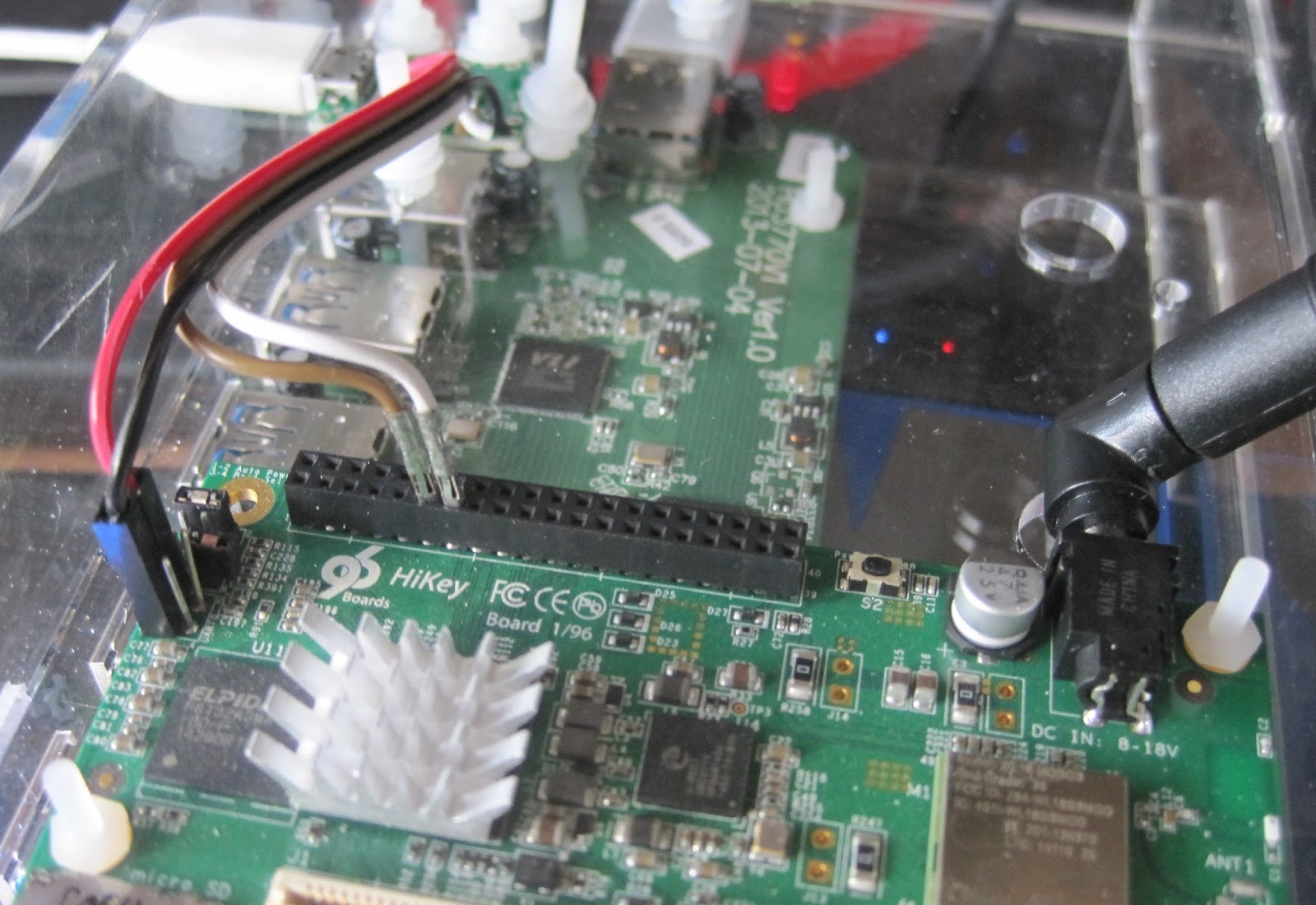
Recently I have been very hopeful about the 96boards Hikey SBC and as Evan Esar predicted I have therefore been very disappointed. I was given a Hikey after a Linaro connect event some time ago by another developer who could not get the system working usefully and this is the tale of what followed.
The Standard Design
This board design was presented as Linaro creating a standard for the 64bit Single Board Computer (SBC) market. So I had expected that a project with such lofty goals would have considered many factors and provided at least as good a solution as the existing 32bit boards.

The lamentable hubris of creating a completely new form factor unfortunately sets a pattern for the whole enterprise. Given the aim towards "makers" I would have accepted that the system would not be a ATX PC size motherboard, but mini/micro/nano and pico ITX have been available for several years.

If opting for a smaller "credit card" form factor why not use one of the common ones that have already been defined by systems such as the Raspberry Pi B+? Instead now every 96Board requires special cases and different expansion boards.

Not content with defining their own form factor the design also uses a 8-18V supply, this is the only SBC I own that is not fed from a 5V supply. I understand that a system might require more current than a micro USB connector can provide, but for example the Banana Pi manages with a DC barrel jack readily capable of delivering 25W which would seem more than enough

The new form factor forced the I/O connectors to be placed differently to other SBC, given the opportunity to concentrate all connectors on one edge (like ATX designs) and avoid the issues where two or three sides are used. The 96board design instead puts connectors on two edges removing any possible benefit this might have given.

The actual I/O connectors specified are rather strange. There is a mandate for HDMI removing the possibility of future display technology changes. The odd USB arrangement of two single sockets instead of a stacked seems to be an attempt to keep height down but the expansion headers and CPU heatsink mean this is largely moot.

The biggest issue though is mandating WIFI but not Ethernet (even as an option), everything else in the design I could logically understand but this makes no sense. It means the design is not useful for many applications without adding USB devices.

Expansion is presented as a 2mm pitch DIL socket for "low speed" signals and a high density connector for "high speed" signals. The positioning and arrangement of these connectors proffered an opportunity to improve upon previous SBC designs which was not taken. The use of 2mm pitch and low voltage signals instead of the more traditional 2.54mm pitch 3.3v signals means that most maker type applications will need adapting from the popular Raspberry Pi and Arduino style designs.

In summary the design appears to have been a Linaro project to favour one of their members which took a Hisilicon Android phone reference design and put it onto a board with no actual thought beyond getting it done. Then afterwards attempted to turn that into a specification, this has simply not worked as an approach.

My personal opinion is that this specification is fatally flawed and, is a direct cause of, the bizarre situation where the "consumer" specification exists alongside the "enterprise" edition which itself has an option of microATX form factor anyhow!
The ImplementationIf we ignore the specification appearing to be nothing more than a codification of the original HiKey design we can look at the HiKey as an implementation.

Initially the board required modifying to add headers to attach a USB to 1.8V LVTTL serial adaptor on the UART0 serial port. Once Andy Simpkins had made this change for me I was able to work through the instructions and attempt to install a bootloader and OS image.

The initial software was essentially HiSilicon vendor code using the Android fastboot system to configure booting. There was no source and the Ubuntu OS images were an obvious afterthought to the Android images. Just getting these images installed required a great deal of effort, repetition and debugging. It was such a dreadful experience this signalled the commencement one of the repeated hiatuses throughout this project, the allure of 64 bit ARM computing has its limits even for me.

When I returned to the project I attempted to use the system from the on-board eMMC but the pre-built binary only kernel and OS image were very limited. Building a replacement kernel , or even modules for the existing one proved fruitless and the system was dreadfully unstable.

I wanted to use the system as a builder for some Open Source projects but the system instability ruled this out. I considered attempting to use virtualisation which would also give better system isolation for builder systems. By using KVM running a modern host kernel and OS as a guest this would also avoid issues with the host systems limitations. At which point I discovered the system had no virtualisation enabled apparently because the bootloader lacked support.

In addition to these software issues there were hardware problems, despite forcing the use of USB for all additional connectivity the USB implementation was dreadful. For a start all USB peripherals have to run at the same speed! One cannot mix full (12Mbit) and high speed (480Mbit) devices which makes adding a USB Ethernet and SATA device challenging when you cannot use a keyboard.

And because I needed more challenges only one of the USB root hubs was functional. In effect this made the console serial port critical as it was the only reliable way to reconfigure the system without a keyboard or network link (and WIFI was not reliable either)
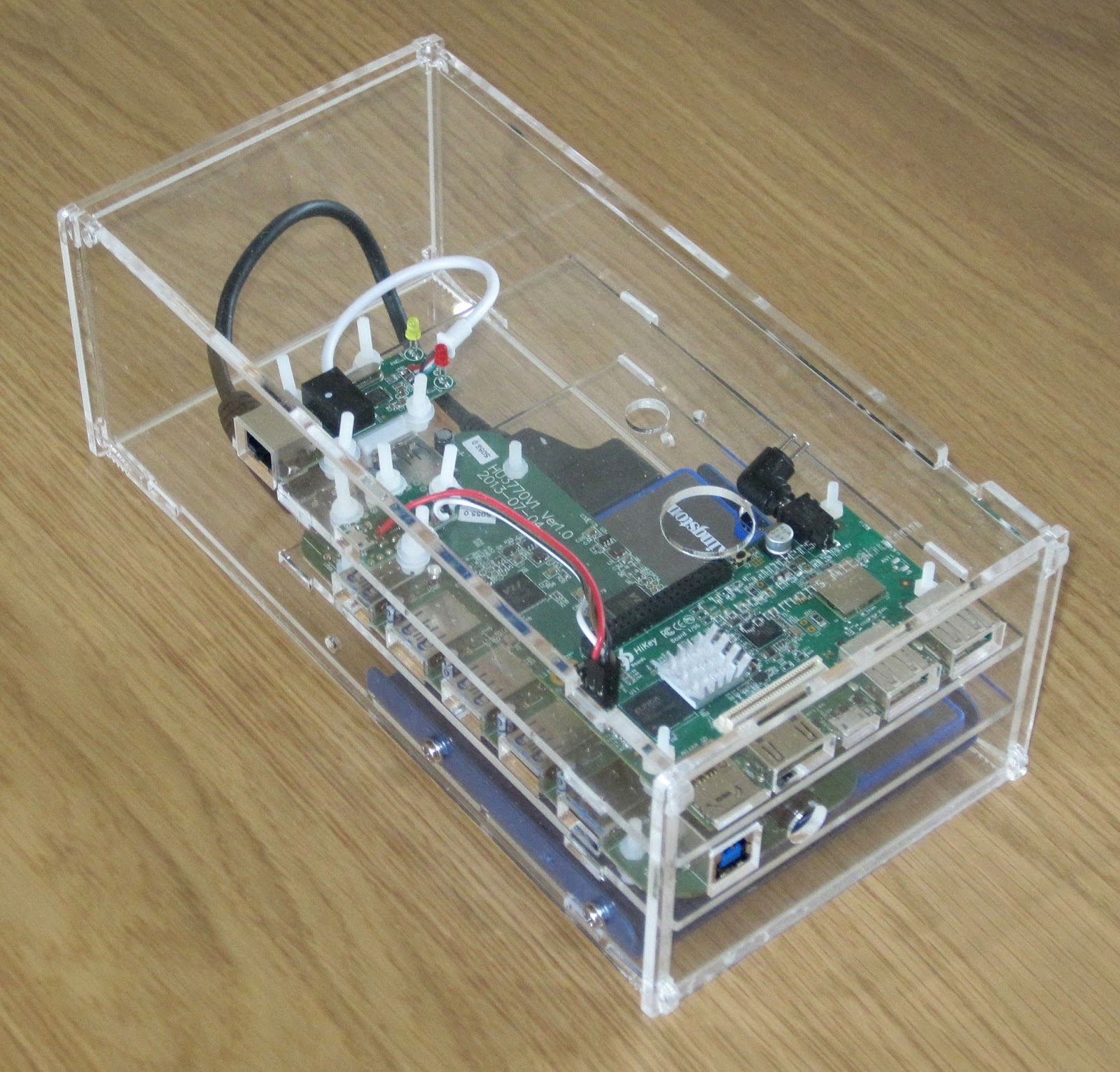
After another long pause in proceedings I decided that I should house all the components together and that perhaps being out on my bench might be the cause of some instability. I purchased a powered Amazon basics USB 2 hub, an Ethernet adaptor and a USB 2 SATA interface in the hope of accessing some larger mass storage.

The USB hub power supply was 12V DC which matched the Hikey requirements so I worked out I could use a single 4A capable supply and run a 3.5inch SATA hard drive too. I designed a laser cut enclosure and mounted all the components. As it turned out I only had a 2.5inch hard drive handy so the enclosure is a little over size. If I were redoing this design I would attempt to make it fit in 1U of height and be mountable in a 19inch rack instead it is an 83mm high (under 2U) box.

A new software release had also become available which purported to use an UEFI bootloader after struggling to install this version unsuccessfully, made somewhat more problematic by the undocumented change from UART0 (unpopulated header) to UART3 on the low speed 2mm pitch header. The system seemed to start the kernel which panicked and hung either booting from eMMC or SD card. Once again the project went on hold after spending tens of hours trying to make progress.
Third time's a charmAs the year rolled to a close I once again was persuaded to look at the hikey, I followed the much improved instructions and installed the shiny new November software release which appears to have been made for the re-release of the Hikey through LeMaker. This time I obtained a Debian "jessie" system that booted from the eMMC.

Having a booted system meant I could finally try and use it. I had decided to try and use the system to host virtual machines used as builders within the NetSurf CI system.

The basic OS uses a mixture of normal Debian packages with some replacements from Linaro repositories. I would have prefered to see more use of Debain packages even if they were from the backports repositories but on the positive side it is good to see the use of Debian instead of Ubuntu.

The kernel is a heavily patched 3.18 built in a predominantly monolithic (without modules) manner with the usual exceptions such as the mali and wifi drivers (both of which appear to be binary blobs). The use of a non-mainline capable SoC means the standard generic distribution kernels cannot be used and unless Linaro choose to distribute a kernel with the feature built in it is necessary to compile your own from sources.

The default install has a linaro user which I renamed to my user and ensured all the ssh keys and passwords on the system were changed. This is an important step when using this pre-supplied images as often a booted system is identical to every other copy.

To access mass storage my only option was via USB, indeed to add any additional expansion that is the only choice. The first issue here is that the USB host support is compiled in so when the host ports are initialised it is not possible to select a speed other than 12MBit. The speed is changed to 480Mbit by using a user space application found in the users home directory (why this is not a tool provided by a package and held in sbin I do not know).

When the usb_speed tool is run there is a chance that the previously enumerated devices will be rescanned and what was /dev/sda has become /dev/sdb if this happens there is a high probability that the system must be rebooted to prevent random crashes due to the "zombie" device.

Because the speed change operation is unreliable it cannot be reliably placed in the boot sequence so this must be executed by hand on each boot to get access to the mass storage.

NetSurf project already uses a x86_64 virtual host system which runs an LLVM physical volume from which we allocate logical volumes for each VM. I initially hoped to do this with the hikey but as soon as I tried to use the logical volume with a VM the system locked up with nothing shown on console. I did not really try very hard to discover why and instead simply used files on disc for virtual drives which seemed to work.

To provide reliable network access I used a USB attached Ethernet device, this like the mass storage suffered from unreliable enumeration and for similar reasons could not be automated requiring manually using the serial console to start the system.

Once the system was started I needed to install the guest VM. I had hoped I might be able to install locally from Debian install media as I do for x86 using the libvirt tools. After a great deal of trial and error I finally was forced to abandon this approach when I discovered the Linaro kernel is lacking iso9660 support so installing from standard media was not possible.

Instead I used the instructions provided by Leif Lindholm to create a virtual machine image on my PC and copied the result across. These instructions are great except I used version 2.5 of Qemu instead of 2.2 which had no negative effect. I also installed the Debian backports for Jessie to get an up to date 4.3 kernel.

After copying the image to the Hikey I started it by hand from the command line as a four core virtual machine and was successfully able to log in. The guest would operate for up to a day before stopping with output such as

$
Message from syslogd@ciworker13 at Jan 29 07:45:28 ...
kernel:[68903.702501] BUG: soft lockup - CPU#0 stuck for 27s! [mv:24089]

Message from syslogd@ciworker13 at Jan 29 07:45:28 ...

kernel:[68976.958028] BUG: soft lockup - CPU#2 stuck for 74s! [swapper/2:0]

Message from syslogd@ciworker13 at Jan 29 07:47:39 ...
kernel:[69103.199724] BUG: soft lockup - CPU#3 stuck for 99s! [swapper/3:0]

Message from syslogd@ciworker13 at Jan 29 07:53:21 ...
kernel:[69140.321145] BUG: soft lockup - CPU#3 stuck for 30s! [rs:main Q:Reg:505]

Message from syslogd@ciworker13 at Jan 29 07:53:21 ...
kernel:[69192.880804] BUG: soft lockup - CPU#0 stuck for 21s! [jbd2/vda3-8:107]

Message from syslogd@ciworker13 at Jan 29 07:53:21 ...
kernel:[69444.805235] BUG: soft lockup - CPU#3 stuck for 22s! [swapper/3:0]

Message from syslogd@ciworker13 at Jan 29 07:55:21 ...
kernel:[69570.177600] BUG: soft lockup - CPU#1 stuck for 112s! [systemd:1]

Timeout, server 192.168.7.211 not responding.

After this output the host system would not respond and had to be power cycled never mind the guest!

Once I changed to single core operation the system would run for some time until the host suffered from the dreaded kernel OOM killer. I was at a loss as to why the oom killer was running as the VM was only allocated half the physical memory (512MB) allowing the host what I presumed to be an adequate amount.

By adding a 512MB swapfile the system was able to push the few hundred kilobytes it wanted to swap and the system was now stable! The swapfile of course has to be started by hand as the external storage is unreliable and unavailable at boot.

I converted the qemu command line to a libvirt config using the virsh tool
virsh domxml-from-native qemu-argv cmdln.args
The converted configuration required manual editing to get a working system but now I have a libvirt based VM guest I can control along with all my other VM using the virt-manager tool.

This system is now stable and has been in production use for a month at time of writing. The one guest VM is a single core 512MB aarch64 system which takes over 1100 seconds (19 minutes) to do what a Banana Pi 2 dual core 1GB memory 32bit native ARM system manages in 300 seconds.

It seems the single core limited memory system with USB SATA attached storage is very, very slow.

I briefly attempted to run the CI system job natively within the host system but within minutes it crashed hard and required a power cycle to retrieve, it had also broken the UEFI boot. I must thank Leif for walking me through recovering the system otherwise I would have needed to start over.
ConclusionsI must stress these conclusions and observations are my own and do not represent anyone else.

My main conclusions are:

This project has taken almost a year to get to the final state and has been one of the least enjoyable within that time. The only reason I have a running system at the end of it is sheer bloody mindedness because after spending hundreds of hours of my free time I was not prepared to see it all go to waste.

To be fair, the road I travelled is now much smoother and if the application is suited to having a mobile phone without a screen then the Hikey probably works as a solution. For me, however, the Hikey product with the current hardware and software limitations is not something I would recommend in preference to other options.

Enrico Zini: Static site generators

I decided to rethink the state of my personal site, and try out some of the new static site generators that are available now. To do that, I jotted down a series of things that I want in a static site generator, then wrote a tool to convert my ikiwiki site to other formats, and set out to evaluate things. As a benchmark I did a full rebuild of my site, which currently contains 1164 static files and 458 markdown pages. My requirements Free layout for my site My / is mostly a high-level index to the site contents. Blog posts are at /blog. My talk archive is organised like a separate blog at /talks. I want the freedom to create other sections of the site, each with its own rss feed, located wherever I want in the site hierarchy. Assets next to posts I occasionally blog just a photo with a little comment, and I would like the .md page with the comment to live next to the image in the file system. I did not even know that I had this as a requirement until I found static site generators that mandated a completely different directory structure for markdown contents and for static assets. Multiple RSS/Atom feeds I want at least one RSS/Atom feed per tag, because I use tags for marking which articles go to http://planet.debian.org. I also want RSS/Atom feeds for specific parts of the site, like the blog and talks. Arbitrary contents in /index.html I want total control over the contents of the main home page of the site. Quick preview while editing contents I do not like to wait several seconds for the site to be rebuilt at every review iteration of the pages I write. This makes me feel like the task of editing is harder than it should, and makes me lose motivation to post. Reasonable time for a full site rebuild I want to be able to run a full rebuild of the site in a reasonable time. I could define "reasonable" in this case as how long I can stare at the screen without getting bored, starting to do something else, and forgetting what it was that I was doing with the site. It is ok if a rebuild takes something like 10 or 30 seconds. It is not ok if it takes minutes. Code and dependency ecosystems that I can work with I can deal with Python and Go. I cannot deal with Ruby or JavaScript. I forgot all about Perl. Also, if it isn't in Debian it does not exist. Decent themes out of the box One of my hopes in switching to a more mainstream generator is to pick and choose themes and easily give my site a more modern look. Hugo Hugo is written in Go and is in Debian testing. Full rebuild time for my site is acceptable, and it can even parallelize:
  $ time hugo
  real      0m5.285s
  user      0m9.556s
  sys       0m1.052s
Free layout for my site was hard to get. I could replace /index.html by editing the template page for it, but then I did not find out how to create another similar index in an arbitrary place. Also, archetypes are applied only on the first path component of new posts, but I would like them instead to be matched on the last path component first, and failing that traveling up to the path until the top. This should be easy to fix by reorganizing the content a bit around here For example, a path for a new blog post of mine could be blog/2016/debian/ and I would like it to match the debian archetype first, and failing that the blog archetype. Assets next to posts almost work. Hugo automatically generates one feed per taxonomy element, and one feed per section. This would be currently sufficient for me, although I don't like the idea that sections map 1 to 1 to toplevel directories in the site structure. Hugo has a server that watches the file system and rerenders pages as they are modified, so the quick preview while editing works fine. About themes, it took me several tries to find a theme that would render navigation elements for both sections and tags, and most themes would render by pages with white components all around, and expect me to somehow dig in and tweak them. That frustrated me, because for quite a while I could not tell if I had misconfigured Hugo's taxonomies or if the theme was just somehow incomplete. Nikola Nikola is written in Python and is in Debian testing. Full rebuild time for my site is almost two orders of magnitude more than Hugo, and I am miffed to find the phrases "Nikola is fast." or "Fast building process" in its front page and package description:
  $ time nikola build
  real      3m31.667s
  user      3m4.016s
  sys       0m24.684s
Free layout could be achieved fiddling with the site configuration to tell it where to read sources. Assets next to post work after tweaking the configuration, but they require to write inconsistent links in the markdown source: https://github.com/getnikola/nikola/issues/2266 I have a hard time accepting that that, because I want to author content with consistent semantic interlinking, because I want to be able 10 years from now to parse it and convert it to something else if a new technology comes out. Nikola generates one RSS/Atom feed per tag just fine. I have not tried generating feeds for different sections of the site. Incremental generation inside its built in server works fine. Pelican Pelican is written in Python and is in Debian testing. Full rebuild time for my site is acceptable:
  $ time pelican -d
  real      0m18.207s
  user      0m16.680s
  sys       0m1.448s
By default, pelican seems to put generate a single flat directory of html files regardless of the directory hierarchy of the sources. To have free layout, pelican needs some convincing in the configuration:
  PATH_METADATA = r"(?P<relpath>.+)\.md"
  ARTICLE_SAVE_AS = " relpath /index.html"
but even if I do that, the urls that it generates still point to just slug /index.html and I have not trivially found a configuration option to fix that accordingly. I got quite uncomfortable at the idea of needing to configure content generation and linking to match, instead of having one automatically being in sync with the other. Having assets next to posts seems to be possible (also setting STATIC_PATHS = ["."]), but I do not recall making progress on this front. I did not manage to generate a feed for each tag out of the box, and probably there is some knob in the configuration for it. I gave up with Pelican as trying it out felt like a constant process of hacking the configuration from defaults that do not make any sense for me, withouth even knowing if a configuration exists that would do what I need Ikiwiki Ikiwiki is written in Perl and is in Debian. Although I am not anymore proficient with Perl, I was already using it, so it was worth considering. Full rebuild time feels a bit on the slow side but is still acceptable:
  $ time ikiwiki --setup site.setup
  real      0m37.356s
  user      0m34.488s
  sys       0m1.536s
In terms of free site structure, all feeds for all or part of the site, ikiwiki just excels. I even considered writing a python web server that monitors the file system and calls ikiwiki --refresh when anything changes, and calling it a day. However, when I tried to re-theme my website around a simple bootstrap boilerplate, I found that to be hard, as a some of the HTML structure is hardcoded in Perl (and it's also my fault) and there is only so much that can be done by tweaking the (rather unreadable) templates. siterefactor During all these experiments I had built siterefactor to generate contents for all those static site engines, and it was going through all the contents quite fast:
  $ time ./siterefactor src dst -t hugo
  real  0m1.222s
  user  0m0.904s
  sys   0m0.308s
So I wondered how slow it would become if, instead of making it write markdown, I made it write HTML via python markdown and Jinja2:
  $ time ./siterefactor ~/zz/ikiwiki/pub/ ~/zz/ikiwiki/web -t web
  real  0m6.739s
  user  0m5.952s
  sys   0m0.416s
I then started wondering how slower it would become if I implemented postprocessing of all local URLs generated by Markdown to make sure they are kept consistent even if the path of a generated page is different than the path of its source. Not much slower, really. I then added taxonomies. And arbitrary Jinja2 templates in the input, able to generate page lists and RSS/Atom feeds. And theming. And realised that reading all the sources and cross-linking them took 0.2 seconds, and the rest was generation time. And that after cross-linking, each page can be generated independently from all the others. staticsite So my site is now generated with staticsite:
  $ time ssite build
  real  0m6.833s
  user  0m5.804s
  sys   0m0.500s
It's comparable with Hugo, and on a single process.

Erich Schubert: Stop abusing lambda expressions - this is not functional programming

I know, all the Scala fanboys are going to hate me now. But:
Stop overusing lambda expressions.
Most of the time when you are using lambdas, you are not even doing functional programming, because you often are violating one key rule of functional programming: no side effects.
For example:
collection.forEach(System.out::println);
is of course very cute to use, and is (wow) 10 characters shorter than:
for (Object o : collection) System.out.println(o);
but this is not functional programming because it has side effects.
What you are doing are anonymous methods/objects, using a shorthand notion. It's sometimes convenient, it is usually short, and unfortunately often unreadable, once you start cramming complex problems into this framework.
It does not offer efficiency improvements, unless you have the propery of side-effect freeness (and a language compiler that can exploit this, or parallelism that can then call the function concurrently in arbitrary order and still yield the same result).
Here is an examples of how to not use lambdas:
DZone Java 8 Factorial (with boilerplate such as the Pair class omitted):
Stream<Pair> allFactorials = Stream.iterate(
  new Pair(BigInteger.ONE, BigInteger.ONE),
  x -> new Pair(
    x.num.add(BigInteger.ONE),
    x.value.multiply(x.num.add(BigInteger.ONE))));
return allFactorials.filter(
  (x) -> x.num.equals(num)).findAny().get().value;
When you are fresh out of the functional programming class, this may seem like a good idea to you... (and in contrast to the examples mentioned above, this is really a functional program).
But such code is a pain to read, and will not scale well either. Rewriting this to classic Java yields:
BigInteger cur = BigInteger.ONE, acc = BigInteger.ONE;
while(cur.compareTo(num) <= 0)  
  cur = cur.add(BigInteger.ONE); // Unfortunately, BigInteger is immutable!
  acc = acc.multiply(cur);
 
return acc;
Sorry, but the traditional loop is much more readable. It will still not perform very well (because of BigInteger not being designed for efficiency - it does not even make sense to allow BigInteger for num - the factorial of 2**63-1, the maximum of a Java long, needs 1020 bytes to store, i.e. about 500 exabyte.
For some, I did some benchmarking. One hundred random values num (of course the same for all methods) from the range 1 to 1000.
I also included this even more traditional version:
BigInteger acc = BigInteger.ONE;
for(long i = 2; i <=x; i++)  
  acc = acc.multiply(BigInteger.valueOf(i));
 
return acc;
Here are the results (Microbenchmark, using JMH, 10 warum iterations, 20 measurement iterations of 1 second each):
functional    1000     100  avgt   20  9748276,035   222981,283  ns/op
biginteger    1000     100  avgt   20  7920254,491   247454,534  ns/op
traditional   1000     100  avgt   20  6360620,309   135236,735  ns/op
As you can see, this "functional" approach above is about 50% slower than the classic for-loop. This will be mostly due to the Pair and additional BigInteger objects created and garbage collected.
Apart from being substantially faster, the iterative approach is also much simpler to follow. (To some extend it is faster because it is also easier for the compiler!)
There was a recent blog post by Robert Br utigam that discussed exception throwing in Java lambdas and the pitfalls associated with this. The discussed approach involves abusing generics for throwing unknown checked exceptions in the lambdas, ouch.

Don't get me wrong. There are cases where the use of lambdas is perfectly reasonable. There are also cases where it adheres to the "functional programming" principle. For example, a stream.filter(x -> x.name.equals("John Doe")) can be a readable shorthand when selecting or preprocessing data. If it is really functional (side-effect free), then it can safely be run in parallel and give you some speedup.
Also, Java lambdas were carefully designed, and the hotspot VM tries hard to optimize them. That is why Java lambdas are not closures - that would be much less performant. Also, the stack traces of Java lambdas remain somewhat readable (although still much worse than those of traditional code). This blog post by Takipi showcases how bad the stacktraces become (in the Java example, the stream function is more to blame than the actual lambda - nevertheless, the actual lambda application shows up as the cryptic LmbdaMain$$Lambda$1/821270929.apply(Unknown Source) without line number information). Java 8 added new bytecodes to be able to optimize Lambdas better - earlier JVM-based languages may not yet make good use of this.
But you really should use lambdas only for one-liners. If it is a more complex method, you should give it a name to encourage reuse and improve debugging.
Beware of the cost of .boxed() streams!
And do not overuse lambdas. Most often, non-Lambda code is just as compact, and much more readable. Similar to foreach-loops, you do lose some flexibility compared to the "raw" APIs such as Iterators:
for(Iterator<Something>> it = collection.iterator(); it.hasNext(); )  
  Something s = it.next();
  if (someTest(s)) continue; // Skip
  if (otherTest(s)) it.remove(); // Remove
  if (thirdTest(s)) process(s); // Call-out to a complex function
  if (fourthTest(s)) break; // Stop early
 
In many cases, this code is preferrable to the lambda hacks we see pop up everywhere these days. Above code is efficient, and readable.
If you can solve it with a for loop, use a for loop!
Code quality is not measured by how much functionality you can do without typing a semicolon or a newline!
On the contrary: the key ingredient to writing high-performance code is the memory layout (usually) - something you need to do low-level.
Instead of going crazy about Lambdas, I'm more looking forward to real value types (similar to a struct in C, reference-free objects) maybe in Java 9 (Project Valhalla), as they will allow reducing the memory impact for many scenarios considerably. I'd prefer a mutable design, however - I understand why this is proposed, but the uses cases I have in mind become much less elegant when having to overwrite instead of modify all the time.

29 February 2016

Muammar El Khatib: Cast audio from Debian to chromecast audio

I recently decided to buy a chromecast audio (CCA) to use with my Harman Kardon Soundsticks III. My main motivation was to avoid plugging the 3.5mm jack to the phone or the computer when I wanted to switch devices. Bluetooth connectivity was not an option given their poor quality of sound and short range of the signal to connect (limited to 10m). There are many different options in the market being Sonos the most widely spoken and known right now because of its Hi-Fi Wifi solution. But Sonos is also very expensive tech. For instance, the starting price of a connected speaker is around $200. Another limitation going beyond price is the fact that you can only stream using Sonos application (as far as I investigated) something I don t find appealing. As I already had my speakers, I was looking for something to cast over them using wifi. Sonos also proposes a feature called Connect which is like what CCA does but for a price which is 10 times more expensive!.

Tom Marble: is-slfc-shooting-open-source-in-the-foot

Is SFLC Shooting Open Source in the Foot? The academic article by SFLC about ZFS is troubling and may unintentionally shoot free software licensing in the foot. When I was at Sun (as part of the team that released the Java Programming Language by starting the OpenJDK project) I often heard community concerns about the CDDL license. At the time the big complaint was about the "Choice of Venue" clause. I got involved because Sun had developed many essential Java libraries and distributed them under CDDL. The community requested a more permissive license and I was able to convince internal project leaders (and Sun's lawyers) to make a licensing change for a handful of these projects. And there was much rejoicing. Based on my experience in helping Java to become open source I came to appreciate the legal hacks on copyright which make open source possible. It's the free software license which uses copyright to enable sharing (vs. the default of disabling sharing).

Open Source Licenses
And so I have appreciated many of the writings and speeches from SFLC on the mechanisms of software freedom. I was particularly moved by the talks about the "Freedom Box" concept. That's why this SFLC post on ZFS sounds so off key: if open source works because of free software licenses it seems weird to weaken that foundation by prioritizing the "equity" (or intended spirit) of the license. Allow me to mention that as I do most of my computing these days on GNU/Linux I miss the super cool features of ZFS from Solaris. I did try an early version of btrfs and was quite disappointed (but that's another story). In this happy case the source code for ZFS is available, but what about the future, when we aren't so lucky and someone asserts in court that the "you know, the software license was really about the spirit of sharing and that means we are allowed to use it -- and not be held to the pesky details as written in the license". A lawyer I respect called this out: "Equity" has no place in US law. The point is that for lawyers software licenses work because they have clear, written rules to guarantee the spirit is upheld; but spirit doesn't work in front of a judge -- clear rules do. Free and open source software has made so much progress in all facets of life why on earth would we second guess the licensing tools that made it possible? And why would SFLC try to shift the spotlight (and in this case the legal burden) to "a good-faith belief that the conduct falls within the equity of the license". Especially given the earlier comment which clearly states "[the combination] is inconsistent with the literal meaning of GPLv2 section 2(b)."
Wat?

The entire raison d' tre for open source software licenses was so that developers (and users) would have clarity and wouldn't have to ask permission to use the software!!! As stated elsewhere (and like I did with those Java libraries) the easy solution is to have the ZFS copyright holder (now Oracle) reclicense (or dual license) the code under a compatible license (permissive or copyleft). If OpenSolaris was still a thing I might understand some hesitancy, but why not liberate ZFS now? So we have to wonder what could possibly be motivating this odd "spirit of the license" position on the part of SFLC? Fortunately charities that enjoy non-profit status are required to make public filings of their income in something called a "Form 990". The latest SFLC 990 I could find shows SFLC getting 78% (or just over $5 million) from "non public support" (see page 14). A number with "two commas" would even be interesting to for-profit companies. Just whom is making these "donations" and what exactly do they get in return? Apparently I'm not the only one wondering about this question. On one hand it's important to know if SFLC as a non-profit is, indeed, acting in the public interest (as the IRS requires). Yet the even bigger issue here is would "asking for a consensus about the spirit" trump the written copyright license and set a scary precedent for open source software in general?

27 February 2016

Joey Hess: documentation first

I write documentation first and code second. I've mentioned this from time to time (previously, previously) but a reader pointed out that I've never really explained why I work that way. It's a way to make my thinking more concrete without diving all the way into the complexities of the code right away. So sometimes, what I write down is design documentation, and sometimes it's notes on a bug report[1], but if what I'm working on is user-visible, I start by writing down the end user documentation. Writing things down lets me interact with them as words on a page, which are more concrete than muddled thoughts in the head, and much easier to edit and reason about. Code constrains to existing structures; a blank page frees you to explore and build up new ideas. It's the essay writing process, applied to software development, with a side effect of making sure everything is documented. Also, end-user documentation is best when it doesn't assume that the user has any prior knowledge. The point in time when I'm closest to perfect lack of knowledge about something is before I've built it[2]. So, that's the best time to document it. I understand what I'm trying to tell you better now that I've written it down than I did when I started. Hopefully you do too.

[1] I'll often write a bug report down even if I have found the bug myself and am going to fix it myself on the same day. (example) This is one place where it's nice to have bug reports as files in the same repository as the code, so that the bug report can be included in the commit fixing it. Often the bug report has lots of details that don't need to go into the commit message, but explain more about my evolving thinking about a problem. [2] Technically I'm even more clueless ten years later when I've totally forgotten whatever, but it's not practical to wait. ;-)

25 February 2016

Matthew Garrett: I bought some awful light bulbs so you don't have to

I maintain an application for bridging various non-Hue lighting systems to something that looks enough like a Hue that an Amazon Echo will still control them. One thing I hadn't really worked on was colour support, so I picked up some cheap bulbs and a bridge. The kit is badged as an iSuper iRainbow001, and it's terrible.

Things seemed promising enough at first, although the bulbs were alarmingly heavy (there's a significant chunk of heatsink built into them, which seems to get a lot warmer than I'd expect from something that claims a 7W power consumption). The app was a bit clunky, but eh - I wasn't planning on using it for long. I pressed the button on the bridge, launched the app and could control the bulbs. The first thing I noticed was that they had a separate "white" and "colour" mode. White mode was pretty bright, but colour mode massively less so - presumably the white LEDs are entirely independent of the RGB ones, and much higher intensity. Still, potentially useful as mood lighting.

Anyway. Next step was to start playing with the protocol, which meant finding the device on my network. I checked anything that had picked up a DHCP lease recently and nmapped them. The OS detection reported Linux, which wasn't hugely surprising - there was no GPL notice or source code included with the box, but I'm way past the point of shock at that. It also reported that there was a telnet daemon running. I connected and got a login prompt. And then I typed admin as the username and admin as the password and got a root prompt. So, there's that. The copy of Busybox included even came with tftp, so it was easy to get copies of tcpdump and strace on there to see what was up.

So. Next step. Protocol sniffing. I wanted to know how discovery worked, so reset the device to factory and watched what happens. The app on my phone sent out a discovery packet on UDP port 18602 which looked like this:

INLAN:CLIP:23.21.212.48:CLPT:22345:MAC:02:00:00:00:00:00

The CLIP and CLPT fields refer to the cloud server that allows for management when you're not on the local network. The mac field contains an utterly fake address. If you send out a discovery packet and your mac hasn't been registered with the device, you get a denial back. If your mac has been (and by "mac" here I mean "utterly fake mac that's the same for all devices"), you get back a response including the device serial number and IP address. And if you just leave out the mac field entirely, you get back a response no matter whether your address is registered or not. So, that's a start. Once you've registered one copy of the app with the device, anything can communicate with it by just using the same fake mac in the discovery packets.

Onwards. The command format turns out to be simple. They start ##, are followed by two ascii digits encoding a command, four ascii digits containing a bulb id, two ascii digits containing the number of following bytes and then the command data (in ascii). An example is:

##05010002ff

which decodes as command 5 (set white intensity) on bulb 1 with two bytes of data following, each of which is an f. This translates as "Set bulb 1 to full white intensity". I worked out the rest pretty quickly - command 03 sets the RGB colour of the bulb, 0A asks the bridge to search for new bulbs, 0B tells you which bulbs are available and their capabilities and 0E gives you the MAC addresses of the bulbs( ). 0C crashes the server process, and 06 spews a bunch of garbage back at you and potentially crashes the bulb in a hilarious way that involves it flickering at about 15Hz. It turns out that 06 is actually the "Rename bulb" command, and if you send it less data than it's expecting something goes hilariously wrong in string parsing and everything is awful.

Ok. Easy enough, but not hugely exciting. What about the remote protocol? This turns out to involve sending a login packet and then a wrapped command packet. The login has some length data, a header of "MQIsdp", a long bunch of ascii-encoded hex, a username and a password.

The username is w13733 and the password is gbigbi01. These are hardcoded in the app. The ascii-encoded hex can be replaced with 0s and the login succeeds anyway.

Ok. What about the wrapping on the command? The login never indicated which device we wanted to talk to, so presumably there's some sort of protection going on here oh wait. The command packet is a length, the serial number of the bridge and then a normal command packet. As long as you know the serial number of the device (which it tells you in response to a discovery packet, even if you're unauthenticated), you can use the cloud service to send arbitrary commands to the device (including the one that crashes the service). One of which involves the device then doing some kind of string parsing that doesn't appear to work that well. What could possibly go wrong?

Ok, so that seemed to be the entirety of the network protocol. Anything else to do? Some poking around on the bridge revealed (a) that it had an active wireless device and (b) a running DHCP server. They wouldn't, would they?

Yes. Yes, they would.

The devices all have a hardcoded SSID of "iRainbow", although they don't broadcast it. There's no security - anybody can associate. It'll then hand out an IP address. It's running telnetd on that interface as well. You can bounce through there to the owner's internal network.

So, in summary: it's a device that infringes my copyright, gives you root access in response to trivial credentials, has access control that depends entirely on nobody ever looking at the packets, is sufficiently poorly implemented that you can crash both it and the bulbs, has a cloud access protocol that has no security whatsoever and also acts as an easy mechanism for people to circumvent your network security. This may be the single worst device I've ever bought.

I called the manufacturer and they insisted that the device was designed in 2012, was no longer manufactured or supported, that they had no source code to give me and there would be no security fixes. The vendor wants me to pay for shipping back to them and reserves the right to deduct the cost of the original "free" shipping from the refund. Everything is awful, which is why I just ordered four more random bulbs to play with over the weekend.

comment count unavailable comments

24 February 2016

Arturo Borrero Gonz lez: Playing with the HA stack in Debian strecth


Given the HA stack is now in very good shape in Debian stretch [testing by now] we can start playing a bit with these tools.

There are 2 main points in doing so now:
  1. reporting bugs
  2. systemd integration
The last HA stack was in Debian wheezy, which didn't include systemd. Good to take that into account.

My hardware: 2 virtual machines with 1 NIC each. I called them node01 and node02.
Packages
Using aptitude. install debian packages corosync, pacemaker, pacemaker-cli-utils and crmsh.

The installation of the packages is enough for corosync to start working.

$ sudo systemctl status corosync
corosync.service - Corosync Cluster Engine
Loaded: loaded (/lib/systemd/system/corosync.service; enabled; vendor preset: enabled)
Active: active (running) since mar 2016-02-09 11:01:24 CET; 3h 7min ago
Main PID: 14610 (corosync)
CGroup: /system.slice/corosync.service
14610 /usr/sbin/corosync -f
$ sudo crm status
Last updated: Tue Feb 9 14:11:33 2016 Last change: Tue Feb 9 11:01:48 2016 by hacluster via crmd on node01
Stack: corosync
Current DC: node01 (version 1.1.14-70404b0) - partition WITHOUT quorum
1 node and 0 resources configured
Online: [ node01 ]

Full list of resources:

Basic configurationYou will need to edit the /etc/corosync/corosync.conf file:

totem
version: 2
cluster_name: lbcluster
transport: udpu
interface
ringnumber: 0
bindnetaddr: 10.0.0.0
mcastaddr: 239.255.1.1
mcastport: 5405
ttl: 1
quorum
provider: corosync_votequorum
two_node: 1
nodelist
node
ring0_addr: 10.0.0.1
name: node01
nodeid: 1
node
ring0_addr: 10.0.0.2
name: node02
nodeid: 2
logging
to_logfile: yes
logfile: /var/log/corosync/corosync.log
to_syslog: yes
timestamp: on

Note that if you choose the proper bindnetaddr directive, you can use the exact same file for all the nodes (see corosync.conf(5))

System, daemons, servicesYou may want to check that the corosync and pacemaker services are auto-started at boot time by systemd.
Do a reboot and check it:

$ sudo systemctl status corosync grep active
Active: active (running) since mi 2016-02-24 18:54:37 CET; 3min 11s ago
$ sudo systemctl status pacemaker grep active
Active: active (running) since mi 2016-02-24 18:54:38 CET; 3min 10s ago

Also, check that no firewall blocks the communication between both nodes.

Now, the status of the cluster should show both nodes working together (with no resources):

$ sudo crm status
Last updated: Wed Feb 24 19:01:13 2016 Last change: Wed Feb 24 18:43:32 2016 by hacluster via crmd on node01
Stack: corosync
Current DC: node02 (version 1.1.14-70404b0) - partition with quorum
2 nodes and 0 resources configured
Online: [ node01 node02 ]
Full list of resources:

ResourcesNow, you can start playing with the cluster resources. Below is an example of a virtual IPv6 address:

$ sudo crm configure primitive test ocf:heartbeat:IPv6addr params ipv6addr="fe00::200" cidr_netmask="64" nic="eth0"

Which should give this cluster status:

$ sudo crm status
Last updated: Wed Feb 24 19:13:46 2016 Last change: Wed Feb 24 19:11:45 2016 by root via cibadmin on node02
Stack: corosync
Current DC: node02 (version 1.1.14-70404b0) - partition with quorum
2 nodes and 1 resource configured
Online: [ node01 node02 ]
Full list of resources:
test (ocf::heartbeat:IPv6addr): Started node01

Congratulations, now you have a working HA cluster with a virtual IP address, using an active/backup approach.

Please, report any bug you may find.

Norbert Preining: Switching from iOS to Android

This article starts a series of blogs on my ventures into Android land after having used iOS devices for 6 years. I have never been a strong believer in the Apple ecosystem, and my trials to convince myself to MacBooks and MacPros always ended with installing Linux on them, so I guess I wasn t really the ideal target for iOS. Thus, my iOS devices were also permanently in jailbroken state, otherwise I would feel amputated. But as much as I disliked the lock-in and closed environment of the iOS world, it was from the user perspective surprisingly well done and smooth. So it was with a certain level of tension when I finally switched to Linux^WAndroid. android-ios If you don t want to read on, here the preliminary conclusion: Why didn t I do it earlier! But before we go into details, let me start with my background: History of my devices Originally I was a big opponent of smart phones and preferred the Unix-way, one device for one thing. So I had a normal phone and (various) Palm devices (Tungsten X, Tungsten C, and above all my beloved Handera TRGpro). I loved the Palm world and considered it superior to the then smart phone world, until I came to Japan, where the challenge of a proper input method for Japanese and proper Japanese support posed a big hurdle. The Palm devices had a stick and written input fields, but Japanese input was practically impossible and a huge pain. Searching for a word in Japanese was more hurdle then looking it up in a printed dictionary. In addition, I needed a phone in Japan, so I plunged into the smart phone world and got myself a iPhone (3g). What a world did open for me: easy typing of Japanese, dictionaries, on-the-fly translation, woooow! And above all, I discovered my most beloved and till now one of my most important programs: Flashcards Deluxe. Thanks, and I have to say to 80% thanks to this program my Japanese learning speed has accelerated considerably. There is nothing more important for me than getting drilled in a systematic way. But I derail, anyway, having Flashcard Deluxe on the iPhone within rather short time I had about 10000 or more flashcards created, and moving on to a different architecture (Android) was for quite some time practically impossible without loosing years of statistics and learning, so I renewed my contract after 2 years together with a iPhone 4s. Another two years passed, and these years brought an Android version of Flashcards Deluxe, as well as Dropbox syncing, so I had no excuse anymore to remain in iOS land, wouldn t it be for an iPhone 5s that was passed to me near the end of my forth year, so I again extended the contract for two years. Finally, after 6 years of iPhone devices, this January I finally decided it is time to switch to Android. After lots of thinking, comparing, and requesting advice from good friends with more experience in the smart phone market I went for a Google Nexus 6p. Google Nexus 6p I will not repeat the specs of this phone as they are widely available on the net. My original plan was a Samsung S6, but after consultation with an expert I decided for an original Google phone for better security support. That left me with the option between a Nexus 5x and 6p, and due to prize differences (prizes of mobiles are ridiculously strange in Japan) I went for the 6p instead of the 5x. One point that made the decision for this slight too big device easy was the fact that it uses a great AMOLED display. Moving the data Since I was using Google Calendar and Google Contacts already on the iPhone, moving to the Android phone was far less a hassle than I thought. My contacts and events showed up without a hiccup. Most of the usual apps are nowadays available on both iOS and Android, so the most difficult thing was remembering all the passwords to log into the applications again (SNS like G+, FB, Twitter etc). The same is more or less true for messengers of all kinds (Line, WhatsApp, Threema, etc), but here one is advised to check with the respective web site first to make sure one does not loose all of the important data. Line for example is a stupid ***** that deletes all previous chats on the old phone and does not make them available on the new one. WhatsApp can be converted with a special conversion program. Threema, too allows for transfer of ids. Move of applications After that came the hunt for replacement applications for those that are not available as is on Android: Mail At first like probably everyone I used the shipped GMail program. It might be good for Google Mail accounts, but for anything else it is just a real pain. Thus, I have searched a bit and finally settled (for now) for K-9 Mail: it is open source, open development, feature rich, and more a hackers type email program, perfectly suited to me. There is a commercial variant called K@-Mail that says that it improves the user interface and some usability items as well as features, but I didn t see much of an advantage over the original version (which is completely free) and in fact some of my accounts didn t work at all. So I remain with K9 Mail and I think this is a good decision. Calendar Managing Calendars is one of the most important task for me. I have been a fervent supporter of DateBk4, DateBk 5, and DateBk 6 on the original Palm series, and when I left the Palm World it was with great pain that I had to loose DateBk. Not only because it was a simply fantastic calendar program that allowed me to keep track of all my climbing routes, festivities, in a much more advanced way than any other Calendering application, but also because the programmer of the DateBk series is running the Dewar Wildlife Trust, a Gorilla rescue group and a lot of the money he makes from the app sales is going to rescue Gorillas. With the switch to iOS this option was gone, and I first used the built-in calendar application (which is so weak) and later and for long time Pocket Informant Pro. This is a very good program and probably the only one that can compete with DateBk with respect to functionality and usefulness. During the time of me being locked in in iOS I realized that the world has moved on and a new version of DateBk series for Java was developed, called Pimlical. First only available on Windows, it became later available also on Android and Linux, too. The following screen shot puts Pimlical on the left, and Pocket Informant on the right. I will write a more detailed comparison in future, in short: PInformant is more streamlined and polished, Pimlical has more configuration option. Practically everything can be adjusted to one s need, and in addition there is also a Desktop application that sync either with Google and the phone, or only with the phone if you want to live off the grid. pimlical-pinformant So nowadays on Android I have both Pocket Informant Pro as well as Pimlical, but after a short time I have now switched practically exclusively to Pimlical. Notes Here there is pain HUGE PAIN!!! iOS has an excellent applications for notes, called simply Notebooks. This little pearl was my work horse for everything (more or less) memorable. From poems and song texts to bus time tables, from PDF to GIFs, from MarkDown to HTML, everything could be saved into Notebooks, displayed, edited, ordered. And above all it had automatic background sync with Dropbox. So I could drop new files into the respective sub-folder of my Dropbox folder and could be sure I have the files available on my phone when I leave for a trip. And there is a huge bag of features that I haven t even tapped into! Android is unfortunately not on the list of supported architectures of Notebooks. So I searched far and wide, and without any success. There are all kind of notes, flash colors, overly simple, fast and slow, stylish and plain, but none of them did even provide half of the features of Notebooks. None, not even half. I still hope I might find the ultimate notes application, or even better would be an Android version of the original Notebooks application (but this is not high on the developers todo list), but for now I am in despair The Rest As I said, most apps are nowadays available on both platforms, so there is not much more to do than download the respective Android app and log in again. That worked very nice across practically all apps. Things I don t like (i.e., which are broken!) on Android Although a very convenient system and perfectly made to fit my taste, there are some things that are a huge pain (and a big shame on Google to not being able to fix that for long time!): Japanese fonts when the device is in English interface language In case you are a foreigner living in Japan and want your Android phone in English, but still read emails, news, etc in Japanese, then Android provides you with the worst, namely Chinese fonts: chinese-japanese-mix This is a well known problem and I have blogged about fixing the very same problem on Linux (Debian), and the solution is a simple reshuffling in the fontconfig configuration files. There is even an application for it in the Google store, Kanji Fix, but it needs a rooted device (which I haven t done till now my failure!). I can only hope that Google fixes this completely stupid problem in a future version. The Me problem Another of these beasty problems: The Android Contacts application has an entry for Me , which unfortunately, no idea why, cannot be linked with my normal me in the list of contacts. There are reports all over the Internet, strange suggestions, and no real solution. Again, a simple thing that should work but doesn t. Invisible Images folder in MTP mode A more annoying problem is that the camera folder under Photos does not show up when connecting the device in MTP mode to my computer, and as consequence me being unable to copy photos from the device to my computer. The solution I am using at the moment is moving the photos with a file manager to a new folder which is visible during MTP communcation, and copy the photos from there. But this, too, should be something trivial, but alas, despite a lot of posts on the internet I couldn t find a proper solution. Google Music As written somewhere else, Google Music has switched from 5 star system to up/down system, which is a huge pain and PITA. Things I do like (or I discovered) on Android There are some things I haven t been used/tried on iOS they might be possible which I really like: Yubikey Neo support I will write about this in a different blog, but nowadays I have my GPG keys on an hardware token (Yubikey Neo) and the application OpenKeychain on Android works nicely with both K9 Mail and via NFC with my Yubikey. That is a great tool! Bluetooth streaming Bluetooth on iOS devices was always a bit broken for me, so connecting my phone to my old car radio I needed radio transmitter that was connected to the cable port of the iPhone. With Android I use a Bluetooth Radio device (receives data via bluetooth, and sends music out via radio waves for a car stereo to receive them). Now if my monthly data limit wouldn t be that low  Debian on Android Yes, you can have a full Debian system running in your terminal on Android. There are several applications providing this feature, and I am rather surprised how smooth it works. Conclusion My preliminary conclusion is that the switch to Android at this time was perfectly timed, and from the technological side I should have done much earlier. In future blogs I will discuss particular instances of this transition in more details. If you have any suggestion for me, in particular for a good notes taking application, please let me know!
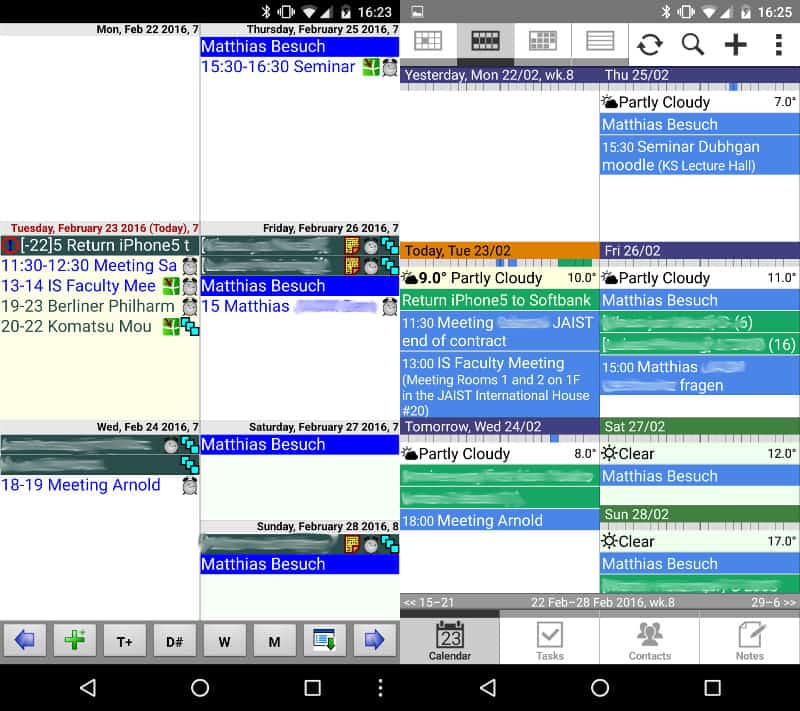
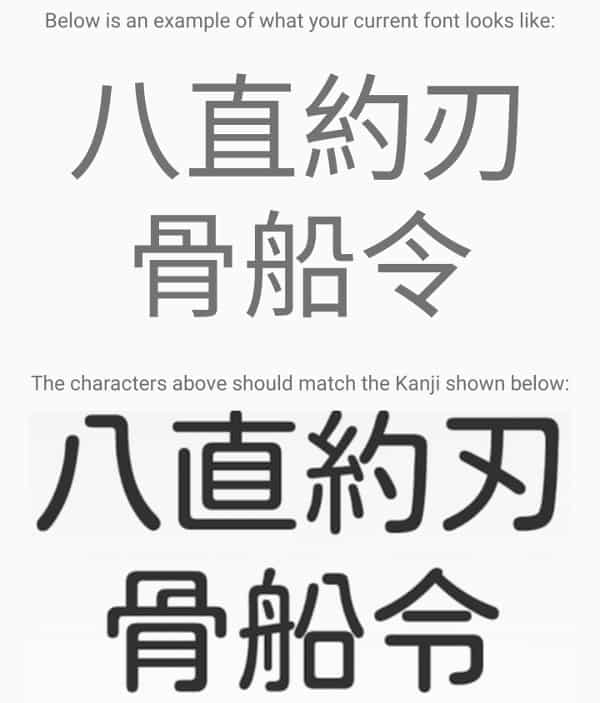
23 February 2016

Uwe Kleine-K nig: Christoph Hellwig vs VMware

On Thursday the lawsuit about GPL compliance of VMware's ESXi products starts. I support Christoph's position and share his view that VMware's product is in conflict with the GPL. Read more on the software freedom conservancy's FAQ about the case. I keep my fingers crossed!

Michal &#268;iha&#345;: Weekly phpMyAdmin contributions 2016-W07

As the flow of incoming bugs for upcoming 4.6.0 has slowed down a bit it was more time for code cleanups and related tasks. But it's also time where potential Google Summer of Code students come to our organization and want to get involved. On the cleanup side the biggest was change to remove embedded PHP libraries which are available on Packagist from our Git and use Composer to manage the dependencies. This change will happen in 4.7.0, so it's still some time ahead, but it's already in our master branch. There still some third party libraries which we use and can not be installed using Composer, so we keep these for now. Besides the usual bug fixing stuff, I've noticed that we lack issues which can be easily understood and fixed by potential Google Summer of Code. We require them to get involved before the program starts, so that we can see they are capable of useful contributions and also to see how they behave if asked for patch improvements. To fix this deficit we're prepared few small cleanup or refactoring tasks, where the students can show their skills. All handled issues:

Filed under: English phpMyAdmin 2 comments

22 February 2016

Matthew Garrett: Freedom, the US Government, and why Apple are still bad

The US Government is attempting to force Apple to build a signed image that can be flashed onto an iPhone used by one of the San Bernardino shooters. To their credit, Apple have pushed back against this - there's an explanation of why doing so would be dangerous here. But what's noteworthy is that Apple are arguing that they shouldn't do this, not that they can't do this - Apple (and many other phone manufacturers) have designed their phones such that they can replace the firmware with anything they want.

In order to prevent unauthorised firmware being installed on a device, Apple (and most other vendors) verify that any firmware updates are signed with a trusted key. The FBI don't have access to Apple's firmware signing keys, and as a result they're unable to simply replace the software themselves. That's why they're asking Apple to build a new firmware image, sign it with their private key and provide it to the FBI.

But what do we mean by "unauthorised firmware"? In this case, it's "not authorised by Apple" - Apple can sign whatever they want, and your iPhone will happily accept that update. As owner of the device, there's no way for you to reconfigure it such that it will accept your updates. And, perhaps worse, there's no way to reconfigure it such that it will reject Apple's.

I've previously written about how it's possible to reconfigure a subset of Android devices so that they trust your images and nobody else's. Any attempt to update the phone using the Google-provided image will fail - instead, they must be re-signed using the keys that were installed in the device. No matter what legal mechanisms were used against them, Google would be unable to produce a signed firmware image that could be installed on the device without your consent. The mechanism I proposed is complicated and annoying, but this could be integrated into the standard vendor update process such that you simply type a password to unlock a key for re-signing.

Why's this important? Sure, in this case the government is attempting to obtain the contents of a phone that belonged to an actual terrorist. But not all cases governments bring will be as legitimate, and not all manufacturers are Apple. Governments will request that manufacturers build new firmware that allows them to monitor the behaviour of activists. They'll attempt to obtain signing keys and use them directly to build backdoors that let them obtain messages sent to journalists. They'll be able to reflash phones to plant evidence to discredit opposition politicians.

We can't rely on Apple to fight every case - if it becomes politically or financially expedient for them to do so, they may well change their policy. And we can't rely on the US government only seeking to obtain this kind of backdoor in clear-cut cases - there's a risk that these techniques will be used against innocent people. The only way for Apple (and all other phone manufacturers) to protect users is to allow users to remove Apple's validation keys and substitute their own. If Apple genuinely value user privacy over Apple's control of a device, it shouldn't be a difficult decision to make.

comment count unavailable comments

21 February 2016

Mario Lang: Generating C++ from a DTD with Jinja2 and lxml

I recently stumbled across an XML format specified in a DTD that I wanted to work with from within C++. The XML format is document centric, which is a bit of a pain with existing data binding compilers according to my limited experience. So to learn something new, and to keep control over generated code, I started to investigate what it would take to write my own little custom data binding compiler.
Writing a program that writes a program It turns out that there are two very helpful libraries in Python which can really make your life a lot easier:
To keep my life simple, I am focusing on generating accessors for XML attributes only for now. I leave it up to the library client to figure out how to deal with child elements.
A highly simplified DOM Inspired by the hybrid example from libstudxml, we define a simple base class that can store raw XML elements.
class element  
public:
  using attributes_type = std::map<xml::qname, std::string>;
  using elements_type = std::vector<std::shared_ptr<element>>;
  element(const xml::qname& name) : tag_name_(name)  
  virtual ~element() = default;
  xml::qname const& tag_name() const   return tag_name_;  
  attributes_type const& attributes() const   return attributes_;  
  attributes_type&       attributes()         return attributes_;  
  std::string const& text() const   return text_;  
  void text(std::string const& text)   text_ = text;  
  elements_type const& elements() const  return elements_; 
  elements_type&       elements()         return elements_;  
  element(xml::parser&, bool start_end = true);
  void serialize (xml::serializer&, bool start_end = true) const;
  template<typename T> static std::shared_ptr<element> create(xml::parser& p)  
    return std::make_shared<T>(p, false);
   
private:
  xml::qname tag_name_;
  attributes_type attributes_;
  std::string text_;           // Simple content only.
  elements_type elements_;     // Complex content only.
 ;
For each element name in the DTD, we're going to define a class that inherits from the element class, implementing special methods to make attribute access easier. The element(xml::parser&) constructor is going to create the corresponding class whenever it sees a certain element name. This calls for some sort of factory:
class factory  
public:
  static std::shared_ptr<element> make(xml::parser& p);
protected:
  struct element_info  
    xml::content content_type;
    std::shared_ptr<element> (*construct)(xml::parser&);
   ;
  using map_type = std::map<xml::qname, element_info>;
  static map_type *get_map()  
    if (!map) map = new map_type;
    return map;
   
private:
  static map_type *map;
 ;
template<typename T>
struct register_element : factory  
  register_element(xml::qname const& name, xml::content const& content)  
    get_map()->insert( name, element_info content, &element::create<T> );
   
 ;
shared_ptr<element> factory::make(xml::parser& p)  
  auto name = p.qname();
  auto iter = get_map()->find(name);
  if (iter == get_map()->end())  
    // No subclass found, so store plain data so we do not loose on roundtrip.
    return std::make_shared<element>(p, false);
   
  auto const& element = iter->second;
  p.content(element.content_type);
  return element.create(p);
 
The header template Now that we have our required infrastructure, we can finally start writing Jinja2 templates to generate classes for all elements in our DTD:
 %- for elem in dtd.iterelements() % 
   %- if elem.name in forwards_for % 
     %- for forward in forwards_for[elem.name] % 
class  forward ;
     %- endfor % 
   %- endif % 
class  elem.name  : public dom::element  
  static register_element< elem.name > factory_registration;
public:
   elem.name (xml::parser& p, bool start_end = true) : dom::element(p, start_end)  
   
   %- for attr in elem.iterattributes() % 
     %- if attr is required_string_attribute % 
  std::string  attr.name () const;
  void  attr.name (std::string const&);
     %- elif attr is implied_string_attribute % 
  optional<std::string>  attr.name () const;
  void  attr.name (optional<std::string>);
     # more branches to go here # 
     %- endif % 
   %- endfor % 
 ;
 %- endfor % 
required_string_attribute and implied_string_attribute are so-called Jinja2 tests. They are a nice way to isolate predicates such that the Jinja2 templates can stay relatively free of complicated expressions:
templates.tests['required_string_attribute'] = lambda a: \
  a.type in ['id', 'cdata', 'idref'] and a.default == 'required'
templates.tests['implied_string_attribute'] = lambda a: \
  a.type in ['id', 'cdata', 'idref'] and a.default == 'implied'
That is nice, but we have only seen C++ header declarations so far. Lets have a look into the implementation of some of our attribute accessors.
Enum conversion One interesting aspect of DTD based code generation is the fact that attributes can have enumerations specified. Assume that we have some extra data-structure in Python which helps us to define a nice name for each individual enumeration attribute. Then, a part of the Jinja2 template to generate the implementation for an enumeration attribute looks like:
     %- elif attr is known_enumeration_attribute % 
       %- set enum = enumerations[tuple(attr.values())]['name'] % 
       %- if attr.default == 'required' % 
 enum   elem.name :: attr.name () const  
  auto iter = attributes().find(qname " attr.name " );
  if (iter != attributes().end())  
         %- for value in attr.values() % 
     % if not loop.first % else  % else %       % endif -% 
    if (iter->second == " value ") return  enum :: value   mangle ;
         %- endfor % 
    throw illegal_enumeration ;
   
  throw missing_attribute ;
 
void  elem.name :: attr.name ( enum  value)  
  static qname const attr " attr.name " ;
  switch (value)  
         %- for value in attr.values() % 
  case  enum :: value   mangle :
    attributes()[attr] = " value ";
    break;
         %- endfor % 
  default:
    throw illegal_enumeration ;
   
 
       %- elif attr.default == 'implied' % 
 # similar implementation using boost::optional # 
       %- endif % 
     %- endif % 
Putting it all together The header for the library is generated like this:
from jinja2 import DictLoader, Environment
from lxml.etree import DTD
LIBRARY_HEADER = """
 # Our template code # 
"""
bmml = DTD('bmml.dtd')
templates = Environment(loader=DictLoader(globals()))
templates.filters['mangle'] = lambda ident: \
   '8th_or_128th': 'eighth_or_128th',
   '256th': 'twohundredfiftysixth',
   'continue': 'continue_'
   .get(ident, ident)
def template(name):
  return templates.get_template(name)
def hpp():
  print(template('LIBRARY_HEADER').render(
     'dtd': bmml,
     'enumerations': enumerations,
     'forwards_for':  'ornament': ['ornament_type'],
                      'score': ['score_data', 'score_header'] 
     ))
With all of this in place, we can have a look at a small use case for our library.
Printing document content I haven't really explained anything about the document format we're working with until now. Braille Music Markup Language is an XML based plain text markup language. Its purpose is to be able to enhance plain braille music scores with usually hard-to-calcuate meta information. Almost all element text content is supposed to be printed as-is to reconstruct the original plain text. So we could at least define one very basic operation in our library: printing the plain text content of an element. I found an XML stylesheet that is supposed to convert BMML documents to HTML. This stylesheet apparently has a bug, insofar as it forgets to treat the rest_data element in the same way as it already treats the note_data element. note to self, I wish I would've done a code review before the EU-project that developed BMML was finished. It looks like resurrecting maintainance is one of the things I might be able to look into in a meeting in Pisa in the first three days of March this year. If we keep this in mind, we can easily reimplement what the stylesheet does in idiomatic C++:
template<typename T>
typename std::enable_if<std::is_base_of<element, T>::value, std::ostream&>::type
operator<<(std::ostream &out, std::shared_ptr<T> elem)  
  if (!std::dynamic_pointer_cast<note_data>(elem) &&
      !std::dynamic_pointer_cast<rest_data>(elem) &&
      !std::dynamic_pointer_cast<score_header>(elem))
   
    auto const& text = elem->text();
    if (text.empty()) for (auto child : *elem) out << child; else out << text;
   
  return out;
 
The use of std::enable_if is necessary here so that operator<< is defined on the element class and all of its subclasses. Without the std::enable_if magic, client code would be forced to manually make sure it is passing std::shared_ptr<element> each time it wants to use the operatr<< on any of our specially defined subclasses. Now we can easily print BMML documents and get their actual plain text representation.
#include <fstream>
#include <iostream>
#include <xml/parser>
#include <xml/serializer>
#include "bmml.hxx"
using namespace std;
using namespace xml;
int main (int argc, char *argv[])  
  if (argc < 2)  
    cerr << "usage: " << argv[0] << " [<filename.bmml>...]" << endl;
    return EXIT_FAILURE;
   
  try  
    for (int i = 1; i < argc; ++i)  
      ifstream ifs argv[i] ;
      if (ifs.good())  
        parser p ifs, argv[i] ;
        p.next_expect(parser::start_element, "score", content::complex);
        cout << make_shared<bmml::score>(p, false) << endl;
        p.next_expect(parser::end_element, "score");
        else  
        cerr << "Unable to open '" << argv[i] << "'." << endl;
        return EXIT_FAILURE;
       
     
    catch (xml::exception const& e)  
    cerr << e.what() << endl;
    return EXIT_FAILURE;
   
 
That's it for now. The full source for the actual library which inspired this posting can be found on github in my bmmlcxx project. If you have an comments or questions, send me mail. If you like bmmlcxx, don't forget to star it :-).

Next.

Previous.