Search Results: "spa"

9 August 2016

Reproducible builds folks: Reproducible builds: week 67 in Stretch cycle

What happened in the Reproducible Builds effort between Sunday July 31 and Saturday August 6 2016: Toolchain development and fixes Packages fixed and bugs filed The following 24 packages have become reproducible - in our current test setup - due to changes in their build-dependencies: alglib aspcud boomaga fcl flute haskell-hopenpgp indigo italc kst ktexteditor libgroove libjson-rpc-cpp libqes luminance-hdr openscenegraph palabos petri-foo pgagent sisl srm-ifce vera++ visp x42-plugins zbackup The following packages have become reproducible after being fixed: The following newly-uploaded packages appear to be reproducible now, for reasons we were not able to figure out. (Relevant changelogs did not mention reproducible builds.) Some uploads have addressed some reproducibility issues, but not all of them: Patches submitted that have not made their way to the archive yet: Package reviews and QA These are reviews of reproduciblity issues of Debian packages. 276 package reviews have been added, 172 have been updated and 44 have been removed in this week. 7 FTBFS bugs have been reported by Chris Lamb. Reproducibility tools Test infrastructure For testing the impact of allowing variations of the buildpath (which up until now we required to be identical for reproducible rebuilds), Reiner Herrmann contribed a patch which enabled build path variations on testing/i386. This is possible now since dpkg 1.18.10 enables the --fixdebugpath build flag feature by default, which should result in reproducible builds (for C code) even with varying paths. So far we haven't had many results due to disturbances in our build network in the last days, but it seems this would mean roughly between 5-15% additional unreproducible packages - compared to what we see now. We'll keep you updated on the numbers (and problems with compilers and common frameworks) as we find them. lynxis continued work to test LEDE and OpenWrt on two different hosts, to include date variation in the tests. Mattia and Holger worked on the (mass) deployment scripts, so that the - for space reasons - only jenkins.debian.net GIT clone resides in ~jenkins-adm/ and not anymore in Holger's homedir, so that soon Mattia (and possibly others!) will be able to fully maintain this setup, while Holger is doing siesta. Miscellaneous Chris, dkg, h01ger and Ximin attended a Core Infrastricture Initiative summit meeting in New York City, to discuss and promote this Reproducible Builds project. The CII was set up in the wake of the Heartbleed SSL vulnerability to support software projects that are critical to the functioning of the internet. This week's edition was written by Ximin Luo and Holger Levsen and reviewed by a bunch of Reproducible Builds folks on IRC.

8 August 2016

Paul Tagliamonte: Using PKCS#11 on GNU/Linux

PKCS#11 is a standard API to interface with HSMs, Smart Cards, or other types of random hardware backed crypto. On my travel laptop, I use a few Yubikeys in PKCS#11 mode using OpenSC to handle system login. libpam-pkcs11 is a pretty easy to use module that will let you log into your system locally using a PKCS#11 token locally. One of the least documented things, though, was how to use an OpenSC PKCS#11 token in Chrome. First, close all web browsers you have open.
sudo apt-get install libnss3-tools
certutil -U -d sql:$HOME/.pki/nssdb
modutil -add "OpenSC" -libfile /usr/lib/x86_64-linux-gnu/opensc-pkcs11.so -dbdir sql:$HOME/.pki/nssdb
modutil -list "OpenSC" -dbdir sql:$HOME/.pki/nssdb 
modutil -enable "OpenSC" -dbdir sql:$HOME/.pki/nssdb
Now, we'll have the PKCS#11 module ready for nss to use, so let's double check that the tokens are registered:
certutil -U -d sql:$HOME/.pki/nssdb
certutil -L -h "OpenSC" -d sql:$HOME/.pki/nssdb
If this winds up causing issues, you can remove it using the following command:
modutil -delete "OpenSC" -dbdir sql:$HOME/.pki/nssdb

7 August 2016

Dirk Eddelbuettel: littler 0.3.1

max-heap image The second release of littler as a CRAN package is now available, following in the now more than ten-year history as a package started by Jeff in the summer of 2006, and joined by me a few weeks later. littler is the first command-line interface for R and predates Rscript. It is still faster, and in my very biased eyes better as it allows for piping as well shebang scripting via #!, uses command-line arguments more consistently and still starts faster. It prefers to live on Linux and Unix, has its difficulties on the OS X due yet-another-braindeadedness there (who ever thought case-insensitive filesystems where a good idea?) and simply does not exist on Windows (yet -- the build system could be extended -- see RInside for an existence proof, and volunteers welcome!). This release brings us fixes and enhancements from three other contributors, a couple new example scripts, more robust builds, extended documentation and more -- see below for details. The NEWS file entry is below.
Changes in littler version 0.3.1 (2016-08-06)
  • Changes in examples
    • install2.r now passes on extra options past -- to R CMD INSTALL (PR #37 by Steven Pav)
    • Added rcc.r to run rcmdcheck::rcmdcheck()
    • Added (still simple) render.r to render (R)markdown
    • Several examples now support the -x or --usage flag to show extended help.
  • Changes in build system
    • The AM_LDFLAGS variable is now set and used too (PR #38 by Mattias Ellert)
    • Three more directories, used when an explicit installation directory is set, are excluded (also #38 by Mattias)
    • Travis CI is now driven via run.sh from our fork, and deploys all packages as .deb binaries using our PPA where needed
  • Changes in package
    • SystemRequirements now mentions the need for libR, i.e. an R built with a shared library so that we can embed R.
    • The docopt and rcmdcheck packages are now suggested, and added to the Travis installation.
    • A new helper function r() is now provided and exported so that the package can be imported (closes #40).
    • URL and BugReports links were added to DESCRIPTION.
  • Changes in documentation
    • The help output for installGithub.r was corrected (PR #39 by Brandon Bertelsen)
Full details for the littler release are provided as usual at the ChangeLog page. The code is available via the GitHub repo, from tarballs off my littler page and the local directory here -- and now of course all from its CRAN page and via install.packages("littler"). Binary packages are available directly in Debian as well as soon via Ubuntu binaries at CRAN thanks to the tireless Michael Rutter. will probably have new Comments and suggestions are welcome at the GitHub repo.

This post by Dirk Eddelbuettel originated on his Thinking inside the box blog. Please report excessive re-aggregation in third-party for-profit settings.

6 August 2016

Sean Whitton: git-push-all

I maintain Debian packages for several projects which are hosted on GitHub. I have a master packaging branch containing both upstream s code, and my debian/ subdirectory containing the packaging control files. When upstream makes a new release, I simply merge their release tag into master: git merge 1.2.3 (after reviewing the diff!). Packaging things for Debian turns out to be a great way to find small bugs that need to be fixed, and I end up forwarding a lot of patches upstream. Since the projects are on GitHub, that means forking the repo and submitting pull requests. So I end up with three remotes:

origin
the Debian git server
upstream
upstream s GitHub repo from which I m getting the release tags
fork
my GitHub fork of upstream s repo, where I m pushing bugfix branches
I can easily push individual branches to particular remotes. For example, I might say git push -u fork fix-gcc-6. However, it is also useful to have a command that pushes everything to the places it should be: pushes bugfix branches to fork, my master packaging branch to origin, and definitely doesn t try to push anything to upstream (recently an upstream project gave me push access because I was sending so many patches, and then got a bit annoyed when I pushed a series of Debian release tags to their GitHub repo by mistake). I spent quite a lot of time reading git-config(1) and git-push(1), and came to the conclusion that there is no combination of git settings and a push command that do the right thing in all cases. Candidates, and why they re insufficient:
git push --all
I thought about using this with the remote.pushDefault and branch.*.pushRemote configuration options. The problem is that git push --all pushes to only one remote, and it selects it by looking at the current branch. If I ran this command for all remotes, it would push everything everywhere.
git push <remote> : for each remote
This is the matching push strategy . It will push all branches that already exist on the remote with the same name. So I thought about running this for each remote. The problem is that I typically have different master branchs on different remotes. The fork and upstream remotes have upstream s master branch, and the origin remote has my packaging branch.
I wrote a perl script implementing git push-all, which does the right thing. As you will see from the description at the top of the script, it uses remote.pushDefault and branch.*.pushRemote to determine where it should push, falling back to pushing to the remote the branch is tracking. If won t push something when all three of these are unspecified, and more generally, it won t create new remote branches except in the case where the branch-specific setting branch.*.pushRemote has been specified. Magit makes it easy to set remote.pushDefault and branch.*.pushRemote. I have this in my ~/.mrconfig:
git_push = git push-all
so that I can just run mr push to ensure that all of my work has been sent where it needs to be (see myrepos).
#!/usr/bin/perl
# git-push-all -- intelligently push most branches
# Copyright (C) 2016 Sean Whitton
#
# This program is free software: you can redistribute it and/or modify
# it under the terms of the GNU General Public License as published by
# the Free Software Foundation, either version 3 of the License, or (at
# your option) any later version.
#
# This program is distributed in the hope that it will be useful, but
# WITHOUT ANY WARRANTY; without even the implied warranty of
# MERCHANTABILITY or FITNESS FOR A PARTICULAR PURPOSE.  See the GNU
# General Public License for more details.
#
# You should have received a copy of the GNU General Public License
# along with this program.  If not, see <http://www.gnu.org/licenses/>.
# Prerequisites:
# The Git::Wrapper, Config::GitLike, and List::MoreUtils perl
# libraries.  On a Debian system,
#     apt-get install libgit-wrapper-perl libconfig-gitlike-perl \
#         liblist-moreutils-perl
# Description:
# This script will try to push all your branches to the places they
# should be pushed, with --follow-tags.  Specifically, for each branch,
#
# 1. If branch.pushRemote is set, push it there
#
# 2. Otherwise, if remote.pushDefault is set, push it there
#
# 3. Otherwise, if it is tracking a remote branch, push it there
#
# 4. Otherwise, exit non-zero.
#
# If a branch is tracking a remote that you cannot push to, be sure to
# set at least one of branch.pushRemote and remote.pushDefault.
use strict;
use warnings;
no warnings "experimental::smartmatch";
use Git::Wrapper;
use Config::GitLike;
use List::MoreUtils qw  uniq apply  ;
my $git = Git::Wrapper->new(".");
my $config = Config::GitLike->new( confname => 'config' );
$config->load_file('.git/config');
my @branches = apply   s/[ \*]//g   $git->branch;
my @allBranches = apply   s/[ \*]//g   $git->branch(  all => 1  );
my $pushDefault = $config->get( key => "remote.pushDefault" );
my %pushes;
foreach my $branch ( @branches )  
    my $pushRemote = $config->get( key => "branch.$branch.pushRemote" );
    my $tracking = $config->get( key => "branch.$branch.remote" );
    if ( defined $pushRemote )  
        print "I: pushing $branch to $pushRemote (its pushRemote)\n";
        push @  $pushes $pushRemote   , $branch;
    # don't push unless it already exists on the remote: this script
    # avoids creating branches
      elsif ( defined $pushDefault
              && "remotes/$pushDefault/$branch" ~~ @allBranches )  
        print "I: pushing $branch to $pushDefault (the remote.pushDefault)\n";
        push @  $pushes $pushDefault   , $branch;
      elsif ( !defined $pushDefault && defined $tracking )  
        print "I: pushing $branch to $tracking (probably to its tracking branch)\n";
        push @  $pushes $tracking   , $branch;
      else  
        die "E: couldn't find anywhere to push $branch";
     
 
foreach my $remote ( keys %pushes )  
    my @branches = @  $pushes $remote   ;
    system "git push --follow-tags $remote @branches";
    exit 1 if ( $? != 0 );
 

Mirco Bauer: Ethereum GPU Mining on Linux How-To

TL;DR Install/use Debian 8 or Ubuntu 16.0.4 then execute:
sudo apt-get install software-properties-common
sudo add-apt-repository ppa:ethereum/ethereum
sudo sed 's/jessie/vivid/' -i /etc/apt/sources.list.d/ethereum-ethereum-*.list
sudo apt-get update
sudo apt-get install ethereum ethminer
geth account new
# copy long character sequence within  , that is your <YOUR_WALLET_ADDRESS>
# if you lose the passphrase, you lose your coins!
sudo apt-get install linux-headers-amd64 build-essential
chmod +x NVIDIA-Linux-x86_64-367.35.run
sudo NVIDIA-Linux-x86_64-367.35.run
ethminer -G -F http://yolo.ethclassic.faith:9999/0x<YOUR_WALLET_ADDRESS> --farm-recheck 200
echo done
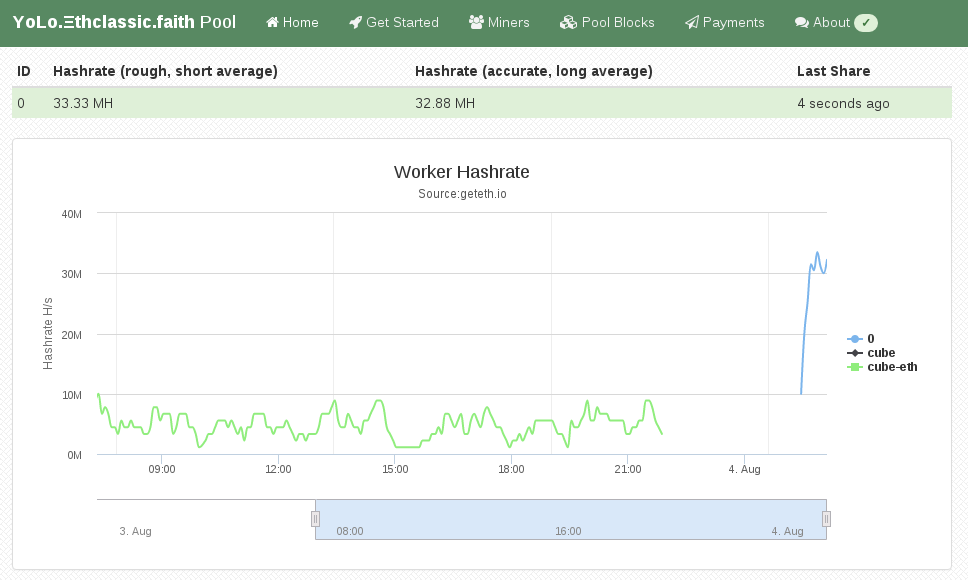
My Attention Span is > 60 seconds Ethereum is a crypto currency similar to Bitcoin as it is based on the blockchain technology. Ethereum is not yet another Bitcoin clone though, since it has an additional feature called Smart Contracts that makes it unique and very promising. I am not going into details how Ethereum works, you can get that into great detail on the Internet. This post is about Ethereum mining. Mining is how crypto coins are created. You need to spent computing time to get coins out. At the beginning CPU mining was sufficient, but as the Ethereum network difficulty has increased you need to use GPUs as they can calculate at a much higher hashrate than a general purpose CPU can do. About 2 months ago I bought a new gaming rig, with a Nvidia GTX 1070 so I can experience virtual-reality gaming with a HTC Vive at a great framerate. As it turns out modern graphics cards are very good at hashing so I gave it a spin. Initially I did this mining setup with Windows 10, as that is the operating system on my gaming rig. If you want to do Ethereum mining using your GPU, then you really want to use Linux. On Windows the GTX 1070 produced a hashrate of 6 MH/s (megahashes per second) while the same hardware does 25 MH/s on Linux. The hashrate multiplied by 4 by using Linux instead of Windows. Sounds good? Keep reading and follow this guide. You have to pick a Linux distro to use for mining. As I am a Debian developer, all my systems run Debian, which is what I am also using for this guide. The same procedure can be done for Ubuntu as it is similar enough. For other distros you have to substitute the steps yourself. So I assume you already have Debian 8 or Ubuntu 16.04 installed on your system.

Install Ethereum Software First we need the geth tool which is the main Ethereum "client". Ethereum is really a peer-to-peer network, that means each node is a server and client at the same time. A node that contains the complete blockchain history in a database is called a full node. For this guide you don't need to run a full node, as mining pools do this for you. We still need geth to create the private key of your Ethereum wallet. Somewhere we have to receive the coins we are mining ;) Add the Ethereum APT repository using these commands:
sudo apt-get install software-properties-common
sudo add-apt-repository ppa:ethereum/ethereum
sudo apt-get update
On Debian 8 (on Ubuntu you can skip this) you need to replace the repository name with this command:
sudo sed 's/jessie/vivid/' -i /etc/apt/sources.list.d/ethereum-ethereum-*.list
sudo apt-get update
Install ethereum, ethminer and geth:
sudo apt-get install ethereum ethminer geth

Create Ethereum Wallet A wallet is where coins are "stored". They are not really stored in the wallet because the wallet is just a private key that nobody has. The balance of that wallet is visible to everyone using the blockchain database. And this is what full nodes do, they contain and distribute the database to all other peers. So this this command to create your first private key for your wallet:
geth account new
Be aware, that this passphrase protects the private key of your wallet. Anyone who has access to that file and knows your passphrase will have full control over your coins. And also do not forget the passphrase, as if you do, you lost all your coins! The output of "geth account new" shows a long character/number sequence quoted in . This is your wallet address and you should write that number down, as if someone wants to send you money, then it is to that address. We will use that for the mining pool later.

Install (proprietary) nvidia driver For OpenCL to work with nvidia graphics cards, like my GTX 1070, you need to install this proprietary driver from nvidia. If you have an older card maybe the opensource drivers will work for you. For the nvidia pascal cards numbers 10xx you will need this driver package. After you have agreed the terms, download the NVIDIA-Linux-x86_64-367.35.run file. But before we can use that installer we need to install some dependencies that installer needs as it will have to compile a Linux kernel module for you. Install the dependencies using this command:
sudo apt-get install linux-headers-amd64 build-essential
Now we can make the installer executable and run it like this:
chmod +x NVIDIA-Linux-x86_64-367.35.run
sudo NVIDIA-Linux-x86_64-367.35.run
If that step completed without error, then we should be able to run the mining benchmark!
ethminer -M -G
The -M means "run benchmark" and the -G is for GPU mining. The first time you run it it will create a DAG file and that will takes a while. For me it took about 12 minutes on my GTX 1070. After that is should show a inner mean hashrate. If it says H/s that is hashes per second and KH is kilo (H/1000) and MH is megahashes per second (KH/1000). I had numbers around 25-30 MH/s, but for real mining you will see an average that is a balanced number and not a min/max range.

Pick Ethereum Network Now it gets serious, you need to decide 2 things. First which Ethereum network you want to mine for and the second is using which pool. Ethereum has 2 networks, one is called Ethereum One or Core, while the other is called Ethereum Classic. Ethereum has made a hardfork to undo the consequences of a software bug in the DAO. The DAO is a smart contract for a decentralized organization. Because of that bug, a blackhat could use that bug to obtain money from that DAO. The Ethereum developers made a poll and decided that the consequences will be undone. Not everyone agreed and the old network stayed alive and is now called Ethereum Classic short ETC. The hardfork kept its short name ETH. This is important to understand for mining, because the hashing difficulty has a huge difference between ETH and ETC. As of writing, the hashrate of ETC is at 20% compared to ETH. Thus you need less computing time to get ETC coins and more time to get ETH coins. Differently said, ETC mining is currently more profitable.

Pick a Pool Hmmmm, I want a swimming pool, thanks! Just kidding... You can mine without a pool, that is called solo mining, but you will get less reward. A mining pool are multiple computers that work on the same block to find a solution quicker than others. The pool has an aggregated hashrate that is higher than other solo miners. Each found block by anyone in this pool will be rewarded to everyone in the pool. The reward of 5 ether currently per block gets split in the same ratio of hashrate each member provides (minus the pool fee). So while you get less for a found block, you still have a steady lower income rate instead of higher with less chance of finding one (in time). Simply said: you have to find a new block faster than the others to receive the reward. If you want to mine Ethereum Classic (ETC) use one of the pools listed here (at the bottom of the page). If you want to mine Ethereum One / Core (ETH) use one of the pools listed here.

Run ethminer The instruction page of the pool website usually says how to start the miner program, but here is an example of the pool that I use (because pony!):
ethminer -G -F http://yolo.ethclassic.faith:9999/0x<YOUR_WALLET_ADDRESS> --farm-recheck 200

Profit If this guide was helpful for you, you can tip me at ethereum:0x9ec1220d2f2fadd3f0c96e3007daa827bc83fbd6 or simply run the ethminer using my wallet address for a day or two:
ethminer -G -F http://yolo.ethclassic.faith:9999/0x9ec1220d2f2fadd3f0c96e3007daa827bc83fbd6 --farm-recheck 200
Happy mining!

5 August 2016

Arturo Borrero Gonz lez: Spawning a new blog with jekyllrb


I have been delighted with git for several years now. It's a very powerful tool and I use it every day.
I try to use git in all possible tasks: bind servers, configurations, firewalls, and other personal stuff.

However, there has been always a thing in my git-TODO: a blog managed with git.

After a bit of searching, I found an interesting technology: jekyllrb hosted at github pages. Jekyll looked easy to manage and easy to learn for a newbie like me.
There are some very good looking blogs out there using this combination, for example: https://rsms.me/

But I was lazy to migrate this 'ral-arturo' blog from blogger to jekyll, so I decided to create a new blog from scratch.

This time, the new blog in written in Spanish and is about adventures, nature, travels and outdoor sports.
Perhaps you noticed this article about the Mulhacen mountain (BTW, we did it! :-))
The new blog is called alfabravo.org,

I like the workflow with git & jekyll & github:


Who knows, perhaps this 'ral-arturo' blog ends being migrated to the new system as well.

3 August 2016

Joey Hess: Patreon

I've been funded for two years by the DataLad project to work on git-annex. This has been a super excellent gig; they provided funding and feedback on ways git-annex could be improved, and I had a large amount of flexability to decide what to work on in git-annex. Also plenty of spare time to work on new projects like propellor, concurrent-output, and scroll. It was an awesome way to spend the last two years of my twenty years of free software. That funding is running out. I'd like to continue this great streak of working on the free software projects that are important to me. I'd normally dip into my savings at this point and keep on going until some other source of funding turned up. But, my savings are about to be obliterated, since I'm buying the place where I've had so much success working distraction-free. So, I've started a Patreon page to fund my ongoing work. Please check it out and contribute if you want to. Some details about projects I want to work on this fall:

John Goerzen: All Aboard

Aaaaaall Aboard! *chug* *chug* And so began a trip aboard our hotel train in Indianapolis, conducted by our very own Jacob and Oliver. IMG_20160703_101438 Because, well, what could be more fun than spending a few days in the world s only real Pullman sleeping car, on its original service track, inside a hotel? IMG_20160703_101520 We were on a family vacation to Indianapolis, staying in what two railfan boys were sure to enjoy: a hotel actually built into part of the historic Indianapolis Union Station complex. This is the original train track and trainshed. They moved in the Pullman cars, then built the hotel around them. Jacob and Oliver played for hours, acting as conductors and engineers, sending their train all across the country to pick up and drop off passengers. Opa! Have you ever seen a kid s face when you introduce them to something totally new, and they think it is really exciting, but a little scary too? That was Jacob and Oliver when I introduced them to saganaki (flaming cheese) at a Greek restaurant. The conversation went a little like this: Our waitress will bring out some cheese. And she will set it ON FIRE right by our table! Will it burn the ceiling? No, she ll be careful. Will it be a HUGE fire? About a medium-sized fire. Then what will happen? She ll yell OPA! and we ll eat the cheese after the fire goes out. Does it taste good? Oh yes. My favorite! It turned out several tables had ordered saganaki that evening, so whenever I saw it coming out, I d direct their attention to it. Jacob decided that everyone should call it opa instead of saganaki because that s what the waitstaff always said. Pretty soon whenever they d see something appear in the window from the kitchen, there d be craning necks and excited jabbering of maybe that s our opa! And when it finally WAS our opa , there were laughs of delight and I suspect they thought that was the best cheese ever. Giggling Elevators IMG_20160703_205544 Fun times were had pressing noses against the glass around the elevator. Laura and I sat on a nearby sofa while Jacob and Oliver sat by the elevators, anxiously waiting for someone to need to go up and down. They point and wave at elevators coming down, and when elevator passengers waved back, Oliver would burst out giggling and run over to Laura and me with excitement. Some history IMG_20160704_161550 We got to see the grand hall of Indianapolis Union Station what a treat to be able to set foot in this magnificent, historic space, the world s oldest union station. We even got to see the office where Thomas Edison worked, and as a hotel employee explained, was fired for doing too many experiments on the job. Water and walkways Indy has a system of elevated walkways spanning quite a section of downtown. It can be rather complex navigating them, and after our first day there, I offered to let Jacob and Oliver be the leaders. Boy did they take pride in that! They stopped to carefully study maps and signs, and proudly announced this way or turn here and were usually correct. 20160702_164754_Richtone(HDR) And it was the same in the paddleboat we took down the canal. Both boys wanted to be in charge of steering, and we only scared a few other paddleboaters. Fireworks IMG_20160704_220332 Our visit ended with the grand fireworks show downtown, set off from atop a skyscraper. I had been scouting for places to watch from, and figured that a bridge-walkway would be great. A couple other families had that thought too, and we all watched the 20-minute show in the drizzle. Loving brothers By far my favorite photo from the week is this one, of Jacob and Oliver asleep, snuggled up next to each other under the covers. They sure are loving and caring brothers, and had a great time playing together. IMG_20160702_071015

1 August 2016

Charles Plessy: Amazon cloud: refreshing my skills.

For a few years I did not attempt any serious task on the Amazon cloud. It took me a bit of time to get back my automatisms and adapt myself to the changes. In particular, the cheapest instances, t2.nano, are only accessible via virtual private clouds (VPC), and it was a bit difficult for me to find how to create a simple one. Perhaps this is because all AWS accounts created after March 18, 2013, automatically have a default VPC, and everybody else who needed their own simple VPC have created it a long time ago already. In the end, this was not complicated at all. This is probably why I could not find a tutorial. In brief, one needs first to create a VPC. If it is just for spawning an instance from time to time, the IP range does not matter much. Default VPCs are using 172.31.0.0/16, so let's do the same.
CIDR_BLOCK=172.31.0.0/16
aws ec2 create-vpc --cidr-block $CIDR_BLOCK
In the command's output, there is the VPC's identifier, that I paste by hand in a variable called VPC. The same pattern will be repeated for each command creating something. One can also find the VPC's identifier with the command aws ec2 describe-vpcs.
VPC=vpc-XXXXXXXX
Then, create a subnet. Again, no need for complications, in our simple case one can give the full IP range. I cut and paste the returned identifier in the variable SUBNET. In order that the instances receive a public IP address like in default VPCs and like in the usual behaviour of the VPC-less Cloud, one needs to set the attribute MapPublicIpOnLaunch.
aws ec2 create-subnet --vpc-id $VPC --cidr-block $CIDR_BLOCK
SUBNET=subnet-XXXXXXXX
aws ec2 modify-subnet-attribute --subnet-id $SUBNET --map-public-ip-on-launch 
Then, create a gateway (paste the identifier in GATEWAY) and attach it to the VPC.
aws ec2 create-internet-gateway
GATEWAY=igw-XXXXXXXX
aws ec2 attach-internet-gateway --internet-gateway-id $GATEWAY --vpc-id $VPC
A routing table was created automatically, and one can find its identifier via the command describe-route-tables. Then, create a default route to the gateway.
aws ec2 describe-route-tables
ROUTETABLE=rtb-XXXXXXXX
aws ec2 create-route --route-table-id $ROUTETABLE --destination-cidr-block 0.0.0.0/0 --gateway-id $GATEWAY
Of course, if one does not open the traffic, no instance can be contacted from outside... Here I open port 22 for SSH.
aws ec2 describe-security-groups
SECURITY_GROUP=sg-XXXXXXXX
aws ec2 authorize-security-group-ingress --group-id $SECURITY_GROUP --protocol tcp --port 22 --cidr 0.0.0.0/0
Other novelty, now Amazon distributes some Free tools for the command line, that are more comprehensive than euca2ools. Next, I will try again the Debian Installer in the Cloud.

Shirish Agarwal: Doha and the past year in APT

A week has gone by and another small sharing about Doha and one package that quite a few of us use everyday but don t think much of them. Let s start with Doha with these two pictures which tells/shares a bit about what the Doha of today is like qatar-1 qatar-2 While I have more than a dozen snapshots of Doha, all of them show same thing, all are huge skyscrapers and overall Doha seems to be aping Dubai and is in a frenzy as World Cup 2022 is around the corner. We did see a few of the older places but these seemed to be more done for tourists rather than the real thing. We saw stuff like wooden_ship This was a picture taken by Ritesh Raj Saraff, a friend and a DD whom I met while I was going to Debconf. The place where this picture has been taken is known as a Souk or what we know as market-place. This was a place where you could get spices. Quite a few of the spices that we get and use in India were bought from Middle-East in the olden times. In fact, it has been argued that the whole Mughlai food that is part of Indian culture was imported from Middle-East when we were trading them before India or Akhand Bharat was invaded. What was interesting to both of us is that we could perceive that most of the buildings had a sort of fakeness to it, they tried to show that it had a lot of detailed work on the buildings but we could see it was all done recently so not that old as being led to believe. One of the other interesting bits that we came to know throughout our stay in Qatar that almost 80-90% of the staff we met inside Qatar airport as well as in the Souk were people from Asian sub-continent and more specifically from South India. I had few interesting conversations with some of the people who were managing the shops were that almost of them were just employees while the owners were Qataris . I could understand this as the distance and flight between Qatar and India is hardly 3 hours. It seemed very similar to how Mexicans look for work in United States. The most expensive thing there was water as it s desert other than housing and most workers seemed to have shared accommodation from anywhere between 5-15 people in one room. It s only the relative strength of the Qatari Rial which probably compels them to be there. The temperature was around 45 degrees with a bit of humidity as it s next to the Ocean. For all the money in the world, I wouldn t work there. It is true that you know your city s worth only when you go outside:) I do have some more stories about Qatar but that would have to wait for another day now. Also, I really don t want to talk much about this part as it s part depressing but probably would explore it a bit in a further blog-post. One of the more interesting topics that I attended was the apt talk . There are 3-4 tools in the Debian world i.e. apt, aptitude, apt-get, dpkg and dselect. More often than not people know aptitude and apt-get whereas the rest of the packages are not thought so much about. What I somewhat suspected about the history of apt was revealed to be true today, courtesy David K. julias-andreas-klose-year-in-apt You can see the talk/video about apt at http://meetings-archive.debian.net/pub/debian-meetings/2016/debconf16/The_past_year_in_APT.webm. I had been curious about apt,libapt,dpkg and the entire tool-chain which goes into updating packages and like. I had a couple of conversations here in India before on mail, in person and IRC as well as couple of conversations in South Africa as well before the APT talk where it was told that packages are not signed or it s not easy to figure out the integrity. Being a Debian fan-boy I could not believe this to be true. Hence I asked and to my dismay found it to be true . I also then asked the same with a bit more background on the mailing list as well and got to know that this has been a concern since 2005. As I do not have the requisite skills and the person would require probably knowledge of dpkg internals as well as have probably good social skills to have at least 1-2 DD s help her/im to work on it and have probably some server space where even some partial archive is re-built using debian packages which use dpkg-sig . I also had some concerns that even if somebody did do the work, it might come in the way of the reproducible builds concept where Neils shared ways in which it could be overcome. Having said the above, it is totally doable if somebody has the will, skills and the patience to do it. Just look at the amazing work done by the team which re-built almost all the archive using clang. See clang.debian.net for the amazing work that they have done. Now, one of the issues in India which comes in popularizing Debian or in fact any free software distribution in India is the bandwidth issue or rather the lack of it or how expensive it is. The situation for better lack of term is pathetic . While nothing can be done till the time the Govt. gives limited term oligopoly licenses to telecom operators and they have a cabal (cabal closed team where decisions and policies are made without any knowledge of and to other stakeholders.) we need to find ways to make the best of the situation. Anyways, while there are some ideas to tackle that but that s a long-term goal and I will share some aspects of it in probably another blog post. In the interim somethings can definitely be made better. Now one of the issues that is there for most people is getting the package updates. Before updating the packages, the package index needs to be updated. Now, both in home and work environments most people are cautious to update the package index. But many times, either due to bandwidth issues or some other issue which is outside your control, your package index is corrupted. I have put both the possible reasons of why and how the package index corruption takes place and a probable work-around of in the deity mail post. I do hope to put in a more coherent state by probably making smaller bug issues so they could be tackled or answered one by one. Any improvements would be better for stability of debian infrastructure only. If anybody does do the required work and need a guinea pig for testing, count me in. Just holler and share you will be working on this aspect and at least one of my workstations would definitely take part in seeing if its better or not. Even if you are able to just provide a way to make a copy of /var/lib/apt/lists after every successful update and do the comparison with time-stamp on next run and only change the copy when a successful update occurs, that will be a huge help in itself. Look forward to hearing form one and all.
Filed under: Miscellenous Tagged: #Debconf16, #feature-request, #Julian Andreas Klose, #shell-script ?, apt, aptitude

Bits from Debian: Debian and Tor Services available as Onion Services

We, the Debian project and the Tor project are enabling Tor onion services for several of our sites. These sites can now be reached without leaving the Tor network, providing a new option for securely connecting to resources provided by Debian and Tor. The freedom to use open source software may be compromised when access to that software is monitored, logged, limited, prevented, or prohibited. As a community, we acknowledge that users should not feel that their every action is trackable or observable by others. Consequently, we are pleased to announce that we have started making several of the various web services provided by both Debian and Tor available via onion services. While onion services can be used to conceal the network location of the machine providing the service, this is not the goal here. Instead, we employ onion services because they provide end-to-end integrity and confidentiality, and they authenticate the onion service end point. For instance, when users connect to the onion service running at http://sejnfjrq6szgca7v.onion/, using a Tor-enabled browser such as the TorBrowser, they can be certain that their connection to the Debian website cannot be read or modified by third parties, and that the website that they are visiting is indeed the Debian website. In a sense, this is similar to what using HTTPS provides. However, crucially, onion services do not rely on third-party certification authorities (CAs). Instead, the onion service name cryptographically authenticates its cryptographic key. In addition to the Tor and Debian websites, the Debian FTP and the Debian Security archives are available from .onion addresses, enabling Debian users to update their systems using only Tor connections. With the apt-transport-tor package installed, the following entries can replace the normal debian mirror entries in the apt configuration file (/etc/apt/sources.list):
  deb  tor+http://vwakviie2ienjx6t.onion/debian          jessie            main
  deb  tor+http://vwakviie2ienjx6t.onion/debian          jessie-updates    main
  deb  tor+http://sgvtcaew4bxjd7ln.onion/debian-security jessie/updates    main
Likewise, Tor's Debian package repository is available from an onion service :
  deb tor+http://sdscoq7snqtznauu.onion/torproject.org   jessie    main
Where appropriate, we provide services redundantly from several backend machines using OnionBalance. The Debian OnionBalance package is available from the Debian backports repository. Lists of several other new onion services offered by Debian and Tor are available from https://onion.debian.org and https://onion.torproject.org respectively. We expect to expand these lists in the near future to cover even more of Debian's and Tor's services.

Chris Lamb: Free software activities in July 2016

Here is my monthly update covering a large part of what I have been doing in the free software world (previously):



Debian
  • Created a proof-of-concept wrapper for pymysql to reduce the diff between Ubuntu and Debian's packaging of python-django. (tree)
  • Improved the NEW queue HTML report to display absolute timestamps when placing the cursor over relative times as well as to tidy the underlying HTML generation.
  • Tidied and pushed for the adoption of a patch against dak to also send mails to the signer of an uploaded package on security-master. (#796784)

LTS

This month I have been paid to work 14 hours on Debian Long Term Support (LTS). In that time I did the following:
  • "Frontdesk" duties, triaging CVEs, etc.
  • Improved the bin/lts-cve-triage.py script to ignore packages that have been marked as unsupported.
  • Improved the bin/contact-maintainers script to print a nicer error message if you mistype the package name.
  • Issued the following advisories:
    • DLA 541-1 for libvirt making the password policy consistent across the QEMU and VNC backends with respect to empty passwords.
    • DLA 574-1 for graphicsmagick fixing two denial-of-service vulnerabilities.
    • DLA 548-1 and DLA 550-1 for drupal7 fixing an open HTTP redirect vulnerability and a privilege escalation issue respectfully.
    • DLA 557-1 for dietlibc removing the current directory from the current path.
    • DLA 577-1 for redis preventing the redis-cli tool creating world-readable history files.

Uploads
  • redis:
    • 3.2.1-2 Avoiding race conditions in upstream test suite.
    • 3.2.1-3 Correcting world_readable ~/.rediscli_history files.
    • 3.2.1-4 Preventing a race condition in the previous upload's patch.
    • 3.2.2-1 New upstream release.
    • 3.2.1-4~bpo8+1 Backport to jessie-backports.
  • strip-nondeterminism:
    • 0.020-1 Improved the PNG handler to not blindly trust chunk sizes, rewriting most of the existing code.
    • 0.021-1 Correcting a regression in the PNG handler where it would leave temporary files in the generated binaries.
    • 0.022-1 Correcting a further regression in the PNG handler with respect to IEND chunk detection.
  • python-redis (2.10.5-1~bpo8+1) Backport to jessie-backports.
  • reprotest (0.2) Sponsored upload.

Patches contributed


I submitted patches to fix faulty initscripts in lm-sensors, rsync, sane-backends & vsftpd.

In addition, I submitted 7 patches to fix typos in debian/rules against cme:, gnugk: incorrect reference to dh_install_init, php-sql-formatter, python-django-crispy-forms, libhook-lexwrap-perl, mknbi & ruby-unf-ext.

I also submitted 6 patches to fix reproducible toolchain issues (ie. ensuring the output is reproducible rather than the package itself) against libextutils-parsexs-perl: Please make the output reproducible, perl, naturaldocs, python-docutils, ruby-ronn & txt2tags.

Lastly, I submitted 65 patches to fix specific reproducibility issues in amanda, boolector, borgbackup, cc1111, cfingerd, check-all-the-things, cobbler, ctop, cvs2svn, eb, eurephia, ezstream, feh, fonts-noto, fspy, ftplib, fvwm, gearmand, gngb, golang-github-miekg-pkcs11, gpick, gretl, hibernate, hmmer, hocr, idjc, ifmail, ironic, irsim, lacheck, libmemcached-libmemcached-perl, libmongoc, libwebsockets, minidlna, mknbi, nbc, neat, nfstrace, nmh, ntopng, pagekite, pavuk, proftpd-dfsg, pxlib, pysal, python-kinterbasdb, python-mkdocs, sa-exim, speech-tools, stressapptest, tcpflow, tcpreen, ui-auto, uisp, uswsusp, vtun, vtwm, why3, wit, wordgrinder, xloadimage, xmlcopyeditor, xorp, xserver-xorg-video-openchrome & yersinia.

RC bugs

I also filed 68 RC bugs for packages that access the internet during build against betamax, curl, django-localflavor, django-polymorphic, dnspython, docker-registry, elasticsearch-curator, elib.intl, elib.intl, elib.intl, fabulous, flask-restful, flask-restful, flask-restful, foolscap, gnucash-docs, golang-github-azure-go-autorest, golang-github-fluent-fluent-logger-golang, golang-github-franela-goreq, golang-github-mesos-mesos-go, golang-github-shopify-sarama, golang-github-unknwon-com, golang-github-xeipuuv-gojsonschema, htsjdk, lemonldap-ng, libanyevent-http-perl, libcommons-codec-java, libfurl-perl, libgravatar-url-perl, libgravatar-url-perl, libgravatar-url-perl, libgravatar-url-perl, libgravatar-url-perl, libhttp-async-perl, libhttp-oai-perl, libhttp-proxy-perl, libpoe-component-client-http-perl, libuv, libuv1, licenseutils, licenseutils, licenseutils, musicbrainzngs, node-oauth, node-redis, nodejs, pycurl, pytest, python-aiohttp, python-asyncssh, python-future, python-guacamole, python-latexcodec, python-pysnmp4, python-qtawesome, python-simpy, python-social-auth, python-structlog, python-sunlight, python-webob, python-werkzeug, python-ws4py, testpath, traitlets, urlgrabber, varnish-modules, webtest & zurl.


Finally, I filed 100 FTBFS bugs against abind, backup-manager, boot, bzr-git, cfengine3, chron, cloud-sptheme, cookiecutter, date, django-uwsgi, djangorestframework, docker-swarm, ekg2, evil-el, fasianoptions, fassets, fastinfoset, fest-assert, fimport, ftrading, gdnsd, ghc-testsuite, golang-github-magiconair-properties, golang-github-mattn-go-shellwords, golang-github-mitchellh-go-homedir, gplots, gregmisc, highlight.js, influxdb, jersey1, jflex, jhdf, kimwitu, libapache-htpasswd-perl, libconfig-model-itself-perl, libhtml-tidy-perl, liblinux-prctl-perl, libmoox-options-perl, libmousex-getopt-perl, libparanamer-java, librevenge, libvirt-python, license-reconcile, louie, mako, mate-indicator-applet, maven-compiler-plugin, mgt, mgt, mgt, misc3d, mnormt, nbd, ngetty, node-xmpp, nomad, perforate, pyoperators, pyqi, python-activipy, python-bioblend, python-cement, python-gevent, python-pydot-ng, python-requests-toolbelt, python-ruffus, python-scrapy, r-cran-digest, r-cran-getopt, r-cran-lpsolve, r-cran-rms, r-cran-timedate, resteasy, ruby-berkshelf-api-client, ruby-fog-libvirt, ruby-grape-msgpack, ruby-jquery-rails, ruby-kramdown-rfc2629, ruby-moneta, ruby-parser, ruby-puppet-forge, ruby-rbvmomi, ruby-redis-actionpack, ruby-unindent, ruby-web-console, scalapack-doc, scannotation, snow, sorl-thumbnail, svgwrite, systemd-docker, tiles-request, torcs, utf8proc, vagrant-libvirt, voms-api-java, wcwidth, xdffileio, xmlgraphics-commons & yorick.

FTP Team

As a Debian FTP assistant I ACCEPTed 114 packages: apertium-isl-eng, apertium-mk-bg, apertium-urd-hin, apprecommender, auto-apt-proxy, beast-mcmc, caffe, caffe-contrib, debian-edu, dh-make-perl, django-notification, dpkg-cross, elisp-slime-nav, evil-el, fig2dev, file, flightgear-phi, friendly-recovery, fwupd, gcc-5-cross, gdbm, gnustep-gui, golang-github-cznic-lldb, golang-github-dghubble-sling, golang-github-docker-leadership, golang-github-rogpeppe-fastuuid, golang-github-skarademir-naturalsort, golang-glide, gtk+2.0, gtranscribe, kdepim4, kitchen, lepton, libcgi-github-webhook-perl, libcypher-parser, libimporter-perl, liblist-someutils-perl, liblouis, liblouisutdml, libneo4j-client, libosinfo, libsys-cpuaffinity-perl, libtest2-suite-perl, linux, linux-grsec, lua-basexx, lua-compat53, lua-fifo, lua-http, lua-lpeg-patterns, lua-mmdb, lua-openssl, mash, mysql-5.7, node-quickselect, nsntrace, nvidia-graphics-drivers, nvidia-graphics-drivers-legacy-304xx, nvidia-graphics-drivers-legacy-340xx, openorienteering-mapper, oslo-sphinx, p4est, patator, petsc, php-mailparse, php-yaml, pykdtree, pypass, python-bioblend, python-cotyledon, python-jack-client, python-mido, python-openid-cla, python-os-api-ref, python-pydotplus, python-qtconsole, python-repoze.sphinx.autointerface, python-vispy, python-zenoss, r-cran-bbmle, r-cran-corpcor, r-cran-ellipse, r-cran-minpack.lm, r-cran-rglwidget, r-cran-rngtools, r-cran-scatterd3, r-cran-shinybs, r-cran-tibble, reproject, retext, ring, ruby-github-api, ruby-rails-assets-jquery-ui, ruby-swd, ruby-url-safe-base64, ruby-vmstat, ruby-webfinger, rustc, shadowsocks-libev, slepc, staticsite, steam, straight.plugin, svgwrite, tasksh, u-msgpack-python, ufo2otf, user-mode-linux, utf8proc, vizigrep, volk, wchartype, websockify & wireguard.

31 July 2016

Ritesh Raj Sarraf: User Mode Linux

Recently, we had the User-Mode Linux suite out of Debian, which included user-mode-linux, user-mode-linux-doc and uml-utilities package. We are happy that we were able to bring it back into the archvie quick, and hope to maintain it active. For many who may not know about UML, here's a discription from its website:
User-Mode Linux is a safe, secure way of running Linux versions and Linux processes. Run buggy software, experiment with new Linux kernels or distributions, and poke around in the internals of Linux, all without risking your main Linux setup.
User-Mode Linux gives you a virtual machine that may have more hardware and software virtual resources than your actual, physical computer. Disk storage for the virtual machine is entirely contained inside a single file on your physical machine. You can assign your virtual machine only the hardware access you want it to have. With properly limited access, nothing you do on the virtual machine can change or damage your real computer, or its software.
Most of the use cases mentioned here are achievable with Containers today. The big difference UML provides in, is with a separate kernel. UML is an implementation of Linux as an architecture of Linux itself. It supports x86 and x86_64 architecture. And given that it is the port of the kernel, you can do many of the tests and experiments of the regular kernel, safely inside a confined UML environment. As with other virtualization implementations, the limitation comes in if you are working on physical hardware. With its re-entry in Debian, I wanted to revive my local setup. First is the packaging structure and the second is its integration with current standard tools
  • Packaging: For packaging UML in Debian, we rely on the packaged linux-source package provided by the kernel team.
    • linux-source package: We build UML from the linux sources that are provided by the debian kernel team. This works fine for now. Whenever there's a kernel vulnerability, there'll be an updated source package, to which we'll rebuild the UML package.
    • Merge with debian-kernel: In the longer run, we'd like to push UML package into the debian kernel team. UML is a component of the Linux kernel, and that is where it should be built from.
  • Integration: It works fairly well right now. On modern systems with systemd, where (nspawn) containers can easily have a network interface bound to it, UML lacks a bit behind. It'd be nice if we could see some UML integration with systemd.
    • Networking under systemd: Setting up networking, for UML, under systemd is fairly straight. In fact, with systemd, it is much simpler. Below is the host network (tuntap) setup, to which UML can bind for all its network needs.
rrs@learner:~/tidBits (master)$ cat /etc/systemd/network/tap.netdev 
[NetDev]
Name=tap0
Kind=tap
[TAP]
Group=uml-net
User=uml-net
2016-08-01 / 15:41:40       
rrs@learner:~/tidBits (master)$ cat /etc/systemd/network/tap.network 
[Match]
Name=tap0
[Network]
DHCPServer=yes
IPForward=yes
IPMasquerade=yes
Address=172.16.20.2
LLMNR=yes
MulticastDNS=yes
DNS=172.16.20.1
2016-08-01 / 15:41:43       

systemd allows for defining user/group ownership in its file. With this setup, and uml-utilities running, one can simply fire a UML instance as below:

rrs@learner:~/rrs-home/Community/Packaging/user-mode-linux (master)$ linux ubd0=~/rrs-home/NoTrack/uml.img eth0=daemon mem=1024M rw  
Core dump limits :
    soft - 0
    hard - NONE
Checking that ptrace can change system call numbers...OK
Checking syscall emulation patch for ptrace...OK
Checking advanced syscall emulation patch for ptrace...OK
Checking environment variables for a tempdir...none found
Checking if /dev/shm is on tmpfs...OK
Checking PROT_EXEC mmap in /dev/shm...OK
Adding 23609344 bytes to physical memory to account for exec-shield gap
Linux version 4.6.3 (root@chutzpah) (gcc version 5.4.0 20160609 (Debian 5.4.0-6) ) #2 Sat Jul 16 16:22:22 UTC 2016
Built 1 zonelists in Zone order, mobility grouping on.  Total pages: 263721
Kernel command line: ubd0=/home/rrs/rrs-home/NoTrack/uml.img eth0=daemon mem=1024M rw root=98:0
PID hash table entries: 4096 (order: 3, 32768 bytes)
Dentry cache hash table entries: 262144 (order: 9, 2097152 bytes)
Inode-cache hash table entries: 131072 (order: 8, 1048576 bytes)
Memory: 1020852K/1071632K available (4803K kernel code, 1207K rwdata, 1340K rodata, 157K init, 217K bss, 50780K reserved, 0K cma-reserved)
SLUB: HWalign=64, Order=0-3, MinObjects=0, CPUs=1, Nodes=1
NR_IRQS:15
.....snipped.......
root@uml:~# cat /proc/cpuinfo 
processor    : 0
vendor_id    : User Mode Linux
model name    : UML
mode        : skas
host        : Linux learner 4.6.0-1-amd64 #1 SMP Debian 4.6.4-1 (2016-07-18) x86_64
bogomips    : 6048.97
root@uml:~# ping www.debian.org
PING www.debian.org (130.89.148.14) 56(84) bytes of data.
64 bytes from klecker4.snt.utwente.nl (130.89.148.14): icmp_seq=1 ttl=46 time=372 ms
64 bytes from klecker4.snt.utwente.nl (130.89.148.14): icmp_seq=2 ttl=46 time=395 ms
64 bytes from klecker4.snt.utwente.nl (130.89.148.14): icmp_seq=3 ttl=46 time=315 ms
^C
--- www.debian.org ping statistics ---
3 packets transmitted, 3 received, 0% packet loss, time 2002ms
rtt min/avg/max/mdev = 315.550/361.064/395.440/33.556 ms

And here are some (incomplete and non-conclusive) performance numbers

root@uml:~# dd if=/dev/zero of=foo.img bs=1M count=2500 conv=fsync
2500+0 records in
2500+0 records out
2621440000 bytes (2.6 GB, 2.4 GiB) copied, 39.4876 s, 66.4 MB/s
vs
rrs@learner:/var/tmp/Debian-Build/Result$ dd if=/dev/zero of=foo.img bs=1M count=2500 conv=fsync
2500+0 records in
2500+0 records out
2621440000 bytes (2.6 GB, 2.4 GiB) copied, 41.2126 s, 63.6 MB/s
2016-08-01 / 15:59:15       

Categories:

Keywords:

Like:

Paul Tagliamonte: Hacking a Projector in Hy

About a year ago, I bought a Projector after I finally admitted that I could actually use a TV in my apartment. I settled on buying a ViewSonic PJD5132. It was a really great value, and has been nothing short of a delight to own. I was always a bit curious about the DB9 connector on the back of the unit, so I dug into the user manual, and found some hex code strings in there. So, last year, between my last gig at the Sunlight Foundtion and USDS, I spent some time wandering around the US, hitting up DebConf, and exploring Washington DC. Between trips, I set out to figure out exactly what was going on with my Projector, and see if I could make it do anything fun. So, I started off with basics, and tried to work out how these command codes were structured. I had a few working codes, but to write clean code, I'd be better off understanding why the codes looked like they do. Let's look at the "Power On" code. 0x06 0x14 0x00 0x04 0x00 0x34 0x11 0x00 0x00 0x5D Some were 10 bytes, other were 11, and most started with similar looking things. The first byte was usually a 0x06 or 0x07, followed by two bytes 0x14 0x00, and either a 0x04 or 0x05. Since the first few bytes were similarly structured, I assumed the first octet (either 0x06 or 0x07) was actually a length, since the first 4 octets seemed always present. So, my best guess is that we have a Length byte at index 0, followed by two bytes for the Protocol, a flag for if you're Reading or Writing (best guess on that one), and opaque data following that. Sometimes it's a const of sorts, and sometimes an octet (either little or big endian, confusingly).
Length
           Read / Write
                 
     Protocol                Data
       ----           ------------------------ 
0x06 0x14 0x00 0x04 0x00 0x34 0x11 0x00 0x00 0x5D
Right. OK. So, let's get to work. In the spirit of code is data, data is code, I hacked up some of the projector codes into a s-expression we can use later. The structure of this is boring, but it'll let us both store the command code to issue, as well as define the handler to read the data back.
(setv *commands*
  ;  function                       type family         control
  '((power-on                         nil nil            (0x06  0x14 0x00  0x04  0x00 0x34 0x11 0x00 0x00 0x5D))
    (power-off                        nil nil            (0x06  0x14 0x00  0x04  0x00 0x34 0x11 0x01 0x00 0x5E))
    (power-status                   const power          (0x07  0x14 0x00  0x05  0x00 0x34 0x00 0x00 0x11 0x00 0x5E))
    (reset                            nil nil            (0x06  0x14 0x00  0x04  0x00 0x34 0x11 0x02 0x00 0x5F))
    ...
As well as defining some of the const responses that come back from the Projector itself. These are pretty boring, but it's helpful to put a name to the int that falls out.
(setv *consts*
  '((power        ((on           (0x00 0x00 0x01))
                   (off          (0x00 0x00 0x00))))
    (freeze       ((on           (0x00 0x00 0x01))
                   (off          (0x00 0x00 0x00))))
    ...
After defining a few simple functions to write the byte arrays to the serial port as well as reading and understanding responses from the projector, I could start elaborating on some higher order functions that can talk projector. So the first thing I wrote was to make a function that converts the command entry into a native Hy function.
(defn make-api-function [function type family data]
   (defn ~function [serial]
      (import [PJD5132.dsl [interpret-response]]
              [PJD5132.serial [read-response/raw]])
      (serial.write (bytearray [~@data]))
      (interpret-response ~(str type) ~(str family) (read-response/raw serial))))
Fun. Fun! Now, we can invoke it to create a Hy & Python importable API wrapper in a few lines!
(import [PJD5132.commands [*commands*]]
        [PJD5132.dsl [make-api-function]])
(list (map (fn [(, function type family command)]
               (make-api-function function type family command)) *commands*)))
Cool. So, now we can import things like power-on from *commands* which takes a single argument (serial) for the serial port, and it'll send a command, and return the response. The best part about all this is you only have to define the data once in a list, and the rest comes for free. Finally, I do want to be able to turn my projector on and off over the network so I went ahead and make a Flask "API" on top of this. First, let's define a macro to define Flask routes:
(defmacro defroute [name root &rest methods]
  (import os.path)
  (defn generate-method [path method status]
     (with-decorator (app.route ~path) (fn []
       (import [PJD5132.api [~method ~(if status status method)]])
       (try (do (setv ret (~method serial-line))
               ~(if status  (setv ret (~status serial-line)))
                (json.dumps ret))
       (except [e ValueError]
          (setv response (make-response (.format "Fatal Error: ValueError:  " (str e))))
          (setv response.status-code 500)
          response)))))
  (setv path (.format "/projector/ " name))
  (setv actions (dict methods))
   (do ~(generate-method path root nil)
       ~@(list-comp (generate-method (os.path.join path method-path) method root)
                    [(, method-path method) methods])))
Now, we can define how we want our API to look, so let's define the power route, which will expand out into the Flask route code above.
(defroute power
  power-status
  ("on"  power-on)
  ("off" power-off))
And now, let's play with it!
$ curl http://192.168.1.50/projector/power
"off"
$ curl http://192.168.1.50/projector/power/on
"on"
$ curl http://192.168.1.50/projector/power
"on"
Or, the volume!
$ curl 192.168.1.50/projector/volume
10
$ curl 192.168.1.50/projector/volume/decrease
9
$ curl 192.168.1.50/projector/volume/decrease
8
$ curl 192.168.1.50/projector/volume/decrease
7
$ curl 192.168.1.50/projector/volume/increase
8
$ curl 192.168.1.50/projector/volume/increase
9
$ curl 192.168.1.50/projector/volume/increase
10
Check out the full source over at github.com/paultag/PJD5132!

30 July 2016

Luke Faraone: Snappy Sprint Heidelberg

I recently attended Snappy Sprint Heidelberg, the first Snappy sprint focused on upstream and cross-distribution collaboration.
Snappy is a technology with an interesting history: initially started to provide App Store-like semantics (atomicity, declarative security) for the Ubuntu Phone project, it has since expanded to be a platform for desktop application deployment (e.g. VLC), as well as server applications and the IoT space.

There were a number of productive discussions with people working on Snappy itself, as well as folks from Fedora, elementary OS, KDE, and elsewhere.

At the start of the week, Snappy was technically usable in several different distributions, but only shipped fully-featured (in the main distribution repositories, with confinement, etc) in Ubuntu. Some great progress was made on AppArmor confinement in Arch Linux, and there is currently beta support for confinement via SELinux.

Providing a full-featured Snappy experience in Debian has its challenges, mostly relating to the lack of a default LSM. While AppArmor in Debian is supported and there's desire to have it be the default in "buster", Ubuntu carries a number of patches that add additional functionality not yet present upstream. I'm not sure whether pursuing getting those patches merged is more viable than waiting for SELinux support in snapd, however.

I've agreed to co-maintain the snapd package in Debian, and am excited to see intentions to support building snaps on a variety of distribution bases. While I do not expect Snappy (or Flatpak, or AppImage) to replace distribution-maintained software in the foreseeable future, nor do I feel that's a desirable outcome, I do think offering users freedom to choose to use software via these systems in a safe manner is critical.

29 July 2016

Bits from Debian: Looking for the artwork for the next Debian release

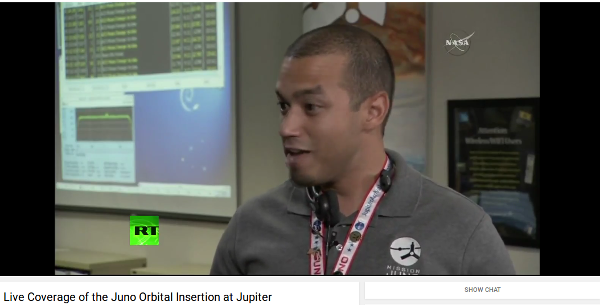
Each release of Debian has a shiny new theme, which is visible on the boot screen, the login screen and, most prominently, on the desktop wallpaper. Debian plans to release Stretch next year. As ever, we need your help in creating its theme! You have the opportunity to design a theme that will inspire thousands of people while working in their Debian systems. They might be people working in exciting NASA missions: Debian Squeeze Space Fun Spotted during the Juno Orbital Insertion live stream Or DYI users who decided to make a matching keyboard: Keyboard matching Debian Lenny Theme If you're interested, please take a look at https://wiki.debian.org/DebianDesktop/Artwork/Stretch

Luciano Prestes Cavalcanti: Contributing with Debian Recommendation System

Hi, my name is Luciano Prestes, I am participating in the program Google Summer of Code (GSoC), my mentor is Antonio Terceiro, and my co-mentor is Tassia Camoes, both are Debian Developers. The project that I am contributing is the AppRecommender, which is a package recommender for Debian systems, my goal is to add a new strategy of recommendation to AppRecommender, to make it recommend packages after the user installs a new package with 'apt'.
At principle AppRecommender has three recommendation strategies, being them, content-based, collaborative and hybrid. To my work on GSoC this text explains two of these strategies, content-based and collaborative. Content-based strategy get the user packages and analyzes yours descriptions to find another Debian packages that they are similar to the user packages, so AppRecommender uses the content of user packages to recommender similar packages to user. The collaborative strategy compare the user packages with the packages of another users, and then recommends packages that users with similar profile have, where a profile of user is your packages. On her work, Tassia Camoes uses the popularity-contest data to compare the users profiles on the collaborative strategy, the popularity-contest is an application that get the users packages into a submission and send to the popularity-contest server and generates statistical data analyzing the users packages.
I have been working with a classmate on our bachelor thesis since August 2015, in our work we created new strategies to AppRecommender, one using machine-learning and another using a deterministic method to generates the recommendation, another feature that we implemented its improve the user profile using the recently used packages to makes the profile. During our work we study the collaborative strategy and analyzed that strategy and remove it from AppRecommender, because this implementation of collaborative strategy needs to get the popularity-contest submissions on the user's pc, and this is against the privacy policy of popularity-contest.
My work on Google Summer of Code is create a new strategy on AppRecommender, as described above, where this strategy should be able to get an referenced package, or a list of referenced packages, then analyze the users packages making a recommendation using the referenced packages such as base, example: if users run "$ sudo apt install vim", the AppRecommender use "vim" as referenced package, and should recommender packages with relation between "vim" and the other packages that user has installed. This new strategy can be implemented like a content-based strategy, or the collaborative strategy.
The first month of Google Summer of Code its destined to students knows the community of the project, so I talk with the Debian community about my project, to get feedback and ideas about the project. I talk with Debian community on IRC channels, and then came the idea to use the data of popularity-contest to improve the recommendations. Talking with my mentors, they approve the idea of usage popularity-contest data, so we started a discussion about how to use the popularity-contest data on AppRecommender without broken the privacy policy of popularity-contest.
Now my work on Google Summer of Code is create the new strategy for AppRecommender that can makes recommendation using a list of packages as reference, so as explained above, when user install packages like "sudo apt install vim vagrant", AppRecommender should recommends packages with relation between the packages "vim" and "vagrant", and this recommendation should be relation with the user profile. The other work its use the popularity-contest data to improve the recommendations of AppRecommender using a new model of collaborative strategies.

Norbert Preining: TUG 2016 Day 4 Books, ooh Books (and Boats)

Talks have been finished, and as a special present to the participants, Pavneet has organized an excursion that probably was one of the best I ever had. First we visited the Toronto Reference Library where we were treated to a delicious collection of rare books (not to mention all the other books and architecture), and then a trip through the Ismaili Centre Toronto and the Aga Khan Museum.

Page from "A Dream of John Ball", Kelmscott Press Edition, 1892.
(Kelmscott press edition from 1892 of William Morris A Dream of John Ball.) All these places were great pieces of architecture with excellent samples of the writing and printing art. And after all that and not to be mentioned, the conference dinner evening cruise! Our first stop was the Toronto Reference Library. Designed by Raymond Moriyama, it features a large open atrium with skylights, and it gives the library an open and welcoming feeling. We were told that it resembles a tea cup that needs to be filled with knowledge.
The Toronto Reference Library's atrium
The library also features running water at several places the architect had the idea that natural ambient noise is more natural for a library than the eclectic silence that anyway never happens. Originally there were lots of greens hanging down into the Atrium, resembling the Hanging Gardens, but they have been scrapped due to financial reasons. But there are still green oasis like this beautiful green wall in a corner of the library.
Wall of Green in the middle of the library
We were guided first to the fifth floor where the special collection is housed. And what a special collection. The librarian in charge has laid out about 20 exquisite books starting from early illuminated manuscripts over incunabula to high pieces of printing art from the 18th and 19th century. Here we have a illuminated script in Carolingian minuscule.
Illuminated script in Carolingian minuscule
What was really surprising for all of us in this special collection that all these books were simply laid out in front of us, that the librarian touched and used it without gloves, and above all, that he told us that if one wants it is common practice to check out these books for study sessions and enjoy them on the spot in the reading room. I don t know any other library that allows you to actually handle these rare and beauty specimens! The library not only featured lots of great books, it also had some art installation like these light rods.
Art Light installation in the Toronto Reference Library
In one of the books I found by chance a map of my hometown of Vienna. Looking at this map from very old times, the place where I grew up is still uninhabited somewhere in the far upper right corner of the map. Times have changed.
Map op Vienna found in the Toronto Reference Library
After we left this open and welcoming treasure house of beautiful books, we moved to the Aga Khan Museum and Ismaili Centre Toronto, which are standing face-to-face separated by some water ponds in the Aga Khan park a bit outside of central Toronto. Here we see the Ismaili Centre from the Aga Khan Museum entrance. The big glass dome is the central prayer room, and is illuminated at night. Just one detail one can see in the outer wall one part that looks like glass, too. This is the prayer alcove in the back of the prayer hall, and is made from huge slabs of Onyx that are also lit up in the night.
View onto the Ismaili Centre's Prayer Hall formed by a glass dome
The Ismaili Centre, designed by Charles Correa combines modern functional and simple style with the wonderful ornamental art of the Islam heritage. The inside of the Ismaili Centre features many pieces of exquisite art calligraphy, murals, stone work, etc here is a medallion made from precious stone and set onto a hand-carved wall.
Medaillon made of precious stones in hand carved wall, Ismaili Centre Toronto
A calligraphy on the wall in the Ismaili Centre
Wall Calligraphy in the Ismaili Centre Toronto
Following the Ismaili Centre we turned to the Aga Khan museum which documents Islamic art, science, and history with an extensive collection. We didn t have much time, and in addition I had to do some fire-fighting over the phone, but the short trip through the permanent collection with samples of excellent calligraphy was amazing.
Koran Calligraphy, Aga Khan Museum Toronto
After returning from this lovely excursion and a short break, we set off for the last stop for tonight, the dinner cruise. After a short bus ride we could board our ship and off we go. Although the beer selection was not on par with what we are used from carft breweries, the perfectly sized boat with two decks and lots of places to hang around invited us to many discussions and chitchats. And finally I could enjoy also the skyline of Toronto.
View onto Toronto from the boat
After the dinner we had some sweets, one of which was a specially made cake with the TUG 2016 logo on it. I have to say, it was not only this cake but the whole excellent and overboarding food we had during all these days, that will make me go on diet when I am back in Japan. Pavneet organized for the lunch breaks three different style of kitchens (Thai, Indian, Italian), then the excursions to local brewers and and and If it wouldn t be for TeX, I would call it a Mastkur .
TUG 2016 cake
During the cruise we also had a little ceremony thanking Jim for his work as president of the TUG, but above all Pavneet for this incredible well organized conference. I think everyone agreed that this was the best TUG conference since long.
Sunset near Toronto
pensDuring the ceremony, Pavneet also announced the winners of the TUG 2016 fountain pen auction. These pens have a long history/travel behind them, see details on the linked page, and were presented to the special guests of the conference. Two remaining pens were auctioned with funds going to the TUG. The first one was handed over to Steve Grathwohl, and to my utter surprise the second one to myself. So now I am a happy owner of a TUG 2016 fountain pen. What a special feature! Just one more detail about these pens: They are traditional style, so without ink capsules, but one needs to insert the ink with a syringe. I guess I need to stack up a bit at home, and more importantly, train my really ugly hand-writing, otherwise it would be a shame to use this exquisite tool. We returned to the harbor around 10pm, and back to the hotel, where there was much greeting and thanking, as many people will return the following day.

Heading back to Toronto
I will also leave on Friday morning to meet with friends, thus I will not be participating in (and not reporting on) the last excursion of the TUG 2016. I will leave Toronto and the TUG 2016 with (nearly) exclusively good memories of excellent talks, great presentations, wonderful excursions, and lots of things I have learned. I hope to see all of the participants on next year s TUG meeting and I hope I will be able to attend it. Thanks a lot to Pavneet, you have done an incredible job. And last but not least, thanks to your lovely wife for letting you do all this, I know how much time we did steal from her. A few more photos can be found at the album Day 4 Books, ooh books.

Dirk Eddelbuettel: RcppGetconf 0.0.1

A new package RcppGetconf to read system configuration --- not unlike getconf from the libc library. Now R can read what system calls sysconf, pathconf and confstr have to say. The package is still pretty green, and now on CRAN in a very first version, corresponding to a very first (and single !) commit. Right now, the CRAN just has one function getAll() similar to getconf -a. A first example shows how it provides all values which can be retried -- currently 320 on my systems.
R> res <- getAll()
R> head(res)
               key value type
1         LINK_MAX 65000 path
2  _POSIX_LINK_MAX 65000 path
3        MAX_CANON   255 path
4 _POSIX_MAX_CANON   255 path
5        MAX_INPUT   255 path
6 _POSIX_MAX_INPUT   255 path
R> tail(res)
                      key  value type
315    LEVEL4_CACHE_ASSOC      0  sys
316 LEVEL4_CACHE_LINESIZE      0  sys
317                  IPV6 200809  sys
318           RAW_SOCKETS 200809  sys
319           _POSIX_IPV6 200809  sys
320    _POSIX_RAW_SOCKETS 200809  sys
R> 
Earlier this evening I added a second function to the GitHub repo which can access indivial values. But right now, the biggest need is really for someone with some systems skills---and an OS X machine---to look at the code, and maybe the getconf.c from the C library, in order to make this build OS X. If you can help, please get in touch. More about the package is at the local RcppGetconf page and the GitHub repo.

This post by Dirk Eddelbuettel originated on his Thinking inside the box blog. Please report excessive re-aggregation in third-party for-profit settings.

28 July 2016

Gunnar Wolf: Subtitling DebConf talks Come and join!

As I have said here a couple of times already, I am teaching a diploma course on embedded Linux at UNAM, and one of the modules I'm teaching (with Sandino Araico) is the boot process. We focus on ARM for obvious reasons, and while I have done my reading on the topic, I am very far from considering myself an expert. So, after attending Martin Michlmayr's Debian on ARM devices talk, I decided to do its subtitles as part of my teaching job. This talk gives a great panorama on what actually has to happen in order to get an ARM machine to boot, and how support for new ARM devices comes around to Linux in general and to Debian in particular Perfect for our topic! But my students are not always very fluent in English, so giving a hand is always most welcome. In case any of you dear readers didn't know, we have a DebConf subtitling team. Yes, our work takes much longer to reach the public, and we have no hopes whatsoever in getting it completed, but every person lending a hand and subtitling a talk that they thought was interesting helps a lot to improve our talks' usability. Even if you don't have enough time to do the whole talk (we are talking about some 6hr per 45 minute session), adding a bit of work is very very very welcome. So... Enjoy And thanks in advance for your work!

Next.

Previous.