Search Results: "ema"

16 August 2015

John Goerzen: First steps: Debian on an Asus t100, and some negative experience with Gnome

The Asus t100 tablet is this amazing and odd little thing: it sells for under $200, yet has a full-featured Atom 64-bit CPU, 2GB RAM, 32 or 64GB SSD, etc. By default, it ships with Windows 8.1. It has a detachable keyboard, so it can be used as a tablet or a very small 10 laptop. I have never been a fan of Windows on it. It does the trick for web browsing and email, but I d like to ssh into my machines sometimes, and I just can t bring myself to type sensitive passwords into Windows. I decided to try installing Debian on it. After a lot of abortive starts due to the UEFI-only firmware, I got jessie installed. (The installer was fine; it was Debian Live that wouldn t boot.) I got wifi and battery status working via an upgrade to the 4.1 kernel. A little $10 Edimax USB adapter was handy to spare a bunch of copying via USB disks. I have been using XFCE with XMonad for so many years that I am somewhat a stranger to other desktop environments. XMonad isn t really suitable for a tablet, however, so I thought I d try Gnome, especially after a fairly glowing review about its use on a tablet. I am already disappointed after just a few minutes. There is no suspend button on the menu. Some Googling showed that holding Alt while hovering over the power off button will change it to a suspend button. And indeed it does. But uh, what? That is so common and so non-obvious. And pushing the power button does nothing. That s right, nothing. Apparently the way to enable some action when you push the power button is to type in a settings command in a terminal. There s no setting in the settings panel. I initially ditched Gnome some years ago due to its penchant for removing features. I had hoped that this much time later, it would have passed that stage, but I m already disappointed. I was hoping for some really nice integration with the system. But my XFCE setup has a very clear When power button is pressed setting. I have no idea why Gnome doesn t. Also, the touch screen works fine and it registers my touches, but whenever I touch anywhere, the cursor disappears. Weird, eh? There are some things to fix yet on the tablet (sound, brightness adjustment, and making suspend reliable) but others have solved these in Ubuntu so I don t think it ll be too hard. In the meantime, any suggestions regarding Gnome? Is it just going to annoy me? Maybe I should try KDE also. I ve heard good things about Plasma Active, but don t see it in Debian though.

15 August 2015

Norbert Preining: Kobo GloHD firmware 3.17.0 mega update (KSM, nickel patch, ssh, fonts)

As with all the previous versions, I have prepared a mega update for the Kobo firmware 3.17.0. Big warning for a start this is for Mark6 hardware, thus GloHD only. The update includes all my favorite patches and features. Please see details (although for for Kobo Glo) for 3.16.0, 3.15.0, 3.13.1 and 3.12.1. As before, the following addons are included: Kobo Start Menu, koreader, coolreader, pbchess, ssh access, custom dictionaries, and some side-loaded fonts. What I dropped this time is most of the kobohack part, as the libraries seem to get outdated. But I included the dropbear ssh server from the kobohack package. Kobo Logo So what are all these items: Install procedure Latest firmware Warning: Sideloading or crossloading the incorrect firmware can break/brick your device. The link below is for Kobo GloHD ONLY. The first step is to update the Kobo to the latest firmware. This can easily be done by just getting the latest firmware (thread, direct link for Kobo 3.17.0 for GloHD) and unpacking the zip file into the .kobo directory on your device. Eject and enjoy the updating procedure. Mega update Get the combined Kobo-3.17.0-combined/KoboRoot.tgz and put it into the .kobo directory, then eject and enjoy the updating procedure again. After this the device should reboot and you will be kicked into KSM, from where after some time of waiting Nickel will be started. If you consider the fonts too small, select Configure, then the General, and add item, then select kobomenuFontsize=55 and save. Remarks to some of the items included The full list of included things is above, here are only some notes about what specific I have done. WARNINGS After installing this patch, you need to fix the password for root and disable telnet. This is an important step, here are the steps you have to take (taken from this old post):
  1. Turn on Wifi on the Kobo and find IP address
    Go to Settings Connect and after this is done, go to Settings Device Information where you will see something like
    IP Address: 192.168.1.NN

    (numbers change!)
  2. telnet into your device
    telnet 192.168.1.NN
    it will ask you the user name, enter root (without the quotes) and no password
  3. (ON THE GLO) change home directory of root
    edit /etc/passwd with vi and change the entry for root by changing the 6th field from: / to /root (without the quotes). After this procedure the line should look like
    root::0:0:root:/root:/bin/sh
    don t forget to save the file
  4. (ON THE GLO) create ssh keys for dropbear
    [root@(none) ~]# mkdir /etc/dropbear
    [root@(none) ~]# cd /etc/dropbear
    [root@(none) ~]# dropbearkey -t dss -f dropbear_dss_host_key
    [root@(none) ~]# dropbearkey -t rsa -f dropbear_rsa_host_key
  5. (ON YOUR PERSONAL COMPUTER) check that you can log in with ssh
    ssh root@192.168.1.NN
    You should get dropped into your device again
  6. (ON THE GLO) log out of the telnet session (the first one you did)
    [root@(none) ~]# exit
  7. (ON THE GLO) in your ssh session, change the password of root
    [root@(none) ~]# passwd
    you will have to enter the new password two times. Remember it well, you will not be easily able to recover it without opening your device.
  8. (ON THE GLO) disable telnet login
    edit the file /etc/inetd.conf.local on the GLO (using vi) and remove the telnet line (the line starting with 23).
  9. restart your device
The combined KoboRoot.tgz is provided without warranty. If you need to reset your device, don t blame me!

14 August 2015

Alberto Garc a: I/O limits for disk groups in QEMU 2.4

QEMU 2.4.0 has just been released, and among many other things it comes with some of the stuff I have been working on lately. In this blog post I am going to talk about disk I/O limits and the new feature to group several disks together. Disk I/O limits Disk I/O limits allow us to control the amount of I/O that a guest can perform. This is useful for example if we have several VMs in the same host and we want to reduce the impact they have on each other if the disk usage is very high. The I/O limits can be set using the QMP command block_set_io_throttle, or with the command line using the throttling.* options for the -drive parameter (in brackets in the examples below). Both the throughput and the number of I/O operations can be limited. For a more fine-grained control, the limits of each one of them can be set on read operations, write operations, or the combination of both: Example:
-drive if=virtio,file=hd1.qcow2,throttling.bps-write=52428800,throttling.iops-total=6000
In addition to that, it is also possible to configure the maximum burst size, which defines a pool of I/O that the guest can perform without being limited: One additional parameter named iops_size allows us to deal with the case where big I/O operations can be used to bypass the limits we have set. In this case, if a particular I/O operation is bigger than iops_size then it is counted several times when it comes to calculating the I/O limits. So a 128KB request will be counted as 4 requests if iops_size is 32KB. Group throttling All of these parameters I ve just described operate on individual disk drives and have been available for a while. Since QEMU 2.4 however, it is also possible to have several drives share the same limits. This is configured using the new group parameter. The way it works is that each disk with I/O limits is member of a throttle group, and the limits apply to the combined I/O of all group members using a round-robin algorithm. The way to put several disks together is just to use the group parameter with all of them using the same group name. Once the group is set, there s no need to pass the parameter to block_set_io_throttle anymore unless we want to move the drive to a different group. Since the I/O limits apply to all group members, it is enough to use block_set_io_throttle in just one of them. Here s an example of how to set groups using the command line:
-drive if=virtio,file=hd1.qcow2,throttling.iops-total=6000,throttling.group=foo
-drive if=virtio,file=hd2.qcow2,throttling.iops-total=6000,throttling.group=foo
-drive if=virtio,file=hd3.qcow2,throttling.iops-total=3000,throttling.group=bar
-drive if=virtio,file=hd4.qcow2,throttling.iops-total=6000,throttling.group=foo
-drive if=virtio,file=hd5.qcow2,throttling.iops-total=3000,throttling.group=bar
-drive if=virtio,file=hd6.qcow2,throttling.iops-total=5000
In this example, hd1, hd2 and hd4 are all members of a group named foo with a combined IOPS limit of 6000, and hd3 and hd5 are members of bar. hd6 is left alone (technically it is part of a 1-member group). Next steps I am currently working on providing more I/O statistics for disk drives, including latencies and average queue depth on a user-defined interval. The code is almost ready. Next week I will be in Seattle for the KVM Forum where I will hopefully be able to finish the remaining bits.
I will also attend LinuxCon North America. Igalia is sponsoring the event and we have a booth there. Come if you want to talk to us or see our latest demos with WebKit for Wayland. See you in Seattle!

13 August 2015

Gunnar Wolf: It has landed.

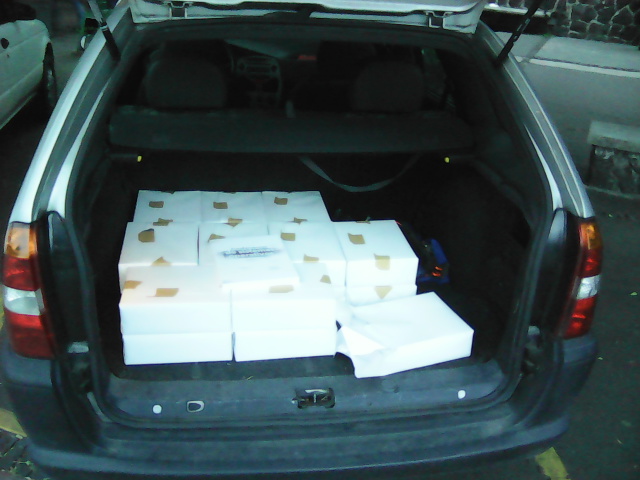
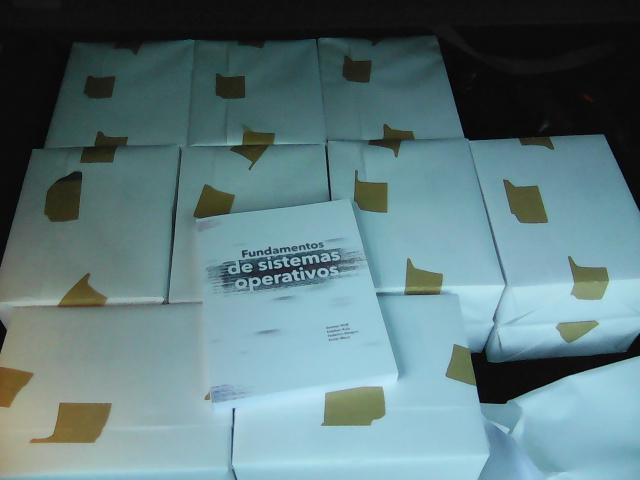
Basically everybody who knows me is aware that, basically for the last two years, I have been writing a book on Operating Systems for use in my class and, of course, in any similar class. Well, long story short, as of today: What's that in my car trunk? Lets have a closer look. Finally, Facultad de Ingenier a finished printing the book! So... Well, some minor data points: Anyway... Very happy here :D
AttachmentSize
IMG_20150812_193756.t.jpg106.36 KB
IMG_20150812_193805.t.jpg82.22 KB

12 August 2015

Tiago Bortoletto Vaz: c3video for debconf #3

This is a follow-up to my previous post related the DebConf videoteam using a new software stack for the next conferences: http://acaia.ca/~tiago/posts/c3video-for-dc-take-2/. An outdated documentation for current subject is available at https://wiki.fem.tu-ilmenau.de/streaming/projekte/c3/28c3/crs/pipeline. Although the system may work differently nowadays, the basic idea remains the same. A newer, but incomplete documentation can be found in https://repository.fem.tu-ilmenau.de/trac/c3tt/wiki. Btw, CCC people from #voc at hackint.eu have been very kind and supportive. I've set an instance of C3TT for DebConf15 in http://c3tt.acaia.ca/. If you want to play with it just ping me in #debconf-video at oftc. As you can see, we can keep a single external C3TT server for all Debian events, without much work left to the local side, doesn't it sound amazing?
Setting a new conference Go to Projects, then Create. In the project area we'll need to import the Tickets. Tickets will come from the schedule file, which is a XML as generated from frab. With a minor hack we've been able to make the schedule XML from DebConf Summit quite compatible to it (kudos cate!):
/images/import_tickets.png

Importing tickets

By importing the schedule from https://summit.debconf.org/debconf15.xml we'll be asked from which rooms we want to import the events. Usually those that have video coverage will be selected:
/images/chosing_rooms.png

Choosing rooms

Then, we may want to exclude some talks that we won't provide video:
/images/chosing_talks.png

Choosing talks

We're also required to adjust some Properties for a given conference. An example with some explanation of these properties is availabe at https://c3voc.de/wiki/c3tracker. For my initial tests the ones below seem to be enough:
/images/c3tt_properties.png

Setting properties

The backend: basic understand The screen UI mentioned above will run a set of scripts in background which will automate most of the tasks, preparing videos for cutting to deploying them in different online services. Tab 0: A-recording-scheduler Each 30 seconds it will check if there's any ticket in the state scheduled or recording. It's based in the start/end datetime of the talk, so the ticket will be kept as scheduled (current < talk start), or marked as recording (start => current =< end) or recorded (current > end). Tab 1: B-mount4cut Each 30 seconds it will check if there's any ticket in the state recorded. That means the talk is already finished, and the raw video file is available in the path which has previously been set as a property (Path.Capture) in the web interface. For each ticket marked as recorded it will try to find the related video file in the capture path. The file format should be <room>-YYYY-MM-DD_HH-MM-SS.<extension>. The script will then use fuse-vdv to create a custom filesystem with some needed files for human interaction (fancy stuff!). Here's an example of talks in a room called Heidelberg, after being recorded and auto-mounted by the B-mount4cut script:
/images/c3tt_fuse.png

Mounting custom fuse FS

The human interaction is just a short review process using Kdenlive. The reviewers will access these files via a glusterFS network share. There's even a Debian Virtualbox image provided for that, including all the necessary tools. I'm going into this right now and will report what I get in the next hours. Hopefully the following scripts will also be covered, very soon-ish :) Tab 2: C-cut-postprocessor Tab 3: D-encoding Tab 4: E-postencoding (auphonic) Tab 5: F-postprocessing(upload) DebCamp is fun.

Daniel Pocock: Recording live events like a pro (part 2: video)

In the first blog in this series, we looked at how to capture audio effectively for a range of different events. While recording audio appears less complicated than video, it remains fundamental to a good recording. For some types of event, like a speech or a debate, you can have quite a bad video with poor lighting and other defects but people will still be able to watch it if the audio is good. Therefore, if you haven't already looked at the previous blog, please do so now. As mentioned in the earlier blog, many people now have high quality equipment for recording both audio and video and a wide range of opportunities to use it, whether it is a talk at a conference, a wedding or making a Kickstarter video. The right camera for video recording The fundamental piece of equipment is the camera itself. You may have a DSLR camera that can record video or maybe you have a proper handheld video camera. The leading DSLR cameras, combined with a good lens, make higher quality recordings than many handheld video cameras. Unfortunately, although you pay good money to buy a very well engineered DSLR that could easily record many hours of video, most DSLRs are crippled to record a maximum of 30 minutes in one recording. This issue and some workarounds are discussed later in this blog. If you don't have any camera at all you need to think carefully about which type to buy. If you are only going to use it once you may want to consider renting or borrowing or asking for other people attending the event to bring whatever cameras they have to help make multiple recordings (the crowdsourcing solution). If you are a very keen photographer then you will probably have a preference for a DSLR. Accessories Don't just look at the cost of your camera and conclude that is all the budget you need. For professional quality video recording, you will almost certainly need some accessories. You may find they are overpriced at the retail store where you bought your camera, but you still need some of them, so have a look online.
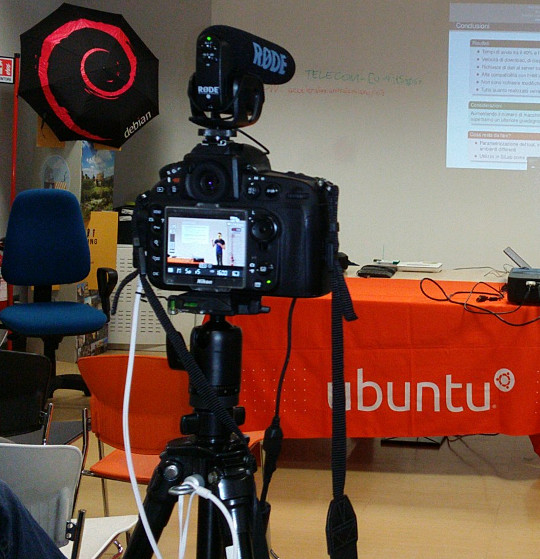
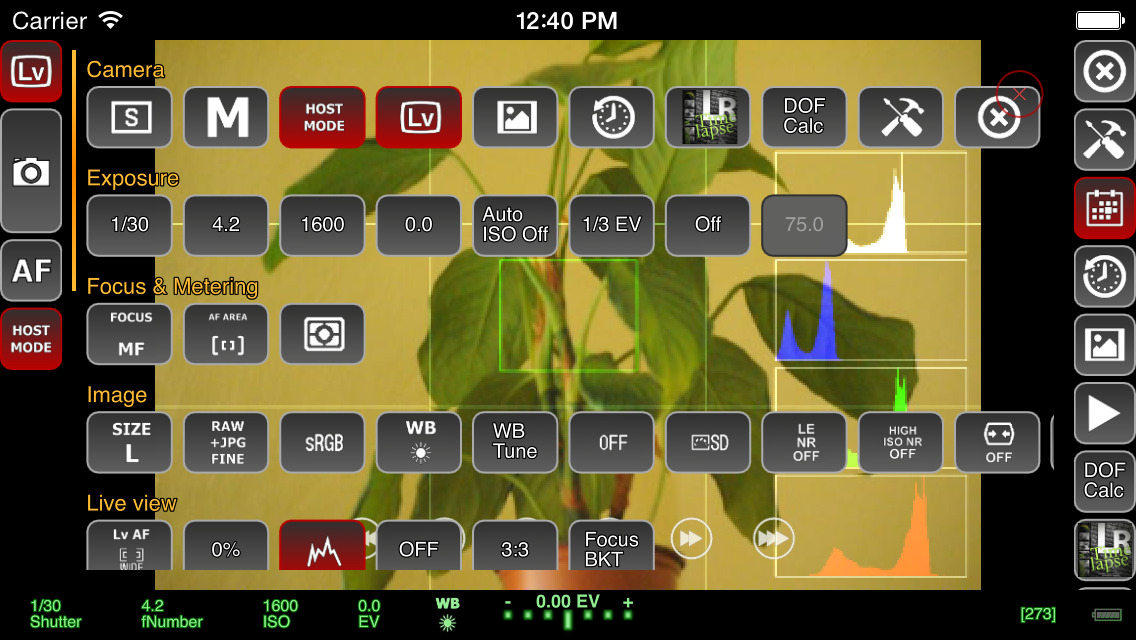
Recording a talk at a free software event with a Nikon D800 on a very basic tripod with Rode VideoMic Pro, headphones (white cable) and external power (black cable) If you want to capture audio with the camera and record it in the video file (discussed in more detail below), you will need to purchase a microphone that mounts on the camera. The built-in microphones on cameras are often quite bad, even on the most expensive cameras. If you are just using the built-in microphone for reference audio (to help with time synchronization when you combine different audio files with the video later) then the built-in microphone may be acceptable. Camera audio is discussed in more detail below. If your camera has a headphone socket, get some headphones for listening to the audio. Make sure you have multiple memory cards. Look carefully at the speed of the memory cards, slow ones are cheaper but they can't keep up with the speed of writing 1080p video. At a minimum, you should aim to buy memory cards that can handle one or two days worth of data for whatever it is you do. A tripod is essential for most types of video. If you use a particularly heavy camera or lens or if you are outdoors and it may be windy you will need a heavier tripod for stability. For video, it is very useful to have a tripod with a handle for panning left and right but if the camera will be stationary for the whole recording then the handle is not essential. Carrying at least one spare battery is another smart move. On one visit to the Inca Trail in Peru, we observed another member of our group hiking up and down the Andes with a brand new DSLR that they couldn't use because the battery was flat. For extended periods of recording, batteries will not be sufficient and you will need to purchase a mains power supply (PSU). These are available for most types of DSLR and video camera. The camera vendors typically design cameras with unusual power sockets so that you can only use a very specific and heavily overpriced PSU from the same company. Don't forget a surge protector too. There are various smartphone apps that allow you to remotely control the camera from the screen of your phone, such as the qDslrDashboard app. These often give a better preview than the screen built-in to the camera and may even allow you to use the touch screen to focus more quickly on a specific part of the picture. A regular USB cable is not suitable for this type of app, you need to buy a USB On-The-Go (OTG) cable.
Screenshot of qDslrDashboard app on a smartphone, controlling a DSLR camera If you plan to copy the video from the camera to a computer at the event, you will need to make sure you have a fast memory card reader. The memory card readers in some laptops are quite slow and others can be quite fast so you may not need to buy an extra card reader. Camera audio Most cameras, including DSLRs, have a built-in microphone and a socket for connecting an external microphone. The built-in microphones obtain very poor quality sound. For many events, it is much better to have independent microphones, such as a lapel microphone attached to a smartphone or wireless transmitter. Those solutions are described in part one of this blog series. Nonetheless, there are still some benefits of capturing audio in the camera. The biggest benefit is the time synchronization: if you have audio recordings in other devices, you will need to align them with the video using post-production software. If the camera recorded an audio stream too, even if the quality is not very good, you can visualize the waveform on screen and use it to align the other audio recordings much more easily and precisely. If the camera will be very close to the people speaking then it may be acceptable to use a microphone mounted on the camera. This will be convenient for post-production because the audio will be synchronized with the video. It may still not be as good as a lapel microphone though, but the quality of these camera-mounted microphones is still far higher than the built-in microphones. I've been trying the Rode VideoMic Pro, it is definitely better than recording with the built-in microphone on the camera and also better than the built-in microphone on my phone. One problem that most people encounter is the sound of the lens autofocus mechanism being detected by the microphone. This occurs with both the built-in microphone and any other microphone you mount on the camera. A microphone mounted on top of the camera doesn't detect this noise with the same intensity as the built-in microphone but it is still present in the recordings. If using a camera-mounted microphone to detect the audio from an audience, you may need to have an omnidirectional microphone. Many camera-mounted microphones are directional and will not detect very much sound from the sides or behind the camera. When using any type of external microphone with the camera, it is recommend to disable automatic gain control (AGC) in the camera settings and then manually adjust the microphone sensitivity/volume level. Use headphones A final word on audio - most good cameras have an audio output socket. Connect headphones and wear them, to make sure you are always capturing audio. Otherwise, if the microphone's battery goes flat or if a wireless microphone goes out of range you may not notice. Choosing a lens The more light you get, the better. Bigger and more expensive lenses allow more light into the camera. Many of the normal lenses sold with a DSLR camera are acceptable but if it is a special occasion you may want to rent a more expensive lens for the day. If you already have a lens, it is a very good idea to test it in conditions similar to those you expect for the event you want to record. Recording duration limits Most DSLR cameras with video capability impose a 30 minute maximum recording duration This is basically the result of a friendly arrangement between movie studios and politicians to charge an extra tax on video recording technology and potentially make the movie studio bosses richer, supposedly justified by the fact that a tiny but exaggerated number of people use their cameras to record movies at the cinema. As a consequence, most DSLR manufacturers limit the duration of video recording so their product won't be subject to the tax, ensuring the retail price is lower and more attractive. On top of this, many DSLR cameras also have a 4GB file size limit if they use the FAT filesystem. Recording 1080p video at a high frame rate may hit the file size limit in 10 minutes, well before you encounter the 30 minute maximum recording duration. To deal with the file size issue, you can record at 720p instead of 1080p and use the frame rate 24fps. For events longer than 30 minutes or where you really want 1080p or a higher frame rate, there are some other options you can consider:
  • Buy or rent a proper video camera instead of using a DSLR camera
  • Using multiple cameras that can stop and be restarted at different times.
  • Manually stopping and restarting the camera if there are breaks in the event where it is safe to do so.
  • Use an app to control the camera and program it to immediately restart the recording each time it stops
  • Extract the raw output from the camera's HDMI socket and record into some other device or computer. There are several purpose-built devices
    that can be used this way with an embedded SSD for storage.
  • There are also some people distributing unofficial/alternative firmware images that remove the artificial 30 minute recording limit.
Camera settings There are many online tutorials and demonstration videos on YouTube that will help you optimize the camera settings for video. You may have already made recordings using the automatic mode. Adjusting some or all of the settings manually may help you create a more optimal recording. You will need to spend some time familiarizing yourself with the settings first. The first thing to check is white balance. This tells the camera the type of lighting in the location. If you set this incorrectly then the colours will be distorted. Many cameras have the ability to automatically set the white balance. For video, you may be able to change one or more settings that control the recording quality. These settings control the file compression ratio and image size. Typical image size settings are 720p and 1080p. Compression ratio may be controlled by a high/medium/low quality setting. Choosing the highest quality and biggest picture requires more space on the memory card and also means you reach the 4GB file size limit more quickly. A higher quality setting also implies a faster memory card is required, because the rate of megabytes per second written to the memory card is higher. Next you need to think about the frame rate. Events that involve fast moving subjects, such as sports, typically benefit from a higher frame rate. For other events it is quite acceptable to use 24 frames per second (fps). Higher frame rates also imply bigger file size and a requirement for a faster memory card. Once you have decided on the frame rate, the next thing to do is set the shutter speed. Use a shutter speed that is double the frame rate. For example, if using 24fps or 25fps, use a 1/50 shutter speed. The final two settings you need to adjust are the ISO and aperture. Set these based on the lighting conditions and extent to which the subjects are moving. For example, if the setting is dark or if you are trying to record fast moving subjects like athletes, vehicles or animals, use an ISO value of 800 or higher. Once you have chosen ISO, adjust the aperture to ensure the picture is sufficiently illuminated. Aperture also has a significant impact on the depth of field. Operating the camera: zoom and focus Many people use zoom lenses. It is not always necessary to change the zoom while recording a video, you can use software to zoom in and out on individual parts of the picture when editing it in post-production. If you do change the zoom while recording, it may be more difficult to maintain focus. Almost all lenses support manual focus (turning the focus ring by hand) and many support automatic focus. When shooting photographs with a DSLR, the mirror is down and the camera can use dedicated sensors for focus and light sensing. When shooting video, the mirror is up and the camera can not use the same focus sensors that are used in photography. Video recording uses a digital focussing algorithm based on contrast in the picture. If you take a lot of photos you are probably quite accustomed to the fast and precise autofocus for photography and you will notice that keeping a video in focus is more challenging. As mentioned already, one of the first things you can do to keep focus simple is to avoid zooming while recording. Record in a higher resolution than you require and then zoom with software later. Some people record using 4k resolution even when they only want to produce a 720p video, as they can digitally zoom in to different parts of the 4k recording without losing detail. If the subject is very stationary (people sitting at a desk for an interview is a typical example), you may be able to set the camera to manual focus and not change it at all while recording. If you choose to enable autofocus while recording, any built-in camera microphone or microphone mounted on the camera is likely to detect sounds from the motorized focus system. Ultimately, the autofocus mechanism is not accurate for all subjects and you may be unable to stop them moving around so you will need to change the focus manually while recording. It requires some practice to be able to do this quickly without overshooting the right focus. To make life more tricky, Nikon and Canon focus rings rotate in the opposite direction, so if you are proficient using one brand you may feel awkward if you ever have to use the other. A good way to practice this skill is to practice while in the car or on the train, pointing at different subjects outside the window and trying to stay in focus as you move from one subject to the next. Make a trial run Many events, from weddings right up to the Olympic Games opening ceremony, have a trial run the day before. One reason for that is to test the locations and settings of all the recording and broadcasting equipment. If a trial run isn't possible for your event, you may find some similar event to practice recording and test your equipment. For example, if you are planning to record a wedding, you could try and record a Sunday mass in the same church. Backup and duplicate the recordings before leaving the event If you only have one copy of the recordings and the equipment is stolen or damaged you may be very disappointed. Before your event, make a plan to duplicate the raw audio and video recordings so that several people can take copies away with them. Decide in advance who will be responsible for this, ensure there will be several portable hard disks and estimate how much time it will take to prepare the copies and factor this into the schedule. Conclusion All the products described can be easily purchased from online retailers. You may not need every accessory that is mentioned as it depends on the type of event you record. The total cost of buying or renting the necessary accessories may be as much as the cost of the camera itself so if you are new to this you may need to think carefully about making a budget with a spreadsheet to do it correctly. Becoming familiar with the camera controls and practicing the techniques for manual focus and zoom can take weeks or months. If you enjoy photography this can be time well spent but if you don't enjoy it then you may not want to commit the time necessary to make good quality video. Don't rule out options like renting equipment instead of buying it or crowdsourcing, asking several participants or friends to help make recordings with their own equipment. For many events, audio is far more indispensable than video and as emphasizing at the beginning of this article, it is recommended that you should be one hundred percent confident in your strategy for recording audio before you start planning to record video.

11 August 2015

Matthias Klumpp: AppStream/DEP-11 for everyone! (beta!)

One of the things we discussed at this year s Akademy conference is making AppStream work on Kubuntu.appstream-logo On Debian-based systems, we use a YAML-based implementation of AppStream, called DEP-11 . DEP-11 exists for historical reasons (the DEP-11 YAML format was a superset of AppStream once) and because YAML, unlike XML, is one accepted file format by the Debian FTPMasters team, who we want to have on board when adding support for AppStream. So I ve spent the last few days on setting up the DEP-11 generator for Kubuntu, as well as improving it greatly to produce more meaningful error messages and to generate better output. It became a bit slower in the process, but the greatly improved diagnostics data is worth it. For example, maintainers of Debian packages will now get a more verbose explanation of issues found with metadata in their packages, making them easier to fix for people who didn t get in contact with AppStream yet. At time, we generate AppStream metadata for Tanglu, Kubuntu and Debian, but so far only Tanglu makes real use of it by shipping it in a .deb package. Shipping the data as package is only a workaround though, for a proper implementation, the data will be downloaded by Apt. To achieve that, the data needs to reach the archive first, which is something that I can hopefully discuss and implement with the FTPMasters team of Debian at this year s Debconf. When this is done, the new metadata will automatically become available in tools like GNOME-Software or Muon Discover. How can I see if there are issues with my package? The dep11-generator tool will return HTML pages to show both the extracted metadata, as well as issues with it. You can find the information for the respective distribution here: Each issue tag will contain a detailed explanation of what went wrong. Errors generally lead to ignoring the metadata, so it will not be processed. Warnings usually concern things which might reduce the amount of metadata or make it less useful, while Info-type hints contain information on how to improve the metadata or make it more useful. Can I use the data already? Yes, you can. You just need to place the compressed YAML files in /var/cache/app-info/yaml and the icons in /var/cache/app-info/icons/<suite>-<component>/<size>, for example: /var/cache/app-info/icons/jessie-amd64/64 64 I think I found a bug in the generator In that case, please report the issue against the appstream-dep11 package at Debian, or file an issue at Github.. The only reason why I announce this feature now is to find remaining generator bugs, before officially announcing the feature on debian-devel-announce. When will this be officially announced? I want to give this feature a little bit more testing, and ideally have the integration into the archive ready, so people can see how the metadata looks like when rendered in GNOME-Software/Discover. I also want to write a bit more documentation to help Debian developers and upstreams to improve their metadata. Ideally, I also want to incorporate some feedback at Debconf when announcing full AppStream support in Debian. So take all the stuff you ve read above as a little sneak peek  Debconf15goingI will also give a talk at Debconf, titled AppStream, Limba, XdgApp Where we are going. The aim of this talk is to give an insight i tnto the new developments happening in the software distribution area, and what the goal of these different projects is (the talk should give an overview of what s in the oven and how it will impact Debian). So if you are interested, please drop by :-) Maybe setting up a BOF would also be a good idea.

10 August 2015

Matthias Klumpp: Akademy 2015

I am very late with this, but I still wanted to write a few words about Akademy 2015. First of all: It was an awesome conference! Meeting all the great people involved with KDE and seeing who I am working with (as in: face to face, not via email) was awesome. We had some very interesting discussions on a wide variety of topics, and also enjoyed quite some beer together. Particularly important to me was of course talking to Daniel Vr til who is working on XdgApp, and Aleix Pol of Muon Discover fame.
Also meeting with the other Kubuntu members was awesome I haven t seen some of them for about 3 years, and also met many cool people for the first time. My talk on AppStream/Limba went well, except that I got slightly confused by the timer showing that I had only 2 minutes left, after I had just completed the first half of my talk. It turned out that the timer was wrong  Another really nice aspect was to be able to get an insight into areas where I am usually not involved with, like visual design. It was really interesting to learn about the great work others are doing and to talk to people about their work and I also managed to scratch an itch in the Systemsettings application, where three categories had shown the same icon. Now Systemsettings looks like it is supposed to be, finally :-) The only thing I could maybe complain about was the weather, which was more Scotland/Wales like than Spanish but that didn t stop us at all, not even at the social event outside. So I actually don t complain  We also managed to discuss some new technical stuff, like AppStream for Kubuntu, and plenty of other things that I ll write about in a separate blog post. Generally, I got so many new impressions from this year s Akademy, that I could write a 10-pages long blogpost about it while still having to leave out things.

Kudos to the organizers of this Akademy, you did a fantastic job! I also want to thank the Ubuntu community for funding my flight, and the Kubuntu community for pushing me a little to attend :-). KDE is a great community with people driving the development of Free Software forward. The diversity of people, projects and ideas in KDE is a pleasure, and I am very happy to be part of this community. Akademy2015

Steve Kemp: A brief look at the weed file store

Now that I've got a citizen-ID, a pair of Finnish bank accounts, and have enrolled in a Finnish language-course (due to start next month) I guess I can go back to looking at object stores, and replicated filesystems. To recap my current favourite, despite the lack of documentation, is the Camlistore project which is written in Go. Looking around there are lots of interesting projects being written in Go, and so is my next one the seaweedfs, which despite its name is not a filesystem at all, but a store which is accessed via HTTP. Installation is simple, if you have a working go-lang environment:
go get github.com/chrislusf/seaweedfs/go/weed
Once that completes you'll find you have the executable bin/weed placed beneath your $GOPATH. This single binary is used for everything though it is worth noting that there are distinct roles: In our demo we'll have three hosts one, the master, two and three which are storage nodes. First of all we start the master:
root@one:~# mkdir /node.info
root@one:~# weed master -mdir /node.info -defaultReplication=001
Then on the storage nodes we start them up:
root@two:~# mkdir /data;
root@two:~# weed volume -dir=/data -max=1  -mserver=one.our.domain:9333
Then the second storage-node:
root@three:~# mkdir /data;
root@three:~# weed volume -dir=/data -max=1 -mserver=one.our.domain:9333
At this point we have a master to which we'll talk (on port :9333), and a pair of storage-nodes which will accept commands over :8080. We've configured replication such that all uploads will go to both volumes. (The -max=1 configuration ensures that each volume-store will only create one volume each. This is in the interest of simplicity.) Uploading content works in two phases: We'll do that like so:
laptop ~ $ curl -X POST http://one.our.domain:9333/dir/assign
 "fid":"1,06c3add5c3","url":"192.168.1.100:8080","publicUrl":"192.168.1.101:8080","count":1 
client ~ $ curl -X PUT -F file=@/etc/passwd  http://192.168.1.101:8080/1,06c3add5c3
 "name":"passwd","size":2137 
In the first command we call /dir/assign, and receive a JSON response which contains the IPs/ports of the storage-nodes, along with a "file ID", or fid. In the second command we pick one of the hosts at random (which are the IPs of our storage nodes) and make the upload using the given ID. If the upload succeeds it will be written to both volumes, which we can see directly by running strings on the files beneath /data on the two nodes. The next part is retrieving a file by ID, and we can do that by asking the master server where that ID lives:
client ~ $ curl http://one.our.domain:9333/dir/lookup?volumeId=1,06c3add5c3
 "volumeId":"1","locations":[
  "url":"192.168.1.100:8080","publicUrl":"192.168.1.100:8080" ,
  "url":"192.168.1.101:8080","publicUrl":"192.168.1.101:8080" 
] 
Or, if we prefer we could just fetch via the master - it will issue a redirect to one of the volumes that contains the file:
client ~$ curl http://one.our.domain:9333/1,06c3add5c3
<a href="http://192.168.1.100:8080/1,06c3add5c3">Moved Permanently</a>
If you follow redirections then it'll download, as you'd expect:
client ~ $ curl -L http://one.our.domain:9333/1,06c3add5c3
root:x:0:0:root:/root:/bin/bash
..
That's about all you need to know to decide if this is for you - in short uploads require two requests, one to claim an identifier, and one to use it. Downloads require that your storage-volumes be publicly accessible, and will probably require a proxy of some kind to make them visible on :80, or :443. A single "weed volume .." process, which runs as a volume-server can support multiple volumes, which are created on-demand, but I've explicitly preferred to limit them here. I'm not 100% sure yet whether it's a good idea to allow creation of multiple volumes or not. There are space implications, and you need to read about replication before you go too far down the rabbit-hole. There is the notion of "data centres", and "racks", such that you can pretend different IPs are different locations and ensure that data is replicated across them, or only within-them, but these choices will depend on your needs. Writing a thin middleware/shim to allow uploads to be atomic seems simple enough, and there are options to allow exporting the data from the volumes as .tar files, so I have no undue worries about data-storage. This system seems reliable, and it seems well designed, but people keep saying "I'm not using it in production because .. nobody else is" which is an unfortunate problem to have. Anyway, I like it. The biggest omission is really authentication. All files are public if you know their IDs, but at least they're not sequential ..

Mirco Bauer: Smuxi 1.0 "Finally" Release

And here we go again! We're proud to announce the new version of Smuxi, release 1.0 "Finally". During the development, 20 bug reports and 10 feature requests in 285 commits were worked on.

Finally 1.0 Smuxi is celebrating its 10th anniversary! 10 years ago, Mirco Bauer made the first commit to the Smuxi source code repository and is still very committed to it. He started the Gnosmirc project in 2005 when the only way a 24/7 "always-on" experience with IRC meant you had to use a console based IRC client like bitchx, irssi or epic combined with screen and SSH. This looks very practical at first and is a powerful Unix-ish way of accomplishing that job, but it has the big downside that it doesn't integrate with a desktop environment like GNOME. A bit later the Gnosmirc project was renamed to Smuxi when the new code architecture allowed other frontend implementations besides the GNOME one. The ncurses/STFL based text frontend was later implemented and is considered stable and useful enough for day to day use, but still has some rough edges. WinForms and WPF frontends also exist but need more work to reach a usable state. At this point Smuxi 1.0 contains all features that we could have imagined and even goes beyond with very advanced features like message patterns or language agnostic scripting.

Changes since Smuxi 0.11

Message Persistence One of the biggest drawbacks of the IRC protocol ever was that messages can't be retrieved from the IRC server because the IRC server is simply relaying messages to the connected clients. So, if an IRC client is freshly started and connects it starts to receive new messages, but all message you had received before are no longer available. This always made IRC in a way "volatile" unlike other communication systems like email where messages are relayed and stored on the client side. One common approach for IRC clients is to store log files in a text file. This is a simple feature and gives the user the possibility to read older conversations. Smuxi also supports text file logging like other IRC clients but it has a big user experience drawback as you need to open the file from the disk outside of the IRC client. In Smuxi 1.0 messages sent and received are now stored on the disk in a way they can automatically be retrieved/loaded when you restart Smuxi. It is like you have never closed Smuxi! This feature was already available in Smuxi for some time as a technical preview and it used the Db4o object database, but we were never happy about the performance neither with the stability so it always stayed an optional feature you need to enable. This year we tried a new message buffer backend using the famous SQLite database and it works much faster and stable as a rock. So finally we can enable this feature by default because it just works and enhanced your experience. We hope you enjoy it. Documentation of how you can change Smuxi message buffer backend and behavior can be found here. For instructions how to convert your existing db4o history to SQLite can be found in the "smuxi-message-buffer tool" section.

User Interface Enhancements
  • Synced message markers: the position of of the seen/unseen messages marker is pushed to the smuxi-server and remembered when the frontend reconnects. (Sebastian Poeplau)
  • Persistent message markers: the message marker position is also remembered across Smuxi(-server) restarts.
  • Message Counter: in addition to the highlight counter next to a chat new/unseen messages are also counted. This makes it easy to identify chats with much traffic.
  • Single application instance support. If you start Smuxi again from the menu it will bring the existing instance into the foreground. This makes the Ubuntu Messaging Menu much nicer.
  • The command/message entry is alignment with the messages. (Lex Berezhny)

Text Frontend Enhancements
  • The console background color can now be configured using: /config set STFL/Interface/TerminalBackgroundColor = #000000 (Ond ej Ho ek)
  • The text color contrast if nicks with the background is now ensured (Ond ej Ho ek) #1033
  • Messages containing images will not be skipped but their alternative text is shown instead (Ond ej Ho ek) #1035

New smuxi-message-buffer tool This is a new commandline tool that allows you to convert and export the message history of Smuxi message buffer files. This can be used to convert your existing Db4o history to SQLite like this for example:
for DB_DB4O in $HOME/.local/share/smuxi/buffers/*/*/*/*.db4o; do
    DB_SQLITE=$ DB_DB4O/.db4o/.sqlite3 
    smuxi-message-buffer convert $DB_DB4O $DB_SQLITE
done
Smuxi shouldn't be running when using this tool.

Scripting Enhancements

New Hook Points Smuxi 1.0 supports with the following new hook points:
  • engine/protocol-manager/on-presence-status-changed/ This hook point is raised when the presence status of a protocol manager changes. This happens for example when an IRC connection toggles the away state.
  • engine/session/on-event-message/ This hook point raises event messages that usually begin with "-!-". This can be useful to track state changes that are shown as a message without having a dedicated hook point for it.
  • engine/session/command-$cmd/ This hook point is raised on the engine side for commands, e.g. /some_command that isn't handled by the frontend or engine built-in commands. This is useful for commands that should be available for all frontends and isn't specific to the frontend environment.

New Plugins The following new plugins are supported by Smuxi 1.0:
  • topic-diff: Shows the word differences of the topic after topic changes. (meebey)
  • away-nick: Automatically appends and removes $AWAY_SUFFIX to/from the nick name when you go away using the /away command or by disconnecting all frontends from the smuxi-server. (meebey)
  • system-info: Shows system info. Includes system kernel version, distro name, and CPU vendor information. (AK0)
  • now-playing: This plugin is not new but was rewritten in Python to get rid of the spaghetti code monster which was written in Bash. (jamesaxl)

IRC Enhancements
  • NICKSERV support Notices from Nick/ChanServ are no longer shown on all channels as they like to send greeting messages and other spam which is annoying to see on all channels. #868
  • Automatic rejoin of channels protected with a key works as expected again
  • Connecting to irc.gitter.im is now supported. Gitter's IRCd implementation has a bug in the IRC protocol which is now tolerated.

Twitter Enhancements
  • The /search command shows tweets as live stream
  • Added /delete, /favorite and /unfavorite commands

Behind the Scenes
  • Re-licensed smuxi-common from GPLv2 to MIT/X11

Contributors Contributors to this release are the following people:
  • Mirco Bauer (199 commits)
  • Carlos Mart n Nieto (15 commits)
  • Andr s G. Aragoneses (14 commits)
  • Piotr Dr g (12 commits)
  • Ond ej Ho ek (11 commits)
  • Oliver Schneider (5 commits)
  • Calvin B (4 commits)
  • Victor Seva (3 commits)
  • Will Johansson (2 commits)
  • Sebastian Poeplau (2 commits)
  • Julian Taylor (2 commits)
  • James Axl (2 commits)
  • Daniel Mustieles (2 commits)
  • Christopher James Halse Rogers (2 commits)
  • . Uzun (1 commit)
  • Lex Berezhny (1 commit)
  • Kalle Kaitala (1 commit)
  • Jordi Mas (1 commit)
  • Joe Hansen (1 commit)
  • Jimmie Elvenmark (1 commit)
  • Dimitris Spingos (1 commit)
  • Dean Lee (1 commit)
  • Cl ment Bourgeois (1 commit)
  • Carlos Hernandez (1 commit)
Thank you very much for your contributions to Smuxi! Want this? Go here and grab it right now!

Posted Sun Aug 9 17:48:18 2015

9 August 2015

Thorsten Alteholz: My Debian Activities in July 2015

FTP assistant This month I marked 485 packages for accept, rejected 87 of them and had to send 18 emails to maintainers. The NEW-queue is below 100 again, but you hardworking fellows don t make a break, but start the GCC5 transition. This is so much fun :-) . Squeeze LTS This was my thirteens month that I did some work for the Squeeze LTS initiative, started by Raphael Hertzog at Freexian. This month I got assigned a workload of 15h and I spent again most of it to work on a new upload of php5. I finally prepared the patches for the CVEs and realized only then that the number of failed tests drastically increased. So return to beginning and checking why everything is broken now :-( . The patch for [DLA 269-1] was prepared by Mats Erik Andersson. This month I also had another term of doing frontdesk work. So I answered questions on the IRC channel and looked for CVEs that are important for Squeeze LTS or could be ignored. Other stuff This month I could finally finish the harminv transition and all affected packages migrated to testing meanwhile. I also uploaded a new version for pipexec. Donations Again, thanks alot to all donors. I really appreciate this and hope that everybody is pleased with my commitment. Don t hesitate to make suggestions for improvements.

Simon Kainz: DUCK challenge: week 5

Slighthly delayed, but here are the stats for week 5 of the DUCK challenge: So we had 10 packages fixed and uploaded by 10 different uploaders. A big "Thank You" to you!! Since the start of this challenge, a total of 59 packages, were fixed. Here is a quick overview:
Week 1 Week 2 Week 3 Week 4 Week 5 Week 6 Week 7
# Packages 10 15 10 14 10 - -
Total 10 25 35 49 59 - -
The list of the fixed and updated packages is availabe here. I will try to update this ~daily. If I missed one of your uploads, please drop me a line. Only 2 more weeks to DebConf15 so please get involved: The DUCK Challenge is running until end of DebConf15! Pevious articles are here: Week 1, Week 2, Week 3, Week 4.

8 August 2015

Christoph Egger: What's wrong with the web? -- authentication

The problem One problem to solve when doing web authentication has always been one identity provider, so you don't have to remember which username (or email address) you used for that bugtracker you used three years ago or that website. And tie it to one login ideally. Five years ago this problem seemed to be basically solved. There was OpenID and while it may not have been great it worked. You could have your own provider, your institution (university, company, foss project, ..) could have one and you could use your university-provided ID for all university stuff. Today's state Looking at the problem again today and the situation seems to have changed. To the worse. A lot. People are actively removing OpenID support. There seemed to be a replacement with, at least, proper design goals: Mozilla's persona. However this seems to be a dead end, no-one (almost) actually supports it. Then there is what people call OAuth2. However there does not seem to be such a thing as OAuth2 at all, at least not for logging into websites. So for example phabricator supports 12 different OAuth2 systems. That includes Google, Facebook, Twitter, Amazon Github and a whole bunch of other services. Each with a different implementation in the webapp of course. And of course you can not just have your university/company/.. provide an OAuth2 service for you to use -- you would need to write yet another adapter on the (foreign) website to talk to your implementation and your provider. And the strange thing, people seem to still consider OAuth2 a replacement for OpenID while it does not even provide the core functionality of the older system. Plus there does not seem to be any awareness of that all together. Other features Now of course, OpenID is not (and never was) the ultimate answer to the web authentication problem. The most obvious problem being user tracking. Your identity provider will see every website you log into, will see when you log into it and even be able to log into that website with your credentials. Of course, this problem is fully inherited by OAuth2. And in contrast to OpenID you can no longer run your own provider whom you can fully trust and who already knows about your surfing habits (because it's actually you already). Mozilla's persona might have solved that, they at least intended to. But, again, persona seems quite dead.

7 August 2015

Christoph Egger: Systemd pitfalls

logind hangs If you just updated systemd and ssh to that host seems to hang, that's just a known Bug (Debian Bug). Don't panic. Wait for the logind timeout and restart logind. restart and stop;start One thing that confused me several times and still confuses people is systemctl restart doing more than systemctl stop ; systemctl start. You will notice the difference once you have a failed service. A restart will try to start the service again. Both stop and start however will just ignore it. Rumors have it this has changed post jessie however. sysvinit-wrapped services and stop While there are certainly bugs with sysvinit services in general (I found myself several times without a local resolver as unbound failed to be started, haven't managed to debug further), the stop behavior of wrapped services is just broken. systemctl stop will block until the sysv initscript finished. It will even note the result of the action in its state. However systemctl will return with exitcode 0 and not output anything on stdout/stderr. This has been reported as Debian Bug. zsh helper I found the following zshrc snipped quite helpful in dealing with non-reported systemctl failures. On root shells it will display a list of failed services as part of the prompt. This will give proper feedback whether your systemctl stop failed, it will give feedback if you still have type=simple services and if the sysv-init script or wrapper is broken.
precmd ()  
    if [[ $UID == 0 && $+commands[systemctl] != 0 ]]
    then
      use_systemd=true
      systemd_failed=" systemctl --state=failed   grep failed   cut -d \  -f 2   tr '\n' ' ' "
    fi
 
if [[ $UID == 0 && $+commands[systemctl] != 0 ]]
then
  PROMPT=$'% $fg[red]>>  $systemd_failed$reset_color% \n'
else
  PROMPT=""
fi
PROMPT+=whateveryourpromptis
zsh completion Speaking of zsh, there's one problem that bothers me a lot and I don't have any solution for. Tab-completing the service name for service is blazing fast. Tab-completing the service name for systemctl restart takes ages. People traced down to truckloads of dbus communication for the completion but no further fix is known (to me). type=simple services As described in length by Lucas Nussbaum type=simple services are actively harmful. Proper type=forking daemons are strictly superior (they provide feedback of finished initialization and success thereof) and type=notify services are so simple there's no excuse for not using them even for private one-off hacks. Even if you're language doesn't provide libsystemd-daemon bindings:
(defun sd-notify (event-string)
  (let ((socket (make-instance 'sb-bsd-sockets:local-socket :type :datagram))
        (name (posix-getenv "NOTIFY_SOCKET"))
        (bufferlen (length event-string)))
    (when name
      (sb-bsd-sockets:socket-connect socket name)
      (sb-bsd-sockets:socket-send socket event-string bufferlen))))
This is a stable API guaranteed to not break in the future and implemented in less than ten lines of code with just basic socket functions. And if your language has support it becomes actually trivial:
    try:
        import systemd
        systemd.daemon.notify("READY=1")
    except ImportError:
        pass
Note that in both cases there is no drawback at all on systemd-free setups. It has the overhead of checking the process' environment for NOTIFY_SOCKET or for the systemd package and behaves like a simple service otherwise. Actually the idea of separating the technical aspect (daemonizing) from the semantic aspect of signalizing "initialization finished, everything's fine" is a pretty good idea and hopefully has the potential to reduce the number of services signalizing the "everything's fine" too early. It could even be ported to non-systemd init systems easily given the API.

Christoph Egger: Systemd pitfalls

logind hangs If you just updated systemd and ssh to that host seems to hang, that's just a known Bug (Debian Bug #770135). Don't panic. Wait for the logind timeout and restart logind. restart and stop;start One thing that confused me several times and still confuses people is systemctl restart doing more than systemctl stop ; systemctl start. You will notice the difference once you have a failed service. A restart will try to start the service again. Both stop and start however will just ignore it. Rumors have it this has changed post jessie however. sysvinit-wrapped services and stop While there are certainly bugs with sysvinit services in general (I found myself several times without a local resolver as unbound failed to be started, haven't managed to debug further), the stop behavior of wrapped services is just broken. systemctl stop will block until the sysv initscript finished. It will even note the result of the action in its state. However systemctl will return with exitcode 0 and not output anything on stdout/stderr. This has been reported as Debian Bug #792045. zsh helper I found the following zshrc snipped quite helpful in dealing with non-reported systemctl failures. On root shells it will display a list of failed services as part of the prompt. This will give proper feedback whether your systemctl stop failed, it will give feedback if you still have type=simple services and if the sysv-init script or wrapper is broken.
precmd ()  
    if [[ $UID == 0 && $+commands[systemctl] != 0 ]]
    then
      use_systemd=true
      systemd_failed=" systemctl --state=failed   grep failed   cut -d \  -f 2   tr '\n' ' ' "
    fi
 
if [[ $UID == 0 && $+commands[systemctl] != 0 ]]
then
  PROMPT=$'% $fg[red]>>  $systemd_failed$reset_color% \n'
else
  PROMPT=""
fi
PROMPT+=whateveryourpromptis
zsh completion Speaking of zsh, there's one problem that bothers me a lot and I don't have any solution for. Tab-completing the service name for service is blazing fast. Tab-completing the service name for systemctl restart takes ages. People traced down to truckloads of dbus communication for the completion but no further fix is known (to me). type=simple services As described in length by Lucas Nussbaum type=simple services are actively harmful. Proper type=forking daemons are strictly superior (they provide feedback of finished initialization and success thereof) and type=notify services are so simple there's no excuse for not using them even for private one-off hacks. Even if you're language doesn't provide libsystemd-daemon bindings:
(defun sd-notify (event-string)
  (let ((socket (make-instance 'sb-bsd-sockets:local-socket :type :datagram))
        (name (posix-getenv "NOTIFY_SOCKET"))
        (bufferlen (length event-string)))
    (when name
      (sb-bsd-sockets:socket-connect socket name)
      (sb-bsd-sockets:socket-send socket event-string bufferlen))))
This is a stable API guaranteed to not break in the future and implemented in less than ten lines of code with just basic socket functions. And if your language has support it becomes actually trivial:
    try:
        import systemd
        systemd.daemon.notify("READY=1")
    except ImportError:
        pass
Note that in both cases there is no drawback at all on systemd-free setups. It has the overhead of checking the process' environment for NOTIFY_SOCKET or for the systemd package and behaves like a simple service otherwise. Actually the idea of separating the technical aspect (daemonizing) from the semantic aspect of signalizing "initialization finished, everything's fine" is a pretty good idea and hopefully has the potential to reduce the number of services signalizing the "everything's fine" too early. It could even be ported to non-systemd init systems easily given the API.

Mike Gabriel: New plugin for GOsa : gosa-plugin-mailaddress

During last week, I hacked a new plugin together for GOsa . Simply quoting parts from debian/control here to inform you on its functionality:
Package: gosa-plugin-mailaddress
Architecture: all
Depends:
$ misc:Depends ,
gosa (>= 2.7),
Conflicts:
gosa-plugin-mail,
Description: Simple plugin to manage user mail addresses in GOsa
This plugin is a very light-weighted version of the GOsa mail plugin.
Whereas gosa-plugin-mail can be used to manage a complete mail server
farm, this tiny plugin only provides means to modify the user's mail
address via a text field.
.
This plugin is useful for people that need to maintain users' email
addresses via GOsa , but do not run their own mailserver(s).
.
GOsa is a combination of system-administrator and end-user web
interface, designed to handle LDAP based setups.
light+love
Mike (aka sunweaver)

John Goerzen: Detailed Smart Card Cryptographic Token Security Guide

After my first post about smartcards under Linux, I thought I would share some information I ve been gathering. This post is already huge, so I am not going to dive into much specific commands, but I am linking to many sources with detailed instructions. I ve reviewed several types of cards. For this review, I will focus on the OpenPGP card and the Yubikey NEO, since the Cardomatic Smartcard-HSM is not supported by the gpg version in Jessie. Both cards are produced by people with strong support for the Free Software ecosystem and have strong cross-platform support with source code. OpenPGP card: Basics with GnuPG The OpenPGP card is well-known as one of the first smart cards to work well on Linux. It is a single-application card focused on use with GPG. Generally speaking, by the way, you want GPG2 for use with smartcards. Basically, this card contains three slots: decryption, signing, and authentication slots. The concept is that the private key portions of the keys used for these items are stored only on the card, can never be extracted from the card, and the cryptographic operations are performed on the card. There is more information in my original post. In a fairly rare move for smartcards, this card supports 4096-byte RSA keys; most are restricted to 2048-byte keys. The FSF Europe hands these out to people and has a lot of good information about them online, including some HOWTOs. The official GnuPG smart card howto is 10 years old, and although it has some good background, I d suggest using the FSFE instructions instead. As you ll see in a bit, most of this information also pertains to the OpenPGP mode of the Yubikey Neo. OpenPGP card: Other uses Of course, this is already pretty great to enhance your GPG security, but there s a lot more that you can do with this card to add two-factor authentication (2FA) to a lot of other areas. Here are some pointers: OpenPGP card: remote authentication with ssh You can store the private part of your ssh key on the card. Traditionally, this was only done by using the ssh agent emulation mode of gnupg-agent. This is still possible, of course. Now, however, the OpenSC project now supports the OpenPGP card as a PKCS#11 and PKCS#15 card, which means it works natively with ssh-agent as well. Try just ssh-add -s /usr/lib/x86_64-linux-gnu/pkcs11/opensc-pkcs11.so if you ve put a key in the auth slot with GPG. ssh-add -L will list its fingerprint for insertion into authorized_keys. Very simple! As an aside: Comments that you need scute for PKCS#11 support are now outdated. I do not recommend scute. It is quite buggy. OpenPGP card: local authentication with PAM You can authenticate logins to a local machine by using the card with libpam-poldi here are some instructions. Between the use with ssh and the use with PAM, we have now covered 2FA for both local and remote use in Unix environments. OpenPGP card: use on Windows Let s move on to Windows environments. The standard suggestion here seems to be the mysmartlogon OpenPGP mini-driver. It works with some sort of Windows CA system, or the local accounts using EIDAuthenticate. I have not yet tried this. OpenPGP card: Use with X.509 or Windows Active Directory You can use the card in X.509 mode via these gpgsm instructions, which apparently also work with Windows Active Directory in some fashion. You can also use it with web browsers to present a certificate from a client for client authentication. For example, here are OpenSC instructions for Firefox. OpenPGP card: Use with OpenVPN Via the PKCS#11 mode, this card should be usable to authenticate a client to OpenVPN. See the official OpenVPN HOWTO or these other instructions for more. OpenPGP card: a note on PKCS#11 and PKCS#15 support You ll want to install the opensc-pkcs11 package, and then give the path /usr/lib/x86_64-linux-gnu/pkcs11/opensc-pkcs11.so whenever something needs the PKCS#11 library. There seem to be some locking/contention issues between GPG2 and OpenSC, however. Usually killing pcscd and scdaemon will resolve this. I would recommend doing manipulation operations (setting PINs, generating or uploading keys, etc.) via GPG2 only. Use the PKCS#11 tools only to access. OpenPGP card: further reading Kernel Concepts also has some nice readers; you can get this card in a small USB form-factor by getting the mini-card and the Gemalto reader. Yubikey Neo Introduction The Yubikey Neo is a fascinating device. It is a small USB and NFC device, a little smaller than your average USB drive. It is a multi-application device that actually has six distinct modes: There is a ton to digest with this device. Yubikey Neo Basics By default, the Yubikey Neo is locked to only a subset of its features. Using the yubikey-personalization tool (you ll need the version in stretch; jessie is too old), you can use ykpersonalize -m86 to unlock the full possibilities of the card. Run that command, then unplug and replug the device. It will present itself as a USB keyboard as well as a PC/SC-compatible card reader. It has a capacitive button, which is used to have it generate keystrokes to input validation information for HOTP or HMAC validation. It has two slots that can be configured with HMAC and HOTP; a short button press selects the default slot #1 and a long press selects slot #2. But before we get into that, let s step back at some basics. opensc-tool list-algorithms claims this card supports RSA with 1024, 2048, and 3072 sizes, and EC with 256 and 384-bit sizes. I haven t personally verified anything other than RSA-2048 though. Yubikey Neo: OpenPGP support In this mode, the card is mostly compatible with the physical OpenPGP card. I say mostly because there are a few protocol differences I ll get into later. It is also limited to 2048-byte keys. Support for this is built into GnuPG and the GnuPG features described above all work fine. In this mode, it uses firmware from the Yubico fork of the JavaCard OpenPGP Card applet. There are Yubico-specific tutorials available, but again, most of the general GPG stuff applies. You can use gnupg-agent to use the card with SSH as before. However, due to some incompatibilities, the OpenPGP applet on this card cannot be used as a PKCS#11 card with either scute or OpenSC. That is not exactly a huge problem, however, as the card has another applet (PIV) that is compatible with OpenSC and so this still provides an avenue for SSH, OpenVPN, Mozilla, etc. It should be noted that the OpenPGP applet on this card can also be used with NFC on Android with the OpenKeychain app. Together with pass (or its Windows, Mac, or phone ports), this makes a nicely secure system for storing passwords. Yubikey Neo: PKCS#11 with the PIV applet There is also support for the PIV standard on the Yubikey Neo. This is supported by default on Linux (via OpenSC) and Windows and provides a PKCS#11-compabible store. It should, therefore, be compatible with ssh-agent, OpenVPN, Active Directory, and all the other OpenPGP card features described above. The only difference is that it uses storage separate from the OpenPGP applet. You will need one of the Yubico PIV tools to configure the key for it; in Debian, the yubico-piv-tool from stretch does this. Here are some instructions on using the Yubikey Neo in PIV mode: A final note: for security, it s important to change the management key and PINs before deploying the PIV mode. I couldn t get this to work with Firefox, but it worked pretty much everywhere else. Yubikey Neo: HOTP authentication This is the default mode for your Yubikey; all other modes require enabling with ykpersonalize. In this mode, a 128-bit AES key stored on the Yubikey is used to generate one-time passwords (OTP). (This key was shared in advance with the authentication server.) A typical pattern would be for three prompts: username, password, and Yubikey HOTP. The user clicks in the Yubikey HOTP field, touches the Yubikey, and their one-time token is pasted in. In the background, the service being authenticated to contacts an authentication server. This authentication server can be either your own (there are several open source implementations in Debian) or the free Yubicloud. Either way, the server decrypts the encrypted part of the OTP, performs validity checks (making sure that the counter is larger than any counter it s seen before, etc) and returns success or failure back to the service demanding authentication. The first few characters of the posted auth contain the unencrypted key ID, and thus it can also be used to provide username if desired. Yubico has provided quite a few integrations and libraries for this mode. A few highlights: You can also find some details on the OTP mode. Here s another writeup. This mode is simple to implement, but it has a few downsides. One is that it is specific to the Yubico line of products, and thus has a vendor lock-in factor. Another is the dependence on the authentication server; this creates a potential single point of failure and can be undesireable in some circumtances. Yubikey Neo: OATH and HOTP and TOTP First, a quick note: OATH and OAuth are not the same. OATH is an authentication protocol, and OAuth is an authorization protocol. Now then Like Yubikey HOTP, OATH (both HOTP and TOTP) modes rely on a pre-shared key. (See details in the Yubico article.) Let s talk about TOTP first. With TOTP, there is a pre-shared secret with each service. Each time you authenticate to that service, your TOTP generator combines the timestamp with the shared secret using a HMAC algorithm and produces a OTP that changes every 30 seconds. Google Authenticator is a common example of this protocol, and this is a drop-in replacement for it. Gandi has a nice description of it that includes links to software-only solutions on various platforms as well. With the Yubikey, the shared secrets are stored on the card and processed within it. You cannot extract the shared secret from the Yubikey. Of course, if someone obtains physical access to your Yubikey they could use the shared secret stored on it, but there is no way they can steal the shared secret via software, even by compromising your PC or phone. Since the Yubikey does not have a built-in clock, TOTP operations cannot be completed solely on the card. You can use a PC-based app or the Android application (Play store link) with NFC to store secrets on the device and generate your TOTP codes. Command-line users can also use the yubikey-totp tool in the python-yubico package. OATH can also use HOTP. With HOTP, an authentication counter is used instead of a clock. This means that HOTP passwords can be generated entirely within the Yubikey. You can use ykpersonalize to configure either slot 1 or 2 for this mode, but one downside is that it can really only be used with one service per slot. OATH support is all over the place; for instance, there s libpam-oath from the OATH toolkit for Linux platforms. (Some more instructions on this exist.) Note: There is another tool from Yubico (not in Debian) that can apparently store multiple TOTP and HOTP codes in the Yubikey, although ykpersonalize and other documentation cannot. It is therefore unclear to me if multiple HOTP codes are supported, and how.. Yubikey Neo: Challenge-Response Mode This can be useful for doing offline authentication, and is similar to OATH-HOTP in a sense. There is a shared secret to start with, and the service trying to authenticate sends a challenge to the token, which must supply an appropriate response. This makes it only suitable for local authentication, but means it can be done fairly automatically and optionally does not even require a button press. To muddy the waters a bit, it supports both Yubikey OTP and HMAC-SHA1 challenge-response modes. I do not really know the difference. However, it is worth noting that libpam-yubico works with HMAC-SHA1 mode. This makes it suitable, for instance, for logon passwords. Yubikey Neo: U2F U2F is a new protocol for web-based apps. Yubico has some information, but since it is only supported in Chrome, it is not of interest to me right now. Yubikey Neo: Further resources Yubico has a lot of documentation, and in particular a technical manual that is actually fairly detailed. Closing comments Do not think a hardware security token is a panacea. It is best used as part of a multi-factor authentication system; you don t want a lost token itself to lead to a breach, just as you don t want a compromised password due to a keylogger to lead to a breach. These things won t prevent someone that has compromised your PC from abusing your existing ssh session (or even from establishing new ssh sessions from your PC, once you ve unlocked the token with the passphrase). What it will do is prevent them from stealing your ssh private key and using it on a different PC. It won t prevent someone from obtaining a copy of things you decrypt on a PC using the Yubikey, but it will prevent them from decrypting other things that used that private key. Hopefully that makes sense. One also has to consider the security of the hardware. On that point, I am pretty well satisfied with the Yubikey; large parts of it are open source, and they have put a lot of effort into hardening the hardware. It seems pretty much impervious to non-government actors, which is about the best guarantee a person can get about anything these days. I hope this guide has been helpful.

4 August 2015

Matthew Garrett: Reverse this

The TODO group is an industry body that appears to be trying to define community best practices or something. I don't really know what their backstory is and whether they're trying to do meaningful work or just provide a fig leaf of respectability to organisations that dislike being criticised for doing nothing to improve the state of online communities but don't want to have to actually do anything, and their initial work on codes of conduct was, perhaps, suboptimal. But they do appear to be trying to improve things - this commit added a set of inappropriate behaviours, and also clarified that reverseisms were not actionable behaviour.

At which point Reddit lost its shit, because Reddit is garbage. And now the repository is a mess of white men attempting to explain how any policy that could allow them to be criticised is the real racism.

Fuck that shit.

Being a cis white man who's a native English speaker from a fairly well-off background, I'm pretty familiar with privilege. Spending my teenage years as an atheist of Irish Catholic upbringing in a Protestant school in a region of Northern Ireland that made parts of the bible belt look socially progressive, I'm also pretty familiar with the idea that that said privilege doesn't shield me from everything bad in life. Having privilege isn't a guarantee that my life will be better, in the same way that avoiding smoking doesn't mean I won't die of lung cancer. But there's an association in both cases, one that's strong enough to alter the statistical likelihood in meaningful ways.

And that inherently affects discussions about race or gender or sexuality. The probability that I've been subject to systematic discrimination because of these traits is vanishingly small. In the communities this policy is intended to cover, I'm the default. It's very difficult for any minority to exercise power over me. "You're white, you wouldn't understand" isn't fundamentally about my colour, it's about the fact that my colour means I haven't been subject to society trying to make my life more difficult at every opportunity. A community that considers saying that to be racist is a community that will never change the default, a community that will never be able to empower people who didn't grow up with that privilege. A code of conduct that makes it clear that "reverse racism" isn't grounds for complaint makes it clear that certain conversations are legitimate and helps ensure we have the framework we need to gradually change that default, and as such is better than one that doesn't.

(comments disabled because I don't trust any of you)

comment count unavailable comments

Julien Danjou: Ceilometer, Gnocchi & Aodh: Liberty progress

It's been a while since I talked about Ceilometer and its companions, so I thought I'd go ahead and write a bit about what's going on this side of OpenStack. I'm not going to cover new features and fancy stuff today, but rather a shallow overview of the new project processes we initiated. Ceilometer growing Ceilometer has grown a lot since that time when we started it 3 years ago. It has evolved from a system designed to fetch and store measurements, to a more complex system, with agents, alarms, events, databases, APIs, etc. All those features were needed and asked for by users and operators, but let's be honest, some of them should never have ended up in the Ceilometer code repository, especially not all at the same time. The reality is we picked a pragmatic approach due to the rigidity of the OpenStack Technical Committee in regards to new projects to become OpenStack integrated and, therefore, blessed projects. Ceilometer was actually the first project to be incubated and then integrated. We had to go through the very first issues of that process. Fortunately, now that time has passed, and all those constraints have been relaxed. To me, the OpenStack Foundation is turning into something that looks like the Apache Foundation, and there's, therefore, no need to tie technical solutions to political issues. Indeed, the Big Tent now allows much more flexibility to all of that. Back a year ago, we were afraid to bring Gnocchi into Ceilometer. Was the Technical Committee going to review the project? Was the project going to be in the scope of Ceilometer for the Technical Committee? Now we don't have to ask ourselves those questions, now that we have that freedom, it empowers us to actually do what we think is good in term of technical design without worrying too much about political issues.
Ceilometer development activity
Acknowledging Gnocchi The first step in this new process was to continue working on Gnocchi (a timeserie database and resource indexer designed to overcome historical Ceilometer storage issue) and to decide that it was not the right call to merge it into Ceilometer as some REST API v3, but that it was better to keep it standalone. We managed to get traction to Gnocchi, getting a few contributors and users. We're even seeing talks proposed to the next Tokyo Summit where people leverage Gnocchi, such as "Service of predictive analytics on cost and performance in OpenStack", "Suveil" and "Cutting Edge NFV On OpenStack: Healing and Scaling Distributed Applications". We are also doing some progress on pushing Gnocchi outside of the OpenStack community, as it can be a self-sufficient timeserie and resource database that can be used without any OpenStack interaction. Branching Aodh Rather than continuing to grow Ceilometer, during the last summit we all decided that it was time to reorganize and split Ceilometer into the different components it is made of, leveraging a more service-oriented architecture. The alarm subsystem of Ceilometer being mostly untied to the rest of Ceilometer, we decided it was the first and perfect candidate to do that. I personally engaged into doing the work and created a new repository with only the alarm code from Ceilometer, named Aodh.
Aodh is an Irish word meaning fire. A word picked so it also had some relation to Heat, and because we have some Irish influence around the project .
This made sense for a lot of reason. First because Aodh can now work completely standalone, using either Ceilometer or Gnocchi as a backend or any new plugin you'd write. I love the idea that OpenStack projects can work standalone like Swift does for example without implying any other OpenStack component. I think it's a proof of good design. Secondly, because it allows us to resonate on a smaller chunk of software a reason really under-estimated today in OpenStack. I believe that the size of your software should match a certain ratio to the size of your team. Aodh is, therefore, a new project under the OpenStack Telemetry program (or what remains of OpenStack programs now), alongside Ceilometer and Gnocchi, forked from the original Ceilometer alarm feature. We'll deprecate the latter with the Liberty release, and we'll remove it in the Mitaka release. Lessons learned Actually, moving that code out of Ceilometer (in the case of Aodh), or not merging it in (in the case of Gnocchi) had a few side effects that I admit I think we probably under-estimated back then. Indeed, the code size of Gnocchi or Aodh ended up being much smaller than the entire Ceilometer project Gnocchi is 7 smaller and Aodh 5x smaller than Ceilometer and therefore much more easy to manipulate and to hack on. That allowed us to merge dozens of patches in a few weeks, cleaning-up and enhancing a lot of small things in the code. Those tasks are very much harder in Ceilometer, due to the bigger size of the code base and the small size of our team. By having our small team working on smaller chunks of changes even when it meant actually doing more reviews greatly improved our general velocity and the number of bugs fixed and features implemented. On the more sociological side, I think it gave the team the sensation of finally owning the project. Ceilometer was huge, and it was impossible for people to know every side of it. Now, it's getting possible for people inside a team to cover a much larger portion of those smaller project, which gives them a greater sense of ownership and caring. Which ends up being good for the project quality overall. That also means that we technically decided to have different core teams by project (Ceilometer, Gnocchi, and Aodh) as they all serve different purposes and can all be used standalone or with each others. Meaning we could have contributors completely ignoring other projects. All of that reminds me some discussion I heard about projects such as Glance, trying to fit new features in - some that are really orthogonal to the original purpose. It's now clear to me that having different small components interacting together that can be completely owned and taken care of by a (small) team of contributors is the way to go. People that can therefore trust each others and easily bring new people in, makes a project really incredibly more powerful. Having a project covering a too wide set of features make things more difficult if you don't have enough manpower. This is clearly an issue that big projects inside OpenStack are facing now, such as Neutron or Nova.

3 August 2015

Matthew Palmer: How not to report abuse

This is the entire complaint that was received:
We are an IT security company from Spain. We have detected sensitive information belonging to Banesco Banco Universal, C.A. clientes. As authorized representative in the resolution of IT security incidents affecting Banesco Banco Universal, C.A., we demand the deletion of the content related to Banesco Banco Universal, C.A, clients. This content violates the law about electronic crime in Venezuela (see Ley Especial sobre Delitos Inform ticos de Venezuela , Chapter III, Articles 20 y 23).
Note the complete lack of any information regarding what URLs, or even which site(s), they consider to be problematic. Nope, just delete all our stuff! and a wave of the against the law somewhere! stick.

Next.

Previous.