Russell Coker: Using BTRFS
I ve just installed BTRFS on some systems that matter to me. It is still regarded as experimental but Oracle supports it with their kernel so it can t be too bad and it s almost guaranteed that anything other than BTRFS or ZFS will lose data if you run as many systems as I do and I run lots of systems that don t have enough RAM for ZFS (4G isn t enough in my tests). So I have to use BTRFS.
BTRFS and Virtual Machines
I m running BTRFS for the DomUs on a virtual server which has 4G of RAM (and thus can t run ZFS). The way I have done this is to use ext4 on Linux software RAID-1 for the root filesystem on the Dom0 and use BTRFS for the rest. For BTRFS and virtual machines there seem to be two good options given that I want BTRFS to use it s own RAID-1 so that it can correct errors from a corrupted disk. One is to use a single BTRFS filesystem with RAID-1 for all the storage and then have each VM use a file on that big BTRFS filesystem for all it s storage. The other option is to have each virtual machine run BTRFS RAID-1.
I ve created two LVM Volume Groups (VGs) named diska and diskb, each DomU has a Logical Volume (LV) from each VG and runs BTRFS. So if a disk becomes corrupt the DomU will have to figure out what the problem is and fix it.
#!/bin/bash
for n in $(xm list cut -f1 -d\ egrep -v ^Name\ ^Domain-0) ; do
echo $n
ssh $n "btrfs scrub start -B -d /"
done I use the above script in a cron job from the Dom0 to scrub the BTRFS filesystems in the DomUs. I use the -B option so that I will receive email about any errors and so that there won t be multiple DomUs scrubbing at the same time (which would be really bad for performance). BTRFS and Workstations The first workstation installs of BTRFS that I did were similar to installations of Ext3/4 in that I had multiple filesystems on LVM block devices. This caused all the usual problems of filesystem sizes and also significantly hurt performance (sync seems to perform very badly on a BTRFS filesystem and it gets really bad with lots of BTRFS filesystems). BTRFS allows using subvolumes for snapshots and it s designed to handle large filesystems so there s no reason to have more than one filesystem IMHO. It seems to me that the only benefit in using multiple BTRFS filesystems on a system is if you want to use different RAID options. I presume that eventually the BTRFS developers will support different RAID options on a per-subvolume basis (they seem to want to copy all ZFS features). I would like to be able to configure /home to use 3 copies of all data and metadata on a workstation that only has a single disk. Currently I have some workstations using BTRFS with a BTRFS RAID-1 configuration for /home and a regular non-RAID configuration for everything else. But now it seems that this is a bad idea, I would be better off just using a single copy of all data on workstations (as I did for everything on workstations for the previous 15 years of running Linux desktop systems) and make backups that are frequent enough to not have a great risk. BTRFS and Servers One server that I run is primarily used as an NFS server and as a workstation. I have a pair of 3TB SATA disks in a BTRFS RAID-1 configuration mounted as /big and with subvolumes under /big for the various NFS exports. The system also has a 120G Intel SSD for /boot (Ext4) and the root filesystem which is BTRFS and also includes /home. The SSD gives really good read performance which is largely independent of what is done with the disks so booting and workstation use are very fast even when cron jobs are hitting the file server hard. The system has used a RAID-1 array of 1TB SATA disks for all it s storage ever since 1TB disks were big. So moving to a single storage device for /home is a decrease in theoretical reliability (in addition to the fact that a SSD might be less reliable than a traditional disk). The next thing that I am going to do is to install cron jobs that backup the root filesystem to something under /big. The server in question isn t used for anything that requires high uptime, so if the SSD dies entirely and I need to replace it with another boot device then it will be really annoying but it won t be a great problem. Snapshot Backups One of the most important uses of backups is to recover from basic user mistakes such as deleting the wrong file. To deal with this I wrote some scripts to create backups from a cron job. I put the snapshots of a subvolume under a subvolume named backup . A common use is to have everything on the root filesystem, /home as a subvolume, /home/backup as another subvolume, and then subvolumes for backups such as /home/backup/2012-12-17, /home/backup/2012-12-17:00:15, and /home/backup/2012-12-17:00:30. I make /home/backup world readable so every user can access their own backups without involving me, of course this means that if they make a mistake related to security then I would have to help them correct it but I don t expect my users to deal with security issues, if they accidentally grant inappropriate access to their files then I will be the one to notice and correct it. Here is a script I name btrfs-make-snapshot which has an optional first parameter -d to cause it do just display the btrfs commands it would run and not actually do anything. The second parameter is either minutes or days depending on whether you want to create a snapshot on a short interval (I use 15 minutes) or a daily snapshot. All other parameters are paths for subvolumes that are to be backed up: #!/bin/bash
set -e
# usage:
# btrfs-make-snapshot [-d] minutes days paths
# example:
# btrfs-make-snapshot minutes /home /mail
if [ "$1" == "-d" ]; then
BTRFS="echo btrfs"
shift
else
BTRFS=/sbin/btrfs
fi
if [ "$1" == "minutes" ]; then
DATE=$(date +%Y-%m-%d:%H:%M)
else
DATE=$(date +%Y-%m-%d)
fi
shift
for n in $* ; do
$BTRFS subvol snapshot -r $n $n/backup/$DATE
done Here is a script I name btrfs-remove-snapshots which removes old snapshots to free space. It has an optional first parameter -d to cause it do just display the btrfs commands it would run and not actually do anything. The next parameters are the number of minute based and day based snapshots to keep (I am currently experimenting with 100 100 for /home to keep 15 minute snapshots for 25 hours and daily snapshots for 100 days). After that is a list of filesystems to remove snapshots from. The removal will be from under the backup subvolume of the path in question. #!/bin/bash
set -e
# usage:
# btrfs-remove-snapshots [-d] MINSNAPS DAYSNAPS paths
# example:
# btrfs-remove-snapshots 100 100 /home /mail
if [ "$1" == "-d" ]; then
BTRFS="echo btrfs"
shift
else
BTRFS=/sbin/btrfs
fi
MINSNAPS=$1
shift
DAYSNAPS=$1
shift
for DIR in $* ; do
BASE=$(echo $DIR cut -c 2-200)
for n in $(btrfs subvol list $DIR grep $BASE/backup/.*: head -n -$MINSNAPS sed -e "s/^.* //"); do
$BTRFS subvol delete /$n
done
for n in $(btrfs subvol list $DIR grep $BASE/backup/ grep -v : head -n -$MINSNAPS sed -e "s/^.* //"); do
$BTRFS subvol delete /$n
done
done A Warning The Debian/Wheezy kernel (based on the upstream kernel 3.2.32) doesn t seem to cope well when you run out of space by making snapshots. I have a filesystem that I am still trying to recover after doing that. I ve just been buying larger storage devices for systems while migrating them to BTRFS, so I should be able to avoid running out of disk space again until I can upgrade to a kernel that fixes such bugs.
for n in $(xm list cut -f1 -d\ egrep -v ^Name\ ^Domain-0) ; do
echo $n
ssh $n "btrfs scrub start -B -d /"
done I use the above script in a cron job from the Dom0 to scrub the BTRFS filesystems in the DomUs. I use the -B option so that I will receive email about any errors and so that there won t be multiple DomUs scrubbing at the same time (which would be really bad for performance). BTRFS and Workstations The first workstation installs of BTRFS that I did were similar to installations of Ext3/4 in that I had multiple filesystems on LVM block devices. This caused all the usual problems of filesystem sizes and also significantly hurt performance (sync seems to perform very badly on a BTRFS filesystem and it gets really bad with lots of BTRFS filesystems). BTRFS allows using subvolumes for snapshots and it s designed to handle large filesystems so there s no reason to have more than one filesystem IMHO. It seems to me that the only benefit in using multiple BTRFS filesystems on a system is if you want to use different RAID options. I presume that eventually the BTRFS developers will support different RAID options on a per-subvolume basis (they seem to want to copy all ZFS features). I would like to be able to configure /home to use 3 copies of all data and metadata on a workstation that only has a single disk. Currently I have some workstations using BTRFS with a BTRFS RAID-1 configuration for /home and a regular non-RAID configuration for everything else. But now it seems that this is a bad idea, I would be better off just using a single copy of all data on workstations (as I did for everything on workstations for the previous 15 years of running Linux desktop systems) and make backups that are frequent enough to not have a great risk. BTRFS and Servers One server that I run is primarily used as an NFS server and as a workstation. I have a pair of 3TB SATA disks in a BTRFS RAID-1 configuration mounted as /big and with subvolumes under /big for the various NFS exports. The system also has a 120G Intel SSD for /boot (Ext4) and the root filesystem which is BTRFS and also includes /home. The SSD gives really good read performance which is largely independent of what is done with the disks so booting and workstation use are very fast even when cron jobs are hitting the file server hard. The system has used a RAID-1 array of 1TB SATA disks for all it s storage ever since 1TB disks were big. So moving to a single storage device for /home is a decrease in theoretical reliability (in addition to the fact that a SSD might be less reliable than a traditional disk). The next thing that I am going to do is to install cron jobs that backup the root filesystem to something under /big. The server in question isn t used for anything that requires high uptime, so if the SSD dies entirely and I need to replace it with another boot device then it will be really annoying but it won t be a great problem. Snapshot Backups One of the most important uses of backups is to recover from basic user mistakes such as deleting the wrong file. To deal with this I wrote some scripts to create backups from a cron job. I put the snapshots of a subvolume under a subvolume named backup . A common use is to have everything on the root filesystem, /home as a subvolume, /home/backup as another subvolume, and then subvolumes for backups such as /home/backup/2012-12-17, /home/backup/2012-12-17:00:15, and /home/backup/2012-12-17:00:30. I make /home/backup world readable so every user can access their own backups without involving me, of course this means that if they make a mistake related to security then I would have to help them correct it but I don t expect my users to deal with security issues, if they accidentally grant inappropriate access to their files then I will be the one to notice and correct it. Here is a script I name btrfs-make-snapshot which has an optional first parameter -d to cause it do just display the btrfs commands it would run and not actually do anything. The second parameter is either minutes or days depending on whether you want to create a snapshot on a short interval (I use 15 minutes) or a daily snapshot. All other parameters are paths for subvolumes that are to be backed up: #!/bin/bash
set -e
# usage:
# btrfs-make-snapshot [-d] minutes days paths
# example:
# btrfs-make-snapshot minutes /home /mail
if [ "$1" == "-d" ]; then
BTRFS="echo btrfs"
shift
else
BTRFS=/sbin/btrfs
fi
if [ "$1" == "minutes" ]; then
DATE=$(date +%Y-%m-%d:%H:%M)
else
DATE=$(date +%Y-%m-%d)
fi
shift
for n in $* ; do
$BTRFS subvol snapshot -r $n $n/backup/$DATE
done Here is a script I name btrfs-remove-snapshots which removes old snapshots to free space. It has an optional first parameter -d to cause it do just display the btrfs commands it would run and not actually do anything. The next parameters are the number of minute based and day based snapshots to keep (I am currently experimenting with 100 100 for /home to keep 15 minute snapshots for 25 hours and daily snapshots for 100 days). After that is a list of filesystems to remove snapshots from. The removal will be from under the backup subvolume of the path in question. #!/bin/bash
set -e
# usage:
# btrfs-remove-snapshots [-d] MINSNAPS DAYSNAPS paths
# example:
# btrfs-remove-snapshots 100 100 /home /mail
if [ "$1" == "-d" ]; then
BTRFS="echo btrfs"
shift
else
BTRFS=/sbin/btrfs
fi
MINSNAPS=$1
shift
DAYSNAPS=$1
shift
for DIR in $* ; do
BASE=$(echo $DIR cut -c 2-200)
for n in $(btrfs subvol list $DIR grep $BASE/backup/.*: head -n -$MINSNAPS sed -e "s/^.* //"); do
$BTRFS subvol delete /$n
done
for n in $(btrfs subvol list $DIR grep $BASE/backup/ grep -v : head -n -$MINSNAPS sed -e "s/^.* //"); do
$BTRFS subvol delete /$n
done
done A Warning The Debian/Wheezy kernel (based on the upstream kernel 3.2.32) doesn t seem to cope well when you run out of space by making snapshots. I have a filesystem that I am still trying to recover after doing that. I ve just been buying larger storage devices for systems while migrating them to BTRFS, so I should be able to avoid running out of disk space again until I can upgrade to a kernel that fixes such bugs.
 have I said before that we are running out of easy RC bugs? the list is a
bit short this week:
have I said before that we are running out of easy RC bugs? the list is a
bit short this week:
 Why?
Why?
 A long time ago, I spent many many hours playing Frontier (Elite 2) on
the family Atari ST. It was nice-looking (oh, those sunrises on
distant planets!), playable, varied, had ample room for progression,
very different possible roles, a huge universe of which nobody could
ever hope of exploring more than a tiny fraction, and it was basically
the first game I encountered with no set goals. You are a spaceship
pilot in a galaxy colonised left and right, and it's up to you to
decide what you want the game to be. Pirate, headhunter, mercenary,
trader, taxi, explorer, there's no end goal to achieve except what you
fix for yourself. That was, for me as a youngster, a mind-opening
experience, which I never felt as strongly since (with the possible
exception of the Creatures game, but I barely tried it).
Then came modernity, the PC, and the First Encounters sequel
(Elite 3). It added moderate complexity to the gameplay, some sort of
political evolution among the factions and a kind of plot so the
galaxy was no longer quite so static, but the end results were still a
bit disappointing. It felt like Frontier with a few
not-exactly-overwhelming textures stuck onto the ships, a loose plot
arc, and a third faction, the Alliance of Independent Systems, beyond
the Federation and the Empire. Not that exciting, although the name
of the Alliance's capital star system stayed in my mind.
So, like many others, I came to wait for Elite 4. That wait started
in 1995, more than seventeen years ago. During that time, Duke Nukem
Forever was announced, promised, developed, postponed, abandoned,
found again, developed again, and it was even actually released in
2011, while Elite 4 went into the same kind of hell only without the
actual release (yet).
At some point I started trying various substitutes to help pass time.
There was Parsec which was a nice-looking space combat simulator,
multiplayer and all, but never felt like finished. Development slowed
down to a thin trickle, and it seems like it only recently started
again as
A long time ago, I spent many many hours playing Frontier (Elite 2) on
the family Atari ST. It was nice-looking (oh, those sunrises on
distant planets!), playable, varied, had ample room for progression,
very different possible roles, a huge universe of which nobody could
ever hope of exploring more than a tiny fraction, and it was basically
the first game I encountered with no set goals. You are a spaceship
pilot in a galaxy colonised left and right, and it's up to you to
decide what you want the game to be. Pirate, headhunter, mercenary,
trader, taxi, explorer, there's no end goal to achieve except what you
fix for yourself. That was, for me as a youngster, a mind-opening
experience, which I never felt as strongly since (with the possible
exception of the Creatures game, but I barely tried it).
Then came modernity, the PC, and the First Encounters sequel
(Elite 3). It added moderate complexity to the gameplay, some sort of
political evolution among the factions and a kind of plot so the
galaxy was no longer quite so static, but the end results were still a
bit disappointing. It felt like Frontier with a few
not-exactly-overwhelming textures stuck onto the ships, a loose plot
arc, and a third faction, the Alliance of Independent Systems, beyond
the Federation and the Empire. Not that exciting, although the name
of the Alliance's capital star system stayed in my mind.
So, like many others, I came to wait for Elite 4. That wait started
in 1995, more than seventeen years ago. During that time, Duke Nukem
Forever was announced, promised, developed, postponed, abandoned,
found again, developed again, and it was even actually released in
2011, while Elite 4 went into the same kind of hell only without the
actual release (yet).
At some point I started trying various substitutes to help pass time.
There was Parsec which was a nice-looking space combat simulator,
multiplayer and all, but never felt like finished. Development slowed
down to a thin trickle, and it seems like it only recently started
again as  Have you ever heard someone talking extensively about Cloud Computing or generally Clouds? and have you ever noticed the fact many people (even the ones who present themselves as experts) don t really understand what a Cloud is at all? That happened to me multiple times and one of the most common misunderstandings is many see the Cloud as something being on the internet. Many companies add a little logo representing a cloud on their frontpage and without a single change on their infrastructure (but surely with a price increment) they start calling their products as being on the Cloud. Given the lack of knowledge about this specific topic people tend to buy the product presented as being on the Cloud without understanding what they really bought.
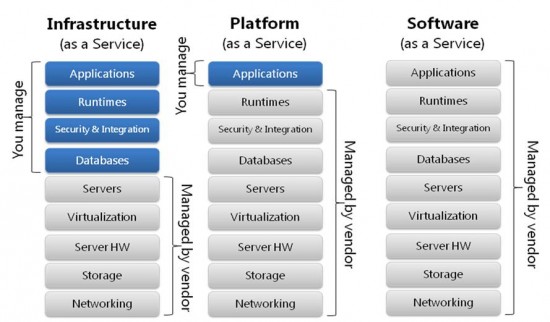
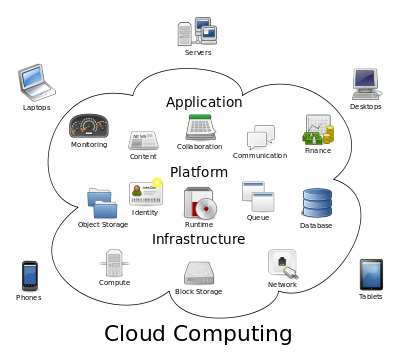 But what Cloud Computing really means? it took several years and more than fifteen drafts to the National Institute of Standards and Technology s (NIST) to find a definition. The final accepted proposal:
 Working with open hardware
Some weeks ago at LinuxCon EU in Barcelona I
Working with open hardware
Some weeks ago at LinuxCon EU in Barcelona I 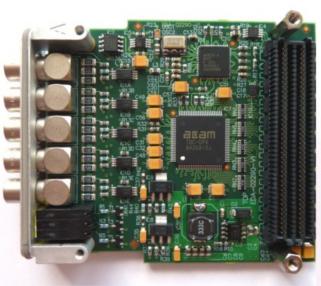
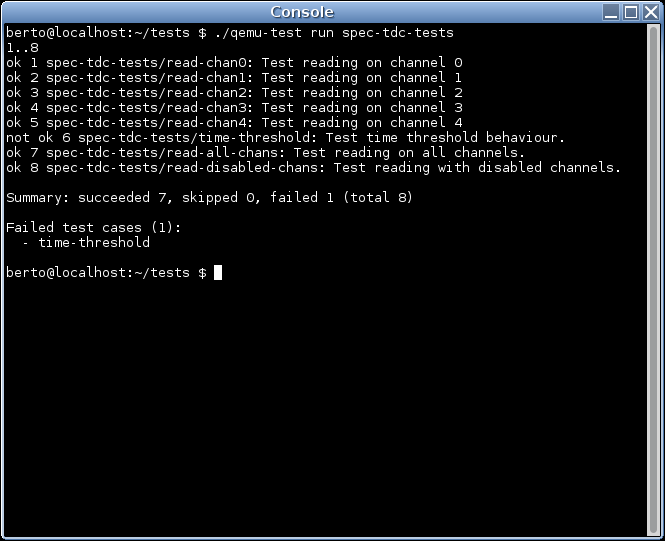
 A the new
  The Free and Open successor to the
  Since
Since  As systems developer I like just being able to pick the most useful Perl modules from CPAN and preferably use quite recent versions of the modules I need. On the other hand our systems administrators prefer running Debian Stable and deploy software using .deb packages.
I do not want to maintain hundred small packages by hand. I just want a single package with all needed the Perl dependencies for a given project. After looking at different possibilities for bundling Perl dependencies I finally found
As systems developer I like just being able to pick the most useful Perl modules from CPAN and preferably use quite recent versions of the modules I need. On the other hand our systems administrators prefer running Debian Stable and deploy software using .deb packages.
I do not want to maintain hundred small packages by hand. I just want a single package with all needed the Perl dependencies for a given project. After looking at different possibilities for bundling Perl dependencies I finally found  TL;DR: There s a
  I do like the way programmers think in terms of DRY, for instance, among other forms of optimization. A couple of days ago I wanted to test different implementations of the same algorithm in C++.
The usual approach would be to implement those algorithms, call them in
I do like the way programmers think in terms of DRY, for instance, among other forms of optimization. A couple of days ago I wanted to test different implementations of the same algorithm in C++.
The usual approach would be to implement those algorithms, call them in