Search Results: "ads"

13 June 2021

Vincent Fourmond: Solution for QSoas quiz #2: averaging several Y values for the same X value

This post describes two similar solutions to the Quiz #2, using the data files found there. The two solutions described here rely on split-on-values. The first solution is the one that came naturally to me, and is by far the most general and extensible, but the second one is shorter, and doesn't require external script files.
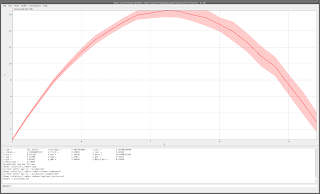
Solution #1 The key to both solution is to separate the original data into a series of datasets that only contain data at a fixed value of x (which corresponds here to a fixed pH), and then process each dataset one by one to extract the average and standard deviation. This first step is done thus:
QSoas> load kcat-vs-ph.dat
QSoas> split-on-values pH x /flags=data
After these commands, the stacks contains a series of datasets bearing the data flag, that each contain a single column of data, as can be seen from the beginnings of a show-stack command:
QSoas> k
Normal stack:
	 F  C	Rows	Segs	Name	
#0	(*) 1	43	1	'kcat-vs-ph_subset_22.dat'
#1	(*) 1	44	1	'kcat-vs-ph_subset_21.dat'
#2	(*) 1	43	1	'kcat-vs-ph_subset_20.dat'
...
Each of these datasets have a meta-data named pH whose value is the original x value from kcat-vs-ph.dat. Now, the idea is to run a stats command on the resulting datasets, extracting the average value of x and its standard deviation, together with the value of the meta pH. The most natural and general way to do this is to use run-for-datasets, using the following script file (named process-one.cmds):
stats /meta=pH /output=true /stats=x_average,x_stddev
So the command looks like:
QSoas> run-for-datasets process-one.cmds flagged:data
This command produces an output file containing, for each flagged dataset, a line containing x_average, x_stddev, and pH. Then, it is just a matter of loading the output file and shuffling the columns in the right order to get the data in the form asked. Overall, this looks like this:
l kcat-vs-ph.dat
split-on-values pH x /flags=data
output result.dat /overwrite=true
run-for-datasets process-one.cmds flagged:data
l result.dat
apply-formula tmp=y2;y2=y;y=x;x=tmp
dataset-options /yerrors=y2
The slight improvement over what is described above is the use of the output command to write the output to a dedicated file (here result.dat), instead of out.dat and ensuring it is overwritten, so that no data remains from previous runs.

Solution #2 The second solution is almost the same as the first one, with two improvements: This yields the following, smaller, solution:
l kcat-vs-ph.dat
split-on-values pH x /flags=data
stats /meta=pH /accumulate=* /stats=x_average,x_stddev /buffers=flagged:data
pop
apply-formula tmp=y2;y2=y;y=x;x=tmp
dataset-options /yerrors=y2


About QSoas QSoas is a powerful open source data analysis program that focuses on flexibility and powerful fitting capacities. It is released under the GNU General Public License. It is described in Fourmond, Anal. Chem., 2016, 88 (10), pp 5050 5052. Current version is 3.0. You can download its source code there (or clone from the GitHub repository) and compile it yourself, or buy precompiled versions for MacOS and Windows there.

12 June 2021

Norbert Preining: Future of Cinnamon in Debian

OK, this is not an easy post. I have been maintaining Cinnamon in Debian for quite some time, since around the times version 4 came out. The soon (hahaha) to be released Bullseye will carry the last release of the 4-track, but version 5 is already waiting, After Bullseye, the future of Cinnamon in Debian currently looks bleak. Since my switch to KDE/Plasma, I haven t used Cinnamon in months. Only occasionally I tested new releases, but never gave them a real-world test. Having left Gnome3 for it s complete lack of usability for pro-users, I escaped to Cinnamon and found a good home there for quite some time using modern technology but keeping user interface changes conservative. For long time I haven t even contemplated using KDE, having been burned during the bad days of KDE3/4 when bloat-as-bloat-can-be was the best description. What revelation it was that KDE/Plasma was more lightweight, faster, responsive, integrated, customizable, all in all simple great. Since my switch to KDE/Plasma I think not for a second I have missed anything from the Gnome3 or Cinnamon world. And that means, I will most probably NOT packaging Cinnamon 5, nor do any real packaging work of Cinnamon for Debian in the future. Of course, I will try to keep maintenance of the current set of packages for Bullseye, but for the next release, I think it is time that someone new steps in. Cinnamon packaging taught me a lot on how to deal with multiple related packages, which is of great use in the KDE packaging world. If someone steps forward, I will surely be around for support and help, but as long as nobody takes the banner, it will mean the end of Cinnamon in Debian. Please contact me if you are interested!

Kentaro Hayashi: fabre.debian.net has moved to Debian.net Team Infrastructure

Today, fabre.debian.net has moved to Debian.net Team Infrastructure So far, fabre.debian.net was sponsored by FOSSHOST which provides us a VPS instance since Jan, 2021. It was located at OSU Open Source Lab. It worked pretty well, Thanks FOSSHOST sponsorship since ever! Now, fabre.debian.net uses the VPS instance which is provided by Debian.net Team Infrastructure. (still non-DSA managed) It is hosted at HETZNER Cloud. About fabre.debian.net fabre.debian.net is a experimental service to demonstrate how to improve user experience with finding and fixing Debian unstable related bugs for making "unstable life" comfortable. Thank Debian.net Team for sponsoring,

Junichi Uekawa: Wrote a quick hack to open chroot in emacs tramp.

Wrote a quick hack to open chroot in emacs tramp. I wrote a mode for cros_sdk and it was relatively simple. I figured that chroot must be easier. I could write one in about 30 minutes. I need to mount proc and home inside the chroot to make it useful, but here goes. chroot-tramp.el

11 June 2021

Mike Gabriel: New: The Debian BBB Packaging Team (and: Kurento Media Server goes Debian)

Today, Fre(i)e Software GmbH has been contracted for packaging Kurento Media Server for Debian. This packaging project will be funded by GUUG e.V. (the German Unix User Group e.V.). A big thanks to the people from GUUG e.V. for making this packaging project possible. About Kurento Media Server Kurento is an open source software project providing a platform suitable for creating modular applications with advanced real-time communication capabilities. For knowing more about Kurento, please visit the Kurento project website: https://www.kurento.org. Kurento is part of FIWARE. For further information on the relationship of FIWARE and Kurento check the Kurento FIWARE Catalog Entry. Kurento is also part of the NUBOMEDIA research initiative. Kurento Media Server is a WebRTC-compatible server that processes audio and video streams, doing composable pipeline-based processing of media. About BigBlueButton As some of you may know, Kurento Media Server is one of the core components of the BigBlueButton software, an ,,Open Source Virtual Classroom Software''. The context of the KMS funding is - after several other steps - getting the complete software component stack of BigBlueButton (aka BBB) into Debian some day, so that we can provide BBB as native Debian packages. On Debian. (Currently, one needs to use an always already a bit outdated version of Ubuntu). Due to this greater context, I just created the Debian BBB Packaging Team on salsa.debian.org. Outlook and Appreciation The current project (uploading Kurento Media Server to Debian) will very likely be extended to one year of package maintenance for all Kurento Media Server components in Debian. Extending this maintenance funding to a second year, has also been discussed, and seems a possible option. Probably most Debian Developer colleagues will agree with me when I say that Debian packaging is not a one-time shot until the first uploads of software packages have landed and settled. Debian package maintenance is a long term responsibility and requires long term commitment. I am very glad, that the people at GUUG e.V are on the same page with me (with us) regarding this. This is much and dearly appreciated. Thank you!!! What else? Well, we have also talked about another BigBlueButton component that is not yet in Debian: FreeSwitch. But more of that, when time has come. How to Join the Debian BBB Packaging Team? Please ping me via IRC (sunweaver on OFTC IRC) or [matrix] (@sunweaver:matrix.org). How to Support the Debian BBB Packaging Team? If you, your organization, your company, your municipality, your university, etc. feels like supporting the effort of packaging BigBlueButton for Debian, please get in touch with: mike.gabriel@freiesoftware.gmbh And yes, the company homepage is not online, yet, but it is in the makings... light+love
Mike (aka sunweaver)

Colin Watson: SSH quoting

A while back there was a thread on one of our company mailing lists about SSH quoting, and I posted a long answer to it. Since then a few people have asked me questions that caused me to reach for it, so I thought it might be helpful if I were to anonymize the original question and post my answer here. The question was why a sequence of commands involving ssh and fiddly quoting produced the output they did. The first example was this:
$ ssh user@machine.local bash -lc "cd /tmp;pwd"
/home/user
Oh hi, my dubious life choices have been such that this is my specialist subject! This is because SSH command-line parsing is not quite what you expect. First, recall that your local shell will apply its usual parsing, and the actual OS-level execution of ssh will be like this:
[0]: ssh
[1]: user@machine.local
[2]: bash
[3]: -lc
[4]: cd /tmp;pwd
Now, the SSH wire protocol only takes a single string as the command, with the expectation that it should be passed to a shell by the remote end. The OpenSSH client deals with this by taking all its arguments after things like options and the target, which in this case are:
[0]: bash
[1]: -lc
[2]: cd /tmp;pwd
It then joins them with a single space:
bash -lc cd /tmp;pwd
This is passed as a string to the server, which then passes that entire string to a shell for evaluation, so as if you d typed this directly on the server:
sh -c 'bash -lc cd /tmp;pwd'
The shell then parses this as two commands:
bash -lc cd /tmp
pwd
The directory change thus happens in a subshell (actually it doesn t quite even do that, because bash -lc cd /tmp in fact ends up just calling cd because of the way bash -c parses multiple arguments), and then that subshell exits, then pwd is called in the outer shell which still has the original working directory. The second example was this:
$ ssh user@machine.local bash -lc "pwd;cd /tmp;pwd"
/home/user
/tmp
Following the logic above, this ends up as if you d run this on the server:
sh -c 'bash -lc pwd; cd /tmp; pwd'
The third example was this:
$ ssh user@machine.local bash -lc "cd /tmp;cd /tmp;pwd"
/tmp
And this is as if you d run:
sh -c 'bash -lc cd /tmp; cd /tmp; pwd'
Now, I wouldn t have implemented the SSH client this way, because I agree that it s confusing. But /usr/bin/ssh is used as a transport for other things so much that changing its behaviour now would be enormously disruptive, so it s probably impossible to fix. (I have occasionally agitated on openssh-unix-dev@ for at least documenting this better, but haven t made much headway yet; I need to get round to preparing a documentation patch.) Once you know about it you can use the proper quoting, though. In this case that would simply be:
ssh user@machine.local 'cd /tmp;pwd'
Or if you do need to specifically invoke bash -l there for some reason (I m assuming that the original example was reduced from something more complicated), then you can minimise your confusion by passing the whole thing as a single string in the form you want the remote sh -c to see, in a way that ensures that the quotes are preserved and sent to the server rather than being removed by your local shell:
ssh user@machine.local 'bash -lc "cd /tmp;pwd"'
Shell parsing is hard.

Mike Gabriel: Linux on Acer Spin 3

Recently, I bought an Acer Spin 3 Convertible Notebook for the company and provided it to Robert Tari for his daily work on Ayatana Indicators (which currently is funded by the UBports Foundation via my company Fre(i)e Software GmbH). Some days ago Robert reported back about a sleepless night he spent with that machine... He got stuck with a tricky issue regarding the installation of Manjaro GNU/Linux on that machine, that could be -- at the end -- resolved by a not so well documented trick. Before anyone else spends another sleepless night on this, we thought we'd better share Robert's solution. So, the below applies to the Acer Spin 3 series (and probably to other Spin models, perhaps even some other Acer laptops): Acer Spin 3 Pre-Inst Cheat Codes Before you even plug in the USB install media:
  1. Go to UEFI settings (i.e. BIOS for us elderly people) [F2]
  2. Security -> Set Supervisor Password [Enabled]
  3. Enter the password you'll use
  4. Boot -> Secure Boot -> [Disabled] (you can't disable it without a set supervisor password)
  5. Exit -> Exit Saving Changes
  6. Restart and go to UEFI settings again [F2]
  7. Main -> [Now press CTRL + S] -> VMD Controller -> [Disabled]
  8. Exit -> Exit Saving Changes
  9. Now plug in the install USB and restart
Esp. the disabling of the VMD Controller is essential. Otherwise, GRUB won't find any partition nor EFI registered boot items after the installation and drops into the EFI recovery shell. Robert hasn't tested the Wacom pen that comes with the device, nor the fingerprint reader, yet. Everything else works out-of-the-box. light+love
Mike Gabriel (aka sunweaver)

10 June 2021

Louis-Philippe V ronneau: New Desktop Computer

I built my last desktop computer what seems like ages ago. In 2011, I was in a very different place, both financially and as a person. At the time, I was earning minimum wage at my school's caf to pay rent. Since the caf was owned by the school cooperative, I had an employee discount on computer parts. This gave me a chance to build my first computer from spare parts at a reasonable price. After 10 years of service1, the time has come to upgrade. Although this machine was still more than capable for day to day tasks like browsing the web or playing casual video games, it started to show its limits when time came to do more serious work. Old computer specs:
CPU: AMD FX-8530
Memory: 8GB DDR3 1600Mhz
Motherboard: ASUS TUF SABERTOOTH 990FX R2.0
Storage: Samsung 850 EVO 500GB SATA
I first started considering an upgrade in September 2020: David Bremner was kindly fixing a bug in ledger that kept me from balancing my books and since it seemed like a class of bug that would've been easily caught by an autopkgtest, I decided to add one. After adding the necessary snippets to run the upstream testsuite (an easy task I've done multiple times now), I ran sbuild and ... my computer froze and crashed. Somehow, what I thought was a simple Python package was maxing all the cores on my CPU and using all of the 8GB of memory I had available.2 A few month later, I worked on jruby and the builds took 20 to 30 minutes long enough to completely disrupt my flow. The same thing happened when I wanted to work on lintian: the testsuite would take more than 15 minutes to run, making quick iterations impossible. Sadly, the pandemic completely wrecked the computer hardware market and prices here in Canada have only recently started to go down again. As a result, I had to wait more time than I would've liked not to pay scalper prices. New computer specs:
CPU: AMD Ryzen 5900X
Memory: 64GB DDR4 3200MHz
Motherboard: MSI MPG B550 Gaming Plus
Storage: Corsair MP600 500 GB Gen4 NVME
The difference between the two machines is pretty staggering: I've gone from a CPU with 2 cores and 8 threads, to one with 12 cores and 24 threads. Not only that, but single-threaded performance has also vastly increased in those 10 years. A good example would be building grammalecte, a package I've recently sponsored. I feel it's a good benchmark, since the build relies on single-threaded performance for the normal Python operations, while being threaded when it compiles the dictionaries. On the old computer:
Build needed 00:10:07, 273040k disk space
And as you can see, on the new computer the build time has been significantly reduced:
Build needed 00:03:18, 273040k disk space
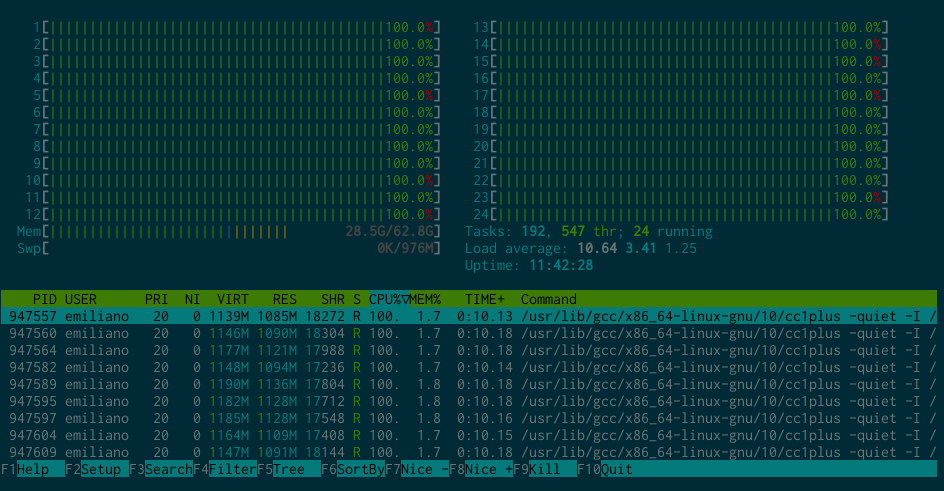
Same goes for things like the lintian testsuite. Since it's a very multi-threaded workload, it now takes less than 2 minutes to run; a 750% improvement. All this to say I'm happy with my purchase. And lo and behold I can now build ledger without a hitch, even though it maxes my 24 threads and uses 28GB of RAM. Who would've thought... Screen capture of htop showing how much resources ledger takes to build

  1. I managed to fry that PC's motherboard in 2016 and later replaced it with a brand new one. I also upgraded the storage along the way, from a very cheap cacheless 120GB SSD to a larger Samsung 850 EVO SATA drive.
  2. As it turns out, ledger is mostly written in C++ :)

Dirk Eddelbuettel: #33: Collaborative Editing and Execution in Shared Byoby Sessions

Welcome to the 33th post in the rigorously raconteuring R recommendations series, or R4 for short. This post is also a post in the T4 series of tips, tricks, tools, and toys as it picks up and extends earlier posts on byobu. And it fits nicely in the more recent ESS-Intro series as we show some Emacs. You can find earlier R4 posts here, and the T4 posts here; the ESS-Intro series is here. The focus of this short video (and slides) is on collaboration using files, but also entire sessions, execution and all aspects of joint exploration, development or debugging. Anything you can do in a terminal you can also do shared in a terminal. The video contains a brief lightning talk, and a shared session jointly with Grant McDermott and Vicent Arel-Bundock. My big big thanks to both of them for prodding and encouragement, as well as fearless participation in the joint section of the video:

The corresponding pdf slides are here. If you like this or other open-source work I do, you can sponsor me at GitHub.

This post by Dirk Eddelbuettel originated on his Thinking inside the box blog. Please report excessive re-aggregation in third-party for-profit settings.

9 June 2021

Michael Prokop: efivars is gone with Debian/bullseye #newinbullseye

Continuing with #newinbullseye, it s worth being aware of, that efivars is gone with the kernel version shipped as of Debian/bullseye. Quoting from wiki.debian.org/UEFI:
The Linux kernel gives access to the UEFI configuration variables via a set of files under /sys, using two different interfaces. The older interface was showing files under /sys/firmware/efi/vars, and this is what was used by default in both Wheezy and Jessie. The new interface is efivarfs, which will expose things in a slightly different format under /sys/firmware/efi/efivars.
This is the new preferred way of using UEFI configuration variables, and Debian switched to it by default from Stretch onwards.
Now, CONFIG_EFI_VARS is no longer enabled in Debian due to commit 20146398c4 (shipped as such with Debian kernel package versions >=5.10.1-1~exp1). As a result, the kernel module efivars is no longer available on systems running Debian kernels >=5.10 (which includes Debian/bullseye). Now, when running such a system in EFI mode, chroot-ing into a system and executing e.g. efibootmgr, it might fail with:
# efibootmgr
EFI variables are not supported on this system.
This is caused by /sys/firmware/efi/vars no longer being available, because of the disabled CONFIG_EFI_VARS. To get this working again, you need to make efivarfs available via:
# mount -t efivarfs efivarfs /sys/firmware/efi/efivars
Then efibootmgr and further tools relying on efivars should work again. FYI: if you re a user of Grml s grml-chroot tool, this is going to be handled out of the box for you.

Thorsten Alteholz: My Debian Activities in May 2021

FTP master This month I accepted 85 and rejected 6 packages. The overall number of packages that got accepted was only 88. Yeah, Debian is frozen but hopefully will unfreeze soon. Debian LTS This was my eighty-third month that I did some work for the Debian LTS initiative, started by Raphael Hertzog at Freexian. This month my all in all workload has been 29.75h. During that time I did LTS and normal security uploads of: I also made some progress with gpac and struggle with dozens of issues here. Last but not least I did some days of frontdesk duties, which for whatever reason was rather time-consuming this month. Debian ELTS This month was the thirty-fifth ELTS month. During my allocated time I uploaded: I also made some progress with python3.4 Last but not least I did some days of frontdesk duties. Other stuff On my neverending golang challenge I again uploaded some packages either for NEW or as source upload. Last but not least I adopted gnucobol.

8 June 2021

Jonathan Dowland: LaTeX draft documents

I'm writing up a PhD deliverable (which will show up here eventually) using LaTeX, which is my preferred tool for such things, since I also use it for papers, and will eventually be using it for my thesis itself. For this last document, I experimented with a few packages and techniques for organising the document which I found useful, so I thought I'd share them. What version is this anyway? I habitually store and develop my documents in git repositories. From time to time I generate a PDF and copy it off elsewhere to review (e.g., an iPad). Later on it can be useful to be able to figure out exactly what source built the PDF. I achieve this using
\newcommand \version \input "git describe --always --dirty" 
And \version\ somewhere in the header of the document. Draft mode The common document classes all accept a draft argument, to enable Draft Mode.
\documentclass[12pt,draft] article 
Various other packages behave differently if Draft Mode is enabled. The graphicx package, for example, doesn't actually draw pictures in draft mode, which I don't find useful. So for that package, I force it to behave as if we were in "Final Mode" at all times:
\usepackage[final] graphicx 
I want to also include some different bits and pieces in Draft Mode. Although the final version won't need it, I find having a Table of Contents very helpful during the writing process. The ifdraft package adds a convenience macro to query whether we are in draft or not. I use it like so:
\ifdraft 
This page will be cut from the final report.
\tableofcontents
\newpage
 
For this document, I have been given the section headings I must use and the number of pages each section must run to. When drafting, I want to include the page budget in the section names (e.g. Background (2 pages)). I also force new pages at the beginning of each Section, to make it easier to see how close I am to each section's page budget.
\ifdraft \newpage 
\section Work completed\ifdraft  (1 page)  % 1 Page
todonotes
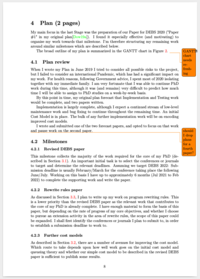
Two TODO items in the margin Two TODO items in the margin
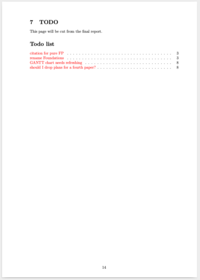
Collated TODOs in a list Collated TODOs in a list
The todonotes package package is one of many that offers macros to make managing in-line TODO notes easier. Within the source of my document, I can add a TODO right next to the relevant text with \todo something to do . In the document, by default, this is rendered in the right-hand margin. With the right argument, the package will only render the notes in draft mode.
\usepackage[textsize=small,obeyDraft] todonotes 
todonotes can also collate all the TODOs together into a single list. The list items are hyperlinked back to the page where the relevant item appears.
\ifdraft 
\newpage
\section TODO 
  This page will be cut from the final report.
  \listoftodos
 

Norbert Preining: KDE/Plasma 5.22 for Debian

Today, KDE released version 5.22 of the Plasma desktop with the usual long list of updates and improvements. And packages for Debian are ready for consumption! Ah and yes, KDE Gear 21.04 is also ready! As usual, I am providing packages via my OBS builds. If you have used my packages till now, then you only need to change the plasma521 line to read plasma522. Just for your convenience, if you want the full set of stuff, here are the apt-source entries:
deb https://download.opensuse.org/repositories/home:/npreining:/debian-kde:/other-deps/Debian_Unstable/ ./
deb https://download.opensuse.org/repositories/home:/npreining:/debian-kde:/frameworks/Debian_Unstable/ ./
deb https://download.opensuse.org/repositories/home:/npreining:/debian-kde:/plasma522/Debian_Unstable/ ./
deb https://download.opensuse.org/repositories/home:/npreining:/debian-kde:/apps2104/Debian_Unstable/ ./
deb https://download.opensuse.org/repositories/home:/npreining:/debian-kde:/other/Debian_Unstable/ ./
and for testing the same with Debian_unstable replaced with Debian_Testing. As usual, don t forget that you need to import my OBS gpg key to make these repos work! The sharp eye might have detected also the apps2104 line, yes the newly renamed KDE Gear suite of packages is also available in my OBS builds (and in Debian/experimental). Uploads to Debian Currently, the frameworks and most of the KDE Gear (Apps) 21.04 are in Debian/experimental. I will upload Plasma 5.22 to experimental as soon as NEW processing of two packages is finished (which might take another few months). After the release of bullseye, all the current versions will be uploaded to unstable as usual. Enjoy the new Plasma!

Bits from Debian: Registration for DebConf21 Online is Open

DebConf21 banner The DebConf team is glad to announce that registration for DebConf21 Online is now open. The 21st Debian Conference is being held Online, due to COVID-19, from August 22 to August 29, 2021. It will also sport a DebCamp from August 15 to August 21, 2021 (preceeding the DebConf). To register for DebConf21, please visit the DebConf website at https://debconf21.debconf.org/register Reminder: Creating an account on the site does not register you for the conference, there's a conference registration form to complete after signing in. Participation in DebConf21 is conditional on your respect of our Code of Conduct. We require you to read, understand and abide by this code. A few notes about the registration process: Any questions about registration should be addressed to registration@debconf.org. See you online! DebConf would not be possible without the generous support of all our sponsors, especially our Platinum Sponsors Lenovo and Infomaniak, and our Gold Sponsor Matanel Foundation.

7 June 2021

Mike Gabriel: UBports: Packaging of Lomiri Operating Environment for Debian (part 05)

Before and during FOSDEM 2020, I agreed with the people (developers, supporters, managers) of the UBports Foundation to package the Unity8 Operating Environment for Debian. Since 27th Feb 2020, Unity8 has now become Lomiri. Recent Uploads to Debian related to Lomiri (Feb - May 2021) Over the past 4 months I attended 14 of the weekly scheduled UBports development sync sessions and worked on the following bits and pieces regarding Lomiri in Debian: The largest amount of work (and time) went into getting lomiri-ui-toolkit ready for upload. That code component is a absolutely massive beast and dearly intertwined with Qt5 (and unit tests fail with every new warning a new Qt5.x introduces). This bit of work I couldn't do alone (see below in "Credits" section). The next projects / packages ahead are some smaller packages (content-hub, gmenuharness, etc.) before we will finally come to lomiri (i.e. main bit of the Lomiri Operating Environment) itself. Credits Many big thanks go to everyone on the UBports project, but especially to Ratchanan Srirattanamet who lived inside of lomiri-ui-toolkit for more than two weeks, it seemed. Also, thanks to Florian Leeber for being my point of contact for topics regarding my cooperation with the UBports Foundation. Packaging Status The current packaging status of Lomiri related packages in Debian can be viewed at:
https://qa.debian.org/developer.php?login=team%2Bubports%40tracker.debia... light+love
Mike Gabriel (aka sunweaver)

6 June 2021

Evgeni Golov: Controlling Somfy roller shutters using an ESP32 and ESPHome

Our house has solar powered, remote controllable roller shutters on the roof windows, built by the German company named HEIM & HAUS. However, when you look closely at the remote control or the shutter motor, you'll see another brand name: SIMU. As the shutters don't have any wiring inside the house, the only way to control them is via the remote interface. So let's go on the Internet and see how one can do that, shall we? ;) First thing we learn is that SIMU remote stuff is just re-branded Somfy. Great, another name! Looking further we find that Somfy uses some obscure protocol to prevent (replay) attacks (spoiler: it doesn't!) and there are tools for RTL-SDR and Arduino available. That's perfect! Always sniff with RTL-SDR first! Given the two re-brandings in the supply chain, I wasn't 100% sure our shutters really use the same protocol. So the first "hack" was to listen and decrypt the communication using RTL-SDR:
$ git clone https://github.com/dimhoff/radio_stuff
$ cd radio_stuff
$ make -C converters am_to_ook
$ make -C decoders decode_somfy
$ rtl_fm -M am -f 433.42M -s 270K   ./am_to_ook -d 10 -t 2000 -    ./decode_somfy
<press some buttons on the remote>
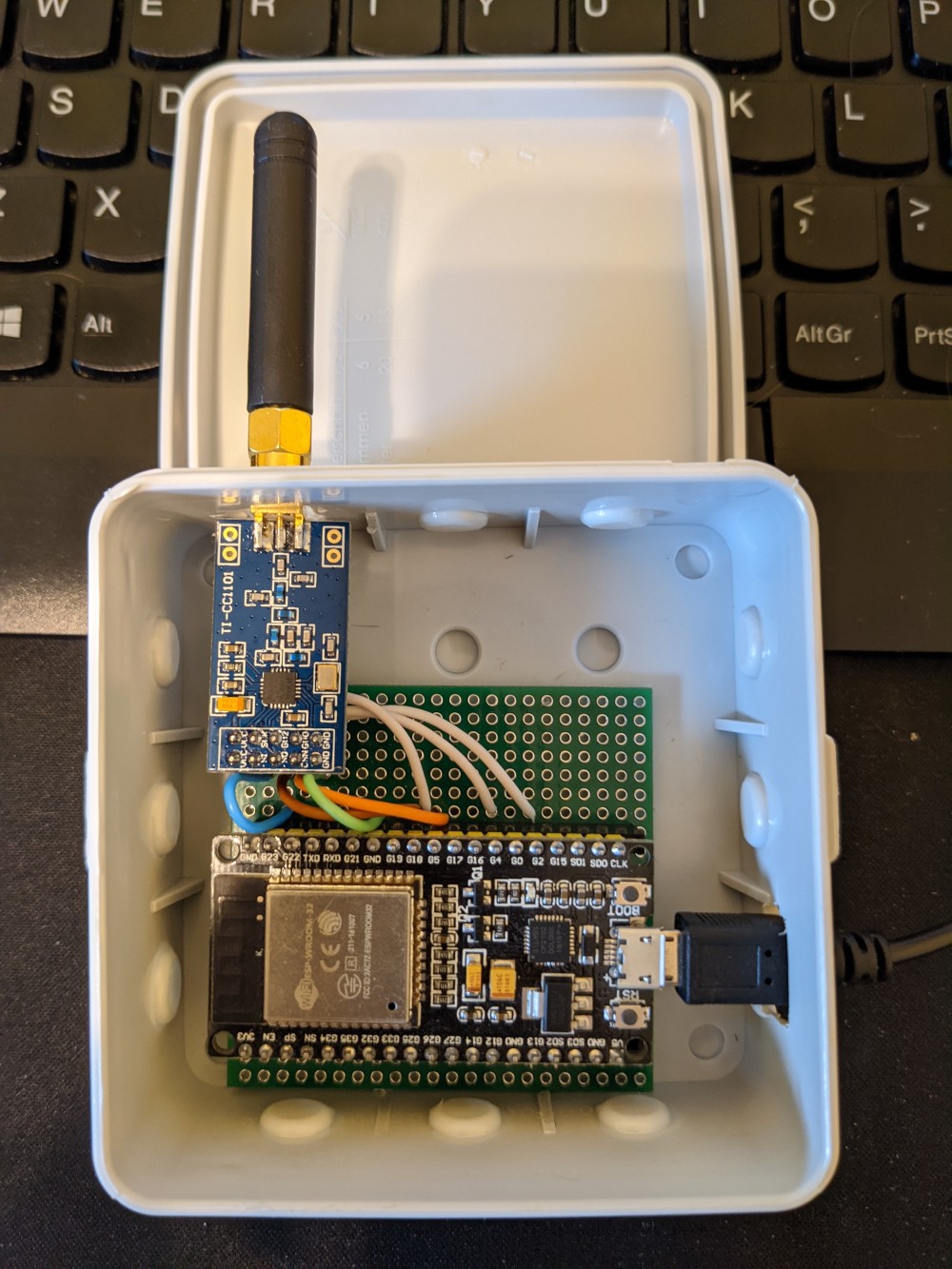
The output contains the buttons I pressed, but also the id of the remote and the command counter (which is supposed to prevent replay attacks). At this point I could just use the id and the counter to send own commands, but if I'd do that too often, the real remote would stop working, as its counter won't increase and the receiver will drop the commands when the counters differ too much. But that's good enough for now. I know I'm looking for the right protocol at the right frequency. As the end result should be an ESP32, let's move on! Acquiring the right hardware Contrary to an RTL-SDR, one usually does not have a spare ESP32 with 433MHz radio at home, so I went shopping: a NodeMCU-32S clone and a CC1101. The CC1101 is important as most 433MHz chips for Arduino/ESP only work at 433.92MHz, but Somfy uses 433.42MHz and using the wrong frequency would result in really bad reception. The CC1101 is essentially an SDR, as you can tune it to a huge spectrum of frequencies. Oh and we need some cables, a bread board, the usual stuff ;) The wiring is rather simple: ESP32 wiring for a CC1101 And the end result isn't too beautiful either, but it works: ESP32 and CC1101 in a simple case Acquiring the right software In my initial research I found an Arduino sketch and was totally prepared to port it to ESP32, but luckily somebody already did that for me! Even better, it's explicitly using the CC1101. Okay, okay, I cheated, I actually ordered the hardware after I found this port and the reference to CC1101. ;) As I am using ESPHome for my ESPs, the idea was to add a "Cover" that's controlling the shutters to it. Writing some C++, how hard can it be? Turns out, not that hard. You can see the code in my GitHub repo. It consists of two (relevant) files: somfy_cover.h and somfy.yaml. somfy_cover.h essentially wraps the communication with the Somfy_Remote_Lib library into an almost boilerplate Custom Cover for ESPHome. There is nothing too fancy in there. The only real difference to the "Custom Cover" example from the documentation is the split into SomfyESPRemote (which inherits from Component) and SomfyESPCover (which inherits from Cover) -- this is taken from the Custom Sensor documentation and allows me to define one "remote" that controls multiple "covers" using the add_cover function. The first two params of the function are the NVS name and key (think database table and row), and the third is the rolling code of the remote (stored in somfy_secrets.h, which is not in Git). In ESPHome a Cover shall define its properties as CoverTraits. Here we call set_is_assumed_state(true), as we don't know the state of the shutters - they could have been controlled using the other (real) remote - and setting this to true allows issuing open/close commands at all times. We also call set_supports_position(false) as we can't tell the shutters to move to a specific position. The one additional feature compared to a normal Cover interface is the program function, which allows to call the "program" command so that the shutters can learn a new remote. somfy.yaml is the ESPHome "configuration", which contains information about the used hardware, WiFi credentials etc. Again, mostly boilerplate. The interesting parts are the loading of the additional libraries and attaching the custom component with multiple covers and the additional PROG switches:
esphome:
  name: somfy
  platform: ESP32
  board: nodemcu-32s
  libraries:
    - SmartRC-CC1101-Driver-Lib@2.5.6
    - Somfy_Remote_Lib@0.4.0
    - EEPROM
  includes:
    - somfy_secrets.h
    - somfy_cover.h
 
cover:
  - platform: custom
    lambda:  -
      auto somfy_remote = new SomfyESPRemote();
      somfy_remote->add_cover("somfy", "badezimmer", SOMFY_REMOTE_BADEZIMMER);
      somfy_remote->add_cover("somfy", "kinderzimmer", SOMFY_REMOTE_KINDERZIMMER);
      App.register_component(somfy_remote);
      return somfy_remote->covers;
    covers:
      - id: "somfy"
        name: "Somfy Cover"
      - id: "somfy2"
        name: "Somfy Cover2"
switch:
  - platform: template
    name: "PROG"
    turn_on_action:
      - lambda:  -
          ((SomfyESPCover*)id(somfy))->program();
  - platform: template
    name: "PROG2"
    turn_on_action:
      - lambda:  -
          ((SomfyESPCover*)id(somfy2))->program();
The switch to trigger the program mode took me a bit. As the Cover interface of ESPHome does not offer any additional functions besides movement control, I first wrote code to trigger "program" when "stop" was pressed three times in a row, but that felt really cumbersome and also had the side effect that the remote would send more than needed, sometimes confusing the shutters. I then decided to have a separate button (well, switch) for that, but the compiler yelled at me I can't call program on a Cover as it does not have such a function. Turns out, you need to explicitly cast to SomfyESPCover and then it works, even if the code becomes really readable, NOT. Oh and as the switch does not have any code to actually change/report state, it effectively acts as a button that can be pressed. At this point we can just take an existing remote, press PROG for 5 seconds, see the blinds move shortly up and down a bit and press PROG on our new ESP32 remote and the shutters will learn the new remote. And thanks to the awesome integration of ESPHome into HomeAssistant, this instantly shows up as a new controllable cover there too. Future Additional Work I started writing this post about a year ago And the initial implementation had some room for improvement More than one remote The initial code only created one remote and one cover element. Sure, we could attach that to all shutters (there are 4 of them), but we really want to be able to control them separately. Thankfully I managed to read enough ESPHome docs, and learned how to operate std::vector to make the code dynamically accept new shutters. Using ESP32's NVS The ESP32 has a non-volatile key-value storage which is much nicer than throwing bits at an emulated EEPROM. The first library I used for that explicitly used EEPROM storage and it would have required quite some hacking to make it work with NVS. Thankfully the library I am using now has a plugable storage interface, and I could just write the NVS backend myself and upstream now supports that. Yay open-source! Remaining issues Real state is unknown As noted above, the ESP does not know the real state of the shutters: a command could have been lost in transmission (the Somfy protocol is send-only, there is no feedback) or the shutters might have been controlled by another remote. At least the second part could be solved by listening all the time and trying to decode commands heard over the air, but I don't think this is worth the time -- worst that can happen is that a closed (opened) shutter receives another close (open) command and that is harmless as they have integrated endstops and know that they should not move further. Can't program new remotes with ESP only To program new remotes, one has to press the "PROG" button for 5 seconds. This was not exposed in the old library, but the new one does support "long press", I just would need to add another ugly switch to the config and I currently don't plan to do so, as I do have working remotes for the case I need to learn a new one.

5 June 2021

Utkarsh Gupta: FOSS Activites in May 2021

Here s my (twentieth) monthly update about the activities I ve done in the F/L/OSS world.

Debian
This was my 29th month of actively contributing to Debian. I became a DM in late March 2019 and a DD on Christmas 19! \o/ Interesting month, surprisingly. Lots of things happening and lots of moving parts; becoming the new normal , I believe. Anyhow, working on Ubuntu full-time has its own advantage and one of them is being able to work on Debian stuff! So whilst I couldn t upload a lot of packages because of the freeze, here s what I worked on:

Uploads and bug fixes:

Other $things:
  • Mentoring for newcomers and assisting people in BSP.
  • Moderation of -project mailing list.

Ubuntu
This was my 4th month of actively contributing to Ubuntu. Now that I ve joined Canonical to work on Ubuntu full-time, there s a bunch of things I do! \o/ This month, by all means, was dedicated mostly to PHP 8.0, transitioning from PHP 7.4 to 8.0. Naturally, it had so many moving parts and moments of utmost frustration, shared w/ Bryce. :D So even though I can t upload anything, I worked on the following stuff & asked for sponsorship.
But before, I d like to take a moment to stress how kind and awesome Gianfranco Costamagna, a.k.a. LocutusOfBorg is! He s been sponsoring a bunch of my things & helping with re-triggers, et al. Thanks a bunch, Gianfranco; beers on me whenever we meet!

Merges:

Uploads & Syncs:

MIRs:

Seed Operations:

Debian (E)LTS
Debian Long Term Support (LTS) is a project to extend the lifetime of all Debian stable releases to (at least) 5 years. Debian LTS is not handled by the Debian security team, but by a separate group of volunteers and companies interested in making it a success. And Debian Extended LTS (ELTS) is its sister project, extending support to the Jessie release (+2 years after LTS support). This was my twentieth month as a Debian LTS and eleventh month as a Debian ELTS paid contributor.
I was assigned 29.75 hours for LTS and 40.00 hours for ELTS and worked on the following things:

LTS CVE Fixes and Announcements:

ELTS CVE Fixes and Announcements:

Other (E)LTS Work:
  • Front-desk duty from 24-05 until 30-05 for both LTS and ELTS.
  • Triaged rails, libimage-exiftool-perl, hivex, graphviz, glibc, libexosip2, impacket, node-ws, thunar, libgrss, nginx, postgresql-9.6, ffmpeg, composter, and curl.
  • Mark CVE-2019-9904/graphviz as ignored for stretch and jessie.
  • Mark CVE-2021-32029/postgresql-9.6 as not-affected for stretch.
  • Mark CVE-2020-24020/ffmpeg as not-affected for stretch.
  • Mark CVE-2020-22020/ffmpeg as postponed for stretch.
  • Mark CVE-2020-22015/ffmpeg as ignored for stretch.
  • Mark CVE-2020-21041/ffmpeg as postponed for stretch.
  • Mark CVE-2021-33574/glibc as no-dsa for stretch & jessie.
  • Mark CVE-2021-31800/impacket as no-dsa for stretch.
  • Mark CVE-2021-32611/libexosip2 as no-dsa for stretch.
  • Mark CVE-2016-20011/libgrss as ignored for stretch.
  • Mark CVE-2021-32640/node-ws as no-dsa for stretch.
  • Mark CVE-2021-32563/thunar as no-dsa for stretch.
  • [LTS] Help test and review bind9 update for Emilio.
  • [LTS] Suggest and add DEP8 tests for bind9 for stretch.
  • [LTS] Sponsored upload of htmldoc to buster for Havard as a consequence of #988289.
  • [ELTS] Fix triage order for jetty and graphviz.
  • [ELTS] Raise issue upstream about cloud-init; mock tests instead.
  • [ELTS] Write to private ELTS list about triage ordering.
  • [ELTS] Review Emilio s new script and write back feedback, mentioning extra file created, et al.
  • [ELTS/LTS] Raise upgrade problems from LTS -> LTS+1 to the list. Thread here.
    • Further help review and raise problems that could occur, et al.
  • [LTS] Help explain path forward for firmware-nonfree update to Ola. Thread here.
  • [ELTS] Revert entries of TEMP-0000000-16B7E7 and TEMP-0000000-1C4729; CVEs assigned & fix ELTS tracker build.
  • Auto EOL ed linux, libgrss, node-ws, and inspircd for jessie.
  • Attended monthly Debian LTS meeting, which didn t happen, heh.
  • Answered questions (& discussions) on IRC (#debian-lts and #debian-elts).
  • General and other discussions on LTS private and public mailing list.

Until next time.
:wq for today.

Dirk Eddelbuettel: td 0.0.4 on CRAN: More Maintenance

The still fairly recent td package for accessing the twelvedata API for financial data has been updated on CRAN this morning, and is now at released version 0.0.4. This corrects something the previous 0.0.3 release from last weekend was meant to address, but didn t quite do it. Access to the helper function finding a proper user config file (for .e.g., the API config) is now correctly conditioned on R 4.0.0, and the versioned depends has been removed. The NEWS entry follows.

Changes in version 0.0.4 (2021-06-05)
  • The version comparison was corrected and the package no longer (formally) depends on R (>= 4.0.0)
  • Very minor README.md edits

Courtesy of my CRANberries, there is a comparison to the previous release. For questions or comments use the issue tracker off the GitHub repo. If you like this or other open-source work I do, you can now sponsor me at GitHub.

This post by Dirk Eddelbuettel originated on his Thinking inside the box blog. Please report excessive re-aggregation in third-party for-profit settings.

4 June 2021

Junichi Uekawa: emacs tramp mode for chroot.

emacs tramp mode for chroot. I saw tramp for docker and lxc so I figured it must be possible to write a mode for chroot. I wrote one for cros_sdk and that made my life much easier. I can build and run inside chroot from emacs transparently. Seems like it should also be possible to write something for dchroot.

Matthew Garrett: Mike Lindell's Cyber "Evidence"

Mike Lindell, notable for absolutely nothing relevant in this field, today filed a lawsuit against a couple of voting machine manufacturers in response to them suing him for defamation after he claimed that they were covering up hacks that had altered the course of the US election. Paragraph 104 of his suit asserts that he has evidence of at least 20 documented hacks, including the number of votes that were changed. The citation is just a link to a video called Absolute 9-0, which claims to present sufficient evidence that the US supreme court will come to a 9-0 decision that the election was tampered with.

The claim is that Lindell was provided with a set of files on the 9th of January, and gave these to some cyber experts to verify. These experts identified them as packet captures. The video contains scrolling hex, and we are told that this is the raw encrypted data from the files. In reality, the hex values correspond very clearly to printable ASCII, and appear to just be the Pennsylvania voter roll. They're not encrypted, and they're not packet captures (they contain no packet headers).

20 of these packet captures were then selected and analysed, giving us the tables contained within Exhibit 12. The alleged source IPs appear to correspond to the networks the tables claim, and the latitude and longitude presumably just come from a geoip lookup of some sort (although clearly those values are far too precise to be accurate). But if we look at the target IPs, we find something interesting. Most of them resolve to the website for the county that was the nominal target (eg, 198.108.253.104 is www.deltacountymi.org). So, we're supposed to believe that in many cases, the county voting infrastructure was hosted on the county website.

Unfortunately we're not given the destination port, but 198.108.253.104 isn't listening on anything other than 80 and 443. We're told that the packet data is encrypted, so presumably it's over HTTPS. So, uh, how did they decrypt this to figure out how many votes were switched? If Mike's hackers have broken TLS, they really don't need to be dealing with this.

We're also given some background information on how it's impossible to reconstruct packet captures after the fact (untrue), or that modifying them would change their hashes (true, but in the absence of known good hash values that tells us nothing), but it's pretty clear that nothing we're shown actually demonstrates what we're told it does.

In summary: yes, any supreme court decision on this would be 9-0, just not the way he's hoping for.

Update: It was pointed out that this data appears to be part of a larger dataset. This one is even more dubious - it somehow has MAC addresses for both the source and destination (which is impossible), and almost none of these addresses are in actual issued ranges.

comment count unavailable comments

Next.

Previous.