Search Results: "tim"

10 June 2021

Petter Reinholdtsen: Nikita version 0.6 released - free software archive API server

I am very pleased to be able to share with you the announcement of a new version of the archiving system Nikita published by its lead developer Thomas S dring:
It is with great pleasure that we can announce a new release of nikita. Version 0.6 (https://gitlab.com/OsloMet-ABI/nikita-noark5-core). This release makes new record keeping functionality available. This really is a maturity release. Both in terms of functionality but also code. Considerable effort has gone into refactoring the codebase and simplifying the code. Notable changes for this release include:
  • Significantly improved OData parsing
  • Support for business specific metadata and national identifiers
  • Continued implementation of domain model and endpoints
  • Improved testing
  • Ability to export and import from arkivstruktur.xml
We are currently in the process of reaching an agreement with an archive institution to publish their picture archive using nikita with business specific metadata and we hope that we can share this with you soon. This is an interesting project as it allows the organisation to bring an older picture archive back to life while using the original metadata values stored as business specific metadata. Combined with OData means the scope and use of the archive is significantly increased and will showcase both the flexibility and power of Noark. I really think we are approaching a version 1.0 of nikita, even though there is still a lot of work to be done. The notable work at the moment is to implement access-control and full text indexing of documents. My sincere thanks to everyone who has contributed to this release! - Thomas Release 0.6 2021-06-10 (d1ba5fc7e8bad0cfdce45ac20354b19d10ebbc7b)
  • Refactor metadata entity search
  • Remove redundant security configuration
  • Make OpenAPI documentation work
  • Change database structure / inheritance model to a more sensible approach
  • Make it possible to move entities around the fonds structure
  • Implemented a number of missing endpoints
  • Make sure yml files are in sync
  • Implemented/finalised storing and use of
    • Business Specific Metadata
    • Norwegian National Identifiers
    • Cross Reference
    • Keyword
    • StorageLocation
    • Author
    • Screening for relevant objects
    • ChangeLog
    • EventLog
  • Make generation of updated docker image part of successful CI pipeline
  • Implement pagination for all list requests
    • Refactor code to support lists
    • Refactor code for readability
    • Standardise the controller/service code
  • Finalise File->CaseFile expansion and Record->registryEntry/recordNote expansion
  • Improved Continuous Integration (CI) approach via gitlab
  • Changed conversion approach to generate tagged PDF documents
  • Updated dependencies
    • For security reasons
    • Brought codebase to spring-boot version 2.5.0
    • Remove import of necessary dependencies
    • Remove non-used metrics classes
  • Added new analysis to CI including
  • Implemented storing of Keyword
  • Implemented storing of Screening and ScreeningMetadata
  • Improved OData support
    • Better support for inheritance in queries where applicable
    • Brought in more OData tests
    • Improved OData/hibernate understanding of queries
    • Implement $count, $orderby
    • Finalise $top and $skip
    • Make sure & is used between query parameters
  • Improved Testing in codebase
    • A new approach for integration tests to make test more readable
    • Introduce tests in parallel with code development for TDD approach
    • Remove test that required particular access to storage
  • Implement case-handling process from received email to case-handler
    • Develop required GUI elements (digital postroom from email)
    • Introduced leader, quality control and postroom roles
  • Make PUT requests return 200 OK not 201 CREATED
  • Make DELETE requests return 204 NO CONTENT not 200 OK
  • Replaced 'oppdatert*' with 'endret*' everywhere to match latest spec
  • Upgrade Gitlab CI to use python > 3 for CI scripts
  • Bug fixes
    • Fix missing ALLOW
    • Fix reading of objects from jar file during start-up
    • Reduce the number of warnings in the codebase
    • Fix delete problems
    • Make better use of cascade for "leaf" objects
    • Add missing annotations where relevant
    • Remove the use of ETAG for delete
    • Fix missing/wrong/broken rels discovered by runtest
    • Drop unofficial convertFil (konverterFil) end point
    • Fix regex problem for dateTime
    • Fix multiple static analysis issues discovered by coverity
    • Fix proxy problem when looking for object class names
    • Add many missing translated Norwegian to English (internal) attribute/entity names
    • Change UUID generation approach to allow code also set a value
    • Fix problem with Part/PartParson
    • Fix problem with empty OData search results
    • Fix metadata entity domain problem
  • General Improvements
    • Makes future refactoring easier as coupling is reduced
    • Allow some constant variables to be set from property file
    • Refactor code to make reflection work better across codebase
    • Reduce the number of @Service layer classes used in @Controller classes
    • Be more consistent on naming of similar variable types
    • Start printing rels/href if they are applicable
    • Cleaner / standardised approach to deleting objects
    • Avoid concatenation when using StringBuilder
    • Consolidate code to avoid duplication
    • Tidy formatting for a more consistent reading style across similar class files
    • Make throw a log.error message not an log.info message
    • Make throw print the log value rather than printing in multiple places
    • Add some missing pronom codes
    • Fix time formatting issue in Gitlab CI
    • Remove stale / unused code
    • Use only UUID datatype rather than combination String/UUID for systemID
    • Mark variables final and @NotNull where relevant to indicate intention
  • Change Date values to DateTime to maintain compliance with Noark 5 standard
  • Domain model improvements using Hypersistence Optimizer
    • Move @Transactional from class to methods to avoid borrowing the JDBC Connection unnecessarily
    • Fix OneToOne performance issues
    • Fix ManyToMany performance issues
    • Add missing bidirectional synchronization support
    • Fix ManyToMany performance issue
  • Make List
  • and Set
  • use final-keyword to avoid potential problems during update operations
  • Changed internal URLs, replaced "hateoas-api" with "api".
  • Implemented storing of Precedence.
  • Corrected handling of screening.
  • Corrected _links collection returned for list of mixed entity types to match the specific entity.
  • Improved several internal structures.
If free and open standardized archiving API sound interesting to you, please contact us on IRC (#nikita on irc.oftc.net) or email (nikita-noark mailing list). As usual, if you use Bitcoin and want to show your support of my activities, please send Bitcoin donations to my address 15oWEoG9dUPovwmUL9KWAnYRtNJEkP1u1b.

Vincent Bernat: Serving WebP & AVIF images with Nginx

WebP and AVIF are two image formats for the web. They aim to produce smaller files than JPEG and PNG. They both support lossy and lossless compression, as well as alpha transparency. WebP was developed by Google and is a derivative of the VP8 video format.1 It is supported on most browsers. AVIF is using the newer AV1 video format to achieve better results. It is supported by Chromium-based browsers and has experimental support for Firefox.2

Your browser supports WebP and AVIF image formats. Your browser supports none of these image formats. Your browser only supports the WebP image format. Your browser only supports the AVIF image format.

Without JavaScript, I can t tell what your browser supports.

Converting and optimizing images For this blog, I am using the following shell snippets to convert and optimize JPEG and PNG images. Skip to the next section if you are only interested in the Nginx setup.

JPEG images JPEG images are converted to WebP using cwebp.
find media/images -type f -name '*.jpg' -print0 \
    xargs -0n1 -P$(nproc) -i \
      cwebp -q 84 -af ' ' -o ' '.webp
They are converted to AVIF using avifenc from libavif:
find media/images -type f -name '*.jpg' -print0 \
    xargs -0n1 -P$(nproc) -i \
      avifenc --codec aom --yuv 420 --min 20 --max 25 ' ' ' '.avif
Then, they are optimized using jpegoptim built with Mozilla s improved JPEG encoder, via Nix. This is one reason I love Nix.
jpegoptim=$(nix-build --no-out-link \
      -E 'with (import <nixpkgs> ); jpegoptim.override   libjpeg = mozjpeg;  ')
find media/images -type f -name '*.jpg' -print0 \
    sort -z
    xargs -0n10 -P$(nproc) \
      $ jpegoptim /bin/jpegoptim --max=84 --all-progressive --strip-all

PNG images PNG images are down-sampled to 8-bit RGBA-palette using pngquant. The conversion reduces file sizes significantly while being mostly invisible.
find media/images -type f -name '*.png' -print0 \
    sort -z
    xargs -0n10 -P$(nproc) \
      pngquant --skip-if-larger --strip \
               --quiet --ext .png --force
Then, they are converted to WebP with cwebp in lossless mode:
find media/images -type f -name '*.png' -print0 \
    xargs -0n1 -P$(nproc) -i \
      cwebp -z 8 ' ' -o ' '.webp
No conversion is done to AVIF: lossless compression is not as efficient as pngquant and lossy compression is only marginally better than what I get with WebP.

Keeping only the smallest files I am only keeping WebP and AVIF images if they are at least 10% smaller than the original format: decoding is usually faster for JPEG and PNG; and JPEG images can be decoded progressively.3
for f in media/images/**/*. webp,avif ; do
  orig=$(stat --format %s $ f%.* )
  new=$(stat --format %s $f)
  (( orig*0.90 > new ))   rm $f
done
I only keep AVIF images if they are smaller than WebP.
for f in media/images/**/*.avif; do
  [[ -f $ f%.* .webp ]]   continue
  orig=$(stat --format %s $ f%.* .webp)
  new=$(stat --format %s $f)
  (( $orig > $new ))   rm $f
done
We can compare how many images are kept when converted to WebP or AVIF:
printf "     %10s %10s %10s\n" Original WebP AVIF
for format in png jpg; do
  printf " $ format:u  %10s %10s %10s\n" \
    $(find media/images -name "*.$format"   wc -l) \
    $(find media/images -name "*.$format.webp"   wc -l) \
    $(find media/images -name "*.$format.avif"   wc -l)
done
AVIF is better than MozJPEG for most JPEG files while WebP beats MozJPEG only for one file out of two:
       Original       WebP       AVIF
 PNG         64         47          0
 JPG         83         40         74

Further reading I didn t detail my choices for quality parameters and there is not much science in it. Here are two resources providing more insight on AVIF:

Serving WebP & AVIF with Nginx To serve WebP and AVIF images, there are two possibilities:
  1. use <picture> to let the browser pick the format it supports, or
  2. use content negotiation to let the server send the best-supported format.
I use the second approach. It relies on inspecting the Accept HTTP header in the request. For Chrome, it looks like this:
Accept: image/avif,image/webp,image/apng,image/*,*/*;q=0.8
I configure Nginx to serve AVIF image, then the WebP image, and fallback to the original JPEG/PNG image depending on what the browser advertises:4
http  
  map $http_accept $webp_suffix  
    default        "";
    "~image/webp"  ".webp";
   
  map $http_accept $avif_suffix  
    default        "";
    "~image/avif"  ".avif";
   
 
server  
  # [ ]
  location ~ ^/images/.*\.(png jpe?g)$  
    add_header Vary Accept;
    try_files $uri$avif_suffix$webp_suffix $uri$avif_suffix $uri$webp_suffix $uri =404;
   
 
For example, let s suppose the browser requests /images/ont-box-orange@2x.jpg. If it supports WebP but not AVIF, $webp_suffix is set to .webp while $avif_suffix is set to the empty string. The server tries to serve the first existing file in this list:
  • /images/ont-box-orange@2x.jpg.webp
  • /images/ont-box-orange@2x.jpg
  • /images/ont-box-orange@2x.jpg.webp
  • /images/ont-box-orange@2x.jpg
If the browser supports both AVIF and WebP, Nginx walks the following list:
  • /images/ont-box-orange@2x.jpg.webp.avif (it never exists)
  • /images/ont-box-orange@2x.jpg.avif
  • /images/ont-box-orange@2x.jpg.webp
  • /images/ont-box-orange@2x.jpg
Eugene Lazutkin explains in more detail how this works. I have only presented a variation of his setup supporting both WebP and AVIF.

  1. VP8 is only used for lossy compression. Lossless compression is using an unrelated format.
  2. Firefox support was scheduled for Firefox 86 but because of the lack of proper color space support, it is still not enabled by default.
  3. Progressive decoding is not planned for WebP but could be implemented using low-quality thumbnail images for AVIF. See this issue for a discussion.
  4. The Vary header ensures an intermediary cache (a proxy or a CDN) checks the Accept header before using a cached response. Internet Explorer has trouble with this header and may not be able to cache the resource properly. There is a workaround but Internet Explorer s market share is now so small that it is pointless to implement it.

Louis-Philippe V ronneau: New Desktop Computer

I built my last desktop computer what seems like ages ago. In 2011, I was in a very different place, both financially and as a person. At the time, I was earning minimum wage at my school's caf to pay rent. Since the caf was owned by the school cooperative, I had an employee discount on computer parts. This gave me a chance to build my first computer from spare parts at a reasonable price. After 10 years of service1, the time has come to upgrade. Although this machine was still more than capable for day to day tasks like browsing the web or playing casual video games, it started to show its limits when time came to do more serious work. Old computer specs:
CPU: AMD FX-8530
Memory: 8GB DDR3 1600Mhz
Motherboard: ASUS TUF SABERTOOTH 990FX R2.0
Storage: Samsung 850 EVO 500GB SATA
I first started considering an upgrade in September 2020: David Bremner was kindly fixing a bug in ledger that kept me from balancing my books and since it seemed like a class of bug that would've been easily caught by an autopkgtest, I decided to add one. After adding the necessary snippets to run the upstream testsuite (an easy task I've done multiple times now), I ran sbuild and ... my computer froze and crashed. Somehow, what I thought was a simple Python package was maxing all the cores on my CPU and using all of the 8GB of memory I had available.2 A few month later, I worked on jruby and the builds took 20 to 30 minutes long enough to completely disrupt my flow. The same thing happened when I wanted to work on lintian: the testsuite would take more than 15 minutes to run, making quick iterations impossible. Sadly, the pandemic completely wrecked the computer hardware market and prices here in Canada have only recently started to go down again. As a result, I had to wait more time than I would've liked not to pay scalper prices. New computer specs:
CPU: AMD Ryzen 5900X
Memory: 64GB DDR4 3200MHz
Motherboard: MSI MPG B550 Gaming Plus
Storage: Corsair MP600 500 GB Gen4 NVME
The difference between the two machines is pretty staggering: I've gone from a CPU with 2 cores and 8 threads, to one with 12 cores and 24 threads. Not only that, but single-threaded performance has also vastly increased in those 10 years. A good example would be building grammalecte, a package I've recently sponsored. I feel it's a good benchmark, since the build relies on single-threaded performance for the normal Python operations, while being threaded when it compiles the dictionaries. On the old computer:
Build needed 00:10:07, 273040k disk space
And as you can see, on the new computer the build time has been significantly reduced:
Build needed 00:03:18, 273040k disk space
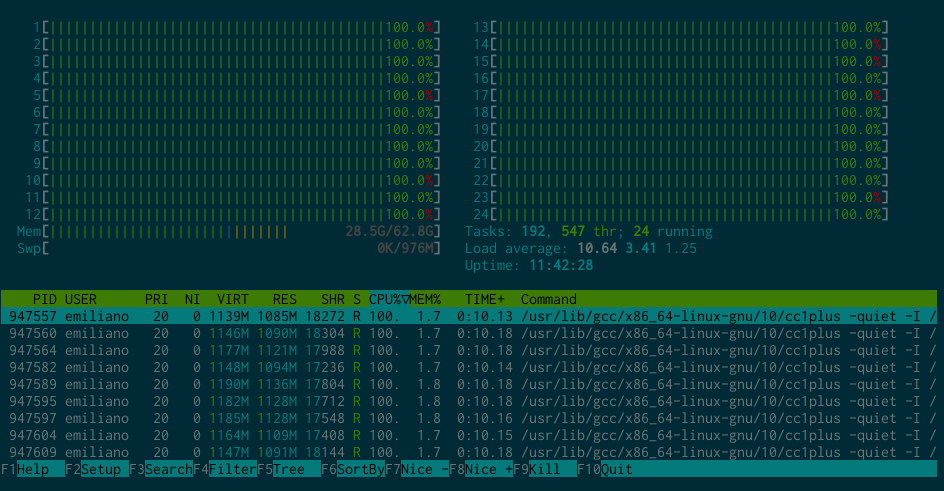
Same goes for things like the lintian testsuite. Since it's a very multi-threaded workload, it now takes less than 2 minutes to run; a 750% improvement. All this to say I'm happy with my purchase. And lo and behold I can now build ledger without a hitch, even though it maxes my 24 threads and uses 28GB of RAM. Who would've thought... Screen capture of htop showing how much resources ledger takes to build

  1. I managed to fry that PC's motherboard in 2016 and later replaced it with a brand new one. I also upgraded the storage along the way, from a very cheap cacheless 120GB SSD to a larger Samsung 850 EVO SATA drive.
  2. As it turns out, ledger is mostly written in C++ :)

9 June 2021

Thorsten Alteholz: My Debian Activities in May 2021

FTP master This month I accepted 85 and rejected 6 packages. The overall number of packages that got accepted was only 88. Yeah, Debian is frozen but hopefully will unfreeze soon. Debian LTS This was my eighty-third month that I did some work for the Debian LTS initiative, started by Raphael Hertzog at Freexian. This month my all in all workload has been 29.75h. During that time I did LTS and normal security uploads of: I also made some progress with gpac and struggle with dozens of issues here. Last but not least I did some days of frontdesk duties, which for whatever reason was rather time-consuming this month. Debian ELTS This month was the thirty-fifth ELTS month. During my allocated time I uploaded: I also made some progress with python3.4 Last but not least I did some days of frontdesk duties. Other stuff On my neverending golang challenge I again uploaded some packages either for NEW or as source upload. Last but not least I adopted gnucobol.

Enrico Zini: Ansible recurse and follow quirks

I'm reading Ansible's builtin.file sources for, uhm, reasons, and the use of follow stood out to my eyes. Reading on, not only that. I feel like the ansible codebase needs a serious review, at least in essential core modules like this one. In the file module documentation it says:
This flag indicates that filesystem links, if they exist, should be followed.
In the recursive_set_attributes implementation instead, follow means "follow symlinks to directories", but if a symlink to a file is found, it does not get followed, kind of. What happens is that ansible will try to change the mode of the symlink, which makes sense on some operating systems. And it does try to use lchmod if present. Buf if not, this happens:
# Attempt to set the perms of the symlink but be
# careful not to change the perms of the underlying
# file while trying
underlying_stat = os.stat(b_path)
os.chmod(b_path, mode)
new_underlying_stat = os.stat(b_path)
if underlying_stat.st_mode != new_underlying_stat.st_mode:
    os.chmod(b_path, stat.S_IMODE(underlying_stat.st_mode))
So it tries doing chmod on the symlink, and if that changed the mode of the actual file, switch it back. I would have appreciated a comment documenting on which systems a hack like this makes sense. As it is, it opens a very short time window in which a symlink attack can make a system file vulerable, and an exception thrown by the second stat will make it vulnerable permanently. What about follow following links during recursion: how does it avoid loops? I don't see a cache of (device, inode) pairs visited. Let's try:
fatal: [localhost]: FAILED! =>  "changed": false, "details": "maximum recursion depth exceeded", "gid": 1000, "group": "enrico", "mode": "0755", "msg": "mode must be in octal or symbolic form", "owner": "enrico", "path": "/tmp/test/test1", "size": 0, "state": "directory", "uid": 1000 
Ok, it, uhm, delegates handling that to the Python stack size. I guess it means that a ln -s .. foo in a directory that gets recursed will always fail the task. Fun! More quirks Turning a symlink into a hardlink is considered a noop if the symlink points to the same file:
---
- hosts: localhost
  tasks:
   - name: create test file
     file:
        path: /tmp/testfile
        state: touch
   - name: create test link
     file:
        path: /tmp/testlink
        state: link
        src: /tmp/testfile
   - name: turn it into a hard link
     file:
        path: /tmp/testlink
        state: hard
        src: /tmp/testfile
gives:
$ ansible-playbook test3.yaml
[WARNING]: provided hosts list is empty, only localhost is available. Note that the implicit localhost does not match 'all'
PLAY [localhost] ************************************************************************************************************************************************************************************************************
TASK [Gathering Facts] ******************************************************************************************************************************************************************************************************
ok: [localhost]
TASK [create test file] *****************************************************************************************************************************************************************************************************
changed: [localhost]
TASK [create test link] *****************************************************************************************************************************************************************************************************
changed: [localhost]
TASK [turn it into a hard link] *********************************************************************************************************************************************************************************************
ok: [localhost]
PLAY RECAP ******************************************************************************************************************************************************************************************************************
localhost                  : ok=4    changed=2    unreachable=0    failed=0    skipped=0    rescued=0    ignored=0
More quirks Converting a directory into a hardlink should work, but it doesn't because unlink is used instead of rmdir:
---
- hosts: localhost
  tasks:
   - name: create test dir
     file:
        path: /tmp/testdir
        state: directory
   - name: turn it into a symlink
     file:
        path: /tmp/testdir
        state: hard
        src: /tmp/
        force: yes
gives:
$ ansible-playbook test4.yaml
[WARNING]: provided hosts list is empty, only localhost is available. Note that the implicit localhost does not match 'all'
PLAY [localhost] ************************************************************************************************************************************************************************************************************
TASK [Gathering Facts] ******************************************************************************************************************************************************************************************************
ok: [localhost]
TASK [create test dir] ******************************************************************************************************************************************************************************************************
changed: [localhost]
TASK [turn it into a symlink] ***********************************************************************************************************************************************************************************************
fatal: [localhost]: FAILED! =>  "changed": false, "gid": 1000, "group": "enrico", "mode": "0755", "msg": "Error while replacing: [Errno 21] Is a directory: b'/tmp/testdir'", "owner": "enrico", "path": "/tmp/testdir", "size": 0, "state": "directory", "uid": 1000 
PLAY RECAP ******************************************************************************************************************************************************************************************************************
localhost                  : ok=2    changed=1    unreachable=0    failed=1    skipped=0    rescued=0    ignored=0
More quirks This is hard to test, but it looks like if source and destination are hardlinks to the same inode numbers, but on different filesystems, the operation is considered a successful noop: https://github.com/ansible/ansible/blob/devel/lib/ansible/modules/file.py#L821 It should probably be something like:
if (st1.st_dev, st1.st_ino) == (st2.st_dev, st2.st_ino):

8 June 2021

Enrico Zini: Mock syscalls with C++

I wrote and maintain some C++ code to stream high quantities of data as fast as possible, and I try to use splice and sendfile when available. The availability of those system calls varies at runtime according to a number of factors, and the code needs to be written to fall back to read/write loops depending on what the splice and sendfile syscalls say. The tricky issue is unit testing: since the code path chosen depends on the kernel, the test suite will test one path or the other depending on the machine and filesystems where the tests are run. It would be nice to be able to mock the syscalls, and replace them during tests, and it looks like I managed. First I made catalogues of the mockable syscalls I want to be able to mock. One with function pointers, for performance, and one with std::function, for flexibility:
/**
 * Linux versions of syscalls to use for concrete implementations.
 */
struct ConcreteLinuxBackend
 
    static ssize_t (*read)(int fd, void *buf, size_t count);
    static ssize_t (*write)(int fd, const void *buf, size_t count);
    static ssize_t (*writev)(int fd, const struct iovec *iov, int iovcnt);
    static ssize_t (*sendfile)(int out_fd, int in_fd, off_t *offset, size_t count);
    static ssize_t (*splice)(int fd_in, loff_t *off_in, int fd_out,
                             loff_t *off_out, size_t len, unsigned int flags);
    static int (*poll)(struct pollfd *fds, nfds_t nfds, int timeout);
    static ssize_t (*pread)(int fd, void *buf, size_t count, off_t offset);
 ;
/**
 * Mockable versions of syscalls to use for testing concrete implementations.
 */
struct ConcreteTestingBackend
 
    static std::function<ssize_t(int fd, void *buf, size_t count)> read;
    static std::function<ssize_t(int fd, const void *buf, size_t count)> write;
    static std::function<ssize_t(int fd, const struct iovec *iov, int iovcnt)> writev;
    static std::function<ssize_t(int out_fd, int in_fd, off_t *offset, size_t count)> sendfile;
    static std::function<ssize_t(int fd_in, loff_t *off_in, int fd_out,
                                 loff_t *off_out, size_t len, unsigned int flags)> splice;
    static std::function<int(struct pollfd *fds, nfds_t nfds, int timeout)> poll;
    static std::function<ssize_t(int fd, void *buf, size_t count, off_t offset)> pread;
    static void reset();
 ;
Then I converted the code to templates, parameterized on the catalogue class. Explicit template instantiation helps in making sure that one doesn't need to include template code in all sorts of places. Finally, I can have a RAII class for mocking:
/**
 * RAII mocking of syscalls for concrete stream implementations
 */
struct MockConcreteSyscalls
 
    std::function<ssize_t(int fd, void *buf, size_t count)> orig_read;
    std::function<ssize_t(int fd, const void *buf, size_t count)> orig_write;
    std::function<ssize_t(int fd, const struct iovec *iov, int iovcnt)> orig_writev;
    std::function<ssize_t(int out_fd, int in_fd, off_t *offset, size_t count)> orig_sendfile;
    std::function<ssize_t(int fd_in, loff_t *off_in, int fd_out,
                                 loff_t *off_out, size_t len, unsigned int flags)> orig_splice;
    std::function<int(struct pollfd *fds, nfds_t nfds, int timeout)> orig_poll;
    std::function<ssize_t(int fd, void *buf, size_t count, off_t offset)> orig_pread;
    MockConcreteSyscalls();
    ~MockConcreteSyscalls();
 ;
MockConcreteSyscalls::MockConcreteSyscalls()
    : orig_read(ConcreteTestingBackend::read),
      orig_write(ConcreteTestingBackend::write),
      orig_writev(ConcreteTestingBackend::writev),
      orig_sendfile(ConcreteTestingBackend::sendfile),
      orig_splice(ConcreteTestingBackend::splice),
      orig_poll(ConcreteTestingBackend::poll),
      orig_pread(ConcreteTestingBackend::pread)
 
 
MockConcreteSyscalls::~MockConcreteSyscalls()
 
    ConcreteTestingBackend::read = orig_read;
    ConcreteTestingBackend::write = orig_write;
    ConcreteTestingBackend::writev = orig_writev;
    ConcreteTestingBackend::sendfile = orig_sendfile;
    ConcreteTestingBackend::splice = orig_splice;
    ConcreteTestingBackend::poll = orig_poll;
    ConcreteTestingBackend::pread = orig_pread;
 
And here's the specialization to pretend sendfile and splice aren't available:
/**
 * Mock sendfile and splice as if they weren't available on this system
 */
struct DisableSendfileSplice : public MockConcreteSyscalls
 
    DisableSendfileSplice();
 ;
DisableSendfileSplice::DisableSendfileSplice()
 
    ConcreteTestingBackend::sendfile = [](int out_fd, int in_fd, off_t *offset, size_t count) -> ssize_t  
        errno = EINVAL;
        return -1;
     ;
    ConcreteTestingBackend::splice = [](int fd_in, loff_t *off_in, int fd_out,
                                        loff_t *off_out, size_t len, unsigned int flags) -> ssize_t  
        errno = EINVAL;
        return -1;
     ;
 
It's now also possible to reproduce in the test suite all sorts of system-related issues we might observe in production over time.

Jonathan Dowland: LaTeX draft documents

I'm writing up a PhD deliverable (which will show up here eventually) using LaTeX, which is my preferred tool for such things, since I also use it for papers, and will eventually be using it for my thesis itself. For this last document, I experimented with a few packages and techniques for organising the document which I found useful, so I thought I'd share them. What version is this anyway? I habitually store and develop my documents in git repositories. From time to time I generate a PDF and copy it off elsewhere to review (e.g., an iPad). Later on it can be useful to be able to figure out exactly what source built the PDF. I achieve this using
\newcommand \version \input "git describe --always --dirty" 
And \version\ somewhere in the header of the document. Draft mode The common document classes all accept a draft argument, to enable Draft Mode.
\documentclass[12pt,draft] article 
Various other packages behave differently if Draft Mode is enabled. The graphicx package, for example, doesn't actually draw pictures in draft mode, which I don't find useful. So for that package, I force it to behave as if we were in "Final Mode" at all times:
\usepackage[final] graphicx 
I want to also include some different bits and pieces in Draft Mode. Although the final version won't need it, I find having a Table of Contents very helpful during the writing process. The ifdraft package adds a convenience macro to query whether we are in draft or not. I use it like so:
\ifdraft 
This page will be cut from the final report.
\tableofcontents
\newpage
 
For this document, I have been given the section headings I must use and the number of pages each section must run to. When drafting, I want to include the page budget in the section names (e.g. Background (2 pages)). I also force new pages at the beginning of each Section, to make it easier to see how close I am to each section's page budget.
\ifdraft \newpage 
\section Work completed\ifdraft  (1 page)  % 1 Page
todonotes
Two TODO items in the margin Two TODO items in the margin
Collated TODOs in a list Collated TODOs in a list

The todonotes package package is one of many that offers macros to make managing in-line TODO notes easier. Within the source of my document, I can add a TODO right next to the relevant text with \todo something to do . In the document, by default, this is rendered in the right-hand margin. With the right argument, the package will only render the notes in draft mode.
\usepackage[textsize=small,obeyDraft] todonotes 
todonotes can also collate all the TODOs together into a single list. The list items are hyperlinked back to the page where the relevant item appears.
\ifdraft 
\newpage
\section TODO 
  This page will be cut from the final report.
  \listoftodos
 

Pavit Kaur: GSoC: About my Project and Community Bonding Period

alt text To start writing about updates regarding my GSoC project, the first obvious thing I need to do is to explain what my project really is. So let s get started.


About my project

What is debci? Directly stating from the official docs:
The Debian continuous integration (debci) is an automated system that coordinates the execution of automated tests against packages in the Debian system.

Let s try decoding it: Debian is a huge system with thousands of packages and within these packages exist inter-package dependencies. So if any package is updated, it is important to test if that package is working correctly but it is equally important to test that all the packages which are dependent on this updated package are working correctly too. Debci is a platform serving this purpose of automated testing for the entire Debian archive whenever a new version of the package, or of any package in its dependency chain is available. It comes with a UI that lets developers easily run tests and see their results if they pass or not. For my GSoC project, I am working to implement some incremental improvements to debci making it easier to use and maintain.

Community Bonding Period

The debci community Everyone I have come across till now in the community is very nice. The debci community in itself is a small but active community. It really feels good to be a part of conversations here.

Weekly call set up I have two mentors for this project Antonio Terceiro and Paul Gevers and they have set up a weekly sync call with me in which I will share my updates regarding the work done in the past week, any issues I am facing, and discuss the work for next week. In addition to this, I can always contact them on IRC for any issue I am stuck in.

Work till now The first thing I did in the community bonding period is setting up this blog. I wanted to have one for a long time and this seems to be a really nice opportunity to start. And the fact this has been added to Planet Debian too makes me happier to write. I am still trying to get a hang of this and definitely need to learn how to spend less time writing it. I also worked on my already opened merge requests during this period and got them merged. Since I am already familiar with the codebase, so I started with my first deliverable a bit earlier before the official coding period begins which is migrating the logins to Salsa, Debian s Gitlab Instance. Currently, debci uses Debian SSO client certificates for logging in, but that is deprecated so it needs to be migrated to use Salsa as an identity provider. The OmniAuth library is being used to implement this with help of ruby-omniauth-gitlab strategy. I explored a great deal about integrating OmniAuth with our application and bumped into so many issues too when I began implementing that. Once I am done integrating the Salsa Authentication with debci, I am planning to write a separate tutorial on that which could be helpful to other people using OmniAuth with their application. With that, the community bonding period has ended on 7th June and the coding period officially begins and for now, I will be continuing working on my first deliverable. That s all for now. See you next time!

Bits from Debian: Registration for DebConf21 Online is Open

DebConf21 banner The DebConf team is glad to announce that registration for DebConf21 Online is now open. The 21st Debian Conference is being held Online, due to COVID-19, from August 22 to August 29, 2021. It will also sport a DebCamp from August 15 to August 21, 2021 (preceeding the DebConf). To register for DebConf21, please visit the DebConf website at https://debconf21.debconf.org/register Reminder: Creating an account on the site does not register you for the conference, there's a conference registration form to complete after signing in. Participation in DebConf21 is conditional on your respect of our Code of Conduct. We require you to read, understand and abide by this code. A few notes about the registration process: Any questions about registration should be addressed to registration@debconf.org. See you online! DebConf would not be possible without the generous support of all our sponsors, especially our Platinum Sponsors Lenovo and Infomaniak, and our Gold Sponsor Matanel Foundation.

7 June 2021

Mike Gabriel: UBports: Packaging of Lomiri Operating Environment for Debian (part 05)

Before and during FOSDEM 2020, I agreed with the people (developers, supporters, managers) of the UBports Foundation to package the Unity8 Operating Environment for Debian. Since 27th Feb 2020, Unity8 has now become Lomiri. Recent Uploads to Debian related to Lomiri (Feb - May 2021) Over the past 4 months I attended 14 of the weekly scheduled UBports development sync sessions and worked on the following bits and pieces regarding Lomiri in Debian: The largest amount of work (and time) went into getting lomiri-ui-toolkit ready for upload. That code component is a absolutely massive beast and dearly intertwined with Qt5 (and unit tests fail with every new warning a new Qt5.x introduces). This bit of work I couldn't do alone (see below in "Credits" section). The next projects / packages ahead are some smaller packages (content-hub, gmenuharness, etc.) before we will finally come to lomiri (i.e. main bit of the Lomiri Operating Environment) itself. Credits Many big thanks go to everyone on the UBports project, but especially to Ratchanan Srirattanamet who lived inside of lomiri-ui-toolkit for more than two weeks, it seemed. Also, thanks to Florian Leeber for being my point of contact for topics regarding my cooperation with the UBports Foundation. Packaging Status The current packaging status of Lomiri related packages in Debian can be viewed at:
https://qa.debian.org/developer.php?login=team%2Bubports%40tracker.debia... light+love
Mike Gabriel (aka sunweaver)

Russell Coker: Dell PowerEdge T320 and Linux

I recently bought a couple of PowerEdge T320 servers, so now to learn about setting them up. They are a little newer than the R710 I recently setup (which had iDRAC version 6), they have iDRAC version 7. RAM Speed One system has a E5-2440 CPU with 2*16G DDR3 DIMMs and a Memtest86+ speed of 13,043MB/s, the other is essentially identical but with a E5-2430 CPU and 4*16G DDR3 DIMMs and a Memtest86+ speed of 8,270MB/s. I had expected that more DIMMs means better RAM performance but this isn t what happened. I firstly upgraded the BIOS, as I expected it didn t make a difference but it s a good thing to try first. On the E5-2430 I tried removing a DIMM after it was pointed out on Facebook that the CPU has 3 memory channels (here s a link to a great site with information on that CPU and many others [1]). When I did that I was prompted to disable advanced ECC (which treats pairs of DIMMs as a single unit for ECC allowing correcting more than 1 bit errors) and I had to move the 3 remaining DIMMS to different slots. That improved the performance to 13,497MB/s. I then put the spare DIMM into the E5-2440 system and the performance increased to 13,793MB/s, when I installed 4 DIMMs in the E5-2440 system the performance remained at 13,793MB/s and the E5-2430 went down to 12,643MB/s. This is a good result for me, I now have the most RAM and fastest RAM configuration in the system with the fastest CPU. I ll sell the other one to someone who doesn t need so much RAM or performance (it will be really good for a small office mail server and NAS). Firmware Update BIOS The first issue is updating the BIOS, unfortunately the first link I found to the Dell web site didn t have a link to download the Linux installer. It offered a Windows binary, an EFI program, and a DOS binary. I m not about to install Windows if there is any other option and EFI is somewhat annoying, so that leaves DOS. The first Google result for installing FreeDOS advised using unetbootin , that didn t work at all for me (created a USB image that the Dell BIOS didn t recognise as bootable) and even if it did it wouldn t have been a good solution. I went to the FreeDOS download page [2] and got the Lite USB zip file. That contained FD12LITE.img which I could just dd to a USB stick. I then used fdisk to create a second 32MB partition, used mkfs.fat to format it, and then copied the BIOS image file to it. I booted the USB stick and then ran the BIOS update program from drive D:. After the BIOS update this became the first system I ve seen get a totally green result from spectre-meltdown-checker ! I found the link to the Linux installer for the new Dell BIOS afterwards, but it was still good to play with FreeDOS. PERC Driver I probably didn t really need to update the PERC (PowerEdge Raid Controller) firmware as I m just going to run it in JBOD mode. But it was easy to do, a simple bash shell script to update it. Here are the perccli commands needed to access disks, it s all hot-plug so you can insert disks and do all this without a reboot:
# show overview
perccli show
# show controller 0 details
perccli /c0 show all
# show controller 0 info with less detail
perccli /c0 show
# clear all "foreign" RAID members
perccli /c0 /fall delete
# add a vd (RAID) of level RAID0 (r0) with the drive 32:0 (enclosure:slot from above command)
perccli /c0 add vd r0 drives=32:0
The perccli /c0 show command gives the following summary of disk ( PD in perccli terminology) information amongst other information. The EID is the enclosure, Slt is the slot (IE the bay you plug the disk into) and the DID is the disk identifier (not sure what happens if you have multiple enclosures). The allocation of device names (sda, sdb, etc) will be in order of EID:Slt or DID at boot time, and any drives added at run time will get the next letters available.
----------------------------------------------------------------------------------
EID:Slt DID State DG       Size Intf Med SED PI SeSz Model                     Sp 
----------------------------------------------------------------------------------
32:0      0 Onln   0  465.25 GB SATA SSD Y   N  512B Samsung SSD 850 EVO 500GB U  
32:1      1 Onln   1  465.25 GB SATA SSD Y   N  512B Samsung SSD 850 EVO 500GB U  
32:3      3 Onln   2   3.637 TB SATA HDD N   N  512B ST4000DM000-1F2168        U  
32:4      4 Onln   3   3.637 TB SATA HDD N   N  512B WDC WD40EURX-64WRWY0      U  
32:5      5 Onln   5 278.875 GB SAS  HDD Y   N  512B ST300MM0026               U  
32:6      6 Onln   6 558.375 GB SAS  HDD N   N  512B AL13SXL600N               U  
32:7      7 Onln   4   3.637 TB SATA HDD N   N  512B ST4000DM000-1F2168        U  
----------------------------------------------------------------------------------
The PERC controller is a MegaRAID with possibly some minor changes, there are reports of Linux MegaRAID management utilities working on it for similar functionality to perccli. The version of MegaRAID utilities I tried didn t work on my PERC hardware. The smartctl utility works on those disks if you tell it you have a MegaRAID controller (so obviously there s enough similarity that some MegaRAID utilities will work). Here are example smartctl commands for the first and last disks on my system. Note that the disk device node doesn t matter as all device nodes associated with the PERC/MegaRAID are equal for smartctl.
# get model number etc on DID 0 (Samsung SSD)
smartctl -d megaraid,0 -i /dev/sda
# get all the basic information on DID 0
smartctl -d megaraid,0 -a /dev/sda
# get model number etc on DID 7 (Seagate 4TB disk)
smartctl -d megaraid,7 -i /dev/sda
# exactly the same output as the previous command
smartctl -d megaraid,7 -i /dev/sdc
I have uploaded etbemon version 1.3.5-6 to Debian which has support for monitoring smartctl status of MegaRAID devices and NVMe devices. IDRAC To update IDRAC on Linux there s a bash script with the firmware in the same file (binary stuff at the end of a shell script). To make things a little more exciting the script insists that rpm be available (running apt install rpm fixes that for a Debian system). It also creates and runs other shell scripts which start with #!/bin/sh but depend on bash syntax. So I had to make /bin/sh a symlink to /bin/bash. You know you need this if you see errors like typeset: not found and [: -eq: unexpected operator and then the system reboots. Dell people, please test your scripts on dash (the Debian /bin/sh) or just specify #!/bin/bash. If the IDRAC update works it will take about 8 minutes. Lifecycle Controller The Lifecycle Controller is apparently for installing OS and firmware updates. I use Linux tools to update Linux and I generally don t plan to update the firmware after deployment (although I could do so from Linux if needed). So it doesn t seem to offer anything useful to me. Setting Up IDRAC For extra excitement I decided to try to setup IDRAC from the Linux command-line. To install the RAC setup tool you run apt install srvadmin-idracadm7 libargtable2-0 (because srvadmin-idracadm7 doesn t have the right dependencies).
# srvadmin-idracadm7 is missing a dependency
apt install srvadmin-idracadm7 libargtable2-0
# set the IP address, netmask, and gatewat for IDRAC
idracadm7 setniccfg -s 192.168.0.2 255.255.255.0 192.168.0.1
# put my name on the front panel LCD
idracadm7 set System.LCD.UserDefinedString "Russell Coker"
Conclusion This is a very nice deskside workstation/server. It s extremely quiet with hardly any fan noise and the case is strong enough to contain the noise of hard drives. When running with 3* 3.5 SATA disks and 2*10k 2.5 SAS disks on a wooden floor it wasn t annoyingly loud. Without the SAS disks it was as quiet as you can expect any PC to be, definitely not the volume you expect from a serious server! I bought the T320 systems loaded with SAS disks which made them quite loud, I immediately put the disks on ebay and installed SATA SSDs and hard drives which gives me more performance and more space than the SAS disks with less cost and almost no noise. 8*3.5 drive bays gives room for expansion. I currently have 2*SATA SSDs and 3*SATA disks, the SSDs are for the root filesystem (including /home) and the disks are for a separate filesystem for large files.

Russ Allbery: Review: Stoneskin

Review: Stoneskin, by K.B. Spangler
Series: Deep Witches #0
Publisher: A Girl and Her Fed Books
Copyright: September 2017
ASIN: B075PHK498
Format: Kindle
Pages: 226
Stoneskin is a prequel to the Deep Witches Trilogy, which is why I have it marked as book 0 of the series. Unlike most prequels, it was written and published before the series and there doesn't seem to be any reason not to read it first. Tembi Moon is an eight-year-old girl from the poor Marumaru area on the planet of Adhama. Humanity has spread to the stars and first terraformed the worlds and then bioformed themselves to live there. The differences are subtle, but Tembi's skin becomes thicker and less sensitive when damaged (either physically or emotionally) and she can close her ears against dust storms. One day, she wakes up in an unknown alley and finds herself on the world of Miha'ana, sixteen thousand light-years away, where she is rescued and brought home by a Witch named Matindi. In this science fiction future, nearly all interstellar travel is done through the Deep. The Deep is not like the typical hand-waved science fiction subspace, most notably in that it's alive. No one is entirely sure where it came from or what sort of creature it is. It sometimes manages to communicate in words, but abstract patterns with feelings attached are more common, and it only communicates with specific people. Those people are Witches, who are chosen by the Deep via some criteria no one understands. Witches can use the Deep to move themselves or anything else around the galaxy. All interstellar logistics rely on them. The basics of Tembi's story are not that unusual; she's been chosen by the Deep to be a Witch. What is remarkable is that she's young and she's poor, completely disconnected from the power structures of the galaxy. But, once chosen, her path as far as the rest of the galaxy is concerned is fixed: she will go to Lancaster to be trained as a Witch. Matindi is able to postpone this for a time by keeping an eye on her, but not forever. I bought this book because of the idea of the Deep, and that is indeed the best part of the book. There is a lot of mystery about its exact nature, most of which is not resolved in this book, but it mostly behaves like a giant and extremely strange dog, and it's awesome. Replacing the various pseudo-scientific explanations for faster than light travel with interactions with a dream-weird giant St. Bernard with too many paws that talks in swirls of colored bubbles and is very eager to please its friends is brilliant. This book covers a lot of years of Tembi's life and is, as advertised, a prelude to a story that is not resolved here. It's a coming of age story in which she does eventually end up at Lancaster, learns and chafes at the elaborate and very conservative structures humans have put in place to try to make interactions with the Deep predictable and reliable, and eventually gets drawn into the politics of war and the question of when people have a responsibility to intervene. Tembi, and the reader, also have many opportunities to get extremely upset at how the Deep is treated and how much entitlement the Witches have about their access and control, although how the Deep feels about it is left for a future book. Not all of this story is as good as the premise. There are some standard coming of age tropes that I'm not fond of, such as Tembi's predictable temporary falling out with the Deep (although the Deep's reaction is entertaining). It's also not at all a complete story, although that's clearly signaled by the subtitle. But as an introduction to the story universe and an extended bit of scene-setting, it accomplishes what it sets out to do. It's also satisfyingly thoughtful about the moral trade-offs around stability and the value of preserving institutions. I know which side I'm on within the universe, but I appreciated how much nuance and thoughtfulness Spangler puts into the contrary opinion. I'm hooked on the universe and want to learn more about the Deep, enough so that I've already bought the first book of the main trilogy. Followed by The Blackwing War. Rating: 7 out of 10

6 June 2021

Iustin Pop: Goodbye Travis, hello GitHub Actions

My very cyclical open-source work For some reason, I only manage to do coding at home every some months - mostly 6 months apart, so twice a year (even worse than my blogging frequency :P). As such, I missed the whole discussion about travis-ci (the .org version) going away, etc. So when I finally did some work on corydalis a few weeks ago, and had a travis build failure (restoring a large cache simply timed out, either travis or S3 has some hiccup - it cleared by itself a day later), I opened the travis-ci interface to see the scary banner ( travis-ci.org is shutting down ), and asked myself what s happening. The deadline was in less than a week even Long story short, Travis was a good home for many years, but they were bought and are doing significant changes to their OSS support, so it s time to move on. I anyway wanted to learn GitHub Actions for a while (ahem, free time intervened), so this was a good (forced) opportunity .

Proper composable CI The advantage of Travis infrastructure was that the build configuration was really simple. It had very few primitives: pre-steps (before_install), install steps, and the actual things to do to test, post-steps (after_sucess) and a few other small helpers (caching, apt packages, etc.) This made it really easy to just pick up and write a config, plus it had the advantage of allowing to test configs from the web UI without needing to push. This simplicity was unfortunately also its significant limiter: the way to do complex things in steps was simply to add more shell commands. GitHub actions, together with its marketplace, changes this entirely. There are no built-in actions, the language just defines the build/job/step hierarchy, and one glues together whatever steps they want. This has the disadvantage that even checking out the code needs to be explicitly written in all workflows (so boilerplate, if you don t need customisation), but it opens up a huge opportunity for composition, since it allows people to publish actions (steps) that you just import, encapsulating all the work. So, after learning how to write a moderately complicated workflow (complicated as in multiple Python version, some of them needing different OS version, and multi-OS), it was straightforward to port this to all my projects - just somewhat tedious. I ve now shutdown all builds on Travis, just can t find a way to delete my account

Better multi-OS, worse (missing) multi-arch In theory, Travis supports Linux, MacOS, FreeBSD and Windows, but I ve found that support for non-Linux is not quite as good. Maybe I missed things, but multi-version Python builds on MacOS were not as nicely supported as Linux; Windows is quite early, and very limited; and I haven t tested FreeBSD. GitHub is more restrictive - Linux, MacOS and Windows - but I found support for MacOS and Windows better for my use cases. If your use case is testing multiple MacOS versions, Travis wins, if it s more varied languages/etc. on the single available MacOS version, GitHub works better. On the multi-arch side, Travis wins hands-down. Four different native architectures, and enabling one more is just adding another key to the arch list. With GitHub, if I understand right, you either have to use docker+emulation, or use self-hosted runners. So here it really matters what is more important to you. Maybe in the future GitHub will support more arches, but right now, Travis wins for this use-case.

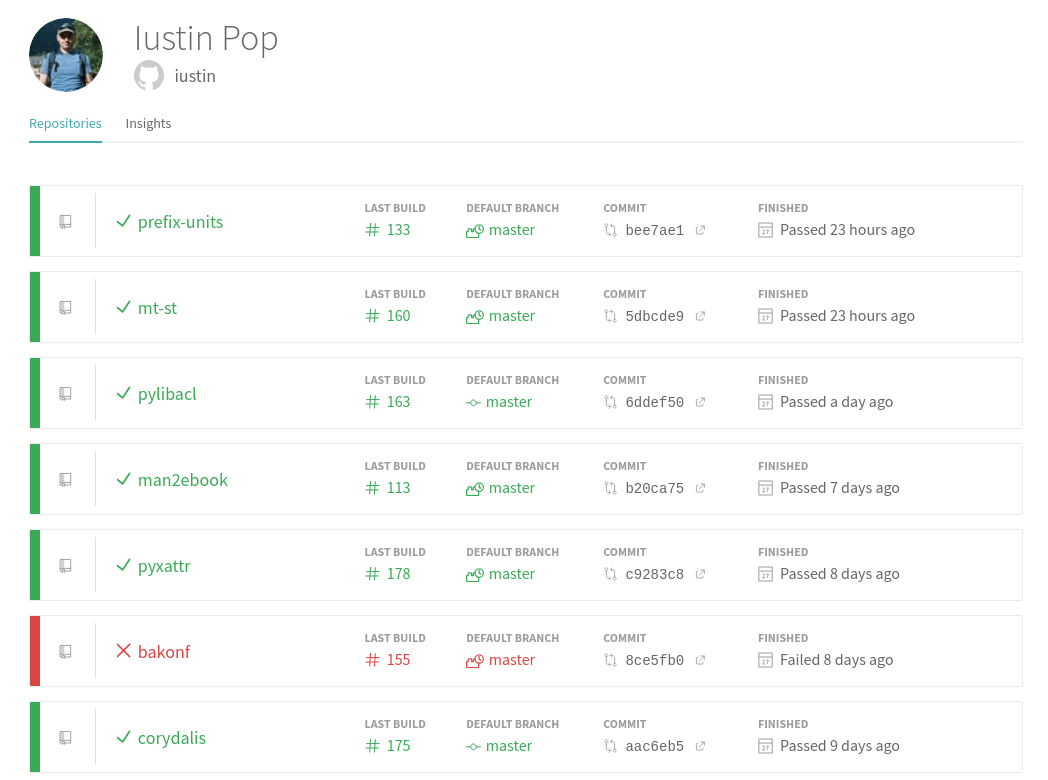
Summary For my specific use-case, GitHub Actions is a better fit right now. The marketplace has advantages (I ll explain better in a future post), the actions are a very nice way to encapsulate functionality, and it s still available/free (up to a limit) for open source projects. I don t know what the future of Travis for OSS will be, but all I heard so far is very concerning. However, I ll still miss a few things. For example, an overall dashboard for all my projects, like this one:
Travis dashboard Travis dashboard
I couldn t find any such thing on GitHub, so I just use my set of badges. Then cache management. Travis allows you to clear the cache, and it does auto-update the cache. GitHub caches are immutable once built, so you have to:
  • watch if changed dependencies/dependency chains result in things that are no longer cached;
  • if so, need to manually bump the cache key, resulting in a commit for purely administrative purposes.
For languages where you have a clean full chain of dependencies recorded (e.g. node s package-lock.json, stack s stack.yaml.lock), this is trivial to achieve, but gets complicated if you add OS dependencies, languages which don t record all this, etc. Hmm, maybe I should just embed the year/month in the cache name - cheating, but automated cheating. With all said and done, I think GHA is much less refined, but with more potential. Plus, the pace of innovation on Travis side was quite slow (likely money problems, hence them being bought, etc.) So one TODO done: learn GitHub Actions , even if a bit unplanned

Evgeni Golov: Controlling Somfy roller shutters using an ESP32 and ESPHome

Our house has solar powered, remote controllable roller shutters on the roof windows, built by the German company named HEIM & HAUS. However, when you look closely at the remote control or the shutter motor, you'll see another brand name: SIMU. As the shutters don't have any wiring inside the house, the only way to control them is via the remote interface. So let's go on the Internet and see how one can do that, shall we? ;) First thing we learn is that SIMU remote stuff is just re-branded Somfy. Great, another name! Looking further we find that Somfy uses some obscure protocol to prevent (replay) attacks (spoiler: it doesn't!) and there are tools for RTL-SDR and Arduino available. That's perfect! Always sniff with RTL-SDR first! Given the two re-brandings in the supply chain, I wasn't 100% sure our shutters really use the same protocol. So the first "hack" was to listen and decrypt the communication using RTL-SDR:
$ git clone https://github.com/dimhoff/radio_stuff
$ cd radio_stuff
$ make -C converters am_to_ook
$ make -C decoders decode_somfy
$ rtl_fm -M am -f 433.42M -s 270K   ./am_to_ook -d 10 -t 2000 -    ./decode_somfy
<press some buttons on the remote>
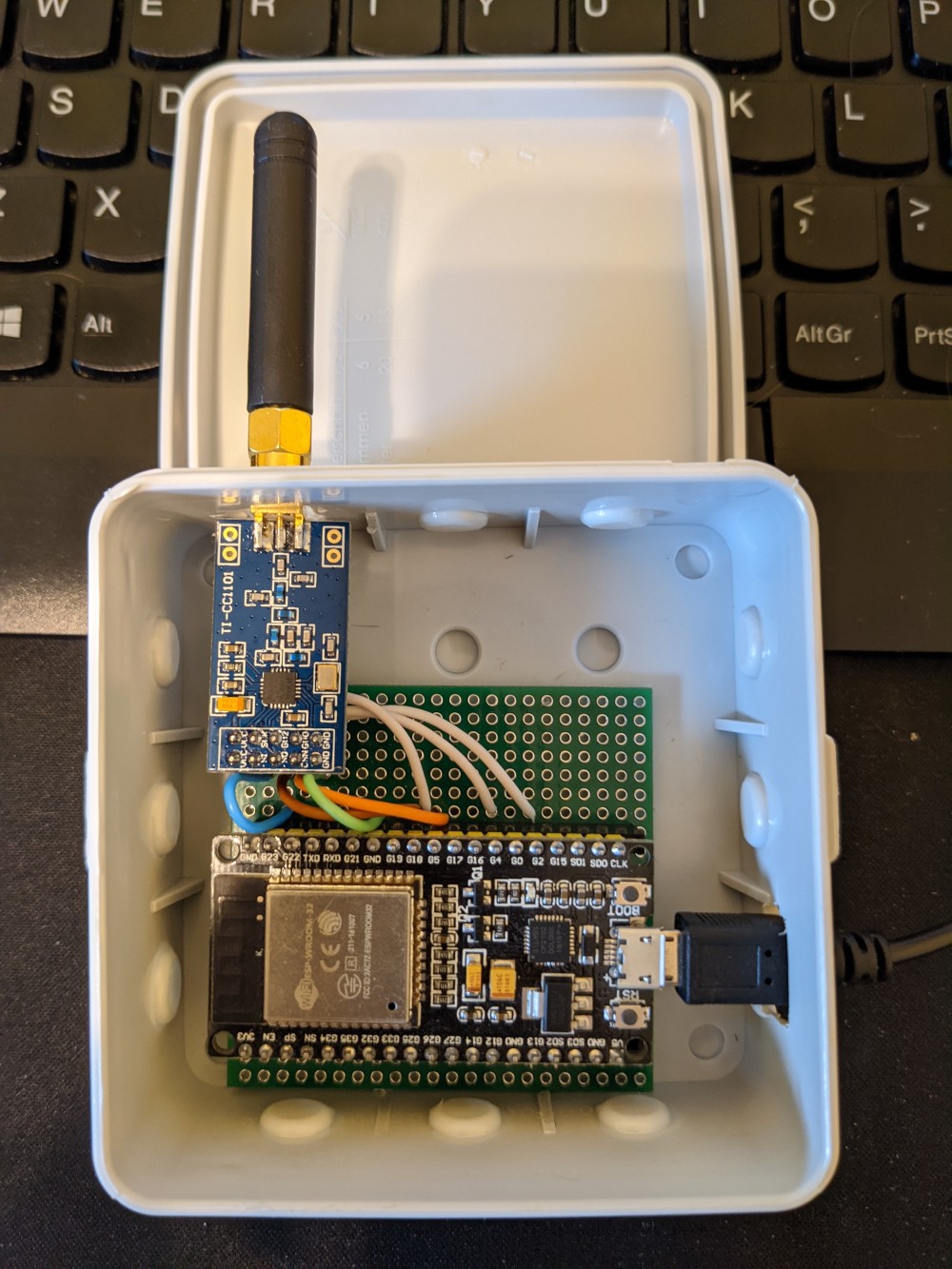
The output contains the buttons I pressed, but also the id of the remote and the command counter (which is supposed to prevent replay attacks). At this point I could just use the id and the counter to send own commands, but if I'd do that too often, the real remote would stop working, as its counter won't increase and the receiver will drop the commands when the counters differ too much. But that's good enough for now. I know I'm looking for the right protocol at the right frequency. As the end result should be an ESP32, let's move on! Acquiring the right hardware Contrary to an RTL-SDR, one usually does not have a spare ESP32 with 433MHz radio at home, so I went shopping: a NodeMCU-32S clone and a CC1101. The CC1101 is important as most 433MHz chips for Arduino/ESP only work at 433.92MHz, but Somfy uses 433.42MHz and using the wrong frequency would result in really bad reception. The CC1101 is essentially an SDR, as you can tune it to a huge spectrum of frequencies. Oh and we need some cables, a bread board, the usual stuff ;) The wiring is rather simple: ESP32 wiring for a CC1101 And the end result isn't too beautiful either, but it works: ESP32 and CC1101 in a simple case Acquiring the right software In my initial research I found an Arduino sketch and was totally prepared to port it to ESP32, but luckily somebody already did that for me! Even better, it's explicitly using the CC1101. Okay, okay, I cheated, I actually ordered the hardware after I found this port and the reference to CC1101. ;) As I am using ESPHome for my ESPs, the idea was to add a "Cover" that's controlling the shutters to it. Writing some C++, how hard can it be? Turns out, not that hard. You can see the code in my GitHub repo. It consists of two (relevant) files: somfy_cover.h and somfy.yaml. somfy_cover.h essentially wraps the communication with the Somfy_Remote_Lib library into an almost boilerplate Custom Cover for ESPHome. There is nothing too fancy in there. The only real difference to the "Custom Cover" example from the documentation is the split into SomfyESPRemote (which inherits from Component) and SomfyESPCover (which inherits from Cover) -- this is taken from the Custom Sensor documentation and allows me to define one "remote" that controls multiple "covers" using the add_cover function. The first two params of the function are the NVS name and key (think database table and row), and the third is the rolling code of the remote (stored in somfy_secrets.h, which is not in Git). In ESPHome a Cover shall define its properties as CoverTraits. Here we call set_is_assumed_state(true), as we don't know the state of the shutters - they could have been controlled using the other (real) remote - and setting this to true allows issuing open/close commands at all times. We also call set_supports_position(false) as we can't tell the shutters to move to a specific position. The one additional feature compared to a normal Cover interface is the program function, which allows to call the "program" command so that the shutters can learn a new remote. somfy.yaml is the ESPHome "configuration", which contains information about the used hardware, WiFi credentials etc. Again, mostly boilerplate. The interesting parts are the loading of the additional libraries and attaching the custom component with multiple covers and the additional PROG switches:
esphome:
  name: somfy
  platform: ESP32
  board: nodemcu-32s
  libraries:
    - SmartRC-CC1101-Driver-Lib@2.5.6
    - Somfy_Remote_Lib@0.4.0
    - EEPROM
  includes:
    - somfy_secrets.h
    - somfy_cover.h
 
cover:
  - platform: custom
    lambda:  -
      auto somfy_remote = new SomfyESPRemote();
      somfy_remote->add_cover("somfy", "badezimmer", SOMFY_REMOTE_BADEZIMMER);
      somfy_remote->add_cover("somfy", "kinderzimmer", SOMFY_REMOTE_KINDERZIMMER);
      App.register_component(somfy_remote);
      return somfy_remote->covers;
    covers:
      - id: "somfy"
        name: "Somfy Cover"
      - id: "somfy2"
        name: "Somfy Cover2"
switch:
  - platform: template
    name: "PROG"
    turn_on_action:
      - lambda:  -
          ((SomfyESPCover*)id(somfy))->program();
  - platform: template
    name: "PROG2"
    turn_on_action:
      - lambda:  -
          ((SomfyESPCover*)id(somfy2))->program();
The switch to trigger the program mode took me a bit. As the Cover interface of ESPHome does not offer any additional functions besides movement control, I first wrote code to trigger "program" when "stop" was pressed three times in a row, but that felt really cumbersome and also had the side effect that the remote would send more than needed, sometimes confusing the shutters. I then decided to have a separate button (well, switch) for that, but the compiler yelled at me I can't call program on a Cover as it does not have such a function. Turns out, you need to explicitly cast to SomfyESPCover and then it works, even if the code becomes really readable, NOT. Oh and as the switch does not have any code to actually change/report state, it effectively acts as a button that can be pressed. At this point we can just take an existing remote, press PROG for 5 seconds, see the blinds move shortly up and down a bit and press PROG on our new ESP32 remote and the shutters will learn the new remote. And thanks to the awesome integration of ESPHome into HomeAssistant, this instantly shows up as a new controllable cover there too. Future Additional Work I started writing this post about a year ago And the initial implementation had some room for improvement More than one remote The initial code only created one remote and one cover element. Sure, we could attach that to all shutters (there are 4 of them), but we really want to be able to control them separately. Thankfully I managed to read enough ESPHome docs, and learned how to operate std::vector to make the code dynamically accept new shutters. Using ESP32's NVS The ESP32 has a non-volatile key-value storage which is much nicer than throwing bits at an emulated EEPROM. The first library I used for that explicitly used EEPROM storage and it would have required quite some hacking to make it work with NVS. Thankfully the library I am using now has a plugable storage interface, and I could just write the NVS backend myself and upstream now supports that. Yay open-source! Remaining issues Real state is unknown As noted above, the ESP does not know the real state of the shutters: a command could have been lost in transmission (the Somfy protocol is send-only, there is no feedback) or the shutters might have been controlled by another remote. At least the second part could be solved by listening all the time and trying to decode commands heard over the air, but I don't think this is worth the time -- worst that can happen is that a closed (opened) shutter receives another close (open) command and that is harmless as they have integrated endstops and know that they should not move further. Can't program new remotes with ESP only To program new remotes, one has to press the "PROG" button for 5 seconds. This was not exposed in the old library, but the new one does support "long press", I just would need to add another ugly switch to the config and I currently don't plan to do so, as I do have working remotes for the case I need to learn a new one.

5 June 2021

Utkarsh Gupta: FOSS Activites in May 2021

Here s my (twentieth) monthly update about the activities I ve done in the F/L/OSS world.

Debian
This was my 29th month of actively contributing to Debian. I became a DM in late March 2019 and a DD on Christmas 19! \o/ Interesting month, surprisingly. Lots of things happening and lots of moving parts; becoming the new normal , I believe. Anyhow, working on Ubuntu full-time has its own advantage and one of them is being able to work on Debian stuff! So whilst I couldn t upload a lot of packages because of the freeze, here s what I worked on:

Uploads and bug fixes:

Other $things:
  • Mentoring for newcomers and assisting people in BSP.
  • Moderation of -project mailing list.

Ubuntu
This was my 4th month of actively contributing to Ubuntu. Now that I ve joined Canonical to work on Ubuntu full-time, there s a bunch of things I do! \o/ This month, by all means, was dedicated mostly to PHP 8.0, transitioning from PHP 7.4 to 8.0. Naturally, it had so many moving parts and moments of utmost frustration, shared w/ Bryce. :D So even though I can t upload anything, I worked on the following stuff & asked for sponsorship.
But before, I d like to take a moment to stress how kind and awesome Gianfranco Costamagna, a.k.a. LocutusOfBorg is! He s been sponsoring a bunch of my things & helping with re-triggers, et al. Thanks a bunch, Gianfranco; beers on me whenever we meet!

Merges:

Uploads & Syncs:

MIRs:

Seed Operations:

Debian (E)LTS
Debian Long Term Support (LTS) is a project to extend the lifetime of all Debian stable releases to (at least) 5 years. Debian LTS is not handled by the Debian security team, but by a separate group of volunteers and companies interested in making it a success. And Debian Extended LTS (ELTS) is its sister project, extending support to the Jessie release (+2 years after LTS support). This was my twentieth month as a Debian LTS and eleventh month as a Debian ELTS paid contributor.
I was assigned 29.75 hours for LTS and 40.00 hours for ELTS and worked on the following things:

LTS CVE Fixes and Announcements:

ELTS CVE Fixes and Announcements:

Other (E)LTS Work:
  • Front-desk duty from 24-05 until 30-05 for both LTS and ELTS.
  • Triaged rails, libimage-exiftool-perl, hivex, graphviz, glibc, libexosip2, impacket, node-ws, thunar, libgrss, nginx, postgresql-9.6, ffmpeg, composter, and curl.
  • Mark CVE-2019-9904/graphviz as ignored for stretch and jessie.
  • Mark CVE-2021-32029/postgresql-9.6 as not-affected for stretch.
  • Mark CVE-2020-24020/ffmpeg as not-affected for stretch.
  • Mark CVE-2020-22020/ffmpeg as postponed for stretch.
  • Mark CVE-2020-22015/ffmpeg as ignored for stretch.
  • Mark CVE-2020-21041/ffmpeg as postponed for stretch.
  • Mark CVE-2021-33574/glibc as no-dsa for stretch & jessie.
  • Mark CVE-2021-31800/impacket as no-dsa for stretch.
  • Mark CVE-2021-32611/libexosip2 as no-dsa for stretch.
  • Mark CVE-2016-20011/libgrss as ignored for stretch.
  • Mark CVE-2021-32640/node-ws as no-dsa for stretch.
  • Mark CVE-2021-32563/thunar as no-dsa for stretch.
  • [LTS] Help test and review bind9 update for Emilio.
  • [LTS] Suggest and add DEP8 tests for bind9 for stretch.
  • [LTS] Sponsored upload of htmldoc to buster for Havard as a consequence of #988289.
  • [ELTS] Fix triage order for jetty and graphviz.
  • [ELTS] Raise issue upstream about cloud-init; mock tests instead.
  • [ELTS] Write to private ELTS list about triage ordering.
  • [ELTS] Review Emilio s new script and write back feedback, mentioning extra file created, et al.
  • [ELTS/LTS] Raise upgrade problems from LTS -> LTS+1 to the list. Thread here.
    • Further help review and raise problems that could occur, et al.
  • [LTS] Help explain path forward for firmware-nonfree update to Ola. Thread here.
  • [ELTS] Revert entries of TEMP-0000000-16B7E7 and TEMP-0000000-1C4729; CVEs assigned & fix ELTS tracker build.
  • Auto EOL ed linux, libgrss, node-ws, and inspircd for jessie.
  • Attended monthly Debian LTS meeting, which didn t happen, heh.
  • Answered questions (& discussions) on IRC (#debian-lts and #debian-elts).
  • General and other discussions on LTS private and public mailing list.

Until next time.
:wq for today.

3 June 2021

Jonathan McDowell: Digging into Kubernetes containers

Having build a single node Kubernetes cluster and had a poke at what it s doing in terms of networking the next thing I want to do is figure out what it s doing in terms of containers. You might argue this should have come before networking, but to me the networking piece is more non-standard than the container piece, so I wanted to understand that first. Let s start with a process listing on the host. ps faxno user,stat,cmd There are a number of processes from the host kernel we don t care about:

kernel processes
    USER STAT CMD
       0 S    [kthreadd]
       0 I<    \_ [rcu_gp]
       0 I<    \_ [rcu_par_gp]
       0 I<    \_ [kworker/0:0H-events_highpri]
       0 I<    \_ [mm_percpu_wq]
       0 S     \_ [rcu_tasks_rude_]
       0 S     \_ [rcu_tasks_trace]
       0 S     \_ [ksoftirqd/0]
       0 I     \_ [rcu_sched]
       0 S     \_ [migration/0]
       0 S     \_ [cpuhp/0]
       0 S     \_ [cpuhp/1]
       0 S     \_ [migration/1]
       0 S     \_ [ksoftirqd/1]
       0 I<    \_ [kworker/1:0H-kblockd]
       0 S     \_ [cpuhp/2]
       0 S     \_ [migration/2]
       0 S     \_ [ksoftirqd/2]
       0 I<    \_ [kworker/2:0H-events_highpri]
       0 S     \_ [cpuhp/3]
       0 S     \_ [migration/3]
       0 S     \_ [ksoftirqd/3]
       0 I<    \_ [kworker/3:0H-kblockd]
       0 S     \_ [kdevtmpfs]
       0 I<    \_ [netns]
       0 S     \_ [kauditd]
       0 S     \_ [khungtaskd]
       0 S     \_ [oom_reaper]
       0 I<    \_ [writeback]
       0 S     \_ [kcompactd0]
       0 SN    \_ [ksmd]
       0 SN    \_ [khugepaged]
       0 I<    \_ [kintegrityd]
       0 I<    \_ [kblockd]
       0 I<    \_ [blkcg_punt_bio]
       0 I<    \_ [edac-poller]
       0 I<    \_ [devfreq_wq]
       0 I<    \_ [kworker/0:1H-kblockd]
       0 S     \_ [kswapd0]
       0 I<    \_ [kthrotld]
       0 I<    \_ [acpi_thermal_pm]
       0 I<    \_ [ipv6_addrconf]
       0 I<    \_ [kstrp]
       0 I<    \_ [zswap-shrink]
       0 I<    \_ [kworker/u9:0-hci0]
       0 I<    \_ [kworker/2:1H-kblockd]
       0 I<    \_ [ata_sff]
       0 I<    \_ [sdhci]
       0 S     \_ [irq/39-mmc0]
       0 I<    \_ [sdhci]
       0 S     \_ [irq/42-mmc1]
       0 S     \_ [scsi_eh_0]
       0 I<    \_ [scsi_tmf_0]
       0 S     \_ [scsi_eh_1]
       0 I<    \_ [scsi_tmf_1]
       0 I<    \_ [kworker/1:1H-kblockd]
       0 I<    \_ [kworker/3:1H-kblockd]
       0 S     \_ [jbd2/sda5-8]
       0 I<    \_ [ext4-rsv-conver]
       0 S     \_ [watchdogd]
       0 S     \_ [scsi_eh_2]
       0 I<    \_ [scsi_tmf_2]
       0 S     \_ [usb-storage]
       0 I<    \_ [cfg80211]
       0 S     \_ [irq/130-mei_me]
       0 I<    \_ [cryptd]
       0 I<    \_ [uas]
       0 S     \_ [irq/131-iwlwifi]
       0 S     \_ [card0-crtc0]
       0 S     \_ [card0-crtc1]
       0 S     \_ [card0-crtc2]
       0 I<    \_ [kworker/u9:2-hci0]
       0 I     \_ [kworker/3:0-events]
       0 I     \_ [kworker/2:0-events]
       0 I     \_ [kworker/1:0-events_power_efficient]
       0 I     \_ [kworker/3:2-events]
       0 I     \_ [kworker/1:1]
       0 I     \_ [kworker/u8:1-events_unbound]
       0 I     \_ [kworker/0:2-events]
       0 I     \_ [kworker/2:2]
       0 I     \_ [kworker/u8:0-events_unbound]
       0 I     \_ [kworker/0:1-events]
       0 I     \_ [kworker/0:0-events]
There are various basic host processes, including my SSH connections, and Docker. I note it s using containerd. We also see kubelet, the Kubernetes node agent.
host processes
    USER STAT CMD
       0 Ss   /sbin/init
       0 Ss   /lib/systemd/systemd-journald
       0 Ss   /lib/systemd/systemd-udevd
     101 Ssl  /lib/systemd/systemd-timesyncd
       0 Ssl  /sbin/dhclient -4 -v -i -pf /run/dhclient.enx00e04c6851de.pid -lf /var/lib/dhcp/dhclient.enx00e04c6851de.leases -I -df /var/lib/dhcp/dhclient6.enx00e04c6851de.leases enx00e04c6851de
       0 Ss   /usr/sbin/cron -f
     104 Ss   /usr/bin/dbus-daemon --system --address=systemd: --nofork --nopidfile --systemd-activation --syslog-only
       0 Ssl  /usr/sbin/dockerd -H fd://
       0 Ssl  /usr/sbin/rsyslogd -n -iNONE
       0 Ss   /usr/sbin/smartd -n
       0 Ss   /lib/systemd/systemd-logind
       0 Ssl  /usr/bin/containerd
       0 Ss+  /sbin/agetty -o -p -- \u --noclear tty1 linux
       0 Ss   sshd: /usr/sbin/sshd -D [listener] 0 of 10-100 startups
       0 Ss    \_ sshd: root@pts/1
       0 Ss        \_ -bash
       0 R+            \_ ps faxno user,stat,cmd
       0 Ss    \_ sshd: noodles [priv]
    1000 S         \_ sshd: noodles@pts/0
    1000 Ss+           \_ -bash
       0 Ss   /lib/systemd/systemd --user
       0 S     \_ (sd-pam)
    1000 Ss   /lib/systemd/systemd --user
    1000 S     \_ (sd-pam)
       0 Ssl  /usr/bin/kubelet --bootstrap-kubeconfig=/etc/kubernetes/bootstrap-kubelet.conf --kubeconfig=/etc/kubernetes/kubelet.conf --config=/var/lib/kubelet/config.yaml --network-plugin=cni --pod-infra-container-image=k8s.gcr.io/pause:3.4.1
And that just leaves a bunch of container related processes:
container processes
       0 Sl   /usr/bin/containerd-shim-runc-v2 -namespace moby -id fd95c597ff3171ff110b7bf440229e76c5108d5d93be75ffeab54869df734413 -address /run/containerd/containerd.sock
       0 Ss    \_ /pause
       0 Sl   /usr/bin/containerd-shim-runc-v2 -namespace moby -id c2ff2c50f0bc052feda2281741c4f37df7905e3b819294ec645148ae13c3fe1b -address /run/containerd/containerd.sock
       0 Ss    \_ /pause
       0 Sl   /usr/bin/containerd-shim-runc-v2 -namespace moby -id 589c1545d9e0cdf8ea391745c54c8f4db49f5f437b1a2e448e7744b2c12f8856 -address /run/containerd/containerd.sock
       0 Ss    \_ /pause
       0 Sl   /usr/bin/containerd-shim-runc-v2 -namespace moby -id 6f417fd8a8c573a2b8f792af08cdcd7ce663457f0f7218c8d55afa3732e6ee94 -address /run/containerd/containerd.sock
       0 Ss    \_ /pause
       0 Sl   /usr/bin/containerd-shim-runc-v2 -namespace moby -id afa9798c9f663b21df8f38d9634469e6b4db0984124547cd472a7789c61ef752 -address /run/containerd/containerd.sock
       0 Ssl   \_ kube-scheduler --authentication-kubeconfig=/etc/kubernetes/scheduler.conf --authorization-kubeconfig=/etc/kubernetes/scheduler.conf --bind-address=127.0.0.1 --kubeconfig=/etc/kubernetes/scheduler.conf --leader-elect=true --port=0
       0 Sl   /usr/bin/containerd-shim-runc-v2 -namespace moby -id 4b3708b62f4d427690f5979848c59fce522dab6c62a9c53b806ffbaef3f88e62 -address /run/containerd/containerd.sock
       0 Ssl   \_ kube-controller-manager --authentication-kubeconfig=/etc/kubernetes/controller-manager.conf --authorization-kubeconfig=/etc/kubernetes/controller-manager.conf --bind-address=127.0.0.1 --client-ca-file=/etc/kubernetes/pki/ca.crt --cluster-name=kubernetes --cluster-signing-cert-file=/etc/kubernetes/pki/ca.crt --cluster-signing-key-file=/etc/kubernetes/pki/ca.key --controllers=*,bootstrapsigner,tokencleaner --kubeconfig=/etc/kubernetes/controller-manager.conf --leader-elect=true --port=0 --requestheader-client-ca-file=/etc/kubernetes/pki/front-proxy-ca.crt --root-ca-file=/etc/kubernetes/pki/ca.crt --service-account-private-key-file=/etc/kubernetes/pki/sa.key --use-service-account-credentials=true
       0 Sl   /usr/bin/containerd-shim-runc-v2 -namespace moby -id 89f35bf7a825eb97db7035d29aa475a3a1c8aaccda0860a46388a3a923cd10bc -address /run/containerd/containerd.sock
       0 Ssl   \_ kube-apiserver --advertise-address=192.168.53.147 --allow-privileged=true --authorization-mode=Node,RBAC --client-ca-file=/etc/kubernetes/pki/ca.crt --enable-admission-plugins=NodeRestriction --enable-bootstrap-token-auth=true --etcd-cafile=/etc/kubernetes/pki/etcd/ca.crt --etcd-certfile=/etc/kubernetes/pki/apiserver-etcd-client.crt --etcd-keyfile=/etc/kubernetes/pki/apiserver-etcd-client.key --etcd-servers=https://127.0.0.1:2379 --insecure-port=0 --kubelet-client-certificate=/etc/kubernetes/pki/apiserver-kubelet-client.crt --kubelet-client-key=/etc/kubernetes/pki/apiserver-kubelet-client.key --kubelet-preferred-address-types=InternalIP,ExternalIP,Hostname --proxy-client-cert-file=/etc/kubernetes/pki/front-proxy-client.crt --proxy-client-key-file=/etc/kubernetes/pki/front-proxy-client.key --requestheader-allowed-names=front-proxy-client --requestheader-client-ca-file=/etc/kubernetes/pki/front-proxy-ca.crt --requestheader-extra-headers-prefix=X-Remote-Extra- --requestheader-group-headers=X-Remote-Group --requestheader-username-headers=X-Remote-User --secure-port=6443 --service-account-issuer=https://kubernetes.default.svc.cluster.local --service-account-key-file=/etc/kubernetes/pki/sa.pub --service-account-signing-key-file=/etc/kubernetes/pki/sa.key --service-cluster-ip-range=10.96.0.0/12 --tls-cert-file=/etc/kubernetes/pki/apiserver.crt --tls-private-key-file=/etc/kubernetes/pki/apiserver.key
       0 Sl   /usr/bin/containerd-shim-runc-v2 -namespace moby -id 2dabff6e4f59c96d931d95781d28314065b46d0e6f07f8c65dc52aa465f69456 -address /run/containerd/containerd.sock
       0 Ssl   \_ etcd --advertise-client-urls=https://192.168.53.147:2379 --cert-file=/etc/kubernetes/pki/etcd/server.crt --client-cert-auth=true --data-dir=/var/lib/etcd --initial-advertise-peer-urls=https://192.168.53.147:2380 --initial-cluster=udon=https://192.168.53.147:2380 --key-file=/etc/kubernetes/pki/etcd/server.key --listen-client-urls=https://127.0.0.1:2379,https://192.168.53.147:2379 --listen-metrics-urls=http://127.0.0.1:2381 --listen-peer-urls=https://192.168.53.147:2380 --name=udon --peer-cert-file=/etc/kubernetes/pki/etcd/peer.crt --peer-client-cert-auth=true --peer-key-file=/etc/kubernetes/pki/etcd/peer.key --peer-trusted-ca-file=/etc/kubernetes/pki/etcd/ca.crt --snapshot-count=10000 --trusted-ca-file=/etc/kubernetes/pki/etcd/ca.crt
       0 Sl   /usr/bin/containerd-shim-runc-v2 -namespace moby -id 73fae81715b670255b66419a7959798b287be7bbb41e96f8b711fa529aa02f0d -address /run/containerd/containerd.sock
       0 Ss    \_ /pause
       0 Sl   /usr/bin/containerd-shim-runc-v2 -namespace moby -id 26d92a720c560caaa5f8a0217bc98e486b1c032af6c7c5d75df508021d462878 -address /run/containerd/containerd.sock
       0 Ssl   \_ /usr/local/bin/kube-proxy --config=/var/lib/kube-proxy/config.conf --hostname-override=udon
       0 Sl   /usr/bin/containerd-shim-runc-v2 -namespace moby -id 7104f65b5d92a56a2df93514ed0a78cfd1090ca47b6ce4e0badc43be6c6c538e -address /run/containerd/containerd.sock
       0 Ss    \_ /pause
       0 Sl   /usr/bin/containerd-shim-runc-v2 -namespace moby -id 48d735f7f44e3944851563f03f32c60811f81409e7378641404035dffd8c1eb4 -address /run/containerd/containerd.sock
       0 Ssl   \_ /usr/bin/weave-npc
       0 S<        \_ /usr/sbin/ulogd -v
       0 Sl   /usr/bin/containerd-shim-runc-v2 -namespace moby -id 36b418e69ae7076fe5a44d16cef223d8908016474cb65910f2fd54cca470566b -address /run/containerd/containerd.sock
       0 Ss    \_ /bin/sh /home/weave/launch.sh
       0 Sl        \_ /home/weave/weaver --port=6783 --datapath=datapath --name=12:82:8f:ed:c7:bf --http-addr=127.0.0.1:6784 --metrics-addr=0.0.0.0:6782 --docker-api= --no-dns --db-prefix=/weavedb/weave-net --ipalloc-range=192.168.0.0/24 --nickname=udon --ipalloc-init consensus=0 --conn-limit=200 --expect-npc --no-masq-local
       0 Sl        \_ /home/weave/kube-utils -run-reclaim-daemon -node-name=udon -peer-name=12:82:8f:ed:c7:bf -log-level=debug
       0 Sl   /usr/bin/containerd-shim-runc-v2 -namespace moby -id 534c0a698478599277482d97a137fab8ef4d62db8a8a5cf011b4bead28246f70 -address /run/containerd/containerd.sock
       0 Ss    \_ /pause
       0 Sl   /usr/bin/containerd-shim-runc-v2 -namespace moby -id 9ffd6b668ddfbf3c64c6783bc6f4f6cc9e92bfb16c83fb214c2cbb4044993bf0 -address /run/containerd/containerd.sock
       0 Ss    \_ /pause
       0 Sl   /usr/bin/containerd-shim-runc-v2 -namespace moby -id 4a30785f91873a7e6a191e86928a789760a054e4fa6dcd7048a059b42cf19edf -address /run/containerd/containerd.sock
       0 Ssl   \_ /coredns -conf /etc/coredns/Corefile
       0 Sl   /usr/bin/containerd-shim-runc-v2 -namespace moby -id 649a507d45831aca1de5231b49afc8ff37d90add813e7ecd451d12eedd785b0c -address /run/containerd/containerd.sock
       0 Ssl   \_ /coredns -conf /etc/coredns/Corefile
       0 Sl   /usr/bin/containerd-shim-runc-v2 -namespace moby -id 62b369de8d8cece4d33ec9fda4d23a9718379a8df8b30173d68f20bff830fed2 -address /run/containerd/containerd.sock
       0 Ss    \_ /pause
       0 Sl   /usr/bin/containerd-shim-runc-v2 -namespace moby -id 7cbb177bee18dbdeed21fb90e74378e2081436ad5bf116b36ad5077fe382df30 -address /run/containerd/containerd.sock
       0 Ss    \_ /bin/bash /usr/local/bin/run.sh
       0 S         \_ nginx: master process nginx -g daemon off;
   65534 S             \_ nginx: worker process
       0 Ss   /lib/systemd/systemd --user
       0 S     \_ (sd-pam)
       0 Sl   /usr/bin/containerd-shim-runc-v2 -namespace moby -id 6669168db70db4e6c741e8a047942af06dd745fae4d594291d1d6e1077b05082 -address /run/containerd/containerd.sock
       0 Ss    \_ /pause
       0 Sl   /usr/bin/containerd-shim-runc-v2 -namespace moby -id d5fa78fa31f11a4c5fb9fd2e853a00f0e60e414a7bce2e0d8fcd1f6ab2b30074 -address /run/containerd/containerd.sock
     101 Ss    \_ /usr/bin/dumb-init -- /nginx-ingress-controller --publish-service=ingress-nginx/ingress-nginx-controller --election-id=ingress-controller-leader --ingress-class=nginx --configmap=ingress-nginx/ingress-nginx-controller --validating-webhook=:8443 --validating-webhook-certificate=/usr/local/certificates/cert --validating-webhook-key=/usr/local/certificates/key
     101 Ssl       \_ /nginx-ingress-controller --publish-service=ingress-nginx/ingress-nginx-controller --election-id=ingress-controller-leader --ingress-class=nginx --configmap=ingress-nginx/ingress-nginx-controller --validating-webhook=:8443 --validating-webhook-certificate=/usr/local/certificates/cert --validating-webhook-key=/usr/local/certificates/key
     101 S             \_ nginx: master process /usr/local/nginx/sbin/nginx -c /etc/nginx/nginx.conf
     101 Sl                \_ nginx: worker process
     101 Sl                \_ nginx: worker process
     101 Sl                \_ nginx: worker process
     101 Sl                \_ nginx: worker process
     101 S                 \_ nginx: cache manager process
There s a lot going on there. Some bits are obvious; we can see the nginx ingress controller, our echoserver (the other nginx process hanging off /usr/local/bin/run.sh), and some things that look related to weave. The rest appears to be Kubernete s related infrastructure. kube-scheduler, kube-controller-manager, kube-apiserver, kube-proxy all look like core Kubernetes bits. etcd is a distributed, reliable key-value store. coredns is a DNS server, with plugins for Kubernetes and etcd. What does Docker claim is happening?
docker ps
CONTAINER ID   IMAGE                                 COMMAND                  CREATED      STATUS      PORTS     NAMES
d5fa78fa31f1   k8s.gcr.io/ingress-nginx/controller   "/usr/bin/dumb-init  "   3 days ago   Up 3 days             k8s_controller_ingress-nginx-controller-5b74bc9868-bczdr_ingress-nginx_4d7d3d81-a769-4de9-a4fb-04763b7c1605_0
6669168db70d   k8s.gcr.io/pause:3.4.1                "/pause"                 3 days ago   Up 3 days             k8s_POD_ingress-nginx-controller-5b74bc9868-bczdr_ingress-nginx_4d7d3d81-a769-4de9-a4fb-04763b7c1605_0
7cbb177bee18   k8s.gcr.io/echoserver                 "/usr/local/bin/run. "   3 days ago   Up 3 days             k8s_echoserver_hello-node-59bffcc9fd-8hkgb_default_c7111c9e-7131-40e0-876d-be89d5ca1812_0
62b369de8d8c   k8s.gcr.io/pause:3.4.1                "/pause"                 3 days ago   Up 3 days             k8s_POD_hello-node-59bffcc9fd-8hkgb_default_c7111c9e-7131-40e0-876d-be89d5ca1812_0
649a507d4583   296a6d5035e2                          "/coredns -conf /etc "   4 days ago   Up 4 days             k8s_coredns_coredns-558bd4d5db-flrfq_kube-system_f8b2b52e-6673-4966-82b1-3fbe052a0297_0
4a30785f9187   296a6d5035e2                          "/coredns -conf /etc "   4 days ago   Up 4 days             k8s_coredns_coredns-558bd4d5db-4nvrg_kube-system_1976f4d6-647c-45ca-b268-95f071f064d5_0
9ffd6b668ddf   k8s.gcr.io/pause:3.4.1                "/pause"                 4 days ago   Up 4 days             k8s_POD_coredns-558bd4d5db-flrfq_kube-system_f8b2b52e-6673-4966-82b1-3fbe052a0297_0
534c0a698478   k8s.gcr.io/pause:3.4.1                "/pause"                 4 days ago   Up 4 days             k8s_POD_coredns-558bd4d5db-4nvrg_kube-system_1976f4d6-647c-45ca-b268-95f071f064d5_0
36b418e69ae7   df29c0a4002c                          "/home/weave/launch. "   4 days ago   Up 4 days             k8s_weave_weave-net-mchmg_kube-system_b9af9615-8cde-4a18-8555-6da1f51b7136_1
48d735f7f44e   weaveworks/weave-npc                  "/usr/bin/launch.sh"     4 days ago   Up 4 days             k8s_weave-npc_weave-net-mchmg_kube-system_b9af9615-8cde-4a18-8555-6da1f51b7136_0
7104f65b5d92   k8s.gcr.io/pause:3.4.1                "/pause"                 4 days ago   Up 4 days             k8s_POD_weave-net-mchmg_kube-system_b9af9615-8cde-4a18-8555-6da1f51b7136_0
26d92a720c56   4359e752b596                          "/usr/local/bin/kube "   4 days ago   Up 4 days             k8s_kube-proxy_kube-proxy-6d8kg_kube-system_8bf2d7ec-4850-427f-860f-465a9ff84841_0
73fae81715b6   k8s.gcr.io/pause:3.4.1                "/pause"                 4 days ago   Up 4 days             k8s_POD_kube-proxy-6d8kg_kube-system_8bf2d7ec-4850-427f-860f-465a9ff84841_0
89f35bf7a825   771ffcf9ca63                          "kube-apiserver --ad "   4 days ago   Up 4 days             k8s_kube-apiserver_kube-apiserver-udon_kube-system_1af8c5f362b7b02269f4d244cb0e6fbf_0
afa9798c9f66   a4183b88f6e6                          "kube-scheduler --au "   4 days ago   Up 4 days             k8s_kube-scheduler_kube-scheduler-udon_kube-system_629dc49dfd9f7446eb681f1dcffe6d74_0
2dabff6e4f59   0369cf4303ff                          "etcd --advertise-cl "   4 days ago   Up 4 days             k8s_etcd_etcd-udon_kube-system_c2a3008c1d9895f171cd394e38656ea0_0
4b3708b62f4d   e16544fd47b0                          "kube-controller-man "   4 days ago   Up 4 days             k8s_kube-controller-manager_kube-controller-manager-udon_kube-system_1d1b9018c3c6e7aa2e803c6e9ccd2eab_0
fd95c597ff31   k8s.gcr.io/pause:3.4.1                "/pause"                 4 days ago   Up 4 days             k8s_POD_kube-scheduler-udon_kube-system_629dc49dfd9f7446eb681f1dcffe6d74_0
589c1545d9e0   k8s.gcr.io/pause:3.4.1                "/pause"                 4 days ago   Up 4 days             k8s_POD_kube-controller-manager-udon_kube-system_1d1b9018c3c6e7aa2e803c6e9ccd2eab_0
6f417fd8a8c5   k8s.gcr.io/pause:3.4.1                "/pause"                 4 days ago   Up 4 days             k8s_POD_kube-apiserver-udon_kube-system_1af8c5f362b7b02269f4d244cb0e6fbf_0
c2ff2c50f0bc   k8s.gcr.io/pause:3.4.1                "/pause"                 4 days ago   Up 4 days             k8s_POD_etcd-udon_kube-system_c2a3008c1d9895f171cd394e38656ea0_0
Ok, that s interesting. Before we dig into it, what does Kubernetes say? (I ve trimmed the RESTARTS + AGE columns to make things fit a bit better here; they weren t interesting).
noodles@udon:~$ kubectl get pods --all-namespaces
NAMESPACE       NAME                                        READY   STATUS
default         hello-node-59bffcc9fd-8hkgb                 1/1     Running
ingress-nginx   ingress-nginx-admission-create-8jgkt        0/1     Completed
ingress-nginx   ingress-nginx-admission-patch-jdq4t         0/1     Completed
ingress-nginx   ingress-nginx-controller-5b74bc9868-bczdr   1/1     Running
kube-system     coredns-558bd4d5db-4nvrg                    1/1     Running
kube-system     coredns-558bd4d5db-flrfq                    1/1     Running
kube-system     etcd-udon                                   1/1     Running
kube-system     kube-apiserver-udon                         1/1     Running
kube-system     kube-controller-manager-udon                1/1     Running
kube-system     kube-proxy-6d8kg                            1/1     Running
kube-system     kube-scheduler-udon                         1/1     Running
kube-system     weave-net-mchmg                             2/2     Running
So there are a lot more Docker instances running than Kubernetes pods. What s happening there? Well, it turns out that Kubernetes builds pods from multiple different Docker instances. If you think of a traditional container as being comprised of a set of namespaces (process, network, hostname etc) and a cgroup then a pod is made up of the namespaces and then each docker instance within that pod has it s own cgroup. Ian Lewis has a much deeper discussion in What are Kubernetes Pods Anyway?, but my takeaway is that a pod is a set of sort-of containers that are coupled. We can see this more clearly if we ask systemd for the cgroup breakdown:
systemd-cgls
Control group /:
-.slice
 user.slice 
   user-0.slice 
     session-29.scope 
        515899 sshd: root@pts/1
        515913 -bash
       3519743 systemd-cgls
       3519744 cat
     user@0.service  
       init.scope 
         515902 /lib/systemd/systemd --user
         515903 (sd-pam)
   user-1000.slice 
     user@1000.service  
       init.scope 
         2564011 /lib/systemd/systemd --user
         2564012 (sd-pam)
     session-110.scope 
       2564007 sshd: noodles [priv]
       2564040 sshd: noodles@pts/0
       2564041 -bash
 init.scope 
   1 /sbin/init
 system.slice 
   containerd.service  
       21383 /usr/bin/containerd-shim-runc-v2 -namespace moby -id fd95c597ff31 
       21408 /usr/bin/containerd-shim-runc-v2 -namespace moby -id c2ff2c50f0bc 
       21432 /usr/bin/containerd-shim-runc-v2 -namespace moby -id 589c1545d9e0 
       21459 /usr/bin/containerd-shim-runc-v2 -namespace moby -id 6f417fd8a8c5 
       21582 /usr/bin/containerd-shim-runc-v2 -namespace moby -id afa9798c9f66 
       21607 /usr/bin/containerd-shim-runc-v2 -namespace moby -id 4b3708b62f4d 
       21640 /usr/bin/containerd-shim-runc-v2 -namespace moby -id 89f35bf7a825 
       21648 /usr/bin/containerd-shim-runc-v2 -namespace moby -id 2dabff6e4f59 
       22343 /usr/bin/containerd-shim-runc-v2 -namespace moby -id 73fae81715b6 
       22391 /usr/bin/containerd-shim-runc-v2 -namespace moby -id 26d92a720c56 
       26992 /usr/bin/containerd-shim-runc-v2 -namespace moby -id 7104f65b5d92 
       27405 /usr/bin/containerd-shim-runc-v2 -namespace moby -id 48d735f7f44e 
       27531 /usr/bin/containerd-shim-runc-v2 -namespace moby -id 36b418e69ae7 
       27941 /usr/bin/containerd-shim-runc-v2 -namespace moby -id 534c0a698478 
       27960 /usr/bin/containerd-shim-runc-v2 -namespace moby -id 9ffd6b668ddf 
       28131 /usr/bin/containerd-shim-runc-v2 -namespace moby -id 4a30785f9187 
       28159 /usr/bin/containerd-shim-runc-v2 -namespace moby -id 649a507d4583 
      514667 /usr/bin/containerd-shim-runc-v2 -namespace moby -id 62b369de8d8c 
      514976 /usr/bin/containerd-shim-runc-v2 -namespace moby -id 7cbb177bee18 
      698904 /usr/bin/containerd-shim-runc-v2 -namespace moby -id 6669168db70d 
      699284 /usr/bin/containerd-shim-runc-v2 -namespace moby -id d5fa78fa31f1 
     2805479 /usr/bin/containerd
   systemd-udevd.service 
     2805502 /lib/systemd/systemd-udevd
   cron.service 
     2805474 /usr/sbin/cron -f
   docker.service  
     528 /usr/sbin/dockerd -H fd://
   kubelet.service 
     2805501 /usr/bin/kubelet --bootstrap-kubeconfig=/etc/kubernetes/bootstrap 
   systemd-journald.service 
     2805505 /lib/systemd/systemd-journald
   ssh.service 
     2805500 sshd: /usr/sbin/sshd -D [listener] 0 of 10-100 startups
   ifup@enx00e04c6851de.service 
     2805675 /sbin/dhclient -4 -v -i -pf /run/dhclient.enx00e04c6851de.pid -lf 
   rsyslog.service 
     2805488 /usr/sbin/rsyslogd -n -iNONE
   smartmontools.service 
     2805499 /usr/sbin/smartd -n
   dbus.service 
     527 /usr/bin/dbus-daemon --system --address=systemd: --nofork --nopidfile 
   systemd-timesyncd.service 
     2805513 /lib/systemd/systemd-timesyncd
   system-getty.slice 
     getty@tty1.service 
       536 /sbin/agetty -o -p -- \u --noclear tty1 linux
   systemd-logind.service 
     533 /lib/systemd/systemd-logind
 kubepods.slice 
   kubepods-burstable.slice 
     kubepods-burstable-pod1af8c5f362b7b02269f4d244cb0e6fbf.slice 
       docker-6f417fd8a8c573a2b8f792af08cdcd7ce663457f0f7218c8d55afa3732e6ee94.scope  
         21493 /pause
       docker-89f35bf7a825eb97db7035d29aa475a3a1c8aaccda0860a46388a3a923cd10bc.scope  
         21699 kube-apiserver --advertise-address=192.168.33.147 --allow-privi 
     kubepods-burstable-podf8b2b52e_6673_4966_82b1_3fbe052a0297.slice 
       docker-649a507d45831aca1de5231b49afc8ff37d90add813e7ecd451d12eedd785b0c.scope  
         28187 /coredns -conf /etc/coredns/Corefile
       docker-9ffd6b668ddfbf3c64c6783bc6f4f6cc9e92bfb16c83fb214c2cbb4044993bf0.scope  
         27987 /pause
     kubepods-burstable-podc2a3008c1d9895f171cd394e38656ea0.slice 
       docker-c2ff2c50f0bc052feda2281741c4f37df7905e3b819294ec645148ae13c3fe1b.scope  
         21481 /pause
       docker-2dabff6e4f59c96d931d95781d28314065b46d0e6f07f8c65dc52aa465f69456.scope  
         21701 etcd --advertise-client-urls=https://192.168.33.147:2379 --cert 
     kubepods-burstable-pod629dc49dfd9f7446eb681f1dcffe6d74.slice 
       docker-fd95c597ff3171ff110b7bf440229e76c5108d5d93be75ffeab54869df734413.scope  
         21491 /pause
       docker-afa9798c9f663b21df8f38d9634469e6b4db0984124547cd472a7789c61ef752.scope  
         21680 kube-scheduler --authentication-kubeconfig=/etc/kubernetes/sche 
     kubepods-burstable-podb9af9615_8cde_4a18_8555_6da1f51b7136.slice 
       docker-48d735f7f44e3944851563f03f32c60811f81409e7378641404035dffd8c1eb4.scope  
         27424 /usr/bin/weave-npc
         27458 /usr/sbin/ulogd -v
       docker-36b418e69ae7076fe5a44d16cef223d8908016474cb65910f2fd54cca470566b.scope  
         27549 /bin/sh /home/weave/launch.sh
         27629 /home/weave/weaver --port=6783 --datapath=datapath --name=12:82 
         27825 /home/weave/kube-utils -run-reclaim-daemon -node-name=udon -pee 
       docker-7104f65b5d92a56a2df93514ed0a78cfd1090ca47b6ce4e0badc43be6c6c538e.scope  
         27011 /pause
     kubepods-burstable-pod4d7d3d81_a769_4de9_a4fb_04763b7c1605.slice 
       docker-6669168db70db4e6c741e8a047942af06dd745fae4d594291d1d6e1077b05082.scope  
         698925 /pause
       docker-d5fa78fa31f11a4c5fb9fd2e853a00f0e60e414a7bce2e0d8fcd1f6ab2b30074.scope  
          699303 /usr/bin/dumb-init -- /nginx-ingress-controller --publish-ser 
          699316 /nginx-ingress-controller --publish-service=ingress-nginx/ing 
          699405 nginx: master process /usr/local/nginx/sbin/nginx -c /etc/ngi 
         1075085 nginx: worker process
         1075086 nginx: worker process
         1075087 nginx: worker process
         1075088 nginx: worker process
         1075089 nginx: cache manager process
     kubepods-burstable-pod1976f4d6_647c_45ca_b268_95f071f064d5.slice 
       docker-4a30785f91873a7e6a191e86928a789760a054e4fa6dcd7048a059b42cf19edf.scope  
         28178 /coredns -conf /etc/coredns/Corefile
       docker-534c0a698478599277482d97a137fab8ef4d62db8a8a5cf011b4bead28246f70.scope  
         27995 /pause
     kubepods-burstable-pod1d1b9018c3c6e7aa2e803c6e9ccd2eab.slice 
       docker-589c1545d9e0cdf8ea391745c54c8f4db49f5f437b1a2e448e7744b2c12f8856.scope  
         21489 /pause
       docker-4b3708b62f4d427690f5979848c59fce522dab6c62a9c53b806ffbaef3f88e62.scope  
         21690 kube-controller-manager --authentication-kubeconfig=/etc/kubern 
   kubepods-besteffort.slice 
     kubepods-besteffort-podc7111c9e_7131_40e0_876d_be89d5ca1812.slice 
       docker-62b369de8d8cece4d33ec9fda4d23a9718379a8df8b30173d68f20bff830fed2.scope  
         514688 /pause
       docker-7cbb177bee18dbdeed21fb90e74378e2081436ad5bf116b36ad5077fe382df30.scope  
         514999 /bin/bash /usr/local/bin/run.sh
         515039 nginx: master process nginx -g daemon off;
         515040 nginx: worker process
     kubepods-besteffort-pod8bf2d7ec_4850_427f_860f_465a9ff84841.slice 
       docker-73fae81715b670255b66419a7959798b287be7bbb41e96f8b711fa529aa02f0d.scope  
         22364 /pause
       docker-26d92a720c560caaa5f8a0217bc98e486b1c032af6c7c5d75df508021d462878.scope  
         22412 /usr/local/bin/kube-proxy --config=/var/lib/kube-proxy/config.c 
Again, there s a lot going on here, but if you look for the kubepods.slice piece then you can see our pods are divided into two sets, kubepods-burstable.slice and kubepods-besteffort.slice. Under those you can see the individual pods, all of which have at least 2 separate cgroups, one of which is running /pause. Turns out this is a generic Kubernetes image which basically performs the process reaping that an init process would do on a normal system; it just sits and waits for processes to exit and cleans them up. Again, Ian Lewis has more details on the pause container. Finally let s dig into the actual containers. The pause container seems like a good place to start. We can examine the details of where the filesystem is (may differ if you re not using the overlay2 image thingy). The hex string is the container ID listed by docker ps.
# docker inspect --format=' .GraphDriver.Data.MergedDir ' 6669168db70d
/var/lib/docker/overlay2/5a2d76012476349e6b58eb6a279bac400968cefae8537082ea873b2e791ff3c6/merged
# cd /var/lib/docker/overlay2/5a2d76012476349e6b58eb6a279bac400968cefae8537082ea873b2e791ff3c6/merged
# find .   sed -e 's;^./;;'
pause
proc
.dockerenv
etc
etc/resolv.conf
etc/hostname
etc/mtab
etc/hosts
sys
dev
dev/shm
dev/pts
dev/console
# file pause
pause: ELF 64-bit LSB executable, x86-64, version 1 (GNU/Linux), statically linked, for GNU/Linux 3.2.0, BuildID[sha1]=d35dab7152881e37373d819f6864cd43c0124a65, stripped
This is a nice, minimal container. The pause binary is statically linked, so there are no extra libraries required and it s just a basic set of support devices and files. I doubt the pieces in /etc are even required. Let s try the echoserver next:
# docker inspect --format=' .GraphDriver.Data.MergedDir ' 7cbb177bee18
/var/lib/docker/overlay2/09042bc1aff16a9cba43f1a6a68f7786c4748e989a60833ec7417837c4bfaacb/merged
# cd /var/lib/docker/overlay2/09042bc1aff16a9cba43f1a6a68f7786c4748e989a60833ec7417837c4bfaacb/merged
# find .   wc -l
3358
Wow. That s a lot more stuff. Poking /etc/os-release shows why:
# grep PRETTY etc/os-release
PRETTY_NAME="Ubuntu 16.04.2 LTS"
Aha. It s an Ubuntu-based image. We can cut straight to the chase with the nginx ingress container:
# docker exec d5fa78fa31f1 grep PRETTY /etc/os-release
PRETTY_NAME="Alpine Linux v3.13"
That s a bit more reasonable an image for a container; Alpine Linux is a much smaller distro. I don t feel there s a lot more poking to do here. It s not something I d expect to do on a normal Kubernetes setup, but I wanted to dig under the hood to make sure it really was just a normal container situation. I think the next steps involve adding a bit more complexity - that means building a pod with more than a single node, and then running an application that s a bit more complicated. That should help explore two major advantages of running this sort of setup; resilency from a node dying, and the ability to scale out beyond what a single node can do.

John Goerzen: Roundup of Unique Data/Storage Hosting Options

Recently I have been taking another look at the services at rsync.net and it got me thinking: what would I do with a lot of storage? What might I want to run with it, if it were fairly cheap? Let s start taking a look at what s out there. I m going to try to focus on things that are unique for some reason: pricing, features, etc. Incidentally, good reviews are hard to find due to the proliferation of affiliate links. I have no affiliate relationships with anyone mentioned here and there are no affiliate links in this post. I ll start with the highest-end community and commercial options (though both are quite competitive on price for what they are), and then move on to the cheaper options. Community option: SDF SDF is somewhat hard to define. What is SDF? could prompt answers like: There s a lot there. SDF lets you use things for yourself, of course, but you can also join a community. It s not a commercial service backed by SLAs it s best-effort but it s been around more than 30 years and has a great track record. Top commercial option for backup storage: rsync.net rsync.net offers storage broadly over SSH: sftp, rsync, scp, borg, rclone, restic, git-annex, git, and such. You do not get a shell, but you do get to run a few noninteractive commands via ssh. You can, for instance, run git clone on the rsync server. The rsync special sauce is in ZFS. They run raidz3 on their arrays (and also offer dual location setups for an additional fee), offer both free and paid ZFS snapshots, etc. The service is designed to be extremely reliable, particularly for backups, and it seems to me to meet those goals. Basic storage is $0.025 per GB/mo, but with certain account types such as borg, can be had for $0.015 per GB/mo. The minimum size is 400GB or $10/mo. There are no bandwidth charges. This makes it quite economical even compared to, say, S3. Additional discounts start at 10TB, so 10TB with rsync.net would cost $204.80/mo or $81.92 on the borg plan. You won t run Nextcloud on this thing, but for backups that must be reliable, or even a photo collection or something, it makes perfect sense. When you look into other options, you ll find that other providers are a lot more vague about their storage setup than rsync.net. Various offerings from Hetzner Hetzner is one of Europe s large hosting companies, and they have several options of interest. Their Storage Box competes directly with the rsync.net service. Their per-GB storage cost is lower than rsync.net, and although they do include a certain amount of free bandwidth with each account, bandwidth is not unlimited and could result in charges. Still, if you don t drive 2x or more your storage usage in bandwidth each month, it would be cheaper than rsync. The Storage Box also uses ZFS with some kind of redundancy, though they don t specifcy details. What differentiates them from rsync.net is the protocol support. They support sftp, scp, Borg, ssh, rsync, etc. just as rsync.net does. But then they also throw in Samba/CIFS, FTPS, HTTPS, and WebDAV all optionally enabled or disabled by you. Although things like sshfs exist, they aren t particularly optimal for some use cases, and CIFS support may just be what you need in some situations. 10TB with Hetzner would cost EUR 39.90/mo, or about $48.84/mo. (This figure is higher for Europeans, who also have to pay VAT.) Hetzner also offers a Storage Share, which is a private Nextcloud instance. 10TB of that is exactly the same cost as 10TB of the Storage Box. You can add your own users, groups, etc. to this as your are the Nextcloud admin of your instance. Hetzner throws in automatic updates (which is great, as updates have been a pain in my side for a long time). Nextcloud is ideal for things like photo sharing, even has email and chat built in, etc. For about the same price at 2TB of Google One, you can have 2TB of Nextcloud with all those services for yourself. Not bad. You can also mount a Nextcloud instance with WebDAV. Interestingly, Nextcloud supports external storages as backend for the data. It supports another Nextcloud instance, OpenStack or S3 object storage, and SFTP, SMB/CIFS, and WebDAV. If you re thinking you d like both SFTP and Nextcloud access to a pool of storage, I imagine you could always get a large Storage Box from Hetzner (internal transfer is free), pair it with a small Nextcloud instance, and link the two with Nextcloud external storage. Dedicated Servers If you want a more DIY approach, you can find some interesting deals on actual dedicated server hardware you get the entire machine to yourself. I ve been using OVH s SoYouStart for a number of years, with good experienaces, and they have a number of server configurations available. For instance, for $45.99, you can get a Xeon box with 4x2TB drives and 32GB RAM. With RAID5 or raidz1, that s 6TB of available space and cheaper than the 6TB from rsync.net (though less redundant) plus you get the whole box to yourself too. OVH directly has some more storage servers; for instance, you can get a box with 4x4TB + 1x500GB SSD for $86.75/mo, giving you 12TB available with RAID5/raidz1, plus a 16GB server to do what you want with. Hetzner also has some larger options available, for instance 2x4TB at EUR39 or 2x8TB at EUR54, both with 64GB of RAM. Bargain Corner Yes, you can find 10TB for $25/mo. It s hosted on ceph, by what appears to be mostly a single person (though with a lot of experience and a fair bit of transparency). You re not going to have the round-the-clock support experience as with rsync.net, nor its raidz3 level of redundancy but if you don t need that, there are quite a few options. Let s start with Lima Labs. Yes, 10TB is $25/mo, and they support sftp, rsync, borg, and even NFS mounts on storage backed by Ceph. The owner, Sam, seems to be a nice guy but the service isn t going to be on the scale of rsync.net or Hetzner. That may or may not be OK for your needs I mean, you can even get 1TB for $5/mo, so there are some fantastic deals to be had here. BorgBase does Borg hosting and borg hosting only. You can get 1TB for $6.67/mo or, for instance, 10TB for $53.46. They don t say much about their infrastructure and it s hard to get a read on the company, but for Borg backups, it could be a nice option. Bargain Corner Part 2: Seedboxes There s a market out there of companies offering BitTorrent seeding and downloading services. Typically, these services offer you Unix ssh access to a shell, give you a bunch of space on completely non-redundant drives (theory being that the data on them is transient), lots of bandwidth, for a low price. Some people use them for BitTorrent, others for media serving and such. If you are willing to take the lowest in drive redundancy, there are some deals to be had. Whatbox is a popular leader here, and has an extensive wiki with info. Or you can find some seedbox.io shared storage plans for instance, 12TB for $32.49/mo. But it s completely non-redundant drives. Seedbox has a partner company, Walker Servers, with some interesting deals; for instance, 4x8TB for EUR 52.45. Not bad for 24TB usable with RAID5 but Walker Servers is completely unknown to me and doesn t publish a phone number. So, YMMV. Conclusion I m sure I ve left out many quality options here, but hopefully this is enough to lay out a general lay of the land. Leave other suggestions in the comments.

2 June 2021

Matthew Garrett: Producing a trustworthy x86-based Linux appliance

Let's say you're building some form of appliance on top of general purpose x86 hardware. You want to be able to verify the software it's running hasn't been tampered with. What's the best approach with existing technology?

Let's split this into two separate problems. The first is to do as much as we can to ensure that the software can't be modified without our consent[1]. This requires that each component in the boot chain verify that the next component is legitimate. We call the first component in this chain the root of trust, and in the x86 world this is the system firmware[2]. This firmware is responsible for verifying the bootloader, and the easiest way to do this on x86 is to use UEFI Secure Boot. In this setup the firmware contains a set of trusted signing certificates and will only boot executables with a chain of trust to one of these certificates. Switching the system into setup mode from the firmware menu will allow you to remove the existing keys and install new ones.

(Note: You shouldn't use the trusted certificate directly for signing bootloaders - instead, the trusted certificate should be used to sign another certificate and the key for that certificate used to sign your bootloader. This way, if you ever need to revoke the signing certificate, you can simply sign a new one with the trusted parent and push out a revocation update instead of having to provision new keys)

But what do you want to sign? In the general purpose Linux world, we use an intermediate bootloader called Shim to bridge from the Microsoft signing authority to a distribution one. Shim then verifies the signature on grub, and grub in turn verifies the signature on the kernel. This is a large body of code that exists because of the use cases that general purpose distributions need to support - primarily, booting on arbitrary off the shelf hardware, and allowing arbitrary and complicated boot setups. This is unnecessary in the appliance case, where the hardware target can be well defined, where there's no need for interoperability with the Microsoft signing authority, and where the boot configuration can be extremely static.

We can skip all of this complexity using systemd-boot's unified Linux image support. This has the format described here, but the short version is that it's simply a kernel and initramfs linked into a small EFI executable that will run them. Instructions for generating such an image are here, and if you follow them you'll end up with a single static image that can be directly executed by the firmware. Signing this avoids dealing with a whole host of problems associated with relying on shim and grub, but note that you'll be embedding the initramfs as well. Again, this should be fine for appliance use-cases, but you'll need your build system to support building the initramfs at image creation time rather than relying on it being generated on the host.

At this point we have a single image that can be verified by the firmware and will get us to the point of a running kernel and initramfs. Unless you've got enough RAM that you can put your entire workload in the initramfs, you're going to want a filesystem as well, and you're going to want to verify that that filesystem hasn't been tampered with. The easiest approach to this is to use dm-verity, a device-mapper layer that uses a hash tree to verify that the filesystem contents haven't been modified. The kernel needs to know what the root hash is, so this can either be embedded into your initramfs image or into the kernel command line. Either way, it'll end up in the signed boot image, so nobody will be able to tamper with it.

It's important to note that a dm-verity partition is read-only - the kernel doesn't have the cryptographic secret that would be required to generate a new hash tree if the partition is modified. So if you require the ability to write data or logs anywhere, you'll need to add a new partition for that. If this partition is unencrypted, an attacker with access to the device will be able to put whatever they want on there. You should treat any data you read from there as untrusted, and ensure that it's validated before use (ie, don't just feed it to a random parser written in C and expect that everything's going to be ok). On the other hand, if it's encrypted, remember that you can't just put the encryption key in the boot image - an attacker with access to the device is going to be able to dump that and extract it. You'll probably want to use a TPM-sealed encryption secret, which will be discussed later on.

At this point everything in the boot process is cryptographically verified, and so should be difficult to tamper with. Unfortunately this isn't really sufficient - on x86 systems there's typically no verification of the integrity of the secure boot database. An attacker with physical access to the system could attach a programmer directly to the firmware flash and rewrite the secure boot database to include keys they control. They could then replace the boot image with one that they've signed, and the machine would happily boot code that the attacker controlled. We need to be able to demonstrate that the system booted using the correct secure boot keys, and the only way we can do that is to use the TPM.

I wrote an introduction to TPMs a while back. The important thing to know here is that the TPM contains a set of Platform Configuration Registers that are large enough to contain a cryptographic hash. During boot, each component of the boot process will generate a "measurement" of other security critical components, including the next component to be booted. These measurements are a representation of the data in question - they may simply be a hash of the object being measured, or the hash of a structure containing various pieces of metadata. Each measurement is passed to the TPM, along with the PCR it should be measured into. The TPM takes the new measurement, appends it to the existing value, and then stores the hash of this concatenated data in the PCR. This means that the final PCR value depends not only on the measurement, but also on every previous measurement. Without breaking the hash algorithm, there's no way to set the PCR to an arbitrary value. The hash values and some associated data are stored in a log that's kept in system RAM, which we'll come back to later.

Different PCRs store different pieces of information, but the one that's most interesting to us is PCR 7. Its use is documented in the TCG PC Client Platform Firmware Profile (section 3.3.4.8), but the short version is that the firmware will measure the secure boot keys that are used to boot the system. If the secure boot keys are altered (such as by an attacker flashing new ones), the PCR 7 value will change.

What can we do with this? There's a couple of choices. For devices that are online, we can perform remote attestation, a process where the device can provide a signed copy of the PCR values to another system. If the system also provides a copy of the TPM event log, the individual events in the log can be replayed in the same way that the TPM would use to calculate the PCR values, and then compared to the actual PCR values. If they match, that implies that the log values are correct, and we can then analyse individual log entries to make assumptions about system state. If a device has been tampered with, the PCR 7 values and associated log entries won't match the expected values, and we can detect the tampering.

If a device is offline, or if there's a need to permit local verification of the device state, we still have options. First, we can perform remote attestation to a local device. I demonstrated doing this over Bluetooth at LCA back in 2020. Alternatively, we can take advantage of other TPM features. TPMs can be configured to store secrets or keys in a way that renders them inaccessible unless a chosen set of PCRs have specific values. This is used in tpm2-totp, which uses a secret stored in the TPM to generate a TOTP value. If the same secret is enrolled in any standard TOTP app, the value generated by the machine can be compared to the value in the app. If they match, the PCR values the secret was sealed to are unmodified. If they don't, or if no numbers are generated at all, that demonstrates that PCR 7 is no longer the same value, and that the system has been tampered with.

Unfortunately, TOTP requires that both sides have possession of the same secret. This is fine when a user is making that association themselves, but works less well if you need some way to ship the secret on a machine and then separately ship the secret to a user. If the user can simply download the secret via some API, so can an attacker. If an attacker has the secret, they can modify the secure boot database and re-seal the secret to the new PCR 7 value. That means having to add some form of authentication, along with a strong binding of machine serial number to a user (in order to avoid someone with valid credentials simply downloading all the secrets).

Instead, we probably want some mechanism that uses asymmetric cryptography. A keypair can be generated on the TPM, which will refuse to release an unencrypted copy of the private key. The public key, however, can be exported and stored. If it's acceptable for a verification app to connect to the internet then the public key can simply be obtained that way - if not, a certificate can be issued to the key, and this exposed to the verifier via a QR code. The app then verifies that the certificate is signed by the vendor, and if so extracts the public key from that. The private key can have an associated policy that only permits its use when PCR 7 has an appropriate value, so the app then generates a nonce and asks the user to type that into the device. The device generates a signature over that nonce and displays that as a QR code. The app verifies the signature matches, and can then assert that PCR 7 has the expected value.

Once we can assert that PCR 7 has the expected value, we can assert that the system booted something signed by us and thus infer that the rest of the boot chain is also secure. But this is still dependent on the TPM obtaining trustworthy information, and unfortunately the bus that the TPM sits on isn't really terribly secure (TPM Genie is an example of an interposer for i2c-connected TPMs, but there's no reason an LPC one can't be constructed to attack the sort usually used on PCs). TPMs do support encrypted communication channels, but bootstrapping those isn't straightforward without firmware support. The easiest way around this is to make use of a firmware-based TPM, where the TPM is implemented in software running on an ancillary controller. Intel's solution is part of their Platform Trust Technology and runs on the Management Engine, AMD run it on the Platform Security Processor. In both cases it's not terribly feasible to intercept the communications, so we avoid this attack. The downside is that we're then placing more trust in components that are running much more code than a TPM would and which have a correspondingly larger attack surface. Which is preferable is going to depend on your threat model.

Most of this should be achievable using Yocto, which now has support for dm-verity built in. It's almost certainly going to be easier using this than trying to base on top of a general purpose distribution. I'd love to see this become a largely push button receive secure image process, so might take a go at that if I have some free time in the near future.

[1] Obviously technologies that can be used to ensure nobody other than me is able to modify the software on devices I own can also be used to ensure that nobody other than the manufacturer is able to modify the software on devices that they sell to third parties. There's no real technological solution to this problem, but we shouldn't allow the fact that a technology can be used in ways that are hostile to user freedom to cause us to reject that technology outright.
[2] This is slightly complicated due to the interactions with the Management Engine (on Intel) or the Platform Security Processor (on AMD). Here's a good writeup on the Intel side of things.

comment count unavailable comments

1 June 2021

David Bremner: Baby steps towards schroot and slurm cooperation.

Unfortunately schroot does not maintain CPU affinity 1. This means in particular that parallel builds have the tendency to take over an entire slurm managed server, which is kindof rude. I haven't had time to automate this yet, but following demonstrates a simple workaround for interactive building.
  simplex:~
 % schroot --preserve-environment -r -c polymake
(unstable-amd64-sbuild)bremner@simplex:~$ echo $SLURM_CPU_BIND_LIST
0x55555555555555555555
(unstable-amd64-sbuild)bremner@simplex:~$ grep Cpus /proc/self/status
Cpus_allowed:   ffff,ffffffff,ffffffff
Cpus_allowed_list:      0-79
(unstable-amd64-sbuild)bremner@simplex:~$ taskset $SLURM_CPU_BIND_LIST bash
(unstable-amd64-sbuild)bremner@simplex:~$ grep Cpus /proc/self/status
Cpus_allowed:   5555,55555555,55555555
Cpus_allowed_list:      0,2,4,6,8,10,12,14,16,18,20,22,24,26,28,30,32,34,36,38,40,42,44,46,48,50,52,54,56,58,60,62,64,66,68,70,72,74,76,78

Next steps In principle the schroot configuration parameter can be used to run taskset before every command. In practice it's a bit fiddly because you need a shell script shim (because the environment variable) and you need to e.g. goof around with bind mounts to make sure that your script is available in the chroot. And then there's combining with ccache and eatmydata...

Robert McQueen: Next steps for the GNOME Foundation

As the President of the GNOME Foundation Board of Directors, I m really pleased to see the number and breadth of candidates we have for this year s election. Thank you to everyone who has submitted their candidacy and volunteered their time to support the Foundation. Allan has recently blogged about how the board has been evolving, and I wanted to follow that post by talking about where the GNOME Foundation is in terms of its strategy. This may be helpful as people consider which candidates might bring the best skills to shape the Foundation s next steps. Around three years ago, the Foundation received a number of generous donations, and Rosanna (Director of Operations) gave a presentation at GUADEC about her and Neil s (Executive Director, essentially the CEO of the Foundation) plans to use these funds to transform the Foundation. We would grow our activities, increasing the pace of events, outreach, development and infrastructure that supported the GNOME project and the wider desktop ecosystem and, crucially, would grow our funding to match this increased level of activity. I think it s fair to say that half of this has been a great success we ve got a larger staff team than GNOME has ever had before. We ve widened the GNOME software ecosystem to include related apps and projects under the GNOME Circle banner, we ve helped get GTK 4 out of the door, run a wider-reaching program in the Community Engagement Challenge, and consistently supported better infrastructure for both GNOME and the Linux app community in Flathub. Aside from another grant from Endless (note: my employer), our fundraising hasn t caught up with this pace of activities. As a result, the Board recently approved a budget for this financial year which will spend more funds from our reserves than we expect to raise in income. Due to our reserves policy, this is essentially the last time we can do this: over the next 6-12 months we need to either raise more money, or start spending less. For clarity the Foundation is fit and well from a financial perspective we have a very healthy bank balance, and a very conservative 12 month run rate reserve policy to handle fluctuations in income. If we do have to slow down some of our activities, we will return to a steady state where our regular individual donations and corporate contributions can support a smaller staff team that supports the events and infrastructure we ve come to rely on. However, this isn t what the Board wants to do the previous and current boards were unanimous in their support of the idea that we should be ambitious: try to do more in the world and bring the benefits of GNOME to more people. We want to take our message of trusted, affordable and accessible computing to the wider world. Typically, a lot of the activities of the Foundation have been very inwards-facing supporting and engaging with either the existing GNOME or Open Source communities. This is a very restricted audience in terms of fundraising many corporate actors in our community already support GNOME hugely in terms of both financial and in-kind contributions, and many OSS users are already supporters either through volunteer contributions or donating to those nonprofits that they feel are most relevant and important to them. To raise funds from new sources, the Foundation needs to take the message and ideals of GNOME and Open Source software to new, wider audiences that we can help. We ve been developing themes such as affordability, privacy/trust and education as promising areas for new programs that broaden our impact. The goal is to find projects and funding that allow us to both invest in the GNOME community and find new ways for FOSS to benefit people who aren t already in our community. Bringing it back to the election, I d like to make clear that I see this reaching the outside world, and finding funding to support that as the main priority and responsibility of the Board for the next term. GNOME Foundation elections are a slightly unusual process that filters our board nominees by being existing Foundation members, which means that candidates already work inside our community when they stand for election. If you re a candidate and are already active in the community THANK YOU you re doing great work, keep doing it! That said, you don t need to be a Director to achieve things within our community or gain the support of the Foundation: being a community leader is already a fantastic and important role. The Foundation really needs support from the Board to make a success of the next 12-18 months. We need to understand our financial situation and the trade-offs we have to make, and help to define the strategy with the Executive Director so that we can launch some new programs that will broaden our impact and funding for the future. As people cast their votes, I d like people to think about what kind of skills building partnerships, commercial background, familiarity with finances, experience in nonprofit / impact spaces, etc will help the Board make the Foundation as successful as it can be during the next term.

Next.

Previous.