Search Results: "sf"

10 May 2012

Lars Wirzenius: Obnam 0.28 (backup program)

I've just released version 0.28 of Obnam, my backup application. The relevant part of NEWS:

Jo Shields: Sleeping with the enemy: my life with Windows Phone

In my last blog post about smartphones, I urged the universe at large to help maintain a variety of ecosystems, to help foster competition and originality amongst vendors and the same day I hit publish, WebOS was killed. Apparently the universe hates me. Since then, a few things have changed. My main phone since the day of its release was the HP Pre 3, running WebOS and whilst I still have a soft spot for the OS, the Pre 3 was simply too buggy for me to use full time. The main issue is that I use my phone as an MP3 player in the car but the Pre 3 would pause playback at the end of a track every half dozen tracks or so making it impossible to drive the 85 miles to work without needing to root around in the armrest and poke a touchscreen. Not something I really want to do whilst moving and ultimately too big a papercut to deal with. So, come the new year, I moved on to my next device, a Nokia N9 running MeeGo Harmattan. Ultimately, this was an even bigger failure for me than the Pre 3 was, and I lasted maybe two weeks with it before giving up and going back to the HP. Beyond massive usability errors in the software (especially the braindead unkillable pop-up demanding Internet access, even when none is available), the worst for me was how it handled the MP3 player task. My usual way of working is to have the phone hooked up to the stereo with a 3.5mm jack, and the car switches to headset Bluetooth profile to handle calls this is pretty common on cars too old to support A2DP profile (Stereo music-capable headphones). WebOS and Android are fine with this but not the N9. The N9, instead, will output all audio through the last connected audio device, regardless of how much that might not be helpful. Get in car, start music playing, plug in cable, start engine and it plays audio for about three seconds before the Bluetooth connects, and it switches to outputting music via the Headset bluetooth profile (not something that my car can do). Unplug and replug the cable, and music works but incoming calls are silent until I disconnect the 3.5mm jack, as it outputs the headset audio through the headphone socket. I just couldn t deal with this big a step back from WebOS as far as my workflow goes, and gave up. So, where next? Well, a funny thing happened a co-worker with generally very good instincts regarding consumer electronics usability told me that his housemate had just bought a Nokia Lumia 800 Windows phone (the WP7-based cousin to the N9) and loved it. Enough that said co-worker was considering getting one himself. This was a very strange thing to hear, especially from an iPhone owner, about a Microsoft product. I d been generally interested in WP7 on an academic level for a while, but to hear that degree of praise of the actual product was interesting. Also interesting, and roughly simultaneous, was seeing Sajid Anwar s reverse engineering of the proprietary Zune file transfer protocol go from theory into an actual set of libmtp patches. So if the capability to use Banshee to transfer music on is here or near and it can t be as braindead as Harmattan when it comes to headphone/bluetooth behaviour, then why not jump ship and squeeze a handset out of Orange? About a week after my co-worker replaced his iPhone with a Lumia 800, I bought one too. So where to begin? Well, I ll begin at the start: WP7 is a joy to use. It really just is. It s the first mobile OS to try something radically different in the UI department for years. Everyone else these days (especially Android) builds iPhone rip-offs to varying degrees, and even the iPhone interface has a lot in common with the old old OLD interfaces found on the dumb Nokia phones of the 1990s. WP7 has an interface which provides just the right level of passively visible information and interactivity, and manages to do it with an elegance that no Android home screen filled with widgets will ever manage. The uncluttered screens are easy to read, and the Metro usability paradigms are trivial to pick up and learn. Without a doubt I d recommend WP7 to friends and family from a usability perspective, and the Microsoft engineers and designers responsible for cooking up the WP7 interface are worthy of praise. And I m not the only one saying this Apple co-founder Steve Woz Wozniak recently came out with a similar line. That s the good. There s also some bad, make no mistake. I m going to cover all the reasons WP7 sucks over several paragraphs. But overall, a smartphone is a device which I expect to suck the question is how bad the suck is, and whether it gets in the way of me using the device for what I need at the time. Moreso than MeeGo, moreso than Android, and even WebOS (and I m still a big WebOS fan), WP7 has more good points than bad points. But there s still some room for improvement, and some room for caution and since I know there are a few Microsoft folks following me on Twitter, I m going to go over my prescription for continued platform success. Oh, one more thing before I start: I know WP7 isn t Free Software. As an end user, I really don t care about that. I just want something that works something I didn t get from WebOS and Harmattan, both of which are primarily Free Software stacks. I m not saying there s a causal relationship there, or that a mobile OS can t be both Free Software and good just that as an end user, my favourite platform right now is non-Free. Take from that whatever you like. It s also vitally important, as Free Software folks, never to lose sight of what the other players in the market are up to. If you can t objectively assess why people are using a proprietary option by using it & recognising its good points (i.e. what to steal & what to improve) then you can t hope to win over users. So. WP7 s downsides in detail. In-place updates. Seriously guys, even Apple can manage this now. Why can t Windows Phone? I understand that making backups is smart and all updates come with a mandatory backup but I really shouldn t be tied to a PC to update a post-PC device. Also, those backups are useless, since they cannot be restored onto replacement devices in the case of failure or theft, so fix that too. Update all the things. An iPhone sold in June 2009 still has access to the latest iOS releases. Android phones are notorious for shipping with an outdated version of the OS, then getting at most one major update over the phone s lifetime (usually the device is abandoned by its manufacturer within months of release). Which camp does Microsoft want to align with, there? Every Windows phone 7 device released should receive Windows Phone 8, even with some features disabled. Anything less is punishing every existing customer, in the hope that you ll attract new ones not a winning strategy for a fringe platform whose biggest evangelists are its users. Fix IMAP. IMAP isn t hard. Yet WP7 never seems to work properly with a subset of my mail, never showing the message body & just saying Downloading forever. Fix it. Bing sucks. Bing s search results are terrible. Either do something to make them bearable, or allow me to pick which search engine I get when I hit the search button. A Google live tile isn t the same thing. Make killing apps easier. I know you stole the WebOS card view for multitasking (hold the back button) please also steal the WebOS ability to close apps. I don t want to have to go into an app and bash back repeatedly until it quits. This is particularly annoying for Internet Explorer. Make reinstalling apps easier. If I want to install every app I previously had installed on a new device, without restoring a backup, this should be easy. There are third party apps which try to plug this gap. Find a way to support copyleft. I d like to port a few C# apps to WP7, but because they re LGPL, I can t. The code s copyright holders would have no issue with their code being on WP7, as long as end users have a mechanism to replace the libraries, so why not find a way to allow this? e.g. when compiling an app, let me mark a library as user-replaceable , then allow for some mechanism where an end user can replace those assemblies with their own version. Let me use multiple Google calendars. WP7 only lets me add/see appointments on my default Google calendar. I want to add/see things on my wife s calendar, which is shared with me. WebOS can do this. MTP-Z is the devil. I do not need or want encrypted end to end communication between my PC and my camera device, to transfer a photo off. I do not need or want encrypted end to end communication between my PC and my MP3 player to transfer a photo on. Let s be honest, the only reason for MTP-Z is to enforce DRM on Zune-rented music tracks and honestly, there s no good reason to require MTP-Z for *all* communications if all you want to do is protect one folder or file extension. Now, since MTP-Z theoretically forces me to use Zune for many tasks better handled by other apps, now I get to write multiple criticisms of Zune s desktop app and as long as MTP-Z is enforced, every Zune failing is a Windows Phone failing too. Zune: Support Windows codec infrastructure, and transcode where needed. Windows Media Player can play Ogg Vorbis files. No, not out of the box, but if one installs the required codecs. Zune should support the same files as WMP if you want to ensure people don t try to copy files to a portable device which are not supported on that device, then you should have an API in place to allow for pluggable seamless transcoding of files as required Banshee allows me to do this (e.g. to copy files I have as .flac to devices which do not support it). Zune: Search my tracks, not the web. Zune s searching is terrible it doesn t do as-you-type searches, and when I hit enter, matches from my collection are given a tiny little space compared to matches from the Zune music store. Let me easily pick the track I feel like listening to, don t make it a chore Zune: Let s solve metadata together. I absolutely love how nicely the Zune app on desktop and on phone shifts as appropriate to the currently playing artist (e.g. changing the lock screen to an image of the artist in question). However, Zune doesn t make it obvious how to set an album s metadata to support this, and it s particularly frustrating when it s a minor difference of spelling causing a track not to get the nice treatment e.g. UNKLE versus U.N.K.L.E. . Either start making heavy use of audio fingerprinting services like MusicBrainz to fill in metadata, or allow me to search for fully supported artists when filling in track metadata Zune: Random playlists are useless on devices. I like smart playlists. In Banshee, I have one to pick 12GB of random tracks, which I can sync to my phone. I can t do this with Zune. If I try to just sync all my random music to my phone, it errors out due to lack of space. If I have a random playlist, the random selection changes multiple times during a sync resetting the sync, wiping out half the tracks that were transferred on, and starting again. As a result, the sync goes on for literally hours, never ending up with more than a gig or so of tracks on the phone. Random playlists should be freezable, so I can transfer them to my device in peace, then get a new random selection when I want. So, that s my list of miserable failure and it s still a less painful list than any other mobile OS I ve used. Perhaps one day Android will approach being usable, perhaps Blackberry s BBX will actually appeal to human beings rather than corporate IT managers, and perhaps Mozilla s delightfully named Boot to Gecko will get some traction. Who knows. All I know is, My Lumia 800 is the best phone I think I ve ever owned, and it s important for anyone working in the mobile space to understand why.

8 May 2012

James Bromberger: Courier IMAP and FAM

Last Friday, while tracking Debian Testing, the courier package was updated, and while authentication could be seen to be successful, actually using IMAP seemed to fail. Turns out the FAM package was somehow to blame; installing fam and libfam0 was the solution. This uninstalled gamin for me. So if you re pulling your hair out with a similar courier/imap issue, then perhaps have a look at the courier-imap mailing list.

7 May 2012

Cyril Brulebois: Debian XSF News #12

Time for a DXN#11 follow-up.
  1. The recent xserver-xorg-input-synaptics rc4 upload solved a lot of issues, but the 1.6.0 release (just uploaded) should fix some more. Enjoy!
  2. I ve also uploaded a new xorg-server, merging from upstream server-1.12-branch to get many XI2.2 bug fixes, along with an infinite loop bug fix (also seen with synaptics).
  3. Many drivers can no longer work on ia64 due to the recent changes, so we requested they be removed, which happened promptly!
  4. All XSF-maintained packages build happily against X server 1.12, meaning users can get back to running apt-get dist-upgrade blindly without having to fear the consequences. Pro tip: when you see something like xserver-xorg go away during a dist-upgrade, think twice before confirming!
  5. xf86-input-mtrack was recently fixed; xf86-video-glamo and xf86-video-msm fail to build (#671028, #671806), so they stay uninstallable for now. Thankfully nothing appears to depend on them, so they can be temporarily removed from testing if needs be.
  6. In the meanwhile, xserver-xorg-video-intel 2.19 was released. It will probably land into experimental first, until the new server and its drivers make it into testing.
  7. Andreas Beckmann asked me to mention the status of the binary drivers, so here is my take about them: fglrx still doesn t support X server 1.12 (LOL!). The other, big fat blobby driver is installable, and supposed to work.

2 May 2012

Matthew Garrett: Anatomy of a Fedora 17 ISO image

My spare time has been limited lately, so progress on producing Mac-bootable Fedora install images has been a bit slow. Thankfully it looks like everything's gong to land in time for Fedora 17[1] so hurrah for that - all that's missing right now are the last couple of patches that make sure the boot picker displays useful labels on the drives.

So how is this accomplished? Here's a hex dump of the first few K of the image.
00000000  45 52 08 00 00 00 90 90  00 00 00 00 00 00 00 00   ER.............. 
00000010  00 00 00 00 00 00 00 00  00 00 00 00 00 00 00 00   ................ 
00000020  33 ed fa 8e d5 bc 00 7c  fb fc 66 31 db 66 31 c9   3...... ..f1.f1. 
00000030  66 53 66 51 06 57 8e dd  8e c5 52 be 00 7c bf 00   fSfQ.W....R.. .. 
00000040  06 b9 00 01 f3 a5 ea 4b  06 00 00 52 b4 41 bb aa   .......K...R.A.. 
00000050  55 31 c9 30 f6 f9 cd 13  72 16 81 fb 55 aa 75 10   U1.0....r...U.u. 
00000060  83 e1 01 74 0b 66 c7 06  f1 06 b4 42 eb 15 eb 00   ...t.f.....B.... 
00000070  5a 51 b4 08 cd 13 83 e1  3f 5b 51 0f b6 c6 40 50   ZQ......?[Q...@P 
00000080  f7 e1 53 52 50 bb 00 7c  b9 04 00 66 a1 b0 07 e8   ..SRP.. ...f.... 
00000090  44 00 0f 82 80 00 66 40  80 c7 02 e2 f2 66 81 3e   D.....f@.....f.> 
000000a0  40 7c fb c0 78 70 75 09  fa bc ec 7b ea 44 7c 00   @ ..xpu.... .D . 
000000b0  00 e8 83 00 69 73 6f 6c  69 6e 75 78 2e 62 69 6e   ....isolinux.bin 
000000c0  20 6d 69 73 73 69 6e 67  20 6f 72 20 63 6f 72 72    missing or corr 
000000d0  75 70 74 2e 0d 0a 66 60  66 31 d2 66 03 06 f8 7b   upt...f f1.f... 
000000e0  66 13 16 fc 7b 66 52 66  50 06 53 6a 01 6a 10 89   f... fRfP.Sj.j.. 
000000f0  e6 66 f7 36 e8 7b c0 e4  06 88 e1 88 c5 92 f6 36   .f.6. .........6 
00000100  ee 7b 88 c6 08 e1 41 b8  01 02 8a 16 f2 7b cd 13   . ....A...... .. 
00000110  8d 64 10 66 61 c3 e8 1e  00 4f 70 65 72 61 74 69   .d.fa....Operati 
00000120  6e 67 20 73 79 73 74 65  6d 20 6c 6f 61 64 20 65   ng system load e 
00000130  72 72 6f 72 2e 0d 0a 5e  ac b4 0e 8a 3e 62 04 b3   rror...^....>b.. 
00000140  07 cd 10 3c 0a 75 f1 cd  18 f4 eb fd 00 00 00 00   ...<.u.......... 
00000150  00 00 00 00 00 00 00 00  00 00 00 00 00 00 00 00   ................ 
This is the boot sector. One of the fun things about ISO9660 is that it doesn't have a boot sector in the usual x86 sense - firmwares are expected to read enough of the filesystem that they can find the bootloader in it and run it directly. x86 isn't really smart enough to manage that, so it uses something called El Torito[2]. In any case, this is usually empty space on an x86 CD. But with an increasing number of systems shipping without optical drives, real CD installs are decreasing in popularity. We use a piece of software called isohybrid that allows the building of ISO9660 images that can be written directly onto a USB stick. Asking a machine to boot off them will execute the boot sector located here, which then loads a real bootloader that's capable of reading ISO and booting the OS. It'll just be ignored when it's on a real CD.

There's one difference here, though. The isohybrid bootsector has been modified so that the first 32 bytes are just noops, and this has been inserted:
00000000  45 52 08 00 00 00 90 90  00 00 00 00 00 00 00 00   ER.............. 
45 52 ("ER") indicates the presence of an Apple partition map. This will become important later. 0800 indicates that it's using 2048-byte sectors. The 9090 is a lie to convince the firmware that it's not a zero-sized disk without representing dangerous code. We need an Apple partition map because some older Macs won't boot off CD unless the CD has one. But it's sitting right at the start of the boot sector, and this code is going to be executed. Thankfully, the entire Apple header decodes to
00000000  45                inc bp
00000001  52                push dx
00000002  0800              or [bx+si],al
00000004  0000              add [bx+si],al
00000006  90                nop
00000007  90                nop
00000008  0000              add [bx+si],al
0000000A  0000              add [bx+si],al
0000000C  0000              add [bx+si],al
0000000E  0000              add [bx+si],al
00000010  0000              add [bx+si],al
00000012  0000              add [bx+si],al
00000014  0000              add [bx+si],al
00000016  0000              add [bx+si],al
00000018  0000              add [bx+si],al
0000001A  0000              add [bx+si],al
0000001C  0000              add [bx+si],al
0000001E  0000              add [bx+si],al
which is completely harmless - we can execute all these instructions without any interesting changes in state. They'll all be undone by the rest of the boot sector.
000001b0  14 05 00 00 00 00 00 00  4c 1e ed 76 00 00 80 00   ........L..v.... 
000001c0  01 00 00 3f a0 89 00 00  00 00 00 50 14 00 00 fe   ...?.......P.... 
000001d0  ff ff ef fe ff ff a4 00  00 00 70 04 00 00 00 fe   ..........p..... 
000001e0  ff ff 00 fe ff ff 44 05  00 00 c0 08 00 00 00 00   ......D......... 
000001f0  00 00 00 00 00 00 00 00  00 00 00 00 00 00 55 aa   ..............U. 
This is the MBR partition table. The aim here was to produce media that would boot via BIOS just as well as it does via EFI, and it turns out that there are some systems that refuse to BIOS-boot off GPT media. So we need an MBR partition map. The first entry covers the entire disk and is of type 0. This is important, because some EFI implementations are strict about MBR parsing - if there's an MBR with overlapping partitions, the entire MBR will be ignored. Inconvenient. Fortunately, we've got the source code to this code, and it turns out that partitions of type 0 are ignored when performing this check. So, there's a partition of type 0.

Why does it cover the entire disk? Once we've booted the OS, we need to be able to read the ISO image contained on the USB stick. That means the kernel needs to be able to mount it, which means we need a partition entry that covers the entire disk. Linux is perfectly happy mounting a filesystem from a partition of type 0.

So, the next partition. This is an EFI boot partition that points at the embedded VFAT El-Torito image. Some firmware will decide that we've got an MBR and so will only boot off a partition that exists in it. So, here's an MBR partition to keep them happy.

The final partition covers the embedded HFS+ image. It's there purely for convenience - it means we can access it under Linux in order to update its contents for testing purposes.
00000200  45 46 49 20 50 41 52 54  00 00 01 00 5c 00 00 00   EFI PART....\... 
00000210  09 27 93 7e 00 00 00 00  01 00 00 00 00 00 00 00   .'.~............ 
00000220  fe 4f 14 00 00 00 00 00  30 00 00 00 00 00 00 00   .O......0....... 
00000230  de 4f 14 00 00 00 00 00  2a 26 0f 37 23 c9 7f 4f   .O......*&.7#..O 
00000240  90 df 5e fe 0a 60 1c b0  10 00 00 00 00 00 00 00   ..^.. .......... 
00000250  80 00 00 00 80 00 00 00  ec 70 63 c1 00 00 00 00   .........pc..... 
00000260  00 00 00 00 00 00 00 00  00 00 00 00 00 00 00 00   ................ 
And here we have the GPT header. Nothing complicated here, other than it indicates that the first partition descriptor is at LBA 0x10, ie byte 0x2000 - that's further into the disk than normal. That leaves us enough space to fit the Apple partition entries.

Why have a GPT at all? The EFI spec says that machines should boot fine from an MBR partition. Sadly, not all seem to. It also lets us represent the HFS+ partition in a way that makes the Mac firmware happy.
00000800  50 4d 00 00 00 00 00 03  00 00 00 01 00 00 00 10   PM.............. 
00000810  41 70 70 6c 65 00 00 00  00 00 00 00 00 00 00 00   Apple........... 
00000820  00 00 00 00 00 00 00 00  00 00 00 00 00 00 00 00   ................ 
00000830  41 70 70 6c 65 5f 70 61  72 74 69 74 69 6f 6e 5f   Apple_partition_ 
00000840  6d 61 70 00 00 00 00 00  00 00 00 00 00 00 00 00   map............. 
00000850  00 00 00 00 00 00 00 0a  00 00 00 03 00 00 00 00   ................ 
00000860  00 00 00 00 00 00 00 00  00 00 00 00 00 00 00 00   ................ 
2K into the disk, here's an Apple partition map. It's 2K into the disk because we set the sector size to 2K in the partition map header. Why did we do that? Because the default is 512 bytes, and if we'd put the partition map at 512 bytes it would have been on top of the GPT header. Why 2K rather than 1K? A couple of reasons. First, the Apple partition map is only used when we boot off an actual CD, and the CD sector size is genuinely 2K. Secondly, because CDs have a sector size of 2K, 2K is a value that's actually been tested in the real world. It's nice to avoid tempting fate.
00001000  50 4d 00 00 00 00 00 03  00 00 00 29 00 00 04 70   PM.........)...p 
00001010  45 46 49 00 00 00 00 00  00 00 00 00 00 00 00 00   EFI............. 
00001020  00 00 00 00 00 00 00 00  00 00 00 00 00 00 00 00   ................ 
00001030  41 70 70 6c 65 5f 48 46  53 00 00 00 00 00 00 00   Apple_HFS....... 
00001040  00 00 00 00 00 00 00 00  00 00 00 00 00 00 00 00   ................ 
00001050  00 00 00 00 00 00 04 70  00 00 00 33 00 00 00 00   .......p...3.... 
00001060  00 00 00 00 00 00 00 00  00 00 00 00 00 00 00 00   ................ 
*
00001800  50 4d 00 00 00 00 00 03  00 00 01 51 00 00 08 c0   PM.........Q.... 
00001810  45 46 49 00 00 00 00 00  00 00 00 00 00 00 00 00   EFI............. 
00001820  00 00 00 00 00 00 00 00  00 00 00 00 00 00 00 00   ................ 
00001830  41 70 70 6c 65 5f 48 46  53 00 00 00 00 00 00 00   Apple_HFS....... 
00001840  00 00 00 00 00 00 00 00  00 00 00 00 00 00 00 00   ................ 
00001850  00 00 00 00 00 00 08 c0  00 00 00 33 00 00 00 00   ...........3.... 
00001860  00 00 00 00 00 00 00 00  00 00 00 00 00 00 00 00   ................ 
The Apple partition map entries. One partition covers the entire disk, the other the embedded HFS+ filesystem. Why do this? Because not all Macs understand EFI El Torito, so won't EFI boot a CD unless there's an Apple partition map. Why have an HFS+ partition at all? Because the same Macs won't boot off FAT.
00002000  a2 a0 d0 eb e5 b9 33 44  87 c0 68 b6 b7 26 99 c7   ......3D..h..&.. 
00002010  d0 84 a5 d4 aa 89 e0 40  81 f9 fc e4 04 e9 c2 99   .......@........ 
00002020  00 00 00 00 00 00 00 00  10 4b 14 00 00 00 00 00   .........K...... 
00002030  00 00 00 00 00 00 00 00  49 53 4f 48 79 62 72 69   ........ISOHybri 
00002040  64 20 49 53 4f 00 49 53  4f 48 79 62 72 69 64 00   d ISO.ISOHybrid. 
00002050  41 70 70 6c 00 00 00 00  00 00 00 00 00 00 00 00   Appl............ 
00002060  00 00 00 00 00 00 00 00  00 00 00 00 00 00 00 00   ................ 
*
00002080  a2 a0 d0 eb e5 b9 33 44  87 c0 68 b6 b7 26 99 c7   ......3D..h..&.. 
00002090  68 d5 e0 27 72 83 c6 4c  a7 ae 92 dd ed 6c 89 71   h..'r..L.....l.q 
000020a0  a4 00 00 00 00 00 00 00  13 05 00 00 00 00 00 00   ................ 
000020b0  00 00 00 00 00 00 00 00  49 53 4f 48 79 62 72 69   ........ISOHybri 
000020c0  64 00 41 70 70 6c 65 00  41 70 70 6c 00 00 00 00   d.Apple.Appl.... 
000020d0  00 00 00 00 00 00 00 00  00 00 00 00 00 00 00 00   ................ 
*
00002100  00 53 46 48 00 00 aa 11  aa 11 00 30 65 43 ec ac   .SFH.......0eC.. 
00002110  68 d5 e0 27 72 83 c6 4c  a7 ae 92 dd ed 6c 89 71   h..'r..L.....l.q 
00002120  44 05 00 00 00 00 00 00  03 0e 00 00 00 00 00 00   D............... 
00002130  00 00 00 00 00 00 00 00  49 53 4f 48 79 62 72 69   ........ISOHybri 
00002140  64 00 41 70 70 6c 65 00  41 70 70 6c 00 00 00 00   d.Apple.Appl.... 
00002150  00 00 00 00 00 00 00 00  00 00 00 00 00 00 00 00   ................ 
Three GPT entries - one covers the entire CD, one covers the embedded FAT filesystem, one covers the embedded EFI filesystem. That ensures that they're all accessible to the firmware.
00008000  01 43 44 30 30 31 01 00  4c 49 4e 55 58 20 20 20   .CD001..LINUX    
00008010  20 20 20 20 20 20 20 20  20 20 20 20 20 20 20 20                    
00008020  20 20 20 20 20 20 20 20  46 65 64 6f 72 61 2d 4c           Fedora-L 
00008030  69 76 65 43 44 20 20 20  20 20 20 20 20 20 20 20   iveCD            
00008040  20 20 20 20 20 20 20 20  00 00 00 00 00 00 00 00           ........ 
00008050  c4 12 05 00 00 05 12 c4  00 00 00 00 00 00 00 00   ................ 
00008060  00 00 00 00 00 00 00 00  00 00 00 00 00 00 00 00   ................ 
00008070  00 00 00 00 00 00 00 00  01 00 00 01 01 00 00 01   ................ 
00008080  00 08 08 00 40 00 00 00  00 00 00 40 15 00 00 00   ....@......@.... 
00008090  00 00 00 00 00 00 00 17  00 00 00 00 22 00 1d 00   ............"... 
000080a0  00 00 00 00 00 1d 00 08  00 00 00 00 08 00 70 05   ..............p. 
000080b0  01 09 30 36 f0 02 00 00  01 00 00 01 01 00 20 20   ..06..........   
000080c0  20 20 20 20 20 20 20 20  20 20 20 20 20 20 20 20                    
The ISO9660 superblock. This is completely standard. From here on there's nothing terribly surprising - the CD filesystem itself is entirely normal. The only slight oddity is that we have three embedded El Torito images. The first of these is a BIOS-bootable disk image. That'll be executed whenever the CD is put in a non-EFI machine. The second is a VFAT EFI boot image. That's used for the majority of EFI systems. The third is an HFS+ EFI boot image. There's no strict requirement for the HFS+ one to be an El Torito image - CD booting on Macs is already handled by the Apple partition map. Storing it as an El Torito is purely for convenience, since it guarantees correct alignment and avoids us having to parse the entire ISO9660 image to find its location when generating the partition maps.

In summary: Three partition maps, three bootable images, support for BIOS, UEFI and Mac platforms, works whether it's burned to a CD or written directly to a USB stick. I'm pretty pleased with that.

[1] Other than an awkward bug where something goes horribly wrong during Radeon graphics init, so Radeon-based Macs aren't working too well at the moment. We're working on it.

[2] The world decided that writing a real ISO9660 driver for BIOS was hard, so came up with El Torito. El Torito is a spec for embedding disk images inside ISO9660. There's a pointer to the disk image in the Cd header, so the BIOS simply reads a few blocks off CD, finds that pointer and then sets up a bunch of disk i/o interrupts to point at the embedded filesystem rather than a real disk. From that point on, the El Torito image simply behaves like a floppy or hard drive. This was a reasonable compromise given how resource limited older BIOS implementations were.

For reasons that aren't entirely clear, UEFI doesn't mandate that implementations support ISO9660. So even though our firmware is now sufficiently capable that the only thing standing between it and emacs is someone being sufficiently bored, we still use El Torito. Fortunately the spec allows multiple El Torito images to be embedded, so we can include one that's bootable by BIOS systems and another that's bootable by UEFI systems.

comment count unavailable comments

30 April 2012

Cyril Brulebois: Debian XSF News #11

Long time no see Summary Anyway, here are some quick news from the X packaging front, focussing on the past few weeks.
  1. While I was busy doing other things, Julien took care of uploading lots of libraries (making most of them multiarch-aware) along with our usual meta-packages (like x11-apps, x11-utils, etc.), preparing for the upcoming 7.7 katamari.
  2. Mesa 8.0.2 was finally uploaded to experimental, where it seems to be building fine, and working fine, at least for me.
  3. Accordingly, I m planning an upload to unstable very soon, and I won t be disabling wayland support this time, since wayland/weston reached their first milestone with a public release (0.85). There s nothing very interesting to see here, but since wayland support doesn t really hurt, I thought I d just keep it. That s why wayland hit unstable yesterday; weston should follow after mesa. (In case somebody is in a hurry, they have been in experimental for quite some time already.)
  4. Scrolling issues with the synaptics driver seem to be finally fixed thanks to rc4: #665004 was confirmed as fixed by many reporters (thanks everyone for the quick feedback after my ping). Accordingly, I ve pinged the release team to get an age-days 3 to make it migrate faster, and a kind RM added that hint to his file, so testing is getting the fixed package thanks to this midnight s britney run.
  5. libcairo2/server/EXA/ati/nouveau fun: will be added through an edition of this post. Executive summary: downgrade libcairo2 to testing s version if you re seeing text corruptions.
Upcoming X server transition X server 1.12 has been prepared in experimental for a while, from release candidates to the first stable release from server-1.12-branch. Since a bunch of drivers were uploaded to cope with that version when it shows up, we should be able to upload xorg-server 1.12 to unstable VERY SOON. What does that mean? Basically, that s a transition. In details:
  1. We upload xorg-server, and wait for it to be built everywhere, then we trigger binNMUs for all architectures at once when it s ready on all of them.
  2. Unlike shared libraries, there s no old and new library packages (old+new SONAME); instead, the server itself provides different packages (because of the different input and video ABI). That means that drivers won t be installable until they are rebuilt against the new server. Usually, we re talking about a few dinstall runs, meaning less than a day.
Frequently Yelled Phrases:
  1. Upgrades are broken! No, it just means you can t upgrade the server alone, you need the drivers too (see above).
  2. Installations are broken! Well, that s unstable, and you probably know installability-related issues are trivially solved by pulling packages from testing when needed. This is such a case.
Please don t report bugs on this topic, thanks already, and enjoy that new server.

Lars Wirzenius: Obnam 0.27 released (backup software)

I've just released version 0.27 of Obnam, my backup application. The relevant part of NEWS:

Petter Reinholdtsen: Cutting it short - and picking the right tool for the job

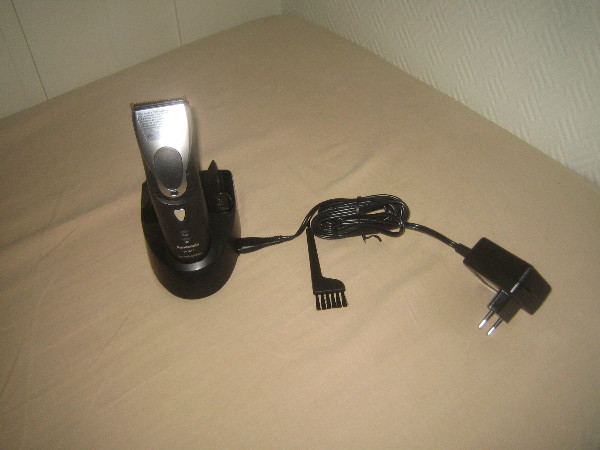
I normally cut my hair short, and my tool of choice has been a common hair/beard cutter, bought in a electrical shop here in Norway. But the last ones have not really been up to the task. My last cutter, some model from Braun, could only cut a few of my hairs at the time, and cutting my head took forever. And the one before that did not work very well either. We have looked for something better for a while, but it was not until I ended up visiting a hairdresser that we discovered that there are indeed better tools available. But these are not marketed and sold to "regular consumers". The hair saloons can get them through their suppliers, but their suppliers only sell companies. The models they sell, are very different from the ones available from Elkj p and Lefdal. The main difference is their efficiency. It would cut my hair in 5 minutes, instead of the 30-40 minutes required by my impotent Braun. The hairdresser I visited had a Panasonic ER160, which unfortunately is no longer available from the producer. But I found it had a successor, the Panasonic ER1611. The next step was to find somewhere to buy it. This was not straight forward. The list of suppliers I got from the hairdresser did not want to sell anything to me. But searching for the model on the web we found a supplier in Norway willing to sell it to us for around NOK 4000,-. This was a bit much. We kept searching and finally found a Danish supplier selling it for around NOK 1800,-. We ordered one, and it arrived a few days ago. The instructions said it had to charge for 8 hours when we started to use it, so we left it charging over night. Normally it will only need one hour to charge. The following evening we successfully tested it, and I can warmly recommend it to anyone looking for a real hair cutter. The ones we have used until now have been hair cutter toys.

John Goerzen: Review: Amateur Radio Handhelds (HTs), APRS, and Battery Tuning Tips

There are a lot of opinions about handhelds for amateur radio users (these handhelds are often known as HTs). I ve used three of them, two with APRS capability, and thought it s about time I write about them. First, I ll talk about the units in particular, then I ll get to some broader Yaesu vs. Kenwood generalizations and conclusions. Yaesu VX-7R a rugged first HT without APRS Cost: $350 as of 4/30/2012 This was the first HT I got as a ham, at the suggestion of Mike AE0MW. It truly does make a great first handheld for a ham. Radio-wise, one unique feature is a receive that s wideband enough to cover both broadcast FM and broadcast AM, the various ham bands, and plenty of others besides. The battery life quoted in the manual is 6 hours on 2m and 5.5 hours on 440 (using standard 6s TX / 6s RX / 48s squelched metric), and in my experience it seems it must be even better in some cases. The real piece of news about this unit, though, is just how rugged it is. It says submersible across the front and I absolutely believe it. I have personal experience with its ruggedness. I once was at an event and put the radio on my car roof while helping one of my children into the car. I then started driving home and forgot it there. When we got home, I realized what had happened, and also realized what that mysterious CLUNK along the busy county road was. So I drove 45 minutes back to where I heard the clunk, and found the VX-7R still lying in the roadway, where it had been for 1.5 hours on the 55 MPH road. The thing was really beat up. It had obviously been hit by numerous vehicles. The antenna was ripped off, taking the SMA mount with it. But wouldn t you know it, the darn thing still powered up. I took it to a local amateur radio shop, and about $80 later it was repaired. Incredible. The only real problem was the antenna connector. I took this radio with me on my bicycle many days, mounted on my handlebars. It got bounced around, but still worked great. Some days I listened to FM radio from it while riding my bike, monitoring a local repeater while I rode. Other days, I spent most of my ride (about an hour each way) chatting with people on the repeaters I have a mobile antenna mounted on the bike, fed to the VX-7R, and a headset. It all worked fine never a problem at all. The ruggedness has its downside. All of the connectors on the radio, except for DC in, are screw-down even the speaker/mic connector. This obviously helps keep water out, but means that it can take a lot longer than normal to do a simple thing like plug in a speaker/mic. It doesn t need any tools, but can get a little annoying. The radio physically is small (unless you install the belt clip, which has an odd peg-based mechanism that protrudes unnecessarily far and is surprisingly non-rugged). It can easily fit into a pocket. The other downsides of the VX-7R mostly surround its interface. I m not one of the Yaesu haters that seem to be so common. I find the interface usable if you read the manual; it seems a lot of people that complain about it don t. But it is quirky. The SET mode is one long menu in sort of a ring. You scroll with the knob, and when you get to the end, it repeats to the beginning. There are one or two shortcut keys to a specific setting, but overall either you use the thing so much you know exactly where you re going, or you re twisting the knob for awhile until the option you want rolls around. (I know of nobody that uses it so much they know exactly where they re going.) They do have options grouped into categories, but it doesn t help much because there s no quick way to skip between categories. The dual transceivers work less elegantly than on the TH-D72A or VX-8GR. Instead of being two equal transceivers A and B, they are main and sub . The sub transceiver is not broadband receive like the main receiver is. But there are also other limitations that have no apparent logic. For instance, you can program memory groups into the device putting, say, all the local repeaters into a certain group, or all the public safety frequencies (to use as a scanner). You can go to the special set menu, select group, then activate SCAN, and it will scan only the memories in that group. But you can t select the special group mode on the sub transceiver for no apparent reason. One other complaint is that the AC charger introduces so much noise to a transmission that you cannot really use the VX-7R to transmit while the charger is connected. Yaesu sells a programming cable that plugs into the speaker/mic port on one end, and a DB-9 serial port on the other, and includes programming software. For an incredibly high price. For far less, I found a similar cable on eBay that has a USB port on the other end (with a built-in USB/serial converter), and used VX-7R Commander though now that Chirp is available for Linux, I ll probably switch to it. I would probably continue to recommend this transceiver for a new ham. The ruggedness, plus the broadband RX, are features that should make it appealing. It is an excellent emergency preparedness/response radio due to those properties; having TX and RX on ham bands, plus RX on broadcast and public safety could be quite the asset. However, for someone that has any interest in APRS, one of the other two radios I mention is probably a better choice. At only $10 more, the VX-8GR sacrifices ruggedness and broadband receive for APRS functionality and could make a compelling alternative to the VX-7R at the same price point. The very low-power transmit at 50MHz and 220MHz on the VX-7R strikes me as a gimmick feature at best that has very little actual use. Shipped battery: FNB-80LI, 7.4V, 1400 mAh, lithium-ion Kenwood TH-D72A / D72E The Cadillac HT, with APRS and GPS Cost: $464 as of April 30, 2012 It s hard to use any word but incredible to describe this HT, though it does have its own rough edges. Starting with the basics, it has dual transceivers with full duplex (meaning you can be transmitting on one band while receiving on another). Its stored memory system and memory bank scanning system are both a lot easier and faster to use than Yaesu s, and work the same on both transceivers A and B, though perhaps offer slightly less flexibility than Yaesu s (on the VX-7R, a single memory can be a member of more than one group). The quoted operating time is 6 hours, which is probably accurate with APRS and GPS off, matching (or nearly matching) the VX-7R. The TH-D72A has the usual mic and speaker ports. Unlike Yaesu, Kenwood has used the same jack for years, so it is not necessary to purchase new accessories with each upgrade. The unit also has both serial (Kenwood connector) and standard mini USB ports, and even ships with a USB cable. The USB port is designed to interface to a PC, and the radio presents itself as a serial-over-USB device. Kenwood also includes MCP-4A, the programming software for the unit, free. This is one example of several things that Kenwood includes for free but are costly add-ons with Yaesu. Kenwood s configuration menu system is hierarchical. You can scroll through the four top-level menus (RADIO, GPS, APRS, and SKY), then navigate through sub menus. The result is that it s both faster and easier to find what you want than on the Yaesu menus. Plus, as you navigate, the radio shows you the shortcut key to get to a particular option (each level of menu is numbered starting) so, for instance, Menu-1-1-0 takes me directly to the configuration for RX battery saver interval far faster than I could get there on the VX-7R or VX-8GR. Only the APRS menu gets a bit crowded with this setup. The D72A supports Kenwood s Sky Command II an intriguing way of making it essentially a remote for a Kenwood HF rig such as the TS-2000. It works by engaging a crossband repeater for the audio, and setting up a AX.25 packet link for the control. It works, but as the response time to frequency adjustments is measured in seconds, is klunky for tuning around a HF band. A nifty, though perhaps not supremely useful, feature with some hackable potential that I haven t explored yet. The TH-D72A is one of only two shipping general-purpose amateur radios that have a built-in GPS the other is the Yaesu VX-8GR, which I ll review below. The GPS works well, and can get a fix indoors if desired. It has a system of saving waypoints, which you can then navigate back to later (using distance/bearing indicators). It also has a track log. While the track log can t be viewed on the unit, it can be downloaded with the included MCP-4A software and saved in a variety of formats including Google s KML for later importing into Google Maps or Google Earth. I enjoy this feature on trips to see where I went later on. There is also a GPS-only mode, which disables all of the other radio circuitry on the radio for very low power consumption. The GPS navigation screens all support heading-up or north-up indicators. But where this radio really shines is APRS. The D72 has all the basics you d expect sending and receiving beacons, sending and receiving messages and bulletins, etc. It has built-in support for being a digipeater in many different ways, including new-N UI-Trace. Coupled with an MFJ VHF amplifier, this could make a nice temporary (or even permanent) digi. The message interface permits sending, receiving, and shortcuts for replying to messages. Beacon transmission can be completely manual, at set intervals, or using SmartBeaconing. Outbound beacons also support proportional pathing (meaning adjusting via-path to not have wide coverage with every transmission). Also, if not using SmartBeaconing, a decay algorithm can be used to send beacons less frequently when the station s location isn t changing. An alternative tells the system to transmit a beacon every time PTT is released, subject to rate limiting by interval. So lots of choices there. For incoming beacons, there are various filters by callsign pattern, packet type, etc. that control whether they will be processed at all, and what kind of alert (visual or audible) to present. Beacons are also placed in a received beacon list, sorted with the most recent at the top (duplicates from the same station are always removed, so only the most recent is presented.) A long press of the LIST button shows time received and type of device next to the callsign. Selecting a specific beacon shows status text, comment, device type, bearing/distance (with graphical north-up or heading-up display), telemetry (weather information and the like), and a little bit of info about the via-path. Pretty nice to see weather reports from local weather stations on there. You can sort the list by received time, station call, or distance from your position but it doesn t stay sorted by anything other than received time, and takes several seconds to re-sort. Seems like a bit of an oversight there. The D72A supports QSY information in beacons. This can automatically insert the frequency of the other band on the transceiver into your transmitted beacons for you, or give you a quick way to tune to the frequency mentioned on others beacons. Either way, a nice touch. The D72 also supports query packets, such as packets asking your station to transmit its position right now. The TH-D72A can directly interface with several types of weather stations via serial link to read weather sensor information and transmit it into APRS packets directly, with no need for a PC to be in the picture at all. But if you do hook up a PC to it, there are quite a few more possibilities. You can hook it up to PC APRS software (or a hardware device such as the AVMAP) to see locations of other APRS stations on a map. It can emit APRS packets, plus even GPS sentences, down the USB port to the PC. Moreover, in PACKET mode, it acts as a full TNC, with a fairly robust TNC command set. In short, it can do more than APRS; it can also do regular AX.25 such as DX clusters, BBS, nodes, etc. As far as I know, this is the only HT that can interface with a PC in this manner, and only Kenwood s mobile D710 has the same kind of feature set at that. Kenwood includes a lot of documentation with the TH-D72A. The 51-page printed manual is a summary or introductory guide. The included CD-ROM supplies another 75 pages of detailed reference material, and the 92-page in-depth APRS manual has a level of detail that true geeks like me appreciate. I ve referred to Kenwood s documentation more than once while figuring out things about the VX-8GR (which woefully under-documents things like SmartBeaconing). That said, it appears that at least some of the documentation has been copied from the earlier TH-D7A. Page 4 of the printed book is a good example. It talks about the memory effect of the battery, and warns against unplugging and replugging the charger because the charge cycle will be reset and the battery will be over-charged (I find it hard to believe that a Li-Ion charge controller would be that stupid, and furthermore direct observation suggests that it isn t.) Parts of the in-depth APRS guide appear to have been written for the D710, but that s a really minor nit. Unlike Yaesu, Kenwood issues periodic firmware updates to the D72A, which you can apply over USB. They have fixed bugs and added features to the unit over time. Now onto the things that aren t so good about the D72A. I ll start with the battery system, since we were already discussing it. Despite shipping with a much larger battery than the VX-8GR (1800 mAh vs. 1100 mAh), it only manages roughly equal battery life with APRS and GPS engaged. (It will probably do better as a simple voice unit, however.) This has been confirmed by numerous reports on the Internet. I will discuss this topic more below. There is very little else to fault the D72A on, feature-wise. I have a minor nit in that it is impossible to cause the keylock feature to also lock PTT. It would be nice to be able to see raw APRS packets on beacons and messages. Other than that, I can t think of a feature it really lacks. Compared to the VX-7R and VX-8GR, the TH-D72A is significantly larger physically, in every dimension. It is not uncomfortably large, and still fits in my hand fine. But its size is enough different that it feels like the design is dated and could have been more compact if Kenwood would have bothered. It s a nit, sure, but a nontrivial one. With the single exception of the sturdy metal belt clip, the D72 doesn t feel nearly as rugged as the VX-7R, and not even as rugged as the VX-8GR. The keys have a squishy feel to them, the PTT button works fine but has a cheap plastic design (as opposed to the rubberized versions on Yaesu s HTs). The manual doesn t mention it, but one Kenwood brochure mentions and IP54 weatherproofing. That means it is protected against limited ingress of dust and against water sprayed from all directions limited ingress permitted. Contrast that to the VX-7R, which is rated for 30 minutes of submersion at 3ft and has a magnesium case. It seems to be specced similarly to the VX-8GR, though the VX-8GR certainly feels a lot more solid. I have no proof, as I m not about to sacrifice my HTs for science, but I doubt that the TH-D72A would have survived over an hour on a busy road as well as the VX-7R did, and probably not even as well as the VX-8GR would. The case is plastic a stout plastic, but still plastic. Like the VX-8GR, and unlike the VX-7R, the D72A does not have broadband receive. It can receive some bands adjacent to the ham bands it supports, which includes a lot of bands of interest to people with scanners, but still can t receive broadcast FM signals like the VX-7R. Shipped battery: PB-45L, 1800 mAh, lithium-ion Yaesu VX-8GR: Cheaper APRS & GPS Cost: $360 as of 4/30/2012 One could probably call this Yaesu s closest competitor to the D72A. At about $100 cheaper, it doesn t have a featureset that matches Kenwood s, but it does have a few innovations that the D72A lacks. Starting with the basics, it lacks the VX-7R s broadband receive, with the receive roughly matching the TH-D72A s. The 8GR is a dual-transceiver HT, and it works this effectively (moreso than the VX-7R). Yaesu has a bad habit of changing connectors on radios with regularity, and charging an arm and a leg for accessories to boot. Even within the VX-8 line, the 8GR uses different accessories than the 8DR, and of course has different plugs than the 7R (though it appears that the DC power plug is the same, and with some luck you might be able to use a VX-7R speaker/mic on the 8GR, though not the reverse). The menu system on the 8GR is still similar to the 7R, though Yaesu has done several things to improve it. For one, scrolling through the menu now shows several lines of context on the screen at once, making it faster to scan. Also, there are more ways to jump into the menu at a certain location than before and even a small bit of clumsily-implemented hierarchy (there are several settings on the SmartBeaconing page, for instance). The menu key now toggles between various displays: the default frequency/status display, a GPS display, an APRS staion list, and an APRS message list. Just about everything operationally takes more keypresses than the D72A. On the D72A, it s one or two keys (a physical button or F+button) to do almost everything: toggle GPS state, change TNC/APRS state (turn on or off), etc. All of that is in the scrolling menus on the 8GR. The quickest way there, which is documented in the manual, is to press MENU until a certain screen comes up, then press and hold MENU to bring up the settings (defaulting to a certain APRS-related category), then scroll and change settings. It s a pain to turn APRS on and off, because you have to do this process for both the GPS and the APRS modem. Inexplicably, there is a hotkey to change the APRS beacon method (manual, auto, or SmartBeaconing) but not to turn APRS itself on or off. (The D72A has a hotkey to toggle the beaconing, though not to change its method; though in truth, if you do it frequently, the menu shortcuts will get you there rapidly.) Physically, the VX-8GR is closer to the size of the 7R than the size of the D72A, and notably is significantly smaller than the D72A (at least with the standard battery). As noted in the D72A review, the VX-8GR feels more rugged than the D72A, though whether that is actually true or not is hard to pin down. It is definitely less rugged than the VX-7R. The keys require more pressure than the D72A, and in this they are similar to the 7R, but feel satisfyingly solid. Unlike the other radios here, the 8GR does not have a dedicated volume knob, having only one dial on the top. To adjust volume, you hold the volume button on the left while twisting the knob. In practice, this is probably not usually very annoying, but if the radio is on your belt or otherwise not in your hand, this would be a frustration. (I think it would be particularly annoying if using it with a speaker/mic). Setting 99 will let you change the key so you don t have to hold it in, which could probably go a long way to making the situation more tolerable. One unique feature of the VX-8GR, as far as I know completely unique to it, is a vibrating alert. This would most frequently be used with APRS to provide a nearly-silent alert of incoming messages and the like. The screen of the 8G, while similar in size to both the D72A and the 7R, appears to be higher-resolution (or if not, they make better use of it). More information is packed onto the screen at once, and although the D72A does have a small font, it uses it so rarely that lots of scrolling is needed. The 8GR uses a smaller font than the D72A to show content of messages and the like, which makes a much faster experience since there is a lot less scrolling. Neither radio has a setting to change this behavior, so if your eyesight isn t good, you may prefer the D72A anyhow. The VX-8GR supports a heading-up or a north-up view of the received GPS data, but strangely it does not support this when navigating to a received beacon (north-up is the only option). Unlike the TH-D72A, you can engage keylock on the 8GR while someone s beacon is on the display. Also unlike the TH-D72A, you can lock out the PTT key on the 8GR. However, the keylock feature is just a quick press of the power button, which makes me a bit nervous. And worse, if you tell it to lock the PTT key, then it also won t transmit any automatic APRS beacons! There are a lot of things the D72A supports in the APRS area that the 8GR doesn t. Here s a summary of features missing in the 8GR compared to the D72A: voice alert (can t even do it manually since tone/CTCSS are locked out in APRS mode), quick replying to messages, TNC mode (meaning you can t use it with PC-based APRS programs), full AX.25 packet mode, full PC linking, weather station inputs, built-in digipeater mode, heading-up display, GPS track logs, QSY in beacons, quick tuning to others QSY info, responding to position queries, proportional pathing, automatic decay, beaconing on PTT release, sorting of beacon list, hotkey access to many features, and I m sure the list goes on. On the flipside, the only thing feature-wise that you get on the 8GR s APRS implementation that the D72A lacks is ability to inspect raw APRS packets. The VX-8GR has the lowest-capacity battery of the three radios covered in this post, and this is an oft-cited problem for users of the unit. Yeasu does seem to do a much better job of power management than Kenwood, though, so in full APRS and GPS mode, the battery life is roughly the same, amazingly enough. It is unlikely that the talk time on the 8GR would match either the 7R or the D72A, however. Kenwood and Yaesu both have a battery saver feature which cuts power to the RX circuit except for brief checks for signals. Yaesu completely disables this while the APRS modem is on (and STILL matches Kenwood s battery life, despite the smaller battery!) Kenwood doesn t, though recommends changing the signal-check interval from 0.2s to 0.03s in order to avoid truncating APRS packets. Yaesu offers an 1800 mAh extended-life battery which should significantly exceed Kenwood s battery life. Aftermarket vendors have 2000 mAh batteries as well. Either way, expect APRS to be a drain on batteries. More on that below. Although Yaesu includes 168 pages of documentation with the 8GR, don t expect it to match the quality and detail of Kenwood s 218 pages. There are a lot of gimmicky/useless features on the 8GR (WIRES, for one) that get extensive treatment, and there is a fair bit of repetition. I particularly single out the SmartBeaconing documentation on the 8GR as being, at best, woefully incomplete and probably also inaccurate to boot. Read the D72A manuals to figure out how that feature works on your 8GR. I bought the VX-8GR intending it to be something akin to a more versatile TinyTrak. On that score, it mostly succeeds. It may be my go-to rig for use at bicycle rides, marathons, emergencies, etc., while the D72A will probably be the one that goes with me on trips. Shipped battery: FNB-101LI, 7.4V, 1100 mAh, lithium-ion Not covered: VX-8DR poor value for the dollar Cost: $434 ($550 with GPS and GPS connector) Yaesu s top-of-the-line HT is sometimes considered to be the VX-8DR. It maintains the broadband capability of the 7R, is probably almost as rugged as the 7R, and has APRS built in, like the 8GR. It even has an option to add a Bluetooth board. What is doesn t have built-in is a GPS. You can add one on for $77 for the FGPS-2 plus $39 for the CT-136 connector which connects the GPS to the unit. But then you have a unit a lot less rugged than even the D72A (that s a small connector for the GPS), a lot less small, with the same APRS featureset as the 8GR (meaning a lot less than the D72A), which costs about $100 more than the D72A. Frankly I think this makes for a poor APRS package, and would probably only be reasonable for someone that wants other 8DR features and has a desire for some very occasionaly APRS work. Battery Life and APRS One of my first surprises with APRS HTs was the poor battery life I saw. Doing my research seemed to suggest that, contrary to popular opinion, the transmitted beacons were not the culiprit, but the receive circuits were to blame. Because it is not acceptable to cut off the first 200ms of an AX.25 packet like it is with a repeater, the RX circuit is either engaged much more frequently (Kenwood) or continuously (Yaesu), putting a lot more drain on the battery. (This has also been confirmed by multiple others that have done testing) The GPS receiver also adds drain, and on the D72A, so does the TNC, which is always active when APRS is. If you don t care about received beacons, you can dramatically raise the battery life on the D72A by setting the power saver to 1 second or greater as high as 14 hours by one report. On either unit, raising the squelch should have some effect (though not as much; but in any case, weak packets won t decode anyhow, so there s no sense in letting them in.) On the 8GR, getting the extended life 1800 mAh (or aftermarket version) could produce battery life in nearly that same region, without compromising on the RX side of things. Conclusions If you want a HT capable of APRS, seriously think of the TH-D72A before anything else. It is $100 more expensive than the 8GR, but has more than $100 worth of extra features (and included things, like PC link cable and software, that are extra on the 8GR), so it has a better value. If you re particularly budget-conscious or want the most ruggedness you can find, the 7R and 8GR are solid contenders if you can sacrifice the extra APRS features. Update May 1: Clarified what the lack of TNC mode on the VX-8GR means, and also how the VX-8GR PTT keylock also locks out APRS transmissions.

26 April 2012

Paul Wise: What happens when a Debian derivative shuts down?

Over the past months we have seen the end of two Debian derivatives. In January the news came that Junta de Extremadura (Spain) were abandoning the development of LinEx and switching to Debian itself. Early in March the Debian derivatives census scripts noted that the Vanillux apt repository was down. Fabrice Quenneville then confirmed that he had to put a hold on the Vanillux project due to the cost of bandwidth and servers. In addition the future of StormOS is in doubt after Illumian was created. StormOS is a port of Debian to the OpenSolaris kernel and Illumian is similar but uses only apt/dpkg and repackages everything else. The LinEx page in the Debian derivatives census did not reveal much information about the project that would have been useful to Debian, in particular it does not list any apt repositories. As a result it is quite hard to say what has potentially been lost. Two mails from people close to or involved in the project indicate that much of the LinEx distribution was already merged into Debian. It is probably safe to say that everything of value has been merged into Debian, including at least one of the developers involved in LinEx. Vanillux was a small distribution with few developers according to the Google caches of their website. If we look at the patches created by the derivatives census scripts, we can see that the 5 source packages that were possibly derived from Debian source packages were simply imported from Christian Marillat's repository of non-free, patented, legally restricted and multimedia-related packages. The patches indicate that 3 source packages were forked from Debian and that 2 source packages were done from scratch. The forked packages seem to be mainly about enabling support for proprietary and patented codecs in several programs. This is a surprisingly small number of altered/differing packages, so what else could Vanillux folks have been working on? It appears that there were 12 new source packages that were not derived from Debian source packages. These appear to be mainly multimedia-related packages, one font imported from an Ubuntu PPA, some syslinux themes and a metapackage. The multimedia packages are all from Christian Marillat's repository. The Debian multimedia team is working hard on bringing multimedia related software to Debian and welcomes help with that. The font (Cantarell) is now in Debian under a different source package name. The metapackage appears to be very similar to from the ubuntu-meta source package from Ubuntu that uses germinate. So at first glance, the contribution of Vanillux to the world of Linux distributions appears to be in the area of artwork and package selection. The artwork produced is basically Vanillux branding and is thus not usable by Debian, although we would like more artists involved in Debian. The meta-package is not easily useful to Debian since we use a different mechanism for our task packages and our task packages have already been updated for the GNOME 3 transition. Still, the amount of difference between to source packages is relatively small. So, what else? Perusing the diff between the list of source packages exposed by the Packages and Sources files, I noted that a number of binary packages in the Packages files reference source packages not listed in the Sources files. When I saw picasa in that list, it occurred to me that Vanillux might have directly imported some binary packages without their corresponding source packages. Perusing their apt metadata confirms that they have imported some binary packages of non-free software directly from vendors. These include Google Desktop, Opera, Picasa and VirtualBox 3.2. The rest of the packages in the diff appear to be caused by some sort of issue with the import process from Debian and other apt repos. Most of the above could be achieved by adding some external commerical repositories to a normal Debian system or by merging some of those repositories (such as the Opera one) into Debian. The interesting thing about the Debian derivatives census is that it allows us to perform analyses like these and figure out what patches and packages we might like to integrate into Debian. In this way we can salvage some of the value of our derivatives if they abandon ship. If you have any ideas or code for improving the census or are running a Debian derivative, please join us at the Debian derivatives frontdesk.

25 April 2012

Vincent Bernat: XBMC Eden on Debian Wheezy

I bought some HTPC a few years ago to run XBMC, a neat media center solution. At the time, to avoid any problems, I installed it on top of a minimal Ubuntu Lucid installation with the official packages from the team XBMC. Recently, XBMC Eden has been released and XBMC has landed into Debian unstable. It was a good occasion to make the switch. Unofficial XBMC logo for Eden TL;DR: Installing XBMC on Debian Wheezy is quite easy: it almost works out of the box. The big difficulty is the configuration of the remote control: either it works as you expect or you will have to scratch your head over the pile of layers needed to work with a remote control. The configuration of my HTPC is as follows:

Installation

Installing Debian Wheezy Installing Debian Wheezy2 is pretty easy. Nowadays, getting a bootable USB key from a netinst image of Debian Installer for Wheezy is simplified:
$ sudo dd if=debian-testing-i386-netinst.iso \
>         of=/dev/disk/by-id/usb...
The installation was smooth with the exception of GRUB which was unable to install itself on the disk. This is a known bug when dealing with LVM and it comes with a simple workaround. I hope it will be corrected in time for Wheezy release. While this has little to do with the installation of XBMC, I wanted to test systemd which may become the default init in Debian (at least in Debian GNU/Linux). From README.Debian:
systemd can be installed alongside sysvinit and will not change the behaviour of the system out of the box. This is intentional. To test systemd, add init=/bin/systemd to the kernel command line and then rebooting, or install the systemd-sysv package.
The final system boots in about 15 seconds.

Configuring X Because video decoding in nouveau driver is still a work in progress, the use of the proprietary NVIDIA drivers is mandatory to be able to watch high resolution videos. Therefore, /etc/apt/sources.list should be completed with contrib and non-free repository. Then, you can install the appropriate packages: xserver-xorg-video-nvidia, nvidia-vdpau-driver and xserver-xorg. Here is my /etc/X11/xorg.conf.d/nvidia.conf:
Section "Device"
    Identifier     "NVidia ION"
    Driver         "nvidia"
    VendorName     "NVIDIA Corporation"
    Option         "HWCursor" "False"
    Option         "NoFlip" "False"
    Option         "FlatPanelProperties" "Scaling = Native"
    Option         "DynamicTwinView" "False"
    Option         "ConnectedMonitor" "DFP-1"
    Option         "CustomEDID" "DFP-1:/etc/X11/edid.bin"
    Option         "NoLogo" "True"
EndSection
Section "Extensions"
    Option "Composite" "false"
EndSection
The CustomEDID option allows the driver to get an appropriate EDID even when the AV receiver is off. You can get yours, free of charge, with get-edid from read-edid package.

Installing XBMC Thanks to the work of Andr s Mej a, XBMC is now available in Debian Wheezy. To install it, just type aptitude install xbmc. I have dropped the following xbmc.service in /etc/systemd/system directory:
[Unit]
Description = XBMC media center
After = syslog.target
[Service]
User = xbmc
Group = xbmc
Type = simple
ExecStart = /usr/bin/xinit /usr/bin/xbmc-standalone -- :0
Restart = on-failure
[Install]
WantedBy = multi-user.target
Enable this service on boot with systemctl enable xbmc.service. You need to allow xbmc user to run X. The simplest way is to run dpkg-reconfigure -plow x11-common and to allow anybody to run X. sudo may be an alternative.

Configuration

Sound While I wanted to use PulseAudio, I want the AV receiver to be able to upmix stereo streams itself. With PulseAudio, it would always receive a 6-channel signal. Therefore, I directly use ALSA. First, unmute the appropriate outputs:
$ amixer scontrols   grep IEC958
Simple mixer control 'IEC958',0
Simple mixer control 'IEC958 Default PCM',0
Simple mixer control 'IEC958',1
$ amixer sset 'IEC958',0 unmute
$ amixer sset 'IEC958 Default PCM',0 unmute
$ amixer sset 'IEC958',1 unmute
$ sudo systemctl stop alsa-utils.service
The order of channels is incorrect. With the following /etc/asound.conf, we declare a new output, hdmi2, with a different mapping:
pcm.hdmi2  
  type asym
  playback.pcm  
    type plug
    slave.pcm "remap-surround51"
   
 
pcm.!remap-surround51  
  type route
  slave.pcm "hdmi"
  ttable  
    0.0= 1
    1.1= 1
    2.4= 1
    3.5= 1
    4.2= 1
    5.3= 1
   
 
In XBMC, this output should be used instead of the default one. hdmi should still be used for passthrough. To check if each speaker is mapped correctly, one can use speaker-test -D hdmi2 -c 6.

LCD display The LCD display integrated into the SoundGraph iMON is supported by the imon kernel module and the lcdproc package. I have only modified a few lines of /etc/LCDd.conf to make it work:
[server]
Driver=imonlcd
ServerScreen=off
[imonlcd]
Protocol=1
OnExit=2
Contrast=400

Remote control This is the most difficult part. I have a Logitech Harmony remote which is a great universal remote. Its support in Linux is acceptable: you can configure through Logitech website and use congruity to push the new configuration.

Remote controls and Linux Before Linux 2.6.36, most remote controls would need LIRC to work:
  • The driver receives the signal from the IR receiver and make it available through /dev/lirc.
  • lircd, with the help of a configuration file describing the protocol used by the remote control, will read the signal and turn it into the appropriate LIRC code.
  • XBMC connects to lircd and receives incoming LIRC codes. It will translate them to an XBMC command. This translation is specified in Lircmap.xml.
  • XBMC maps each command to an action (like Play, Fullscreen, ) using a keymap. This keymap can handle commands received by a remote control, but also by a keyboard, a mouse or a joystick.
Since Linux 2.6.36, remote controls will be mapped as a generic input device (just like a keyboard):
  • The driver receives the signal from the IR receiver.
  • The signal will be handled by a decoder. The configuration of this decoder is done in userland by ir-keytable. The decoder will turn the signal into the appropriate event (usually, some keypress).
  • X will listen to those events and turn them into X key events.
  • XBMC will receive them and use the appropriate keymap to turn them into actions.
And to add more complexity to the mix, in this last case, you can still use LIRC: lircd will listen to events generated by the kernel and turn them into LIRC codes. This can be very confusing. Moreover, the SoundGraph iMON IR receiver accepts two IR protocols: the iMON protocol and the RC-6 one. The Linux driver accepts both of them but uses the first one by default. The RC-6 protocol is the protocol used by many MCE remote controls. I hope you are still with me here.

The easy way To get a reasonable configuration out of the box, here is how to configure each layer:
Logitech Harmony remote
Configure it as a Microsoft branded Media Center PC: Windows Media Center SE.
iMON IR receiver
It must use RC-6 protocol. See below for more details.
LIRC
In /etc/lirc/hardware.conf, put DEVICE=/dev/input/by-id/usb-15c2_0038-event-if00 and DRIVER=devinput. In /etc/lirc/lircd.conf, just put include "/usr/share/lirc/remotes/devinput/lircd.conf.devinput".
XBMC
With the previous bits done, it should just work out of the box.
To switch to RC-6 protocol, install the ir-keytable package and use the following commands:
$ sudo modprobe rc-imon-mce
$ sudo ir-keytable -s rc0 -p rc-6 -c -w /lib/udev/rc_keymaps/imon_mce
Read imon_mce table
Old keytable cleared
Wrote 77 keycode(s) to driver
Protocols changed to RC-6
To make the change permanent, add the rc-imon-mce module to /etc/modules and create /etc/udev/rules.d/90-imon.rules with the following content:
# Override the keytable for iMON
ACTION=="add change", SUBSYSTEM=="rc", DRV_NAME="imon", \
   RUN+="/usr/bin/ir-keytable -s $name -p rc-6 -c -w /lib/udev/rc_keymaps/imon_mce"

The hard way Now, you may want to bind custom actions to some (physical or virtual) buttons. Basically, you are left with two solutions:
  1. Start from the basic configuration with LIRC and add more buttons at each levels (there are five of them!).
  2. Remove LIRC and start with the Logitech Harmony acting as a Microsoft MCE keyboard.
The first option can be quite difficult. You need to find an unused code for the Logitech Harmony. You can try to make it learn a new code if you have some RC-6 remote control. Then, you need to ensure that this code will be present in the keytable used by ir-keytable. If not, you need to add it. That s not easy since you need a to enable some debug stuff in the kernel to find the appropriate scancode. After that, the code needs to be translated in lircd.conf. You will then have to translate it again in Lircmap.xml. At least, you need to add it to a keymap in XBMC. The other way is not ideal but seems less cumbersome. The first step is to configure the Logitech Harmony as a Microsoft MCE keyboard: it has a lot of available keys. Because of the lack of multimedia keys, let s match the keyboard configuration of XBMC:
Button Command Button Command
Channel Down PageDown Stop X
Channel Up PageUp Skip back Comma
Prev Backspace Skip forward .
Up DirectionUp Play P
Down DirectionDown Rewind R
Left DirectionLeft Fast forward F
Right DirectionRight Star Delete
OK Enter Pound W
Menu C Red F1
Exit Esc Green F2
Guide Tab Yellow F3
Info I Blue F4
Unfortunately, the keytables provided with ir-keytable are not complete enough. I have built a more complete table3. With this table and the bindings described above, most functions will work out of the box without LIRC. Additional keys can be configured in a dedicated keymap4. Here is an excerpt of mine:
<keymap>
 <global>
  <keyboard>
    <end>XBMC.ShutDown()</end>
    <f1>XBMC.ActivateWindow(MusicLibrary)</f1>
    <f2>XBMC.ActivateWindow(Videos,TvShowTitles)</f2>
    <f3>XBMC.ActivateWindow(Videos,MovieTitles)</f3>
    <f4>XBMC.ActivateWindow(Weather)</f4>
  </keyboard>
 </global>
 <FullscreenVideo>
  <keyboard>
   <opensquarebracket>SubtitleDelayMinus</opensquarebracket>
   <closesquarebracket>SubtitleDelayPlus</closesquarebracket>
   <f6>xbmc.runscript(script.xbmc.subtitles)</f6>
  </keyboard>
 </FullscreenVideo>
</keymap>

FTP Instead of using SSH, I prefer to drop new files with anonymous FTP. vsftpd fits this purpose. Here is my configuration file:
listen=YES
xferlog_enable=YES
use_localtime=YES
setproctitle_enable=YES
secure_chroot_dir=/var/run/vsftpd/empty
nopriv_user=ftp
ftpd_banner=XBMC
hide_ids=YES
ftp_username=xbmc
anon_umask=022
anon_root=/home/xbmc/media
anonymous_enable=YES
write_enable=YES
anon_upload_enable=YES
anon_world_readable_only=YES
It is currently not compatible with systemd (see bug #670308). I have removed the symlink in /etc/rc2.d and I have used the following unit file:
[Unit]
Description=Vsftpd ftp daemon
After=syslog.target network.target
[Service]
Type=simple
ExecStart=/usr/sbin/vsftpd /etc/vsftpd.conf
ExecReload=/bin/kill -HUP $MAINPID
ExecStartPre=-/bin/mkdir -p /var/run/vsftpd/empty
[Install]
WantedBy=multi-user.target

Miscellaneous
  1. In /etc/default/grub, reduce TIMEOUT to 0 to shorten the boot time.
  2. Enabling dirty regions can help speed up XBMC.
  3. aptitude install upower pm-utils to be able to shutdown/suspend from XBMC. Since XBMC was configured to be started outside any session, you need to explicitely give the appropriate rights by creating the following /var/lib/polkit-1/localauthority/50-local.d/xbmc.pkla:
    [Actions for xbmc user]
    Identity=unix-user:xbmc
    Action=org.freedesktop.upower.*;org.freedesktop.consolekit.system.*
    ResultAny=yes
    ResultInactive=yes
    ResultActive=yes
    

  1. The readibility of the LCD screen is very bad. You should look at the VFD version. The IR receiver reception is poor. The provided remote control is a joke.
  2. Debian Wheezy is not yet released. If you are unfamiliar with Debian, it may be cumbersome to maintain it until the freeze happens in a few months.
  3. Some keys are missing from the provided table. For example, there is no exclamation mark. While there is a scan code for such a key in RC-6 protocol, there is no appropriate key code to translate to: on a QWERTY keyboard, the exclamation mark is on the same key as the number 1. It is possible to map it to some other key code, but the mapping would have been difficult to use.
  4. For example, in ~/.xbmc/userdata/keymaps/harmony.xml.

23 April 2012

Benjamin Drung: Unreliable SSDs

Today my system froze and failed to reboot. I plugged in an Ubuntu live USB stick and booted from it. Then I discovered the problem that my Intel SSD 320 broke. The output of hdparm is attached to the end of the blog post. You can see that the device size is reduced to 8 MB from 120 GB and the serial number is called BAD_CTX 00000159. The firmware of the SSD was up-to-date and the last firmware update should have fixed the 8 MB bug. The Intel SSD 320 is my second SSD. My first SSD was a Super Talent Ultradrive GX 64GB, which died after around fifteen month of heavy use. It left a big bunch of my data corruption behind. SSDs seems to be very unreliable. Both SSDs died, but I cant remember that one of my HDDs died. $ sudo hdparm -I /dev/sda /dev/sda: ATA device, with non-removable media
Model Number: INTEL SSDSA2CW120G3
Serial Number: BAD_CTX 00000159
Firmware Revision: 4PC10362
Transport: Serial, ATA8-AST, SATA 1.0a, SATA II Extensions, SATA Rev 2.5, SATA Rev 2.6
Standards:
Used: unknown (minor revision code 0x0029)
Supported: 8 7 6 5
Likely used: 8
Configuration:
Logical max current
cylinders 16383 16
heads 16 16
sectors/track 63 63
--
CHS current addressable sectors: 16128
LBA user addressable sectors: 16384
LBA48 user addressable sectors: 16384
Logical Sector size: 512 bytes
Physical Sector size: 512 bytes
device size with M = 1024*1024: 8 MBytes
device size with M = 1000*1000: 8 MBytes
cache/buffer size = unknown
Nominal Media Rotation Rate: Solid State Device
Capabilities:
LBA, IORDY(can be disabled)
Standby timer values: spec'd by Standard, no device specific minimum
R/W multiple sector transfer: Max = 16 Current = 16
DMA: mdma0 mdma1 mdma2 udma0 udma1 udma2 udma3 udma4 udma5 *udma6
Cycle time: min=120ns recommended=120ns
PIO: pio0 pio1 pio2 pio3 pio4
Cycle time: no flow control=120ns IORDY flow control=120ns
Commands/features:
Enabled Supported:
Security Mode feature set
* Power Management feature set
* Write cache
* Look-ahead
* Host Protected Area feature set
* WRITE_BUFFER command
* READ_BUFFER command
* NOP cmd
* DOWNLOAD_MICROCODE
SET_MAX security extension
* 48-bit Address feature set
* Device Configuration Overlay feature set
* Mandatory FLUSH_CACHE
* FLUSH_CACHE_EXT
* General Purpose Logging feature set
* WRITE_ DMA MULTIPLE _FUA_EXT
* 64-bit World wide name
* IDLE_IMMEDIATE with UNLOAD
* WRITE_UNCORRECTABLE_EXT command
* READ,WRITE _DMA_EXT_GPL commands
* Segmented DOWNLOAD_MICROCODE
* Gen1 signaling speed (1.5Gb/s)
* Gen2 signaling speed (3.0Gb/s)
* Phy event counters
* Software settings preservation
* SMART Command Transport (SCT) feature set
* SCT LBA Segment Access (AC2)
* SCT Error Recovery Control (AC3)
* SCT Features Control (AC4)
* SCT Data Tables (AC5)
* Data Set Management TRIM supported (limit 8 blocks)
* Deterministic read ZEROs after TRIM
Security:
Master password revision code = 65534
supported
not enabled
not locked
frozen
not expired: security count
supported: enhanced erase
2min for SECURITY ERASE UNIT. 2min for ENHANCED SECURITY ERASE UNIT.
Logical Unit WWN Device Identifier: 500151795951d4b9
NAA : 5
IEEE OUI : 001517
Unique ID : 95951d4b9
Checksum: correct

22 April 2012

Joey Hess: moving my email archives and packages to git-annex

I've recently been moving some important data into git-annex, and finding it simplifies things while also increasing my flexability. email archives I've kept my email archives in git for years. This works ok, just choose the right file format (compressed mbox) and number of files (one archive per mailbox per month or so) and git can handle this well enough, as email is not really large. But, email is not really small either. Keeping my email repository checked out on my netbook consumes 2 gigabytes of its 30 gigabyte SSD, half of which is duplication in .git. Also, I have only kept it at 2 gigabytes through careful selection of what classes of mail I archive. That made sense when archival disk was more expensive, but what makes sense these days is to archive everything. For a while I've wanted to have a "raw" archive, that includes all email I receive. (Even spam.) This protects against various disasters in mail filtering or reading. Setting that up was my impetus for switching my mail archives to git-annex today. The new system I've settled on is to first copy all incoming mail into a "raw" maildir folder. Then mailfilter sorts it into the folders I sync (with offlineimap) and read. Each day, the "raw" folder is moved into a mbox archive, and that's added to the git annex. Each month, the mail I've read is moved into a monthly archives, and added to the git annex. A simple script does the work. I counted the number of copies that existed of my mail when it was stored in git, and found 7 copies spread amoung just 3 drives. I decided to slim that back, and configured git-annex to require only 5 copies. But those 5 copies will spread amoung more drives, including several offline archival drives, so it will be more robust overall. My netbook will have an incomplete checkout of my mail, omitting the "raw" archive. If I need to peek inside a spam folder for a lost mail, I can quickly pull it down; if I need to free up space I can quickly drop older archives. This is the flexability that git-annex fans love. :) By the way, this also makes it easier to permanantly delete mail, when you really need to (ie, for contractual reasons). Before, I'd have to do a painful git-filter-branch if I needed to get rid of eg, mail for old jobs. Now I can git annex drop --force. Pro Tip: If you're doing this kind of migration to git-annex, you can save bandwidth by not re-transferring files to machines that already have a copy. I ran this command on my netbook to inject the archives it had in the old repository into the new repository, verifying checksums as it goes:
cd ~/mail/archive; find -type l -exec git annex reinject ~/mail.old/archive/    \;
Note on mairix compatability: I use mairix to index and search my mail. But it refuses to follow git-annex's symlinks to the content. So I have to point it at .git/annex/objects/. I also configured annex.backend to SHA256E, which keeps the extensions on my compressed mailbox files, which is necessary for mairix to realize they're compressed. debian packages I'd evolved a complex and fragile chain of personal apt repositories to hold Debian packages I've released. I recently got rid of the mess, which looked like this: dput local mini-dinstall repo dput&rarr;mini-dinstallrepo on my server &rarr;dput Debian The point of all that was that I could "upload" a package locally while offline and batch transfer it later. And I had a local and a public apt repository of just the packages I've uploaded. But these days, packages uploaded to Debian are available nearly immediately, so there's not much reason to do that. My old system also had a problem: It only kept the most recent single copy of each package. Again, disk is cheap, so I'd rather have archives of everything I have uploaded. Again I switched to git-annex. My new system is simplicity itself. I release a package by checking it into a "toupload" directory in my git annex repository on my netbook. Items in that directory are dput to Debian and moved to "released". I have various other clones of that repository, which I git annex move packages to periodically to free up SSD space. In the rare cases when I build a package on a server, I check it into the clone on the server, and again rely on git-annex to copy it around. Now, does anyone know a good way to download a copy of every package you're ever released from archive.debian.org? (Ideally as a list of urls I can feed to git annex addurl.) conclusion My email and Debian packages were the last large files I was not storing in git-annex. Even backups of my backups end up checked into git-annex and archived away. Now that I'm using git-annex in every place I can, my goal with it is to make it as easy as possible for as many of you to use it as possible, too. I have some inotify tricks up my sleeve that seem promising. Kickstarter may be involved. Watch this space!

Lars Wirzenius: Obnam 1.0 planning

Obnam is my backup program. See http://liw.fi/obnam/ for details. Debian is hopefully going to be freezing the current testing version in June, in preparation for a release late this year. I'd like Obnam 1.0 to be included. In preparation for that I reviewed the currently open bugs and tagged the ones that I think are blockers. See list of 1.0 blocker bugs. Did I miss anything? Is anything there that isn't really a blocker? Other than that, the roadmap for 1.0 has the following things that aren't done yet: Performance is one of those things that's always going to be a problem. I'm hoping to optimize the sftp performance a big, but apart from that, I don't consider it to be a blocker for 1.0. The verification test I'm confident I will pass, but it needs to actually be performed. (See the roadmap for details of the test.) Anyone else have opinions of what needs to be done for Obnam 1.0? PS. There's a mailing list for Obnam now.

Stefano Zacchiroli: deferred bits from the DPL for March 2012

Posted a week ago, already deferred back then, this report is even more deferred now! But as there are people interest in knowing what the "DPL job" is about even among non debian-devel-announce subscribers, here is a blog-conveyed reproduction, for the records.
Dear project members,
here is my monthly DPL activity report, this time for last March. It is delayed by a couple of weeks because, myself being both incumbent and candidate DPL, I preferred not to use d-d-a during the voting period unless really needed. Apologies for the delay (or the unneeded paranoia, you name it). As a side effect of the delay, the results of the DPL election are now known. I'd like to thank all the people who took part in the elections: voters, people who asked questions on -vote, the secretary, and obviously Gergely and Wouter, without whom the campaign wouldn't have allowed to discuss relevant aspects of Debian "politics". Thanks for your trust. I'll do my best to match your expectations. ... and just to remind you what you've just asked for, here goes the BigMonthlyBlurb! Highlight: long-term hardware replacement planning The highlight for this month is long term planning of hardware replacement. It's something I've been discussing with DSA for quite a while and on which DSA has worked hard during the recent sprint. As a result, we now have a quite ambitious 5-year hardware replacement plan that will guarantee that all machines in production are under warranty at any given time (with the nice side effect of generally better performances, as they go hand in hand with newer hardware). The current estimated cost per year is 29'000 USD. That does not yet include buildds and porter-boxes, so it is expected to increase a bit to cover all our hardware needs. But we expect it not increase too much, as we tend to get explicit hardware donations to cover arch-specific needs. Given the current state of Debian finances and donation trends, the plan looks sustainable for at least 2-3 years. But this assessment still needs to be refined as soon as, together with the auditors, we'll manage to obtain the history of past Debian transactions, in particular from SPI. We've been waiting for this for about 5 months now, but I'm positive it could become a reality in the next weeks. In the meantime, it is surely safe to start with the plan for the next 1-1.5 years, so I'll give green light to DSA for the first acquisitions as soon as they're ready for it. When implemented, this plan will increase our ability to rely on hardware. But it also means we will need to become a bit more organized about fund-raising. The discussion started with the sprint report has some insights about how to do that. As part of this, we'll also need to share resources (e.g. contact databases, people, etc.) among the yearly DebConf fund-raising initiatives and the initiatives mentioned in the aforementioned discussion. Ongoing discussions Summer of Code Debian has been accepted as an organization for the Google Summer of Code. At the time these bits go out, the student application deadline has also elapsed. In March I've contributed a few project ideas and chased potential mentors for them, when I thought the project could be important for Debian and the prospective student. I'm happy that one (a dak building block needed for the implementation of PPAs and more) has found both mentors and students. We'll see if any of the corresponding student proposal is retained and how it goes. Communication I've given an interview, about Debian and Free Software in general, to La Repubblica, one of the major newspapers in Italy. The interview is available online, but only in Italian. If some kind (and Italian-speaking) soul would like to translate it into English, I'll be happy to publish the translation as well. (update 22/04/2012: Matteo Cortese has contributed an English translation of the interview, which I'll make available shortly) Legal stuff In order to transfer ownership of the Debian trademark in Japan to SPI, I've contacted the current owners (all Japanese Debian Developers or contributors) to do the needed paperwork. I've been blessed by the help of Kenshi Muto that has taken the matter in his hands. He is now navigating through Japanese trademark procedures, a subject neither myself nor SPI lawyers were familiar with. Thanks also to Jonathan McDowell who has done the needed paperwork, SPI-side. Sprints Plenty of sprints and sprint reports in March!: Debian Med, DSA, DAM/FrontDesk. Everything should also be available from the wiki sprint page where you can find info to organize your team sprint. Assets miscellanea Cheers.
PS the boring day-to-day activity log for March is available at master:/srv/leader/news/bits-from-the-DPL.txt.201203

Robert Collins: Reading list

I ve recently caught up on a bunch of reading some of which are worth commending. Read them all, or none. I enjoyed them all.

18 April 2012

Richard Hartmann: Woegle is me

Google seems to become more and more annoying. Package download http://dl.google.com/linux/chrome/deb/ is slow. Not just slow, but slow. Any random apt-get update will take ages; just sitting there waiting for Google's servers to send any data. Downloading actual packages is slow, as well. Ironically, Google's PageRank will punish sites for loading slowly; it's a pity they don't use their considerable server & bandwidth capacities to fix slowness they are causing, themselves. Chrome Copy and paste is a central part of what I use a mouse for. X has had two copy buffers for as long as I can remember, one for mouse selection, pasting with middle mouse button and one for CTRL-c/CTRL-v. Chrome merges the two. That's bad enough in and as of itself, but every time Chrome gets focus, it will clobber anything you may have in your copy buffers at that time with anything that's selected. No matter if you selected it via mouse, via keyboard, a context switch autoselected something. Selection goes into buffer. Every time. Every. Single. Time. To add insult to injury, this is dependent on which tab is active. And if you happen to search on the site (CTRL-f), it will always use what's in the search bar to clobber buffers, no matter if anything on the actual website has been selected. I can't find the bug report about this at the moment, but Google's stance is that this is a feature and introducing an option for traditional copy & paste handling is not desirable. Google+ I get that they feel a need to combat Facebook, but still, pushing Google+ on you is just annoying. At least the Android application has had a permission change on ICS so it can not auto-update. It's the little things ;) WWW Unified branding, the need to support touch-based devices in their UI, etc. Still, GMail's new interface sucks and the old one will be going away for good. And while making some UI elements larger or displaying them unconditionally makes sense for hand-held portrait displays, this is highly annoying on wide-screen landscape displays. 1366x768 may have overtaken 1024x768, but 768 is a constant here and still not a lot. As an aside, hopefully the Apple Effect and the iPad 3 will break the age-long stalemate with regards to screen resolution. More is better, here. Android Bloatware Using stock Android means you won't get Facebook and other useless apps pre-installed. Yet, uninstalling stock applications, like Google+, is impossible. Rights management It's nice that I get to see what kind of access an application would like to have. It's not nice that I can not choose what access I am willing to grant any given application. I can make a binary decision, install or not install, but I can't refuse random access rights to applications. There are custom versions of Android out there which allow you to do this and many applications seem to cope with being unable to do some things. This should be a standard feature. Access management The concept of "access to USB storage" meaning "whatver your SD card or, in the Galaxy Nexus' case, just a specific directory" is also broken. There is a middle ground between "this application needs access to a large chunk of storage" and "this application needs complete access to said large chunk". Just assign the application a specific directory to write into and read from and done's done. Multi-user I can not hand anyone my phone to play a game or surf the Internet without giving them the ability to look through all my email, contacts, calendar, you name it. While I only give my phone to people I trust completely, this still sucks. How hard can it be to create a minimal guest mode which allows people to access a few pre-selected applications with a custom setting of if they are allowed to use cellular data and/or WiFi? Data access Authorized Access Ah, the big one.... Keep in mind that I am using Google's latest and greatest, the Samsung Galaxy Nexus GSM. It's as cutting-edge as you can get. Yes, having one continuous storage device is nice. But MTP support on Linux is abysmal and you are forced to access your data by means of MTP or PTP. gphoto2, gwenview, and gthumb are all unable to import any photos via PTP; no program I tried can transfer anything via MTP. gphoto2 will transfer the background images which APOD (highly recommended, by the way; there's also a donation application for this) stores on my phone. That's it. So, unless I send email to myself, use WiFi-based hacks, or root my phone, I can not access my data. On the strongest mobile platform in the world. Using the most powerful and versatile OS with up-to-date packages. In 2012. Yay. Unauthorized Access Not being able to access my data is a Bad Thing. Even worse is when others can access my data. Contrary to older Android versions, someone decided that it would be a good idea to allow MTP or PTP, only. As in "you can not disable MTP and PTP. One of them has the be activated." This is awesome when you want to charge your phone at an airport or at an acquaintance's possibly malware-ridden Windows machine. Everyone and their bot-herder can potentially access my data while I can not. Usability And while MTP/PTP is an either/or decision, they are using check-boxes, not radio buttons. There's a decade or more of UI experience about check-box versus radio button, so why not use it? I know of at least one owner of a Galaxy Nexus who was not even aware that he couldn't turn off MTP (the default) as the UI pretends otherwise. Opaqueness And good luck trying to contact anybody about this. Having filed a few bugs against Google stuff in the past, I simply gave up on it. Back when Gmail's mailing list filtering and labelling system was somewhat broken, I spent months hunting down people who knew people who knew someone who was able to actually do something about it.

17 April 2012

Tanguy Ortolo: Camera with a standard USB cable?

Digital camera icon Since some years, there has been a movement towards standardization: mobile devices are now using Micro-USB for data transfer and charging, and SD or Micro-SD for storage extension (except Apple of course). One piece is lacking to this perfection, however; as far as I know, digital camera producers did realize that SD won for storage, but they do not seem to have acknowledged the Micro-USB standard yet. Now, since manufacturers and resellers do not indicate the connector type, I have no way to be sure that this is still the case. So, dear lazyweb, do you know if, by chance, there exists a compact digital camera that would use SD cards and a Micro-USB connector for data transfer and integrated charging?

15 April 2012

Richard Hartmann: Choo choo two

Now that our departure is looming ahead of us, it's time to give a short update. (Turns out it's not so short, after all...) Preparation Visa Mongolian and Russian visas are done; we will apply for the Chinese ones next Monday. Travel All train tickets, hotels, hostels, and tents have been booked and both a horse-back tour through Mongolia and scuba diving in Lake Baikal have been pre-arranged. The Russian railway seems to do maintenance and development on the live website all the time which meant we were forced to book through a local travel agent. We paid a hefty extra charge for that privilege but still, that was less than half of what we would have paid if we had booked through a German agent. With the help of #china-lug on irc.freenode.net, we found accommodation in a traditional Siheyuan in an old Hutong. Hopefully, this will be a interesting as it sounds. Locals By the power of attending conferences and this blog, I now have local contacts in Moscow, Beijing, and Shanghai. Everyone who contacted me was extremely nice and helpful. I have been getting hints and tips galore; I doubt our preparations would be as neat as they are without this invaluable help. Thanks; you know who you are :) Packing list Apparently there's an interest in what we will be bringing; also, this will be a nice reminder for the future. Information and note-keeping Luggage Clothing Personal and computer security Fastening, storage, and tools Health Photography Minimal scuba gear Food Convenience Leisure That's it. Re-reading this list, I wonder how we managed to fit all of this into an 80-liter travel bag and a 15-liter backpack, but we did and with room to spare.

Vasudev Kamath: Update: Falcon Debian package Status

Recently I wrote about packaging Falcon programming language for Debian. So here is the status of package. Package builds multiple binaries and we have successfully separated modules from core Falcon language component
  1. falconpl (Falcon language itself )
  2. falconpl-dbg (Debug symbols)
  3. libfalconpl-engine1 (Falcon engine library)
  4. libfalconpl-engine1-dbg (Debug symbols for Falcon enging)
Core modules like feathers and modules writtein Falcon itself are part of libfalconpl-engine1. Rest of modules are separated into following packages
  1. falconpl-mongodb: Mongodb connector module
  2. falconpl-dbi : Database Abstraction layer
  3. falconpl-dbi-sqlite3: SQLite3 connector based on DBI module
  4. falconpl-dbi-postgresql: PostgreSQL connector based on DBI module
  5. falconpl-dbi-mysql: MySQL connector based on DBI module
  6. falconpl-dbi-firebird: Firebird DB server connector
  7. falconpl-curl: Curl bindings for Falcon
  8. falconpl-dbus: DBus bindings for Falcon
  9. falconpl-dmtx: Data Matrix reader/writer for Falcon
  10. falconpl-hpdf: Haru based PDF module for Falcon
  11. falconpl-gd2: Graphic manipulation module for Falcon
There are 4 modules which I'm not sure how to build (dependency) or if at all possible to build for Linux they are dynlib, wopi, sdl, conio. I need to consult upstream on these modules status and ability to build. Modules not built We didn't build dbi-oracle and dbi-odbc modules as these are proprietary software dependant. Additionally in a conversation with upstream on IRC it was told dynlib module can't be built for 64bit and X86 version of Linux because lack of assembler, but I've not fully confirmed this. Legal Issues To enable the curl bindings I added curl dependency which in turn has dependency on libssl1.0 library which is part of openssl source package which is causing lintian thrown GPL violation error. Kartik will be looking into this. Patches submitted I've submitted total of 6 patches of which 5 patches are already applied to upstream git repo and 6th one is waiting to be applied. In other words upstream is really helpful to us. Well thats all for this week more updates next week (or may be even before that ;-) )

Next.

Previous.