Search Results: "pm"

1 January 2013

Vincent Sanders: I don't drink coffee I take tea my dear, I like my toast done on one side...

Choices, options, selections if you rather. These are what set us all apart from our fellow man, perhaps it is only the appearance of free will and individuality but our world is full of choice.

In software it might be argued programming is nothing more than making thousands perhaps millions of choices which result in a list of instructions for a machine incapable of making decisions of its own.

On a more mundane level sometimes a programmer cannot make a choice suitable for all expected use cases and a user option is created. These options have become something of a cause for arguments within certain sections of the open source software community especially amongst the groups that influence the graphical user experience.

The discussion should be nuanced and varied (perhaps that is my age, or maybe I am more diplomatic than I thought?) but there seems to be little compromise on this discussion which (from an outsiders point of view) splits into two viewpoints:


The reductionist group is currently winning the argument in the popular graphical environments and seem to be removing functionality which requires user choice wherever they can find it. This results in the absurd "joke" that the UI will become a single button, which they are trying to remove.

Personally my view is that an option should be present only when an option cannot be satisfactorily selected by the computer and even then a default suitable for as many users as possible should be picked.

You may ask why I have raised this topic at all? well over the last few days I have been trying to fix the preferences selection for the GTK port of NetSurf. The NetSurf project follows my view on this subject pretty closely but being a browser its very difficult to do the right thing for everyone

NetSurf has numerous frontends for the core browser, I use the term frontend because in some places the toolkit and OS are conflated (windows, cocoa) and not in others (gtk). For each frontend NetSurf is a native application, this is an important distinction, the windows and widgets a user interfaces with are produced by that platforms toolkit.

Old NetSurf Preferences Dialog
This is a deliberate choice unlike other browsers which render their UI themselves as web content, this is a beguiling solution when the authors wish there to be a single browsing "experience" with a common look and feel. However NetSurf looks and feels like a native browser for each frontend, which is what the project decided it wanted to achieve.

Given this the gtk frontend (is it a Gnome application? not sure of the distinction TBH) has had no dedicated maintainer for some time it has suffered from a bad case of bitrot from both GTK library changes and general neglect.

I have slowly been improving this situation, the browser can now be compiled with GTK version 2 (2.12 onwards) or 3, the menus and other UI elements have been translated for the supported languages and now the turn has come for the options dialog.

Oh, right, its "Preferences" not options, fair enough a common semantic throughout all applications does give a degree of homogeneousness but the word choice does seem to indicate the users control has been reduced. At this point I gained an education in just how unfriendly GTK and its tools have become towards the casual programmer.

The dialog I wanted to construct was a pretty standard tabbed layout which reflected the current options and allowed the user to change them in an obvious way. Given that I have constructed and equivalent interface in idiomatic manner for cocoa and windows I thought this would be straightforward, I was very wrong.

The interface construction tool is called glade which used to be the name of the UI "resource" file and interfaces. However the tool is still called glade but the interface is now GtkBuilder which has a different (but similar) XML based file format. Then we discover that despite it being an extensible file format the UI files are specifically versioned against the GTK library. Also why on earth can these resources not be compiled into my program? OK make them over-ridable perhaps. Generally it is yet another file to distribute and update in step with the executable.
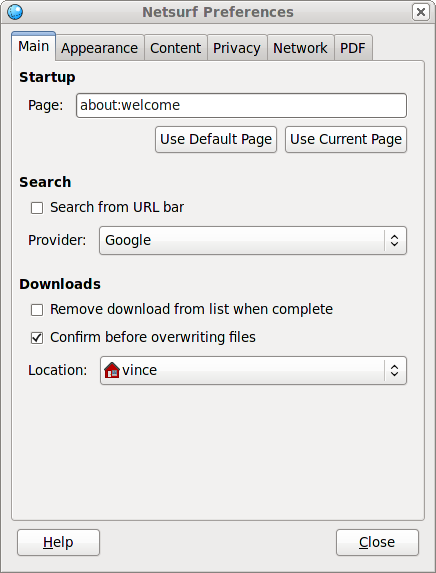
New NetSurf Properties Dialog open on Main tab
New NetSurf Preferences
So because I want to support back to version 2.12 of GTK I do not get to use any of the features from 2.16 in my UI unless I load a different UI builder file...oh and GTK3? requires a completely different version of glade and the UI files which are incompatible with gtk 2. Once this was worked round with having multiple UI files I then moved on to the next issue.

The GTK model uses function callbacks on events, these are known as signals. Perfectly reasonable but because the ui files are loaded at runtime and not compiled in there must be a way for the GTKBuilder to map the textural signal names to function pointers.

The way the GTK developers have chosen to do this is to search the global function table which means any signal handler function symbol has also to be global which means unnecessary overhead for the ELF loader increasing load times.

This lookup should have been confined to a single object or even placed in an alternative section to avoid these issues, this would not have seemed especially challenging to implement as all callback handlers have to use a preprocessor to define already (G_MODULE_EXPORT).

Another thing that makes developing GTK applications worse is the documentation, this seems to be a continuous complaint about may open source projects, which is taciturn or simply missing in many cases. GTK seems to suffer dreadfully from having multiple API versions all subtly different resulting in a lot of work on the developers part to simply find what they want.

A specific example of this is the signals and under what circumstance they occur I wanted to update all the widgets with the current configuration state whenever the options window is shown (using gtk_widget_show()) so I figured that would be the "show" signal...right? nope, never did find the right one to use, ended up with "realize" which occurs once when the dialog is created, not what I wanted, but is at least consistent and works.

NetSurf with is Properties dialog open on the content tab
NetSurf with Preferences Dialog
Overall my impression of developing just one small dialog (60 widgets total exclusing labels and containers) for a GTK program is that the toolkit and its tooling is missing the facilities to make developers life easier when doing the drudge work that a good proportion of graphical program development.

It is not the case that one cannot do things, just that everything has to be done manually instead of having the tools do the work, and because of the documentation that tedium is magnified.

I did eventually reach the stage that the thought of writing the boilerplate to add another check button to enable "do not track" had me thinking "do they really need this or can I avoid the work?" perhaps that is why they are all reductionist?



Christian Perrier: [life] [running] 2012 summary

Yet another yearly summary of my running activities. It seems, indeed, that running has now slightly taken precedence over free software activities in my life and priorities for my free time. To my fellow free software friends: don't worry, I'm not on my way to stop investing my time in Debian. It's quite clear that I'm reducing my involvement, mostly because days only have 24 hours...not because I'm bored or tired by free software development. But, certainly, it became an important thing that running currently has a small priority over Debian nowadays, for me. So, what happened on that front in 2012 for running bubulle? I finally managed to run 2900 km during the year, which is over 400km more than 2011. This is mostly due to the increasing part of running in my daily commute : a typical work week can now be something like this: With such an organization, I can end up with weeks where I run up to 50-60 kilometers in 5 days, with peaks that may include 26km in one *work* day. I also end up having room in trains between the runs, I wonder why..:-) And, of course, during week-ends, I spend some parts of my time running too..:-). Indeed, just like for many drugs, I feel sad during days where I haven't run at all and it's usually hard for me to spend more than 2 days without. Indeed, the longest time period without running, this year, has been 9 days, just after the Caen marathon, in June. Mostly because, at that time, I reached a moment where training (and believe me, very boring and hard training) consumed all my motivation. But these moments are indeed very rare and training is mostly *never* boring for me. Mostly because I like running in the nature, in forests, woods, fields, country. Never wearing an MP3 player or any kind of such device toplay music, but just enjoying the outside, whether it's raining, winding, sunny hot. Running (particularly my daily commute) is also the moment where I *think* about my work, my technical activities, my own life, whatever. I think I even sometimes translated some software, mentally, while running..:) Indeed, there have been 205 days in this year where I ran at least once. Last year was 181 so....drug addiction is increasing. So, 2900 kilometers. That's about the distance from my place to Moscow in Russia. 282 hours (11 days18 hours.....9d21h last year). Average speed: 10,3km/h (10,5km/h last year). Cumulated height difference: 33,400 meters (27700m last year). More distance, more time, a bit slower: this is an obvious consequence of more trail running (which includes more difficulties, such as running on volcanoes!). Most active month: November with 331km. Less active month: June with 141km. This year was also a year of records: I ran 10 official races during the year : two "ultra" races (70km Le Puy-Firminy in November, by night and 80km Paris Ecotrail in March), two marathons (Caen and Val de Rueil), four half-marathons and two "short" (less than 30km) trail races. How about next^W this year? Well, my goals are currently being secured: All this of course is assuming that no injury comes up (my ankles are sometimes yelling outbut I'm fortunate enough to not have articulation problems that many runners have, particularly in knees). We'll see on January 1st 2014...:-)

31 December 2012

Thorsten Glaser: Not just Amigas, editors and errnos

mksh made quite some waves (machine translation of the third article) recently. Let s state it s not just Amigas ara5 is a buildd running the Atari kernel, an emulated though. On the other hand, the bare-metal Ataris used to be the fastest buildds, so I expect we get them back online soonish. I m currently fighting with some buildd software bugfixes, but once they re in, we will make more of them. Oh, and porterboxen! Does anyone want to host a VM with a porterbox? Requirements: wheezy host system (can be emulated), 1 GiB RAM, one CPU core with about 6500 BogoMIPS or more (so the emulated system has decent speed; an AMD Phenom II X4 3.2 GHz does just fine). Oh, and mksh is ported to more and more platforms, like 386BSD 0.0 with GCC 1.39, and QNX 4 with Watcom and more bugfixes are also being worked on. And let s not forget features! jupp got refreshed: it s got a bracketed paste mode, which is even auto-enabled on xterm-xfree86 (though the xterm(1) in MirBSD s a tad too old to know it; will update that later, just imported sendmail(8) 8.14.6 and lynx(1) 2.8.8dev.15 into base, more to come) and will be enhanced later (should disable auto-indent, wordwrap, status line updates, and possibly more), lots of new functions and bindings, now uses mkstemp(3) to create backup files race-free, and more (read the NEWS file). In MirBSD, Benny and I just added a number of errnos, mostly for SUSv4 compliance and being able to compile more software from pkgsrc without needing to patch. This is being tested right now (although I should probably go out and watch fireworks in less than a half-hour), together with the new imports and the bunch of small fixes we accumulate (even though most development in MirBSD is currently in mksh(1) and similar doesn t mean that all is, or worse, we were dead, which we aren t). I ll publish a new snapshot some time in January. The Grml 2012.12 also contains a pretty up-to-date MirBSD, with a boot(8/i386)loader that now ignores GUID partition table entries when deciding what to use for the a slice. If you haven t already done so, read Benjamin Mako Hill s writings!

Russell Coker: Modern Swap Use

A while ago I wrote a blog post debunking the idea that swap should be twice as large as RAM [1]. The issue of swap size has come up for discussion in a mailing list so it seems that it s worth another blog post. Swap Size In my previous post I suggested making swap space equal to RAM size for systems with less than 1G of RAM and half RAM size for systems with 2-4G of RAM with a maximum of 2G for any system. Generally it s better to have the kernel Oom handler kill a memory hungry process than to have the entire system go so slow that a hardware reset is needed. I wrote memlockd to lock the important system programs and the shared objects and data files they use into RAM to make it easier to recover from some bad paging situations [2], but even that won t always make it possible to login to a thrashing system in a reasonable amount of time. But it s not always good to reduce swap size. Sometimes if you don t have enough swap then performance sucks in situations where it would be OK if there was more swap. One factor in this regard is that pages mapped read-only from files are discarded when there is great memory pressure and no swap space to page-out the read-write pages. This can mean that you get thrashing among memory for executables and shared objects while there s lots of unused data pages in RAM that can t be paged out. One noteworthy corner case in this regard is Chromium which seems to take a lot of RAM if you have many tabs open for a long time. Another factor is that there is a reasonable amount of memory allocated which will almost never get used (EG all the X based workstations which have 6 gettys running on virtual consoles which will almost never be used). So a system which has a large amount of RAM relative to it s use (EG a single-user workstation with 8G of RAM) can still benefit from having a small amount of swap to allow larger caches. One workstation I run has 8G of RAM for a single user and typically has about 200M of the 1G swap space in use. It doesn t have enough swap to make much difference if really memory hungry programs are run, but having 4G of memory for cache instead of 3.8G might make a difference to system performance. So even systems which can run without using any swap can still be expected to give better performance if there is some swap space for programs that are very inactive. I have some systems with as much 4G of swap, but they are for corner cases where swap is allocated but there isn t a lot of paging going on. For example I have a workstation with 3G of RAM and 4G of swap for the benefit of Chromium. Hardware Developments Disk IO performance hasn t increased much when compared to increases in RAM size over the last ~15 years. A low-end 1988 era hard drive could sustain 512KB/s contiguous transfer rates and had random access times of about 28ms. A modern SATA disk will have contiguous transfer rates getting close to 200MB/s and random access times less than 4ms. So we are looking at about 400* the contiguous performance and about 10* the random access since 1988. In 1988 2MB was a lot of RAM for a PC, now no-one would buy a new PC with less than 4G so we are looking at something like 2000* the RAM size in the same period. When comparing with 1993 (when I first ran a Linux server 24*7) it was 4M of RAM, maybe 15ms random access, and maybe 1MB/s contiguous IO approximately double everything I had in 1988. But I ll use the numbers from 1988 because I m more certain of them even though I never ran an OS capable of proper memory management on the 1988 PC. In the most unrealistically ideal situation paging IO will be a factor of 5* more expensive now relatively than it was in 1988 (RAM size increase by a factor of 2000 divided by contiguous IO performance increase by a factor of 400). But in a more realistic situation (random IO) it will be 200* more expensive relatively than it was. In the early 90s a Linux system with swap use equal or greater than RAM could perform well (my recollection is that a system with 4M of RAM and 4M of active swap performed well and the same system with 8M of active swap was usable). But nowadays there s no chance of a system that has 4G of RAM and 4G of swap in active use being usable in any way unless you have some corner case of an application allocating RAM and not using it much. Note that 4G of RAM doesn t make a big system by today s standards, so it might be reasonable to compare 2M in 1988 to 8G or 16G today. But I think that assuming 4G of RAM for the purpose of comparison makes my point. Using Lots of Swap It is probably possible to have some background Chromium tabs using 4G of paged out RAM with good system performance. I ve had a system use 2G of swap for Chromium and perform well overall. There are surely many other ways that a user can launch processes that use a lot of memory and not use them actively. But this will probably require that the user know how the system works and alter their usage patterns. If you have a lot of swap in use and one application starts to run slowly you really don t want to flip to another application which would only make things worse. If you use tmpfs for /tmp then you need enough swap to store everything that is written to /tmp. There is no real upper limit to how much data that could be apart from the fact that applications and users generally don t want to write big data files that disappear on reboot. I generally only use a tmpfs for /tmp on servers. Programs that run on servers tend not to store a large amount of data in /tmp and that data is usually very temporary, unlike workstation users who store large video files in /tmp and leave them there until the next reboot. Are there any other common corner cases that allow using a lot of swap space without serious performance problems? My Swap Space Allocation When I setup Linux workstations for other people I generally use 1G of swap. For a system that often has multiple users (via the user-switch feature) I use 2G of swap if it only has 3G of RAM (I run many systems which are limited to 3G of RAM by their chipset). For systems that I personally use I generally allocate 4G of swap, this is to cater to excessive RAM use by Chromium and also because I test out random memory hungry programs and can t easily predict how much swap space will be needed a typical end-user desktop system is a lot more predictable than a workstation used for software development. For servers I generally allocate 512M of swap space. That s enough to page out things that aren t used and make space for cache memory. If that turns out to be inadequate then it s probably best to just let the watchdog daemon reboot the system.

30 December 2012

Keith Packard: MicroPeakSerial

MicroPeak Serial Interface Flight Logging for MicroPeak MicroPeak was original designed as a simple peak-recording altimeter. It displays the maximum height of the last flight by blinking out numbers on the LED. Peak recording is fun and easy, but you need a log across apogee to check for unexpected bumps in baro data caused by ejection events. NAR also requires a flight log for altitude records. So, we wondered what could be done with the existing MicroPeak hardware to turn it into a flight logging altimeter. Logging the data The 8-bit ATtiny85 used in MicroPeak has 8kB of flash to store the executable code, but it also has 512B (yes, B as in bytes ) of eeprom storage for configuration data. Unlike the code flash, the little eeprom can be rewritten 100,000 times, so it should last for a lifetime of rocketry. The original MicroPeak firmware already used that to store the average ground pressure and minimum pressure (in Pascals) seen during flight; those are used to compute the maximum height that is shown on the LED. If we store just the two low-order bytes of the pressure data, we d have room left for 251 data points. That means capturing data at least every 32kPa, which is about 3km at sea level. 251 points isn t a whole lot of storage, but we really only need to capture the ascent and arc across apogee, which generally occurs within the first few seconds of flight. MicroPeak samples air pressure once every 96ms, if we record half of those samples, we ll have data every 192ms. 251 samples every 192ms captures 48 seconds of flight. A flight longer than that will just see the first 48 seconds. Of course, if apogee occurs after that limit, MicroPeak will still correctly record that value, it just won t have a continuous log. Downloading the data Having MicroPeak record data to the internal eeprom is pretty easy, but it s not a lot of use if you can t get the data into your computer. However, there aren t a whole lot of interfaces avaialble on MicroPeak. We ve only got: First implementation I changed the MicroPeak firmware to capture data to eeprom and made a test flight using my calibrated barometric chamber (a large syringe). I was able to read out the flight data using the AVR programming pins and got the flight logging code working that way. The plots I created looked great, but using an AVR programmer to read the data looked daunting for most people as it requires: With the hardware running at least $120 retail, and requiring a pile of software installed from various places around the net, this approach didn t seem like a great way to let people easily capture flight data from their tiny altimeter. The Blinking LED The only other interface available is the MicroPeak LED. It s a nice LED, bright and orange and low power. But, it s still just a single LED. However, it seemed like it might be possible to have it blink out the data and create a device to watch the LED and connect that to a USB port. The simplest idea I had was to just blink out the data in asynchronous serial form; a start bit, 8 data bits and a stop bit. On the host side, I could use a regular FTDI FT230 USB to serial converter chip. Those even have a 3.3V regulator and can supply a bit of current to other components on the board, eliminating the need for an external power supply. To see the LED blink, I needed a photo-transistor that actually responds to the LED s wavelength. Most photo-transistors are designed to work with infrared light, which nicely makes the whole setup invisible. There are a few photo-transistors available which do respond in the visible range, and ROHM RPM-075PT actually has its peak sensitivity right in the same range as the LED. In between the photo-transistor and the FT230, I needed a detector circuit which would send a 1 when the light was present and a 0 when it wasn t. To me, that called for a simple comparator made from an op-amp. Set the voltage on the negative input to somewhere between light and dark and then drive the positive input from the photo-transistor; the output would swing from rail to rail. Bit-banging async The ATtiny85 has only a single serial port , which is used on MicroPeak to talk to the barometric sensor in SPI mode. So, sending data out the LED requires that it be bit-banged directly modulated with the CPU. I wanted the data transmission to go reasonably fast, so I picked a rate of 9600 baud as a target. That means sending one bit every 104 S. As the MicroPeak CPU is clocked at only 250kHz, that leaves only about 26 cycles per bit. I need all of the bits to go at exactly the same speed, so I pack the start bit, 8 data bits and stop bit into a single 16 bit value and then start sending. Of course, every pass around the loop would need to take exactly the same number of cycles, so I carefully avoided any conditional code. With that, 14 of the 26 cycles were required to just get the LED set to the right value. I padded the loop with 12 nops to make up the remaining time. At 26 cycles per bit, it s actually sending data at a bit over 9600 baud, but the FT230 doesn t seem to mind. A bit of output structure I was a bit worried about the serial converter seeing other light as random data, so I prefixed the data transmission with MP ; that made it easy to ignore anything before those two characters as probably noise. Next, I decided to checksum the whole transmission. A simple 16-bit CRC would catch most small errors; it s easy enough to re-try the operation if it fails after all. Finally, instead of sending the data in binary, I displayed each byte as two hex digits, and sent some newlines along to keep the line lengths short. This makes it easy to ship flight logs in email or whatever. Here s a sample of the final data format:
MP
dc880100fec000006800f56d8f63b059
73516447273fa93728301927d91b7712
730bbf0491fe88f7c5ee8ee896e3fadc
9dd9d3d502d1afcea2cbafc6b4c34ec1
bfbfcabf10c03dc05dc070c084c08fc0
9cc0abc0b9c0c1c0ccc0dcc020c152c4
71c9a6cf45d623db7de05ee758edd9f2
b4f9fd00aa074311631a9221c4291330
c035873b2943084bbb52695c0c67eb6b
d26ee5707472fb74a4781f7dee802b84
09860a87e786ad868a866e8659865186
4e8643863e863986368638862e862d86
2f862d86298628862a86268629862686
28862886258625862486
d925
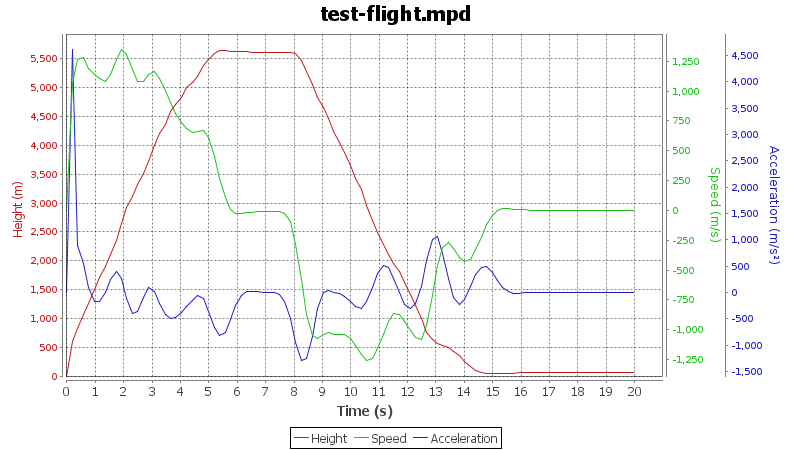
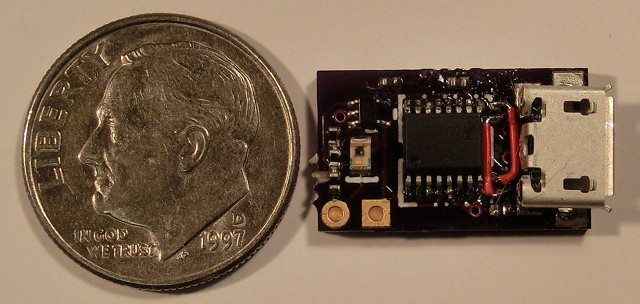
Making the photo-transistor go fast enough The photo-transistor acts as one half of a voltage divider on the positive op-amp terminal, with a resistor making the other half. However, the photo-transistor acts a bit like a capacitor, so when I initially chose a fairly large value for the resistor, it actually took too long to switch between on and off the transistor would spend a bunch of time charging and discharging. I had to reduce the resistor to 1k for the circuit to work. Remaining hardware design I prototyped the circuit on a breadboard using a through-hole op-amp that my daughter designed into her ultrasonic guided robot and a prefabricated FTDI Friend board. I wanted to use the target photo-transistor, so I soldered a couple of short pieces of wire onto the SMT pads and stuck that into the breadboard. Once I had that working, I copied the schematic to gschem, designed a board and had three made at OSHPark for the phenomenal sum of $1.35. Aside from goofing up on the FT230 USB data pins (swapping D+ and D-), the board worked perfectly. The final hardware design includes an LED connected to the output of the comparator that makes it easier to know when things are lined up correctly, otherwise it will be essentially the same. Host software Our AltosUI code has taught us a lot about delivering code that runs on Linux, Mac OS X and Windows, so I m busy developing something based on the same underlying Java bits to support MicroPeak. Here s a sample of the graph results so far: Production plans I ve ordered a couple dozen raw boards from OSH Park, and once those are here, I ll build them and make them available for sale in a couple of weeks. The current plan is to charge $35 for the MicroPeak serial interface board, or sell it bundled with MicroPeak for $75.

29 December 2012

Paul Tagliamonte: Updates on Hy

After a quick rename, hy s back, and better then ever. I ve taken a slightly different approach, and I m now doing Python AST generation out of Lisp. I got things working so well, stack traces even make sense:
(defn foo []
    (raise (Exception "This isn't great")))
(foo)
And, when run:
(hy)[tag@leliel:~][01:28 PM]$ ~/dev/local/hy/bin/hython foo.hy 
Traceback (most recent call last):
  File "foo.hy", line 5, in <module>
    (foo)
  File "foo.hy", line 3, in foo
    (raise (Exception "This isn't great")))
Exception
In addition, I ve added a few new syntax bits, and did some speed tests. Check out the gist it turns out Hy is on-par with Python (whereas Clojure-Py (although much more featureful) is quite a bit slower) To just show off a few things, here s a small script to scrape NEW packages off the website
; NEW scraper
(import "lxml.html"
        "urllib2")
(def xpath "//tr[contains(@class, 'sourceNEW')]//td[@class='package']")
(def url "http://ftp-master.debian.org/new.html")
(def page (lxml.html.fromstring (.read (urllib2.urlopen url))))
(for [row (page.xpath xpath)]
  (print "NEW:" (row.text_content)))
More to come, methinks!

Russell Coker: Samsung Galaxy Camera a Quick Review

I recently had a chance to briefly play with the new Samsung Galaxy Camera [1]. The Galaxy Camera is an Android device with a 4.8 display (the same size as the Samsung Galaxy S3) that has a fairly capable camera (IE nothing like a typical phone camera). It runs Android 4.1 (Jelly Bean) and the camera has 21* zoom with a 16 megapixel sensor. Camera Features It seems that professional photographers are often annoyed when they see someone with a DSLR set in auto mode. It s widely regarded that auto mode is a waste of a good camera, although the better lenses used with DSLRs will usually give a better result than any compact camera even when it s in auto mode. The problem is that photography is quite complex, in an earlier post about digital cameras I summarised some of the technical issues related to cameras and even without any great detail it became a complex issue [2]. The Galaxy Camera has a reasonably friendly GUI for changing camera settings which even includes help on some of the terms, I expect that most people who use it will end up using most of the features which could make it a good training camera for someone who is going to move to a DSLR. A DSLR version of the Galaxy Camera could also be an interesting product. The camera also has modes such as Waterfall and Panorama , hopefully the settings for those would be exposed to the user so they could devise their own similar groups of settings. I ve seen the phone criticised for the lack of physical controls as the expert mode in software is inherently slower than manually turning dials on a DSLR. But it seems obvious to me that anyone who knows how to use the controls manually should be using a DSLR or bridge camera and anyone who doesn t already know how to do such things will be better suited by the software controls. It supports 120fps video at 720*480 resolution (with a file format stating that it s 30fps to give 1/4 speed) which could be useful. I used to have a LG Viewty smart-phone that did 120fps video but the resolution was too low to be useful. 720*480 is enough resolution to see some detail and has the potential for some interesting video, one use that I ve heard of is filming athletes to allow them to analyse their performance in slow motion. It also does 60fps video at 720p (1280*720) resolution. One down-side to the device is that the lens cover doesn t seem particularly sturdy. It s quite OK for a device that will be stored in a camera case but not so good for a device that will be used as a tablet. I didn t get to poke at the lens cover (people don t like it if you mess with their Christmas presents) but it s design is a couple of thin flaps that automatically retract when the camera is enabled which looks quite weak. I d like to see something solid which doesn t look like it will slide back if the device is treated as roughly as a phone. I think that the lack of a solid lens cover could be the one factor that prevents it from being used as a replacement for a smart phone. Apart from that a Galaxy Camera and a cheap GSM phone could perform all the functions of a high end phone such as the Galaxy S3 while also producing great pictures. It would probably make sense for retailers to bundle a cheap phone with a Galaxy Camera for this purpose. Tablet Features The device boasts WiFi Direct to allow multiple cameras and phones to talk to each other without a regular WiFi access point [3]. I didn t test this and I don t think it would be particularly useful to me, but it seems like a handy feature for less technical users. It can connect to the Internet via Wifi or 3G, supports automatic upload of pictures (it comes with Dropbox support by default like the Galaxy S3), and has a suite of photo and video editing software. I don t expect that any photo editing software that runs on an Android device would be much good (I think that you really need fine cursor control with a mouse and a high resolution screen), but it would probably be handy for sending out a first draft of photos. Most Android apps should just work, the exceptions being apps that rely on a camera that faces the user or full phone functionality. So the Galaxy Camera can do almost anything that an Android phone or tablet can do. Value The RRP for the Galaxy Camera is $599, that puts it in the same price range as a DSLR with a single lens. While that s not a bad price when compared to smart-phones (it s cheaper than the LTE version of the Galaxy S3 phone) it s still quite expensive for a camera that s not a DSLR. Fortunately Kogan is selling it for $469 and has free shipping at the moment [4]. This still makes it more expensive than some of Bridge Cameras which probably have significantly better optical features, but in terms of what the typical user can do with a camera the Galaxy Camera will probably give a much better result. The sensor in the Galaxy Camera is smaller than that in the Nokia 808 PureView [5] (1/2.3 vs 1/1.2 ) so the Nokia PureView should be able to take better pictures in some situations. Unfortunately the Nokia 808 doesn t run Android, I d probably own one if it did. Some of the reviews are rather harsh, the Verge has a harsh but fair review by Aaron Souppouris which makes a number of negative comparisons to cheaper cameras [6]. I really recommend reading Aaron s review as there s a lot of good information there. But I think that Aaron is missing some things, for example he criticises the inclusion of ebook software by saying that he wouldn t read a book on a camera. But the device is a small tablet computer which also has a compact camera included. I can easily imagine someone reading a book or playing Angry Birds on their camera/tablet while in transit to where they are will photograph something. I can also imagine a Galaxy Camera being a valuable tool for a journalist who wants to be able to write short articles and upload pictures and video when out of the office. Aaron concludes by suggesting that the Galaxy Camera is a $200 camera with $300 of editing features. I think of it as $200 in camera hardware with software that allows less skilled users to take full advantage of the hardware and the ability to do all the software/Internet things that you would do on a $450+ smart-phone. Would I Buy One? No. The Galaxy Camera is among other things a great toy, I d love to have one to play with but I can t spare $469 on one. Part of the reason for this is that my wife just bought a DSLR and is getting lessons from a professional photographer, so I really won t get better pictures from a Galaxy Camera. The DSLR on auto mode will allow me to take pictures that will usually be better than a Galaxy Camera can achieve (sometimes you just can t beat a good lens). For more demanding pictures my wife can tweak the DSLR. The 120fps video is a really nice feature, I don t know if my wife s DSLR can do that, but it s a toy feature not something I really need. I ve just bought a Galaxy S3 which is a great little tablet computer (most of the time it won t be used for phone calls). I don t need another 4.8 tablet so a significant part of the use of the Galaxy Camera doesn t apply to me. I recommend the Galaxy Camera to anyone who wants to take good photos but can t get a DSLR and lessons on how to use it properly. But if you would rather get a 35mm camera with interchangeable lenses that runs Android then it might be worth waiting. I expect that the Galaxy Camera will be a great success in the market (it s something you will love when you see it). That will drive the development of similar products, if Samsung doesn t release a 35mm Android camera soon then someone else will (for example Sony develops both high end cameras and Android phones). If my wife didn t have a DSLR then I d probably have bought a Galaxy Camera already. I will recommend it to my parents and many other people I know who want an OK camera and can benefit from a tablet, but don t know how to use a DSLR properly (or don t want to carry a bulky camera).

28 December 2012

Petter Reinholdtsen: A Christmas present for Skolelinux / Debian Edu

I was happy to discover a few days ago that the Skolelinux / Debian Edu project also this year received a Christmas present from Another Agency in Trondheim. NOK 1000,- showed up on our donation account December 24th. I want to express our thanks for this very welcome present. As the Debian Edu / Skolelinux project is very short on funding these days, and thus lack the money to do regular developer gatherings, this donation was most welcome. One developer gathering cost around NOK 15 000,-, so we need quite a lot more to keep the development pace we want. Thus, I hope their example this year is followed by many others. :) The public list of donors can be found on the donation page for the project, which also contain instructions if you want to donate to the project.

27 December 2012

Jamie McClelland: Live video streaming using vp8enc and webm on Debian

The vp8 video codec and webm container format (which are alternates for theora/ogg and h264/flv) are getting lots of attention, especially as more web browsers are supporting html5 - which includes a new video tag that plays video directly in a web page, rather than requiring a plugin. With Google fully behind these new formats (and converting YouTube videos) and even skype using vp8, it seems as though it could supplant h264/flash as the default video codec and container. After years under the boot of the proprietary flash video, this change could usher in a lot of exciting developments. While the shift in formats is also significant for on-demand video, I'm focusing on live streaming in this blog. There are a lot of tools needed to successfully stream a live video. Enough of them support vp8 and webm to create a live video stream, however, not all of the right versions of these tools have landed in Debian. Without any patches or changes, if you try to send a live video stream to icecast using vp8 encoding and webm, you'll get something like this:
0 jamie@animal:~$ gst-launch v4l2src ! video/x-raw,width=320,height=240 ! vp8enc ! webmmux ! shout2send ip=icecast.server port=8000 password=secret mount=/test.webm
WARNING: erroneous pipeline: could not link webmmux0 to shout2send0
1 jamie@animal:~$
I've documented the steps for patching/upgrading gstreamer and icecast2 so you can get a live video stream using vp8 encoding and the webmc container that originates on a Debian wheezy machine using gstreamer and streams to a Debian squeeze server running icecast2. On the workstation, you'll need libshout3 version 2.3.0 or higher, which is at the moment available in experimental and installable without bringing in any dependencies. In addition, you will need to bring in gstreamer1.0 from sid and you will need to rebuild gstreamer1.0-plugins-good after libshout-dev has been installed from experimental. So, begin by adding experimental and sid to your sources list by creating the files /etc/apt/sources.list.d/experimental.list and /etc/apt/sources/lists.d/sid.list with the respective contents:
deb http://mirror.cc.columbia.edu/debian experimental main
and
deb http://mirror.cc.columbia.edu/debian sid main 
deb-src http://mirror.cc.columbia.edu/debian sid main
In order to avoid upgrading your entire machine to sid (experimental packages won't upgrade by default), you'll also need to add the file /etc/apt/preferences.d/sid:
Package: *
Pin: release n=sid
Pin-Priority: 200
Then update and install:
apt-get update
apt-get install -t experimental libshout3
apt-get install gir1.2-clutter-gst-1.0 gir1.2-gst-plugins-base-1.0 gir1.2-gstreamer-1.0 gstreamer0.10-ffmpeg  gstreamer1.0-libav:amd64 gstreamer1.0-plugins-bad:amd64 gstreamer1.0-plugins-base:amd64 gstreamer1.0-plugins-base-apps gstreamer1.0-plugins-good:amd64 gstreamer1.0-pulseaudio:amd64 gstreamer1.0-tools gstreamer1.0-x:amd64 libclutter-gst-1.0-0:amd64 libgstreamer-plugins-bad1.0-0:amd64 libgstreamer-plugins-base1.0-0:amd64 libgstreamer-plugins-base1.0 libgstreamer1.0-0:amd64 libgstreamer1.0
Fortunately, the version of gstreamer1.0-plugins-good in sid includes a fix for a bug patched on November 31, 2012 that allows the use of the webm container. However, for it to work properly gstreamer1.0-plugins-good has to be built against libshout version 2.3.0 or higher (which is in experimental, not sid). Therefore, you have install libshout-dev from experimental and then rebuild gstreamer1.0-plugins-good.
sudo apt-get build-dep gstreamer1.0-plugins-good
sudo apt-get -t experimental install libshout-dev
apt-get source gstreamer1.0-plugins-good
cd gst-plugins-good1.0-1.0.4
dch -v 1.0.4-1+webmmux
fakeroot debian/rules binary
sudo dpkg -i ../gstreamer1.0-plugins-good_1.0.4-1+webmmux_amd64.deb
Now if you try the command, things should work on the client side. When streaming to an icecast2 server running squeeze, I don't get any errors, however, when opening the streaming page via the icecast URL, there is a play button, which can be clicked, but no picture is shown. That's because the version of Icecast2 in squeeze doesn't support either vp8 or webm. On the server side, you will need icecast2 version 2.4beta or higher. This version hasn't landed anywhere in Debian as of this writing. However, you can build it from source by following these steps (the patches I'm removing have all been applied to the new upstream version).
apt-get source icecast2
wget http://downloads.xiph.org/releases/icecast/icecast-2.4-beta.tar.gz
tar -xzvf icecast-2.4-beta.tar.gz
cp -r icecast2-2.3.2/debian icecast-2.3.99.0/
cd icecast-2.3.99.0/
rm debian/patches/ 1001_autotools_avoid_debian-subdir.patch,1002_add_missing_xspf_file,1003_fix_memory_leak.patch,series 
dch -v 2.3.99.0-1
fakeroot debian/rules binary
When you install it, be sure to replace the icecast2.xml configuration file and update it with your server-specific customizations. Hopefully this version of icecast2 will make it to experimental soon. And now... you can successfully stream via:
gst-launch-1.0 v4l2src ! video/x-raw,width=320,height=240 ! vp8enc ! webmmux !  shout2send ip=icecast.server port=8000 password=secret mount=/test.webm
If you want full audio and video, here's a more complete pipeline: gst-launch-1.0 v4l2src ! queue ! video/x-raw,width=320,height=240 ! tee name=tscreen ! queue ! autovideosink tscreen. ! queue ! videorate ! video/x-raw,framerate=25/2 ! queue ! vp8enc ! queue ! webmmux name=mux pulsesrc ! queue ! audioconvert ! vorbisenc ! queue ! queue ! mux. mux. ! queue ! shout2send ip=hobo port=8000 mount=jamie.webm password=secret Unfortunately, since I'm not sure how to deal with the python2.7 vs python3 dependecies, my elegant mobi python script that creates this pipeline for you using python-gtk as been reduced to a crude bash script. Another item on the todo list is opus audio encoding. gstreamer doesn't seem able to use opus in the webm container (although it seems to work with ogg). In the course of this research I found directions for getting gstreamer-1.0 installed on debian independent of packages installed on the system. If you follow the directions above, these steps should not be necessary. I'm including in case you need the latest sources for another reason. Extra steps I needed were:

26 December 2012

Rudy Godoy: s3tools Simple Storage Service for non-Amazon providers

One of the nicest developments in the cloud arena is the increasing adoption of standards, this of course will impact on maturity and market confidence on such technologies. Amazon, as one of the pioneers, made a good choice on their offering design by making their API implementation public. Now, vendors such as Eucalyptus private/hybrid cloud offering and many other providers can leverage and build upon the specs to offer compatible services without the hassle for their customers to learn a new technology/tool. I ve bare-metal servers siting on Connectria s data-center. A couple of months ago I ve learned about their new cloud storage offering. Since I m working a lot on cloud lately I checked the service. It s was nice to learn they are not re-inventing the wheel but instead implementing Amazon s Simple Storage Service (S3) de-facto standard for cloud storage. Currently there are many S3-compatible tools available both FLOSS and freeware/closed source (Connectria provides a nice list of them). I ve been using s3tools, which is already available in the Debian archive, to interact with S3-compatible services. Usage is pretty straightforward. For my use case I intend to store copies of certain files on my provider s S3 service. I ll need to create buckets to be able to store files. For the ones not very familiar with S3 terminology buckets can be seen as containers or folders (in the desktop paradigm). First thing to do is configure your keys and credentials for accessing S3 from your provider. I do recommend you to use the --configure option to create the $HOME/.s3cfg file because it will put all the available options for a standard S3 service, leaving you the work of just tweaking them based on your needs. You can go and create the file all by yourself if you prefer, of course.
$ sudo aptitude install s3cmd
$ s3cmd --configure
Enter new values or accept defaults in brackets with Enter.
Refer to user manual for detailed description of all options.
Access key and Secret key are your identifiers for Amazon S3
Access Key:
...
You ll be required to enter the access key and the secret key. You ll be asked for a encryption password (use only if you plan to use this feature). Finally, the software will test the configuration against Amazon s service. Since this is not our case it will fail. Tell the configuration instead to not retry configuration and say Y to Save configuration. Now, edit the $HOME/.s3cfg file and set the address for your private/third-party S3 provider. This is done here:
host_base = s3.amazonaws.com
host_bucket = %(bucket)s.s3.amazonaws.com
Change s3.amazonaws.com to your provider s address and the host_bucket configuration also. For my case I had to use:
host_base = rs1.connectria.com
host_bucket = %(bucket)s.rs1.connectria.com
Now, save the file and test the service by listing the available buckets (of course there is none yet).
$ s3cmd ls
If you don t get an error then the tool is properly configured. Now you can create buckets, put files, list, etc.
$ s3cmd mb s3://testbucket
Bucket 's3://testbucket/' created
$ s3cmd put testfile.txt s3://testbucket
testfile.txt -> s3://testbucket/testfile.txt [1 of 1]
8331 of 8331 100% in 1s 7.48 kB/s done
$ s3cmd ls s3://testbucket
2012-12-26 22:09 8331 s3://testbucket/testfile.txt

25 December 2012

Uwe Hermann: sigrok at the 29th Chaos Communication Congress (29c3)

29c3 logo Yup, it's been a while since my last blog post, but I'm not dead yet. Most of my spare time goes into sigrok development these days (open-source signal analysis suite for logic analyzers, oscilloscopes, multimeters, and lots more), but I'll try to revive my blog too. I have various microcontroller/embedded topics and devices I want to talk about in a small blog post series in the nearer future. But more on that later. Feel free to subscribe to the sigrok-devel mailing list, join us on IRC in #sigrok (Freenode) where most of the discussions take place, or follow our new sigrok blog (RSS) if you're interested in the ongoing sigrok developments. Anyway, for now just a quick announce: Same as last year, we will be at the Chaos Communication Congress (29c3), this time in Hamburg, Germany. The conference takes place from December 27th to 30th, 2012. We'll have a sigrok "assembly", likely in area 3b of the conference building, where we'll be hanging around, working on new sigrok features, new hardware drivers, new protocol decoders and various other things. We'll have lots of gear with us for demo and development purposes, including logic analyzers, oscilloscopes, MSOs, multimeters, and lots more. Bring your own device if you own models we don't yet support or know about. We'll be happy to have a look! Chat with us, give us your suggestions which features you'd like to see, which devices you want to be supported, which protocol decoders you'd like to have, or even help us write some drivers/decoders! Hope to see you there!

Petter Reinholdtsen: How to backport bitcoin-qt version 0.7.2-2 to Debian Squeeze

Let me start by wishing you all marry Christmas and a happy new year! I hope next year will prove to be a good year. Bitcoin, the digital decentralised "currency" that allow people to transfer bitcoins between each other with minimal overhead, is a very interesting experiment. And as I wrote a few days ago, the bitcoin situation in Debian is about to improve a bit. The new debian source package (version 0.7.2-2) was uploaded yesterday, and is waiting in the NEW queue for one of the ftpmasters to approve the new bitcoin-qt package name. And thanks to the great work of Jonas and the rest of the bitcoin team in Debian, you can easily test the package in Debian Squeeze using the following steps to get a set of working packages:
git clone git://git.debian.org/git/collab-maint/bitcoin
cd bitcoin
DEB_MAINTAINER_MODE=1 DEB_BUILD_OPTIONS=noupnp fakeroot debian/rules clean
DEB_BUILD_OPTIONS=noupnp git-buildpackage --git-ignore-new
You might have to install some build dependencies as well. The list of commands should give you two packages, bitcoind and bitcoin-qt, ready for use in a Squeeze environment. Note that the client will download the complete set of bitcoin "blocks", which need around 5.6 GiB of data on my machine at the moment. Make sure your ~/.bitcoin/ directory have lots of spare room if you want to download all the blocks. The client will warn if the disk is getting full, so there is not really a problem if you got too little room, but you will not be able to get all the features out of the client. As usual, if you use bitcoin and want to show your support of my activities, please send Bitcoin donations to my address 15oWEoG9dUPovwmUL9KWAnYRtNJEkP1u1b.

24 December 2012

Julien Danjou: Ceilometer bug squash day #1

In order to start the year in a good mood, what's the best than squashing some bugs on OpenStack? Therefore, the Ceilometer team is pleased to announce that it organizes a bug squashing day on the Friday 4th January 2013. We wrote an extensive page about how you can contribute to Ceilometer, from updating the documentation, to fixing bugs. There's a lot you can do. We've good support for Ceilometer built into Devstack, so installing a development platform is really easy. The main goal on this bug day will be put Ceilometer in the best possible shape before the grizzly-2 milestone arrives (10th January 2013). This version of Ceilometer will aim to keep compatibility with Folsom, so early deployers can enjoy some of our new features before upgrading to Grizzly. After that date, we'll start merging more extensive changes. We'll be hanging out on the #openstack-metering IRC channel on Freenode, as usual, so feel free to come by and join us!

23 December 2012

Gregor Herrmann: RC bugs 2012/51

I just realized it's sunday again, so here goes my list of RC bugs I've worked on during the last week:

Gregor Herrmann: RC bugs 2012/51

I just realized it's sunday again, so here goes my list of RC bugs I've worked on during the last week:

22 December 2012

Russ Allbery: Review: Regenesis

Review: Regenesis, by C.J. Cherryh
Series: Cyteen #2
Publisher: DAW
Copyright: January 2009
ISBN: 0-7564-0592-0
Format: Mass market
Pages: 682
Regenesis is a direct sequel to Cyteen, picking up very shortly after the end of that book and featuring all of the same characters. It would be absolutely pointless to read this book without first reading Cyteen; all of the emotional resonance and world-building that make Regensis work are done there, and you will almost certainly know whether you want to read it after reading the first book. Besides, Cyteen is one of the best SF novels ever written and not the novel to skip. Because this is such a direct sequel, it's impossible to provide a good description of Regenesis without spoiling at least characters and general plot developments from Cyteen. So stop reading here if you've not yet read the previous book. I've had this book for a while, and re-read Cyteen in anticipation of reading it, but I've been nervous about it. One of the best parts of Cyteen is that Cherryh didn't belabor the ending, and I wasn't sure what part of the plot could be reasonably extended. Making me more nervous was the back-cover text that framed the novel as an investigation of who actually killed the first Ari, a question that was fairly firmly in the past by the end of Cyteen and that neither I nor the characters had much interest in answering. Cyteen was also a magical blend of sympathetic characters, taut tension, complex plotting, and wonderful catharsis, the sort of lightning in a bottle that can rarely be caught twice. I need not have worried. If someone had told me that Regenesis was another 700 pages of my favorite section of Cyteen, I would have been dubious. But that's exactly what it is. And the characters only care about Ari's murderer because it comes up, fairly late in the novel, as a clue in another problem. Ari, and Justin, are back in the safe laboratory environment of Reseune, safe now that politics are not trying to kill or control them. Yanni has taken over administration. There is a general truce, and even some deeper agreement. Everyone can take a breath and relax, albeit with the presence of Justin's father Jordan as an ongoing irritant and hostile factor. But broader Union politics are not as stable: there is an election in progress for the Defense councilor that may break the tenuous majority in favor of Reseune and the Science Directorate, Yanni is working out a compromise to gain more support by turning a terraforming project loose on a remote world, and Ari isn't sure she likes that Eversnow idea at all. Then, just as things seem to be turning Reseune's way, politics and interpersonal relationships abruptly deteriorate, tensions with Jordan sharply worsen, and there may be moles in Reseune's iron-clad security. Navigating the crisis while keeping her chosen family safe will once again tax all of Ari's abilities. The third section of Cyteen, where Ari finally has the tools to take fate into her own hands and starts playing everyone off against each other, is one of my favorite sections of any book. If it was yours as well, Regenesis is another 700 pages of exactly that. As an extension and revisiting, it does lose a bit of immediacy and surprise from the original, and Regenesis is much less concerned with the larger questions of azi society, the nature of thought and personality, loyalty and authority, and the best model for the development of human civilization. It's somewhat less far-thinking and more of a political thriller. But it's a political thriller that recaptures much of the drama and tension of Cyteen and is full of exceptionally smart and paranoid people thinking through all angles of a problem, working fast on their feet, and successfully navigating tricky and treacherous political landscapes. And, like Cyteen but unlike others of Cherryh's novels I've read, it's a novel about empowerment, about seizing control of one's surroundings and effectively using all of the capability and leverage at one's fingertips. That gives it a thrilling catharsis that's almost as good as Cyteen. It's also, like its predecessor, a surprisingly authoritarian novel. I think it's in that, more than anything else in these books, that one sees the impact of the azi. Regenesis makes it clear that the story is set, not in a typical society, but inside a sort of corporation, with an essentially hierarchical governance structure. There are other SF novels set within corporations (Solitaire comes to mind), but normally they follow peons or at best mid-level personnel or field agents, or otherwise take the viewpoint of the employees or the exploited. When they follow the corporate leaders, the focus usually isn't down inside the organization, but out into the world, with the corporation as silent resources on which the protagonist can draw. Regenesis is much more of a balance. It's about decisions of the future of humanity that characters feel they can make undemocratically (in part because they or their predecessors have effectively engineered the opinions of the democratic population), but it's also about how one manages a top-down organization. And, most vitally, how one secures it. Reseune is, as in the previous novel, a paranoid's suspicions come true; everyone is out to get everyone else, or at least might be, and the level of omnipresent security and threat forces a close parsing of alliances and motivations that elevates loyalty to the greatest virtue. In Cyteen, we had long enough with Ari to see the basic shape of her personality and her slight divergences from her predecessor, but her actions are mostly driven by necessity. Regenesis gives us more of a picture of what she's like when her actions aren't forced, and here I think Cherryh manages a masterpiece of subtle characterization. Ari has diverged substantially from her predecessor without necessarily realizing it, but in ways that are firmly grounded in the differences she found or created between her life and the first Ari's. Specifically, she has friends, confidents, and a community, which combined with past trauma has made her fiercely, powerfully protective, and it's that protective instinct that weaves the plot together. It's probably the most significant way in which so much of the events of Cyteen and Regenesis are driven by people's varying reactions to trauma. If you, like me, loved the last third of Cyteen, read this, because Regenesis is more of exactly that. Cherryh finds new politics, new challenges, and a new and original plot within the same world and with the same characters, but it has the same feel of maneuvering, analysis, and decisive action. You will, as with Cyteen have to be comfortable with pages of internal monologue from really smart people thinking through all sides of a problem. If you didn't like that in the previous book, avoid this one; if you loved it, here's the sequel you didn't know you were waiting for. Rating: 9 out of 10

21 December 2012

Tim Retout: Perl Forking, Reference Counting and Copy-on-Write

I have been dealing with an interesting forking issue at work. It happens to involve Perl, but don't let that put you off. So, suppose you need to perform an I/O-bound task that is eminently parallelizable (in our case, generating and sending lots of emails). You have learnt from previous such attempts, and broken out Parallel::Iterator from CPAN to give you easy fork()ing goodness. Forking can be very memory-efficient, at least under the Linux kernel, because pages are shared between the parent and the children via a copy-on-write system. Further suppose that you want to generate and share a large data structure between the children, so that you can iterate over it. Copy-on-write pages, should be cheap, right?
my $large_array_ref = get_data();
my $iter = iterate( sub  
    my $i = $_[1];
    my $element = $large_array_ref->[$i];
    ...
 , [0..1000000] );
Sadly, when you run your program, it gobbles up memory until the OOM killer steps in. Our first problem was that the system malloc implementation was less good for this particular task than Perl's built-in malloc. Not a problem, we were using perlbrew anyway, so a quick few experimental rebuilds later and this was solved. More interesting was the slow, 60MB/s leak that we saw after that. There were no circular references, and everything was going out of scope at the end of the function, so what was happening? Recall that Perl uses reference counting to track memory allocation. In the children, because we took a reference to an element of the large shared data structure, we were effectively writing to the relevant page in memory, so it would get copied. Over time, as we iterated through the entire structure, the children would end up copying almost every page! This would double our memory costs. (We confirmed the diagnosis using 'smem', incidentally. Very useful.) The copy-on-write semantics of fork() do not play well with reference-counted interpreted languages such as Perl or CPython. Apparently a similar issue occurs with some mark-and-sweep garbage-collection implementations - but Ruby 2.0 is reputed to be COW-friendly. All was not lost, however - we just needed to avoid taking any references! Implement a deep copy that does not involve saving any intermediate variables along the way. This can be a bit long-winded, but it works.
my $large_array_ref = get_data();
my $iter = iterate( sub  
    my $i = $_[1];
    my %clone;
    $clone id   = $large_array_ref->[$i] id ;
    $clone foo  = $large_array_ref->[$i] foo ;
    ...
 , [0..1000000] );
This could be improved if we wrote an XS CPAN module that cloned data structures without incrementing any reference counts - I presume this is possible. We tried the most common deep-copy modules from CPAN, but have not yet found one that avoids reference counting. This same problem almost certainly shows up when using the Apache prefork MPM and mod_perl - even read-only global variables can become unshared. I would be very interested to learn of any other approaches people have found to solve this sort of problem - do email me.

Dirk Eddelbuettel: Rcpp 0.10.2

Relase 0.10.2 of Rcpp provides the second update to the 0.10.* series, and has arrived on CRAN and in Debian. It brings another great set of enhancements and extensions, building on the recent 0.10.0 and 0.10.1 releases. The new Rcpp attributes were rewritten to not require Rcpp modules (as we encountered on issue with exceptions on Windows when built this way), code was reorganized to significantly accelerate compilation and a couple of new things such as more Rcpp sugar goodies, a new timer class, and a new string class were added. See below for full details. We also tested this fairly rigorously by checking about two thirds of the over 90 CRAN packages depending on Rcpp (and the remainder required even more package installs which we did not do as this was already taking about 12 total cpu hours to test). We are quite confident that no changes are required (besides one in our own RcppClassic package which we will update. The complete NEWS entry for 0.10.2 is below; more details are in the ChangeLog file in the package and on the Rcpp Changelog page.
Changes in Rcpp version 0.10.2 (2012-12-21)
  • Changes in Rcpp API:
    • Source and header files were reorganized and consolidated so that compile time are now significantly lower
    • Added additional check in Rstreambuf deletetion
    • Added support for clang++ when using libc++, and for anc icpc in std=c++11 mode, thanks to a patch by Yan Zhou
    • New class Rcpp::String to facilitate working with a single element of a character vector
    • New utility class sugar::IndexHash inspired from Simon Urbanek's fastmatch package
    • Implementation of the equality operator between two Rcomplex
    • RNGScope now has an internal counter that enables it to be safely used multiple times in the same stack frame.
    • New class Rcpp::Timer for benchmarking
  • Changes in Rcpp sugar:
    • More efficient version of match based on IndexHash
    • More efficient version of unique base on IndexHash
    • More efficient version of in base on IndexHash
    • More efficient version of duplicated base on IndexHash
    • More efficient version of self_match base on IndexHash
    • New function collapse that implements paste(., collapse= "" )
  • Changes in Rcpp attributes:
    • Use code generation rather than modules to implement sourceCpp and compileAttributes (eliminates problem with exceptions not being able to cross shared library boundaries on Windows)
    • Exported functions now automatically establish an RNGScope
    • Functions exported by sourceCpp now directly reference the external function pointer rather than rely on dynlib lookup
    • On Windows, Rtools is automatically added to the PATH during sourceCpp compilations
    • Diagnostics are printed to the console if sourceCpp fails and C++ development tools are not installed
    • A warning is printed if when compileAttributes detects Rcpp::depends attributes in source files that are not matched by Depends/LinkingTo entries in the package DESCRIPTION
Thanks to CRANberries, you can also look at a diff to the previous release 0.10.1. As always, even fuller details are on the Rcpp Changelog page and the Rcpp page which also leads to the downloads, the browseable doxygen docs and zip files of doxygen output for the standard formats. A local directory has source and documentation too. Questions, comments etc should go to the rcpp-devel mailing list off the R-Forge page

20 December 2012

Russell Coker: Samsung Galaxy S3 First Review with Power Case

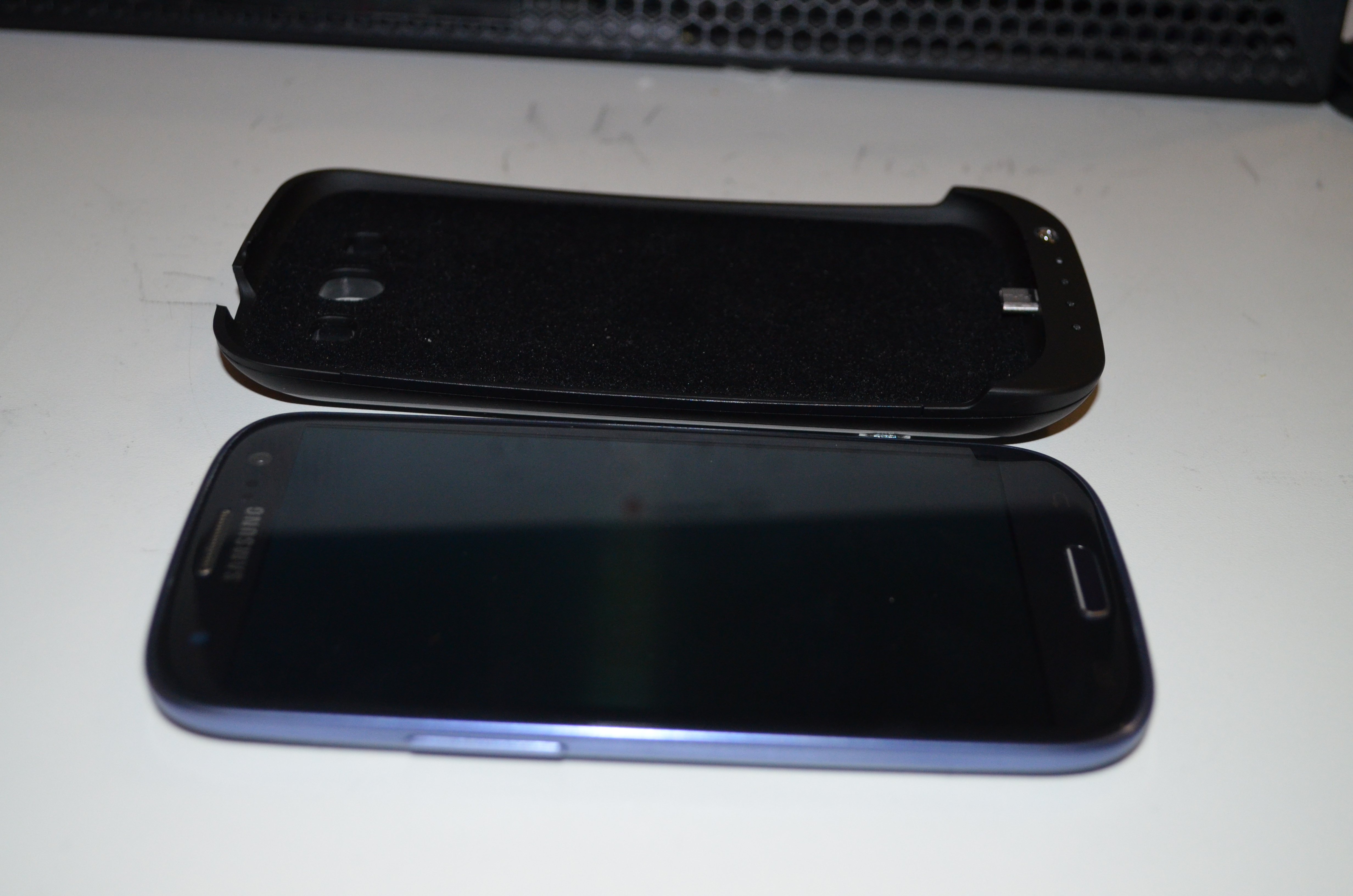
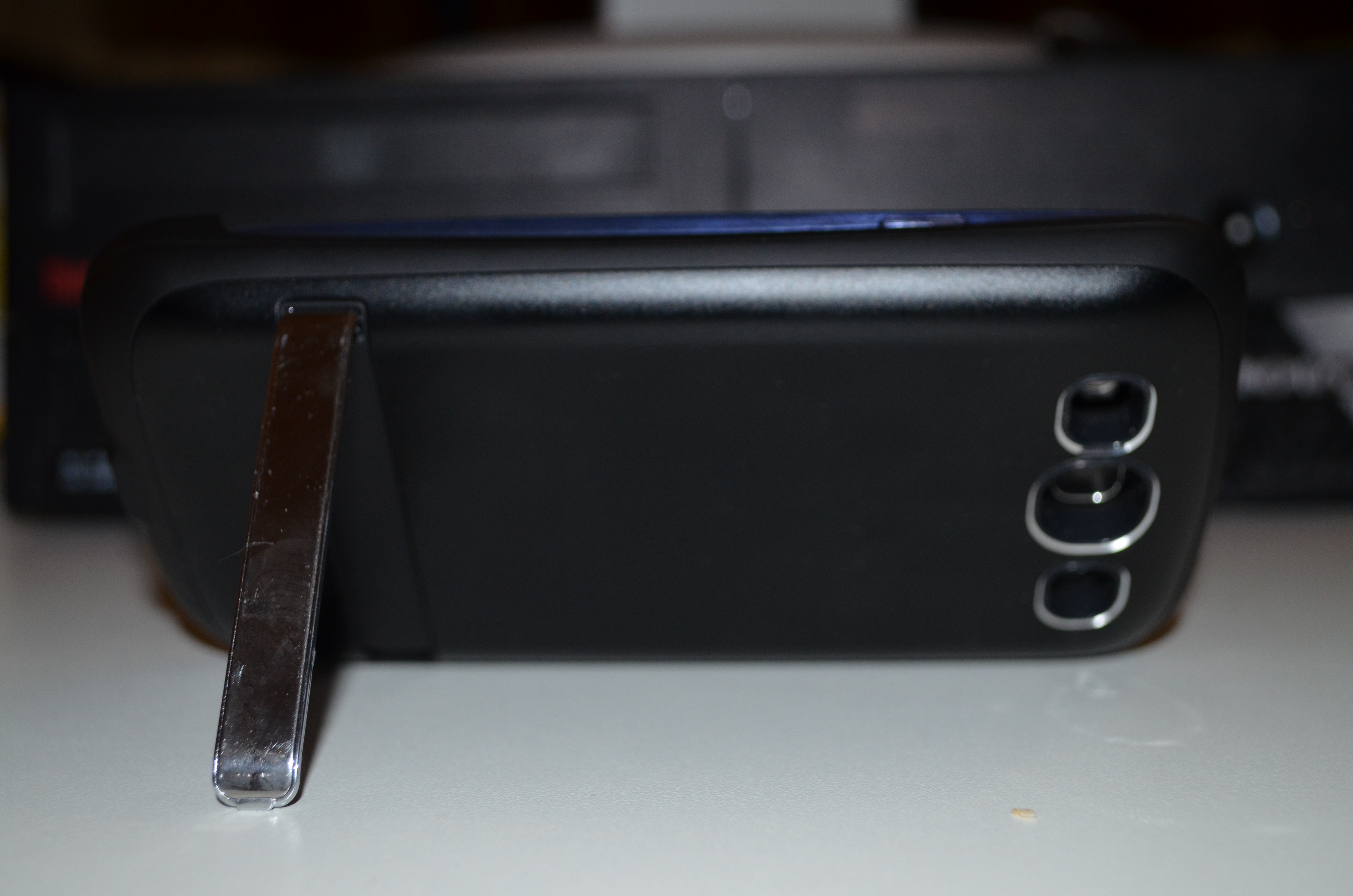
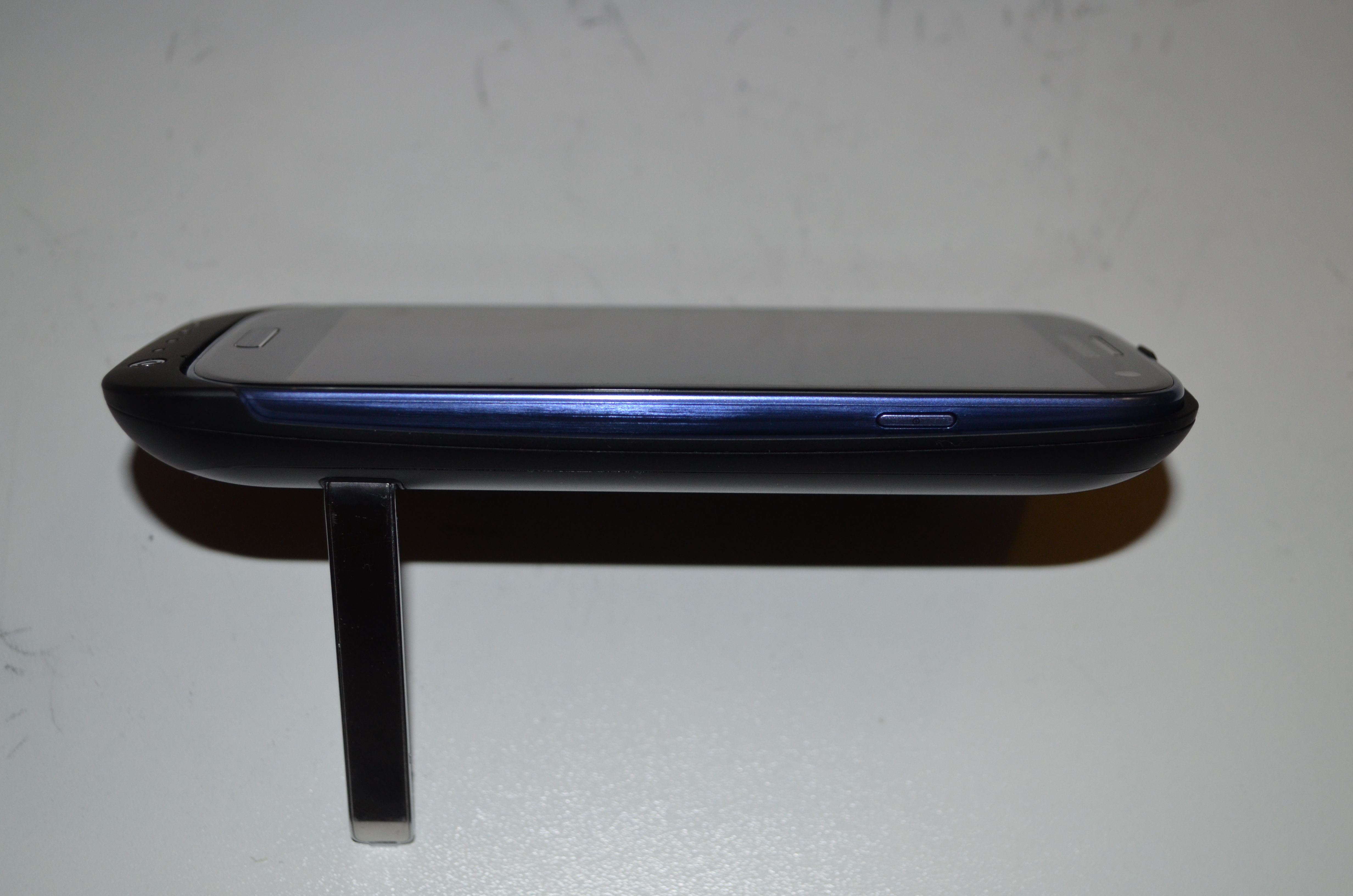
My new Samsung Galaxy S3 arrived a couple of days ago. Kogan added to the weirdness in their shipping that I documented in a previous post [1] by shipping the two phones on consecutive days with separate invoices for $789 each (as opposed to the $449 that I paid). This means that if customs were to track this down they could bust me for import duties (which apply whenever you order more than $1000 of electronics from another country) as multiple shipments in a small period of time are aggregated for tax purposes. It also means that it would be easy to defraud the tax office or an employer about the cost of the devices if I didn t blog about it Phone and Case Review back of power case with S3 installed next to back plastic of S3S3 and case next to each other To install the Samsung Galaxy S3 in the power case I bought from Kogan the back of the S3 has to be removed. One annoying implication of this is that when using the phone in it s case I will either have to carry the back of the phone with me or have no option of removing the case during the day. The phone has to slide in to the case from a small angle and if it s removed carelessly there seems to be a risk of breaking the power connector on the case. S3 on power case standedge view of S3 in power case stand The above photos show the kick-stand on the power case in use, I haven t yet had an opportunity to use the stand for anything other than photography and as it s made of thin plastic there s a reasonable chance that it will break off before I ever use it properly. One major deficiency of the power case is that it has no protection for the screen. The typical gel case will extend by about 2mm above the screen which means that you can place the phone screen-down on a table without a risk of scratching the screen. Also if a phone in a gel case is dropped on a hard surface it seems likely that the chance of the screen hitting a bump and cracking will be lower although I m not aware of any research regarding how well this theory works in practice. This combined with the fact that the power case is smooth and difficult to grip makes it quite unsuitable for regular use. I am concerned that the added mass of the power case would increase the risk of serious phone damage if it s dropped screen-down. I plan to buy a gel case ASAP which I will use most of the time. I will swap the gel case for the power case on the occasions when I expect to spend an extended period of time away from home or an office where I can charge my phone. The power case really should have been designed with a flange that extends above the level of the screen on all sites. It also shouldn t be smooth on the outside. Phone Review The Galaxy S3 equals the Galaxy S for the title of the most slippery phone I ve ever owned. This combined with the fact that the Galaxy S3 is slightly thinner and also 10% wider and longer makes it a more difficult phone to hold. It s a phone that really needs a case with a lot of grip. The camera is reasonable given the fact that any device that is 8.6mm thick will have a very small focal length and also a very small CCD for receiving light. The laws of physics just don t allow something the size of the Galaxy S3 to have a half-decent camera. My ideal mobile phone would be about the size of the Galaxy S3 with the power case, it would use the extra thickness for a big battery as well as a much longer focal length for the camera. I d like a phone to be about 16mm thick over most of it s area with a section that s 20mm for the camera. The burst shot mode (which allows you to take 20 pictures rapidly) is good for capturing certain types of relatively slow movement (EG someone s mouth moving when they talk). But it s no good at all if you try to pan the camera while doing burst mode. When I first started using the phone it gave me lots of hints about using various functions. This wasn t particularly useful for me as most things are obvious to anyone who has much experience with computers and the non-obvious things are probably going to be forgotten if you are doing something else when the help system prompts you. It will be useful for my sister in law who s getting the other phone, but the down-side of this is that I can t configure her phone before delivering it. She needs to use it first to see all the tips. The Galaxy S3 has a screen that s 4.8 diagonally which is slightly larger than the 4.0 screens of my previous Android phones (Sony Ericsson Xperia X10 and Samsung Galaxy S). That gives 44% more screen area which is a good thing. Unfortunately many apps seem to display the same amount of data, I had hoped that 44% more area and 140% more pixels would result in most apps displaying more data by default. Fortunately ConnectBot (my SSH client of choice) gives me 60 rows and 120 columns on the Galaxy S3 as opposed to the mere 31 rows and 80 columns on the Xperia X10. I don t use ConnectBot that often (a phone is a really bad ssh client no matter how you do it), but when I do it s really important and the extra space matters. The down-side of the larger screen for me is that the distance from the center of the palm of my hand to the end of my thumb is slightly less than 4.8 . This means that I can t hold the Galaxy S3 with one corner in the palm of my hand and still reach the far corner of the screen. So I am forced to hold the sides of the phone for one-handed use which means that it would be easier for it to slip out of my hand. A further complication is that the settings and back buttons are very close to the edge of the phone and can be hit by accident very easily. Hopefully a gel case will alleviate that. But I have never owned a hand-held device which was so difficult to hold in a stock configuration. According to AndroSensor (one of my favorite demo programs for showing useless things that a phone can do) the Galaxy S3 lacks support for measuring humidity and external temperature but it has all the other sensors. I think I can survive without knowing how hot and humid my pockets are, but it would still be nice to have every possible feature. The default partitioning of the phone storage is to have all internal storage used for applications and none used for a VFAT filesystem accessible over USB. It s nice that I won t run out of application storage space (a problem I ve had with every other Android device) but it does mean that I ll have to buy a micro SD card before I can use the phone properly. Micro SD storage costs about $1.50 per gig in the size range from 8G to 32G, it s not particularly expensive but it s annoying to have the phone not be fully usable right from the start. Without using a SD card I have to use gphoto2 to download pictures from the phone so it s fully usable in every way. But the cost of the power case, the gel case I m about to buy, and an SD card make the phone less of a bargain. The phone has more RAM, a faster CPU, and Android 4.1. These are all really good things, but nothing worth writing about in a review. Conclusions The power case is very poorly designed, I probably wouldn t buy it if I knew then what I know now. For one-handed phone use by someone like me with longer than average fingers a 4.0 phone is about the largest possible. This doesn t mean that phones should stay small, but it does mean that Apple weren t being entirely silly when they released all the 3.5 iPhones. Presumably a large portion of the population would find a 3.5 phone to be as usable as a 4.0 phone is for me. It now seems to me that as a 4.8 screen is going to be impractical for one-hand use by almost everyone the phone designers should concentrate more on larger phones similar to the Samsung Galaxy Note. I think that the 4.8 screen size may be ideal for some young children who could use it the way an adult might use a 7 tablet an Android phone seems to be a relatively common present for children in the 6-12 age range. Generally I think that no-one should ever buy a new phone or tablet without trying one of the same size. While I am happy with the S3 it really doesn t work in the way I expected. Having 2.9* as many characters on screen for ConnectBot is a massive benefit. If I ever write another magazine article on a hand-held device the extra size and resolution will really help if I found a suitable editor (please make suggestions in the comments). For the WordPress client to write long blog posts on it then the screen could potentially be reasonably useful, but so far it seems that it s more suited to reviewing posts and comments than to writing posts. Generally the Samsung Galaxy S3 is a good phone and I think it s great value for money when it s less than $500.

17 December 2012

Ian Campbell: Foreign Chroots with schroot and qemu

Since I've been working on qcontrol I've had need of a way to build packages in an ARM environment. Since all my native ARM hardware is "production" (at least so far as something can be production in a home environment) I prefer to avoid installing development tools on them. When I started looking into this all my ARM systems ran from relatively small flash devices which also ruled out the possibility of a development chroot. After search the web a bit I discovered that it is possible to use qemu-user-static together with [[!binfmt-support ]] to create cross architecture chroots which can be entered mostly transparently. It is also possible to combine this with schroot and sbuild which makes the day to day use pretty much the same as a native or biarch chroot. Since I've now had to rediscover how to do this twice (once for Sid and then again when I realized I also needed a Wheezy environment) I thought I should write it down for the benefit of my future self. First things first lets install the various packages which we need. As well as debootstrap to create the chroot we need qemu-user-static and binfmt-support to allow us to run ARM binaries:
$ sudo apt-get install debootstrap qemu-user-static binfmt-support
I'm using schroot's lvm-snapshot mode so we need an LVM volume, formatted with a filesystem and mounted in a temporary location:
$ sudo lvcreate -L8G -n sbuild-wheezy-armel /dev/VG
$ sudo mkfs.ext3 /dev/VG/sbuild-wheezy-armel
$ sudo mount /dev/VG/sbuild-wheezy-armel /mnt/
Next we need to create the chroot. For this we use debootstrap in foreign mode which does a 2 stage setup, firstly by using the --foreign option:
$ sudo debootstrap --variant=buildd --include=fakeroot,build-essential \
        --arch=armel --foreign \
        wheezy /mnt http://<DEBIAN-MIRROR>/debian/
Now we (temporarily) copy the qemu-arm-static binary into the chroot (at the place where binfmt-support expects it), change into the chroot and run debootstrap's second stage to finish the basic chroot setup:
$ sudo cp /usr/bin/qemu-arm-static /mnt/usr/bin/
$ sudo chroot /mnt
(chroot)# ./debootstrap/debootstrap --second-stage
(chroot)# exit
Now that we have a basic chroot in place it needs a little bit of tailoring. I've found the easiest way to do this is to use sbuild-createchroot and then tweak the result:
$ sudo sbuild-createchroot --arch=armel --foreign --setup-only \
    wheezy /mnt http://<DEBIAN-MIRROR>/debian/
If we were building a native chroot then we could have skipped the debootstrap stuff and let sbuild-createchroot handle things. Unfortunately this doesn't seem to play nicely with --foreign. Now we can remove the qemu-arm-static binary from the chroot. schroot will automatically bind mount the version from the host into the chroot which ensures it remains up to date. We can also unmount the chroot since we will let schroot manage that from here on:
$ sudo rm /mnt/usr/bin/qemu-arm-static
$ sudo umount /mnt
Next we need to tweak the resulting schroot/sbuild configuration since sbuild-createchroot assumes the use of schroot's directory mode. First remove the symlink to /mnt which it created:
$ sudo rm /etc/sbuild/chroot/wheezy-armel-sbuild
Lastly we need to edit /etc/schroot/chroot.d/wheezy-armel-sbuild-<SUFFIX> (where is randomly generated) and reconfigure it to use lvm-snapshot mode, by apply the following changes:
 [wheezy-armel-sbuild]
-type=directory
-directory=/mnt
+type=lvm-snapshot
+device=/dev/VG/sbuild-wheezy-armel
+lvm-snapshot-options=--size 2G
 description=Debian wheezy/armel autobuilder
 groups=root,sbuild
 root-groups=root,sbuild
 profile=sbuild
That's it, we now have a chroot which we can trivially invoke via sbuild to build armel packages:
$ sbuild --arch=armel --dist=wheezy <... other options...>
We can also use sbuild-update to keep the chroot up to date:
$ sudo sbuild-update -udcar wheezy-armel
You can also use schroot to login to the chroot directly, although for that case you'll likely want to create a different chroot using schroot's directory or block-device mode instead lvm-snapshot and drop some of the sbuild specific setup. I expect I'll blog about this configuration in some more detail at some point in the future since I'll want to document it to give a more convenient build environment for Xen on ARM than the build farm which we have at work.

Next.

Previous.